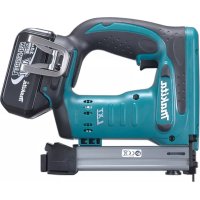
DST221 - Electric stapler MAKITA - Free user manual and instructions
Find the device manual for free DST221 MAKITA in PDF.


| Product Type | Cordless Electric Stapler |
| Brand | Makita |
| Model | DST221 |
| Staple Width | 10 mm |
| Applicable Staple Length | 10 mm to 22 mm |
| Magazine Capacity | 84 staples |
| Overall Length | 251 mm |
| Net Weight | 2.4 kg (with battery) |
| Rated Voltage | 18 V DC |
| Battery Type | Makita 18 V lithium-ion battery |
| Power Source | Rechargeable battery |
| Safety System | Safety lever and trigger (double action) |
| Depth Adjustment | Yes, by rotating nut (90° increments) |
| Suspension Hook | Yes, reversible |
| Viewing Window | Yes, to check remaining staples |
| Main Use | Inserting staples into wood and construction materials |
| Maintenance | Clean with a dry cloth, do not use solvents |
| Sound Pressure Level | 82 dB(A) |
| Sound Power Level | 93 dB(A) |
| Vibration Value | 3.5 m/s² |
| Spare Parts | Use exclusively Makita parts |
| Repairability | Makita authorized service center |
| Included Accessories | Safety glasses (depending on country) |
| Standards | CE, EN60745 |
Frequently Asked Questions - DST221 MAKITA
User questions about DST221 MAKITA
0 question about this device. Answer the ones you know or ask your own.
Ask a new question about this device
Download the instructions for your Electric stapler in PDF format for free! Find your manual DST221 - MAKITA and take your electronic device back in hand. On this page are published all the documents necessary for the use of your device. DST221 by MAKITA.
USER MANUAL DST221 MAKITA
GB Cordless Stapler Instruction manual
ENGLISH (Original instructions)
Explanation of general view
| 1. Red indicator | 7. Locking lever | 13. Nut |
| 2. Button | 8. Staples | 14. Front |
| 3. Battery cartridge | 9. Main magazine | 15. Workpiece |
| 4. Trigger | 10. Groove | 16. Rear |
| 5. Safety lever | 11. Hook | 17. Sight window |
| 6. Sub magazine | 12. Screw |
SPECIFICATIONS
| Model DST220 DST221 | ||
| Staple width 10 mm 10 mm | ||
| Applicable staples length 10 mm - 22 mm | 10 mm - 22 mm | |
| Staple magazine capacity | 84 pcs | 84 pcs |
| Overall length | 247 mm | 251 mm |
| Net weight | 2.3 kg | 2.4 kg |
| Rated voltage | D.C. 14.4 V | D.C. 18 V |
- Due to our continuing program of research and development, the specifications herein are subject to change without notice.
- Specifications and battery cartridge may differ from country to country.
- Weight, with battery cartridge, according to EPTA-Procedure 01/2003
Intended use
ENE054-1
The tool is intended for pressing staples into construction materials such as timbers.
General Power Tool Safety Warnings GEA010-1

WARNING Read all safety warnings and all
instructions. Failure to follow the warnings and
instructions may result in electric shock, fire and/or
serious injury.
Save all warnings and instructions for future reference.
CORDLESS STAPLER SAFETY Warnings
GEB075-2
- Always assume that the tool contains fasteners.
Careless handling of the stapler can result in unexpected firing of fasteners and personal injury. - Do not point the tool towards yourself or anyone nearby. Unexpected triggering will discharge the fastener causing an injury.
- Do not actuate the tool unless the tool is placed firmly against the workpiece. If the tool is not in contact with the workpiece, the fastener may be deflected away from your target.
- Disconnect the tool from the power source when the fastener jams in the tool. While removing a jammed fastener, the stapler may be accidentally activated if it is plugged in.
- Use caution while removing a jammed fastener.
The mechanism may be under compression and the fastener may be forcefully discharged while attempting to free a jammed condition.
- Do not use this stapler for fastening electrical cables. It is not designed for electric cable installation and may damage the insulation of electric cables thereby causing electric shock or fire hazards.
- Always wear safety goggles or safety glasses with side shield, and a full face shield when needed.
- Keep hands and feet away from the ejection port area.
- Always remove the battery cartridge before loading the fasteners, adjustment, inspection, maintenance or after operation is over.
- Make sure no one is nearby before operation. Never attempt to drive fasteners from both the inside and outside of wall at the same time. Fasteners may rip through and/or fly off, presenting a grave danger.
- Watch your footing and maintain your balance with the tool. Make sure there is no one below when working in high locations.
- Check walls, ceilings, floors, roofing and the like carefully to avoid possible electrical shock, gas leakage, explosions, etc. caused by stapling into live wires, conduits or gas pipes.
- Use only fasteners specified in this manual. The use of any other fasteners may cause malfunction of the tool.
- Do not tamper with the tool or attempt to use it for other than driving fasteners.
- Do not operate the tool without fasteners. It shortens the service life of the tool.
- Stop driving operations immediately if you notice something wrong or out of the ordinary with the tool.
-
Never fastener into any materials which may allow the fastener to puncture and fly through as a projectile.
-
Never actuate the switch trigger and safety lever at the same time until you are prepared to fastener workpieces. Allow the workpiece to depress the safety lever. Never defeat its purpose by securing the safety lever back or by depressing it by hand.
- Never tamper with the safety lever. Check the safety lever frequently for proper operations.
SAVE THESE INSTRUCTIONS.

WARNING:
DO NOT let comfort or familiarity with product (gained from repeated use) replace strict adherence to safety rules for the subject product. MISUSE or failure to follow the safety rules stated in this instruction manual may cause serious personal injury.
IMPORTANT SAFETY INSTRUCTIONS ENCO07-7
FOR BATTERY CARTRIDGE
- Before using battery cartridge, read all instructions and cautionary markings on (1) battery charger, (2) battery, and (3) product using battery.
- Do not disassemble battery cartridge.
- If operating time has become excessively shorter, stop operating immediately. It may result in a risk of overheating, possible burns and even an explosion.
- If electrolyte gets into your eyes, rinse them out with clear water and seek medical attention right away. It may result in loss of your eyesight.
- Do not short the battery cartridge:
(1) Do not touch the terminals with any conductive material.
(2) Avoid storing battery cartridge in a container with other metal objects such as nails, coins, etc.
(3) Do not expose battery cartridge to water or rain.
A battery short can cause a large current flow, overheating, possible burns and even a breakdown.
- Do not store the tool and battery cartridge in locations where the temperature may reach or exceed 50^ (122^) .
- Do not incinerate the battery cartridge even if it is severely damaged or is completely worn out. The battery cartridge can explode in a fire.
- Be careful not to drop or strike battery.
- Do not use a damaged battery.
SAVE THESE INSTRUCTIONS.
Tips for maintaining maximum battery life
- Charge the battery cartridge before completely discharged. Always stop tool operation and charge the battery cartridge when you notice less tool power.
-
Never recharge a fully charged battery cartridge. Overcharging shortens the battery service life.
-
Charge the battery cartridge with room temperature at 10^ - 40^ (50°F - 104°F). Let a hot battery cartridge cool down before charging it.
- Charge the battery cartridge once in every six months if you do not use it for a long period of time.
FUNCTIONAL DESCRIPTION
CAUTION:
- Always be sure that the tool is switched off and the battery cartridge is removed before adjusting or checking function on the tool.
Installing or removing battery cartridge (Fig. 1)
- Always switch off the tool before installing or removing of the battery cartridge.
- To remove the battery cartridge, slide it from the tool while sliding the button on the front of the cartridge.
- To install the battery cartridge, align the tongue on the battery cartridge with the groove in the housing and slip it into place. Always insert it all the way until it locks in place with a little click. If you can see the red indicator on the upper side of the button, it is not locked completely. Install it fully until the red indicator cannot be seen. If not, it may accidentally fall out of the tool, causing injury to you or someone around you.
- Do not use force when installing the battery cartridge. If the cartridge does not slide in easily, it is not being inserted correctly.
Safety system (Fig. 2)
Make sure all safety systems are in working order before operation. The tool must not operate if only the switch trigger is pulled or if only the safety lever is pressed against the wood. It must work only when both actions are performed. Test for possible faulty operation with a tool unloaded and pointed well away from yourself or any bystanders.
NOTE:
- There is a possibility that the tool may operate for an instant when only the trigger is pulled. This does not indicate a problem. If this occurs, point the tool well away from yourself or any bystanders. Release and pull the trigger again to make sure the safety systems are in working order.
ASSEMBLY
CAUTION:
- Always make sure that your fingers are not placed on the trigger and the battery cartridge is removed before carrying out any work on the stapler.
Staples
- Handle the staples and their box carefully. If the staples have been handled roughly, they may be bent out of shape, causing poor staple feed or jamming.
- Avoid storing the staples in a very humid or hot place or place exposed to direct sunlight.
CAUTION:
- Do not use staples other than designated in this manual or staples that appear to be damaged, bent, rusty or corroded.
- Do not insert staples of which size is different each other at the same time inside the magazine, causing poor staple feed or jamming.
Loading staples
Remove the battery cartridge.
Press the locking lever on the rear of the sub magazine and slide the sub magazine backward. (Fig. 3)
Load staples into the main magazine with their feet facing up. Slide the sub-magazine forward. (Fig. 4)
To secure the sub magazine in place, hook the locking lever on the rear of the sub-magazine.
CAUTION:
- With the magazine loaded, if the tool is held downward and the sub-magazine is opened, the staples can fall out and present a danger to anyone or anything below. Keep this in mind especially when working in high locations.
Unloading staples
CAUTION:
- When removing staples, make sure that your fingers are not placed on the trigger or the lever and the battery cartridge is removed from the stapler. Misfiring may cause personal injuries and property damage.
Remove the battery cartridge.
Press the locking lever and slide the magazine back.
(Fig. 3)
Take out staples from the magazine slit. (Fig. 5)
Hook
CAUTION:
- Always make sure that your fingers are not placed on the trigger or the lever and the battery cartridge is removed before using the hook. (Fig. 6)
CAUTION:
- Do not hang the hook from the waist belt. Dropping the stapler, which is caused by the hook accidentally coming out of place, may cause misfiring and personal injuries.
The hook is convenient for temporarily hanging the tool. This can be installed on either side of the tool.
To install the hook, insert it into a groove in the tool housing on either side and then secure it with a screw. To remove, loosen the screw and then take it out. (Fig. 7)
OPERATION
Depth adjustment (Fig. 8)
If the staples are driven too deep or too shallow, adjust the driving depth by turning the nut on the bottom of the tool. For deeper driving of staples, turn the nut clockwise. For shallower driving, turn the nut counterclockwise.
Please note the nut must be turned in increments of 90^ (1/4 turn) so that the groove on the nut runs parallel to the magazine.
Driving staples (Fig. 9)
Place flat the opening of the tool from which staples are fired on the material to be fastened and hold the tool firmly against the material. Then pull the lever and then pull the trigger fully to drive the staples. The grip is shaped so that the tool head can be held down securely with index finger and thumb. After driving a staple, be sure to release the trigger fully.
When the head of driven staple remains above the surface of material to be fastened, drive the staple while holding the stapler head firmly. (Fig. 10)
NOTE:
- Using the stapler continuously with the head of driven staples remaining above the surface of material to be fastened may cause damage to the driver of the stapler and stapler jamming etc.
Checking remaining staples (Fig. 11)
CAUTION:
- Do not operate the tool without staples. It shortens the service life of the tool.
There is a convenient sight window on the right side of the tool (when viewing the tool from the front). Use this sight window to check if there are staples in the magazine.
When staples are not visible through the window, load staples into the magazine.
Removing jammed staples
WARNING:
- Always make sure that the trigger are released and the battery cartridge is removed before removing jammed staples.
Remove the battery cartridge from the stapler. (Fig. 5) Press the locking lever on the rear of the sub magazine and slide the sub magazine backward.
Take out stuck staples that remain inside the opening that staples are fired from as it appears.
MAINTENANCE
CAUTION:
- Always be sure that the tool is switched off and the battery cartridge is removed before attempting to perform inspection or maintenance.
- Never use gasoline, benzine, thinner, alcohol or the like. Discoloration, deformation or cracks may result. To maintain product SAFETY and RELIABILITY, repairs, any other maintenance or adjustment should be performed by Makita Authorized Service Centers, always using Makita replacement parts.
OPTIONAL ACCESSORIES
CAUTION:
- These accessories or attachments are recommended for use with your Makita tool specified in this manual. The use of any other accessories or attachments might present a risk of injury to persons. Only use accessory or attachment for its stated purpose.
If you need any assistance for more details regarding these accessories, ask your local Makita Service Center.
Staples - Various type of Makita genuine batteries and chargers
NOTE:
- Safety goggles
- Some items in the list may be included in the tool package as standard accessories. They may differ from country to country.
Noise
ENG905-1
The typical A-weighted noise level determined according to EN60745:
Sound pressure level (L_pA) .. 82 dB (A)
Sound power level (L_WA) : 93 dB (A)
Uncertainty (K): 3 dB (A)
Wear ear protection.
Vibration
ENG900-1
The vibration total value (tri-axial vector sum) determined according to EN60745:
Vibration emission (a_h) : 3.5m / s^2
Uncertainty (K): 1.5m / s^2
ENG901-1
- The declared vibration emission value has been measured in accordance with the standard test method and may be used for comparing one tool with another.
- The declared vibration emission value may also be used in a preliminary assessment of exposure.

WARNING:
- The vibration emission during actual use of the power tool can differ from the declared emission value depending on the ways in which the tool is used.
- Be sure to identify safety measures to protect the operator that are based on an estimation of exposure in the actual conditions of use (taking account of all parts of the operating cycle such as the times when the tool is switched off and when it is running idle in addition to the trigger time).
For European countries only
ENH101-15
EC Declaration of Conformity
We Makita Corporation as the responsible manufacturer declare that the following Makita machine(s):
Designation of Machine:
Cordless Stapler
Model No./Type: DST220, DST221
are of series production and
Conforms to the following European Directives: 2006/42/EC
And are manufactured in accordance with the following standards or standardised documents:
EN60745
The technical documentation is kept by our authorised representative in Europe who is:
Makita International Europe Ltd.
Michigan Drive, Tongwell,
Milton Keynes, Bucks MK15 8JD, England
30.1.2009

Tomoyasu Kato
Director
Makita Corporation
3-11-8, Sumiyoshi-cho,
Anjo, Aichi, 446-8502, JAPAN
Michigan Drive, Tongwell,
Milton Keynes, Bucks MK15 8JD, Angleterre
30.01.2009

Tomoyasu Kato
Director
Makita Corporation
3-11-8, Sumiyoshi-cho,
Anjo, Aichi, 446-8502, JAPAN
Michigan Drive, Tongwell,
Milton Keynes, Bucks MK15 8JD, England
30.1.2009

Tomoyasu Kato
Direktor
Makita Corporation
3-11-8, Sumiyoshi-cho,
Anjo,Aichi,446-8502,JAPAN
Michigan Drive, Tongwell,
Milton Keynes, Bucks MK15 8JD, Inghilterra
30.1.2009

Tomoyasu Kato
Direttore
Makita Corporation
3-11-8, Sumiyoshi-cho,
Anjo,Aichi,446-8502,JAPAN
WAARSCHUWING Lees alle
Michigan Drive, Tongwell,
Milton Keynes, Bucks MK15 8JD, England
30.1.2009
Tomoyasu Kato
Director
Makita Corporation
3-11-8, Sumiyoshi-cho,
Anjo, Aichi, 446-8502, JAPAN
ESPANOL (Instrucciones originales)
Michigan Drive, Tongwell,
Milton Keynes, Bucks MK15 8JD, Inglaterra
30.1.2009
Tomoyasu Kato
Director
Makita Corporation
3-11-8, Sumiyoshi-cho,
Anjo, Aichi, 446-8502, JAPAN
Michigan Drive, Tongwell,
Milton Keynes, Bucks MK15 8JD, Inglaterra
30.1.2009

Tomoyasu Kato
Director
Makita Corporation
3-11-8, Sumiyoshi-cho,
Anjo,Aichi,446-8502,JAPAN
Michigan Drive, Tongwell,
Milton Keynes, Bucks MK15 8JD, England
30.1.2009

Tomoyasu Kato
Direktør
Makita Corporation
3-11-8, Sumiyoshi-cho,
Anjo,Aichi,446-8502,JAPAN
Euupopwovotai e tis akokouthe Eupwtaikes
O8nyieS:
2006/42/EK
Kai kataokeuaocovta ouμwva e Ta Tpapakattpotutaa
Michigan Drive, Tongwell,
Milton Keynes, Bucks MK15 8JD, England
30.1.2009

Tomoyasu Kato
△ieuOuvtns
Makita Corporation
3-11-8, Sumiyoshi-cho,
Anjo, Aichi, 446-8502, JAPAN
Makita Corporation
Anjo, Aichi, Japan
885343-996 www.makita.com
- ENGLISH (Original instructions)
- SPECIFICATIONS
- Intended use
- General Power Tool Safety Warnings GEA010-1
- Save all warnings and instructions for future reference.
- CORDLESS STAPLER SAFETY Warnings
- SAVE THESE INSTRUCTIONS.
- WARNING:
- IMPORTANT SAFETY INSTRUCTIONS ENCO07-7
- FOR BATTERY CARTRIDGE
- Tips for maintaining maximum battery life
- FUNCTIONAL DESCRIPTION
- CAUTION:
- Installing or removing battery cartridge (Fig. 1)
- Safety system (Fig. 2)
- NOTE:
- ASSEMBLY
- Staples
- Loading staples
- Unloading staples
- (Fig. 3)
- Hook
- OPERATION
- Depth adjustment (Fig. 8)
- Driving staples (Fig. 9)
- Checking remaining staples (Fig. 11)
- Removing jammed staples
- MAINTENANCE
- OPTIONAL ACCESSORIES
- Noise
- Vibration
- For European countries only
- EC Declaration of Conformity
- Tomoyasu Kato
- WAARSCHUWING Lees alle
- ESPANOL (Instrucciones originales)
- Makita Corporation
Brand : MAKITA
Model : DST221
Category : Electric stapler