CH 3656DA - Hedge Trimmers HiKOKI - Free user manual and instructions
Find the device manual for free CH 3656DA HiKOKI in PDF.



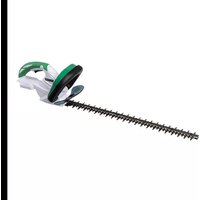
| Product Type | Cordless Hedge Trimmer |
| Brand | HiKOKI |
| Model | CH 3656DA |
| Voltage | 36 V |
| Blade Length | 560 mm |
| No-load Speed | 1000–1500 min⁻¹ (4 levels) |
| Weight (with BSL36A18X battery) | 4.2 kg |
| Continuous runtime (with BSL36A18X) | Approx. 62.5 minutes |
| Compatible battery type | Multi-volt (BSL36A18X / BSL36B18X) |
| Included battery capacity | 2.5 Ah / 5.0 Ah (automatic switching) |
| Compatible charger | UC18YSL3 (14.4–18 V) |
| Charger weight | 0.6 kg |
| Sound level (acoustic pressure) | 83 dB(A) (K=3 dB) |
| Sound level (power) | 91 dB(A) (K=3 dB) |
| Vibrations (no-load) | 2.2 m/s² (K=1.5 m/s²) |
| Main functions | Variable speed (4 LED), battery indicator, protection stop, USB charging |
| Maintenance and cleaning | Sharpen blade with file, grease every hour, clean with dry cloth |
| Safety | Dual switch, blade guard, blade cover, automatic overload stop |
| Included accessories | Battery, charger, blade case (according to reference) |
| Warranty | Manufacturer warranty according to conditions, spare parts available |
| Repairability | HiKOKI authorized after-sales service |
Frequently Asked Questions - CH 3656DA HiKOKI
User questions about CH 3656DA HiKOKI
0 question about this device. Answer the ones you know or ask your own.
Ask a new question about this device
Download the instructions for your Hedge Trimmers in PDF format for free! Find your manual CH 3656DA - HiKOKI and take your electronic device back in hand. On this page are published all the documents necessary for the use of your device. CH 3656DA by HiKOKI.
USER MANUAL CH 3656DA HiKOKI
natural_image
Technical illustration of a hatched tool with serrated edge and chain (no text or symbols)CH3656DA

en Handling instructions
de Bedienungsanleitung
fr Mode d'emploi
it Istruzioni per l'uso
nl Gebruiksaanwijzing
es Instrucciones de manejo
pt Instruções de uso
sv Bruksanvisning
da Brugsanvisning
no Bruksanvisning
fi Käyttöohjeet
el Οδηγίες χειρισμού
pl Instrukcja obsługi
hu Kezelési utasítás
cs Návod k obsluze
tr Kullanım talimatları
ro Instructiuni de utilizare
sl Navodila za rokovanje
sk Pokyny na manipuláciu
bg Инструкция за експлоатация
sr Uputstvo za rukovanje
hr Upute za rukovanje
1
CH3656DA
2
4
natural_image
Technical line drawing of a mechanical component with directional arrows indicating movement or force (no text or symbols present)6
7
8
flowchart
graph TD
    A["Device 1"] --> B["Device 2"]
    B --> C["Device 3"]
    C --> D["Device 4"]
    D --> E["Device 5"]
    E --> F["Device 6"]
    F --> G["Device 7"]
    G --> H["Device 8"]
    H --> I["Device 9"]
    I --> J["Device 10"]
    J --> K["Device 11"]
    K --> L["Device 12"]
    L --> M["Device 13"]
    M --> N["Device 14"]
    N --> O["Device 15"]
    O --> P["Device 16"]
    P --> Q["Device 17"]
    Q --> R["Device 18"]
    R --> S["Device 19"]
    S --> T["Device 20"]
9
10
11
natural_image
Diagram showing a mobile phone connected to a device via cable, with a power outlet attached (no text or symbols present)a
natural_image
Diagram of a mobile device connected to a wall-mounted power outlet (no text or symbols present)b
12
13
WARNINGS AND SAFETY INSTRUCTIONS
Pay special attention to statements preceded by the following words:
WARNING
Indicates a strong possibility of severe personal injury or loss of life, if instructions are not followed.
CAUTION
Indicates a possibility of personal injury or equipment damage, if instructions are not followed.
NOTE
Helpful information for correct function and use.
GENERAL POWER TOOL SAFETY WARNINGS

WARNING
Read all safety warnings, instructions, illustrations and specifications provided with this power tool.
Failure to follow the warnings and instructions may result in electric shock, fi re and/or serious injury.
Save all warnings and instructions for future reference.
The term “power tool” in the warnings refers to your mains-operated (corded) power tool or battery-operated (cordless) power tool.
1) Work area safety
a) Keep work area clean and well lit. Cluttered or dark areas invite accidents.
b) Do not operate power tools in explosive atmospheres, such as in the presence of fl ammable liquids, gases or dust.
Power tools create sparks which may ignite the dust or fumes.
c) Keep children and bystanders away while operating a power tool.
Distractions can cause you to lose control.
2) Electrical safety
a) Power tool plugs must match the outlet. Never modify the plug in any way.
Do not use any adapter plugs with earthed (grounded) power tools. Unmodified plugs and matching outlets will reduce risk of electric shock.
b) Avoid body contact with earthed or grounded surfaces, such as pipes, radiators, ranges and refrigerators. There is an increased risk of electric shock if your body is earthed or grounded.
c) Do not expose power tools to rain or wet conditions. Water entering a power tool will increase the risk of electric shock.
d) Do not abuse the cord. Never use the cord for carrying, pulling or unplugging the power tool. Keep cord away from heat, oil, sharp edges or moving parts. Damaged or entangled cords increase the risk of electric shock.
e) When operating a power tool outdoors, use an extension cord suitable for outdoor use. Use of a cord suitable for outdoor use reduces the risk of electric shock.
f) If operating a power tool in a damp location is unavoidable, use a residual current device (RCD) protected supply.
Use of an RCD reduces the risk of electric shock.
3) Personal safety
a) Stay alert, watch what you are doing and use common sense when operating a power tool. Do not use a power tool while you are tired or under the influence of drugs, alcohol or medication.
A moment of inattention while operating power tools may result in serious personal injury.
b) Use personal protective equipment. Always wear eye protection.
Protective equipment such as a dust mask, non-skid safety shoes, hard hat or hearing protection used for appropriate conditions will reduce personal injuries.
c) Prevent unintentional starting. Ensure the switch is in the off position before connecting to power source and/or battery pack, picking up or carrying the tool.
Carrying power tools with your fi nger on the switch or energising power tools that have the switch on invites accidents.
d) Remove any adjusting key or wrench before turning the power tool on.
A wrench or a key left attached to a rotating part of the power tool may result in personal injury.
e) Do not overreach. Keep proper footing and balance at all times. This enables better control of the power tool in unexpected situations.
f) Dress properly. Do not wear loose clothing or jewellery. Keep your hair and clothing away from moving parts.
Loose clothes, jewellery or long hair can be caught in moving parts.
g) If devices are provided for the connection of dust extraction and collection facilities, ensure these are connected and properly used. Use of dust collection can reduce dust-related hazards.
h) Do not let familiarity gained from frequent use of tools allow you to become complacent and ignore tool safety principles.
A careless action can cause severe injury within a fraction of a second.
4) Power tool use and care
a) Do not force the power tool. Use the correct power tool for your application. The correct power tool will do the job better and safer at the rate for which it was designed.
b) Do not use the power tool if the switch does not turn it on and off. Any power tool that cannot be controlled with the switch is dangerous and must be repaired.
c) Disconnect the plug from the power source and/or remove the battery pack, if detachable, from the power tool before making any adjustments, changing accessories, or storing power tools. Such preventive safety measures reduce the risk of starting the power tool accidentally.
d) Store idle power tools out of the reach of children and do not allow persons unfamiliar with the power tool or these instructions to operate the power tool.
Power tools are dangerous in the hands of untrained users.
e) Maintain power tools and accessories. Check for misalignment or binding of moving parts, breakage of parts and any other condition that may affect the power tool's operation.
If damaged, have the power tool repaired before use.
Many accidents are caused by poorly maintained power tools.
English
f) Keep cutting tools sharp and clean.
Properly maintained cutting tools with sharp cutting edges are less likely to bind and are easier to control.
g) Use the power tool, accessories and tool bits etc. in accordance with these instructions, taking into account the working conditions and the work to be performed.
Use of the power tool for operations different from those intended could result in a hazardous situation.
h) Keep handles and grasping surfaces dry, clean and free from oil and grease.
Slippery handles and grasping surfaces do not allow for safe handling and control of the tool in unexpected situations.
5) Battery tool use and care
a) Recharge only with the charger specified by the manufacturer.
A charger that is suitable for one type of battery pack may create a risk of fire when used with another battery pack.
b) Use power tools only with specifically designated battery packs.
Use of any other battery packs may create a risk of injury and fire.
c) When battery pack is not in use, keep it away from other metal objects, like paper clips, coins, keys, nails, screws or other small metal objects, that can make a connection from one terminal to another.
Shorting the battery terminals together may cause burns or a fire.
d) Under abusive conditions, liquid may be ejected from the battery; avoid contact. If contact accidentally occurs, fl ush with water. If liquid contacts eyes, additionally seek medical help.
Liquid ejected from the battery may cause irritation or burns.
e) Do not use a battery pack or tool that is damaged or modified.
Damaged or modified batteries may exhibit unpredictable behaviour resulting in fire, explosion or risk of injury.
f) Do not expose a battery pack or tool to fire or excessive temperature.
Exposure to fire or temperature above 130^ C may cause explosion.
g) Follow all charging instructions and do not charge the battery pack or tool outside the temperature range specified in the instructions.
Charging improperly or at temperatures outside the specified range may damage the battery and increase the risk of fire.
6) Service
a) Have your power tool serviced by a qualified repair person using only identical replacement parts.
This will ensure that the safety of the power tool is maintained.
b) Never service damaged battery packs.
Service of battery packs should only be performed by the manufacturer or authorized service providers.
PRECAUTION
Keep children and infirm persons away.
When not in use, tools should be stored out of reach of children and infirm persons.
HEDGE TRIMMER SAFETY WARNINGS
a) Do not use the hedge trimmer in bad weather conditions, especially when there is a risk of lightning. This decreases the risk of being struck by lightning.
b) Keep all power cords and cables away from cutting area. Power cords or cables may be hidden in hedges or bushes and can be accidentally cut by the blade.
c) Wear ear protection. Adequate protective equipment will reduce the risk of hearing loss.
d) Hold the hedge trimmer by insulated gripping surfaces only, because the blade may contact hidden wiring. Blades contacting a "live" wire may make exposed metal parts of the hedge trimmer "live" and could give the operator an electric shock.
e) Keep all parts of the body away from the blade. Do not remove cut material or hold material to be cut when blades are moving. Blades continue to move after the switch is turned off. A moment of inattention while operating the hedge trimmer may result in serious personal injury.
f) When clearing jammed material or servicing the hedge trimmer, make sure all power switches are off and the battery pack is removed or disconnected. Unexpected actuation of the hedge trimmer while clearing jammed material or servicing may result in serious personal injury.
g) Carry the hedge trimmer by the handle with the blade stopped and taking care not to operate any power switch. Proper carrying of the hedge trimmer will decrease the risk of inadvertent starting and resultant personal injury from the blades.
h) When transporting or storing the hedge trimmer, always use the blade cover. Proper handling of the hedge trimmer will decrease the risk of personal injury from the blades.
PRECAUTIONS FOR CORDLESS HEDGE TRIMMER
- Before starting work make sure there are no power cables or foreign objects, such as wire fences or hidden wiring in the work area. The blade could come into contact with the power cable causing electric shock, ground faults and other accidents.
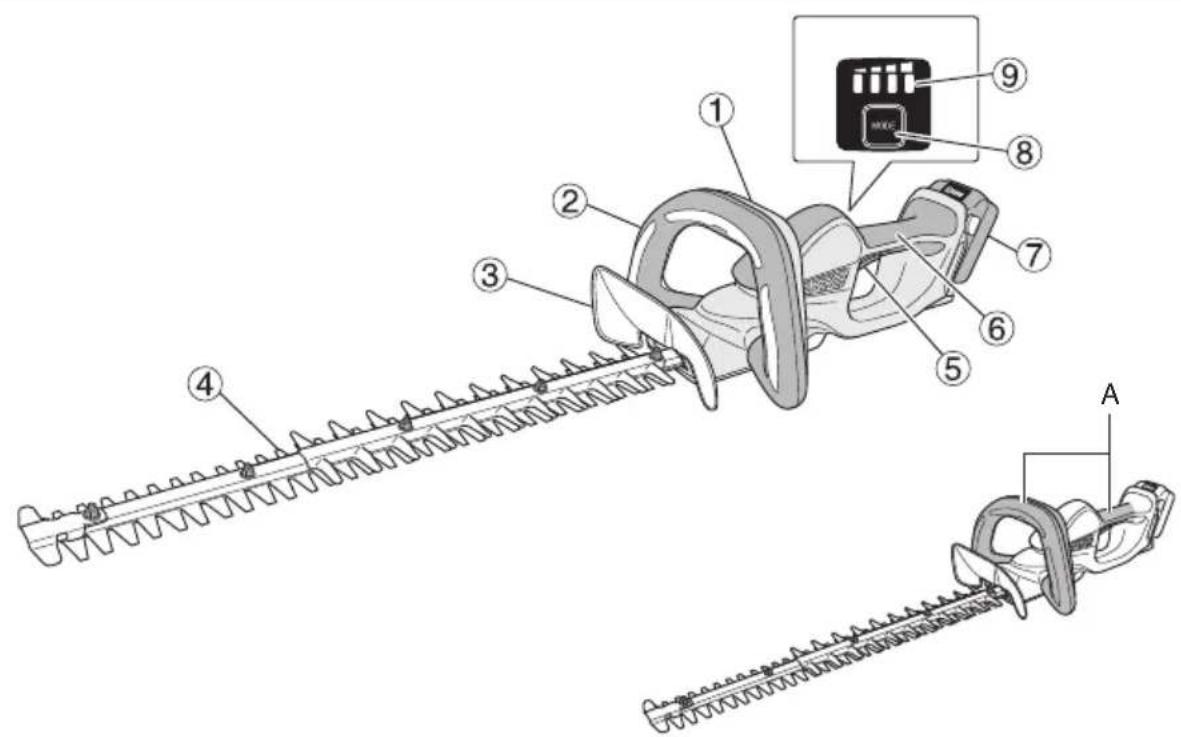
- Hold the tool firmly with both hands during use to prevent injury. (Fig. 1-A)
- Keep your hands and all parts of the body away from the blade to prevent contact that could lead to injury.
- Make sure the blade and all accessories are properly installed. Improper installation could cause the blade or accessories to come loose resulting in an injury.
- Make sure the blade is not cracked, deformed or excessively worn before starting work. Do not use a blade in this condition as it could break and cause injury.
- Do not use the tool to cut wire, metal plates or other hard objects. The tool could be damaged and cause injury.
- If the tool does not work normally and is producing strange noise, turn it off immediately and have it inspected and repaired.
- If the tool falls or strikes against an object, check the blade and the body for damage, cracking and deformation. Use of a damaged, deformed or cracked blade could result in injury.
-
Do not disassemble the blade. This may result in injury.
-
This product generates vibration during operation. This makes long continuous work physically strenuous so avoid a poor work posture and be sure to take frequent rests. Also during short work periods, stop work immediately to take a rest when your fingers, hands, arms or shoulders become tired.
-
Use gloves, or cloth to protect your hands when handling the blade. Careless handling may lead to injury.
-
Do not expose the blade to excessive pressure during cutting as the blade could be damaged.
-
The blade is extremely hot after cutting. Do not touch it to prevent burn injuries.
-
The tool should be used by an operator standing securely on the ground. Do not use the tool on a ladder or unstable location.
-
To prevent unforeseen accidents, never leave the tool running unattended on a stand or on the floor.
-
Do not expose the tool to insecticide and other chemicals. Such chemicals could cause cracking and other damage.
-
Do not secure the front switch or trigger switch pulled. If you pull it by mistake, the unit may work suddenly, causing injury.
-
Do not use the product if the tool or the battery terminals (battery mount) are deformed.
Installing the battery could cause a short circuit that could result in smoke emission or ignition.
- Keep the tool's terminals (battery mount) free of swarf and dust.
- Prior to use, make sure that swarf and dust have not collected in the area of the terminals.
During use, try to avoid swarf or dust on the tool from falling on the battery.
When suspending operation or after use, do not leave the tool in an area where it may be exposed to falling swarf or dust.
Doing so could cause a short circuit that could result in smoke emission or ignition.
ADDITIONAL SAFETY WARNINGS
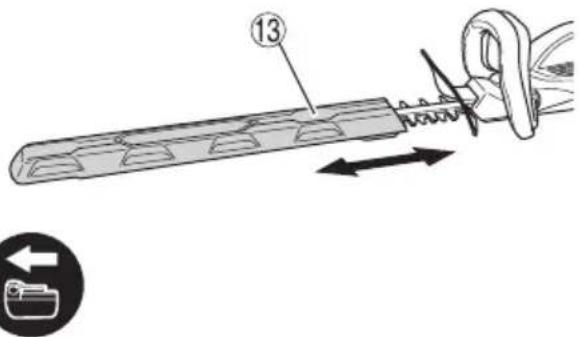
When removing the blade case
WARNING
Be sure to turn the tool off and remove the battery from the tool before attaching and removing the blade case.
CAUTION
To prevent injury, take care when placing the blade in the blade case.
When changing speed
NOTE
The battery must be mounted to the main body and the trigger of the main handle must be pulled otherwise the LED will not light up, even though the selector button is pressed.
During use
WARNING
To prevent accidents, make sure there are no people in the work area.
○ Use protective goggles during work to prevent injury from twigs and wood chips.
Do not use to tool to cut wire, metal plates or other hard objects. The tool could be damaged and cause injury.
CAUTION
○ Use a pair of pruning shears to cut thick branches before using the hedge trimmer.
Do not force the tool to prevent it from breaking.
- Stop the tool immediately if the blade stalls against a too heavy branch. Do not allow the motor to seize up as it could damage the motor.
○ Use only for cutting shrub.
NOTE
☐ Lubricate (using sewing machine oil, mineral oil, etc.) the blade before starting and then every hour. Use an adequate amount of oil and wipe away excess oil.
During work (for example, when taking rests) do not leave the tool in a place exposed to direct sunlight or high temperature. This will prevent proper cooling and could result in damage.
☐ Do not use the tool for work that exceeds its capacity. Such operation could cause the motor to lock up or slow down and will damage it.
○ Do not use the tool for cutting the lawn or weeds. Grass or weeds could stick to the blade.
○ Cut thick branches by gently pressing the blades against the branch.
PRECAUTIONS FOR BATTERY AND CHARGER
- Always charge the battery at an ambient temperature of -10-40^ . A temperature of less than -10^ will result in over charging which is dangerous. The battery cannot be charged at a temperature greater than 40^ .
The most suitable temperature for charging is that of 20–25°C. - Do not use the charger continuously.
When one charging is completed, leave the charger for about 15 minutes before the next charging of battery. - Do not allow foreign matter to enter the hole for connecting the rechargeable battery.
- Never disassemble the rechargeable battery or charger.
- Never short-circuit the rechargeable battery.
Short-circuiting the battery will cause a great electric current and overheat. It results in burn or damage to the battery.
- Do not dispose of the battery in fire.
If the battery is burnt, it may explode.
- Using an exhausted battery will damage the charger.
- Bring the battery to the shop from which it was purchased as soon as the post-charging battery life becomes too short for practical use. Do not dispose of the exhausted battery.
- Do not insert objects into the air ventilation slots of the charger.
Inserting metal objects or flammable into the charger air ventilation slots will result in an electrical shock hazard or damage to the charger.
CAUTION ON LITHIUM-ION BATTERY
To extend the lifetime, the lithium-ion battery equips with the protection function to stop the output.
In the cases of 1 to 3 described below, when using this product, even if you are pulling the switch, the motor may stop. This is not the trouble but the result of protection function.
-
When the battery power remaining runs out, the motor stops. In such a case, charge it up immediately.
-
If the tool is overloaded, the motor may stop. In this case, release the switch of tool and eliminate causes of overloading. After that, you can use it again.
-
If the battery is overheated under overload work, the battery power may stop.
In this case, stop using the battery and let the battery cool. After that, you can use it again.
Furthermore, please heed the following warning and caution.
WARNING
In order to prevent any battery leakage, heat generation, smoke emission, explosion and ignition beforehand, please be sure to heed the following precautions.
English
- Make sure that swarf and dust do not collect on the battery.
○ During work make sure that swarf and dust do not fall on the battery.
○ Make sure that any swarf and dust falling on the power tool during work do not collect on the battery.
○ Do not store an unused battery in a location exposed to swarf and dust.
Before storing a battery, remove any swarf and dust that may adhere to it and do not store it together with metal parts (screws, nails, etc.). - Do not pierce battery with a sharp object such as a nail, strike with a hammer, step on, throw or subject the battery to severe physical shock.
- Do not use an apparently damaged or deformed battery.
- Do not use the battery in reverse polarity.
- Do not connect directly to an electrical outlets or car cigarette lighter sockets.
- Do not use the battery for a purpose other than those specified.
- If the battery charging fails to complete even when a specified recharging time has elapsed, immediately stop further recharging.
- Do not put or subject the battery to high temperatures or high pressure such as into a microwave oven, dryer, or high pressure container.
- Keep away from fire immediately when leakage or foul odor are detected.
- Do not use in a location where strong static electricity generates.
- If there is battery leakage, foul odor, heat generated, discolored or deformed, or in any way appears abnormal during use, recharging or storage, immediately remove it from the equipment or battery charger, and stop use.
- Do not immerse the battery or allow any fluids to flow inside. Conductive liquid ingress, such as water, can cause damage resulting in fire or explosion. Store your battery in a cool, dry place, away from combustible and fl ammable items. Corrosive gas atmospheres must be avoided.
CAUTION
- If liquid leaking from the battery gets into your eyes, do not rub your eyes and wash them well with fresh clean water such as tap water and contact a doctor immediately.
If left untreated, the liquid may cause eye-problems.
- If liquid leaks onto your skin or clothes, wash well with clean water such as tap water immediately.
There is a possibility that this can cause skin irritation.
- If you find rust, foul odor, overheating, discolor, deformation, and/or other irregularities when using the battery for the first time, do not use and return it to your supplier or vendor.
WARNING
If an electrically conductive foreign object enters the terminals of the lithium ion battery, a short-circuit may occur resulting in the risk of fire. Please observe the following matters when storing the battery.
Do not place electrically conductive cuttings, nails, steel wire, copper wire or other wire in the storage case.
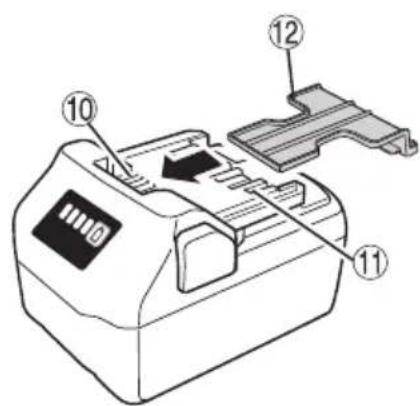
☐ Either install the battery in the power tool or store by securely pressing into the battery cover until the ventilation holes are concealed to prevent short-circuits (See Fig. 2).
REGARDING LITHIUM-ION BATTERY TRANSPORTATION
When transporting a lithium-ion battery, please observe the following precautions.
WARNING
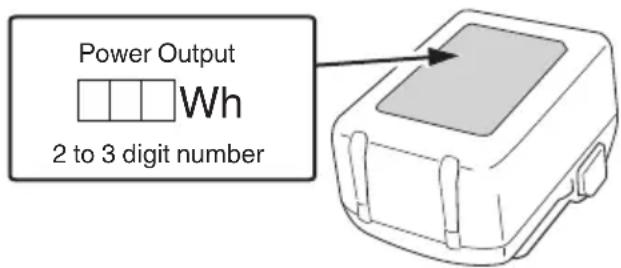
Notify the transporting company that a package contains a lithium-ion battery, inform the company of its power output and follow the instructions of the transportation company when arranging transport.
☐ Lithium-ion batteries that exceed a power output of 100 Wh are considered to be in the freight classification of Dangerous Goods and will require special application procedures.
☐ For transportation abroad, you must comply with international law and the rules and regulations of the destination country.
USB DEVICE CONNECTION PRECAUTIONS (UC18YSL3)
When an unexpected problem occurs, the data in a USB device connected to this product may be corrupted or lost. Always make sure to back up any data contained in the USB device prior to use with this product.
Please be aware that our company accepts absolutely no responsibility for any data stored in a USB device that is corrupted or lost, nor for any damage that may occur to a connected device.
WARNING
- Prior to use, check the connecting USB cable for any defect or damage.
Using a defective or damaged USB cable can cause smoke emission or ignition.
○ When the product is not being used, cover the USB port with the rubber cover.
Buildup of dust etc. in the USB port can cause smoke emission or ignition.
NOTE
- There may be an occasional pause during USB recharging.
- When a USB device is not being charged, remove the USB device from the charger.
Failure to do so may not only reduce the battery life of a USB device, but may also result in unexpected accidents.
- It may not be possible to charge some USB devices, depending on the type of device.
DESCRIPTION OF NUMBERED ITEMS (Fig. 1 – Fig. 9)
| 1 | Sub Switch |
| 2 | Sub Handle |
| 3 | Protector |
| 4 | Blade |
| 5 | Trigger |
| 6 | Main Handle |
| 7 | Battery |
| 8 | Selector switch |
| 9 | Stroke speed indicator lamp |
| 10 | Ventilation holes |
| 11 | Terminals |
| 12 | Battery cover |
| 13 | Blade case |
| 14 | Battery level indicator switch |
| 15 | Battery level indicator lamp |
SYMBOLS
WARNING
The following show symbols used for the machine.
Be sure that you understand their meaning before use.
| CH3656DA / CH3672DA: Cordless Hedge Trimmer | |
 | To reduce the risk of injury, user must read instruction manual. |
 | Do not expose to rain. |
 | Only for EU countries Do not dispose of electric tools together with household waste material! In observance of European Directive 2012/19/EU on waste electrical and electronic equipment and its implementation in accordance with national law, electric tools that have reached the end of their life must be collected separately and returned to an environmentally compatible recycling facility. |
 | Always wear eye protection. |
 | Always wear hearing protection. |
 | Keep hands away from blade |
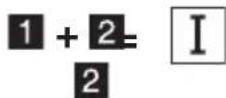
 | Switching ON |
 | Switching OFF |
 | Removing the battery |
 | Selector button |
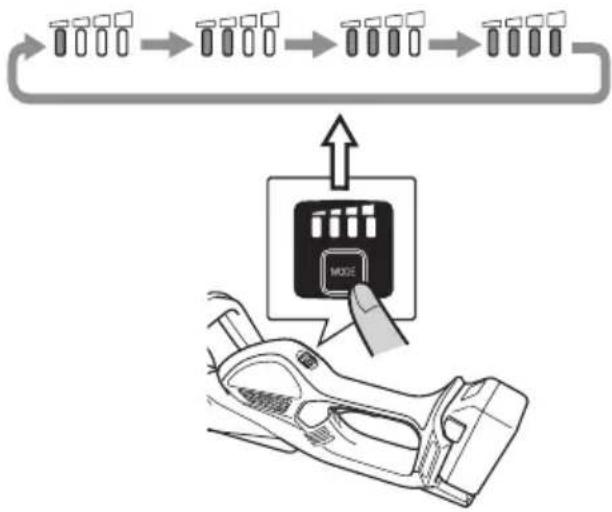
 | 1 LED illuminated: 1000 min ^-1 |
 | 2 LEDs illuminated: 1170 min ^-1 |
 | 3 LEDs illuminated: 1330 min ^-1 |
 | 4 LEDs illuminated: 1500 min ^-1 |
Battery
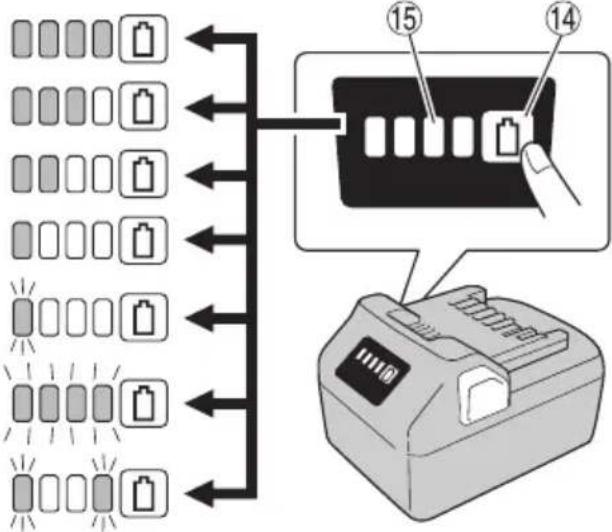
 | Lights;The battery remaining power is over 75% |
 | Lights;The battery remaining power is 50% – 75%. |
 | Lights;The battery remaining power is 25% – 50%. |
 | Lights;The battery remaining power is less than 25% |
 | Blinks;The battery remaining power is nearly empty.Recharge the battery soonest possible. |
 | Blinks;Output suspended due to high temperature.Remove the battery from the tool and allow it to fully cool down. |
 | Blinks;Output suspended due to failure or malfunction.The problem may be the battery so please contact your dealer. |
STANDARD ACCESSORIES
In addition to the main unit, the package contains the accessories listed on page 242.
Standard accessories are subject to change without notice.
APPLICATIONS
○ Fine trimming hedges
○ Trimming and pruning garden trees
SPECIFICATIONS
1. Power tool
| Model CH3656DA CH3672DA | ||
| Voltage 36 V | ||
| No-load speed 1000 – 1500 min | -1 | |
| Blade size (Trimming width) 560 mm 720 mm | ||
| Battery available for this tool* Multi volt battery | ||
| Weight** | 4.2 kg (With BSL36A18X attached)4.5 kg (With BSL36B18X attached) | 4.4 kg (With BSL36A18X attached)4.6 kg (With BSL36B18X attached) |
| Continuous operating time (depending on the work conditions) | Approx. 62.5 minutes Approx. | 48 minutes |
* Existing batteries (BSL3660/3620/3626, BSL18xx series, etc.) cannot be used with this tool.
** According to EPTA-Procedure 01/2014
2. Battery
| Model BSL36A18X | |
| Voltage 36 V / 18 V | (Automatic Switching*) |
| Battery capacity | 2.5 Ah / 5.0 Ah(Automatic Switching*) |
| Available cordless products** | Multi volt series, 18V product |
| Available charger | Sliding charger for lithium ion batteries |
* The tool itself will automatically switch over.
** Please see our general catalogue for details.
3. Charger
| Model UC18YSL3 | |
| Charging voltage 14.4 V | -18 V |
| Weight 0.6 kg |
NOTE
Due to HiKOKI's continuing program of research and development, the specifications herein are subject to change without prior notice.
CHARGING
Before using the power tool, charge the battery as follows.
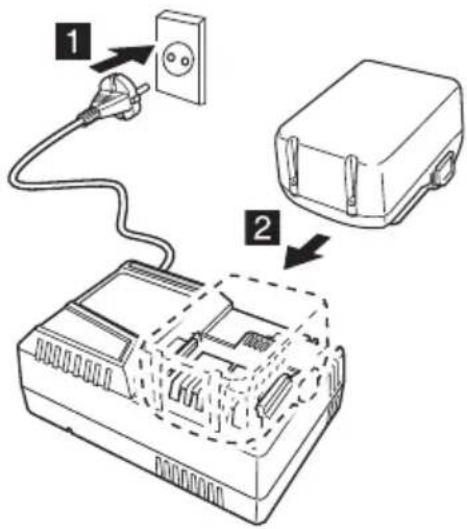
- Connect the charger's power cord to the receptacle. When connecting the plug of the charger to a receptacle, the charge indicator lamp will blink in red. (See Table 1)
2. Insert the battery into the charger.
Firmly insert the battery into the charger as shown in Fig. 3 (on page 2).
3. Charging
When inserting a battery in the charger, charging will commence and the charge indicator lamp will blink in blue.
When the battery becomes fully recharged, the charge indicator lamp will light up in green. (See Table 1)
(1) Charge indicator lamp indication
The indications of the charge indicator lamp will be as shown in Table 1, according to the condition of the charger or the rechargeable battery.
Table 1: Indications of the charge indicator lamp
ON/OFF at 0.5 sec. intervals (RED) | Before charging *1 |
Lights for 0.5 sec. at intervals of 1 sec. (BLUE) | Charged at less than 50% |
Lights for 1 sec. at intervals of 0.5 sec. (BLUE) | Charged at less than 80% |
Lights continuously (BLUE) | Charged at more than 80% |
Lights continuously (Continuous buzzer sound: about 6 sec.) (GREEN) | Charging complete |
ON/OFF at 0.3 sec. intervals (RED) | Overheat standby *2 |
ON/OFF at 0.1 sec. intervals (Intermittent buzzer sound: about 2 sec.) (PURPLE) | Charging impossible *3 |
NOTE
*1 If the red lamp continues to blink even after the charger has been attached, check to confirm that the battery has been fully inserted.
*2 Battery overheated. Unable to charge. Although charging will start once the battery has cooled down even when left in situ, the best practice is to remove the battery and allow it to cool down in a shaded, well-ventilated location before charging.
\*3 Malfunction in the battery or the charger
– Fully insert the battery.
- Check to confirm that no foreign matter is stuck to the battery mount or terminals. If there are no foreign objects, it is probable that the battery or charger is malfunctioning. Take it to your authorized Service Center.
When the battery charger has been continuously used, the battery charger will be heated, thus constituting the cause of the failures. Once the charging has been completed, give 5 minutes rest until the next charging.
(2) Regarding the temperatures and charging time of the battery (See Table 2)
Table 2
| Model UC18YSL3 | ||
| Type of battery Li-ion | ||
| Charging voltage 14.4–18 V | ||
| Temperatures at which the battery can be recharged | 0°C–50°C | |
| Charging time for battery capacity, approx.(At 20°C) | 1.5 Ah 15 min | |
| 2.0 Ah 20 min | ||
| 2.5 Ah 25 min | ||
| 3.0 Ah | 20 min(BSL1430C, BSL1830C: 30 min) | |
| 4.0 Ah | 26 min(BSL1840M: 40 min) | |
| 5.0 Ah 32 min | ||
| 6.0 Ah 38 min | ||
| Charging time for multi volt battery capacity, approx.(At 20°C) | 1.5 Ah(×2 unit) | 20 min |
| 2.5 Ah(×2 unit) | 32 min | |
| 4.0 Ah(×2 unit) | 52 min | |
| Number of battery cells 4–10 | ||
| Charging voltage for USB 5 V | ||
| Charging current for USB 2 A | ||
| Weight 0.6 kg | ||
NOTE
☐ The recharging time may vary according to the ambient temperature and power source voltage.
○ If charging takes a long time
- Charging will take longer at extremely low ambient temperatures. Charge the battery in a warm location (such as indoors).
- Do not block the air vent. Otherwise the interior will overheat, reducing the charger's performance.
-
If the cooling fan is not operating, contact a HiKOKI Authorized Service Center for repairs.
-
Disconnect the charger's power cord from the receptacle.
-
Hold the charger firmly and pull out the battery. NOTE
Be sure to pull out the battery from the charger after use, and then keep it.
Regarding electric discharge in case of new batteries, etc.
As the internal chemical substance of new batteries and batteries that have not been used for an extended period is not activated, the electric discharge might be low when using them the first and second time. This is a temporary phenomenon, and normal time required for recharging will be restored by recharging the batteries 2–3 times.
How to make the batteries perform longer.
(1) Recharge the batteries before they become completely exhausted. When you feel that the power of the tool becomes weaker, stop using the tool and recharge its battery. If you continue to use the tool and exhaust the electric current, the battery may be damaged and its life will become shorter.
(2) Avoid recharging at high temperatures. A rechargeable battery will be hot immediately after use. If such a battery is recharged immediately after use, its internal chemical substance will deteriorate, and the battery life will be shortened. Leave the battery and recharge it after it has cooled for a while.
MOUNTING AND OPERATION
| Action | Figure | Page |
| Inserting the battery cover | 2 | 2 |
| Charging | 3 | 2 |
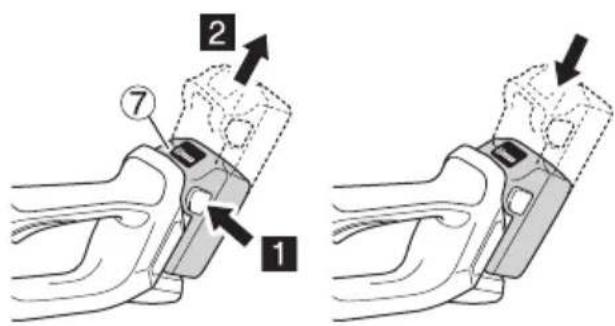
| Removing and inserting the battery | 4 | 2 |
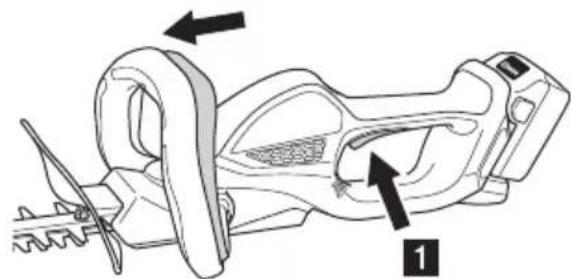
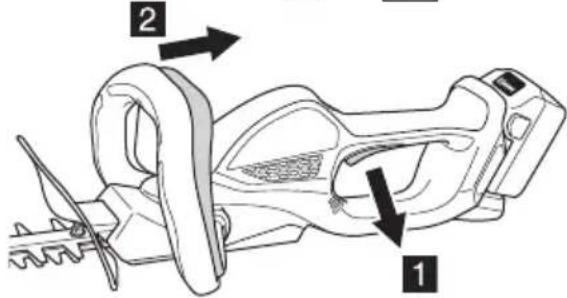
| Switch ON | 5 | 2 |
| Switch OFF | 6 | 3 |
| Blade case | 7 | 3 |
| Speed adjustment | 8 | 3 |
| Battery level | 9 | 3 |
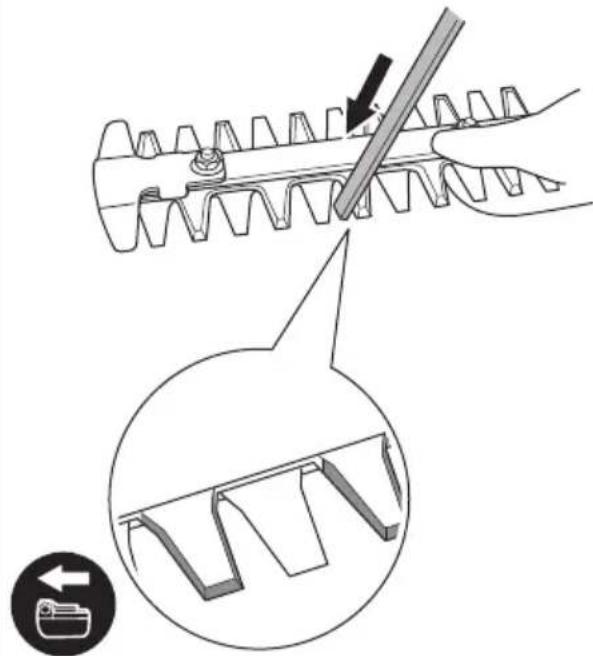
| Sharpening the blade | 10 | 3 |
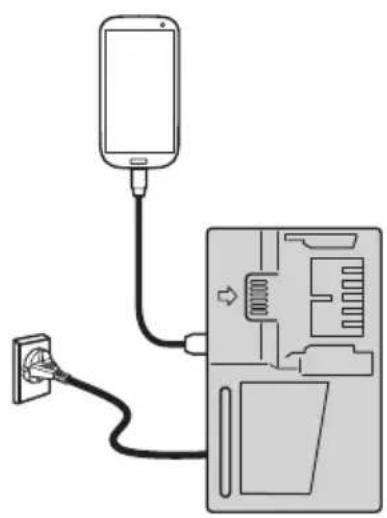
| Charging a USB device from a electrical outlet | 11-a | 4 |
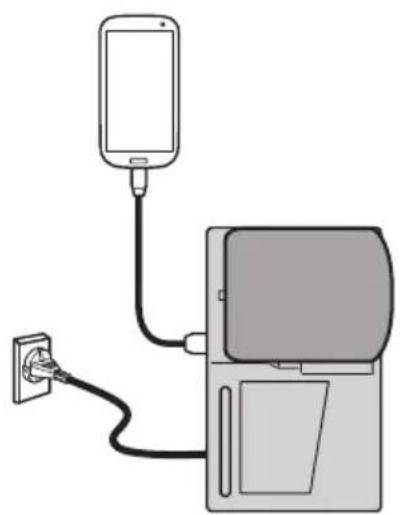
| Charging a USB device and battery from a electrical outlet | 11-b | 4 |
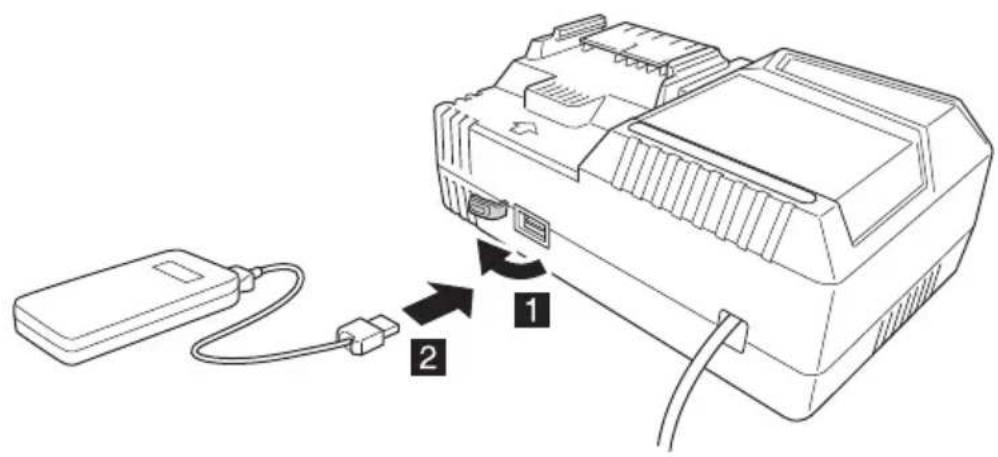
| How to recharge USB device | 12 | 4 |
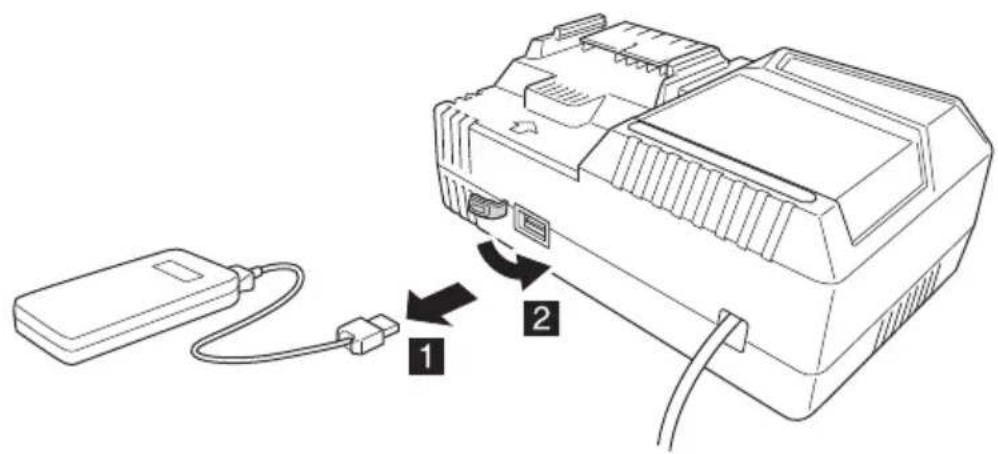
| When charging of USB device is completed | 13 | 4 |
| Selecting accessories — 243 |
ABOUT USB DEVICE
○ Charging a USB device from an electrical outlet. (Fig. 11-a)
○ Charging a USB device and battery from an electrical outlet. (Fig. 11-b)
○ How to recharge USB device. (Fig. 12)
○ When charging of USB device is completed. (Fig. 13)
MAINTENANCE AND INSPECTION
WARNING
○ Be sure to turn the tool off and remove the battery from the tool before making inspections or carrying out maintenance.
○ Do not disassemble to blade. Failure to heed this warning may result in injury.
Use gloves, or cloth to protect your hands when handling the blade. Failure to heed this warning may result in injury.
English
1. Sharpening the blade (Fig. 10)
Move an iron file in the direction of the arrow for a rough sharpening then use an oil stone to give the blade a good fi nish.
(1) Use a fine iron file or one of intermediate coarseness.
(2) Coat the oil stone with machine oil (bicycle oil or the like).
(3) Use a whetstone to gently remove any burrs from the back of the blade edge.
When to sharpen the blade
While this will vary the type of trees that are trimmed and how often it is used, it is a good idea to sharpen the blade about once a year to maintain a sharp edge.
NOTE
Do not use water for cleaning the blade to prevent rust or other damage.
2. Lubricating the blade
During trimming, sap adhering to the blade edge will increase load and wear down the battery more rapidly. Use machine oil (or bicycle oil or the like) to lubricate the blade and wipe the blade with a cloth. To prevent the blade from rusting, be sure to lubricate the blade after use and when it will not be used for an extended period of time before placing it in the blade case.
3. Inspecting the mounting screws
Regularly inspect all mounting screws and ensure that they are properly tightened. Should any of the screws be loose, retighten them immediately. Failure to do so could result in serious hazard.
4. Maintenance of the motor
The motor unit winding is the very “heart” of the power tool. Exercise due care to ensure the winding does not become damaged and/or wet with oil or water.
5. Inspection of terminals (tool and battery)
Check to make sure that swarf and dust have not collected on the terminals.
On occasion check prior, during and after operation.
CAUTION
Remove any swarf or dust which may have collected on the terminals.
Failure to do so may result in malfunction.
6. Cleaning on the outside
When the hedge trimmer is stained, wipe with a soft dry cloth or a cloth moistened with soapy water. Do not use chloric solvents, gasoline or paint thinner, for they melt plastics.
7. Transport of the tool
Remove the battery and attach the blade case to the blade before carrying this tool.
If you carry it without the blade case, the blade may come in contact with your body, causing injury.
8. Storage
Store the power tool and battery in a place in which the temperature is less than 40^ C and out of reach of children.
NOTE
Storing lithium-ion batteries.
Make sure the lithium-ion batteries have been fully charged before storing them.
Prolonged storage (3 months or more) of batteries with a low charge may result in performance deterioration, signifi cantly reducing battery usage time or rendering the batteries incapable of holding a charge.
However, signifi cantly reduced battery usage time may be recovered by repeatedly charging and using the batteries two to five times.
If the battery usage time is extremely short despite repeated charging and use, consider the batteries dead and purchase new batteries.
CAUTION
In the operation and maintenance of power tools, the safety regulations and standards prescribed in each country must be observed.
Important notice on the batteries for the HiKOKI cordless power tools
Please always use one of our designated genuine batteries. We cannot guarantee the safety and performance of our cordless power tool when used with batteries other than these designated by us, or when the battery is disassembled and modified (such as disassembly and replacement of cells or other internal parts).
GUARANTEE
We guarantee HiKOKI Power Tools in accordance with statutory/country specific regulation. This guarantee does not cover defects or damage due to misuse, abuse, or normal wear and tear. In case of complaint, please send the Power Tool, undismantled, with the GUARANTEE CERTIFICATE found at the end of this Handling instruction, to a HiKOKI Authorized Service Center.
Information concerning airborne noise and vibration
The measured values were determined according to EN62841 and declared in accordance with ISO 4871.
Measured A-weighted sound power level: 91 dB (A) Measured A-weighted sound pressure level: 83 dB (A) Uncertainty K: 3 dB (A).
Wear hearing protection.
Vibration total values (triax vector sum) determined according to EN62841.
No load:
$$ \mathbf {a} _ {\mathrm{h}} = 2. 2 \mathrm{m} / \mathrm{s} ^ {2}, \text { Uncertainty } K = 1. 5 \mathrm{m} / \mathrm{s} ^ {2} $$
The declared vibration total value and the declared noise emission value have been measured in accordance with a standard test method and may be used for comparing one tool with another.
They may also be used in a preliminary assessment of exposure.
WARNING
☐ The vibration and noise emission during actual use of the power tool can differ from the declared total value depending on the ways in which the tool is used especially what kind of workpiece is processed; and
○ Identify safety measures to protect the operator that are based on an estimation of exposure in the actual conditions of use (taking account of all parts of the operating cycle such as the times when the tool is switched off and when it is running idle in addition to the trigger time).
NOTE
Due to HiKOKI's continuing program of research and development, the specifications herein are subject to change without prior notice.
TROUBLESHOOTING
Use the inspections in the table below if the tool does not operate normally. If this does not remedy the problem, consult your dealer or the HiKOKI Authorized Service Center.
- Power tool
| Symptom Possible cause | use Remedy | ||
| Tool does not operate. No remaining battery power Charge the battery. | |||
| The battery has not been properly installed. | Remove the storage battery from the battery compartment in the tool and check for foreign matter. Also check the battery electrodes for soiling. Make sure that the battery is pressed in until it clicks into place. | ||
| Foreign matter is lodged in the blade. | When there is foreign matter in the blade, remove the battery and use a pair of tongs or similar tool to remove it.Take great care since the tool may start operating when the foreign matter has been removed.Sap or rust may also prevent the blade from operating. Use a wire brush or similar tool to remove sap or rust. | ||
| The tool has been used for heavy work. | This is the effect of a function that protects the battery by turning off the motor when the tool is exposed to an excessive load. Release the switch and remove what caused the excessive load and pull back the switch to resume work. | ||
| Tool does not trim well. The blade has become dull. Use a wire brush or other tool to remove sap and rust and use a file or whetstone to sharpen the blade. If these eff orts fail to make the blade sharper, the blade has reached the end of its service life. Replace the blade with a new one. | |||
| The blade stopped because it was used to cut a branch whose width exceeded the blade's cutting capacity.NOTEWork that will repeatedly cause the blade to stop will eventually damage the motor. | Some garden trees have wood that is very hard and may be beyond the capacity of the tool even if it is of a width that is within normal capacity. Use a pair of pruning shear to remove thick branches before starting work. | ||
| An oblique cut may also exceed the capacity of the tool since the length of the cut increases. Be sure to trim thick branches at right angles. | |||
| Tool suddenly stopped Tool was overburdened Get rid of the problem causing the overburden. | |||
| The battery is overheated. Let the battery cool down. | |||
| Battery cannot be installed Attempting to install a battery other than that specified for the tool. | Please install a multi volt type battery. | ||
English
- Charger
| Symptom Possible | cause Remedy | |
| The charge indicator lamp is rapidly f l ickers purple, and battery charging doesn't begin. | The battery is not inserted all the way. | Insert the battery firmly. |
| There is foreign matter in the battery terminal or where the battery is attached. | Remove the foreign matter. | |
| The charge indicator lamp blinks red, and battery charging doesn't begin. | The battery is not inserted all the way. | Insert the battery firmly. |
| The battery is overheated. If left alone, the battery will automatically begin charging if its temperature decreases, but this may reduce battery life. It is recommended that the battery be cooled in a well-ventilated location away from direct sunlight before charging it. | ||
| Battery usage time is short even though the battery is fully charged. | The battery's life is depleted. Replace the battery with a new one. | |
| The battery takes a long time to charge. | The temperature of the battery, the charger, or the surrounding environment is extremely low. | Charge the battery indoors or in another warmer environment. |
| The charger's vents are blocked, causing its internal components to overheat. | Avoid blocking the vents. | |
| The cooling fan is not running. Contact a HiKOKI Authorized Service Center for repairs. | ||
| The USB power lamp has switched off and the USB device has stopped charging. | The battery's capacity has become low. Replace the battery with one that has capacity remaining. | |
| USB power lamp does not switch off even though the USB device has fi nished charging. | The USB power lamp lights up green to indicate that USB charging is possible. | This is not a malfunction. |
| It is unclear what the charging status of a USB device is, or whether its charging is complete. | The USB power lamp does not switch off even when charging is complete. | Examine the USB device that is charging to confi rm its charging status. |
| Charging of a USB device pauses midway. | The charger was plugged into an electrical socket while the USB device was being charged using the battery as the power source. | This is not a malfunction.The charger pauses USB charging for about 5 seconds when it is dif ferentiating between power sources. |
| A battery was inserted into the charger while the USB device was being charged using a power socket as the power source. | ||
| Charging of the USB device pauses midway when the battery and the USB device are being charged at the same time. | The battery has become fully charged. This is not a malfunction.The charger pauses USB charging for about 5 seconds while it checks whether the battery has successfully completed charging. | |
| Charging of the USB device doesn't start when the battery and the USB device are being charged at the same time. | The remaining battery capacity is extremely low. | This is not a malfunction.When the battery capacity reaches a certain level, USB charging automatically begins. |
WAARSCHUWINGEN EN VEILIGHEIDSINSTRUCTIES
OVER HET USB-APPARAAT
natural_image
Line drawing of a rectangular electronic device with a central screen and mounting tabs (no text or symbols)VEDLIKEHOLD OG INSPEKSJON
ADVARSEL
DODATNA VARNOSTNA OPOZORILA
UPOZORENJA I BEZBEDNOSNA UPUTSTVA
UPOZORENJA I SIGURNOSNE UPUTE
Posebno obratite pažnju na izjave kojima prethode sljedeće riječi:
ÚPOZORENJE
natural_image
Line drawing of a battery pack with a digital display (no text or symbols)BSL36A18XBSL36B18X
natural_image
Line drawing of a battery pack with a digital display (no text or symbols)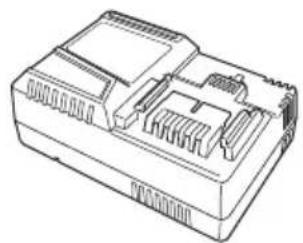
natural_image
Line drawing of a mechanical component with internal slots and housing (no text or symbols)UC18YSL3 (14,4V - 18V)
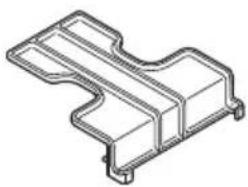
natural_image
Technical line drawing of a mechanical bracket component (no text or symbols)329897
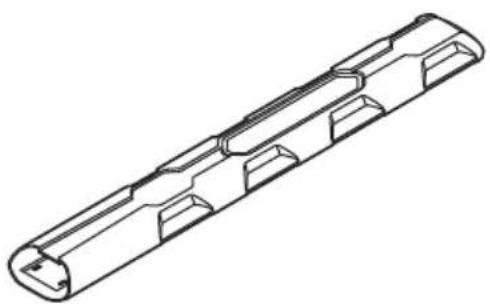
natural_image
Technical line drawing of a cylindrical mechanical component with internal cavities (no text or symbols)335011 (For CH3656DA) 336102 (For CH3672DA)
natural_image
Line drawing of a quill pen in an inkwell (no text or symbols)| English Dansk Română | ||||
| GUARANTEE CERTIFICATE1 Model No.2 Serial No.3 Date of Purchase4 Customer Name and Address5 Dealer Name and Address(Please stamp dealer name and address) | GARANTIBEVIS1 Modelnummer2 Serienummer3 Købsdato4 Kundes navn og adresse5 Forhandlers navn og adresse(Indsæt stempel med forhandlers navn og adresse) | CERTIFICAT DE GARANTIE1 Model nr.2 Nr. de serie3 Data cumpărării4 Numele și adresa clientului5 Numele și adresa distribuitorului(Vă rugăm aplicați štampila cu numele și adresa distribuitorului) | ||
| Deutsch Norsk Slovenščina | ||||
| GARANTIESCHEIN1 Modell-Nr.2 Serien-Nr.3 Kaufdatum4 Name und Anschrift des Kunden5 Name und Anschrift des Händlers(Bitte mit Namen und Anschrift des Handlers abstempeln) | GARANTISERTIFIKAT1 Modellnr.2 Serienr.3 Kjopsdato4 Kundens navn og adresse5 Forhandlerens navn og adresse(Vennligst stemple forhandlerens navn og adresse) | GARANCIJSKO POTRDILO1 Št. modela2 Serijska št.3 Datum nakupa4 Ime in naslov kupca5 Ime in naslov prodajalca(Prosimo vtsnite žig z imenom in naslovom prodajalca) | ||
| Français Suomi Slovenčina | ||||
| CERTIFICAT DE GARANTIE1 No. de modèle2 No de série3 Date d'achat4 Nom et adresse du client5 Nom et adresse du revendeur(Cachet portant le nom et l'adresse du revendeur) | TAKUUTODISTUS1 Malli nro2 Sarja nro3 Ostopăivămâäră4 Asiakkaan nimi ja osoite5 Myyjän nimi ja osoite(Leimaa myyjän nimi ja osoite) | ZÁRUČNÝ LISTA1 Č. modelu2 Sériové č.3 Dátum zakúpenia4 Meno a adresa zákaznika5 Názov a adresa predajcu(Pečiatka s názvom a adresou predajcu) | ||
| Italiano Ελληνικά Български | ||||
| CERTIFICATO DI GARANZIA1 Modello2 N° di serie3 Data di acquisto4 Nome e indirizzo dell'acquirente5 Nome e indirizzo del rivenditore(Si prega di apporre il timbro con questi dati) | ПІЗТОПОІНТИКО ЕГГУНЄНЕ1 Ар. Мовтёлou2 Aŭξων Αρ.3 Нμερομηνία αγοράς4 ́Овоја кай десуθυνση πελάτη5 ́Овоја кай десуθυνση μεταπωλητή(Паракалоўєе va хрησιμοποιηθεί σφραγίδα) | ГАРАНЦИОНЕН СЕРТИФИКАТ1 Модел No2 Сериен No3 Дата за закупуване4 Име и адрес на клиента5 Име и адрес на търговеца(Моля, отпечатайте името и адрес на дильра) | ||
| Nederlands Polski Srpski | ||||
| GARANTIEBEWIJS1 Modelnummer2 Serienummer3 Datum van aankoop4 Naam en adres van de gebruiker5 Naam en adres van de handelaar(Stempel a.u.b. naam en adres vande de handelaar) | GWARANCJA1 Model2 Numer seryjny3 Data zakupu4 Nazwa klienta i adres5 Nazwa dealera i adres(Pieczęć punktu sprzedaży) | GARANTNI SERTIFIKAT1 Br. modela.2 Serijski br.3 Datum kupovine4 Ime i adresa kupca5 Ime i adresa prodavca(Molimo da stavite pečat na ime i adresu trgovca) | ||
| Español Magyar Hrvatski | ||||
| CERTIFICADO DE GARANTÍA1 Número de modelo2 Número de serie3 Fecha de adquisición4 Nombre y dirección del cliente5 Nombre y dirección del distribuidor(Se ruega poner el sello del distribuidor con su nombre y dirección) | GARANCIA BIZONYLAT1 Tipusszám2 Sorozatszám3 A vásárlás dátuma4 A Vásárló neve és címe5 A Kereskedő neve és címe(Kérjük ide elhelyezni a Kereskedő nevének és címének pecsétjét) | JAMSTVENI CERTIFIKAT1 Br modela.2 Serijski br.3 Datum kupnje4 Ime i adresa kupca5 Ime i adresa trgovca(Molimo stavite pečat na ime i adresu trgovca) | ||
| Português Čeština | ||||
| CERTIFICADO DE GARANTIA1 Número do modelo2 Número do série3 Data de compra4 Nome e morada do cliente5 Nome e morada do distribuidor(Por favor, carimbe o nome e morada do distribuidor) | ZÁRUČNÍ LIST1 Model č.2 Série č.3 Datum nákupu4 Jméno a adresa zákaznika5 Jméno a adresa prodejce(Prosíme o razítko se jménem a adresou prodejce) | |||
| Svenska Türkçe | ||||
| GARANTICERTIFIKAT1 Modellnr2 Serienr3 Inkõpsdatum4 Kundens namn och adress5 Försäljarens namn och adress(Stämpla försäljarens namn och adress) | GARANTI SERTÍFÍKASI1 Model No.2 Seri No.3 Satin Alma Tarihi4 Müşteri Adi ve Adresi5 Bayi Adi ve Adresi(Lütfen bayi adini ve adresini kaşe olarak basin) | |||
HiKOKI
| 1 | |
| 2 | |
| 3 | |
| 4 | |
| 5 |
Siemensring 34, 47877 willich, Germany
Tel: +49 2154 49930
Fax: +49 2154 499350
URL: http://www.hikoki-powertools.de
Hikoki Power Tools Netherlands B.V.
Brabanthaven 11, 3433 PJ Nieuwegein, The Netherlands
Tel: +31 30 6084040
Fax: +31 30 6067266
URL: http://www.hikoki-powertools.nl
Hikoki Power Tools (U.K.) Ltd.
25 Majestic Road, Southampton, SO16 OYT,
United Kingdom
Tel: +44 1908 660663
Fax: +44 1908 606642
URL: http://www.hikoki-powertools.uk
Hikoki Power Tools France S.A.S.
Hikoki Power Tools Belgium N.V./S.A.
Koningin Astridlaan 51, B-1780 Wemmel, Belgium
Tel: +32 2 460 1720
Fax: +32 2 460 2542
URL http://www.hikoki-powertools.be
Hikoki Power Tools Italia S.p.A
Via Piave 35, 36077, Altavilla Vicentina (VI), Italy
Tel: +39 0444 548111
Fax: +39 0444 548110
URL: http://www.hikoki-powertools.it
Hikoki Power Tools Ibérica, S.A.
C/ Puigbarral, 26-28, Pol. Ind. Can Petit, 08227 Terrassa
(Barcelona), Spain
Tel: +34 93 735 6722
Fax: +34 93 735 7442
URL: http://www.hikoki-powertools.es
Kjeller Vest 7, N-2007 Kjeller, Norway
Tel: (+47) 6692 6600
Fax: (+47) 6692 6650
URL: http://www.hikoki-powertools.no
Hikoki Power Tools Sweden AB
Rotebergsvagen 2B SE-192 78 Sollentuna, Sweden
Tel: (+46) 8 598 999 00
Fax: (+46) 8 598 999 40
URL: http://www.hikoki-powertools.se
Hikoki Power Tools Denmark A/S
Lillebaeltsvej 90, 6715 Esbjerg N, Denmark
Tel: (+45) 75 14 32 00
Fax: (+45) 75 14 36 66
URL: http://www.hikoki-powertools.dk
Hikoki Power Tools Finland Oy
Tupalankatu 9, 15680 Lahti, Finland
Tel: (+358) 20 7431 530
Fax: (+358) 20 7431 531
URL: http://www.hikoki-powertools.fi
Hikoki Power Tools Hungary Kft.
Hikoki Power Tools Romania S.R.L.
Ring Road, No. 66, Mustang Traco Warehouses, Warehouse
No.1, Pantelimon City, 077145, Ilfov County, Romania
natural_image
Line drawing of a quill pen in an inkwell (no text or symbols)
natural_image
Line drawing of a quill pen in an inkwell (no text or symbols)| English Nederlands | ||
| EC DECLARATION OF CONFORMITYWe declare under our sole responsibility that Cordless Hedge Trimmer, identified by type and specific identification code *1), is in conformity with all relevant requirements of the directives *2) and standards *3). Tim Sieberns who is authorized to compile the technical fi le is at *4) – See below.2000/14/ECType of equipment: Hedge TrimmerType name: CH3656DA, CH3672DAConformity assessment procedure: Annex VMeasured sound power level: 94 dBGuaranteed sound power level: 97 dBThe declaration is applicable to the product affi xed CE marking. | EC VERKLARING VAN CONFORMITEITWij verklaren onder onze eigen verantwoordelijkheid dat Snoerloze Heggenschaar, geidentificeerd door het type en de specifieke identificatiecode*1), voldoet aan alle relevante bepalingen van de richtlijnen*2) en normen*3). Tim Sieberns die gemachtigd is om het technische dossier samen te stellen is bij *4) – Zie onder.2000/14/ECType gereedschap: HeggenschaarTypenaam: CH3656DA, CH3672DAConformiteit vaststellingsprocedure: Annex VGemeten geluidsdruk: 94 dBGegarandeerde geluidsdruk: 97 dBDeze verklaring is van toepassing op producten voorzien van de CE-markeringen. | |
| Deutsch EspañolEG-KONFORMITÄTSERKLÄRUNGWir erklären in alleiniger Verantwortung, dass die durch den Typ und den spezifischen Identifizierungscode *1) identifizierte Akku-Heckenschere allen einschlägigen Bestimmungen der Richtlinien *2) und Normen *3) entspricht. Tim Sieberns, die für die Zusammenstellung der technischen Datei zuständig ist, ist unter *4) erreichbar – Siehe unten.2000/14/EGArt der Ausrüstung: HeckenschereTypname: CH3656DA, CH3672DAÜbereinstimmungsbeurteilungsverfahren: Annex VGemessener Schalleistungspegel: 94 dBGarantieter Schalleistungspegel: 97 dBDie Erklärung gilt für die an dem Produkt angebrachte CE-Kennzeichnung. | ||
| Français PortuguêsDECLARATION DE CONFORMITE CENous déclarons sous notre entière responsabilité que le taille-haies à batterie, identifié par le type et le code d'identification spécifique *1) est en conformité avec toutes les exigences applicables des directives *2) et des normes *3). Tim Sieberns, personne autorisée à constituer le dossier technique, est à *4) – Voir ci-dessous.2000/14/CEType de matériel: Taille-haiesNom du type: CH3656DA, CH3672DAProcedure d'évaluation de conformité : Annexe VNiveau de puissance sonore mesuré : 94 dBNiveau de puissance sonore garanti : 97 dBCette déclaration s'applique aux produits désignés CE. | ||
| Italiano SvenskaDICHIARAZIONE DI CONFORMITÀ CEDichiariamo sotto la nostra esclusiva responsabilità che la tagliasiepi a batteria, identificata dal tipo e dal codice identificativo specifico *1), è conforme a tutti i requisiti delle direttive *2) e degli standard *3). Tim Sieberns, autorizzato a compilare il fi le tecnico, è al numero *4) – Vedere sotto.2000/14/CETipo di apparecchiatura: TagliasiepiNome di tipo: CH3656DA, CH3672DAProcedimento di valutazione conformità: Allegato VLivello di potenza sonora misurato: 94 dBLivello di potenza sonora garantito: 97 dBLa dichiarazione è applicabile ai prodotti cui sono applicati i marchi CE. | ||
| *1) CH3656DAC365604SCH3672DAC365605S*2) 2006/42/EC, 2000/14/EC, 2014/30/EU, 2014/35/EU, 2011/65/EU*3) EN60745-1:2009+A11:2010EN60745-2-15:2009+A1:2010EN60335-1:2012+A11:2014EN60335-2-29:2004+A2:2010EN55014-1:2006+A1:2009+A2:2011EN55014-2:1997+A1:2001+A2:2008 | DECLARAÇÃO DE CONFORMIDADE CEDeclaramos bajo nuestra única responsabilidad que el Cortaseto a batería, identificado por tipo y por código de identificación específico *1), está en conformidad con todas las disposiciones correspondientes de las directivas *2) y de las normas *3). Tim Sieberns, quien está autorizado a compilar el archivo técnico está en *4) – Ver a continuación.Tipo de dispositivo: CortasetoNombre del modelo: CH3656DA, CH3672DAProcedimento de evaluación de conformidad: Anexo VNivel de potencia acústica medida: 94 dBNivel de potencia acústica garantizada: 97 dBLa declaración se aplica al producto con marcas de la CE. | |
| *4) Representative offi ce in EuropeHikoki Power Tools Deutschland GmbHSiemensring 34, 47877 Willich, GermanyHead offi ce in JapanKoki Holdings Co., Ltd.Shinagawa Intercity Tower A, 15-1, Konan 2-chome,Minato-ku, Tokyo, Japan | EG-DEKLARATION BETRÄFFANDE LIKFORMIGHETVi förklarar på eget ansvar att denna batteridrivna häcksax, identifierad enligt typ och särskild identifikationskod *1), överensstämmer med alla relevanta krav i direktiven *2) och standarderna *3). Tim Sieberns som är auktoriserad att sammanställa den tekniska filen finns på *4) – Se nedan.2000/14/EGTyp av utrustning: HäcksaxTypnamn: CH3656DA, CH3672DKonformitetsbedömningsmetod: Annex VUppmätt ljudstyrkenivä: 94 dBGaranterad ljudstyrkenivä: 97 dBDenna försäkran gäller för produkten med tillhörande CE-märkning. | |
30. 4. 2024 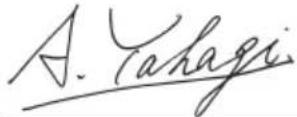 A. YahagiGeneral Manager ofValidation/Service DivisionKoki Holdings Co., Ltd. A. YahagiGeneral Manager ofValidation/Service DivisionKoki Holdings Co., Ltd. | ||
| Dansk Polsk | ||
| EF-OVERENSSTEMMELSESERKLÆRINGVi erklærer os fuldstændige ansvarlige for, at batteri hækkeklipper, identificeret ved type og specifik identifikationskode *1), er i overensstemmelse med alle relevante krav i direktiverne *2) og standarderne *3). Tim Sieberns, der er bemyndiget til at udarbejde den tekniske fi I er ved *4) – Se nedenfor.2000/14/EF• Udstyrstype: Hækkeklipper• Typenavn: CH3656DA, CH3672DA• Procedure for fastsættelse af ensartethed: Bilag V• Målt lydstyrkeniveau: 94 dB• Garanteret lydstyrkeniveau: 97 dBErklæringen gælder produktet, der er mærket med CE. | DEKLARACJA ZGODNOŚCI Z WEOświadczamy na własną wyłączną odpowiedzialność, że Sekator akumulatorowy podanego typu i oznaczony unikalnym kodem identyfikacyjnym *1) jest zgodny z wszystkimi właściwymi wymogami dyrektyw *2) i norm *3). Tim Sieberns jest upoważniony do sporządzenia dokumentacji technicznej i jest dostępny pod adresem *4) – Patrz poniżej.2000/14/WE• Typ narzędzia: Sekator• Nazwa typu: CH3656DA, CH3672DA• Procedura oceny zgodności: Annex V• Zmierzony poziom mocy dźwięku: 94 dB• Gwarantowany poziom mocy dźwięku: 97 dBNiniejsza deklaracja ma zastosowanie do produktu opatrzonego znakiem CE. | |
| Norsk Magyar | ||
| EF'S ERKLÆRING OM OVERENSSTEMMELSEVi erklærer på eget ansvar at batteridrevet hekksaks, identifisert etter type og spesifikik identifikasjonskode *1), er i samsvar med alle relevante krav i direktiver *2) og standarder *3). Tim Sieberns, som er autorisert til å utarbeide den tekniske fi len, er på *4) – Se nedenfor.2000/14/EF• Utstyrstype: Hekksaks• Typenavn: CH3656DA, CH3672DA• Prosedyre for konformitetsvurdering: Annex V• Målt lydeff ektnivå: 94 dB• Garantert lydeff ektnivå: 97 dBErklæringen gjelder for CE-merket på produktet. | EK MEGFELELŐSÉGI NYILATKOZATA kizárólagos felelősségünkre kijelentjük, hogy az Akkus sövényvágó, amely tipus és egyedi azonositó kód *1) alapján azonositott, megfelel az irányelvek *2) és szabványok *3) vonatkozó követelményeinek. A műszaki fájl összeállítására jogosult Tim Sieberns elérhetősége itt található: *4) – Lásd alább.2000/14/EK• Akészülék tipusa: Sövényvágó• Tipusszám: CH3656DA, CH3672DA• Megfelelőségi eljárás: Annex V• Měrt hangteljesítmény szint: 94 dB• Garantált hangteljesítmény szint: 97 dBJelen nyilatkozał a terméken feltüntetett CE jelzésre vonatkozik. | |
| Suomi Češtiha | ||
| EY-ILMOITUS YHDENMUKAISUUDESTAVakuutamme yksinomaisella vastuullamme, että akkutoiminen pensasleikkuri, joka identifioidaan tyypin ja erityisen tunnistuskoodin *1) perusteella, on kaikkien direktiivien *2) ja standardien *3) asiaankuuulvien vaatimusten mukainen. Tim Sieberns, joka on valtuutettu kokoarnaan teknisen tiedoston, on kohdassa *4) – katso alta.2000/14/EY• Laitleen tyyppi: Pensasleikkuri• Tyyppinimi: CH3656DA, CH3672DA• Yhdenmukaisuuden määritystoimenpiteet: Annex V• Mitattu äänenpainetaso: 94 DBA ttattu äämempanetaso: 97 dBIlmoitus on sovellettavissa tuotteeseen kiinnitettyyn CE-merkintään. | PROHLÁŠENÍ O SHODĚ S ESProhlašujeme na svou výhradní zodpovědnost, že akku ořezávačka, identifikovaná podle typu a specifického identifikačního kódu *1), je v souladu se všemi příslušnými požadavky směrnic *2) a norem *3). Tim Sieberns, jež je oprávněný k sestavení technické dokumentace, je v *4) - viz niže.2000/14/ES• Druh zařízení: Ořezávačka• Typ: CH3656DA, CH3672DA• Homologace: Annex V• Naměřená hlučnost: 94 dB• Zaručená mez hluku: 97 dBToto prohlášení platí pro výrobek označený značkou CE. | |
| Ελληνικά Túrkçe | ||
| ΕΚ ΔΗΛΩΣΗ ΕΝΑΡΜΟΝΙΣΜΟΥΔηλώνουμε με αποκλειστική μας ευθύνη ότι το Ψαλίδι μπορντούρας μπαταρίας, το οποίο προσδιορίζεται από τον τύπο και ειδικό αναγνωριστικό κωδικό *1), είναι σύμφωνο με όλες τις σχετικές απαιτήσεις των Οδηγιών *2) και με τα σχετικά πρότυτα *3). O Tim Sieberns που είναι εξουσιοδοτημένος για τη σύνταξη του τεχνικού φαϊκέλου είναι στο *4) – Δείτε παρακάτω.2000/14/EK• Τύπος μηχαγήματος: Ψαλίδι μπορντούρας• Ονομασία τύπου: CH3656DA, CH3672DA• Διαδικασία ελέγχου εναρμονισμού: Παράρτημα ν• Μετρημένο επίπεδο ηχητικής ισχύος: 94 dB• Εγγυμηένο επίπεδο ηχητικής ισχύος: 97 dBΗ δήλωση ισχύει μόνο για το προϊόν που είναι τοποθετημένη σήμανοη CE. | AT UYGUNLUK BEYANITip ve özel tanım koduyla *1) tanımlı Akülü Çit Budama’nin direktiflerin *2) ve standartların *3) tüm ilgili gereksinimlerine uygun olduğunu tamamen kendi sorumluluğumuz altında beyan ederiz. Teknik dosya derleme yetkisi olan Tim Sieberns *4) no.lu kısımdadir – Aşagiya bakın.2000/14/AT• Aletin tipi: Çit budama• Tip adi: CH3656DA, CH3672DA• Uygunluk değerlendirme prosedürü: EK LV• Ölçülen ses gücü seviyesi: 94 dB• Garanti edilen ses gücü seviyesi: 97 dBeyan, üzerinde CE işareti bulunan ürünler için geçerlidir. | |
| *1) CH3656DA C365604SCH3672DA C365605S*2) 2006/42/EC, 2000/14/EC, 2014/30/EU, 2014/35/EU, 2011/65/EU*3) EN60745-1:2009+A11:2010EN60745-2-15:2009+A1:2010EN60335-1:2012+A11:2014EN60335-2-29:2004+A2:2010EN55014-1:2006+A1:2009+A2:2011EN55014-2:1997+A1:2001+A2:2008 | ||
*4) Representative offi ce in EuropeHikoki Power Tools Deutschland GmbH Siemensring 34, 47877 Willich, GermanyHead offi ce in JapanKoki Holdings Co., Ltd.Shinagawa Intercity Tower A, 15-1, Konan 2-chome, Minato-ku, Tokyo, Japan  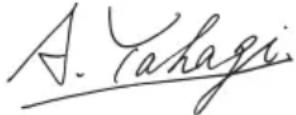 A. Yahagi General Manager of Validation/Service Division Koki Holdings Co., Ltd. A. Yahagi General Manager of Validation/Service Division Koki Holdings Co., Ltd. | ||
| Română Български | |||
| DECLARATIE DE CONFORMITATE CEDeclarăm pe propria răspundere că Foarfeca pentru gard viu cu acumulator, identificată după tipul și codul de identificare specific *1), este în conformitate cu toate cerintele relevante ale directivelor *2) și ale standardelor *3). Tim Sieberns, persoana autorizată să întocmească dosarul tehnic, se află la *4) – Vezi mai jos.2000/14/CETip de echipament: Foarfeca pentru gard viuDenumire tip: CH3656DA, CH3672DAProcedură de evaluare a conformității: Anexa VNivel măsurat al puterii sonore: 94 dBNivel garantat al puterii sonore: 97 dBDeclarația se referă la produsul pe care este aplicat semnul CE. | EO ДЕКЛАРАЦИЯ ЗА СЪОТВЕТСТВИЕДекларираме на своя собствена отговорност, че Безжичният храсторез, идентифицирана по тип и специален идентификационен код *1), е в съответствие с всички съответни изисквания на директивите *2) и стандартите *3). Tim Sieberns, които са упълномощени да съставят техническото досие е в *4) - Вижте по - долу.2000/14/EOТип оборудване: ХрасторезНаименование на типа: CH3656DA, CH3672DAProcedура за оценка на съвместимостта: Приложение VИзмерено ниво на акустична мощност: 94 dBГарантирано ниво на акустична мощност: 97 dBDекларацията е приложима за продукта, който има поставена СЕ маркировка. | ||
| Slovenščina Srpski | |||
| ES IZJAVA O SKLADNOSTINa lastno odgovornost izjavljamo, da so Akumulatorske vrtne škarje, označene z vrsto in posebno identifikacijsko kodo *1), v skladu z vsemi ustreznimi zahtevami direktiv *2) in standardov *3). Tim Sieberns, ki je odobren za pripravo tehnične datoteke pri * 4) – glejte spodaj.2000/14/ESVrsta opreme: Vrtne škarjeIme izdelka: CH3656DA, CH3672DAPostopek ocenjevanja skladnosti: Dodatek VIzmerjen nivo jakosti hrupa: 94 dBZajamčen nivo jakosti hrupa: 97 dBDeklaracija je označena na izdelku s pritrjeno oznako CE. | EZ DEKLARACIJA O USAGLAŠENOSTIPod punom odgovornošću izjavljujemo da je Akumulatorski trimer za živu ogradu, identifikovan prema tipu i specifičnom identifikacionom kodu *1), u skladu sa svim relevantnim zahtevima direktiva *2) i standardima *3). Tim Sieberns koji je ovlašćen da sastavi tehničku datoteku je na *4) – Pogledajte dole.2000/14/EZTip opreme: Trimer za živu ograduNaziv tipa: CH3656DA, CH3672DAPostupak procene saobraznosti; Dopuna VIzmerena jačina zvuka: 94 dBGarantovana jačina zvuka: 97 dBDeklaracija je primenjiva na proizvod na koji je stavljena CE oznaka. | ||
| Slovenčina Hrvatski | |||
| ES VYHLÁSENIE O ZHODETýmto vyhlasujeme na vlastnú zodpovednost, že výrobok Aku orezávač identifikovaný podľa typu a špecifického identifikačného kódu *1) je v zhode so všetkými prislušnými požiadavkami smernic *2) a noriem *3). Tim Sieberns, ktorý má oprávnenie na zostavovanie technickej dokumentácie, je uvedený v bode *4) – Pozrite nižšie.2000/14/ESTyp zariadenia: OrezávačkaNázov typu: CH3656DA, CH3672DASúlad s procesom ohodnotenia: Priloha VNameraná hladina akustického tlaku: 94 dBZaručená hladina akustického výkonu: 97 dBToto vyhlásenie sa vzfahuje na výrobok označený značkou CE. | EZ IZJAVA O SUKLADNOSTIJzjavljujemo pod vlastitom odgovornošću da je Bezična rezalica za živicu, identificirana prema vrsti i posebnom identifikacijskom kodu *1), u skladu sa svim relevantnim zahtjevima direktiva *2) i standarda *3). Tim Sieberns koji je ovlašten za sastavljanje tehničke datoteke nalazi se na *4) – Vidi dolje.2000/14/EZVrsta opreme: Rezalica za živicuNaziv vrste: CH3656DA, CH3672DAPostupak za ocjenu sukladnosti: Prilog VIzmerena razina zvučne snage: 94 dBZajamčena razina zvučne snage: 97 dBljava se primjenjuje na proizvod na kojem je stavljena CE oznaka. | ||
| *1) CH3656DA C365604SCH3672DA C365605S*2) 2006/42/EC, 2000/14/EC, 2014/30/EU, 2014/35/EU, 2011/65/EU*3) EN60745-1:2009+A11:2010EN60745-2-15:2009+A1:2010EN60335-1:2012+A11:2014EN60335-2-29:2004+A2:2010EN55014-1:2006+A1:2009+A2:2011EN55014-2:1997+A1:2001+A2:2008 | |||
| *4) Representative offi ce in EuropeHikoki Power Tools Deutschland GmbHSiemensring 34, 47877 Willich, GermanyHead offi ce in JapanKoki Holdings Co., Ltd.Shinagawa Intercity Tower A, 15-1, Konan 2-chome,Minato-ku, Tokyo, Japan | CE 30. 4. 2024A. YahagiGeneral Manager ofValidation/Service DivisionKoki Holdings Co., Ltd. | ||
Koki Holdings Co., Ltd.
- WARNINGS AND SAFETY INSTRUCTIONS
- WARNING
- CAUTION
- NOTE
- GENERAL POWER TOOL SAFETY WARNINGS
- 1) Work area safety
- 2) Electrical safety
- 3) Personal safety
- 4) Power tool use and care
- English
- PRECAUTION
- HEDGE TRIMMER SAFETY WARNINGS
- PRECAUTIONS FOR CORDLESS HEDGE TRIMMER
- ADDITIONAL SAFETY WARNINGS
- When removing the blade case
- When changing speed
- During use
- PRECAUTIONS FOR BATTERY AND CHARGER
- CAUTION ON LITHIUM-ION BATTERY
- REGARDING LITHIUM-ION BATTERY TRANSPORTATION
- USB DEVICE CONNECTION PRECAUTIONS (UC18YSL3)
- SYMBOLS
- STANDARD ACCESSORIES
- APPLICATIONS
- SPECIFICATIONS
- Power tool
- Battery
- Charger
- CHARGING
- Insert the battery into the charger.
- Charging
- Charge indicator lamp indication
- \*3 Malfunction in the battery or the charger
- How to make the batteries perform longer.
- ABOUT USB DEVICE
- MAINTENANCE AND INSPECTION
- Sharpening the blade (Fig. 10)
- When to sharpen the blade
- Lubricating the blade
- Inspecting the mounting screws
- Maintenance of the motor
- Inspection of terminals (tool and battery)
- Cleaning on the outside
- Transport of the tool
- Storage
- Important notice on the batteries for the HiKOKI cordless power tools
- GUARANTEE
- Information concerning airborne noise and vibration
- TROUBLESHOOTING
- WAARSCHUWINGEN EN VEILIGHEIDSINSTRUCTIES
- OVER HET USB-APPARAAT
- VEDLIKEHOLD OG INSPEKSJON
- ADVARSEL
- DODATNA VARNOSTNA OPOZORILA
- UPOZORENJA I BEZBEDNOSNA UPUTSTVA
- UPOZORENJA I SIGURNOSNE UPUTE
- ÚPOZORENJE
- Hikoki Power Tools Netherlands B.V.
- Hikoki Power Tools (U.K.) Ltd.
- Hikoki Power Tools France S.A.S.
- Hikoki Power Tools Belgium N.V./S.A.
- Hikoki Power Tools Italia S.p.A
- Hikoki Power Tools Ibérica, S.A.
- Hikoki Power Tools Sweden AB
- Hikoki Power Tools Denmark A/S
- Hikoki Power Tools Finland Oy
- Hikoki Power Tools Hungary Kft.
- Hikoki Power Tools Romania S.R.L.
- Koki Holdings Co., Ltd.
Brand : HiKOKI
Model : CH 3656DA
Category : Hedge Trimmers