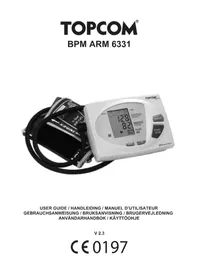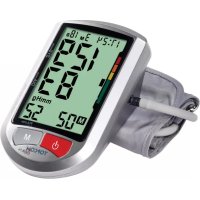
BPM ARM 5000 - Blood pressure monitor TOPCOM - Free user manual and instructions
Find the device manual for free BPM ARM 5000 TOPCOM in PDF.



User questions about BPM ARM 5000 TOPCOM
0 question about this device. Answer the ones you know or ask your own.
Ask a new question about this device
Download the instructions for your Blood pressure monitor in PDF format for free! Find your manual BPM ARM 5000 - TOPCOM and take your electronic device back in hand. On this page are published all the documents necessary for the use of your device. BPM ARM 5000 by TOPCOM.
USER MANUAL BPM ARM 5000 TOPCOM
This Blood Pressure Monitor complies with the EC Directives and bears the CE Mark "CE 0197".
This product is in compliance with the essential requirements and other relevant provisions of the directive 93/42/EEC. The declaration of conformity can be found on:
http://www.topcom.net/support/cedeclarations.php
The quality of the device has been verified and is in line with the provisions of the EC council directive 93/42/EEC (EN IEC60601-1-General requirements for safety, EN IEC 60601-1-2:2001 - Electromagnetic compatibility-Requirements and tests) dated 14 June 1993 concerning medical devices and the EN performance standards as follow:
• EN 1060-1 Non-invasive sphygmomanometers - General requirements
- EN 1060-3 Non-invasive sphygmomanometers - Supplementary requirements for electromechanical blood pressure measuring systems.
- EN 1060-4 Non-invasive sphygmomanometers - Test procedures to determine the overall system accuracy of automated non-invasive sphygmomanometers.
Authorized Representative in the European Community
Topcom Europe NV,
Grauwmeer 17
3001 Heverlee, Belgium,

Manufacturer
Kodon (Tianjin) Electric & Electronic Apparatus Co., Ltd.
7/F, Hua Qiao Chuang Ye Plaza, No.10 Jin Ping Rd,
Ya An St, Nankai Dist, Tianjin, China
1 Introduction
Congratulations with your purchase of the Topcom BPM Arm 5000. This fully automatic, Arm mounted blood pressure monitor is both easy to use and ideally suited for daily measurements. The large display includes systolic, diastolic and pulse, all clearly shown at the completion of each reading.
In addition, you can store up to 40 measurements per Memory Zone, ideal for users who want to monitor and track their blood pressure on a regular basis. The BPM Arm 5000 is compact and portable, making it ideal for home use and travel.


Please read this manual carefully before use. For specific information on your own blood pressure, contact your physician. Put the user guide away in a safe place for future reference.
2 Safety instructions
- This product is for household use only. It is not intended as a substitute for consultation with your doctor.
- For users diagnosed with common arrhythmia (atrial or ventricular premature beats or atrial fibrillation), diabetes, poor circulation of blood, kidney problems, or for users suffered from stroke, or for unconscious users, the device might not be suitable for use. Consult your doctor in case of any doubt.
- The unit should not be operated by children to avoid hazardous situations.
- The unit contains high-precision assemblies. Therefore, avoid extreme temperatures, humidity and direct sunlight. Avoid dropping or strongly shocking the main unit, and protect it from dust.
- Leaking batteries can damage the unit. Remove the batteries when the unit is not used for a long time.
- Do not press the START/STOP button when the cuff is not placed around the wrist.
- Do not disassemble the main unit or cuff.
- If the unit is stored in a cold place, allow it to acclimatize at room temperature before use.
- Clean the blood pressure monitor body and the cuff carefully with a slightly damp, soft cloth. Do not press. Do not bend the preformed cuff inside out. Do not wash the cuff or use chemical cleaner on it. Never use thinner, alcohol or petrol (gasoline) as cleaner.
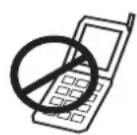
To avoid inaccurate results caused by electromagnetic interference between electrical and electronic equipments, do not use the device near a cell phone or microwave oven.
3 Blood pressure
3.1 What is blood pressure?
Blood pressure is the pressure exerted on the artery tube while blood flows through the arteries. The pressure measured when the heart contracts and sends blood out of the heart is systolic (highest). The pressure measured when the heart dilates with blood flowing back into the heart is called diastolic (lowest) blood pressure.
3.2 Why measure your blood pressure?
Among the various health problems afflicting modern people, problems associated with high blood pressure are by far the most common. High blood pressure's dangerously strong correlation with cardiovascular diseases and high morbidity has made measuring blood pressures a necessity of identifying those at risk.
3.3 Blood pressure standard
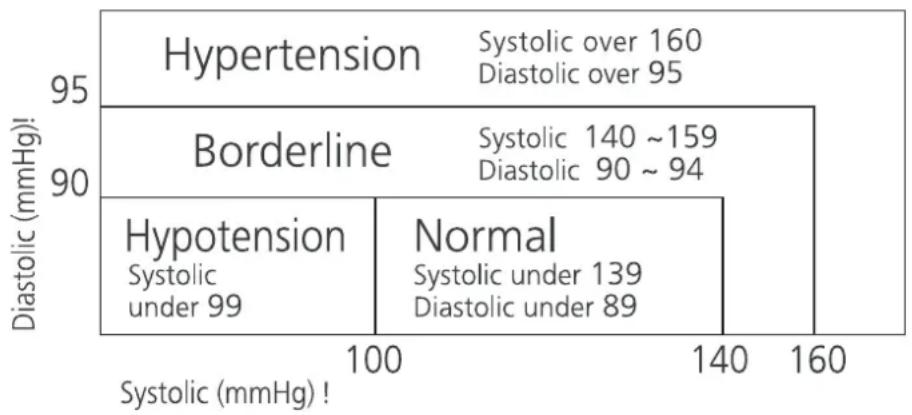
The World Health Organization (WHO) and National High Blood Pressure Education Program has developed a Blood pressure standard, according to which areas of low and high-risk blood pressure are identified. This standard however, is a general guideline as individual's blood pressure varies among different people and different groups...etc.
heatmap
| Diastolic (mmHg)! | Hypotension | Normal | |---|---|---| | 100 | Systolic under 99 | Systolic under 139 | | 140 | Diastolic under 89 | Diastolic over 95 | | 160 | Diastolic over 160 | Diastolic over 95 | Borderline Hypertension Borderline Hypotension Borderline Hypotension Borderline Borderline Borderline Borderline Borderline Borderline Borderline Borderline Borderline Borderline Borderline Borderline Borderline Borderline Borderline Borderline Borderline Borderline Borderline Borderline Borderline Borderline Borderline Borderline Borderline Borderline Borderline Borderline Borderline Borderline Borderline Borderline Borderline BorderlineIt is important that you consult your physician regularly. Your physician will tell you your normal blood pressure range as well as the point at which you will be considered at risk.
3.4 Blood pressure fluctuation
Blood pressure fluctuates all the time!
You should not be worried if you encountered two or three measurements at high levels. Blood pressure changes over the month and even throughout the day depending on circumstances (state of mind, temperature, ...)
4 Battery installation
natural_image
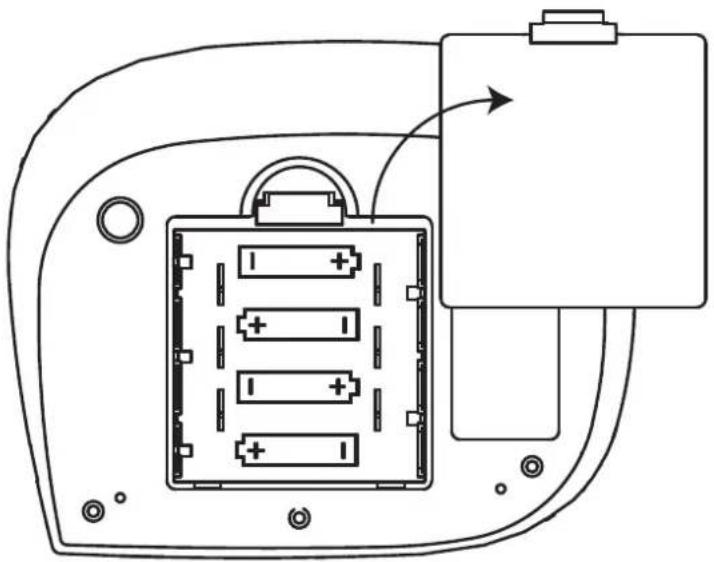
Diagram of a battery pack with four battery cells and an external circuit block (no text or symbols)- Open the battery compartment by pulling the cover away.
- Insert 4 AA non - rechargeable batteries. Follow the polarity as indicated in the battery compartment.
Do not short-circuit & dispose of in fire. Remove the battery if this device is not going to be used for a long period.
When the batteries are low, is displayed. Low batteries must be replaced.
5 Buttons
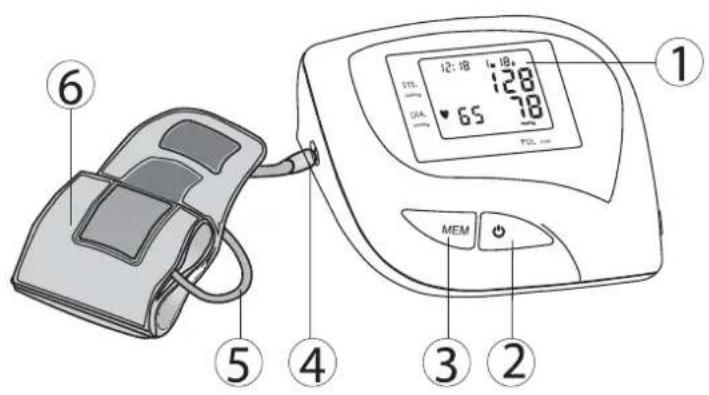
text_image
① 12:18 18 65 70L DTL GVA MEM ② ③ ④ ⑤ ⑥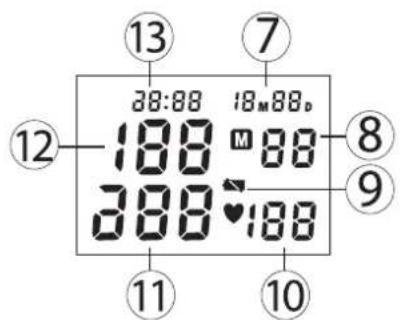
text_image
13 7 28:88 18M88D 188 M 88 388 ♥ 188 12 8 9 11 10- Display
- START / STOP button
- MEMORY button
- Air plug
- Rubber tube
- Wrist cuff
- Date
- Memory location
- Battery low icon
- Heart rate
- Diastolic pressure
- Systolic pressure
- Time
6 Applying the cuff
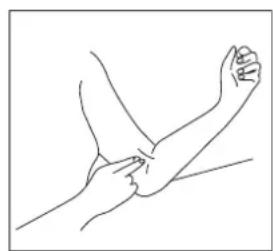
natural_image
Line drawing of two hands performing a physical maneuver or massage (no text or symbols)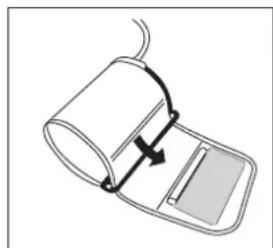
natural_image
Diagram of a medical or laboratory device with a curved arrow indicating rotation or movement (no text or symbols)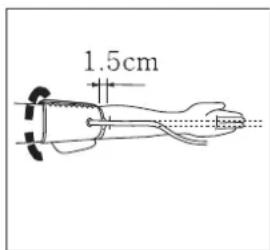
text_image
1.5cm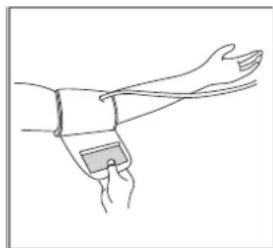
natural_image
Line drawing of a human forearm with wristband and wristpin (no text or symbols)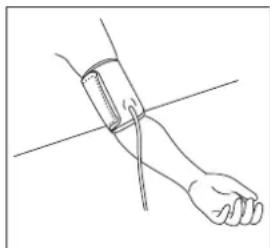
natural_image
Line drawing of a human hand holding a blood pressure gauge (no text or symbols)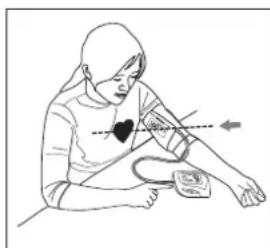
natural_image
Illustration of a person performing a heart valve on a patient's arm (no text or symbols)- Remove all watches, jewellery, etc. prior to attaching the cuff. Clothing sleeves should be rolled up.
- Press your brachial artery by two fingers approximately 2,5 cm above the elbow on the inside of your left arm to determine where your strongest pulse is.
- Slide the end of arm cuff furthest from the tube through the metal ring to a loop. The smooth cloth should be on the inside of the cuff. The Velcro will be on the outside of the cuff.
- Put the left arm through the cuff loop. The bottom of the cuff should be approx. 1,5 cm above the elbow. The cuff tube should lie over the brachial artery on the inside of the arm.
- Pull the cuff so that the top and bottom edges are tightened around your arm.
- When the cuff is positioned properly, press the Velcro firmly against the pile side of the cuff. The metal ring will not touch your skin.
- Relax your entire body, especially the area between your elbow and fingers. Place your elbow on a table so that the cuff is at the same level as your heart. Avoid leaning back while the measurements being taken.
7 Measurement
7.1 Important tips
- This monitor automatically switches off 2 minutes after the last key operation.
- To interrupt the measurement, simply press any key. The cuff will deflate immediately after a key is pressed.
- Do not measure your blood pressure immediately after consuming a large meal. To obtain more accurate readings, please wait one hour before measuring.
- Do not smoke or drink alcohol before measuring your blood pressure.
- You should not be physically tired or exhausted while taking a measurement.
- It is important that you relax during measurement. Try to take 15-minutes rest before a reading.
- Do not take measurements if you are under stress or under tension.
• Take your blood pressure at normal body temperature. If you are feeling cold or hot, wait a while before taking a measurement. - If the monitor is stored at very low temperature (near freezing), have it placed at a warm location for at least one hour before using it.
- Wait about 5 minutes before taking the next pressure measurement.
- During the measurement, do not talk or move your arm or hand muscles.
7.2 Procedure
text_image
28:88 18M88D 388 M 88 388 ♥ 5 188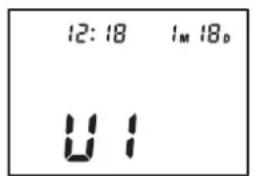
text_image
12:18 1M 18D U1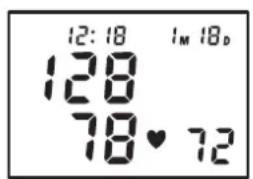
text_image
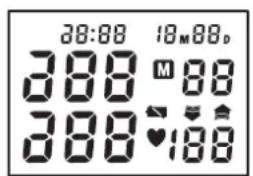
12:18 1M 18D 128 78♥ 72- Press the START/STOP button to activate the device. All segments will be displayed.
- Once the actual Memory zone is displayed (U1-3), press the MEMORY button to select the desired memory zone.
- If no button is pressed within 5 seconds, the measurement will start automatically.
- The display will show the last measurement result before inflating the cuff to the level that is right for you.
- When the right level is reached, the cuff will deflate.
This monitor will re-inflate automatically to approximately 220mmHg if the system detects that your body needs more pressure to measure your blood pressure.
- When the measurement is completed, systolic, diastolic and pulse will be shown simultaneously on the LCD screen.
- When a mistake was detected during measurement the Error icon ‘EE’ appears on the display
8 Memory
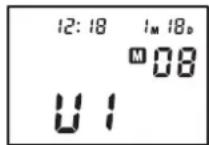
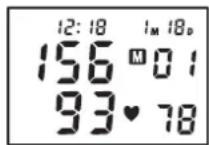
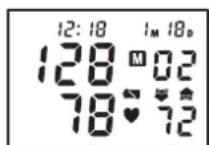
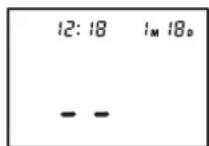
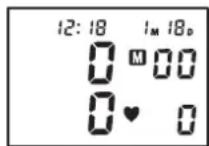
The BPM Arm 5000 has 3 Memory zones. Each can store up to 40 measurements including the date and time The result will be stored automatically in the selected Memory Zone after the measurement.
Select the desired Memory Zone before measurement after pressing the START/STOP button.
To recall measurement results:
When the clock is displayed.
- Press the MEMORY button to enter memory mode.
- Press the START/STOP button select the desired memory zone.
- Press the MEMORY button to see the last measurement result.
- Press the MEMORY button repeatedly for prior values stored.
- After the oldest record is displayed, the unit will switch back to normal time.
To erase all data from one memory zone:
- Press the MEMORY button to enter memory mode.
- Press the START/STOP button select the desired memory zone.
- Press the MEMORY button to see the last measurement result.
- Press and hold the MEMORY button for 3 seconds to erase all records from the selected memory zone.

When the batteries are removed, the memory will not be erased.
8.1 Time adjustment
text_image
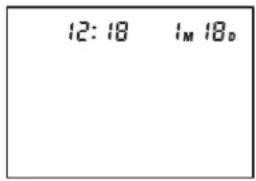
12:18 1M 18DTo adjust the date an time:
- Press the START/STOP and MEMORY button simultaneously. The month will blink on the display.
- Press the MEMORY button successively to change the month.
- Press the START/STOP button to confirm the month. The day will blink on the display.
- Change the day, hours and minutes as described above, using the MEMORY button ☑ to change and the START/STOP button ☑ to confirm every setting.
• After setting the minutes, the device is ready to use.
9 Power adapter (optional)
The BPM Arm 5000 can operate on batteries or on an optional power adapter.
The power adapter can be bought on the Topcom website - http://shop.topcom.net/
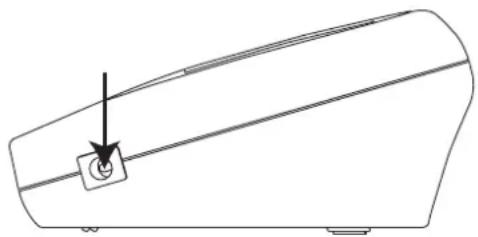
- Connect the AC adapter jack with the AC adapter connector on the right side of the unit.
- Plug the AC adapter into the wall socket.
natural_image
Pure technical line drawing of a mechanical part with a small circular feature and arrow, no text or symbols present.
Only use the optional power adapter.
10 Technical specifications
| Model No. | KD-5903 |
| Measurement | Oscillometric |
| Inflation | Automatic inflation with pump |
| Memory capacity | 3 Memory zones for each 40 memories with date and time |
| Range | Pressure: 0 ~ 300 mmHgPulse rate: 30 ~ 180 beats/min |
| Accuracy | Pressure: within ± 3 mmHgPulse rate: within ± 5% of reading |
| Power Supply | 2 X "AAA" Alkaline batteries (3 V) |
| Auto Power Off | 1 minute after last key operation |
| Operating Temperature | +5°C to +40°C |
| Operation Humidity | < 85% RH |
| Storage Temperature | -20°C to +55°C |
| Storage Humidity | < 95% RH |
| Weight (exclude batteries) | Approximately 300g (without batteries) |
| External Dimensions | 91(L) x 72(W) x 29(H) mm |
| Cuff size | 520mm x 140mm |
| Limited patient | Over 18 years old |
Classification  | • Internally powered equipment• Class II• Classification of type BF• IPX0• Not suitable for use in presence of flammable anaesthetic mixture with air or with oxygen or nitrous oxide• Continuous operation with short-time loading |
*Specifications are subject to change without notice.
The CE symbol indicates that the unit complies with the essential requirements of the directive 93/42/EEC.
11 Disposal of the device
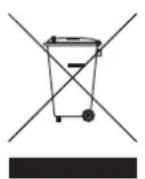
At the end of the product lifecycle, you should not throw this product into the normal household garbage but bring the product to a collection point for the recycling of electrical and electronic equipments. The symbol on the product, user guide and/or box indicate this.
Some of the product materials can be re-used if you bring them to a recycling
point. By re-using some parts or raw materials from used products you make an important contribution to the protection of the environment. Please contact your local authorities in case you need more information on the collection points in your area.
12 Topcom warranty
12.1 Warranty period
The Topcom units have a 24-month warranty period. The warranty period starts on the day the new unit is purchased. Topcom does not give any warranty on standard or rechargeable batteries (AA/AAA type). Consumables or defects causing a negligible effect on operation or value of the equipment are not covered.
The warranty has to be proven by presentation of the original or copy of the purchase receipt, on which the date of purchase and the unit-model are indicated.
12.2 Warranty handling
A faulty unit needs to be returned to a Topcom service centre including a valid purchase note. If the unit develops a fault during the warranty period, Topcom or its officially appointed service centre will repair any defects caused by material or manufacturing faults free of charge.
Topcom will at its discretion fulfill its warranty obligations by either repairing or exchanging the faulty units or parts of the faulty units. In case of replacement, color and model can be different from the original purchased unit.
The initial purchase date shall determine the start of the warranty period. The warranty period is not extended if the unit is exchanged or repaired by Topcom or its appointed service centers.
12.3 Warranty exclusions
Damage or defects caused by incorrect treatment or operation and damage resulting from use of non-original parts or accessories not recommended by Topcom are not covered by the warranty.
Topcom cordless phones are designed to work with rechargeable batteries only. The damage caused by the use of non-rechargeable batteries is not covered under warranty. The warranty does not cover damage caused by outside factors, such as lightning, water and fire, nor any damage caused during transportation. No warranty can be claimed if the serial number on the units has been changed, removed or rendered illegible.
Any warranty claims will be invalid if the unit has been repaired, altered or modified by the buyer or by unqualified, non-officially appointed Topcom service centers.
1 Inleiding
natural_image
Diagram of an electronic device showing battery pack and external circuit (no text or symbols)natural_image
Line drawing of a hand performing a physical maneuver or massage (no text or symbols)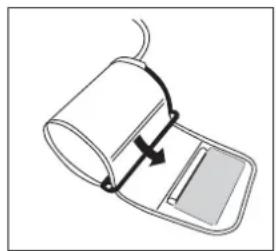
natural_image
Diagram of a medical device with a curved arrow indicating motion or force, no text or symbols present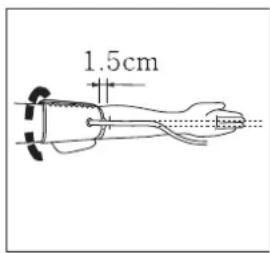
text_image
1.5cm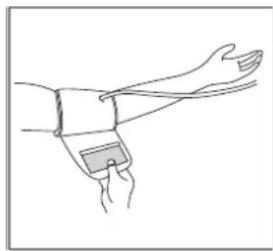
natural_image
Line drawing of a human arm with wristband and clasp (no text or symbols)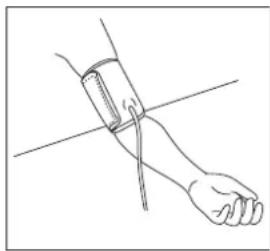
natural_image
Line drawing of a human forearm with a wristband, no text or symbols present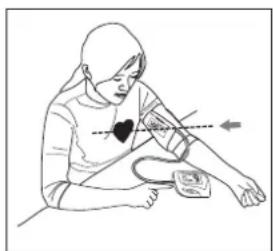
natural_image
Illustration of a person performing a blood pressure measurement with a heart symbol (no text or labels)natural_image
Line drawing of a mechanical component with a small circular feature and an arrow pointing to it (no text or symbols)
natural_image
Diagram of a battery pack with four battery cells inside and an external circuit board connected to a power outlet (no text or symbols)natural_image
Line drawing of two hands performing a physical maneuver or massage (no text or symbols)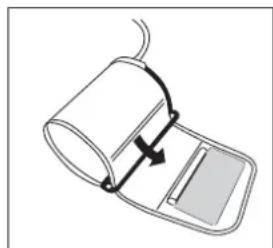
natural_image
Diagram of a medical device with a curved arrow indicating rotation or movement (no text or symbols)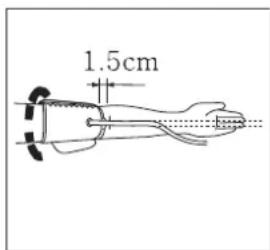
text_image
1.5cm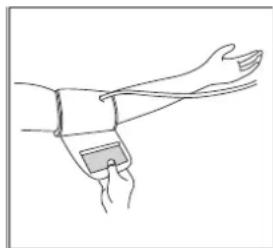
natural_image
Line drawing of a human forearm with wristband and wristpin (no text or symbols)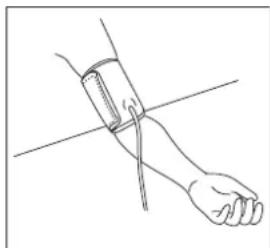
natural_image
Line drawing of a human forearm and hand holding a blood pressure gauge (no text or symbols)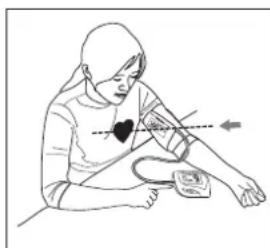
natural_image
Illustration of a person performing a heart rate measurement exercise (no text or symbols)text_image
12:18 I_M 18_D U1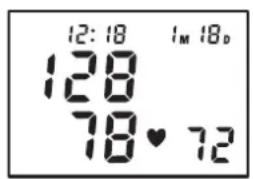
text_image
12:18 1M 18D 128 78♥ 72natural_image
Line drawing of a curved mechanical component with a small circular feature and an arrow pointing to it (no text or symbols)
heatmap
| Diastolic (mmHg)! | Hypotension | Normal | |---|---|---| | 100 | Systolic under 99 | Systolic under 139 | | 140 | Diastolic under 89 | Diastolic over 95 | | 90 | Diastolic over 160 | Diastolic over 95 | | 95 | Diastolic over 95 | Diastolic over 95 | The chart is divided into three sections based on the y-axis label 'Diastolic (mmHg)!'. The x-axis labels are 'Systolic (mmHg)!'. The legend indicates that 'Hypertension' and 'Borderline' represent different categories. The heatmap uses a color scale from light to dark to indicate intensity or frequency. The values in the top section are explicitly labeled: 'Hypertension' has an average systolic value of 160 mmHg; 'Borderline' has an average systolic value of 140 mmHg; 'Hypotension' has an average systolic value of 139 mmHg. The heatmap is grouped into three sections based on the x-axis label 'Systolic (mmHg)!'.natural_image
Diagram of a battery pack with four battery cells and an external circuit block (no text or symbols)natural_image
Line drawing of a hand performing a physical maneuver or massage (no text or symbols)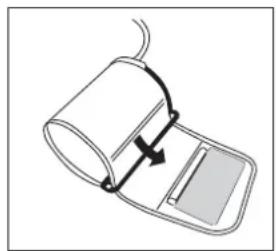
natural_image
Diagram of a medical device with a curved arrow indicating motion or force, no text or symbols present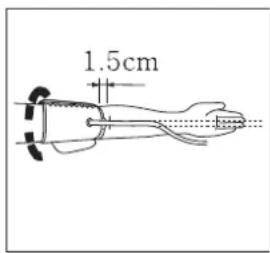
text_image
1.5cm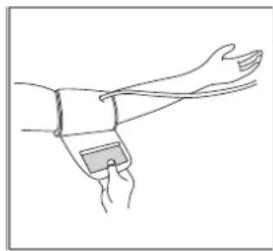
natural_image
Line drawing of a human arm with wristband and clasp (no text or symbols)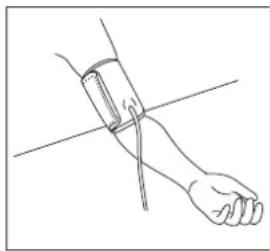
natural_image
Line drawing of a human forearm with a bandage and cord, no text or symbols present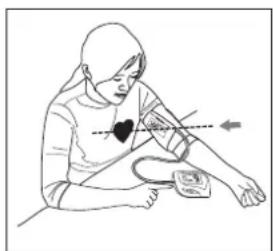
natural_image
Illustration of a person performing a blood pressure measurement with a heart symbol (no text or labels)natural_image
Pure technical line drawing of a mechanical component with a labeled arrow and circular feature (no text or symbols)10 Technische Daten
heatmap
| Region | Diastolic (mmHg) | Systolic (mmHg) | | :--- | :--- | :--- | | Hypertension | 95 | Systolic over 160, Diastolic over 95 | | Borderline | 90 | Systolic 140 ~159, Diastolic 90 ~ 94 | | Hypotension | 90 | Systolic under 139, Diastolic under 89 | Systolic under 99 Normal Systolic under 139 Diastolic under 89natural_image
Diagram of a battery pack with four battery cells and an external circuit block (no text or symbols)natural_image
Line drawing of two hands performing a physical maneuver on a forearm (no text or symbols)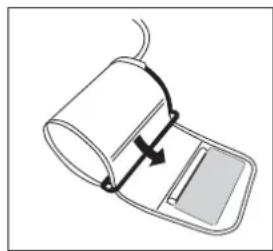
natural_image
Diagram of a medical device with a curved arrow indicating rotation or movement (no text or symbols)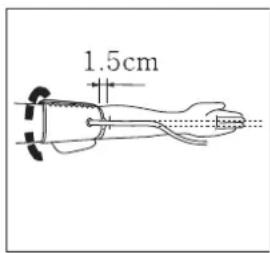
text_image
1.5cm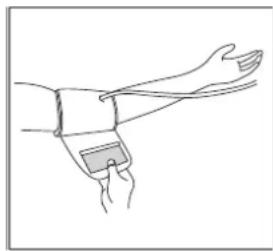
natural_image
Line drawing of a human forearm with wristband and wristpin (no text or symbols)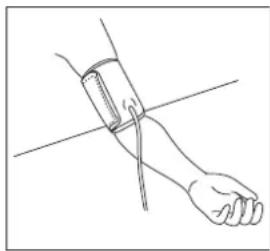
natural_image
Line drawing of a human hand holding a blood pressure monitor (no text or symbols)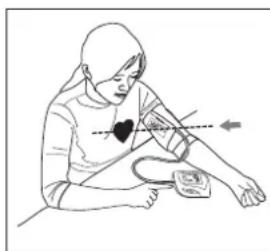
natural_image
Illustration of a person measuring blood pressure using a handbar and sphygmomanometer (no text or symbols)natural_image
Line drawing of a mechanical component with a small circular feature and an arrow pointing to it (no text or symbols)
heatmap
| Diastolic (mmHg)! | Hypotension | Normal | |---|---|---| | 100 | Systolic under 99 | Systolic under 139 | | 140 | Diastolic under 89 | Diastolic over 95 | | 160 | Diastolic over 160 | Diastolic over 95 | Borderline Hypertension Borderline Hypotension Borderline Diastolic over 160 Diastolic over 95 Diastolic over 94 Systolic 140 ~159 Diastolic 90 ~ 94natural_image
Diagram of a battery pack with four battery cells and an external circuit block (no text or symbols)natural_image
Line drawing of a hand performing a physical maneuver or massage (no text or symbols)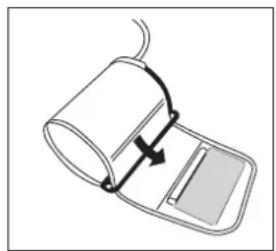
natural_image
Diagram of a medical device with a curved arrow indicating motion or force, no text or symbols present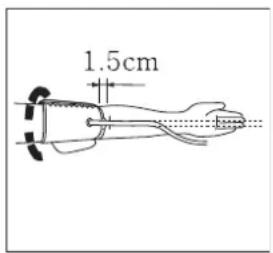
text_image
1.5cm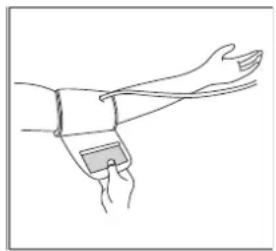
natural_image
Line drawing of a human arm with wristband and clasp (no text or symbols)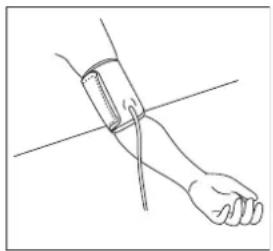
natural_image
Line drawing of a human forearm and hand holding a blood pressure gauge (no text or symbols)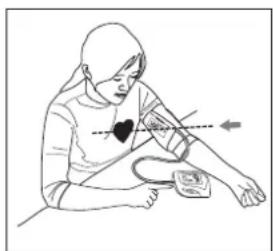
natural_image
Illustration of a person using a pressure monitor with measurement markings (no text or symbols)natural_image
Line drawing of a mechanical component with a small circular feature and an arrow pointing to it (no text or symbols)
heatmap
| Diastolic (mmHg) | Hypotension | Normal | |---|---|---| | 100 | Systolic under 99 | Systolic under 139 | | 140 | Diastolic under 89 | Diastolic over 95 | | 160 | Diastolic over 160 | Diastolic over 95 | Borderline: Systolic 140 ~159 Borderline: Diastolic 90 ~ 94 Diportional: Hypotension Diportional: Normalnatural_image
Diagram of a battery pack with four battery cells and an external circuit block (no text or symbols)natural_image
Line drawing of two hands performing a physical maneuver or massage (no text or symbols)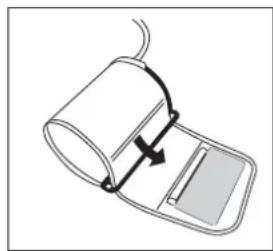
natural_image
Diagram of a medical device with a curved arrow indicating rotation or movement (no text or symbols)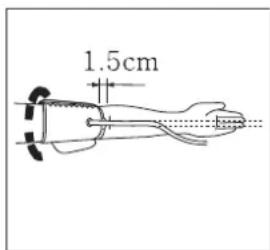
text_image
1.5cm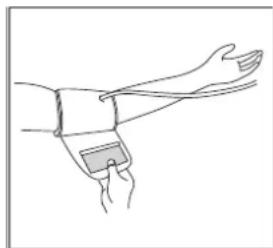
natural_image
Line drawing of a human forearm with wristband and wristpin (no text or symbols)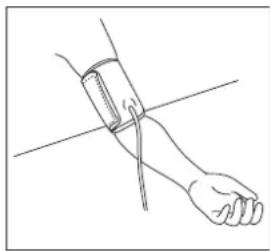
natural_image
Line drawing of a human hand holding a blood pressure monitor (no text or symbols)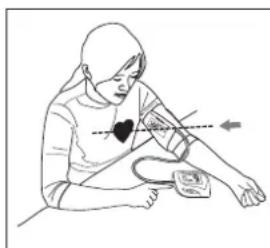
natural_image
Illustration of a person performing a heart rate measurement exercise (no text or symbols)natural_image
Line drawing of a mechanical component with a small circular feature and an arrow pointing to it (no text or symbols)
natural_image
Diagram of a battery pack with four battery cells and an external circuit board (no text or symbols)natural_image
Line drawing of two hands performing a physical maneuver on a forearm (no text or symbols)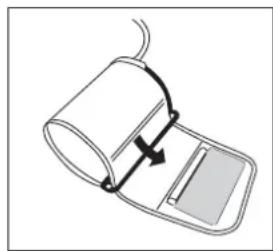
natural_image
Diagram of a medical device with a curved arrow indicating rotation or movement (no text or symbols)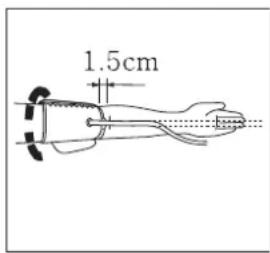
text_image
1.5cm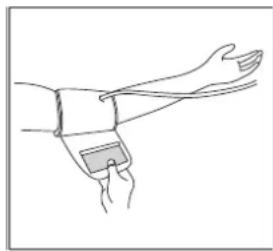
natural_image
Line drawing of a human forearm and hand wearing a wristband (no text or symbols)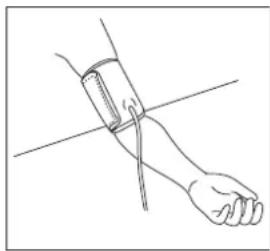
natural_image
Line drawing of a human hand holding a blood pressure monitor (no text or symbols)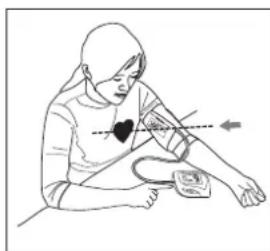
natural_image
Illustration of a person measuring blood pressure using a handbar and sphygmomanometer (no text or symbols)natural_image
Line drawing of a mechanical component with an arrow pointing to a circular feature (no text or symbols)
Bruk kun den valgfrie strømadapteren.
natural_image
Diagram of an electronic device showing battery pack and external circuit (no text or symbols)natural_image
Line drawing of two hands performing a physical maneuver or massage (no text or symbols)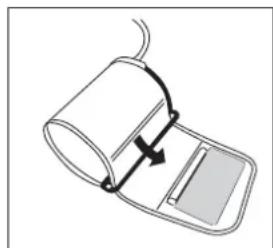
natural_image
Diagram of a medical or laboratory device with a curved arrow indicating rotation or movement (no text or symbols)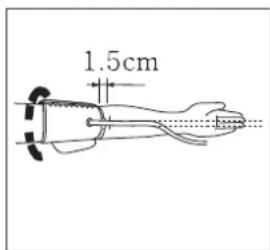
text_image
1.5cm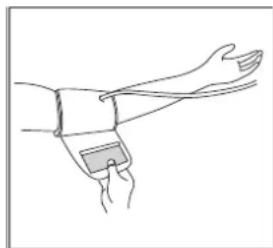
natural_image
Line drawing of a human forearm with wristband and wristpin (no text or symbols)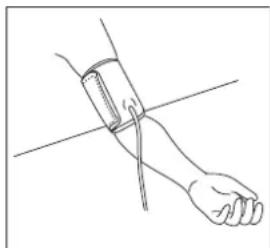
natural_image
Line drawing of a human forearm and hand holding a blood pressure gauge (no text or symbols)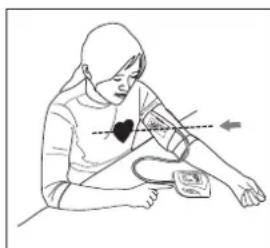
natural_image
Illustration of a person performing a heart rate measurement exercise (no text or symbols)natural_image
Line drawing of a mechanical component with a small circular feature and an arrow pointing to it (no text or symbols)
natural_image
Diagram of a battery pack with four battery cells and an external circuit board (no text or symbols)natural_image
Line drawing of a hand performing a physical maneuver or massage (no text or symbols)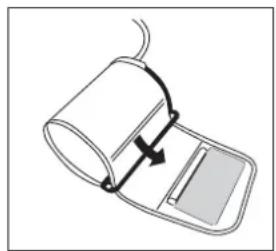
natural_image
Diagram of a medical device with a curved arrow indicating motion or force, no text or symbols present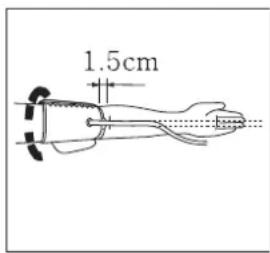
text_image
1.5cm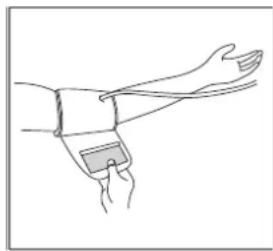
natural_image
Line drawing of a human arm with wristband and clasp (no text or symbols)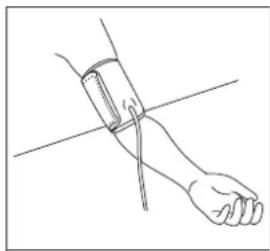
natural_image
Line drawing of a human forearm with a wristband and bar, no text or symbols present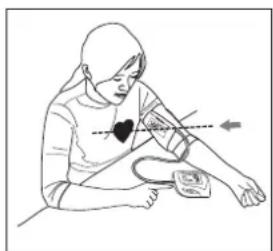
natural_image
Illustration of a person performing a blood pressure measurement with a heart symbol (no text or labels)natural_image
Line drawing of a mechanical component with a circular button and arrow indicator (no text or symbols)
heatmap
| Diastolic (mmHg) | Hypotension | Borderline | Hypertension | |---|---|---|---| | 100 | Systolic under 99 | Systolic 140 ~ 159 | Systolic over 160 | | 140 | Normal | Diastolic 90 ~ 94 | Diastolic over 95 | | 160 | Normal | Diastolic under 89 | Diastolic over 95 |natural_image
Diagram of a battery pack with four battery cells and an external circuit board (no text or symbols)natural_image
Line drawing of a hand performing a physical maneuver or massage (no text or symbols)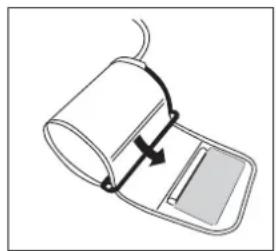
natural_image
Diagram of a medical device with a curved arrow indicating motion or force, no text or symbols present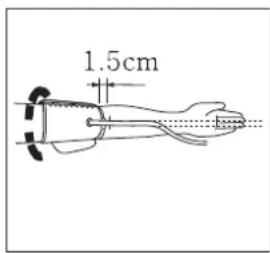
text_image
1.5cm
natural_image
Line drawing of a human arm with wristband and clasp (no text or symbols)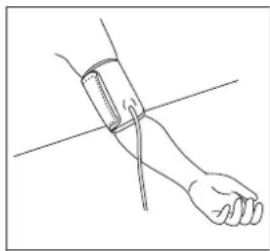
natural_image
Line drawing of a human forearm with a wristband and bar, no text or symbols present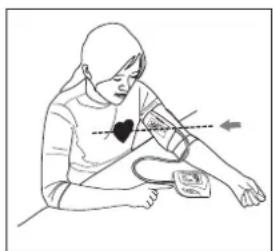
natural_image
Illustration of a person performing a blood pressure measurement with a heart symbol (no text or labels)text_image
12:18 I_M 18_D U1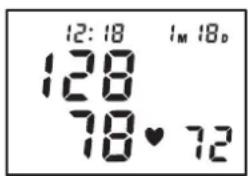
text_image
12:18 1M 18D 128 78♥ 72natural_image
Simple line drawing of a curved mechanical component with a small circular feature and an arrow pointing to it (no text or symbols)
heatmap
| Diastolic (mmHg)! | Systolic (mmHg)! | Diastolic (mmHg)! | |---|---|---| | 95 | 160 | over 95 | | 90 | 140 ~ 159 | 90 ~ 94 | | 90 | 139 | under 89 | Hypotension Systolic under 99 Normal Systolic under 139 Diastolic under 89natural_image
Diagram of a battery pack with four battery cells and an external circuit block (no text or symbols)text_image
⑥ ⑤ ④ ③ ② MEM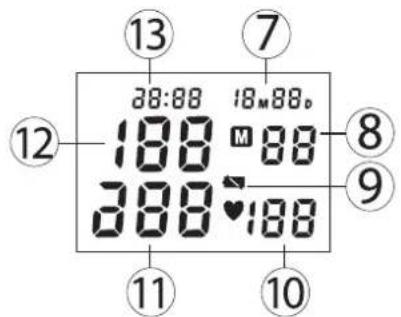
text_image
13 7 28:08 18M88p 188 M 88 388 ♥ 188 12 8 9 11 10natural_image
Line drawing of two hands performing a physical maneuver or massage (no text or symbols)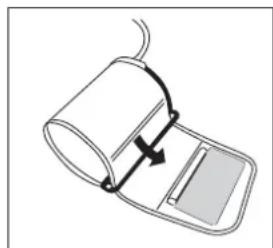
natural_image
Diagram of a medical or laboratory device with a curved arrow indicating rotation or movement (no text or symbols)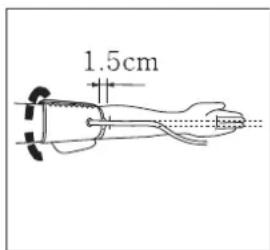
text_image
1.5cm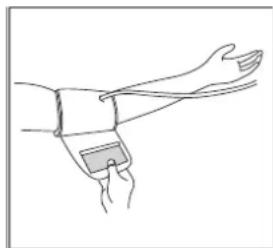
natural_image
Line drawing of a human forearm with wristband and wristpin (no text or symbols)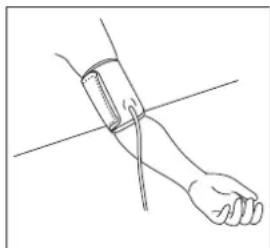
natural_image
Line drawing of a human forearm and hand holding a blood pressure gauge (no text or symbols)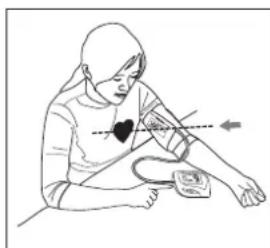
natural_image
Illustration of a person performing a heart rate measurement exercise (no text or symbols)natural_image
Line drawing of a mechanical component with a small circular feature and an arrow pointing to it (no text or symbols)
natural_image
Diagram of a battery pack with four battery cells and an external circuit block (no text or symbols)natural_image
Line drawing of two hands performing a physical maneuver or massage (no text or symbols)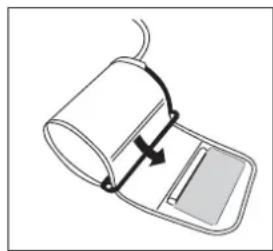
natural_image
Diagram of a medical device with a curved arrow indicating rotation or movement (no text or symbols)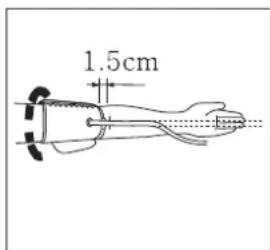
text_image
1.5cm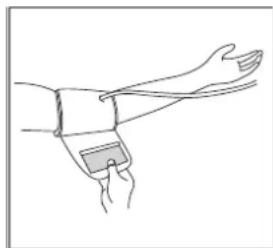
natural_image
Line drawing of a human forearm with wristband and wristpin (no text or symbols)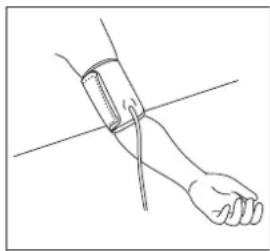
natural_image
Line drawing of a human hand holding a blood pressure monitor (no text or symbols)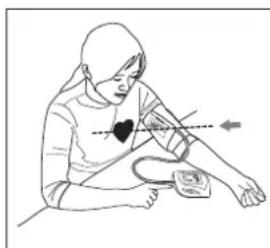
natural_image
Illustration of a person performing a heart rate measurement exercise (no text or symbols)natural_image
Line drawing of a mechanical component with a circular button and arrow indicator (no text or symbols)
heatmap
| Diastolic (mmHg) | Hypotension Systolic under 99 | Normal Systolic under 139 | Diastolic under 89 | |---|---|---|---| | 95 | Hypertension | | Systolic over 160, Diastolic over 95 | | 90 | Borderline | | Systolic 140 ~159, Diastolic 90 ~ 94 | | 90 | Hypotension | | Systolic under 139, Diastolic under 89 | Systolic (mmHg) : 100, Diastolic (mmHg) : 140, Diastolic (mmHg) : 160 Systolic (mmHg) : 100, Diastolic (mmHg) : 140, Diastolic (mmHg) : 160natural_image
Diagram of an electronic device showing battery pack and connector (no text or symbols)natural_image
Line drawing of a hand performing a physical maneuver or massage (no text or symbols)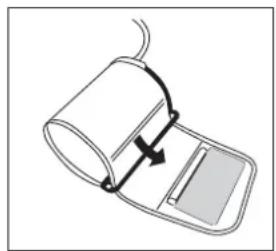
natural_image
Diagram of a medical device with a curved arrow indicating motion or force, no text or symbols present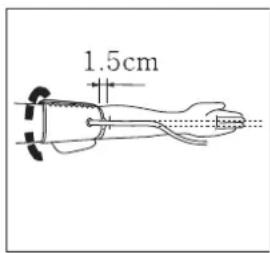
text_image
1.5cm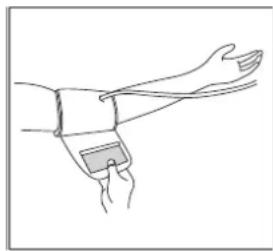
natural_image
Line drawing of a human arm with wristband and clasp (no text or symbols)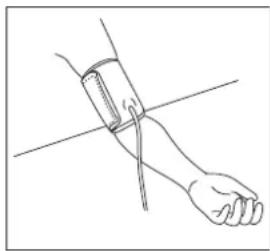
natural_image
Line drawing of a human forearm with a wristband and bar, no text or symbols present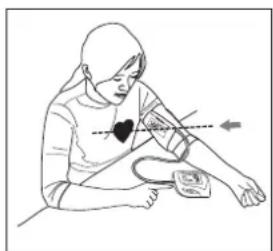
natural_image
Illustration of a person performing a blood pressure measurement with a heart symbol (no text or labels)natural_image
Simple line drawing of a curved mechanical component with an arrow pointing to a circular feature (no text or symbols)
natural_image
Diagram of a battery pack with four battery cells and an external circuit block (no text or symbols)natural_image
Line drawing of a hand performing a physical maneuver or massage (no text or symbols)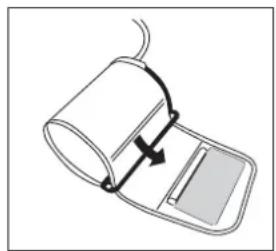
natural_image
Diagram of a medical device with a curved arrow indicating motion or force, no text or symbols present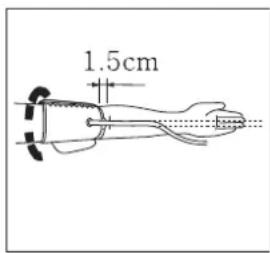
text_image
1.5cm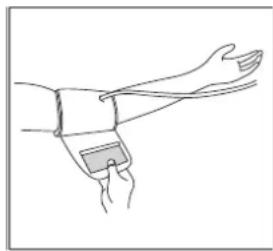
natural_image
Line drawing of a human arm with wristband and clasp (no text or symbols)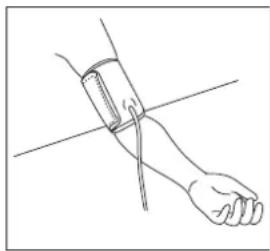
natural_image
Line drawing of a human forearm with a wristband and bar, no text or symbols present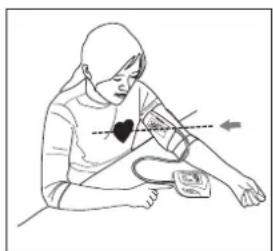
natural_image
Illustration of a person performing a blood pressure measurement with a heart symbol (no text or labels)natural_image
Line drawing of a mechanical component with a small circular feature and an arrow pointing to it (no text or symbols)
heatmap
| Diastolic (mmHg)! | Systolic (mmHg)! | Diastolic (mmHg)! | |---|---|---| | 95 | 160 | over 95 | | 90 | 140 ~ 159 | 90 ~ 94 | | 90 | under 99 | | | 90 | | Normal | | 100 | | Diastolic under 89 | Systolic under 139 Systolic over 139 Diastolic under 139 Diastolic over 160natural_image
Diagram of a battery pack with four battery cells and an external circuit board (no text or symbols)natural_image
Line drawing of a hand performing a massage or physical therapy technique on a forearm (no text or symbols)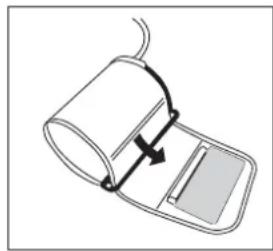
natural_image
Diagram of a medical device with a curved arrow indicating rotation or movement (no text or symbols)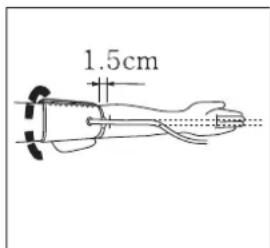
text_image
1.5cm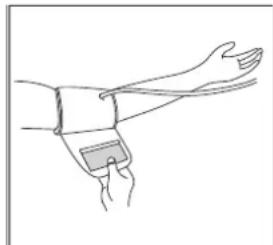
natural_image
Line drawing of a human wrist with wristband and wrist strap (no text or symbols)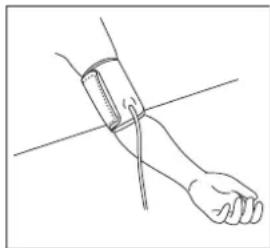
natural_image
Line drawing of a human hand holding a blood pressure gauge (no text or symbols)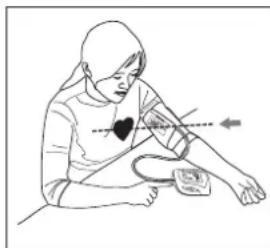
natural_image
Illustration of a person performing a physical therapy or pulse diagnosis (no text or symbols present)8.
text_image
12:18 I_M 18_D U1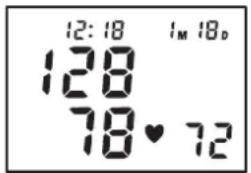
text_image
12:18 128 78♥72 1M 18Dnatural_image
Line drawing of a mechanical component with a small circular button and arrow pointing to it (no text or symbols)
heatmap
| Diastolic (mmHg)! | Systolic (mmHg)! | Diastolic (mmHg)! | |---|---|---| | 95 | 160 | over 95 | | 90 | 140 ~ 159 | 90 ~ 94 | | 90 | under 99 | | | 90 | | Normal | | 100 | | Diastolic under 89 | Systolic under 139 Systolic under 160natural_image
Diagram of a battery pack with four battery cells and an external circuit block (no text or symbols)natural_image
Line drawing of two hands performing a physical maneuver or massage (no text or symbols)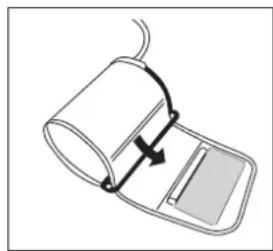
natural_image
Diagram of a medical device with a curved arrow indicating rotation or movement (no text or symbols)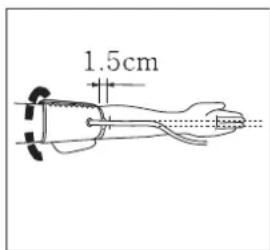
text_image
1.5cm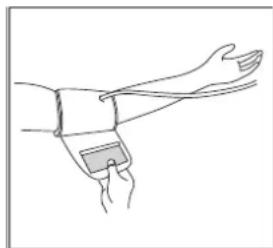
natural_image
Line drawing of a human forearm with wristband and wristpin (no text or symbols)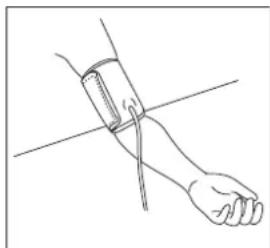
natural_image
Line drawing of a human forearm and hand holding a blood pressure gauge (no text or symbols)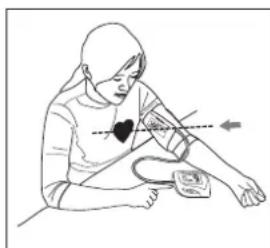
natural_image
Illustration of a person performing a heart rate measurement exercise (no text or symbols)natural_image
Line drawing of a mechanical component with a small circular feature and an arrow pointing to it (no text or symbols)
visit our website www.topcom.net