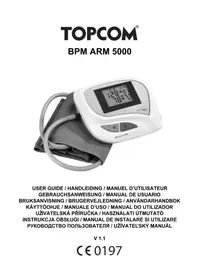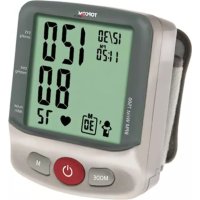
BPM Wrist 7500 - Blood pressure monitor TOPCOM - Free user manual and instructions
Find the device manual for free BPM Wrist 7500 TOPCOM in PDF.



User questions about BPM Wrist 7500 TOPCOM
0 question about this device. Answer the ones you know or ask your own.
Ask a new question about this device
Download the instructions for your Blood pressure monitor in PDF format for free! Find your manual BPM Wrist 7500 - TOPCOM and take your electronic device back in hand. On this page are published all the documents necessary for the use of your device. BPM Wrist 7500 by TOPCOM.
USER MANUAL BPM Wrist 7500 TOPCOM
UK The features described in this manual are published with reservation to modifications.
Authorized Representative in the European Community
Topcom Europe NV,
Grauwmeer 17
3001 Heverlee, Belgium,

Manufacturer
Health & Life Co., Ltd.
9F No.186, Jian Yi Road
Chung Ho City, Taipei, Taiwan
This Blood Pressure Monitor complies with the EC Directives and bears the CE Mark "CE 0197".
This product is in compliance with the essential requirements and other relevant provisions of the directive 93/42/EEC.
The declaration of conformity can be found on:
http://www.topcom.net/support/cedeclarations.php
The quality of the device has been verified and is in line with the provisions of the EC council directive 93/42/EEC (EN IEC60601-1-General requirements for safety, EN IEC 60601-1-2:2001 - Electromagnetic compatibility-Requirements and tests) dated 14 June 1993 concerning medical devices and the EN performance standards as follow:
• EN 1060-1 Non-invasive sphygmomanometers - General requirements
• EN 1060-3 Non-invasive sphygmomanometers - Supplementary requirements for electromechanical blood pressure measuring systems.
- EN 1060-4 Non-invasive sphygmomanometers - Test procedures to determine the overall system accuracy of automated non-invasive sphygmomanometers.
1 Introduction
Congratulations with your purchase of the Topcom BPM Wrist 7500. This fully automatic, wrist mounted blood pressure monitor is both easy to use and ideally suited for daily measurements. The large display includes systolic, diastolic and pulse, all clearly shown at the completion of each reading.
In addition, you can store up to 40 measurements per Memory Zone, ideal for users who want to monitor and track their blood pressure on a regular basis. The BPM Wrist 7500 is compact and portable, making it ideal for home use and travel.


Please read this manual carefully before use. For specific information on your own blood pressure, contact your physician. Put the user guide away in a safe place for future reference.
2 Safety instructions
- This product is for household use only. It is not intended as a substitute for consultation with your doctor.
- For users diagnosed with common arrhythmia (atrial or ventricular premature beats or atrial fibrillation), diabetes, poor circulation of blood, kidney problems, or for users suffered from stroke, or for unconscious users, the device might not be suitable for use. Consult your doctor in case of any doubt.
- The unit should not be operated by children so to avoid hazardous situations.
- The unit contains high-precision assemblies. Therefore, avoid extreme temperatures, humidity, and direct sunlight. Avoid dropping or strongly shocking the main unit, and protect it from dust.
- Leaky batteries can damage the unit. Remove the batteries when the unit is not used for a long time.
- Do not press the start key when the cuff is not placed around the wrist.
- Do not disassemble the main unit or cuff.
- If the unit is stored in a cold place, allow it to acclimate at room temperature before use.
- Clean the blood pressure monitor body and the cuff carefully with a slightly damp, soft cloth. Do not press. Do not bend the pre-formed cuff inside out. Do not wash the cuff or use chemical cleaner on it. Never use thinner, alcohol or petrol (gasoline) as cleaner.
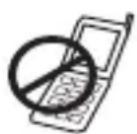
To avoid inaccurate results caused by electromagnetic interference between electrical and electronic equipments, do not use the device near a cell phone or microwave oven.
3 Helpfull tips
Here are a few helpful tips to help you obtain more accurate readings:
- Do not measure your blood pressure immediately after consuming a large meal. To obtain more accurate readings, please wait one hour before measuring.
- Do not smoke or drink alcohol before measuring your blood pressure.
- You should not be physically tired or exhausted while taking a measurement.
- It is important that you relax during measurement. Try to take 15-minutes rest before a reading.
- Do not take measurements if you are under stress or under tension.
• Take your blood pressure at normal body temperature. If you are feeling cold or hot, wait a while before taking a measurement. - If the monitor is stored at very low temperature (near freezing), have it placed at a warm location for at least one hour before using it.
- Wait about 5 minutes before taking the next pressure measurement.
4 Disposal of the device
At the end of the product lifecycle, you should not throw this product into the normal household garbage but bring the product to a collection point for the recycling of electrical and electronic equipments. The symbol on the product, user guide and/or box indicate this.
Some of the product materials can be re-used if you bring them to a recycling point. By re-using some parts or raw materials from used products you make an important contribution to the protection of the environment. Please contact your local authorities in case you need more information on the collection points in your area.
5 Blood pressure
5.1 What is blood pressure?
Blood pressure is the pressure exerted on the artery tube while blood flows through the arteries. The pressure measured when the heart contracts and sends blood out of the heart is systolic (highest). The pressure measured when
the heart dilates with blood flowing back into the heart is called diastolic (lowest) blood pressure.
5.2 Why measure your blood pressure?
Among the various health problems afflicting modern people, problems associated with high blood pressure are by far the most common. High blood pressure's dangerously strong correlation with cardiovascular diseases
and high morbidity has made measuring blood pressures a necessity of identifying those at risk.
5.3 Blood pressure standard
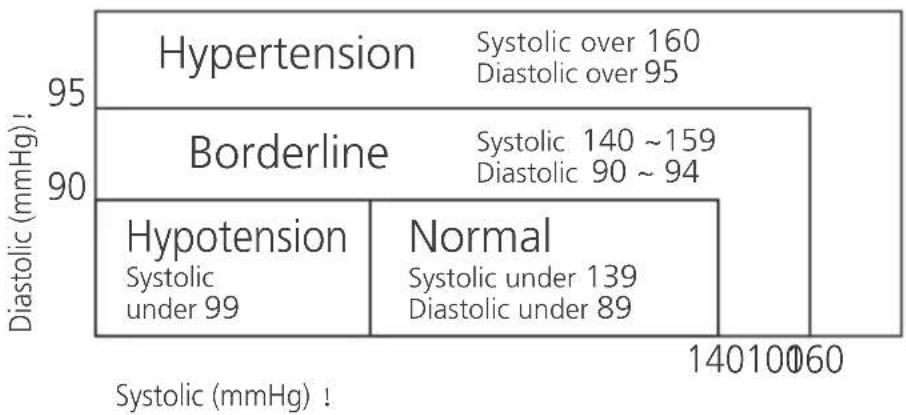
The World Health Organization (WHO) and National High Blood Pressure Education Program has developed a Blood pressure standard, according to which areas of low and high-risk blood pressure are identified. This standard however, is a general guideline as individual's blood pressure varies among different people and different groups...etc.
heatmap
| Region | Diastolic (mmHg) | | :--- | :--- | | Hypertension | Systolic over 160, Diastolic over 95 | | Borderline | Systolic 140 ~159, Diastolic 90 ~ 94 | | Hypotension | Systolic under 139, Diastolic under 89 | | Normal | Systolic under 139, Diastolic under 89 |It is important that you consult with your physician regularly. Your physician will tell you your normal blood pressure range as well as the point at which you will be considered at risk.
5.4 Blood pressure fluctuation
Blood pressure fluctuates all the time!
You should not be worried if you encountered two or three measurements at high levels. Blood pressure changes over the month and even throughout the day depending on circumstances (state of mind, temperature, ...)
6 Battery installation
natural_image
Technical line drawing of a mechanical component with no visible text or symbols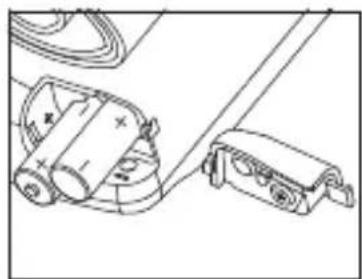
natural_image
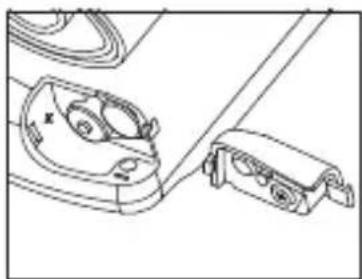
Technical line drawing of mechanical components including a cylindrical device and a bracket (no text or symbols)- Open the battery compartment by pulling the cover away
- Insert 2 AAA non - rechargeable batteries. Follow the polarity as illustrated.
- Re-install the battery cover.

Do not shortcircuit & dispose of in fire. Remove the battery if this device is not going to be used for a long period.
The batteries must be replaced when the battery low icon is displayed.
7 Buttons
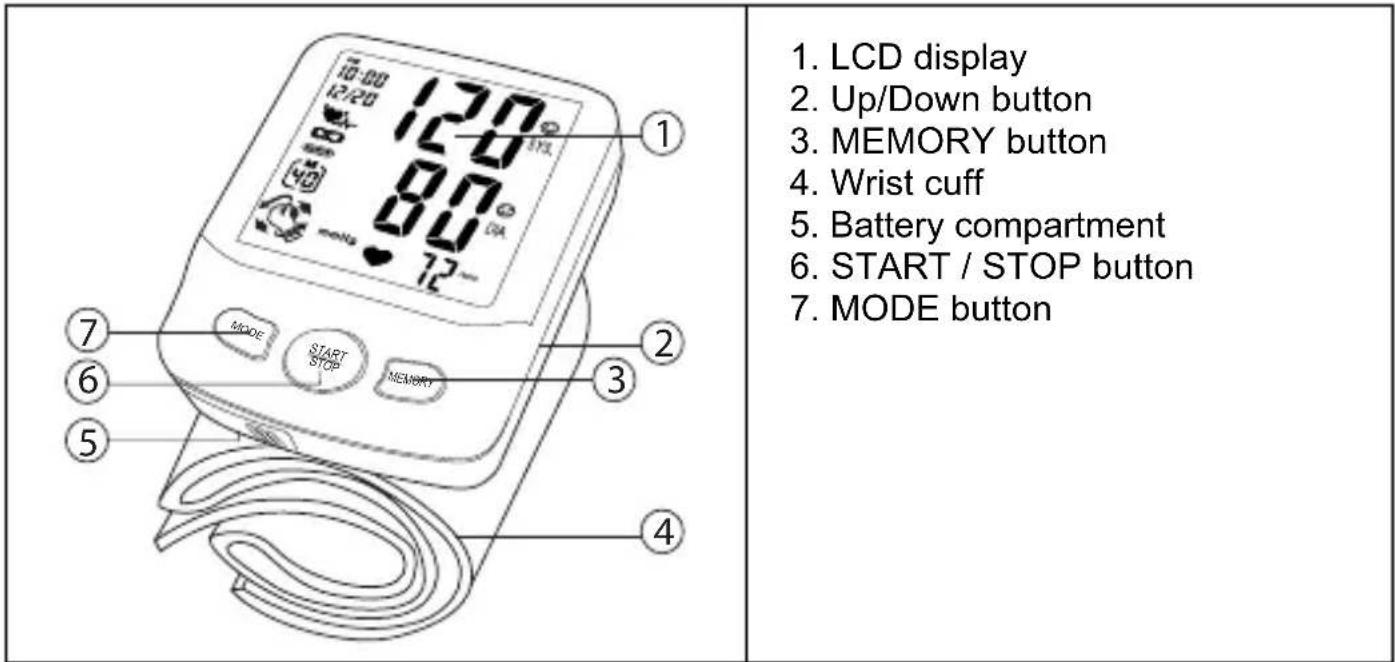
text_image
1. LCD display 2. Up/Down button 3. MEMORY button 4. Wrist cuff 5. Battery compartment 6. START / STOP button 7. MODE button8 Display
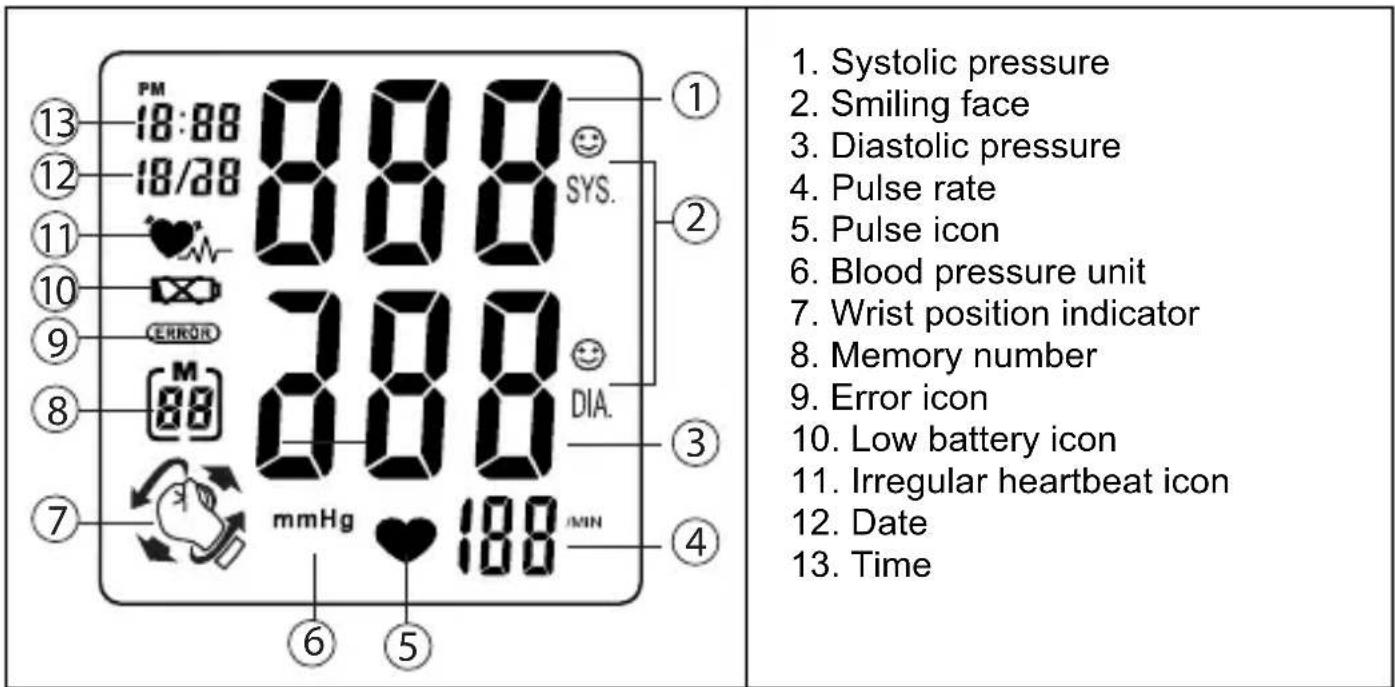
text_image
13 PM 18:88 0.00 12 18/28 SYS. 11 10 9 ERROR 8 7 mmHg 188 MIN 6 5 1 Systolic pressure 2 Smiling face 3 Diastolic pressure 4 Pulse rate 5 Pulse icon 6 Blood pressure unit 7 Wrist position indicator 8 Memory number 9 Error icon 10 Low battery icon 11 Irregular heartbeat icon 12 Date 13 Time9 Settings
9.1 Time & date adjustment
In stand-by:
- P r e s s t h e MODE button, the month will blink on the display.
- Press the UP or DOWN button to change the month.
- Press the MODE button to confirm the month. The day will blink on the display.
- Change the day, hours and minutes as described above, using the UP or DOWN button to change and the MODE button to confirm every setting.
After setting the minutes, the device is ready to use.
9.2 Self-management function
The monitor allows you to pre-set your personalized values of blood pressure which should be recommended or decided by your physician or medical professional.
If the Systolic or Diastolic rate of the measurement is greater than your pre-set personalized level, the digit of the result on the screen will flash to alert.
Besides, either the Systolic or Diastolic rate of the measurement is equal to or less than your pre-set personalized levels, or you don't set the personalized levels, the smiling face icon will appear and flash on screen after each measurement.
3 different personal levels can be set. The levels are related to the memory zone (see chapter 14)
To set your personal blood pressure levels:
After setting the minutes, the setting of personal Blood pressure level limits is not active. (--) is displayed.
- Press the MODE button, the Systolis pressure limit is flashing.
- Press the UP or DOWN button to set your personal systolic pressure limit.
- Press the MODE button to confirm. The diastolic pressure level is flashing.
- Press the UP or DOWN button to set your personal diastolic pressure limit.
- Press the MODE button to confirm.
Repeat previous steps for setting the levels for memory zone 2 and 3.
After setting you personal blood pressure level, the 3 positioning system can be (de-)activated.
9.3 3D Wrist position system
Keeping the wrist at your heart level while measuring is extremely important to get accurate blood pressure values.
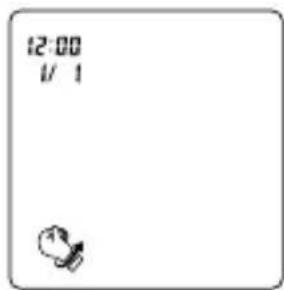
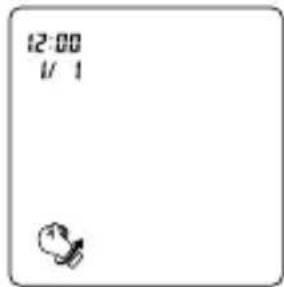
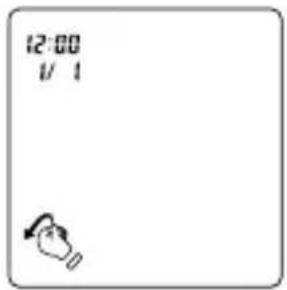
This monitor features a Wrist Position Sensor which guides you to adjust your posture by the WRIST POSITION INDICATOR symbols shown on screen and helps to determine your optimal height of the wrist for measurement.
Wrist position indicator function in measurement
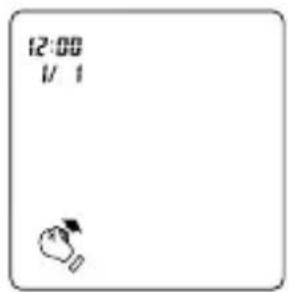
text_image
12:00 1/1Move wrist upwards Move wrist downwards
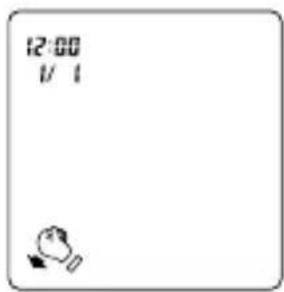
text_image
12:00 1/1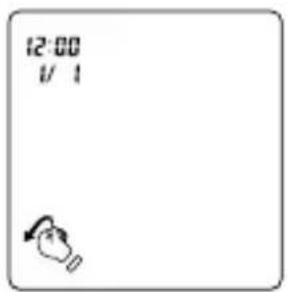
text_image
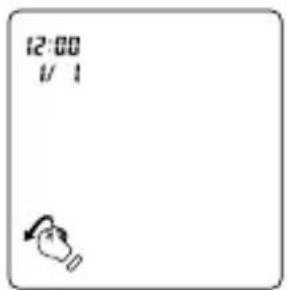
12:00 1/1Rotate wrist counterclockwise
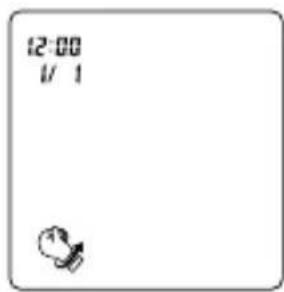
text_image
12:00 1/ 1Rotate wrist clockwise
To switch the 3d positioning on or off:
After setting your personal blood pressure levels:
- Press the MODE button, the '3d On' is displayed.
- Press the UP or DOWN button to set the function on of off.
- P r e s s t h e MODE button to confirm.
• The monitor is ready to be used.
10 Applying the cuff
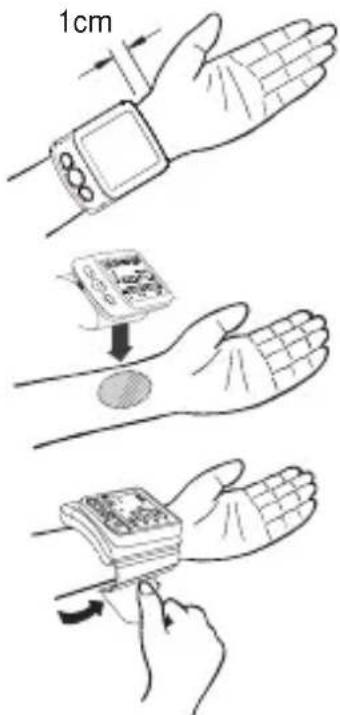
- Remove all watches, jewelry, etc. prior to attaching the wrist monitor. Clothing sleeves should be rolled up and the cuff should be wrapped on bare skin for correct measurements. Apply cuff to left wrist with palm facing up.
- Make sure the edge of the cuff is about 1 cm from the palm. In order to insure accurate-measurements.
- Fasten the velcro strap securely around your wrist so there is no extra space between the cuff and the wrist. If the cuff is not wrapped tight enough, the measurement values will be false.
- If your physician has diagnosed you with poor circulation on your left arm, place the cuff around your right wrist.
text_image
1cm11 Measuring posture
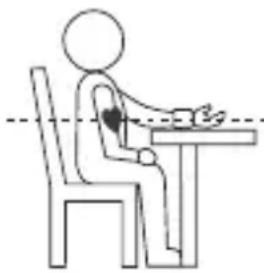
- Relax your entire body, especially the area between your elbow and fingers. Place your elbow on a table so that the cuff is at the same level as your heart.

Your heart is located slightly below your arm pit.
- If the cuff is not at the same level as your heart or if you can not keep your arm completely still throughout the reading, use a soft object such as folded towel to support your arm.
- Turn your palm upwards. Sit upright in a chair, and take 5-6 deep breaths. Avoid leaning back while the measurement is being taken.
natural_image
Simple line drawing of a person sitting at a table with a heart symbol on the arm (no text or symbols present)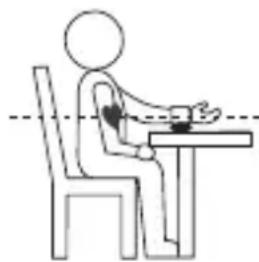
natural_image
Simple line drawing of a person sitting at a desk with hands placed on the table, no text or symbols present.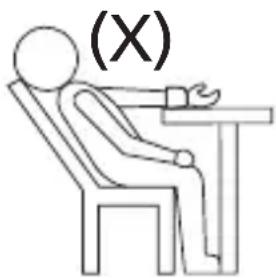
text_image
(X)12 Measurement
12.1 Important
- This monitor automatically switches off 1 minute after the last key operation.
- To interrupt the measurement, simply press any key. The cuff will deflate immediately after a key is pressed.
- During the measurement, do not talk or move your arm or hand muscles.
- The result will be stored automatically in the selected Memory Zone. Select the desires Memory Zone before measurement (see chapter §14)
13 Procedure
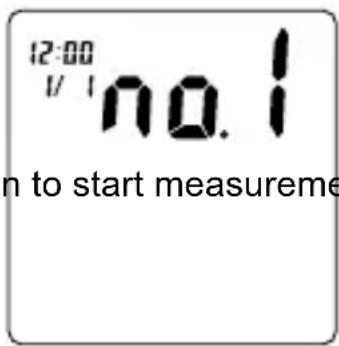
- Press the START/STOP button to activate the display.
- Press the UP or DOWN button to select the desired memory zone.
- Press the START/STOP button to start measurement.
- The 3d positioning system will help you to position your wrist at the correct level.
- When your wirst is at the correct position, the cuff will inflate to the level that is right for you.
- When the right level is reached, the cuff will deflate.
text_image
12:00 1/1 no.1 n to start measuremeThis monitor will re-inflate automatically to approximately 220mmHg if the system detects that your body needs more pressure to measure your blood pressure.
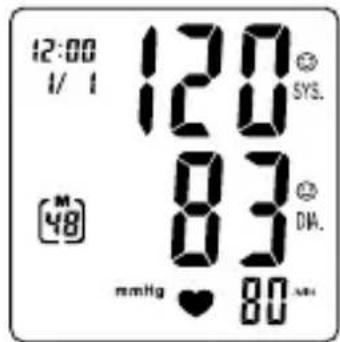
- When the measurement is completed, systolic, diastolic and pulse will be shown simultaneously on the LCD screen.
text_image
12:00 1/ 1 120 SYS. 83 DIA. mmHg ♥ 80 MHz13.1 Display icons
- If the Systolic or Diastolic rate of the result is greater than your pre-set personalized level (see chapter 9.3), the digit of Systolic or Diastolic rate will flash.
- If the Systolic or Diastolic rate of the result is equal to or less than your pre-set personalized level, the smiling face icon will flash.
- When a mistake was detected during measurement the Error icon appears on the display.
13.2 Irregular heartbeat (IHB)
The appearance of this symbol, ^1 signifies that a certain pulse irregularity was detected during measurement.
Talking, moving, shaking or an irregular pulse during the measurement can result in the appearance of this icon.
Usually this is not a cause for concern, however if the symbol appears often, we recommend you seek medical advice.
And please note that the device does not replace a cardiac examination, but serves to detect pulse irregularities at an early stage.

The irregular heart beat detected record wont be stored in memory.
14 Memory
The BPM Wrist 7500 has 3 Memory zones. Each can store up to 40 measurements including the date and time The result will be stored automatically in the selected Memory Zone after the measurement.
To recall measurement results:
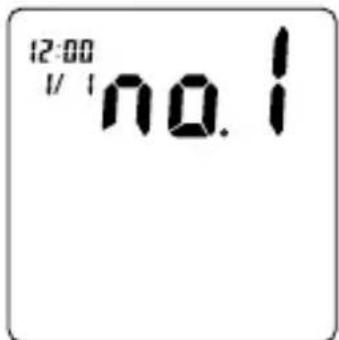
text_image
12:00 I/ I no.1- Press the START/STOP button to activate the display.
- Press the UP or DOWN button to select the desired memory zone.
- Press the MEMORY button to see the average of all measurement results [A]
- Press the UP button repeatedly to see prior stored measurement results.
- To stop reading the data, press the START/STOP button to switch back to standby.
To erase all data from one memory zone:
- P r e s s t h e START/STOP button to activate the display
- Press the UP or DOWN button to select the desired memory zone.
- Press the MEMORY button to see the average of all measurement results.
- Press the MODE and the DOWN button simultaneously to erase all data from the selected memory zone.
15 Technical specifications
| Power source | 3V DC: Two LR03 (AAA) Non rechargeable batteriesOscillometric |
| Measurement method | Pressure: 0 ~ 300 mmHg |
| Measurement zone | Pulse: 40 ~ 199 beats/minute |
| Pressure: ± 3 mmHg | |
| Accuracy | Pulse: within ± 5% of reading |
| Semi-conductor | |
| Pressure sensor | Pump driven |
| Inflation | Automatic Pressure release valve |
| Deflation | 3 Memory zones for each 40 memories |
| Memory capacity | 1 minute after last key operation |
| Auto-shut-off | +10°C ~ + 40°C |
| Operation environment | ≤85% RH |
| -20°C ~ + 70°C | |
| Storage environment | ≤85% RH |
| Weight | 148g (including batteries) |
| Wrist circumference | 135 ~ 195 mm |
| Limited patient | Over 18 years old |
| Dimensions | 74(L) x 84(W) x 32(H) mm |
| K.B. | Short time operation 2 minutes |
| Classification | |
| Internally powered equipmentClassification of type BF (applied part)IPX0Not suitable for use in presence of flammable anaesthetic mixture with air or with oxygen or nitrous oxideContinuous operation with short-time loading |
*Specifications are subject to change without notice.
The CE symbol indicates that the unit complies with the essential requirements of the directive 93/42/EEC.
16 Topcom Warranty
16.1 Warranty period
The Topcom units have a 24-month warranty period. The warranty period starts on the day the new unit is purchased. There is no warranty on standard or rechargeable batteries (AA/AAA type).
Consumables or defects causing a negligible effect on operation or value of the equipment are not covered.
The warranty has to be proven by presentation of the original or copy of the purchase receipt, on which the date of purchase and the unit-model are indicated.
16.2 Warranty handling
A faulty unit needs to be returned to a Topcom service centre including a valid purchase note and a filled in service card.
If the unit develops a fault during the warranty period, Topcom or its officially appointed service center will repair any defects caused by material or manufacturing faults free of charge, by either repairing or exchanging the faulty units or parts of the faulty units. In case of replacement, colour and model can be different from the original purchased unit. The initial purchase date shall determine the start of the warranty period. The warranty period is not extended if the unit is exchanged or repaired by Topcom or its appointed service centre.
16.3 Warranty exclusions
Damage or defects caused by incorrect treatment or operation and damage resulting from use of non-original parts or accessories are not covered by the warranty.
The warranty does not cover damage caused by outside factors, such as lightning, water and fire, nor any damage caused during transportation.
No warranty can be claimed if the serial number on the units has been changed, removed or rendered illegible.
Any warranty claims will be invalid if the unit has been repaired, altered or modified by the buyer.
1 Inleiding
heatmap
| Region | Diastolic (mmHg) | | :--- | :--- | | Hypertension | Systolic over 160, Diastolic over 95 | | Borderline | Systolic 140 ~159, Diastolic 90 ~ 94 | | Hypotension | Systolic under 139, Diastolic under 89 | | Normal | Systolic under 139, Diastolic under 89 |natural_image
Technical line drawing of a mechanical component with no visible text or symbols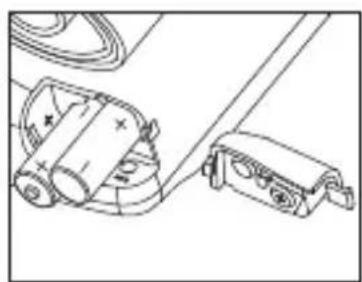
natural_image
Technical line drawing of a mechanical assembly with no visible text or symbolstext_image
12:00 1/1text_image
12:00 1/1text_image
12:00 1/1Beweeg de pols omlaag
text_image
12:00 1/1Draai de pols linksom
text_image
12:00 1/1natural_image
Line drawing of a person sitting at a desk with hands placed on the table, no text or symbols present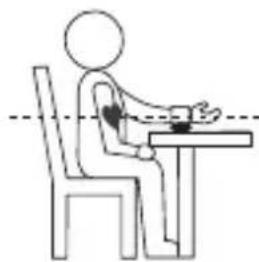
natural_image
Line drawing of a person sitting at a desk with hands placed on the table, no text or symbols present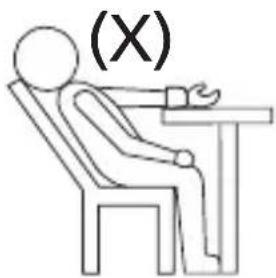
text_image
(X)13 Procedure
text_image
12:00 1/1 no.1text_image
12:00 I/ I no.1heatmap
| Category | Diastolic (mmHg) | | :--- | :--- | | Hypertension | Systolic over 160, Diastolic over 95 | | Borderline | Systolic 140 ~159, Diastolic 90 ~ 94 | | Hypotension | Systolic under 139, Diastolic under 89 | | Normal | Systolic under 139, Diastolic under 89 |natural_image
Technical line drawing of a mechanical component with no visible text or symbols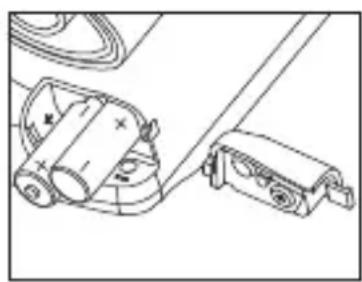
natural_image
Technical line drawing of a mechanical device with no visible text or symbolstext_image
① ② ③ ④ ⑤ ⑥ ⑦ ⑧ ⑨ ⑩ ⑪ ⑫ ⑬ ⑭ ⑮ mmHg 888 SYS. ERROR 88 88 MIN 18:88 18/28 18:88 18:88 18:88 18:88 18:88 18:88 18:88 18:88 18:88 18:88 18:88 18:88 18:88 18:88 18:88 18:88 18:88 10 12 13 SYS. DIA.text_image
12:00 1/1text_image
12:00 1/1text_image
12:00 1/1text_image
12:00 1/1text_image
12:00 1/1natural_image
Simple line drawing of a person sitting at a desk with a heart symbol on the arm, no text or symbols present.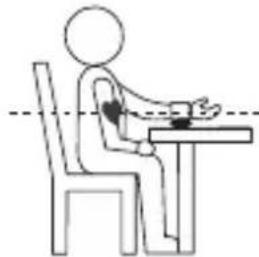
natural_image
Simple line drawing of a person sitting at a desk with hands placed on the table, no text or symbols present.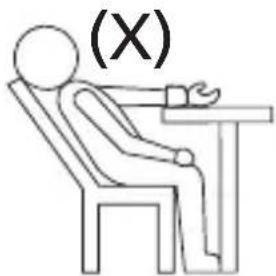
text_image
(X)12 Mesure
12.1 Important
text_image
12:00 1/1 no.1text_image
12:00 1/1 no.1natural_image
Technical line drawing of a mechanical component with no visible text or symbols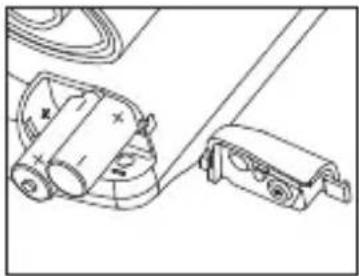
natural_image
Technical line drawing of mechanical components including a cylindrical housing and a clamping device (no text or symbols)text_image
12:00 1/1text_image
12:00 1/1text_image
12:00 1/1text_image
12:00 1/1text_image
12:00 1/1natural_image
Simple line drawing of a person sitting at a desk with a heart symbol on the arm (no text or symbols)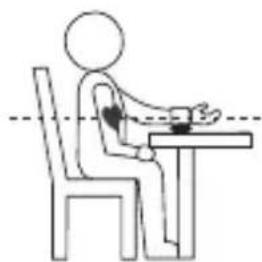
natural_image
Simple line drawing of a person sitting at a desk with hands placed on the table, no text or symbols present.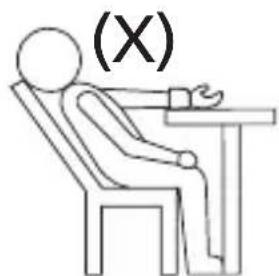
text_image
(X)12 Messung
12.1 Wichtig
text_image
12:00 1/1 no.1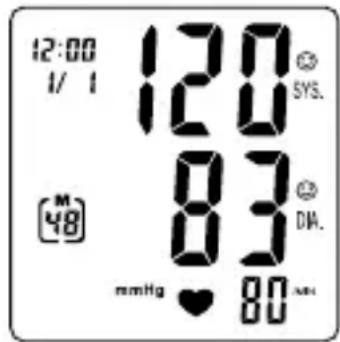
text_image
12:00 1/ 1 120 SYS. M 48 83 DIA. mmHg ♥ 8013.1 Display-Symbole
text_image
12:00 1/1 no.1
text_image
CLA15 Technische Daten
heatmap
| Region | Diastolic (mmHg) | | :--- | :--- | | Hypertension | Systolic over 160, Diastolic over 95 | | Borderline | Systolic 140 ~ 159, Diastolic 90 ~ 94 | | Hypotension | Systolic under 139, Diastolic under 89 | | Normal | Systolic under 139, Diastolic under 89 |natural_image
Technical line drawing of a mechanical component with no visible text or symbols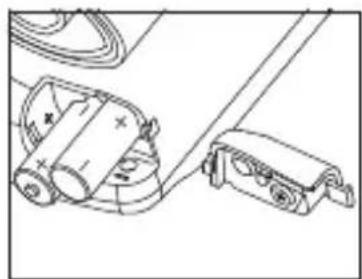
natural_image
Technical line drawing of a mechanical assembly with rollers and clamps (no text or symbols)text_image
12:00 1/1text_image
12:00 1/1text_image
12:00 1/1text_image
12:00 1/1Vrid handleden moturs
text_image
12:00 1/1Vrid handleden medurs
natural_image
Simple line drawing of a person sitting at a desk with a heart symbol on the arm (no text or symbols)
natural_image
Simple line drawing of a person sitting at a desk with hands placed on the table, no text or symbols present.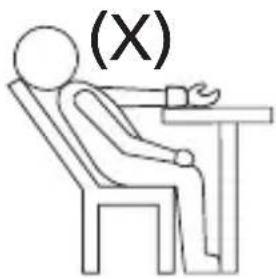
text_image
(X)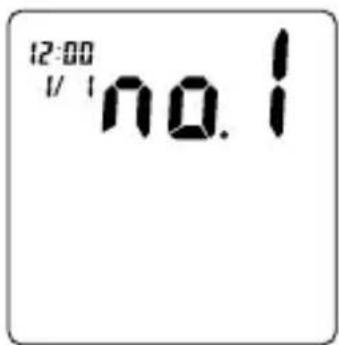
text_image
12:00 1/1 no.1text_image
12:00 1/1 no.1natural_image
Technical line drawing of a mechanical component with no visible text or symbols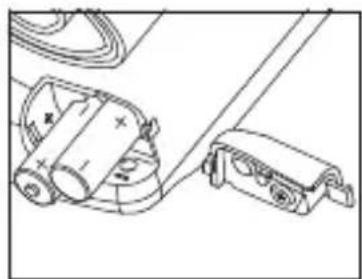
natural_image
Technical line drawing of a mechanical device with rollers and clamps (no text or symbols)text_image
12:00 1/1text_image
12:00 1/1text_image
12:00 1/1text_image
12:00 1/1natural_image
Line drawing of a person sitting at a desk with hands placed on the table, no text or symbols present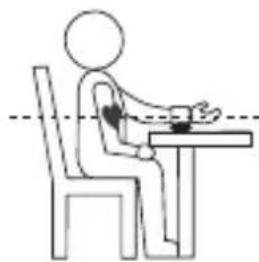
natural_image
Simple line drawing of a person sitting at a desk with hands placed on the table (no text or symbols)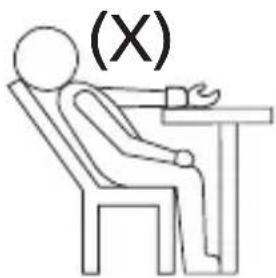
text_image
(X)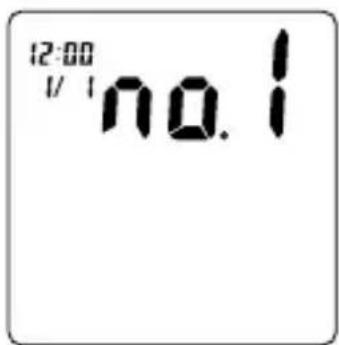
text_image
12:00 1/1 no.1text_image
12:00 I/ I no.1heatmap
| Region | Diastolic (mmHg) | Systolic (mmHg) | | :--- | :--- | :--- | | Hypertension | 95 | Systolic over 160, Diastolic over 95 | | Borderline | 90 | Systolic 140 ~159, Diastolic 90 ~ 94 | | Hypotension | 90 | Systolic under 139, Diastolic under 89 | 14010060Det er viktig at du har regelmessige konsultasjoner med legen. Legen vil informere deg om hvilket blodtrykksområde som er normalt for deg, og på hvilket punkt du anses for å være i risikosonen.
5.4 Svingninger i blodtrykket
natural_image
Technical line drawing showing two views of a car's front and side compartments with no visible text or symbolstext_image
12:00 1/7 1text_image
12:00 1/1text_image
12:00 1/1text_image
12:00 1/1text_image
12:00 1/1natural_image
Simple line drawing of a person sitting at a desk with a heart symbol on the arm, no text or symbols present.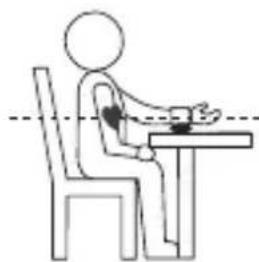
natural_image
Simple line drawing of a person sitting at a desk with hands placed on the table (no text or symbols)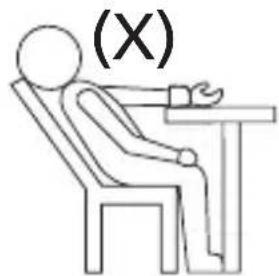
text_image
(X)13 Fremgangsmåte
text_image
12:00 1/1 no.1text_image
12:00 I/ I no.1natural_image
Technical line drawing of a mechanical component with no visible text or symbols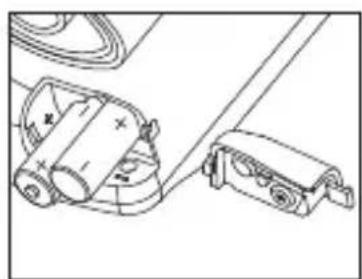
natural_image
Technical line drawing of a mechanical assembly with no visible text or symbolstext_image
12:00 1/1text_image
12:00 1/1Laske rannetta alemmas
text_image
12:00 1/1text_image
12:00 1/1natural_image
Simple line drawing of a person sitting at a desk with a heart symbol on the arm, no text or symbols present.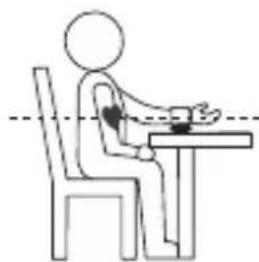
natural_image
Simple line drawing of a person sitting at a desk with hands placed on the table (no text or symbols)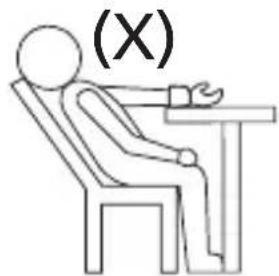
text_image
(X)13 Menettely
text_image
12:00 1/1 no.1text_image
12:00 I/ I no.1RETURN WITH YOUR DEFECT PRODUCT
natural_image
Pure horizontal line with evenly spaced vertical tick marks (no text or symbols)natural_image
A row of empty rectangular boxes with no text, numbers, or symbols visible.natural_image
A horizontal row of evenly spaced empty rectangular cells with no text or symbolsnatural_image
Two identical rectangular frames with vertical lines, no text or symbols presentLocation/Ort./Lieu/Plaats: Post code/Postleitzahl/Code Postal/Postcode:

natural_image
Two identical rectangular grids of empty rectangular cells, no text or symbols presentCountry/Land/Pays/Land:
Tel./Tél.:
E-mail:
natural_image
A row of evenly spaced empty rectangular boxes with no text or symbols(Original Proof of Purchase has to be attached to this return card to be valid for warranty)
natural_image
A row of evenly spaced empty rectangular bars with no text or symbolsvisit our website www.topcom.net