2710 GA - Screwdriver SKIL - Free user manual and instructions
Find the device manual for free 2710 GA SKIL in PDF.



| Product type | Screwdriver |
| Power | 300 W |
| No-load speed | 0-600 rpm |
| Maximum torque | 30 Nm |
| Battery capacity | Not applicable (corded model) |
| Weight | 1.2 kg |
| Dimensions | 25 x 20 x 8 cm |
| Included accessories | Chuck, screwdriver bits |
| Recommended use | Screwing and unscrewing work in wood and metal |
| Maintenance | Regular cleaning, checking cables and chuck condition |
| Safety measures | Wear safety glasses, do not touch moving parts |
| Warranty | 2 years |
Frequently Asked Questions - 2710 GA SKIL
User questions about 2710 GA SKIL
0 question about this device. Answer the ones you know or ask your own.
Ask a new question about this device
Download the instructions for your Screwdriver in PDF format for free! Find your manual 2710 GA - SKIL and take your electronic device back in hand. On this page are published all the documents necessary for the use of your device. 2710 GA by SKIL.
USER MANUAL 2710 GA SKIL
text_image
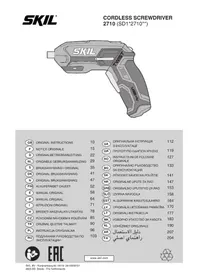
SKIL TWIST USBGB ORIGINAL INSTRUCTIONS 10
F NOTICE ORIGINALE 15
D ORIGINALBETRIEBSANLEITUNG 22
NL ORIGINELE GEBRUIKSAANWIJZING 29
S BRUKSANVISNING | ORIGINAL 35
DK ORIGINAL BRUGSANVISNING 41
N ORIGINAL BRUKSANVISNING 47
FIN ALKUPERÄISET OHJEET 52
E MANUAL ORIGINAL 58
P MANUAL ORIGINAL 64
I ISTRUZIONI ORIGINALI 71
H EREDETI HASZNÁLATI UTASÍTÁS 78
CZ PÚVODNÍM NÁVODEM K POUŽÍVÁNÍ 85
TR ORIJINAL İŞLETME TALİMATI 90
PL INSTRUKCJA ORYGINALNA 96
RU
ПОДЛИННИК РУКОВОДСТВА ПО 103
ЭКСПЛУАТАЦИИ
text_image
Diagram illustrating three steps of a lock mechanism in a backpack, showing wood grain patterns and directional arrows.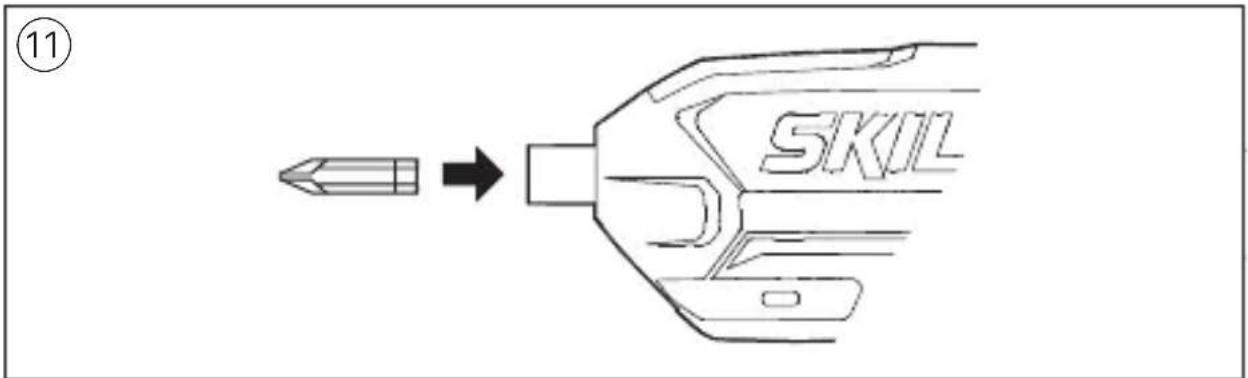
text_image
⑪ SKIL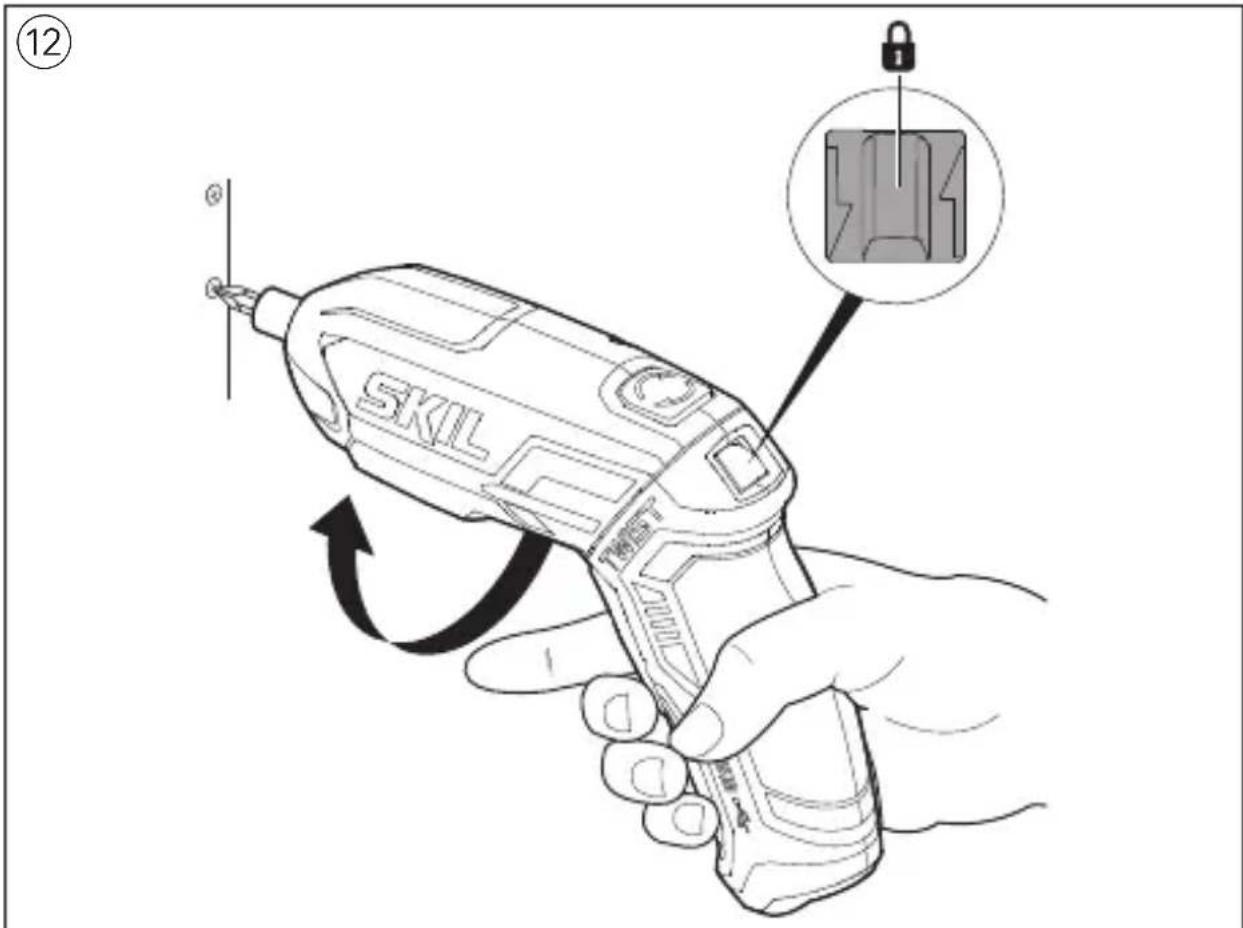
text_image
⑫ SKIL TWOES 12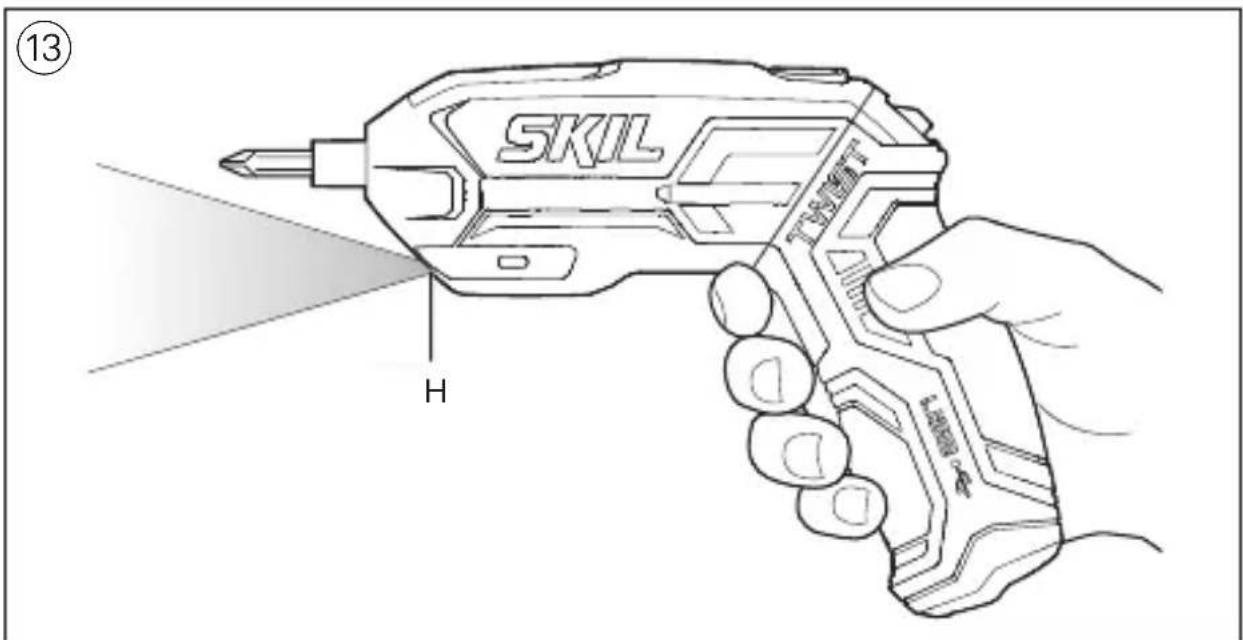
text_image
SKIL H TAWLFT 13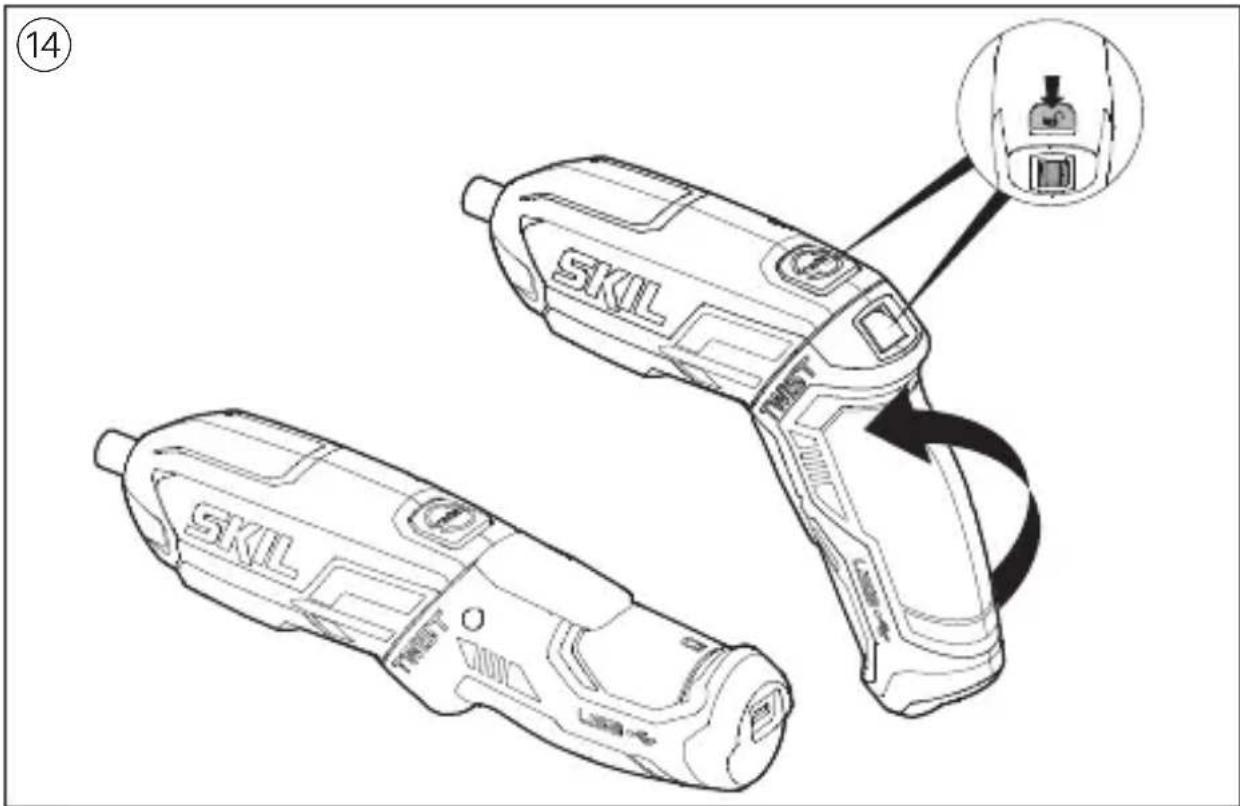
text_image
SKIL SKIL TREST CABO 14
text_image
15 PHILLIPS POZIDRIV SLOTTED TORX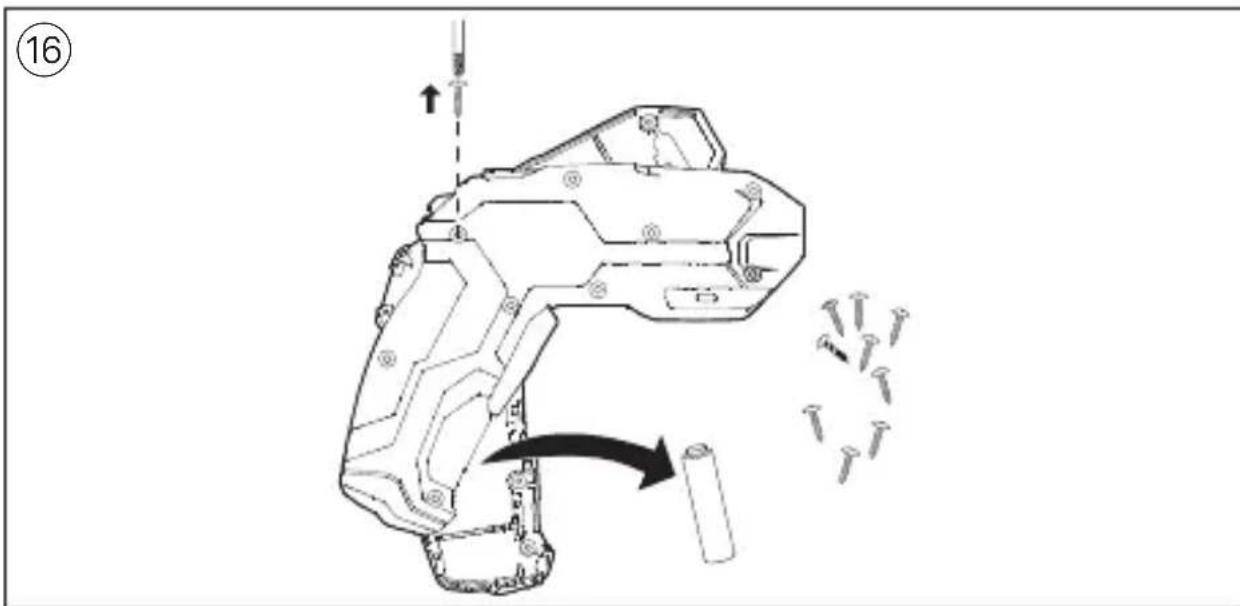
text_image
16
text_image
ACCESSORIES → WWW.SKIL.COMGB
Cordless screwdriver 2710
INTRODUCTION
- This tool with left/right rotation is intended for screwdriving and pre-drilling in wood
• This tool is not intended for professional use - Read and save this instruction manual ③
TECHNICAL DATA①
Max. torque for hard screwdriving application according to ISO 5393 : 7Nm
TOOL ELEMENTS ②
A Charger
B Charger interface
C Battery level indicator
D On/off switch
E Switch for changing direction of rotation
F Pivot unlock knob
G Magnetic bitholder
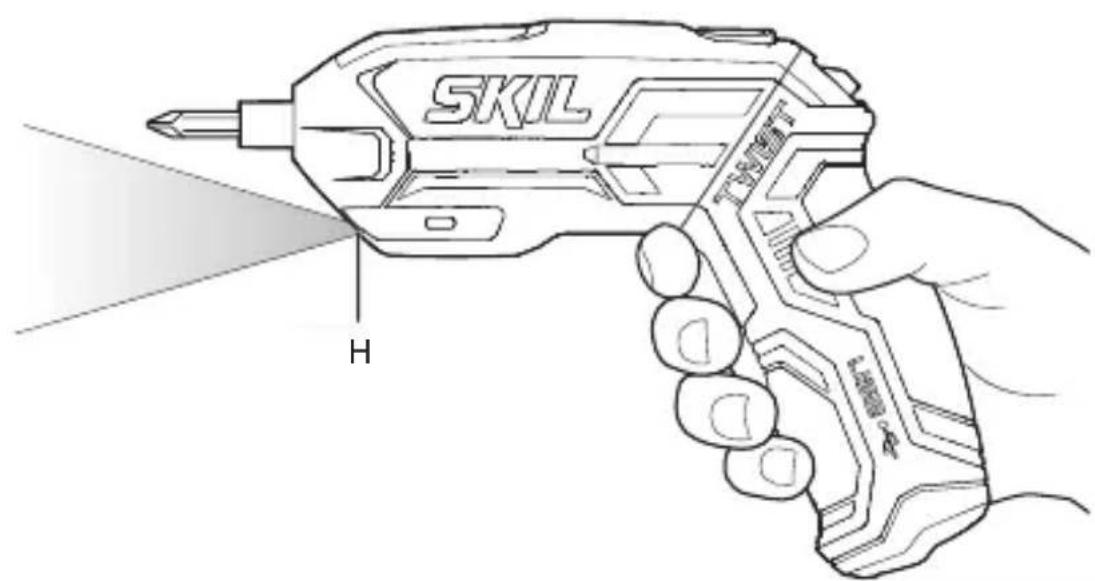
H LED-light
J Bit storage
K Charger cable
SAFETY
GENERAL POWER TOOL SAFETY WARNINGS
WARNING Read all safety warnings, instructions, illustrations and specifications provided with this power tool. Failure to follow all instructions listed below may result in electric shock, fire and/or serious injury.
Save all warnings and instructions for future reference.
The term “power tool” in the warnings refers to your mains-operated (corded) power tool or battery-operated (cordless) power tool.
1) WORK AREA SAFETY
a) Keep work area clean and well lit. Cluttered or dark areas invite accidents.
b) Do not operate power tools in explosive atmospheres, such as in the presence of flammable liquids, gases or dust. Power tools create sparks which may ignite the dust or fumes.
c) Keep children and bystanders away while operating a power tool. Distractions can cause you to lose control.
2) ELECTRICAL SAFETY
a) Power tool plugs must match the outlet. Never modify the plug in any way. Do not use any adapter plugs with earthed (grounded) power tools. Unmodified plugs and matching outlets will reduce risk of electric shock.
b) Avoid body contact with earthed or grounded surfaces such as pipes, radiators, ranges and refrigerators. There is an increased risk of electric shock if your body is earthed or grounded.
c) Do not expose power tools to rain or wet conditions. Water entering a power tool will increase the risk of electric shock.
d) Do not abuse the cord. Never use the cord for carrying, pulling or unplugging the power tool. Keep cord away from heat, oil, sharp edges or moving parts. Damaged or entangled cords increase the risk of electric shock.
e) When operating a power tool outdoors, use an extension cord suitable for outdoor use. Use of a cord suitable for outdoor use reduces the risk of electric shock.
f) If operating a power tool in a damp location is unavoidable, use a residual current device (RCD) protected supply. Use of an RCD reduces the risk of electric shock.
3) PERSONAL SAFETY
a) Stay alert, watch what you are doing and use common sense when operating a power tool. Do not use a power tool while you are tired or under the influence of
drugs, alcohol or medication. A moment of inattention while operating power tools may result in serious personal injury.
b) Use personal protective equipment. Always wear eye protection. Protective equipment such as a dust mask, non-skid safety shoes, hard hat, or hearing protection used for appropriate conditions will reduce personal injuries.
c) Prevent unintentional starting. Ensure the switch is in the off-position before connecting to power source and/or battery pack, picking up or carrying the tool. Carrying power tools with your finger on the switch or energising power tools that have the switch on invites accidents.
d) Remove any adjusting key or wrench before turning the power tool on. A wrench or a key left attached to a rotating part of the power tool may result in personal injury.
e) Do not overreach. Keep proper footing and balance at all times. This enables better control of the power tool in unexpected situations.
f) Dress properly. Do not wear loose clothing or jewellery. Keep your hair and clothing away from moving parts. Loose clothes, jewellery or long hair can be caught in moving parts.
g) If devices are provided for the connection of dust extraction and collection facilities, ensure these are connected and properly used. Use of dust collection can reduce dust-related hazards.
h) Do not let familiarity gained from frequent use of tools allow you to become complacent and ignore tool safety principles. A careless action can cause severe injury within a fraction of a second.
4) POWER TOOL USE AND CARE
a) Do not force the power tool. Use the correct power tool for your application. The correct power tool will do the job better and safer at the rate for which it was designed.
b) Do not use the power tool if the switch does not turn it on and
off. Any power tool that cannot be controlled with the switch is dangerous and must be repaired.
c) Disconnect the plug from the power source and/or remove the battery pack, if detachable, from the power tool before making any adjustments, changing accessories, or storing power tools. Such preventive safety measures reduce the risk of starting the power tool accidentally.
d) Store idle power tools out of the reach of children and do not allow persons unfamiliar with the power tool or these instructions to operate the power tool. Power tools are dangerous in the hands of untrained users.
e) Maintain power tools and accessories. Check for misalignment or binding of moving parts, breakage of parts and any other condition that may affect the power tool's operation. If damaged, have the power tool repaired before use. Many accidents are caused by poorly maintained power tools.
f) Keep cutting tools sharp and clean. Properly maintained cutting tools with sharp cutting edges are less likely to bind and are easier to control.
g) Use the power tool, accessories and tool bits etc., in accordance with these instructions, taking into account the working conditions and the work to be performed. Use of the power tool for operations different from those intended could result in a hazardous situation.
h) Keep handles and grasping surfaces dry, clean and free from oil and grease. Slippery handles and grasping surfaces do not allow for safe handling and control of the tool in unexpected situations.
5) BATTERY TOOL USE AND CARE
a) Recharge only with the charger specified by the manufacturer. A charger that is suitable for one type of battery pack may create a risk of fire when used with another battery pack.
b) Use power tools only with specifically designated battery
packs. Use of any other battery packs may create a risk of injury and fire.
c) When battery pack is not in use, keep it away from other metal objects like paper clips, coins, keys, nails, screws, or other small metal objects that can make a connection from one terminal to another. Shorting the battery terminals together may cause burns or a fire.
d) Under abusive conditions, liquid may be ejected from the battery; avoid contact. If contact accidentally occurs, flush with water. If liquid contacts eyes, additionally seek medical help. Liquid ejected from the battery may cause irritation or burns.
e) Do not use a battery pack or tool that is damaged or modified. Damaged or modified batteries may exhibit unpredictable behaviour resulting in fire, explosion or risk of injury.
f) Do not expose a battery pack or tool to fire or excessive temperature. Exposure to fire or temperature above 130^ C may cause explosion.
g) Follow all charging instructions and do not charge the battery pack or tool outside the temperature range specified in the instructions. Charging improperly or at temperatures outside the specified range may damage the battery and increase the risk of fire.
6) SERVICE
a) Have your power tool serviced by a qualified repair person using only identical replacement parts. This will ensure that the safety of the power tool is maintained.
b) Never service damaged battery packs. Service of battery packs should only be performed by the manufacturer or authorized service providers.
SAFETY INSTRUCTIONS FOR CORDLESS SCREWDRIVERS
- Hold the power tool by insulated gripping surfaces, when performing an operation where the fastener may contact hidden wiring (fasteners contacting a “live” wire may make exposed metal parts of the power tool “live” and could give the operator an electric shock)
GENERAL
- Do not work materials containing asbestos (asbestos is considered carcinogenic) - Dust from material such as paint containing lead, some wood species, minerals and metal may be harmful (contact with or inhalation of the dust may cause allergic reactions and/or respiratory diseases to the operator or bystanders); wear a dust mask and work with a dust extraction device when connectable
- Certain kinds of dust are classified as carcinogenic (such as oak and beech dust) especially in conjunction with additives for wood conditioning; wear a dust mask and work with a dust extraction device when connectable
- Follow the dust-related national requirements for the materials you want to work with
- Do not expose tool/charger to rain
- Do not disassemble charger or tool
- Ensure that switch E ② is in the middle (locking) position before making any adjustments or changing accessories as well as when carrying or storing the tool
CHARGING/BATTERIES
- Only use SKIL charger 2610S00722 (U.K. 2610S00723) with this tool
• This charger can be used by children aged 8 and above and by persons who have physical,
sensory or mental limitations or a lack of experience or knowledge if a person responsible for their safety supervises them or has instructed them in the safe operation of the charger and they understand the associated dangers (otherwise, there is a danger of operating errors and injuries)
- Supervise children (this will ensure that children do not play with the charger)
- Cleaning and user maintenance of the battery charger shall not be made by children without supervision
- Do not use charger when damaged
- Permitted ambient temperature (tool/charger/battery):
-when charging 4...40°C
-during operation -20...+50°C
-during storage -20...+50°C
ACCESSORIES
- SKIL can assure flawless functioning of the tool only when original accessories are used
BEFORE USE
- Always check that the supply voltage is the same as the voltage indicated on the nameplate of the charger
- Avoid damage that can be caused by screws, nails and other elements in your workpiece; remove them before you start working
- Secure the workpiece (a workpiece clamped with clamping devices or in a vice is held more securely than by hand)
- Use suitable detectors to find hidden utility lines or call the local utility company for assistance (contact with electric lines can lead to fire or electrical shock; damaging a gas line can result in an explosion; penetrating a water pipe will cause property damage or an electrical shock)
DURING USE
- In case of electrical or mechanical malfunction, immediately switch off the tool or unplug charger from power source
EXPLANATION OF SYMBOLS ON TOOL/CHARGER
③ Read the instruction manual before use
④ Only use the charger indoors
⑤ Double insulation (no earth wire required)
⑥ Incorrect polarity of the charger connection could cause a hazard (only charge the battery with the charger supplied)
⑦ Do not dispose of electric tools and batteries together with household waste material
USE
- Charging battery ⑧
! the battery supplied is partially charged (to ensure full capacity of the battery, completely charge the battery in the battery charger before using your power tool for the first time)
-connect charger cable K with both
charger A and charger interface B
-connect charger A with wall socket
-indicator C is blinking GREEN indicating that the battery is being charged
-during the charging procedure, the handle of the tool warms up; this is normal
-indicator C turns GREEN
continuously when the battery is fully charged
-the lithium-ion battery can be charged at any time (interrupting the charging procedure does not damage the battery)
-the lithium-ion battery does not have to be empty before charging (no "memory-effect" as with nickel-cadmium batteries)
-the tool cannot be used during the charging procedure; it is not defective when inoperative during the charging procedure
-if you anticipate long periods of non-use for the tool, it is best to unplug the charger from its power source
- On/off ⑨
- Changing direction of rotation ⑩ -when not properly set in left/right position, switch D ② cannot be activated
! change direction of rotation only when tool is at a complete standstill
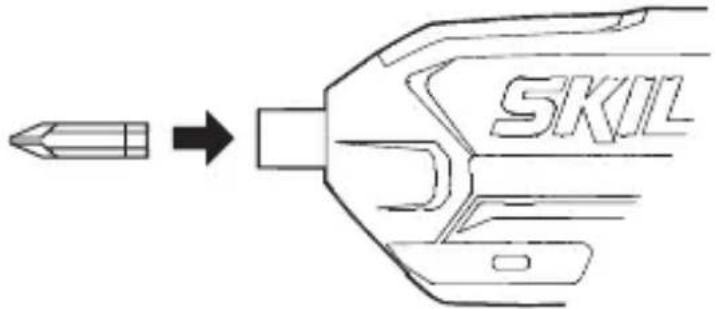
- Changing bits ⑪
-push bit to end position in bitholder G
! do not use bits with a damaged shank
• Automatic spindle-lock
Allows you to manually tighten or loosen screws, when necessary ⑫
- LED-light ⑬
LED-light H automatically lights on when activating switch D, even when switch E is in the middle (locking) position
- Bit storage J ②
Offers storage for 2 bits at the front
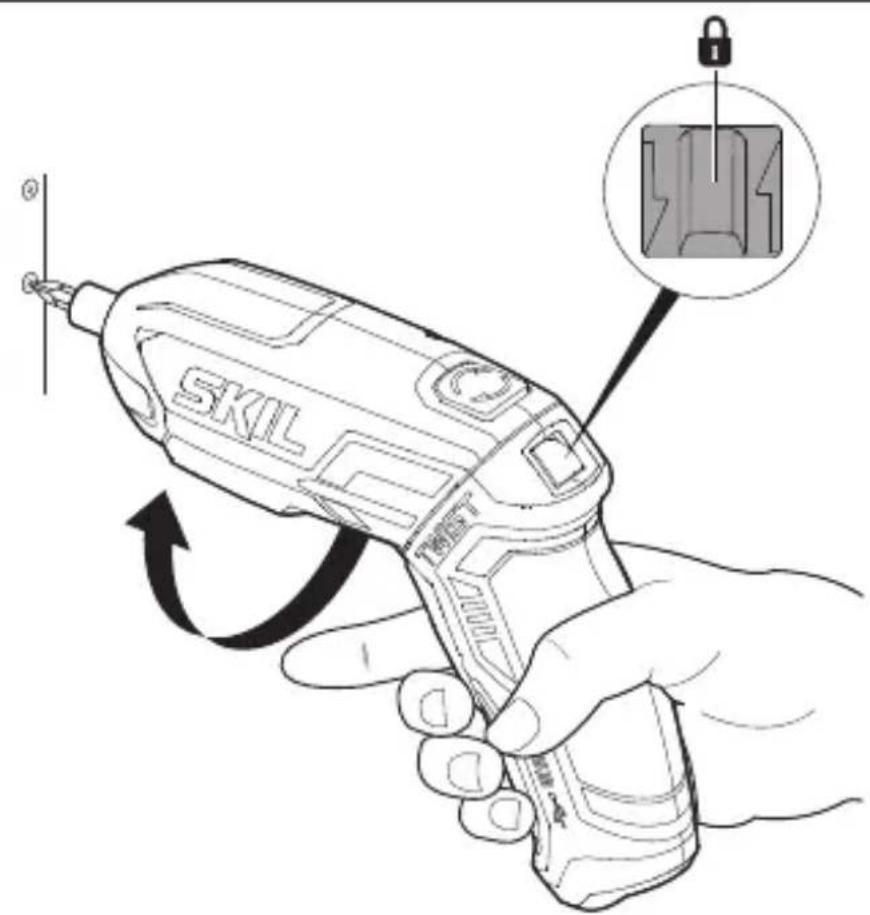
- Two handle positions ⑭
- Battery protection
Switches off the tool or prevents the tool from being switched on, when -the load is too high
-the battery temperature is not within the allowable operating temperature range of -20 to +50°C
-the lithium-ion battery is nearly empty (to protect against deep discharge)
! do not continue to press the on/off switch after the tool is switched off automatically; battery may be damaged
APPLICATION ADVICE
- Use the appropriate bits ⑮
! do not use damaged bits
! only use bits with hexagon shaft
- When turning in a screw at/near the cross cut end or an edge of wood, pre-drill a hole in order to avoid cracking of the wood
- For an optimal use of the tool a steady pressure on the screw is required, especially while removing
- When screwdriving in hard wood one should pre-drill a hole
- For more information see www.skil.com
MAINTENANCE / SERVICE
• This tool is not intended for professional use
- Keep tool and charger clean ! unplug charger from power source before cleaning
- If the tool/charger should fail despite the care taken in manufacturing and testing procedures, repair should be carried out by an after-sales service centre for SKIL power tools -send the tool or charger undismantled together with proof of purchase to your dealer or the nearest SKIL service station (addresses as well as the service diagram of the tool are listed on www.skil.com)
- Be aware that damage due to overload or improper handling of the tool will be excluded from the warranty (for the SKIL warranty conditions see www.skil.com or ask your dealer)
ENVIRONMENT
-
Do not dispose of electric tools, accessories and packaging together with household waste material (only for EU countries)
-in observance of European Directive 2012/19/EC on waste of electric and electronic equipment and its implementation in accordance with national law, electric tools that have reached the end of their life must be collected separately and returned to an environmentally compatible recycling facility
-symbol ⑦ will remind you of this when the need for disposing occurs ! remove the batteries before disposal of the tool -
Removing/disposing of batteries ⑯
! only remove the batteries if they are completely empty
-protect battery terminals with heavy tape to prevent short-circuit -dispose of the batteries at an official collection point for batteries
! batteries may explode when disposed of in fire, so do not burn battery for any reason
NOISE / VIBRATION
- Measured in accordance with EN 62841 the sound pressure level of this tool is <70 dB(A) (uncertainty K = 3 dB) and the vibration <2.5 m/s ^2 (triax vector sum; uncertainty K = 1.5 m/s ^2 )
- The vibration emission level has been measured in accordance with a standardised test given in EN 62841; it may be used to compare one tool with another and as a preliminary assessment of exposure to vibration when using the tool for the applications mentioned
-using the tool for different applications, or with different or poorly maintained accessories, may significantly increase the exposure level
-the times when the tool is switched off or when it is running but not actually doing the job, may significantly reduce the exposure level
! protect yourself against the effects of vibration by maintaining the tool and its accessories, keeping your hands warm, and organizing your work patterns

Visseuse sans fil 2710
INTRODUCTION
1) SIKKERHET PÅ ARBEIDSPLASSEN
a) Hold arbeidsområdet rent og ryddig. Rotete arbeidsområder eller arbeidsområder uten lys kan føre til ulykker.
VEDLIKEHOLD / SERVICE
-ladattaessa 4...40°C
APKALPOŠANA / APKOPE
TECHNINIAI DUOMENYS ①
natural_image
Technical diagram of a mechanical assembly with arrows indicating motion, no visible text or symbols
text_image
WWW.SKIL.COM → الملحقات11
text_image
SKIL17
text_image
SKIL MINT17
text_image
SKIL TENDEFT H LADID 4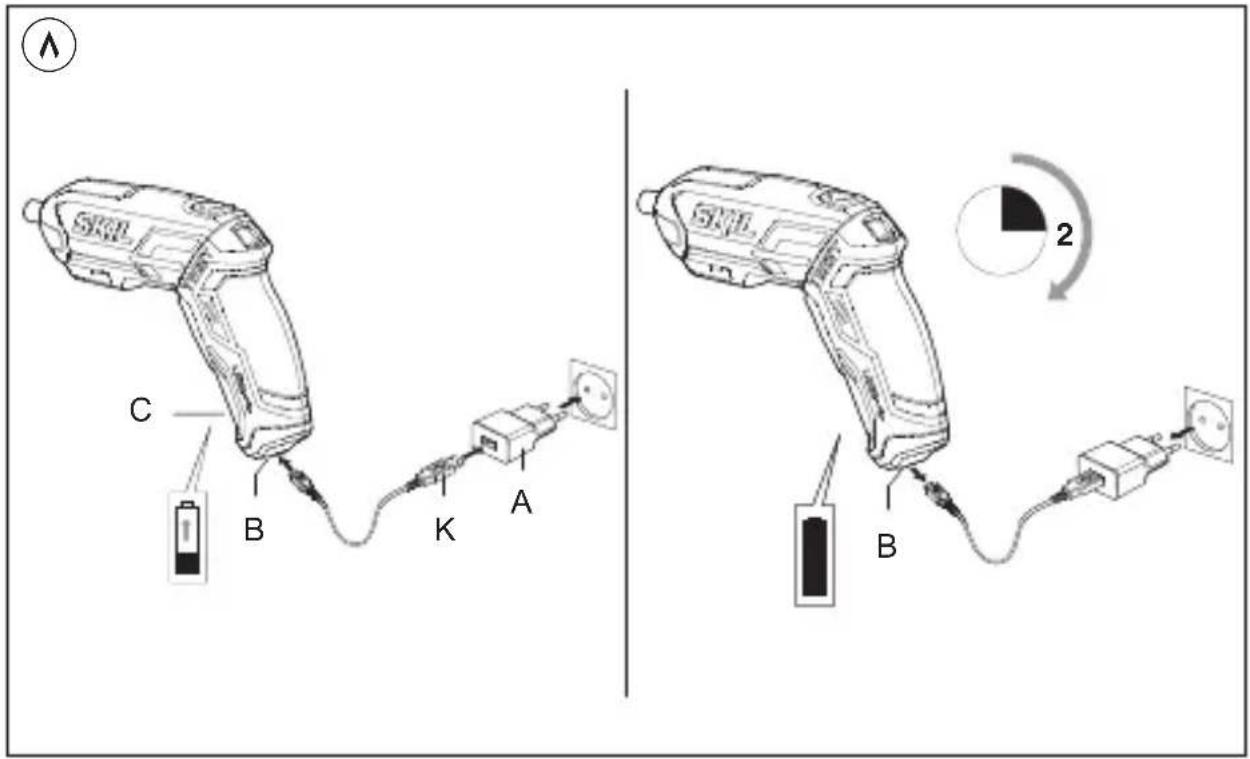
text_image
C B K A SKL B 2
text_image
⑨ STOP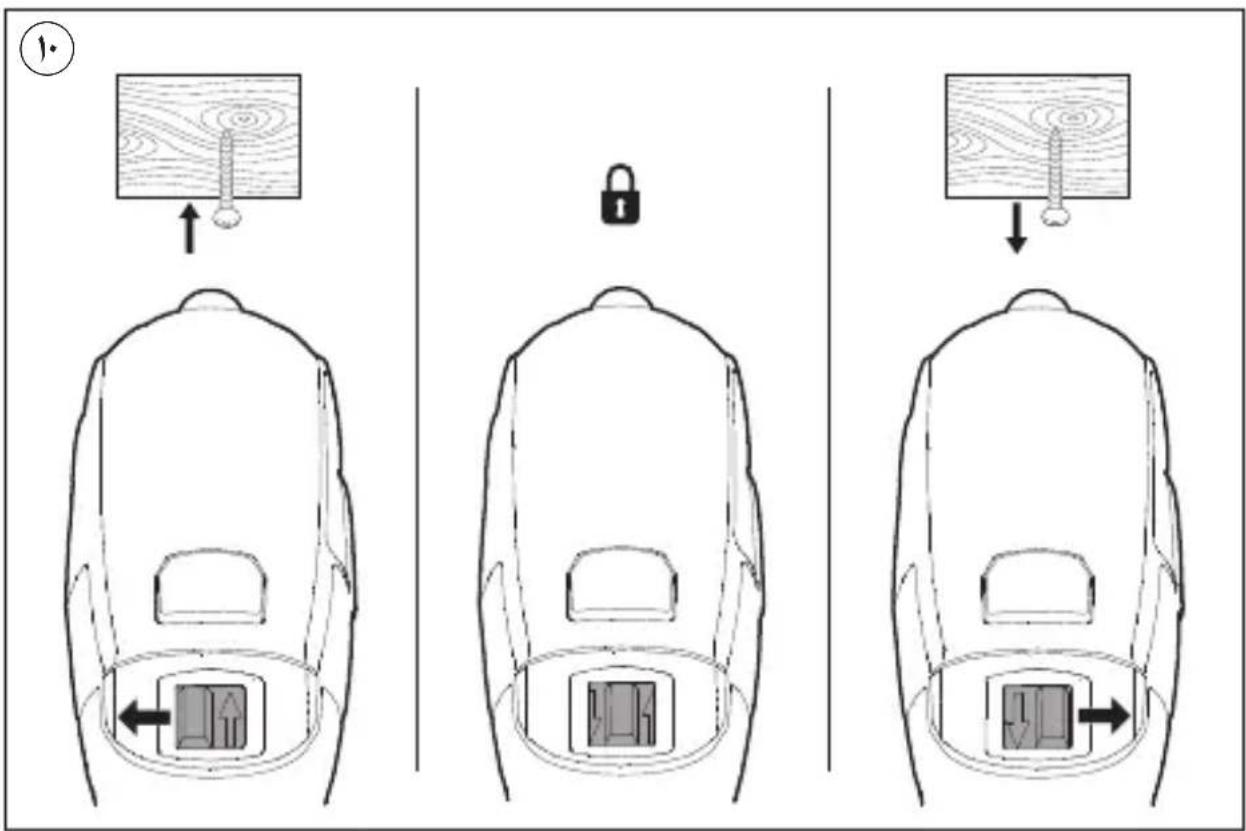
text_image
Diagram illustrating three steps of a lock mechanism inside a backpack, showing hand positioning and movement directions.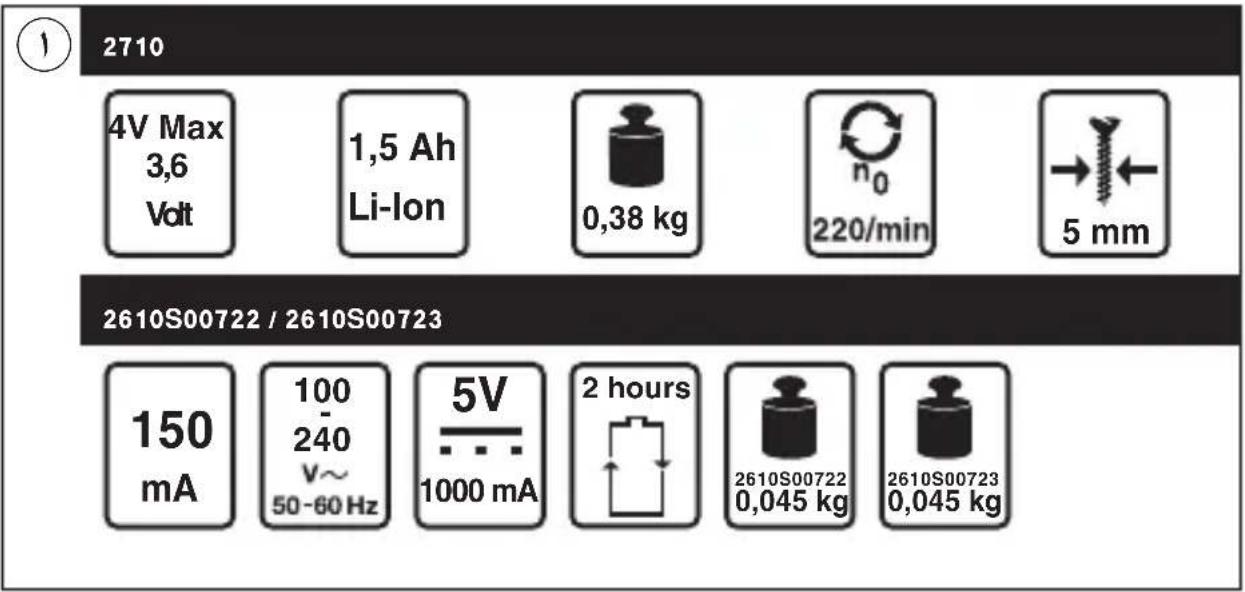
text_image
2710 4V Max 3,6 Volt 1,5 Ah Li-Ion 0,38 kg n₀ 220/min → 5 mm 2610S00722 / 2610S00723 150 mA 100 240 V~ 50-60 Hz 5V 1000 mA 2 hours 2610S00722 0,045 kg 2610S00723 0,045 kg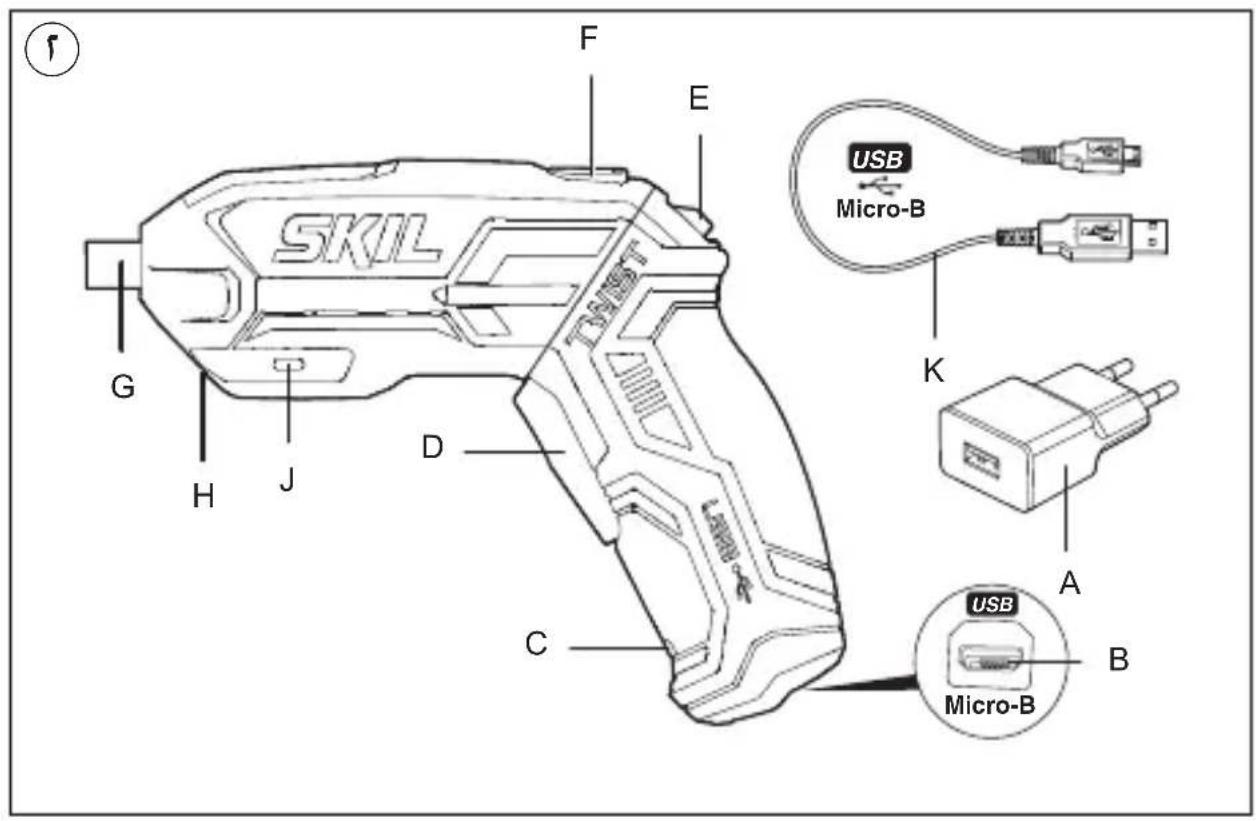
text_image
SKIL G H J D C F E USB Micro-B K A B Micro-B
text_image
Three black-and-white icons representing different home-related symbols: person reading, house, and square.
text_image
① PIN1(−) PIN5(+) ②
text_image
SKIL TWIST USB 42دليل الاستعمال AR
FA راهنماي اصلی