
Nikkor AFS DX Micro NIKKOR 85mm f3.5G ED VR - Camera lens NIKON - Free user manual and instructions
Find the device manual for free Nikkor AFS DX Micro NIKKOR 85mm f3.5G ED VR NIKON in PDF.


User questions about Nikkor AFS DX Micro NIKKOR 85mm f3.5G ED VR NIKON
0 question about this device. Answer the ones you know or ask your own.
Ask a new question about this device
Download the instructions for your Camera lens in PDF format for free! Find your manual Nikkor AFS DX Micro NIKKOR 85mm f3.5G ED VR - NIKON and take your electronic device back in hand. On this page are published all the documents necessary for the use of your device. Nikkor AFS DX Micro NIKKOR 85mm f3.5G ED VR by NIKON.
USER MANUAL Nikkor AFS DX Micro NIKKOR 85mm f3.5G ED VR NIKON
Touching the internal parts of the camera or lens could result in injury. Repairs should be performed only by qualified technicians. Should the camera or lens break open as the result of a fall or other accident, take the product to a Nikon-authorized service representative for inspection after unplugging the product and/ or removing the battery.
Turn off immediately in the event of malfunction
Should you notice smoke or an unusual smell coming from the camera or lens, remove the battery immediately, taking care to avoid burns. Continued operation could result in injury.
After removing or disconnecting the power source, take the product to a Nikon-authorized service representative for inspection.
Do not use the camera or lens in the presence of flammable gas
Operating electronic equipment in the presence of flammable gas could result in an explosion or fire.
Do not look at the sun through the lens or viewfinder
Viewing the sun or other strong light sources through the lens or viewfinder could cause permanent visual impairment.
Keep out of reach of children
Particular care should be taken to prevent infants from putting the batteries or other small parts into their mouths.
Observe the following precautions when handling the camera and lens
-
Keep the camera and lens unit dry. Failure to do so could result in fire or electric shock.
-
Do not handle or touch the camera or lens unit with wet hands. Failure to do so could result in electric shock.
- When shooting with back-lighting, do not point the lens at the sun or allow sunlight to pass directly down the lens as this may cause the camera to overheat and possibly cause a fire.
- When the lens will not be used for an extended period of time, attach both front and rear lens caps and store the lens away from direct sunlight. Failure to do so could result in a fire, as the lens may focus sunlight onto a flammable object.
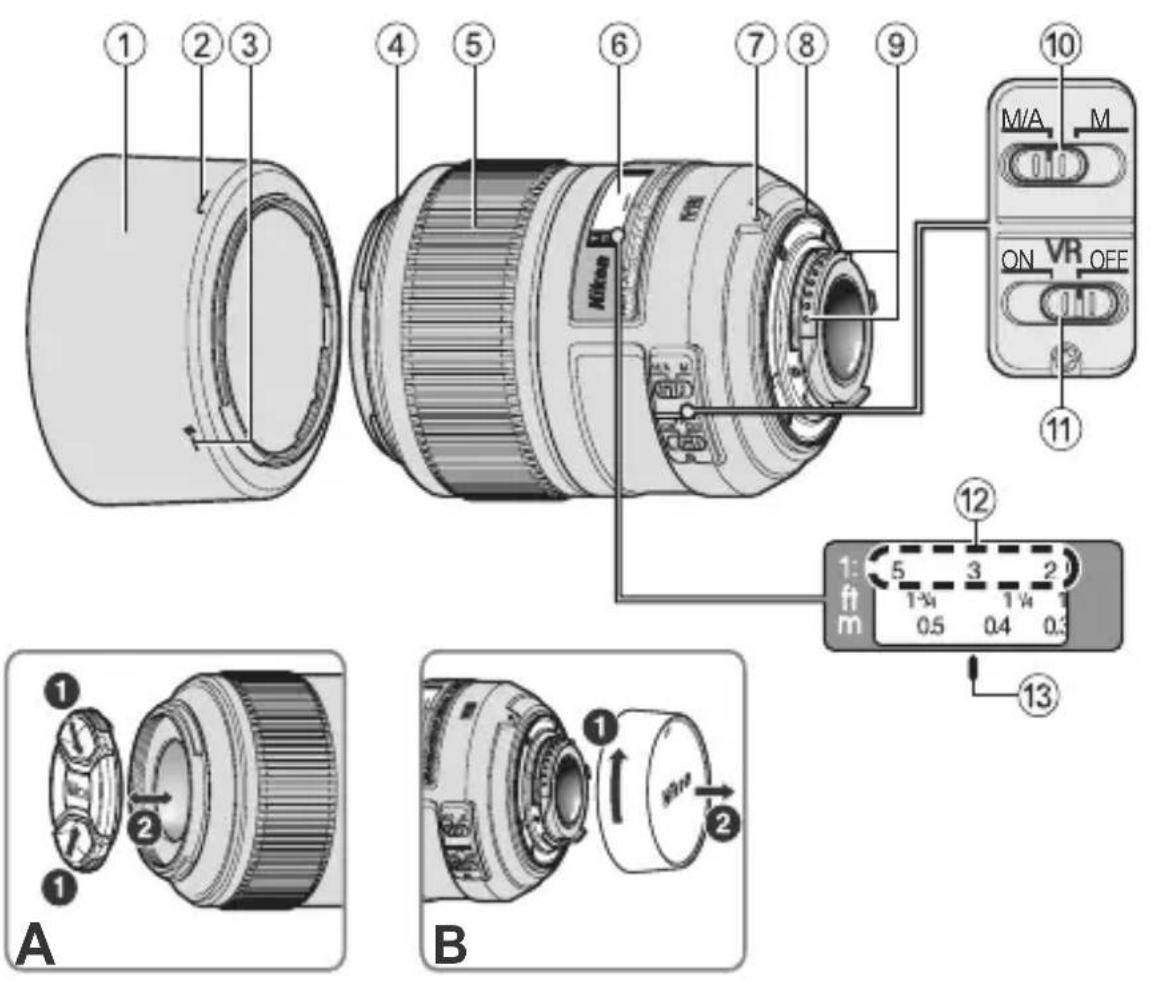
■Nomenclature
En
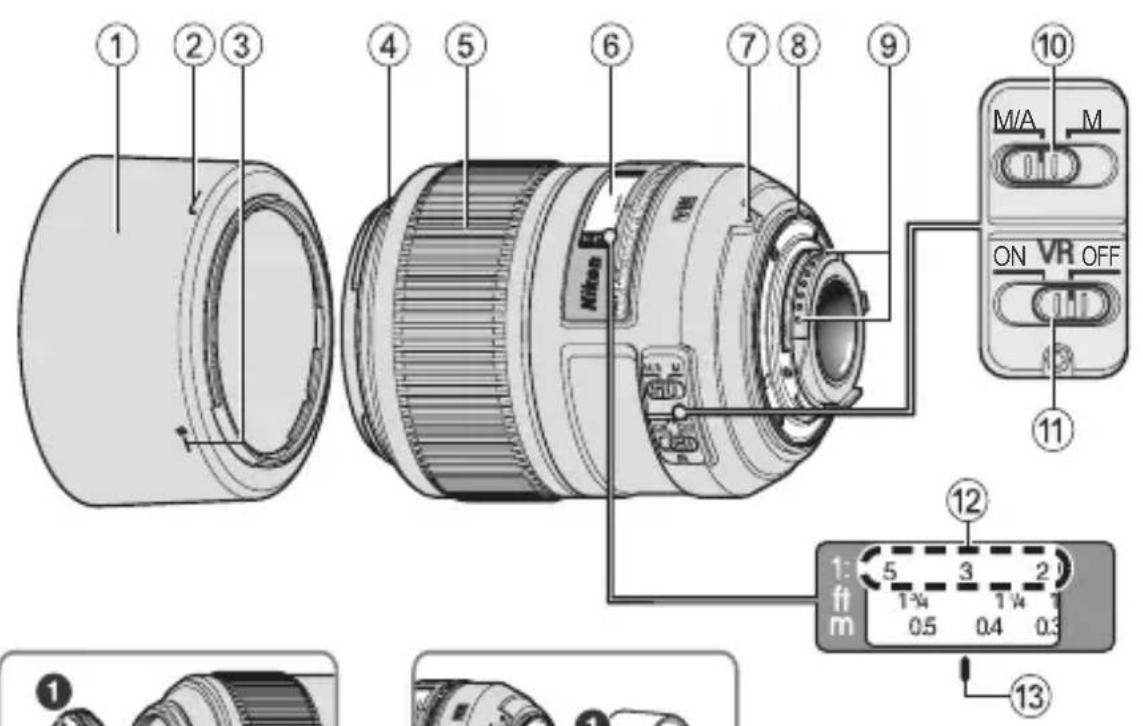
(1)Lens hood (P. 22)
(2) Lens hood attachment index (P. 22)
(3)Lens hood setting index (P. 22)
Lens hood mounting index (P. 22)
(5) Focus ring (P. 17)
(6)Distance scale
⑦ Mounting index (P. 16)
Lens mount rubber gasket (P. 22)
CPU contacts (P. 22)
10 Focus mode switch (P. 17)
① Vibration reduction ON/OFF switch (P. 20)
(12)Reproduction ratio scale (P. 18)
(13)Distance index line (P. 18) ( ) : reference page
Thank you for purchasing the AF-S DX Micro NIKKOR 85mm f/ 3.5G ED VR lens. DX NIKKOR lenses are specially designed for use with Nikon digital-SLR (Nikon DX format) cameras, such as the D300-series and D90. When mounted on Nikon DX format cameras, the lens picture angle is equivalent to approximately 1.5 × the focal length in 35mm format. Before using this lens, please read these instructions and refer to your camera's User's Manual.
Major features
- This lens exhibits sharp rendering characteristics suited to close-up photography, reproduction work, snapshots, and general photography at all shooting distances.
- This lens is equipped with the Nikon Internal Focusing (IF) system, which offers excellent balance between sharp focus on the primary subject and pleasing blur characteristics in the background and foreground.
- Superior optical performance and rendering characteristics are maximized with the use of one extra-low dispersion (ED) glass element, which ensure correction of chromatic aberration. In addition, the rounded aperture produces soft and pleasing blur characteristics in portions of pictures that are out-of-focus.
- Up to four Wireless Remote Speedlight SB-R200s can be mounted on the edge of the lens.
En
Using the lens Mounting the lens on the camera
1Turn the camera off.
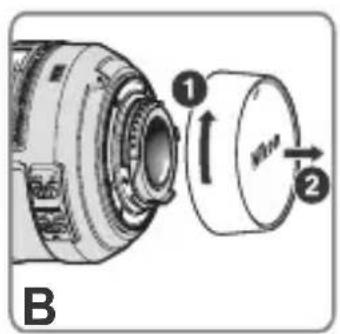
2 Remove the rear lens cap. (Fig. B)
3 Align the mounting index ⑦ on the lens with the mounting index on the camera, and rotate the lens counterclockwise until it clicks into place. Be sure that the lens is in the correct position when the mounting index ⑦ is on the top of the lens.
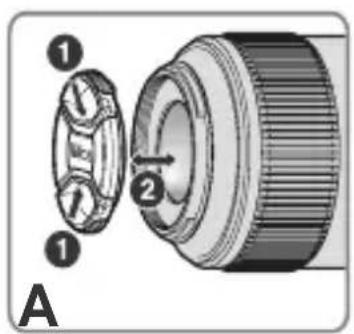
4 Remove the front lens cap. (Fig. A)
Removing the lens from the camera
1Turn the camera off.
Press and hold the lens release button on the camera while turning the lens clockwise.
■Focusing
Set your camera's focus mode selector according to the chart below:
| Camera focus mode | Lens' focus mode switch | |
| M/A M | ||
| AF | Autofocus with manual override | Manual focus (electronic rangefinder is available.) |
| MF Man | ual focus (electronic rangefinder is available.) | |
For more information on camera focus modes, refer to your camera's User's Manual.
Autofocus with manual override (M/A mode)
1 Set the lens focus mode switch ⑩ to M/A.
2Autofocus is enabled, but autofocus operation can be overridden by rotating the separate focus ring ⑤ while pressing the shutter-release button halfway, or while pressing the AF-ON button on the camera body of cameras so equipped.
3 Press the shutter-release button halfway or the AF-ON button once again to cancel manual focus and resume autofocus.
Setting the aperture
Use the camera to adjust the aperture setting. When exposure (or shooting) mode is set at "A" or "M", the camera will control aperture to maintain the effective f-number (up to approx. 1.1 stops) even if shooting distance is changed.
Depth of field
If your camera supports depth-of-field preview, the effects of the aperture setting can be previewed in the viewfinder before shooting.
This lens is equipped with the Internal Focusing (IF) system. As the shooting distance decreases, the focal length also decreases.
■Focusing at a predetermined reproduction ratio (Reproduction ratio scale)
The reproduction ratio is the relation between the size of the image recorded on the image sensor and the actual subject size. If, for example, the image on the image sensor is one-fifth the actual subject size, the reproduction ratio is 1:5.
To photograph at a predetermined reproduction ratio, use the following procedure:
1 Manually turn the focus ring until the desired reproduction ratio scale number is aligned with the distance index line 13.
2 Aim at the subject, then change your position, moving closer to or farther away from the subject, until the image in the viewfinder sharpens.
Notes on close-up photography and reproduction work
Camera shake
This lens provides such exceptionally high image magnification that even the slightest movement during shooting can cause the image to blur. Therefore, the use of a tripod and a cable release or remote cord is highly recommended to prevent the effects of camera shake.
Close working distance
At the high reproduction ratios used in close-up shooting, the depth of field is very shallow. To ensure sufficient depth of field, stop down the lens, extend the exposure time, and carefully position the camera so that the most important portion of the subject is parallel to the surface of the image sensor to ensure sharp focus.
Exposure factor
The f-number of a lens indicates brightness of the image formed by the lens set at "infinity" shooting distance. The greater the reproduction ratio, the more image brightness decreases. The actual brightness of the image is called the "effective f-number," and the exposure compensation value for the change of the effective f-number is called the "exposure factor."
Effective f-number variation (P. 148)
With this lens, the greater the reproduction ratio (the shorter the shooting distance), the more the brightness of the image projected onto the image sensor decreases and the more the effective f-number increases (the amount of light passing through the lens' aperture decreases). This variation is automatically compensated for by the camera's exposure meter, so the user can determine exposure or operate TTL flash shooting without having to consider the exposure factor.
The f-number displayed in the camera's LCD panel or viewfinder is the value automatically compensated.
■Vibration reduction mode Setting the vibration reduction ON/OFF switch
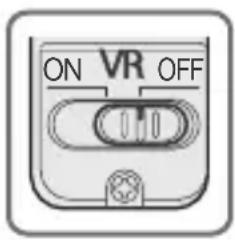
ON: The effects of camera shake are reduced while the shutter-release button is pressed halfway and also at the instant the shutter is released. Because vibration is reduced in the viewfinder, auto/manual focusing and exact framing of the subject are easier.
OFF:The effects of camera shake are not reduced.
Notes on using vibration reduction
- By enabling vibration reduction (VR), slower shutter speeds (3.0stops^) can be used when shooting distance is between and 2.6m (the reproduction ratio from to 1/30× ). The higher the reproduction ratio from 1/30× is, the more the effects of vibration reduction will decrease gradually. (The effects of VR on shutter speed are measured according to Camera and Imaging Products Association (CIPA) standards; FX-format lenses are measured using FX-format digital cameras, DX-format lenses using DX-format cameras. Zoom lenses are measured at maximum zoom.)
- After pressing the shutter-release button halfway, wait until the image in the viewfinder stabilizes before pressing the shutter-release button the rest of the way down.
- Due to the characteristics of the vibration reduction mechanism, the image in the viewfinder may be blurred after the shutter is released. This is not a malfunction.
-
If the camera is panned in a wide arc, compensation for camera shake in the panning direction is not performed. For example, only the effects of vertical camera shake is reduced with horizontal panning.
-
Do not turn the camera off or remove the lens from the camera while vibration reduction is operating. Failure to observe this note could result in the lens sounding and feeling as if an internal component is loose or broken when it is shaken. This is not a malfunction. Turn the camera on again to correct this.
- With cameras featuring a built-in flash, vibration reduction does not function while the built-in flash is charging.
- With autofocus cameras featuring an AF-ON button, vibration reduction does not function even when the AF-ON button is pressed.
- When the camera is mounted on a tripod, set the vibration reduction ON/OFF switch ⑪ to OFF. However, set the switch to ON when using a tripod without securing the tripod head, or when using a monopod.
The built-in flash and vignetting
- The built-in flash cannot be used over distances of less than 0.6 m (2.0 ft.).
- To prevent vignetting, do not use the lens hood.
- Vignetting is the darkening of the corners around the image that occurs when light emitted by the camera's built-in flash is obstructed by the lens barrel.

Using the lens hood
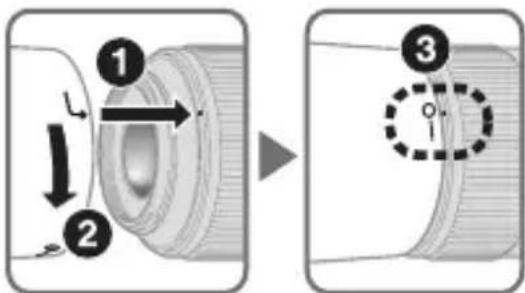
The lens hood blocks light rays that have harmful effects on pictures. It also helps to protect the glass surface of the lens.
Attaching the hood
-
Be sure that the lens hood mounting index () is aligned with the lens hood setting index (-o) (3).
-
To facilitate attachment or removal of the hood, hold it by the lens hood attachment index (▶) rather than its outer edge.
- If the lens hood is not correctly attached, vignetting may occur.
- The lens can be stored with the lens hood attached in the reverse position.
Lens care
- Be careful not to allow the CPU contacts ⑨ to become dirty or damaged.
- If the lens mount rubber gasket ⑧ is damaged, be sure to visit the nearest Nikon- authorized service representative for repair.
- Clean lens surfaces with a blower brush. To remove dirt and smudges, use a soft, clean cotton cloth or lens tissue moistened with ethanol (alcohol) or lens cleaner. Wipe in a circular motion from the center to the outer edge, taking care not to leave traces or touch other parts of the lens.
-
Never use organic solvent such as thinner or benzene to clean the lens, as this could cause damage, result in a fire, or cause health problems.
-
NC filters are available to protect the front lens element. The lens hood also helps to protect the front of the lens.
- When storing the lens in its flexible lens pouch, attach both the front and rear lens caps.
- When the lens is mounted on a camera, do not pick up or hold the camera and lens by the lens hood.
- When the lens will not be used for an extended period of time, store it in a cool, dry place to prevent mold and rust. Be sure to store the lens away from direct sunlight or chemicals such as camphor or naphthalene.
- Do not get water on the lens or drop it in water as this will cause it to rust and malfunction.
- Reinforced plastic is used for certain parts of the lens. To avoid damage, never leave the lens in an excessively hot place.
Standard accessories
- 52mm snap-on Front Lens Cap LC-52
- Rear Lens Cap
- Bayonet Hood HB-37
- Flexible Lens Pouch CL-1018
■Optional accessory
- 52mm screw-on filters
■Specifications
Type of lens: G-type AF-S DX Micro NIKKOR lens with built-in CPU and Nikon bayonet mount (specially designed for use with Nikon digital-SLR—DX format—cameras)
Focal length: 85mm
Maximum f/3.5
aperture:
Lens 14 elements in 10 groups (1 ED lens construction: element)
Picture angle: 18^ 50'
Reproduction to 1:1 (life-size)
ratio scale:
Distance Output to camera
information:
Focusing: Nikon Internal Focusing (IF) system, autofocus using a Silent Wave Motor, manually via separate focus ring
Vibration Lens-shift method using voice coil motors reduction: (VCMs)
Shooting Graduated in meters and feet from 0.286 m distance scale: (1 ft) to infinity ()
Closest 0.286 m (0.9 ft.) from focal plane (life-size)
focusing
distance:
No.of 9pcs.(rounded)
diaphragm
blades:
Diaphragm: Fully automatic
Aperture f/3.5 to f/32
range:
Exposure Via full-aperture method measurement:
Attachment 52 mm (P = 0.75 mm) size:
Dimensions: Approximately 73mm (dia.) × 98.5 mm (extension from the camera's lensmounting flange)
Weight: Approximately 355 g (12.5 oz)
Specifications and designs are subject to change without notice or obligation on the part of the manufacturer.

ACHTUNG
Keinesfalls zerlegen.
He pa3bnpaIte foToKamepy
OchOBhble BO3MOXHOCTN
- ΘOT oběektiv obládaet npeBOCXODhIMN ONTNUeCKIMN xapakterpncTKaMn, NOxODaIIMN dI MaKPOcBemKn, CbemKn pePOnyKuN, BbINOJIHEnI MOpEHTaJIbHbIX CHIMKOB I OblyHOcBemKn CJIIO6bIX paCCTOJHNI.
- ΘOT oběkTNB o6OpyIDOBaH cIcTeMoB BHyTpēnHei φOKycnPOBKN Nikon (IF), KOTOPaI o6ecneuBaet npeBOCxOndh bαlaHc Mejdy YeTKoI φOKycnPOBkoI Ha ΓλaBHom oběkTe, a TaKxe KpaCnBbIe HeaChbIe OueptaHnI Ha 3aDHeM n āpeDHeM pλaHax.
- Благория История Ростория Дiversities (ED), Котория обеслояваяхорецхураиматочьхаберрази, улухшaitя певocховные ортуескехарakтегостоки в ВОзможносяп поедачи. Коме Того, скругеленядinaфогма обеслояваяет бolee кpacиьie мягкne и неясны очepтыня тх чавetting симда, Которbie habordясь Всokуca.
·Ha KpaIIO obBeKTHBa MOxHObMOHTnPoBaTb Do yeTbIpex 6ecnpoBODhIX DInCTaHcNoHHO ynpabJIeMbIX BCnbIweK SB-R200.
KpaTHOCTb n3MeHeHnE 3KcNo3nCnN
Диафразмehhoe усно f obteknBa O3нauaet rapkoctb n3o6paжehna, cfoopmnpobahnoro obteknBOM npne erO haBeDeHnHa 6eCKOHeuHOCTb. Yem 6oJIbIe macHTab6 cbemKn, Tem MeNbIe rapKOCTb n3o6paJxehna. ФakTueckaj rpkocTB n3o6paJxehna Ha3bIBaETcra «ФофекТиВhoe Диафразмehhoe uncIo f», a BeIIuHa nonpaBKn 3KcNo3nUdЯ n3MeHnI yΦeKTnBHOrO DinaфразmehHOrO uncla f Ha3bIBaETcra «КраTHOCTb n3MeHEnry 3KcNo3nUcInN».
PpimeeHnno nncnoB30BaHnIO npaBHeHnBn6paun
IcnoIb30BaHne 6JIeHdbI
Бленьда 6лokириет CBetOBbie lyuN, KOTOpbie yxudjaIOT n3O6paJKeHne. OHa takke nomoraet 3auntntb CTeKJIHHyIO NOBepxHOCTb OBeKTnBa.
PpncoeHHeHne 6JeHdbI
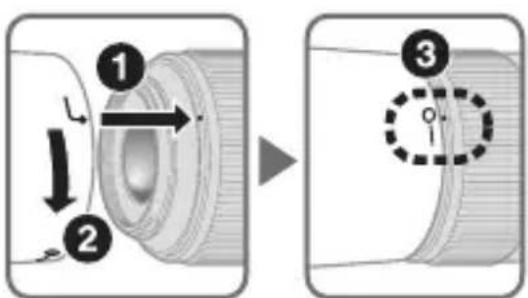
- y6eIntecb, yTO yCTaHOBOUHaMeTKa 6JIeHDbI (●) COBnaJaet C MeTKoJ fIKcauN 6JIeHDbI (-O) (3).
-ДяоблereHЯ yctaHOBKN nIN ChTnA 6IeHdbI DePKeHte ee B OblaactmETKn KpeHneHЯ 6JIeHdbI (,a He 3a BHeuHIO KpOMky.
- HenpaBnIbHa yCTaHOBka 6JIeHDbI MOKeT npNBecTu K BnHbETnpOBaHIO.
- OБъektнв ТаKKe можнохpaHNTb, пиКрпNB K hemy 6JIeHny
-образно CTOPOHNo.
Ru
yxo3a o6bekTINBOM
He donyckaite nonaadaHna KaHTaKbIMnKpOpoceccopa 9 nINx nobpejdeHnia.
Bcnyae noBpeKdEHHpe3HOBOrO yNIOHTeJI KpeIeHHa 8 o6paTntecb KaBTOpn3OBaHHOMy cepBnCHOMy ceHTpy Nikon nIN B cepBnCHbI cHTp dIy npOBeEHn peMOHTa.
- Bылолняп Te OuncTkу NOBepxHocTи OБьeKTHBa ПpoDyBaHnem BO3dYxOM. ДЯ удаленя Гязи и пяten ИспОьЗУTe МягКую, УСТую XLOПЧАTO6умaxная TkaHь ИЛпnpOTИрOчHyЮ TkaHь ДЯ OБьeKTHBa, CMOUeHHYIO эТаHOLOM (aIKNORoJEM) ИЛиЖИДКоCTbЮ DЯ ChNCTKN IIN3. ПрOTиРаTe KpyroBbIMN DBИжЕнЯМN OT ZeHTPa K КpaЯM, CTapaЯСb He OCTabJIЯТb СLEДOB ИЛДОТРaRINBaTbСЯДугnxЧаСтЕОБьeKTHBa.
- HnKOrda He nCpOJIb3yIe oprAHnueCKne pactBOpnteIi nn 6eH30J dIy NCTKn OBeKeTnBa, TaK KaK 3TO MoKET pInBecTn K eIro NOBpeKdEHIIO, NOXApU nn npo6JIemam Co 3DopOBbEm.
- Дязиты пeredнлнзbl obkeknBa moKHO nCNoIb3OBaTb HeITpaIbHbIe cBeToOphIbTpbl.БleHda obkeknBa taKxe nomoraet 3aunitbпereNDIOJIIN3y obkeknBa.
- Пиханени obteknBa в мягkom чекует пикpenTь поедно 3адно Крblшkn obteknBa.
- He noДинмай Te и He hOCHTe obBeKTnB nIi φOTOKaMepy, DepeKacb 3a npNKpePJIeHHyIO K ObBeKTnBy 6JIeHdY.
- Ecni obkeTnB He 6yIeT nCNoJIb3OBaTbcra B TeueHne dIInTeJIbHO rBpeMeHn, XpaHnte erO BC yXOM, npoxlaHOM MeCTe IJn PpeODTbpaUeHn o6pa3OBaHnra Tn6ka nn Koppo3nn. HnkOrda He OCTabJrTe obkeTnB IOd BO3JeCTBnEM npAmbix CoJIHeuHbIX JyuEi N He NOdBepraIte erO BO3JeCTBnIO XmIKaTOB, NaPnPmEp KaMΦapHbIX nn HaΦTaIIINHObBX CpeCTB.
- I36eaiTe IonoaHnHa oBekTIN BODbI Hne 6pocaiTe ero BV Ody, TaK KaK 3TO MOKeT CTaTb PnUHOn BO3NkHOBeHnpyKaBUnHbI NJIHEnCnpaBHOCTn.
B HeKOTOpbIX qactx ObBeKTnBa nCpOJIb3yETcA pIaCTNkoBbIM MaTePnaI NOBbIeHHo IpoUHOCTn.ДЯ npEdoTbpaUeHnI IOBpeJdeHnI HNKOrda He OCTaBJIaIte ObBeKTnB B MeCTax C NOBbIeHHo TeMpePaTyPoI.
CtahdapThbIe npHaJexKHOCTN
-Передnia Крьшka obbeктва LC-52 даметюm 52mm
3aHna 3aHTnKa KpbIka OBeKtNa
-Бленьда с байонецьим Крением HB-37
·MЯrkni chexoI dans obbeKtNbA CL-1018
Дононтульна ринадlexhoctb
BbHnBaIOuIeScy HJIbTpbl DnaMetpom 52MM
■TexHnueckne xapaKTepeNCTnKN
TnO obKeTnBa:ObBeKtB AF-S DX Micro NIKKOR Tnna G co BCTpoEHbIM MmKpOpnopeCCopOM n 6aNoHETHom Nikon (pa3pa6oTaH cpeuaJIbHo dJa INcPOJIb3OBaHnA C zHΦpOBbIMN 3ePKaJIbHbIMN φOTOKaMePamN Nikon φOpMaTa DX)
Φokychoe 85 MM
pacctOHHne:
MaKcImaJIbHa f/3,5
Диафразma:
Ontnuecka cxema: 14 3nementobB 10 rpynnax (1 nnH3a ED)
YrOJ 3peHnJ: 18^50^
Kana macsta6a 0T 1:1 (kaTneckn pa3mep) Cbemkn:
HΦopMaζηo ΠepeaetcB φOTOKamepy paCCTOAHN:
ФokycnpoBka: CnCTema BHyTpeHnei fokcnpOBKn (IF) Nikon, aBTOfOKycnpOBKa C nCNoJIb3OBAHnem 6ecShyMHO BOJHOBOrO npIBoJa, pyuHaJ fokycnpOBKa C nOMOu bIO OTdIbHOrO KOJIbca fokycnpOBKn
Iopablenne MeToI nepeMeueHnJIIN3 C NOMObU Bn6paun: 3JIeKTPoDvBnIaTeJeN C JInHeHOn O6MOTKOi (VCM) IkaIpaacctoHnA rpaynpoBaHa BV metpax n cyTax oT 0,286 M do CbeMkn: 6eckoHeuHOCTn ()
MnHmMaJIbHoe 0,286 M OT φOKaJIbHOJ PINOCKOCTN (ΦaKTNUeCKn paCCTOJHne CbeMKn: pa3Mep)
YncnoJepeKOB 9 (ckpyrIeHHbIe) DnaΦparMbI:
사용하기 전에 '본 칬명서'를 autoHi 퍎고 쩄버드해 사용하심지어.이 '본 칬명서'에는 툔울을 기재고 쩄버드해 사용하심从业者로서부상也只是재선상의 course to be sent to be sent to be sent to be sent to be sent to be sent to be sent to be sent to be sent to be sent to be sent to be sent to be sent to be sent to be sent to be sent to be sent to be
五人国
가丑Si的的叫是d和

GiHnJnJnJnJnJnJnJnJnJnJnJnJnJnJnJnJnJnJnJnJnJnJnJnJnJnJnJnJnJnJnJnJnJnJnJnJnJnJnJnJnJnJnJnJnJnJnJnJnJnJn

| ▲주의 | |
| ▲ cam 전 majority | Jeff is some or I do not like him. Jamiy of the origin it will soon become. |
| ◎ Before majority | Jamiy is a young man who looks good enough to be a good man. Jamiy is a young man who looks good enough to be a good man. Jamiy is a young man who looks good enough to be a good man. Jamiy is a young man who looks good enough to be a good man. Jamiy is a young man who looks good enough to be a good man. Jamiy is a young man who looks good enough to be a good man. Jamiy is a young man who looks great. Jamiy is a young man who looks great. Jamiy is a young man who looks great. Jamiy is a young man who looks great. Jamiy is a young man who looks great. Jamiy is a young man who looks great. Jamiy is a young man who looks great. Jamiy is a young man who looks great. Jamiy is a young man who looks great. Janiy is a young man who looks great. Jamiy is a young man who looks great. Jamiy is a young man who looks great. Jamiy is a young man who looks great. Jamiy is a young man who looks great. Jamiy is a young man who looks great. Jamiy is a young man who looks great. Jamiy is a young man who looks great. Jamiy is a younger man who looks great. Jamiy is a younger man who looks great. Jamiy is a younger man who looks great. Jamiy is a younger man who looks great. Jamiy is a younger man who looks great. Jamiy is a younger man who looks great. Jamiy is a younger man who looks great. Jamiy is a younger man who looks great. Jamiy is a younger man who looks greater than Jamiy. Jamiy is a younger man who looks great. Jamiy is a younger man who looks great. Jamiy is a younger man who looks great. Jamiy is a younger man who looks great. Jamiy is a younger man who looks great. Jamiy is a younger man who looks great. Jamiy is a younger man who looks great. Jamiy is a younger man who looks great. Janiy is a younger man who looks great. Jamiy is a younger man who looks great. Jamiy is a younger man who looks great. Jamiy is a younger man who looks great. Jamiy is a younger man who looks great. Jamiy is a younger man who looks great. Jamiy is a younger man who looks great. Jamiy is a younger man who looks great. Jamiy is a older man who looks great. Jamiy is a older man who looks great. Jamiy is a older man who looks great. Jamiy is a older man who looks great. Jamiy is a older man who looks great. Jamiy is a older man who looks great. Jamiy is a older man who looks great. Jamiy is a older man who looks great. Jamiy is a older man who looks greater than Jamiy. Jamiy is a older man who looks greater than Jamiy. Jamiy is a older man who looks greater than Jamiy. Jamiy is a older man who looks greater than Jamiy. Jamiy is a older man who looks greater than Jamiy. Jamiy is a older man who looks greater than Jamiy. Jamiy is a older man who looks greater than Jamiy. Janiy is a older man who looks greater than Jamiy. Jamiy is a older man who looks greater than Jamiy. Jamiy is a older man who looks greater than Jamiy. Jamiy is a older man who looks greater than Jamiy. Jamiy is a older man who looks greater than Jamiy. Jamiy is a older man who looks greater than Jamiy. Jamiy is a younger man who looks great. Jamiy is a younger man who looks great. Jamiy is a younger man who looks great. Jamiy is a younger man who looks great. Jamiy is a younger man who looks great. Jamiy is a younger man who looks great. Jamiy is a younger man who looks great. Jamiy is a older man who looks great. Janiy is a older man who looks great. Jamiy is a older man who looks great. Jamiy is a older man who looks great. Jamiy is a older man who looks great. Jamiy is a older man who looks great. Jamiy is a older man who looks great. Jamiy is a older man who looks great. Jamiy is a older man who looks great. Jamiy is a younger man who looks great. Jamiy is a younger man who looks great. Jamiy is a younger man who looks great. Jamiy is a younger man who looks great. Jamiy is a younger man who looks great. Jamiy is a younger man who looks great. Jamiy is a younger man who looks great. Jamiy is a younger man who looks greatly. Jamiy is a younger man who looks greatly. Jamiy is a younger man who looks greatly. Jamiy is a younger man who looks greatly. Jamiy is a younger man who looks greatly. Jamiy is a younger man who looks greatly. Jamiy is a younger man who looks greatly. Jamiy is a younger man who looks greatly. Jamiy is a younger man who looks greatly. Janiy is a younger man who looks greatly. Janiy is a younger man who looks greatly. Janiy is a younger man who looks greatly. Janiy is a younger man who looks greatly. Janiy is a younger man who looks greatly. Janiy is a younger man who looks greatly. Janiy is a younger man who looks greatly. Janiy is a younger man who looks greatly. Janiy is a older man who looks great. Janiy is a older man who looks great. Janiy is a older man who looks great. Janiy is a older man who looks great. Janiy is a older man who looks great. Janiy is a older man who looks great. Janiy is a older man who looks great. Janiy is a older man who looks great. Janiy is a older man who looks great. JDani is a younger man who looks great. JDani is a younger man who looks great. JDani is a younger man who looks great. JDani is a younger man who looks great. JDani is a younger man who looks great. JDani is a younger man who looks great. JDani is a younger man who looks great. JDani is a younger man who looks great. JDani is a younger man who looks great. JDani is a younger men who looks great. JDani is a younger man who looks great. JDani is a younger man who looks great. JDani is a younger man who looks great. JDani is a younger man who looks great. JDani is a younger man who looks great. JDani is a younger man who looks great. JDani is a younger man who looks great. JDani is a younger man who looks great. JDani is a younger man that looks great. JDani is a younger man that looks great. JDani is a younger man that looks great. JDani is a younger man that looks great. JDani is a younger man that looks great. JDani is a younger man that looks great. JDani is a younger man that looks great. JDani is a younger man that looks great. JDani is a younger man that looks great. JDani is a younger man that likes to look at things. JDani is a younger man that likes to look at things. JDani is a younger man that likes to look at things. JDani is a younger man that likes to look at things. JDani is a younger man that likes to look at things. JDani is a younger man that likes to look at things. JDani is a younger man that likes to look at things. JDani is a younger man that likes to look at things. |
■明
Closest shooting distance
Aperture range when shooting at the closest shooting distance*
Display on camera's LCD panel/viewfinder (f-number at "infinity")
- - - Display on camera's LCD panel/viewfinder (f-number at closest shooting distance)
- The largest f-number (f/45) will vary according to the camera's exposure value increment. The chart accounts for 1/3 EV increment settings.
Notice for Customers in Europe
This symbol indicates that electrical and electronic equipment is to be collected separately. The following apply only to users in European countries:
- This product is designated for separate collection at an appropriate collection point. Do not dispose of as household waste.
- Separate collection and recycling helps conserve natural resources and prevent negative consequences for human health and the environment that might result from incorrect disposal.
- For more information, contact the retailer or the local authorities in charge of waste management.
De
No reproduction in any form of this manual, in whole or in part (except for brief quotation in critical articles or reviews), may be made without written authorization from NIKON CORPORATION.




