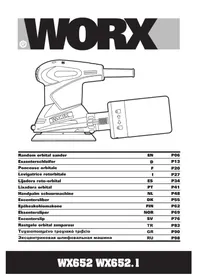
WX653 - Sander WORX - Free user manual and instructions
Find the device manual for free WX653 WORX in PDF.



| Product type | Random orbital sander |
| Brand | Worx |
| Model | WX653 |
| Rated voltage | 220-240 V ~ 50/60 Hz |
| Power consumption | 360 W |
| No-load speed | 7000 – 12000 opm |
| Base plate diameter | 125 mm |
| Vibration amplitude | 2.5 mm |
| Protection class | II (double insulation) |
| Weight | 2.1 kg |
| Sound pressure level | 78.6 dB(A) (K=3 dB(A)) |
| Sound power level | 89.6 dB(A) (K=3 dB(A)) |
| Vibration value | 6.47 m/s² (K=1.5 m/s²) |
| Dust collection system | Dust box and vacuum adapter (32/35 mm) |
| Speed variator | Yes, adjustment wheel |
| Switch | On/off slide |
| Compatible materials | Wood, plastic, fillers, paint, varnish, metal |
| Included accessories | Velcro sanding papers (60/80/120 grit), dust box, 32 mm and 35 mm adapters |
| Maintenance | Clean with a dry cloth; do not use water |
| Safety | Wear eye, ear and dust mask protection; read the manual |
| Reparability | Entrust to a qualified professional; parts not repairable by user |
| Intended use | Sanding and polishing of surfaces |
Frequently Asked Questions - WX653 WORX
User questions about WX653 WORX
0 question about this device. Answer the ones you know or ask your own.
Ask a new question about this device
Download the instructions for your Sander in PDF format for free! Find your manual WX653 - WORX and take your electronic device back in hand. On this page are published all the documents necessary for the use of your device. WX653 by WORX.
USER MANUAL WX653 WORX
natural_image
Line drawing of a mechanical device with no visible text or symbols| Random orbital sander | EN | P05 |
| Exzenterschleifer | D | P12 |
| Ponceuse rotative | F | P19 |
| Levigatrice roto-orbitale | I | P26 |
| Lijadora rotorbital | ES | P34 |
| Excentrische schuurmachine | NL | P42 |
| Szlifierka orbitalna mimośrodowa | PL | P49 |
| Random körkörös mozgású csiszoló | HU | P56 |
| Şlefuitor orbital aleatoriu | RO | P63 |
| Nesouměrná vibrační bruska | CZ | P70 |
| Elektrická leštiaca dráhová brúska | SK | P77 |
| Original instructions EN | |
| Originalbetriebsanleitung | D |
| Notice originale F | |
| Istruzioni originali I | |
| Manual original ES | |
| Oorspronkelijke gebruiksaanwijzing NL | |
| Tłumaczenie oryginalnych instrukcji PL | |
| Eredeti használati utasítás HU | |
| Traducerea instructiunilor inițiale | RO |
| Překlad původních pokynů | CZ |
| Preklad pôvodných pokynov | SK |
text_image
① ② ③ ④ ⑤ ⑥ ⑦ WORX ⑧a ⑧b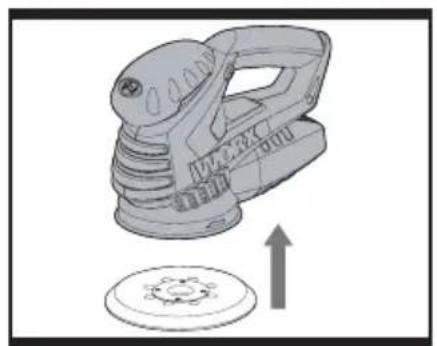
natural_image
Mechanical component with gear and mounting bracket, no visible text or symbolsABC
natural_image
Mechanical component diagram showing a clamping mechanism with an arrow indicating upward motion (no text or symbols present)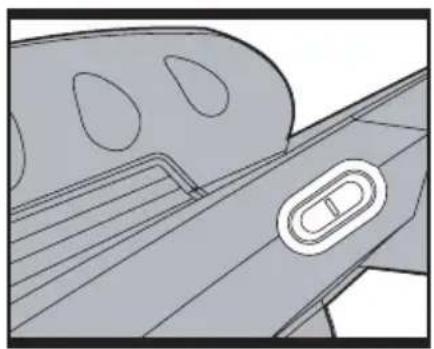
natural_image
Technical line drawing of a mechanical component with a central oval feature (no text or symbols)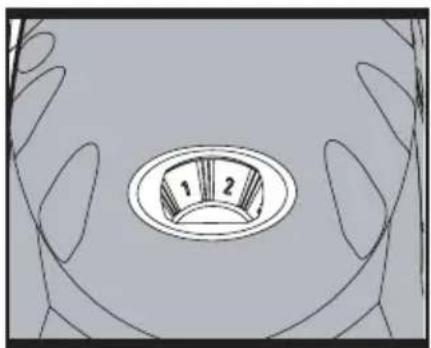
natural_image
Diagram of a hand holding a circular dial with two numbered segments (1 and 2), no text or symbols present.DEF
natural_image
Technical line drawing of a mechanical device with no visible text or symbols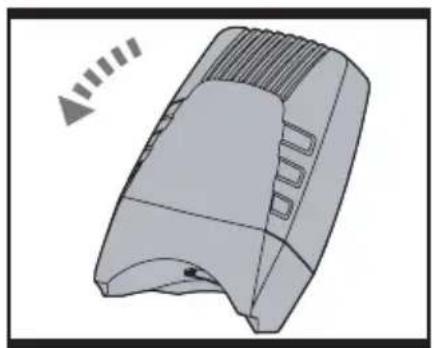
natural_image
3D rendered mechanical component with ribbed top and curved base, no visible text or symbols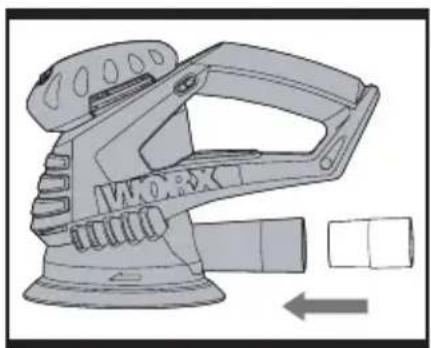
natural_image
Technical illustration of a mechanical device with no visible text or symbolsG
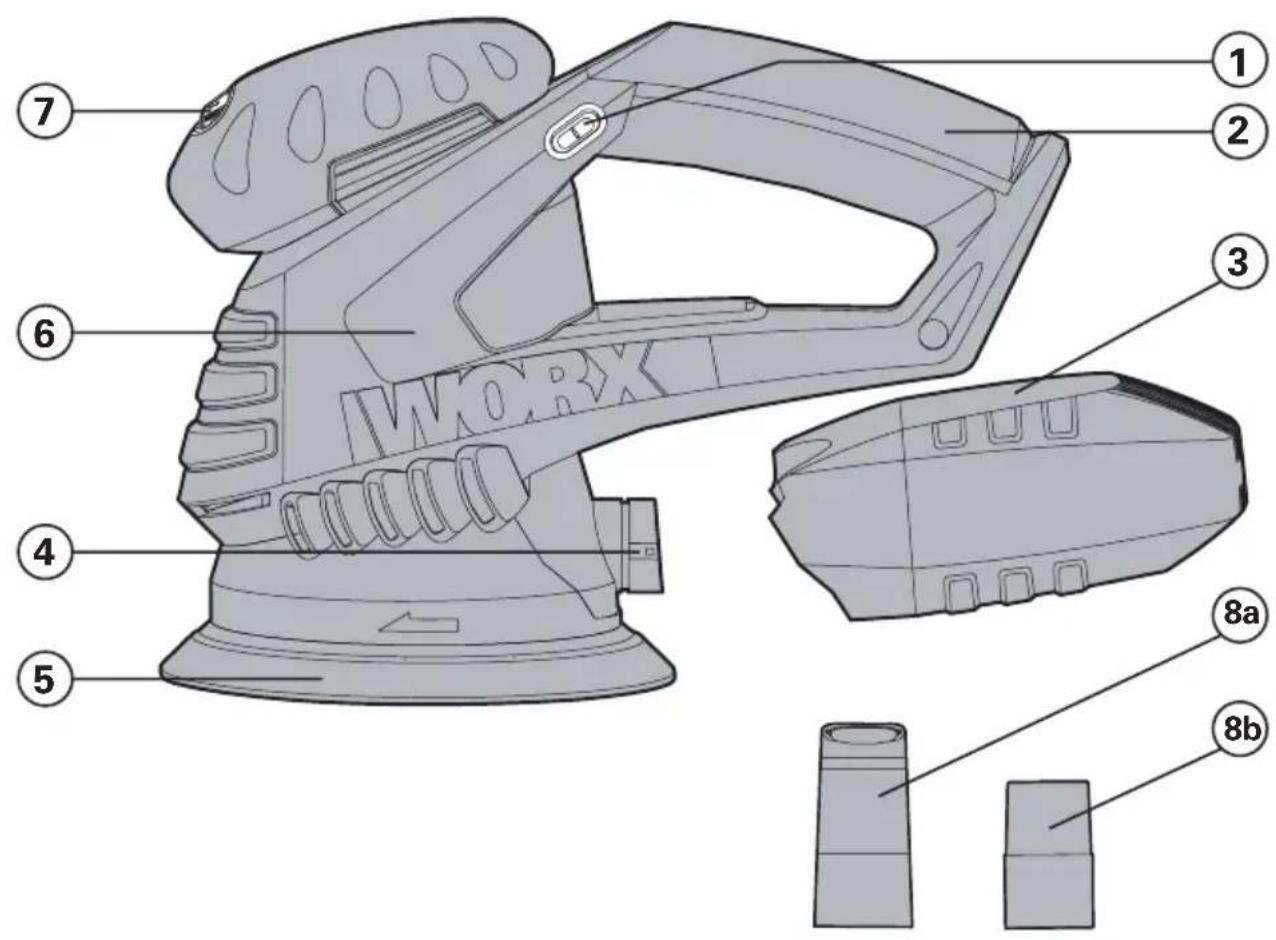
- SLIDING ON-OFF SWITCH
- SOFT GRIP HANDLE
- DUST BOX *
- DUST EXTRACTION OUTLET
- BASEPLATE
- MOTOR HOUSING
- VARIABLE SPEED CONTROL
- DUST EXTRACTION ADAPTER (A: 35mm; B: 32mm)
- SANDING PAPER (See Fig. B) *
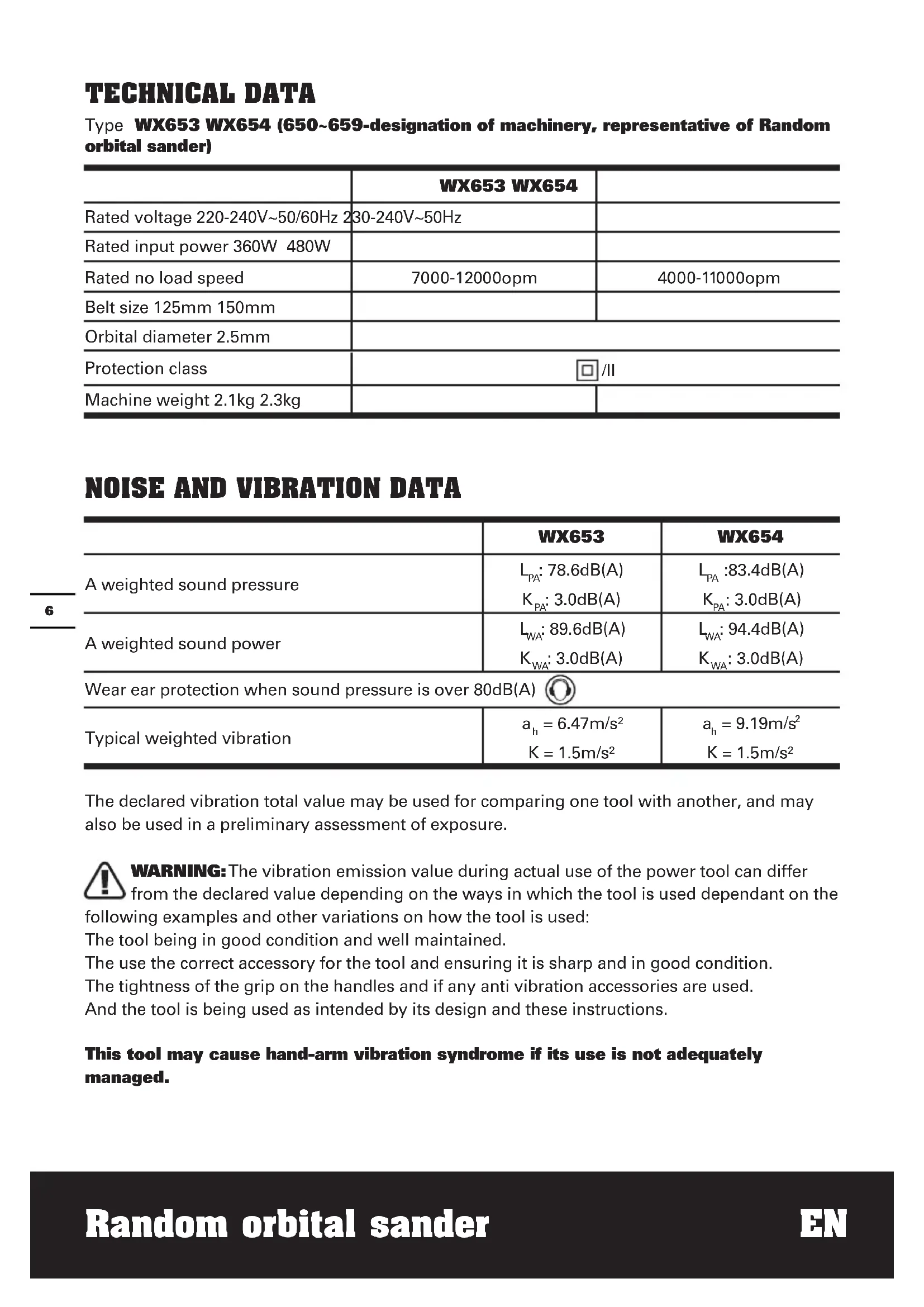
TECHNICAL DATA
Type WX653 WX654 (650\~659-designation of machinery, representative of Random orbital sander)
| WX653 WX654 | ||
| Rated voltage 220-240V~50/60Hz | 230-240V~50Hz | |
| Rated input power 360W 480W | ||
| Rated no load speed | 7000-12000opm | 4000-11000opm |
| Belt size 125mm 150mm | ||
| Orbital diameter 2.5mm | ||
| Protection class | ☐/II | |
| Machine weight 2.1kg 2.3kg | ||
NOISE AND VIBRATION DATA
| WX653 | WX654 | |
| A weighted sound pressure | L_PA : 78.6dB(A) K_PA : 3.0dB(A) | L_PA :83.4dB(A) K_PA : 3.0dB(A) |
| A weighted sound power | L_WA : 89.6dB(A) K_WA : 3.0dB(A) | L_WA : 94.4dB(A) K_WA : 3.0dB(A) |
| Wear ear protection when sound pressure is over 80dB(A) [IMAGE] | ||
| Typical weighted vibration | a_h = 6.47m/s^2 K = 1.5m/s^2 | a_h = 9.19m/s^2 K = 1.5m/s^2 |
The declared vibration total value may be used for comparing one tool with another, and may also be used in a preliminary assessment of exposure.

WARNING: The vibration emission value during actual use of the power tool can differ
from the declared value depending on the ways in which the tool is used dependant on the
following examples and other variations on how the tool is used:
The tool being in good condition and well maintained.
The use the correct accessory for the tool and ensuring it is sharp and in good condition.
The tightness of the grip on the handles and if any anti vibration accessories are used.
And the tool is being used as intended by its design and these instructions.
This tool may cause hand-arm vibration syndrome if its use is not adequately managed.
WARNING: To be accurate, an estimation of exposure level in the actual conditions of use should also take account of all parts of the operating cycle such as the times when the tool is switched off and when it is running idle but not actually doing the job. This may significantly reduce the exposure level over the total working period.
Helping to minimise your vibration exposure risk.
Maintain this tool in accordance with these instructions and keep well lubricated (where appropriate).
If the tool is to be used regularly then invest in anti vibration accessories.
Avoid using tools in temperatures of 10^ C or less.
Plan your work schedule to spread any high vibration tool use across a number of days.
ACCESSORIES
Dust box 1
32mm dust extraction adaptor 1
35mm dust extraction adaptor 1
60 grit velcro sanding paper 3
80 grit velcro sanding paper 3
120 grit velcro sanding paper 3
125mm baseplate 1(only for WX654)
We recommend that you purchase your accessories from the same store that sold you the tool. Use good quality accessories marked with a well-known brand name. Choose the type according to the work you intend to undertake. Refer to the accessory packaging for further details. Store personnel can assist you and offer advice.
SYMBOLS OPERATING INSTRUCTIONS

To reduce the risk of injury, user must read instruction manual

Warning

Double insulation

Wear eye protection

Wear ear protection

Wear dust mask

NOTE: Before using the tool, read the instruction book carefully.
INTENDED USE
The machine is intended for dry sanding of wood, plastic, metal and filler material as well as painted surfaces. Machines with electronic control are also suitable for polishing.
ASSEMBLY THE ROTARY SANDER
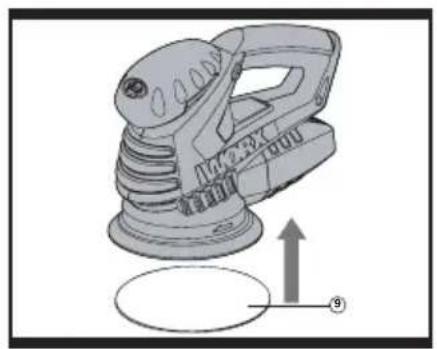
1. REPLACING THE SANDING PLATE (See Fig A)
To replace the sanding plate, pull off the Sand paper. Loosen and remove the screw.
Replace damaged sanding plates without delay.
2. REPLACING THE SAND PAPER
Remove the plug from the socket before carrying out any adjustment, servicing or maintenance.
A) Selecting the sand paper
Depending on the material to be worked and the desired material removal, various Sand paper qualities are to be used:
- Use coarse grits to sand down rough finishes medium grit to smooth the work and fine grit to finish off.
- The higher the grade number, the finer the grit. For rough work, start with a low grade of grit. (e.g.60grit) and change to a higher, finer grade (e.g.120grit) for finishing.
B) Replacing the sand paper (See Fig B)
Lift the Sand paper at the side and pull it off the sanding plate. Clean the sanding plate, if required. Press the new Sand paper against the bottom of the sanding plate. To ensure optimum dust extraction, the holes of the Sand paper must match with those of the sanding plate.
OPERATION
1. SWITCHING ON/OFF (See Fig C)
Depress "I" on the sliding on-off switch to
start the machine.
Depress "0" on the sliding on-off switch to stop it.
2. VARIABLE SPEED CONTROL (See Fig D)
With the variable speed control dial (7), the required speed can be selected (also while running).
The required speed is dependent on the material and is to be determined by a practical trial.
After longer periods of working at low speed, allow the machine to cool down by running it for approx. 3 minutes at maximum speed with no load.
| Sanding work | Grain | Speed setting(opm) | |
| Coarse sanding | Precision sanding | ||
| Sanding down varnishes | 180 400 | 8700~11000 | |
| Stripping paint | 40 120 | 9800~11000 | |
| Touching up paintwork | 120 120 | 7600~10000 | |
| Sanding wood | 60 240 | 7600~11000 | |
| Machining veneer | 180 400 | 8700~11000 | |
| Sanding aluminium | 80 240 | 7600~11000 | |
| Derusting metal | 40 120 | 9800~11000 | |
| Sanding metal and steel | 120 240 | 9800~11000 | |
| Sanding plexiglass | 180 400 | 6500~8700 | |
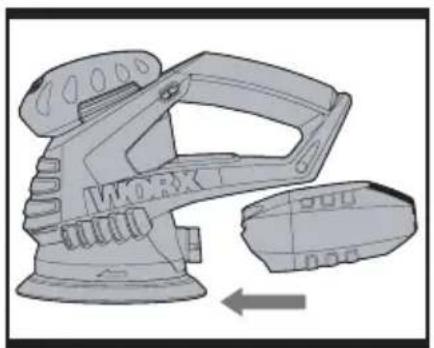
3. DUST BOX (See Fig E, F) A) Attach the dust box (See Fig E)
Your sander is equipped with a dust collection box. To attach, slide the dust box onto the outlet piece and take care that the dust box locks in the grooves of the outlet.
CAUTION: To prevent the possibility of sanding dust or foreign body being thrown into your face or eyes, never attempt to use your sander without the dust box properly installed.
B) Empty dust box (See Fig F)
For more efficient operation, empty dust box every 5-10mins. This will permit the air to flow through the box better. To empty the dust box, pull off the dust box out of the dust extraction outlet directly and shake out dust.
4. USING THE DUST EXTRACTION ADAPTER (See Fig G)
Your sander is equipped with two dust extraction adapters, which are designed for connecting the hose of a vacuum cleaner. If the vacuum hose is 35mm, Insert the 35mm dust adapter (a) directly into the rear dust outlet of sander. If the vacuum hose is 32 mm, insert the 32 mm adapter (b) into the back of 35mm adapter (a).
NOTE: Please pull the dust adapter to make sure tightened securely on the dust outlet.
5. SANDING SURFACES
Place the machine with the complete Sand paper on the surface to be worked. Ensure uniform sanding pressure. Less sanding pressure increases the sanding capacity and protects the machine and the sanding tool. The removal capacity and the sanding pattern are determined mainly by the selection of the Sand paper (grain size), the speed of the sanding plate and the application pressure.
ROUGH SANDING
Attach a Sand paper with coarse grain. Apply only light sanding pressure to achieve increased material removal.
FINE SANDING
Attach a Sand paper with fine grain. With moderate pressure, move the machine in a circular pattern or alternately in lengthwise and crosswise directions over the work piece. Do not tilt the machine to avoid sanding through the work piece (e.g. when sanding veneer). After finishing the work, switch off the machine and lift it from the work piece.
WORKING HINTS FOR YOUR ROTARY SANDER
If your power tool becomes too hot, especially when used at low speed, set the speed to maximum and run it with no load for 2-3 minutes to cool the motor. Avoid prolonged usage at very low speeds. Always use sand paper that is suitable for the material you want to sand.
Always ensure the work-piece is firmly held or clamped to prevent movement.
Any movement of the material may affect the quality of the sanding finish.
Start your sander before sanding and turn it off only after you stop sanding. For the best results, sand wood in the direction of the grain.
Do not start sanding without having the sandpaper fitted.
Do not allow the sand paper to wear away it will damage the base-plate. The guarantee does not cover base-plate wear and tear.
Use coarse grit paper to sand rough surfaces, medium grit for smooth surfaces and fine grit for the final surfaces. If necessary, first make a test run on scrap material.
Use only good quality sand paper.
The sand paper controls the sanding efficiency, not the amount of force you apply to the tool. Excessive force will reduce the sanding efficiency and cause motor overload.
Replacing the sand paper regularly will maintain optimum sanding efficiency.
MAINTAINANCE
Remove the plug from the socket before carrying out any adjustment, servicing or maintenance.
Your power tool requires no additional lubrication or maintenance. There are no user serviceable parts in your power tool. Never use water or chemical cleaners to clean your power tool. Wipe clean with a dry cloth. Always store your power tool in a dry place. Keep the motor ventilation slots clean. Keep all working controls free of dust. Occasionally you may see sparks through the ventilation slots. This is normal. If the supply
cord is damaged, it must be replaced by the manufacturer, its service agent or similarly qualified persons in order to avoid a hazard.
ENVIRONMENTAL PROTECTION

Waste electrical products must not be disposed of with household waste. Please recycle where facilities exist.
Check with your local authorities or retailer for recycling advice.
PLUG REPLACEMENT (UK & IRELAND ONLY)
If you need to replace the fitted plug then follow the instructions below.
IMPORTANT
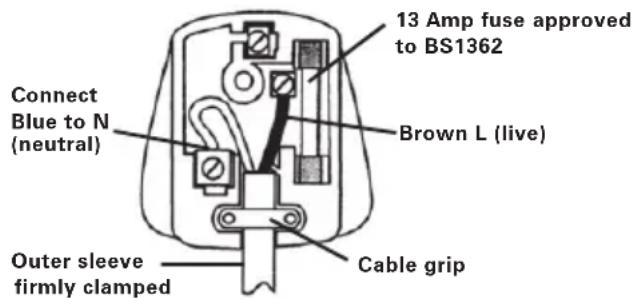
The wires in the mains lead are colored in accordance with the following code:
BLUE = NEUTRAL BROWN = LIVE
As the colors of the wires in the mains lead of this appliance may not correspond with the colored markings identifying the terminals in your plug, proceed as follows. The wire which is colored blue must be connected to the terminal which is marked with N. The wire which is colored brown must be connected to the terminal which is marked with L.

WARNING! Never connect live or neutral wires to the earth terminal of the plug. Only fit an approved 13ABS1363/A plug and the correct rated fuse.
NOTE: If a moulded plug is fitted and has to be removed take great care in disposing of the plug and severed cable, it must be destroyed to prevent engaging into a socket.
text_image
13 Amp fuse approved to BS1362 Brown L (live) Connect Blue to N (neutral) Cable grip Outer sleeve firmly clampedDECLARATION OF CONFORMITY
We,
POSITEC Germany GmbH
Declare that the product,
Description WORX Random orbital sander
Type WX653 WX654(650\~659- designation of machinery, representative of Random orbital sander)
Function Removing surface material using an abrasive medium
Complies with the following directives:
2006/42/EC
2004/108/EC
2011/65/EU
Standards conform to:
EN 55014-1
EN 61000-3-3
EN 55014-2
EN 60745-1
EN 61000-3-2
EN 60745-2-4
The person authorized to compile the technical file,
Name Russell Nicholson
Address Positec Power Tools (Europe) Ltd, PO Box 152, Leeds, LS10 9DS, UK
$$ \text {ko.yue} $$

text_image
C€2014/07/19
Leo Yue
POSITEC Quality Manager
Ltd, PO Box 152, Leeds, LS10 9DS, UK
keo.yue
CE
2014/07/19
Leo Yue
1. MISE EN MARCHE/ARRÊT (Cf. Figure C)
DÉCLARATION DE CONFORMITÉ
Nous,
POSITEC Germany GmbH
Ltd, PO Box 152, Leeds, LS10 9DS, UK

text_image
leo.yue
text_image
CE2014/07/19
Leo Yue
Ltd, PO Box 152, Leeds, LS10 9DS, UK
leo.yue
2014/07/19
Leo Yue
Type WX653 WX654(650\~659
PO Box 152, Leeds, LS10 9DS, UK

text_image
leo.yue
text_image
C€2014/07/19
Leo Yue
80 grit velcro sanding paper 3
120 grit velcro sanding paper 3
125mm PŁYTA PODSTAWOWA 1(only for WX654)
Typ WX653/WX654 (650\~659-
PO Box 152, Leeds, LS10 9DS, UK
keo.yue
CE
2014/07/19
Leo Yue
125mm Talp 1(only for WX654)
Ltd, PO Box 152, Leeds, LS10 9DS, UK

text_image
keo.yue
text_image
C€2014/07/19
Leo Yue
Manager de Calitate POSITEC
- SÍTOVÝ VYPÍNAČ ON/OFF
- MĚKKÁ RUKOJEŤ
- ZÁSOBNÍK NA PRACH *
- VÝSTUP PRO PŘIPOJENÍ ODSÁVÁNÍ PRACHU
- ZÁKLADNÍ DESKA
- KRYT MOTORU
- REGULÁTOR OTÁČEK
- ADAPTÉR NA ODSÁVÁNÍ (A: 35 MM; B: 32 MM)
- BRUSNÉHO PAPÍRU * (VIZ OBR. B) *
80 grit velcro sanding paper 3
120 grit velcro sanding paper 3
Ltd, PO Box 152, Leeds, LS10 9DS, UK

text_image
leo.yue
text_image
C€2014/07/19
Leo Yue
80 grit velcro sanding paper 3
120 grit velcro sanding paper 3
125mm Základová Doska 1(only for WX654)
5. BRÚSENIE POVRCHOV
Ltd, PO Box 152, Leeds, LS10 9DS, UK
leo.yue
CE
2014/07/19
Leo Yue
you've got the power
Copyright © 2014, Positec. All Rights Reserved.