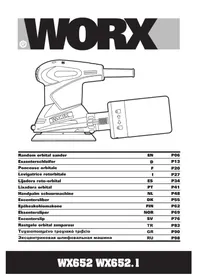
WX652.1 - Sander WORX - Free user manual and instructions
Find the device manual for free WX652.1 WORX in PDF.


| Product type | Orbital sander |
| Brand | Worx |
| Model | WX652.1 |
| Supply voltage | 230-240 V ~ 50 Hz |
| Power | 320 W |
| No-load speed | 12000 min⁻¹ |
| Base plate size | 125 mm |
| Orbit diameter | 2.5 mm |
| Weight | 1.4 kg |
| Double insulation | Yes (class II) |
| Sound pressure level | 73.2 dB(A) (K=3 dB) |
| Sound power level | 84.2 dB(A) (K=3 dB) |
| Vibrations (total value) | 5.73 m/s² (K=1.5 m/s²) |
| Abrasive paper attachment | Hook-and-loop system (Velcro) |
| Dust extraction system | Integrated dust bag |
| Switch | Sliding switch with protective cover |
| Handle | Ergonomic grip, two holding positions |
| Pad brake | Integrated (reduces no-load speed) |
| Intended use | Sanding wood, plastic, fillers, paints and varnishes |
| Included accessories | Dust bag, 6 abrasive sheets (grit 60, 80, 120) |
| Maintenance | Clean with a dry cloth, replace worn paper, empty the bag regularly |
| Repairability | No user-serviceable parts; contact an authorized service center |
| Safety instructions | Wear goggles, dust mask, hearing protection; do not use in explosive atmosphere |
| Disposal | Do not dispose with household waste; take to a recycling center |
Frequently Asked Questions - WX652.1 WORX
User questions about WX652.1 WORX
0 question about this device. Answer the ones you know or ask your own.
Ask a new question about this device
Download the instructions for your Sander in PDF format for free! Find your manual WX652.1 - WORX and take your electronic device back in hand. On this page are published all the documents necessary for the use of your device. WX652.1 by WORX.
USER MANUAL WX652.1 WORX
natural_image
Line drawing of a WORX hair dryer with attached device (no text or symbols)| Random orbital sander | EN | P06 |
| Exzenterschleifer | D | P13 |
| Ponceuse orbitale | F | P20 |
| Levigatrice rotororbitale | I | P27 |
| Lijadora roto-orbital | ES | P34 |
| Lixadora orbital | PT | P41 |
| Handpalm schuurmachine | NL | P48 |
| Excentersliber | DK | P55 |
| Epäkeskohiomakone | FIN | P62 |
| Eksentersliper | NOR | P69 |
| Excenterslip | SV | P76 |
| Rastgele orbital zimparasi | TR | P83 |
| Тухаюпоінмуєво трохіакó тріßeіо | GR | P90 |
| Эксцентриковая шлифовальная машина | RU | P98 |
| Original Instructions EN | |
| Originalbetriebsanleitung | D |
| Notice originale F | |
| Istruzioni originali | I |
| Manual original ES | |
| Manual original PT | |
| Oorspronkelijke gebruiksaanwijzing NL | |
| Original brugsanvisning DK | |
| Alkuperäiset ohjeet FIN | |
| Opprinnelige Instruksjonene NOR | |
| Bruksanvisning i original SV | |
| Orijinal isletme talimatı TR | |
| ПРОТОТУПО ОДНГІОН ХРНЗНЗ GR | |
| Оригинальное руководство по Эксплуатации RU | |
natural_image
Line drawing of a mechanical component with a circular housing and handle (no text or symbols)ABC1
natural_image
Line drawing of a mechanical power tool with a cylindrical component inserted (no text or symbols)
natural_image
Line drawing of a manual electric shaver and power tool (no text or symbols)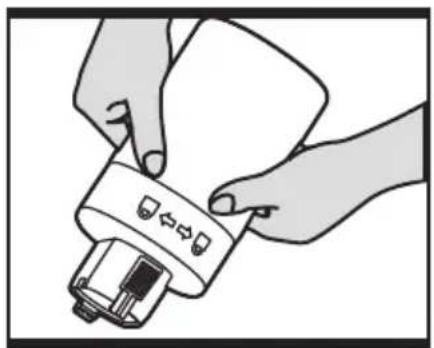
natural_image
Illustration of hands installing a device with a scroll wheel (no text or symbols)C2 D E
natural_image
Line drawing of a mechanical power tool with a cylindrical body and lever mechanism (no text or symbols)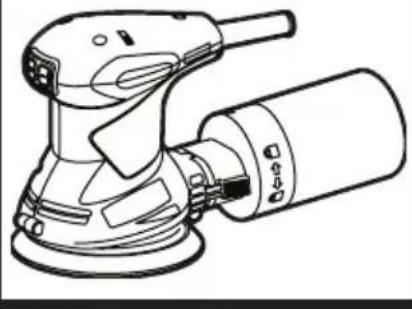
natural_image
Line drawing of a power tool with a cylindrical body and meshing device (no text or symbols)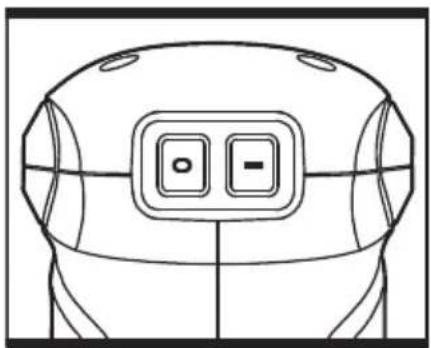
natural_image
Line drawing of a robot head with two buttons labeled 'O' and '-', no text or symbols present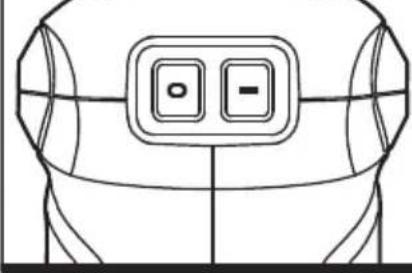
natural_image
Line drawing of a stylized helmet or helmet with two buttons labeled '○' and '-', no text or symbols present.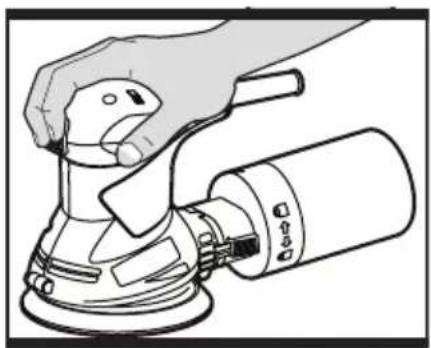
natural_image
Line drawing of a hand using a power tool on an electric scooter (no text or symbols)F
natural_image
Line drawing of a hand using a power tool on a mechanical device (no text or symbols)G
PRODUCT SAFETY GENERAL POWER TOOL SAFETY WARNINGS

WARNING Read all safety warnings, instructions, illustrations and specifications provided with this power
tool. Failure to follow all instructions listed below may result in electric shock, fire and/or serious injury. Save all warnings and instructions for future reference.
The term "power tool" in the warnings refers to your mains-operated (corded) power tool or battery-operated (cordless) power tool.
1) Work area safety
a) Keep work area clean and well lit. Cluttered or dark areas invite accidents.
b) Do not operate power tools in explosive atmospheres, such as in the presence of flammable liquids, gases or dust. Power tools create sparks which may ignite the dust or fumes.
c) Keep children and bystanders away while operating a power tool. Distractions can cause you to lose control.
2) Electrical safety
a) Power tool plugs must match the outlet. Never modify the plug in any way. Do not use any adapter plugs with earthed (grounded) power tools. Unmodified plugs and matching outlets will reduce risk of electric shock.
b) Avoid body contact with earthed or grounded surfaces, such as pipes, radiators, ranges and refrigerators. There is an increased risk of electric shock if your body is earthed or grounded.
c) Do not expose power tools to rain or wet conditions. Water entering a power tool will increase the risk of electric shock.
d) Do not abuse the cord. Never use the cord for carrying, pulling or unplugging the power tool. Keep cord away from heat, oil, sharp edges or moving parts. Damaged or entangled cords increase the risk of electric shock.
e) When operating a power tool outdoors, use an extension cord suitable for outdoor use. Use of a cord suitable for outdoor use reduces the risk of electric shock.
f) If operating a power tool in a damp location is unavoidable, use a residual current device (RCD) protected supply. Use of an RCD reduces the risk of electric shock.
3) Personal safety
a) Stay alert, watch what you are doing and use common sense when operating a power tool. Do not use a power tool while you are tired or under the influence of drugs, alcohol or medication. A moment of inattention while operating power tools may
result in serious personal injury.
b) Use personal protective equipment. Always wear eye protection. Protective equipment such as dust mask, non-skid safety shoes, hard hat, or hearing protection used for appropriate conditions will reduce personal injuries.
c) Prevent unintentional starting. Ensure the switch is in the off-position before connecting to power source and/or battery pack, picking up or carrying the tool. Carrying power tools with your finger on the switch or energising power tools that have the switch on invites accidents.
d) Remove any adjusting key or wrench before turning the power tool on. A wrench or a key left attached to a rotating part of the power tool may result in personal injury.
e) Do not overreach. Keep proper footing and balance at all times. This enables better control of the power tool in unexpected situations.
f) Dress properly. Do not wear loose clothing or jewellery. Keep your hair and clothing away from moving parts. Loose clothes, jewellery or long hair can be caught in moving parts.
g) If devices are provided for the connection of dust extraction and collection facilities, ensure these are connected and properly used. Use of dust collection can reduce dust-related hazards.
h) Do not let familiarity gained from frequent use of tools allow you to become complacent and ignore tool safety principles. A careless action can cause severe injury within a fraction of a second.
4) Power tool use and care
a) Do not force the power tool. Use the correct power tool for your application. The correct power tool will do the job better and safer at the rate for which it was designed.
b) Do not use the power tool if the switch does not turn it on and off. Any power tool that cannot be controlled with the switch is dangerous and must be repaired.
c) Disconnect the plug from the power source and/or remove the battery pack, if detachable, from the power tool before making any adjustments, changing accessories, or storing power tools. Such preventive safety measures reduce the risk of starting the power tool accidentally.
d) Store idle power tools out of the reach of children and do not allow persons unfamiliar with the power tool or these instructions to operate the power tool. Power tools are dangerous in the hands of untrained users.
e) Maintain power tools and accessories. Check for misalignment or binding of moving parts, breakage of parts and any other condition that may affect the power tool's operation. If damaged, have the power tool repaired before use. Many
accidents are caused by poorly maintained power tools.
f) Keep cutting tools sharp and clean. Properly maintained cutting tools with sharp cutting edges are less likely to bind and are easier to control.
g) Use the power tool, accessories and tool bits etc. in accordance with these instructions, taking into account the working conditions and the work to be performed. Use of the power tool for operations different from those intended could result in a hazardous situation.
h) Keep handles and grasping surfaces dry, clean and free from oil and grease. Slippery handles and grasping surfaces do not allow for safe handling and control of the tool in unexpected situations.
5) Service
a) Have your power tool serviced by a qualified repair person using only identical replacement parts. This will ensure that the safety of the power tool is maintained.
SYMBOLS

To reduce the risk of injury, user must read instruction manual

Warning

Double insulation

Wear eye protection

Wear ear protection

Wear dust mask
Waste electrical products should not be disposed of with household waste. Please recycle where facilities exist. Check with your local authorities or retailer for recycling advice.
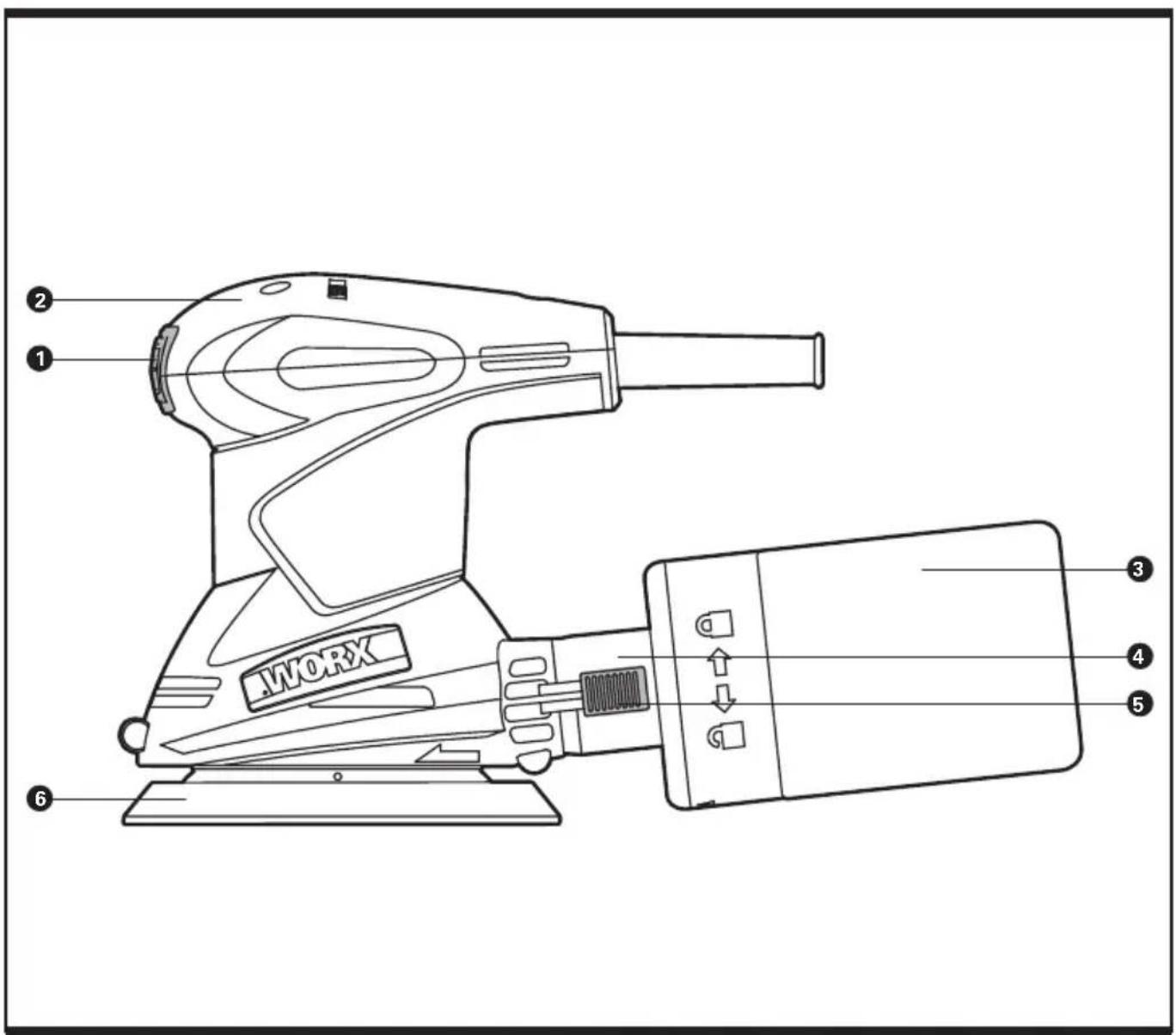
- ON/OFF WITCH
- HAND GRIP AREA
- DUST BAG*
- DUST EXTRACTION OUTLET
- LATCHING LEVER
- BASE PLATE
- SANDING PAPER* (See B)
* Not all the accessories illustrated or described are included in standard delivery.
TECHNICAL DATA
Description WORX Random orbital sander
Type WX652 WX652.1(650-659 designation of machinery, representative of Random Orbital Sander)
Voltage 230-240V\~50Hz
Power Input 320W
No load speed 12000/min
Base size 125mm
Orbital dia 2.5mm
Protection class
Wear ear protection.
VIBRATION INFORMATION
| Vibration total values (triax vector sum) determined according to EN 62841: |
| Vibration emission value a_h = 5.73m/s^2 |
| Uncertainty K = 1.5m/s2 |
The declared vibration total value and the declared noise emission value have been measured in accordance with a standard test method and may be used for comparing one tool with another.
The declared vibration total value and the declared noise emission value may also be used in a preliminary assessment of exposure.
WARNING: The vibration and noise emissions during actual use of the power tool can differ from the declared value depending on the ways in which the tool is used especially what kind of workpiece is processed dependant on the following examples and other variations on how the tool is used:
How the tool is used and the materials being cut or drilled.
The tool being in good condition and well maintained.
The use of the correct accessory for the tool and ensuring it is sharp and in good condition.
The tightness of the grip on the handles and if any anti vibration and noise accessories are used.
And the tool is being used as intended by its design and these instructions.
This tool may cause hand-arm vibration syndrome if its use is not adequately managed.
WARNING: To be accurate, an estimation of exposure level in the actual conditions of use should also take account of all parts of the operating cycle such as the times when the tool is switched off and when it is running idle but not actually doing the job. This may significantly reduce the exposure level over the total working period.
Helping to minimise your vibration and noise exposure risk.
Always use sharp chisels, drills and blades.
Maintain this tool in accordance with these instructions and keep well lubricated (where appropriate).
If the tool is to be used regularly then invest in anti vibration and noise accessories.
Plan your work schedule to spread any high vibration tool use across a number of days.
ACCESSORIES
Dust bag 1
60 grit velcro sanding paper 2
80 grit velcro sanding paper 2
120 grit velcro sanding paper 2
We recommend that you purchase your accessories from the same store that sold you the tool. Choose the type according to the work you intend to undertake. Refer to the accessory packaging for further details. Store personnel can assist you and offer advice.
OPERATING INSTRUCTIONS

NOTE: Before using the tool, read the instruction book carefully.
INTENDED USE
The machine is intended for dry sanding of wood, plastic, metal and filler material as well as painted surfaces.
Machines with electronic control are also suitable for polishing. The sander is not to be used for plastering.
1. CHANGING HOOK & LOOP SANDPAPER (See A, B)
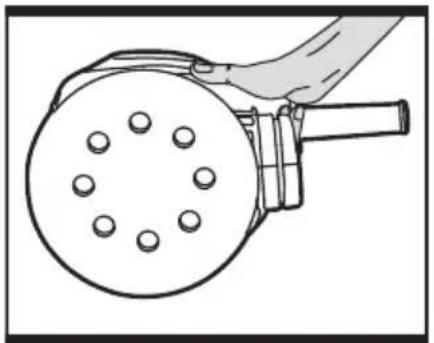
The sandpaper and sanding plate are provided with a hook and loop attachment system to allow quick and easy changing of the sanding and polishing accessories. Firstly, remove any dust or other objects from the hook and loop on the sanding plate and sandpaper. As the sandpaper has dust extraction holes you must align these with the holes in the sanding plate, otherwise the dust extraction will not function. (See A)
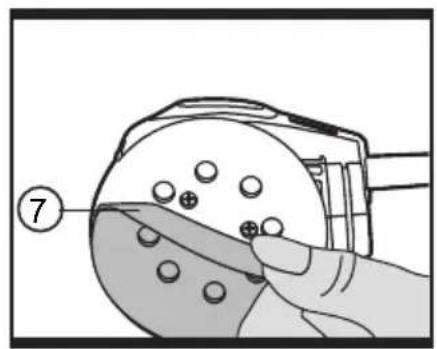
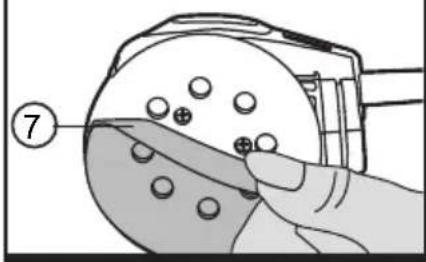
To remove the sandpaper, lift one corner of the paper and pull off from the sanding plate. (See B)
2. DUST BAG (See C1, C2, D)
— ATTACHING THE DUST BAG (See C1)
Always operate your sander with the dust bag fitted.
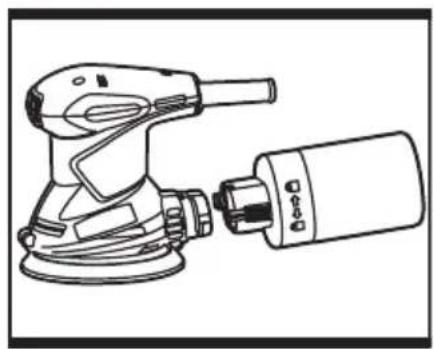
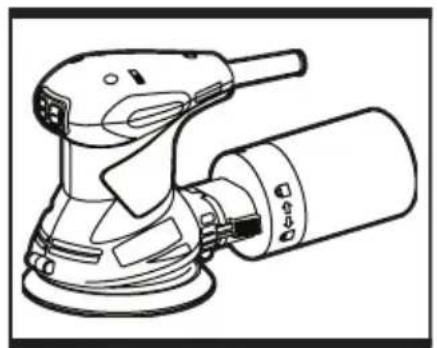
To attach, slide the bag onto the outlet piece and take care that the latching lever engages.

CAUTION!
To prevent the possibility of sanding dust or foreign body being thrown in to your face or eyes, never attempt to use your sander without the dust bag properly installed.
— EMPTY THE DUST BAG (See C1, C2, D)
For more efficient operation, empty the dust bag every 5-10mins. This will permit the air to flow through the bag better.
Method 1: To empty the dust bag, press the latching lever in and pull off the bag from the dust extraction port, and shake out dust. (See C1, C2)
Method 2: To empty the bag, rotate the bag to the unlock position. Remove the bag and shake out dust. (See D)
3. OPERATING THE ON/OFF SWITCH (See E)
To start your sander, depress the protective cover over the switch at the position marked "I". To stop your sander, depress the protective cover at the position marked "0".
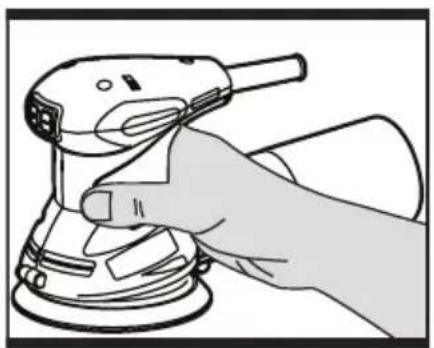
4. HAND GRIP AREA (See F, G)
Your sander is designed to be held either around the main housings, or by the top of the main housing. When sanding for long periods at a time, it is recommended you periodically alternate between the two holding positions.
5. SANDING SURFACES
Place the machine with the complete Sand paper on the surface to be worked. Ensure uniform sanding pressure. Less sanding pressure increases the sanding capacity and protects the machine and the sanding tool. The removal capacity and the sanding pattern are determined mainly by the selection of the Sand paper (grain size), the speed of the sanding plate and the application pressure.
ROUGH SANDING
Attach a Sand paper with coarse grain. Apply only light sanding pressure to achieve increased material removal.
FINE SANDING
Attach a Sand paper with fine grain. With moderate pressure, move the machine in a circular pattern or alternately in lengthwise and crosswise directions over the workpiece. Do not tilt the machine to avoid sanding through the work piece (e.g. when sanding veneer). After finishing the work, switch off the machine and lift it from the workpiece.
6. ORBITAL SANDING
Guide your sander parallel to the working surface and move it in circles or in a cross pattern. Do not tilt the tool in order to avoid deep unwanted sanding marks. The amount of material removed is determined by the speed of the sanding disc and the grit size used. The speed of the sanding disc diminishes relative to the pressure applied to the tool. For faster removal, do not increase pressure on the tool,
but use a coarser grit size.
7. SELECTING THE RIGHT GRADE OF SANDPAPER
— Different grades of sanding paper can be purchased from good DIY shops. Available grades are Coarse, Medium and Fine.
— Use coarse grits to sand down rough finishes, medium grit to smooth the work and fine grit to finish off.
— The higher the grade number, the finer the grit. For rough work start with a low grade of grit. (e.g. 60 grit) and change to a higher, finer grade (e.g. 120 grit) for finishing. If you use a fine grade for rough surfaces it will soon clog and need changing.
— It is best to make a trial run on a scrap piece of material to determine the optimum grades of sandpaper for a particular job.
8. SANDING PLATE BRAKE
An integrated sanding plate brake reduces the speed when running at no load so that scoring is avoided when placing the machine on the work piece. A continuously increasing no-load speed over the course of time indicates that the sanding plate brake is worn and must be replaced by an authorized customer service location.
WORKING HINTS FOR YOUR SANDER
If your power tool becomes too hot, especially when used at low speed, set the speed to maximum and run it with no load for 2-3 minutes to cool the motor. Avoid prolonged usage at very low speeds. Always use sand paper that is suitable for the material you want to sand.
Always ensure the work-piece is firmly held or clamped to prevent movement.
Any movement of the material may affect the quality of the sanding finish.
Start your sander before sanding and turn it off only after you stop sanding. For the best results, sand wood in the direction of the grain.
Do not start sanding without having the sandpaper fitted.
Do not allow the sand paper to wear away it will damage the base-plate. The guarantee does not cover base-plate wear and tear.
Use coarse grit paper to sand rough surfaces, medium grit for smooth surfaces and fine grit for the final surfaces. If necessary, first make a test run on scrap material.
Use only good quality sand paper.
The sand paper controls the sanding efficiency, not the amount of force you apply to the tool. Excessive force will reduce the sanding efficiency and cause motor overload.
Replacing the sand paper regularly will maintain optimum sanding efficiency.
MAINTENANCE
Remove the plug from the socket before carrying out any adjustment, servicing or maintenance.
Your power tool requires no additional lubrication or maintenance. There are no user serviceable parts in your power tool. Never use water or chemical cleaners to clean your power tool. Wipe clean with a dry cloth.
Always store your power tool in a dry place. Keep the motor ventilation slots clean. Keep all working controls free of dust. Occasionally you may see sparks through the ventilation slots. This is normal and will not damage your power tool.
If the supply cord is damaged, it must be replaced by the manufacturer, its service agent or similarly qualified persons in order to avoid a hazard.
ENVIRONMENTAL PROTECTION

Waste electrical products should not be disposed of with household waste. Please recycle where facilities exist.
Check with your Local Authority or retailer for recycling advice.
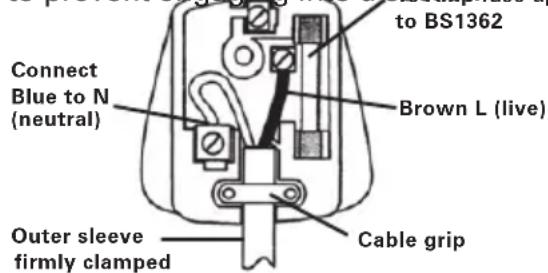
PLUG REPLACEMENT (ONLY FOR REWIRABLE PLUG OF UK & IRELAND)
If you need to replace the fitted plug then follow the instructions below.
IMPORTANT
The wires in the mains lead are colored in accordance with the following code:
BLUE =NEUTRAL BROWN =LIVE
As the colors of the wires in the mains lead of this appliance may not correspond with the colored markings identifying the terminals in your plug, proceed as follows. The wire which is colored blue must be connected to the terminal which is marked with N. The wire which is colored brown must be connected to the terminal which is marked with L.

WARNING! Never connect live or neutral wires to the earth terminal of the plug.
Only fit an approved 13ABS1363/A plug and the correct rated fuse.
NOTE: If a moulded plug is fitted and has to be removed take great care in disposing of the plug and severed cable, it must be destroyed to prevent engaging into a socket fuse approved
DECLARATION OF CONFORMITY
We,
POSITEC Germany GmbH
Grüner Weg 10, 50825 Cologne, Germany
Declare that the product,
Description WORX Random orbital sander
Type WX652 WX652.1 (650-659
designation of machinery, representative of Random orbital sander)
Function Removing surface material using an abrasive medium
Complies with the following directives:
2006/42/EC
2011/65/EU&(EU)2015/863
2014/30/EU
Standards conform to:
EN 62841-1, EN 62841-2-4,
EN 55014-1, EN 55014-2,
EN 61000-3-2, EN 61000-3-3
The person authorized to compile the technical file,
Name Marcel Filz
Address Positec Germany GmbH
Grüner Weg 10, 50825 Cologne, Germany

2019/09/05
Allen Ding
Deputy Chief Engineer, Testing & Certification
Positec Technology (China) Co., Ltd
18, Dongwang Road, Suzhou Industrial
Park, Jiangsu 215123, P. R. China
18, Dongwang Road, Suzhou Industrial
Park, Jiangsu 215123, P. R. China
SÉCURITÉ DU PRODUIT AVERTISSEMENTS DE SÉCURITE GENERAUX POUR L'OUTIL

INFORMATIONS RRELATIVES AUX VIBRATIONS
DÉCLARATION DE CONFORMITÉ
Nous,
POSITEC Germany GmbH
Grüner Weg 10, 50825 Cologne, Germany
18, Dongwang Road, Suzhou Industrial
Park, Jiangsu 215123, P. R. China
SICUREZZA DEL PRODOTTO AVVISI GENERALI PER LA SICUREZZA DEGLI UTENSILI A MOTORE

— RIAPPLICARE LA CASSETTA RACCOGLIPOLVERE (Vedi C1)
18, Dongwang Road, Suzhou Industrial
Park, Jiangsu 215123, P. R. China
Modelo WX652 WX652.1 (650-
18, Dongwang Road, Suzhou Industrial
Park, Jiangsu 215123, P. R. China
SEGURANÇA DO PRODUTO AVISOS GERAIS DE SEGURANÇA DE FERRAMENTAS ELÉCTRICAS

Nós, POSITEC Germany GmbH Grüner Weg 10, 50825 Cologne, Germany
2019/09/05 Allen Ding Engenheiro-chefe adjunto, Teste e Certificação Positec Technology (China) Co., Ltd 18, Dongwang Road, Suzhou Industrial Park, Jiangsu 215123, P. R. China
PRODUCTVEILIGHEID ALGEMENE VEILIGHEIDSWAARSCHUWINGEN VOOR VERMOGENSMACHINE

Positec Technology (China) Co., Ltd 18, Dongwang Road, Suzhou Industrial
Park, Jiangsu 215123, P. R. China
PRODUKTSIKKERHED GENERELLE SIKKERHED- SINSTRUKSER FOR EL-VÆRKT∅J

Type WX652 WX652.1 (650-659-
18, Dongwang Road, Suzhou Industrial
Park, Jiangsu 215123, P. R. China
TUOTETURVALLISUUS YLEISET SAHKOTYOKALUJEN. TURVALLISUUTEEN LIITTYVÄT VAROITUKSET

18, Dongwang Road, Suzhou Industrial
Park, Jiangsu 215123, P. R. China
PRODUKTSIKKERHET GENERELLE ADVARSLER FOR ELEKTROVERKTOY

1) SIKKERHET PÅ ARBEIDSPLASSEN
a) Hold arbeidsområdet rent og ryddig. Rotete arbeidsområder eller arbeidsområder uten lys kan føre til ulykker.
— SETTE PÅ ST∅VBOKSEN (Se C1)
Bruk plansliperen bare påsatt en støvpose. For å sette den på kan du skyve støvboksen på støvventilen. Kontroller at støvboksen låses på plass i sporene på ventilen.

ADVARSEL!
Type WX652 WX652.1 (650-659-
betegner maskin, anger Eksentersliper)
18, Dongwang Road, Suzhou Industrial
Park, Jiangsu 215123, P. R. China
PRODUKTSÄKERHET GENERELLA SÄKERHETSVARNINGAR FÖR ELVERKTYG

Typ WX652 WX652.1 (650-659-
18, Dongwang Road, Suzhou Industrial
Park, Jiangsu 215123, P. R. China
HASSAS (INCE) ZI MPARA
18, Dongwang Road, Suzhou Industrial
Park, Jiangsu 215123, P. R. China
18, Dongwang Road, Suzhou Industrial
Park, Jiangsu 215123, P. R. China
18, Dongwang Road, Suzhou Industrial Park, Jiangsu 215123, P. R. China

natural_image
Completely black image with no visible content, text, or symbols.
natural_image
Completely dark image with no visible content, text, or symbols.WORX
you've got the power
www.worx.com
Copyright © 2020, Positec. All Rights Reserved.
AR01247104