
AD 5032 - Iron ADLER - Free user manual and instructions
Find the device manual for free AD 5032 ADLER in PDF.
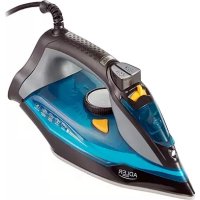



| Product type | Iron |
| Brand | Adler |
| Model | AD 5032 |
| Power supply | 220-240 V ~ 50/60 Hz |
| Rated power | 2400 W |
| Max power | 3000 W |
| Soleplate | Ceramic coated |
| Water tank | With MAX indication, filling through opening |
| Ironing functions | Dry ironing, steam, spray, vertical steam, burst steam function, self-cleaning |
| Temperature adjustment | Thermostat with positions for synthetic, silk/wool, cotton/linen, MAX |
| Anti-drip system | Yes, prevents water leakage at low temperature |
| Anti-scale system | Yes, integrated permanent filter |
| Automatic shut-off | Yes, after 30 s in horizontal position, 8 min in vertical |
| Indicator lights | Power indicator (always on) and heating indicator (turns off when at temperature) |
| Power cord | With rotating cable gland |
| Care and cleaning | Wipe soleplate with damp cloth; monthly self-cleaning recommended; empty tank after use |
| Safety | Automatic shut-off, overheat protection, do not immerse in water, use on stable surface |
| Repairability | Any repair must be carried out by an approved service center |
| Environmental information | Do not dispose of with household waste, drop off at collection point |
| Intended use | Household use only |
Frequently Asked Questions - AD 5032 ADLER
User questions about AD 5032 ADLER
0 question about this device. Answer the ones you know or ask your own.
Ask a new question about this device
Download the instructions for your Iron in PDF format for free! Find your manual AD 5032 - ADLER and take your electronic device back in hand. On this page are published all the documents necessary for the use of your device. AD 5032 by ADLER.
USER MANUAL AD 5032 ADLER
(GB) user manual - 3
ENGLISH
SAFETY CONDITIONS. IMPORTANT INSTRUCTIONS ON SAFETY OF USE. PLEASE READ CAREFULLY AND KEEP FOR FUTURE REFERENCE.
The warranty conditions are different if the device is used for commercial purposes.
- Before using the product, please read carefully and always comply with the following instructions. The manufacturer is not responsible for any damages due to misuse.
- The product is only to be used indoors. Do not use the product for any purpose that is not compatible with its application.
- The applicable voltage is 220-240V, ~50/60Hz. For safety reasons, it is not appropriate to connect multiple devices to one power outlet.
- Please be cautious when using around children. Do not let children play with the product. Do not let children or people who do not know the device use it without supervision.
- WARNING: This device may be used by children over 8 years of age and persons with reduced physical, sensory or mental capabilities, or persons without experience or knowledge of the device, only under the supervision of a person responsible for their safety, or if they were instructed on the safe use of the device and are aware of the dangers associated with its operation. Children should not play with the device. Cleaning and maintenance of the device should not be carried out by children, unless they are over 8 years of age and these activities are carried out under supervision.
- After you are finished using the product, always remember to gently remove the plug from the power outlet, holding the outlet with your hand. Never pull the power cable!!!
- Never leave the product connected to the power source without supervision. Even when use is interrupted for a short time, turn it off from the network and unplug the power.
- Never put the power cable, the plug, or the whole device into water. Never expose the product to atmospheric conditions such as direct sunlight or rain, etc. Never use the product in humid conditions.
- Periodically check the power cable condition. If the power cable is damaged, the product should be taken to a professional service location to be replaced in order to avoid hazardous situations.
- Never use the product with a damaged power cable or if it was dropped or damaged in any other way, or if it does not work properly. Do not try to repair the defective product yourself because it can lead to electric shock. Always turn the damaged device to a professional service location to repair it. All repairs can be done only by authorized service professionals. Incorrect repair can cause hazardous situations for the user.
- Never put the product on or close to hot or warm surfaces or kitchen appliances like an electric oven or gas burner.
- Never use the product close to combustibles.
- Do not let the cord hang over the edge of the counter.
- Do not immerse the motor unit in water.
- To provide additional protection, it is recommended to install a residual current device (RCD) in the power circuit with a residual current rating of not more than 30 mA. Contact a professional electrician for this matter.
- If it is necessary to use an extension cord, use only one with a grounding terminal and adapted to a current of at least 10 A. Other ("weak") extension cords can overheat. The cable should be arranged to avoid accidental strokes or stumbles over it.
- Always unplug the iron from the mains before filling with water or when it is not in use.
- Touching a hot soleplate, contact with hot steam or water may cause burns. Be careful
when you rotate the iron, as the tank may still contain hot water even when the iron is disconnected from the power supply.
- DO NOT allow prolonged contact of the hot steam iron with fabric or flammable materials.
- Be careful that the power cord does not touch the hot soleplate. Allow the iron to cool completely before storage.
- If you do not use the iron, even for a short time, turn off the steam options.
- Under no circumstances should you iron clothes or fabrics that are on humans or animals.
- Never direct the steam at humans or pets.
- Use the self-cleaning function at least once a month.
- The iron must be used on a stable, even surface and can only be disposed of properly.
- Do not fill the water tank with chemicals, perfumes, or descaling substances.
- Do not fill the water tank above the MAX level.
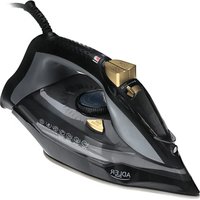
DESCRIPTION OF DEVICE
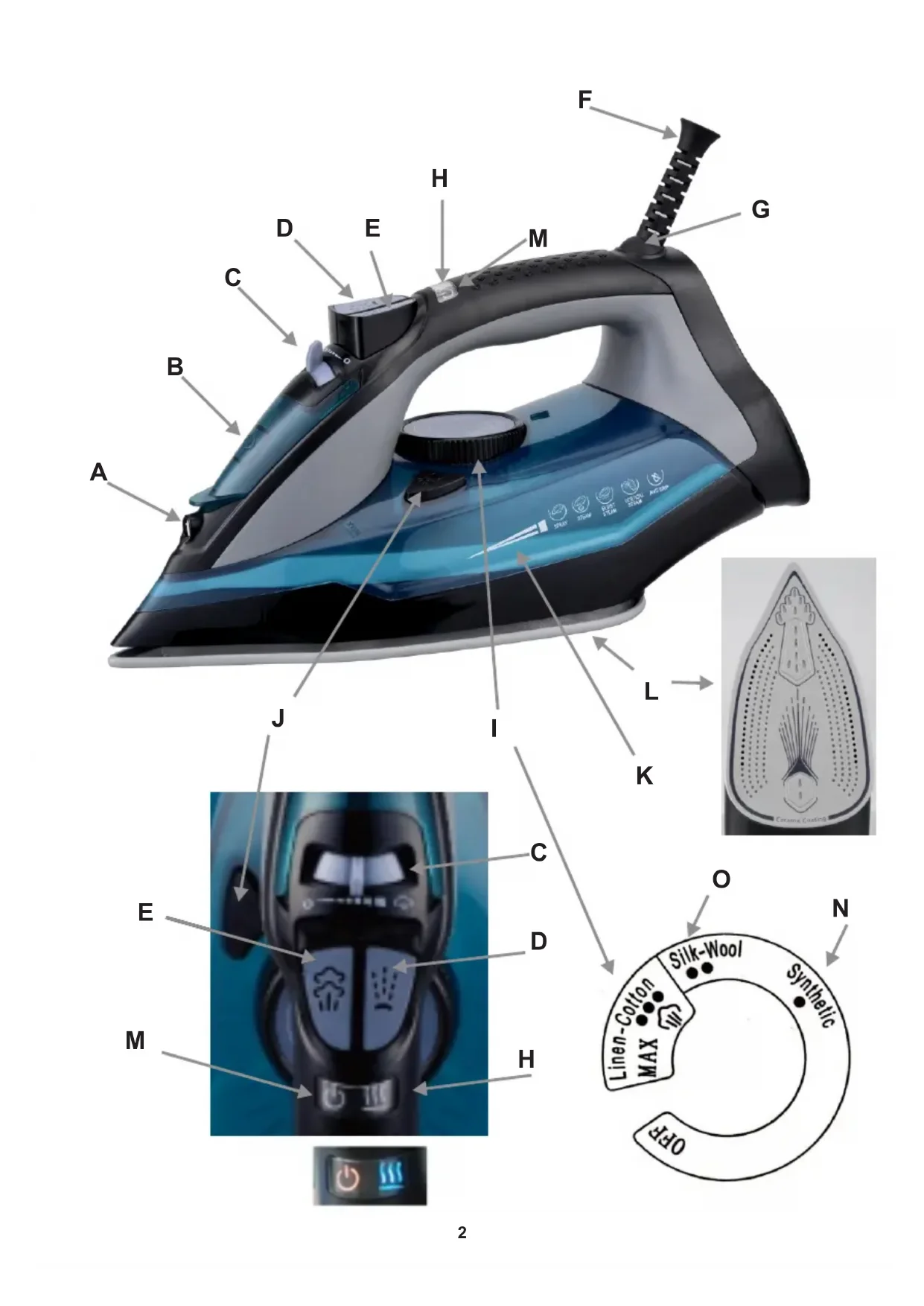
A. Spray nozzle B. Water inlet hole C. Steam control switch D. Spray button E. Steam burst button F. Power cord G. Rotary cable gland H. Heating / Thermostat indicator light I. Temperature control knob - thermostat J. Self-clean button K. Water tank L. Ceramic coated soleplate M. Power indicator light N. Synthetic fabric – one dot O. Silk – Wool fabric – two dots
INDICATOR LIGHT:
Plug in the iron, the power indicator light (M) turns on (always). When the thermostat works, the heating indicator light (H) turns on. Once the thermostat stops working, the heating indicator light (H) turns off.
FILLING WITH WATER:
- Set the steam control (C) to "0" (= no steam).
- Open the water filling cover and tilt the iron at a 45-degree angle on a flat, dry surface.
- Fill the water tank with water up to the "MAX" level.
- Push the water filling cover to close it.
PREPARATION:
Sort the laundry to be ironed according to the international symbols on the garment label, or if this is missing, according to the type of fabric.
| GARMENTLABEL | FABRICTYPE | THERMOSTATREGULATION |
| synthetic | low temperature | |
| silk - wool | medium temperature | |
| Cotton - linen | high temperature | |
| Fabric not to be ironed | ||
Caution: If the fabric consists of various kinds of fibers, always select the lowest ironing temperature of the composition of those fibers. Start ironing the garments requiring a low temperature. This reduces the waiting times (the iron takes less time to heat up than to cool down) and eliminates the risk of scorching the fabric.
FIRST USE
When using the iron for the first time, you may notice a slight emission of smoke and hear some sounds made by the expanding plastics. This is quite normal and it stops after a short time. We also recommend passing the iron over an ordinary cloth when using it for the first time.
DRY IRONING (without steam) FUNCTION
- Connect the power cord of the appliance to the wall outlet.
- Turn the temperature control knob (I) to the desired temperature depending on the type of fabric you want to iron. Make sure
that the steam control switch (C) is in the "0" position.
- When the iron reaches the required temperature, the heating indicator light (H) will turn off.
- After use, turn the temperature control knob (I) to the "OFF" position.
- Remove the plug from the wall socket.
SPRAYING FUNCTION
- Fill the water tank with water as described in "Filling with water".
- Press water spray button (D).
- Note: No matter what steam ironing or dry ironing is, spray will always be available in any case.
STEAM IRONING FUNCTION
- Fill the water tank with water as described in "Filling with water".
- Plug in. The power/heating indicator lights (M / H) will turn on.
- Turn the temperature control knob (I) clockwise to the "MAX" position. Do not turn the switch to "N" or "O" for steam ironing.
- When the iron reaches the required temperature, the heating indicator light (H) will turn off.
- Adjust the steaming by moving the steam control switch (C).
- After use, turn the temperature control knob (I) to the "OFF" position.
- Remove the plug from the wall socket.
- After each use, make sure that the water tank is empty. Caution: Do not steam iron synthetic fabrics, nylon, synthetic silk, or silk fabrics. Steam can ruin the texture of the fabric.
BURST OF STEAM FUNCTION
This function provides more steam to remove stubborn creases.
- Set the temperature control knob (I) to MAX until the indicator light (H) goes off.
- Release the steam by pressing the steam button (E).
- Wait for several minutes and let the steam penetrate through the fabric, then release more steam by pressing this button again.
Note:
- There should be a 3-5 second rest between two presses of the Steam burst button (E) to obtain the best steaming result.
- Fill the water to the MAX position before using this function.
- In order to prevent water leaking from the soleplate, do not press the steam burst button (E) continuously for more than 5 seconds.
VERTICAL STEAM IRONING FUNCTION
The vertical steam ironing system allows you to use the iron for vertical ironing. This is especially useful for removing wrinkles from hanging clothes and curtains.
- Fill the water tank with water as described in "Filling with water".
- Plug in. The power/heating indicator lights (M/H) will turn on.
- Turn the temperature control knob (I) to the "MAX" position. Do not turn the switch to "N" or "O" for steam ironing.
- When the iron reaches the required temperature, the heating indicator light (H) will turn off.
- Adjust the steam by moving the steam control switch (C).
- Hang the garment on a clothes hanger and pull the garment tight with one hand.
- Hold the iron in a vertical position with the other hand and press the steam burst button (E) to iron the garment. Touch the garment lightly with the soleplate of the iron to remove creases.
- After use, turn the temperature control knob (I) to the "OFF" position.
- Remove the plug from the wall socket.
- After each use, make sure that the water tank is empty.
- Caution: Do not use steam ironing on clothes or fabrics that are being worn by people or animals. The temperature is too high.
SELF-CLEANING SYSTEM
Note: Before you start the self-cleaning procedure, make sure the iron is not plugged in and the steam control (C) is in the "0" position.
- Fill the water tank with water up to "MAX". Do not use vinegar or other descaling liquids in the water tank.
- Plug in and turn the temperature control knob (I) to the "MAX" position. The power / heating indicator lights (M/H) will turn on.
- When the heating indicator light (H) turns off, unplug.
- Hold the iron in a horizontal position above the sink. Press and hold the Self-Clean button (J).
- Steam and boiling water will start to come out of the iron plate holes, which contain salts and minerals that have been accumulated in the steam chamber from previous uses.
- Gently move the iron back and forth until the water tank is empty. Caution: The water that comes out during self-cleaning is very hot. Be very careful not to fall on you.
- When the water tank is empty, release the self-clean button.
- Allow the iron to cool down completely.
- Wipe the soleplate with a cold damp cloth.
ANTI-CALC SYSTEM
A special filter inside the water tank softens the water and prevents scale build-up in the soleplate. The filter is permanent and does not
need replacing.
- Use tap water only.
- Distilled and demineralized water makes the anti-calc system ineffective by altering its physicochemical characteristics.
ANTI-DRIP SYSTEM
This iron is equipped with a drip stop function: the iron automatically stops steaming when the temperature is too low to prevent water from dripping out of the soleplate.
With the anti-dripping system, you can perfectly iron even the most delicate fabrics.
AUTO SHUT-OFF SYSTEM
- An electronic safety device will automatically switch the heating element off if the iron has not been moved for more than 30 seconds in a horizontal position. If in a vertical position, this will happen after 8 minutes.
To indicate that the heating element has been switched off, the heating indicator light (H) will turn off, and the power indicator light (M) will start blinking, with an alarm sounding 6 times.
- When picking up the iron again, the power indicator light (M) and the heating indicator light (H) will turn on. This indicates that the iron is heating up again. Wait for the heating indicator light (H) to turn off. Then the iron is ready for use.
AFTER IRONING:
To extend the working life of the iron, whenever you finish ironing, you are recommended to empty the reservoir as follows:
Unplug from the mains socket. Empty the iron by opening the water tank cover and holding it with the tip pointing downwards. Shake it lightly above a sink, then close the cover. To dry the remaining moisture, turn the iron on again with the thermostat control knob (I) in the MAX position and the steam control switch (C) in MAX position until the power indicator light (M) goes off. Unplug from the mains socket and allow to cool down. Clean the soleplate with a dry cloth as traces of moisture could mark it.
CLEANING AND MAINTENANCE
Before cleaning, remove the plug from the socket and allow the iron to cool down sufficiently.
- Wipe off the soleplate with a damp cloth and a non-abrasive (liquid) cleaner.
- If fiber is adhered to the soleplate, use a damp cloth with vinegar to wipe off the soleplate.
- Never use strong acid or alkali in order to avoid damaging the soleplate.
TECHNICAL DATA:
Voltage: 220-240V ~50/60Hz
Power Nom.: 2400W
Power Max: 3000W
To protect your environment: please separate carton boxes and plastic bags and dispose them in corresponding waste bins. Used appliance should be delivered to the dedicated collecting points due to hazardous components, which may affect the environment. Do not dispose this appliance in the common waste bin.
GERMAN
DESCRIPTION OF THE APPLIANCE
A. Spray nozzle
Electric Kettle AD 08
Mixer AD 4205
Food Slicer AD 4701
Water Kettle AD 1247 NEW
Hair Dryer AD 2220
Bagless Vacuum AD 7036
Coffee Grinder
AD 443
Nose Trimmer AD 2911
Precision scale AD 3162
Beard Trimmer AD 2922
Pet Hair Clipper AD 2828
Hair Straightener AD 2318
Air Cooler AD 7913
Blender AD 4067
Hair Dryer AD 2251
Led Bathroom Mirror AD 2168

- ENGLISH
- SAFETY CONDITIONS. IMPORTANT INSTRUCTIONS ON SAFETY OF USE. PLEASE READ CAREFULLY AND KEEP FOR FUTURE REFERENCE
- DESCRIPTION OF DEVICE
- INDICATOR LIGHT
- FILLING WITH WATER
- PREPARATION
- FIRST USE
- DRY IRONING (WITHOUT STEAM) FUNCTION
- SPRAYING FUNCTION
- STEAM IRONING FUNCTION
- BURST OF STEAM FUNCTION
- VERTICAL STEAM IRONING FUNCTION
- SELF-CLEANING SYSTEM
- ANTI-CALC SYSTEM
- ANTI-DRIP SYSTEM
- AUTO SHUT-OFF SYSTEM
- AFTER IRONING
- CLEANING AND MAINTENANCE
- GERMAN
- DESCRIPTION OF THE APPLIANCE
Brand : ADLER
Model : AD 5032
Category : Iron