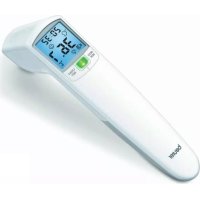
FT 70 - Thermometers BEURER - Free user manual and instructions
Find the device manual for free FT 70 BEURER in PDF.



User questions about FT 70 BEURER
0 question about this device. Answer the ones you know or ask your own.
Ask a new question about this device
Download the instructions for your Thermometers in PDF format for free! Find your manual FT 70 - BEURER and take your electronic device back in hand. On this page are published all the documents necessary for the use of your device. FT 70 by BEURER.
USER MANUAL FT 70 BEURER
natural_image
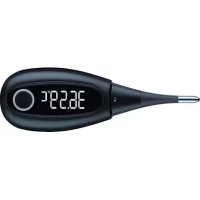
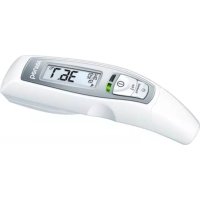
Digital medical thermometer with display showing 36.7°C, no visible text or symbols on the device bodyFT 70
EN Multi-function thermometer Instructions for use....19
natural_image
Illustration of a hand holding a tool with two directional arrows indicating movement (no text or symbols)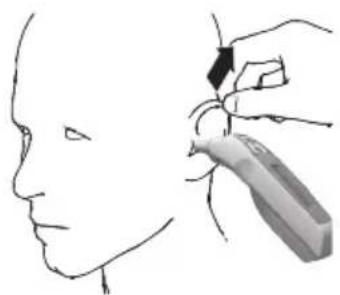
natural_image
Line drawing of a human head and neck with a hand holding a pen or stylus (no text or symbols)natural_image
Side profile illustration of a human head with a digital thermometer and arrow indicating direction (no text or symbols)natural_image
Close-up of a white handheld electronic device with batteries and a black arrow pointing to a component (no visible text or symbols)Thank you for choosing one of our products. Our name stands for high-quality, thoroughly tested products for applications in the areas of heat, gentle therapy, blood pressure/diagnosis, weight, massage and air.
With kind regards,
Your Beurer team
Contents
- Signs and symbols....20
- Notes 21
- Unit description 24
- Initial use 25
- Setting the device....25
- What you should know about using this thermometer..26
-
Measuring....26
-
Changing the batteries 30
- Storage and maintenance 31
- Disposal....31
- Technical data 31
- Troubleshooting....33
- Warranty/service 33
Included in delivery
- Thermometer
• 2 x 1.5 V AAA batteries (LR03)
• These instructions for use
Please read these instructions for use carefully and keep them for later use, be sure to make them accessible to other users and observe the information they contain.
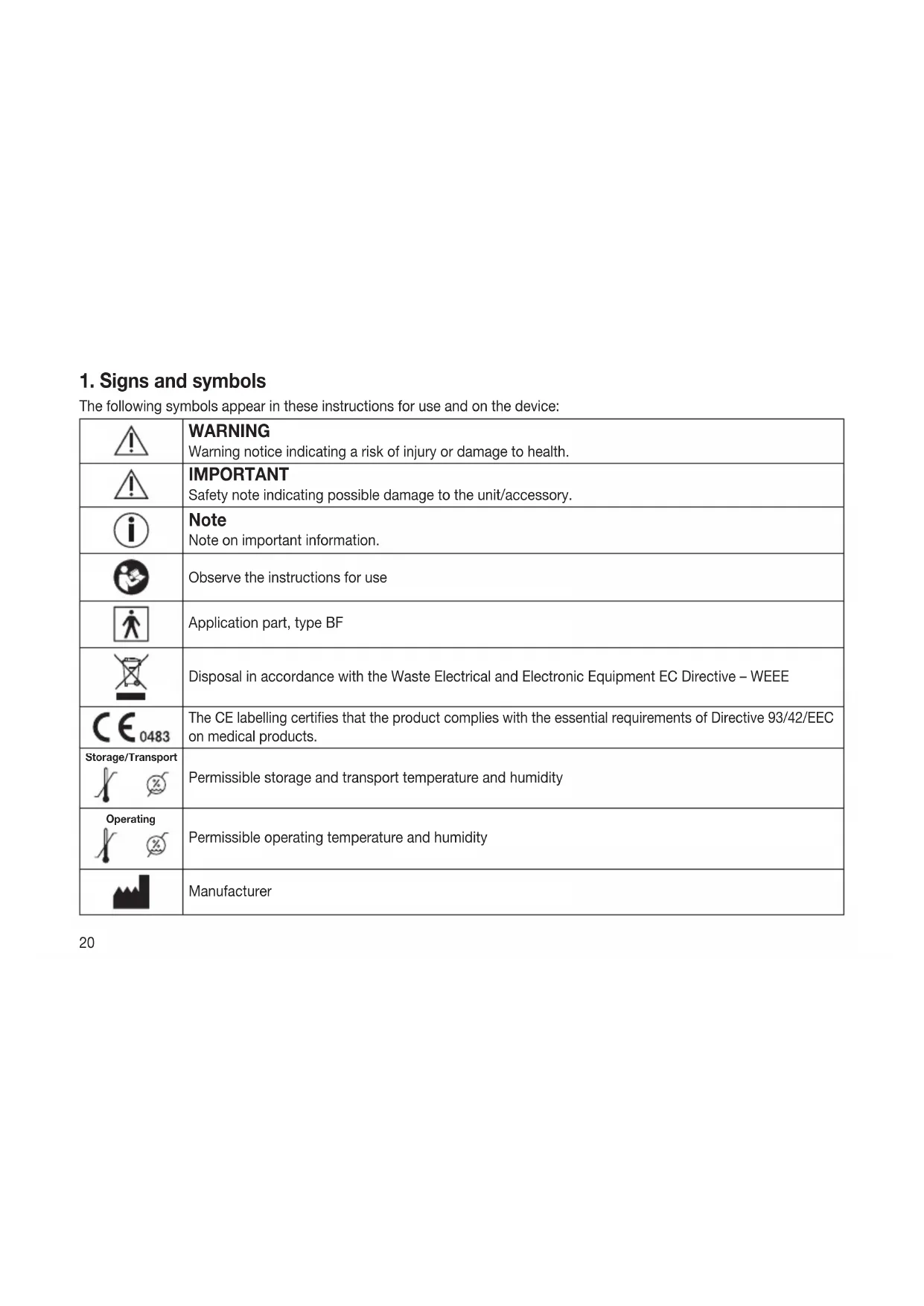
1. Signs and symbols
The following symbols appear in these instructions for use and on the device:
 | WARNINGWarning notice indicating a risk of injury or damage to health. |
 | IMPORTANTSafety note indicating possible damage to the unit/accessory. |
 | NoteNote on important information. |
 | Observe the instructions for use |
 | Application part, type BF |
 | Disposal in accordance with the Waste Electrical and Electronic Equipment EC Directive – WEEE |
 | The CE labelling certifies that the product complies with the essential requirements of Directive 93/42/EEC on medical products. |
Storage/Transport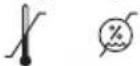 | Permissible storage and transport temperature and humidity |
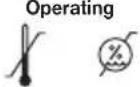 | Permissible operating temperature and humidity |
 | Manufacturer |
 | Dispose of packaging in an environmentally friendly manner |
 | Protect from moisture |
2. Notes
Safety notes

Warning:
• To measure temperature, insert the sensor tip of the thermometer carefully into the ear.
- Use of the thermometer on different persons can be inappropriate in the event of certain acute infectious diseases because of the possible spread of germs despite cleaning and disinfection. If you have any doubts, please consult your doctor.

Notes on handling batteries
- If your skin or eyes come into contact with battery fluid, flush out the affected areas with water and seek medical assistance.
- Choking hazard! Small children may swallow and choke on batteries. Store the batteries out of the reach of small children.
- Observe the plus (+) and minus (-) polarity signs.
- If a battery has leaked, put on protective gloves and clean the battery compartment with a dry cloth.
- Protect the batteries from excessive heat.
- Risk of explosion! Never throw batteries into a fire.
- Do not charge or short-circuit batteries.
-
If the device is not to be used for a long period, take the batteries out of the battery compartment.
• Use identical or equivalent battery types only.
• Always replace all batteries at the same time. -
Do not use rechargeable batteries.
- Do not disassemble, split or crush the batteries.
General notes

- Please read these instructions for use carefully and keep them for later use, be sure to make them accessible to other users and observe the information they contain.
- This thermometer is a sensitive electronic device. Handle it with care and do not subject it to any mechanical impacts.
- Do not expose the device to direct sunlight.
- Check before each use that the lens is intact. If it is damaged, please contact your retailer or the service address.
- The thermometer is NOT waterproof. For this reason, direct contact with water or other liquids should be avoided.
- The FT70 thermometer is only designed for the measuring area on the human body stated in the instructions for use.
- The device is only intended for the purpose stated in these instructions for use.
• After each use, clean the measuring tip with a soft cloth moistened with disinfectant. - The thermometer has been designed for practical use, but is not a substitute for a visit to the doctor.
- Before each repair query, first check the batteries and replace them if necessary.
• Repairs must only be carried out by authorised service centres, otherwise the guarantee is invalidated. - This device complies with the EU Directive 93/42/EEC concerning medical products, the Medizinproduktegesetz (German Medical Devices Act), the ASTM (American Society for Testing and Materials) E 1965 - 98 and the European Standard EN 12470-5: Clinical thermometers – Part 5: Requirements for infrared ear thermometers (with maximum device) the standard ISO 80601-2-56 and the European Standard EN 60601-1-2 (in accordance with CISPR11, IEC61000-4-2, IEC61000-4-3, IEC61000-4-8), and is subject to particular precautions with regard to electromagnetic compatibility. Please note that portable and mobile HF communication systems may interfere with this unit.
- If you should have any questions about using our devices, please contact either your retailer or customer services.
Notes on electromagnetic compatibility

- The device is suitable for use in all environments listed in these instructions for use, including domestic environments.
- The use of the device may be limited in the presence of electromagnetic disturbances. This could result in issues such as error messages or the failure of the display/device.
- Avoid using this device directly next to other devices or stacked on top of other devices, as this could lead to faulty operation. If, however, it is necessary to use the device in the manner stated, this device as well as the other devices must be monitored to ensure they are working properly.
- The use of accessories other than those specified or provided by the manufacturer of this device can lead to an increase in electromagnetic emissions or a decrease in the device's electromagnetic immunity; this can result in faulty operation.
- Failure to comply with the above can impair the performance of the device.
3. Unit description
Overview
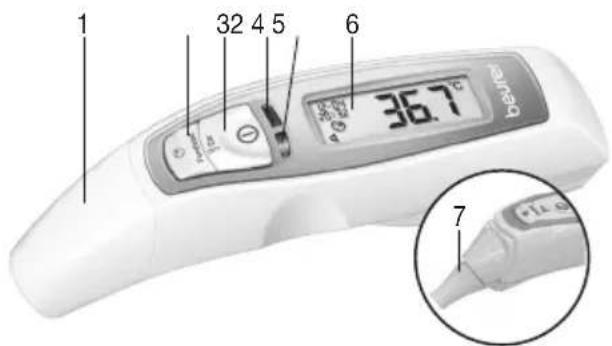
text_image
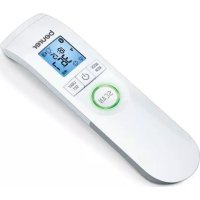
1 32 4 5 6 36.7 °C beine 71 Forehead/cover cap
2 Forehead thermometer mode button Forehead
3 Ear thermometer mode/on button 📋 Ear/①
4 LED(red)(high temperature alarm)
5 LED (green)
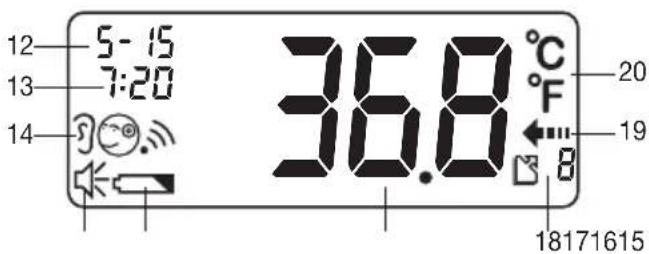
12 Date
13 Time
14 Measurement mode ("Ear", "Forehead", "Object")
15 Speaker symbol
16 Battery warning symbol
17 Measurement display
18 "Memory" symbol and storage space number
19 "Measurement in progress" symbol
20 Unit of measurement (°C or °F)
text_image
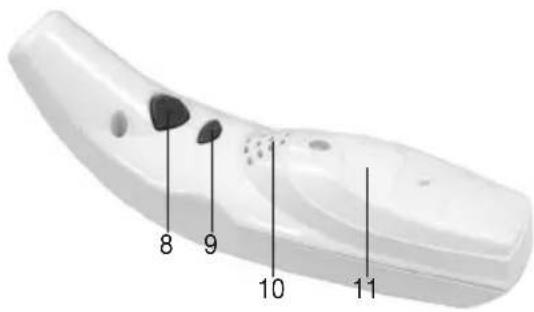
8 9 10 116 LCD
7 Sensor tip with lens (cover cap removed)
8 Memory button M
9 Set button S
10 Speaker
11 Battery compartment lid
text_image
12 5-15 13 7:20 14 36.8 °C °F 20 19 181716154. Initial use
The batteries are already inserted in all new devices. Before first use, remove the protruding plastic insulating strip from the battery compartment. The thermometer will then switch on automatically.
5. Setting the device
Set the language, volume, the unit in which the temperature will be displayed, the date and the time
text_image
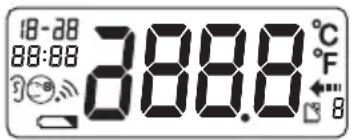
18:38 88:88 388.8 °C °F BPress the Ⓑ button for 1 second to switch the thermometer on. The device performs a brief self test: all elements of the display are shown for approx. 1 second. Following a successful self test, the device emits two short beeps. In Standby mode, the date and time are shown and “-”-is displayed.
When the thermometer is used for the first time and each time the batteries are changed, the date and time are displayed in the format 1-100:00 during the basic set-up (after the self test). Set each of the following settings in turn: language, volume, unit in which the temperature will be displayed, date and time. To set the device, proceed in stages: Language (L01 – German, L02 – English, L03 – French, L04 – Italian, L05 – Russian, L06 – Turkish), Volume (U01 – lowest setting, U06 – highest setting), Unit – year – month – day – hours – minutes (there is no voice output when setting date and time).
- Press the button for approx. three seconds in order to reach Set mode.
The setting to be changed will flash each time. - Press the button again to save the setting or
- press the button to change the setting.
- Then press the button to save the setting.
After this process, the thermometer shows the word OFF in the display and switches off automatically.
Turning volume on and off again
Turn the device on and the speaker symbol [15] shows whether the voice function is on or off. Press the Set button to turn the voice function on and off. When you turn the voice function on, a short beep sounds (speaker symbol visible = voice function on; speaker symbol not visible = voice function off).
6. What you should know about using this thermometer
There are different thermometers for taking temperature measurements in different parts of the body:
- Ear/forehead thermometer (this thermometer, for measuring in the ear or on the forehead area)
- Rod thermometer (for rectal [in the back passage], axillary [under the arm] or oral measurement [in the mouth])

Taking the temperature gives a measurement that provides information about a person's current body temperature. If you are uncertain about interpreting the results or if the value is abnormal, please consult your doctor. This also applies in the case of slight temperature changes if there are other symptoms of illness such as agitation, severe sweating, flushed skin, fast pulse rate, tendency to collapse, etc.
Temperatures measured with different thermometers cannot be compared with one another. You should therefore tell your doctor (or bear in mind if you are diagnosing yourself) what thermometer you used to take your temperature and in what part of the body.
The temperature of a healthy person is influenced by various factors: individual metabolic rate, which depends on the person, age (body temperature of infants and small children is higher and decreases as they age). Greater temperature fluctuations occur faster and more often in children, e.g. due to growth spurts), their clothing, the ambient temperature, the time of day (body temperature is lower in the morning and increases throughout the day towards evening), the preceding physical and, to a lesser extent, mental activity.
The temperature varies depending on the part of the body where the measurement is taken. The difference can be between 0.4 °F (0.2 °C) and 1.8 °F (1 °C) for a healthy person. The normal temperature ranges are as follows:
• on the forehead: 96.4 °F – 99.7 °F (35.8 °C – 37.6 °C), with a forehead thermometer,
- in the ear: 96.8 °F – 100 °F (36.0 °C – 37.8 °C), with an ear thermometer,
- in the back passage: 97.3 °F – 100 °F (36.3 °C – 37.8 °C), with a conventional thermometer,
- in the mouth: 96.8 °F – 99.3 °F (36.0 °C – 37.4 °C), with a conventional thermometer.
In order to track temperature change, always take the measurements in the same part of the body.
7. Measuring
Before each use, please check that the lens is intact. If it is damaged, please contact your retailer or the service address. Bear in mind that the thermometer needs to have been in the room in which the measurement is taken for at least 30 minutes before use.
Measuring body temperature in the ear

- Some people produce different readings in their left and right ear. In order to record temperature changes, always measure a person's temperature in the same ear.
- The ear thermometer may be used by children only under adult supervision. Measurement is usually possible over the age of 6 months. In infants under 6 months, the ear canal is still very narrow so the temperature of the eardrum often cannot be recorded and the result displayed is often too low.
- The measurement must not be taken in an ear affected by inflammatory diseases (e.g. discharging pus or secretion), after possible ear injuries (e.g. eardrum damage) or in the healing period after operative procedures. In all of these cases, please consult your doctor.
- Use of the thermometer on different persons can be inappropriate in the event of certain acute infectious diseases because of the possible spread of germs despite cleaning and disinfection. If you have any doubts, please consult your doctor.
- This thermometer may only be used without a disposable protective cover.
- If you have been lying on one ear for some time, the temperature is slightly raised. Wait a little while or measure in the other ear.
-
As ear wax can affect the measurement, you should clean the ear before measuring if necessary.
-
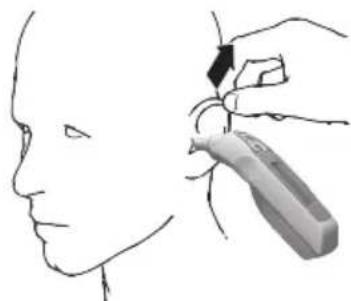
Press the button for 1 second to switch the thermometer on. Following a successful self test, the device emits two short beeps.
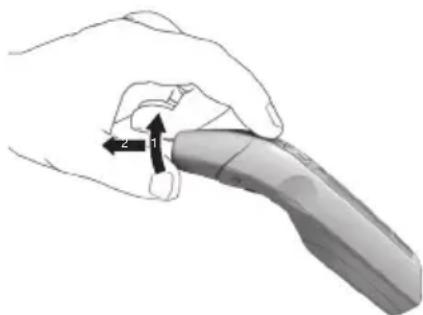
- Remove the cap by gently pushing it up (1) and then pulling it off forwards (2).
natural_image
Illustration of a hand holding a tool with two directional arrows labeled 1 and 2 (no text or symbols beyond arrows)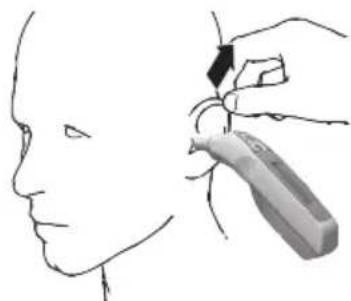
natural_image
Line drawing of a person's head and neck with a hand holding a tool near the neck (no text or symbols)Make sure that the sensor tip and also the ear canal are clean.
As the ear canal is slightly curved, you have to pull the ear slightly up and backwards before inserting the sensor tip. This is important so that the sensor tip can be pointed directly at the eardrum.
- Insert the sensor tip carefully and press the ⏻ button for 1 second.
- Release the Button. The end of the measuring time is signalled with a short beep and the measured value appears on the display.
If the measured value is within the normal range (< 100.4 °F/38 °C), the green LED lights up for 3 seconds. If the measured value is higher (≥ 100.4 °F/38 °C, high temperature), the red LED is illuminated.
Measuring body temperature on the forehead
natural_image
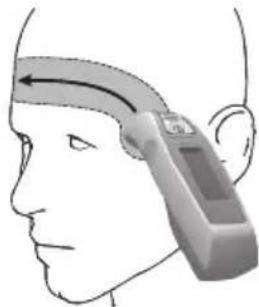
Side profile illustration of a human head with a handheld device, showing anatomical orientation (no text or symbols)Please note that the forehead/temples must be free from sweat and cosmetics and that taking vasoconstrictive medication and skin irritations can distort the result when measuring temperature on the forehead.
- Press the Button for 1 second to switch the thermometer on. Following a successful self test, the device emits two short beeps.
- Place the measuring head with the forehead/cover cap fitted on the temples, hold down the ⚙ Forehead button and move the thermometer smoothly over the forehead to the other temple.
- Then release the ⚙ Forehead button. The end of the measuring time is signalled with a short beep and the measured value appears on the display.
If the measured value is within the normal range (< 100.4 °F/38 °C), the green LED lights up for 3 seconds. If the measured value is higher (≥ 100.4 °F/38 °C, high temperature), the red LED is illuminated.
Measuring surface temperature
- Press the Button for 1 second to switch the thermometer on. Following a successful self test, the device emits two short beeps.
- Then press the and buttons simultaneously for 3 seconds to switch to the Object temperature mode. The symbol appears in the display.
- Press and hold the button or Forehead and point the sensor tip towards the object or liquid to be measured (never immerse in liquids), maintaining a distance of 3 cm.
- Release the button or Forehead. The end of the measuring time is signalled with a short beep and the measured value appears on the display.
Please note that the displayed temperature is the measured and not the adapted surface temperature. It is not the same as the forehead/ear temperature.
To switch back to the Ear/Forehead thermometer mode, press the and buttons simultaneously for 3 seconds until the symbol disappears and there is a short beep. By switching the thermometer off and on again, it automatically exits the Object temperature mode.
Mode Ear Forehead Object
| Voice output Your body temperature is ... Your body temperature is ... The object temperature is ... | |||
| Display | |||
The temperature last measured, i.e. only the last value of a series of measurements, is automatically stored as soon as the thermometer switches itself off or is switched off. There are 10 storage spaces available for this.
If you do not take any further measurements, the thermometer switches itself off automatically after approx. one minute after the measured values have been displayed.
To call up the saved values, switch the thermometer on and press the Ⓜ button.
The date, time, storage space number, the measurement mode symbol and the temperature are displayed in turn. Storage space number and measurement are announced. Browse through the stored measurements by pressing the button repeatedly.
| Mode Ear Forehead Object | |||
| Voice output Memory ..., your body temperature was ... | Memory ..., your body temperature was ... | Memory ..., the object temperature was ... | |
| Display | |||
8. Changing the batteries
When the batteries get weak, the battery warning symbol appears. It is still possible to measure temperature. The batteries must be replaced. When the battery symbol flashes and appears in the display, the batteries must be replaced. If the batteries are too flat, then the thermometer will switch off automatically.

Note:
- When changing the batteries, use batteries of the same type, make and capacity.
• Always replace all batteries at the same time. -
Do not use rechargeable batteries.
• Use batteries free from heavy metals. -
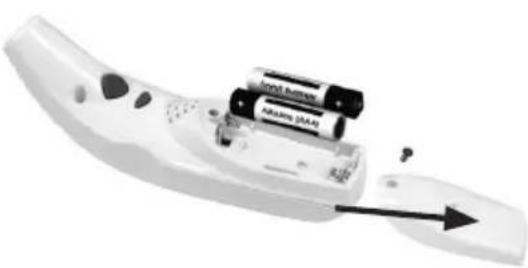
Loosen the screw on the battery compartment lid and pull the lid off downwards.
- Remove the used batteries and insert two new batteries in the direction indicated.
- Close the battery compartment lid and screw it back on. Dispose of used batteries in accordance with the applicable legal regulations. Never dispose of batteries in the normal household waste.
natural_image
White remote control device with batteries and a mouse, showing internal components and an arrow indicating direction (no text or symbols visible)9. Storage and maintenance
- Clean the sensor tip after each use. Use a clean cloth or cotton bud that can be moistened with disinfectant, alcohol or warm water.
- To clean the entire device, please use a soft cloth slightly moistened with a mild soapy solution.
- Do not use any harsh cleaning products.
• Always store the thermometer with the forehead/cover cap on. - If prolonged storage is intended, you should remove the battery.
- The device must not be stored or used at an excessively high or low temperature or humidity (see technical data), in sunlight, in association with an electrical current or in dusty locations. Otherwise inaccuracies can occur.
10. Disposal
- The empty, completely flat batteries must be disposed of through specially designated collection boxes, recycling points or electronics retailers. You are legally required to dispose of the batteries.
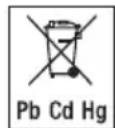
- The codes below are printed on batteries containing harmful substances:
Pb = Battery contains lead,
Cd = Battery contains cadmium,
Hg = Battery contains mercury.
- For environmental reasons, do not dispose of the device in the household waste at the end of its useful life. Dispose of the unit at a suitable local collection or recycling point. Dispose of the device in accordance with EC Directive – WEEE (Waste Electrical and Electronic Equipment). If you have any questions, please contact the local authorities responsible for waste disposal.

11. Technical data
Note: If the device is used other than in accordance with the specifications, perfect functioning cannot be guaranteed! We reserve the right to make technical changes to improve and develop the product.
The accuracy of this thermometer has been carefully checked and developed with regard to a long useful life.
If using the device for commercial medical purposes, it must be regularly tested for accuracy by appropriate means.
Precise instructions for checking accuracy may be requested from the service address.
| Name and model FT 70 | |
| Measurement range Ear/Forehead thermometer mode: 93.2 °F - 109.4 °F (34 °C - 43 °C)Object temperature mode: 32 °F - 212 °F (0 °C - 100 °C) | |
| Laboratory measurement precision | Ear thermometer mode: ±0.4 °F (±0.2 °C) from 95.0 °F - 107.6 °F (35 °C - 42 °C), outside this measurement range ±0.5 °F (±0.3 °C), Forehead thermometer mode: ±0.4 °F (±0.2 °C) from 95.0 °F - 107.6 °F (35 °C - 42 °C), outside this measurement range ±0.5 °F (±0.3 °C), Object temperature mode: ±2.7 °F (±1.5 °C) at < 86 °F (30 °C); ±5% at ≥ 86 °F (30 °C) |
| Interval between 2 measurements | At least 5 seconds |
| Clinical repeat precision Ear: | Children, 1 - 5 years: ±0.14 °F (±0.08 °C) Adults: ±0.13 °F (±0.07 °C)Forehead: Children, 1 - 5 years: ±0.13 °F (±0.07 °C) Adults: ±0.14 °F (±0.08 °C) |
| Measurement units °Celsius (°C) or °Fahrenheit (°F) | |
| Ambient operating conditions | 59 °F - 95 °F (15 °C - 35 °C) with a relative humidity of up to 85% (non-condensing) |
| Storage conditions -13 °F - 131 °F (-25 °C - 55 °C) with a relative humidity of up to 85% (non-condensing) | |
| Dimensions 38.2 x 138 x 46.5 mm | |
| Weight 90 g including battery | |
| Battery 2 x 1.5 V AAA (LR03) | |
| Memory For 10 measurements | |
The serial number is located on the device or in the battery compartment.
12. Troubleshooting
| Display Cause Voice output Solution | |||
| HI | The recorded temperature is higher than1) Ear/Forehead thermometer mode: 109.4 °F (43 °C),2) Object temperature mode: 212 °F (100 °C). | Measurement error,please try again! | Operate the thermometer onlybetween the specified temperature ranges.If necessary, clean the sensor tip.In the event of a repeated errormessage, contact your retailer orCustomer Services. |
| Lo | The recorded temperature is lower than1) Ear/Forehead thermometer mode: 93.2 °F (34 °C),2) Object temperature mode: 32 °F (0 °C). | Measurement error,please try again! | |
| Err | The operating temperature is not in the range from59°F to 95 °F (15 °C to 35 °C). | Measurement error,please try again! | Operate the thermometer onlybetween the specified temperature ranges. |
13. Warranty/service
Beurer GmbH, Söflinger Straße 218, 89077 Ulm, Germany (hereinafter referred to as "Beurer") provides a warranty for this product, subject to the requirements below and to the extent described as follows.
The warranty conditions below shall not affect the seller's statutory warranty obligations which ensue from the sales agreement with the buyer.
The warranty shall apply without prejudice to any mandatory statutory provisions on liability.
Beurer guarantees the perfect functionality and completeness of this product.
The worldwide warranty period is 5 years, commencing from the purchase of the new, unused product from the seller.
The warranty only applies to products purchased by the buyer as a consumer and used exclusively for personal purposes in the context of domestic use.
German law shall apply.
During the warranty period, should this product prove to be incomplete or defective in functionality in accordance with the following provisions, Beurer shall carry out a repair or a replacement delivery free of charge, in accordance with these warranty conditions.
If the buyer wishes to make a warranty claim, they should approach their local retailer in the first instance: see the attached “International Service” list of service addresses.
The buyer will then receive further information about the processing of the warranty claim, e.g. where they can send the product and what documentation is required.
A warranty claim shall only be considered if the buyer can provide Beurer, or an authorised Beurer partner, with
- a copy of the invoice/purchase receipt, and
- the original product.
The following are explicitly excluded from this warranty:
- deterioration due to normal use or consumption of the product;
- accessories supplied with this product which are worn out or used up through proper use (e.g. batteries, rechargeable batteries, cuffs, seals, electrodes, light sources, attachments and nebuliser accessories);
- products that are used, cleaned, stored or maintained improperly and/or contrary to the provisions of the instructions for use, as well as products that have been opened, repaired or modified by the buyer or by a service centre not authorised by Beurer;
- damage that arises during transport between manufacturer and customer, or between service centre and customer;
- products purchased as seconds or as used goods;
- consequential damage arising from a fault in this product (however, in this case, claims may exist arising from product liability or other compulsory statutory liability provisions).
Repairs or an exchange in full do not extend the warranty period under any circumstances.
FRANÇAIS
Chère cliente, cher client,
natural_image
Illustration of a hand holding a tool with two directional arrows indicating movement (no text or symbols present)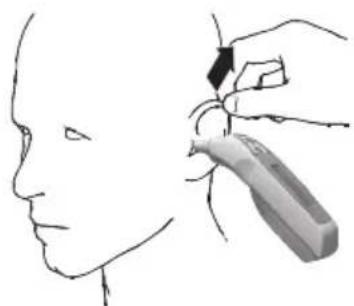
natural_image
Line drawing of a human head with a hand holding a medical device near the ear (no text or symbols)natural_image
Side profile illustration of a human head with a medical device attached, showing anatomical positioning (no text or symbols)natural_image
Close-up of a white electronic device with batteries and a black arrow pointing to one component (no visible text or symbols)natural_image
Illustration of a hand holding a pen or tool, with two arrows indicating movement direction (no text or symbols present)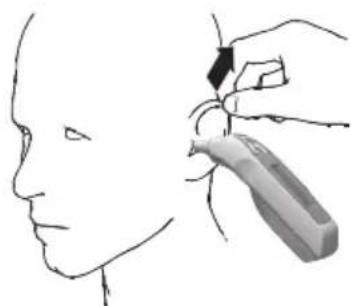
natural_image
Line drawing of a human head with a hand holding a medical or surgical tool near the ear (no text or symbols)natural_image
Side profile illustration of a human head with a medical device attached, showing airflow direction (no text or symbols)natural_image
Close-up of a white remote control device with batteries and an arrow indicating direction (no visible text or symbols)natural_image
Illustration of a hand holding a tool with two directional arrows indicating movement (no text or symbols)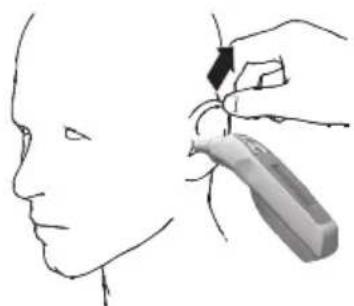
natural_image
Line drawing of a human head with a hand holding a medical or surgical tool near the ear (no text or symbols)natural_image
Side profile illustration of a human head with a medical device on the forehead (no text or symbols)natural_image
Close-up of a white handheld device with batteries and a black arrow pointing to it (no visible text or symbols)natural_image
Illustration of a hand holding a tool, showing two directional arrows labeled 1 and 2 (no text or symbols beyond labels)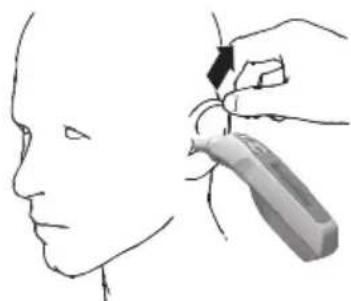
natural_image
Line drawing of a person's head and neck with a hand holding a tool near the neck area (no text or symbols)natural_image
Side profile illustration of a person's head with a handheld device, showing airflow direction (no text or symbols)natural_image
Close-up of a white handheld device with attached batteries and a black arrow pointing to it (no visible text or symbols)9. Saklama ve bakım
natural_image
Illustration of a hand holding a tool with a finger pointing to the tip (no text or symbols present)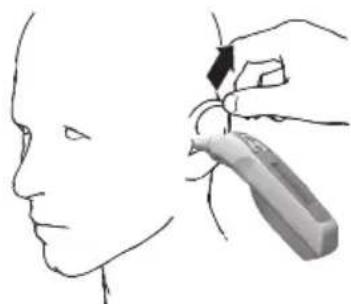
natural_image
Line drawing of a human head with a hand holding a tool near the ear area (no text or symbols)natural_image
Side profile illustration of a person's head with a medical device attached, showing ear and head (no text or symbols)natural_image
Close-up of a white electronic device with batteries and a mouse, showing internal components and an arrow indicating direction (no text or symbols visible)9. Хранение и уход
natural_image
Illustration of a hand holding a tool with two directional arrows indicating movement (no text or symbols)