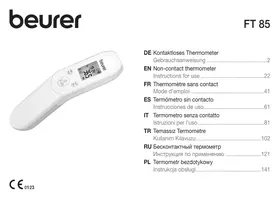
FT85 - Thermometers BEURER - Free user manual and instructions
Find the device manual for free FT85 BEURER in PDF.



| Product type | Non-contact infrared medical thermometer |
| Brand | Beurer |
| Model | FT85 |
| Dimensions (L x W x H) | 161 x 42.8 x 36 mm |
| Weight | 67 g (without batteries) |
| Power supply | 2 AAA 1.5 V batteries (LR03) |
| Battery life | Approximately 2000 measurements (depending on usage) |
| Main functions | Forehead measurement, object temperature, ambient temperature |
| Measurement technology | Non-contact infrared |
| Measurement range – forehead | 34 °C to 42.2 °C (93.2 °F to 108 °F) |
| Measurement range – object | 0 °C to 80 °C (32 °F to 176 °F) |
| Measurement range – ambient | 15 °C to 40 °C (59 °F to 104 °F) |
| Accuracy – forehead | ± 0.2 °C (34 °C to 42.2 °C) |
| Accuracy – object | ± 4% or ± 2 °C |
| Measurement distance | 2 to 3 cm from the measured area |
| Display | LCD screen with backlight |
| Memory | Last 60 measurements (forehead mode only) |
| Auto-off | After approximately 60 seconds |
| Protection rating | IP 22 |
| Cleaning | Soft cloth or cotton swab with 70% alcohol for the sensor; slightly damp soft cloth for the housing |
| Storage and transport | -20 °C to 50 °C, relative humidity < 85% |
| Warranty | 5 years |
| Standards | CE 0123, Directive 93/42/EEC, ASTM E 1965-98, EN 60601-1-2 |
Frequently Asked Questions - FT85 BEURER
User questions about FT85 BEURER
0 question about this device. Answer the ones you know or ask your own.
Ask a new question about this device
Download the instructions for your Thermometers in PDF format for free! Find your manual FT85 - BEURER and take your electronic device back in hand. On this page are published all the documents necessary for the use of your device. FT85 by BEURER.
USER MANUAL FT85 BEURER
- Signs and symbols 23
- Intended use 24
3.Warnings and safety notes 24
3.1 Risks to the user 24
3.2 Risks to the device 25
3.3 Notes on handling batteries 25
- Information about this thermometer 26
- Unit description 28
- Initial use 29
-
Switching on and setting the thermometer 30
-
Forehead measurement 32
- Measuring object temperature/room temperature 35
- Error messages 35
- Batteries 36
- Cleaning the device 37
13.Storing the device 37
14.Disposing of the device 37 - Technical data 37
- Guidelines 39
17.Warranty / service 39

Read these instructions for use carefully and keep them for later use, be sure to make them accessible to other users and observe the information they contain.
Dear customer,
Thank you for choosing a product from our range. Our name stands for high-quality, thoroughly tested products for applications in the areas of heat, gentle therapy, blood pressure/diagnosis, weight, massage and air.
Please read these instructions for use carefully and observe the information they contain.
With kind regards,
Your Beurer team
Included in delivery
Check that the exterior of the delivery cardboard packaging is intact and make sure that all components are present. Before use, ensure that there is no visible damage to the device or accessories and that all packaging material has been removed. If you have any doubts, do not use the device and contact your retailer or the specified Customer Service address.
Clinical thermometer
- 2x 1.5 V AAA batteries (LR03)
- Instructions for use
1. Signs and symbols
The following symbols appear in these instructions for use and on the device:
| ! | WARNING Warning notice indicating a risk of injury or damage to health. |
| ! | IMPORTANT Safety note indicating possible damage to the device/accessory. |
| i | Note Note on important information. |
| Observe the instructions for use | |
| Application part, type BF | |
| Disposal in accordance with the Waste Electrical and Electronic Equipment EC Directive – WEEE |
| Storage/Transport | Permissible storage and transport temperature and humidity |
| Operating | Permissible operating temperature and humidity |
| IP 22 | Device protected against foreign objects ≥12.5 mm and against water dripping at an angle |
| SN | Serial number |
| Important information/tip | |
| Cross-reference with another section | |
| CE 0123 | This product satisfies the requirements of the applicable European and national directives. |
| Manufacturer |
| PAP | Dispose of packaging in an environmentally friendly manner |
2. Intended use
This thermometer is intended for non-contact measurement of forehead temperature. You can also measure the temperature of objects and rooms with this thermometer. The thermometer is suitable for domestic use. It allows you to quickly and easily measure body temperature. Values are saved automatically.
3.Warnings and safety notes
3.1 Risks to the user
- Only use the device once you have read and understood these instructions for use.
- Retain these instructions for use. The instructions for use must be accessible to all users. All instructions must be followed.
- The thermometer needs to be in the room in which the measurement is taken for at least 30 minutes before use.
- After physical activity, a bath or spending time outdoors, wait approx. 30 minutes before you take a measurement on your forehead.
- The FT 85 thermometer is only designed for the measuring area on the human body stated in the instructions for use.
- Measure your temperature regularly to obtain your normal average temperature. If you suspect you have a fever, simply compare your normal average temperature with the temperature measured currently.
- Do not self-diagnose or self-medicate on the basis of the measurements without consulting your doctor. In particular, do not start taking any new medication or change the type and/or dosage of any existing medication without prior approval.
- The device is only intended for the purpose stated in these instructions for use.
- The manufacturer is not liable for damage resulting from improper or careless use.
Children must not be allowed to use the device. Medical devices are not toys. - Check before each use that the lens is intact. If it is damaged, please contact your retailer or the service address.
-
Do not touch the lens with your fingers.
-
The measurements taken by you are for your information only – they are no substitute for a medical examination. Consult a doctor before you undertake any medical treatment.
- Clean the thermometer after each use (12. Cleaning the device).
- Should you have any questions about using the device, please contact either your retailer or Customer Services.
3.2 Risks to the device
- Do not drop the device or subject it to any mechanical impacts.
- The use of the device may be limited in the presence of electromagnetic disturbances. This could result in issues such as error messages or the failure of the display/device.
- Avoid using this device directly next to other devices or stacked on top of other devices, as this could lead to faulty operation. If, however, it is necessary to use the device in the manner stated, this device as well as the other devices must be monitored to ensure they are working properly.
- The use of accessories other than those specified or provided by the manufacturer of this device can lead to an increase in electromagnetic emissions or a decrease in the device's electromagnetic immunity; this can result in faulty operation.
- Failure to comply with the above can impair the performance of the device.
- Do not expose the device to direct sunlight, extreme temperatures or high humidity.
- Do not expose the device to liquids. The device is not waterproof. Avoid all direct contact with water or other liquids.
- Do not open or repair the device yourself. Have the device repaired by authorised service centres only, otherwise its warranty is invalidated.
- Portable and mobile HF communication systems may interfere with this device.
3.3 Notes on handling batteries
- If your skin or eyes come into contact with battery fluid, rinse the affected area with water and seek medical assistance.
- Choking hazard! Small children may swallow and choke on batteries. Store batteries out of the reach of small children.
- Observe the plus (+) and minus (-) polarity signs.
- If a battery has leaked, put on protective gloves and clean the battery compartment with a dry cloth.
- Protect batteries from excessive heat.
- Risk of explosion! Do not throw batteries into a fire.
-
Do not charge or short-circuit batteries.
-
If the device is not to be used for a relatively long period, take the batteries out of the battery compartment.
- Use identical or equivalent battery types only.
Always replace all batteries at the same time. - Do not use rechargeable batteries.
- Do not disassemble, split or crush the batteries.
4. Information about this thermometer
The temperature measurement varies depending on the part of the body where the measurement is taken. In a healthy person, the variance can be between 0.2^ and 1^ ( 0.4^ and 1.8^ ) in different parts of the body.
Normal temperature range with various thermometers:
| Measurements | Thermometer used | |
| Forehead temperature | 35.8°C to 37.6°C (96.4°F to 99.7°F) | Forehead thermometer |
| Ear temperature | 36.0°C to 37.8°C (96.8°F to 100.0°F) | Ear thermometer |
| Oral temperature | 36.0°C to 37.4°C (96.8°F to 99.3°F) | Conventional thermometer |
| Rectal temperature | 36.3°C to 37.8°C (97.3°F to 100.0°F) | Conventional thermometer |

Beurer tip
- Temperatures measured with different thermometers should never be compared with one another.
- Tell your doctor what type of thermometer you used to take your temperature and on what part of the body. Also bear this in mind if you are diagnosing yourself.

Holding the thermometer in your hand for too long before taking a measurement can cause the device to warm up. This means the measurement could be incorrect.
Influences on body temperature
- A person's individual metabolism
Age
Body temperature is higher in babies and toddlers than in adults. Greater temperature fluctuations occur faster and more often in children. Normal body temperature decreases with age.
- Clothing
- Outside temperature
Time of day
Body temperature is lower in the morning and increases throughout the day towards evening. Activities
- Physical and, to a lesser extent, mental activities increase body temperature.

Beurer tip
Taking the body temperature provides a current measurement of a person's temperature. If you are uncertain about interpreting the results or if the values are abnormal (e.g. fever), please consult your doctor. This also applies in the case of slight temperature changes if there are other symptoms of illness such as agitation, heavy sweating, flushed skin, fast pulse rate, tendency to collapse, etc.
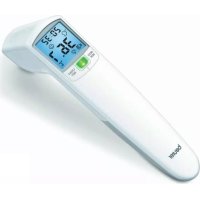
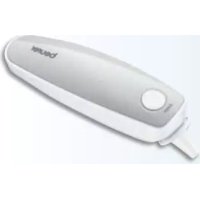
5. Unit description
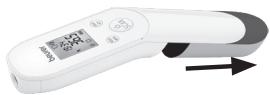
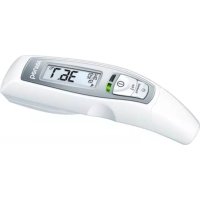
1 Display
2 MODE/MEM button
3 LIGHT/SET button
4 Measuring sensor
5 SCAN button
6 Battery compartment lid
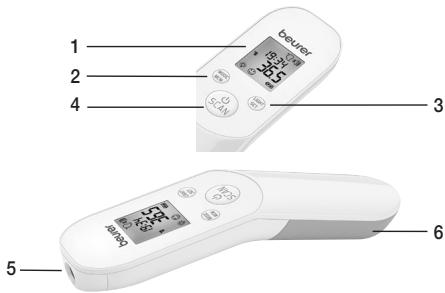
| Buttons | Functions |
| MODE/MEM | MODE Sets the measurement mode. MEM Displays the saved measurements. |
| LIGHT/SET | LIGHT Manual switch on of the illuminated display. SET Sets the basic functions. |
| /SCAN | Switch on the device. Starts the temperature measurement. |
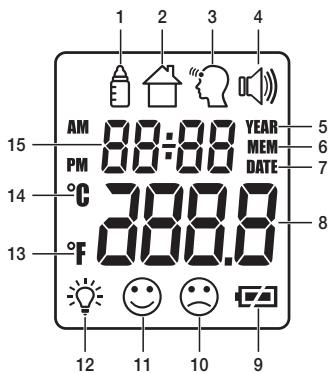
Display description
1 Object temperature mode
2 Room temperature mode
3 Forehead temperature mode
4 Acoustic signal symbol
5 Year
6 Memory function
7 Date
8 Temperature/memory space number display
9 Battery status indicator
10 Measurement ≥ 38.0^ (≥ 100.4^) "fever
11 Measurement < 37.5^ (< 99.5^) "no fever
12 Illuminated display symbol
13 Temperature measurement unit Celsius
14 Temperature measurement unit Fahrenheit
15 Year/date/time display
6. Initial use
Inserting battery
- Remove the battery compartment cover.
- Insert the two batteries into the battery compartment ensuring correct polarity.
- Use exclusively brand-name batteries of the type: 2 × 1.5V Micro (Alkaline Type LR03). Making absolutely sure that you insert them with the correct polarity as marked. Do not use rechargeable batteries.
- Then close the battery compartment by fitting the cover and clicking it in position.
The thermometer automatically switches on and the settings menu appears in the display (7. Switching on and setting the thermometer).
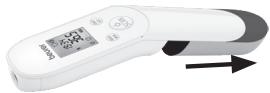
7. Switching on and setting the thermometer
To switch on the thermometer, briefly press the /SCAN button.
After a brief self-test and two short beeps the thermometer is ready for forehead measurement. The device always starts up in forehead temperature mode.
Set the basic functions
This menu allows you to set the following functions individually, one after another.

Insert the batteries or press and hold the LIGHT/SET button for 3 seconds when the thermometer is switched on. The temperature measurement unit flashes on the display (Fig. 1). You can set the device to display the temperature in degrees Celsius (^) or degrees Fahrenheit (^) .
- To display the temperature in Celsius, select ^ C using the MODE/MEM button and confirm with the LIGHT/SET button.
- To display the temperature in Fahrenheit, select ^ F using the MODE/MEM button and confirm with the LIGHT/SET button.
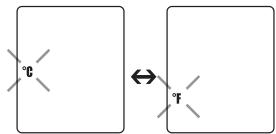
Fig. 1
The time format flashes on the display (Fig. 2).
- Use the MODE/MEM button to set your preferred time format, and confirm with the LIGHT/SET button.
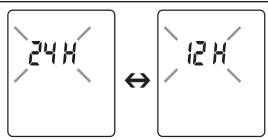
Fig. 2
The year flashes on the display (Fig. 3).
- Use the MODE/MEM button to set the year, and confirm with the LIGHT/SET button. The day/month flashes on the display (Fig. 4).
- Use the MODE/MEM button to set the day and month, and confirm with the LIGHT/SET button (Fig. 5).
If the hour format is set as 12h , the day/month display sequence is reversed. Be sure to set the date and time correctly. Otherwise, you will not be able to save your measured values correctly with a date and time and access them again later.
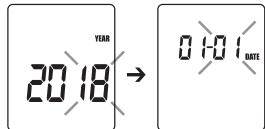
Fig. 3

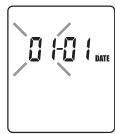
Fig. 5
The hour flashes on the display (Fig. 6).
- Use the MODE/MEM button to set the hour, and confirm with the LIGHT/SET button. The minute flashes on the display (Fig. 7).
- Use the MODE/MEM button to set the minute, and confirm with the LIGHT/SET button.
In the 12 h format, the time is displayed with AM/PM.
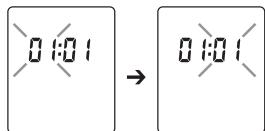
Fig. 6
Fig. 7
The illuminated display symbol flashes on the display (Fig. 8).
You can activate or deactivate the automatic illuminated display (appears following forehead temperature measurement).
- To activate the automatic illuminated display, use the MODE/MEM button to select , and confirm with the LIGHT/SET button.
- To deactivate the automatic illuminated display, use the MODE/MEM button to select OFF, and confirm with the LIGHT/SET button.
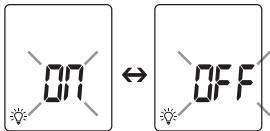
Fig. 8
You can also activate the illuminated display manually by briefly pressing the LIGHT/SET button. The display lights up for 5 seconds.
The automatic and manual illuminated display cannot be used while measurement is in progress.
The acoustic signal symbol flashes on the display (Fig. 9).
You can activate/deactivate the acoustic signals (device activation, measurement in progress, measurement completion).
- To activate the acoustic signals, use the MODE/MEM button to select and confirm with the LIGHT/SET button.
- To deactivate the acoustic signals, use the MODE/MEM button to select OFF, and confirm with the LIGHT/SET button.
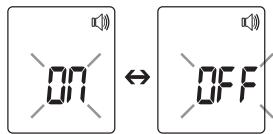
Fig. 9
8. Forehead measurement

Beurer tip
Remember:
- Physical activity, increased perspiration on the forehead, taking vasoconstrictive medication and skin irritations can distort the measurement.
- The forehead, or the temples, must be free from perspiration and cosmetics.
- We recommend that you take three measurements on the forehead. If the three measurements are different, use the highest value.
- If the forehead area is covered in hair, sweat or dirt, clean the area and then wait for 10 minutes to improve the precision of the measurement.
-
It is important that you keep the thermometer still during measurement. Moving the thermometer during measurement may cause imprecise measurements.
-
To switch on the thermometer, briefly press the /SCAN button. After a brief self-test and two short beeps the device is ready for forehead temperature measurement. The device is in forehead temperature mode. You can tell this from the " symbol on the display.
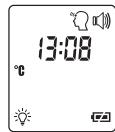
Fig. 10
- Hold the thermometer 2 to 3cm in front of the forehead measuring point (Fig. 11). Press the /SCAN button.
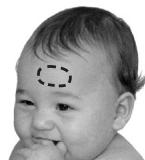
Fig. 11
If the measurement is less than 37.5^ (99.5°F), appears in the display to indicate no fever; this indicates that the body temperature is in the normal range.
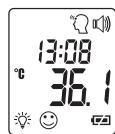
Fig. 12
If the measurement is over 38^ (100.4^) , appears in the display to indicate that the body temperature is above the normal range.
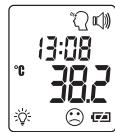
Fig. 13
The measurement is automatically saved with the date/time and the "fever" / "no fever" classification. The device is ready to take another measurement when two short beeps sound and the forehead symbol stops flashing. The device automatically switches off after approx. 60 seconds or you can press the SCAN button for 5 seconds to switch it off.
Displaying stored measurements
The device only stores measurements in forehead temperature mode. The device automatically stores the values from the last 60 measurements.
When 60 memory spaces are exceeded, the oldest value is deleted.
- The memory can be called up as follows:
- With the thermometer switched on, press and hold the MODE/MEM button for 3 seconds.
The most recent measurement is displayed.
- Pressing the MODE/MEM button again will display the measured value.
- In the upper line, the time and date are displayed alternately.
9. Measuring object temperature/room temperature
If you want to measure an object temperature with this thermometer, switch to object temperature mode.
- With the thermometer switched on, briefly press the MODE/MEM button. The device switches to the object temperature mode (Fig. 14).
- Hold the thermometer 2 to 3cm from the measuring point. Briefly press the /SCAN button and read the temperature on the display (Fig. 15).
The device automatically switches off after approx. 60 seconds or you can press the /SCAN button for 5 seconds to switch it off.
Measurements taken in object temperature mode are not stored.
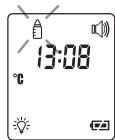
Fig. 14
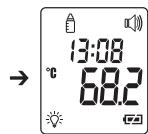
Fig. 15
If you want to use the thermometer to measure the room temperature you need to switch to room temperature mode.
- With the thermometer switched on, briefly press the MODE/MEM button twice. The device switches to room temperature mode.
- The room temperature is immediately displayed (Fig. 16).
The device automatically switches off after approx. 60 seconds or you can press the /SCAN button for 5 seconds to switch it off.
Measurements taken in room temperature mode are not stored.
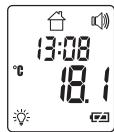
Fig. 16
10. Error messages
| Error mes-sage | Problem | Solution |
| Er-1 | Measurement during self-test, device not yet ready for measurement. | Wait until the forehead symbol stops flashing. |
| Er-3 | Room temperature below 15°C or over 40°C (<59°F, >104°F). | Room temperature must be between 15°C and 40°C (59°F – 104°F). |
| Hi | (1) Forehead temperature mode: The recorded tempera-ture is higher than 42.2°C (108°F).(2) Object temperature mode: The recorded temperature is higher than 80°C (176°F). | Operate the thermometer only within the specified tem-perature ranges. In the event of a repeated error message, contact your retailer or Customer Services. |
| Lo | (1) Forehead temperature mode: The recorded tempera-ture is lower than 34°C (93.2°F).(2) Object temperature mode: The recorded temperature is lower than 0°C (32°F). | Operate the thermometer only within the specified tem-perature ranges. In the event of a repeated error message, contact your retailer or Customer Services. |
| □ | The batteries are empty. | Replace the batteries. |
11. Batteries
Changing the batteries
The device requires two AAA (LR03) batteries.
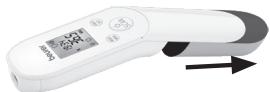
- Open the battery compartment.
To do this, push the battery compartment down.
- Take the used batteries out of the battery compartment.
- Insert new batteries.
Make sure that the batteries are inserted the correct way round.
- Close the battery compartment.
Disposing of batteries
- Empty, completely flat batteries must be disposed of through specially designated collection boxes, recycling points or electronics retailers. You are legally required to dispose of the batteries.
- The codes below are printed on batteries containing harmful substances:
Pb = Battery contains lead, Cd = Battery contains cadmium, Hg = Battery contains mercury

12. Cleaning the device

- The measuring sensor is the most sensitive part of the thermometer. Be very careful with the measuring sensor when cleaning the device.
- Do not use any harsh cleaning products.
- Always observe all safety notes for users and the device.
3.Warnings and safety notes
Clean the measuring sensor after each use. Use a soft cloth or cotton bud that can be moistened with disinfectant or 70% alcohol. To clean the entire device, please use a soft cloth slightly moistened with a mild soapy solution. Under no circumstances may liquid enter the device.
Do not use the device again until it is completely dry.
13. Storing the device
The device must not be stored or used at an excessively high or low temperature or humidity (15. Technical data), in sunlight, in association with an electrical current or in dusty locations. Measurement inaccuracies can otherwise occur.
If prolonged storage is planned, you should remove the batteries.
14. Disposing of the device
For environmental reasons, do not dispose of the device in the household waste at the end of its useful life.
Dispose of the device at a suitable local collection or recycling point.
Dispos of the device in accordance with EC Directive - WEEE (Waste Electrical and Electronic Equipment).
If you have any questions, please contact the local authorities responsible for waste disposal.

15. Technical data
If the device is not used according to the instructions specified, perfect functionality cannot be guaranteed!
The accuracy of this thermometer has been carefully checked and it has been developed with a long service life in mind.
If the device is used for commercial medical purposes, it must be regularly tested for accuracy by appropriate means. Precise instructions for checking accuracy may be requested from the service address.
We reserve the right to make technical changes to improve and develop the product.
| Model | FT 85 |
| Type | GCE 103 |
| Measurement method | Non-contact infrared measurement |
| Basic functions | Forehead temperature measurement Object temperature measurement Room temperature measurement |
| Measurement units | Celsius (°C) or Fahrenheit (°F) |
| Operating conditions | 15 °C to 40 °C (59 °F to 104 °F) at a relative humidity of <95% |
| Storage and transport conditions | -20 °C to 50 °C (-4 °F to 122 °F) at a relative humidity of <85% |
| Measuring distance | 2 to 3 cm from the measuring point |
| Measurement range and accuracy of forehead temperature measurement | Forehead temperature measurement 34 °C to 42.2 °C (93.2 °F to 108 °F) Measurement accuracy 34 °C to 42.2 °C: ±0.2 °C (93.2 °F to 108 °F: ±0.4 °F) |
| Clinical repeat precision | Forehead: Children 1 – 5 years ± 0.07 °C (0.13 °F) Adults ± 0.07 °C (0.13 °F) |
| Measurement range and accuracy Object temperature measurement | Object temperature measurement 0 °C to 80 °C (32 °F to 176 °F) Measurement accuracy ±4% or ±2 °C (±4 °F) |
| Memory function Body temperature measurement | Automatically stores the last 60 measurements. |
| Acoustic signal | With device activation, during measurement, when measurement is complete (can be set). |
| Display | LCD display |
| Energy saving functions | Device automatically switches off after 1 minute. |
| Dimensions Width x depth x height | 161 x 42.8 x 36 mm |
| Weight | 67 g (without batteries) |
| 2 x AAA (LR03) batteries | Batteries last for approx. 2000 measurements Extra activated functions such as acoustic signal or illuminated display reduce the battery life. |
The serial number is located on the device or in the battery compartment.
16. Guidelines
This device complies with EU Medical Devices Directive 93/42/EEC, the German Medical Devices Act (Medizinproduktegesetz), the ASTM (American Society for Testing and Materials) E 1965 - 98 and the European Standard EN 60601-1-2 (in accordance with CISPR 11, IEC 61000-3-2, IEC 61000-3-3) and is subject to particular precautions with regard to electromagnetic compatibility. The device is suitable for use in all environments listed in these instructions for use, including domestic environments.
17. Warranty / service
Beurer GmbH, Söflinger Straße 218, 89077 Ulm, Germany (hereinafter referred to as "Beurer") provides a warranty for this product, subject to the requirements below and to the extent described as follows.
The warranty conditions below shall not affect the seller's statutory warranty obligations which ensue from the sales agreement with the buyer.
The warranty shall apply without prejudice to any mandatory statutory provisions on liability.
Beurer guarantees the perfect functionality and completeness of this product.
The worldwide warranty period is 5 years, commencing from the purchase of the new, unused product from the seller.
The warranty only applies to products purchased by the buyer as a consumer and used exclusively for personal purposes in the context of domestic use.
German law shall apply.
During the warranty period, should this product prove to be incomplete or defective in functionality in accordance with the following provisions, Beurer shall carry out a repair or a replacement delivery free of charge, in accordance with these warranty conditions.
If the buyer wishes to make a warranty claim, they should approach their local retailer in the first instance: see the attached "International Service" list of service addresses.
The buyer will then receive further information about the processing of the warranty claim, e.g. where they can send the product and what documentation is required.
A warranty claim shall only be considered if the buyer can provide Beurer, or an authorised Beurer partner, with
- a copy of the invoice/purchase receipt, and
- the original product.
The following are explicitly excluded from this warranty:
- deterioration due to normal use or consumption of the product;
- accessories supplied with this product which are worn out or used up through proper use (e.g. batteries, rechargeable batteries, cuffs, seals, electrodes, light sources, attachments and nebuliser accessories);
products that are used, cleaned, stored or maintained improperly and/or contrary to the provisions of the instructions for use, as well as products that have been opened, repaired or modified by the buyer or by a service centre not authorised by Beurer; - damage that arises during transport between manufacturer and customer, or between service centre and customer;
- products purchased as seconds or as used goods;
- consequential damage arising from a fault in this product (however, in this case, claims may exist arising from product liability or other compulsory statutory liability provisions).
Repairs or an exchange in full do not extend the warranty period under any circumstances.
FRANÇAIS
Sommaire
Chere cliente, cher client,
3.3 Ykaazanno no obaaeeHIO c 6aTaapeKamn
- PnI nonaDAnH JxNkOCTn I3 aKKymyIaTopa Ha KOKy IIN B rIa3a Heo6XoIMo IpombITb COOTBeTCTByUoIy uactOK 60JIbIIM KOJIHcETBOM BObl I O6paNTbcK BpaHy.
Onachocb npornatabHnna MeKnx qachei! ManeHbKnE Detn MoYt nporlotnb 6aTapeKn n noaBntcra IMN. IToMy 6bataepkn Heo6xOIMNO xpaHnB H neocTyHOM dner deteMeCTe! - 06paaatae BnMaHne Ha o6o3HaueHne nOJrphocTn: pIc (+) u Mmhyc (-).
- EcnbatapeKa noteKna, ouncntte ottdene HnB 6ataeck cyxoc caltoKo, npedBaPntelho naeb 3aunthbne nepuATKn.
3aunuai Te 6aTapeKOn OT Upe3MepHOro BO3deIcTBnTePna. - OnachocbB3pbBa! He 6pocaiTe 6aTaapeiKn B oroHb.
- He 3apjaKeIe n He 3aMbkaIe 6aTapeKn HakoPOTko.
- EcnI npi6op dInlTeJbHoe BpeM He nCnOJIb3yeTcR, n3BLeKeNte n3 Hero 6aTaapeKn.
- IcnoIb3yIte 6aTapeiKn TOnbKO OJHOrO TIna INIpaBHOceHHbIX TINOB.
Bcerda 3aMeHnTe BCE 6aTapeKn cpa3y. - He ncpoIb3yIte akKymJIaTOpbl!
- He pa36bpaIte, He otKpbBaIte n He pa36bBaIte 6aTapeiKn.
4.ИнформалцяоТермометре
I3mepeHHoe 3haueHHe TempepaTpyb 3aBnCt OT cAchTu Tena, Ha KToopo OHa I3MepeTcR. Pa3NHyra TempepaTpyb pa3Hbix ChTe Ta3Dopoboro YelOBeka MoYr CoCTabJIbTb OT 0,2 Do 1°C (OT 0,4 Do 1,8°F).
Tpe6yetc3aMeHa 6aTaapeek
B npu6bope nCnoJb3yIOTc DBe 6atapeKn Ttna AAA, LR03.
- OtkpoiTe OTdeneHne Ia6Taapeek.ДлэЗTO rCBnHbTe KpbIshky BHN3.
- ɪЗ藓ʌkɪteɪnɪəbɪtəbɪsəbɪnɪhɪeɪbɪsəbɪsəbɪsɪnɪ
BCTaBbTe HOBBe 6aTapeKm. Co6nOdaIte nOJrPHoCTb.
3aKpoTe OtdenHe nIg 6aTaapeek.
YtJnI3aIg 6aTaapeek
- YtɪnɪzɪpɪyɪteɪsɪŋləbʒɔbaBHHIeɪnɪlɪhOCTbɪo paɪræjɛHbIe 6bʌtapeɪkɪN B KOHTeɪnHepβI cɒcɪeɪaɪbHɔŋ M aɪpɪnəpɒBkɔ, cʌd-Baɪte B I yɪnKtI bɪpɪeMa cneɪtɔxOJOB N I N B MaɪaɪnHbI 3JIeKtpoObOpdyOBAHɪŋ. 3aʊθ Ośrəs3bɪBaET nɒlɜbɔtæle i oboceŋHt bYtɪnɪzɪaɪnɪ 6bʌtapeɪk.
Cneyuoume 3na npedynpejkaot O hajnHm B 6aTaapeKkax TOKCNbIX BeueCTB.
Pb = 6atapeiKa coepxnt CbHneU, Cd = 6atapeiKa coepxnt KaDMn.
Hg = 6aTapeiKa coPejxnt pTuTb.

Globalcare Medical Technology Co., Ltd.
7th Building, 39 Middle Industrial Main Road, European Industrial Zone, Xiaolan Town, 528415 Zhongshan City, Guangdong Province PEOPLES REPUBLIC OF CHINA
Phone: +86 760 22589901
http://www.globalcare.com.hk/contact/
EC REP
Donawa Lifescience consulting Srl.
Piazza Albania 10, 00153 Rome, Italy
CE0123
- Dear customer,
- Included in delivery
- Signs and symbols
- Intended use
- 3.Warnings and safety notes
- Risks to the user
- Risks to the device
- Notes on handling batteries
- Information about this thermometer
- Beurer tip
- Influences on body temperature
- Unit description
- Display description
- Initial use
- Inserting battery
- Switching on and setting the thermometer
- Set the basic functions
- Forehead measurement
- Remember:
- Displaying stored measurements
- Measuring object temperature/room temperature
- Error messages
- Batteries
- Changing the batteries
- Disposing of batteries
- Cleaning the device
- Storing the device
- Disposing of the device
- Technical data
- Guidelines
- Warranty / service
- FRANÇAIS
- Sommaire
- Chere cliente, cher client,
- Ykaazanno no obaaeeHIO c 6aTaapeKamn
- 4.ИнформалцяоТермометре
- Tpe6yetc3aMeHa 6aTaapeek
- YtJnI3aIg 6aTaapeek
Brand : BEURER
Model : FT85
Category : Thermometers