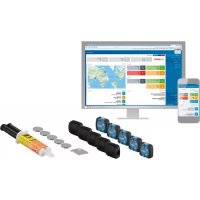
GCC 304 Professional - Rechargeable Battery BOSCH - Free user manual and instructions
Find the device manual for free GCC 304 Professional BOSCH in PDF.


| Product type | Bluetooth® identification module for tools |
| Brand | Bosch |
| Model | GCC 30-4 Professional |
| Dimensions (L x W x H) | 34 x 32 x 13 mm |
| Weight | 0.02 kg (20 g) |
| Power supply | CR2032 lithium button cell (3 V) |
| Battery life | Approximately 36 months |
| Protection rating | IP67 (water and dust tight) |
| Wireless technology | Bluetooth® 4.0 (Low Energy) |
| Signal range | Up to 30 m (depending on environment) |
| Frequency range | 2402 - 2480 MHz |
| Output power | < 1 mW |
| Operating temperature | -10 °C to +40 °C |
| Storage temperature | -20 °C to +70 °C |
| Hardware compatibility | Android 4.3+, iOS 8+, PC (Windows, Linux, Mac) |
| Main functions | Tool localization via TrackMyTools app, data collection |
| Fixation method | Bonding with provided two-component adhesive (UHU PLUS MULITFEST) |
| Identification code | Data Matrix on the module |
| Maintenance and cleaning | Soft, damp cloth, without detergents or solvents |
| Spare parts | Replacement battery (ref. 1 600 A00 92A), retaining clip GCC 30-9 Professional |
| General information | Compliant with directive 2014/53/EU. Recycling according to applicable legislation. |
Frequently Asked Questions - GCC 304 Professional BOSCH
User questions about GCC 304 Professional BOSCH
0 question about this device. Answer the ones you know or ask your own.
Ask a new question about this device
Download the instructions for your Rechargeable Battery in PDF format for free! Find your manual GCC 304 Professional - BOSCH and take your electronic device back in hand. On this page are published all the documents necessary for the use of your device. GCC 304 Professional by BOSCH.
USER MANUAL GCC 304 Professional BOSCH
OBJ_BUCH-2515-003.book Page 1 Tuesday, April 25, 2017 8:11 AM
WEU WEU
Robert Bosch Power Tools GmbH
70538 Stuttgart
GERMANY
www.bosch-pt.com
1609 92A 3W4 (2017.04) PS / 131
GCC 30-4 Professional

BOSCH
natural_image
3D rendering of a cylindrical mechanical component with a flanged housing and labeled part '5' (no text or symbols beyond the label)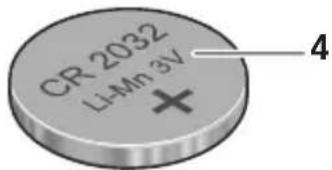
natural_image
3D CAD model of a mechanical housing component with internal cavity and mounting holes (no text or symbols)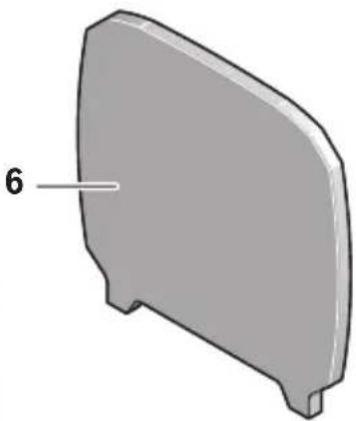
natural_image
3D model of a gray plastic component with a labeled dimension '6' (no text or symbols on the object itself)GCA 30-9 Professional
Bosch Power Tools 1 609 92A 3W4 | (25.4.17)







OBJ_BUCH-2515-003.book Page 4 Tuesday, April 25, 2017 8:11 AM



4
flowchart
graph TD
    A["笔记本电脑"] --> C["云"]
    B["手机"] --> C
    C --> D["手机"]
    D --> E["手机图标"]
    D --> F["无线图标"]
    style C stroke-dasharray: 5 5
    style D stroke-dasharray: 5 5
    note right of C
        A1
    end



1 609 92A 3W4 | (25.4.17) Bosch Power Tools









OBJ_BUCH-2515-003.book Page 5 Tuesday, April 25, 2017 8:11 AM










Bosch Power Tools 1 609 92A 3W4 | (25.4.17)





OBJ_BUCH-2515-003.book Page 6 Tuesday, April 25, 2017 8:11 AM



6
1 609 92A 3W4 | (25.4.17) Bosch Power Tools







OBJ_BUCH-2515-003.book Page 7 Tuesday, April 25, 2017 8:11 AM



17
Bosch Power Tools 1 609 92A 3W4 | (25.4.17)







OBJ_BUCH-2515-003.book Page 8 Tuesday, April 25, 2017 8:11 AM


8
natural_image
Technical line drawings of a power tool and a flat tool, showing no text or symbols1 609 92A 3W4 | (25.4.17) Bosch Power Tools







OBJ_BUCH-2515-003.book Page 9 Tuesday, April 25, 2017 8:11 AM



|9
Bosch Power Tools 1 609 92A 3W4 | (25.4.17)







OBJ_BUCH-2515-003.book Page 10 Tuesday, April 25, 2017 8:11 AM


10
natural_image
3D rendered mechanical component with a diagonal arrow indicating direction (no text or symbols)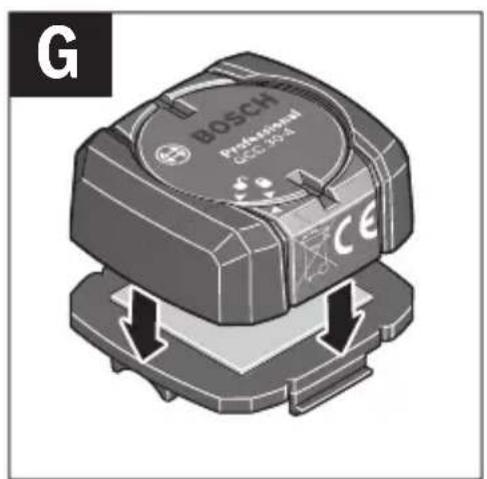
1 609 92A 3W4 | (25.4.17) Bosch Power Tools







OBJ_BUCH-2515-003.book Page 11 Tuesday, April 25, 2017 8:11 AM



11
natural_image
Diagram showing a mechanical assembly with two connected components, one with a checkmark and the other with a cross (no text or symbols present)



Bosch Power Tools 1 609 92A 3W4 | (25.4.17)






12 | Deutsch
Deutsch
Sicherheitshinweise

natural_image
Simple geometric diagram with intersecting lines and a central circle (no text or symbols)

Deutsch | 17
Montage und Betrieb
All instructions must be read and observed in order to enable work with the GCC 30-4 Professional to be carried out safely. Store these instructions in a safe place and provide them when transferring the GCC 30-4 Professional or any object identified using it to a third party.
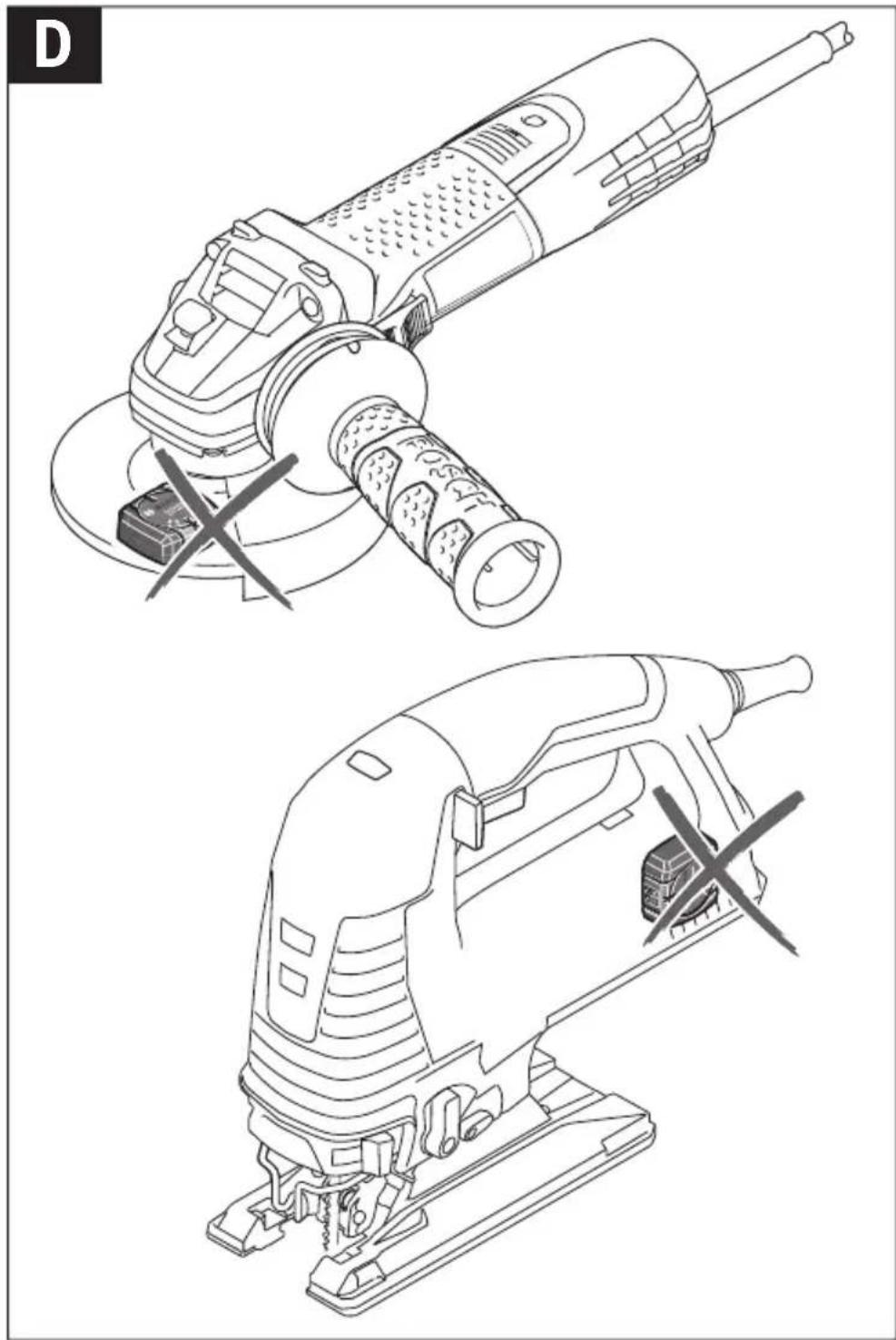
It must be ensured that attaching the GCC 30-4 Professional does not limit the proper and safe use of the object to be identified at any time. Attaching a GCC 30-4 Professional at the following locations is prohibited (for examples, see image D):
- Protective devices,
- Ventilation grills,
- Components that are actively operated (e.g. on/off switches, controllers, inlets, etc.)
- Moving or rotating components,
- Type plates,
- Operating panels and grip surfaces,
- Soft grips surfaces,
– Surfaces in the direct vicinity of sparks, - Surfaces that are exposed to strong mechanical or thermal effects,
- Surfaces that ensure that the object is positioned safely,
- Surfaces that could be damaged by adhesive components.
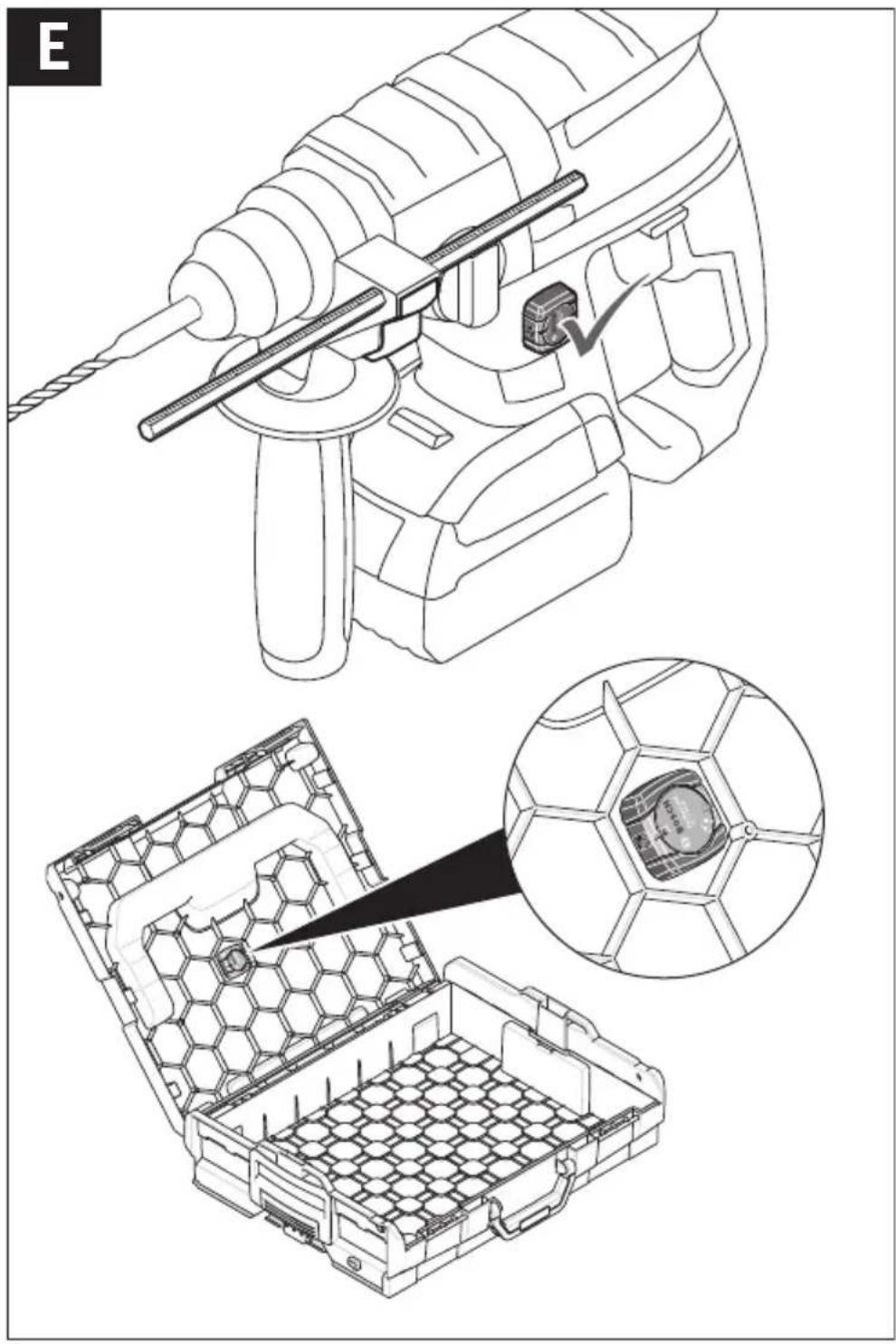
The following locations are suitable for attaching a GCC 30-4 Professional (for examples, see image E):
- Surfaces where attaching the GCC 30–4 Professional does not prevent or complicate the operation of the object,
- Surfaces that will not be exposed in the event that the identified object falls over,
- Surfaces with the minimum possible curvature.
▶ Only use the two-part adhesive provided and observe all processing instructions from the manufacturer when attaching to the object. The use of adhesives with a different composition may either cause damage to the object to be identified or fail to create a permanent bond between the GCC 30–4 Professional and the object.
English | 23
▶ Prepare the bonding surface in accordance with the instructions from the manufacturer of the two-part adhesive. If the object to be identified is not properly cleaned before bonding, the material properties could change, potentially leading to damage.
▶ Only use batteries listed in this operating manual. Do not use any other button cells or other forms of electrical power supply.
▶ Ensure that battery replacement is carried out properly. There is a risk of explosion.
▶ Please note that the Bluetooth® module is powered by a button cell. Never swallow button cells. Swallowing button cells can result in severe internal burns within two hours and can cause death.

Ensure that the button cells are kept out of the reach of children. If you suspect that someone has swallowed a button cell or that a button cell has entered someone's body in another way, seek medical attention immediately.
▶ Stop using the Bluetooth® module if you cannot close the battery compartment cover. Remove the button cell and have the Bluetooth® module repaired.
▶ Do not attempt to recharge the button cells and do not short circuit the button cell. The button cell may leak, explode, catch fire and cause personal injury.
▶ Remove and dispose of drained batteries correctly. Drained batteries may leak and damage the Bluetooth® module or cause personal injury.
▶ Protect any object identified with a GCC 30-4 Professional against heat and fire. Prolonged exposure to sunlight and high temperatures (>70 °C) may cause the battery to leak, explode, catch fire and cause personal injury.
▶ Do not damage the button cell and or take the button cell apart. The button cell may leak, explode, catch fire and cause personal injury.
▶ Do not allow damaged button cells to come into contact with water. Leaking lithium may mix with water to create hydrogen. This may cause a fire or explosion, or cause personal injury.
Product Description and Specifications
The Bluetooth® word mark and logos are registered trademarks owned by Bluetooth SIG, Inc. and any use of such marks by Robert Bosch Power Tools GmbH is under licence.
24 | English
Intended Use
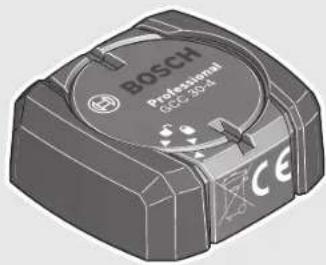
The GCC 30-4 Professional enables power tools and other objects to be clearly identified via a Bluetooth® signal.
The GCC 30–4 Professional sends out a continuous radio signal, enabling its location to be determined or other freely configurable data (such as service intervals) to be ascertained. Bosch offers an app and a web-based application that is appropriate for this purpose.
Product Features
The numbering of the product features refers to the illustrations on the graphics pages.
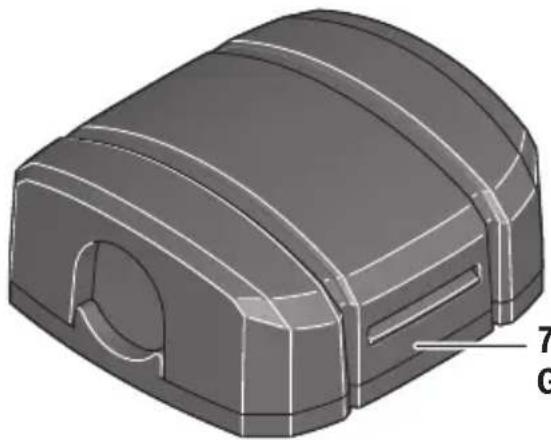
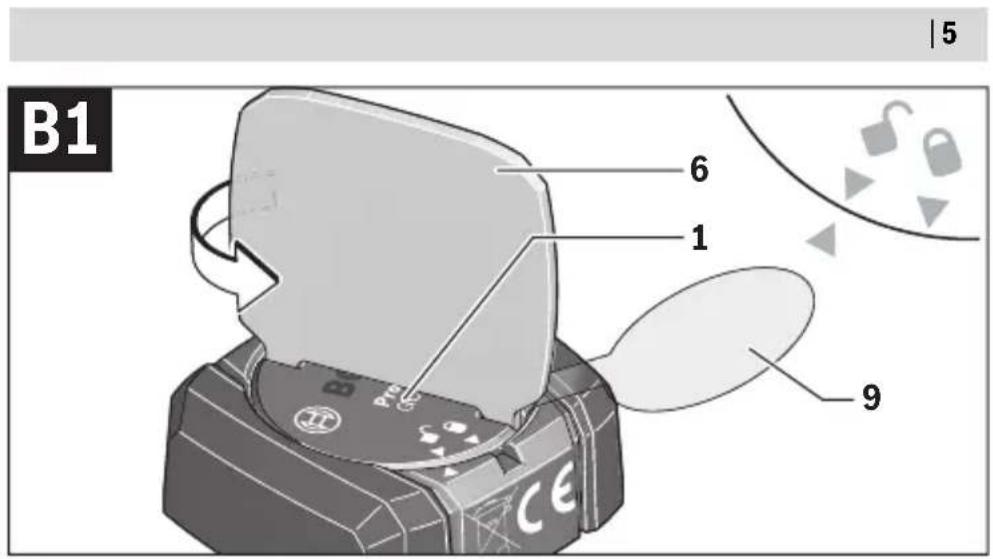
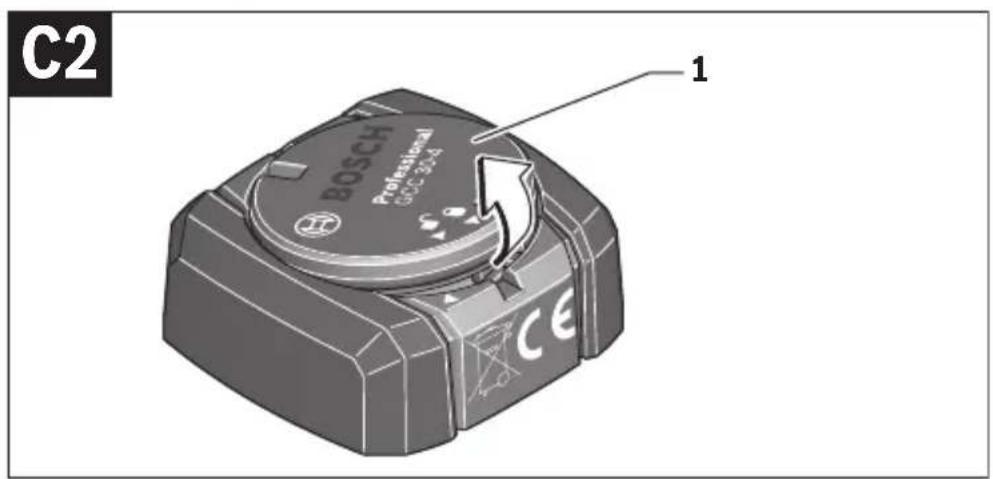
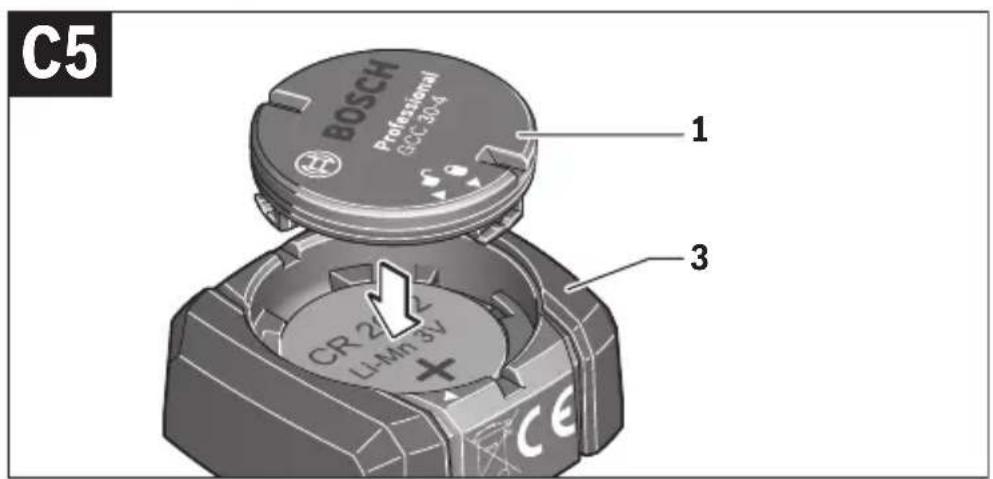
1 Battery lid
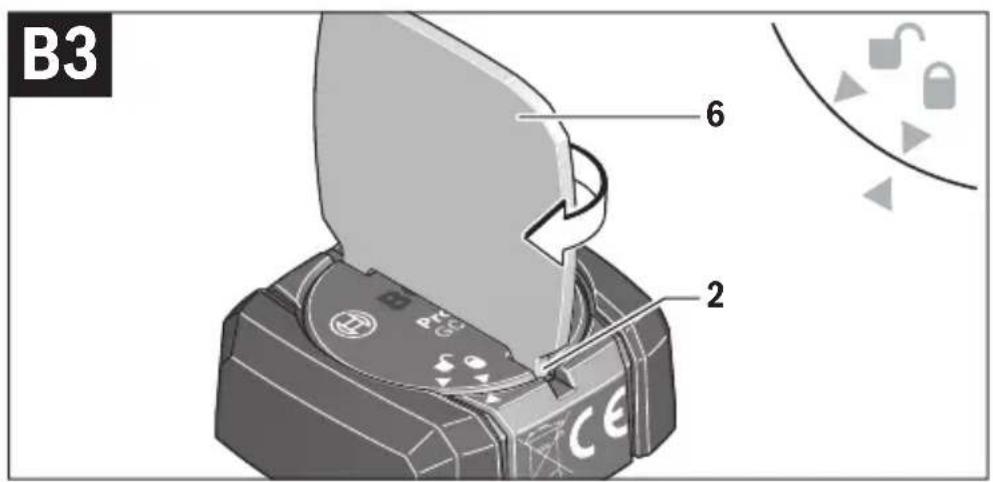
2 Groove on the battery compartment cover
3 Module housing
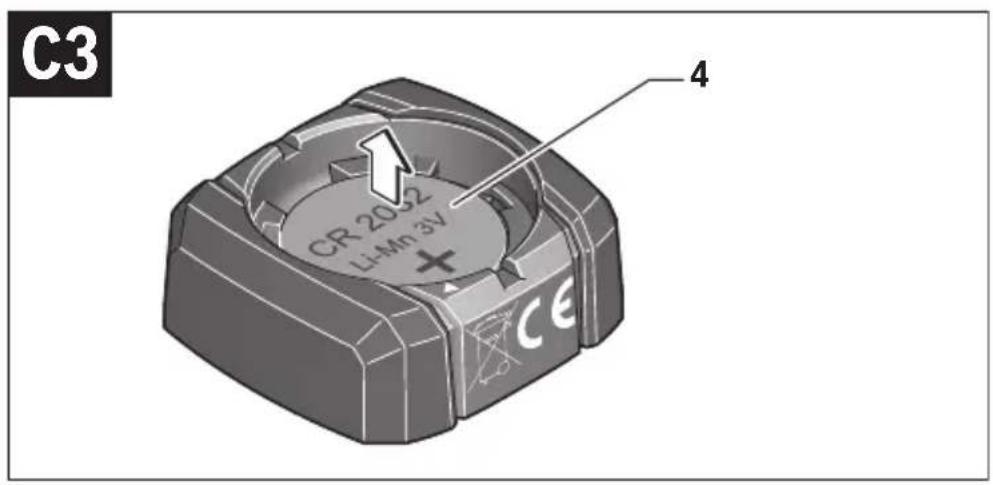
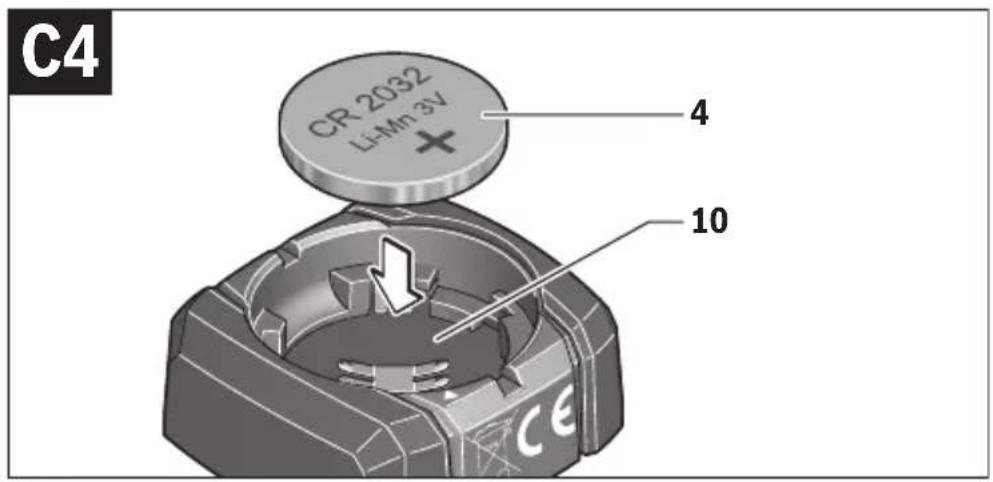
4 Battery
5 Two-part adhesive*
6 Battery compartment key
7 Cable clip*
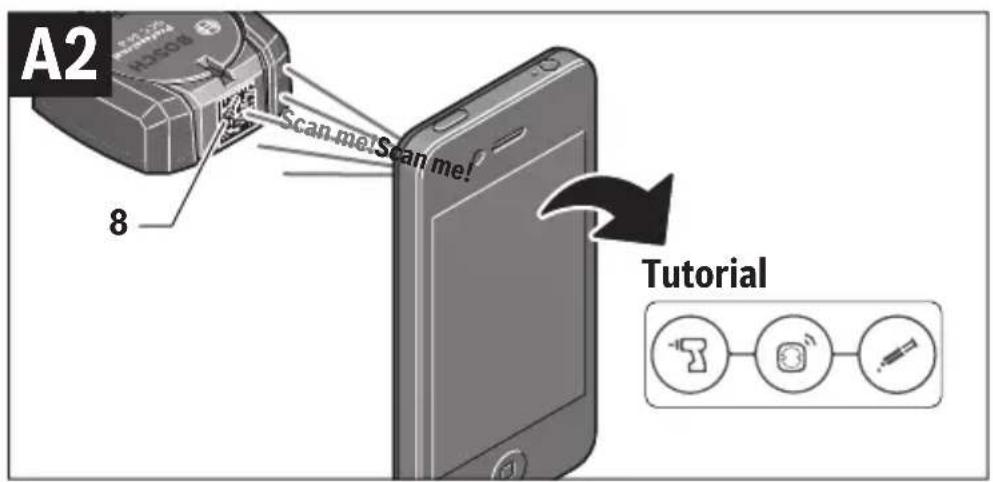
8 Data matrix code (product information and tutorial)
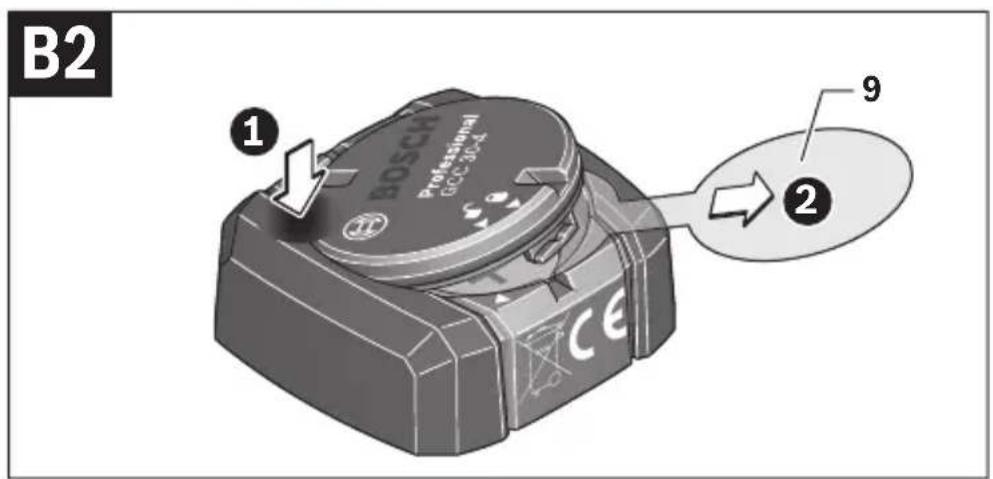
9 Protective film
10 Battery compartment
*Accessories shown or described are not part of the standard delivery scope of the product. A complete overview of accessories can be found in our accessories program.
Technical Data
| Bluetooth® module | GCC 30-4 Professional |
| Article number | 1 600 A01 1.. |
| Operating temperature | -10 °C...+40 °C |
| Storage temperature | -20 °C...+70 °C |
| Degree of protection | IP 67 (water-tight) |
| Dimensions | 34 x 32 x 13mm |
| Weight according to EPTA-Procedure 01:2014 | 0,02 kg |
1 609 92A 3W4 | (25.4.17) Bosch Power Tools
English | 25
| Bluetooth® module | GCC 30-4 Professional |
| Data transmission | |
| Bluetooth® | Bluetooth® 4.0 (Low Energy) A) |
| Signal interval 8 s | |
| Signal range | maximum 30 m B) |
| Frequency range used 2402-2480 MHz | |
| Output power | < 1 m W |
| Power supply | |
| Battery Button cell | (3 V lithium battery, CR 2032) |
| Battery service life, approx. | 36 months |
A) The mobile terminal devices must be compatible with Bluetooth® Low Energy devices (version 4.1) and support the Generic Access Profile (GAP).
B) The signal range may vary greatly depending on external conditions, including the receiving device used. The Bluetooth® range may be significantly weaker inside closed rooms and through metallic barriers (e.g. walls, shelving units, cases, etc.).
System Requirements
| Mobile terminal device (tablet, smartphone) | Android 4.3 (and above) |
| iOS 8 (and above) | |
| Bluetooth® 4.0 (and above) | |
| PC | Windows Vista, 7, 8, 8.1 |
| Linux Mint 17, Ubuntu 14.10, Debian GNU/Linux 7.0, Mageia 4, Fedora 21 | |
| Mac OS X 10.7 to 10.10 | |
| Browser | Internet Explorer 10 (and above) |
| Firefox 28 (and above) | |
| Chrome 26 (and above) | |
| Safari 7.0 (and above) |
26 | English
| Two-part adhesive UHU PLUSMULTIFEST | |
| Properties | - Shear strength, shock resistance and peeling resist-ance- Temperature resistance- Not susceptible to sagging- Fills cracks and splits up to 4 mm- Weather-resistant and moisture-resistant- No surface treatment necessary |
| Chemical basis | Methyl methacrylate |
| Suitable materials | Plastics, metals and composite material parts |
| Unsuitable materials | Polyethylene, polypropylene |
| Pot life (at 20 °C) C) | 4-6 min |
| Setting time | 10-15 min |
| Strength properties | 75% of maximum adhesion after 10-15 minutes at room temperature, full hardening after 24 hours |
| Mixing ratio | 1:1 |
| Optimal application temper-ature | + 20 °C ... +22 °C |
C) Definition of "pot life": Time until the product can no longer be applied once its parts have been thoroughly mixed.
Declaration of Conformity

Robert Bosch Power Tools GmbH hereby declares that the GCC 30–4 Professional radio communication unit complies with Directive 2014/53/EU.
The full EU declaration of conformity is available at: http://eu-doc.bosch.com/
Mounting and Operation
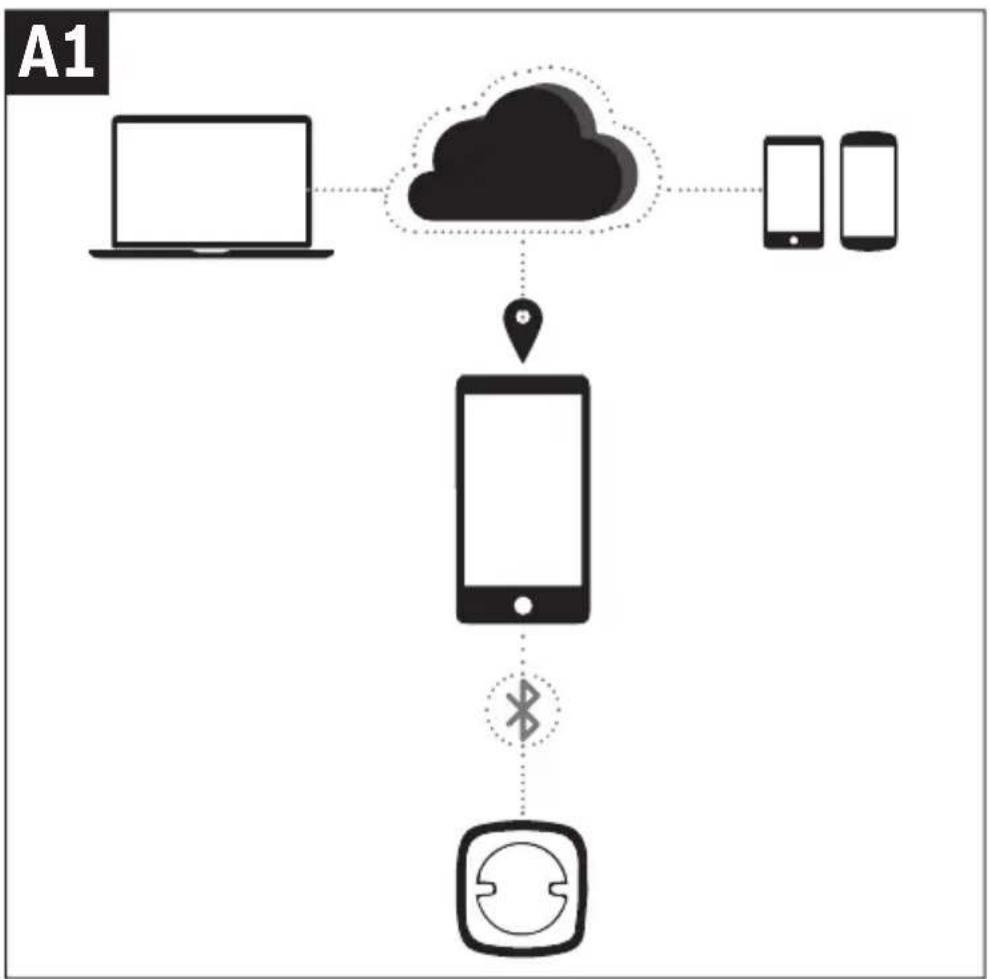
Registering and setting up the app/web-based application (see figures A1–A2)
Before you can use the GCC 30-4 Professional, you need to register with TrackMyTools online.
- Open the website www.bosch-trackmytools.com and register.
After registration is complete, you will receive your access information.
Bosch offers a special application (app) and a web-based application for managing the inserted GCC 30–4 Professional module and determining its location.
1 609 92A 3W4 | (25.4.17) Bosch Power Tools
English | 27
- Download the app TrackMyTools from the relevant app store (Apple App Store, Google Play Store) or access the web application at https://web.bosch-trackmytools.com, where you can log in using your access details.
You can now create and manage your inventory using the app/web-based application.
Help on using the app/web-based application and creating the inventory
Note: First, complete the tutorial for the app/web-based application. This will provide you with a better overview of the procedure for creating the inventory and using the software.
- Scan the data matrix code 8 on the side of the GCC 30–4 Professional module using the TrackMyToolsapp. This means that the GCC 30–4 Professional module is clearly identified and can be assigned to an inventory set up in the software.
Power supply
▶ Never remove the battery lid and the battery with an unsuitable object such as a screwdriver or needle nose pliers. Using unsuitable objects can damage the electronics or the gasket.
- To start using the product after purchasing it or to change the 4 battery, follow the illustrations on the graphics pages. Observe the following advice when doing so.
Initial Operation (see figures B1 - B3)
- Using the battery compartment key 6, turn the battery compartment cover 1 anticlockwise until the tips of the arrows for the "open" symbol are aligned.
- Remove the protective film 9.
To do this, press down lightly at the position shown in the diagram B2 so that the battery compartment cover 1 cannot drop down.
- To close it, using the battery compartment key 6, turn the battery compartment cover 1 clockwise until the tips of the arrows for the "closed" symbol are aligned.
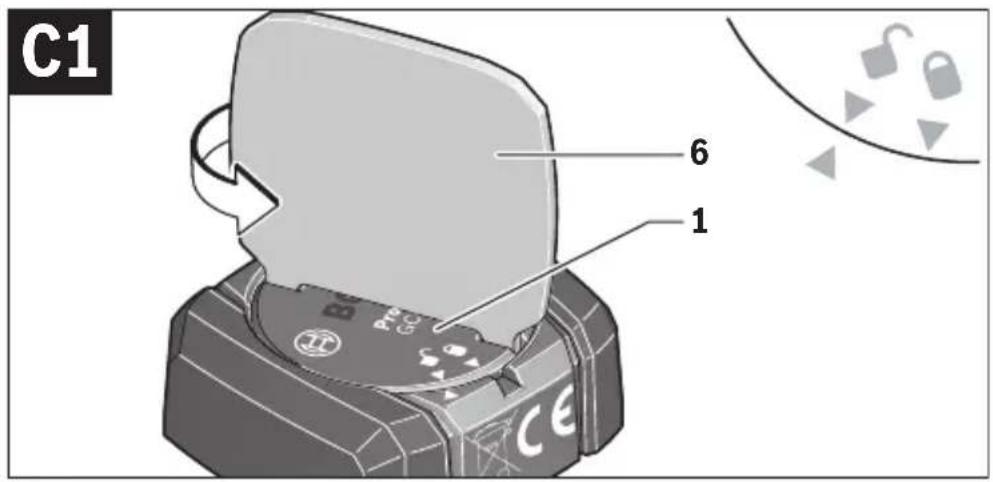
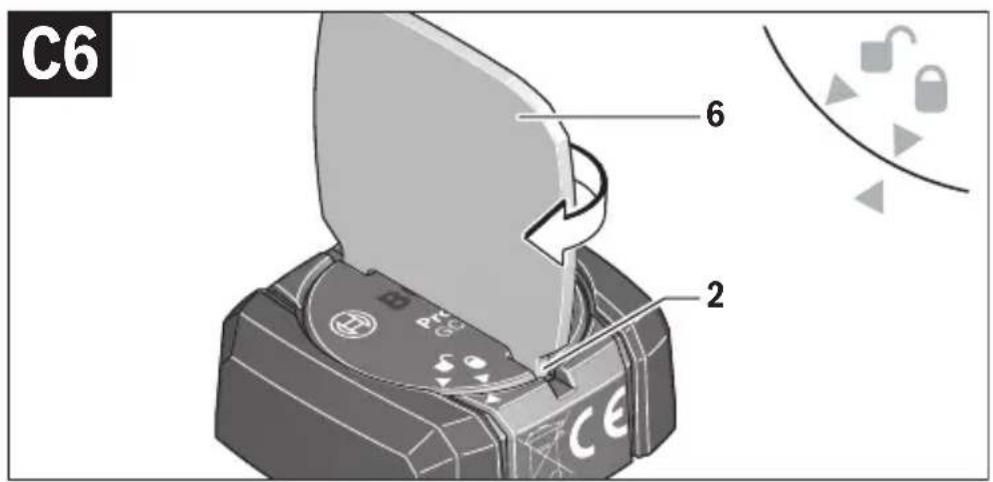
Battery Replacement (see figures C1-C6)
Only remove the used 4 battery with your fingers.
Insert the 4 battery into the 10 battery compartment with the plus terminal facing upwards. The angle of the battery may vary depending on the system. It is not necessary to push in the battery.
Before closing the battery lid 1, ensure that the gasket was not damaged when the battery compartment was opened.
28 | English
Initial Operation
Note: First, complete the tutorial for the app/web-based application. This will provide you with a better overview of the procedure for creating the inventory and using the software.
Once the 4 battery has been inserted or put into use, the GCC 30-4 Professional will send out a continuous signal. The Bluetooth® signal will only stop if the battery is drained or faulty or if it is removed.
You can find further information directly in the app/web-based application from Bosch.
Attaching the GCC 30-4 Professional
Attaching the GCC 30-4 Professional
▶ Observe the safety information and processing instructions provided with the two-part adhesive.
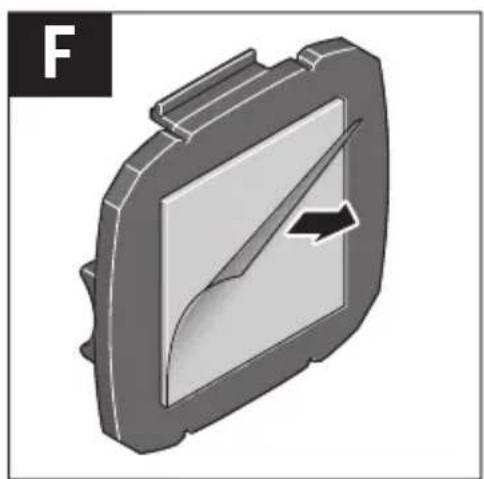
- Thoroughly mix both parts of the two-part adhesive 5 together.
- Immediately apply the mixed adhesive to the underside of the GCC 30-4 Professional as a thin film or in the form of droplets.
Note: Use enough material to ensure that the surface is completely covered with adhesive. If the bonding surface is curved, you need to use proportionately more adhesive to ensure that the joint is as large as possible.
Note: The data matrix code 8 must not be covered by adhesive.
- Establish firm contact between the GCC 30–4 Professional and the surface of the object that is to be bonded. Ensure that the bonded parts are not moved until they have been completely fixed.
Before the adhesive hardens, you can use acetone (solvent) to remove excess adhesive from the object or from any tools used for mixing.
Store the two-part adhesive in a cool, frost-free and dry environment.
Removing the GCC 30-4 Professional
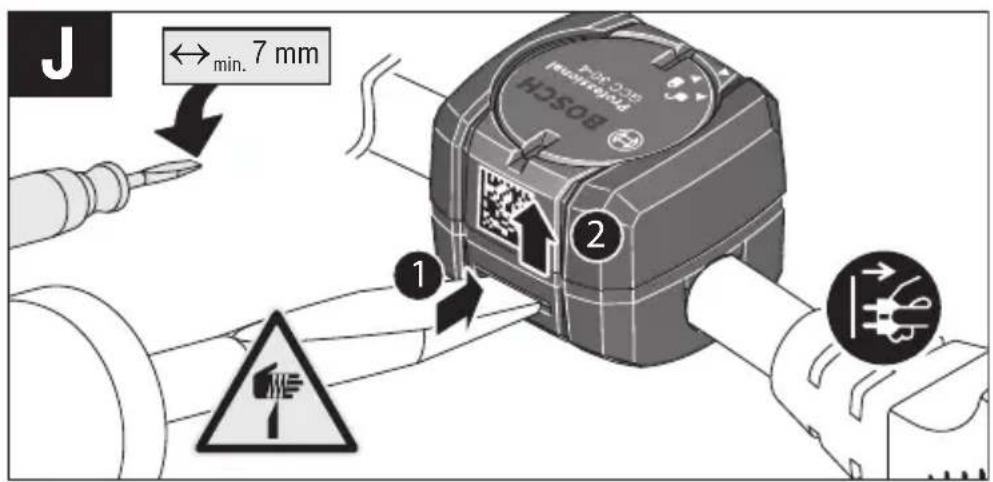
Do not use force to remove the GCC 30-4 Professional. Do not use any sharp or pointed tools which may cause damage to the surface of the identified object.
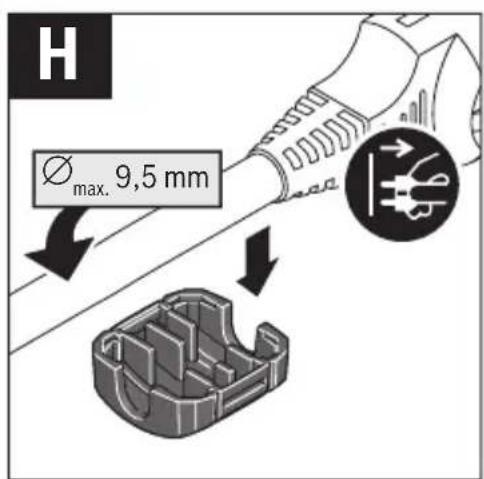
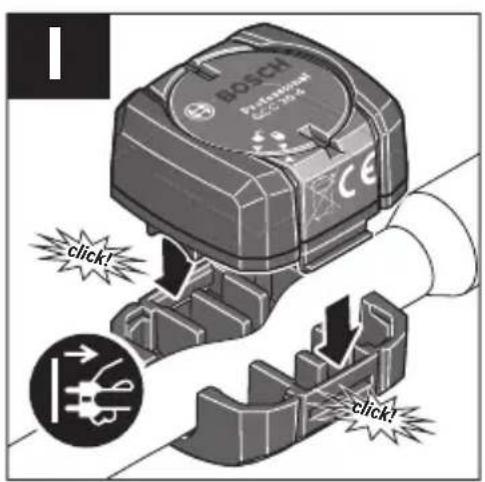
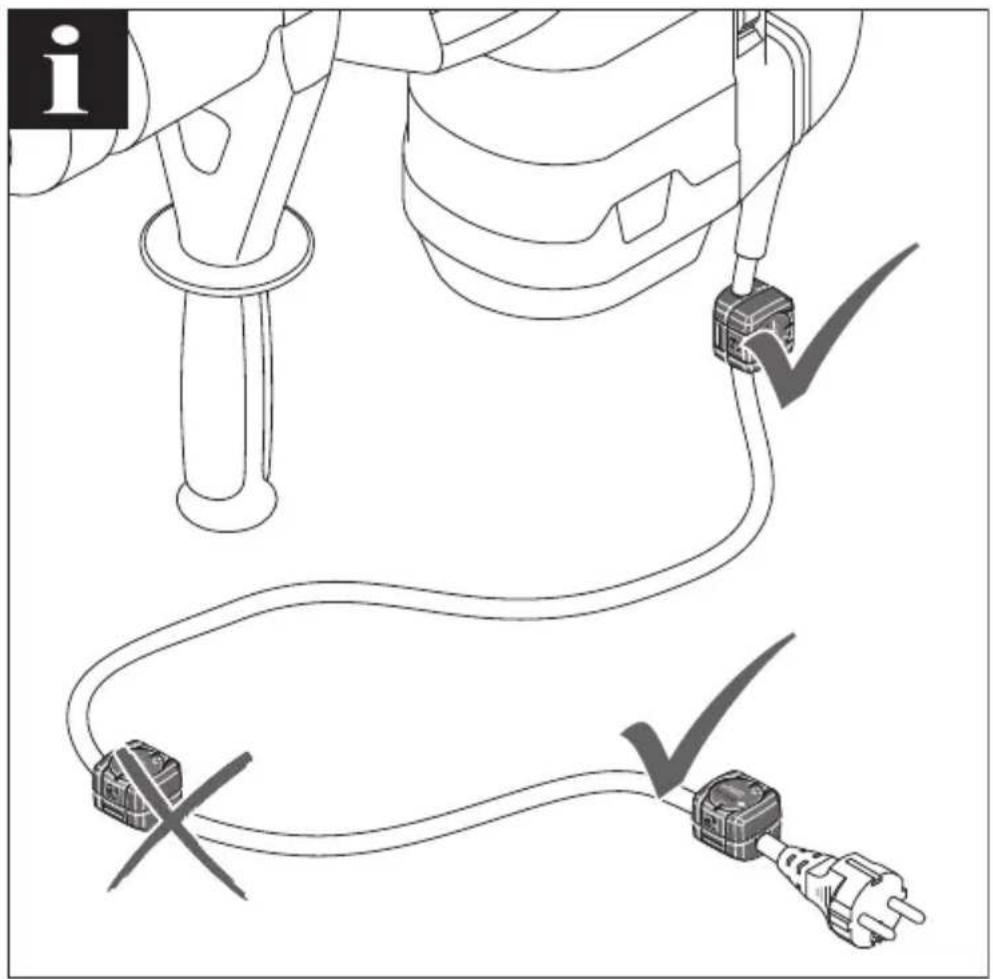
Attaching the GCC 30-4 Professional to a cable (see page 10-11)
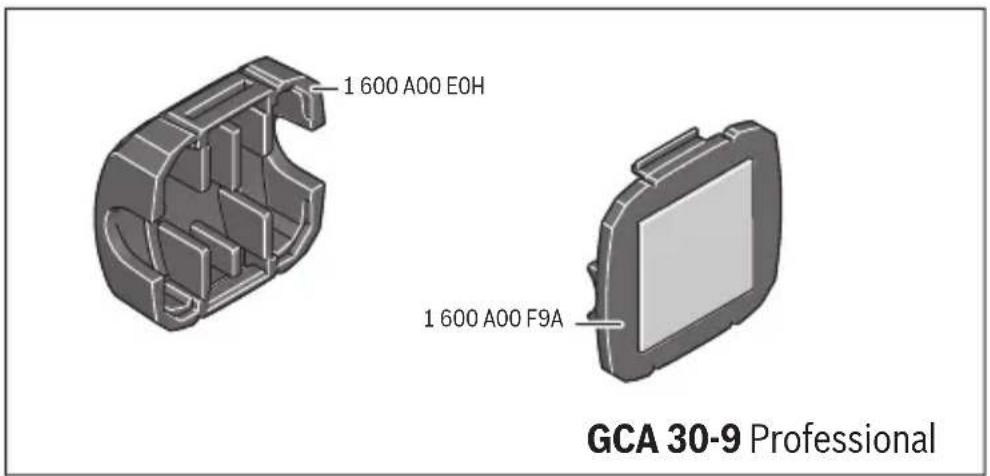
You can attach the GCC 30-4 Professional module to a cable using the GCC 30-9 Professional retaining clip.
English | 29
Data Transmission via Bluetooth®
The transmission interval of the GCC 30–4 Professional is eight seconds. Depending on ambient conditions, up to three transmission intervals may be required before the GCC 30–4 Professional is detected. If the GCC 30–4 Professional is not detected, check the following:
- Is the battery too low or drained?
▷ Change the battery (order number 1 600 A00 92A).
– Is the distance to the mobile terminal device too great?
▷ Reduce the distance between the mobile terminal device and the GCC 30-4 Professional.
Note: During initial set-up, GCC 30–4 Professional modules that are already assigned to an object are not displayed or cannot be connected.
Maintenance and Service
Help: The TrackMyTools Support team will be happy to help you with any questions you may have relating to your GCC 30-4 Professional module.
Contact details can be found at: www.bosch-trackmytools.com
Maintenance and Cleaning
Wipe off debris using a moist and soft cloth. Do not use any cleaning agents or solvents.
After-sales Service and Application Service
Our after-sales service responds to your questions concerning maintenance and repair of your product as well as spare parts. Exploded views and information on spare parts can also be found under:
www.bosch-pt.com
Bosch's application service team will gladly answer questions concerning our products and their accessories.
In all correspondence and spare parts orders, please always include the 10-digit article number given on the nameplate of the product.











30 | English
Great Britain
Robert Bosch Ltd. (B.S.C.)
P.O. Box 98
Broadwater Park
North Orbital Road
Denham
Uxbridge
UB 9 5HJ
At www.bosch-pt.co.uk you can order spare parts or arrange the collection of a product in need of servicing or repair.
Tel. Service: (0344) 7360109
E-Mail: boschservicecentre@bosch.com
Ireland
Origo Ltd.
Unit 23 Magna Drive
Magna Business Park
City West
Dublin 24
Tel. Service: (01) 4666700
Fax: (01) 4666888
Australia, New Zealand and Pacific Islands
Robert Bosch Australia Pty. Ltd.
Power Tools
Locked Bag 66
Clayton South VIC 3169
Customer Contact Center
Inside Australia:
Phone: (01300) 307044
Fax: (01300) 307045
Inside New Zealand:
Phone: (0800) 543353
Fax: (0800) 428570
Outside AU and NZ:
Phone: +61 3 95415555
www.bosch-pt.com.au
www.bosch-pt.co.nz








1 609 92A 3W4 | (25.4.17) Bosch Power Tools



English | 31
Republic of South Africa
Customer service
Hotline: (011) 6519600
Gauteng - BSC Service Centre
35 Roper Street, New Centre
Johannesburg
Tel.: (011) 4939375
Fax: (011) 4930126
E-Mail: bsctools@icon.co.za
KZN - BSC Service Centre
Unit E, Almar Centre
143 Crompton Street
Pinetown
Tel.: (031) 7012120
Fax: (031) 7012446
E-Mail: bsc.dur@za.bosch.com
Western Cape – BSC Service Centre
Democracy Way, Prosperity Park
Milnerton
Tel.: (021) 5512577
Fax: (021) 5513223
E-Mail: bsc@zsd.co.za
Bosch Headquarters
Midrand, Gauteng
Tel.: (011) 6519600
Fax: (011) 6519880
E-Mail: rbsa-hq.pts@za.bosch.com
Disposal
GCC 30–4 Professional modules, accessories and packaging should be recycled in an environmentally friendly manner.

Do not dispose of electronic components and batteries into household waste!

Bosch Power Tools 1 609 92A 3W4 | (25.4.17)




32 | Français
Only for EC countries:
In accordance with European Directive 2012/19/EU on waste electrical and electronic equipment and Directive 2006/66/EC respectively, electronic components that are no longer usable and faulty or drained batteries must be collected separately and recycled in an environmentally friendly manner.
Battery packs/batteries no longer suitable for use can be directly returned at:
Great Britain
Robert Bosch Ltd. (B.S.C.)
P.O. Box 98
Broadwater Park
North Orbital Road
Denham
Uxbridge
UB 9 5HJ
At www.bosch-pt.co.uk you can order spare parts or arrange the collection of a product in need of servicing or repair.
Tel. Service: (0344) 7360109
E-Mail: boschservicecentre@bosch.com
Subject to change without notice.
Français
Robert Bosch (France) S.A.S.
Remover o GCC 30-4 Professional
Bosch Service Center
Telegrafvej 3
2750 Ballerup
På www.bosch-pt.dk kan der online bestilles reservedele eller oprettes en reparations ordre.
Tlf. Service Center: 44898855
Fax: 44898755
E-Mail: vaerktoej@dk.bosch.com
Bortskaffelse
Bosch Service Center
Telegrafvej 3
2750 Ballerup
Danmark
Tel.: (08) 7501820 (inom Sverige)
Fax: (011) 187691