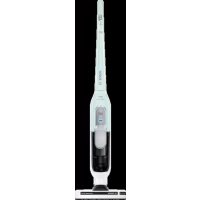
Athlet BCH51841 - Broom BOSCH - Free user manual and instructions
Find the device manual for free Athlet BCH51841 BOSCH in PDF.



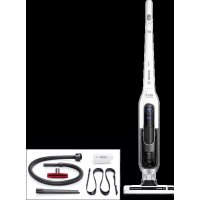
| Product type | Cordless stick vacuum cleaner |
| Brand | Bosch |
| Model | Athlet BCH51841 |
| Power supply | Rechargeable lithium-ion battery, mains charger |
| Initial charging time | At least 6 hours |
| Charge indicator | Indicator light (steady blue = charged, flashing = needs charging) |
| Power levels | 3 (Level 1 - smooth floors, Level 2 - normal, Turbo - maximum) |
| Motorized brush | Yes, electric brush for floors |
| Filter type | Filter cartridge with foam filter and motor protection filter, washable |
| Container capacity | Maximum level mark not to exceed |
| Included accessories | Upholstery nozzle, crevice tool, adapter, suction hose (depending on model) |
| Intended use | Household, indoor |
| Operating temperature | 0 °C to 40 °C |
| Maintenance | Regular emptying of the container, cleaning of the filter and rotating brush |
| Spare parts available | Filter cartridge, rotating brush, nozzles, charging cable |
| Warranty | According to the conditions of the country of purchase |
| Safety | Detailed instructions: do not vacuum liquids, hot objects, hazardous substances; only use with original filters and accessories |
| Disposal | Recyclable via 'Green Dot' collection points; lithium-ion battery to be disposed of separately |
Frequently Asked Questions - Athlet BCH51841 BOSCH
User questions about Athlet BCH51841 BOSCH
0 question about this device. Answer the ones you know or ask your own.
Ask a new question about this device
Download the instructions for your Broom in PDF format for free! Find your manual Athlet BCH51841 - BOSCH and take your electronic device back in hand. On this page are published all the documents necessary for the use of your device. Athlet BCH51841 by BOSCH.
USER MANUAL Athlet BCH51841 BOSCH
Register your new Bosch now: www.bosch-home.com/welcome

natural_image
Exterior view of a Bosch 18 V lithium power vacuum cleaner (no signage or text overlays)BCH5...

BOSCH
Please keep this instruction manual for future reference.
When passing the vacuum cleaner on to a third party, please also pass on this instruction manual.
Intended use
This appliance is intended for domestic use only, not for commercial use. Only use this vacuum cleaner in accordance with the information provided in this instruction manual. The manufacturer will not accept any responsibility for damage caused by improper use or incorrect operation.
Therefore, please note the following points.
The vacuum cleaner must only be operated with:
■ Original filter inserts
■ Original replacement parts, accessories or special accessories
In order to prevent injuries and damage, the vacuum cleaner must not be used for:
■ Vacuuming persons or animals.
■ Vacuuming up:
- Small creatures (e.g. flies, spiders, etc.).
- Hazardous, sharp-edged, hot or red-hot substances.
- Damp or liquid substances.
- Highly flammable or explosive substances and gases.
- Ash, soot from tiled stoves and central heating systems.
- Toner dust from printers and copiers.
Safety information
This vacuum cleaner complies with the recognised rules of technology and the relevant safety regulations.
■ The appliance may be used by children over the age of 8 years and by persons with reduced physical, sensory or mental capacity or by persons with a lack of experience or knowledge if they are supervised or have been instructed on the safe use of the appliance and have understood the potential dangers of using the appliance.
■ Children must never play with the appliance.
■ Cleaning and user maintenance must never be carried out by children without supervision.
■ Plastic bags and films must be kept out Information on disposal
of the reach of children and disposed of.
= There is a risk of suffocation.
Proper use
■ The charging cable must only be connected and operated as specified on the rating plate.
■ The appliance must only be stored and charged indoors.
■ Do not expose the appliance to temperatures below 0 °C or above 40 °C.
■ Never vacuum without the dust bag or dust container, motor protection or exhaust filter.
= This may damage the vacuum cleaner.
- Keep the vacuum cleaner away from your head when using nozzles and tubes. => This could cause injury.
- Do not use a damaged charging cable. Replace it with an original charging cable.
■ When disconnecting the charging cable from the mains, pull the plug itself to remove it; do not pull on the power cord.
■ Do not pull the charging cable over sharp edges or allow it to become trapped.
■ Before carrying out any work on the vacuum cleaner, switch off the appliance and disconnect it from the charging cable and the mains.
■ Do not operate the vacuum cleaner if it is damaged.
■ If a fault is detected, switch off the appliance and disconnect it from the charging cable and the mains.
■ For safety reasons, only authorised after-sales service personnel are permitted to carry out repairs and fit replacement parts to the vacuum cleaner.
In the following cases, you must stop the appliance immediately and contact the after-sales service:
- If you have accidentally vacuumed up some liquid or liquid has entered the inside of the appliance;
- If the appliance has been dropped and damaged.
■ Protect the vacuum cleaner from outside weather conditions, moisture and sources of heat.
■ Do not pour flammable substances or substances containing alcohol onto the filters (dust bag, motor protection filter, exhaust filter, etc.).
■ The vacuum cleaner is not suitable for use on construction sites. => Vacuuming up building rubble may damage the appliance.
■ Switch off the appliance when it is not in use.
Batteries
Your appliance is fitted with lithium-ion batteries which, for safety reasons, are only accessible to professional repair specialists.
For battery replacement, please contact your nearest after-sales centre or an authorised specialist dealer.
Packaging
The packaging is designed to protect the vacuum cleaner from being damaged during transportation. It is made of environmentally friendly materials and can be recycled. Dispose of packaging that is no longer required at an appropriate recycling point.
■ Old appliances
This appliance contains rechargeable lithium-ion batteries. The appliance must therefore only be disposed of by an authorised after-sales service or dealer.
fr
=> Fare for kvelning!
Tiltenkt bruk
natural_image
Simple line drawing of an open book with a right-handled arrow indicating rotation (no text or symbols)We are very pleased that you have chosen to purchase a cordless hand-held vacuum cleaner from Bosch.
This instruction manual describes various appliance models, which means that some of the equipment features and functions described may not apply to your model. You should only use original Bosch accessories, which have been specially developed for your vacuum cleaner, in order to achieve the best possible vacuuming results.
Fold out the picture pages.

natural_image
Simple line drawing of an open book with a right-handled arrow indicating rotation (no text or symbols)1 Floor nozzle with electric brush
2 Dust container
3 Dirt container release button
4 Battery charging status indicator
5 Dust container
6 Outer filter unit
7 Filter cartridge with motor protection filter and foam filter
8 Handle
9 On/off switch
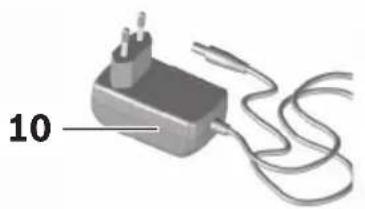
10 Charging cable
11 Upholstery nozzle*
12 Crevice nozzle*
13 Professional upholstery nozzle*
14 Professional crevice nozzle*
15 Carrying strap*
16 Accessory adapter*
17 Flexible hose with handle*
Before using your appliance for the first time
Fig. 1
Carefully plug the handle onto the main housing and lock it into place.
To release the handle, press the release button and carefully lift the handle upwards to remove it.
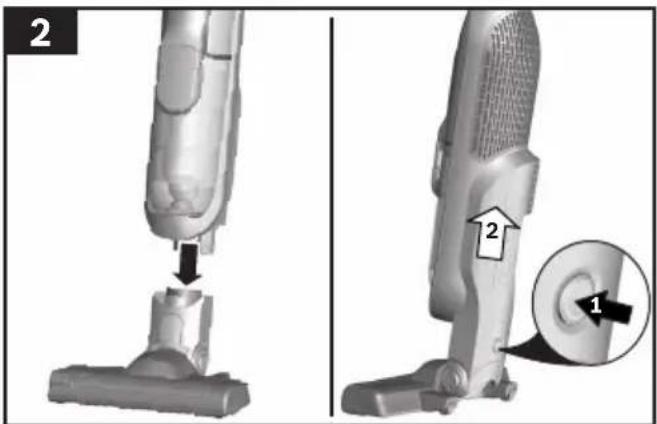
Fig. 2
Plug the hand-held vacuum cleaner into the floor nozzle and lock it into place.
To release the floor nozzle, press the release button and pull the hand-held vacuum cleaner out of the nozzle.
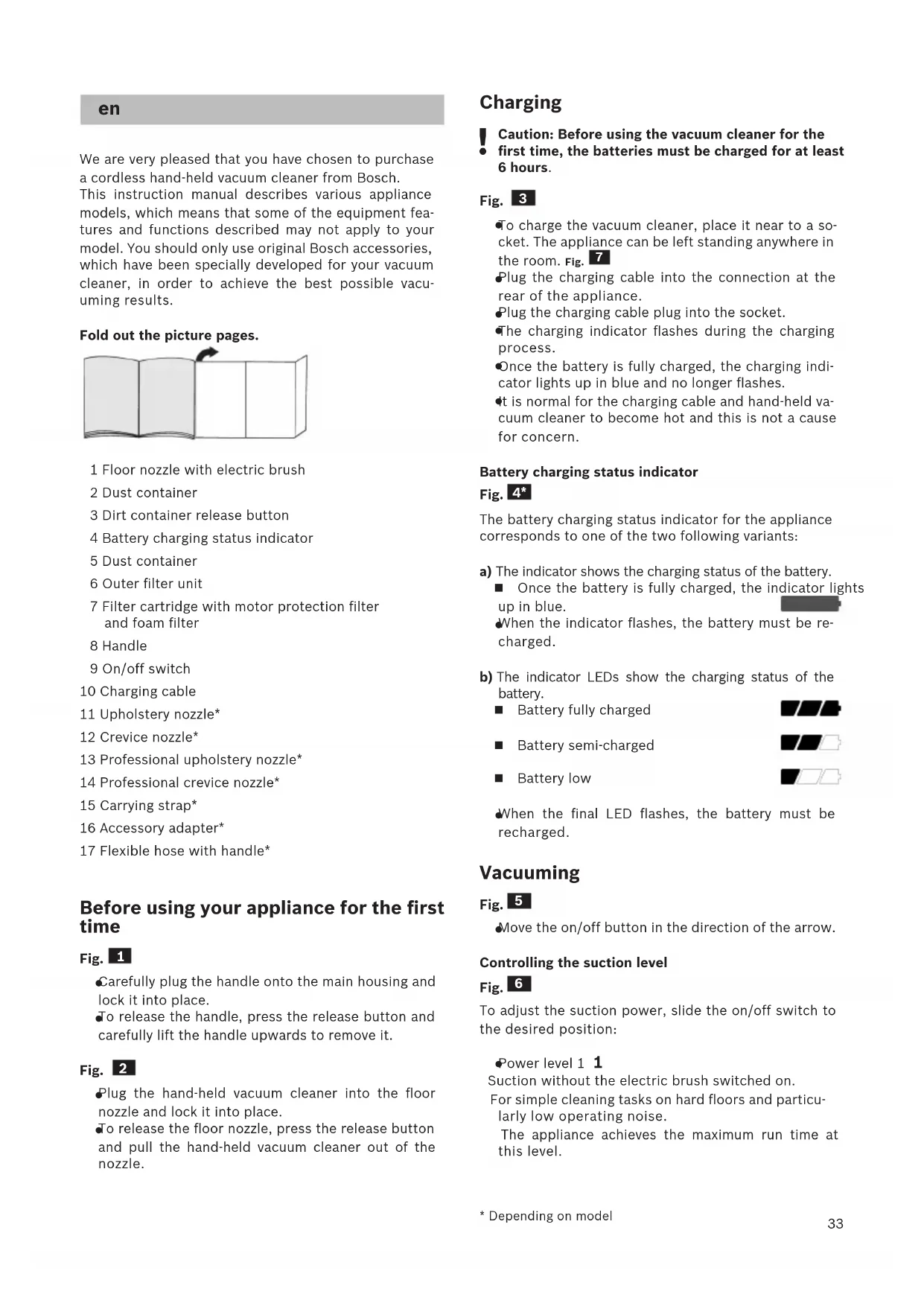
Charging
Caution: Before using the vacuum cleaner for the
- first time, the batteries must be charged for at least 6 hours.
Fig. 3
To charge the vacuum cleaner, place it near to a socket. The appliance can be left standing anywhere in the room. Fig. 7
Plug the charging cable into the connection at the rear of the appliance.
Plug the charging cable plug into the socket.
The charging indicator flashes during the charging process.
- Once the battery is fully charged, the charging indicator lights up in blue and no longer flashes.
- it is normal for the charging cable and hand-held vacuum cleaner to become hot and this is not a cause for concern.
Battery charging status indicator
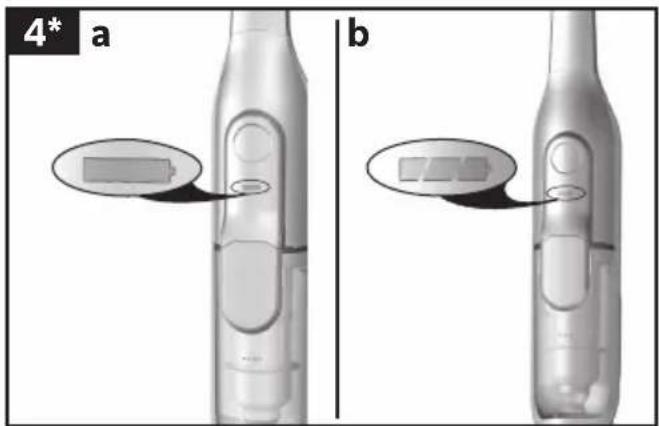
Fig. 4\*
The battery charging status indicator for the appliance corresponds to one of the two following variants:
a) The indicator shows the charging status of the battery.
■ Once the battery is fully charged, the indicator lights up in blue.
When the indicator flashes, the battery must be re-charged.
b) The indicator LEDs show the charging status of the battery.
■ Battery fully charged

■ Battery semi-charged

Battery low

When the final LED flashes, the battery must be recharged.
Vacuuming
Fig. 5
- Move the on/off button in the direction of the arrow.
Controlling the suction level
Fig. 6
To adjust the suction power, slide the on/off switch to the desired position:
Power level 1 1
Suction without the electric brush switched on.
For simple cleaning tasks on hard floors and particularly low operating noise.
The appliance achieves the maximum run time at this level.
●Power level 2 2
Vacuuming at normal power and with the electric brush switched on.
For normal cleaning tasks on all floors at an average run time.
●Turbo level Turbo
Vacuuming at full power and with the electric brush switched on.
For particularly demanding cleaning tasks on all surfaces (carpets, in particular) and when using an optional accessory. The appliance achieves a shorter run time at this level.
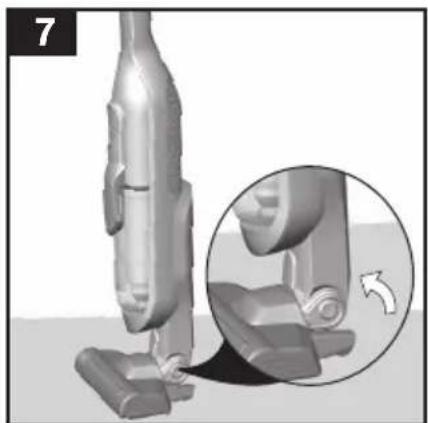
Fig. 7
- During short pauses in vacuuming, the appliance can be left standing anywhere in the room. To do this, tilt the vacuum cleaner forwards slightly in the direction of the nozzle.
Caution: When the appliance is left standing, it must be switched off because, if the brush is turning while the appliance is standing still, it could cause damage to the floor covering.
Vacuuming with accessories
Fig. 8\*
a) Plug the accessory adapter into the hand-held vacuum cleaner and lock it into place.
To release the accessory adapter, press the release button and pull out the accessory adapter.
b) Fasten the carrying strap to the handle. When doing so, lay down the appliance; do not rest it on the adapter or the hose.
Fig. 9\*
Fit nozzles as required to the flexible hose with the accessory adapter handle:
●Upholstery nozzle for vacuuming upholstered furniture, curtains, etc.
- Crevice nozzle for vacuuming crevices and corners, etc.
After using the appliance
Fig. 10
- Switch off the appliance after vacuuming.
Emptying the dust container
Fig. 11
In order to achieve the best possible vacuuming results, the dust container should be emptied after every use or, at the latest, when dust at one point in the dust container has reached the marking.
We recommend that you not fill the dust container beyond the marking, as this leads to considerable soiling of the filter.
When emptying the dust container, always check how dirty the outer filter unit is and, if necessary, clean it as detailed in the "Cleaning the outer filter unit" instructions. Fig. 16
! Caution: The filter can only be cleaned if the appliance is switched off.
Never vacuum without the outer filter unit and its fitted filter cartridge.
Fig. 12
- Use the release button to unlock the dust container and remove it from the appliance.
Fig. 13
Take the filter unit out of the dust container.
Empty the dust container.
Fig. 14
Remove any dirt which may have been lodged underneath the container ejector opening.
- insert the filter unit into the dust container, making sure it is correctly seated.
- insert the dust container in the appliance, so that it "clicks" audibly into place.
! Caution: If you notice any resistance when inserting the dust container, check that the filter is complete and that the filter unit and dust container are correctly seated.
Filter care
! Caution: The filter can only be cleaned if the appliance is switched off.
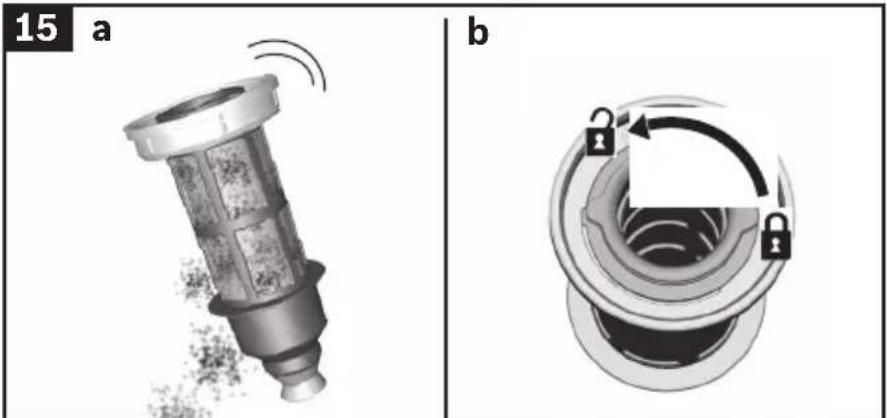
Fig. 15 Cleaning the outer filter unit
The outer filter unit should be cleaned at regular intervals in order to ensure optimum operation of the vacuum cleaner.
Please switch off the appliance to clean the outer filter unit.
Remove the dust container from the appliance. Fig. 12
Take the filter unit out of the dust container. Fig. 13 Clean the outer filter unit.
a) It is usually sufficient to lightly shake or tap out the whole filter unit when the dust container is emptied in order to dislodge any particles of dirt.
b) If this is not sufficient, you can use a dry cloth to remove dirt particles from the surface. If you want to wash the outer filter unit, you must first remove the filter cartridge from the filter unit. The filter cartridge must only be reinserted after the outer filter unit has completely dried.
a) It is usually sufficient to lightly shake or tap out the whole filter unit when the dust container is emptied in order to dislodge any particles of dirt. b) If this is not sufficient, you can use a dry cloth to remove dirt particles from the surface. If you want to wash the outer filter unit, you must first remove the filter cartridge from the filter unit. The filter cartridge must only be reinserted after the outer filter unit has completely dried.
Fig. 16 Cleaning the filter cartridge
●Switch off the appliance.
- Remove the dust container from the appliance.
Fig. 12
●Take the filter unit out of the dust container. Fig. 13
a) Turn the filter cartridge lid anti-clockwise and remove the filter cartridge from the filter unit.
b) Firstly, clean the filter cartridge by tapping out the dirt.
c) Then, under running water, rinse out the filter cartridge, foam filter and motor protection filter together or separately from each other. If the foam filter is heavily contaminated, the filter cartridge can also be cleaned in the washing machine at a maximum temperature of 30 °C and at the lowest spin speed.
Allow the foam filter and motor protection filter to dry completely (approx. 24 hours)
d) After fitting the foam filter, insert the filter cartridge into the dust container.
e) Insert the filter cartridge into the filter unit and lock it by turning the lid clockwise.
New filters can be obtained from our after-sales service, if required.
Cleaning the floor nozzle
Before carrying out any maintenance, switch off the vacuum cleaner and disconnect it from the charging cable.
Fig. 17
a) Release the brush roller using the release button and pull it sideways out of the floor nozzle.
b) Using the groove provided, cut through threads and hairs wound round the rollers with scissors and then remove them.
c) Push the brush roller in sideways along the guide rod in the floor tool and lock in place using the release button.
Caution: The floor nozzle must only be put into ope-
- ration with the brush roller fitted.
Care
Before cleaning the hand-held vacuum cleaner, it must be switched off and disconnected from the charging cable. The vacuum cleaner and plastic accessories can be cleaned with an ordinary plastic cleaner.
Caution: Do not use abrasive materials, glass-
- cleaning agents or all-purpose cleaning products. Never immerse the vacuum cleaner in water.
Subject to technical modifications.
fr
natural_image
Simple line drawing of an open book with a right-pointing arrow indicating the page direction (no text or symbols)natural_image
Simple line drawing of an open book with a curved arrow indicating rotation (no text or symbols)natural_image
Simple line drawing of an open book with a right-pointing arrow indicating the page (no text or symbols present)natural_image
Simple line drawing of an open book with a right-handled arrow indicating rotation (no text or symbols)natural_image
Simple line drawing of an open book with a right-pointing arrow indicating the page (no text or symbols present)natural_image
Simple line drawing of an open book with a right-pointing arrow indicating the page (no text or symbols present)natural_image
Simple line drawing of an open book with a right-pointing arrow indicating rotation (no text or symbols)natural_image
Simple line drawing of an open book with a curved arrow indicating rotation (no text or symbols)natural_image
Simple line drawing of an open book with a curved arrow indicating rotation (no text or symbols)natural_image
Simple line drawing of an open book with a right-pointing arrow indicating rotation (no text or symbols)natural_image
Simple line drawing of an open book with a curved arrow indicating rotation (no text or symbols)natural_image
Simple line drawing of an open book with a right-pointing arrow indicating the page direction (no text or symbols)natural_image
Simple line drawing of an open book with a right-handled arrow indicating rotation (no text or symbols)natural_image
Simple line drawing of an open book with a right-pointing arrow indicating the page (no text or symbols present)natural_image
Simple line drawing of an open book with a right-pointing arrow indicating rotation (no text or symbols)natural_image
Simple line drawing of an open book with a curved arrow indicating rotation (no text or symbols)natural_image
Simple line drawing of an open book with a curved arrow indicating rotation (no text or symbols)natural_image
Simple line drawing of an open book with blank pages (no text or symbols)Jebel Ali Free Zone – Dubai
Tel.: 04 881 4401
mailto:service.uae@bshg.com
www.bosch-home.com/ae
AL Republika e Shqiperise, Albania
AERTECH SH.P.K.
Rruga Qemal Stafa
Pallati i ri perball Prokuroris se
Pergjithshme
Hyrjā C Kati 10
Tirana
Tel.: 066 206 47 94
mailto:g.volina@aertech.al
HEATHERTON, Victoria 3202
Tel.: 1300 368 339
mailto:bshau-as@bshg.com
www.bosch-home.com.au
BA Bosna i Hercegovina, Bosnia-Herzegovina
"HIGH" d.o.o.
Gradačačka 29b
71000 Sarajevo
Info-Line: 061 100 905
Fax: 033 213 513
mailto:delicnanda@hotmail.com
European Trade Center Building,
5th floor
1784 Sofia
Tel.: 02 892 90 47
Fax: 02 878 79 72
mailto:informacia.servis-bg@
bshg.com
www.bosch.home.bg
+ 7 snt/min (alv 23%)
+ 17 snt/min (alv 23%)
FR France
BSH Electroménager S.A.S.
50 rue Ardoin – BP 47
93401 SAINT-OUEN cedex
To arrange an engineer visit, to order spare parts and accessories or for product advice please visit www.bosch-home.co.uk or call
*Calls from a BT landline will be charged at up to 3 pence per minute. A call set-up fee of up to 6 pence may apply.
GR Greece, Ελλάς
BSH Ikiakes Siskeves A.B.E.
Central Branch Service
17 km E.O. Athinon-Lamias & Potamou 20
14564 Kifisia
Unit 1 & 2, 3rd Floor
North Block, Skyway House
3 Sham Mong Road
Tai Kok Tsui, Kowloon
Hong Kong
Tel.: 2565 6151
Fax: 2565 6681
mailto:bosch.hk.service@bshg.com
www.bosch-home.cn
HR Hrvatska, Croatia
BSH kućni uređaji d.o.o.
Kneza Branimira 22
10000 Zagreb
Tel:. 01 640 36 09
Fax: 01 640 36 03
mailto:informacije.servis-hr@
bshg.com
www.bosch-home.com/hr
www.bosch-home.com/hu
IE Republic of Ireland
BSH Home Appliances Ltd.
Unit F4, Ballymount Drive
Ballymount Industrial Estate
Walkinstown
Dublin 12
Service Requests,
Spares and Accessories
Tel.: 01450 2655
Fax: 01450 2520
www.bosch-home.co.uk
IL Israel, בַרְבָר
C/S/B Home Appliance Ltd.
Uliel Building
2, Hamelacha St.
Industrial Park North
71293 Lod
Tel.: 08 9777 222
Fax: 08 9777 245
mailto:csb-serv@zahav.net.il
www.bosch-home.co.il
IN India, Bhārat, भारत
BSH Customer Service Front Office
Shop No.4, Everest Grande,
Opp. Shanti Nagar Bus Stop,
Mahakali Caves Road, Andheri East
Mumbai 400093
IS Iceland
Smith & Norland hf.
Noatuni 4
105 Reykjavik
Tel.: 0520 3000
Fax: 0520 3011
www.sminor.is
IT Italia, Italy
www.bosch-home.com/it
IP Turebekov Yerzhan
Nurmanovich
Jangeldina str. 15
Shimkent 160018
Tel.: 0252 31 00 06
mailto:evrika_kz@mail.ru
LB Lebanon, لبنان
Teheni, Hana & Co.
Boulevard Dora 4043 Beyrouth
P.O. Box 90449
Jdeideh 1202 2040
Tel.: 01 255 211
mailto:Info@Teheni-Hana.com
LT Lietuva, Lithuania
Senuku prekybos centras UAB
Jonavos g. 62
44192 Kaunas
Tel.: 0372 12146
Fax: 0372 12165
www.senukai.lt
LU Luxembourg
General Serviss Limited
Bullu street 70c
1067 Riga
Tel.: 07 42 41 37
mailto:bt@olimpeks.lv
Elkor Serviss
Brivibas gatve 201
1039 Riga
Tel.: 067 0705 20; -36
Fax: 067 0705 24
mailto:domoservice@elkor.lv
www.servisacentrs.lv
MD Moldova
S.R.L. "Rialto-Studio"
ул. Щусева 98
2012 Кишинев
тел./факс: 022 23 81 80
mailto:bosch-md@mail.ru
ME Crna Gora, Montenegro
Elektronika komerc
UI. Slobode 17
84000 Bijelo Polje
Tel./Fax: 050 432 575
Mobil: 069 324 812
mailto:ekobosch.servis@
t-com.me
Unit F 2, 4 Orbit Drive
Mairangi Bay
Auckland 0632
Tel.: 09 477 0492
Fax: 09 477 2647
mailto:bshnz-cs@bshg.com
www.bosch-home.co.nz
PL Polska, Poland
SA Kingdom Saudi Arabia,
Bin Hamran Commercial Centr.
6th Floor 603B
Jeddah 21481
Tel.: 800 124 1247
mailto:service.ksa@bshg.com
www.bosch-home.com/sa
SE Sverige, Sweden
www.bosch-home.com/tr
4th floor, No. 112 Sec 1
Chung Hsiao E Road
Taipei ROC 100
Tel.: 02 2321 6222
mailto:Bosch@achelis.com.tw
UA Ukraine, Україна
gama-electronics.com
XS Srbija, Serbia
BSH Kućni aparati d.o.o.
Milutina Milankovića 11 ^a
11070 Novi Beograd
Tel.: 011 205 23 97
Fax: 011 205 23 89
mailto:informacije.servis-sr@
bshg.com
www.bosch-home.rs
ZA South Africa
BSH Home Appliances (Pty) Ltd.
15th Road Randjespark
Private Bag X36, Randjespark
1685 Midrand – Johannesburg
Tel.: 086 002 6724
Fax: 086 617 1780
mailto:applianceserviceza@
bshg.com
www.bosch-home.com/za
natural_image
Symbol of a trash bin crossed with two diagonal lines, no text or numbers presentde
This appliance is labelled in accordance with European Directive 2012/19/EU concerning used electrical and electronic appliances (waste electrical and electronic equipment - WEEE). The guideline determines the framework for the return and recycling of used appliances as applicable throughout the EU.
fr
natural_image
Symbol of a trash bin crossed with two crossed lines, representing no waste or discharge (no text or labels)pt
GB Conditions of guarantee
For this appliance the guarantee conditions as set out by our representatives in the country of sale apply. Details regarding same may be obtained from the dealer from whom the appliance was purchased. For claims under guarantee the sales receipt must be produced.
FR Conditions de garantie
bosch-infoteam@bshg.com
natural_image
3D illustration of a small electronic device with wires and a labeled component (no text or symbols beyond the number 10)



natural_image
Close-up of a metallic electronic device with a scroll wheel and a black arrow indicating direction (no text or symbols)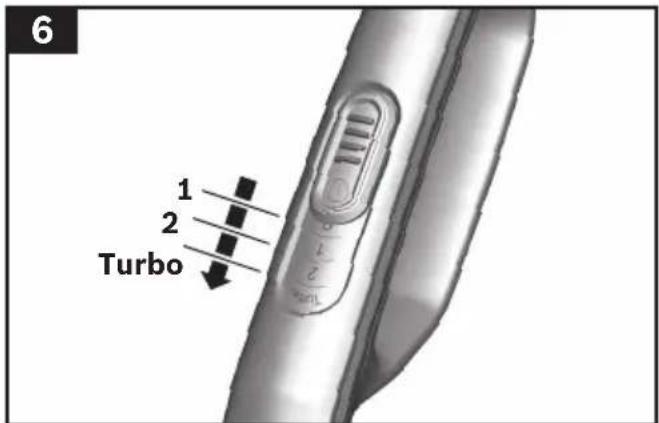
natural_image
3D model of a vacuum cleaner with an inset close-up showing the mechanism (no text or symbols)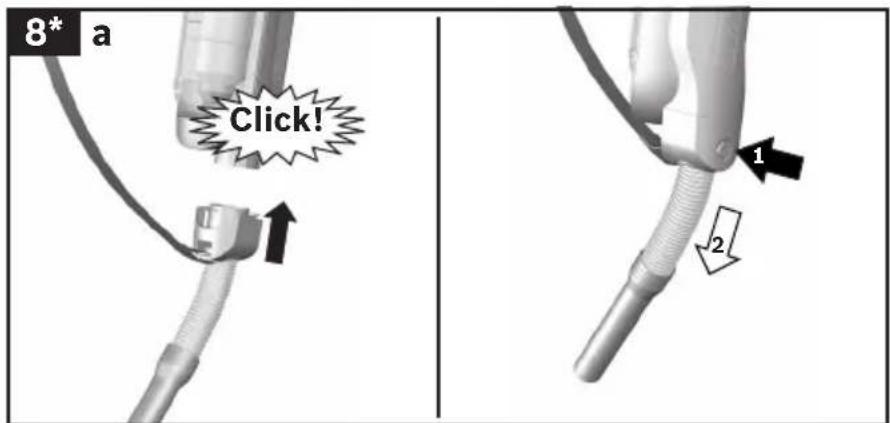


natural_image
Two-step diagram showing a hairdryer with a clip and a handle, no text or symbols present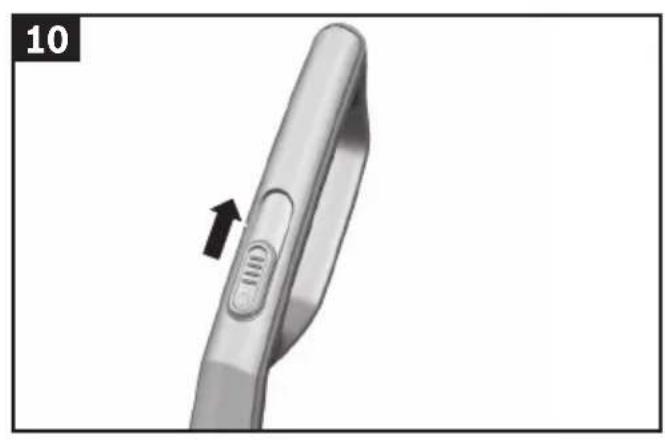
natural_image
Close-up of a handheld electronic device with a black arrow pointing to the handle (no text or symbols visible)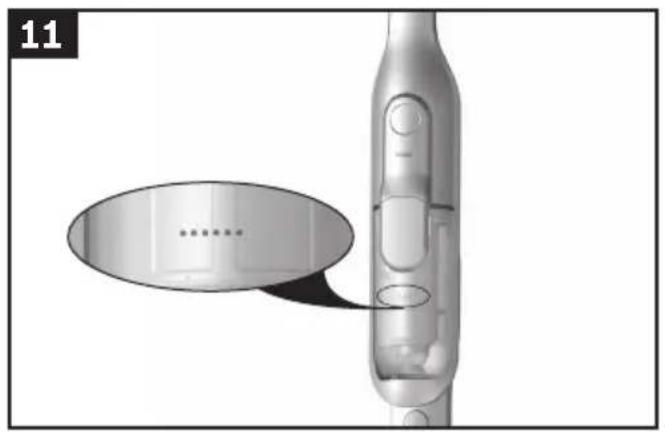
natural_image
3D model of a handheld device with a speech bubble highlighting a component (no text or symbols present)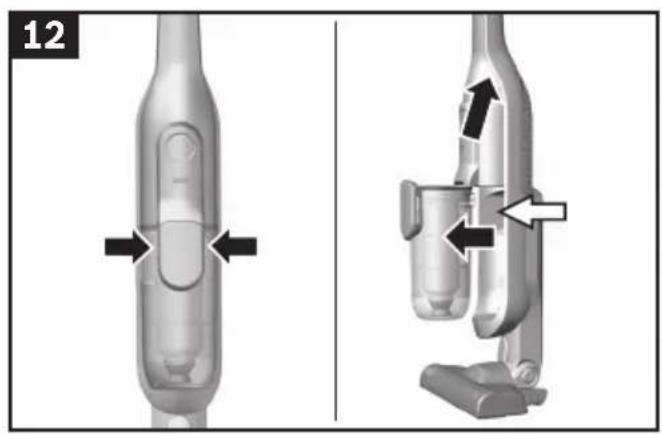
natural_image
Two technical diagrams of a mechanical device with directional arrows indicating movement or force (no text or symbols present)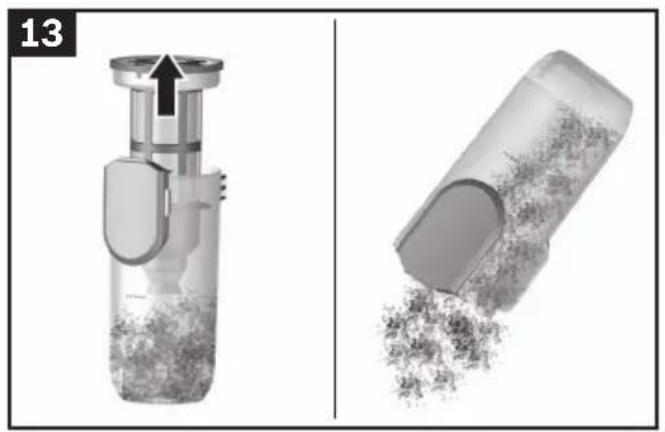
natural_image
Two grayscale images showing a hand mixer and a cylindrical container filled with granular material, both without any text or symbols.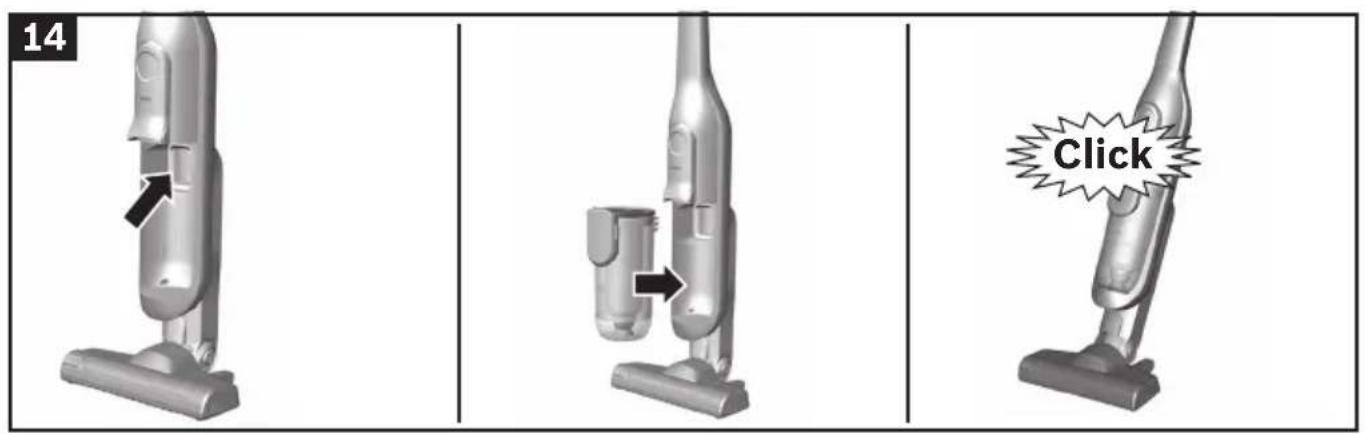
natural_image
Two technical diagrams showing a mechanical component (a) and a circular lock mechanism (b), both without any text or symbols.
natural_image
Two views of a mechanical component with internal structure and hand gesture indicators (no text or symbols)
natural_image
Three-panel illustration showing mechanical components: a valve with lock mechanism, a cylindrical component with upward arrow, and a cylindrical device emitting particles (no text or symbols)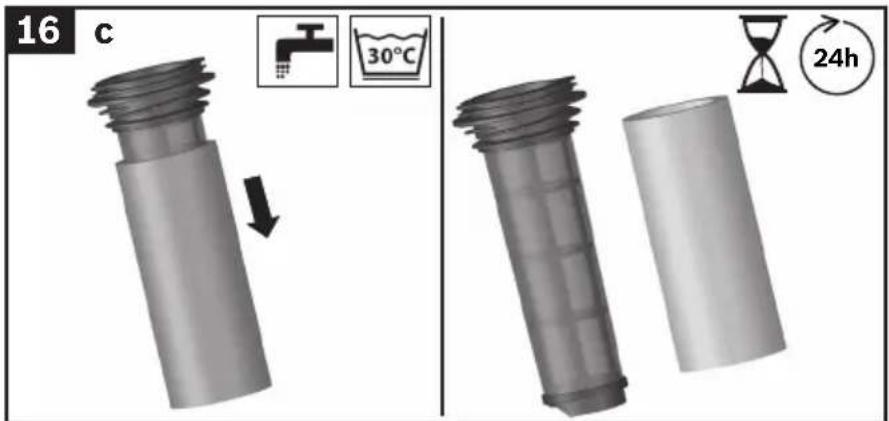

natural_image
Two 3D mechanical components with arrows indicating movement, one showing a threaded cylindrical part and the other a handle (no text or symbols)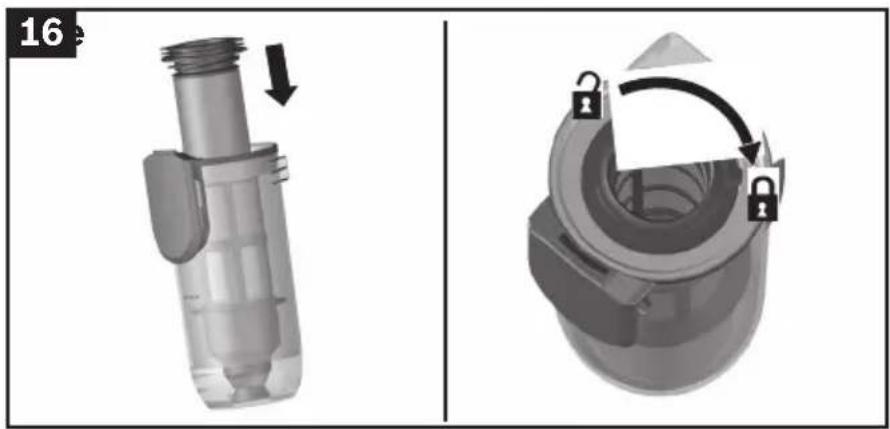
natural_image
Mechanical assembly diagram showing a valve component before and after disassembly, with no visible text or symbols.
natural_image
Two-panel image showing a hairdryer tool in (a) and a wire-wrapped tool in (b), with arrows indicating process direction (no text or symbols)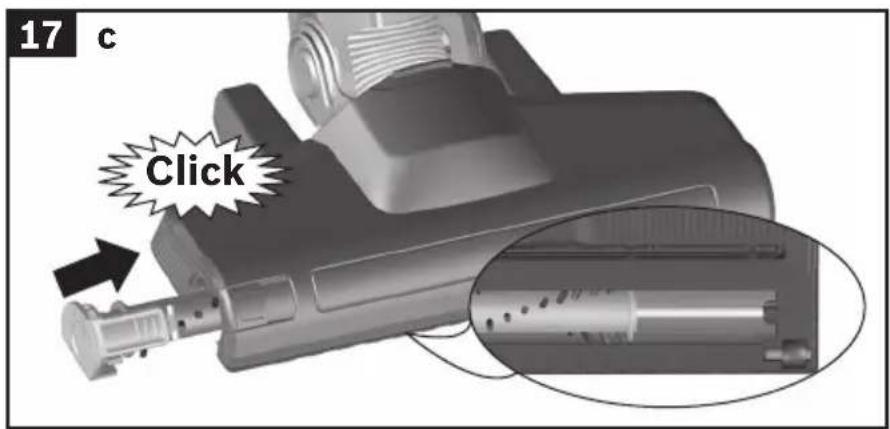

- Intended use
- The vacuum cleaner must only be operated with:
- In order to prevent injuries and damage, the vacuum cleaner must not be used for:
- Safety information
- Proper use
- Batteries
- Packaging
- ■ Old appliances
- fr
- Tiltenkt bruk
- Before using your appliance for the first time
- Fig. 1
- Fig. 2
- Charging
- Fig. 3
- Battery charging status indicator
- Fig. 4\*
- Vacuuming
- Fig. 5
- Controlling the suction level
- Fig. 6
- Fig. 7
- Vacuuming with accessories
- Fig. 8\*
- Fig. 9\*
- After using the appliance
- Fig. 10
- Emptying the dust container
- Fig. 11
- Fig. 12
- Fig. 13
- Fig. 14
- Filter care
- Fig. 15 Cleaning the outer filter unit
- Fig. 16 Cleaning the filter cartridge
- Cleaning the floor nozzle
- Fig. 17
- Care
- FR France
- GR Greece, Ελλάς
- HR Hrvatska, Croatia
- IE Republic of Ireland
- IL Israel, בַרְבָר
- IN India, Bhārat, भारत
- IS Iceland
- IT Italia, Italy
- LB Lebanon, لبنان
- LT Lietuva, Lithuania
- LU Luxembourg
- MD Moldova
- ME Crna Gora, Montenegro
- PL Polska, Poland
- SA Kingdom Saudi Arabia,
- SE Sverige, Sweden
- UA Ukraine, Україна
- XS Srbija, Serbia
- ZA South Africa
- de
- pt
- GB Conditions of guarantee
- FR Conditions de garantie
Brand : BOSCH
Model : Athlet BCH51841
Category : Broom