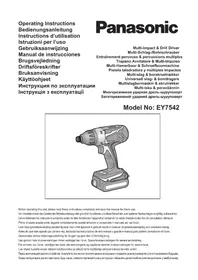
EY7542 - Drill PANASONIC - Free user manual and instructions
Find the device manual for free EY7542 PANASONIC in PDF.



| Product type | Cordless impact drill/driver |
| Brand | Panasonic |
| Model | EY7542 |
| Battery voltage | 14.4 V DC |
| Battery type | Li-ion (models EY9L40 / EY9L41) |
| Battery capacity | 3 Ah (EY9L40) / 3.3 Ah (EY9L41) |
| No-load speed (impact mode) | 0 – 2350 min⁻¹ |
| No-load speed (drill mode) | 0 – 700 min⁻¹ |
| Max torque (impact mode) | 140 N·m |
| Max torque (drill mode) | 14.0 N·m |
| Clutch settings | 21 positions + drill mode |
| Chuck | Quick-release hex chuck (6.35 mm / 1/4") |
| Overall length | 193 mm |
| Weight (with EY9L40 battery) | 1.65 kg |
| Weight (with EY9L41 battery) | 1.7 kg |
| Drilling capacity (steel) | 10 mm |
| Drilling capacity (wood) | 21 mm |
| Screwing capacity (wood screws) | 6.2 mm (drill mode) / 9.5 mm (impact mode) |
| Bolt tightening capacity | Standard bolt M14, HR bolt M12 |
| Lighting | Integrated LED with dedicated switch |
| Belt hook | Yes, adjustable on both sides |
| Compatible charger | EY0L80 |
| Charging time (3 Ah battery) | Approximately 35 to 50 minutes (depending on model) |
| Built-in protections | Overheat and over-discharge protection |
| Maintenance | Clean with a dry, clean cloth. Do not use water or solvent. |
Frequently Asked Questions - EY7542 PANASONIC
User questions about EY7542 PANASONIC
0 question about this device. Answer the ones you know or ask your own.
Ask a new question about this device
Download the instructions for your Drill in PDF format for free! Find your manual EY7542 - PANASONIC and take your electronic device back in hand. On this page are published all the documents necessary for the use of your device. EY7542 by PANASONIC.
USER MANUAL EY7542 PANASONIC
Before operating this unit, please read these instructions completely and save this manual for future use.
English: Page 5 Dansk: Side 82
This tool is the Multi-Impact & Drill driver that has 2 operation modes, "Impact Driver mode" and "Drill Driver mode". The modes can be selected by sliding the impact/drill driver switch.
Read the Safety Instructions booklet and the following before using.
II. ADDITIONAL SAFETY RULES
1) Wear ear protectors when using the tool for extended periods.
Prolonged exposure to high intensity noise can cause hearing loss.
2) Be aware that this tool is always in an operating condition, since it does not have to be plugged into an electrical outlet.
3) When drilling or driving into walls, floors, etc., "live" electrical wires may be encountered. DO NOT TOUCH THE CHUCK OR ANY FRONT METAL PARTS OF THE TOOL! Hold the tool only by the plastic handle to prevent electric shock in case you drill or drive into a "live" wire.
4) If the bit becomes jammed, immediately turn the trigger switch off to prevent an overload, which can damage the battery pack or motor.
Use reverse motion to loosen jammed bits.
5) Do NOT operate the Forward/Reverse lever when the trigger switch is on. The battery will discharge rapidly and damage to the unit may occur.
6) During charging, the charger may become slightly warm. This is normal. Do NOT charge the battery for a long period.
7) When storing or carrying the tool, set the Forward/Reverse lever to the center position (switch lock).
8) Do not strain the tool by holding the speed control trigger halfway (speed control mode) so that the motor stops.
| Symbol | Meaning |
| V | Volts |
| --- | Direct current |
| n0 | No load speed |
| ... min-1 | Revolutions or reciprocations per minutes |
| Ah | Electrical capacity of battery pack |
| Rotation only | |
| Impact driver mode | |
| Read the operating instructions before use. | |
| For indoor use only. |
WARNING
- Do not use other than the Panasonic battery packs that are designed for use with this rechargeable tool.
- Do not dispose of the battery pack in a fire, or expose it to excessive heat.
- Do not drive the likes of nails into the battery pack, subject it to shocks, dismantle it, or attempt to modify it.
- Do not allow metal objects to touch the battery pack terminals.
- Do not carry or store the battery pack in the same container as nails or similar metal objects.
- Do not charge the battery pack in a high-temperature location, such as next to a fire or in direct sunlight. Otherwise, the battery may overheat, catch fire, or explode.
- Never use other than the dedicated charger to charge the battery pack. Otherwise, the battery may leak, overheat, or explode.
- After removing the battery pack from the tool or the charger, always reattach the pack cover. Otherwise, the battery contacts could be shorted, leading to a rick of the fire.
III. ASSEMBLY
Attaching or Removing Bit
NOTE:
-
When attaching or removing a bit, disconnect battery pack from tool or place the switch in the center position (switch lock).
-
Hold the collar of quick connect chuck and pull it out from the driver.
- Insert the bit into the chuck. Release the collar.
- The collar will return to its original position when it is released.
- Pull the bit to make sure it does not come out.
- To remove the bit, pull out the collar in the same way.
CAUTION:
- If the collar does not return to its original position or the bit comes out when pulled on, the bit has not been properly attached. Make sure the bit is properly attached before use.
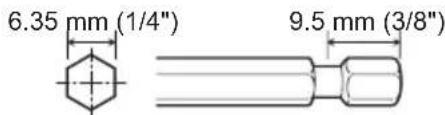
Use 6.35 mm (1/4") hexagonal bits. To ensure proper securement of the bit, use only hexagonal bits with 9.5 mm (3/8") detent.
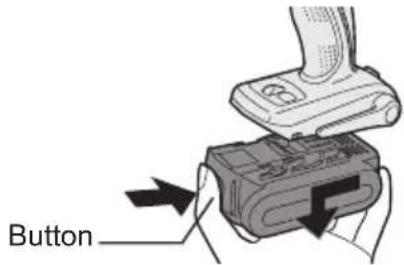
Attaching or Removing Battery Pack
-
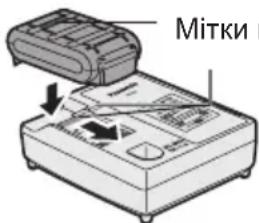
To connect the battery pack: Line up the alignment marks and attach the battery pack.
-
Slide the battery pack until it locks into position.
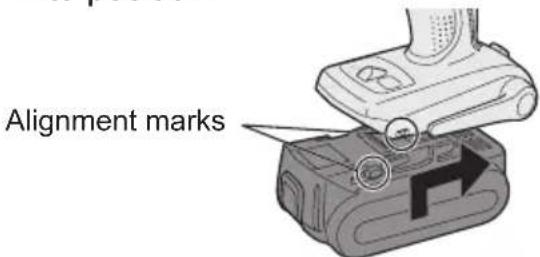
- To remove the battery pack: Push on the button from the front to release the battery pack.
IV. OPERATION
[Main Body] Switch Operation
- The speed increases with the amount of depression of the trigger. When beginning work, depress the trigger slightly to start the rotation slowly.
- A feedback electronic controller is used to give a strong torque even in low speed.
- The brake operates when the trigger is released and the motor stops immediately.
NOTE:
When the brake operates, a braking sound may be heard. This is normal.
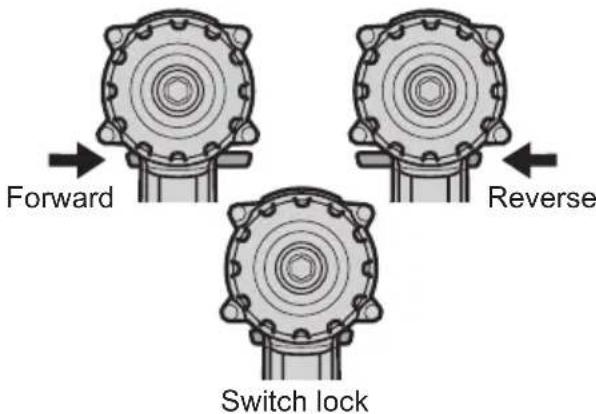
Switch and Forward/Reverse Lever Operation
CAUTION:
To prevent damage, do not operate Forward/Reverse lever until the bit comes to a complete stop.
Forward Rotation Switch Operation
- Push the lever for forward rotation.
- Depress the trigger switch slightly to start the tool slowly.
- The speed increases with the amount of depression of the trigger for efficient tightening of screws and drilling. The brake operates and the chuck stops immediately when the trigger is released.
- After use, set the lever to its center position (switch lock).
Reverse Rotation Switch Operation
- Push the lever for reverse rotation. Check the direction of rotation before use.
- Depress the trigger switch slightly to start the tool slowly.
- After use, set the lever to its center position (switch lock).
Selecting Mode
| Select mode | Intended use | Work material |
| Impact driver | Fastening Bolt | t |
| Nut | ||
| Driving Wood | screw | |
| Metal screw | ||
| Self-driving | ||
| screw | ||
| Drill driver mode with clutch function | Drilling Wood | Metal |
WARNING!
This tool must not be used as a drill in "Impact Driver mode". During drilling in steel, the drill bit may break in case of blocking and this may cause dangerous cut wounds.
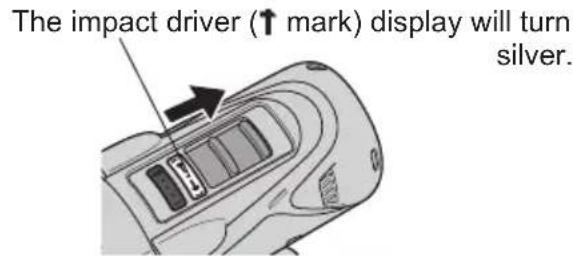
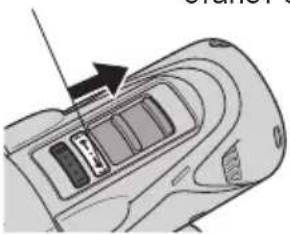
Impact Driver Operation
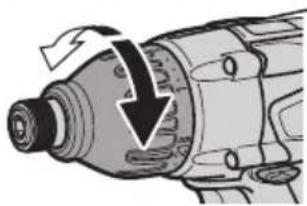
Select Impact Driver with the impact/ drill driver switch.
- Switch to the impact/drill driver posi
tion only when the tool has completely stopped rotating. Damage may be caused if the tool is rotating.
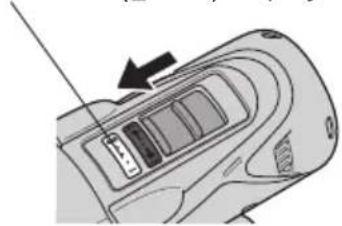
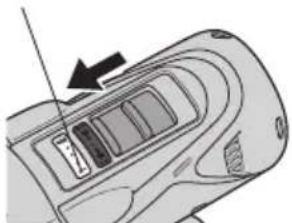
Drill Driver Operation
Select Drill Driver with the impact/drill driver switch.
- Switch to the impact/drill driver position only when the tool has completely stopped rotating. Damage may be caused if the tool is rotating.
The drill driver (mark) display will turn silver.
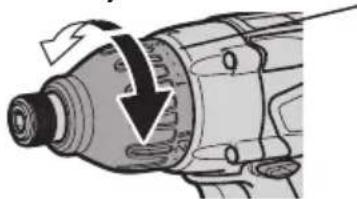
Clutch Torque Setting
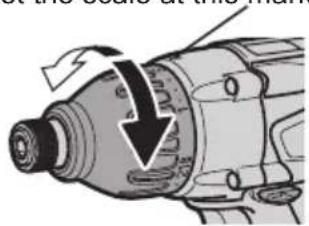
Adjust the torque to one of the 21 clutch settings or "3" position.
CAUTION:
Test the setting before actual operation.
Set the scale at this mark (A).
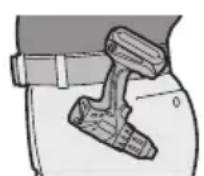
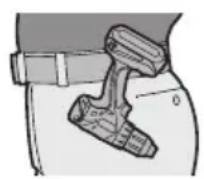
How to Use the Belt Hook
WARNING!
- Be sure to attach the belt hook securely to the main unit with the screw firmly fastened. When the belt hook is not firmly attached to the main unit, the hook may disconnect and the main unit may fall.
This may result in an accident or injury.
Periodically check screw for tightness. If found to be loose, tighten firmly.
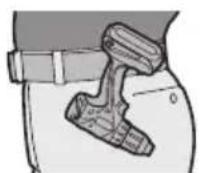
- Be sure to attach the belt hook firmly and securely onto a waist belt or other belt. Pay attention that the unit does not slip off the belt. This may result in an accident or injury.
- When the main unit is held by the belt hook, avoid jumping or running with it. Doing so may cause the hook to slip and the main unit may fall. This may result in an accident or injury.
- When the belt hook is not used, be sure to return it to the storing position. The belt hook may catch on something. This may result in an accident or injury.
- When the unit is hooked onto the waist belt by the belt hook, do not attach driver bits to the unit. A sharp edge object, such as a drill bit, may cause injury or an accident.
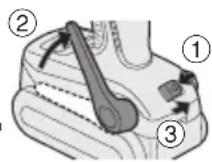
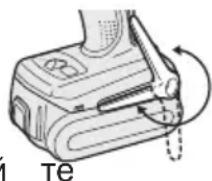
To Set the Belt Hook Angle Position
- Slide the belt hook lock lever ① and hold it to unlock the belt hook.
2.Pull the belt hook from storing position ② and set it.
- Release the belt hook lock lever to lock the angle of belt hook.
4.Make sure the belt hook is firmly locked. Also make sure the belt hook is firmly locked into position ③
The belt hook cannot be locked in this position. Firmly lock it into position before use.
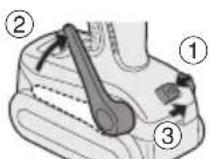
To return the belt hook to the storing position, follow step 1. and 2. above, then lower the belt hook.
To secure the lock, follow 3 and 4 above.
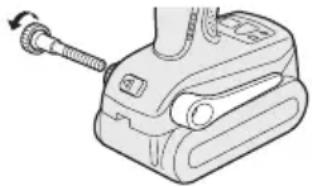
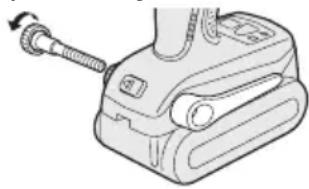
To Change the Belt Hook Location Side
The belt hook can be attached to either side of the unit.
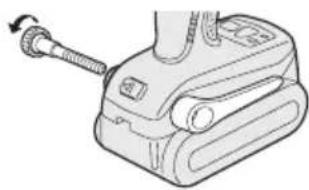
- Set the belt hook at storing position.
- Loosen the screw turning it counterclockwise, using a flat metal or a flat blade screw driver.
- Take out the belt hook and insert into the other side of the slot on the main unit.
- Fasten the screw firmly, turning it clockwise.
The belt hook can be taken out from the main unit only when it is at storing position.
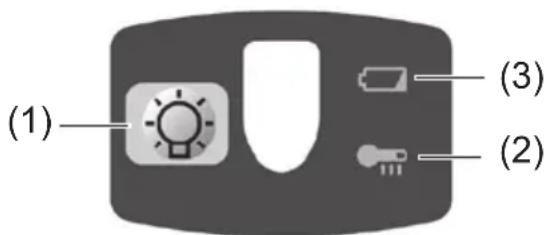
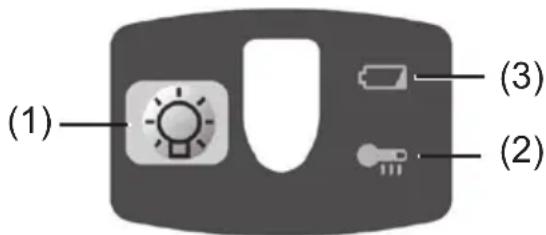
Control Panel
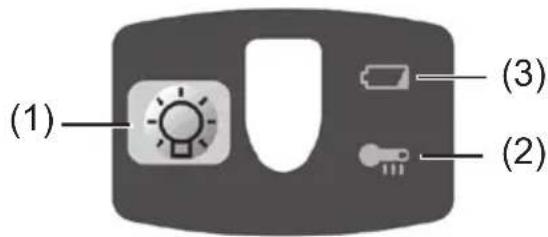
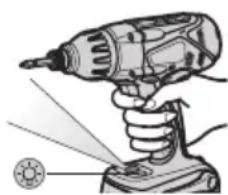
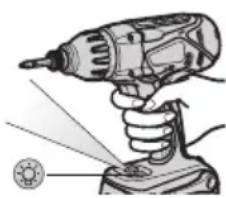
(1)LED light
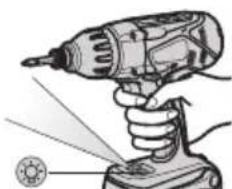
Before the use of LED light, always pull the power switch once.
Press the LED light on button.
The light illuminates
with very low current, and it does not adversely affect the performance of the driver during use or its battery capacity.
CAUTION:
- The built-in LED light is designed to illuminate the small work area temporarily.
- Do not use it as a substitute for a regular flashlight, since it does not have enough brightness.
- LED light turn off when the tool has not been used for 5 minutes.
Caution: DO NOT STARE INTO BEAM.
Use of controls or adjustments or performance of procedures other than those specified herein may result in hazardous radiation exposure.
(2) Overheat warning lamp
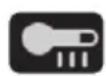
Off (normal operation)

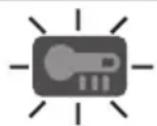
- Flashing: Overheat
- Indicates operation has been halted due to battery overheating.
The overheating protection feature halts driver operation to protect the battery pack in the event of overheating. The overheat warning lamp on the control panel flashes when this feature is active.
- If the overheating protection feature activates, allow the driver to cool thoroughly (at least 30 minutes). The driver is ready for use when the overheat warning lamp goes out.
- Avoid using the driver in a way that causes the overheating protection feature to activate repeatedly.
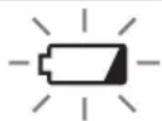
(3) Battery low warning lamp

Off (normal operation)

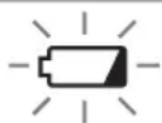
Flashing (No charge) Battery protection feature active
Excessive (complete) discharging of lithium ion batteries shortens their service life dramatically. The driver includes a battery protection feature designed to prevent excessive discharging of the battery pack.
- The battery protection feature activates immediately before the battery loses its charge, causing the battery low warning lamp to flash.
- If you notice the battery low warning lamp flashing, charge the battery pack immediately.
[Battery Pack]
For Appropriate Use of Battery pack
Li-ion Battery pack (EY9L40/ EY9L41)
- For optimum battery life, store the Li-ion battery pack following use without charging it.
- When charging the battery pack, confirm that the terminals on the battery charger are free of foreign substances such as dust and water etc. Clean the terminals before charging the battery pack if any foreign substances are found on the terminals. The life of the battery pack terminals may be affected by foreign substances such as dust and water etc. during operation.
- When battery pack is not in use, keep it away from other metal objects like: paper clips, coins, keys, nails, screws, or other small metal objects that can make a connection from one terminal to another. Shorting the battery terminals together may cause sparks, burns or a fire.
- When operating the battery pack, make sure the work place is well ventilated.
- When the battery pack is removed from the main body of the tool, replace the battery pack cover immediately in order to prevent dust or dirt from contaminating the battery terminals and causing a short circuit.
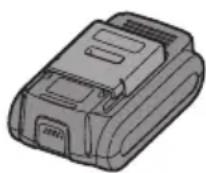
Battery Pack Life
The rechargeable batteries have a limited life. If the operation time becomes extremely short after recharging, replace the battery pack with a new one.
Battery Recycling
ATTENTION:
For environmental protection and recycling of materials, be sure that it is disposed of at an officially assigned location, if there is one in your country.
[Battery Charger]
Charging
Cautions for the Li-ion Battery Pack
- If the temperature of the battery pack falls approximately below -10^ ( 14^ ), charging will automatically stop to prevent degradation of the battery.
Common Cautions for the Li-ion/Ni-MH/Ni-Cd Battery Pack
- The ambient temperature range is between 0^ (32^) and 40^ (104^) . If the battery pack is used when the battery temperature is below 0^ (32^) , the tool may fail to function properly.
- When charging a cool battery pack (below 0^ (32^) ) in a warm place, leave the battery pack at the place and wait for more than one hour to warm up the battery to the level of the ambient temperature.
Cool down the charger when charging more than two battery packs consecutively. - Do not insert your fingers into contact hole, when holding charger or any other occasions.
CAUTION:
To prevent the risk of fire or damage to the battery charger.
- Do not use power source from an engine generator.
- Do not cover vent holes on the charger and the battery pack.
- Unplug the charger when not in use.
Li-ion Battery Pack
NOTE:
Your battery pack is not fully charged at the time of purchase. Be sure to charge the battery before use.
Battery charger (EY0L80)
- Plug the charger into the AC outlet.
NOTE:
Sparks may be produced when the plug is inserted into the AC power supply, but this is not a problem in terms of safety.
-
Insert the battery pack firmly into the charger.
-
Line up the alignment marks and place the battery onto the dock on the charger.
- Slide forward in the direction of the arrow.
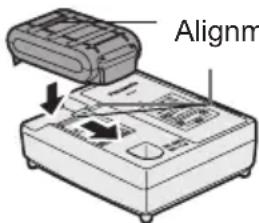
- During charging, the charging lamp will be lit.
When charging is completed, an internal electronic switch will automatically be triggered to prevent overcharging. - Charging will not start if the battery pack is warm (for example, immediately after heavy-duty operation). The orange standby lamp will be flashing until the battery cools down. Charging will then begin automatically.
- The charge lamp (green) will flash slowly once when the battery is approximately 80% charged.
- When charging is completed, the charging lamp will start flashing quickly in green color.
- If the temperature of the battery pack is 0^ or less, charging takes longer to fully charge the battery pack than the standard charging time.
Even when the battery is fully charged, it will have approximately 50% of the power of a fully charged battery at normal operating temperature.
- If the power lamp does not light immediately after the charger is plugged in, or if after the standard charging time the charging lamp does not flash quickly in green, consult an authorized service center.
- If a fully charged battery pack is inserted into the charger again, the charging lamp lights up. After several minutes, the charging lamp may flash quickly to indicate the charging is completed.
Ni-MH/Ni-Cd Battery Pack
NOTE:
When you charge the battery pack for the first time, or after prolonged storage, charge it for about 24 hours to bring the battery up to full capacity.
Battery charger (EY0L80)
- Plug the charger into the AC outlet.
NOTE:
Sparks may be produced when the plug is inserted into the AC power supply, but this is not a problem in terms of safety.
- Insert the battery pack firmly into the charger.
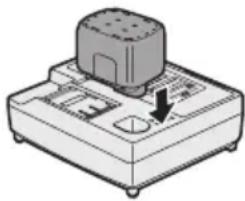
- During charging, the charging lamp will be lit.
When charging is completed, an internal electronic switch will automatically be triggered to prevent overcharging.
- Charging will not start if the battery pack is warm (for example, immediately after heavy-duty operation).
The orange standby lamp will be flashing until the battery cools down. Charging will then begin automatically.
-
When charging is completed, the charging lamp will start flashing quickly in green color.
-
If the charging lamp does not light immediately after the charger is plugged in, or if after the standard charging time the charging lamp does not flash quickly in green, consult an authorized service center.
- If a fully charged battery pack is inserted into the charger again, the charging lamp lights up. After several minutes, the charging lamp may flash quickly to indicate the charging is completed.
LAMP INDICATIONS

Green Lit
Charger is plugged into the AC outlet.
Ready to charge.

Green Flashing Quickly
Charging is completed. (Full charge.)

Green Flashing
Battery is approximately 80% charged. (Usable charge. Li-ion only.)

Green Lit
Now charging.

Orange Lit
Battery pack is cool.
The battery pack is being charged slowly to reduce the load on the battery. (Li-ion only.)

Orange Flashing
Battery pack is warm. Charging will begin when temperature of battery pack drops.

If the temperature of the battery pack is -10^ (14^) or less, the charging status lamp (orange) will also start flashing.
Charging will begin when the temperature of the battery pack goes up (Li-ion only).
Charging Status Lamp
Left: green Right: orange will be displayed.

Both Orange and Green Flashing Quickly
Charging is not possible. Clogged with dust or malfunction of the battery pack.
Information for Users on Collection and Disposal of Old Equipment and used Batteries
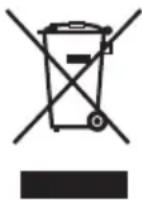
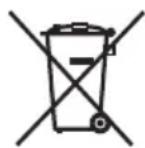
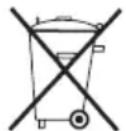
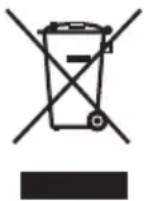
These symbols on the products, packaging, and/or accompanying documents mean that used electrical and electronic products and batteries should not be mixed with general household waste.
For proper treatment, recovery and recycling of old products and used batteries, please take them to applicable collection points, in accordance with your national legislation and the Directives 2002/96/EC and 2006/66/EC.
By disposing of these products and batteries correctly, you will help to save valuable resources and prevent any potential negative effects on human health and the environment which could otherwise arise from inappropriate waste handling.
For more information about collection and recycling of old products and batteries, please contact your local municipality, your waste disposal service or the point of sale where you purchased the items.
Penalties may be applicable for incorrect disposal of this waste, in accordance with national legislation.
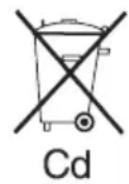
Cd
Business users in the European Union
If you wish to discard electrical and electronic equipment, please contact your dealer or supplier for further information.
[Information on Disposal in other Countries outside the European Union]
These symbols are only valid in the European Union. If you wish to discard these items, please contact your local authorities or dealer and ask for the correct method of disposal.
Note for the battery symbol (bottom two symbol examples):
This symbol might be used in combination with a chemical symbol. In this case it complies with the requirement set by the Directive for the chemical involved.
V. MAINTENANCE
Use only a dry, soft cloth for wiping the unit. Do not use a damp cloth, thinner, benzine, or other volatile solvents for cleaning.
VI. TIGHTENING TORQUE
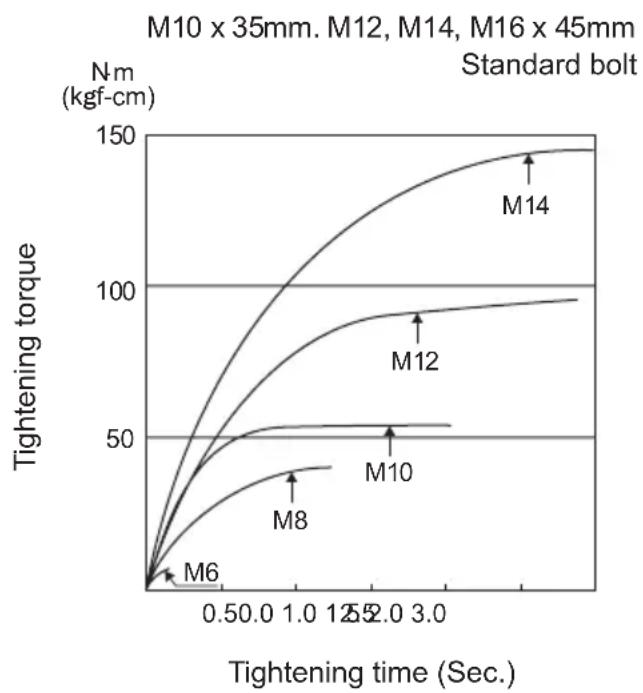
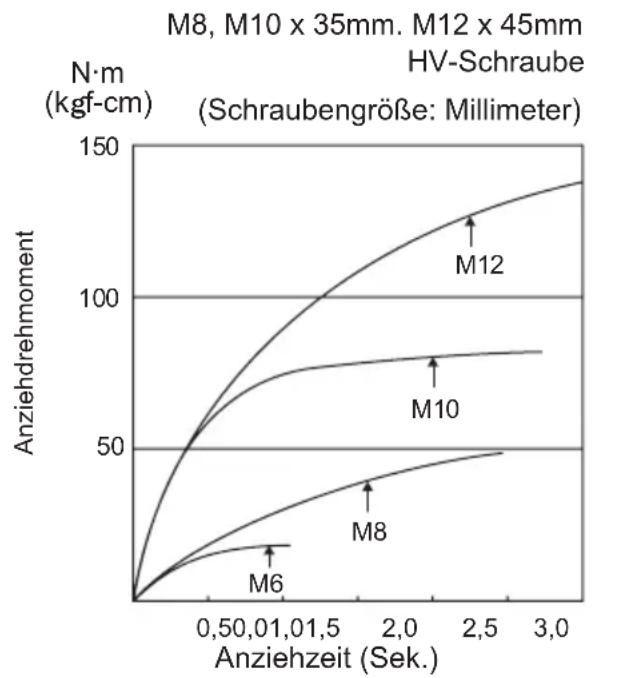
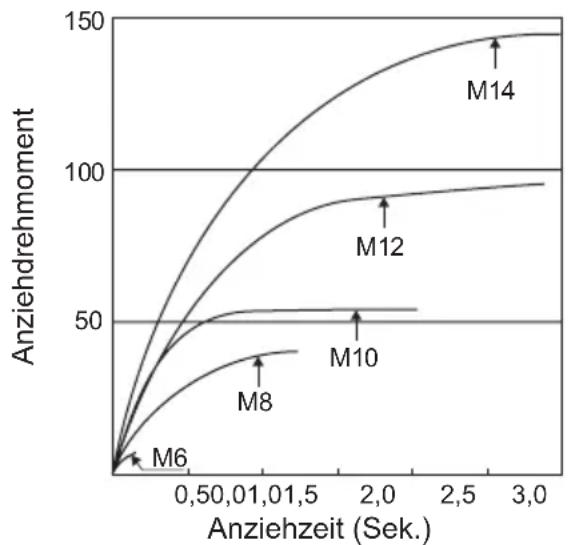
The power required for tightening a bolt will vary, according to bolt material and size, as well as the material being bolted. Choose the length of tightening time accordingly.
Reference values are provided below.
They may vary according to tightening conditions.
Factors Affecting Tightening Torque
The tightening torque is affected by a wide variety of factors including the followings. After tightening, always check the torque with a torque wrench.
1) Voltage
When the battery pack becomes nearly discharged, the voltage decreases and the tightening torque drops.
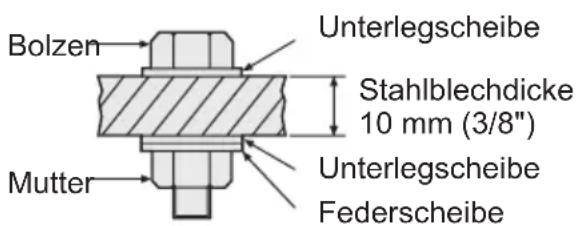
Bolt Tightening Conditions
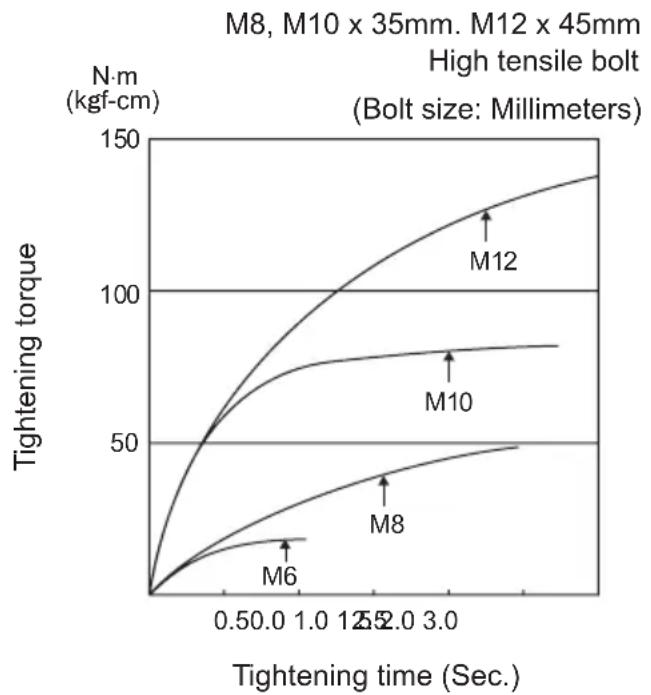
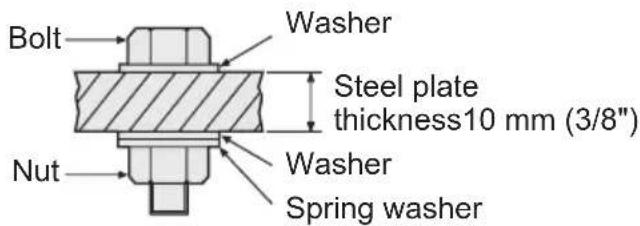
Tightening conditions
The following bolts are used. Standard bolts:Strength type 4.8 High tensile type 12.9
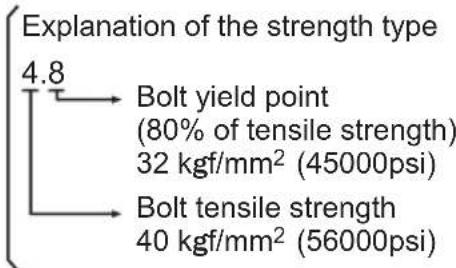
2) Tightening time
Longer tightening time results in increased tightening torque. Excessive tightening, however, adds no value and reduces the life of the tool.
3) Different bolt diameters
The size of the bolt diameter affects the tightening torque.
Generally, as the bolt diameter increases, tightening torque rises.
4) Tightening conditions
-
Tightening torque will vary, even with the same bolt, according to grade, length, and torque coefficient (the fixed coefficient indicated by the manufacturer upon production).
-
Tightening torque will vary, even with the same bolting material (e.g. steel), according to the surface finish.
-
Torque is greatly reduced when the bolt and nut start turning together.
5) Socket play
Torque is lowered as the six-sided configuration of the socket of the wrong size is used to tighten a bolt.
6) Switch (Variable speed control trigger)
Torque is lowered if the unit is used with the switch not fully depressed.
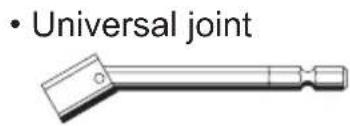
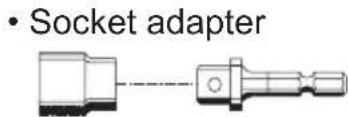
7) Effect of Connecting Adapter
The tightening torque will be lowered through the use of a universal joint or a socket adapter.
VII. ACCESSORIES
Drill chuck
- EY9HX409E
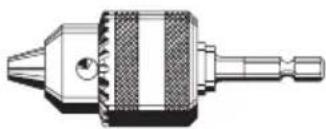
Use with screw driver bit, wood drill bit or metal drill bit with straight shank of 1.5mm to 10mm diameter.
Universal Joint (Available on the market)
Socket Adapter (Available on the market)
VIII.MAXIMUM RECOMMENDED CAPACITIES
| Model EY7542 | |||
| Screw driver | Wood screw | Impact mode | ø 9.5 mm (3/8") |
| Drill driver mode | ø 6.2 mm (1/4") | ||
| Self-drilling screw | Impact mode | ø 6 mm (15/64") | |
| Drill driver mode | ø 6 mm (15/64") | ||
| Bolt fastening Impact mode | Standard bolt: M14 High tensile bolt: M12 | ||
| Drill | Steel | Drill driver mode | ø 10 mm (25/64") |
| Wood ø 21 mm (53/64") | |||
IX. SPECIFICATIONS
MAIN UNIT
| Model EY7542 | |
| Motor 14.4 V DC | |
| No load speed | Impact mode: 0 – 2350 min-1(rpm) |
| Drill driver mode: 0 – 700 min-1(rpm) | |
| Maximum torque | Impact mode: 140 N·m (1430 kg·cm, 1239 in-lbs) |
| Drill driver mode: 14.0 N·m (143 kg·cm, 124 in-lbs) | |
| Clutch torque | Approx. 0.7 N·m (7 kg·cm, 6.2 in-lbs) -- 4.4 N·m (45 kg·cm, 39 in-lbs) |
| Overall length 193 mm (7-1/2") | |
| Weight (with battery pack: EY9L40) | 1.65 kg (3.6 lbs) |
| Weight (with battery pack: EY9L41) | 1.7 kg (3.7 lbs) |
| Noise Vibration | See the included sheet. |
BATTERY PACK
| Model EY9L40 EY9L41 | ||
| Storage battery Li-ion Battery | ||
| Battery voltage 14.4 V | DC (3.6 V × 4 cells) | |
| Capacity | 3 Ah 3.3 Ah | |
BATTERY CHARGER
| Model EY0L80 | |
| Electrical rating See the rating plate on the bottom of the charger. | |
| Weight 0.95 k (2.1 lbs) | g |
[Li-ion battery pack]
| Charging time | 3 Ah | 14.4 V 21.6 V | 28.8 V | |
| \( EY9L40 \) \( EY9L6 \) | \( 0\ EY9L80 \) | |||
| Usable: 35 min. Usable: | 45 min. Usable: | 55 min. | ||
| Full: 50 min. Full: | 60 min. Full: | 70 min. |
| Charging time | 3.3 Ah | 14.4 V | ||
| EY9L41 | ||||
| Usable: 45 min. | ||||
| Full: 60 min. |
[Ni-Cd/Ni-MH battery pack]
| Charging time | 7.2 V | 9.6 V | 12 V | 15.6 V | 18 V | 24 V | |
| 1.2 Ah | EY9065 | EY9080 | EY9001 | ||||
| EY9066 | EY9086 | ||||||
| 20 min. | |||||||
| 1.7 Ah | EY9180 | EY9101 | |||||
| EY9182 | EY9103 | ||||||
| 25 min. | |||||||
| 2 Ah | EY9168 | EY9188 | EY9106 | EY9136 | EY9116 | ||
| EY9107 | EY9117 | ||||||
| EY9108 | 60 min. | ||||||
| 30 min. | |||||||
| 3 Ah | EY9200 | EY9230 | EY9210 | ||||
| 45 min. | 90 min. | ||||||
| 3.5 Ah | EY9201 | EY9231 | EY9251 | ||||
| 55 min. | 65 min. | ||||||
NOTE: This chart may include models that are not available in your area. Please refer to the latest general catalogue.
NOTE: For the dealer name and address, please see the included warranty card.
ONLY FOR U. K.
X. ELECTRICAL PLUG INFORMATION
FOR YOUR SAFETY PLEASE READ THE FOLLOWING TEXT CAREFULLY
This appliance is supplied with a moulded three pin mains plug for your safety and convenience.
A 5 amp fuse is fitted in this plug.
Should the fuse need to be replaced please ensure that the replacement fuse has a rating of 5 amp and that it is approved by ASTA or BSI to BS1362.
Check for the ASTA mark on the BSI mark on the body of the fuse.
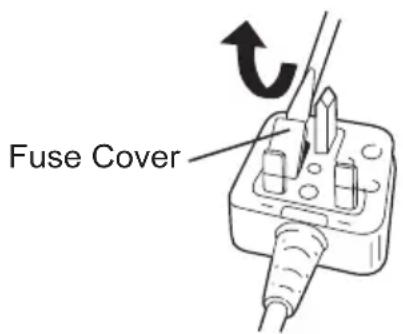
If the plug contains a removable fuse cover you must ensure that it is refitted when the fuse is replaced.
If you lose the fuse cover the plug must not be used until a replacement cover is obtained.
A replacement fuse cover can be purchased from your local Panasonic Dealer. IF THE FITTED MOULDED PLUG IS UNSUITABLE FOR THE SOCKET OUTLET IN YOUR HOME THEN THE FUSE SHOULD BE REMOVED AND THE PLUG CUT OFF AND DISPOSED OF SAFELY. THERE IS A DANGER OF SEVERE ELECTRICAL SHOCK IF THE CUT OFF PLUG IS INSERTED INTO ANY 13 AMP SOCKET.
If a new plug is to be fitted please observe the wiring code as shown below.
If in any doubt please consult a qualified electrician.
IMPORTANT:
The wires in this mains lead are coloured in accordance with the following code:
Blue: Neutral
Brown:Live
As the colours of the wire in the mains lead of this appliance may not correspond with the coloured markings identifying the terminals in your plug, proceed as follows.
The wire which is coloured BLUE must be connected to the terminal in the plug which is marked with the letter N or coloured BLACK.
The wire which is coloured BROWN must be connected to the terminal in the plug which is marked with the letter L or coloured RED.
Under no circumstances should either of these wires be connected to the earth terminal of the three pin plug, marked with the letter E or the Earth Symbol 1一
How to replace the fuse: Open the fuse compartment with a screwdriver and replace the fuse and fuse cover if it is removable.
This apparatus was produced to BS800.
M10 x 35mm. M12, M14, M16 x 45mm
N·m (kgf-cm)
Anziehbedingungen
Pacco battery Li-ion
NOTA:
[Pacco battery Li-ion]
| Tempo di caricamento | 3 Ah | 14,4 V 21,6 V | 28,8 V | |
| EY9L40 EY9L6 | 0 EY9L80 | |||
| Utilizzabile: 35 min. | lizzabile: 45 min. Utilizzato | ile: 55 min. | ||
| Completa: 50 min. | completa: 60 min. Completa: | 70 min. |
| Tempo di caricamento | 3,3 Ah | 14,4 V | ||
| EY9L41 | ||||
| Utilizzabile: 45 min. | ||||
| Completa: 60 min. |
[Pacco battery Ni-MH/Ni-Cd]
| Tempo di caricamento | 7,2 V | 9,6 V | 12 V | 15,6 V | 18 V | 24 V | |
| 1,2 Ah | EY9065 | EY9080 | EY9001 | ||||
| EY9066 | EY9086 | ||||||
| 20 min. | |||||||
| 1,7 Ah | EY9180 | EY9101 | |||||
| EY9182 | EY9103 | ||||||
| 25 min. | |||||||
| 2 Ah | EY9168 | EY9188 | EY9106 | EY9136 | EY9116 | ||
| EY9107 | EY9117 | ||||||
| EY9108 | 60 min. | ||||||
| 30 min. | |||||||
| 3 Ah | EY9200 | EY9230 | EY9210 | ||||
| 45 min. | 90 min. | ||||||
| 3,5 Ah | EY9201 | EY9231 | EY9251 | ||||
| 55 min. | 65 min. | ||||||
M10 × 35 mm. M12, M14, M16 × 45 mm N·m Standardbult (kgf-cm)
![PANASONIC EY7542 - [Pacco battery Ni-MH/Ni-Cd] - 1](/content/2026/03/454754/images/876dda10b35dcf68a06f68016a62baa00bc09dc49f56f7d2254b0892b87c5001.jpg)
![PANASONIC EY7542 - [Pacco battery Ni-MH/Ni-Cd] - 2](/content/2026/03/454754/images/3bdbc6025a755d4856850a68e74a5c81ce4b78f59f656069e5bdf8e985d3b875.jpg)
(2) Varsellampe for overoppheting
Av
(normalt arbeid)

Blink: Overoppheting
HdKaTOp ydapHoro wypynOBepTa (3HaoyK↑)
CTaHET cepe6pncTBIM.
Pa6oTa B pexkme dpenn-wwypynOBepTa
BbI6epnte pexnM dpen-NoPOBepTa c nOoBIO nepeKnHoyaTeTn peKMa ydapHoN dpeN/whpyNoBepTa.
- BbInonHnTe nepeKIOUeHne B noJoxKeHne
ydpHOn DpeJI/NsypynOBepTa TOnbKO NocJe NpHOn OCTaHOBKn BpaueHn HnCTpyMeHTa.Ecnn nHCTpyMeNT 6yTeBpaAsTbcR,3TO MoKET PnVBecTN K erO NOBpeJKeHHIO.
HdkaTop dpenn-wwypnoBepTa (3haQKCTaHET cepepnCTbIM.
YctaHObKa KpyTJeero MOMeHTa MyΦTbI
YCTaHOBNTe 3NaueHne KpyTaeo MOMeHTa B OndHy n3 21 yCTaHOBOK MydTbI e HnB NOJoxHne" .OJ JKe H
BHIMAHNE:
PpOBepbTe yCTaHOBky nepeD Ha-CTOJeu pa60Toi.
YCTaHOBtE uKaJy BO3Je 3TOI METKn
Kak noIb3OBaTbCЯ NOYCHbIM KpOkOM

OCTOPOXHO
- YbEInTeCb, yTO NOrCHOn KpOK HaDeXHO npKpePnIeN KOCHOBHOMy 6NoKy npi NOMOuIN PLOTHO 3aTAYTOB BUHTa. Ecnn NOrCHOn KpOK He npKpePnIeN HAdExHO K OCHOBHOMy 6NoKy, KpOK MOxET OToITN IOCHOBHON 6NoK MoXeT yNaCTb. 3TO MOxET pRBeCTN K HeCuaCTHOMy CnyuAo IJI TpaBMe
-Пернодунескп npOBeрЯnte 3aTЯЖky BnHTa. Ecnn OH ocna6HET, KpeNKo 3aTЯнite erO.
-уб eд n Te c b,чTo O np IПNotHO n HaNEXKHO npNKpePnIeH K NOrCHOMy peMHIO nIIN dpyROMy peMHIO. BHNMaTeJIbHO cNeDnTE 3a Tem,чTO6bl 6JOK He COCKOJIb3Hyn C NOraCa. 3TO MOxET npNBecTn K HeCuaCTHOMy CnyuAIO nIIN TpaBMe.
- Ecnn OCHOBHOJ 6JOK ydepxnBaetcnoYORCHbIM KpHOKOM, n36eraTe npbIraTbN 6eRaTb C Hm. 3TO MOKeT npNBecTNI COCKaJIb3bIBaHNIO KpHOKa N NaDeHNIO OCHOBHOrO 6JOKA3TO MOKeT pNBecTNI K HeCuaCTHOMy CNYUaIO NN TpaBMe.
Ecni NIOACHO KPOK He NCNOJb3yeTc, y6eINTecb, yTO OH BO3BpaueH B NOIOXeHne DnY xpaHeHn. NIOCHO KPOK MOKET 3aueNtbcr 3a yTO-Jn6o 3TO MOKET pINBeCTN K HecyactHOMClyuio nn TpaBMe - Ecnn 6IOK NOBEWeH Ha NORCHOM pEmHe npi NOMOUs NORCHOro KpUoka, He 3aKpeNJaTe Ha Hero HacaKn UwpynOBePta. OBeKeT C OCTpbIMn KpOMKaMn, TaKo KaK HacaKa IJIc Be pI eH Iy, M OX et n Pn HechactHomy cIyuaHO nn TpaBMe
yctaHOBTb yroJ NOBOPota IORCHORO KpHoka
1.CdBnHbTe pbiurФNKcaunnoaCHOKpOKa ① uyepeXNBaIe erO,TO6bIpa36JIOKIpOBaTb NOAChOH KpOK.
2.ПOTЯнITE NOACHOI KPOK N3 NOJOKHINIA XPAHENI ② n yCTaHOBNTe erO NOH YXHBIM yTlOM.
3.OTnyCTnte pbuHar 6Kcaunn NOrCHOro KpOka, T06bl 3aQnkCnpOBaTb yroJ IOBOPota NORCHOrO KpOka.
4.y6eIntecb,yTO NOACHO KpHOK npOuHO 3a6JIOKIpOBaH. TaKKe y6eIntecb,yTO 10ACHO KpHK npOuHO 3a6JIOKIpOBaH B 10JIOXeHN③.
-ПОЯСHо KРЮК He MoЖeT 6bITb 3aБLOKIpOBaH DaHHOM NOLOXKeHn. NpeEd nCNoJIb3OBAHneM npOuHo 3a6LOKpyIte erO B HUxHOM NOLOXKeHn.
YTo6bI Bep H yT b I OyC H0NoJoxKeHne DnXpaHeHn, CNeDynteBblIeONHcAHbIM DeiCTBnAM NyHKTOB 1 n2,3aTeM onyCTnte NORCHO KpOK.
YTo6bl 3a6IoknpoBaTb fNk caTop, CNeDyIe BblIeONuCAHHbIM DeIcTBnM NyHKTOB 3 n 4.
UTo6bI n3MeHnTb CTOPOHy pa3MeuEHHa NpOCHOro KpUoka
POnchon KpOK MoXeT 6bITb pa3MeueH HaJIIO6oN n3 CTOpOH 6noka.
1.YcTaHOBInTe NpOCHOn KpOK B NOLOKeHHe DnXpaHeHn.
2.Ocna6bTe BnHT, BpaaJ erO npOTNB acoBOI CTpeKN, NcNoJIb3yJ DJIa 3TOrO MOHeTKU INI PLOCKYIO OTBepTKU
3.BbHbTe NOAChO KnBCTaBbTe erq B npyTOcPOHy OTBepCTnHa 0CHOBHOM 6IKe.
4.ПлOTно 3aTЯнITE BnHT,Вpaца erO no YacOBoi CTpeJIke.
I0aCHO KpOK MOKET 6bITb BbyHYT n3 OCHOBHOrO 6noka TOJbKO ecnn OH HaxoINTcB NIOJOKeHN dJa XpaHeHn
Панель управлия
(1) CBeToAnNoHaHnOcBcETKa
Bce rda Haxn nepeKJIIOuateIb NITaHnOdIN pa3 nepeI NCNOJb3OBaHNEm CBETOINOHOI NOcCBETKn. HaxmTe KHOkY BKNIOueHn I BbIKIOUeHn CBETOINOHOI NOcCBETKn
IocBcTka ropnt npn OueHb HN3KOM TOke n He OKa3bIbaet He6naROpnraTHoro BO3deNCTBnHa npOn3BOdnteJIbHOCTb INHCTpyMeHTa BO BpeM p60kblnnnEeKOCTb erO 6batapei.
BHIMAHNE:
BcTpoEHnA CBeToDnOHa NODCBeTKa npedHa3NaYeHa DJI BpeMeHHoro OCBeueHnHe6oJbwo pa6oye 3Onbl.
He nCnoIb3yIte ee B KaueCTBe 3aMeHbI NOcTOrHHoro fOHaPnKa, TaK KaK OHa He o6NaJaTe DOcTaTOUHOJ rPKoCTbIO.
- Ecnn INHCTpymEnT He NcNoJb3yeTcB TeueHne 5 MnHyT, CBeToNIOHaNpa NOCDBETKa BbIKIIOHTc.
BHHMaHHe: HE CMOTPetb HA JIyU.
IcnoJb3ObaHne opraHOB ynpaBHeHn IyI peryInpOBok, IIO6 BO BbIOnHeHne npoceDyp INbIM 6pa3OM, Yem yKa3aHO B DaHHo IHCTpyKuN, MOxET npVBecTn K NpHaDaHnO PoD BO3DeiCTBne ONaCHOro n3nyeHn.
- Ecni 6atapeHbI 6nok He nCnoJb3y-etc, XpaHnte erO noJaIbWe OT TaKnx MeTaNInueCKNX npEdMeTOB, KaK cKePENK, MOHeTbI, KJIOnu, rBO3dN, Wypynbl, INI DpyrNX MeNKx MeTaNInueCKNX npEdMeTOB, KOtOpbie MOryt npNBecTN K KOHTaKTy OndHOK NEmMbI C dpyroN.
XpaHeHne 6aTapeeHbIX 6JOKOB BMeCTe MOKET CTAb IpruHON BO3HNKHOBEHn ICKP, OKOROB NIN NOXapa.
BoBpempaobtbc6aTapeHbIM6IOKOM ybeintecb,yTO paOoee NOMEeHne XopoOIOPOBETPnBaetcra.
-Пи n3BileeHn 6aTapeHoro 6Ioka n3 OCHOBHO KOpnyca HNCTpymeHTa, HeMeIeHNO 3aMeHnte KpbIuKy 6aTapeHoro 6Ioka dJa npEDoTbpaueHna 3aRpa3HeHn KIeMM 6aTapeN PbIbIO n
rpa3bIO, yTO MOXeT Bbl3BaTb KOpOTKoe 3aMbIkaHHe.
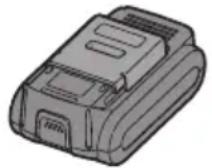
Cpok cnyx6bI 6aTapeHoro 6Joka
AkkymyIaTOPbIe 6aTapeu IMeHOT orpa-HnueHHbI CpOK cLyXkbI. Ecnn nocJe3apJKn BpeM aYHKUHOHPOBaHNCTaHOBNTcay Ype3MepHO KOpOTKm, 3aMeHnTe 6aTapeHbI 6JOK Ha HObI.
YtJn3aun 6aTapeu BHIMAHNE
B ueJx 3aunTbI OKpykaUoSei cpebl n yTuIN3auu MaTePnaIOB, y6eInTEcB, UTO OHa yTuIN3nPOBaHa B OOpNuaJIbHO npEJaHa3NaueHHom MeCTe, ecn TaKOBbIe eCTb B BaWei cTpaHe.
[3apraHoe yctpoiCTBq
3apяdka
Mepbl npeodoctopoXHocTn dIa IHTN-NOHOrO 6aTaapeHoro 6Joka
- Ecnn TemnepaTypa 6batapeHoro 6noka onyctntc Hxke npin3ntelho -10^ (14°F), 3apraKa aBtOMaTnueckn npeKpATNTc dna npeDToBpaUeHn yxudhen xapaKTepcntk 6batapei.
Оьшип Меры пе dioctopoxhoctn Дялntи-ноHOrO/HNKeIb-MetaJI-NorndHOrO/HNKeIb-KaMneBOrO 6atapeHoro 6loka
-Дианазон Temпературbl Okpyжаншенисты coctabлгет OT 0^ (32°F)do 40^ (104°F).
Ecnn 6aTapeHbI 6JOK 6yJeT nCNoJb-3OBaTbc npi Tempeatype 6aTapeHnKe 0^ (32^) ,nHCTpyMeHT MoKetHe yHKUHOHnpOBaTb HaJIeKaUIMO6pa3OM.
- Пи зардкхолоногбатарног6лoka (c Tempepatури Нжke 0^ (32^) )В TeПLOM MeCTe, OCTaBTe 6atapeHbI 6lOK B 3TOM MeCTe I NOOJdnte 6OJIee ODHORO
yaca, noka 6atape Harpeetcdo ypOBnTeMnepaTypbOkpykaUouei Cpebl.
- OxnaIte 3apAIDHOe yCTPOINCTBO npn nocJeIOBaTeIbHOn 3apAKe 6OJee Yem DByx 6aTapeiHbIX 6IOKOB.
-He BCTabJnTe Baun naIbUb I B KOHTaKTHbIE OTBepCTn, KOrDa Bbl DePKeTc3apAnHOe yCtpoiCTBO,a TaKKe B Dpyrnx Cnyuax.
BHIMAHNE
Ipy npdeoTbpaueHn pncKa noXapa nIINIOBpeJDeHn 3apAaHOrO yctpoNCTBa.
He nCnoJb3yIe B kaueCTBe nCTOuHnKa NiTaHnReHepaTOp DnRaTeJIa.
He 6IOKpyTe BEHTNJIAUHOHbIE OTBepCTNa Ha 3apAnHom yCTpoiCTBe N 6aTapeiHOM 6Ioke.
BbIKHouHTe 3apAHOe yCTPOIcTBO H3 ITeNCEJIbHOJ pO3ETKN, eCNI OHO He NCNOJIb3YeTcR.
OpaHkeBaJ lamnoUka peXmua Oxu-daHn6 Byet Mrratb, Noka 6ataper He OCTbIHET.
3aTeM 3apJaKa HaUHeTcA ABTomTuYeCKn.
4.лamnoчka 3apdkn (3eJeHa) 6ydet MeJHeHOMIratb, KaTToIbKO6aTape8 6ydt 3apjKeHa npImepHo Ha 80%
5. После 3аВершени 3ардклammoчka 3ардкн haunet 6bICTpo MURAТь 3eJIeHbIM CBETOM.
6. Ecnn TemnepaTypa 6batapeHoro 6Ioka coCTabJIaET 0^ nIN MeHbSe, noJHaJ 3apJaKa 6batapeHoro 6Ioka 3aIMet 6OJIbSe BpEMeHn, Yem o6bIuHoe BpEma 3apJKn. Daxe IocNe IOpHoi 3apJKn 6batapey 6UdET IMETb npi6Iu3ntelbHO 50% M O uN HOC T N 6batap en , n 3apJxehHO npn 06bIuHoi pa6oey TemnepaType.
7. Ecnn NaMNoUka NITaHn He 3aROpNTc HEmeJIeHHo NocNe BKNIOueHn 3apJdHoro UCTPOINCTBa, INN ecNn NO nCTeueHn CTahД a pT H O rO B peMe H N NaMNoUka 3apJdKn He Haunet 6bICTpo MInrTaB 3eJIeHbIM CBETOM, ObpaTntEcb B yNOJHOMOueHHbI CepBnCHbI ueHTp.
8. Ecnn nonnoctbno 3apjxehnbl 6aTapeHbI 6JOK CHOBA BCTABNTB 3apJdHoe yCTPOINCTBO, 3arOpNTcN JAMNOUka 3apJdku. Upe3 HeCKOJIbKO MNHyT JAMNOUka 3apJdku MoKeT Haatb 6bICTpo MIRaTb, NOKa3bIBa, YTO 3apJDKa 3aBepWeHa.
HnkeIb-MetanloIrpndHBi/ HnkeIb-KaMneBbI 6aTapeHbI 6Jok
ПРИМЕЧАНС
Ipn nepBoi 3apJKe 6aTapeHoro 6loka, nnn nocne dNITeNbHoro xpaHeHna, 3apXaIte erO B TeueHne OKoNo 24 yacOB, YTo6bl DOBecTN
6aTaapeo Do NOpHOn 3apAHOJ EMKOCTN.
3apndHoe yctpoonCTBO(ey0L80)
- BkIIOHTe 3apJHoe yCTPOIcTBO B WTeNCEJIbHyIO PO3ETKy NepEmEHORO TOka.
ПРИМЕЧАНЕ
Pn NOdkIoueHnn WTeNCEbHOB BNKK K NCTOUYHKY NITaHNApeMeHHORO TOKAMORYT NOBNTbcNCKpbI,HO 3TO He npedctabnaretnpo6nemy C TOnK3peHn6be30NaCHOCTN.
2.ПлOTнOBCTaBbTe 6aTapeHbI 6JOKВ 3apAДhoe yCTpoIcTBO.
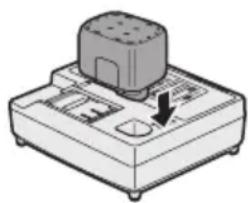
3.BoBpeM3apAdkn6yJeT rOpetbJaAMno- yka 3apAdkn. Iocne 3aBepseHn8 3apAdkn aBTOMaTHu- yeckn cpa6Otae T BHyTpEHHN 3JIeKTPoHn HbI nepeKIOUaTeIb, npeDOTBpauzaar Upe3MePHyO 3apAdky.
3apraKa He NaHHeTc,ecn6batapeHbI 6nOK CnNkOM TropyH (HaONH O C HIOE, HENOCPeDCTBENHO Nocne cyHKUHOHPOBaHnnp 6OJbwoHarpy3Ke). OpaHxBeBa JAmNoCupeKIma OxuDaHn6yDet MmRaT, noka 6batape He OCTbIHET.
4. 3apraKn 1ocne 3aBepweHna 3aprKn IamnoUka 3aprKn HaHHeT 6bICTpo MmraTb 3eJeHbIM CBETOM.
5. EcnI JAMNoUka 3apAdkn He 3arOpntc H eM eJ Ie H H O N O C I e 3apAHorO yCTpOInCTBa, INIeCJN IIO NCTeueHn CTaHdApTHoro BpeMeHn 3apAKn JAmNoUka 3apAdkn He NaHTe 6bICTpo MIRATb 3eJIeHbIM CBETOM, 6paTInTeCb B y n OJNHOMOueHHbI cepBnCHbI ueHTp.
6. Ecnn NOHOCbIO 3apJxHeHHbI 6aTapeHbI 6NOK CHOBA BCTaBNTb B 3apJaHoe yCTpoiCTBO, 3aROpNTcIaMNoUka 3apAKn. Ypee3 HeCKoJIbKO MInHyT IaMNoUka 3apAkn MoKeT HaaytB 6bICTPO MInrA Tb, NOK a3bIBa, YTO 3apAdka 3aBepSeHa.
CBETOBbie INHdNKATOPbl

BbCBeYBaHne 3eJIeHbIM CBETOM
3apdHoe yctpoiCTBO NOdkIIOyeHO K WTeNCEJbHO pO3eTKe nepemehoro Toka. FToBO K 3apdKe.

БыICTpoe MINGHHe 3eJIeHbIM CBETOM
3apka 3aBepweHa. (Ponna 3apka.)

MɪrəHne 3eJIeHbIM CBETOM
6) Bbl K J U O Y a T e N b (n peRyI npOBKn nepeMeHHoN cKOpocTn) Pn nCNoJIb3OBAHn yCTpoNcTba C He NOJHOCTbIO HaxKaTbIM nepeKJIHOuYaTeJeM KpyTAA MOMeHT CHNXKaETcA.
7) 3ΦΦeK T coeHHTeJIbHOro aIaITepa
KpyraHmMeHT cAnxHaTeC, ecn npn nCNoIb3OBAHH yHNBepcaIbHOro pa3bem a nn co ed n H n TeI aanTepa.
- yHnBepcaIbHa coeINHITeIbHa HmyTaP N O p M bI
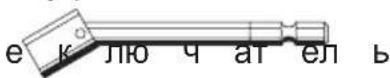
- IepexoHOn aanTep
VII. ПИнадлесхости
3aXIMHOI naTPOH dpelen
- EY9HX409E
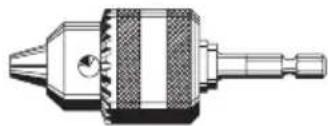
IcnoIb3yIte c hacaKoI dIa 3aBnHcNBAHna wypynob, hacaKoI dIa CBepJeHnA DepeBa IIN MeTJIa C npMbIM XBOCTOBKOM DnAmETpOM OT 1,5 MM do 10 MM.
YHnBepcaIbHa coeHHTeIbHa MyΦTa (npoJaetc OTeIbHo)
PoxaIyIcTa, o6paTntecb K cAmomy nocJeHemMy o6uemy KaTaNory.
BctaHOBJIeHHa KpyTnIbHOro MOMeHTy MyΦTN
BcTaHOBiTb 3NaueHHKpyTnIbHOrOMoMeHTy B OndHy 321 yCTaHOBOK MyΦTu a60 B nOToXeHHra"
eHTyBAFAe IOBnHHeH
IepeBipTe yctacnpaBXhboo po6otoBtahOBiTB ukany biia miTKn (A).
KopncTyBaTnCnIPOrCHNm KpOKOM

OBEPEXKHO!
-NepekoHaTeC, 10 NOAChN KpK HAdiHNO pNcDHaHn DO OCHOBHO 6No ky 3a D O N O M 3aTgHyTO rBnHTa. Jkso NOAChN KpK He npEHaHn HaDInHO DO OCHOBHO 6LOKy, KpOK MOKe BiDInI OCHOBn 6LOK MOKe Bnactn. Lc MoKe pN3BeCTn Do HeuacHOro BnnaKy a6o TpaBMn.
- NepioDnHNo nepeBipRyTe 3aTJkKy rBnHTa. KaO BIn Ocna6He, MiHO 3aTARHITb Ioro.
-NepekoHaTeC, 10 NoRCHN KpOK ⅢIbHo i HadiHo pNcEHaHn Do IIOrCHOMy peMeHa a6o IHwOro peMeHa. YBaXHO cIiKyuTe 3a TmM, 106 bNoK He BnCIn3HyB 3 NOrCy. Lc MoKe npu3BecTu Do HeUacHOro BnPaKn y a6o TpaBMn.
- RaKIO OCHOBHN 6JOK yTpIMyEToBcI NOAChHM KpOkOM, yHnKaIe CTpn6aTn Ta 6iratn 3 Hm. Lc MoKe np3BecTu DO BnCIn3HeHH KpOka i NaiHH OCHOBHoro 6Joky. Lc MoKe np3BecTu Do HeuacHO BnPaDKy a6o TpaBMn.
-Якшо NOЯСнй КрIOK He BnKOpNCTOByEcTbCry,пepekoHaITecra,иOиOro nobepHyTOBNOLOXeHHaДЯ 36epirahH.ПОяСнй KpIOK MoKe 3aUeHNTuCry ⅢO-He6yDb.Ze moKe npn3BecTN Do HeuacHO BnPaDky a60 TpaBMn.
JaKIO 6IOK NiDBiWeHn Ha NORCHOMy pemeHi 3a DOnOMOHO NOA CHOro KpIOKa, He 3aKpINIIouTe Ha HbOro HacAdKn UypynOBepTa. O6'ekT 3 ROCTPmN KpaAMn, TaKni JAK HacaIka ДЯ CBepdJIeHHa, MoKe PpN3BecTn Do HeuacHOrO BnnaIky a60 TpaBMn.
Uo6 BCTaHOBNTN Kyt NOBOpoTy IOnCHoro KpIoka
1.3cyhbTe Baxilb pikcaii nOaCHOKpoka ① i ytpmmyte noro, o6 po36noKyBaTN NOAChN Kpok
2. Notaryt b NoarHni KpOK 3 NIOXKeHHa Ia 36epiraHHa ② i BCTaHOItb Ioro NiD NOTpi6HM KyTom.
3.BiDnyctitb Baxinb ikcaii noaCHOKpoka, 06 3aikcyBatn Kyt nobopoTynoaCHOKpoka.
4.П e pe k o h a n T e c KpOK MlUHO 3a6nokOBaHn. TaKoX NpekoHaNTecr, 10 NOAChN KpOK MlUHO 3a6nokOBaHn y NOJKeHH③.
- IoRCHN KpIOK He MoXe 6yTu 3a6nOkOBaHn B DaHOMy NOnOxKeHHi. Ipeed BNkOpNCtAHHm MiUHO 3 a 6n OkYi NOrO B Notpi6HOMy NOnOxKeHHi.
Ioo6 n OBe pHyTu n OaCHN KpIOK
NoIOXeHHraDn 36epirAHn, DOTPMuTecb
BnuOeONscaHnx dii nyHKtIB 1 Ta 2, Notim
Onyctitb NOAChN KpIOK.
Ioo6 3a6IOkYBaTu n oikCaTop, dOTPMuY-
TeCb BnuOeONscaHnx dii NyHKtIB 3 Ta 4.
3mHnTn CToPOHy po3Mi- 110A CHORO KpOka
IocnKpOK MoKe 6yTu po3MiueHn Ha 6yDb-yaKi 3i CToPiN 6NoKy.
1.BctaHObitb NOAChn KpO B NIOJOXEHNA 36epirAHH.
2.Ocna6Te rBnHT, o6epTaHOn noro np OTnI rOd INHH IKOBoi C Tpi JKI BnKOpNCTOByUOuN dJIa cboTg MOHeTKy a6o pnoCKy BnKpyTKy.
3. BntaHITb Iocn Kpok i BCTaBTe O O O B IH N N 6 OCHOBHOMy 6loci.
4.卍iNbHO 3aTЯHrHiTB rBnHT,ObepTaUOHy NOro 3a rOuHHNKOBOHO CTpiIKOIO.
IocnoBHO 6n OKy BIn 3naTbcB NOJXeHHi J3epiraHn.
Panaelb ynpablinnna
U O N O R C H N (1) CbITIOADHe nIDcBiuyBaHH
3 a B x d n H a T N epemkau XnBJIeHHa OdH pa3 nepeBnKOpNCtAHm CBIIOJIOHO rIO iDCBIyBaHHa. HaTncHiB KONky BBIMKHeHH i BmKHeHHcBIIOJIOHO rIOiCBiYBaHH
IiCbiuYBaHnraRopntb npn Dyke Hn3bKOMy cTpyMi I He BnNn BaE He rAT N BHO npOdyKTnBHiCTb iHcTpymEnTy nID qac po60Tu aHo Ha EMKiCTb Noro 6aTaapei.
YBAGA:
B6ydoBaHcBi1 niDcbiyBaHH npn3NaYe dIa TmUacOBOrOocBITJeHH HeBeJIkoI po6ooi 30H.
He BnKOpNCToBnyTe NOrO y KocTi 3amHn NoCTiHoro lixtapnka, TaK JaK BOHO He Mae DoCTaTHboI RCKpaBOCTi.
-JaKIO iHCTpyMeHT He BnKOpNCTOByeTbcra npOTaROM 5 XBUNH, CBITIOJIOHe NiDCBiyBaHHRA BMKHETbcra.
Ybara:HE DUNBNTNcH A NPOMIHb.
BnKOpncTaHn opraHb ynpabNinHn a6o peryIIOBaHb, a6o BnKoHaHH npOeDyp IHsIM YHOM, JHIX Bka3aHO B daHIN IHCTpykii, MoKe npN3BeCTn Do nOTpanPnHn NiD BnJIb He6e3neuHoro BnnpomIHOBaHH.
Bumkheha (3BnuaHa np60ta)

Murae (3apxkeHHn He Bi6yBaetbca) BImKHeHa yHKi3axncty 6atapei
HaMipHe (noBHe) po3paJxKeHHa
niTiH-IOHHx 6aTapei p3ko ckopooye
CTPOK IXHbOcIyX6n. DaHn DpInb OCHaUeHN ΦyHKciEIO 3axNctTy 6atapei, Rka npu3HaueHa dIg nonepedxKeHHa HAdMipHoro po3prJxHn8 6atapeHoro 6lOky.
-Функцязхиctу6aTapeiakTNByeTbc8 6e3noceped H b O nepeD TUM,ЯK 6batapeBtpaTntb CbiN 3apd, 0 3MyuE MnraTn nonepdKyBaIbHy Iamnoky Hn3bkoro 3apdny 6aTapei.
-ЯкwoBNIOMITUNI,so nonepeJyBaJIbHaJaMNoUkaHn3bKOro3apAdy6aTapei Mura,HeaHHO 3apAidi6aTapeHn6lOK.
[BaTapeHn 6No]
-Якso 6aTapeин 6Iok He BnKOpNCTOBYeTBcra,36epiraTe NOro NodaJI BiTaknx MeTaNEBxpeeu,як ckpiINKMOHETN, KJIIOUci, UBXN, Wypyn, a60iHux dpi6HNx MeTaNEBxpeeu,яkiMOKyTb npn3BeCTn Do KOHTaKTy OndHicIKJEMN 3 IHsoIO.
36epirahnhaatapeHnx 6Iokib pa30M OKe CTaTb npuHIO BUNKHeHHiaKp, oniKIB a6o noKexi.
-Пд уас po6OTn 3батapeHIM 6LOKOM nepekoHaITeCb, lopo6ooy npimiueHndo6pe npoBITpOeTbcra.
-При втуговни 6атapestенoro 6лokу 3 OCHOBHorO KOpNcy IHCTpyMeHTy, HeraиHo 3amHb KpNiShky 6aTapestenHO 6lOKy dIЯ 3anobirahnra 3a6pydHeHHa
Knem 6atapei nnom Ta 6pydom, IO MOKe BnKnIkaTn KOpOTke 3aMnKaHHa.
![PANASONIC EY7542 - [BaTapeHn 6No] - 1](/content/2026/03/454754/images/53e87b45a055bce27380b04d97650169ed7ac86d7d7a4373d4c0fe93be9cb198.jpg)
Tepmin clyx6n 6aTapeHoro 6noky
AkymyIyTopHi 6aTapei MaOTb 06-MexeH N Te pMi H Cn yK 6n Nicra 3apdKn Yac yHKciOHyBaHHCTae HaMipHO KOPOTKM, 3aMIHTb 6aTapeHn 6lOK Ha HOBn.
Ytulizia 6atapei
YBAGA:
3 MeTOHO 3axnCTy HABKOJIuHbOro cepeIOBua Ta yTNIi3aui MaTepiAnIB, nepeKoHaIteCra, 0 BOHa yTNIi3OBaHa B OphiuiHO Bn3HaueHomy Micci, RaUTo Taki e y BaWi KpaHi.
[3apdHn npncTpi]
3apяdka
3aCTepexHi 3axoDi 7oDo NiTiHIOHOrO 6aTapeHoro 6IOKy
JaKuo Temn epatypa 6atap eH 6n OK y B n a d e H n K -10° C (14° F) aB T O M a T N u H o n BiDBepyTu nOriPseHHra XapaKTepNCtNK 6atapei.
3araJIbHI 3acTepeKHi 3axOdn IIOdo JITiI-IoHHoro/HikeNb-MetanOrIdprnHoro/ HikeNb-KaDmicBoro 6aTapeHoro 6IOKy
-ДIANa3OH TemnepaTpyn HabKOJINHbOro cepeoBnua cKaJaAe BiD 0^ (32^) do 40^ (104^) Kso batapeHnN 6Iok 6yde BnKOpncTOByBaTncb npi TeMnpaTypi batapei HxKye 0^ (32^) ,InCTpymEnT MoKe He cyHKIOHyBaTN HaJIeXHM YINHom.
- Пи зарядци xолоного 6атapestиного
6лOKу (3 TempepatypОннжч 0
°C (32°F)) B теллOMyMICci,ЗалшTe
6aTapeHnB 6lOKВцБOMyMICci
Ta noYeKaIte NOHaD OndHy rOdINHy,
ДOKN 6aTaper HarpicTBcRdo pIBHЯ
Teme nepa TpynHa cepeDobu.
- Oxoloditb 3apdHn npucpti npn nocjioBHi 3apdci 6ibh HIX DBOX 6atapeHnx 6IOKIB.
-He BCTabJnTe BaWi nalbci B KOHTaKTHi OTBOpN, KOnn Bu TpMaTe 3apdHn npicTpni, a TaKoB iHUnx BInaKaX.
YBAGA:
HnKHeHH np3Nky noKexi a60 NOoKOJKeHH 3apdHOrO npNCToIO.
He BnKOpncToBvIe B JKOcTi DKepeJa XnBJIeHHra ReHepaTOP DnBryHa.
He 6IokyuTe BeHTnlaicHi OTbOpn Ha 3apAnOMy npncTroT Ta 6aTapeHOMy 6loci.
BumkhItb 3apAHH npucptpi 3 WTeNceJIbHOi PO3eTKI, kUO BIn He BnKOpNCTOBycTbcra.
JIiTi-IOHHN 6aTapeHn6Jok
ПРИМITKA:
BaW 6aTapeHnB 6Iok He c NobHicTIO 3apJxKeHMMPiD Yac PnpIbHaHH. He 3a6yDbTe 3apAaNTu Ioro nepeD BVKOpNCtAHNM.
3apdHn npctpi (EY0L80)
oro1. BbIMKnHtB 3apAHN npnCTpiB Wtence- e JbHy PO3eTKyBMnHcRO aTpyMv.
3PIMITKA;Ky 6yJe p ePi nKHOeHHo WTeNCbHoi BnKN Do JKepeNa KINBJIeHHa 3MiHHM CTPymOM MoKyTB 3'YBNTnCia Ickp, aIe Ce He CTBOpyo npOblemy 3 TOCKN 30py 6e3neKn.
-
ⅢiNbHO BCTaBTe 6aTapeHnB 3apAHN npNCtpiN.
-
3piBnIte MiTkn BnpiBHOBaHH i po3micti6aTapeo y 3arIn6JeHHi Ha 3apdHOMy npncToi.
2.3cHybTe Ioro Bnepey Hapymky cTpiKN.
HabaHTaxKeHHa Ha 6atapeIO. (JIiue JITi-iOHHa 6atape)

MiraHraOpAHXeBmCBITJiom
Батуарейни 6лok rapячи. 3apяджени понеться, кол Temпература БатуарейHorO 6лoka вда.
JaKuo TemnepaTypa 6atapeHoro 6Joky cKnadae -10^ (14°F)
a6o MeHwe, lamnoouka 3apdKn (opaHxkeBa) TAKOX NOUHe MInrTaTn.
3apka noHetbcra ToDi, KOJI TEmpepatya 6aTapeHoro 6nOKy niBnntbcra. (Nlwe JITiI-IOHHa 6atape)

JaMnoKa cTaHy 3apAkn
JIiBa:3eNeHaIpaBa:opAnKeBa6ydyTbBnCbiCyBaTncr.

WBnKe MrraHHo OndHocHO opAHxEBIM i3JeEHm CBiTJiom
3apdkeHH e HEmoxnBm. BaTapeHn 6nok 3acMieHN
ПИПОМ aбо Hecправн.
Ihopmaia yoYo yTnlaaB KpaIHax, kI He BxOJaTb B CBponecBkn Co03
EY971075423 H2101 Printed in China


- ADDITIONAL SAFETY RULES
- WARNING
- ASSEMBLY
- Attaching or Removing Bit
- NOTE:
- CAUTION:
- Attaching or Removing Battery Pack
- OPERATION
- [Main Body] Switch Operation
- Switch and Forward/Reverse Lever Operation
- Forward Rotation Switch Operation
- Reverse Rotation Switch Operation
- WARNING!
- Impact Driver Operation
- Drill Driver Operation
- Clutch Torque Setting
- How to Use the Belt Hook
- To Set the Belt Hook Angle Position
- To Change the Belt Hook Location Side
- Control Panel
- (1)LED light
- Overheat warning lamp
- Battery low warning lamp
- [Battery Pack]
- For Appropriate Use of Battery pack
- Li-ion Battery pack (EY9L40/ EY9L41)
- Battery Pack Life
- Battery Recycling
- ATTENTION:
- [Battery Charger]
- Charging
- Cautions for the Li-ion Battery Pack
- Common Cautions for the Li-ion/Ni-MH/Ni-Cd Battery Pack
- Li-ion Battery Pack
- Battery charger (EY0L80)
- Ni-MH/Ni-Cd Battery Pack
- LAMP INDICATIONS
- Information for Users on Collection and Disposal of Old Equipment and used Batteries
- Business users in the European Union
- [Information on Disposal in other Countries outside the European Union]
- Note for the battery symbol (bottom two symbol examples):
- MAINTENANCE
- TIGHTENING TORQUE
- Factors Affecting Tightening Torque
- 1) Voltage
- Bolt Tightening Conditions
- Tightening conditions
- ACCESSORIES
- VIII.MAXIMUM RECOMMENDED CAPACITIES
- SPECIFICATIONS
- MAIN UNIT
- BATTERY PACK
- BATTERY CHARGER
- [Li-ion battery pack]
- [Ni-Cd/Ni-MH battery pack]
- ONLY FOR U. K.
- ELECTRICAL PLUG INFORMATION
- FOR YOUR SAFETY PLEASE READ THE FOLLOWING TEXT CAREFULLY
- IMPORTANT:
- Anziehbedingungen
- Pacco battery Li-ion
- NOTA:
- [Pacco battery Li-ion]
- [Pacco battery Ni-MH/Ni-Cd]
- Varsellampe for overoppheting
- Pa6oTa B pexkme dpenn-wwypynOBepTa
- YctaHObKa KpyTJeero MOMeHTa MyΦTbI
- BHIMAHNE:
- Kak noIb3OBaTbCЯ NOYCHbIM KpOkOM
- OCTOPOXHO
- yctaHOBTb yroJ NOBOPota IORCHORO KpHoka
- UTo6bI n3MeHnTb CTOPOHy pa3MeuEHHa NpOCHOro KpUoka
- Панель управлия
- CBeToAnNoHaHnOcBcETKa
- Cpok cnyx6bI 6aTapeHoro 6Joka
- YtJn3aun 6aTapeu BHIMAHNE
- [3apraHoe yctpoiCTBq
- 3apяdka
- Mepbl npeodoctopoXHocTn dIa IHTN-NOHOrO 6aTaapeHoro 6Joka
- Оьшип Меры пе dioctopoxhoctn Дялntи-ноHOrO/HNKeIb-MetaJI-NorndHOrO/HNKeIb-KaMneBOrO 6atapeHoro 6loka
- BHIMAHNE
- HnkeIb-MetanloIrpndHBi/ HnkeIb-KaMneBbI 6aTapeHbI 6Jok
- ПРИМЕЧАНС
- 3apndHoe yctpoonCTBO(ey0L80)
- ПРИМЕЧАНЕ
- CBETOBbie INHdNKATOPbl
- ПИнадлесхости
- BctaHOBJIeHHa KpyTnIbHOro MOMeHTy MyΦTN
- KopncTyBaTnCnIPOrCHNm KpOKOM
- OBEPEXKHO!
- Uo6 BCTaHOBNTN Kyt NOBOpoTy IOnCHoro KpIoka
- 3mHnTn CToPOHy po3Mi- 110A CHORO KpOka
- Panaelb ynpablinnna
- U O N O R C H N (1) CbITIOADHe nIDcBiuyBaHH
- YBAGA:
- Ybara:HE DUNBNTNcH A NPOMIHb.
- [BaTapeHn 6No]
- Tepmin clyx6n 6aTapeHoro 6noky
- Ytulizia 6atapei
- [3apdHn npncTpi]
- 3aCTepexHi 3axoDi 7oDo NiTiHIOHOrO 6aTapeHoro 6IOKy
- 3araJIbHI 3acTepeKHi 3axOdn IIOdo JITiI-IoHHoro/HikeNb-MetanOrIdprnHoro/ HikeNb-KaDmicBoro 6aTapeHoro 6IOKy
- JIiTi-IOHHN 6aTapeHn6Jok
- ПРИМITKA:
- Ihopmaia yoYo yTnlaaB KpaIHax, kI He BxOJaTb B CBponecBkn Co03
Brand : PANASONIC
Model : EY7542
Category : Drill