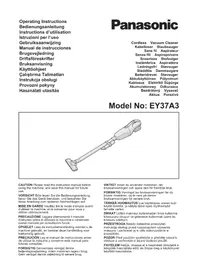
EY37A3 - Vacuum Cleaner PANASONIC - Free user manual and instructions
Find the device manual for free EY37A3 PANASONIC in PDF.



| Product type | Cordless stick vacuum |
| Brand | Panasonic |
| Model | EY37A3 |
| Dimensions (main unit) | 452 × 124 × 160 mm |
| Weight (main unit) | 0.89 kg |
| Dust collector capacity | 650 ml |
| Rated voltage | 14.4 V DC / 18 V DC |
| Battery type | Li-ion (compatible models: EY9L45, EY9L47, EY9L51, EY9L52, EY9L53, EY9L54) |
| Battery runtime | Varies depending on battery (not specified) |
| Sound pressure level (LpA) | 71 dB(A) (K=2 dB) |
| Vibration emission (ah) | ≤ 2.5 m/s² |
| Usage | Indoor, dry use only |
| Main functions | Two power modes (High/Low), automatic low voltage shutdown |
| Included accessories | Nozzle, crevice tool, extension tube, dust filter, protection grille, protection filter |
| Maintenance | Empty collector after use, clean filters, wipe with a dry cloth |
| Safety | Do not vacuum liquids, hot objects, flammable dust; use only Panasonic battery |
| Spare parts and repairability | Battery, charger, nozzle, crevice tool, tube, filters (references provided) |
| General information | User manual available in multiple languages; commercial use possible |
Frequently Asked Questions - EY37A3 PANASONIC
User questions about EY37A3 PANASONIC
0 question about this device. Answer the ones you know or ask your own.
Ask a new question about this device
Download the instructions for your Vacuum Cleaner in PDF format for free! Find your manual EY37A3 - PANASONIC and take your electronic device back in hand. On this page are published all the documents necessary for the use of your device. EY37A3 by PANASONIC.
USER MANUAL EY37A3 PANASONIC
Cordless Vacuum Cleaner
Kabelloser Staubsauger
Sans fil Aspirateur
CAUTION Please read the instruction manual before using the machine, and save this manual for future use.
Children should be supervised to ensure that they do not play with the appliance.
- The appliance is only to be used with the power supply unit (battery pack) provided with the appliance.
- This machine is not intended for use by persons (including children) with reduced physical, sensory or mental capabilities, or lack of experience and knowledge.
WARNING
Operators shall be adequately instructed on the use of these machines.
This machines is not suitable for picking up hazardous dust.
This machines is for dry use only.
CAUTION
This machine is for indoor use only.
This machine shall be stored indoor only.
NOTE: Battery pack and charger are not included in this kit.
Do not block any openings of the main unit or battery charger.
This may result in burn or ignition by overheat.
Do not expose the skin to hot wind from any openings of the main unit or battery charger. This may result in burn.
Do not vacuum up the following materials.
- Liquids (water, kerosene, petrol, etc.) or substances with liquids.
- Flammable metal powder (aluminum, carbon, magnesium, etc.)
- Hot or burning objects (cigarette butts etc.) These may result in fire or explode.
Do not use any other battery pack besides as shown in the Specifications.

WARNING
- Do not use other than the Panasonic battery packs that are designed for use with this rechargeable tool.
- Panasonic is not responsible for any damage or accident caused by the use of recycled or counterfeit battery pack.
- Do not dispose of the battery pack in a fire, or expose it to excessive heat.
- Do not allow metal objects to touch the battery pack terminals.
- Do not carry or store the battery pack in the same container as nails or similar metal objects.
- Do not charge the battery pack in a high-temperature location, such as next to a fire or in direct sunlight. Otherwise, the battery may overheat, catch fire, or explode.
- After removing the battery pack from the tool or the charger, always reattach the pack cover. Otherwise, the battery contacts could be shorted, leading to a risk of fire.
- When the battery pack has deteriorated, replace it with a new one. Continued use of a damaged battery pack may result in heat generation, ignition or battery rupture.

CAUTION
-
This unit is not waterproof.
-
Do not use it in damp or wet locations.
-
Do not wash it in water.
-
Keep it in a safe, dry, and clean area when it is not in use.
-
This unit automatically goes off when the battery voltage drops below a specified level.
- Do not disassemble this unit. Servicing should be performed by an authorized service center.
- Do not throw the battery pack into a fire. This can cause an explosion.
| To reduce the risk of injury, user must read and understand instruction manual. | |
| For indoor use only | |
| Dry application only. Do not vacuum up any liquid. |
NOTE:
This machine is intended for commercial use, for example in hotels, schools, hospitals, factories, shops, offices and rental businesses.
II. ASSEMBLY
NOTE:
When attaching or removing accessories, disconnect battery pack from tool.
Attaching nozzle [Fig.1]
Attaching or Removing Battery pack
- Attaching: [Fig.2]
Align the highlighted marker points and attach battery pack.
-
Slide the battery pack until it locks into position.
-
Removing: [Fig.2]
Push the button and slide the battery pack forward.
III. OPERATION
[MAIN UNIT]
How to use [Fig.3]
- Attach the battery pack to the main unit.
-
Press the switch (A) HIGH/LOW button. [Fig.4] Only by pushing (A) HIGH/LOW button, tool's setting can be switched from High mode to Low mode or vice versa. None of any other operation is required to switch.
-
Press the switch (B) OFF button after use. [Fig.4]
![PANASONIC EY37A3 - How to use [Fig.3] - 1](/content/2026/03/454648/images/f6a489ac93c6e690a9b74d31124b28626152370e20dfdcf140780eb660ec25e0.jpg)
CAUTION
- Read the instruction manual of the charger to charge the battery pack, and how to handle battery pack.
[Battery Pack]
For Appropriate Use of Battery Pack
- The rechargeable batteries have a limited life.
- For optimum battery life, store the Li-ion battery pack following use without charging it.
For safe use
- The battery pack is designed to be installed by proceeding two steps for safety. Make sure the battery pack is installed properly to the main unit before use.
- If the battery pack is not connected firmly when the switch is switched on, the overheat warning function and over-discharge prevention function will be effected that safety operation is not possible, and the main unit will not operate normally.
Connect the battery pack into the unit of the tool until the red or yellow label disappears. (There should be no more than a 15^ difference between the temperatures of the battery and the charging location.)
[Battery charger]
Charging

CAUTION
1) If the temperature of the battery pack falls approximately below -10^ (14 F), charging will automatically stop to prevent degradation of the battery.
2) The ambient temperature range is between 0^ (32^) and 40^ (104^) . If the battery pack is used when the battery temperature is below 0^ (32^) , the tool may fail to function properly.
3) Use the charger at temperatures between 0^ and 40^ , and charge the battery at a temperature similar to that of the battery itself.
4) When charging a cool battery pack (below 0^ (32^) ) in a warm place, leave the battery pack at the place and wait for more than one hour to warm up the battery to the level of the ambient temperature.
5) Cool down the charger when charging more than two battery packs consecutively.
6) Do not insert your fingers into contact hole, when holding charger or any other occasions.
7) To prevent the risk of fire or damage to the battery charger.
- Do not cover vent holes on the charger and the battery pack.
- Unplug the charger when not in use.
NOTE:
Your battery pack is not fully charged at the time of purchase. Be sure to charge the battery before use.
IV. MAINTENANCE
Before using
- To make any adjustments, changing accessory, or storing this unit, remove battery pack from this unit.
- To clean this unit, wipe with a dry, soft cloth.

WARNING
The battery pack must be removed from this unit before it is scrapped.
How to empty dust cup [Fig.5]
- Switch off the vacuum cleaner.
-
Remove the dust cup from the main unit while pushing the button for attaching or removing dust cup. (a)
-
Pull out the filter grid from the dust cup by holding a tab. Shake the filter grid to remove dust. (b)
-
To make any adjustments, changing accessory, or storing this unit, remove battery pack from this unit.
-
To clean this unit, wipe with a dry, soft cloth.
-
Attach the filter grid into the dust cup again. Pull out the dust filter. (c)
- Empty the dust cup. (d)
- Attach filters into the dust cup.
- Fit the tab for fixing dust cup into the groove of main unit, and attach the dust cup to the main unit until it clicks. (e)
V. ACCESSORIES
Battery pack
See the Specification.
- Use only Panasonic Li-ion battery pack for power tools (Voltage DC14.4 V / DC 18 V only).
[Information for Users on Collection and Disposal of Old Equipment and used Batteries]
![PANASONIC EY37A3 - [Information for Users on Collection and Disposal of Old Equipment and used Batteries] - 1](/content/2026/03/454648/images/c1e1b917a8d3957bcc643109832dac8b5eb47e586c2b02db2bf3652b652578a9.jpg)
These symbols on the products, packaging, and/or accompanying documents mean that used electrical and electronic products and batteries should not be mixed with general household waste. For proper treatment, recovery and recycling of old products and used batteries, please take them to applicable collection points, in accordance with your national legislation and the Directives 2012/19/EC and 2006/66/EC.
By disposing of these products and batteries correctly, you will help to save valuable resources and prevent any potential negative effects on human health and the environment which could otherwise arise from inappropriate waste handling.
For more information about collection and recycling of old products and batteries, please contact your local municipality, your waste disposal service or the point of sale where you purchased the items.
Penalties may be applicable for incorrect disposal of this waste, in accordance with national legislation.
[For business users in the European Union]
If you wish to discard electrical and electronic equipment, please contact your dealer or supplier for further information.
[Information on Disposal in other Countries outside the European Union]
These symbols are only valid in the European Union. If you wish to discard these items, please contact your local authorities or dealer and ask for the correct method of disposal.
Battery charger
For inquiries please contact an authorized dealer.
NOTE:
Battery pack and charger are not included in this kit.
Floor brush
WEY3782K7617
Crevicenozzle
WEY37A3K7557
Extension pipe
WEY37A3K7307
Dust filter
WEY37A3L0247
Filter grid
WEY37A3W3037
Protection filter
WEY3780L0138
VI. SPECIFICATIONS
| Model no. EY37A3 | |||||
| Capacity with a dust cup | 650 ml | ||||
| Voltage DC 14.4 V DC 18 V | |||||
| Size 452 mm × 124 mm × 160 mm (main unit only) | |||||
| Weight 0.89 kg (main unit only) | |||||
| Battery packs | Li-ion battery pack | ||||
| EY9L45 EY9L47 EY9L51 EY9L52 EY9L53 EY9L54 | |||||
NOTE:
This chart may include battery pack models that are not available in your area. Please refer to the latest general catalogue.
Noise & Vibration
| Sound pressure level (LpA) | 71 dB (A) Uncertainty (K): 2 dB |
| Emission of vibration (ah) | ≤ 2.5 m/s² |
VII. About the motor protection valve

The suction force may decrease if the motor protection valve is damaged. Be sure to heed the handling cautions below.
- Do not remove the motor protection valve.
- Do not apply strong forces to the motor protection valve (by blowing air on it, brushing it, etc.).
- Do not use a wet cloth or volatile substances such as thinner, alcohol, benzene, etc. (Doing so could cause discoloration, warping or cracking.)
- Check that there are no foreign objects stuck in the motor protection valve before use.
- To protect the motor protection valve, be sure to store the vacuum cleaner with the dust box attached.
VIII. CAUTION FOR AC MAINS LEAD
FOR YOUR SAFETY, PLEASE READ
THE FOLLOWING TEXT CAREFULLY
This appliance is supplied with a moulded three pin mains plug for your safety and convenience. A 5 amp fuse is fitted in this plug.
Should the fuse need to be replaced please ensure that the replacement fuse has a rating of 5 amp and that it is approved by ASTA or BSI to BS1362.
Check for the ASTA mark or the BSI mark on the body of the fuse.
If the plug contains a removable fuse cover you must ensure that it is refi tted when the fuse is replaced.
If you lose the fuse cover the plug must not be used until a replacement cover is obtained.
A replacement fuse cover can be purchased from your local Panasonic Dealer.
CAUTION:
IF THE FITTED MOULDED PLUG IS UNSUITABLE FOR THE SOCKET OUTLET IN YOUR HOME THEN THE FUSE SHOULD BE REMOVED AND THE PLUG CUT OFF AND DISPOSED OF SAFELY. THERE IS A DANGER OF SEVERE ELECTRICAL SHOCK IF THE CUT OFF PLUG IS INSERTED INTO ANY 13 AMP SOCKET.
How to replace the fuse
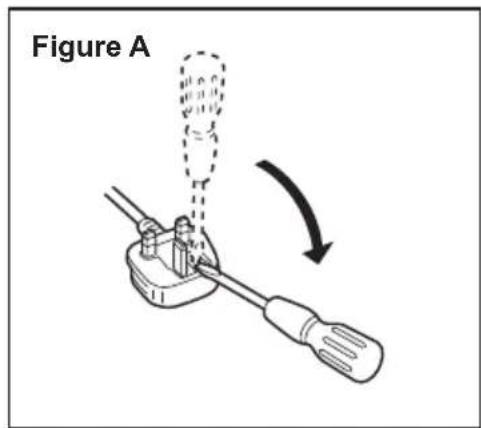
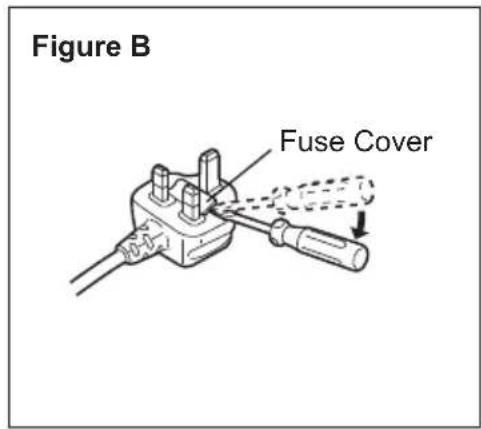
The location of the fuse differs according to the type of AC mains plug (fi gures A and B).
Confirm the AC mains plug fitted and follow the instructions below. Illustrations may differ from actual AC mains plug.
Open the fuse cover with a screwdriver and replace the fuse and close or attach the fuse cover.
2.Demontering: [Fig.2]
Importer for Turkey:
Panasonic Eco Solutions Elektnik San Tic A.S
Abdurrahmangazi Mah. Ebubekir Cad. No: 44
34887 Sancaktepe Istanbul/Turkiye
Dołuczanie ssawki [Fig.1]
I. PRECTETESIVESKEREPOKNY

VAROVÁNÍ
Nezakryvejte zdne otvory na hlavni\ nednotice a nabijece akumulatoru.\ Mohlo by dojt k popalen nebo vzniceni\ nednotky v dusledku prehariat.
- WARNING
- CAUTION
- NOTE:
- ASSEMBLY
- Attaching nozzle [Fig.1]
- Attaching or Removing Battery pack
- OPERATION
- [MAIN UNIT]
- How to use [Fig.3]
- [Battery Pack]
- For Appropriate Use of Battery Pack
- For safe use
- [Battery charger]
- Charging
- MAINTENANCE
- Before using
- How to empty dust cup [Fig.5]
- ACCESSORIES
- Battery pack
- [Information for Users on Collection and Disposal of Old Equipment and used Batteries]
- [For business users in the European Union]
- [Information on Disposal in other Countries outside the European Union]
- Battery charger
- Floor brush
- Crevicenozzle
- Extension pipe
- Dust filter
- Filter grid
- Protection filter
- SPECIFICATIONS
- Noise & Vibration
- About the motor protection valve
- CAUTION FOR AC MAINS LEAD
- FOR YOUR SAFETY, PLEASE READ
- THE FOLLOWING TEXT CAREFULLY
- CAUTION:
- How to replace the fuse
- Dołuczanie ssawki [Fig.1]
- PRECTETESIVESKEREPOKNY
- VAROVÁNÍ
Brand : PANASONIC
Model : EY37A3
Category : Vacuum Cleaner