
TYCE42PS20 - Television PANASONIC - Free user manual and instructions
Find the device manual for free TYCE42PS20 PANASONIC in PDF.
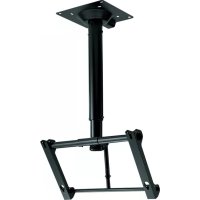



| Product type | Ceiling mount bracket for plasma screen |
| Brand | Panasonic |
| Model | TYCE42PS20 |
| Compatibility | Panasonic plasma screens (models listed on pages 96-97 of the manual) |
| Bracket weight | Approximately 16 kg |
| Maximum supported load | Depends on the screen weight (refer to the screen manual) |
| Material | Coated steel |
| Tilt angle | 0° to 30° in 5° increments |
| Directional adjustment | Horizontal (left-right orientation) |
| Ceiling attachment | 8 attachment points, M12 bolts (not included) |
| Operating ambient temperature | Up to 40°C |
| Maintenance and cleaning | Wipe with a soft dry cloth (cotton or flannel). For stubborn stains, use a diluted mild detergent then dry. Do not use gasoline, thinner, or wax. |
| Safety | Installation must be done by a professional. Check the ceiling's strength and use suitable components. Do not mount the screen facing upward or sideways. Leave a space of 10 cm around and 7 cm at the back. |
| Spare parts and repairability | The provided parts are specific. If lost, contact Panasonic. Do not modify the bracket. |
| General information | This bracket is designed exclusively for Panasonic plasma screens. Improper installation can result in serious injury or death. |
Frequently Asked Questions - TYCE42PS20 PANASONIC
User questions about TYCE42PS20 PANASONIC
0 question about this device. Answer the ones you know or ask your own.
Ask a new question about this device
Download the instructions for your Television in PDF format for free! Find your manual TYCE42PS20 - PANASONIC and take your electronic device back in hand. On this page are published all the documents necessary for the use of your device. TYCE42PS20 by PANASONIC.
USER MANUAL TYCE42PS20 PANASONIC
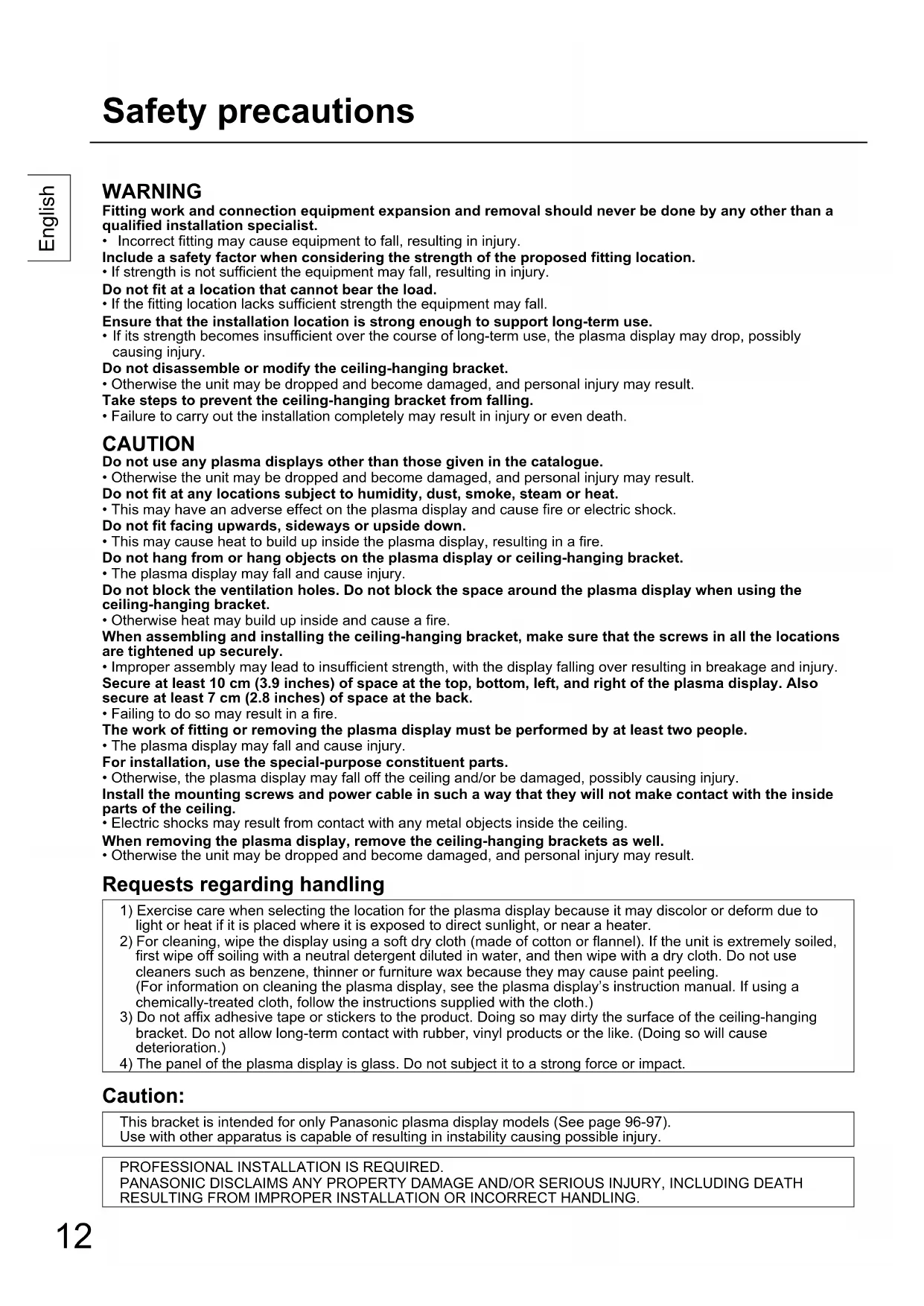
Fitting work and connection equipment expansion and removal should never be done by anyone other than a qualified installation specialist.
- Incorrect fitting may cause equipment to fall, resulting in injury. Include a safety factor when considering the strength of the proposed fitting location.
- If strength is not sufficient, the equipment may fall, resulting in injury. Do not fit at a location that cannot bear the load.
- If the fitting location lacks sufficient strength, the equipment may fall. Ensure that the installation location is strong enough to support long-term use.
- If its strength becomes insufficient over the course of long-term use, the plasma display may drop, possibly causing injury. Do not disassemble or modify the ceiling-hanging bracket.
- Otherwise the unit may be dropped and become damaged, and personal injury may result. Take steps to prevent the ceiling-hanging bracket from falling.
- Failure to carry out the installation completely may result in injury or even death.
CAUTION
Do not use any plasma displays other than those given in the catalogue.
- Otherwise the unit may be dropped and become damaged, and personal injury may result.
Do not fit at any locations subject to humidity, dust, smoke, steam, or heat.
- This may have an adverse effect on the plasma display and cause fire or electric shock.
Do not fit facing upwards, sideways, or upside down.
- This may cause heat to build up inside the plasma display, resulting in a fire.
Do not hang from or hang objects on the plasma display or ceiling-hanging bracket.
- The plasma display may fall and cause injury.
Do not block the ventilation holes. Do not block the space around the plasma display when using the ceiling-hanging bracket.
- Otherwise heat may build up inside and cause a fire.
When assembling and installing the ceiling-hanging bracket, make sure that the screws in all the locations are tightened up securely.
- Improper assembly may lead to insufficient strength, with the display falling over resulting in breakage and injury.
Secure at least 10 cm (3.9 inches) of space at the top, bottom, left, and right of the plasma display. Also secure at least 7 cm (2.8 inches) of space at the back.
- Failing to do so may result in a fire.
The work of fitting or removing the plasma display must be performed by at least two people.
- The plasma display may fall and cause injury.
For installation, use the special-purpose constituent parts.
- Otherwise, the plasma display may fall off the ceiling and/or be damaged, possibly causing injury.
Install the mounting screws and power cable in such a way that they will not make contact with the inside parts of the ceiling.
- Electric shocks may result from contact with any metal objects inside the ceiling.
When removing the plasma display, remove the ceiling-hanging brackets as well.
- Otherwise the unit may be dropped and become damaged, and personal injury may result.
Requests regarding handling
1) Exercise care when selecting the location for the plasma display because it may discolor or deform due to light or heat if it is placed where it is exposed to direct sunlight, or near a heater. 2) For cleaning, wipe the display using a soft dry cloth (made of cotton or flannel). If the unit is extremely soiled, first wipe off soiling with a neutral detergent diluted in water, and then wipe with a dry cloth. Do not use cleaners such as benzene, thinner or furniture wax because they may cause paint peeling. (For information on cleaning the plasma display, see the plasma display's instruction manual. If using a chemically-treated cloth, follow the instructions supplied with the cloth.) 3) Do not affix adhesive tape or stickers to the product. Doing so may dirty the surface of the ceiling-hanging bracket. Do not allow long-term contact with rubber, vinyl products or the like. (Doing so will cause deterioration.) 4) The panel of the plasma display is glass. Do not subject it to a strong force or impact.
Caution:
This bracket is intended for only Panasonic plasma display models (See page 96-97).
Use with other apparatus is capable of resulting in instability causing possible injury.
PROFESSIONAL INSTALLATION IS REQUIRED.
PANASONIC DISCLAIMS ANY PROPERTY DAMAGE AND/OR SERIOUS INJURY, INCLUDING DEATH
RESULTING FROM IMPROPER INSTALLATION OR INCORRECT HANDLING.
Check that all the parts are accounted for and present in their designated quantities.
| ① Ceiling unit (1) | ② Bolt for fixing upper and lower sections (2) M8 × 12 | ③ Screw for securing unit (2) M5 × 35 | ||
| ④ Through bolt for fixing upper and lower sections (1) M8 × 100 | ⑤ Spring washer (1) M8 | ⑥ Washer pan nut (1) M8 | ||
| ⑦ Allen head countersunk screw (4) M8 × 32 | ⑧ Dished toothed washer (4) | ⑨ Insulation spacer (4) | ⑩ Ceiling cover (1) | |
| ⑪ Truss tapping screw (3) | ⑫ Rotation stop screw (1) M6 × 8 Spring washer (1) M6 | ⑬ Allen wrench (included tool) (1) | ⑭ Clampers (2) | |
[The images shown in this manual are for illustrative purpose only.]
Precautions for ceiling-hanging bracket fitting
This equipment is a ceiling unit to suspend the Plasma Display from a ceiling structure for viewing purposes. The ceiling unit must not be installed in any locations other than ceiling structures with sufficient strength. To ensure correct plasma display performance and prevent trouble, do not fit at any of the following locations.
Near sprinklers or fire/smoke detectors - Where there is a risk of exposure to vibration or impact Near high-voltage wires or dynamic power supplies - Near sources of magnetism, heat, water vapor or soot - Locations exposed to air blown from heating equipment - Where droplets of condensation from an air conditioner or other unit may form
Fit using techniques suited to the structure and materials of the fitting location. When installing the ceiling unit to a ceiling structure, use structural components appropriate to the material of the structure, and an installation method. Ensure good air flow so that the ambient temperature does not exceed 40°C (104°F)
Failure to do this may cause heat to build up inside the plasma display, resulting in malfunction.
Spread a soft blanket or cloth over the floor so that the plasma display and floor will not be marked or scratched during the assembly and installation work. When screwing down the parts, ensure that the screws are neither insufficiently tightened nor over tightened. Take sufficient care and ensure safety around you when performing the installation work. Do not install the plasma display underneath ceiling lamps (spotlights, halogen lamps, etc.). Otherwise, the cabinet may be bent or damaged by high heat.
1. Checking the strength of the installation location
The ceiling-hanging bracket weighs approximately 16 kg (35.3 lbs).
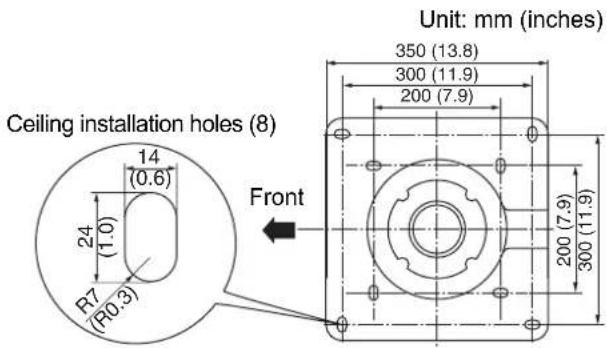
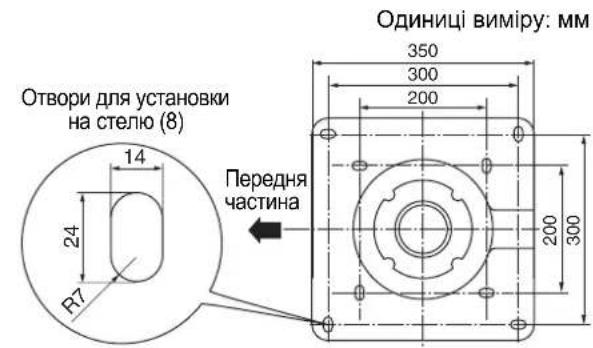
Refer to the instruction manual of the plasma display, and check the weight of the plasma display unit which will be fitted into the ceiling-hanging bracket. Refer to the outline drawing of the ceiling-hanging bracket shown on the right, and check the ceiling strength at the eight installation positions shown. If the strength at any of these positions is lacking, provide sufficient reinforcement.
2. Prepare the ceiling unit
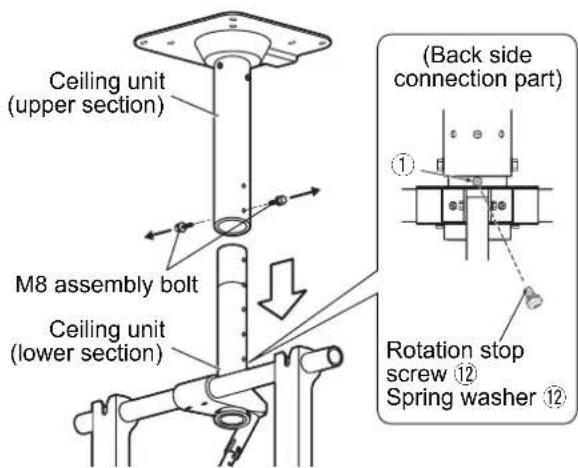
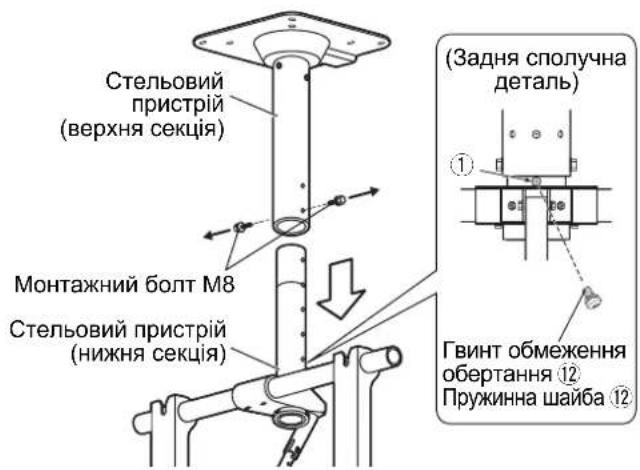
① Remove the protective sheets (8 sheets) for the bracket of the ceiling unit at four locations. ② Set a spring washer on the rotation stop screw ⑫, and fix at the position shown on the right. (Tightening torque: 1.5 to 1.8 N·m) ③ Remove the two M8 assembly bolts from the ceiling unit and separate the upper and lower sections of the unit. - Use the removed M8 assembly bolts when attaching the ceiling unit (lower section).
Note
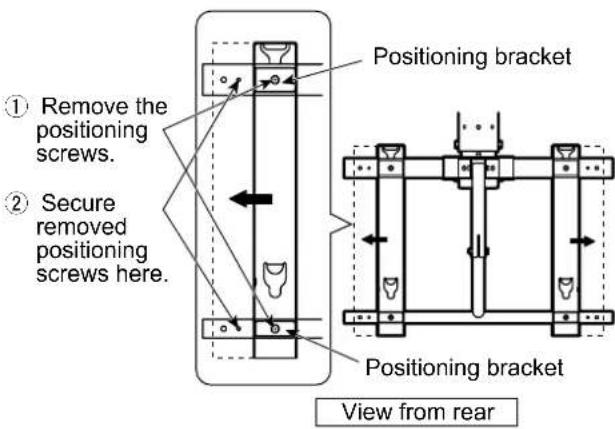
If using a 58-inch plasma display, adjust the attachment brackets as shown in the figure.
① Remove the positioning screws (top and bottom), and slide the positioning brackets and attachment brackets as indicated by the arrows. ② Align the screw holes, and secure with the removed screws.
(Adjust the opposite side in the same way.) (Tightening torque: 1.5 to 2.0 N·m)
3. Install the ceiling unit (upper section)
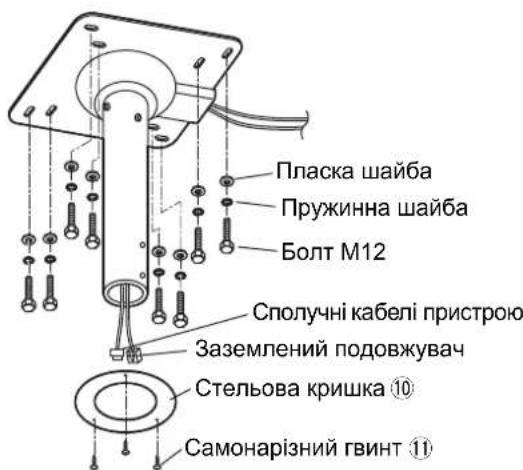
① Before installing the upper section on the ceiling, pass the wiring through the pipe as shown in the figure on the right. Use an earthed extension cord for the power cord (not supplied). Pass the other device connection cables through the same way. ② Make holes for inserting M12 bolts on the ceiling using a method appropriate for the ceiling structure. Install the upper section using a hex socket bolt (M12) (not supplied), flat washer and spring washer. * Attach a ceiling cover to the ceiling board if needed using three truss tapping screws.
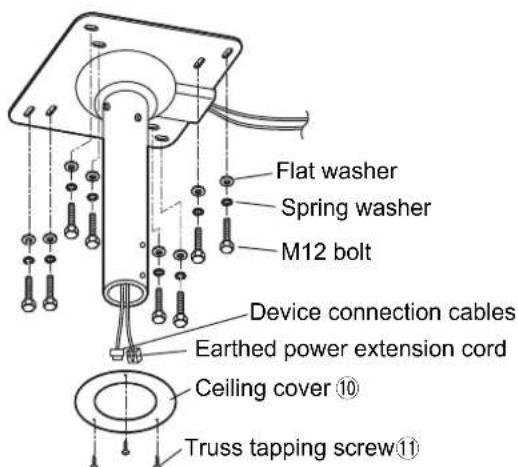
Notes
- Reinforce the ceiling if it is not strong enough.
- Use bolts appropriate for the ceiling material (not supplied).
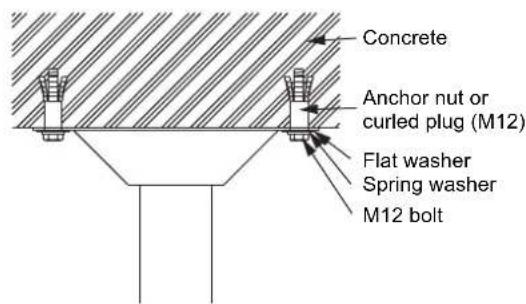
- Refer to the installing examples for wooden structure and concrete structure.
- Installing to a wooden structure (example) - Installing to a concrete structure (example)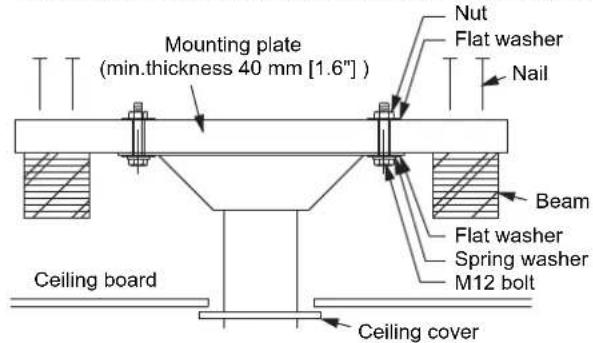
4. Attach the ceiling unit (lower section)
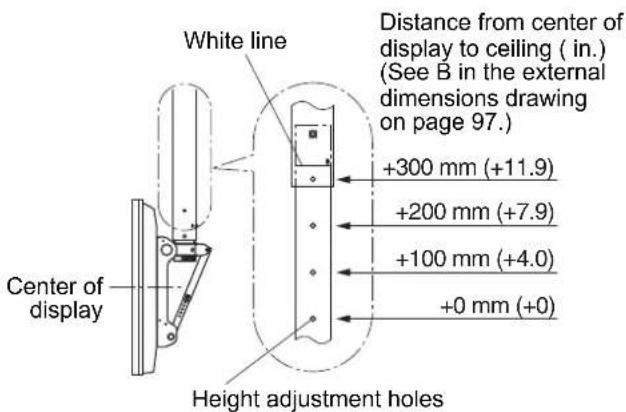
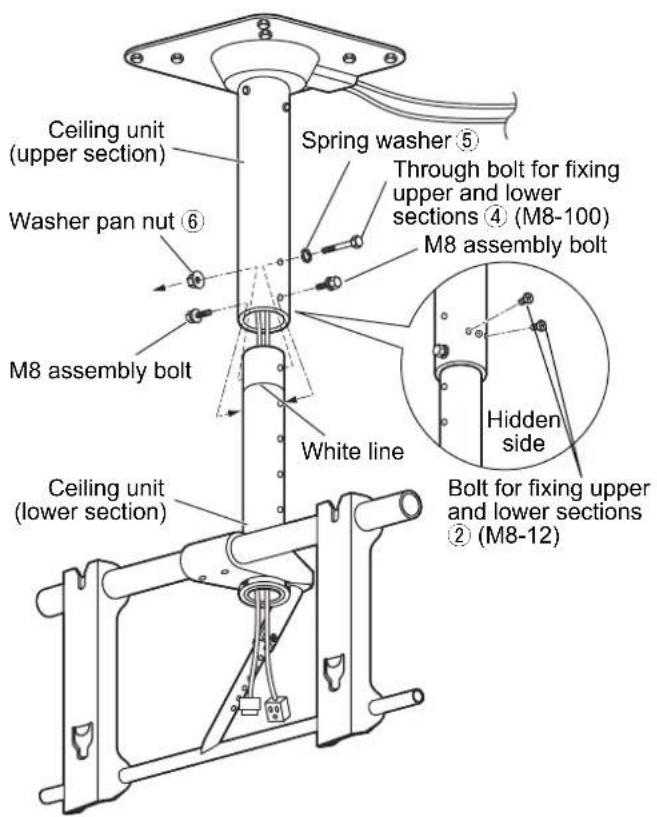
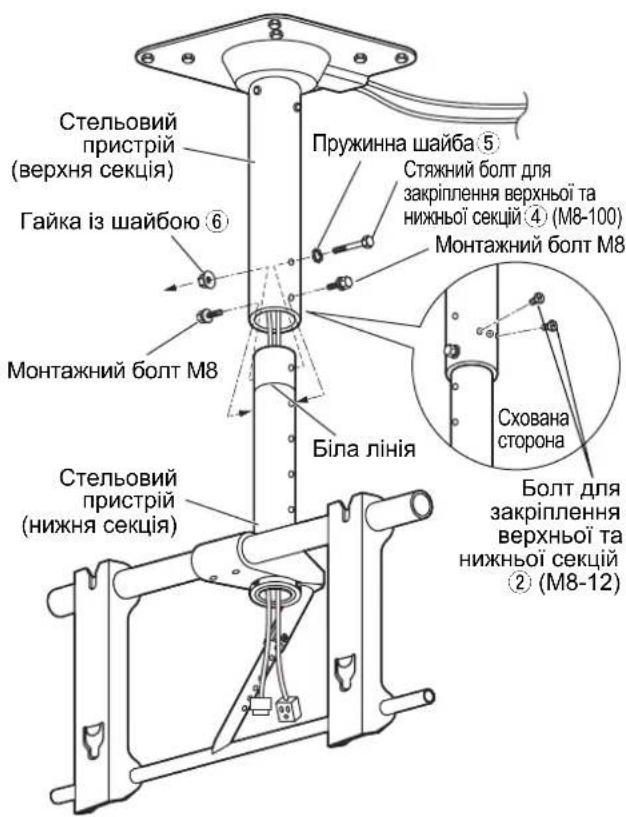
① Pass the cords and cables extending from the ceiling unit (upper section) through the pipe of the ceiling unit (lower section). ② Align the height adjustment holes of the lower section of the ceiling unit with the holes of the upper section. Pass a spring washer ⑤ over the through bolt for fixing upper and lower sections ④ and pass the bolt through the ceiling unit adjustment holes. Then, temporarily tighten with a washer pan nut ⑥.
Note
- No more than four height adjustment holes should be visible. (The white line should not be visible.)
③ Temporarily tighten the two M8 assembly bolts removed in unit preparation. ④ Tighten firmly using the two bolts for fixing upper and lower sections ②. Tighten further the bolts tightened temporarily in steps ② and ③. (Tightening torque: 8 to 10 N·m)
5. Preparing the plasma display
Attaching the insulation spacers
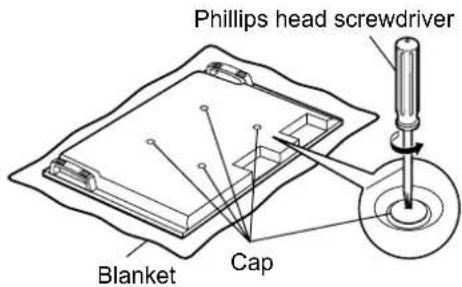
① Place the front surface of the plasma display on a clean cloth that has no dirt or foreign objects on it, and follow the procedure below. If the plasma display has any protruding parts, take care not to scratch or damage them. ② Remove the four caps from the plasma display using a Phillips head screwdriver.
Note
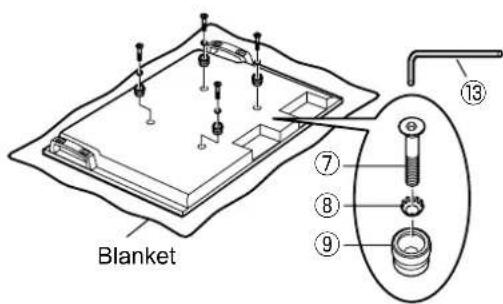
- Keep the caps that were removed in a safe place. (They will be required if you use the pedestal.) ③ Using the supplied Allen wrench ⑬, mount the supplied 4 Allen head countersunk screws ⑦, 4 dished toothed washers ⑧, and 4 insulation spacers ⑨ at the locations where the caps were removed as shown in the figure on the right. (Tightening torque: 3 to 4 N·m)
6. Mount the plasma display in the ceiling unit
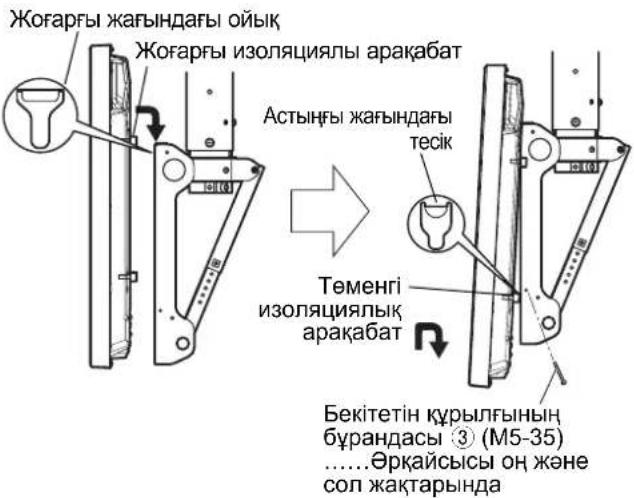
① Engage the upper insulation spacers of the plasma display with the cutouts of the ceiling-hanging bracket, and slowly lower the display into place. ② While lifting the plasma display slightly, insert the lower insulation spacers into the holes at the lower part of the ceiling-hanging bracket.
CAUTION
- If the plasma display is lifted too much, its top part will become disengaged from the ceiling-hanging bracket.
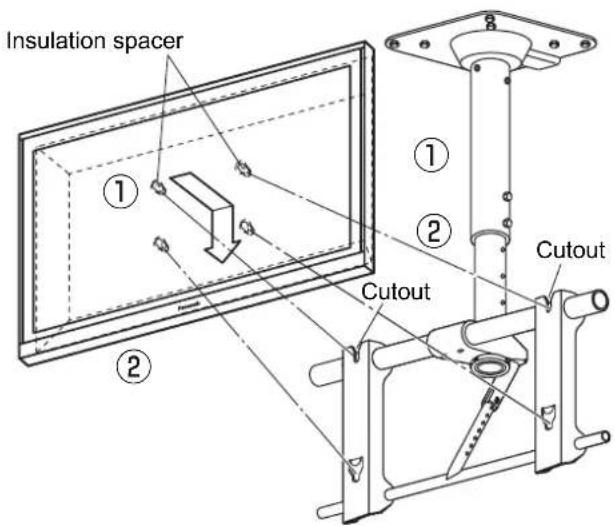
③ Lower the plasma display onto the ceiling unit. Fix two screws for securing unit to the holes for those screws on the left and right sides of the ceiling unit.
(Tightening torque: 1.5 to 2.0 N·m)
Notes
- Be sure to tighten the screws for securing unit ③ to their base to prevent the display from coming off.
- Lift the plasma display slightly, and check that it is firmly secured in place.
Screw for securing unit (M5-35)....One each on right and left sides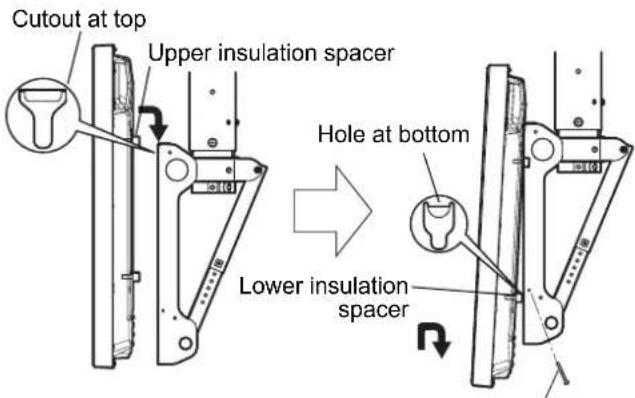
7. Adjust the ceiling-hanging bracket
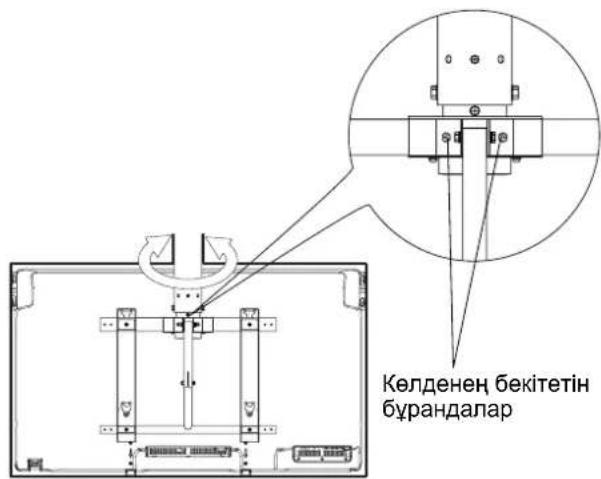
① Direction adjustment
Loosen the two horizontal fixing bolts. After adjusting the direction of the plasma display, retighten the loosened bolts to fix in place.
(Tightening torque: 6 to 7 N·m)
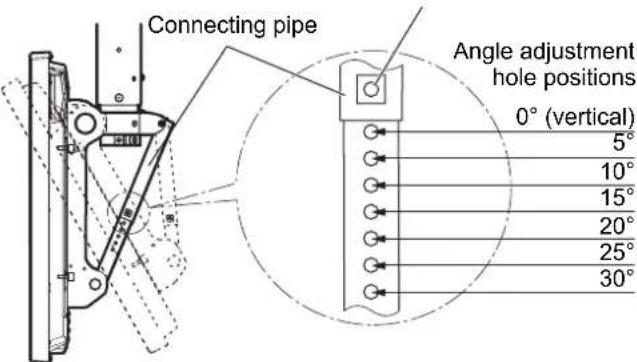
② Angle adjustment
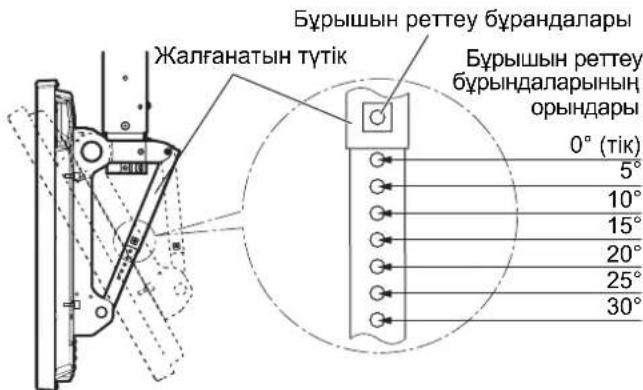
This ceiling unit can be placed in 7 angles from 0° to 30° in 5° increments.
If you wish to adjust the angle, remove the angle adjusting screws from the connecting pipe and select the corresponding position of the angle adjustment holes. Then reinsert the screws.
(Tightening torque: 3 to 4 N·m)
Angle adjusting screws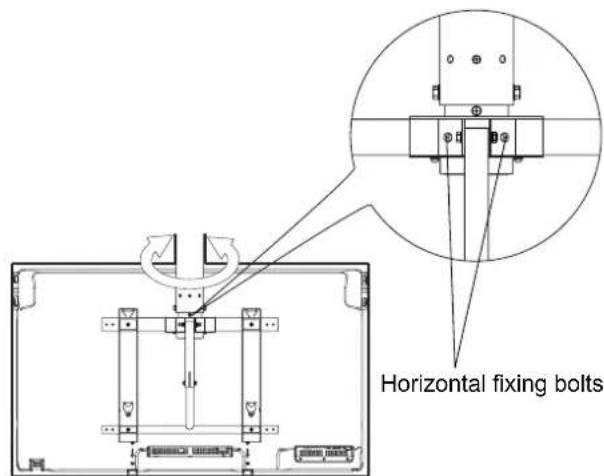
8. Measures to prevent falling
When taking measures to prevent the bracket from falling down, ensure the weight of the ceiling-hanging bracket can be supported.
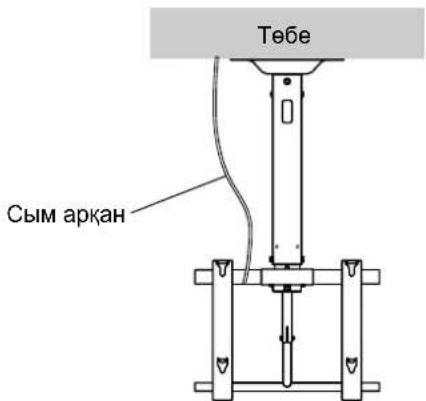
To ensure that persons in the immediate vicinity will not be struck in the event that the ceiling-hanging bracket slips out of position, use at least one wire rope with some slack to prevent the bracket from falling down.
- For measures to prevent bracket from falling down, use a commercially available wire rope.
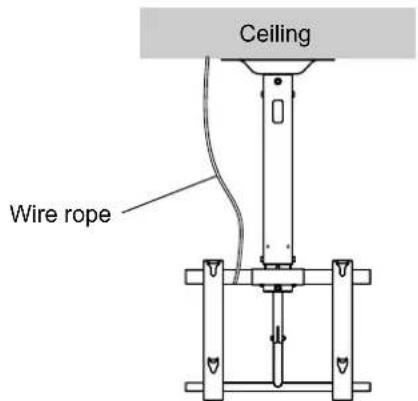
9. Gather the cables
- For details on wiring, see the instruction manual of the plasma display.
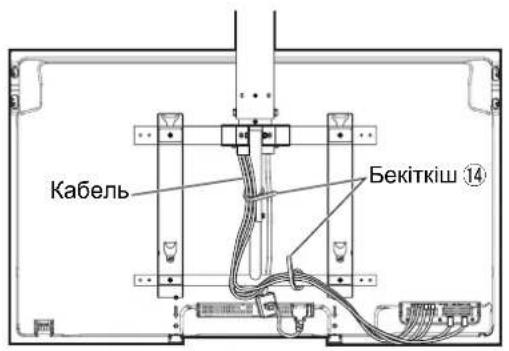
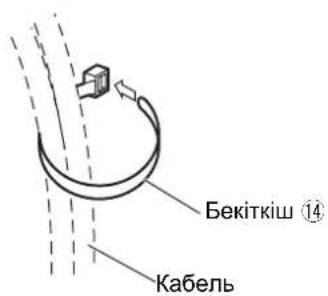
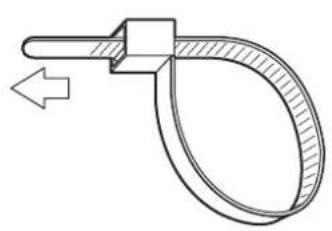
- Bundle the cords and cables connected to the terminals at the bottom of the back side of the plasma display, and secure them using the two clampers 14.
- Do not bunch the power cord together with other cords and cables.
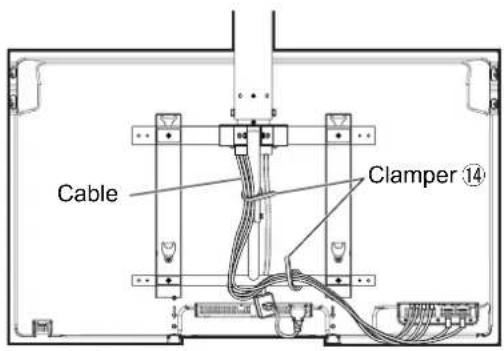
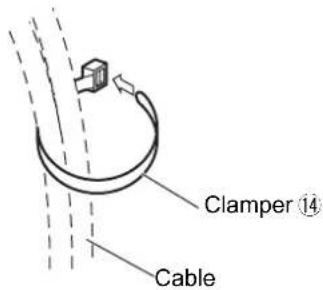
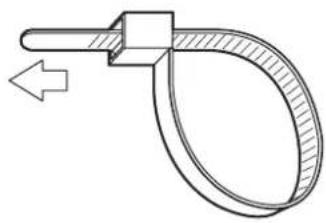
Removing the plasma display
- Return the ceiling unit angle to 0° , then remove the two screws for securing unit ③ on the left and right sides of the ceiling unit.
① Lift the lower part of the plasma display, ② pull outward ③ and lift upward.
Screw for securing unit (M5-35)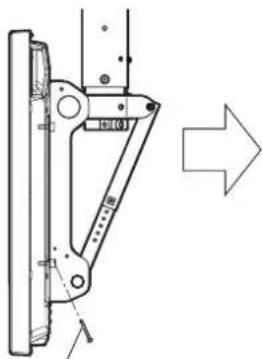
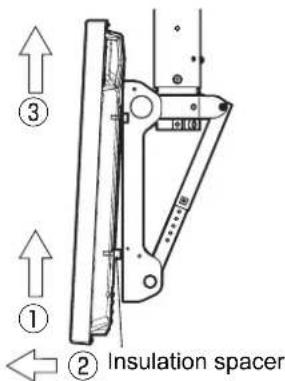
Warning
- This may cause damage or injury, and may also lead to injuries.
Perform the actions to prevent the ceiling bracket from falling.
- Incomplete compliance with installation rules may lead to injuries or even fatal outcomes.
WARNING
Do not use plasma displays that differ from those specified in the catalog.
Otherwise, the device may fall and be damaged, which may cause injury.
Do not install in places exposed to moisture, dust, smoke, or heat.
- This may have a negative effect on the plasma display and may lead to fire or electric shock.
Do not install with the screen facing up, sideways, or down.
- This may cause heat to accumulate inside the plasma display, which may cause a fire.
Do not place objects on the plasma display or ceiling bracket, and do not hang any objects from them.
The plasma display may fall, which may cause injury.
Do not block the ventilation holes. When using the ceiling bracket, do not cover the space around the plasma display.
Otherwise, heat may accumulate inside and cause a fire.
When assembling and installing the ceiling bracket, make sure to securely tighten the screws in all places.
- As a result of assembly performed improperly, the strength may be insufficient; the display may fall, and this will lead to its damage and cause injury.
Leave at least 10 cm of free space above, below, to the right and to the left of the plasma display. Also leave at least 7 cm behind the display.
- Failure to follow these recommendations may cause a fire.
Installation work on the plasma display must be performed by at least two people.
When mounting the bracket to the wall, you must use the supplied screws and anchors.
You must use the supplied screws and anchors appropriate for the wall material to securely mount the bracket.
Use the supplied screws and anchors for mounting the bracket.
9. Cable connections
Check the connectors on the plasma display. The plasma display has terminals on the back and side; connect the cables to the corresponding terminals. Do not connect cables together if the connectors do not match.
Do not install the bracket on walls that are not strong enough to support the display.
- If the wall is not strong enough for mounting, the bracket may fall.
Make sure that the wall where the bracket will be mounted is strong enough to support the display securely.
- If the wall strength becomes insufficient, the plasma display may fall and cause injury.
Do not disassemble or modify the bracket for wall mounting.
- This may cause damage to the display or injury from falling.
Use the included brackets for mounting the bracket to the wall.
- If you fail to perform the installation correctly, it can lead to injury or death.
WARNING
Use only the plasma displays listed in the catalog.
- Such a choice may cause damage or malfunction, and also poses a risk of injury.
Do not install the bracket in places with high humidity, dust, soot, water vapor, or high temperature.
These conditions can adversely affect the operation of the plasma display, and also become a cause of electric shock.
Do not install the plasma display with the screen facing up, on its side, or upside down.
- This can cause dust to accumulate inside the plasma display, which may result in damage.
Do not hang on the plasma display or the bracket mounting screws, and do not place any objects on it.
- Such actions can cause damage to the plasma display or result in injury.
Do not block the ventilation holes or openings. When using the bracket for mounting to the wall, do not cover the space around the plasma display.
- Such heat can accumulate and cause a fire.
During the work of assembling and mounting the bracket to the wall, make sure that all screws are fully tightened.
- If the assembly is not done properly, the strength may be insufficient; the display may fall, and this could lead to injury.
Provide at least 10 cm of free space above, below, and to the left and right of the plasma display.
Also maintain a minimum of 7 cm of free space behind the display.
- Failure to follow these recommendations may cause a fire.
All installation and dismantling work on the plasma display must be performed by qualified personnel.
- Such a plasma display may fall and cause injury.
Use the specified mounting brackets and parts.
- Failure to follow these instructions may cause the plasma display to fall from the ceiling and/or cause injury or damage.
Tighten the mounting screws and cable clamps so that they do not protrude inside the device.
- Failure to follow these instructions may cause electric shock due to contact with metal parts inside the ceiling.
When removing the plasma display, also remove the mounting bracket for the ceiling.
- Such a fall may cause injury or damage.
Handling Precautions
1) Carefully choose the location for installing the plasma display, as exposure to direct sunlight or heat (if placed near heating appliances or under direct sunlight) may cause discoloration or deformation. 2) Clean the display with a soft, dry cloth (cotton or flannel). If the screen is heavily soiled, first wipe off the dirt with a neutral detergent, then wipe with a dry cloth. Do not use volatile solvents such as benzene, thinner, or alcohol, as they may damage the surface. (For instructions on cleaning the plasma display, refer to the display manual. When using chemically treated cloths, read the instructions carefully first.) 3) Do not place the display on a slanted or unstable surface. This may cause the screen to fall and damage the mounting bracket on the wall. Ensure proper contact with rubber, plastic, or similar materials. (This may cause deterioration of the product's properties.) 4) The plasma display is made of glass. Do not apply excessive force to it or subject it to impacts.
WARNING:
This mounting bracket is intended for use only with Panasonic plasma displays (see pages 96-97). Use with other devices may result in improper installation, which could lead to injury.
WARNING: INCORRECT INSTALLATION OR MAINTENANCE. PANASONIC COMPANY IS NOT RESPONSIBLE FOR ANY PROPERTY DAMAGE AND/OR SERIOUS INJURY, INCLUDING DEATH, AS A RESULT OF INCORRECT INSTALLATION OR IMPROPER MAINTENANCE.
Check the presence of all parts and that their quantities correspond to those indicated.
| ①Стений постп (1) | ②БOLT Ддя зakрления ворхьои та похьои секши (2) M8 × 12 | ③ГВИNT Ддя зakрления постю (2) M5 × 35 | |
| ④Стений пост ддя зakрления ворхьои та похьои секши (1) M8 × 100 | ⑤Пруженинашайба (1) M8 | ⑥Гайka i3шайбю (1) M8 | |
| ⑦ГВИNT i3 утоныю толовкою i3 Вунтішим јechтграннkom (4) M8 × 32 | ⑧Увігунта зубачашайба (4) | ⑨IзOLЯЧИЕ на рокладka (4) | ⑩Стениь кришka (1) |
| ⑪Самонарізné ГВИNT (3) | ⑫ГВИNT обм_EXEGНЯ обертыня (1) M6 × 8 Пруженинашайба (1) M6 | ⑬Торець Клич (BXODITь до КOMПLEКТY) (1) | ⑭Фіксуний писстп (2) |
[The image is for illustrative purposes only.]
Follow the safety regulations during installation of the bracket and its attachment to the wall.
♠ This bracket is designed for mounting on a plasterboard ceiling for the purpose of adjustment. The bracket design does not allow its installation on other surfaces with the same reliability as on a ceiling. ♣ Ensure reliable operation of the plasma display to prevent malfunctions; do not install it in the following places. - Places with vibration or impact that may cause damage or injury. - Places with high-voltage equipment or power lines. - Near sources of magnetic fields, heat, or fire. - Places where condensation may form due to humidity or where flammable gases may be present. ♣ For installation, use the mounting method that best suits the structure and material of the surface on which the bracket is installed. ♣ For mounting the bracket to a ceiling of a specific structure, use the mounting method and structural elements that are most suitable for the material of the specific surface. Ensure proper ventilation so that the temperature does not exceed 40°C. Failure to do so may lead to overheating of the plasma display and cause malfunction. ♠ Keep a distance between the carpet or fabric on the floor so that during assembly and installation of the plasma display and the stand, they are not damaged. Tighten the screws firmly but do not overtighten. ♣ During installation work, pay attention to the safety of the work area. Do not install the plasma display directly under ceiling lights (such as fluorescent lamps, spotlights, or halogen lamps). This may cause deformation or discoloration of the plastic parts of the housing.
(Tightening torque: 1.5-2.0 N·m)
3. Installation of the ceiling unit (upper section)
① Before installing the upper section on the ceiling, check the curvature of the pipe as shown in the right figure. Use the grounding wire for the power supply (not included). Similarly, check the other cables of the device. ② Using a method that matches the ceiling structure, make holes in the ceiling for the bolts (M12). Install the upper section using bolts with hexagonal heads (M12) (not included), flat washers, and spring washers. * Attach the ceiling cover to the ceiling plate, using self-tapping screws if necessary ①.
Screw M4
Washer
There should be no more than four holes for adjustment. (The hole should not be visible.)
③ Tighten the bolts for installation of the M8 bolts, having previously prepared the device. ④ Tighten the two bolts as much as possible to secure the upper and lower sections. ② To tighten the bolts, first tighten them while performing steps 2 and 3. (Tightening torque: 8-10 N·m)
- CAUTION
- REQUESTS REGARDING HANDLING
- PRECAUTIONS FOR CEILING-HANGING BRACKET FITTING
- CHECKING THE STRENGTH OF THE INSTALLATION LOCATION
- PREPARE THE CEILING UNIT
- NOTE
- INSTALL THE CEILING UNIT (UPPER SECTION)
- NOTES
- ATTACH THE CEILING UNIT (LOWER SECTION)
- PREPARING THE PLASMA DISPLAY
- ATTACHING THE INSULATION SPACERS
- MOUNT THE PLASMA DISPLAY IN THE CEILING UNIT
- ADJUST THE CEILING-HANGING BRACKET
- MEASURES TO PREVENT FALLING
- GATHER THE CABLES
- REMOVING THE PLASMA DISPLAY
- WARNING
- CABLE CONNECTIONS
- HANDLING PRECAUTIONS
- FOLLOW THE SAFETY REGULATIONS DURING INSTALLATION OF THE BRACKET AND ITS ATTACHMENT TO THE WALL
- INSTALLATION OF THE CEILING UNIT (UPPER SECTION)
- WASHER
Brand : PANASONIC
Model : TYCE42PS20
Category : Television