USER MANUAL KD65AG9 SONY
To attach the Table-Top Stand, refer to the Setup Guide.
Table of Contents
IMPORTANT NOTICE 2
Safety Information 3
Protecting the TV Screen (OLED TV) 4
Remote Control and TV. 5
Connection Diagram 6
Installing the TV to the Wall 9
Using the optional Wall-Mount Bracket (SU-WL850 or SU-WL450) 9
Troubleshooting 11
Troubles and Solutions. 11
Specifications 12
Internet Connection and Data Privacy
This product connects to the internet during initial setup as soon as a network is connected in order to confirm internet connection, and later to configure the Home screen. Your IP address is used in these and all other internet connections. If you do not want your IP address be used at all, do not set-up the wireless internet function and do not connect an internet cable. Please refer to the privacy information presented in the set-up screens for further details of internet connections.
Introduction
Thank you for choosing this Sony product. Before operating the TV, please read this manual thoroughly and retain it for future reference.
Note
Before operating the TV, please read the "Safety Information" (page 3). - Read the supplied Safety Information for additional safety information. - Images and illustrations used in the Setup Guide and this manual are for reference only and may differ from the actual product.
Help
Find more troubleshooting and other useful information directly from your TV. Press HELP on the remote control to display a list of topics, or to search by keyword.
Help Guide (Manual)
For more detailed information, select [Help Guide] from the Help menu on your TV. You can also check the Help Guide from your PC or smartphone (information provided on the back cover of this manual).
Location of the identification label
Labels for the TV Model No., Production Date (year/month) and Power Supply rating are located on the rear of the TV or package. They can be found by removing the stand cover CD1
IMPORTANT NOTICE
Notice for Radio Equipment
Hereby, Sony Visual Products Inc. declares that the radio equipment types KD-77AG9, KD-65AG9, KD-55AG9 are in compliance with Directive 2014/53/EU. The full text of the EU declaration of conformity is available at the following internet address: http://www.compliance.sony.de/ Notice for customers: the following information is only applicable to equipment sold in countries applying EU directives. For this radio equipment, the following restrictions on putting into service or of requirements for authorization of use apply in AT, BE, HR, CY, CZ, DK, EE, FI, FR, DE, EL, HU, IE, IT, LV, LT, LU, NL, PL, PT, SK, SI, ES, SE, UK, IS, LI, NO, CH, BG, RO, TR, AL, BA, M MD, RS, ME, Kosovo : 5150 - 5350 MHz band is restricted to indoor operations only.
Installation/Set-up
Install and use the TV set in accordance with the instructions below in order to avoid any risk of fire, electric shock or damage and/or injuries.
Installation
- The TV set should be installed near an easily accessible mains socket.
- Place the TV set on a stable, level surface to prevent it from falling over and causing personal injury or property damage. Install the TV where it cannot be pulled, pushed, or knocked over.
- Install the TV so that the TV's Table-Top Stand does not protrude out from the TV stand (not supplied). If the TV's Table-Top Stand protrudes out from the TV stand, it may cause the TV set to topple over, fall down, and cause personal injury or damage to the TV.

- For safety reasons, be sure to attach the centre covers to the rear of the TV when the TV is in Table-Top condition.
- Only qualified service personnel should carry out wall-mount installations.
- For safety reasons, it is strongly recommended that you use Sony accessories, including:
Wall-Mount Bracket SU-WL850 Wall-Mount Bracket SU-WL450
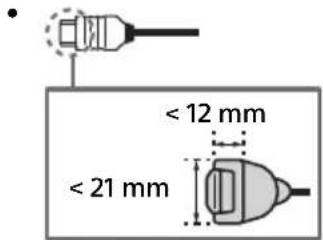
- Be sure to use the screws supplied with the Wall-Mount Bracket when attaching the Wall-Mount Bracket to the TV set. The supplied screws are designed as indicated by the illustration when measured from the attaching surface of the Wall-Mount Bracket. The diameter and length of the screws differ depending on the Wall-Mount Bracket model.
Use of screws other than those supplied may result in internal damage to the TV set or cause it to fall, etc.

Transporting
- Before transporting the TV set, disconnect all cables.
- Two or three people are needed to transport a large TV set.
- When transporting the TV set by hand, hold it as shown below. Do not put stress on the panel and the frame around the screen.
- When handling or mounting the TV set, do not lay down the TV.

- When transporting the TV set, do not subject it to jolts or excessive vibration.
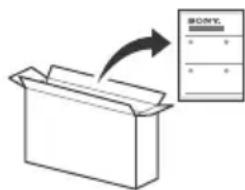
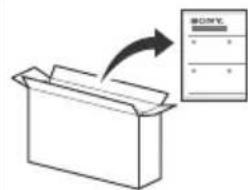
- When transporting the TV set for repairs or when moving, pack it using the original carton and packing material.
Topple prevention
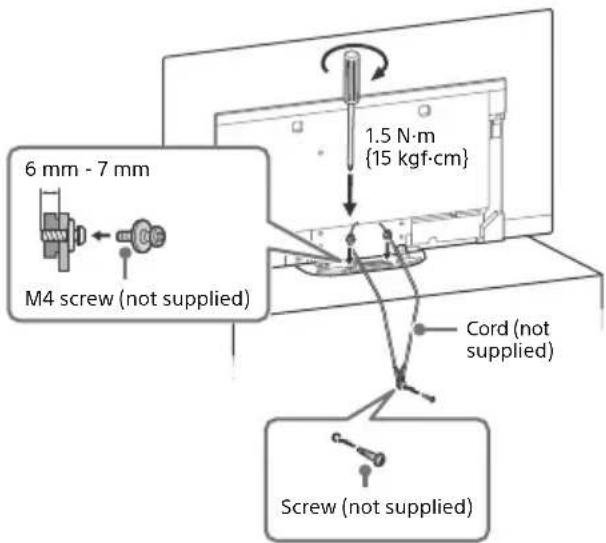
Ventilation
- Never cover the ventilation holes or insert anything into the cabinet.
- Leave space around the TV set as shown below.
- It is strongly recommended that you use a Sony Wall-Mount Bracket in order to provide adequate air circulation.
Installed on the wall
Leave at least this much space around the set.
Installed with stand

To ensure proper ventilation and prevent the collection of dirt or dust:
- Do not lay the TV set flat, install upside down, backwards, or sideways.
- Do not place the TV set on a shelf, rug, bed or in a closet.
- Do not cover the TV set with a cloth, such as curtains, or items such as newspapers, etc.
- Do not install the TV set as shown below.

Protecting the TV Screen (OLED TV)
Precautions to Protect the Screen from Damage
Image retention
OLED TVs are susceptible to image retention (burn-in) due to the characteristics of the materials used. Image retention may occur if images are displayed in the same location on the screen repeatedly or over extended periods of time. This is not a malfunction of the TV. Avoid displaying images that may cause image retention.
The following are examples of images that may cause image retention:
Content with black bars either on the top and bottom and/or the left and right sides of the screen (for example, letterboxed, 4:3 screen, standard definition). Static images such as photos. Video games that might have static content in some part of the screen. On-screen menus, programme guides, channel logos, etc. Static content from applications. On-screen tickers, such as those used for news and headlines.
To reduce the risk of image retention:
- Sony recommends that you turn off the TV normally by pressing the power button on the remote control or the TV.
- Fill the screen by changing [Wide mode] to eliminate the black bars. Select [Wide mode] other than [Normal].
- Turn off the OSD (On Screen Display) by pressing the button, and turn off the menus from connected equipment. For details, refer to the instruction manuals for the connected equipment.
- Avoid displaying static images with bright colours (including white), clocks, or logos on any portion of the screen.
- Set the picture settings based on the ambient conditions. The Standard Picture is recommended for home use and when viewing content that often displays station logos, etc.
The TV has the following features to help reduce/prevent image retention.
Panel refresh
Panel refresh will automatically run to adjust the uniformity of the TV screen after it has been in use for long periods of time. Panel refresh can also be performed manually and should only be used if image retention is very noticeable or you see the following message: [Panel refresh did not finish...]
Caution:
- The Panel refresh function may affect the panel. As a reference, perform the Panel refresh only once a year, do not perform it more than once a year as it may affect the usable life of the panel.
- Panel refresh takes about one hour to complete.
- A white line may be displayed on the screen during the Panel refresh, this is not a malfunction of the TV.
- Panel refresh will only work when the room temperature is between 10°C and 40°C.
Pixel shift
Automatically moves the image on the screen to prevent image retention.
Other feature
The screen brightness is automatically reduced when displaying still images, clocks, bright colours or logos etc.
Remote Control and TV
The remote control shape, location, availability and function of remote control buttons may vary depending on your region/country/TV model.

1 (Microphone): Use voice search. (e.g., Search various content by voice.)*1
▲/▼/◀/▶ (Navigation D-Pad): On screen menu navigation and selection.
TV: Switch to a TV channel or input and display the TV menu.
2 (TV standby) Number buttons
+7/2 (Info / Text re information).
O (Text): Display text information.
3 Google Play
NETFLIX (Only on limited region/country/TV model) Colour buttons
4 GUIDE: Display the digital programme guide, or EPG of cable/satellite box*2.
REC LIST: Display the Rec list of USB HDD, or DVR*2.
-> (Input select): Display and select the input source, etc.
Quick settings): Display Quick Settings.
BACK/ HOME
5 +/- (Volume)
(Jump) (Mute)
Hint
The accessibility shortcut service can be turned on or off by pressing and holding.
CH +/- / E /
In TV mode: Select the channel.
In Text mode: Select the next (2) or previous (3) page.
6 AUDIO: Select the sound of multilingual source or dual sound (depending on programme source).
(Subtitle setting)
HELP: Display the Help menu.
←/→/→/11
REC: Record the currently viewed programme on the USB HDD, or DVR*2.
EXIT

(Power)
Remote Control sensor / Light sensor / Illumination LED
Built-in MIC*3: To enable the built-in MIC, press the MIC button on the remote control and follow the on-screen instructions. For more information, refer to the Help Guide.
*1 The voice search requires an Internet connection. *2 [Cable/Satellite box setup] setting is required (only on limited region/country/TV model). For more information, refer to the Help Guide. *3 Only on limited region/country/language. Standby power consumption will increase when the voice search with the built-in MIC is enabled.
Connection Diagram
For more information on connections, refer to the Help Guide by pressing HELP on the remote control.
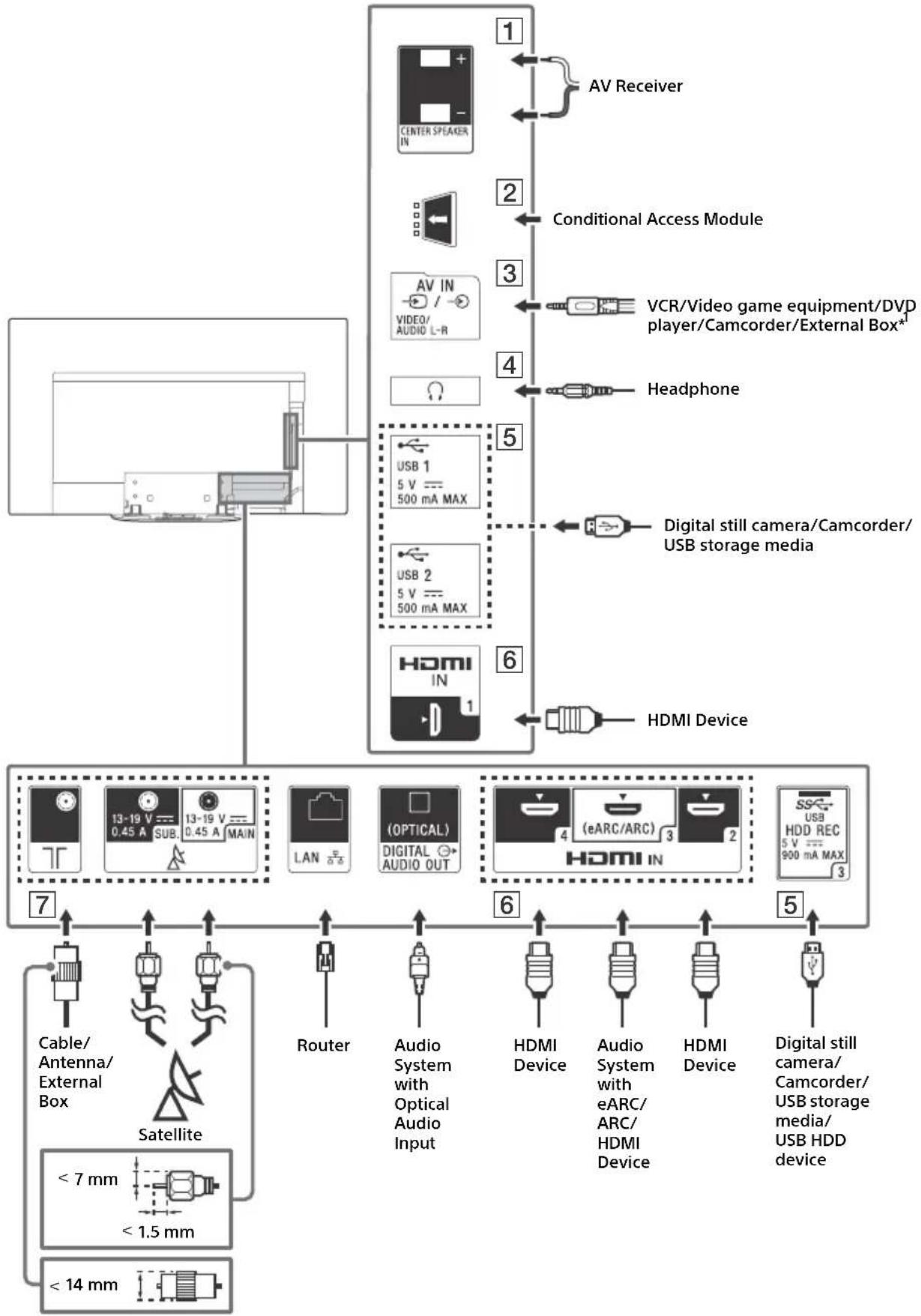
1 CENTER SPEAKER IN
To use your TV speakers as the centre speaker, connect the output of your AV receiver to the CENTER SPEAKER IN on your TV. - Before connecting cables, disconnect the mains lead of both TV and AV receiver. Make sure the [Speakers] is set to [Audio system].

To prevent hiss when not connecting the CENTER SPEAKER IN to an AV receiver, disable [TV centre speaker mode]. For details, refer to the Help Guide.
2 CAM (Conditional Access Module)
- Provides access to pay TV services. For details, refer to the instruction manual supplied with your CAM.
- Do not insert the smart card directly into the TV CAM slot. It must be fitted into the Conditional Access Module provided by your authorised dealer.
- CAM is not supported in some countries/ areas. Check with your authorised dealer.
- A CAM message may appear when you switch to a digital programme after using the Internet video.
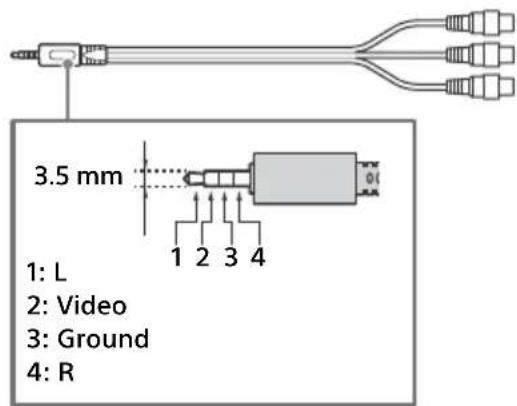
3 → / → AVIN
- For a composite connection, use an Analogue Extension Cable (not supplied).
4 (Headphone)
Supports 3-pole stereo mini jack only. - You cannot output sound from both the headphone and the TV speakers at the same time.
5 USB 1/2, USB3 (HDD REC)*
2
- Connecting a large USB device may interfere with other connected devices beside it.
- When connecting a large USB device, connect to the USB 1 port.
- Connect a USB HDD device to the USB 3 port (blue).
HDMI IN 1/2/3/4
- The HDMI interface can transfer digital video and audio on a single cable.

To enjoy high-quality 4K 50p/60p content, connect a Premium High Speed HDMI cable and set the [HDMI signal format] to [Enhanced format]. Do this setting individually for each connected HDMI IN terminal. For details of supported formats, refer to the "Specifications" in this manual (pages 12-13). - HDMI IN 3 eARC/ARC (Enhanced Audio Return Channel/Audio Return Channel): Connect your audio system to the HDMI IN 3 to route TV audio to your audio system. An audio system that supports HDMI eARC/ARC can send video to the TV and receive audio from the TV via the same HDMI cable. If your audio system does not support HDMI eARC/ARC, an additional connection with DIGITAL AUDIO OUT (OPTICAL) is necessary. - Use an HDMI cable with Ethernet to connect an audio system with eARC.

7 (RF input), (Satellite input)
- Connections for terrestrial/cable and satellite. Connection steps: SUB. → MAIN → Antenna
- For the SUB. jack, connect only when using twin tuner mode, except for Single Cable Distribution EN50494.
1 For an external device that has only SCART AV OUT, use a SCART-RCA adaptor and Analogue Extension Cable. 2 Only on limited region/country/TV model.
Note
- You cannot attach the side cover if cables are connected to the side terminal.
- Be sure to store the side cover in a safe place for future use.
Installing the TV to the Wall
Using the optional Wall-Mount Bracket (SU-WL850 or SU-WL450)
To Customers:
For product protection and safety reasons, Sony strongly recommends that installation of your TV be performed by Sony dealers or licensed contractors. Do not attempt to install it yourself.
To Sony Dealers and Contractors:
Provide full attention to safety during the installation, periodic maintenance and examination of this product.
This TV's instruction manual only provides the steps to prepare the TV for Wall-Mount installation before it is installed on the wall.
For instructions on Wall-Mount Bracket installation, see the Installation Information (Wall-Mount Bracket) on the product page for your TV model.
www.sony.eu/support/
Preparing for Wall-Mount Installation
Use the Wall-Mount Bracket SU-WL850 (not supplied) or SU-WL450 (not supplied) to install the TV to the wall.
Make sure to attach the Table-Top Stand before installing the TV to the wall by referring to the Setup Guide.
- Prepare the TV for the Wall-Mount Bracket before making cable connections.
- Follow the instruction guide provided with the Wall-Mount Bracket for your model. Sufficient expertise is required in installing this TV, especially to determine the strength of the wall for withstanding the TV's weight.
- Be sure to entrust the attachment of this product to the wall to Sony dealers or licensed contractors and pay adequate attention to safety during the installation. Sony is not liable for any damage or injury caused by mishandling or improper installation.
- The screws for Wall-Mount Bracket are not supplied.
- Be sure to store the unused screws and Table-Top Stand in a safe place until you are ready to attach the Table-Top Stand. Keep the screws away from small children.
1 Remove the stand cover and terminal covers.
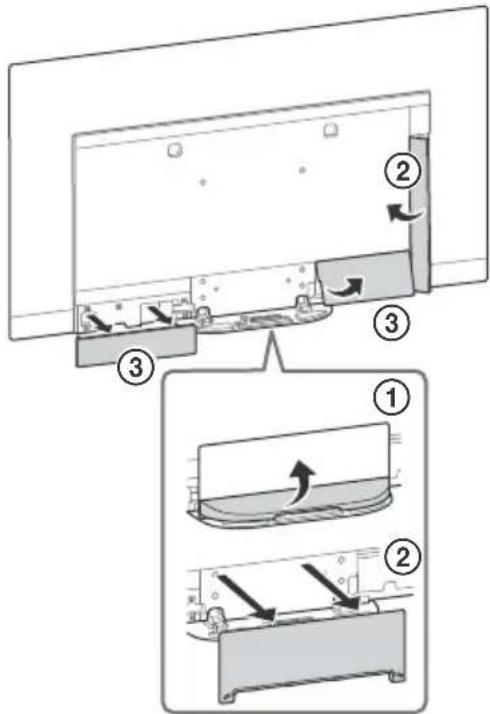
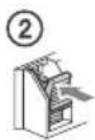
2 Remove the screws from the rear of the TV.

Troubleshooting
General troubleshooting for issues like: black screen, no sound, frozen picture, TV does not respond, or network is lost, do the following steps.
1 Restart your TV by pressing the power button on the remote control until a message appears. The TV will restart. If the TV does not recover, try unplugging the mains lead. Then press the power button on the TV and wait for two minutes, and plug in the mains lead. 2 Refer to the Help menu by pressing HELP on the remote control. 3 Connect your TV to the Internet and perform a software update. Sony recommends you to keep your TV software updated. Software updates provide new features and performance improvements. 4 Visit Sony support website (information provided on the front cover of this manual).
When you plug in the TV, the TV may not be able to turn on for a while even if you press the power button on the remote control or the TV.
It takes time to initialize the system. Wait for about one minute, then operate it again.
Troubles and Solutions
When the illumination LED is flashing in red.
- Count how many times it flashes (interval time is three seconds).
Reboot the TV by disconnecting the mains lead until the illumination LED stopped flashing in red, then turn on the TV.
If the problem persists, disconnect the mains lead, and contact your dealer or Sony service centre with the number of times the illumination LED flashes.
Terrestrial/cable service cannot be received.
- Check the antenna (aerial)/cable connection and booster settings.
- Select terrestrial/cable service by pressing TV on the remote control, and then select [Digital] if the broadcasting service is not displayed.
- Terrestrial signal might be suppressed if there is a strong signal supplied nearby. Set [LNA (CH---)] to [Off] in digital tuning settings.
- After moving to a new house or trying to receive new services, attempt a service search by selecting [Digital tuning].
Satellite service cannot be received.
- Check the satellite cable connection.
- When [No signal. LNB overload detected...] message is displayed, unplug the mains lead. Then, ensure the satellite cable is not damaged and the satellite signal line is not short-circuited in the satellite connector.
The remote control does not function.
The parental lock for broadcast password has been forgotten.
- Enter 9999 for the PIN code and select [Change PIN code].
The TV surrounds become warm.
- When the TV is used for an extended period, the TV surrounds become warm. You may feel hot when touching there by the hand.
The screen becomes darker while watching TV.
- If the whole image or part of the image remains still, the screen brightness will be gradually reduced to prevent image retention. This is not a malfunction of the TV.
You are concerned about image retention.
If the same image is displayed repeatedly or for long periods of time, image retention may occur. To reduce image retention, we recommend that you turn off the TV normally by pressing the power button on the remote control or the TV.
Note
- Perform Panel refresh manually only when image retention is particularly noticeable. As a reference, perform it only once a year. Avoid performing it more than once a year because it may affect the usable life of the panel.
- Images that include clocks, logos and bright colours (including white) easily cause image retention. Avoid displaying these types of images for long periods of time, otherwise image retention may occur.
A white line appears on the screen.
- Panel refresh automatically runs after the TV has been used for long periods of time to reduce image retention. Panel refresh starts after the TV is turned off and takes about one hour to complete. A white line may be displayed on the screen during the Panel refresh. This is not a malfunction of the TV.
The message [Panel refresh did not finish...] is displayed.
Panel refresh automatically runs after the TV has been used for long periods of time to reduce image retention. If the TV is turned on, the mains lead is unplugged, or the room temperature falls outside of the range between 10°C and 40°C during the Panel refresh, the process will not be completed and this message will appear.
- If Panel refresh started automatically, it will restart when you turn off the TV with the remote control. If Panel refresh initiated manually, you must select it again.
Specifications
System
Panel system
OLED (Organic Light Emitting Diode) Panel
TV system
Depending on your country/area selection/TV model
Analogue: B/G, D/K, I
Digital: DVB-T/DVB-C
DVB-T2
Satellite+1: DVB-S/DVB-S2
Colour system
PAL/SECAM/NTSC3.58 (Video only)/NTSC4.43 (Video only)
Channel coverage
Depending on your country/area selection/TV model
Analogue: UHF/VHF/Cable
Digital: UHF/VHF/Cable
Satellite*1: IF Frequency 950-2,150 MHz
Sound output
20W+20W+10W+10W
Wireless technology
Protocol IEEE802.11ac/a/b/g/n
(IEEE802.11ac may not be available depending on countries/
regions.)
Bluetooth Version 4.2
Frequency band(s)
| Wireless LAN (IEEE802.11ac/a/b/g/n) |
| Frequency range Output | Power |
| 2400 - 2483.5 MHz < 20.0 dBm | |
| 5150 - 5250 MHz < 23.0 dBm | |
| 5250 - 5350 MHz < 20.0 dBm | |
| 5470 - 5725 MHz < 20.0 dBm | |
| 5725 - 5850 MHz < 13.9 dBm | |
| Bluetooth |
| Frequency range Output | Power |
| 2400 - 2483.5 MHz < 10.0 | dBm |
RMF-TX600E
| Bluetooth |
| Frequency range Output | Power |
| 2400 - 2483.5 MHz < 10.0 | dBm |
Software version
This radio equipment is intended to be used with the approved version(s) of software that are indicated in the EU Declaration of Conformity.
Press HELP on the remote control to know the software version.
Remote control:
Select [Remote control] → [Software version] from [Settings].
For more information, refer to the Help Guide.
The software loaded on this radio equipment is verified to
comply with the essential requirements of the Directive 2014/53/EU.
Antenna (aerial)/cable
75 ohm external terminal for VHF/UHF
Satellite antenna*1
Female F Type Connector, 75 ohm.
DiSEqC 1.0, LNB 13 V/18 V & 22 kHz tone, Single Cable
Distribution EN50494.
AVIN
Video/Audio input (mini jack)
HDMI IN 1/2/3/4 (support 4K resolution, HDCP 2.3-
compatible)
Video:
4096×2160p (50, 60 Hz)*2, 4096×2160p (24 Hz)*2
3840×2160p (50, 60 Hz)*3, 3840×2160p (24, 25, 30 Hz),
1080p (30, 50, 60, 100, 120 Hz), 1080/24p, 1080i (50, 60 Hz),
720p (30, 50, 60 Hz), 720/24p, 576p, 480p, PC Formats*
Audio:
In eARC (Enhanced Audio Return Channel) mode
Refer to the Help Guide for details.
Except eARC mode
5.1 channel linear PCM: 32/44.1/48/88.2/96/176.4/192 kHz
16/20/24 bits, Dolby Digital, Dolby Digital Plus, DTS
eARC/ARC (Enhanced Audio Return Channel/Audio Return
Channel) (HDMI IN 3 only)
In eARC mode*5
Refer to the Help Guide for details.
In ARC mode
Two channel linear PCM: 48 kHz 16 bits, Dolby Digital, Dolby
Digital Plus, DTS
DIGITAL AUDIO OUT (OPTICAL)
Digital optical jack (Two channel linear PCM:
48 kHz 16 bits, Dolby Digital, DTS)
(Stereo mini jack)
Headphone
1,2-3(HDDREC)* 6
USB device port (SS USB HDD device for REC feature)
USB port 1 and 2 support High Speed USB
(USB 2.0)
USB port 3 supports Super Speed USB (USB 3.1 Gen 1)

CAM (Conditional Access Module) slot
LAN
10BASE-T/100BASE-TX connector (Depending on the operating environment of the network, connection speed may differ. The communication rate and quality are not guaranteed.)
CENTER SPEAKER IN
Centre speaker input terminal
Others
Optional accessories
Wall-Mount Bracket: SU-WL850
Wall-Mount Bracket: SU-WL450
Operating temperature
0°C - 40°C
Operating humidity
10% - 80% RH (non-condensing)
Power, Product Fiche and others
Power requirements
220V-240VAC,50Hz
Energy Efficiency Class
KD-77AG9:A
KD-65AG9:B
KD-55AG9:B
Screen size (measured diagonally) (Approx.)
KD-77AG9: 194.7 cm / 77 inches
KD-65AG9: 163.9 cm / 65 inches
KD-55AG9:138.8 cm / 55 inches
Power consumption
In [Standard] mode
KD-77AG9: 211 W
KD-65AG9: 169 W
KD-55AG9: 132 W
In [Vivid] mode
KD-77AG9: 674 W
KD-65AG9: 490 W
KD-55AG9: 394 W
Annual energy consumption
KD-77AG9: 293 kWh per year
KD-65AG9: 234 kWh per year
KD-55AG9: 183 kWh per year
Standby power consumption*8,9
KD-77AG9: 0.50 W (29 W in software/EPG update mode)
KD-65AG9: 0.50 W (27 W in software/EPG update mode)
KD-55AG9: 0.50 W (27 W in software/EPG update mode)
Display resolution
3,840 dots (horizontal) x 2,160 lines (vertical)
Output Rating
USB 1/2
5V 750mA MAX
USB3
5V 900mA MAX
Dimensions (Approx.) (w x h x d)
with Table-Top Stand
KD-77AG9: 172.1 x 100.1 x 30.2 cm
KD-65AG9: 144.7 x 83.8 x 25.5 cm
KD-55AG9: 122.6 x 71.4 x 25.5 cm
without Table-Top Stand
KD-77AG9: 172.1 x 99.6 x 4.9 cm
KD-65AG9: 144.7 x 83.4 x 4.0 cm
KD-55AG9: 122.6 x 71.0 x 4.0 cm
Mass (Approx.)
with Table-Top Stand
KD-77AG9: 39.7 kg
KD-65AG9: 24.8 kg
KD-55AG9: 22.3 kg
without Table-Top Stand
KD-77AG9: 35.3 kg
KD-65AG9: 21.2 kg
KD-55AG9: 18.7 kg
*1 Not all TV sets have DVB-T2 or DVB-S/S2 technology or a satellite antenna terminal.
*2 When 4096 x 2160p is input and [Wide mode] is set to [Normal], the resolution is displayed as 3840 x 2160p. To display 4096 x 2160p, set [Wide mode] to [Full 1] or [Full 2].
*3 To support 18 Gbps, set [HDMI signal format] to [Enhanced format].
*4 Refer to the Help Guide for details.
*5 eARC mode is active when [eARC mode] is set to [Auto], [Speakers] is set to [Audio system] and an eARC compatible audio system is connected.
*6 Only on limited region/country/TV model.
*7 Energy consumption in kWh per year, based on the power consumption of the television operating 4 hours per day for 365 days. The actual energy consumption will depend on how the television is used.
*8 Specified standby power is reached after the TV finishes necessary internal processes.
*9 Standby power consumption will increase when your TV is connected to the network.
Note
- Do not remove the dummy card or cover (availability depends on TV model) from TV CAM (Conditional Access Module) slot other than to insert a smart card fitted in CAM.
- Optional accessories availability depends on countries/region/ TV model/stock.
- Design and specifications are subject to change without notice.
Notes on Digital TV function
- Digital TV (DVB terrestrial, satellite and cable), interactive services and network functions may not be available in all countries or areas. Some functions might not be enabled or might not operate correctly with some providers and network environments. Some TV service providers may charge a fee for their services.
This TV supports digital broadcasting using MPEG-2, H.264/ MPEG-4 AVC and H.265/HEVC codec, but compatibility with all operator/service signals, which may change over time, cannot be guaranteed.
- The terms HDMI and HDMI High-Definition Multimedia Interface, and the HDMI Logo are trademarks or registered trademarks of HDMI Licensing Administrator, Inc. in the United States and other countries.
- Dolby, Dolby Vision, Dolby Audio, and the double-D symbol are trademarks of Dolby Laboratories. Manufactured under license from Dolby Laboratories. Confidential unpublished works. Copyright © 1992-2015 Dolby Laboratories. All rights reserved.
- "BRAVIA", and BRAVIA Sync are trademarks or registered marks of Sony Corporation.
- Gracenote, the Gracenote logo and logotype, "Powered by Gracenote" logo are either registered trademarks or trademarks of Gracenote, Inc. in the United States and/or other countries.
- Vewd® Core. Copyright 1995-2019 Vewd Software AS. All rights reserved.
- Google, Google Play, Chromecast, YouTube, Android TV and other related marks and logos are trademarks of Google LLC. Wi-Fi, Wi-Fi Alliance and Wi-Fi Direct are registered trademarks of Wi-Fi Alliance. The Wi-Fi CERTIFIED™ Logo is a certification mark of Wi-Fi Alliance.
- For DTS patents, see http://patents.dts.com. Manufactured under license from DTS, Inc. DTS, the Symbol, & DTS and the Symbol together are registered trademarks, and DTS Digital Surround is a trademark of DTS, Inc. © DTS, Inc. All Rights Reserved.
- The Bluetooth® word mark and logos are registered trademarks owned by the Bluetooth SIG, Inc. and any use of such marks by Sony Corporation is under license. Other trademarks and trade names are those of their respective owners.
- Netflix is a registered trademark of Netflix, Inc.
- DiSEqCTM is a trademark of EUTELSAT. This TV supports DiSEqC 1.0. This TV is not intended for controlling motorized antennas.
- TUXERA is a registered trademark of Tuxera Inc. in the US and other countries.
- USB-IF SuperSpeed USB Trident logo is a registered trademark of USB Implementers Forum, Inc. All other trademarks are the property of their respective owners.
7 (RF input), A (Satellite input)
Analogue: UHF/VHF/Cable
eARC/ARC (Enhanced Audio Return Channel/Audio Return Channel) (HDMI IN 3 only)
In eARC mode
DIGITAL AUDIO OUT (OPTICAL)
10% - 80% RH (without condensation)
KD-77AG9: 194.7 cm / 77 inches
KD-65AG9: 163.9 cm / 65 inches
KD-55AG9: 138.8 cm / 55 inches
KD-55AG9: 122.6 × 71.4 × 25.5 cm
Without table stand
KD-77AG9: 172.1 × 99.6 × 4.9 cm
KD-65AG9: 144.7 × 83.4 × 4.0 cm
KD-55AG9: 122.6 × 71.0 × 4.0 cm
Weight (approx.)
TV system
Digital: UHF/VHF/Cable
DIGITAL AUDIO OUT (OPTICAL)
Optical digital audio input (two-channel linear PCM: 48 kHz 16 bits, Dolby Digital, DTS)
(mini stereo connector)
Headphone
6
1,2,3(HBDREC)
USB device port. (USB HDD device for REC function)
10% - 80% RH (without condensation)
KD-55AG9: 122.6 x 71.4 x 25.5 cm
DIGITAL AUDIO OUT (OPTICAL)
KD-55AG9: 122.6 x 71.4 x 25.5 cm
OLED (Organic Light Emitting Diode) panel
TV standard
DIGITAL AUDIO OUT (OPTICAL)
KD-55AG9: 138.8 cm / 55 inches
KD-55AG9: 122.6 × 71.4 × 25.5 cm
without table stand
KD-77AG9: 172.1 × 99.6 × 4.9 cm
KD-65AG9: 144.7 × 83.4 × 4.0 cm
KD-55AG9: 122.6 × 71.0 × 4.0 cm
Weight (approx.)
with table stand
KD-77AG9: 39.7 kg
KD-65AG9: 24.8 kg
KD-55AG9: 22.3 kg
without table stand
KD-77AG9: 35.3 kg
KD-65AG9: 21.2 kg
KD-55AG9: 18.7 kg
Install the television on the wall
Use the optional Wall-Mount Bracket (SU-WL850 or SU-WL450)
For patients:
eARC/ARC (Enhanced Audio Return Channel/Audio Return
Channel) (Only on HDMI IN 3 models)
In eARC mode
DIGITAL AUDIO OUT (OPTICAL)
Optical digital audio output (Linear PCM 2 channels: 48 kHz 16 bits, Dolby Digital, DTS)
KD-55AG9: 122.6 × 71.4 × 25.5 cm
without table-top stand
KD-77AG9: 172.1 × 99.6 × 4.9 cm
KD-65AG9: 144.7 × 83.4 × 4.0 cm
KD-55AG9: 122.6 × 71.0 × 4.0 cm
Weight (Approx.)
4096 × 2160p (50, 60 Hz)**, 4096 × 2160p (24 Hz)*, 3840 × 2160p (50, 60 Hz)*, 3840 × 2160p (24, 25, 30 Hz), 1080p (30, 50, 60, 100, 120 Hz), 1080/24p, 1080i (50, 60 Hz), 720p (30, 50, 60 Hz), 720/24p, 576p, 480p, PC formats
Audio:
eARC/ARC (Enhanced Audio Return Channel/Audio Return Channel) (Solo HDMI IN 3)
In eARC mode*5
DIGITAL AUDIO OUT (OPTICAL)
KD-55AG9: 122.6 x 71.4 x 25.5 cm
KD-55AG9: 122.6 x 71.0 x 4.0 cm
Approximate weight
See the Help Guide for more information.
eARC/ARC (Enhanced Audio Return Channel/Audio Return
Channel) (HDMI IN 3 only)
In eARC mode*
See the Help Guide for more details.
In ARC mode
DIGITAL AUDIO OUT (OPTICAL)
KD-65AG9: 163.9 cm / 65 inches
KD-55AG9: 138.8 cm / 55 inches
Energy consumption
In [Standard] mode
KD-77AG9: 211 W
KD-65AG9: 169 W
KD-55AG9: 132 W
In [Daylight] mode
KD-77AG9: 674 W
KD-65AG9: 490 W
KD-55AG9: 394 W
KD-55AG9: 122.6 × 71.4 × 25.5 cm
without table stand
KD-77AG9: 172.1 × 99.6 × 4.9 cm
KD-65AG9: 144.7 × 83.4 × 4.0 cm
KD-55AG9: 122.6 × 71.0 × 4.0 cm
Weight (approx.)
with table-top stand
KD-77AG9: 39.7 kg
KD-65AG9: 24.8 kg
KD-55AG9: 22.3 kg
without table-top stand
KD-77AG9: 35.3 kg
KD-65AG9: 21.2 kg
KD-55AG9: 18.7 kg
*1 Some TV models do not have DVB-T2 or
DVB-S/S2 technology or a terminal for a satellite antenna.
DIGITAL AUDIO OUT (OPTICAL)
Digital optical jack (two-channel linear PCM: 48 kHz 16 bit, Dolby Digital, DTS)
(Mini stereo jack) Headphones
1, 2-3 (HBDREC) 6
In [Standard] mode
KD-77AG9: 211W
KD-65AG9: 169W
KD-55AG9: 132W
I [Power] mode
KD-77AG9: 674W
KD-65AG9: 490W
KD-55AG9: 394W
KD-55AG9: 122.6 x 71.4 x 25.5 cm
Without TV stand
KD-77AG9: 172.1 x 99.6 x 4.9 cm
KD-65AG9: 144.7 x 83.4 x 4.0 cm
KD-55AG9: 122.6 x 71.0 x 4.0 cm
Weight (approx.)
Including TV stand
KD-77AG9: 39.7 kg
KD-65AG9: 24.8 kg
KD-55AG9: 22.3 kg
eARC/ARC (Enhanced Audio Return Channel/Audio Return
Channel) (Vain HDMI IN 3) eARC-tilassa*5 Katso lisatietajo Kavtttoop
eARC/ARC (Enhanced Audio Return Channel/Audio Return
Channel) (Kun HDMI IN 3)
I eARC-modus*5
DIGITAL AUDIO OUT (OPTICAL)
Digital optisk kontakt (tokenans lineer PCM: 48 kHz 16 biter, Dolby Digital, DTS)
(stereo mini-kontakt)
Hodetelefoner
1,2-3(HDBREC)6
KD-55AG9: 122.6 x 71.4 x 25.5 cm
without table stand
KD-77AG9: 172.1 x 99.6 x 4.9 cm
KD-65AG9: 144.7 × 83.4 × 4.0 cm
KD-55AG9: 122.6 × 71.0 × 4.0 cm
Weight (approx.)
with tabletop stand
KD-77AG9: 39.7 kg
KD-65AG9: 24.8 kg
KD-55AG9: 22.3 kg
without tabletop stand
KD-77AG9: 35.3 kg
KD-65AG9: 21.2 kg
KD-55AG9: 18.7 kg
OLED panel (Organic Light Emitting Diode)
TV system
eARC/ARC (Enhanced Audio Return Channel/Audio Return
Channel) (only HDMI IN 3 model)
In eARC mode
DIGITAL AUDIO OUT (OPTICAL)
USB 3 port supports Super Speed USB (USB 3.1 Gen 1)
KD-65AG9: 163.9 cm / 65 inches
KD-55A5G9: 138.8 cm / 55 inches
Power consumption
In [Standard] mode
KD-77AG9: 211 W
KD-65AG9: 169 W
KD-55AG9: 132 W
In [Zwy] mode
KD-77AG9: 674 W
KD-65AG9: 490 W
KD-55AG9: 394 W
KD-55AG9: 122.6 x 71.4 x 25.5 cm
without stand
KD-77AG9: 172.1 x 99.6 x 4.9 cm
KD-65AG9: 144.7 x 83.4 x 4.0 cm
KD-55AG9: 122.6 x 71.0 x 4.0 cm
Weight (approx.)
with stand
KD-77AG9: 39.7 kg
KD-65AG9: 24.8 kg
KD-55AG9: 22.3 kg
without stand
KD-77AG9: 35.3 kg
KD-65AG9: 21.2 kg
KD-55AG9: 18.7 kg
eARC/ARC (Enhanced Audio Return Channel/Audio Return
Channel) (HDMI IN 3 models only)
In eARC*5 mode
DIGITAL AUDIO OUT (OPTICAL)
KD-55AG9: 122.6 x 71.4 x 25.5 cm
Without tabletop stand
KD-77AG9: 172.1 x 99.6 x 4.9 cm
KD-65AG9: 144.7 x 83.4 x 4.0 cm
KD-55AG9: 122.6 x 71.0 x 4.0 cm
Weight (approx.)
With tabletop stand
KD-77AG9: 39.7 kg
KD-65AG9: 24.8 kg
KD-55AG9: 22.3 kg
Without tabletop stand
KD-77AG9: 35.3 kg
KD-65AG9: 21.2 kg
KD-55AG9: 18.7 kg
OLED panel (Organic Light Emitting Diode)
eARC/ARC (Enhanced Audio Return Channel/Audio Return Channel) (on model HDMI IN 3)
In eARC mode*5
For details, see the manual.
In ARC mode
2-channel linear PCM: 48 kHz 16 bits, Dolby Digital, Dolby Digital Plus, DTS
DIGITAL AUDIO OUT (OPTICAL)
KD-55AG9: 122.6 × 71.4 × 25.5 cm
without tabletop stand
KD-77AG9: 172.1 × 99.6 × 4.9 cm
KD-65AG9: 144.7 × 83.4 × 4.0 cm
KD-55AG9: 122.6 × 71.0 × 4.0 cm
DIGITAL AUDIO OUT (OPTICAL)
KD-55AG9: 122.6 × 71.4 × 25.5 cm
KD-55AG9: 122.6 × 71.0 × 4.0 cm
Weight (approx.)
with table stand
KD-77AG9: 39.7 kg
KD-65AG9: 24.8 kg
KD-55AG9: 22.3 kg
Analog: B/G, D/K, I
Digital: DVB-T/DVB-C
DVB-T2
Satellite*1: DVB-S/DVB-S2
Color system
PAL/SECAM/NTSC3.58 (video only)/NTSC4.43 (video only)
Channel coverage
Analog: UHF/VHF/Cable
Digital: UHF/VHF/Cable
Satellite*: IF frequency 950-2150 MHz
Audio output
20W+20W+10W+10W
Wireless technology
Protocol IEEE802.11ac/a/b/g/n
DIGITAL AUDIO OUT (OPTICAL)
Digital optical socket (linear PCM on two channels: 48 kHz 16 bits, Dolby Digital, DTS)
O (mini stereo jack) Headphones
6
1.2-3 (HDD REC)
USB device port. (SS USB HDD devices for REC feature)
USB ports 1 and 2 are compatible with High Speed USB (USB 2.0)
KD-55AG9: 0.50 W (27 W in software/update mode)
Screen resolution
3,840 dots (horizontal) × 2,160 lines (vertical)
Nominal output sizes
USB 1/2
5V 500mA max.
USB3
5V 900mA max.
Dimensions (approx.) (W × H × D)
with table-top stand
KD-77AG9: 172.1 × 100.1 × 30.2 cm
KD-65AG9: 144.7 × 83.8 × 25.5 cm
KD-55AG9: 122.6 × 71.4 × 25.5 cm
without table-top stand
KD-77AG9: 172.1 × 99.6 × 4.9 cm
KD-65AG9: 144.7 × 83.4 × 4.0 cm
KD-55AG9: 122.6 × 71.0 × 4.0 cm
Weight (approx.)
with table-top stand
KD-77AG9: 39.7 kg
KD-65AG9: 24.8 kg
KD-55AG9: 22.3 kg
without table-top stand
KD-77AG9: 35.3 kg
KD-65AG9: 21.2 kg
KD-55AG9: 18.7 kg
Internet connection and protection of personal data
This product connects to the Internet during initial setup. It is recommended to connect it to a router with an internet connection, as well as later, in order to configure the TV. Your IP address is used for these and all other internet connections. If you do not want your IP address to be used, do not set up the internet connection function and do not connect the device to the internet via cable. For more details about the internet connection, please see the information on the setup screens.
Introduction
Thank you for purchasing this Sony product. Before operating the TV, please read this manual thoroughly and retain it for future reference.
Note
Help
For more information on how to use the remote control, refer to the Help Guide. Press HELP on the remote control to see a list of topics or to search by keyword.
Help Guide (Web)
For more detailed information, refer to the [Help Guide] from the menu of your TV. You can also check the Help Guide on your computer or smartphone (the information is provided on the support website).
Trademark information
The model number, production date (year/month), and power consumption class are located on the back of the TV or on the packaging. You can find them by removing the stand cover.
Important safety information
Safety information for wireless equipment

Hereby, Sony Visual Products Inc. declares that the radio equipment types KD-77AG9, KD-65AG9, KD-55AG9 are in compliance with Directive 2014/53/EU. The full text of the EU declaration of conformity is available at the following internet address: http://www.compliance.sony.de/
Notice for consumers: this information is only for equipment sold in countries that apply the EU directives.
For this radio equipment, there are specific restrictions on operation or requirements for use in the following countries: AT, BE, HR, CY, CZ, DK, EE, FI, FR, DE, EL, HU, IE, IT, LV, LT, LU, MT, NL, PL, PT, SK, SI, ES, SE, UK, IS, LI, NO, CH, BG, RO, TR, AL, BA, MK, MD, RS, ME, Kosovo.
The 5150-5350 MHz band is restricted to indoor use only.
Safety information
Installation
Install and use the TV in accordance with the instructions described below to avoid the risk of fire, electric shock, or damage and/or injury.
Install the TV so that it is close to the power outlet. Place the TV on a flat, stable surface to avoid the risk of it tipping over and causing injury or damage to property. - Mount the TV in a place where it cannot be pulled, pushed, or knocked over. - Position the TV so that the table stand does not protrude from the table on which the TV is placed (do not place it). If the table stand is extended directly over the table on which the TV is placed, this may cause the TV to tip over or fall, leading to injury or damage to the TV.

Regarding safety-related warnings, ensure that you do not mount the central brackets to the rear part of the TV when the TV is placed for power supply. - The installation of the device to the wall must be carried out only by qualified personnel. - For greater safety, we recommend using original Sony accessories, including: - Wall-mount bracket: SU-WL850 - Wall-mount bracket: SU-WL450. When using the wall-mount bracket, always use the screws supplied with the wall-mount bracket when attaching it to the TV. The supplied screws are designed as shown in the illustration, with the measurement directed towards the mounting surface of the wall-mount bracket.
The length and diameter of the screws vary depending on the model of the wall-mount bracket.
Using screws other than those supplied with the wall-mount bracket may cause internal damage to the TV or cause it to fall, etc.
9 mm - 13 mm
Moving
- Before moving the TV, disconnect all cables from it.
- Moving a large TV requires two or more people. When moving the TV, hold it as shown in the illustration. Do not press on the front panel or the frame around the screen.

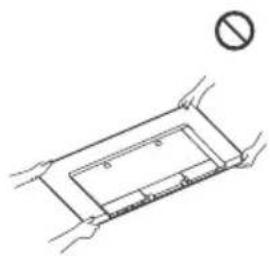
When lifting or securing the TV, do not hold it by the stand.

- When moving, do not subject the TV to shocks or excessive vibration. When moving the TV for repair or when changing its location, pack it using the original packaging material.
Preventing falls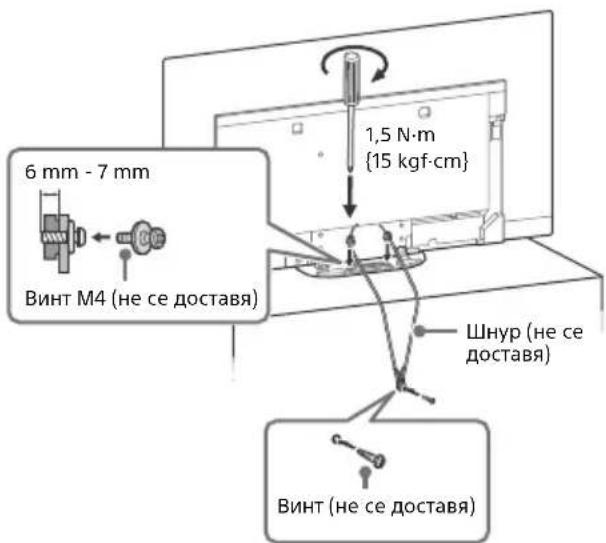
Ventilation
Never cover the ventilation openings or insert objects into the cabinet. Leave free space around the TV as shown in the illustration. - It is recommended to use the original Sony wall-mount bracket to ensure adequate air circulation.
Wall installation
Leave at least 10 cm of space around the device.
Installation with the stand
Leave at least 10 cm of space around the device.
To ensure proper ventilation and to prevent the accumulation of dust and moisture
Do not place the TV on the floor, do not mount it near heaters, stoves, or other heat sources. Do not place the TV on carpets, blankets, or other soft surfaces. Do not cover the TV with cloth, paper, or other objects, such as curtains or drapes. Do not install the TV as shown below.
Air circulation is blocked.
Do not block the air circulation zone.
Protection of the TV screen (OLED TV)
Precise measures for protecting the screen from damage
Image retention
OLED TVs are susceptible to image retention (ghosting) due to the characteristics of the materials used. Image retention may occur if static images are displayed on the screen repeatedly or for extended periods of time. This is not a malfunction of the TV. Avoid displaying images that may cause image retention.
Examples of images that may cause image retention include:
Content with black bars at the top and bottom or left and right sides of the screen. (For example, letterboxed format, 4:3 screen, standard resolution) - Static images such as photos. Video games that have static elements in certain parts of the screen. TV menus, program guides, channel logos, etc. - Static content from applications. - Screen elements such as tickers used for news and headlines.
To reduce the risk of image retention:
- Sony recommends turning off the TV as usual by pressing the power button on the remote control or the TV itself. Adjust the screen settings, such as [Wide mode], to remove black bars. For [Wide mode], select [Normal] when watching standard definition content. Disable the OSD (On-Screen Display) by pressing the i+ button. Disable the menu of the connected equipment. For details, refer to the user manual of the connected equipment. Avoid displaying static images with bright colors (including white, red, green, blue, and other colors) on the screen. Adjust the picture according to the viewing environment. The standard picture mode is recommended for home use and when watching content with subtitles, which also displays static elements such as logos and tickers.
The screen brightness is automatically adjusted to prevent/avoid image retention.
Updating the software
The software update is performed automatically to improve the image on the TV screen, especially if the TV has been used previously. The software update can be performed manually or automatically only if the image retention is very severe or if the input signal is as follows: [Software update is not complete...]
Caution:
The software update function may damage the TV. As a precaution, perform the software update only when necessary. Do not perform it more than necessary, as it may damage the TV's internal components. - The software update takes about one hour. - Repeated software updates may be performed on the screen; this is not a malfunction of the TV. - The software update works only when the temperature in the room is between 10°C and 40°C.
Pixel replacement
AUTOMATIC PIXEL REPLACEMENT TO PREVENT IMAGE RETENTION.
Other functions
The screen brightness automatically decreases when displaying still images, such as channel logos, color bars, or similar.
2 (Standby) Button with numbers
Info/Text display: Shows information.
(Text): Shows text information.
3 Google Play NETFLIX (Only for certain regions/countries/models of TVs) Light button
4 GUIDE Shows the guide of digital programs or EPG of cable/satellite box*2.
REC LIST: Shows the list of recorded programs from USB HDD and DVR*2.
(Input selection): Shows and selects the input source, etc.
(Quick setup): Shows quick setup.
BACK/ HOME
5 +/- (Sound signal)
(Pause) (Mute)
Light
- Some functions may be disabled for people with disabilities; they can be enabled or disabled by pressing and holding the 品 button.
CH +/-/E/
In TV mode: selects channel.
In text mode: selects the next (A) or previous (E) page.
6 AUDIO: Selects the appropriate sound from a multi-channel source or surround sound (depending on the program source).
(Subtitle setup)
HELP: Shows the help menu.
←/▶/▶/
REC: Records the current program to USB HDD or DVR*2.
EXIT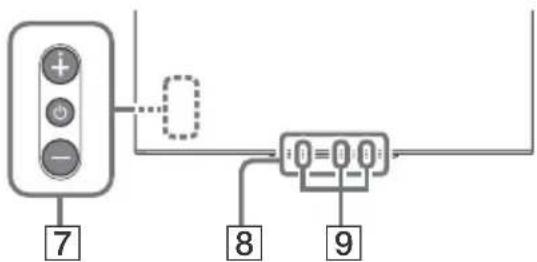
7 (Standby) 8 Sensor for remote control/Light sensor/LED lighting
9 Voice control with microphone: for
To activate voice control with the microphone, press the MIC button on the remote control and follow the on-screen instructions. For more information, see the help guide.
1 Voice control with the microphone. 2 Setup is required [Setup of cable/satellite box] (only for limited regions/countries/models of televisions). For more information, see the help guide. *3 Only for certain regions/countries/models. Energy consumption in standby mode may increase when voice control with the microphone is activated.
Connection diagram
For more information about connections, see the help guide by pressing HELP on the remote control.

1 CENTER SPEAKER IN
To use your TV as a center speaker, connect the audio output of your AV receiver to the CENTER SPEAKER IN input on your TV. - Before connecting the cables, disconnect the power cables of the TV and the AV receiver. - Make sure that [Speaker] is set to [Audio system].


To prevent noise when not connecting CENTER SPEAKER IN to an AV receiver, turn off [TV center speaker mode]. For details, see the help guide.
2 CAM (Conditional Access Module)
- Provides access to paid TV services. For details, see the user guide provided with your CAM. Do not insert the smart card directly into the CAM slot on the TV. It must be inserted into the Conditional Access Module provided by your operator.
- CAM is not supported in some countries/regions. Check with your operator. When switching to a digital program after watching Internet video, the CAM menu may appear.
3 AV IN
For a composite connection, use an analog audio/video cable (not supplied).

- Póndbpxa cMo cTepeo MHN-HaK c Tprn noIoca. He MoKeTe Da NyCKaTe 3ByK eHOBpeMeHHO OT CnyuJaNKte N BnCOKOrOBOpHTeJIte Ha TeIeBn3opa.
USB1/2, USBH (HDD REC)* 2
Connecting a large USB device may affect the operation of other connected devices in close proximity. When connecting a large USB device, connect it to the USB1 port. - Connect the USB HDD device to the USB 3 port (blue).
HDMI IN 1/2/3/4
- The HDMI interface can transmit digital video and audio through a single cable.
To enjoy high-quality 4K 50p/60p content, connect a high-quality high-speed HDMI cable and set [HDMI Signal Format] to [Enhanced Format]. Perform this setting for all connected HDMI IN terminals. For more information on supported formats, see "Specifications" in this manual (pp.14-15). - HDMI IN 3 eARC/ARC (Enhanced Audio Return Channel/Audio Return Channel) Connect your audio system to the HDMI IN 3 to send TV audio to your audio system. An audio system that supports HDMI eARC/ARC can send video to the TV and receive audio from the TV through the same HDMI cable. If your audio system does not support HDMI eARC/ARC, an additional connection to DIGITAL AUDIO OUT (OPTICAL) is required. - Use HDMI cables with Ethernet to connect the audio system with eARC.

7T (RF input), Satellite input
- Connector for terrestrial/cable and satellite TV. Connection method: SUB. → MAIN → Antenna Connect the SUB. cable only when using the dual tuner mode, with the exception of distribution via a single cable EN50494.
For an external device that has a SCART AV OUT, use a SCART-RCA adapter and an analog audio cable. 2 Only for specific regions/countries/models.
Back cover
You cannot use the remote control when the cables are connected to the remote terminal. - Make sure you have the remote control ready for use.
Input/Output Jacks
Antenna/cable 75 ohm VHF/UHF terminal
Satellite antenna
Connector type F, female, 75 Ohm. DiSEqC 1.0, LNB 13 V/18 V & 22 kHz tone, distribution over 1 cable EN50494.
AV IN video/audio input (mini jack)
HDMI IN 1/2/3/4 (supports 4K resolution, compatible with HDCP 2.3)
Video:
4096×2160p (50, 60 Hz)×2,3, 4096×2160p (24 Hz)×2, 3840×2160p (50, 60 Hz)×3, 3840×2160p (24, 25, 30 Hz), 1080p (30, 50, 60, 100, 120 Hz), 1080/24p, 1080i (50, 60 Hz), 720p (30, 50, 60 Hz), 720/24p, 576p, 480p, PC formats
Audio:
In eARC (Enhanced Audio Return Channel)* mode
For more information, refer to the user manual.
Connection for eARC
5.1 channel linear PCM: 32/44.1/48/88.2/96/176.4/192 kHz 16/20/24 bits, Dolby Digital, Dolby Digital Plus, DTS
eARC/ARC (Enhanced Audio Return Channel/Audio Return Channel) (see HDMI IN 3)
In eARC*5 mode
For more information, refer to the user manual.
In ARC mode
2-channel linear PCM: 48 kHz 16 bits, Dolby Digital, Dolby Digital Plus, DTS
DIGITAL AUDIO OUT (OPTICAL)
OPTICAL DIGITAL AUDIO OUT JACK (Supports Linear PCM: 48 kHz 16 bit, Dolby Digital, DTS)
(Stereo mini jack)
Listening
1, 2, 3 (HDMI REC)* 6
USB port 1 and 2 support High Speed USB (USB 2.0)
USB port 3 supports Super Speed USB (USB 3.1 Gen 1)
CAM (Conditional Access Module) slot
LAN
10BASE-T/100BASE-TX connector (Depending on the network conditions, the data transfer speed may vary. The cable and the quality of the communication are not guaranteed.)
CENTER SPEAKER IN
Input jack for the center high-resolution speaker
Optional accessories
Wall mounting bracket: SU-WL850
Wall mounting bracket: SU-WL450
Operating temperature
0°C - 40°C
Operating humidity
Relative humidity 10%-80% (without condensation)
Power consumption, standby and other
Power consumption specifications
220V-240VAC, 50Hz
Energy class
KD-77AG9: A
KD-65AG9: B
KD-55AG9: B
Screen size (measured diagonally) (approx.)
KD-77AG9: 194.7 cm / 77 inches
KD-65AG9: 163.9 cm / 65 inch
KD-55AG9: 138.8 cm / 55 inch
Power consumption
In [Standard] mode
KD-77AG9: 211 W
KD-65AG9: 169 W
KD-55AG9: 132 W
In [Vivid] mode
KD-77AG9: 674 W
KD-65AG9: 490 W
KD-55AG9: 394 W
Annual power consumption*7
KD-77AG9: 293 kWh per year
KD-65AG9: 234 kWh per year
KD-55AG9: 122.6 x 71.4 x 25.5 cm
With table stand
KD-77AG9: 172.1 x 99.6 x 4.9 cm
KD-65AG9: 144.7 x 83.4 x 4.0 cm
KD-55AG9: 122.6 x 71.0 x 4.0 cm
Weight (approx.)
With table stand
KD-77AG9: 39.7 kg
KD-65AG9: 24.8 kg
KD-55AG9: 22.3 kg
Without table stand
KD-77AG9: 35.3 kg
KD-65AG9: 21.2 kg
KD-55AG9: 18.7 kg
*1 Not all TV models have DVB-T2 or DVB-S/S2 technology or a satellite antenna connector.
*2 When 4096 × 2160p is input and [Wide mode] is set to [Normal], the resolution is displayed as 3840 × 2160p. To display 4096 × 2160p, set [Wide mode] to [Full 1] or [Full 2].
*3 3a noДьрха He Ha 18 Gbps HabToIe [ΦopMaT Ha HDMi cnHaJa.] Ha [Побpen ФopMaT].
*4 3a noBueye INHΦOpMaζη BuxTe ΠOMoUHTo pBkoBOdCTBo.
*5 PexMM eARC e aktuBeH, KOrato [PexMM eARC] e 3aJaTeH Ha [ABTomAt.], [RobOpntEn] e 3aJaTeHo Ha [AydNo cncTeMa] n e CBbp3Ha ayDnO cnCTema, CbbMeCtMa c pexMM eARC.
*6 Camo 3a onpepeenepeHn/cTpaHn/Moenn TeneBn3Opn.
*7 TOnuHaTa KOHcyMaun Ha eHepnB KWh e 6a3npaHa Ha KOHCyMaunTa Ha TeJeBn3Op, KoTo pa6Ot4 Yaca Ha DeH, 365 dH. DeIcTBnTeHnHa Ta KOHcyMaun Ha eHepn3 3aBnCn OTTOBa KaCe m3non3Ba TeJeBnOpa.
*8 Yka3aHata KOHcyMaunHa eHepnB RpeXIM FOTOBHOCCT ce DOCTrA cNeI Kato TEeBn3OpBT npKKnOuH Heo6xOUMNTe BbTpeHN IpouECN.
*9 KoHcyMaZnraHa eHeprna B pexm rtoBHOCT ue ce yBeNHy, KOraTO BaunrTeNeBn3Op e Cbbp3aH KbM MpeJa.
3a6eJekka
He n3BaJxJaTe nCeBdo-KapTaTaNIN KANaka (HaIInuHocTta NIM 3aBnCn OT MoJeNa Ha TeJeBnOpa)OT TV CAM cNoTa (MoUyna 3a YcNOBeHnOCTbN),OCBeH 3a Da NoCTaBnTe CmApT KapTa B CAM. - HAIHNUMeTo Ha onUHOHaHN akcecoapn 3aBncn ot DbpxBaTa/ perNoHa/MoDena Ha TeLEBn3Opa HAIHNUHOCTTa. -Ди3aHbT nCpeuФkaUTe noIeKaT Ha npomHa 6e3 npedynpexkdeHne.
3a6eJekka 3a uΦpObaT a yHKnIHa TeIeBn3opa
- UΦpOBA TeLEBn3nA (DVB Ha3eMHO, cateJIInTHo n Ka6eJHNo), INHTepaKTHBn YCnyn mpeXOBn FyHKun MoKe Da He ca DOCTbHN BbB BCNUKn CTpaHn nn paOHn. HrkON FyHKUn MOKe Da He ca AKTNBupaHn NmN MoKe Da He pa60Tt npABuHNO C hKOn DOCTaBnuN mpeXOBn cpeHn. HrkON DOCTaBnuN Ha TeLEBn3nOHn YCnyn MoKe Da HauchcIbaT TaKa Ca 3a YCnyrnte CN. To3nTeBn3OpNoIbPkaUΦpOBo IpeBaHe, nIOn3BaKn MPEG-2,H.264/MPEG-4AVC H.265/HEVC KoIeN,HO He MoKcJa 6bJe rapaHTnpaHa CbBMecTmocTtCa BCNUK CNHAnHa OnepaTopu/Cnyr, KONTO MOKeJa ce npOMeHCTeueHMe HA BPeMeTo.
Hhopmaun3a TbproBckn MapK
- TepMNHTeHDMI INHTepFeic3a MyNTmMeJnC BVCoka pa3dEmTHe hcnoc6hOCT HDMI (HDMI-High-Definition Multimedia Interface), KaKTo n Joroto HDMI ca 3ana3eHn Mapkn Ha HDMI Licensing Administrator, Inc. B CbeDInHeHt e uatn N DpyrN IbPxabN. Dolby, Dolby Vision, Dolby Audio, И сиMuBoJbT Двоно "D" ca TьproBcKn Маркн Ha Dolby Laboratories. РрИЗБeДeно no liuEh3 Ha Dolby Laboratories. KoHΦiIeHuaJIHn HENy6blKyBaHn TrpyObe. AByTopcko npaba 1992-2015 Dolby Laboratories. BcNcK n ppaba 3anaaEHn. "BRAVIA", BRAVIA Sync ca TbproBcKn Mapkn nnn pernctpupaHn MapKn Ha Sony Corporation.
- Gracenote, noroto n I noroto nbt Gracenote, kaKTo n I noroto "Powered by Gracenote" ca pernctpnaHn TbproBcKn MapKn nn TbproBcKn MapKn Ha Gracenote, Inc. B CAU n/nn dpyrn Dpbxabn.
- Vewd® Core. Copyright 1995-2019 Vewd Software AS. All rights reserved. Google, Google Play, Chromecast, YouTube, Android TV n pyrnu cBpb3aHn MapKn n Iora ca 3anaeHn MapKn Ha Google LLC. Wi-Fi, Wi-Fi Alliance Wi-Fi Direct ca peructpupaHn TbPROBcN MapKn Ha Wi-Fi Alliance.
- For DTS patents, see http://patents.dts.com. Manufactured under license from DTS, Inc. DTS, the Symbol, & DTS and the Symbol are registered trademarks, and DTS Digital Surround is a trademark of DTS, Inc. © DTS, Inc. All rights reserved. The Bluetooth® word mark and logos are registered trademarks owned by Bluetooth SIG, Inc. and any use of such marks by Sony Corporation is under license. Other trademarks and trade names are those of their respective owners.
- Netflix is a registered trademark of Netflix, Inc. DiSEqC™ is a trademark of EUTELSAT. This TV supports DiSEqC 1.0. This TV is not intended for controlling motorized antennas. TUXERA is a registered trademark of Tuxera Inc. in the U.S. and other countries.
- The USB-IF SuperSpeed USB Trident is a registered trademark of USB Implementers Forum, Inc. All other trademarks are the property of their respective owners.
For more information about the network connection, refer to the Help Guide.
Table of Contents
IMPORTANT INFORMATION 2
Safety 3
Safety 3
eARC/ARC (Enhanced Audio Return Channel/Audio Return
Channel) (Only for the model with HDMI IN 3)
DIGITAL AUDIO OUT (OPTICAL)
Optical audio input (PCM 2-channel:
48 kHz 16 bit, Dolby Digital, DTS)
KD-65AG9: 234 kWh per year
KD-55AG9: 122.6 × 71.4 × 25.5 cm
KD-77AG9: 172.1 x 99.6 x 4.9 cm
KD-65AG9: 144.7 x 83.4 x 4.0 cm
KD-55AG9: 122.6 x 71.0 x 4.0 cm
Tuner (Terrestrial)
Digital: DVB-T/DVB-C
DVB-T2*1
Satellite*1: DVB-S/DVB-S2
Color System
PAL/SECAM/NTSC3.58 (Video only)/NTSC4.43 (Video only)
Channel Coverage
Digital: UHF/VHF/Cable
Satellite*1: IF Frequency 950-2150 MHz
Audio Output
20W+20W+10W+10W
Wireless technology
IEEE802.11ac/a/b/g/n protocol
DIGITAL AUDIO OUT (OPTICAL)
KD-55AG9: 122.6 x 71.4 x 25.5 cm
KD-65AG9: 144.7 x 83.4 x 4.0 cm
KD-55AG9: 122.6 x 71.0 x 4.0 cm
Aignerik (Approximate)