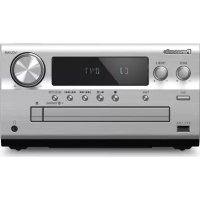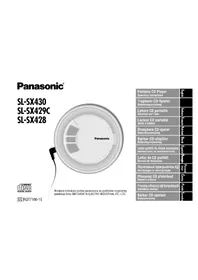
SLSX429C - Hi-Fi System PANASONIC - Free user manual and instructions
Find the device manual for free SLSX429C PANASONIC in PDF.



| Product Type | Hi-Fi System (portable CD player) |
| Model | SL-SX429C |
| Brand | Panasonic |
| Dimensions (W × H × D) | 135 × 24,3 × 135 mm |
| Weight (with batteries) | 224 g |
| Weight (without batteries) | 180 g |
| Power Supply | DC 4,5 V (AC mains adapter 220-230 V 50/60 Hz optional) |
| Power consumption (mains adapter) | 0,7 W |
| Power consumption (when charging) | 3,1 W |
| Battery life (alkaline batteries, CD-DA) | Approx. 50 hours |
| Battery life (alkaline batteries, MP3) | Approx. 85 hours |
| Battery life (rechargeable batteries, CD-DA) | Approx. 23 hours |
| Battery life (rechargeable batteries, MP3) | Approx. 40 hours |
| Supported audio formats | CD-DA, MP3 (32-320 kbps, 48/44,1/32 kHz) |
| Anti-skip memory | 10 seconds (CD-DA) / 100 seconds (MP3 at 128 kbps) |
| Playback functions | Programmed (20 tracks), repeat, random, A-B repeat, album skip, album mode |
| Equalizer | Yes (adjustable) |
| Digital remastering | Yes (improves sound of compressed files) |
| Lock (HOLD) | Yes (on the unit) |
| Auto power off | After approx. 10 minutes in stop mode |
| Supplied accessories | 1 pair of stereo earphones, 1 vehicle power adapter, 1 cassette adapter for vehicle stereo system |
| Maintenance | Clean with a soft, dry cloth; do not use alcohol, thinner, or benzene |
| Safety | Do not expose to rain or moisture; avoid shocks; do not open the laser unit |
Frequently Asked Questions - SLSX429C PANASONIC
User questions about SLSX429C PANASONIC
0 question about this device. Answer the ones you know or ask your own.
Ask a new question about this device
Download the instructions for your Hi-Fi System in PDF format for free! Find your manual SLSX429C - PANASONIC and take your electronic device back in hand. On this page are published all the documents necessary for the use of your device. SLSX429C by PANASONIC.
USER MANUAL SLSX429C PANASONIC
2 Thank you for purchasing this product.
Before connecting, operating or adjusting this product, please read these instructions completely. Please save this manual for future reference.
Note:
SL-SX429C and SL-SX428 models are not designed for use with remote control.
Table of Contents
Supplied Accessories 2
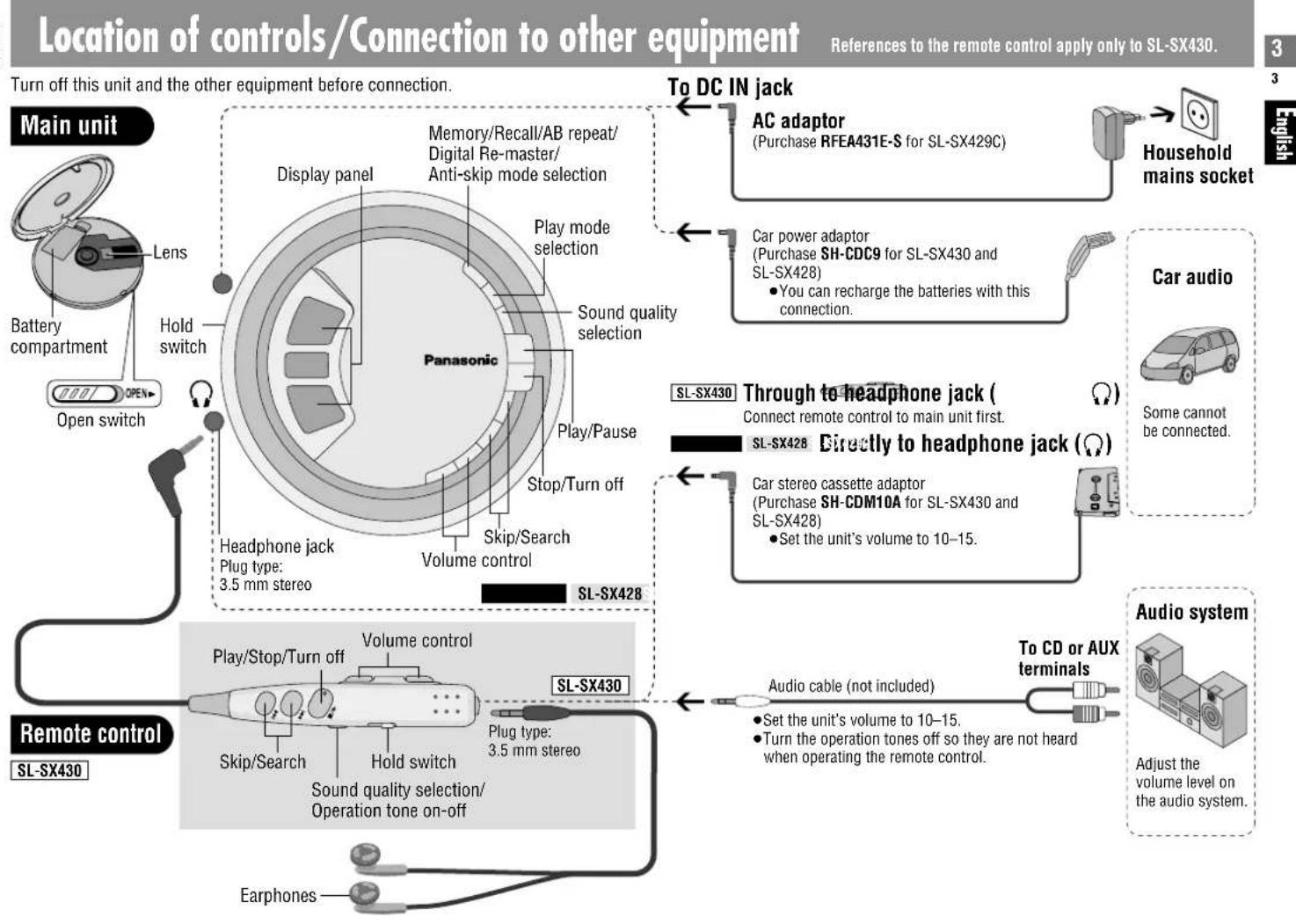
Location of controls/Connection to other equipment 3
Power Supply. 4
How to Use 5
Other Play Methods 6
Playing MP3 7
Specifications 8
Maintenance 8
Caution 8
Troubleshooting guide 9
Displays 9
Playing MP3
This unit can play MP3 files you have recorded to discs.
MPEG Layer-3 audio decoding technology licensed from Fraunhofer IIS and Thomson
multimedia
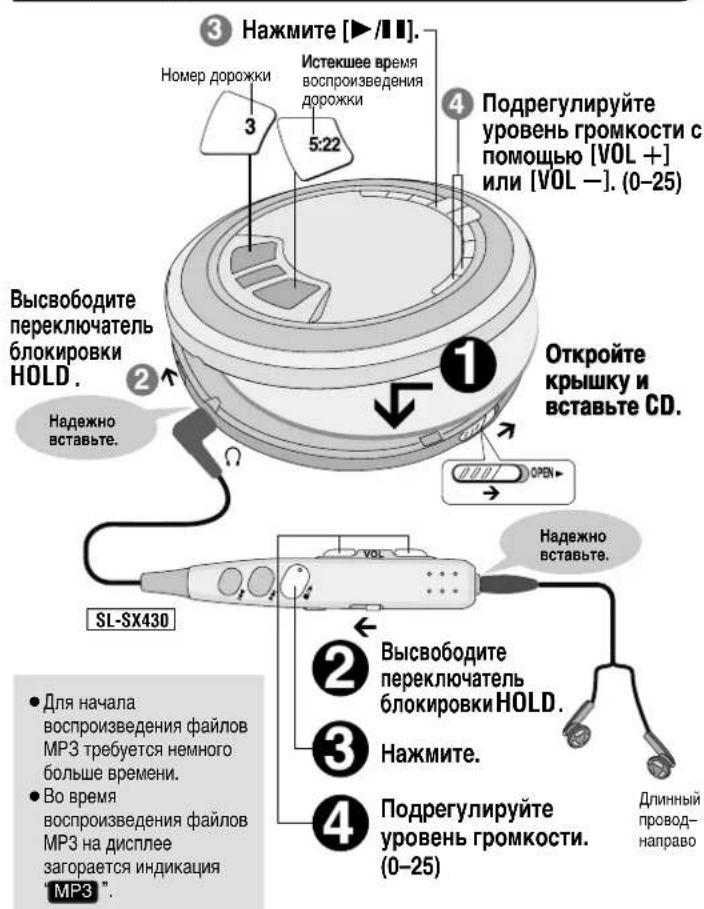
HOLD
This function causes the unit to ignore accidental button presses
Set to HOLD so the unit doesn't power on accidentally or interrupt play
The unit and remote control each have independent HOLD switches.
Note on CD-R and CD-RW
This unit can play CD-R and CD-RW recorded with CD-DA or MP3. Use an audio recording disc for CD-DA and finalize it when you finish recording. The unit may not be able to play some discs due to the condition of the recording.
- A process performed after recording that enables CD-R/CD-RW players to play audio CD-R and CD-RW.
Resume function
Play begins from the last point stopped. Replacing the disc cancels the function.
Auto off function
If the unit is left in stop mode for approximately 10 minutes, the unit turns itself off automatically.
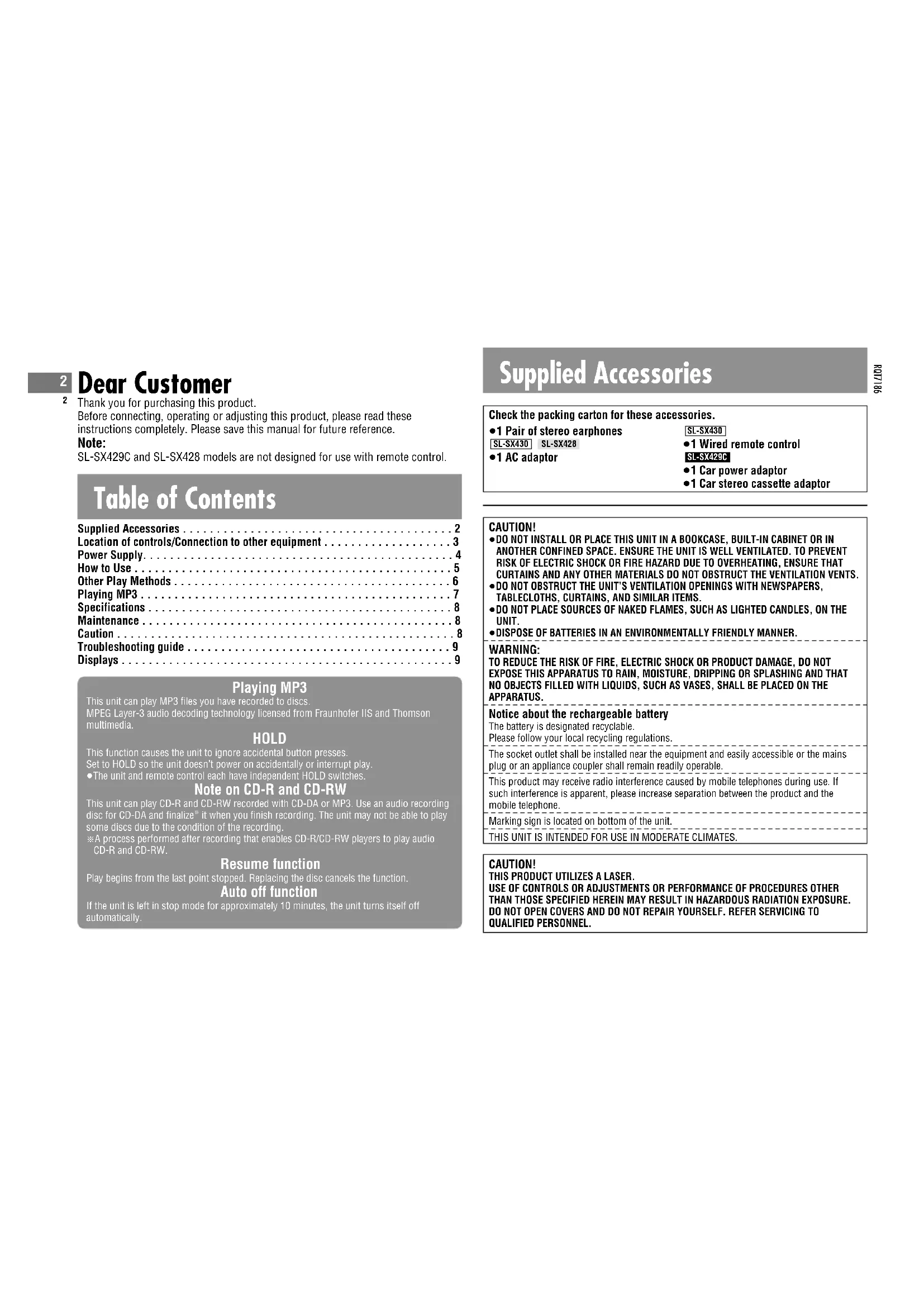
Supplied Accessories
Check the packing carton for these accessories.
1 Pair of stereo earphones
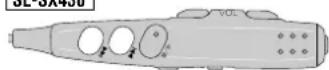
SL-SX430 SL-SX428
-1 AC adaptor
SL-SX430
-1 Wired remote control
SL-SX429C
-1 Car power adaptor
-1 Car stereo cassette adaptor
CAUTION!
DO NOT INSTALL OR PLACE THIS UNIT IN A BOOKCASE, BUILT-IN CAFET OR IN ANOTHER CONFINED SPACE.ENSURE THE UNIT IS WELL VENTILATED. TO PREVENT RISK OF ELECTRIC SHOCK OR FIRE HAZARD DUE TO OVERHEATING,ENSURE THAT CURTAINS AND ANY OTHER MATERIALS DO NOT OBSTRUCT THE VENTILATION VENTIS.
DO NOT OBSTRUCT THE UNIT'S VENTILATION OPENINGS WITH NEWSPAPERS, TABLECLOTHS, CURTAINS, AND SIMILAR ITEMS.
DO NOT PLACE SOURCES OF NAKED FLAMES, SUCH AS LIGHTED CANDLES, ON THE UNIT.
- DISPOSE OF BATTERIES IN AN ENVIRONMENTALLY FRIENDLY MANNER.
WARNING:
TO REDUCE THE RISK OF FIRE, ELECTRIC SHOCK OR PRODUCT DAMAGE, DO NOT EXPOSE THIS APPARATUS TO RAIN, MOISTURE, DRIPPING OR SPLASHING AND THAT NO OBJECTS FILLED WITH LIQUIDS, SUCH AS VASES, SHALL BE PLACED ON THE APPARATUS.
Notice about the rechargeable battery
The battery is designated recyclable.
Please follow your local recycling regulations
The socket outlet shall be installed near the equipment and easily accessible or the mains plug or an appliance coupler shall remain readily operable.
This product may receive radio interference caused by mobile telephones during use. If
such interference is apparent, please increase separation between the product and the mobile telephone.
Marking sign is located on bottom of the unit
THIS UNIT IS INTENDED FOR USE IN MODERATE CLIMATES
CAUTION!
THIS PRODUCT UTILIZES A LASER.
USE OF CONTROLS OR ADJUSTMENTS OR PERFORMANCE OF PROCEDURES OTHER THAN THOSE SPECIFIED HEREIN MAY RESULT IN HAZARDOUS RADIATION EXPOSURE. DO NOT OPEN COVERS AND DO NOT REPAIR YOURSELF. REFER SERVICING TO QUALIFIED PERSONNEL.
Power Supply
Rechargeable batteries (not included) Recharge before initial use.
As a safety precaution this unit is constructed so it is impossible to recharge ordinary batteries. For details, check with your dealer.
Special rechargeable Ni-Cd batteries P-3GAVE/2B (set of 2)

Ordinary dry cell batteries/ rechargeable batteries
■For SL-SX429C
Be sure to obtain the optional AC adaptor RFEA431E-S.
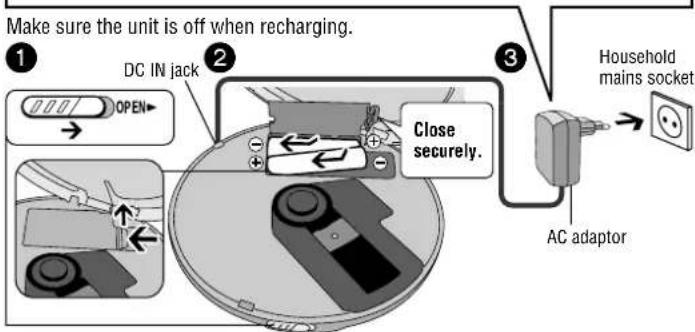
The battery indicator ( rolls while recharging and disappears when finished (about 4 to 5 hours).
- You can recharge the batteries before they are fully discharged.
- Fit the battery lid so it is secure and flush with the battery compartment. If it comes loose, it may scratch your discs.
Dry cell batteries (not included)
After disconnecting the AC adaptor, insert two "LR6, AA, UM-3" alkaline batteries. Insert the same way as the rechargeable batteries.
The battery indicator
This indicator appears when the unit is on.
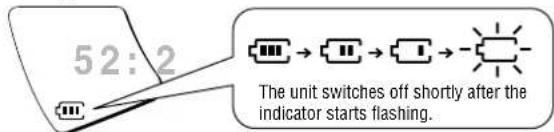
Before playing starts the battery indicator may flash although the batteries are not drained. It appears correctly once you start play.
General
Play time
Specifications, page 8
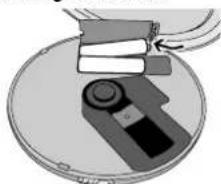
■Removing batteries
Car adaptor
SL-SX429C includes a car power adaptor. (Refer to the separate installation instructions.)
Purchase the SH-CDC9 car power adaptor for use with SL-SX430 and SL-SX428.
The unit is in the standby condition when the AC adaptor is connected. The primary circuit is always "live" as long as the AC adaptor is connected to an electrical outlet.
How to Use
References to the remote control apply only to SL-SX430.
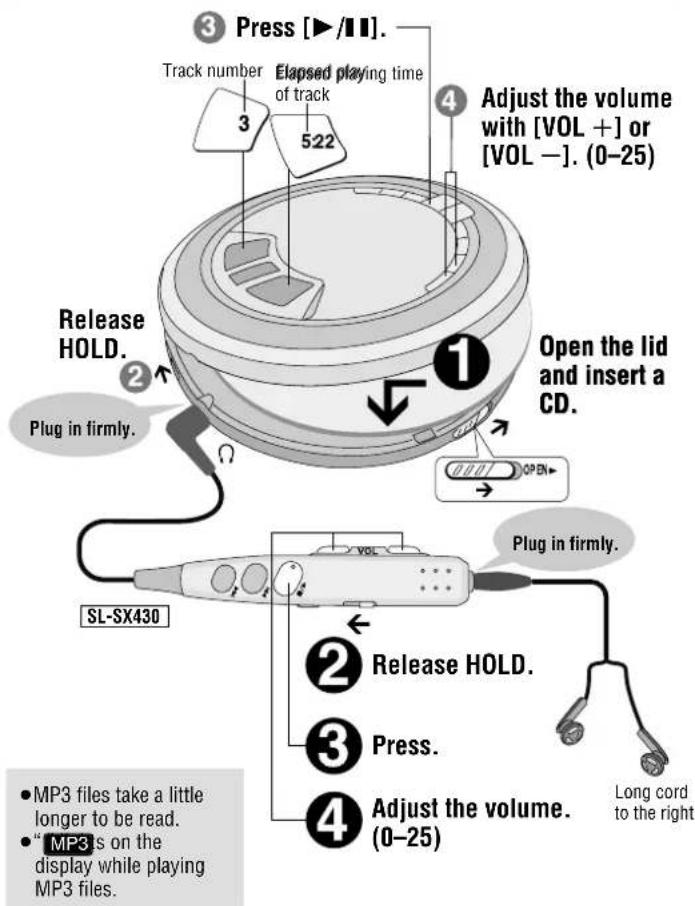
Playback
Pause
Remote control Main unit
Not available.

Press.
Press again to restart play.
Search
Remote control Main unit
Press and hold during play.
Press and hold during play.
-
You cannot search while playing MP3.
-
You can search only within the current track during program, one track repeat, random, random repeat and AB repeat play modes ( page 6).
Skip
Remote control Main unit
Press. Press.
-
Press [▶] twice to skip to the beginning of the previous track during play.
-
You cannot use [ ] to skip to the previous track during random play (page 6).
Stop/Turn off
Remote control Main unit

Press. Press.

Press and hold to turn the unit off.
Press again to turn the unit off.
MP3
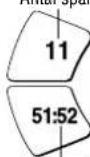
Number of tracks Number of albums
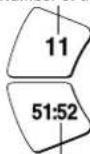
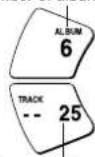
Total play time Number of tracks
Other Play Methods
References to the remote control apply only to SL-SX430.
Program Play

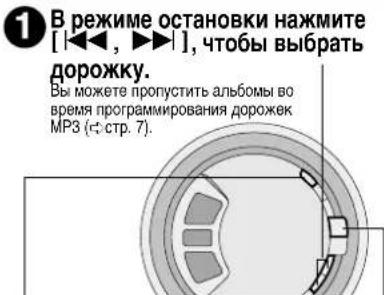
Press [▶▶,▶] while stopped to select the tracks.
You can skip albums when programming MP3 tracks (cpag
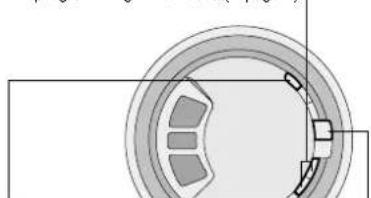

Press [MEMO] to register.
Track number
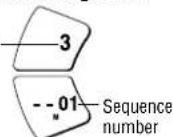

Repeat steps 1 and 2 to register up to 20 tracks.

Press [▶/■] to start play.
When Playing MP3
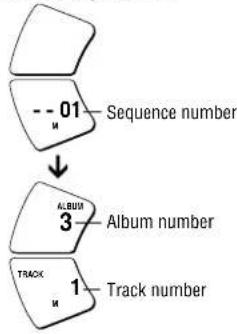
To confirm the contents of the program
Press [MEMO] while the disc is playing.
To cancel program play Press [ ]
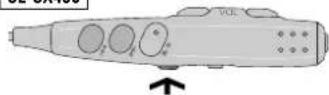
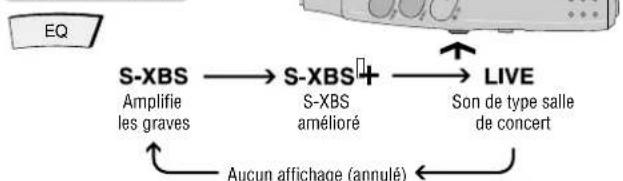
Changing the sound quality
Each time you press
Main unit

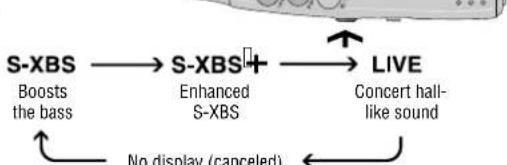
The effect may differ between different kinds of music.
Play modes
Each time you press
Main unit

MODE


While paused


One track repeat
All track repeat
Random
Random repeat
AB repeat (AB specified segment repeat) (± below)


- Specifying the AB segment
Press [MEMO] at the start point (A) and once more at the end point (B).


- Stop or skip (page 5) to cancel.
If you do not specify point B and reach the end of disc, point B is set automatically and repeat begins. You can also specify point B again by pressing [MEMO].
- You cannot select "RANDOM" and "A B" while playing MP3.
Anti-Skip System
This system reduces skipping caused by vibration to a minimum.
You can change the anti-skip memory time for CD-DA to improve sound quality.
While stopped, each time you press and hold
Main unit

POS 2
Sound enhanced mode,
10-second anti-skip memory
Anti-skip enhanced mode.
45-second anti-skip memory
- You cannot change the memory time for MP3. It is a maximum of 100 seconds for data recorded at 128 kbps.
Turning the operation tone off
Press and hold [EQ] until "bP oFF" appears
SL-SX430

Tone off


Tone on
Playing MP3
References to the remote control apply only to SL-SX430.
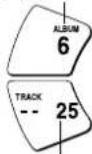
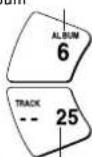
Starting play from an album (Album skip)
Press and hold until the album you want appears
Main unit

SL-SX430

Album number
THACK
10 Number of tracks
Playing only the tracks in a selected album (Album mode)
Each time you press and hold
Main unit
MODE
ALBUM
Album mode
←
一
一
No display
(canceled)
- You can select another album with album skip (above).
- You cannot turn album mode on during program play.
Enjoying even more natural sound (Digital Re-master)
You can regenerate signal frequency lost during compression, restoring to near pre-compression form.
While stopped, each time you press and hold
Main unit
MBMO
RMTR
Sound enhanced
No display
Conserves battery life
This unit can play MP3, a method of compressing audio without overtly hurting audio quality.
When creating MP3 files to play on this unit
Disc formats: ISO9660 level 1 and level 2 (except for extended formats)
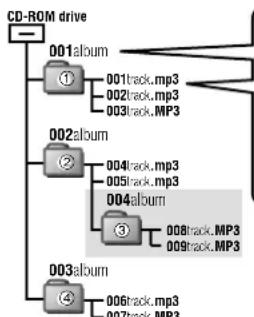
Naming tracks and albums
Prefix with 3-digit numbers in the order you want to play


Up to 30 characters
If you created an album such as 004album on the left, the files may not play in name order. The albums would play in the order ① ② ③ ④
■ Limitations on MP3
- This unit is compatible with multi-session but if there are a lot of sessions it takes more time for play to start. Keep the number of sessions to a minimum to avoid this.
This unit cannot play files recorded using packet write. - If a CD-ROM format CD contains MP3 and files other than MP3, only the MP3 files will be playable.
- Depending on how you create MP3 files, they may not play in the order you numbered them or may not play at all.
Specifications
Audio (CD-DA)
Sampling frequency: 44.1 kHz
No. of channels:
2 (left and right, stereo)
Headphone output level:
RMS max. 6 mW+6 mW/
adjustable)
Frequency response: 20Hz to 20,000 Hz
(+0.5dB to -7dB)
Pickup
Light source: Semiconductor laser
Wavelength: 780 nm
(Norsk)
Bolgelende 780 nm
Supported bit-rates:
32 kbps to 320 kbps
(128 kbps is recommended)
Supported sampling frequency:
48 kHz/44.1 kHz/32 kHz
Maximum number of items
(total no. of albums and tracks): 999
Maximum album levels: 100
General
Power supply:
DC input: DC 4.5 V
SL-SX430 SL-SX428
AC adaptor input:
AC220-230V50/60Hz
SL-SX430 SL-SX428
Power consumption:
Using AC adaptor: 0.7 W
Recharging: 3.1 W
Play time:
Using on a flat stable surface at 25^ , EQ is off, Hold is on, Anti-skip is on POS 1 (CD-DA), recommended bit rate (MP3:128 kbps), and Digital Re-maste is off (MP3). Play times are in hours and approximate.
| Batteries used | MP3 disc | CD-DA disc |
| 2 optional alkaline batteries | 85 | 50 |
| 2 optional rechargeable batteries | 40 | 23 |
Recharging time: About 4 to 5 hours
The play time may be less depending on the operating conditions.
Play time will be considerably reduced when playing CD-RW.
Operational temperature range:
Rechargeable temperature range:
5^ - 40^
Dimensions (W× H× D)
135× 24.3× 135mm
Mass: 224 g (with batteries)
180 g (without batteries)
Note:
Specifications are subject to change without notice.
Mass and dimensions are approximate.
Maintenance
If the surfaces are dirty wipe with a soft, dry cloth.
- Never use alcohol, paint thinner or benzine to clean this unit.
Before using chemically treated cloth, read the instructions that came with the cloth carefully.
Caution
- Do not expose the unit to direct sunlight or heat, such as from heating appliances, as these can damage the unit.
- Discontinue use if you experience discomfort with the earphones or any other parts that directly contact your skin. Continued use may cause rashes or other allergic reactions.
Batteries
- Do not peel off the covering on batteries and do not use if the covering has been peeled off.
Align the poles ^+ and - correctly when inserting the batteries. - Do not mix different types of batteries or old and new batteries.
- Remove the batteries if you do not intend to use the unit for a long time.
- Do not throw into a fire, short-circuit, disassemble, or subject to excessive heat.
- Do not attempt to recharge dry cell batteries.
- When carrying batteries in a pocket or bag, ensure no metal objects such as necklaces are placed together with them. Contact with metal may cause short-circuiting which can cause a fire.
■Listening
- Do not play your headphones or earphones at a high volume. Hearing experts advise against continuous extended play.
If you experience a ringing in your ears, reduce volume or discontinue use. - Do not use while operating a motorized vehicle. It may create a traffic hazard and is illegal in many areas.
- You should use extreme caution or temporarily discontinue use in potentially hazardous situations.
Even if your headphones or earphones are the open-air type designed to let you hear outside sounds, don't turn up the volume so high that you can't hear what's around you.
CDs
- Do not use irregularly shaped CDs.
- Do not use non-specification
- Do not use CDs printed with label printers available on the market.
- Do not use CDs with labels and stickers that are coming off or with adhesive exuding from under labels and stickers.
Troubleshooting guide
References to the remote control apply only to SL-SX430.
Before requesting service, make the below checks. If you are in doubt about some of the check points, or if the remedies indicated in the chart do not solve the problem, consult your dealer for instructions.
| No play. | The HOLD function is on. Release HOLD ( \( \Leftrightarrow \) page 5). The batteries may have run empty ( \( \Leftrightarrow \) page 4). (If play is extremely short even after fully recharging the batteries, the batteries may have exceeded their life. Rechargeable batteries can be recharged approximately 300 times.) - The disc isn't correctly set. - The disc is scratched or dirty. (Tracks skipped.) - There is moisture on the lens. Wait for about an hour and then try again. - The lens is dirty: clean it with a blower (recommended product: SZZP1038C). If the lens gets marked with fingerprints, gently wipe them off with a cotton swab. - The unit may not read MP3 correctly if it is shaken while it is reading the files. - Play of a multi-session disc may not be possible if there is a blank data segment between sessions. - If there is large JPEG data etc. within a MP3 file, sound may become muted and play may not be possible. - If you try playing a CD that contains CD-ROM format data and normal audio data (CD-DA), output from one of the above may become silent, and play may not be possible. |
| No sound or there is a lot of noise. | Ensure the plugs are inserted firmly. - Wipe the plugs clean with a clean cloth. - Noise may occur when playing MP3 if recording quality is poor. - The elapsed playing time disappears and sound is interrupted if bumps continue repeatedly. |
| Play doesn't resume from the last point stopped. | This doesn't work if you change discs. - This doesn't work during random play. - It may not work correctly under some conditions. |
| Play doesn't start from the first track. | Random play modes may be on ( \( \Leftrightarrow \) page 6). - Play resumes from the last point stopped. |
| The unit stops working. | Disconnect then reconnect all power sources (batteries and AC adaptor). |
| Cannot search through tracks. | You cannot search through MP3 files. |
| Cannot skip albums. | You cannot skip between the first and last albums during play. |
| Cannot change the Digital Re-master mode, anti-skip mode. | If [ \( \Leftrightarrow \) ]or [ \( \Leftrightarrow \) ] is pressed before [MEMO] you cannot change the mode. |
| Cannot specify the AB segment. | You may not be able to specify segment A or B at the end of disc. |
| Digital Re-master does not work. | Depending on the type of MP3 disc recording, the effect may not appear. |
| SL-SX430The unit malfunctions when connected to other equipment. | Be sure to connect other equipment through the remote control. Speakers connected directly to the unit should have an impedance of 1 kΩor less. |
| Cannot hear the remote control's operation tone. | The operation tone may be off (▶page 6). |
| The remote control does not work properly. | Use only the included remote control to operate this unit. |
| Cannot recharge. | ●You aren't using the special rechargeable batteries (▶page 4). ●You must insert two batteries before you can recharge them. ●The unit must be off before you can recharge. |
| The AC adaptor becomes warm during recharging. | This is normal. |
| The batteries are taking a long time to recharge. | The batteries may take a maximum of 6 hours to recharge under some conditions. |
| Play time is short after recharging. | ●This may occur after the first time you recharge the batteries or haven't used them for a long time. Play time should be restored after a few recharges. ●The batteries can go flat if you leave the AC adaptor connected after recharging is complete. |
| The battery indicator fails to appear or is incorrect. | ●The indicator does not appear when the AC adaptor is connected. ●The indicator does not appear correctly under some conditions. |
Displays
| h o l d | The HOLD function is on. Release HOLD ( \( \Leftrightarrow \) page 5). |
| no d ! S C | -You haven't inserted a disc or it isn't inserted correctly. -You have inserted a disc this unit cannot play. |
| BPR | The disc lid is open. |
| F | The program already contains 20 tracks. |
| 3 | Reading MP3 files. |
48 kHz/44.1 kHz/32 kHz
supportate: 48 kHz/44.1 kHz/32 kHz
Piles sèches (non fournies)
A cheque pression Appareil principal
-1 Auto-stereo cassetteheadapter
WAARSCHUWING!
- OM EEN GOEVE VENTILATIE TE VERZEKEREN, DIT APPARAAT NIET IN EEN BOEKKENAST, EEN INGEBOUWDE KAST OF EEN ANDEREGESLOTEN RUIMTE INSTALLEREN OF GEBRIUKEN. ZORG ERVOOR DAT DE VENTILATIEWEGEN NIET DOOR GORDIJNEN OF ANDERE MATERIALEN WORDEN AFGESLOTEN, OM GEVAAR VOOR ELEKTRISCHE SCHOK OF BRAND TEN GEVOLGE VAN OVERVERHITTING TE VOORKOMEN.
ZORG DAT DE VENTILATIE-OPENINGEN VAN HET APPARAAT NIET GEBLOKKEERD
WORDEN DOOR KRANTEN, TAFELKLEEDJES, GORDIJNEN, OF IETS DERGELIJKS.
ZET GEN OPEN VUUR, ZOALS BRANDENDE KAARSEN, OP HET APPARAAT
DOE LEGEBATTERIJEN WEG OP EEN MILIEUVRIENDELIJKE MANIER.
WAARSCHUWING:
TENEINDE HE TETEVAAR VOOR BRAND, ELEKTRISCHE SCHOK OF PRODUCTBESCHADIGING TE VERMINDEREN, MAG DIT APPARAAT NIET WORDEN BLOOTGESTELD AAN REGEN, VOGHT, EN DRUPPELEND OF SPATTEND WATER, EN MOGEN ER GEEN VOORWERPEN MET WATER OF ANDERE VLOEISTOFFEN ERIN, ZOALS BLOEMENVAZEN, OP HET APPARAAT WORDEN GEZET.
Opmerking betreffende de oplaadbare batterij
Aantal tracks Aantal albums
-1 Par stereo-ogeletefoner SL-SX430 SL-SX428
-1 Lysnetadapter
SL-SX430 Fjernbetjening med kabel
SL-SX429C
-1 Biladapter
-1 Bilstereokassetteadapter
BEMARK:
- PLACER APPARATET PÅ ET GODT VENTILERET STED. LAD VARE MED AT STILLE DETI ET SKAB ELLER ET ANDET LILLE, LUKKET RUM. PAS PÅ, AT GARDINER ELLER LIGENDE IIKE DAEKKER VENTILATIONSÄBNINGERNE. HVIS APPARATET OVEROPHEDES, ER DER RISIKO FOR ELEKTRISK TSDL ELLER BRAND.
TILD/ek IKKE APPARATETS VENTILATIONSABNINGER MED AVISER, DUGE, GARDINER OG LIGENDE TING.
ANBRING IKKE KILDER TIL ABEN ILD, SOM FOR EKSEMPEL TÄENDTE STEARINLYS, OVENPA APPARATET.
BORTSKAF BATTERIER PÄ EN MILJÖMÄESSIG FORSVARLIG MÄDE.
ADVARSEL:
FOR AT MINDSKE RISIKOEN FOR BRAND, ELEKTRISK STØD ELLER SKADER PÄ PRODUKTET, MA DETTE APPARAT IKKE UDSÄTTES FOR REGN, FUGT, VANDDRYP OG VANDSTÄMK, OG DER MA IKKE ANBRINGES BEHÖLDERE INDEHOLDENDE VÄSEK, SOM FOR EKSEMPEL VASER, OVENPA APPARATET.
48 kHz/44.1 kHz/32 kHz
Maks. antal afsnit
Dpyrme MeToDbI BOCnpon3BeDeHn
Bocnpom3BeDeHne MP3
TexHueckne xapaKTePncTnKn
yxoA
PpeodoctepekeHH
PykoBOCTBO NO NOnCKY H yCTpaHeHHIO HEnCnpaBHOCTe
HdNkaun
Bocnpon3BedeHne MP3
OTAMAPAT MOKET BOCNP0B3OBDnT FAnbIb BΦoPMAte MP3, KOTOpBE Bb 3aHcMaHa JDCKm. TexHOrma 3yBOKOrO DEkOxPOBaHnM MPEG (YpOeBb 3), NueHeMxPOBaHHa y Fraunhofer IIS n Thomson multimedia.
Функцяблоровн HOLD
3Ta cyHKnna 3actabnreT annapat HnHOpPOBaTb cnuyaHHe HaxaTHe KHONOK
YcTaHOBnTe nepeKIOuATEb B noOxHHe HOLD TaK, YTo aannapat He BKIOHTcCnyaHNO
BOcPOn3BvEHe He bYdET PpeBaHO
Camaannapatn6loK DuctaHNOHO ynpabneHm HMeIOT He3aBNCMBIE nepeKIOHateM
6JOKUPOBKHOLD
PpmeaHne OTHOCHTeBHO CD-R n CD-RW
3TOT annapat moKet BOCnpoN3BODnT bckn CD-R n CD-RW, 3aIImcaHbIe B foOpMaTeCD-DA mnp MP3. NcIbnbtyte dck nlaan cfoPMataCD-DA n 3abeepuine" erO, korga Bbl 3aKaHnBaTaE 3aIbn. Bo3MoXHO, ToHekOTopJIbe DnKm 33-aYcNOBIM 3aNCHne CMOyT 6bbl BocnoPb3BedeHb H an npapate.
Пл� QeCC,BbIOnaHMeBbNocHeZanCn,KOTOpBnOaOBaJIrTpOmOrpBuTaTeMa CD-R/CD-RW BOCPOVIOAOBHTbAydUdAnCKD- -CD-RW.
ФУHKUЯ BO306HOBJIENHA
BocpoB3BENHeHnAHnBaTc B nocnEnyI TohN, B KOTopoO OHO SoCTaHOJIeHO. 3aMeHa DmCKA OTMHNETf yHKnHIO.
ФУнкцЯ abTOMaTnueCKOTo BbIKNIOUeHnA
Ecm octaBHTBnAnap B pekMmOCTAHOBVK B TcHEne npNbNtENHo 10 MmHTy,To annapam CAM ABOTAMTHeCKN BHKNTHCbR.
Ppnilaraemblpe npHaJekHoctn
IpoBepbTe HauHnue 3TuX npHaadNekHOCTe B KApToHNO yNaKOBoHNO KoPo6Ke.
-1 Napa ctepeo yuHbIX TeJeFOHOB
SL-SX430 SL-SX428
-1AanTep nepemehHoro toka
SL-SX430
1PnOBoDHOH NylbT DuctaHIOHOHNOV npBApEnHO
SL-SX429C
-1 ABTomo6nIbHbI aanTep nHTaHn
-1 ABTOMO6nBHyKACCCTHbI
ctepeoaanTep
IPEDOCTEPEXEHNE!
HE CNEYET YCTAHABIMBATI INP PA3MEUATB DAHNHBI ANIAPAT B KHINKHOM 1KKAΦY, BCTPOEHNOM K4AΦY INI DPNYTOF OPMAHENHIMO PNOCTPAHCTBE IJTOI, QTOBIs COXPAHNTYUCOIOJI XOPOUIE BEHTMNIUM. YDOCTOBEPBTcB, QTO 1T0PbI NDPYTE NOIDOSBII PNEDMETI HE PEPENRTCYOT HOPMAIHOB BEHTMNLIIM IINI PNDOTBPAUHEIN PCKA NOPAXEHI 3JEKTPNECKHM TOKOM INI BO3HKNHOBBHNIIOXAPA M-3A INEPETPEBA.
- HE 3AKPBBAIIEBHTNIJIUIIOHIIHE OTBECTIN AIIIAPATA FA3ETAMM, CKATEPTAMN, UTOPAMN INOOSIBHM NPEDMETAMN.
HE PA3MEEJAHTE HA ANIAPAT NCTOCHIKNOTKPTOTIO IJIAMEHNI, TAKIE,KAKTOPRAIME CBEHN.
- BbIbPacbBAuTE BATAPEN B MYCOP, yuHTbIBa OXPAHY OKPYXAOUeN CPEbl.
IPEDYIPPEKDEHNE:
ДЛЯ YMEHbIeHJI PNUCKA BO3HMKHOBEHJI NOJXA, NOPAXEHHI 3JIeKTPUeCKIM TOKOM IINIOBPEKJHJI IN3DEJIHNE HE NOBEPAHTE DAHbIy ANIPAPAT BO3JEETBMO JOXJI, BJIaR, BpIbI, IMI KANEJI, IIc HCTABTE HA APINAPAT IPEDMTbl, HANOJIENHHJIe JxNKOCTrMI, TAKME, KAK BA3bl.
PpmeaHne kacateIbHo aKKymyIaTOPHO 6aTaepKn
BaTapeKa npedHa3NaeHa dIy nepe3apAekn.
Noxaynta, cneynt MeCthbIM npabnam no nepe3aprke 6aTapeek.
O6pyoBHeMo 6bIb pa3MeHc0KO cTeBO p0eTKe npeMeHHOR TOKa, a CTeBaA BnKa doJNka 6bIb paONIOKeHa TAK, YTObO bOna NERKOPOCTyTHa B CNYae BO3NHKHOBBHnnpoBneMbI.
370 n3eJIme MoKET npHMMb TaIIO MOxEMx, oOyCNIOBHeHHBe nepeHOCHbIM TEneFOHAM. ECNI TAKME NOEXN BANIOCTc OeBnDmH, YBEINbTe, NOKaIyKCTa, pAcTcRHeM MEkdy n3eJIENM INepEOHCBH TAMEFOHM.
3HaK MapkpObKn pacnoJoxKeH Ha HxKHe nAnenn annapaTa.
3TOT ANIAPAT INPEHHA3HAUYENINCIOB0AHN B KIMMATE CPEHNIOLOCBi
IPEIOCTEPEXEHNEI
B 3TOM YCTPOINCTBE INCIOJIb3YETCR IIA3EP.
ПМЕHEMHЕРЕМЛМОВКИ ACTPPEOK,OTNIMHbIXOT NIMKEONICAHbIX,MOKETP PINECTK K ONACHOMY JIA3EPHOMY ONUYEHMI.
HE OKPTKBIPOBATE KPBIIUHY HE PONBO3DNE PEMOHT CAMN—JIYHUE IOPYNTB 3TO KBAIUMIIMPOBAHHOMY CNEILNAIANTCY.
Pacnoioxehne opraHOB ynpabJIeHn/CoeINHeHne c npymo6opydOBAHNem
HΦopmaqIaIyIaIyIaIyIaIyIaIyIaIyIaIyIaIyIaIyIaIyIaIyIaIyIaIyIaIyIaIyIaIyIaIyIaIyIaIyIaIyIaIyIaIyIaIyIaIyIaIyIaIyaIIbIXOIOHOHOYypabHeHHpIMMeHHMaToJbKOIOHOModEN SL-SX430.
PepedcoeHHeHem BbIKIOHTe 3To annapaT n Dpyoe o6OpObaHne.
ABTOMO6HbHA ayDnO CNTEMA
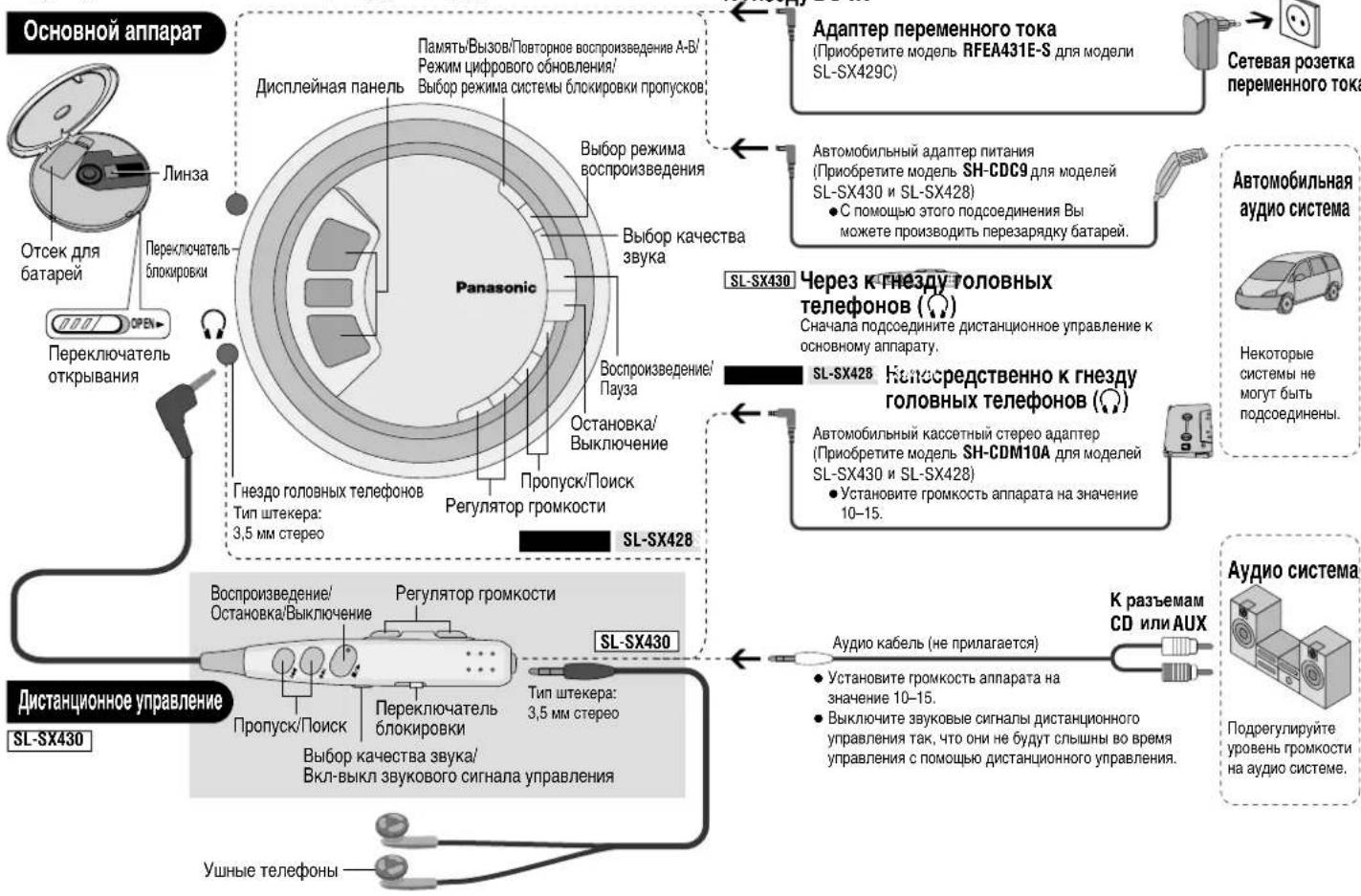
HeKotopbIe HcCTMBeHc MOrTy 6bTbN NoDCOeDnHE

Aydno CnCTema
3neKtpoNTaHne
Npe3apxaaemble 6atapeu (He npnaaratoTc)
3aprrntepnepnepBmncnoNb30BaHHeM
B KaueCTBe MepeIbe3oNaCHocTn 3To annapa CnpoeKtnpObaH TaK, YTO 3apJkaTb
06bHHe batapeKe HEBo3MoXHo. OTHOCHTeJIbHO NpObo6HOcte npOKHcyJIbTpPyITcEcb
BaAMm dInepom.
CneuHbIe nepe3apKaemble Ni-Cd 6atapen P-3GAVE/2B (KOMnIeKT n3 2-x)
ObchyBle cyxme 6aTapeKm/ nepe3apKaemble 6aTapeN

■ДЯ SL-SX429C
O63aTeIbHNo npHO6peTne DOIOHnHTeIbHbI aBtOMoHbHbI aDAnTeP nepMeHHoro TOKaRFEA431E-S.
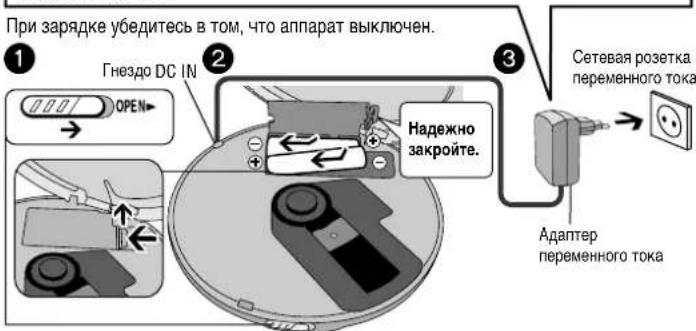
BoBpEm3apAekb6atapeHbHnHmikatop(KpUyMaetcNMCHeaT,KOrda 3apAka3akOHHeHa(np6nntenbHOOT4do5acob)
BbMOxTepe3apn6aTapeNTOKAKOHNOHOCbpopa3raTCA.
YcTaHOBtE KpIbIKy OTeKcA JnJ 6aTapei TAK, YTObI OHa 6bla HApEeXHO 3AkpeIeHAn 6bla 3anOpDnC o TceKcOM JnJ 6aTapei. EcM KpbIbIka ocna6He,To OHa MoKeT noJapauNb Bau DnCK.
Cyxne 6aTaepKn (He npJIaraoTc)
Nocne OTOcoeHHeHnA daanTepa nepeMeHHoro ToKa BCTabTe DBe UeNoHbIe 6atapKe "LR6,AA,UM-3". BCTabTe TAKMM Kc 6opzOM, Ka Kpe3apXaEMbIe 6atapEn.
BatapeHbI INdKaTOp
3TOT INHINKATOP NOBBLAETC, KOrda annapaT BKNIOHcN.
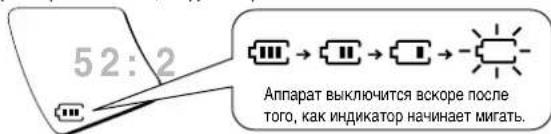
Ipeep TEM KAK HauHETcB BOCpOn3BeDEHne, 6aTapeHbM INMdkaTop MOKet MIRaTb, XOTaBapEn He pa3paJKeHb. OH ByTe NOKa3bBaTb npABINbHOe 3HaueHHe, KAK TOnbKO Bb HauHete BOCpOn3BeDEHne.
Ooune daHnble
BpemBaocnpon3BepeHn
::TexHmecKeX xaapKTePncTmKn, cTp.8
UdaJIeHne 6aTapei
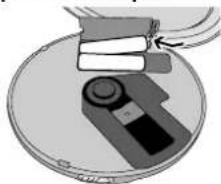
AbTomo6nIbHbI aadTep
A BOMO6nblbH aadantep nHTAHN BXoNT B KOMnKET NOCTaKN MoEN SL-SX429C. (O6paauTReB K OTenblHOH INCTpyKmno No yCTaHOBe.)
PiNo6pTeTne aTOBMO6nblbH aadantep nHTAHN SH-CDC9 dIe IcNOJ30BaHn c MoJeANSL-SX430 nSL-SX428.
Annapat haoDnTcB cOToHm OxuDaHn, KOrda NoCoEHNHeAaIaTepe npemehHoro ToKa. NepBuHa TaB CeTa HaxoDnTcNoHapXeHMe, KOrda aadantpe npemehHoro ToKa NoCoEHNHeK CTeeBo 3NeKtpueckOn po3eKe.
Kak nCnoJb3OBaTb
HΦopmaaIgI dIgI dIctauonHOy ynpaJIeHMy npMHeHMaToIbKo IgI moEi SL-SX430.
Bocnpom3BedeHne
Nay3a
HCTaHMOHHe ynpabneHne OChOBHO annapaT
He doctynho.
HAXMITE CHOBA, YTO6b BO3O6HOBNTB BOCPON28EHEJIa
Nonck
DuctaHMOHOe ynpabneHHe OChOBHO annapat

Haxmte n
yapedjmbaHTe BO
Bpemr
Bocnpoun3BeDeHnA.

Haxmnte u
yapedxmbaHTe BO
Bpemr
Bocnpon3BedeHn.
BbH MoXeTe BbINrHrTb NcK Bo BPemR Bocpn3BeHeHn paJIOB MP3.
BpeKIMnPpOrpaMMHOrO Bocpn03BcEeHnR, NOBtOPHO BOCpn03BcEeHnR OOH DopOKKn, Bocpn03BcEeHnR B pOxNBOhOM NOpAKe, NOBtOPHO BOCpn03BcEeHnR B pOxNBOhOM NoPAnKe NOBtOPHO BOCpn03BcEeHnR A-B BbMoXeTe BbIOINrTa NOnCK TOnIbKO B npdeIax TeKuyenDopOKKn C:ctp.6).
Pponyck
DuctanmoHoe ynpabHeHneOchOBHO annapat
Haxmnte. Haxmnte
DaxbKaHxMnITE [A]TTObIbIOnHnItb npOyck K HAnany npdeBdyuee IopOxxN BO BpEMA BocPNO3BeDEHnA.
Bb Hn Bokte K n 10bblnHtbnpOcK K npdeBduJeepoDopoxkBe BO BPEM Bocnpno3eBdneHN bnpoanlBom npoRJaE (r-CTp.6).
OctaHOBKa/BbIKIOueHne
甲CTAHUHNOHHOE
ynpabneHoeOchOBHO annapat

HaxMMte. HaxMMte.
Haxmte m
ydepxmbaIte,TOb6bl
BbIKIOHHTaannapat.
HaxMTE CHOBA, YTO6bl
BbIKJIIOHHTb annapaT.
UncnoDopoxeku

51:52
PONHOBEM
Bocnpn3eDeneH
HcnoDopOKeK

Дугнe MeToMbI BOCnPOn3BVeDEHnA
VHΦopMaJNaI DnA DCTaHcOHHOro ynpabHeHn npmHeHmToIbko dIeMOn SL-SX430.
PpOrrpAMMHOe BOCnpoN3BeDHeHne
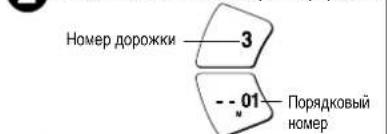
Haxmnte [MEMO], yTo6b3 apeHnctpnpoBaTb.
3 NOBTOPHTE DeHCTBnI NYKTOB 1N2, YTO6bI 3apeHCTPNPOBaT do 20 dopOKeK.
HaKMTe[//I],YTO6bl Haatb BOCPON3BedeHne.
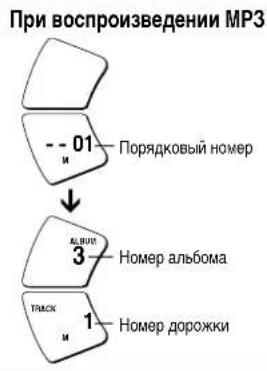
YtobnoTBePnBcOepKaHne nporpamMbBo BPOBmBOCPOIN3eDHHaNCKA HAKMTE [MEMO].
TObI OTMeHnIb nporpaMMHoe BocpnONBeDene HAKMTEI
N3meneHne KauecTba 3ByKa
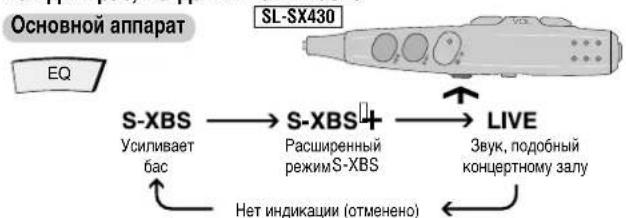
Kakdbi pa3, korga Bbl haxmaete
3ΦΦK TMOKET pa3HnAHTbC B 3aBNCIMOCT NT BUNa My3bIKN.
Pexmmbl Bocnpoun3BedeHna
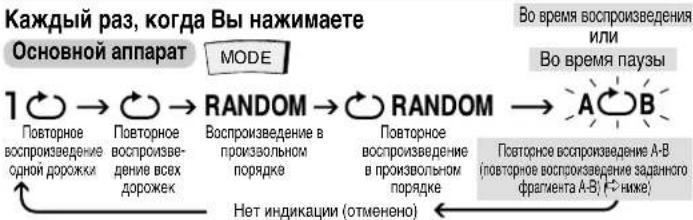
3aahanhe ppaarmetaA-B
Haxmte [MEMO] B Hauhboho TocKe (A) n eue pa3 B KOeHno TocKe (B).
AOB AOB
TO6bIOTMEHHTB, BbONHHTe OCTaHOBY ININ pponyck (cTp.5).
EcnBbHe 3a4aHte TOky Bn DOCTNHTE KOHua DnCKA,TO TOyKa B yctahabINBaTcB aTOMATNIeckn HauHnaeTaC NOBTOPOH BOCPON3BeDEHMe. Bb MoKeTe TaKke 3a4aTb TOky B, CHOBa Hxakn [MEMO].
BbHemokete Bbipbpekmmbl“RANDOM”m“A B"BO BpemaBocnpn3beHenaPainOB MP3.
CnCTema 6IOKINPOBKN nponyckOB
3Ta CNTema Chnkaet Do MHHMMyMa nponyckn, Bb3BaHhble Bn6paJnei.
Bb Mokehe NmEhHb Perna Marnn Cnembbl 6NkropKbnn pOnyckOBn Iya fOpMaTc CD-DA TTO6bl yIyHnHb KAHCTBO 3bYka.
Kaxdbpa3, korga BbI haxmaete u yedeXnBaete bpeXnme ocTaHOBKn
OchOBHO annapaT
MEMO
POS 2
PexmmynyuweHHoro3byaKa
CmCTema 6IIOKINPOBKN IponyckOB C
10-CEKHyDNoH naMaTbIO
BbHEMOXeTeH3MeHHTBpeMaTnIaIPOPMATA MP3.OHOcoCTaBnREtMAKCMMABHo
100 cekyHd nn daHHbix, 3anncahhhix npn 128 K6nt/c.
BbIKIOeHne 3ByKOBOrO CnHaJa ynpaBNeHn
HaxMMTe u ydepXHBaIe KhoNky [EQ] do tex nop, noka He noBaTc HnDkaZna "bP oFF" SL-SX430
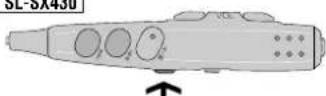
bP oFF bP on
CnHnBbIKIOHeh CmHn BkIOHeh
Bocnpon3BedeHne MP3
HΦopMaZnI dI nCTaHOnHO ynpaBHeHH npMEnHaToIbKO dIe MoeJSL-SX430.
Haayao Bocpon3BedeHn 3 aJb6oma (Pponyck aJb6oma)
Haxmte u ydepKbAte do tex nop, noka He noBtca Hyxhbl Bam aIb6om
OchOBHO annapat

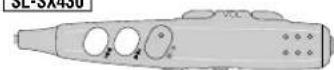
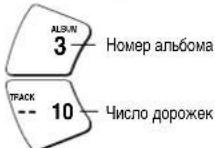
Bocpon3BeHHeToIbKOdoPoxEKBbI6paHHOM aIb6Ome(Pexm aIb6oma)
KaKdbi pa3, KOrda BbI Haxmnaete N ydepXnBaTe
OchOBHO annapat
MODE
ALBUM HET INHINKaunn (OTMHENHO)
BbMoKeTe Bb6paTbDpyroanb6oM,BblnONHINB nponyck anb6oma (BbIwe)
BbI He MoXKeTe BkJIIOUHTb peKm aJIb6OMa BO BpEm npOrpaMMHOBOCnpOn3BeDEHn.
HacnaXdennia daxe 60nee eCTeCTBeHHbIM 3ByKOM (LufpoBoe o6HOBJIeHne)
BbMoKTe 3aHOBO CreHepnObaT bactOt bcmHa, yTeprHHbI npu Cxatm, BOCCTaHOBB IN NOHT DO HecXaTOrO COCTORHN.
Kakdbpa3, Korga Bblhaxmaeteu ydepknaeTe bpekmoctaHOBKn
OchOBHO annapat
MEMO
RMTR HETMHINKauu CoXpaHReT BpemCnyk6bDatap
3TOT annapat moKET BOCPONBODnB fOpmat MP3-MeToD CxATy ayNoDAHHbIX 6e3 3aMeTHoro N3MeHmry ayNo KaeeCTBA.
Tpe6oBaHn npC03aHm HpAilOB MP3 nla Bocnpn3BeHnHa 3OM annapate
ΦopMaTbI DnCKOB: ISO9660 ypoBeHb 1 n ypoBeHb 2 (3a NcKTHOHeHMe paCmpeHHbIX (pOpMaTOB)
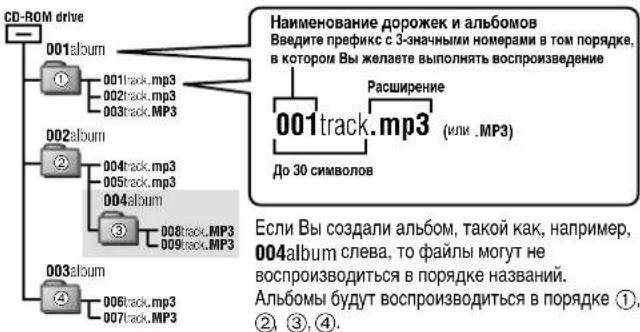
OrpaHnueHnIaPm3
3T0 annapat COBMECTMM C peKMMOM MHOROCEAHCOB 3aNCH, HO ECIN HA DNCKE MNEOTCNR MHORO CEAHCOB 3aNCH, TO Tpe6yETCR 6oJIbwe BPEMH N7I TORO, YTObI HauHAT BOCPON3BeDHEM. YTObI N36ExaTb 3TOR, CTapaItecB coxpaHrT bMCIO CEAHCOB 3aNNIC MNIMAMJIbHBM.
3T0 annapat He MOKET BOCPON3BOJITb paIbI, 3aIncAHHbE B pexime naKeTHO3aINCN.
-ECN CD DnCK FopMaTc CD-ROM cOepeKHT faJIb foPMA T MP3 H faJIb foPMA, OTMnHOrO OTO MP3, TO 6dyT BocpnO3BODnTBc TOnkO faJIb foPMA T MP3.
B 3abncmocnT OTO, KAK Bb co3daete MP3 faaibly, OHN MORYT BOCPON3BODNTbcra He B Tom npAek, B KOTOPOM Bb Hx npohymepoban, HIN MORYT COBCem HE BOCPON3BODNTcb.
TexhneckxapaKtepcntkn

Aydno (CD-DA)
HaCTOta BbIbOpKn: 44,1 K
Hcno KaHaoB:2 (neBbI npaBbI, cTepeo)
BbXoHnYpOBeHrOOBhIX
TenefoHOB:RMSMAK.C6MBT +6MBT/
16Ω (perynnympeoe)
YactotharXapaKTePmCTnKa
or 20 Fg do 20.000 Fg
(+0.5450-745)
3ByKoCHMaTeIb
VCTOCHK CBeta: NonynpoBDOHNKOBBI na3ep
ДиHA BONHbI:780HM
MP3
NoepKmbeckopocnnepea
daHHbIX:OT32K6MT/cdo320K6MT/c
(peKoMeHdyTeC 128 K6nt/c)
NoepKnBaemar Yactota BbIbOpKn:
48KΓU/44,1KΓU32KΓU
MaKcHmAbHoE YnCIO 3JEM
(06ueeunnoanbboomnnpoxek):999
MaKcImaJIbHOe KOINHeCTBO yPObHReI
anb60MOB:100
06wne daHHbIe
3NeKtpoNTaHHe:
Bxod noctoHHoro ToKa:
4.5 B noctoHHoro Toka
SL-SX430 SL-SX428
Bxod aanTepa nepemehnHoro toka:
220-230BnepeMeHHoroToKa50/60T
SL-SX430 SL-SX428
TIpTe6BnEma MOUHOCTb:
Pa3MepbI (U×B×Γ):135 ×24.3×135 MM
Macca:224r(cbaTapeMn)
180r(6e36aTapei)
PpIMeuaHHe:
TexnHeckne xapakTepeCTKNMOyT 6bItb
3MeHeHb63yBEdOMHeHnA.
Maccn pa3mepb daHb np6n3ntbHO.
yxoA
EcniIOBepxHOCTn3aqr3HeHb, BbITpnte INX MArKo,CyXO TKAhBo.
HmKorda nOnb3yTe aIkorOJIb, pactBopnteJb nn KpaKn mIn 6eH3nN dIa YnCTkn 3toro annapata.
-NepeIncnoJIb3OBAHHeM XmMnueckn O6pa6oTaHHo TkaHn BHNMaTeNbHO npOHTaTepnpinaraeMyK Hei HnCTpyKUIO.
Ipeodoctepej Hen
He noBepraIte annapat Bo3JeCTBnIO npMoro coHneHOro CBeta nTtna Hapmep,OT HarpeBaTeNbHbIX np6OBpO,TAK KAK 3TO MOKeT NOpeDnTB annapaT.
- PnepkpatHe IcNoIb3oBaTb annapat, ecN BblcNtBlaeTe dNCKOMpO7 OT yHbIX TeJeIOHOH nn NIObX bpynx TactEn, KOTOpBe HENOCpeCTBEHNO KOHTAKTPHYOT C BaueH koxE. DInTeHbE HcNIOb3oBaHVe MOKET BblBaTb NOBLeHne CbHn Hn IyDyTbe anPrrnueckne peaekn.
Batape
-He ydaIyTe 06oNoOky 6aTapeek H He IcNoIb3yIte 6aTapeeKn Co ChrToI o6oNoOko.
PpabINbHO COBMeuaTe NOIOCA+N-PPN BCTaBHeHm6aTapei
He CmeunBaIte pa3nHbIe TINbI 6aTape nIIN CTapBie HOBbIe 6aTapeN.
YdaIte 6aTapeHn3 annapata,ecnBbHe HamepeBaTeEc bncnoIb3oBaT erO B TeueHne DoIrTO BpEmEH.
He 6pocaiTe 6atapeu B OROH, He 3ambikaiTe Hx HAKOPOTK, He pa3bupaTe Hne noDBepraTe IN Ype3MePHOMy HarpeBy.
He nbtairecb nepe3apkaTb cyxhe 6aataeKn.
-При посяпес bataр в capmahe nИВ CUMKE yIOCTOBepbTecb TOM,чTo HNKAKNE MEtanJIHcECKne npeIMTeB,ΚΑΚ HanpIMeP,цeNOaKN, He HaxOДТСВ BmecTe C HIMN. KOHTAK bataр c MeTANJMOKOT cTaTB npuHINOH KOPOTKORI ZAMbIKAHnA, KOTOp MOKET Bb3BaTb BO3rOpaHne.
PpocnyuBaHne
He Bocnpom3B0DHTeMbky Hepe3oTolbHBe TenePbOnI Nm yuHbTe TenePbHOHa HbICOKOM yOBHe rpoMkOCTn. 3KnepTeBn o Cnyx He COBETyOT cUyecTBnA T npOdoJXHNTeHnO pOcNHyUNBaHne pn OnbUeHemON yOBHe.
EcnBbIcNtBtBaTe 3BOH B yuaX, yMeHbWnte yPoBeHb rPOMKocTn nIN npeKpaTne NCNoB30BAHHe.
HeNCNoJIb3yIe annapat BO BpEMa BoXdHn TpaHcNtPHTo CpeIcTBA. 30 MoKeT npINBCTN K DOpOKHOmy PIONCWECTBIO, N IABJRETCHE3aKOHbIM BO MHOnx peRHOax
BbI DOnXHbI bIbI ppeJeHbHO ocToPoxHb IIN BpeMeHo npeKpaTnTB MCNoIb3ObaHne B NOTeuHaHbO OAnChbIX CITyauNAX.
AaKe ecn BbI ncoNb3yeTe rnoOBHe TeNEoHb nn yuHbte NToKpBtor Ta, papaobTaNHe dner toro, 406bI no3BOnNTb Bam cbluTaH hapyXhie 3BykIn He nobbaiye OpoBHe rpoMKoCTn HactlonbKO BcICOQ, Yo BHe CMOKeTe CbluAtB, TTO npomCOnDt BOKpyr Bac.
Duckn CD
He nCnoB3yTe DNCKN CD HnepaBnBHOf oPmbl.
He nCnoJb3yIe DNCKn, He COOTBeTCTByHOuJe TEXHnuecknM Tpe6oBaHnM.
HeNCIOJIb3yIteMNCDc3TNIKETKAMH,HANEaTAHHbIMN C NMOUIO pINHTepOB, HmEOUIXCRBnpOdaxe.
He nCnObl3yTe Dc C 3TKeTkAmu HaKLeKaMn, KOToPbIe OTKnEINncB, mNecm KneB BbCTyNaet H-NOd 3TNKeTOK N HAKeEeK.
PykoBODCTBO NO NONCKy I ycTpaHEnIO HencpapBHOCTeI
HΦopmaIgIgIgIgIgIgIgIgIgIgIgIgIgIgIgIgIgIgIgIgIgIgIgIgIgIgIgIgIgIgIgIgIgIgIgIgIgIgIgIgIgIgIgIgIgIgIgIgIgIgI gIgIgIgIgIgIgIgIgIgIgIgIgIgIgIgIgIgIgIgIgIgIgIgIgIgIgIgIg
Ipeedobpaenem 3a TeXo6cnyKbAHnEM BblOINHte prnnpBeDHHbIX HNKe npOBepok. Ecm y Bac nOBmncb comHeHn OTHOCTeBHO HeKOTOpbIX 3Tnx npOBepok, mnpBedeHHbE b TabInue peKomeHdaun He pseaoT np6bemy, npOKOHcybTpyuTcecb Baum dmJlepom OTHOCTeBHO daJIbeHux DeCTbn.
73
| Остуг肃ует вocmpno3bdehene. | •Вклоча Нфуньша Блоровский Hold. Всббобдente песклоча 히ьл. Блоровский Hold (*-ст. 5). Батарей моггли радраитья (*-ст. 4). (Eсm Врм Всббобдente очны Короткoe Доже пооче полочи песклоча 히ьл. Блоровский Hold. Батарей моггли радраитья восток. Дамс уст. 300 pa.). Дамс уст. 300 pa. Дамс уст. 300 pa. Дамс уст. 300 pa. Дамс уст. 300 pa. Дамс уст. 300 pa. Дамс уст. 300 pa. Дамс уст. 300 pa. Дамс уст. 300 pa. Дамс уст. 300 pa. Дамc уст. 300 pa. Дамс уст. 300 pa. Дамс уст. 300 pa. Дамс уст. 300 pa. Дамс уст. 300 pa. Дамс уст. 300 pa. Дамс уст. 300 pa. Дамс уст. 300 pa. Дамс уст.300 pa. Дамс уст.300 pa. Дамс уст.300 pa. Дамс уст.300 pa. Дамс уст.300 pa. Дамс уст.300 pa. Дамс уст.300 pa. Дамс уст.300 pa. Дамс уст.300 pa. Дамс уст. 300 pa. Дамс уст.300 pa. Дамс уст.300 pa. Дамс уст.300 pa. Дамс уст.300 pa. Дамс уст.300 pa. Дамс уст.300 pa. Дамс уст.300 pa. Дамс уст. Дамс уст.300 pa. Дамс уст.300 pa. Дамс уст.300 pa. Дамс уст.300 pa. Дамс уст.300 pa. Дамс уст.300 pa. Дамс уст.300 pa. Дамс уст.300 pa. Дамс уст.300 pa Дамс уст.300 pa Дамс уст.300 pa Дамс уст.300 pa Дамс уст.300 pa Дамс уст.300 pa Дамс уст.300 pa Дамс уст.300 pa Дамс уст.300 pa Дамс уст.300 pa DA DA DA DA DA DA DA DA DA DA DA DA DA DA DA DA DA DA DA DA DA DA DA DA DA DA DA DA DA DA DA DA DA DA DA DA DA DA DA DA DA DA DA DA DA DA DA DA DA DA D DA DA DA DA DA DA DA DA DA DA DA DA DA DA DA DA DA DA DA DA DA DA DA DA DA DA DA DA DA DA DA DA DA DA DA DA DA DA DA DA DA DA DA DA DA DA DA DA DA MA DA DA DA DA DA DA DA DA DA DA DA DA DA DA DA DA DA DA DA DA DA DA DA DA DA DA DA DA DA DA DA DA DA DA DA DA DA DA DA DA DA DA DA DA DA DA DA DA DA DMA DA DA DA DA DA DA DA DA DA DA DA DA DA DA DA DA DA DA DA DA DA DA DA DA DA DA DA DA DA DA DA DA DA DA DA DA DA DA DA DA DA DA DA DA DA DA DA DA DA DM DA DA DA DA DA DA DA DA DA DA DA DA DA DA DA DA DA DA DA DA DA DA DA DA DA DA DA DA DA DA DA DA DA DA DA DA DA DA DA DA DA DA DA DA DA DA DA DA DA DN DA DA DA DA DA DA DA DA DA DA DA DA DA DA DA DA DA DA DA DA DA DA DA DA DA DA DA DA DA DA DA DA DA DA DA DA DA DA DA DA DA DA DA DA DA DA DA DA DA NA DA DA DA DA DA DA DA DA DA DA DA DA DA DA DA DA DA DA DA DA DA DA DA DA DA DA DA DA DA DA DA DA DA DA DA DA DA DA DA DA DA DA DA DA DA DA DA DA DA DNA DA DA DA DA DA DA DA DA DA DA DA DA DA DA DA DA DA DA DA DA DA DA DA DA DA DA DA DA DA DA DA DA DA DA DA DA DA DA DA DA DA DA DA DA DA DA DA DA DA BA DA DA DA DA DA DA DA DA DA DA DA DA DA DA DA DA DA DA DA DA DA DA DA DA DA DA DA DA DA DA DA DA DA DA DA DA DA DA DA DA DA DA DA DA DA DA DA DA DA DR DA DA DA DA DA DA DA DA DA DA DA DA DA DA DA DA DA DA DA DA DA DA DA DA DA DA DA DA DA DA DA DA DA DA DA DA DA DA DA DA DA DA DA DA DA DA DA DA DA SA DA DA DA DA DA DA DA DA DA DA DA DA DA DA DA DA DA DA DA DA DA DA DA DA DA DA DA DA DA DA DA DA DA DA DA DA DA DA DA DA DA DA DA DA DA DA DA DA DA OA DA DA DA DA DA DA DA DA DA DA DA DA DA DA DA DA DA DA DA DA DA DA DA DA DA DA DA DA DA DA DA DA DA DA DA DA DA DA DA DA DA DA DA DA DA DA DA DA DA ZA DA DA DA DA DA DA DA DA DA DA DA DA DA DA DA DA DA DA DA DA DA DA DA DA DA DA DA DA DA DA DA DA DA DA DA DA DA DA DA DA DA DA DA DA DA DA DA DA DA LA DA DA DA DA DA DA DA DA DA DA DA DA DA DA DA DA DA DA DA DA DA DA DA DA DA DA DA DA DA DA DA DA DA DA DA DA DA DA DA DA DA DA DA DA DA DA DA DA DA QA DA DA DA DA DA DA DA DA DA DA DA DA DA DA DA DA DA DA DA DA DA DA DA DA DA DA DA DA DA DA DA DA DA DA DA DA DA DA DA DA DA DA DA DA DA DA DA DA DA HA DA DA DA DA DA DA DA DA DA DA DA DA DA DA DA DA DA DA DA DA DA DA DA DA DA DA DA DA DA DA DA DA DA DA DA DA DA DA DA DA DA DA DA DA DA DA DA DA DA FA FA FA FA FA FA FA FA FA FA FA FA FA FA FA FA FA FA FA FA FA FA FA FA FA FA FA FA FA FA FA FA FA FA FA FA FA FA FA FA FA FA FA FA FA FA FA FA FA FA FCA FCA FCA FCA FCA FCA FCA FCA FCA FCA FCA FCA FCA FCA FCA FCA FCA FCA FCA FCA FCA FCA FCA FCA FCA FCA FCA FCA FCA FCA FCA FCA FCA FCA |
| Hebo3MOxH0 3a4aTb Фрмгent A-B. | Взмохнь Вь He CmOxeTe 3a4aTb Фрмгent A ИИ B KОнцe ДИСКА. |
| РекичфpoRt obHOBONHЯne ne pabotaet. | ВЗавсIMMOTN OT TINA ZaHNCI DИСКA MP3 3cΦeKTe MOxET He NORBNTBCN. |
| SL-SX430 Kor'da annapat NDcoDcHIneH К дуromy ObyopduOBaHnO, OH pabotaET HENPABINHNo. | ОьаТALENBIO NDcoOeDinHte Dpyroe OOBpyoDaHIne UpeRe3 ДИСТANUHONHOуnpaBNeHne. ГРOMKOrOBpHTeN, NDcoOeDinHbHne HENOCPeDCTBENH K AnnapatY,doJKNbHb IMeTb cOnpOTMbIneHme 1 KΩ ИИМ MeHbUe. |
| Hebo3MOxH0 CbIbATb 3ByKOBov CMHnA ДИСТANUHONHOrу nprablenHa. | ЗБУКOBОu CmHnA nprabLBeHnO MoxET 6bITb BvIKNIOChE (°-Ctp. 6). |
| ДИСТANUHONHoe uypaBLENHe pabotaET HENPABINHNo. | ИСпЛБуITE TOIbKO PrnIaRaEоMe IcHSTANUHOnHoe uypaBIneHne, TObIb YIpbAPLTb STIM AnnapatOM. |
| Hebo3MOxH0 BvIOLHnTB 3aRdKy. | ■Бы He NcIbTyBe TceUaJIbHbe NepeZaRJaGMaIbe 6aTapeN (r-CTp. 4). ■Бы DoIqKbHb 8ctabNTb DeIe 6aTapeN,PrejckJe ChE MBy CMOxete 3aRdNTb INX. ■Annapat DoIqKbENb 6bITb BvIKNIOChE,PrejckJe ChE MBy CMOxete BvIOLHnTB 3aRdKy. |
| Адтөр.Tэр.EннгHERO ToK aSTAHOBITc TЕлblM BO BPEMaz 3aRdKy. | ЗTO RЯJIeTc HOpMaJIbHbM. |
| Tpebyetc DonrOe BPEMaz ДуяЗрдк Bpatae. | При НeKOTOpBX UcNOBHX MaKCMaJIbHoe BpeMae NepeZaRdKn batae ComTocBAYET 6 CacOb. |
| ВpeMae BocPOnHsBeDnHЯ BraJIbTc KOROTKHM nocle 3aRdKy. | ■ЗТо мeKET ПпОзOTn NocE ToR,Кak Bы b NapRbI pao 3aRdNite batae, ИИЕ сIb Nы He NcIbTOBaIIH INB V TeUeHne DINOrTO BpeMehn. BpeMae BOCpOVAbEDeHnO DINOJHO BOCCTAHOBITcBoc nocne HecKobkHx NpeZaRdNOK. BataeM yOryT PashDyIbTcBc,ecm Bы octabite aIaNTer nepemeHnHO ToK aNcIbTH NocE ToR,Кak ZaRbUHHa 3aRdKy. |
| Батайньй ИndNKATop OTCYTCTBYET ИИ NOKa3bIbAeT HepaBvInlbHoe 3aHauHne. | ■Батайньй ИndNKATop OTCytCTByET, KOrDA NOdKIOChE aIaNTer петеMuHOPERTOK TQa. ■При НeKOTOpBX UcNOBIX ИndNKa3aJIg NOKa3bIbAeTc HEPaBvInlbHo. |
HdNkaun
WTYM URZADZENIU ZNAJDUJE SIE LASER.
WYKONYWANIE REGULACJI INNYCH, NIZ OPISANE, LUB POSTEPOWANIE W SPOSOB
NIE PRZEWIDZIANY W INSTRUKCJI OBSLUGI GROZI NIEBEZPIECZNYM NASWIELNIEM
PROMIENIAM LASERA
PROSIMY NIE OTWIERAC OBUDOWY I NIE DOKONYWAC NAPRAW SAMODZIELNIE.
PROSIMY POWIERZYC NAPRAWY KWALIFIKOWANEMU PERSONELOWI
Antal spar Antal album
48 kHz/44.1 kHz/32 kHz