DB1 - Doorbells EZVIZ - Free user manual and instructions
Find the device manual for free DB1 EZVIZ in PDF.



| Product Type | Connected Doorbell |
| Brand | EZVIZ |
| Model | DB1 |
| Power Supply | 8 to 24 V AC, existing wiring |
| Connectivity | Wi-Fi 2.4 GHz, EZVIZ app |
| Main Functions | HD video, two-way audio, motion detection, night vision, push notification, SD card recording |
| Storage | MicroSD card (not included) |
| LED Indicator | Flashing blue (setup), solid blue (operation), solid red (power), flashing red (exception) |
| Box Contents | Doorbell, 3 faceplates, 3 mounting plates, foam, drill bit, power kit, mini level, cable harness, fuse wire, U wires, wire nuts, screws and anchors |
| Dimensions (approx.) | Approx. 14 x 5 x 2.5 cm |
| Weight (approx.) | Approx. 200 g |
| Material | ABS plastic, metal |
| Protection Rating | Not specified, recommended sheltered from weather |
| Installation | Wall mounting, compatible with wired or wireless chime |
| Chime Adjustment | Via the EZVIZ app |
| Maintenance and Cleaning | Clean with a soft, dry cloth |
| Security | Security screws, data encryption, secure connection |
| Spare Parts | Faceplates, mounting plates, power kit |
| Repairability | Limited warranty, repair or replacement by the manufacturer |
| General Information | Manufactured by Hangzhou EZVIZ Software Co., Ltd. |
Frequently Asked Questions - DB1 EZVIZ
User questions about DB1 EZVIZ
0 question about this device. Answer the ones you know or ask your own.
Ask a new question about this device
Download the instructions for your Doorbells in PDF format for free! Find your manual DB1 - EZVIZ and take your electronic device back in hand. On this page are published all the documents necessary for the use of your device. DB1 by EZVIZ.
USER MANUAL DB1 EZVIZ
COPYRIGHT ©2018 Hangzhou EZVIZ Software Co.,Ltd. or its subsidiaries. ALL RIGHTS RESERVED.
About this Manual
The Manual includes instructions for using and managing the product. Pictures, charts, images and all other information hereinafter are for description and explanation only. The information contained in the Manual is subject to change, without notice, due to firmware updates or other reasons. Please find the latest version in the www.ezvizlife.com).
Any and all information, including, among others, wordings, pictures, graphs are the properties of Hangzhou EZVIZ Software Co., Ltd. or its subsidiaries (hereinafter referred to be "EZVIZ"). This user manual (hereinafter referred to be "the Manual") cannot be reproduced, changed, translated, or distributed, partially or wholly, by any means, without the prior written permission of EZVIZ. Unless otherwise stipulated, EZVIZ does not make any warranties, guarantees or representations, express or implied, regarding to the Manual.
Trademarks Acknowledgement
ezviz™, ™™, and other EZVIZ's trademarks and logos are the properties of EZVIZ in various jurisdictions. Other trademarks and logos mentioned below are the properties of their respective owners.
Legal Disclaimer
TO THE MAXIMUM EXTENT PERMITTED BY APPLICABLE LAW, THE PRODUCT DESCRIBED, WITH ITS HARDWARE, SOFTWARE AND FIRMWARE, IS PROVIDED "AS IS", WITH ALL FAULTS AND ERRORS, AND EZVIZ MAKES NO WARRANTYES, EXPRESS OR IMPLIED, INCLUDING WITHOUT LIMITATION, MERCHANTABILITY, SATISFACTORY QUALITY, FITNESS FOR A PARTICULAR PURPOSE, AND NONINFRINGEMENT OF THIRD PARTY. IN NO EVENT WILL EZVIZ, ITS DIRECTORS, OFFICERS, EMPLOYEES, OR AGENTS BE LIABLE TO YOU FOR ANY SPECIAL, CONSEQUENTIAL, INCIDENTAL, OR INDIRECT DAMAGES, INCLUDING, AMONG OTHERS, DAMAGES FOR LOSS OF BUSINESS PROFITS, BUSINESS INTERRUIPTION, OR LOSS OF DATA OR DOCUMENTATION, IN CONNECTION WITH THE USE OF THIS PRODUCT, EVEN IF EZVIZ HAS BEEN ADVISED OF THE POSSIBILITY OF SUCH DAMAGES.
TO THE MAXIMUM EXTENT PERMITTED BY APPLICABLE LAW, IN NO EVENT SHALL EZVIZ'S TOTAL LIABILITY FOR ALL DAMAGES EXCEED THE PURCHASE PRICE THE PRODUCT.
EZVIZ does not undertake any liability for personal injury or property damage, as the result of product interruption or service termination cause by: a) improper installation or usage other than as requested; b) the protection of national or public interests; c) Force Majeure; d) yourself or the third party, including not limitation, using any third party's products, software, applications, and among others.
REGARDING TO THE PRODUCT WITH INTERNET ACCESS, THE USE OF PRODUCT SHALL BE WHOLLY AT YOUR OWN RISKS. EZVIZ SHALL NOT TAKE ANY RESPONSIBILITIES FOR ABNORMAL OPERATION, PRIVACY LEAKAGE OR OTHER DAMAGES RESULTING FROM CYBER ATTACK, HACKER ATTACK, VIRUS INSPECTION, OR OTHER INTERNET SECURITY RISKS; HOWEVER, EZVIZ WILL PROVIDE TIMELY TECHNICAL SUPPORT IF REQUIRED.
The purpose of the Products is to provide an adequate warning in the event of illegal encroachment in certain area; however, the proper installation of the Products will not eliminate, but only reduce, that accidents will not occur or that there will be no personal injury or property loss as a result. You are highly recommended to raise your vigilance and
strengthen the safety awareness in the daily life.
SURVEILLANCE LAWS VARY BY JURISDICTION. PLEASE CHECK ALL RELEVANT LAWS IN YOUR JURISDICTION BEFORE USING THIS PRODUCT IN ORDER TO ENSURE THAT YOUR USE CONFORMS TO THE APPLICABLE LAW. YOU FURTHER AGREE THAT THIS PRODUCT IS ONLY FOR CIVIL USE, AND EZVIZ SHALL NOT BE LIABLE IN THE EVENT THAT THIS PRODUCT IS USED WITH ILLEGIMATE PURPOSES, SUCH AS THIRD PARTY RIGHTS INFRINGEMENT, MEDICAL TREATMENT, SAFETY EQUIPMENT OR OTHER SITUATIONS WHERE THE PRODUCT FAILURE COULD LEAD TO DEATH OR PERSONAL INJURY, OR WEAPON OF MASS DESTRUCTION, CHEMICAL AND BIOLOGICAL WEapon, NUCLEAR EXPLOSION, AND ANY UNSAFE NUCLEAR ENERGY USES OR ANTI-HUMANITY USAGES. YOU SHOULD UNDERTAKE ALL RESPONSIBILITIES FOR LOSSES OR DAMAGES RESULTING FROM THE ABOVE USAGES WHATSOVER.
IN THE EVENT OF ANY CONFLICTS BETWEEN THE ABOVE AND THE APPLICABLE LAW, THE LATER PREVAILS.
Regulatory Information
FCC Information
This device complies with Part 15 of the FCC Rules. Operation is subject to the following two conditions:
[1] This device may not cause harmful interference, and
[2] This device must accept any interference received, including interference that may cause undesired operation.
Note: This product has been tested and found to comply with the limits for a Class B digital device, pursuant to Part 15 of the FCC Rules. These limits are designed to provide reasonable protection against harmful interference in a residential installation.
This product generates, uses, and can radiate radio frequency energy and, if not installed and used in accordance with the instructions, may cause harmful interference to radio communications. However, there is no guarantee that interference will not occur in a particular installation. If this product does cause harmful interference to radio or television reception, which can be determined by turning the equipment off and on, the user is encouraged to try to correct the interference by one or more of the following measures:
—Reorient or relocate the receiving antenna.
—Increase the separation between the equipment and receiver.
- Connect the equipment into an outlet on a circuit different from that to which the receiver is connected.
—Consult the dealer or an experienced radio/TV technician for help.
Please take attention that changes or modification not expressly approved by the party responsible for compliance could void the user's authority to operate the equipment.
This equipment should be installed and operated with a minimum distance 20cm between the radiator and your body.
This device complies with Industry Canada licence-exempt RSS standard(s). Operation is subject to the following two conditions:
(1) this device may not cause interference, and
(2) this device must accept any interference, including interference that may cause undesired operation of the device.
Under Industry Canada regulations, this radio transmitter may only operate using an antenna of a type and maximum (or
lesser) gain approved for the transmitter by Industry Canada. To reduce potential radio interference to other users, the antenna type and its gain should be so chosen that the equivalent isotropically radiated power (e.i.r.p.) is not more than that necessary for successful communication.

EU Conformity Statement
This product and - if applicable - the supplied accessories too are marked with "CE" and comply therefore with the applicable harmonized European standards listed under the Radio Equipment Directive 2014/53/EU, the EMC Directive 2014/30/EU, the RoHS Directive 2011/65/EU.
2012/19/EU (WEEE directive): Products marked with this symbol cannot be disposed of as unsorted municipal waste in the European Union. For proper recycling, return this product to your local supplier upon the purchase of equivalent new equipment, or dispose of it at designated collection points. For more information see: www-recyclethis.info.
2006/66/EC (battery directive): This product contains a battery that cannot be disposed of as unsorted municipal waste in the European Union. See the product documentation for specific battery information. The battery is marked with this symbol, which may include lettering to indicate cadmium (Cd), lead (Pb), or mercury (Hg). For proper recycling, return the battery to your supplier or to a designated collection point. For more information see: www.recyclethis.info.

TapaHTnHbI cpoK-1 roD
Cpok cnjx6bl-3 rOda
Pon3BOnTeInb:XaHxKoy XKBNXH DnIXnTal TexHOJOn(KnTa)
ИМпорТер-ПОCTавцИКВ РОСсИN:3AO"XиКВИЖн"
IImnopTepe-nocTabuK B Pecny6nke Benapycb:OOO "ToproBbI Dom "ABAHT-TEXHO"
CaiT:www.ezviz.ru
| The power supply must conform to LPS. The recommended adaptor models and manufacturers are shown on the right. Use the attached adapter, and do not change the adaptor randomly. | Model Manufacturer | |
| MKAC-57-242500M, MKAC-57-242200M, MKAC-57-241500M | MACABLE |
EC DECLARATION OF CONFORMITY
Hereby, Hangzhou EZVIZ Software Co., Ltd. declares that the radio equipment type [CS-DB1, CS-DB1i,CS-DB1C,CS-DB1S,CS-DB2, CS-DB2i,CS-DB2C,CS-DB2S,CS-DB3, CS-DB3i,CS-DB3C,CS-DB3S] is in compliance with Directive 2014/53/EU.
The full text of the EC DECLARATION OF CONFORMITY is available at the following web link:
http://www.ezvizlife.com/declaration-of-conformity.
Safety Instruction
Due to the product shape and dimension, the name and address of the importer/manufacturer are printed on the package.
Quick Setup
Power Kit Installation
Doorbell Installation
Doorbell Setup
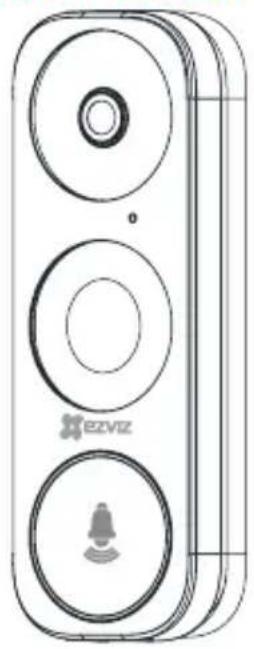
What's in the Box
Doorbell (x1)
Faceplate [x3]
Pick the one that best matched your home from three faceplates.
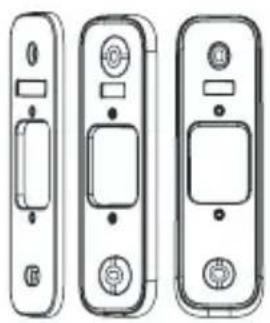
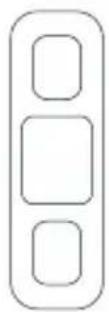
Mounting Plate (x3)
Pick the one for best surveillance angle.
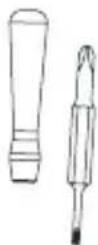
Screwdriver (x1)
EN

Drill Bit [x1]
Plate Foam (x1)
Stabilize the mounting plate when installing it in the rough surface.
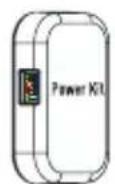
Power Kit (x1)
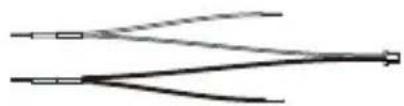
Wire Harness (x1)

Fuse Wire (x1)

Wire Connectors (x4)
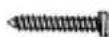
Mounting Screws (x3)
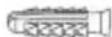
Anchors [x3]

Security Screws [x2]

Fixing Screws (x2)

Doorbell Screws [x2]
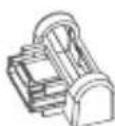
Mini-Level [x1]
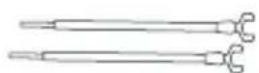
U-shaped Wires [x2]
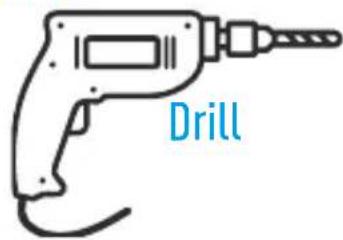
Tools You May Need

Pencil
- If you have mechanical chime installed in your home, install the power kit and doorbell.

-
If you have electronic chime installed in your home, refer to its own manual to install the power kit, and install the doorbell.
-
If no chime is installed, skip power kit installation, install the doorbell and follow the Option B in page 5.
Power Kit Installation
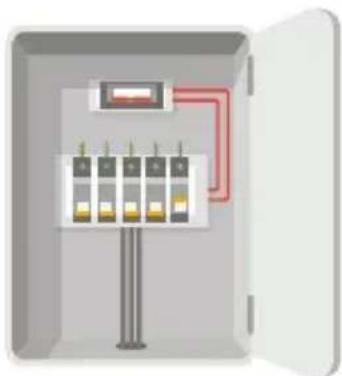
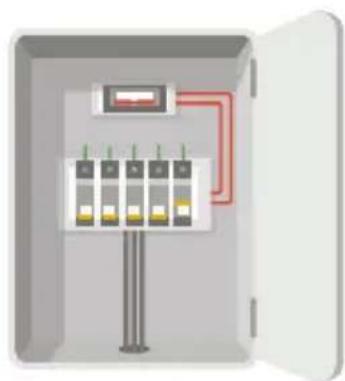
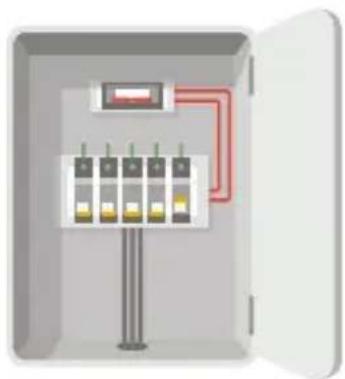
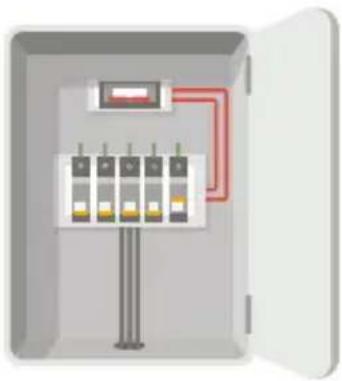
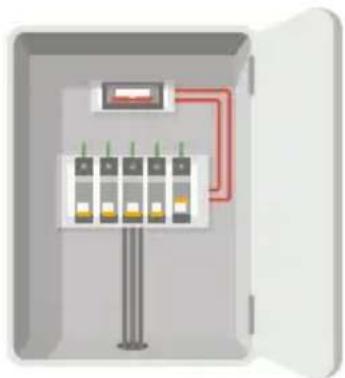
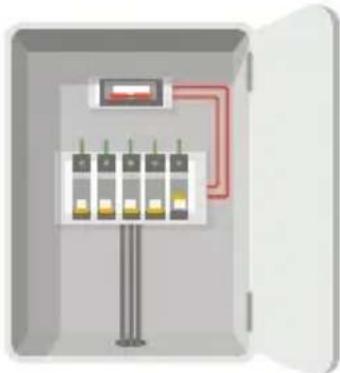
1 Shut off the electricity at the breaker that controls doorbell's circuit.
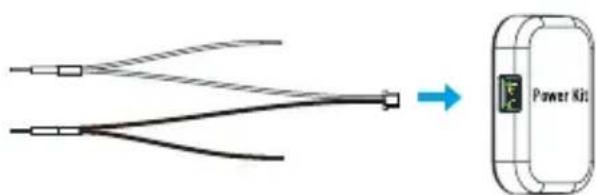
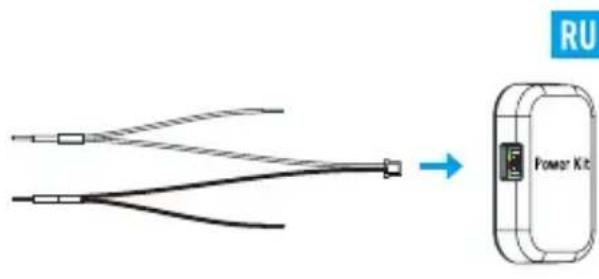
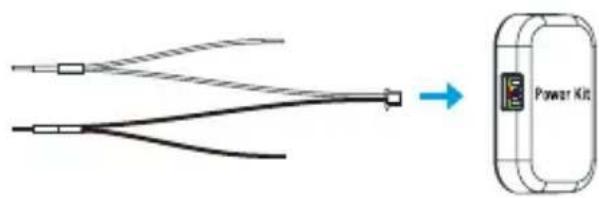
2 Insert one end of the wire harness the power kit.
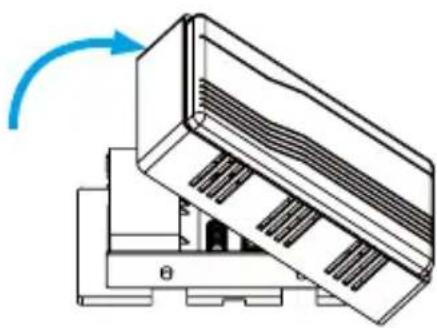
3 Remove the cover from your mechanical chime.
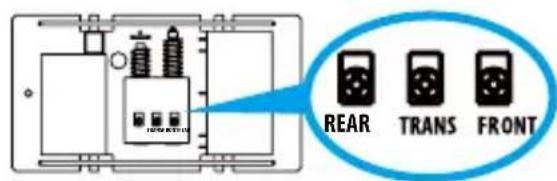
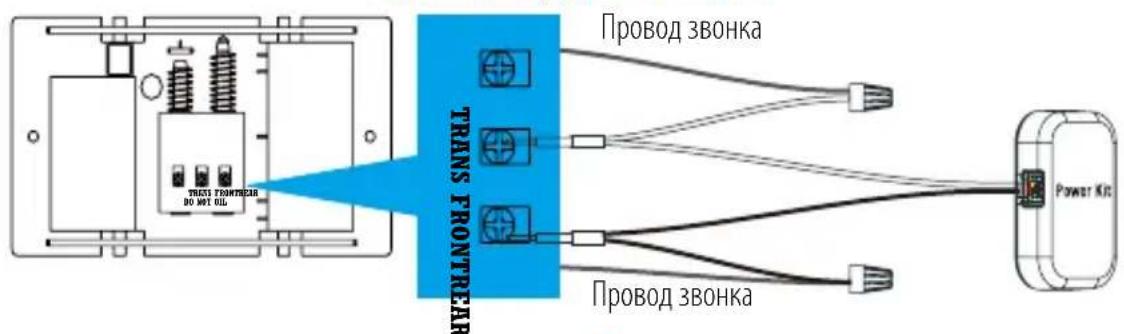
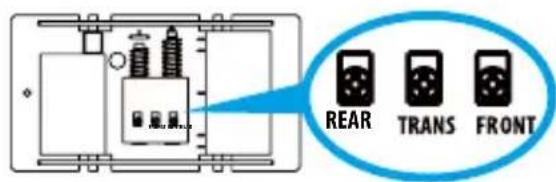
4 Remove the existing chime wires in the terminals named TRANS and FRONT.
EN
5 Connect the wire harness to the chime's terminals named TRANS and FRONT.
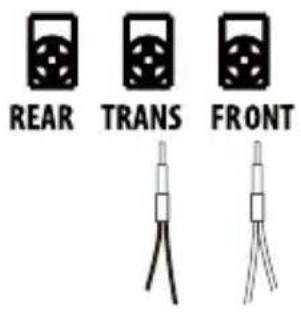
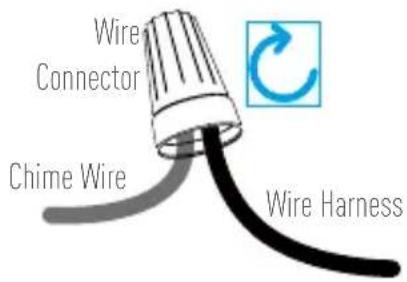
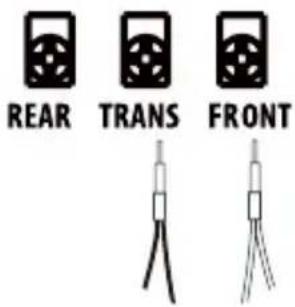
6 Insert the existing chime wire and the other end of the wire harness into the wire connector and twist it tightly. Repeat this step with the other chime wire.
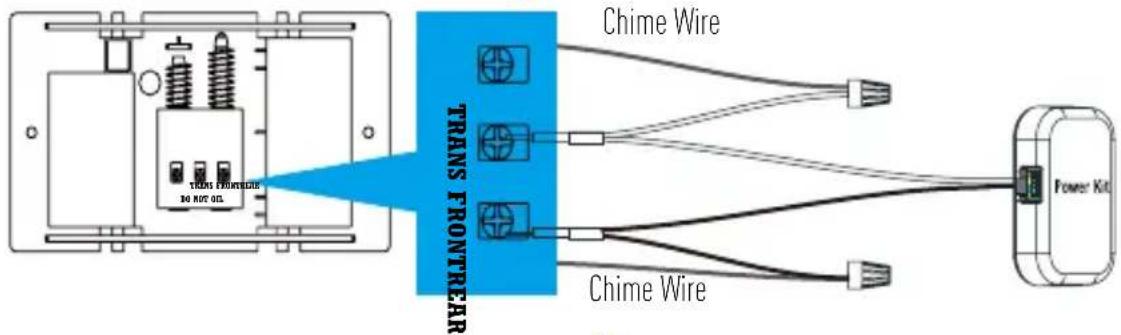
Wiring Overview
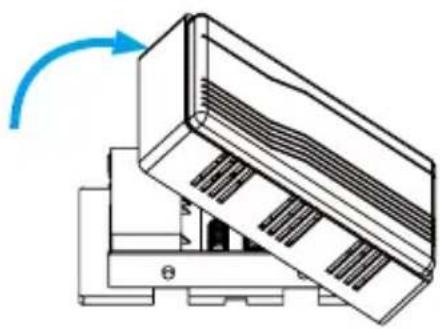
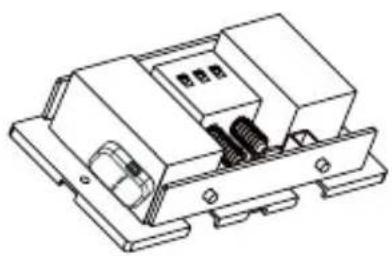
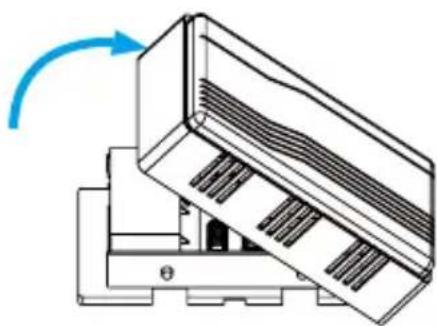
7 Mount the power kit to the side of the chime.

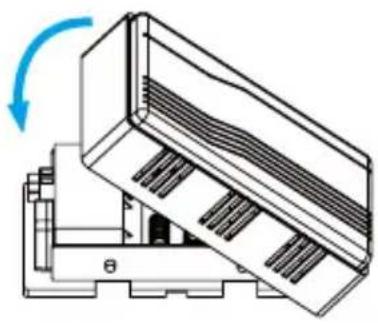
Put back the chime cover.
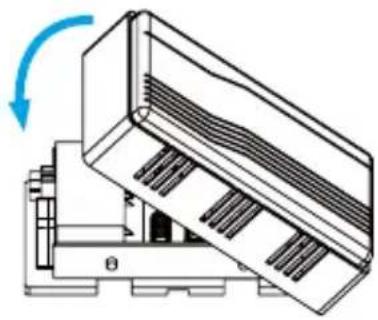
Doorbell Installation
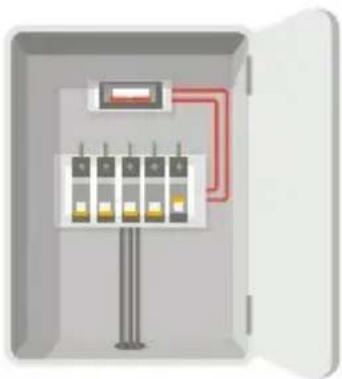
Shut off the electricity at the breaker that controls doorbell's circuit.
3 Insert the mini-level into the mounting plate and mark the drill points when its bubble stays in the middle.
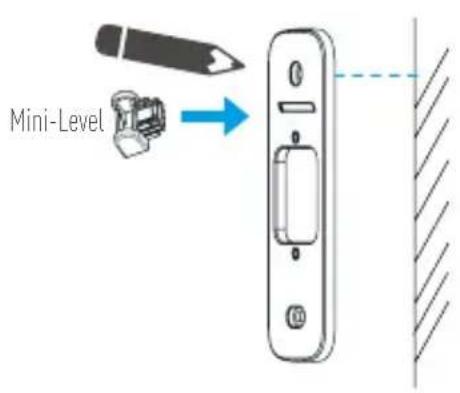
i Remove the mini-level when drill points are marked.
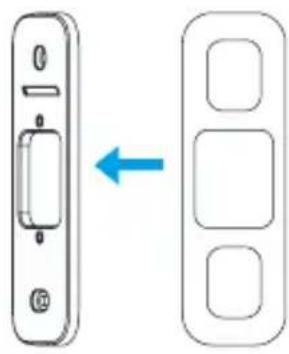
2 Optional) When the wall is uneven, paste the plate foam to the mounting plate.
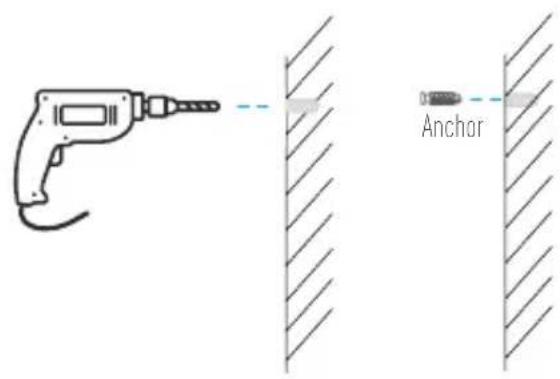
4 Drill holes according to drill points and insert anchors.
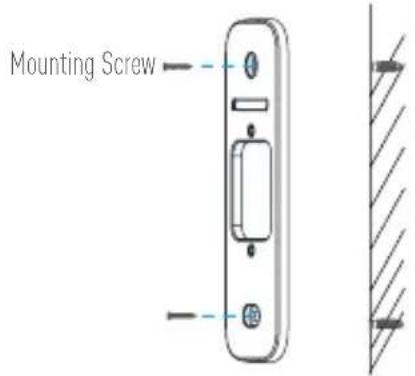
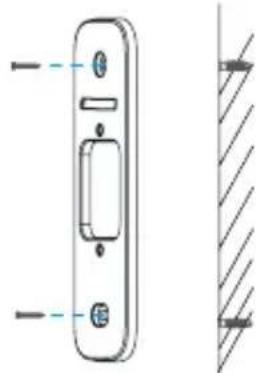
Fix the mounting plate to the wall.
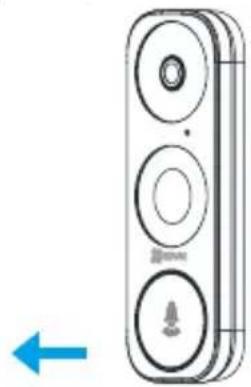
6 Remove faceplate on your doorbell from button to top.
If you have a chime installed, follow Option A; If not, follow Option B.
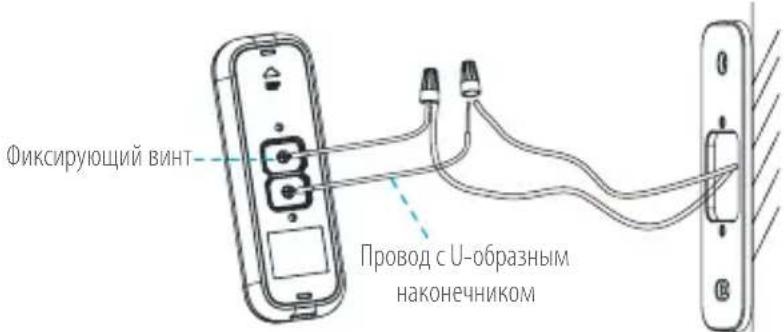
Option A Connect doorbell with your existing doorbell wires.
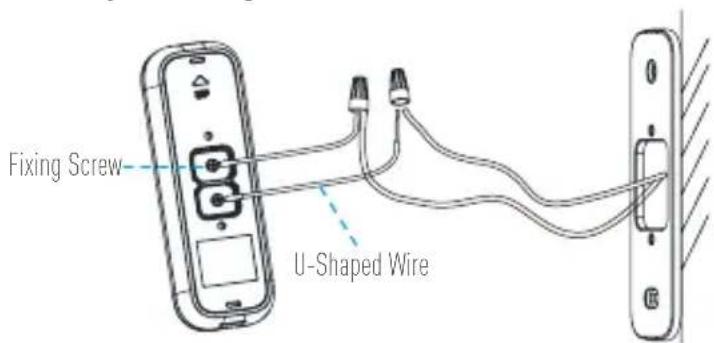
Option B Connect the fuse wire with your existing doorbell wire.
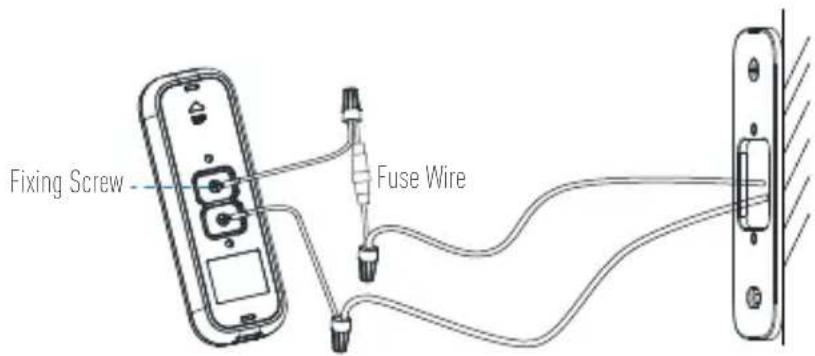
Power Supply: 8 to 24 VAC
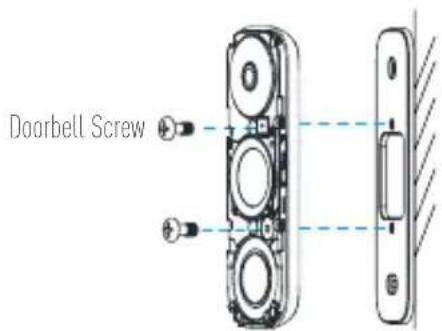
Fix the doorbell to the mounting plate by inserting the doorbell screws.
9 Restore the electricity at the breaker.
Doorbell is powered on when its indicator flashes blue quickly. If not, make sure your electricity is off and check the wiring. If yes, proceed to doorbell setup.
Doorbell Setup
10 Add to EZVIZ app.
- Connect your mobile phone to Wi-Fi.
- Download and install the EZVIZ app by searching "EZVIZ" in App Store or Google PlayTM.
- Register an EZVIZ user account following the start-up wizard and log in.
- On the Home screen, tap "+" on the upper-right corner to go to the scan QR code page.
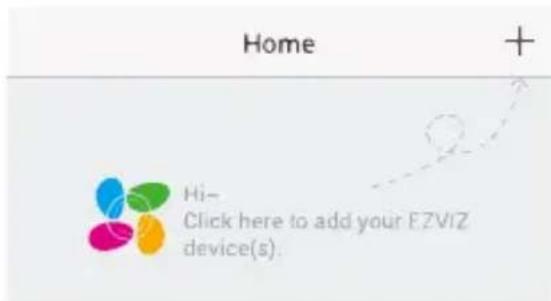
- Scan the QR code on the device or the cover of this manual when the indicator flashes blue.
- Follow the app wizard to finish Wi-Fi configuration.
If you want to change your doorbell's Wi-Fi, press and hold the reset button for 5s and repeat this part.
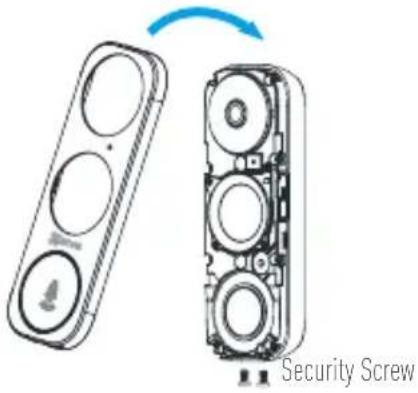
11 Put the faceplate back and insert two security screws into the bottom of the doorbell to secure the faceplate.
EN
Appendix
Basics
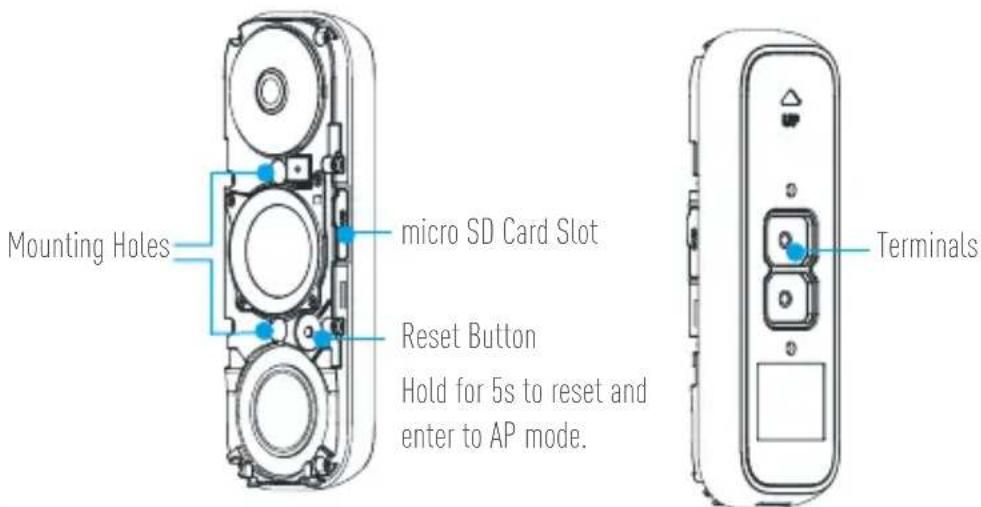
LED Indicator
Blue Light Flashing Doorbell is ready for Wi-Fi configuration.
Steady on Doorbell is working.
Red Light Flashing Fast Device Exception
Steady on Doorbell is powering on.
Use AP Mode for Wi-Fi Configuration
-For AP hotspot configuration, press the Reset button for 5 seconds and then you will hear voice prompt.
- Wait for a few seconds until you see the LED indicator flashes blue.
-Follow the voice prompt to connect Wi-Fi.
Wi-Fi Name: EZVIZ_XXXXX (9-digit Serial No.)
Default Password: EZVIZ_XXXXX (Verification Code)
eg. Default Password: EZVIZ_ABCDEF
Serial No. and verification code are listed on the cover of this manual.
-Go back to EZVIZ app after successful connection. Tap Next.
-Search out the Wi-Fi you want the device to connect and enter password.
SD Card Management
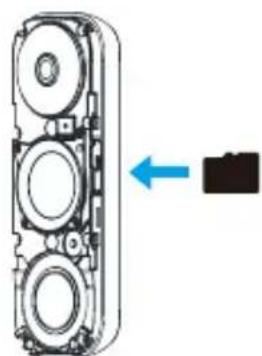
- In the EZVIZ app, tap the Storage Status in the Device Settings interface to check the SD card status.
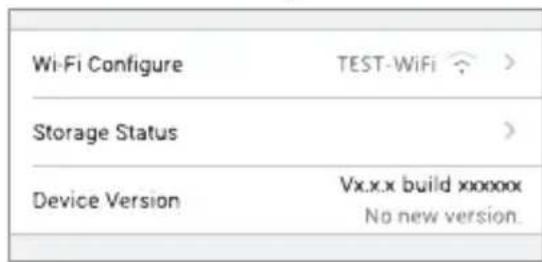
- If the card status displays as Uninitialized, tap to initialize it.
The status will then change to Normal and it can store videos and/or pictures.
KpenexHbIe BnHTbI,2uT.
BnHTbI DBePHoro 3BOHka,2Wt.
Heo6xodmbie nHctpymentbI
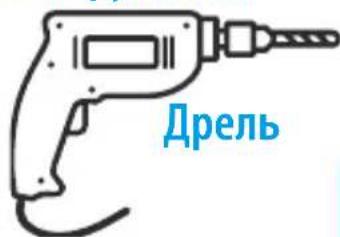

Kapandaa
- Ecnn B BaIeM Dome yCTaHOBnEh 3BOHOK, yCTaHOBNTe 6NtAHnI NaHeB ynpaBneHn IBePbIM 3BOHkOM.

- Ecnn B BaIeM Dome yctaHOBHeN 3BOHOK, nCnOJIb3yIte npUraEoe K Hemy pyKOBoCTBO dIy UCTaHOBKn 6NoKa NITAHN I NaHEn YnpaBHeN aBepHbIM 3BOHkOM.
- Ecnn HnkaKo3BOHOK He yCTaHOBHe, npOnyCTnte NyHKtBi NO yCTaHOBKe 6Noka NHTAHNA, yCTaHOBNTe NaHEnb ynpabHeHnA DBepHbIM 3BOHkOM IN CNeDyIte INCHtpKcHm BapnaHTa B Ha CTp.5.
yctahOBka 6noka nHTaHna
1 OTKIIOHTe NOdauy 3JIeKTPoNtAHnA BToMaTnueckm BbIKHOuATEMe, KOToPbI pa3Mbkaet cenb IBepHOrO 3BOHka.
2 Bctabte oINH KOHeu MOHTaXHOrO XryTa B 6nok nITaHa.
3 CHINMITE KpbIiKky 3JIeKtpomexaHnueckoro 3BOHka.
4 OTKIIOHTe npOBoDA cyueCTByIOUeTo 3BOHka OT KJIeMM TRANS (tpaHcfoopMaTOp) nFRONT (nepeHnra KhonKa).
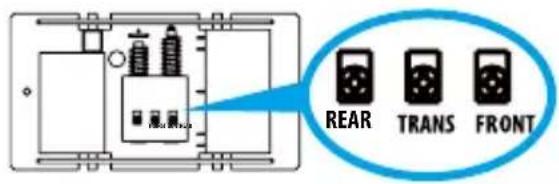
5 IopKIOUHTe KryT npOBOB K KneMMam 3BOHka TRANS (tpaHcΦopMaTOp) n FRONT (nepeHnKa KHONka).

REAR

TRANS

FRONT
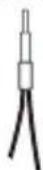
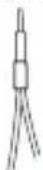
6 Bctabte npoBOD cyuectbYIOUeO 3BOHka n dpyroKoHeu MOHTaXHO O KryTa B coeINHtEnb npoBOOBn PNOTHO cKpyTInTe ux. NOBTOpe 3TO xe Je EneCTBne DnIPOKnIOueHn BTOPOrO npoBODa 3BOHka.
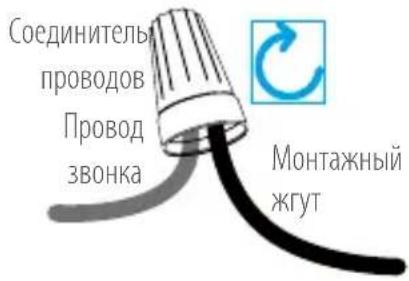
Cxema podklioueHna
7 YctaHOBtTe 6IOK NITAHnHa 60KOBoI CTOpOHe 3BOHka.
8 YcTaHOBnTe Ha MeTo KpbIuKy 3BOHka.
YCTaHOBka DBephoro 3BOHka
1 OtknIOuHTe nOaUy 3JIeKTPoNTaHnA aBTOMaTNUeCKIM BbIKNIOuATEIeM, KOToPbI pa3MbIkaET cIb NB DBePHOrO 3BOHKa.
3 Bctabte MmH-nyOBeHb MOHTaXHyIO nlaCTnHy n OTMeTbTe TOcKIN DIA OTBepCTN, KOrDa Np3bIpeK yPOBnHa HaxoINTcNocepEne.
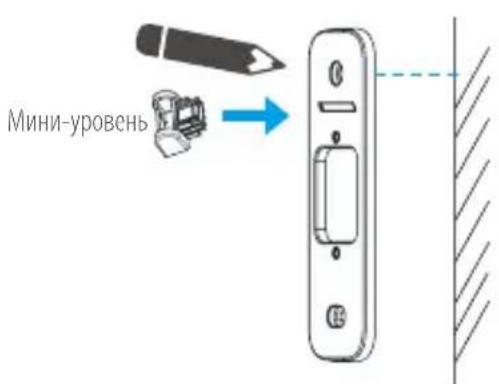
ydaIte MHN-ypoBeHb, KOrDa TouKn IJn OTBepCTn 6byT OTMeueHbl.
2 (Донон'teьho).Есистehа HepoBna, noToxnte npoknaidky n3 neHonnacta noJ MOHTaXHyIO nlaCTNHy.
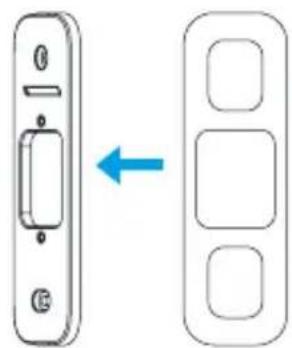
RU
4 IpoCbePnIte OTBepCTnNo OTMeueHHbIM ToUkAm IN BCTaBbTe B HIX DIO6eIN.
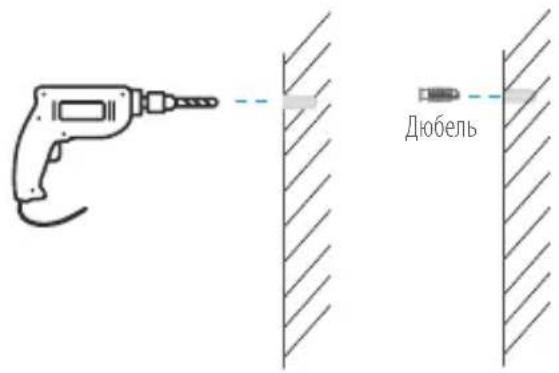
5 PnKpeHte MoHTaXHyIO pAChHy K CTeHe.
KpenexHbI Wypyn
6 CHIMnTe IueBeyo naHelen C naHelen ynpaBneHnA DBepHbIM 3BOHKOM CHN3y BBepx.
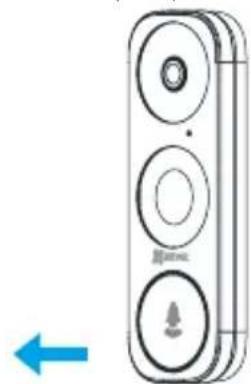
7 EcnB B aWeM Dome yXe yCTaHOBJIeH 3BOHOK, BbINOHnTe INHCTpyKcIMn BapnaHTa A, eCNI HeT, BbINOHnTe INHCTpyKcIMn BapnaHTa B.
BapnAHT A. IopKnIOUChTe K naHenn ynpaBHeHna DBepHbIM 3BOHcOM npOBoJa oT cyueCTbyuIeero 3BOHka.
Bapnnt B. PoiKIOUHTe npOBd C npEdoXpaHNTeMe K npOBOy O T cyueCTByIOUeTo 3BOhKa.
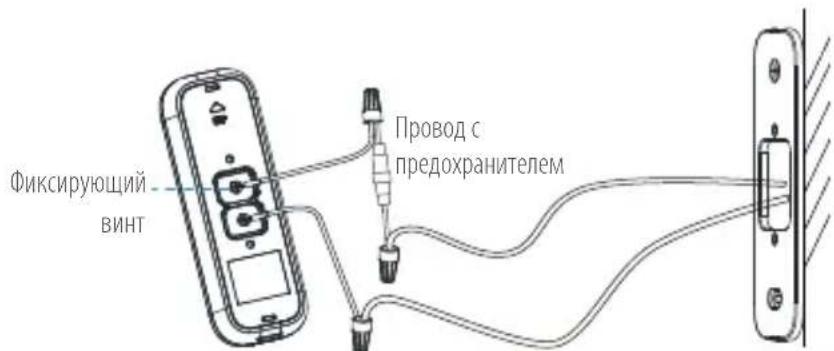
JNEKTPoNTaHHe:8-24B Nepm.Toka
8 PnKpeNte naHEnb ynpaBneHnA DBePbIM 3BOHKOM K MOHTaXHOI pAACTnHe C NOMOu BINTOB.
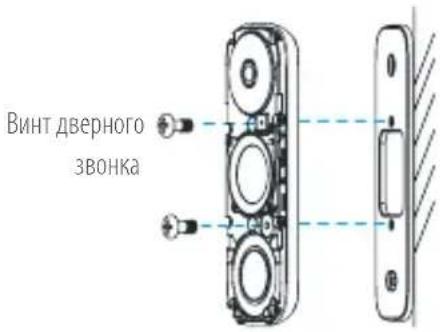
9 IopaiTe 3IeKtpOnHnTHe C nOmoBIO ABTOMaTNUeCKoR O BbIKJIouyateTEn.
Korda naheIb ynpableny IBepbHbIM 3BOHKOM nOdknUoyeha K NCTOCHNY pHTAHN, ee INDnKaTOp 6bICTPO MIRaET CINHM cBcTOM. EcnI eTO He TaK, OTKIOUHTe 3NeKTPoNTaHne i npOBepbTe npOBODKY. EcnI Bce B nopAKe, nepexoDITE K HAcTPOKe naHEn ynpableny IBepbHbIM 3BOHKOM.
RU
HacrtpoiKa DBephoro 3BOHka
CBeToaNoDhBIMnHdNkAtOp
CnHn nHnKaTOp Muraet DBePHO 3BOHOK rTOB K hAcTpOKe npaMeTPOB Wi-Fi.
CBETTCA NOCTOARHHIOBEPHO3BOHOKpa60TaET.
CBeNTcKaPChbIM cBETOM bIcTpo Mmraet Own6Ka yctpoiCTBa
CBETTCAIOCTOARHNODBEPHO3BOHOKBKJIOaETCA
Eykataaon KIT Tpooosia
1 DIAkópsiTe TnV npoxn peuatoC oTov diakontn nou eEyxet to Kukawma Tou koudoviov npotac.
3 ApaipoeTo kALmu aAoTo mXavko Koudouvi.
2 Tonoetnoe to eva akpo tnc doumc kaawdiw oTO KIT troppodooiac.
4 Apaipoe ta unapxovta kaawia tnc ouokevn, i a c ano ta terpuatikac Tc ovoaioe TRANs kai FRONT.
5 i v o t a e p a t i k a t n c o o a k e u n c i a c t i c o v o p a o i e c T R A N S K a I F R O N T.
6 TooTheTneTo kaWdoTnc Vpotaevnc ouokue nC eawiaac kai to aAko akpo Tnc deounc kaawdiw otov ouvdeoKaawdiwVkoiEeKala.EnavaaBete auTo to bna Kaia to aAko KaawdoTnc ouokue nC eawiaac.

Dörrklocka [x1]
Frontplatta [x3]
Thank you for purchasing EZVIZ products. This limited warranty gives you, the original purchaser of the EZVIZ product, specific legal rights. You may also have other legal rights that vary by state, province or jurisdiction. The disclaimers, exclusions, and limitations of liability under this limited warranty will not apply to the extent prohibited by applicable law. No distributor, reseller, agent, or employee is authorized to make any medication, extension, or addition to this limited warranty.
Your EZVIZ product is warranted for a period of two (2) years from the date of purchase against defects in materials and workmanship, or such longer period as may be required by law in the country or state where this product is sold, when used normally in accordance with user manual.
You can request warranty service by emailing us at support.eul@dezvizlife.com.
For any defective EZVIZ products under warranty, Hangzhou EZVIZ Software Co., Ltd. ("the Company") will, at its option, (i) repair or replace your product free of charge; (ii) exchange your product with a functional equivalent product; (iii) or refund the original purchase price, provided you provide the original purchase receipt or copy, brief explanation of the defect, and return the product in its original packaging. At the sole discretion of the Company, repair or replacement may be made with a new or refurbished product or components. This warranty does not cover the postal cost, insurance and any other incidental charges incurred by you in returning the product.
Except where prohibited by applicable law, this is your sole and exclusive remedy for breach of this limited warranty. Any product that has either been repaired or replaced under this limited warranty will be covered by the terms of this limited warranty for the longer of ninety [90] days from the date of delivery or the remaining original warranty period.
This warranty does not apply and is void:
- If the warranty claim is made outside the warranty period or if the proof of purchase is not provided.
- For any malfunction, defect or failure caused by or resulting from the evidence of impact, mishandling, tampering, use contrary to the applicable instruction manual, incorrect power line voltage, accident, loss, theft, fire, flood or other Acts of God, shipping damage or damage resulting from repairs performed by unauthorized personnel.
- For any consumable parts, such as batteries, where the malfunction is due to the normal aging of the product.
Cosmetic damage, including but not limited to scratches, dents and broken plastic on ports.
Any software, even if packaged or sold with EZVIZ hardware.
For any other damages free from defects in material or workmanship.
Routine cleaning, normal cosmetic and mechanical wear and tear.
Please do not hesitate to contact your seller, or send e-mails to us support.eul@dezvizlife.com, with any questions.
COPYRIGHT ©2018 Hangzhou EZVIZ Software Co., Ltd. ALL RIGHTS RESERVED.
BESCHRANKTE GARANTIE
JaHHa rapaHTnHe npmehAeTcN ABJIeTcH HeJeCTBtBHOH:
B Cnyuae noaun 3aBKN Ha rapaHTnHbI peMOHT NO nCTeueHNrapaHTnHOro cpoKa nn OTCyTCTBn IOKa3aTeNbCTBa aKTA NOKyNk.
B Cnyae HencnpabHocTe, DekeTob, Bb3BaHHbx HnnpaBnIbHbIM nCNoJIb3OBAHEm, HApUHeHem INCTpyKcIIN OeknIyatauIN, npn HnnpaBnIbHOM HnnpaJKeHN cTeN, abapnn, yTepe, Kpaxe, noXape, HABoDHeHN ININ INhIx CTnxNnHBx 6eDCTBnAx, NOBpeJKeHN rpy3a INN yUep6e, HaHeceHHbIMn B pe3yJIbTaTe pEMOHTA, BbINOHNHO He yONlHOMOueHHbIMn IINaAMN.
-Длялобьх paCXODHbix yacte, TaKnx KaK 6aTapeN, KOrda HeuCnpaBHOCTb npOxCoDNT n3-3a eCTeCTBeHHORO CTapeHINI npOdykTa.
- Пп КOCMeTnuecknx NOBpeKdEHHx,В TOM YHcNe,HO He TOnbKO,пр ИapaINHaX,BMAtnHax I CLOMaHHOM
Пл actnke Ha nOptax.
-ДлялбогорpoportpammmHoro obecneueHn,дже ecIn OHO 6blno ynaKOBaHo nIn npOdaHO Bmecte c obopudobahnem EZVIZ.
Дялобixдугнх поьжден,дeфктOB MaTeрnaIИИИЗTOВЛЕнЯ.
- IJIaIJIaHOBOrO KOCMeTNUeCKOrIO mExAHUeCKOrO n3HOca.
YTo6bI 3aIaTb BOpoc npoabuy IIN OTnpaBnTB HAM NcBMO, NOxAynCTa, ObaaainTeCb nO daHHomy aDpecy: support.eu@ezvizlife.com
COPYRIGHT ©2018 Hangzhou EZVIZ Software Co.,Ltd. ALL RIGHTS RESERVED.
TIPOIPIMENHETYYHSH
ZAC EUXAPIOUPEYI TY APOPA TOW PPOIOVW EZVIZ. H NAPOUSA NEPIOPIOEN UOUVN PAPEXE O E OAC, Tov apxio Ayopaaon Tou poiovtoc EZVIZ, EIIDA VOpIKA Dikaiuata. EvExTea va ExTe K AALa VOpIA Dkaiwata nov noikllow avaloya ME To Kpatoc, TIV NEPIOXn n Dikaiodooia ac. OI Anooinaeic, EApieaeic kai NEPIOIauo Iuvnc BaoeTNC napouac NEPIOIepEvnc Eyyunanc dev IOxouv otov BaBou Nov anayopeetai ano to eapuooteo diKAO. Kavevac diavouec, Etanawntc, avinpoooc n epyaCoevc oevoc v npoei OE onoiadnoTE tponoioin, ENktaan npoaHKn OTnv napoua NEPIOIeynyunon.
To npoiov EZVIZ oac diaheTei eyyunon yia nepio do duo (2) etw ano tvn nepounvia ayopac, oxetik a ateliec sta uikai knv kataokeun nyia
peyalutepo xpovko diatma, onwc anaiteitai baoi tou vou otn xwpa n to kpato c onou ayopao tke to npoiov, efoav to npoiov xpnoiopoiteiata
kavovika, oupwva me to eyxepidio xphoc.
Mnopeite va unoabaTe aitnon yia eniakeue nto paoauoc yuyuonc, otavovtac mac e-mail otn divbuvon support.eu@ezvizlife.com.
Tia tuxov eAattwpatika npoiovta EZVIZ nou kalunvtai ano eyyunon, n etaipia Hangzhou EZVIZ Software Co., Ltd. ("etaeia"), kata tny npoiapoean tnc, (i) 0a eniokeuaoei n avikataotnoei to pioiov oac domegaav, (ii) 0a avtalaaeei to pioiov oac me eva avitotoiyx oetoupyko npoiov n (iii) 0a eniortpeyie to avittuo ntc apxikc ticn ayopac, me tnv npoiunodeon otih a npoakopioe te nptowotum anodieynayopac n autic me ouvtounen efnynon tou elattwpatoc tou npoiovtoc kai otbaenipseete to pioiov otny apxikn tou ouakeuaia. Kata tn diakpittk euxepelia tnc Etaipeiac, n eniakeun n n avikataotaan evexetai va npayatatooinbe i me veo n eniokeuauevo npoiov h eapntmuata. H napouoa eyyonan dev kaluttei taXbpomuKa eOeda, aoaian n alccnnapenoce danavec, me tic onoe c 0a npapwbeite kata tny eniortpognfouc npoiovtcc
EkTOc av anayopeuEaI aTo eapuooteo diKaio, auto Eivai To mOvo KAI anokkietko oac Eviko eo ee pinnanpaiaoc nTn npaooc nepiopouvc yyyunoc. OIOIOHNote PPOIOv Exei EIOKEuaTei n AvtikataotaDeuvapei Tnc npaooc nepiopouvc evbuvnc kaluntetai ano touc opouc autnc TNC nepiopouvc yyyunoc cte iia diaotma evynuT (90) npewv ano Tnv npepounvia npadoonc, eite yia Tnv evanopovoa apxikn nepiodo yyyunoc, onioe iivai eyaUtopo.
Hnapooua eyyunon devioxuei nEwepeitai akpn:
Eav n axiwn yyyunong eeyepctc npiodou yyunong n oepintwn m npookoiontou anodeiktkou ayopac.
Tia oioafoote duoiieitoupyia, eaattwma n 1n pokkthei ano n opeiletae ae epaiv npokpovon, kao xepiao, npatoinon, xpon avtBte n e to oxetik oxyepioio oyniowv, eoalmevt aon tpoopooiaac, atuxma, anwlaia, klon, npkaia, naumupa n oinec theounviec, bao kata tvn aootoi h cmuia nov anoppei ano eniokeuec nou npayatonoi thkav ano n esouoodotnevo npoomegako.
Ia onoiadnoe avawaiqa eapntmuata, oic oi natapiec, n doaleitoupyia twv onoiw opelaaetai otn kavovikxpnon Tou npoiovtoc me tny npao do tou xpovou.
IiaiothntiKc cncic, ouineplaaavovewv, mtae aalw, ypatouivw, baovawkai oaoevw nlaotikw otic bpc.
Ia oioobnote loyioikó, akouni av ouokéuaotke n iowanthenke paiz te uioikoc tnc EZVIZ.
Ia onoiadnote aan an bnaou dev oepiaetai oe elattwatae uikakai otny noiota kataokeucn.
TiaovnIgKaapioo,poioLoyikaiOthnikkaiunxavikf0pAp.
Tia tuxov epwtneic, mni diotaoe va enikoiowvnoe te to kataotnna nva mac otielte e-mail otn dievuvon support.eu@ezvizlife.com. INEYMATIKA IAKAIOMATA ©2018 Hangzhou EZVIZ Software Co.,Ltd. ME THN ENIPOYAAEH IANTOS IAKAIOMATOZ.