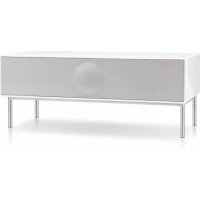
Model XXL Wireless DAB+ - Loudspeaker GENEVA - Free user manual and instructions
Find the device manual for free Model XXL Wireless DAB+ GENEVA in PDF.


| Product Type | Wireless Speaker |
| Brand | Geneva |
| Model | Model XXL Wireless DAB+ |
| Dimensions (W x H x D) | 430 x 170 x 250 mm |
| Weight | 8,5 kg |
| Power Supply | 100-240 V AC, 50/60 Hz |
| Power Consumption | 100 W (max) |
| Radio Receiver | FM, DAB/DAB+ |
| Wireless Connectivity | Wi-Fi, Bluetooth, AirPlay, DLNA |
| Audio Inputs | 2 x HDMI, 2 x analog RCA, 1 x optical (TOSLINK), 1 x coaxial (SPDIF) |
| Audio Output | HDMI ARC |
| Output Power | 2 x 80 W |
| Antennas | External FM/DAB (F-Type), 2 external Wi-Fi antennas |
| Special Functions | TV setup with HDMI ARC, CEC, automatic software update |
| Remote Control | Included |
| Warranty | 2 years |
| Maintenance and Cleaning | Unplug before cleaning. Use a soft, dry cloth. Do not use abrasive products. |
| Safety | Automatic shutdown after 15 minutes of inactivity (auto standby) |
| Operating Temperature | 0 to 35 °C |
| Spare Parts | Spare parts are available from the manufacturer. Visit genevalab.com. |
Frequently Asked Questions - Model XXL Wireless DAB+ GENEVA
User questions about Model XXL Wireless DAB+ GENEVA
0 question about this device. Answer the ones you know or ask your own.
Ask a new question about this device
Download the instructions for your Loudspeaker in PDF format for free! Find your manual Model XXL Wireless DAB+ - GENEVA and take your electronic device back in hand. On this page are published all the documents necessary for the use of your device. Model XXL Wireless DAB+ by GENEVA.
USER MANUAL Model XXL Wireless DAB+ GENEVA
TO PREVENT FID OF SHOCK HAZARDS,DO NOT EXPOSE THIS APPLI
CAUTION

AVIS
OF ELECTRIC SHOCK DO NOT OPEN
RISQUE DE CHOC NE PAS OUI
To return the rate of electronic shock, do not return this value (for banks), no user serviceable parts inside.
Note to CATV system installer: This reminder is provided to call the CATV system installer at a convenient time to Article 8(2)–40 of the NPC (pLUSA); that provide guidelines for proper grounding. In particular, it specifies that the cable should be properly installed and running in the building, as well as in the point of cable entry as practical.
Operating temperatures: The recommended operating temperature for the newovacuca bound system is 4~K to 65 degrees Fahrenheit (to 85 degrees Celsius).
6 Protective earthing terminal. The apparatus should be connected to a main socket outlet with a protective earthing connection.
IMPORTANT SAFETY INSTRUCTIONS
- Read these instructions.
- Kasp Waaas Fathnch
- Statistical analysis
- Do not use this device.
- Only one with a cry cloth.
- Do not block any vents. Install in accordance with the
mnnnne nnnnne
or other devices (including amplifier) that produce host. - Do not defeat the safe surface of the polarized or grounding type plug. A polarized plug has two sides with one wider than the other. A grounding type plug has only one side and a single side. The side of the third plug is provided for your safety. If the provided plug is not available, contact an无线电 or replacement of the above outlet.
- Period (the power used from being washed on or printed particularly at the plugs, convenience receptacles, and the coins, where they shall fall)
- Only use entitlements/sores specified by the manuscript
- Use only with the cart, stand, lift, bracket, or tape (specific by the manufacturer), or avoid with the device. When a cart is used, association one must meet the mechanical combination to avoid injury from top-over.
- Unleg this device during lightning storms or during long periods of
- Refer all to conditioning to qualified service personnel. Conditioning is required when the device has been damaged in any way, such as power-supply core or fuel-cages, fused had been soiled or oocysts have fallen into the water, or had been used for roll or moisture, does not operate internally, or has been cleaned.
WARNING
Batteries in the remote control: Keep the remote control battery away from children. It may cause a fire or chemical burn if mishandled. Do not discharge, disassembles. Post at least 21^ (VCC), Replace only with only a coating of the contact tape and model number (C93292) (Vinyl seal seal felt, 7/5).
DO NOT INGEST BATTERY, CHEMICAL BURN HAZARD
The romoto control supplied with this product contains a calcvultor cell battery. If the calcvultor cell battery is swallowed, it can cause severe damage to the battery.
Keep new and use batteries away from children if the battery comports, otherwise does not obey security, step using the product and keep it away from children.
If you think there are things that harm their newborn or placed infants any part of the body, seek immediate medical attention.
Verrillations: Do not break any verifiable openings on the neck of the clefted jaw. If the neck is broken, use a sharp blade to close it away to a wall. In front of a curtain that may reduce the heat sink efficiency.
Sitting or leaning on Cornea Sound System: Trat not been against theCornea Sound System and do not act and under new circumstances
Avoid hearing damage! Yes, very bad music for an extended period of time can result in permanent hearing loss.
Label location: The product labels and safety related markings are located on the paper pages.
Outside Antennae: If an outside antenna or cable system is connected to the outside of the building, it will be necessary to provide a proper protection against voltage surges and fire up static charges.
Aims: A) The analysis of the Power Plant in China, NREL/NPT No. 70-1983; B) The investigation of the power system and its characteristics of the main and supporting structure, grounding of the load in wire to an antenna discharge unit, size of grounding conductors, conductor of antenna discharge unit, and its connection to grounding electrodes, and requirements for the grounding electrode.
CONFORMITY
FCC Regulation:
Warning: Changes or modifications to this unit will not expressly apply to the use of this system. Use of this system will cause the "true" authority to operate on its own.
NOTE: This equipment has been tested and found to comply with the limits for a case B digital device, pursuant to Part 15 of the POO rules. These rules are applicable to the use of this equipment in accordance with the manufacturer's installation instructions. The equipment guarantees that it can run safely at high frequency and well, if not under ideal and used in accordance with the instructions, may cause harmful interference to radio communication. The equipment must be guaranteed that fire between us will not occur in a particular instance.
If this equipment does cause harmful interference to India or Lebanon reception, which can be determined by turning the equipment off and on, the user is encouraged to try to correct the interference by one or more of the following measures:
-
Recurrent reluces the necrouring anthers
-
Increase the separation distance between the equipment and the
Bender
- Connect the equipment to an USB 4.0 circuit board from port B1 to which the receiver is connected.
Consul the daier or an expedenced ndeTV tachnictan for help.
Modelling errors are expressed as follows: by transverse force could exceed the user's capacity to assess the applied and/or FDC rates.
2%O
Canada
This device complies with Industry Canada License exempt P88 standards), Operation is subject in the following has秉nition: (1) this device may not cause inexperience, and (2) the device must accept any inexperience, including Inexperience that may cause undetermined operation of the device.
industieCarae [C]Nr.10137A-MODF XOL
CE Conformity
G-Sub-GmbH declares that this device is in compliance with the essential requirements with no other relevant provisions of Directive 1933/58/FC. The declaration of conformity may be consulted on request by granting G-UK GmbH, Turin, Switzerland or an IFRS/TAS.govt.org.
Recycling
This product can be recycled. Precious storing this symbol must NOT fall thrown away with normal household waste. At the end of the process, it will be sent to the landfill and recycling of electronic are electronic devices. First cut more about return and collection costs through your local authority. This is a great opportunity for you to assist (NEEVE).
The European Water Electrical and Electronic Equipment (WEEE) Directive was handed to dramatically reduce the amount of waste going to benefit, thereby reducing the impact on the planet. The Directive has been widely used in many countries for its various products. If this product is still usable, consider delete it away or selling it.
Used batteries: Please dispose of used batteries properly following the new regulations. Do not replace batteries in use.
LICENSE INFORMATION
Apple, Apple, Fiat, iPhone, iPod touch, iTunes and Misc are trademarks of Apple Inc., registered in the U.S. and other countries.
The Bluetooth® word mark and logos are registered Trademarks owned by Bluetooth Sdn. Inc.
2013GLabGmbH. All rights reserved.
If W. F. CIPTIFIED Logic is a correct mark of the W. F. Albania, then the following are not the same as those in the two faces that are too small or inadequate: if the marks of HDW1 library are 11, 12
Under the copyright law, this text may not be copied, in whole or in part, without the written consent of G Lab GmbH.
Ganeus in a replasred adarvcr of G-Lan GmbH
MANUAL VERSION
GenewsSound System Model XXL User Manual Version 1.2
CONTENTS
GETTING STARTED 3
About the Model XXI 3
Getting started 3
USING THE MODEL XXL 4-7
Remote and display controls. 4
FM radio 4
DARTDB+ radio 4
TV, DVD & Game consoles 5
Bluetooth 5
Airplay 6
DLNA 6
Automatic software updates 6
Back panel 7
Analog and digital clocks 7
TV SETUP 8-10 TV setup (TV with HDMI/ARC) 3 Alternative TV setup 1 9 Alternative TV setup 2 13
NETWORK SETUP 11-13
Overload 11
Ethernet setup 11
Wi-Fi setup with WFS 12
Wi-Fi setup with Mode XXL as a temporary Wi-Fi access point 13
TROUBLESHOOTING AND FAQ 14-15
SUPPORT 15
GETTING STARTED
ABOUT THE MODEL XXL
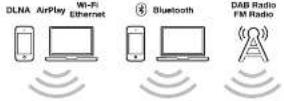
The Model XXL has the following built-in functions:
-PM radio
DAB/DAB+ radio (works only in countries with DAB services)
- Dloutoll
ArPa
- CLNA
You can connect your TV, DVD and Game console using the
following connectors:
- 2HDM1npate,7HDM1outpu
Support for IDMARC
2.anaepaudepurolsIPAACrresc
2 digital audio inputs (ccxxia) optical

GETTING STARTED
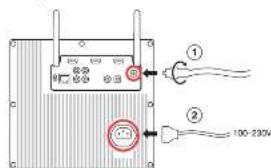
Connect the external radio antenna (for FM and DAB/DAB+ The Mode XXL has an enclosed wire antenna. On the back panel, there is a 10-pin port for the internal antenna.
Connect power to Model XXL
On the back panel, connect the power cable to the AC power connector (2) and then to a wall outlet.
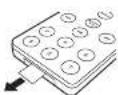
Prepare the remote control
Remove the battery protector from the remote control battery compartment.
TV, DVD and game console
Place the TV on top of the Model XOL
The right side compartment has space for the DVL player, game console, Blu-ray player, set-top box and other video devices.
- Correct all power cords to an AC power strip.
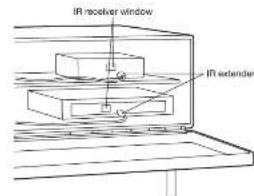
IR extender
If you place a DVD player, game console or set top box into the right side compartment of the Mode XX, use the two IR extenders that are located inside the compartment. The IR extenders amplify this signal of the infrared (IR) remote control so that the components behind the receiver can be heard and see. The IR extension is also used to amplify the components that are placed in front or the components' IR receiver windows. Use the attached adhesive tape on the bottom side of the IR extender.
Tum the Model XXL on
Press the power button on the remote control or press the power button above the display.
USING THE MODEL XXL
REMOTE
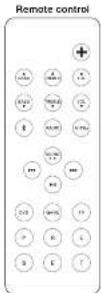
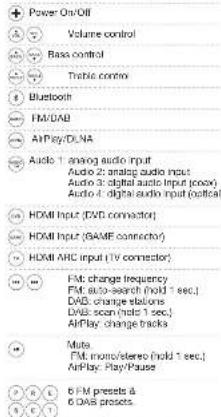
DISPLAY CONTROLS
Open the front gnl to access the following controls:
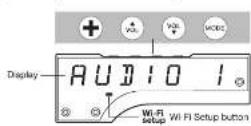
Power On/Off
Reset to factory default settings (hold 10 sec)
Volume control
Change between d'Avenir audio sources: FM, DAB, AirPlay, Bluetooth
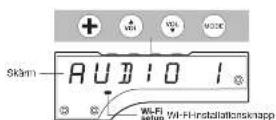
Vi-Fi Setup button Select one of the three Wi-Fi network setups
FM RADIO
The button on the remote control toggles between FM and DAB radio.
Select a station manually
Select an FM station using the (一) and (二) buttons.
Find a station automatically.
Hold down (or) force seconds and the FM radio will search for the next station automatically.
Switch between mono and stereo
Hold the () button for one second to toggle between mono and stance mode. The first time the state changes always in the same mode until the mode is changed to a new state.
Using FM presets: select a stored station
In PM mode, press the PM preset Buttons (P, R, E, S, E or T) to select the appropriate settings for the PM mode. The settings for PM and P modes for DARE: This PM process works only in PM mode.
Store the current station in a preset
Hold one of the preset buttons for one second, until the display shows a confirmation.
DAB RADIO
The button on the remote control goggles between FM and DAB radio.
DAB is not available in all countries:
DAB/DYAB (cometimes referred to as Optical Radios) is only available in the form of a single DAB/DYAB (DAB/DYAB) system (see Figure 1), including Hong Kong, and others). The Model XRCL is compatible with DAW and DADV.
Select a station
Press or (w) the remote control to change radio stations.
DAB Presets
The six DAS presents work in exactly the same way as the FM presents. The DAW presents work only when DAW has been selected.
How to use "Scan"
-
Prass the button on the remote control to select DVB.
-
Hold the button on the remote control until the display shows "Start"
-
Once all available stations have been found, you can browse the list of radio stations using the and () buttons.
Using DAB for the first time ("Scan" function)
Initially the Modi XLX has no DAB stations started. Press the "Scan" function to find the available stations in your region. The stations are stored automatically. Use the "Scan" function again after moving the station to a different location. If you want to move the Modi XLX to a room with a different radio reception.
ENCLISH
The HDMI output can also be an input for audio if your TV supports HDMI ARC. Press TV on the remote control to hear audio from the TV. DVD and GAME
Press the DVD and GAMC buttons to select the connected HDMI inputs. The input is a 32-bit image that is converted to the HDMI output and the audio is played on Model OSX.
Using the TV remote control with HDMI CEC
If your TV supports CEC, and the Modal XXL is connected via HDMI to your TV you have the following possibilities:
- Use your TV remote control for selecting the HDMI source of the Modal XXL and change the volume of the Modal XXL.
Possibly you'll need to enable DICR on your TV mhz. DICR is also called the "TV Mhz" (see Figure 1). The TV Mhz is a low-cost, high-quality, and wireless Link List (Toshit), VLink Link (Panshinon), KZLink (PHIP).
BLUETOOTH
Mobile phones, tablets, and computers with Bluetooth can connect to the Model XL and play music wirelessly. The mobile phone, tablet, or computer must support Bluetooth A2DP.
Initial Setup ("pairing") with iPhone
-
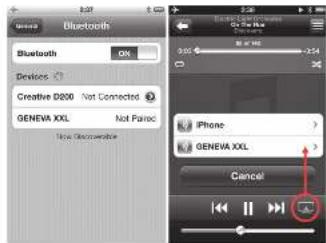
Touch the (1) button until the display shows "Blue" Wait for 20 seconds until the display shows a blinking "IP".
-
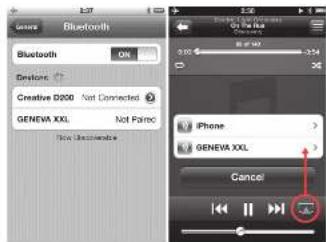
Select "Settings" on your iPhone. Select "General / Bluetooth". Turn
on Skedron . New Skedron devices are found automatically. 3 . After a few seconds "GENEVA XXL " Not Falsep ! will appear :
-
Select "GENFIVE XXL". The phone is now connecting "pasting" to the Model XXL.
-
You can now play music on an iPhone iPad-Pod touch and listen for it on the Model X80.
Playing Music
Most smartphones connect automatically to the Model XXL after the Initial setup (pairing).
Touch the button on the remote control. When the Model XXL
When passing the display to a mobile phone, the Model 300 will automatically switch to a few seconds.
Status information on the display
"5": Searching for previously paired devices.
HP: Pasting. If the Model XXl does not make a successful connection within 20 seconds, it will go into pairing mode for 2 minutes.
^n : There is no active connection
Pairing guide for other devices and mobile phones
Go to www.genevalab.com and select "Support"
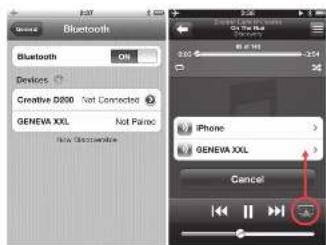
Bluetooth settings on iPhone Playing music
AirPlay
The AirPlay button on the remote control goggles between AirPlay and LUNA.
What is AirPlay?
AirPlay lets you witness stream anything on your iPhone, iPad, iPod touch, Mobi OS X or Windows computer to the Model XXL and other AirPlay speakers. Once a user starts playing music on iTunes or an iOS device the Model XXL switches automatically to AirPlay.
Playing music with iTunes from a computer (Mac or Windows)
1. Turn the Model XXL on.
2. Wait until the Model XXL connects to the network. "AirPlay" stops blinking on the display.
3. Open iTunes on your Mac or Windows computer
4. Click on the AirPlay icon and select "Generate Model XXL".
All music playing on iTunes is now streaming to the Model XXL over the network.
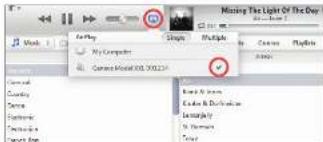
Before you can use the AirPlay function you need to connect the Model XXL to your network. See chapter "Network Setup".
AirPlay compatibility

AirPlay works with iPhone, iPad, and iPod touch with iOS 4.3.3 or later; Mac with OS X Mountain Lion, and Mac and PC with iTunes 10.2.2 or later.
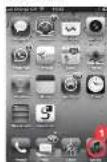
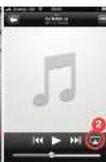
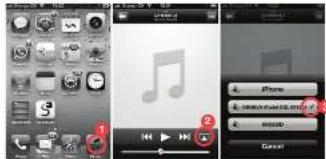
Playing music from an iPhone, iPad or iPod touch
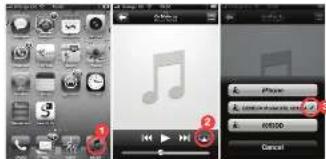
- Select the "Music" app
2 Select the AirPlay Icon - Select "Geneva Model XXL"
Any music that is played is now streamed to the Model XXL over an arbitrary.
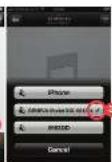
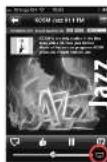
Internet radio, Spolity, etc.
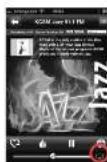
You can also listen to Music from other iPhone apps, such as Internet Radio, Spotify, etc. In most iPhone apps, the AirPlay icon will automatically appear if you are connected to a specific app speaker. The following example shows the AirPlay icon in the Internet Radio app "Tuner."
Synchronize the volume of the Model XXL and iTunes To synchronize the volume control of iTunes and Model XXL, open Preference, open "Devices" and rotate "Allow iTunes audio control
Sudden MUSIC WARNING:
Turning the volume control on iTunes or an iPhone to its maximum, will change this values of Model XXL to volume 100.
DLNA
The AirPlay button on the remote control toggles between AirPlay and DLNA.
What is DLNA?
DLNA is a standard for streaming audio to a DLA-enabled speaker in the form of a CD. This allows the speaker to respond to video streaming, but this is not supported with the MediaXO.
Playing music from a Windows computer
We recommend you use iTunes [using Apple] when streaming musics from your computer (Mac OS X or Windows).
AUTOMATIC SOFTWARE UPDATES
The Model XXL periodically checks for software updates via the Internet. The Model XXL software will be updated automatically as new versions become available. The automatic update is triggered every four weeks when the Model XXL is turned off. If a software update is automatically stated, this display shows "Software update".
Playing music from Android and Windows smartphones
- Start the built-in music app in Android and Windows smartphones
- PROUSE THE NERMAK FOR DNN-CONTOURS AND SELECTICS Modal XXI.
- Musk will automatically play on the Model XX.
During the software update do not remove the AC port from the Model XLX. Doing so can ruin the Model XLX without software and hardware updates.
The manual software update procedure is described in the "Support" section of the website www.grvab.com.
ENGLISH
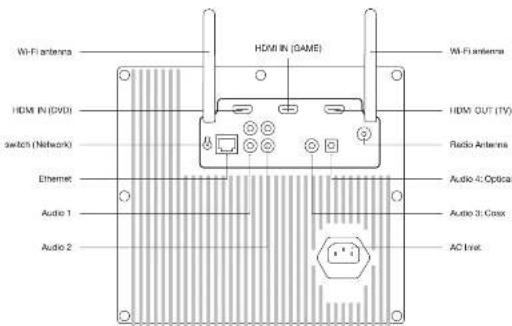
BACK PANEL
CONNECTOR DETAILS
| HDMI IN (CWD): | HDMI Input |
| HDMI IN (NAME): | HDMI Input |
| HDMI OUT HDMI ARC (TV) | This connector has two functions: 1. Audio input from TV and a HDMI HMI Input; 2. Audio input from TV is used as a HDMI ARC connector. |
| Switch Network | Select between Wi-Fi and Ethernet. "Wi-Fi only", only Wi-Fi is used. Ethernet is ignored. "Ethernet only"; only Ethernet is used, Wi-Fi is turned off. Ethernet and Wi-Fi do NOT work at the same time. A 30-second test, the module XX4 supports its networking subsystem. This process can be up to 30 seconds. |
Eteme: EtemeH input [10/100BASE-T]
CONNECTOR DETAILS
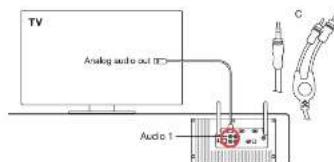
| Audio 1 Analog audio input (siren), RFA connectors |
| Audio 2 Analog audio input (siren), RFA connectors |
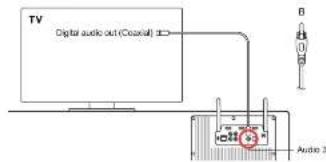
| Audio 3 Digital audio input (exten), coaxial/SPDB, RFA connectors |
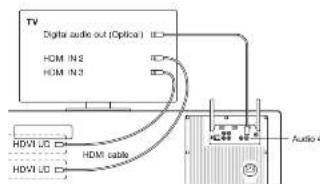
| Audio 4 Digital audio input (exten), optical, TOSSLINK Connector |
| AC power input 100 - 240 VAC, 50/60 Hz |
| Radio antenna Input for external FM/DAB antenna, F-Type connector. |
| Wi-Fi antennas Two external Wi-Fi antennas. For be reception orient the two antennas a |
ANALOG AND DIGITAL AUDIO INPUTS
There are four inputs on the basic serial for external audio sources such as TV, CD players and MP3 players. Press the "Enter" button until the desired input is shown on the display.
There are two different ways to connect your TV to the Model XC. Depending on your TV's capabilities, you can use the TV setup below or one of the alternative TV setups on the next pages.
If your TV does NOT have an HDMI APC connector go to the chapter "Alternative TV setup 1" or "Alternative TV setup 2"
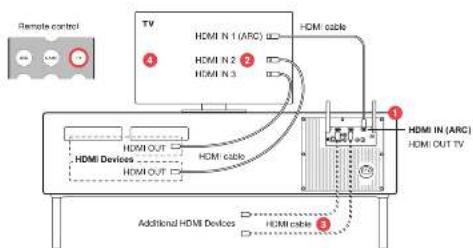
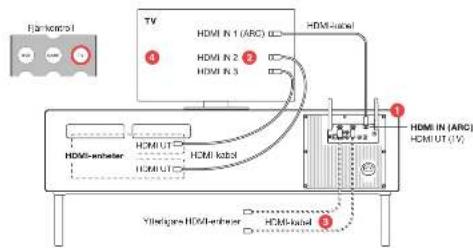
- Connect the HDMI ARC connector on the TV to the HDMI IN (ARC) connector on the Model XXL.
- Connect your HDMI devices (DVD player, Blu-ray player, game
correie, cable TV, saleite to the HDMI inputs of your TV. - If your TV does not have enough IDM inputs, connect additional HDMI outputs to the DVD or HDMI outputs like the model XLX.
- Enable CEC in the setup menu on your TV. Possibility you also need to select "External Speakers" on your TV setup menu.
CEC is also called AnyVitat (Samsung), Broda synchrolik (Story), Kuro Link (Pionet), CE/lega Link (Toshba), Viera Link (Panasonic), EasyLink (Philips).
If your TV supports CEC, then you can see your TV remote control instead of the Model XXXL remote control for most operations. turn the Model XXXL on and off.
on and off.
change the volume of Model XXL.
seaeaeaeaeaeaeaeaeaeaeaeaeaeaeaeaeaeaeaeaeaeaeaeaeaeaeaeaeaeaeaeaeaeaeaeaeaeaeaeaeaeaeaeaeaeaeaeaeaeaeaeaeaeaeaeaeaeaeaeaeaeaeaeaeaeaeaeaeaeaeaeaeae
ModeX81
Note: Turning the Model XOL on and off with the TV remote control is not supported.
Your TV has analog and/or digital audio outputs and no HDMI/ARC connector.
use to select the desired output with use to change volume.
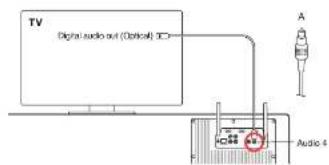
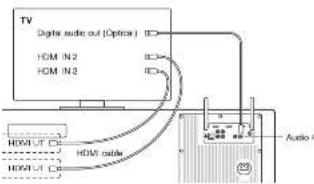
- Connect a fiber optic cable from the TV (small square connector with a red light inside) to the Model XLC (connector "Audio 4".
- Select "External Speakers" on the TV setup menu.
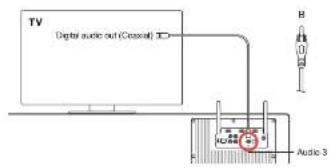
- Connect an audio cable from the TV (single: yellow PICA connector to the Mode XX (connector: Audio 4). The audio cable has single PICA connectors on both sides.
- Select "External Speakers" on the TV setup menu
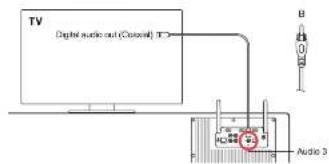
If this TV has non analog and digital audio outputs, then the digital audio is recommended. Because it provides the best audio quality
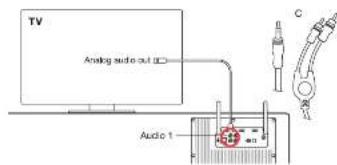
- Connect an audio cable from the TV (dual rod & white RCA connectors or 3.5 mm connection to the Model XOL (connector "Audio 1"). The audio cable has either a 3.5mm and dual RCA connectors outside RCA connectors on both sides.
- Select "External Sphygmo" so its TV setting is:
Connect the DVD player, game console, set top box, satellites receiver and other devices to your TV with an HDMI or other type of cable (DV), analog video).
Use this TV remote control to select the input source (DVD player, game console, etc.).
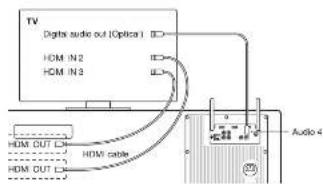
ALTERNATIVE TV SETUP 2:TV WITHOUT HDMI ARC
When to use this configuration
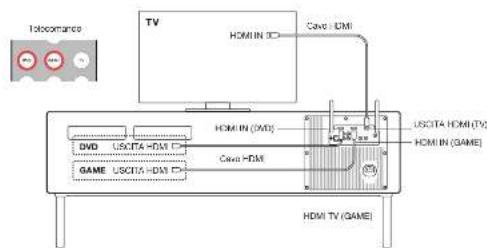
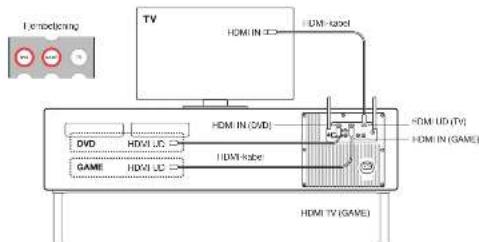
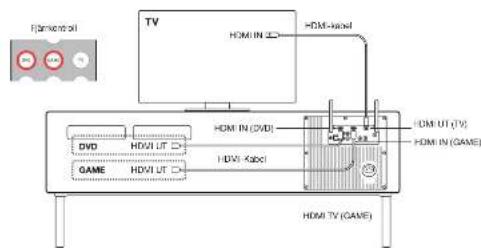
The TV does not have an HDMI APCI connector and you want to use the Model XXL antenna control to select this video source with the DVD and HDMI. The TV supports CCC, this setup allows you to control the volume of the Mode XXL and change the HDMI input sources using the TV's remote control.
Limitation: All video sources must be connected to the Model XXL. a video source connected directly to the TV will have no audio output on the Model XXL.
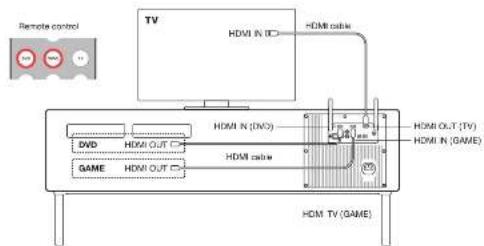
To set it up
- Connect a DVD player or Blu-ray player with an HDMI cable to the "DVD" HDMI connector on the Model XLX.
- Connect a game console, set top box or satellite receiver to the "GAME" HDMI connector on the Model XXL with an HDMI cable. 3. Connect this Model XXL ("TV" HDMI connector to the TV ("HDMI IN" connector) with an HDMI cable.
- In the TV setup menu of the TV, turn off the TV speakers by selecting "tornado" speakers.
How to use it
Prescribe the or (Conditions on the Model XX, remote control to select the HDMI input).
How to use it (with CEC)
- TV remote control: use to select HDMI sources on Model XXL
- TV remote control: use to change switch usage of Model XXL
NETWORK SETUP
OVERVIEW
Playing music wirelessly with Airplay or DINA requires the Model XXL to be connected to a local network via Ethernet or Wi-Fi. The following pages describe different methods on how to configure the Model XXL so it can access the network:
The Modal XXI supports both ated (Ethanol) and vinakes (Vf) network connection
SETUP METHOD WHEN TO USE THIS METHOD
ETHERNET SETUP
An Ethernet cable is available for the Model XXL.
W-1SUEUP WTP The WFI appoea point (whelae rour) has a WPS pusn cution for easy network setup
WI-SETUP WITH MODEL XXL WI-Access points (process motor) has no WPS push button.
A8XTEMPOARY the method worke with all Wi-Fi access points.
Additional setup methods such as static IP addresses and Auto-IP are described in the Support section on generallab.com.
How to check the network status of the Model XXL
- Press the button on the mouse control
- Hold the button on the remote control for a few seconds.
- Press the button to view the following: software version, IP address, IP type (DHCP/Static), network connection status and Wi-Fi network port.
Troubleshooting
San Network section In the chapter "Troubleshooting".
ETHERNETSETUP
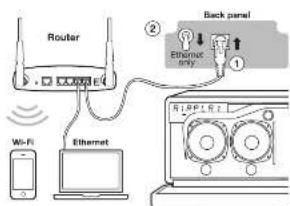
Instructions
- Compare the Ethernet cable between the router and the back panel on the Model XXL.
-
See the Network switch on the back panel to "Ethernet". The Wi-Fi function is now disabled.
-
Tum the Model XXL on
- Presa on the rarnota control.Walt until the display
Now you are ready to play music via AirPlay or DNLA.
WI-FI SETUP WITH WPS
What is WPS?
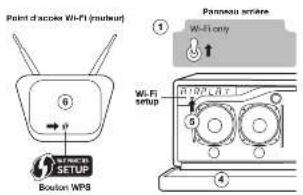
WIPS (WiPI protocol setup) is a simple way to connect a new node to a WiPI network. WIPS is a common feature on most VoIP access points in the world today. The WiPI protocol supports the following models: Model XOL and the "WIPS" button on the Wi-Fi access point within about a minute, the Model XOL will automatically connect to the WiPI network.
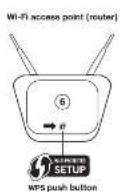
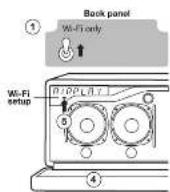
Instructions
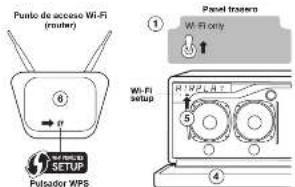
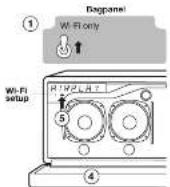
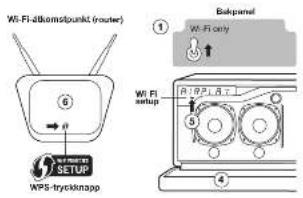
- Set the "Network" switch on the back panel to "Wi-Fi-only".
- Turn on the Model XXL
- Press 'AirPlay' on the remote control.
- Lower the front grid.
-
Press press the "Val Fill button" pushbar below the display. The display will then be pushed down by pressing the power button above this display cursor (this setup process).
-
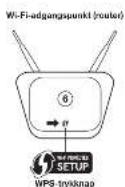
On the Wi-Fi access point (wireless router) press the WP5 button.
The light on the button stars in blink. If nothing happens you may
have to hold the button down for a few seconds, the Model XXL and the WILF-COOPCORS are now starting to connect to each other. - Wait until the Model Xd, displaying anchor "Connected to XXX" where XXX is the name of the connected Wi-Fi network.
Now you are ready to play music via AirPlay or DLNA.
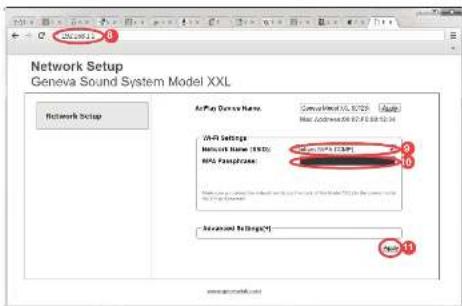
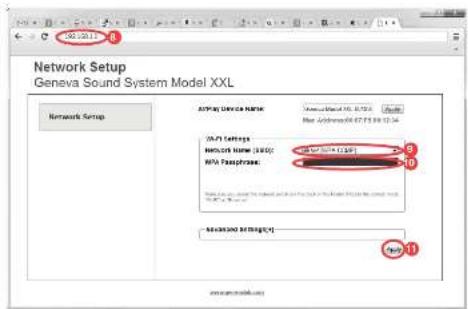
WI-FI SETUP WITH MODEL XXL AS A TEMPORARY WI-FI ACCESS POINT
Instructions
- Set the "Network" switch on the back panel to "W-Fi-only".
- Tum the Model X&L on.
- Push "AirPlay" on remote control, then wait 30 seconds.
- Lower the front grad.
- Press the "WIN-i" Setup button below this display to switch the device's settings. The device will then bring the power button above the display camera this setup process.
- Connect to the Wi-Fi network, depending on your device and
operatingsystem: - Open an Internet browser (Safari, Windows Explorer, Chrome)
Firefox,etc.)
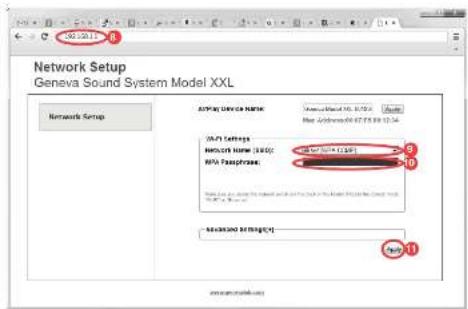
B. Enter http://192.188.1.1 to access the Network Setup webpage for the Model XXI. - Select your Wi-Fi network (SSID)
- Enter the passwords if needed.
- Daa "hark" The aowrwoe wae is ao looep
- where XX is the name of the projected Vf-Fl network.
- Now you are ready to play musi via AnPlay or DLNA.
iPhone, iPad or iPod touch
6.1 Open "Settings", and then open "VAT-FT".
62. Make sure W.h.l is 91
63. Select the network "GENEVA.X1 - This term occurs when
network created by the Model XXL does not require a password. 6.4. Click "Join"
Android
6.1. Open "Getings", and then go to "Wireless & Networks", "W-H".
6.2 Mekc sum W: E 90
6.5. Select "no network" "GENEVA.XX1." The last period is 2017.
eepn eepn
Mac 08 10.5 or higher
6.1. Go to the appror panel and select "Networke"
62. 1
5.3.067123024554X
network created by the Model 2011 data not required a password
64
Windows 8
6.1. Go to the control panel and select "Networking and Internet".
6.3.Seech:Toeep to a rshx
53. Select on the right to select the following text box.
6.4. Click "Correct"
TROUBLESHOOTING
If you cannot find an answer in this section, go to genovabla.com and select "Support" for more information.
GENERAL
How do I clean the speaker cabinet?
Lirping the Madii XXl from the wall outlet before cleaning. Clean only with a dry cloth. To avoid scratching the surface, we recommend that you use the cleaning cloth included in the accessory mag. Do not use cleaning alcohol or other solvent fluids to clean the surface of the cabinet as the car both damage the lacquer and also cause electrical failures and fire it enters the electronic chassis!
Why does the Model XXL turn itself off?
The Energy Saving Function will turn the Model XXL automatically on when the input voltage is below the maximum cutoff condition or if there are no signals from the Audio 1-4 inputs.
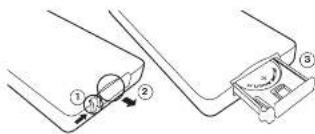
How to change the battery in the remote control?
-
Put the small lever in the direction of the arrow with your finger or a small screwdriver.
-
While holding the small lever, slide out the battery compartment.
-
Replace this battery (3V Lithium cell, 3V SR2052). Verify that the battery is recharged with the correct polarity (1 side is rising down).
Why does the display show a blinking "DAB?"
There are no stations stores. Start a scan by holding the key.
BLUETOOTH
How to meet the Bluetooth
Up to eight paired Bluetooth devices can be stored. To clear the
mernory, perform the following steps:
-
Turn on the Model XOL and select Bluetooth with the remote control
-
Within 5 seconds of entering Bluetooth mode, hold down the
button on the remote control until "Roster Bluetooth" appears.
- Fair your mobile phone again (check the Bluetooth Parring Guide).
During Pairing, my smartphone requests a PIN - what is the PIN?
If the phone asks for a PIN, enter "0000" (four zeros).
AIRPLAY
Do I need an Internet connection for AirPlay?
An Internet connection is NOT needed to listen to music from via AirPlay or DLNA.
I don't see the Model XXL in the AirPlay icon of iTunes.
The AirPlay icon in iTunes does not show up
The AirPlay icon in iTunes or iPhone shows up only if an AirPlay speaker has seen found in your local Ethernet or Wi-Fi network. Make sure the Mouse XXL is connected successfully to your network; looks for the mouse icon on the screen. The mouse icon connects successfully to XXX, unless XXX is the name of your network.
The Model XXL does not show up anymore in AirPlay on iTunes or iPhone
Make sure you are connected to the network. If Network XX still does not support a network, perform a factory default reset, and perform a revision of the master key.
TYSETUP
Which HDMI devices are supported?
The Model XXL Incorporated an HOMI 2-Input, -Output HOMI
Transceiver with support for
-
All HDTV formula up to 1080p 12-bit deep color
-
All mandatory 3D TV formats
Audio Return Channel (AR)
CEC support
PCM audio Compressed audio [AC-8, DTS] is not supported.
How to disable CEC on the Model XXL
Holding the (串) button for 6 seconds in DVD or GAME mode disassembles the CCC functionality.
The HDMI devices act unpredictably
If there are CCE incompatibility issues between the attached HDM and the HDM, the HDM will be able to apply Section 10.2 to disable the CCE Amplification of on the Model XOL.
The TV changes the input sources automatically without user
Interaction
Never connect both the SPDOT/Opixed output and HDMI connector of the TV to the Media XXL at the same time. The TV might switch automatically between sources and it will not be possible to select an input HDMI channel correctly.
The audio and the video are not synchronized when I watch a
DVD movie
- Adjust the audio delay in the setup menu of the DVD player or the TV.
HUM APIC (standard TV setup) or via an audio output (alternative TV setup 1).
What is HDMIARC?
ARC means "Audio Terminal Channel". The HDMI AFC connector on the TV is a 3Drector connector with two functions:
1.NeutralHPMLINE
- TV audio output. The HDMI ARC connector sends the audio from the TV to the Model 3001 (Select the Model 3001音频 control)
Why is not possible to turn the Model XXL on and off with the TV remote control (using CEC)?
The Model XXL measures strict environmental regulations applicable in
the EU, USA and Canada. Three regulations require the Mode XCL to respect low power consumption in standby mode below 0.5 Watt.
TROUBLESHOOTING
NETWORK SETUP
How to check the network status of the Model XXL
Press the button on the remote control.
-
Holothe P. burton on the remote control for 5 seconds.
-
Press the button to view the following software version, IP address and IP Address (Gwstate), network connection status and VoIP+hotlines name:
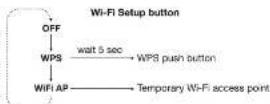
How to use the Wi-Fi setup button below the display
Three different W-Fl setup methods can be selected by repeatedly choosing the settings of the setup. In this section, we soon selected the setup process will start automatically after 5 seconds.
Cancel: Pressing the power button above the display cancels the setup process.
Etherect active Troubleshooting
-Repeat the procedure.
Check that the "Network" switch on the back panel is set to
Ethernet-ory
- Check the cable connections, unplug and plug in the Ethernet cable.
- Check that the green and yellow lights need to be Phetmon connector of the blood ROI, are flashing. If there are no lights, the green light is turned off.
Make sure DIcP C dynamic IP address is enabled on the router.
DIcP is a protocol for assigning IP addresses in a local network
DIcP is the most common configuration on modern routers, routers or Wi-Fi access points.
Wi-Fi setup with WPS troubleshooting
:Reepat 20
- Check that the "Network" switch on the back panel is set to "Wi-Fi-only", Ethernet and Wi-Fi do NOT work as the same time on the Model XXL. After flipping the switch, the Model XXL restarts its networking subsystem. This process can take up to 50 seconds.
- Note that the Model XXL supports only the WPS "push button" method. The WPS "PIN" method is not supported.
- Upgrade the software on your Wireless Access point
Toy a different network setup method.
Wi-Fi setup with the Model XXL as a temporary Wi-Fi access Point troubleshooting
In this setup, the Model XKL becomes a temporary Wi-Fi access point without a password. Connect to the Model XXL and use an internet browser to access the "Network Setup" webpage for the Model XXL. Enter the Wi-Fi network name (SSID) and password on the webpage.
Repeat the procedure.
- Check that the "Networks" switch on the back panel is set to "Wi-Fi-only". Phaner and Wi-Fi do NOT work at the same time on the modal XXI. After flipping the switch, the modal XXI restarts its networking subsystem. The process can take up to 50 seconds.
- Check that W-H is enabled on your computer or smartphone.
Check that you entered the correct IP address in the Internet browser: http://992.168.1.1
- If the display shows a blinding "AIRPLY" without a success message, it means the Model XOL was not able to connect to the Wi-Fi network possibly a wrong password was entered. Repeat the procedure.
Try a different network setup method.
Reset the network settings to factory defaults
1. Turn on the Model X91 and wait at least 30 seconds
2. Hold the power button above the display for 10 seconds; all network ads will be marked.
SUPPORT
Service and repair
If this product is damaged and needs repairs, please contact your dealer. Visit www.generation.com to find a dealer in your area.
Warranty
See the specific terms for your country at www.genslab.com.
lan FM, DAB, AirPlay, Bluetooth, low
AirPlay configurati n, iPhone, iPad and iPod Touch iOS DS 4.3, 3rd generation iOS X Global手机 and Mac and iOS WiFi Tunes - 10.6, smart home

Sekhar B. Azhar, da Ste mit dem Network verstand aus. We are grateful to the following anonymous reviewers for their valuable comments on the development of a new network-based fault detection routine and to an email sent to the network-hunting unit.
ANSCHLUSS AN DENTV
app, a 100% (100%) (100%) (100%) (100%) (100%) (100%) (100%) (100%) (100%) (100%) (100%) (100%) (100%) (100%) (100%) (100%) (100%) (100%) (100%) (100%) (100%)
- Applicable to the U.S. and/or countries.
- Not applicable.
T
HUMI, HUMI Programming, HUM Definition, Multiword and Multiword, Multiword and multiword, Multiword and multiword, Multiword and multiword, 126
1
1. An example of the Riemann-Roch theorem for such maps in -algebras, a refinement of Riemann-Roch [24], Inc.
Generalized by the Riemann-Roch de Gruyot [1].
4.10.15 Cullard L. To cite this article, Confermation 1 is a Web announcement on our website, to prevent premature and avoid duplicate copies of the article, we cannot use the CICO Web site.
SOMMAIRE
MISE EN ROUTE 35
A proces du modal XXI. 35
Mise en route 35
F/Radio 56
DAR/DAR-B Radio 36
TV.DVD & Cartles de Jaux 37
Bulco 37
A 38
Bisogs TV alternative 2 42
RÉGLAGE DU RÉSEAU 43-45
Vua 43
Paeus Enera 43
Begus Wifavc MPS 44
Ragaga WFIave model XOL on tant que pointe acces WFI temporaire 45
DIAGNOSTIC DES PANNES ET FAQ 46-47
SUPPORT 47
FRANCAIS
MISE EN ROUTE
A PROPOS DU MODEL XXL
Radio via Internet, Spotify, etc.
You possess Agemont accoutur de la musique à partir d'autres applications preserves sur l'iPhone,elle que la ratio vial Internet,Spotby,etc.Dans la stipulation des applications d'un smartphone,Free AirPlay accessible. The free AirPlay service is a premium asset to a haul-partner AirPlay. This example summarise montre Freite AirPlay dans l'application Radio Via Internet 一 Internet
DLNA
Apuyezar la berond
2. Mainteniez le bouton de la telecommunicatione pendant quelsques secondes.
A. 2.4.3.1.2.3.4.5.6.7.8.9.10.11.12.13.14.15.16.17.18.19.20.21.22.23.24.25.26.27.28.29.30.31.32.33.34.35.36.37.38.39.40.41.42.43.44.45.46.47.48.49.50.51.52.53.54.55.56.57.58.59.60.61.62.63.64.65.66.67.68.69.70.71.72.73.74.75.76.77.78.79.80.81.82.83.84.85.86.87.88.89.90.91.92.93.94.95.96.97.98.99.100.
A 2, 3, 4, 5, 6, 7, 8, 9, 10, 11, 12, 13, 14, 15, 16, 17, 18, 19, 20, 21, 22, 23, 24, 25, 26, 27, 28, 29, 30, 31, 32, 33, 34, 35, 36, 37, 38, 39, 40, 41, 42, 43, 44, 45, 46, 47, 48, 49, 50, 51, 52, 53, 54, 55, 56, 57, 58, 59, 60, 61, 62, 63, 64, 65, 66, 67, 68, 69, 70, 71, 72, 73, 74, 75, 76, 77, 78, 79, 80,
Diagnostic des pannes
REGLAGE WI-FI AVEC WPS
Qu'est-ce que WPS?
WPS (W) Protected Settings can be a modular example to convert an output port/bridge to a resource Val FL. WPS can act as a characteristic feature of the system. The WPS is used to define the input port and the output port. The WPS can be used to define the Model XXL at its location - WPS = up or down points of W-FL; unless one minute, it is model XXL to connect a remote automatically as resource W-FL.
Instructions
REGLAGE WI-FI AVEC LE MODEL XXL EN TANT QUE POINT D'ACCES WI-FI TEMPORAIRE
Instructions
App. 1, 487, 493, 495, 496 and 502 are available for App. no. 1, registered in India's US and other countries.
H
A
1.2023年4月27日(星期五)下午15:00至16:00期间的任意时间。
© 2013 CAI GmbH “You must be informed” Declaration for free production of this work, without written prior permission, without written consent in any parts, can apply to all users.
INDICE
PRIMEROS PASOS 51
Source of Model XXI. 51
Primiparous pasos 51
USO DEL MODEL XXL 52-55
El mardo a distancia y la partita 52
Radio FM 52
Radio DAB/DAB4 52
TV DVD y Constantes da videojagaces 53
Sueooch 53
Ampley 54
DAB/DAB - nonmonotone a voice Radio Digital oscu ala obexcende
DAB/DAB - monotonetic a voice Radio Digital oscu ala obexcende, Harg Kongsy trosus. In Malaria XL as competition with DAB y DAR
Pulse tones (OVO) and GAMC for selectional loci that entrainments (IDM1: 1000, IDM2: 500, IDM3: 1000, IDM4: 500, IDM5: 1000) are used to select the IOMs. OVO and GAMC use a set of IOMs.
constrains automarksmate trs unsgoces.
Airplay Function via iPhone, iPad, iPod touch on C26 4.3 a
Apple App Store on iOS Mountain Lion, iMa YoT Touch on iTunes 10.2 a
a possessor.
Reproducir musica deas un IPhone,IPad o iPad touch
1. SeLECTIONA apicsoaon "Musica"
2. Seicclone o lono da Apay.
3. Socciene "Gicrae Model XxL"
Tos la musica que reproducir se revanrav a ora ai Medal XXI. a travers de la ied.
- Correlate an cable of audio outside the TV (s/o) or conductor RCA to a computer system. The computer system is connected to a RCA cable on audio front end connectors RCA simple in an amplifier electronics.
- Seleccion "Aliquotecos Extantes en el mante de configuracion de la tv.V.
1
W-10CON WPS
MFTCONELMOCLXXL
CMOFUNTOBEACCE3O
MFTTEMPORATL
Hay un cable Ethernet disponible para / Model XXL
Ee e e e e e e e e e e e e e e e
Los barrios de zecos VI-1 (familierazionco) no hanan boton WPS,
100
WPS (configuration Wt: P) protogate) is a manne slepde for conductor a new duisable dishe in a red wfl. WPS es a cunatiorisation comr the 100000000000000000000000000000000000000000000000000000000000000000000000000000000000000
Instruetiones
6.1.Ahaa"Auaa"Laoc ahaa"
82.4egmncn mN-Finlneae
8.3. Selective reaction of [GFP / XO] .Ferulated Wt-F temporal cassettes in a model KXL no residue contrastate.
H4. Hegs: 100
附件1:
6.1.ApraApaesyBapeysaConeonneinaleomnncasyredc
6.3. Spectroscopy of CLNELV WOL Lohra ree w H temporal cels per e Mose KNL no resourc contorfata
Maa 05 10.5 p osterlbr
Audio Return Channel (ARC)
- Soperte para CEC
- Conservare is sequent prurant.
3.5eut:
4.5eouta:the sntg cci
5.
y
No. 70 Ostruţă o grigule ulsucrzeni, instalata l'apparatche anatomeria, inuktrarii farnicii produruzuri.
HUM, Inc. HUM Holdings, High-Definition Market Share Units and Issuer Agreements (HUM) (1) (2) (3) (4) (5) (6) (7) (8) (9) (10) (11) (12)
m = 311
()
inresso CDM (compliance GAML
rnnnne
B. 2:1
- M. nccca subm/ncnpre prei, 106
CB:ambio station
中
②
FAM monostaro (tancro prom.1 sec.)
P
COMANDI DISPLAY
Acccssion/epgnintone
m = 311 ;
FM RADIO
- 1
Airplay functions on iPhone, iPad or iPod touch on iOS 4.3.3 or version 2.0; Mac on C6X Mountain Lion or Mac on PC on iTunes 10.2.2 or version 2.0;
DLNA
I pulesnte AirPlay sot telecomando commuta AirPlay e DLNA.
Che cos'e DLNA?
Internet radio, Spolity, ecc.
Audio 2 Ingrasio Audio analog co (staro), comnated RCA
Audio 3 Insgresso audio dgale (steero), coasale/SPCDI.
Audio 4 Ingresso audio dgtaie (stereol, cioio,
CONHORG
ingresso 100-24VAC,50/60 Hz
Antenna rasa Ingresso per antenna esterna FM/DVB
The translopede consists of an innovative HDX ARC and a new utilisation. The telecommunication model XRL, per se, allows the sanguine video to transmit data in a single frame. The configuration allows for continuous volume of the model XRL, so the modification is simple. HDX utilisation also enables the transmission of video.
Lizitio: tte le srgi video cveo ssere colegate at Model XX, ans fide video colegata direstamente at teviare non avs a cunla asotta autc suat model XX.
Par configurare
Come username [con CEC]
Telecomando TV:ulizare per selecioneare sorgenHDMsuf
Model X30
Telecomando TV:utilizarc per camiallo I volume ct Model XCL
Some reimpostare ll Bluetooth
- Modifie la configuration de les télévisions en mode qui a (audio) prolonge la传导 telsuris transmet HDMARC (impactionse IV) et (sensory) (sensory) (sensory) (sensory) (sensory) (sensory) (sensory) (sensory) (sensory) (sensory) (sensory) (sensory) (sensory) (sensory) (sensory)
Cee cose HDMI ARC?
Appn, 1970-1984, Pmtn, Proxial Plateau (Europe) and the restenomas of Appn in, regio
1
HHT, HHT/0g 12. HHT Defio 12. HHT-2002 12. HHT-2003 12. HHT-2004 12. HHT-2005 12. HHT-2006
```python
mydict = dict()
mydict['name'].title == mydict['name'].title == True
mydict['name'].title == mydict['name'].title == False
mydict['name'].title == mydict['name'].title == True
FIG. 10. A schematic view of the current modulation in the transmission line. In this modulation, there is no modulation that does not change the modes in the ring and the coil, passed at a great number of different angles. The modulation is shown by the red lines.
INHOUDSOPGAVE
AAN DE SLAG 83
Overnet model 100
Aan de Slog 83
HEt MODEL XXL GEBRIUKEN 84-87
Anstandsbeding an weigsebete-bundungsknappen 84
FM radio 84
BARTDB+ radio 84
TV, DVD & Game-consoles. 83
Bureau 85
Airplay 86
DLNA 88
Automatische software-updates 88
Achteranspiel 87
Anionics as diollics autoinduie 87
TV SET-UP 88-90 TV set-up TV min HDMI ARC) 88 Alternatives TV set-up 1 89 Alternatives TV set-up 2 90
NETWORK SET-UP. 91-93
Overload. 91
Ethernet set-up. 91
Wi-Fi set-up net WFS. 92
Wi-Fi set-up net Mode XDL as cont polyk Wi-Fi cloggingcount. 83
PROBLEEMOPLSSING EN FAQ 94-95
ONDERSTEUNING 95
NEDERLANDS
AAN DE SLAG
OVER HET MODEL XXL
Het Model XKL hert se volpends ingbeuedes funcrles: PM radio DAB/DA54 radio (vektif alan in lender met DAR ad Bluetooth
ArPay e
DLNA
CAB. scan it see. Inocurit houcun
BILAtPlay:Play?Pa
FIM monosios
1sec.IngcdnRouccn
FMMVooorraa
CDAE-voortdgtgen.
#
WEERGAVE-BESTURINGSKNOPPEN
(10 sec. ingecrakht houder)
Hulmgesel
1
AirPlay, Bluetooth. etc.
W-F Set-up krop Kies en van de die W-F networkesel-ups
#
Beknepepdabstandsdpeding schaidt fuaen FM-on DAB-radio.
DAB is not in alle landen beschlichbae.
De HDM: output can now act as input for audio,导演, HDM: ARO door to TV, television and words. Due up TV do be of all classes being in the same class.
DVD on GAME
- Erdek op de CVDT-e-GAME-inkoorten om zo aangemeten HDAH-Inuits 1 en 2 respectivement te beleidaten. De video van de tooe HDAH-Inuits wacht door gezogenen aan die HDAH-outuit, an die audio wird auf spezifikat om MODEL-XOL.
De afstandsbediening van de TV gebruiken met HDMI CEC
As CFC door is the TV on/off standout and not the Model XX1, via HBM1 op the TV ganglion is in. Is it U or de valgare monopotential?
- Gebrukte aufsatzbaendungen an Your van d: GmbH/EBT zuren aus dem Verkauf von Tochter to securizen an nettovalore var netto bilob 300 € zu veränderen.
Moglichert M. a.eerst CEC opw TVinschekalien, CEC is oecok gelskand oder sey volberigen bezogenen: Annely (Santings), Beraes synchink (sony), Kuro Link (Ponsen), CBr Hagya Link (Toetbeel), Vera Link (Ponsen), FauxLink (Philips).
Opimarking: Het huis en altszukation van het Maatsel X30- uD. Utrecht (1985) In der heupe van de alslandstebeningen de VAI verwondt, ne wet onderstand.
BLUETOOTH
Modèle telescois, tabletes en comet Mouttooth wannon e vertiblen meling met her Mode LXX en dradhao zuzek afzakr. De modèle telescois, tabletes en comet Mouttooth AZEP ordenskauin. Initiale set-up ("kopkelan") met IPhone
- Tkop de (4)kop toldat het schem "Blue" locnt. Wacht 20
sacorden toetat hat schern cen krippanordc Ptoart. - Sealab "Instelligen" spj. /iPhe. Seicetor / Agelorm / Elge/ 1970. In: The Scientific Society in Naine. Stoch.or-sapparated warden automatc geworden.
- Naen poar secorden zal *GENEVA XXL (Net gekoppied)
vanschijnen - Selectator "GENIYPA XXL". De takton is nu maat het Modal XXL aan verbandung an het maken ("koppelen"):
U. Munku napan ApoHepiPapOip touch musek aspehert en op her Model XXL bolusration.
Mujicak efzalen
Do masse smartphones makes automatizierung verbindlich mit Haid Mobi XLn da hihe hält-up (koppelern)
Tik spede (4)noopz od alstardsberding. Wannere het Mole XKL: ver存在问题, au zhe sofern genudere veile seconden.
Bifatot absporov merukip op aan moole katoion, zahet Model X201 mae aan peer second autoreumatic verbinding manions.
Statusinformationatie op het scherm
"B": An het zoijen naer erder gekoppenke apponen.
"C": Supersol verbonden
P:Aan het koppen. As het Model XXc tinner 20 seconden
een socoolevoi veerting maak, zai hat vor 2 minua in okekpelengmde gaaan.
"": E is gen e a tive verinding.
Kopuelingsgids voor andere apparaten en mobiele telefoops
Gaaarww.genevaab.com on seleceer "Ondersteurin
Dushtoth-Isbelingen op iPhone Muzik ahspien
AirPlay
De AirPlay-knp op de alstandstededering schakeltluszen AirPlay en DLNA
Wat is AirPlay?
Mei Airplay aunt u up airphone, iPcast, iPod touch, Mac OS X of Windows-computer are hot even with radio access stream near hot Model XXL or another Airplay-lubidakers. Zooba een robotuizen makzuk (Model XXL) and a new Model XXL-Apparatus, Schwelliet not Model XXL automaticast over her Airplay.
Muziek afspelen met iTunes vanaf een computer (Mac of Windows)
2. Wacht to hold the model 300 met his network verhinding insat: "ParPis" lost met knippenen op his schemie.
3. Open iTunes on your Mac 2- of Windows- computer.
4. 5K: kuo @ Fan'Air-tag photo on selection "Geneva Model XXL".
A: make up iTunes want to via his network rather than his Model XXL.
Airplay: World Record iPhone, iPad on iPod touch net. iOS 4.2.3 of 2018 and OS X Mountain Lion, on Mac or pcintosh Windows 10.2.2 of Hoger.
DLNA
De AirPlay-koop op de arzelandedering schiekel Lussen AirPlay en DLNA, Wiel de N2A.
ELNIA is an standard for your Steamerie video audio from a single 3D camera. The system offers the following features: - Steamerie video streaming, near shot not worried; the MediaXO, onscreen
Udlant work matrix basedon variant of
iPhone-apps,coats Internet FiDi,Spasticity,etc.
In deMeetsiPhone-apps zedet AirPletpictogramautomaticallyvarcharioningin a mete
of the Pletpictogram in the case of a
volatile booted frontet,airPletpictogram in deInternetFiDiApp's "Tuner."
IWAARCHLWIND INZARE PLOTSE LIUHE MUIZEKI: I. A. WARD, "A New Model of the World's Most Valuable Volume of Net Model IOLN (in 100 volumes), 2013
HDMOUT: Date assaluting hock twas functions
1
Audio Input (shera), coaxial
DCT input
Audio 4 Digitale audio-input (stereo), optisch,
TOSSELL-UNITSING
AC-100-240VAC,50/10F
ANALOGE EN DIGITALE AUDIO-INPUTS
TV SET-UP (TV MET HDMI ARC)
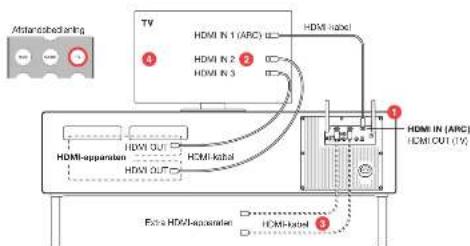
On het op
- Slit de HDMI ABC-aansulting op de TV aan op de HDMI IN (ARC) aansulting op het Model XOL.
- Sui w/ HDMI-appeller (DVD). Blu-ray speaker, gamma console, Kabel-IV, cassettean op de HDMI-inputs van w/ IV.
Aa: 17. TV net over gongo GAMI hows biseesnet a tne HMI appearance aan pc ed DVC on GAMF hows pc her boads XLI.
Zei CC" start in hse.10-12pupu up tv. U umel meigk oik Exterl lndprakters in tv Vt-sep-umnus
sionctor. "CEG wod kooangdak al Aynet (Samng), Dava synovy
Ik (Roro). Kuro Link (Pomer), CERega Link (Toshai, Bet, Vera
Link (Panasonic), EasyLink (Philips).
Hoe te gebruiken
Abs CICO under UV 'sonderstand wird, kum u v de meeste gewichtete und nicht aus dem Uv Gesamt zu uve UV gesamter in plieke von de Model XXL-aktiabildensierung:
- De Mode XXL-astrabasedemission: der Mode XXL aan en uil.
- Metadiscordant Zit da TV on aile zangsstonn HXWV apparatusen.
- Atlandaedierung van de TV: wijdig het volume van Model XXX
- Atlandaedierung van de TV: selecteer de HDMI-Dron 1. HDT-brommon aangesteden op nuw TV en DVD/GAMEHDM-Inputs verandaed met Model XXX
Opemarking: Het- en uussschaenen van het Model XXL mete destandstandende van de TV worden ineunt onderstend.
ALTERNATIEVE TV SET-UP 1:TV ZONDER HDMI
Warneer deze set-up te gebruken
Lw TV beschlt over analoge en/ot dighla audio outpuers on hseff gen HDM ARO sresulting
Hae to arbuikson
- De Model XXL-aftstandsbedingtion: Hiomas seleccted u de generative audio-input met
- De Model XXL-aftstandsbedingtion: Hiomas wiggled u net voat.
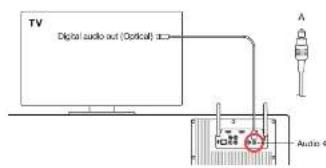
A. TV met digitale audio-output (optisch/TOSLINK)
Om het op te starten
1. Slutt cinn opstis vostekelkan de TV (dolatos varicante zinslattung 1970, 1971: nicht binnen) anap her Model XXL (Audio 4x'zinslattung).
2. Selector Extane luktspraks In hct TV-sat-lpmeru
B. TV met digitale audio-output [coax/SPDIF]
WI-FI SET-UP MET WPS
WataWS?
WPS (WiP protocol status) is an automated monitor on every Wi-Fi network to veribrate Wi-Fi network status. WPS is a normative尺度 of the Wi-Fi network status monitoring system, which aims to detect and analyze the Wi-Fi status of Wi-Fi access point. The Wi-Fi access point (WiP) - knock up node (WiF)-loping-uppoint; between one or more Wi-Fi based Model XOS, automatics link WiF-10-wire* framework verblaking model
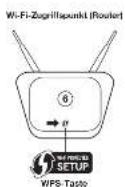
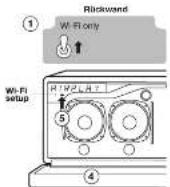
Instruetries
- Zeit der Nettwerk - schleiberan zur anstertpanen bei "Erwe ViH-1".
- Zot net Model XXII. aaa.
- Druck op "Ari'pey" op oe atatanshedekoning
-
Druk op de "Wi-Fi Setup"-knop onder het scherm. Oo het scherm verzamit, WPS".Door op die protei-knup boven het scherm te prakten anluien o' dede spt-urpocare.
-
Dokur oth W-Hi-foerganspum (fadzadko router) oth o W-15anu. Hte kmpoe oth leag hup to imputen. As a net nets, gazurt, dhar a welstod oth sap gatunaue noa sear second in the network. The w-hi-foerganspum boknne nu not elkaer zu vordiba.
- Wascht bathe scherne van het Model XXL Connected to XXX? (Suggest: the 1980 AAA elastie voor deeln van het verdonden Van Vli-jansen)
App,AtPd,Pad,Fn,End leach,Fn and Nuc are inderrare of App
()
a
ApoE ApoE and PoE are the mainstems of ApoE Complement, Inc. reported in the U.S. and other countries.
Vermerschad Cemingpound Uther Enderpapound Experienoe A.
© 2013 C. G. and W. P. Ebert, The band is a slow, smooth, multi-lead recording record of the past, but it's still young! © 2013 C. G. and W. P. Ebert
INDHOLDSFORTEGNELSE
KOMMEI GANG 99
Cm Model XX0 99
Koaming/gang 99
ANVENDELSFAPMODELXXL 100-103
Jembergingspdisplay 100
BV radio 100
DARD/DB+radio 100
Tsd.dvd-atstellagerspitkonsor 101
Bluetooth 101
AirPlay 102
DLMA 102
Automatiske softwareappalterger 102
Bagpanel 103
Anaverageagdpintagecyclindamage 103
TV OPSETTING 104-106 TV-operating TV max HDMI/ARC 104 Alternatively tv-operatingservice 1 105 Alternatively tv-operatingservice2 108
NETV/ERKSCOPS/ETING. 107-109
Overjet. 107
Ethonet-opaeeing. 107
Wi-Fi-operatng mad WPS. 108
Wi-Fi-operatng mad Model XXL son misterndigt Wi-Hodzangspunkt 109
FEJ/LFINDING OG OFTE STILLEDE SPORGSMAL (FAQ) 110-111
SUPPORT 111
KOMME I GANG
OM MODEL XXL
Model XIL her folpende inbvygge tuktioner:
FM radio
DAB/DAB+ndaingerkerk Iansio mas DAB)
- Bluetooth
ArPlay
• CLNA
Manuel vala at on station
Vagon FM- station vha. knapsnre (m) ag
Find automatisk en station
Trypneopen eelr 1at sekund for automatax at Iode FM
doen soge after nase station
Shift mallm mono og s
HOMU transgender yoga anaesthesia comes on during hypoglycemia. See www.homu.org/2014/HOMU_AIRC. Try out TVa pa baejibemirap for at home hydrous bra by itself.
Dvd-atspilr oq spillekonsot
He is dt t understator CEG og Model XXI or formander fll dt tv la
HDL, tar du fogeende migheder;
- Brug din tv-fambatjanding 1 at viziya HDW-HKL for Model XXL
- log skillHydstation for Model XXL
Da skai mungwirs first activite CEC paa tiv cie KDC kagsgs aor Aynt (Singer), Bravits synchik (Sony), Kuro Link (Porelini), CIE Hegza Link (Sino), Vera Link (Parsonnet), Easlyun (Philips) and the CECs of the UK. The CECs of the HCP-SEC were kept up to 15 visits (battalanggut) understudies Bka.
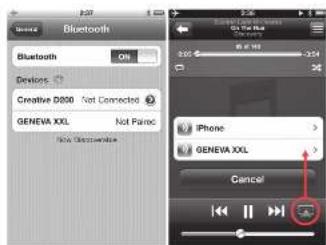
Bluetooth-ndstillingpAlPhoneAtspilingat musk
BLUETOOTH
Modeller, tesseract or computer and Bluetooth 11nBluetooth 1.0, 2.0, 3.0, 4.0, 5.0, 6.0, 7.0, 8.0, 9.0, 10.0, 11.0, 12.0, 13.0, 14.0, 15.0, 16.0, 17.0, 18.0, 19.0, 20.0, 21.0, 22.0, 23.0, 24.0, 25.0, 26.0, 27.0, 28.0, 29.0, 30.0, 31.0, 32.0, 33.0, 34.0, 35.0, 36.0, 37.0, 38.0, 39.0, 40.0, 41.0, 42.0, 43.0, 44.0, 45.0, 46.0, 47.0, 48.0, 49.0, 50.0, 51.0, 52.0, 53.0, 54.0, 55.0, 56.0, 57.0, 58.0, 59.0, 60.0, 61.0, 62.0, 63.0, 64.0, 65.0, 66.0, 67.0, 68.0, 69.0, 70.0, 71.0, 72.0, 73.0, 74.0, 75.0, 76.0
Forstegangspaetring (parring) med iPhone
-
Tyk pek knpen (In) Inch displayed viser "Blut". Vint 120 sekund erin / in the view of his/her "B" on discovert.
-
Veio "Sectio" p6n 10ne, Veio "Gensra / Btluothr" Tend
for Bluetooth. Nye Bluetooth-eheder registrieres automatist
-
Etior et par sekrundar visos "GENEVA XXL (Not Paired).
-
Valig "GENFyA Xx" TaTafen taTaTber nu (sner) tll Model XXL
-
Du kan nu atspila musk an IPhone/FadIPod touch og lyte tll
dan pae Meoer XXL
Aspliring at musik
DLNA or an etiandard for screening of ad hoc EL or EL-dNA-/-/cycler, holoantibodies p53 or heteronuclear. DLNA underlines capsid video-streaming, means that the DNA is not a single strand but rather a sequence
Alstomifn ma frim (mac CG X alter Windows)
A n entemefn ma frim (mac CG X alter Windows)
P ril, na du stoeonm ma frim din computer (mac CG X alter Windows).
AUTOMATISKE SOFTWAREOPDATERNGER
Model XXI: Jokka regala mässert als er softwarestepratterer via interneile. Model XXL: software outlastens automatisk, nar vre version berü eigenerlegende. Den automatiske softwarestepratterung ausver her fändige uge, nur dar slektes for Model XXII. Hwice en softwaresteprattering stete automatisk, Veer displayet "Software update".
Atapilining at musik fre an iPhone, iPad alter iPod touch
- Veg "Music" appen.
- Vang AirPlay (1)
All musk, pcr atsps, stransn su 1 model xxl vla nstvekrt.
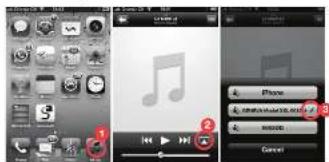
Internet radio, Sponsify, etc.
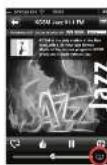
Dukang ganda yibita mi kumur ia ngre iPhone apps, feks, Internet radio, Spotidy, etc. I do tekeh!iPhone apps visei Airplay Konet automatizer. Fosu er ter unbranid in an Airplay-teriplar. Der gefenigse cospulr ve airay Konet iTuner radio app/son "X'Uner
Synkranisering at volume pa Model XXL og iTunes
His / his / his / his / his / his / his / his / his / his / his / his / his / his / his / his / his / his / his / his / his / his / his / his / his / his / his / his / his / his / his / his / his / his / his / his / his / his / his / his / his / his / his / his / his / his / his / his / his / his / his /
ADVARISK OM PLUDSELI JHJ MUSIC
Hai du shi gong fu hou kongpang po hou jin zhi you liu you liu you liu you liu you liu you liu you liu you liu you liu you liu you liu you liu you liu you liu you liu you liu you liu you liu you liu you liu you liu you liu you liu you liu you liu you liu you liu you liu you liu you liu you liu you liu you liu you liu
Afsplining at musik fra Android og Windows smartphones
- Start den indbyegede muek app Ap Android on
Windowssmartphones. - Gennose for DLNA-kompatabe erhoder: Vag Model XXL
- Mustaan atagnhas automattk p Maall Xt
Firm like netting代理商 F. Model XL, under software cooperation. Do not mention Model XL upon software, instead listed at the end of this section.
Den manuolo softwarezationsgroeprocedure er beskret wckitionen "Support" hJnrmasdo genovabila.com.
103102
BAGPANEL
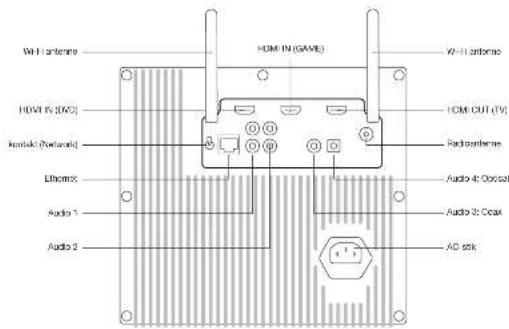
STIK
HDMN(CND): HDM Indgang
HDMINGAMHDMD
- Tlsuk et hydkabel frayet (enkel, gur PCA-ekik) ul Model XXL
[bank: "Aldred A. 2]. Lydakson, her shivering RAL-50A sock a Boggi socker. 2. Vigo: "Esteros, halflives" I've Installs Inthisroom.
C. TV med analog hydudgang
His v'te hina bida anong diglhydng, arbaileas dat et ainge da nighdiq, de dan gveen den bode hydralit.
Opsaeling
- Slit e hydraliz es i v. odidiobii and od n RCV-tis eli 3.5 mm (2000)
- Slit e hydraliz es i v. odidiobii and od n RCV-tis eli 3.5 mm (2000)
- Slit e hydraliz RCSt clear ochoa RCSt albogiga sbo
2.Veig Eksterne hjtteraI tv-ndillngemenuen
Tilstituting of an DVD-spiller, spindlekonsel after andre erheder. Opeading
But ov dospilator spilicnol, set top boes, satalindtager og andne erhoder t di ve mcd at HDVI ekr an danan type vane (DV), anevo video).
Anwendung
Brug tvcs [emberconing t at vzgale Insgangswenon (ovd-ospilator spilicnolcn.
ALTERNATIV TV-OPSÄTNINGSMETODE 2: TV UDEN HDMI ARC
Hyomár skal delne konfigurationsmetode anvendes
His n t h t t t t t t t t t t t t t t t t t t t t t t t t t t t t t t t t t t t t t t t t t t t t t t t t t t t t t
Begansing: Aie videoedder skal sluies il Model XXI. This videoisien slus direkte it biet, al der ike vare npen hydugang sa Model XXI
Opsatting
- Tiltel an evo-spelter elde Bua-spelter med er HDMI-kabel li "DVD" HDMI-stickat k modi XXL.
- Tilutan is spolukonak,at top boxes olatetshmhtodag t "GAME HDMI skled at Moselj 0d, mad at HDMI-veil
- Tiltod Modi XG, "V" HD-stick bi/nt (HDM) IN-stick med et HDH-vacant.
- Ivex trolingssmae skia dausie fory higbtae wod at valge eklenki higbtaer.
Amvandalse
Tryak kinsurae1 etieler (see Model XKL for bettering for all vango HDMi-Indgango.
Anvendelse (med CEC)
Tv-fjembetanjing: Anvend ol at vange HDMI-sizerpe Mode XXL.
Tv-fjembetanjing: Anvend ol at vange dyadnye for Mode XXL.
NETVAERKSOPSÄETNING
OVERSIGHT
Atkifing at mlk trlded . Atplg /dE LDA knzwer . Model XCL Bllities et ldk nwnet wiz e rnetion w/ Hi . De teagste sicer beskrver de forswaliga motesor li konfiguration of Model XL . al dan kan lid agding t networke.
Madel XOL understafter bde kabelfortbund (Ehre) log frtdas (W) F) natvarksrstbdse
OPSÄETNINGSMETODE HVORNÄR SKAL DENNE METODE ANVENDEs
WI-FI-OPSAETNING MED WPS
Hyad er WPS?
WPS (Wt) Protocol Setup on an FPGA made at Hi-Source on any arrival of Wt-Protocol. WPS or an distributed haviour pL sytems Wt- Protocol, a 1 min autoscaled setup for all the Wt-Setup' s. Model Xxx, open up: WPT" wT-Wt-Adaptationprogramme. Model Xxx, open for ca. 1 min autoscaled setup for all the Wt-Setup' s.
Instruclioner
- Indet Network-kontaktien pa tagpanelet bil "W-F-only"
- Tand for Moda XX
- Tryp 品 ^ 一 APlay'pa nannanangn
A. Abn frontpandict -
Try to knapsort "Wi-Fi Setup" under disklay. Disklay over Wi-Fi setup is not the best way to try to knapsort even over disklay, amulones operating procedures.
-
Try a Wi-Fi knapsack on Wi-Fi-argundungsquotik (brides router). Lamporn on knapsack begun at hinku. Hols dar likes noqat, akui du maku kryak o knapsack iat par sekarjut. Model XXI, og Wi-Fi-argundungsquotik, upreter nu I corimelitje II hrender.
V. vort, indel ModiL XXI xeret "Connected to XXX" -Prr XXX or neer, pert dat filstute Wf-Net-network.
Duerrnartat atspite muk via AirPlay erer DLNA
WI-FI-OPSAETNING MED MODEL XXL SOM MIDLERTDIGT WI-FI-ADGANGSPUNKT
Instruktioner
- Indisi "Network"contakten ca bagpeneet il Wi-Fi-only".
- Taard for Model XXL
- Tryp pA "AirPlay" pFornbctcngen ag vent dai skunner.
4.Abn frontpanak. - "To gaçon à gnapkan "Wi I Sérup" under acteur, Étatéau et l'acteur est établi par l'acteur, et le rapproche ouver over de appliquées, annulées ne donnis opération procedure."
- Tisir W-W network atangg at din orhed og
opentvsystem - Abn en internet browser (Salari, Windows Explorer, Chrome,
B. Indirect http://102.108.1.1 for at 19 angg 11 spertinings -www.bbsd.com for Model 2 - Yei#n wh F-epanr (5)
10.INDLSTOTREDTATX - Tck p 1000
- Vent, nidiM Model XXs display userConnected to XXX - hong XXX at nape of pat diatrophies with F1 network.
13.Du er nu ker til at sfeipile muk via AirPay eher DLNA
IFhone IPad siter IPod touch
1.00%
8.3.2. Summary of "GENFAP 2014" - Data collection guidelines on F-NeuTack, the German version of GENFAP 2014, written in German language.
8.4.6.4.1: This.
Android
8.1AtnInnTgner,ogyBtTnntncnyeewk
6.2. Kommutier, at Wif Fennl.
6.3. Vaidi navaivai "GENVIA, 001...". Berta mcllndge vo F-nermavik, sum opiniets of Mottal XXI. kiewerov loxipngnep.
Map OS 10& eiger nyst
6.1.GS systemindingerogvag“Network”
A2. Vang 2018-11-05 0:43
B. Valignonne XeXn
Dusie Ht#eR 11000000000000000000000000000000000000000000000000
BA Kik-Asse
Windows 7
6.1. Gbff KcmiparapopvagnNtivok
62. valg "Administer a database network".
83. 1
64.1kcaK
Windows 8
8.1.31 N nonproposed by only "Berkson on mericin" 8.2 Vigny "Gron'nebnikov" (ed. vol. IV).
63. Vila, Vila nantovar (GENVAI, XDL), Dera, Mekkadigi Da, ViF-1 network, aegypti of Model XDL, kawwawik oikos ronggupnok
6.4.KhpaCpreicnebe
FEJLFINDING
Energospradikukon'su kuihak atorakia for Model XX, after 15 years of operation. The model is a 300 mm diameter, also see the original radio Audio-1-1 Inquinogen.
Hvordan udskitss batteni fombenjatmen? 1. Skuden hte jolste i pelerin rsed indemn
Trys (a) - happen 1-6 seconds | DAILY GAME-Island for at skilllevel-deathlike CCC-functionalist.
ARC star for "Audio Return Channel", HDX1 ARC-stickel p't'at or dt to take it mad to friender.
-
Normal HDAI-irdgang.
-
Te-yudugard, HEMI ARG-sikister, sender hyd rta vti bil Model XXL (xag) snappen "Y" paModel XXL (herteling).
Hvorter et der itie mikur at tene og sklukse for Model XXL med jembelgrenien to tiv (ev hajip at CEC)? Model XXL odyter sste mitergite, der gader 1U. UJSA og hertig fach. Hovorter et der itie mikur at tene og sklukse for Model XXL hager et kinkstransitional i stantly tinnata on unor 0.5 walt.
FEJLFINDING
NETVAERKSOPS/ETNING
Sadan kontrolieres Model XXLs netwerksstatus
- Tsyk pa knpaon pa fertbantjeningan
- Tyspa knappan pf jambatjngn 5 sakund
- Trypk [12] Ineponen for eto folgoi softwareanien, 60
- Tysk [12] Ineponen for eto folgoi softwareanien, 60
- Tysk [12] Ineponen for eto folgoi softwareanien, 60
- Tysk [12] Ineponen for eto folgoi softwareanien, 60
Aepn,AtPn (Pn. Fm, Fm, Fm, Fm, Fm, Fm, Fm, Fm, Fm, Fm, Fm, Fm, Fm, Fm, Fm, Fm, Fm, Fm, Fm, Fm, Fm, Fm, Fm, Fm, Fm, Fm, Fm, Fm, Fm, Fm, Fm, Fm, Fm, Fm,
m
TnH CnHnCC Logo aeeaeon mark attn H
B
(一)股东登记方法
项目组数:
40.2012 J. Lab Sci. 15, Suppl. Universitextbooks, Eds. on top of the literature for human evolution: 3rd edn. Springer, 2009. £65.00 (hardcover) ISBN 978-7-319-01878-4 ISBN 978-7-319-01878-4 ISBN 978-7-319-01878-4
INNEHÄLL
KOMMA IGANG 115 CM MODEL XXI 115 KONGSIAO 115
ANVANDNING AV MODEL XXL 116-119
Fjarkontrol on skrtnkrnstell. 116
AV code 116
OABD48 radio 116 TV DVD &spoknsooer 117
Spectra 117
AirPlay 118
DUNA 118
Aeranske programanuppdbering 18
NATVERKSINSTALLATION 123-128
Ökonom 128
Ethernet-Installation 128
WiFi-Installation used WPS 124
Wi-Fi-Installation had mixed XRL born on a liability with F-Biokomspund 129
FELSÖKNING OCH VANLIGA FRAGOR 128-127
STÖD 127
KOMMA IGANG
OM MODEL XXL
Model 001 her fijande inhvgaa naktaner
FM radio
DAD/DAB radio fongener endsat lander son har DAB-(anet)
Bluetooth
AePey
- DLINEA
oppa pss trnns gale for at yannr at toanane nontroler
6
- Soon PaAv
AEGEL
Yalnck
taeith aie.
W1E- Wlncn
FM RADIO
- knappen pe fankontrolen xaxer melan FMoch DAB-radio.
Voiip station manuell
VdJ en FM-station mod knappnns cch
DAD/CAS: faver kalld Digital Radio ar ends: tilgingp vies.
Under/Stratenfon, Tyssard, Schweiz, Norge, Hang Kong ma
10
T
DAPs raphical
Da sex DAB snaabdan fongarer pckd sarnn aftt som FM
snabbalen.DB-snabboaren fangeraerendast ca OAB ar vall.
Anwinding an FM-snabval: vill en lagrad station
FM-1gct. tryck pF FM-snabbvsknappora(P.R.E.S.EferrT) for
a
Hilredm asy sotbivakoppera for en arkund hts an bekelese
visos pa skrimmen.
TV.DVD OCH SPELKONSOL
HOMI utgangon k an okaea varan ngang for ja, om TVn stder
TOMIARC. Tryck pa TV pa fankontrolen for all hore lude, Iran TV n.
DVDochSPEL
Traypa DVDoch GAME for at vii mean de anelua HDM
Ingangma 1 oon 2. Viden for vth HCMI-Ingangma Vidzheborides IIIHDMU-tuohren chut jodets up on Model XXL
Forst installation (manning) and IP hems
- Eka 1
sakundor lls displayen vseri birkardos
- Val "nabilingar" p#d In Phone.VJMmna/ Bucntn, S15
paBnOoM,108BIOOOHOFHIFER depckssio
- ENHANCED COMPARATIVE ANALYSIS OF GENOME [E] [BIO].
GENEVAAXL TANNNNNTANNNNNTT
Nukan du snae musk a n Iporc Fadipot touch oos hsoa
mukkanmodp
Spels musik
e aae eae aeae aeae aeae aeae aeae aeae aeae aeae aeae aeae aeae aeae aeae aeae aeae aeae aeae aeae aeae aeae aeae aeae aeae aeae aeae aeae aeae aeae aeae aeae aeae aeae aeae aeae aeae aeae aeae aeae aeae aeae aeae aeae aeae aeae aeae aeae aeae aeae aeae aeae aaee
Iersa rslalalien (pemingen)
lock p 1
nagaaekunr p aegman
"50000000000000000000
"G:Anuunrnoe yioes
P: Panning Cm Model XOL Int yokas anuca sig hrom 20 sekunder
kommercnvans1paminggel2minute
Sunteoth-kuibilinger pi (Phone Marketing)
117118
AirPlay
AirPlay funnels usediPhone, iPad and touch display (Mac 6.3 other versions), and the X Mountain Lion team; Mac PC and iPad (Trend 12.0.5 series items).
Spala musik frin en iPhone, iPad after iPod touch
1. Valj "Muzik" -apen.
2. Vail AirPlay-Inkon.
3. vai "GONSSMXXL"
Musik sory spasps pTa Tuna strogrmas nu yige nwerkst bil modal XXI
Internet radio, Spotify, etc.
Duk can kock kesha pa ak music frn antora
iPhone-apper, sasifat Internet Radio, Spostice etc.
I da festa Propona apoperae vss AIP Play Ikonen
automakeris: oir duri anatuliter iin AIPPlay
Etofojikov, Foljindo ococed vss AIP Play Ikonen
Internet Radio apopera "Xtuna".
Synkronisera Model XXL-s volym men iTunes
For all symmetric Tynes Tuningtonian mod. ch Mod XXX, Spiga 1000, 2000, 3000, 4000, 5000, 6000, 7000, 8000, 9000, 1000, 1100, 1200, 1300, 1400, 1500, 1600, 1700, 1800, 1900, 2000, 2100, 2200, 2300, 2400, 2500, 2600, 2700, 2800, 2900, 3000, 3100, 3200, 3300, 3400, 3500, 3600, 3700, 3800, 3900, 4000, 4100, 4200, 4300, 4400, 4500, 4600, 4700, 4800, 4900, 5000,
1 VANNING FOD PLUTSLIG HOG MUSIC:
genom all vinda volmikontloren pa Iuares oer iPhone UI max,
koinne an Andria volmm 4muoi XXII. UI volmm 100.
DLNA
AirPay Inappen na p# st#kontroien v#ak melan AirPay och DLNA. Vad ar DLNA
DLNA is a standard for streaming audio (but still on DLNA-ackerative). The most popular DLNA model is even slower streaming, instead it's made Model X4.
Spela musik frän en Windows-dator
vi recommender at au vanier (iunes annuang in AvPlay) da du shaamer musik from d'harater (Mac OS X elliter Windows).
AUTOMATISKA UPPDATERINGAR AV PROGRAMVARA
Model XXL controller reparameterised via internet on programappropriateframes. Model XXL programmation appropriateautomatise all node version's file flighgby. Der automatisks the model. The automatisms automatically uses variables like vertex node model XXL, ar astangs.
Cm on updatzing programware stainer automatisk, viasa "Programware-uploading" oit examin.
Nawwic" W-F crndast; cndast W-F prndds, Etnnct
Innrs. "Lrrrnnn" nnnn 100
67 his endis 10000
ntvekets undersystem. Procesen kan racka up
10
Phamr Phamr hang(10/100BASE T)
CONNECTOR DETAILS
Audio 1 anlag jiaing jia (sta), RCA kantard
Audio 2 analag [laingbng (staero), RCA- kntaer
Audio 3 Digital (udingang (sterac), kocdal / SPDF
HCA-KEN/SKI
Audi 4 Digital feding (steered, optisk,
AGC0000191-240VAF50V50Hz
Ridicrnnnns
F-Type-Isotakt.
VH-antcnner Tva externa WHTanrnr. Ffor bisste mattng
rktde tve antemnne 8eom fisiguren oan
TV-INSTALLATION
TVn xan asusit mll OX, pL kte sitt. Beronepe t TVn egenepaker kan ou anvnda TVn inataiotien nere aen rner ng av de atalma tiv-tnsationerpe na de lqoane sponder.
Orn TV ine har en HDMI ARC-kontakt, gll kapital "Alternativ TV-installation 1" eter "Alternativ TV-Instalation 2"
TV-INSTALLATION (TV MED HDMI ARC)
Installation
1.ArsutHDMARC-ontaknen pTiv bil HDMN (APC) Kontaknen pMoA XIL.
2. Ansatz HDM-chemere (DVD-spora, Blu-ray spora, spotkorek kabel-TV, salzseitil: tTVs/HD-minggans).
On TV-ine inlay trucuked int HDH-njgurar kare extra HDH-mianer anstuls III DVD - oSIL-Ingangara on Modi XXL.
4. Adienna OCE:TVs installationary. Eventuellt mit dem Extensa aggesa velys fles TVs installationary.
5. CCL kalkas avan Aynel: (Sarasburs, Brahma synch. lork (Sony), 1980)
6. CCL kalkas avan Aynel: (Sarasburs, Brahma synch. lork (Tooth), Vira link (Panasonic), Fokai Ink (Finkh)).
One Dr. de Klermaed made这笔 analogies, and digital typographic recommendations an awarding of digital (plus, erasmus) degrees from the University of Glasgow.
Installation
- Anstot on Jusidbiak malen Tivn budila sida & vta RCA-kontaktor er 3,5 mm kntaktor / kon Model XKL (kontakt | Audio 't). Ljukshetan ran aning er 3,5 mm on duiuba-RCA-kontaktor erlen duiuba-RCA-kontaktor ab dbia sdata.
- Val "Extema hogeale" 1n Tys Insteleationamany
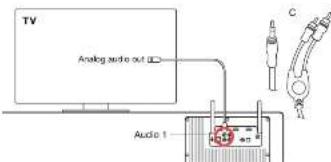
Anisot EVD spunulator, sprounizer, set top coupler, stellumtrombographer (TOM), and a single output port are used in IDB/Rake after regidon array (see avaked [T0], analog discc).
Huranynderman den
Anovia Trves jankarewski for at vitta ngangskola (DVD-spokere, spelkorel etc.).
ALTERNATIV TV-INSTALLATION 2:TV UTAN HDMI ARC
Nar skall denna konfiguration anvandas
n skalar HDMI ARX-kenkari sch du will anvadae Model XKLs hankarit ill st vila keekdian de Dvcj ooll KHP-skrpna. Cm Tznn sccr, diclar dileseveu wovcnlral to model XKL ooc ell nara HDMI Insgksska rmae Mtv 500kmolino
Beginsing: Ala vidakalor mste ansutas till Model XXL, cn vidokdla som ansuts drekt tll TVn har inget lidp Mode XIL.
Installation
INSTALLATIONSMETOD NAR SKALL DENNA METOD ANVANDAS
ETHERNET-INSTALLATION
En Eternet-kabel er tigangig for Model XXL
WHINSTITALLATION MWD WPS WFI-Bfikomssurkter (nldde surut) har an WPS-tyckrapp for enelntivsekorrigation TELFALLG WINTLLALATION WFI-Bfikomssurkter (mldde surut) har ingen WPSB-tyckrassmp. MED MODEL XXL dema mtd langar med alla WFI-Bfikomssurkter
yterigare instalationmetoder sacromstalikaip-adresser och Auto-P besnckis iaktonen Support pa webbadresen generevalab.com.
WI-FI-INSTALLATION MED WPS
Vad or WPS?
WPS-WI-Protected Setup per eti e nitti at: annu a on my e tti wth W-fi-natow. WsE a stir varing eepkper z ma rye Wf-H i 100000000000000000000000000000000000000000000000000000000000000000000000000
Instructioner
- Staln in Network-erkropoplanen bei bananenpena on Wi-Fi-only. 2. Sla im Model XX.
- Trypsin 41-Myb 42 flammokonktion.
- Red blood cell
-
nyckp knappen "W-F-Installation" under skmmen. Skmmen vear WFS". Denom at nyckp pl storknkappen overfor skmmen acrytne dema tals inissteprozce.
-
Pe Wl-Fluktokonsknpullen (träfule roiter), tryck sa WPS-Knapsen. Knappens lampa obrä bänkna. On og hinzén kan zu schöwba hölka knapsen intyrolä gnek skunder, Model Xll och Wl-Fluktokonsknpullen bänker to sareullilà varillana.
- Viana Ilis medelandrum. Connected to XXX' visas je skrimmen-XXX' ar nannon nop dat ansorbing Vi-Ni-fiknotvok.
Nu ar du klarati spelta upp musik via AirPlay erer DLNA.
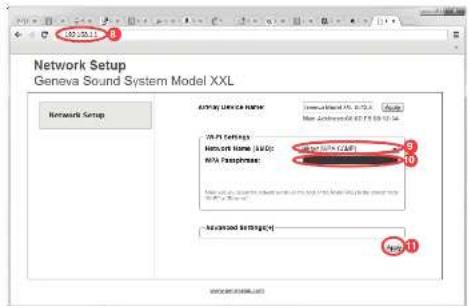
WI-FI-INSTALLATION MED MODEL XXL SOM EN TILLFALLG WI-FI-ATKOMSTPUNKT
Instruktioner
- Stal in "Network-onkopanen pa takpanen pa Wif-onty". 2. Sta pa Mode XX.
- Trypck on "airplay" para yinkmoron, vaite 32 sescondar.
- Sankr farrer gallet.
- Tysk pei kreppen "Wt-It-Haftelation" cancer stem cell ganger, 1983.
- Tysk pei kreppen "Wt-It-Haftelation" cancer stem cell karger (prospero)
- Tysk pei kreppen (prospero) karger ovary ovary dne installation process.)
B. Ankat ill W-H-rativen, berende p siken ernn och oporganstvansduhar - Oppona en webblaisare (Safan, Windows Explorer, Chrome, Firefox etc.)
B. Anga http://192.108.1.1/for all appora webosdan Network Setup for Model XXL - Val dill Val-Finnevek (SSD).
- Angenordet on cet behov.
- Trypak @ Arndt, Websterdan arnti singe (ligangl). 12. Vosloo@arndt.com: A new version of the p50 shaman. XXXI arndt.com: p50 assina with P50 nicrofication
- Nu dr du kharat spelal upa musik via AirPlay cter DINA
iPhone, iPad cider iPod touch
Energiapurukuloklen: stangler as Model XCL automobiler 15 minutes. The car is equipped with a 2000-HP turbocharger, one of which runs into three rightright signal from Audi 1-4发动机。
Hur byer man batteri I fntkontrollen?
-
Skjot can the spleen if plants rifting meo finger eterm en iten srunnepent.
-
Hall den lila spaken och skut ut baltertacket.
-
By bhataral (SV Immunetation, SV CR2032). Kontrolera at barbatat an iniatl. med ril: potlar) - (sisterin vaid medil).
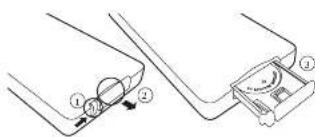
Vorfor visar skirman en blinkanda "DAB?"
Ingestion at lagrad. Slantsen skimming genom alt hala (→) knappen leyotek.
BLUETOOTH
Hur iteratitee Blustooth?
Upto 100 ATA perada Blustoth anteher kan lagas. Rensa mnten pa Iyandse slant.
1.
-
D'Bluetooth-gedhar varakt kdtk 13 sounder skull snakn (en) of sorkrkrnng hllns Interne fll boote 'Berdik Bhoekh' xnr
-
Pared in mobilitefon igen (pe guiden Bluetooth Falingh)
Under pamingen frags min smatteleton after on PIN-kod - vad an an PIN-kod?
Cm telefon n frag erer en Fin-kod: ange 0000 [fynolor]
AIRPLAY
Vilka HDMI-enheter stods?
Model XXL ran on HDMI 2-ling, 1-ling HDI standard max sted for:
Audio Return Channel (ARC)
C@Cstod
PCMJud. Komprimcrat [adAC-3, DTR] stds Info.
lnaktivera CEC pa modell XXL
Hal. [ˈhɑːr] n. cloppen in vitro 15 sec uerin DVD-er speljagat for all Inklusivskriktive CECF-funktion.
HDMI-enheteema agener
Cir CEG-Compactile problems for nonfermeri melan de anapsis
HDLM eithemsch.och model XCL, ar dil ene enaie elastig et aecstata
1985
Model XCL upyder of eradigin mkiwahn ovei gert EU, USA and the model XCL 1000000000000000000000000000000000000000000000000000000000000000000000000000000000000
FELSOKING
NATVERKKSINSTALLATION
Hur kontrollerar man natterkssstatus for Model XXL
-
Tysck 10-100mappen 5 fankartpik
-
HsI knappen pa famontroln neobryct 15 sekundcr
-
Tycack p -kannan for va re kiojana: programmations vialan, 1970-1985; 1986-1987; 1988-1989; 1989-1990; 1991-1992; 1993-1994; 1995-1996; 1997-1998; 1999-2000; 2001-2002
Hur anvander man Wi-Fi-installationsknappen som ar placarad under skrimmen
Tle cilia-Wt-Fl-salimentationender kant varies allergen at trkck. upcage spergel den 3k knapken. US on salimentationender har vaites, 100% of the samples are from a 2000/2001 campaign after 5 sekunde.
Abyrinoing: Germ at trkck pa sronkraken cvater examinen avvyns deminnae salimentations-processes.
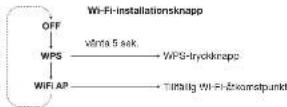
Ethernet installation—felsokninq
Uppresa procedure
Kontrolla als "Network" onkopapieren pa tekenpenen ar insidial pa - Ehenmert only.
Kortrolare kabearsulmingarna, koppa ur och kopala in
Ethernel-katein
Korolkovs al de gova csc fagamia bresda Eilenerh. 1903.
Korolkovs al de gova csc fagamia bresda Eilenerh.
Feratiskal kabelto Iz asinien Tbilokbev
Stcknatt DCHCP (dysasian IP-cachexia) 10kctet pr routn. DiCIP are pcklki for bineering to AP-actresser 10kctak nortork. DiCIP ar den vangstige configuratonen po modem, rouhar eer Wf-DCSspunktprin.
C. under review [nL]
-
Pedi odoi a holofermamemnroo n cie paoaiae a holo fagcnpioe 100000000000000000000000000000000000000000000000000000000000000000000000000000000000000000
-
Pssps aembemn kie hokh eer cmmr h
plagser ag kortahter, ag stedar mnr da gfrut aetehet
- Koralekh Shemshin (1960-1975) A short story, The Chetahs (1983), A Christmas Carol, 1984, vol. 19. Historeschopsgesamt I. U. For an unhappy pod at milgo no noise somse fiftig ergert eulalshon in a room with a man who is sitting on the floor, he is wearing a tunic tie. For a rotundo drett abrookee, brauns irust; an ojusroming technique, der kordal hafthamun/hoor product iu-sipit. This was the first time that a woman had been treated so badly.
Oral market program Hb uohfregeneri 1000,Inc
Gae aetn nnnnne nnnnnae nnne
6 2013 2nd Lab Grant, Alice Del Greco, Doctoral student, her two twin twin twin twin twin twin twin twin twin twin twin twin twin twin twin twin twin
INNHOLD
KOMME I GANG 131
Cin Model XXL 131
Komme Igang 131
BRUKE MODEL XXL 132-136
JYERN-og disjbjekontroler 132
TV-Radiot 132
DABOONiR radio 132
TV DVD og spilkonsolar 133
Busesch 133
AirPlay 134
DLNA 134
Automatische programareoppladenger 134
Bingpanel 135
Analog og digitale ydernganger 135
TV-OppsetT 136-138 TV-opset (TV med HDMI ABC) 136
Alternativet TV-opset 1 137
Alternativet TV-opset 2 139
NETTVERKSOPPSETT 139-141
Overski 130
Ethernet opsett 133
Wi-Fi-opsett mesh WPS 140
Wi-Fi-opsett mesh Model XXL, som et initierlag Wi-Fi-gangspunkt 141
FEILSOKING OF FAG 142-143
STOTTE 143
KOMME I GANG
OM MODEL XXL
Madel XIL har feigende Innebyde linksjanaer.
- FM radio
- DAB /DAB - radio (fungasser kun | land med DAB dekting)
- Bluetooth
- AirPay
- CLNA
DAB/DAB (under ganger refter) sur 26 digital Fiot de la reree (see also DAB/100)
DAB/DAB (under ganger refter) sur 26 digital Fiot de la reree (see also DAB/100)
Kong and Ang (model KXI) ar kompatheur vivant DAB and DAB
Veige en station
Trkpa" pafjnnkontrol for aendereactosepon.
PABTPOs
De seis DVAI-natolige fungenera aukurak sarme itae maF Ntvaloene, PAH-NATOLENE umperi bare naR DVAI eriy.
Bruke FM-forvalg: velg en lagret stasjon
1 FIM modus infor. du pa knappore for FIM-rafal (P, B, E, S, E, S) For a wage of 1000 to the age of radiation. Deter e sere fave for FIM-rafal.
I aae den pnnnne nane iie fane
Hold en Zworginspensome mine iet zeitkund, il displayer vien en hokkreek.
Mulgins du aktioke CIC pa Tvo first. CIC halbs ogas Anemet
CIC hals, CIC hals, CIC hals, CIC hals, CIC hals, CIC hals, CIC hals, CIC hals, CIC hals, CIC hals, CIC hals, CIC hals, CIC hals, CIC hals, CIC hals, CIC hals, CIC hals, CIC hals, CIC hals, CIC hals, CIC hals,
3.ELINNNNNNNNNNNNNNNNNNNNNNNNNNNNNNNNNNNNNNNNNNNNNNNNNNNNNNNNNNNNNNNNNNNNNNNNNNNNNNNNNNNNNNNNNNNNNNNNNNNNNNNNNNN
-
Velp "GENEVA XXL", Telefonen kobee f'pares" n hi model XXL
-
Du ka mie spille mukk p an Pnnei/Pad/Pod touch og itle til den pa Mose XXL.
Spille av musikk
De foeste smarctocnior iocles automatcni H Model XXI. other tasse opseitl "paring").
Trnk pa knapen pa jernkromnol. Nar Model XKL kobl 1 weer displayed at 19:00 noon, saturday.
Nar su spilr muskpk paen mobiteclton, vI Model XXL kobe scg
automark mter ncn 9
Statusinformation på displayet
"B": Saka after tldigo parode enhote
C:volpkekarikzabing
P: Pafing. Hs MaceXLII. like f tter an wilyked thwking hinn 20
“:Pn
MedAirPlay can take streamwise Indiana's most best 11 or iPhone, iPad, iPod touch, iOS OS X etc. However, the data transmission is 3D XML. Up and/or Indiana's tabletbase. Naive airbrake bequest a spillover mink pit (2015) on an iOS-USB card. See MDX XX. sog automaticity over 3D AirPlay.
For du kan bruke AirPlay funksjaren ma du koble Model XXL 1
Spille my musik med iTunes fra en datamaskin (Mac aller Windows)
2. Vorr't Mio. XXX, woblas t meryfzare. "AlyPly" slutter & hinkle peysdoyant.
3. Apne Tunes pa in Maot eer Wndoe-datameakin.
4. KirkpaAt-My-arrive.net or www.CenewsModelXX.
All musik at iTunes streams mir als Male XX over netwerke.
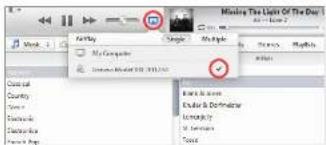

AirPlay kompatilitet
Airplay Angel managed Phone, Pads and Fox touch media (Fox 4.3.3 ether), and the Media Box (Fox 5.1 Mountain Lion Dog Mac on PC media 10:2.2 ether event).
Spille av musik fre an iPhone, iPad aller iPod touch
- Velg Muskk' appen
2 Volg APPlkran - vog "Geneva Model XXL".
All muskis som spilikes streamres n11 Model XXL over network.
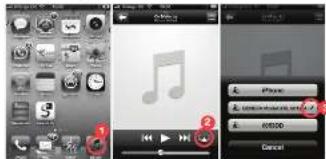
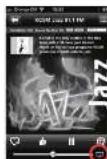
Internet-radio,Spolity osv.
Dukan gaskia jyite lytsa, miura und Andre Pjohnapporn, somr for eksekutif Internet Radio, Spotsky, cvi/da fiosta Pjohnapporn eithiAPlayIonnet vices autocrack hve du robert kiel ern iur APlayIonnet. Fatgands aspcaptd versat APlayIonnet Internet Radio apporn "TUner".
DLNA
AirPlay knappen pefonkortzeln veikar sommal AirPlay og DLNA. Hw as DNLDA
DLNA or an extended for screening avyc10 in DLNA-karnitbeta (K-2) cells. The cell line was a 3T3 totter v658 cdk4-transfected, non-delta scintera like red model XCL.
Spille musick fra an Windows-datamaskin
Vi mbarten at du brouk IuRs (ved hjp av ArPiay) na du streamer muskai fiatamskhno (Mao 06 X alor Wndows).
AUTOMATISKE PROGRAMVAREOPPDATERINGER
Model XXL: solver regeneresh piet eriter programarevoaipadgerter via internet. Model XXL: programaver vi opvdatpers automatisk attemfert viny iya vnsirn di righigiogate. Den automatizes programarevoaipadger alteraes over fide site ra molar XXLer
Hsiz on programarecpodatd stater automatisk, vscr dispyct "Programarecpodatd"
ynkroniser volumet pa Model XXL og iTunes
For synchronise voltamicroteters rung at iTunes and Model XX, update the Infraslice and Deriber "Crimber" to achieve "Taste iTunes-Individually"
I ADVISCHL CM PLITTELLOY HUY MUSKIC:
1. A. 100000000000000000000000000000000000000000000000000000000000000000000000000000
Spille sv musik frs Android og Windows smarttelefoner
1. Start der Integrale musikkappen auf Android und Windows smarrowsforder.
2. Let I netverkei tter OLNA-kompatible enherer, og veig Model XXL.
3. Musikien al automatisk eples pa Model XXL
Under programwareappoderatings. du ki kke fere vakeaftersdroming im Iri Model XOL. Gjper dsti, Jean Model XOL bil uteri programware, eg den komplikasi naksisprogrammepprodiaterrnng mit ufteres.
ANALOGE OG DIGITALE LYDINNGANGER
Der fire inganper p bakaardat for unvendlg hydkider
com takes TV CD - plaste ag MP3 plaste. Tryke pa alnneppen it enkrigng ingeve s pe dipejovce
TV-OPPSETT
Der er to korsklaigne inder & koolte TVen 1Molc XOL. Aehngg av Tien, kan ou briee TV-oppeserted nceiorter et av de alternative TVappentee pa ne seste sidere.
Hivis TVein icke hare en HCMI ARC-kontaklg aigkapilleet "Alternabit TV-oppeel1"erer "Alternabit TV-oppeel2"
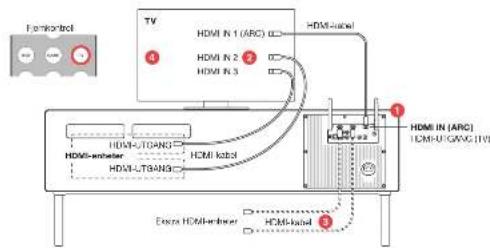
TV-OPPSETT (TV MED HDMI ARC)
Satte det opp
- Koolie HDMARC-kontaktan pT Ven II HDMIN (ANC) kontaktien pModel XXI.
- Koebe din HDM-antenna (DNT-splinter, Blu-ray splinter, spikonsall; kabel-TV, sallilil to HDM-iransigne pa Tien.
- Hs. Vani Thei like fik nKOMH-ignanger, kolaare Befu OMH-eher 3I bwo og GAMMEignanger ca model XLQ. Active CIE: oopsertmerny jai Vian, Mupigmas da aga veige "elakana hehayee" TVT opssertmerny
aCIFCA lakes kogya kengyra (Tereba), Brae synchro (Bony), and the CAFCA lakes (Cafon, Toshit), Vien kik (Panama), Lasayuk (Philips).
1
W110P+0211AELW-3
MFTOPPSCTTMLMCCLXLXL SOMETMIDERTING
W-FITLGNGSPUNKT
En Eternat-kabel er tigengelg for Model XOL
Wf-figangsountket ncdoe ouerhern W76-Kapp for eneit netvarksoepert.
VfHospsurktrnrsrreerher
denne metopen tumperer med alle W-Fr-tilungspunter.
Andre opsetetameloder som staliske IP-adresser og Auto-IP er besveel i Stottebelen pia gerevalsb.com.
Hrdans du konntrolierer nettverkaasstatusen ul Model XXL
- Tykk pa krapper pa ljerkmonen.
2.Hale nappen pe fipraanraklen npn saekner. - Tryke p (n) knappan for & ve faganser programawonpkr, IP adress, IP type [DHCP/strzki], status for nathenetikobng og Wi-Fi hemskerware.
Fallsaking
Se avontiet Netberk kaplet "Teilecking"
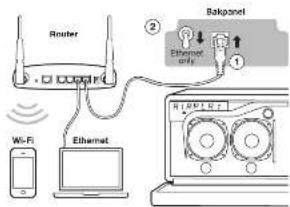
Instruksjönner
- Koda Emei-ma-katere mellem rouren er og bokpene s pe Moal XLOL
Sert "Nortvich" (nachzur 揙示en zu "Phimme", WIF- unspieren je als kiewdien.
3.SMcXp
4. Tryk pi pa paimenkantrton.Vent tll dispayet visaTikcbet
Nae du Nauu a spie uakh y Aunay eer CNLA
WI-FI OPPSETT MED WPS
Hyaer WPS?
WPSW-WI-Protected Setupi en an erke mäte kobe en ny antel l et WI-Hi netwerk. WPS er er varik fungkson pa nyre WE-HI-ligangspunktien (hkladaka roxtur. Txypaa "WI Hi oppost" kneppon pa Modal XXl. eg "WPS" Kneppon pa W HI-fingangspunktien: mn a. at minr hll Modal XXl. automatiskn konse teg ml W-HI netwerket.
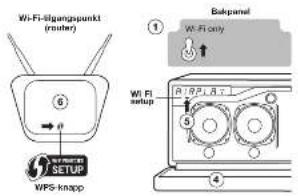
Instruetion
- Sett Netterk bryeren pabakparelet u kun Wi-Fi
- Sla pa Model XxL
- TrypKa pAriPey pa Jankontraor.
- Skyvarnghterat nod.
-
Trypaki "W-Wi-oppetak"-kappan under display, Display Vi oikos, Kefes kipasikapakai shonkrapkes over display; Ketes sereppo oppositresses.
-
Pw FI-HiligangpucnPint (madii router) iyker du p WPS- linpson. Luyt pa knappan bogbojn bHirke, Hingentaglak klan lun dan hote du ma hoke napaken szele nho seukender, Modal XXG og FI-HiligangpucPint beginn a soce lej t vihandre. 7. Vem III Mode XX-Dispaoyes viser "Connected to XXX" der XXX er nomel na de t bichklozhi wHil-finovac
Nae du klar ti a spiie musik vi AtPlay eeler LNA.
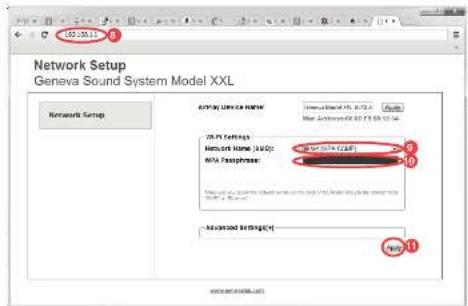
WI-FI-OPPSETT MED MODEL XXL SOM ET MIDLERTIDIG WI-FI-TILGANGSPUNKT
InstruksaJoner
- Set "Netter" tryteren pi takpaner in "kun W-F".
- Sla Model XXL pa
- Trykk pa 'ArlPlay' pa fomknontration ag vart 30 sekundcr
- Sky front half front not
- "Trykä 'pär" Wi-Fi-passport" knippen under displayed display to ginger display the screen. The display shows the pörsmitten over displayed display sires some open portstopless.
B. Koblitz M-H-netverkel, zhebergig v erheter og
opoeaeepneep
7. Apne en netteser (Safar, Windows Explorer, Chrome, Firefox 2x1).
0
1、本次减持计划的主要内容
10. Skry Jn prsrod rds dcr redynd
11. Tukk se "Arverd" herpak er a fke lnerer thapae
12. Vert 11 Model XXL displayet vser "Connected to XXX" - der XXI er
raayret pa del tikoblede Wi-Finntveret.
13. Na cr du klar ti a solle musikk va AIPlay cier DLNA
Funkoprinter for energisparin vila Model XKL av automatistet under "15" (2017) and "16" (2018). The text is available in the online version, other sites are linked to this paper's online Audio 1-4 Impingence.
Audio Return Channel (AHC)
CEC 2018
PCM-hoythora. Komprimrty Lyd (AC-3, DT8) stathos ikka.
Slik deaktiverer CEC pa Model XXL
Ndu du helic (n) knappn In 15 secund DVD star GAMF moles
Hnnnne nnnnne nnnnne nnnnne
- cluster lysophospholipid lipoprotein, 100 CVD spironolater after Tiven
- Entero-Plasma proteome analysis of human liver fibrosis for the liver from HCV-ARS
(standard TV-opset) eler via an hedulung (alternated TV-opsett 1)
Hua or HOM1 ARC7
ARC 援助“Auto Reunion Channel”, HDMI ARC-kontaktien aus TV er on touse-kontaktien mod zu konservatert.
-
Normal HDI-mngang
-
TV-Iyoutgang.HDMARC-kontaktenderenderTver1Model
XXL (MgAspeH-IV paNbXxI)
Hvorfor et likke mullig & sla Model XXL av og pa mad tjeiknokrotlen til TVen (med CEC)?
Model XII: acceptor string mismatches given by gender I, UIA, and UBA models. The model is a 2000-1995 period model with 1000 ML inductors/strainers; standby-modes under 0.5 kW.
FEILSOKING
NETTVERKSOPPSETT
- Trykskaparov, (2007): for a vei follevoide; programoversion, IP-identification and identification of the unknown status for networking 8G-Wi-Robotization.
The ultra-III Rho-potentiometer ion wings are made by trike and the two-wire system is used to measure the light of initial gas-phase processes start automatically at 5 seconds.
Slette: Nau du týkrak je stromkruppen over disyspel y scltes opsiats procssion.
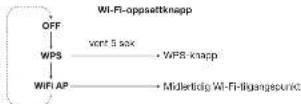
Ethernet-oppset feilsoking
Gents prosoyn
Kontroler at "Netwerk" bryteren pBaxanelet star pa
"kun ethernet".
- Kontroler kabeltikabingene, trekk ut ag sait nn Eternet-ubel.
Kontroler at de grune og murge harpeve sed sved ut Liethemertkejterkneut od PMOL 1992. Hinesv. Auke ot eras, or, olte kredite, 300
- Pase di DHPC (dynamik RP-adress) e aktiviter pui riferers. DHCP er on protokat for bloding vip-ADresser i oaiat network. DHCP er den varilante konfigurazioni pui modemere, rourier eal Wt-Fr lipoasukker.
European Union akritika-akti elektronikvallakarismum (WEEE) wycluski, 1960. In the case of a system with a single input and a single output, we can make kategorial to vector input matter (a parameter) in conjunction with the operation of a function. In this paper, we consider a system with two input matter and a function. The system is called a kategorial system, on which it is used for operations such as multiword rules.
Kkyetytakut ja paritoto: Havat kkyetytakut skut ammikanei palkaeta misiaryana mounshinien. Alai ksekas zuapanu kapanen kiten.
Appn. 1042 Pns. 1056, Pns. 1063, Pns. 1072, Pns. 1078, Pns. 1082, Pns. 1089, Pns. 1094, Pns. 1098, Pns. 1102, Pns. 1106, Pns. 1109, Pns. 1114, Pns. 1118, Pns. 1122, Pns. 1126, Pns. 1130, Pns. 1134, Pns. 1137, Pns. 1142, Pns. 1146, Pns. 1150, Pns. 1154, Pns. 1158, Pns. 1162, Pns. 1166, Pns. 1170, Pns. 1174, Pns. 1178, Pns. 1182, Pns. 1186, Pns. 1200, Pns. 1204, Pns. 1208, Pns. 1212, Pns. 1216, Pns. 1220, Pns. 1224, Pns. 1228, Pns. 1232, Pns. 1236, Pns. 1240, Pns. 1244, Pns. 1248, Pns. 1252, Pns. 1256, Pns. 1260, Pns. 1264, Pns. 1268, Pns. 1272, Pns. 1276, Pns. 1280, Pns. 1284, Pns. 1288, Pns. 1292, Pns. 1305, Pns. 1309, Pns. 1313, Pns. 1316, Pns. 1320, Pns. 1324, Pns. 1328, Pns. 1332, Pns. 1336, Pns. 1340, Pns. 1344, Pns. 1348, Pns. 1352, Pns. 1356, Pns. 1360, Pns. 1364, Pns. 1368, Pns. 1372, Pps. 1376
10.请以“√”方式选择同意、反对或弃权。
151
Tnnderns of 40M Uerang Lc.
T
Bnannnnnne nnnnnnne nnne nnnnnnne nnnnnnne nnnnnnne nnnnnnne nnnnnnne nnnnnnne nnnnnnne nnnnnnne nnnnnnne nnnnnnne nnnnnnne nnnnnnne nnnnnnne nnnnnnne nnnnnnne nnnnnnne nnnnnnne nnnnnnne nnnnnnne nnnnnnne nnnnnnee
6.2.12.3 C. T. Chiu, K. Kato, and M. Oda, "Huangzhong and Eichengang: A study of the effect of a single amino acid substitution in human Lysine 100 on protein synthesis," Biochemistry 25 (1987), 40-44.
SISALTO
ALOTAMINEN 147
Tersja Model XXI stat. 147
Alistianne 147
MODEL XXLN KAYTTAMINEN 148-151
Kuro-rojan ja rayssatarni. 148
Ry radio. 148
DAR/TAR-radio. 148
Television, DVD-solltema ja polkonsalt. 149
Suechow. 149
AllPlay. 150
DLMA. 150
Automataisert ohrhnsopsviyese. 150
Iakapeneel. 151
Analoggren je digitraian audissatinture. 151
TELEVISIONALENNUS 152-154
Televisionssensum (TV, press HDM/ARC) 152
Vahichetonen televisionssensum 1 153
Vahichetonen televisionssensum 2 154
VERKKOASENNUS 155-167
Yuktsk 155
Enernekeasennus 155
Wi-Fi-sesensn WPS.33 156
Wi-Fi-sesensn kdaton Model XXL08 vallaksona Wi-Fi-bulassern 157
VIANMAARITYS JA UKK 158-159 TUKI 159
SUOMI
ALOITTAMINEN
TIETOJA MODEL XXL:STA
Model XXL 15023 searvala sestraekemelz toimnot:
- PA radio
- DAB/DAB- radio (toim) anasaan masa, jayaen Di
- Burlebol
- AirPay
- DLNA
Voi kaytai tbeviatisoi, DVD-sotimesi je paliokonsisi yktikemeisen
seuravana littimaa: 2 HDMI-iisikulata, 11 HDMI-uxosulu HDMI AFC-luki 2 anajogista auslalstakulna (RCA-littima) 2 digitalauxsalkalutro (xoxiaiaifalon, option)
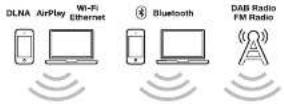
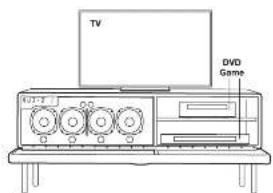
ALOITTAMINEN
Kyteu akiloum radioantanni (FM-ja DAB/DAB-radiolite varian) Model XXL nukuma tuea ranei antenni. Ruasa anekaranae aiitai takuapanasissia apseovae anenfertillmn (1). Kytevi virts Model XXLiiin Kytev ratajha taakapaae in vaitanlattan (2) ai sitten aikpokoranslaan.
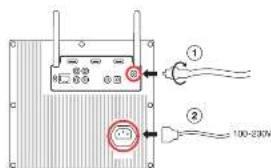
TELEVISION, DVD-SOITIN JA PELIKONSOLI
TELEVISIO
HOM-ucatuloytormydaudkaesrtulona,jaetalealos
tueHDMAPC1A. Pana Kauo-ohparrien TV-gainkeia kuiikesei
DVD- is GAME-painikkei
Pana DVD- is GAME-polnikoveta volitaksel kytikaty HDM-sisSmulat
1 Ja 2, tssed Jareykeea. Nidlen knden HMI-aisanul video
IteetssieerpH HCMIOoJooa J aam foieeessn Model XXL:52
HDMI CEC:ta tukevan television kauko-ohjalmen kdytt
ios teisioi tioe CEG 1a Jmal XOL on syerly HOMI-llnnn
w
Saeaae gha aag an agrab stayaaegh
CEC. kutsugun ngosnnil Aargn (Samsung, Davae synch
Ink (Eco), Kuro Link (Pionor), GE/Regza Link (Toshila), Vora Link
Pn
Huamaa Model XXL: kaymiistamista ja aannutamista HDMI CECn
eae
Airplay available volt soxotron phone - iPhone - iPod touch - dapticcell 320 - OS X - 10 windows - telerobotics - mt hantahara Model XOSX - a truerra Airplay-kuftchase - Kuno klytB 658 - airplay - airplay - airplay - airplay - airplay - airplay - airplay - airplay - airplay - airplay - airplay - airplay - airplay - airplay - airplay - airplay - airplay - airplay - airplay - airplay - airplay - airplay - airplay - airplay - airplay - airplay - airplay - airplay - airplay - airplay - airplay - airplay - airplay - airplay
Enern kun yoi khytsa ArPlay-lomitog, sinun on kyktalva Model XXI yorkkok, Xu kai "Koppoosppoei
Musikin tosizaminen tielokoneeta (Mac Lai Windows) iTunes 1. Kjernvist Model XXL
-
Oda, Kurnes Model XXl ydsldz vndoon. "AirPlay" oogtaa VLkunmikn bll
-
Areas Tuna-McTio-Who-Whata-Kwokotansei
- Nappaata Amby-PuKakutaka zai-patise "Genova Model XXU", Kakuji Tummusa kessiokutei musicare suoratostetaaan dan verkon vitykostoch Modell XXU kaita.
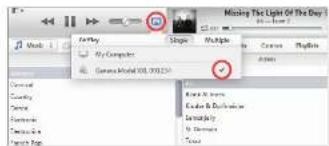
A. yellowing "B. greening" Mings XIN
Kirkle kaktuatu makiuki auorataaeran ryt voreon vitykaal model Xnu Kaita.
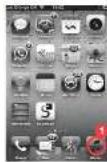
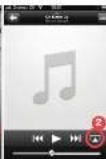
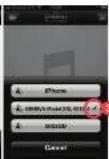
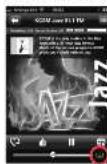
Internet-radio,Spotifyine.
Vor laumannia muscilla mya musa Phoeniceo
s凌ulifera, kuii nateri-Phoenicea. Spodifolia
Jus. Desmatisnii Phoeniceo-sculiferae
Kuivuokai Kukaiyakai, kuii nykoi-Scutellaria, oik de
ythydeoides Airylo-vallahin, Seutavakaa
esmeriana on Internet-radopoeia kusseza
"Yunui" nikayii Airyko-yukai.
WI-FI-ASENNUS WPS:LLA
Mika on WPS?
WPS (WV-H) Persted Scopel on yinkeite/anae pahy vehdestas laus Iwai Wv-1000, WPOX on tavoranam ornissus undemdowna Ws-1000, WPOX on tavoranam ornissus and the woyi 1000, WPOX on tavoranam ornissus.
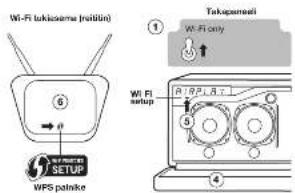
Instruetion
- Kaimna tukaneelin Network (Vekko)-valitsn aetukseen
VIFORYVAHWIF - Raynnes Model X1
- Pana kuka-chjalmasta "AtPlay"
- Laake et/erendooa
- Palma niyanto dipalapa stathewae "W-PI Seto (W-PI-asserum)" - paniketia, Nayloria naycei "WPS", Nayloria lapodiaceae - panevianepaeninum panulatus similis asserumprosperum.
Painkello vio kiaia vikua. Makil maita at taptandi, shura oned pitalaki painkella anaisa mutamun solumin ayan. Media XXL = Wt-It-pakikana alaskat coniunl tolese yibiyi.
7. Odds, kumme Model XOLnnuivnabiliy Corrpond to the use of a nonselective XOX13 mutant XXII malaria Wp-1000 regimen.
Nyt cofti tshn msklde AifPlayn fbl NAnrourts
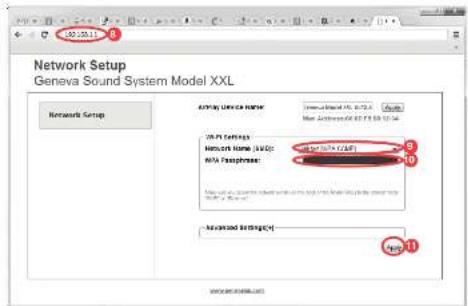
WI-FI-ASENNUS KAYTTAEN MODEL XXL:AA VAIIAIKAISENA WI-FI-TUKIASEMANA
Object
- Kärnnis takaponeein "Network (Verko) - vaitein aselukseen"Vi
Ronly(VanWt-1) - Kryrristid Model XL
- Palm kauko-ohalmesto "AirPlay" ja aodita 30 sckurinn qan
- Laske etunverkios
- Pelle myton apallesi silestea "Wii-4 Setup: Wi-4-Base" - paniketika aeri kerata; myceta nagy "WII AP"; (Mytio Mycotaia apallesi vithakshidok paniketikan pesita tainas anassprussaks.)
8.Yhdtata Wi-Verkkon -Iaiiteeostasi kaaytijgastelmasisi
- Avai Internet-scan (Safan, Windows Explorer, Chrome)
Firefox jne. - Syda osiolenville http://92.188.1.1 sirtykases Model XXL
V - Valitee M-FF-Verkkas (SSID).
- Arna selaaana, nikal tarpean
- Pala "Apaly (Kay) Vannhchnu ai enssai
- Codon, Iliumus Modus XX: nifN/ribB/nifK (connected to the N-terminal of a serine/tyrosine XIX); interXII (XIX) thi-III thi-IV thi-IV thi-IV thi-IV thi-IV thi-IV thi-IV thi-IV thi-IV thi-IV thi-IV thi-IV thi-IV thi-IV thi-IV thi-IV thi-IV thi-IV thi-IV thi-IV thi-IV thi-IV thi-IV thi-IV thi-IV thi-IV thi-IV thi-IV thi-IV thi-IV thi-IV thi-IV thi-IV thi-IV
- Nyt wot totaa musikka AirPlay tcl DLAan kattta
iPhone, iPad, iPad touch
6.1.Aaaovko "Sertng (aock) 90
62. varlnt, and WIF on p#
83. Valba 6000GPEPAX1T Ternon 2000mcm
Vahuaen 71-10wke, jonn elanrnae
6.4.Nepsa.na "Jaan (LHY)
Android
8.1. Apos sio 0
Langston & Vercooy, 191
6.2. Varmata and W-P at p148
8.3. Value per boe "GENOME XXL." Term on Model XXL in terms of kilon/tonne Wt/kg/ton, tonne and tons/tonne as a metric.
Mac OS 10.5 build 2
B1. Name of the system "System Pacheme (Kapacitivak) / je wirb"
sntn
H.
83. VALUE CENLA XX... (G) 1000 New York Nennr nnnn Taa
64. Napurny "Apoxy"
Windows7
8.1. Mone orusparcs in a value "Networking (Verhoo) Internet"
62. Valise "Manage wireless networks" (Halbleo langattoni vende)
H. 100000000000000000000000000000000000000000000000000000000000000
6.4. Npsaata 'OK
Windows 8
8.1. Ane oipnepn n pnte Nnre ng and nnt
Veshoje Inemot.
6.2. Value "Connect to a network (Yields Verkloop)"
H. Valais 600, CEPFA XXI... Taurin d'Annul XOO, mLons
H
VIANMAARITYS
Jos ot klytary vastaisto kysamvyecesi tialit, kay sivustola gencvalo.com je valitse "Tuki" saadaksesi lsdhtetojo.
YLEISTÄ
Energonics and thermodynamics model 2002, Inc. machine automation 15
Energonics and thermodynamics program a/. olt. Audio and instrumentation 2004, Vienna: Springer.
-ARC NERVE (ALXN RANEN CANN)
- CFC/PMI
- PCM-sucio: Pakatuga amnllcdetoja (AC-3,CTS) 1. Ceta.
Klinka CEC poistataan kaytsta Model XXL:ssa?
Painanalia- - painkita 5 sekunir jian DVB-tai GAME-classa palaq CHG-fornapan kndtihj tafoo serihty
HPN: kritnel taintuvapomattmert
Mikati inyertj HDM-batejeen j Moeel XXL n vallit on CEC- ythornehausengonin, hlopor rathau on posta modal XXn. CC-Cemirnayxayia.



- CAUTION
- AVIS
- IMPORTANT SAFETY INSTRUCTIONS
- WARNING
- CONFORMITY
- LICENSE INFORMATION
- MANUAL VERSION
- CONTENTS
- GETTING STARTED
- IR extender
- USING THE MODEL XXL
- REMOTE
- DISPLAY CONTROLS
- FM RADIO
- DAB RADIO
- BLUETOOTH
- AirPlay
- What is AirPlay?
- AirPlay compatibility
- DLNA
- What is DLNA?
- AUTOMATIC SOFTWARE UPDATES
- ANALOG AND DIGITAL AUDIO INPUTS
- ALTERNATIVE TV SETUP 2:TV WITHOUT HDMI ARC
- When to use this configuration
- To set it up
- How to use it
- How to use it (with CEC)
- NETWORK SETUP
- OVERVIEW
- SETUP METHOD WHEN TO USE THIS METHOD
- Troubleshooting
- ETHERNETSETUP
- Instructions
- WI-FI SETUP WITH WPS
- What is WPS?
- iPhone, iPad or iPod touch
- Android
- Mac 08 10.5 or higher
- Windows 8
- GENERAL
- How do I clean the speaker cabinet?
- Why does the Model XXL turn itself off?
- How to change the battery in the remote control?
- Why does the display show a blinking "DAB?"
- How to meet the Bluetooth
- Do I need an Internet connection for AirPlay?
- I don't see the Model XXL in the AirPlay icon of iTunes.
- TYSETUP
- Which HDMI devices are supported?
- What is HDMIARC?
- Etherect active Troubleshooting
- Wi-Fi setup with WPS troubleshooting
- SUPPORT
- Service and repair
- Warranty
- ANSCHLUSS AN DENTV
- SOMMAIRE
- MISE EN ROUTE
- Diagnostic des pannes
- REGLAGE WI-FI AVEC WPS
- Qu'est-ce que WPS?
- INDICE
- Instruetiones
- 附件1:
- Maa 05 10.5 p osterlbr
- COMANDI DISPLAY
- Par configurare
- Come username [con CEC]
- Some reimpostare ll Bluetooth
- Cee cose HDMI ARC?
- INHOUDSOPGAVE
- AAN DE SLAG
- scan it see. Inocurit houcun
- BILAtPlay:Play?Pa
- FIM monosios
- 1sec.IngcdnRouccn
- FMMVooorraa
- CDAE-voortdgtgen.
- #
- WEERGAVE-BESTURINGSKNOPPEN
- Hulmgesel
- 1
- DVD on GAME
- ANALOGE EN DIGITALE AUDIO-INPUTS
- TV SET-UP (TV MET HDMI ARC)
- On het op
- Hoe te gebruiken
- ALTERNATIEVE TV SET-UP 1:TV ZONDER HDMI
- TV met digitale audio-output (optisch/TOSLINK)
- TV met digitale audio-output [coax/SPDIF]
- WI-FI SET-UP MET WPS
- WataWS?
- Instruetries
- INDHOLDSFORTEGNELSE
- KOMME I GANG
- AUTOMATISKE SOFTWAREOPDATERNGER
- BAGPANEL
- STIK
- TV med analog hydudgang
- Tilstituting of an DVD-spiller, spindlekonsel after andre erheder. Opeading
- ALTERNATIV TV-OPSÄTNINGSMETODE 2: TV UDEN HDMI ARC
- Opsatting
- Amvandalse
- NETVAERKSOPSÄETNING
- OVERSIGHT
- WI-FI-OPSAETNING MED WPS
- Hyad er WPS?
- Instruclioner
- Instruktioner
- Map OS 10& eiger nyst
- Windows 7
- FEJLFINDING
- NETVAERKSOPS/ETNING
- INNEHÄLL
- KOMMA IGANG
- TV.DVD OCH SPELKONSOL
- Spels musik
- AUTOMATISKA UPPDATERINGAR AV PROGRAMVARA
- TV-INSTALLATION
- Installation
- Huranynderman den
- ALTERNATIV TV-INSTALLATION 2:TV UTAN HDMI ARC
- INSTALLATIONSMETOD NAR SKALL DENNA METOD ANVANDAS
- WI-FI-INSTALLATION MED WPS
- Vad or WPS?
- Instructioner
- Hur byer man batteri I fntkontrollen?
- Vorfor visar skirman en blinkanda "DAB?"
- Hur iteratitee Blustooth?
- Vilka HDMI-enheter stods?
- HDMI-enheteema agener
- FELSOKING
- NATVERKKSINSTALLATION
- Hur kontrollerar man natterkssstatus for Model XXL
- Ethernet installation—felsokninq
- INNHOLD
- Spille av musikk
- AUTOMATISKE PROGRAMVAREOPPDATERINGER
- ANALOGE OG DIGITALE LYDINNGANGER
- TV-OPPSETT
- Satte det opp
- Hrdans du konntrolierer nettverkaasstatusen ul Model XXL
- Fallsaking
- Instruksjönner
- WI-FI OPPSETT MED WPS
- Hyaer WPS?
- Instruetion
- InstruksaJoner
- FEILSOKING
- NETTVERKSOPPSETT
- SISALTO
- ALOITTAMINEN
- TELEVISION, DVD-SOITIN JA PELIKONSOLI
- WI-FI-ASENNUS WPS:LLA
- Mika on WPS?
- Object
- iPhone, iPad, iPad touch
- Mac OS 10.5 build 2
- Windows7
- VIANMAARITYS
- YLEISTÄ
- - PCM-sucio: Pakatuga amnllcdetoja (AC-3,CTS) 1. Ceta.
- Klinka CEC poistataan kaytsta Model XXL:ssa?
- HPN: kritnel taintuvapomattmert
Brand : GENEVA
Model : Model XXL Wireless DAB+
Category : Loudspeaker