Cinema+ - Audio GENEVA - Free user manual and instructions
Find the device manual for free Cinema+ GENEVA in PDF.


| Product Type | Soundbar with wireless subwoofer |
| Dimensions (Soundbar) | 1000 x 100 x 75 mm |
| Dimensions (Subwoofer) | 250 x 300 x 250 mm |
| Weight (Soundbar) | 2.5 kg |
| Weight (Subwoofer) | 3.5 kg |
| Power Supply | AC 100-240V, 50/60Hz |
| Power Consumption | 30 W (standby <0.5 W) |
| Audio Output | 2.1 channels, 120 W total |
| Connectivity | Bluetooth 5.0, Optical, HDMI ARC, USB-A, 3.5 mm aux |
| Supported Audio Formats | MP3, WAV, AAC, FLAC |
| Remote Control | Included (infrared) |
| Wall Mountable | Yes (brackets included) |
| Cleaning Instructions | Wipe with a soft, dry cloth. Do not use solvents. |
| Safety Precautions | Do not expose to water or moisture. Keep away from children. Do not open the device. |
| Spare Parts Availability | Contact Geneva customer support |
| Repairability | Serviceable by qualified technician only |
| Warranty | 2 years (subject to region) |
Frequently Asked Questions - Cinema+ GENEVA
User questions about Cinema+ GENEVA
0 question about this device. Answer the ones you know or ask your own.
Ask a new question about this device
Download the instructions for your Audio in PDF format for free! Find your manual Cinema+ - GENEVA and take your electronic device back in hand. On this page are published all the documents necessary for the use of your device. Cinema+ by GENEVA.
USER MANUAL Cinema+ GENEVA
natural_image
Black GENEVA cinema wall-mounted speaker unit with two circular ports and control buttons (no readable text beyond branding)Important safety instructions
Mounting instructions
Operation manual
IMPORTANT SAFETY INSTRUCTIONS

This equipment is a Class II or double insulated electrical appliance. It has been designed in such a way that it does not require a safety connection to electrical earth.

This lightning flash with arrowhead symbol within an equilateral triangle is intended to alert the user to the presence of non-insulated “dangerous voltage” within the product's enclosure that may be of sufficient magnitude to constitute a risk of electric shock. WARNING: To reduce the risk of electric shock, do not remove cover (or back) as there are no user-serviceable parts inside. Refer servicing to qualified personnel.
The exclamation point within an equilateral triangle is intended to alert the user to the presence of important operating and maintenance instructions in the literature accompanying the appliance.
-
Read these instructions.
-
Keep these instructions.
3.Heed all warnings.
-
Follow all instructions.
-
Do not use this device near water.
-
Only clean with a dry cloth.
-
Apparatus can be used in tropical climate.
8.Do not block any vents. Install in accordance with the manufacturer's instructions.
-
Do not install near any heat sources such as radiators, heaters, stoves, or other devices (including amplifiers) that produce heat.
-
No naked flame sources, such as lighted candles, should be placed on the apparatus
-
Do not defeat the safety purpose of the polarized or grounding-type plug. A polarized plug has two blades with one wider than the other. A grounding-type plug has two blades and a third grounding prong. The wide blade or the third prong are provided for your safety. If the provided plug does not fit into your outlet, consult an electrician for replacement of the obsolete outlet.
-
Protect the power cord from being walked on or pinched, particularly at the plugs, convenience receptacles, and the point where they exit the device.
-
Only use attachments and accessories specified by the manufacturer.
-
Use only with the cart, stand, tripod, bracket, or table specified by the manufacturer or sold with the device. When a cart is used, use caution when moving the cart/device combination to avoid injury from tip-over.
-
Unplug this device during lightning storms or during long periods of disuse.
-
Refer all servicing to qualified service personnel. Servicing is required when the device has been damaged in any way, such as: power supply cord or plug damages, liquid has been spilled or objects have fallen into the device, the device has been exposed to rain or moisture, does not operate normally, or has been dropped.
-
Do not install this equipment in a confined or built-in space such as a book case or similar unit, and maintain well-ventilated conditions. The ventilation should not be impeded by vents being covered with items such as newspaper, table cloths, curtains, and so on.
-
WARNING: Please refer to the information on the exterior bottom enclosure for electrical and safety information before installing or operating the device.
-
WARNING: To reduce the risk of fire or electric shock, do not expose this device to rain or moisture. The device should not be exposed to dripping, splashing, or objects filled with liquids such as vases, which should never be placed on the apparatus.
-
Standby Power Consumption 0.38W
21.WARNING: The direct plug-in adapter is used as a cut-off device. The cut-off device should remain readily operable.
-
Correct disposal of this product: This marking indicates that this product should not be disposed with other household wastes throughout the EU. To prevent possible harm to the environment or human health from uncontrolled waste disposal, recycle this product responsibly to promote the sustainable reuse of material resources. To return your used device, please use the return and collection systems or contact the retailer where the product was purchased. They can take this product for environmental safe recycling.
-
Operating Temperatures: The recommended operating temperature range for the CINEMA+ is 5 to 40 degrees Celsius / 41 to 104 degrees Fahrenheit. ^24 .
-
The apparatus shall not be exposed to dripping or splashing of any kind of liquid. No objects filled with liquids, such as vases, shall be placed on the apparatus.
-
Main plug is used to disconnect the device from power supply and should be remain readily operable during intended use. In order to disconnect the apparatus from the mains completely, the mains plug should be disconnected from the mains socket outlet completely.
-
Caution marking is located at the rear or bottom of the apparatus.
CONFORMITY
Label location
The product labels and safety related markings are located in the bottom side of the the CINEMA+ and in the power adapter.

CE Conformity
G-Lab GmbH declares that the CINEMA+ is in compliance with the essential requirements and other relevant provisions of Directive 2014/53/EU.
The declaration of conformity may be consulted at the request to G-Lab GmbH, Zug, Switzerland or on genevalab.com.
RECYCLING

This product can be recycled: Products bearing this symbol must NOT be thrown away with normal household waste. At the end of the product's life, take it to a collection point designated for recycling of electrical and electronic devices.
Find out more about return and collection points through your local authority.
The European Waste Electrical and Electronic Equipment (WEEE) Directive was implemented to dramatically reduce the amount of waste going to landfills, thereby reducing the environmental impact
on the planet and on human health. Please act responsibly by recycling used products.
If this product is still usable, consider giving it away or selling it.
Used batteries: Please dispose of used batteries properly, following the local regulations. Do not place the battery in fire.
© 2019 G-Lab GmbH. All rights reserved.
Under the copyright laws, this manual may not be copied, in whole or in part, without the written consent of G-Lab GmbH.
Geneva Cinema+, User Manual, Version v1, model A220.
GENEVA Cinema+
Mounting instructions
NOTE: for floor stand and table stand instructions, please refer to the manuals included in the stands packaging
1) fix the 4 rubber feet.
2) screw the vertical rails on the Cinema+ according to your TV's size
3) screw the horizontal rails on your TV VESA holes.
4) mount the TV on without covering the speaker area on front of the grill
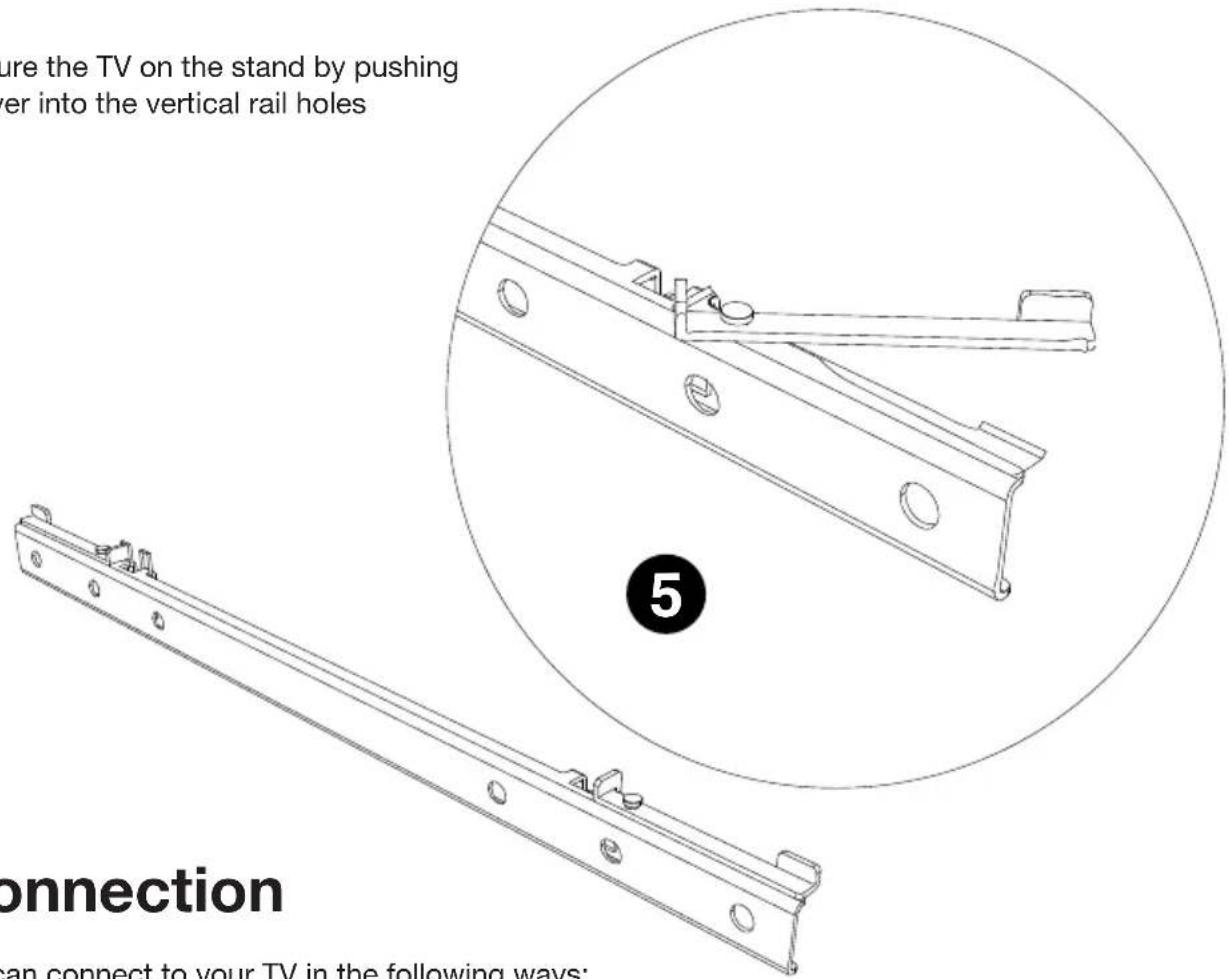
5) push the 2 lock levers of the horizontal Vesa top rail into the vertical rail holes
NOTE: please refer to your TV VESA manual for more information.
Cinema+ supports the following TV VESA standards:
200x200, 200x300, 200x400, 300x300, 300x400, 400x400
Maximum weight: up to 30kg
Compliant TV sizes: 40 to 65 inches

Rubber feet are only needed for a wall mount setup to manage the distance between the Cinema+ and the wall.
The rubber feet are designed to not leave marks on any surface.
Wall mount screws are not included in the packaging and must be bought separately, this because different type of walls need different types of screws (wood, concrete, etc.)

NOTE: Do not cover the black grill area with your TV. The LED should be centered between your TV border and the main unit bottom edge.

Speaker area - do not cover with TV
NOTE: secure the TV on the stand by pushing the lock lever into the vertical rail holes
TV connection
Cinema + can connect to your TV in the following ways:
• Optical (TV2): use this for the best audio quality
- ARC: if your TV has a socket labelled "ARC", use this connection
• RCA: use this to connect both Left and Right channel to your TV
- Line-IN: if your TV has a line out/headphones out, you can use this connection. This socket can be used also for other sources like CD players, Tuners, pre-amplified Vinyl players, etc.
Note: 3.5mm line-in socket takes priority over RCA socket
Important Note: Cinema+ is only able to decode LPCM (PCM) 2.0 audio format signal. Please ensure your TV audio format is set to LPCM (PCM).
For more information, please refer to your TV user manual.
Bluetooth setup
Cinema+ allows wireless playback from any Bluetooth equipped device.
- Select BT on the remote: Cinema+ will reconnect to the last available paired device
- Press and hold BT on the remote to connect a new Bluetooth device (blue LED starts flashing). Repeat this procedure for every new device. Cinema+ can store up to 8 devices
Note: refer to your Bluetooth device manual to connect to Cinema+
Remote learning
Cinema+ can learn volume down/up from other remotes (TV, set top box, etc.)
If you are using HDMI ARC, it is not necessary to 'learn' your TV remote control with Cinema+.
HDMI ARC enables CEC (Consumer Electronics Control) commands to be sent between your TV and Cinema+. This means you will only need one remote to power on both devices and control the volume.
- Press LEARN on the right side of cinema+ 3 seconds (Red LED starts flashing)
-
Press + button on the right side of cinema+
-
Press volume+ on your remote while pointing at the center of the Cinema+ front metal grill
- Red LED stop flashing when the command is stored
Repeat the same procedure for volume down button
Sound mode
Cinema+ features 4 different sound mode to enhance your sound experience. You can manually increase and decrease Subwoofer level with sub-/+ button on your remote
MUSIC: optimized for listening to music, YouTube clips and concerts
VOICE: optimized for crystal clear speech
NEUTRAL: optimized for flat EQ listening
FILM: optimized for sound effects and action movies
Other features
Auto Power ON: Cinema+ turns on automatically when you turn your TV on
Auto Power OFF: Cinema+ turns off automatically after 20 minutes if no sound is playing
Troubleshooting
Why is sound coming from my TV and my Cinema+ simultaneously?
Cinema+ is designed to replace your televisions internal speakers and the audio should only be present in the Cinema+.
Most televisions will automatically recognize an optical output, but some will not. You may need to adjust your audio output settings on your TV and change this to an external speaker or Digital output.
We recommend consulting your user manual or your TV manufacturer for details on how to do this.
How do I pair another remote with Cinema+?
Refer to "Remote learning" chapter every time you want to pair a new remote
Why do I hear a strange sound from my TV2 when watching HD content?
With some TV's, the Cinema+ could output a distorted sound if you are viewing HD content such as:
- HD Channels
- Netflix Apps
• Amazon Instant Video Apps - Blu-Ray/DVD's
- Satellite TV Provider e.g. Sky, Virgin TiVo etc.
This occurs because these will output multi-channel (surround) sound as a default setting.
As Cinema+ is only able to decode a stereo PCM signal, you will need to ensure the audio output of your TV/App/Box's settings are configured to LPCM/Stereo. If you are unsure of how to amend your settings, please consult your TV/Box's manufacturer.
What do Cinema+ coloured LED's represent?
The different colored LED's represent the source you are using. Please find the sources and their corresponding color below.
- HDMI ARC - Purple
- Optical - Pink
- Line-IN - Green
- Bluetooth – Blue
For more information, check www.genevalab.com/support



Brand : GENEVA
Model : Cinema+
Category : Audio