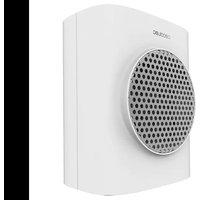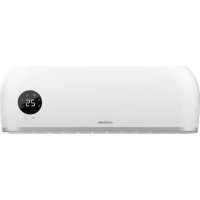
ReadyWarm 2000 Max Box Ceramic - Heating CECOTEC - Free user manual and instructions
Find the device manual for free ReadyWarm 2000 Max Box Ceramic CECOTEC in PDF.



| Product Type | Electric Wall Heater |
| Brand | Cecotec |
| Model | ReadyWarm 2000 Max Box Ceramic |
| Rated Power | 2000 W |
| Minimum Power | 1000 W |
| Power Supply | 220-240 V ~ 50 Hz |
| Protection Rating | IPX2 |
| Operating Modes | Fan, Medium Power, High Power |
| Adjustable Temperature Range | 10 °C to 49 °C |
| Timer | 0 to 12 hours (switch on and off) |
| Weekly Programming | Yes, up to 6 periods per day |
| Open Window Detection | Yes, automatic shutdown if temperature drops |
| Automatic Shutdown | After 12 hours of continuous operation |
| Overheat Protection | Yes, unplug before restarting |
| Floor Safety Distance | Minimum 1.8 m |
| Remote Control | Yes, with CR2025 battery (not included), range 3 m |
| Display | LED screen with mode and temperature indicators |
| Mounting | Horizontal wall mounting, mounting kit included |
| Cleaning | Soft damp cloth, do not immerse |
| Box Contents | Heater, mounting kit, remote control, manual |
Frequently Asked Questions - ReadyWarm 2000 Max Box Ceramic CECOTEC
User questions about ReadyWarm 2000 Max Box Ceramic CECOTEC
0 question about this device. Answer the ones you know or ask your own.
Ask a new question about this device
Download the instructions for your Heating in PDF format for free! Find your manual ReadyWarm 2000 Max Box Ceramic - CECOTEC and take your electronic device back in hand. On this page are published all the documents necessary for the use of your device. ReadyWarm 2000 Max Box Ceramic by CECOTEC.
USER MANUAL ReadyWarm 2000 Max Box Ceramic CECOTEC
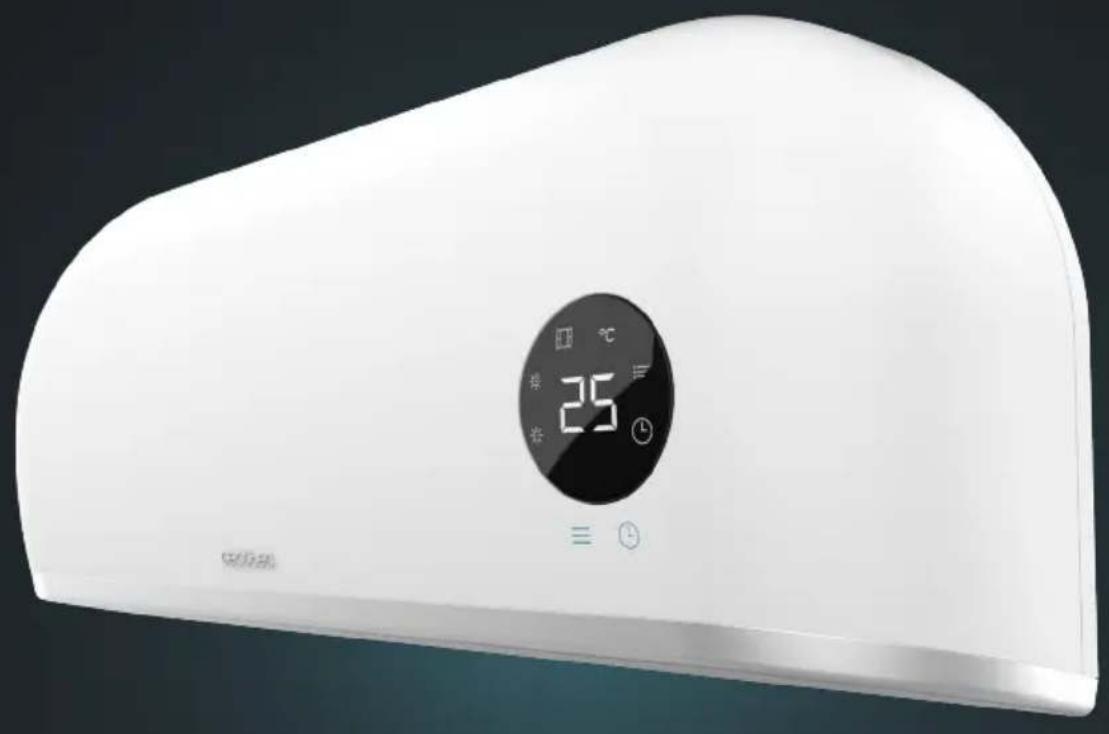
Calefactor cerámico de pared/Wall-mounted PTC heater
natural_image
White appliance with digital temperature display showing 25°C and clock buttons (no text or symbols on the device itself)ES · Este producto no es adecuado para calefacción primaria. Este producto está indicado únicamente para lugares abrigados o para una utilización puntual. EN: This product is not suitable for primary heating purposes. This product is only suitable for well insulated spaces or occasional use. FR: Cet appareil ne convient pas pour une utilisation en tant que chauffage primaire. Cet appareil a été conçu seulement pour être utilisé dans des espaces intérieurs ou pour une utilisation momentanée. DE : Dieses Produkt ist nicht für als Hauptheizgerät geeignet. Dieses Produkt ist nur für geschützten Orten oder zur gelegentlichen Verwendung geeignet. IT: Questo apparecchio non è adatto a scopi di riscaldamento primario. Il suo utilizzo è indicato solo in luoghi riparati o per uso occasionale. PT: Este produto não é adequado para ser utilizado como aquecimento primário. Destina-se a uma utilização ocasional e apenas em locais abrigados. NL: Dit product is niet geschikt voor primaire verwarming. Dit product is alleen geschikt voor gebruik op beschutte plaatsen of voor occasioneel gebruik. PL: Ten produkt nie nadaje się do pierwotnego ogrzewania. Ten produkt jest wskazany tylko do miejsc ostoniętych lub do okazjonalnego użytku. CZ: Tento produkt není vhodný pro primární vytápění. Tento produkt je vhodný pouze na chráněných místech nebo pro příležitostné použití
Manual de instrucciones Instruction manual Manuel d'instructions Bedienungsanleitung Manuale di istruzioni Manual de instruções Handleiding Instrukcja obstugi Návod k použití
Safety instructions 7
-
Parts and components 38
-
Before use 39
-
Installation 39
-
Operation 40
-
Cleaning and maintenance 44
-
Technical specifications 44
-
Disposal of old electrical and electronic appliances 46
-
Technical support and warranty 46
-
Copyright 46
1. PIÈCES ET COMPOSANTS
- Read these instructions thoroughly before using the device. Keep this instruction manual for future reference or new users.
- Ensure that the mains voltage matches the voltage specified on the device rating label and that the plug is earthed.
- This device is designed for domestic use only and is not intended for bars, restaurants, farmhouses, hotels, motels, and offices.
- Do not immerse the cable, plug, or any other non-removable part of the device in water or any other liquid or expose electrical connections to water. Make sure your hands are dry before handling the plug or switching on the device.
- Check the power cable regularly for visible damage. If the cable is damaged, it must be replaced by the official Cecotec Technical Support Service to avoid any danger.
- Do not place the appliance close to heat sources, flammable substances, wet surfaces or allow it to come into contact with water or other liquids. Do not use outdoors.
- Do not cover the device during operation.
- Do not introduce or allow objects to be introduced in the device, this could cause risk of electrical shock, fire, or damage.
- Always turn off and unplug the appliance when not in use and before moving it. Pull from the plug, not the cable, to disconnect it from the outlet.
- Avoid using extension cords, as they could overheat and cause risk of fire.
- The appliance must not be placed directly under a power socket.
- You must install the appliance at least 1.8 m above the ground.
- The heating appliance must be installed in such a way that the switches and other controls cannot be touched by a person in the bathroom or shower.
- CAUTION: some of the product's parts may become very hot and cause burns. Particular attention should be paid when children and/or vulnerable people are present.
- Keep the device out of the reach of children under 3 years old, unless constantly supervised.
- Children between 3 and 8 years old should only switch the appliance on or off when it has been placed in its normal, intended operating position and if they have been given supervision or instruction concerning the use of the appliance in a safe way and understand the hazards involved. Children between 3 and 8 years old should not plug in, adjust, and clean the appliance and should not carry out maintenance tasks.
- This appliance can be used by children aged 8 and above and persons with reduced physical, sensory, or mental capabilities or lack of experience and knowledge, as long as they have been given supervision or instruction concerning the use of the appliance in a safe way and understand the hazards involved. Children must not play with the appliance. Cleaning and maintenance should not be carried out by children without supervision.
- Supervise children to prevent them from playing with the appliance. Close supervision is necessary when the appliance is being used by or near children.
INSTRUCTIONS DE SÉCURITÉ
- Medium power mode indicator
- High power mode indicator
- Open window detection mode indicator
- Temperature unit
- Weekly schedule indicator
- Timer indicator
- Temperature indicator
Remote control. Fig. 3
- Power button
- Timer button
- Decrease button
- Open window detection mode button
- Power on timer button (weekly schedule)
- Setting button
- Confirmation button
- Day selection button
- Period selection button
- Power mode selector button
- Increase button
- Weekly schedule button
- Power off timer button (weekly schedule)
NOTE
The graphics in this manual are schematic representations and may not exactly match the appliance.
2. BEFORE USE
- This device is packaged in a way as to protect it during transport. Take the device out of its box and remove all packaging materials. You can keep the original box and other packaging elements in a safe place. This will help you prevent damage to the device when transporting it in the future. In case the original packaging is disposed of, make sure all packaging materials are recycled accordingly.
- Make sure all parts and components are included and in good conditions. If there is any piece missing or not in good condition, immediately contact the official Cecotec Technical Support Service.
Box content
- Heater
- Assembly kit
- Remote control
- Instruction manual
3. INSTALLATION
-
Fix the heater horizontally on a vertical wall, the screen should face the floor without tilting it. Another position is dangerous.
-
To avoid personal injury, injury and/or damage to the product, ensure that the location where the heater is to be installed allows for free and unobstructed space as shown in figure 4.
-
The screws and plugs supplied are suitable for solid walls. For any other type of wall, use suitable screws and plugs.
-
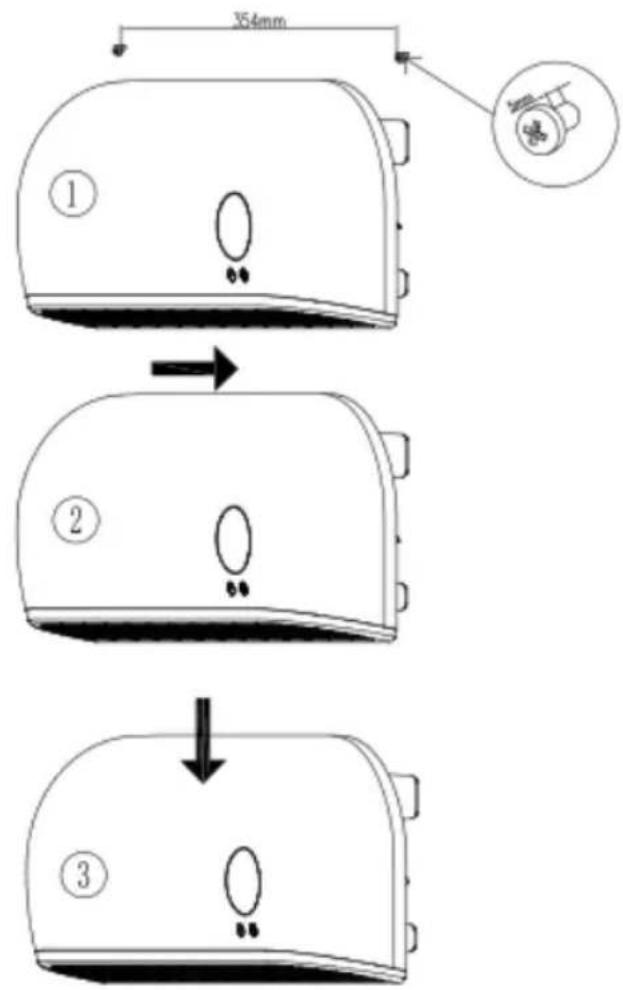
Drill two holes in the wall and have a distance of 354 mm. In figure 5, you can see the dimensions of the product and the distances that must be respected for a correct installation.
-
Once the holes have been drilled, position the heater as shown in figure 6.
4. OPERATION
Fig. 7
Control panel operation
- Plug the appliance in and switch it on by turning the switch on the back of the appliance to the on position (I). The appliance will enter Standby mode and the display will show "S" (Fig. 7, A).
- Press the button, the Fan mode will be activated, and the display will show “--” (Fig. 7, B).
- Press the button a second time to switch to medium power mode (Fig. 7, C).
- Press the button a third time to switch to high power mode (Fig. 7, D).
- To return to Standby mode, press the button ≡ a fourth time and the display will show "S" again (Fig. 7, A). The fan will run for 30 seconds before entering Standby mode.
Note:
If the appliance switches off due to overheating, unplug it before switching it on again.
-
To set the switch-on time: In operation, press the button to set the timer (00-12 h). To increase the timer time, press the button (in 1 h intervals). After setting the timer, the display will show the setting for 5 seconds, then return to the previous screen and keep the icon bit.
-
To set the switch-on time: in Standby mode, press the button, you can set the switch-on time between 00-12 hours. Once selected, the display will show the setting and the icon will remain lit. The display will continue to show the remaining time for each hour elapsed. The device will switch on automatically after the set time has elapsed. The default temperature for automatic switch-on is 23^ C.
Please note
If you do not set the temperature and a weekly programme, the appliance will automatically switch off after 12 hours of continuous operation.
Remote control operation
Please note
The infrared emitter of the remote control must be aligned with the receiver of the device, otherwise it will not receive the signal.
- Press the button to turn on the device. The Fan mode will be activated, and the display will show "--" (Fig. 7, B).
- Press the button, the appliance will operate in medium power mode and the display will show as in figure 7, C.
-
Press the button 11 a second time and it will switch to high power mode. The display will show as in figure 7, D
-
Press the button, a third time to switch to Standby mode, the display will show “--” as in figure 7, B. The fan will run for 30 seconds before entering Standby mode.
-
The function of the button is the same as that of the control panel.
Setting the TIME/DAY
You can set the time and day both in standby mode and in operation.
-
Press the button≡, the display will show "12" by default, press the △/▽ buttons to set the current time (00 to 23).
-
Press the button ≡ again, the display will show "30" by default. Press the △/ buttons to set the minutes "00 to 59".
-
Press the button ≡ again to display the day of the week and press △/ to select the current day. Note that the following codes will be displayed:
d1 = Monday
d2= Tuesday
d3 = Wednesday
d4 = Thursday
d5 = Friday
d6 = Saturday
d7 = Sunday
- Press to confirm the settings. Once confirmed, the previous screen will be displayed again.
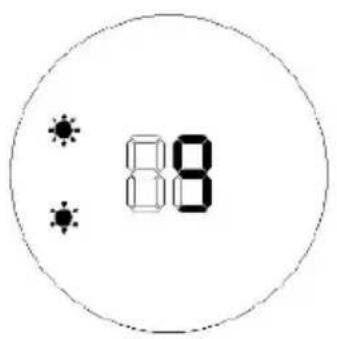
In Figure 8, you can see how the display would look at each step if the setting was for a Wednesday at 9:30 AM.
Note:
- After switching off the device, it is necessary to reset it. Press the button ≡ to check the current time and day.
- The time setting range is 00-23 hours, 00-59 minutes. To check the current time and set temperature, press again.
Temperature settings
-
During operation, to set the desired temperature, press the △ / ▽ buttons. The display will show "23" by default. The temperature range you can set is 10-49 °C.
-
Press to confirm the desired temperature.
When setting the temperature, the appliance will operate as follows:
- If the temperature setting is more than 2^ C higher than the room temperature, the heater will operate in high power mode.
- If the temperature setting is equal to or 2^ C higher than the room temperature, the heater will operate in medium power mode.
ENGLISH
- If the temperature setting is the same as the room temperature, the fan will run for 30 seconds to blow out the remaining hot air inside and the appliance will stop operating.
- If you want to cancel the temperature setting, press the button≡ to choose medium or high-power mode. The appliance will operate without temperature adjustment. The temperature indicator will go out and the display will show “--”.
- After operating continuously for 12 hours, the Fan mode will be activated for 30 seconds, and the device will enter Standby mode.
Setting up a weekly programme
Once the current TIME/DAY setting is complete, follow the steps below to set up a weekly schedule:
- Press the button to turn the appliance on.
- Press the button The icon will light up on the display .
- Press the button 📋 and the display will show d1. Press the button 📋 again until you select the day (Monday to Sunday: d1\~d7) you want to set.
- Press the button 📋 and the display will show P1 as the default. Press the button 📋 again to set the time period (P1-P6).
Please note
You can only set a maximum of 6 time periods for each day. Follow steps 5-7 below to set the desired On/Off Time/Temperature for each time period (P1-P6).
- Press the button and the display will show "00". Press the button again, the time will increase in one-hour intervals with each press (00-24 hours).
-
Press the button and the display will show by default the previous power-on time. Press the button, the time will increase in one hour intervals with each press (00-24 hours). The setting of may not be less than. If the setting of is the same as, the device will enter Standby mode.
-
Press the △/▽ buttons to set the desired temperature (the available temperature range is 10-49 °C).
-
Repeat steps 3-7 above, to set the weekly programme for the desired days.
-
Press to confirm the settings.
-
To cancel the weekly programme setting, press the button ☐ again and the icon:≡ will turn off. The weekly programme will be cancelled.
In figure 9, you can see how the display would look like in the above steps if you wanted to program the heater on a Monday, in the first period, to turn on at 7:00 AM and turn off at 13:00 PM.
Please note
When the above settings are completed and the programme is running, press the button to check the set day (d1-d7), press the button to check the set time period (P1-P6), press
the button to check the set switch-on time and press the button to check the set switch-off time.
Please note
After switching off the device, it is necessary to restart it in order to check the set switch-off time.
Open Window Detection Mode
-
Press the button to turn the appliance on.
-
Press the button and the icons / °C will turn on. The display will show the temperature of "23" by default. Press / to set the desired temperature. If the appliance detects a drop in temperature below the set temperature, it will stop working. If you wish to switch the heater on again, press the button to switch it on.
-
Press the button again to deactivate the Open Window Detection mode, the icon will turn off and the device will return to the previous mode.
- Figure 10, A, shows an example for setting the Open Window Detection temperature to 23 °C (Fig. 10, A).
- When the Open Window Detection and the weekly programme are activated at the same time during the OFF period of the weekly programme, the appliance does not operate. During operation of the weekly programme, the temperature is subject to the temperature set for the Open Window Detection mode, i.e. if the room temperature is below the temperature set in the Open Window Detection mode, the appliance will switch off. Figure 10, B, shows an example for setting the Open Window Detection temperature to 23 °C when the weekly programming is active (Fig. 10, B).
Changing the remote-control batteries. Fig. 11
The remote control requires 1 x CR2025 3V battery (not included).
Important: follow the instructions for use and the recycling regulations on the battery packaging.
- Open the battery compartment by sliding the cover downwards.
- Insert the battery into the battery compartment as shown in figure 11.
- Open the battery compartment.
The remote control operates at a maximum distance of 3 metres from the device and at an angle of 60 degrees to the left and right.
ENGLISH
5. CLEANING AND MAINTENANCE
NOTE
Always disconnect the appliance from the mains before cleaning or maintenance.
WARNING
Never use detergents, chemical agents, or solvents, as they may damage the appliance.
WARNING
Allow the product to cool down completely before cleaning or handling it.
- To avoid the risk of fire or electric shock, do not pour water or any other liquid inside the appliance.
- Clean the outside of the appliance with a soft, damp cloth, with or without soap.
- Clean the air inlet and outlet grilles of the appliance regularly.
6. TECHNICAL SPECIFICATIONS
Product reference: 08281
Product: ReadyWarm 2000 Max Box Ceramic
Power: 2000 W
Voltage: 220-240 V
Frequency: 50 Hz
IPX2
| Model identifier: 08281_ReadyWarm 2000 Max Box Ceramic | |||||
| Item Symbol Value Unit Item Unit | |||||
| Heating power Type of heat input, for electric storage | local space heaters only (single select) | ||||
| Rated heat output P | nom | 2.0 kW | Manual heat | charge control with integrated thermostat | No |
| Minimum heat output (indicative) | Pmin | 1.0 kW | Manual heat | charge control with room and/or outdoor temperature feedback | No |
| Maximum continuous heat output | P_max,c | 2.0 kW | Electronic | heat charge control with room and/or outdoor temperature feedback | No |
| Auxiliary electricity consumption Fan assisted heat output No | |||||
| At nominal heat output | el_max | 1.949 kW | Type of heat output/room temperature control (single select) | ||
| At minimum heat output | el_min | 1.036 kW | Single stage heat output and no room temperature control | No | |
| In standby mode el _SB | 0.000 kW | Two or more manual stages, no room temperature control | No | ||
| With mechanic thermostat | room temperature control | No | |||
| With electronic room | temperature control | No | |||
| Electronic indoor temperature | control and internal/daily timer | No | |||
| Electronic indoor temperature | control and internal/weekly timer | Yes | |||
| Other control options (multiple | selections possible) | ||||
| Room temperature control, | with presence detection | No | |||
| Room temperature control, | with open window detection | Yes | |||
| With distance control option | No | ||||
| With adaptive start control | No | ||||
ENGLISH
| With working time limitation | Yes | |||
| With black bulb sensor No | ||||
| Contact information: | Cecotec innovaciones SL., Av. Reyes Católicos, 60, 46910, Alfafar, Valencia (Spain) | |||
Technical specifications may change without prior notification to improve product quality. Made in China | Designed in Spain
7. DISPOSAL OF OLD ELECTRICAL AND ELECTRONIC APPLIANCES

This symbol indicates that, according to the applicable regulations, the product and/or battery must be disposed of separately from household waste. When this product reaches the end of its shelf life, you should dispose of the cells/batteries/accumulators and take them to a collection point designated by the local authorities.
Consumers must contact their local authorities or retailer for information concerning the correct disposal of old appliances and/or their batteries.
Compliance with the above guidelines will help protecting the environment.
8. TECHNICAL SUPPORT AND WARRANTY
Cecotec shall be liable to the end user or consumer for any lack of conformity that exists at the time of delivery of the product under the terms, conditions, and deadlines established by the applicable regulations.
It is recommended that repairs be carried out by qualified personnel.
If at any moment you detect any problem with your product or have any doubt, do not hesitate to contact the official Cecotec Technical Support Service at +34 963 210 728.
9. COPYRIGHT
The intellectual property rights over the texts in this manual belong to CECOTEC INNOVACIONES, S.L. All rights reserved. The contents of this publication may not, in whole or in part, be reproduced, stored in a retrieval system, transmitted, or distributed by any means (electronic, mechanical, photocopying, recording or similar) without the prior authorization of CECOTEC INNOVACIONES, S.L.
1. PIÈCES ET COMPOSANTS
Img.1
Product: ReadyWarm 2000 Max Box Ceramic
Vermogen: 2000 W
Voltage: 220-240 V
Frequentie: 50 Hz
IPX2
text_image
450mm 42.5mm 354mm 53.5mm 45.5mm 186mmFig. / Img. / Rys. / Obr. 5
text_image
354mm ① ② ③Fig. / Img. / Rys. / Obr. 6

text_image
5:0 8:0 8:0 8:0 8:0 ABCDFig. / Img. / Rys. / Obr. 7
text_image
88
text_image
30
text_image
88Fig. / Img. / Rys. / Obr. 8
A

text_image
P 8 8B

text_image
88 PC

text_image
88 PD

text_image
88 PE

text_image
88 PFig. / Img. / Rys. / Obr. 9

text_image
23°CA

text_image
℃ 83 PB
Fig. / Img. / Rys. / Obr. 10

text_image
Mobile phone control panel with icons for function, display, and settings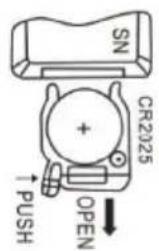
text_image
SN CR2025 + OPEN ↑ PUSHFig. / Img. / Rys. / Obr. 11
www.cecotec.es