TWS162 - Earplug Prixton - Free user manual and instructions
Find the device manual for free TWS162 Prixton in PDF.



| Product Type | True Wireless In-Ear Headphones (TWS) |
| Brand | Prixton |
| Model | TWS162 |
| Bluetooth Technology | Bluetooth 5.2 |
| Operating Distance | 10 meters |
| Speaker | 13 mm, 32 Ω, 20 Hz - 20 kHz |
| Battery Capacity (earphones) | 25 mAh each |
| Battery Capacity (charging case) | 180 mAh |
| Charging Time (earphones) | 1.5 hours |
| Charging Time (charging case) | 1.5 hours |
| Talk Time | 4.5 hours |
| Music Playback Time | 3.5 hours |
| Standby Time | 720 hours (30 days) |
| Charging Voltage | DC 5V, 200 mA |
| Charging Port | USB-C |
| Control | Touch (single tap, double tap, long press) |
| Voice Assistant | Yes (activation by long press on both earbuds) |
| Weight (earphones, approx) | 4 g each |
| Weight (charging case, approx) | 30 g |
| Dimensions (charging case, approx) | 60 x 60 x 25 mm |
| Maintenance | Clean with a soft, dry cloth. Do not immerse. |
| Safety | Do not expose to moisture, do not open, use in dry environments. |
| Repairability | Spare parts not provided. Repair by specialist only. |
Frequently Asked Questions - TWS162 Prixton
User questions about TWS162 Prixton
0 question about this device. Answer the ones you know or ask your own.
Ask a new question about this device
Download the instructions for your Earplug in PDF format for free! Find your manual TWS162 - Prixton and take your electronic device back in hand. On this page are published all the documents necessary for the use of your device. TWS162 by Prixton.
USER MANUAL TWS162 Prixton
1. Safety Instructions
1.1 General precautions
- Do not drop the product and do not expose it to any major shocks.
- The device should only be repaired by a specialist.
1.2 Precautions for electrical products
- Protect the device from dirt, moisture, overheating, extreme temperatures and only use it in dry rooms.
- Do not open the device. Stop using the device if it becomes damaged.
- Never use force when plugging in the device and when using any adapters.
- Do not operate the product outside the power limits specified in the technical data.
1.3 Precautions for batteries
- Avoid storing, charging or using batteries in extreme temperatures.
- When stored over a long period of time, batteries should be charged regularly (at least every three months).
- Don't allow batteries to enter the environment. Don't open, damage or swallow them, as they contain toxic heavy metals.
- In case of a leaking battery, avoid contact with skin or eyes. If a direct contact occurs, wash with plenty of water and consult a doctor.
2. Technical Data
Chipeset:JL6973
Bluetooth Version:V5.2+EDR+BLE+BR
Bluetooth protocol:HSP.HFP.A2DP.AVRCP/SPP/PBAP
Charging mode: type-c Wired charging
Speaker:13mm 32Ω,100+/-3dB,20Hz-20KHZ
Distance:10m
Charging Voltage:DC-5V 200mA
Work Voltage:3.7V
Earphone Battery:25mAh
Box battery:180mAh
Earphone charging time:1.5hour
Box charging time:1.5 hours
Talk time:4.5hours
Music playing time:3.5hours
Standby time:720hours
3. Getting Started
3.1 Fully charge the product before using it for the first time.
Connect the plug of the supplied cable to the charging port. Connect the other side of the cable to a suitable power source. Always pay attention to the voltage and power specifications of your devices.
Wait until the product is fully charged before continuing. Disconnect the cable when fully charged to conserve the battery life.
-
Recharging the charging cradle: While the charging station is being charged using a USB cable, its LED status indicator lights up orange. When the charging station is fully charged, the light turns off.
-
Charging the headphones: The headphones automatically switch to charging mode when you put them back in the charging cradle. However, the charging cradle must have sufficient power for this.
3.2 Bluetooth connection
Open the charging cradle and remove the headphones. They turn on automatically.
Open the Bluetooth setting of your smartphone and search for the following device 'TWS162 PRIXTON'
After successful connection, the status LED will turn off.
3.3 Reset
If the headphones lose connection to each other, put them back in the box. If they are already in the charging cradle, open the lid (do not take the headphones out. Press and hold the button on the back of the charging cradle for a few seconds. A white LED lights up and then flashes.
After successful pairing, the LED will turn green. Close the lid of the charging box to complete pairing.
3.4 General headache controls
On/Off
Once paired with your smartphone, the headphones automatically turn on and off when you take them out of the charging cradle or put them back. They also turn off after 3 minutes without Bluetooth connection.
Play / Pause
Lightly short tap the touch area once to pause or continue the playback while listening to music.
Forward/Reverse
To skip forward one track, double-tap the right earphone while listening to music.
Double-tap the left earphone to skip to previous song.
Answer/End call
Lightly short tap the touch area once to answer a call. Tap again to end the call.
Volume control
Touch the surface of the right earphone for 2 seconds to increase the volume, touch the surface of the left earphone for 2 seconds to decrease the volume. Repeat this process until the desired volume is reached.
Voice assistant
Press and hold both earphones for about 4 seconds to activate the voice assistant of your smartphone.
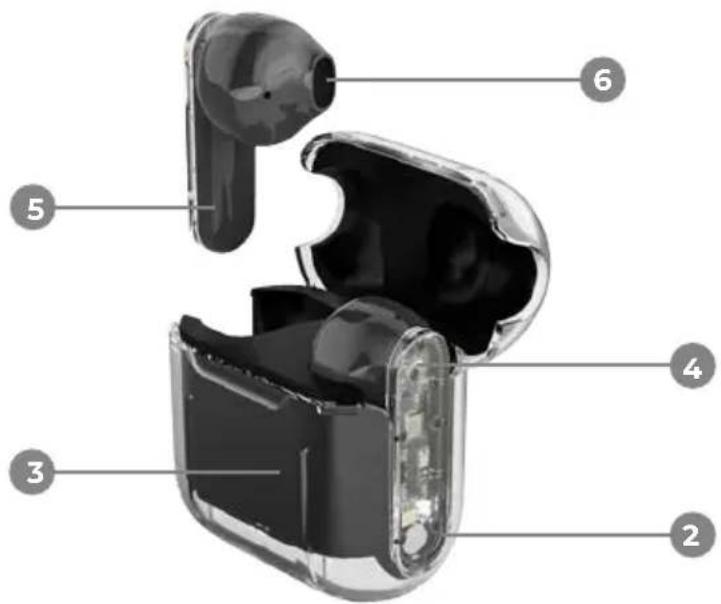
- USB-C charging port
- Charging cradle
3.StatusLED - Toch area
- Charging contact / Microphone
- Speaker
4. Function notes Touch control
Power on / off: Automatically
Play/Pause/Accept call/Hang up: 1x no matter which side
Skip one song forward: 2x right
Skip one song back: 2x left
Increase volume: Right 2 seconds
Decrease volume: Left 2 seconds
Voice assistant: Both earphones 4 seconds
5. Trouble Shooting Setting up connection doesn't work:
-
Make sure that the product:
-
is fully charged.
-
is inside the working range of the device.
-
is not already connected to any other device (deactivate Bluetooth at surrounding, other devices).
-
Make sure that your terminal device:
-
is compatible to the Bluetooth version, listed in the technical data in this manual.
-
has an active Bluetooth connection, and is in pairing mode.
-
does not have other, active connections running.
-
Depending on the terminal device and its software, setting up the connection may take longer. Wait up to a minute, or try again in surroundings with less or minimal radio communication.
The communication is not clear:
- Try again in a mostly wind and hall free surrounding.
- Try to connect the product to a different terminal device.
- Try to call to a different terminal device.
- Try again in surroundings with less or minimal radio communication.
Warranty policy
This product complies with the warranty law in force in the country of purchase. When you have a problem that you can not solve, you must access the web www.prixton.com and click on the contact option to send us your assistance form. These technical and electrical specifications are those of typical units and may be changed without prior notice in order to provide improved equipment.
Simplified EU Declaration Of Conformity
We, La Trastienda Digital located in Avenida Cervantes 49, modulo 25, Basauri 48970, Bizkaia hereby declare that the following goods, imported and selling at European market:
| BRAND | MODEL NAME | DESCRIPTION | CATEGORY |
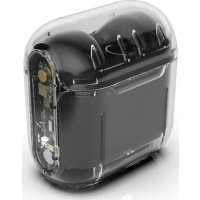
| Prixton TWS162 | Transparent earbuds | Audio | |
Are in compliance with the EC Council Directive of 2014/53/EU (EM DIRECTIVE) and harmonized standards and with the board of the 16th of April 2014.
The complete text of the UE Declaration of conformity is available anytime at this website address:
www.prixton.com
LA TRASTIENDA DIGITAL