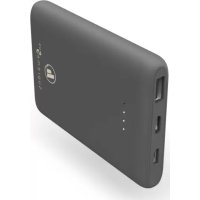
Supreme 5HD 00187290 - Power bank HAMA - Free user manual and instructions
Find the device manual for free Supreme 5HD 00187290 HAMA in PDF.



| Product type | Portable battery (PowerPack) |
| Brand | Hama |
| Model | Supreme 5HD 00187290 |
| Battery capacity | 5000 mAh (min) / 5100 mAh (typ) |
| Usable capacity | 2858 mAh at 5 V / 2 A |
| Battery type | High-density lithium polymer (Li-Po) |
| Battery voltage | 3.7 V |
| USB-C input | 5 V / 2 A |
| Micro-USB input | 5 V / 2 A |
| USB-A output | 5 V / 2.1 A (max) |
| Max output current | 2100 mA |
| Number of output ports | 1 (USB-A) |
| Capacity indicator | 4 LEDs (25% each) |
| Optimized charging | Yes (device recognition) |
| Auto shut-off | Yes (if no device connected) |
| On/off button | Yes (double press to turn off) |
| Protection | Against overcharge, deep discharge, short circuit |
| Package contents | PowerPack, USB-A to USB-C cable, user manual |
| Maintenance | Clean with a damp cloth, without harsh detergent |
| Safety | Do not open, do not expose to heat, keep out of reach of children |
| Recycling | Do not dispose of with household waste, follow local regulations |
Frequently Asked Questions - Supreme 5HD 00187290 HAMA
User questions about Supreme 5HD 00187290 HAMA
0 question about this device. Answer the ones you know or ask your own.
Ask a new question about this device
Download the instructions for your Power bank in PDF format for free! Find your manual Supreme 5HD 00187290 - HAMA and take your electronic device back in hand. On this page are published all the documents necessary for the use of your device. Supreme 5HD 00187290 by HAMA.
USER MANUAL Supreme 5HD 00187290 HAMA
Operating Instructions
Bedienungsanleitung
Moded'emploi
Instruccionesdeuso
PykoBOOCTBOONKcnpyaatau
Istruzioniperl'uso
Gebruiksaanwijzing
O8nyiecxpno
Instrukcjaobslugi
Hasznalatiutmutato
Návodk p oužití
Návodnapoužitie
Manualdeinstruções
Kullanmakilavuzu
Manualdeutilizare
Bruksanvisning
Käyttoohje
Pa6oTHaHHcTpyKcIa
GB
D
F
E
RUS
1
NL
GR
PL
H
CZ
SK
P
TR
RO
S
FIN
BG
Thankyouforchoosinga H amaproduct.
Take your time and read the following instructions and information completely. Please keep these instructions in a safe place for future reference. If you sell the device, please pass these operating instructions ontothenewowner.
1.Explanationof warningsymbolsandnotes
Warning

This symbol is used to indicate safety instructions or to draw your attention to specific hazards andrisks.
Note

Thissymbolisusedtoindicateadditionalinformationorimportantnotes.
High-densityLi-polymercells
This product contains high-density Li-polymer cells. High-density cells were developed primarily for smartphoneproductioninordertoaccommodethenewveryhighdemandsintermsofcapacity andperformancewithsmallspacerequirements.ThesenergewgenerationsofLi-polymercellsallowa lightweightandcompactdesignwithcomparativelyhighcapacity.
2.Packagecontents
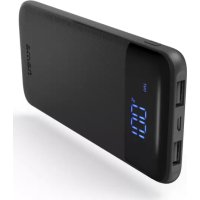
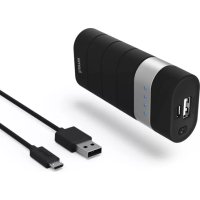
" Supreme5HD"PowerPack,5000mAh
- U SB-A to U SB-C cable
T heseoperatinginstructions
3.Safetyinstructions
T heproductisintendedforprivate,non-commercialuseonly.
- U setheproductonlyforthenthendpurpos.
- Protect the product from dirt, moisture and overheating and use it in dry environments only.
- Do not use the product in the immediate vicinity of heaters, other heat sources or in direct sunlight.
- As with all electrical products, this device should be kept out of the reach of children.
D on o n tdroptheproductandddonotexposeittoanymajorshocks.
- Do not operate the product outside the power limits specified in the technical data.
- Do not open the device or continue to operate it if it becomes damaged.
- Dispos of packaging material immediately in accordance with the locally applicable regulations.
- The battery is permanently installed and cannot be removed; dispose of the product as a whole in accordance with the statutory regulations.
- Do not modify the product in any way. Doing so voids the warranty.
- Do not use the product in areas in which electronic products are not permitted.
- Do not attempt to service or repair the product yourself. Leave any and all service work to qualified experts.
- D o n otincineratethebatteryortheproduct.
- Do not tamper with or damage/heat/disassemble the batteries/rechargeable batteries.
4. Operation
4.1.Chargingthepowerpack
Warning- rechargeablebattery

- Do not charge the power pack via your PC or notebook. The charging currents can damage the USBportonthePCornotepad.
- O nlyusesuitablechargingdevicesorUSBconnectionstochargetheproduct.
- Do not use defective chargers or USB ports and do not attempt to repair them.
- Do not overcharge the product or allow the battery to completely discharge.
-
A voidstoring,chargingandusinginextremetemperaturesandatextremelylowatmospheric pressures(suchasathighhaltitudes).
C hargeregularly(leastquarterly)duringperiodsofprolongedstorage. -
Start the power pack charging process by connecting the enclosed USB-A to USB-C cable to the USB-C input on the power pack (IN 5V/2A) and to a suitable USB charger. To do this, consult the operating instructions for the USB charger you are using. Alternatively, the power pack can also be chargedviathemicro-USBport(IN5V/2A).
T hechargingprocessbeginsandendsautomatically.
Fully charge the power pack once before using it for the first time.
Note- capacity

- Duringthepowerpackchargingprocess, the capacity is displayed constantly.
Each status LED corresponds to 25% of the capacity. The permanent illumination of an LED indicates that the capacity has already been reached. If three LEDs light up and the fourth one flashes, the powerpack is at least 75% charged. - If a llfourstatusLEDslightup, the full capacity is available.
- Press the button on the power pack to switch this on and to determine the power pack's current capacity.
- Press the button twice until the status LEDs go out to switch the power pack off.
4.2.Chargingdevices
Warning- C onnnectionofdevices

- Before connecting a device, check whether it can be adequately supplied with the power pack's currentdelivery.
- Ensure that the total current consumption of the connected device does not exceed 2100mA .
- N otetheinstructionsinyourdevice'soperatingmanual.
- Y oumustobeytheinstructionsandsafetynotescontainedthereinregardingthesupplyof powertoyourdevices.
- T hepowerpackmustnotbechargedanddischargedatthesametime!
Warning

- Never connect the power pack's charging cable to its input and output simultaneously. This can damage the battery.
- Do not connect any devices during the power pack charging process. Doing so can damage the powerpack and connected devices.
- Connect the enclosed USB-A to USB-C cable to the power pack's USB port (OUT 5V/2.1A) and the USB-Cportonyourdevice(mobilephone,smartphone,etc.).
- In certain circumstances, the enclosed charging / connecting cable may not match the USB port on yourdevice. Inthiscase, use the USB cable that came with your device.
- The charging process begins automatically. During the charging process, the status LEDs indicate the powerpack's remaining available capacity.
T hecurrentbatterychargestatusofyourdeviceisindicatedonthis. - T erminate the charging process and switch the powerpack off by pressing the button on the powerpack twice. The status LEDs go out.
- In the event that no device is connected, the power pack switches itself off automatically.
Note- optimisedcharging

Optimised charging meansthat the powerpack recognises the connected device, supplies it with the ideal current strength and therefore reduces the charging time to a minimum. Note that the powerpack's maximum current delivery is 2100mA .
5.Careandmaintenance
Only clean this product with a slightly damp, lint-free cloth and do not use aggressive cleaning agents.
6.WarrantyDisclaimer
Hama GmbH & Co KG assumes no liability and provides no warranty for damage resulting from improper installation/mounting, improper use of the product or from failure to observe the operating instructionsand/or safety notes.
7. Technical data
| USB-Cinput5 V 2 A | --- |
| Micro-USBinput5 V 2 A | --- |
| USB-A o output5 V 2.1A | --- |
| Total output | 5V -- 2.1A (max.) |
| Battery type | 3.7 V/Li-Po (high-density) |
| Min.capacity5000mAh/ 1 8.50Wh | |
| Typ.capacity5100mAh/ 1 8.87Wh | |
| UsableCapacity*2858mAh@ 5 V 2 A | --- |
- T heusablecapacityisthecapacitythatcanbedrawnfromtheoutputsockets,measuredat5V output voltage and a draw current of 2A.
8.Recyclinginformation
Noteonenvironmentalprotection:
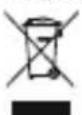
Following the implementation of European Directive 2012/19/EU and 2006/66/EU into national law, the following applies: Electrical and electronic devices as well as batteries must not be disposed of with household waste. Consumers are obliged by law to return electrical and electronic devicesaswellasbatteryestohedesignatedpubliccollectionpointsortothe
point of sale at the end of their service lives. Detailed information on this topic is defined in the national laws of the respective country. This presence of the above symbol on the product, operating instructionsorpackageindicatessthattheproductissubjecttotheseregulations.Byrecycling,reusing the materials or other forms of utilising old devices/batteries, you are making an important contributiontoprotectingourenvironment.
- T heusablecapacityisthecapacitythatcanbedrawnfromtheoutputsockets,measuredat5V output voltage and a draw current of 2A.
8.Pokynyklikvidaci
HighDensityNITueBO-noImepHnKJeTK
To3 npOdyKT sbDbpxka High Density IInTneBO-nOpImepHn KNeTKn. High Density KNeTknte ca pa3pa6oTeHNpEIMHO3aInpON3BOJCTBOTOHacMapTfoHN,3aIamOratDaceu3NbJIHrM HMOr BO BnCOKNTe NO TOBA BpeMe N3NCBaHnKbM KaNaUTeT M OUsHOC T pRn HnCKa NOTpe6HOCT OT MxCTO. ToBa HOBO NOKoJIeHnE IInTneBO-nOpIMepHn KNeTKn I03BOJRA JKeA N KOMNaKTHa KOHCTpyKzIynpncpaBHHTeHOBnCOKKanaIITet.
3.Yka3aHn83a6e30nacHOCT
- PpOdyKTBt e nppeBnDcH 3a JnUHa, HeCToNaHcKa 6ntoBa yNtpe6a.
- I3noJ3BaIte npOyKta cAmo 3a npEbnHeHaTa ceJI.
- Na3eTe npOyKta OT 3aMbpcBaHe, Bnara n ppepRbAne I ro nIIOJ3BaIte cMo B cyxa cpeia.
He n3no3BaIte npOykTa B HenocpeIcTBHea 6JIn3oCT do OTOnJIteJHn ypei, dpyr n3TOHHuHaToPUNHauHnAINPeKTHacNbHueBacBETJnHa. - POno6Ho Ha BCnKNe eJeKtpnueckn npOyKT, TOni npOyKT He 6nBa Da nonaDa B pBcTe Ha deua!
He no3BolraBaiTe Ha npOdykTa da naDa n He ro n3laarTe Ha cnJHn Bn6paun.
He n3noI3BaIte npOyKta n3BbH HeROBIne rpaHnCi Ha MOUHOCTTa, NOCOueHN B TexHnueCKnTe daHHN.
He oTbapnTe npOyKa n npn noBpeDa He npOdbJaBaIe da rO n3nON3BaTe.
-3XbBpJTeOnaKOBbHnMaTepeNaIbEHaRacbIaCHOeICTBaIHTeHaMЯCTopa3nope6n3a 3XbBpJIHeHaOTnaDbu. - BaTePnTa e HEnoDbNxHb BrpaIeHa n He MoKe Ja ce MaXa, N3XBbPJIeTe npOyKta KaTO cNoLo CnopeDzakoHOBntepa3nope6n.
He npabete npomeHn B ypeHa. Taka 3aRy6nte npabo Ha BcKaKbI rapaHIOHn npTeHn.
He n3non3BaIte npOdykTa B 30Hn, B KOnTO He ca pa3peWeHH eJNeKtpoHH npOdyKTN.
He ce onntBaTe camn da o6cnykBaTe nI npMOHTnpate npOyKta. OCTaBeTe BcKaKaBaTexHnuecka noDpBxKka Ha KOMPeTeHTHnTe CneuAInCTn. - HexbprnTe 6aTeepraTaNnn npOyKtB OrBn.
He npomehne n/nn He dephiopmae/HarpaBae/pa3rno6baTe akymyaToPnTe 6atepn/ 6atepuinte.
4.PexmmHapa6ota
4.1.3apexkahehaPowerPack
PpeynpexkdeHne-BaTepe

He 3apekdaute Power Pack ue3 komnrobpa nIn HoYt6yka cn. 3apdHnte Tokobe Morat da nobpepaTbPAuHaHOYt6yka.
- 3a 3apejdahe n3non3BaIte caMo noDxOJaun 3apAInn yCtpoiCTBa nn USB n3BOJn.
- IopnHcHn He n3noJ3BaIte DepeKTHn 3apAaHn yctpoiCTBa nn USB n3BOuHn He ce onNTBaIteDaIgNOnpABTe.
-HeNo3B0JIaBaiTe npOdyKtaDace3apeXdaIbOBeueoTheo6xOIMOTOnIuIacepa3peXda HnblHo.
- 368aBaiTe CbXpaHeHne, 3apeXdaH e N3noJ3BaH npEekTpeMHn TeMnpaTy n 3KJIIOHTeJIHO HNCO HaJIraH e HA Bb3dyxa (KaTO HApImep H a RoJeMn BucOnHn).
- Ppi no-npOdbJIxHTeJHo cIbXpaHeHne I03apExJaTc nepNoDnUHO (nohe BeHNbX Ha Tpr Meceua).
- Cstapnape npoceca Ha 3apejdahe Ha Power Pack kato cbpxeTe npniloxeHna Ka6en USB-A KbM USB-C KbM USB-C BxoJa Ha Power Pack (IN 5 V/2 A) n KbM noJxOJaIO USB 3apJHo yctpoiCTBO. 3a ceIta cna3BaIte HNCTpyKunra Ta 3a o6cIyXbaHe Ha n3non3BaHO TO USB 3apJHo yctpoiCTBO. AnTepeHaTUBHO Power Pack moKe da ce 3apejda nype3 Micro USB BxoJa (IN 5 V/2A).
-Прочьт Ha 3aApexJaHe CTapTnpa n 3aBbPbWA aBTOMaTHUHO.
-Предимьрватaynotpe6anbpbHOанHоЗаpeTeHaньноPowerPack.
Yka3aHne-KanaunTeT

- IIO BpeMe Ha npoueca Ha 3apekxdane Ha Power Pack KanaunTebT ce NOKa3Ba NoCToHNO.
BceKn CBeToOnIOd 3a CtaTyc CbOTBcTcBa Ha 25% ot KanaunTeTa. Ako daJeH CBeToOnIOCBETn NOCToHHO, TOBa NOKa3Ba Beue DOCTuHaT KanaunTeA. Ako CBETr Tpu CBeToOnIOda, aYeTBbpTnT Mira, Power Pack e 3apehen Do MNH. 75%. - Ako CBETT YeTnPITe CBeTOmOJa 3a CTaTyc, e HauuH NbHNrT KaNaIeT.
- Hatnche 6ytoHa Ha Power Pack, 3a da ro BKIOHTe n da pa36epTe Tekyuia KaanaTet Ha PowerPack.
- Hatnche 6ytoHa BToPi NT, DOKaTO yraChAT CBeToIOIoNTe 3a CTaTyc, 3a Da N3KIOUHTe PowerPack.
4.2.3apekdaheHaKaPnHyuCTpoiCTBa
PpeynpexdHne-Cbbp3BaHeHaKpaHHyctpoCTBa

-Ппсьрзбандаденихайноустоюповереталntоможеды
3axpaHENo DOCTaTbUH O C N3XOДИЗТOK HA Power Pack.
- YBepTe ce,Ye He ce npBnShaBa o6uata KOHcMaun Ha ToK OT 2100 mA Ha Cbbp3aHOTO KpaHoyCtpoNCTBO.
Cb6JIOdaBaIte yka3aHnraTb pbKOBOdCTBO 3a ekcNloaTaunna Ha BaWeto yctpoiCTBO.
- HenpeMeHHo Cb6JIOdaBaIte NocOeHInTe TaM DaHHN uYka3aHn 3a 6e3OnacHOCT 3a eJeKtpo3axpaHbHeHaBauNTyeCtpoCTBa.
Power Pack He Tp86Ba Ia ce 3apeXda n pa3peXda eHNOBpeMeHHo!
PpeynpexkdeHne

- HnKora He CBp3BaIte 3apAnHna Ka6eHa Power Pack eNHOpeMeHHo KbM BxOda n I3XoDa My.Ito3nHaunHMOxeAcenOBpeDnAkyMylatopHata6aTePn.
- ПО ВЕME на пюUCEа на зарекдане Ha Power Pack He CBbp3BaIte краин устpoиства.потои Наин Power Pack и CBbp3aHITe краин устpoиства могат да ce nobpeяг.
- Доступanceхлесьду веловсak
- Доступanceхлесьду веловсak
- Достotypicality
- Достotypicality
- Достotypicality
- Достotypicality
- Дostory
- Дostory
- Дostory
- Дostory
- Дostory
- Дostory
- Дostory
- Дostory
- Дostory
- Дostory
- Дostory
- Дostory
- Дostory
- Дostory
- Дostory
- Дostory
- Дostory
- Дostory
- Дostory
- Дostory
- ДostORY
CbpxeI npnloxehna Ka6en USB-A KbM USB-C c USB n3bOda Ha Power Pack (OUT 5 V/2,1 A) n C USB-C n3bOda Ha BaeweTo KpaHNo yCTpoiCTBO (Mo6nHe TeneoH, CmapTfoH n dp.). - Pn onpeJeHn 6ctoTeJIcTBa npIIOxEHNrT 3apJeH/cBbP3BaU KabeH He e NdoXOJa3a USB n3BOda ot ctpaHa Ha KpaHOTO yCTpOuCTBO. Toraba n3noJ3BaIte USB kaBeHa Ha KpaHOTO yCTpOuCTBO.
-Процьт Ha Заразжданe CTapТира АВТOMатИчно. ПО Врeme Ha пpoцesa Ha Заразжданe CBToIINODNTe3aCTaTycNOKa3BaTBceOuSeHaJIuHnIKAanITeTHaPowerPack.
TeKyuTCTaTycha3apexKaHaHeHaakymyIaTopHata6aTePnHaBaWeToKpaHoycTpoiCTBOce NOKa3BaHaHaHero.
3aBbPseIpoceHa 3apeKdaHe n 3KJIIOHcTe Power Pack KaTo HATNCHE TpN NbTu 6yToHa Ha PowerPack.CBeToOnIOuNTe3actatucyracBat.
B CnyaH Ye He cBbp3aHO KpaHOb YcTpoNCTBO, Power Pack ce N3KIOUba ABTOMaTHNO.
Yka3aHHe-ONTUMn3npaH03apexKaHaHe

Оптимирано 3аразхдане 03нача, Que Power Pack pa3no3нава CBbp3aHOTо Краи Ho устю, 3axpaHBA FO C ONТIMалha Cnla Ha TOKa I NO TO3N HaunH Ce HamaJЯBa Do MInHMMy Врет氧 Na 3apexdane. OБьрhte Bнманe, Que CbOTBeTHOTO OTdaBaHe Ha TOK Ha Power Pack e МakcIMym2100mA.
5.TexHueckoo6cIyXbaHe n oDpBkKa
IOnuCTBaIte To3n IpoDyKT cAmO CJIeKO HABlaXHeHa KbPna 6e3 BLnCINKn He n3NoJ3BaITe arpeCnBnIOoNCTBaUInpEnapatn.
6.N3KJIIOUBAHeHaOITROBOPHOCT
Hama GmbH & Co KG He noema OTROBOPHOCT nI rapaHcna 3a NOBpeN, KOITo ca pe3yNTat OT He npabnHa IHCTaIauN, MOHTax N ynoTpe6a Ha npOdykTa nIIN OT HecNa3BaHe Ha pKOBODCTBOTO 3aeknloatauN/nnHayka3AHraT3a6e3OnacHOCT.
7.TexHnuecknDaHHN
| USB-CBx0d5 V 2 A | --- |
| MicroUSBBx0d5 V 2 A | --- |
| USB-Ausbx0d5 V 2,1A | --- |
| I3x0d oct | 5V -2,1A (maks.) |
| Tin6aTeprn3,7V/Li-Po(HighDensity) | |
| MIn. kanaqtet | 5000 mAh / 18,50 Wh |
| Tin. kanaqtet | 5100 mAh / 18,87 Wh |
| Полambaemkaanqtet* | 2858mAh@ 5V -2A |
* Pone3nna kanaunTe e kanaunTebT, KOTo ce noLyuaba OT BXoHnTe 6yKcn, n3MepeH np5 V n3XoJHOHaPexeHneu p a3pJeHTok2 A.
8.Yka3aHn3aun3XbvpJHe
Uka3aHneOTHOCHO3aUHTaHaOKoJHaTaCpeJa:
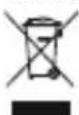
OT MOMENTa Ha npiIarahaTo Ha eBponecknte DnpeKtunb 2012/19/EU n 2006/66/EO B HAIOHOHOTONpaBOHaCbOTBeTHNTecTpaHNBaxNCJeDHTO:EJIeKtpuuecknte ENEKTPOHNHe ypeuN batepnTe He 6nBa Da ce N3XBpJrT C 6nTOBnTe OTnabu.
IOTpe6nteT e dxbxeh no 3aOK h a BbPhe eJektpnuecknte n eJektpoHNte ypeHn 6aTepeHNTe Kpa H a TexHna EKcNlOaTaunOHe cPok Ha n3rpaDeHnTe 3a ceNTa oBseCTBeHH nyHKTOBe3acb6bnpaHepaHaOTnabuINuINHaTbProBCKnro6ekt. IOppo6HOCTnTeNoBbnpocaca perIamEnTpapan H 3aKOHOaTeNCTBOTO Ha CbOTBeHTa TcPaHa.CmBOJbT Bbpy npOdykTa, yNBtBAHeTo 3a ynoTpe6a uIN OnakOBkata HACOUBKa T bM Te3n pa3nope6b. Ype3 pezIKnpaneto, npepa60kATAhAmatepnaJIteuINdpyuNΦopMNHaONJ30TbOPBaHHeHaCTapInTeyepeHn/6aTeprn BneOnpnuHac7e3aazntataHaHaawataoKoJlnHacpeDa.
hama®
HamaGmbH& Co KG 86652Monheim /Germany
Service& Support

www.hama.com

+499091502-0
D GB
- 1.EXPLANATIONOF WARNINGSYMBOLSANDNOTES
- WARNING
- NOTE
- HIGH-DENSITYLI-POLYMERCELLS
- 2.PACKAGECONTENTS
- 3.SAFETYINSTRUCTIONS
- OPERATION
- 4.1.CHARGINGTHEPOWERPACK
- WARNING- RECHARGEABLEBATTERY
- NOTE- CAPACITY
- 4.2.CHARGINGDEVICES
- WARNING- C ONNNECTIONOFDEVICES
- NOTE- OPTIMISEDCHARGING
- 5.CAREANDMAINTENANCE
- 6.WARRANTYDISCLAIMER
- TECHNICAL DATA
- 8.RECYCLINGINFORMATION
- NOTEONENVIRONMENTALPROTECTION
- 8.POKYNYKLIKVIDACI
- HIGHDENSITYNITUEBO-NOIMEPHNKJETK
- 3.YKA3AHN83A6E30NACHOCT
- 4.PEXMMHAPA6OTA
- 4.1.3APEXKAHEHAPOWERPACK
- PPEYNPEXKDEHNE-BATEPE
- YKA3AHNE-KANAUNTET
- 4.2.3APEKDAHEHAKAPNHYUCTPOICTBA
- PPEYNPEXDHNE-CBBP3BAHEHAKPAHHYCTPOCTBA
- PPEYNPEXKDEHNE
- YKA3AHHE-ONTUMN3NPAH03APEXKAHAHE
- 5.TEXHUECKOO6CIYXBAHE N ODPBKKA
- 6.N3KJIIOUBAHEHAOITROBOPHOCT
- 7.TEXHNUECKNDAHHN
- 8.YKA3AHN3AUN3XBVPJHE
- UKA3AHNEOTHOCHO3AUHTAHAOKOJHATACPEJA
- HAMA®
Brand : HAMA
Model : Supreme 5HD 00187290
Category : Power bank