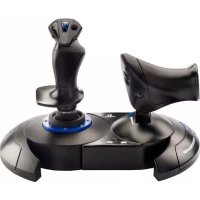
T.Flight Hotas 4 War - Controller THRUSTMASTER - Free user manual and instructions
Find the device manual for free T.Flight Hotas 4 War THRUSTMASTER in PDF.


| Technical Features | THRUSTMASTER T.Flight Hotas 4 game controller, compatible with PlayStation 4 and PC, joystick with 12 programmable buttons, throttle control, force feedback, and calibration system. |
|---|---|
| Usage | Ideal for flight simulators, easy to install and configure, with customizable profiles for different games. |
| Maintenance and Repair | Regularly clean with a soft cloth, avoid exposure to moisture, and consult technical support if problems occur. |
| Safety | Use in a dry environment, avoid strong shocks, and do not disassemble the controller to avoid voiding the warranty. |
| General Information | Weight: approximately 1.5 kg, dimensions: 35 x 25 x 30 cm, 2-year warranty, and driver update support available on the Thrustmaster website. |
Frequently Asked Questions - T.Flight Hotas 4 War THRUSTMASTER
User questions about T.Flight Hotas 4 War THRUSTMASTER
0 question about this device. Answer the ones you know or ask your own.
Ask a new question about this device
Download the instructions for your Controller in PDF format for free! Find your manual T.Flight Hotas 4 War - THRUSTMASTER and take your electronic device back in hand. On this page are published all the documents necessary for the use of your device. T.Flight Hotas 4 War by THRUSTMASTER.
USER MANUAL T.Flight Hotas 4 War THRUSTMASTER
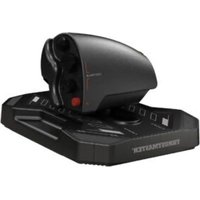
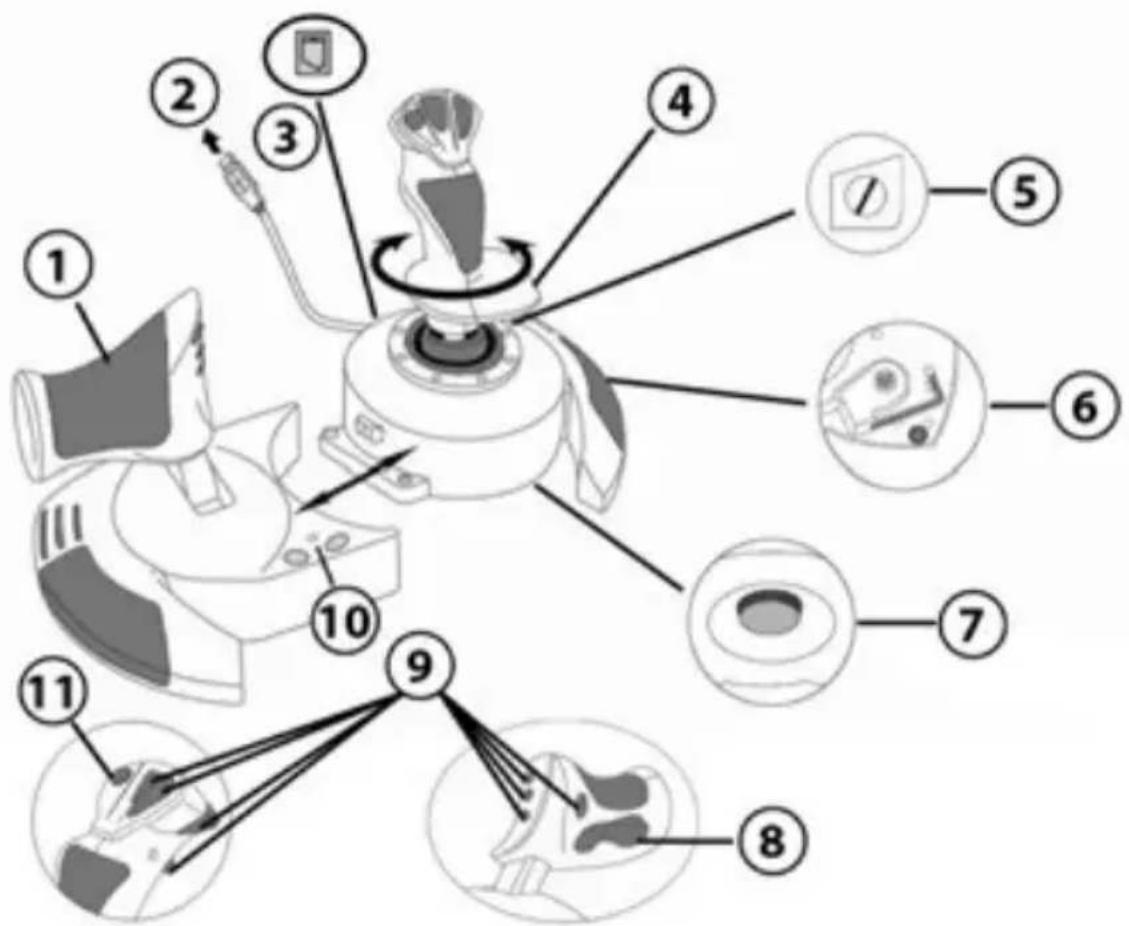
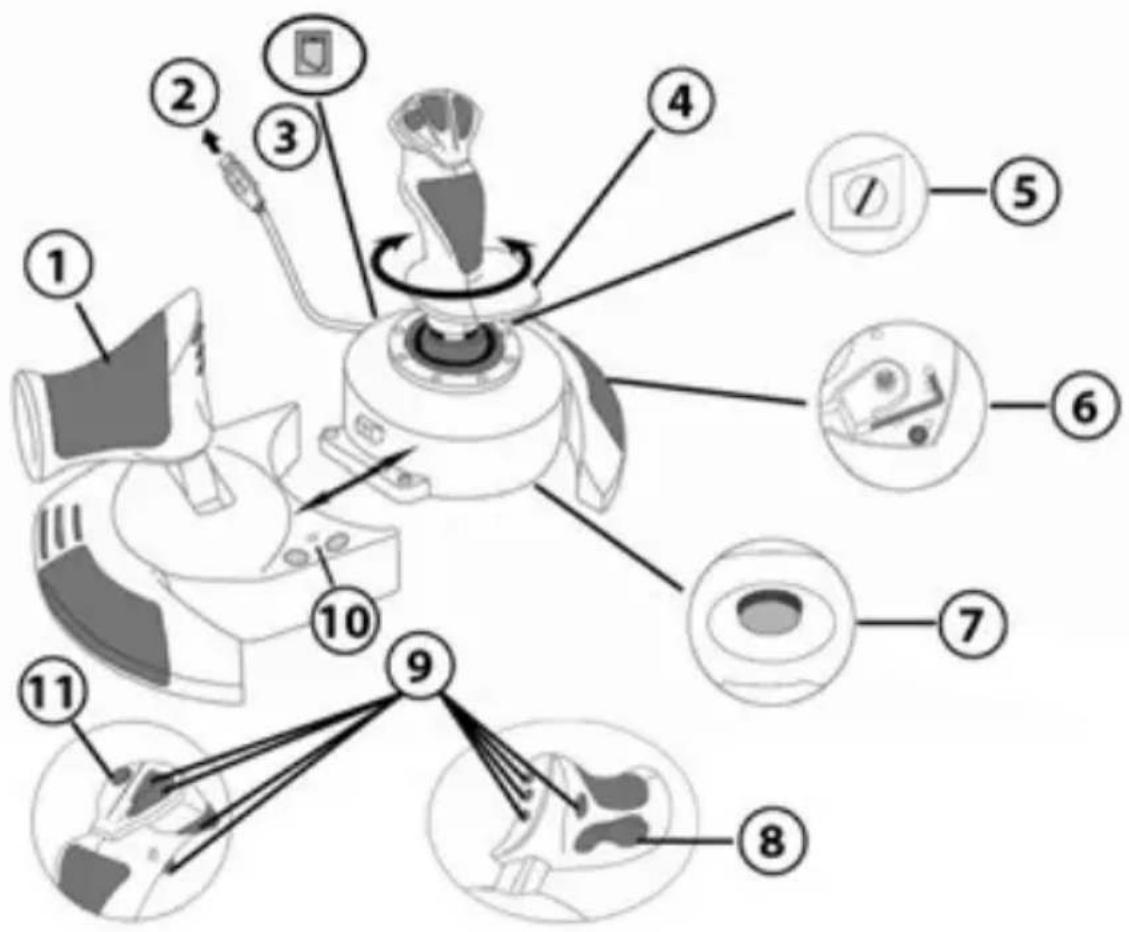
- Throttle
- USB connector
- Rudder connector: RJ12 Thrustmaster Rudder (sold separately) connector
- Rudder function via twisting handle
- Rudder locking screw on handle
-
Allen key to install or separate the throttle
-
Handle resistance adjustment dial
- Rudder via rocking button
- Action buttons
- PS button with LED
- Multidirectional "Point Of View" hat-switch
GETTING TO KNOW YOUR HOTAS JOYSTICK
THROTTLE
Your joystick features a large throttle which you can use to easily control the acceleration of your aircraft.
The throttle is detachable and may be positioned in 2 different ways, either:
Detached and separated from the joystick
(to re-create authentic piloting conditions)
Attached to the joystick
(for greater stability and to take up less space).
By default, the throttle comes detached from the joystick.
To attach the throttle to the joystick:
- Turn both items upside down (the throttle and the joystick).
- Take the Allen key (6) attached underneath the base of the joystick.
- Position the throttle to the left of the joystick.
Insert the connecting tab on the left of the joystick's base into the opening on the right hand side of the throttle.
- Using the key, tighten the two Allen screws undemeath the base
located on the left-hand side of the joystick's base). - Wind up the throttle cable and thread it through the cable guide slot.
- Put the Allen key back in its place so as not to lose it.
Carry out this procedure in reverse to detach the throttle from the joystick.
ADJUSTABLE HANDLE RESISTANCE
Depending on your style of gaming, you may wish to have an ultra-sensitive joystick, which responds to the slightest touch, or you may prefer to have a firmer joystick, which offers some resistance when you move it.
Your joystick's handle resistance is adjustable, in order to adapt to all players. To adjust it, use the handle resistance adjustment dial (7) located underneath your joystick's base.
RUDDER FUNCTION
Your joystick features a rudder function, which in a plane corresponds to the pedals used by the pilot to turn the steering, allowing the plane to pivot around its vertical axis (therefore making the plane turn left or right). This rudder function is accessible on your joystick by rotating the handle to the left or right.
This rudder function is accessible in two ways:
-
on your joystick by rotating the handle (4) to the left or right.
-
or via the rocking button (8) on the throttle.
If you are only using the rocking button (or if you are not using the rudder function), you can disable the handle's rotation thanks to the locking screw (5) located on the base of the joystick. Use a flat head screwdriver to change the screw's position and thus lock/unlock the rudder function.
MULTIDIRECTIONAL "POINT OF VIEW" HAT-SWITCH
Your joystick features a "Point Of View" hat-switch (11) which, as its name indicates, allows you (in games which permit) to instantly view everything that's going on around your plane. To do so, simply go to your game's configuration menu and program the different views (rear view, left view, right view, and also external views) onto the directions of the "Point Of View" hat-switch.
Of course, you can also use the "Point Of View" hat-switch for other functions instead (firing, etc.).
PLAYSTATION®4
INSTALLATION ON PLAYSTATION®4
- Connect the USB connector (2) to one of your system's USB ports.
- Switch on your system.
- The joystick's led turns RED.
- Press the joystick's PS button (10) and sign in to your Sony Entertainment Network account, in order to be able to use the joystick.
- Launch a game that supports the Flight Stick mode.
You are now ready to play!
LIST OF COMPATIBLE PLAYSTATION®4 GAMES
On PlayStation®4, the T.Flight Hotas 4:
- Is only compatible with the games that support the Flight Stick mode.
- Is recognised in games as a real joystick and not a gamepad, for better responsiveness and enhanced precision, and possibility to access the joystick's options in these games.
A list of PlayStation®4 games compatible with the joystick is available at http://ts.thrustmaster.com. Go to PlayStation® / Joystick / T.Flight Hotas 4, then select Games Settings.
This list will be added to regularly, with the arrival of new PS4™ games compatible with T.Flight Hotas 4.
UPDATING YOUR JOYSTICK'S FIRMWARE
The firmware included in your joystick's base can be updated to a more recent version featuring product enhancements.
To display the firmware version that your Joystick is currently using and update it if required: on PC, visit http://ts.thrustmaster.com. In the Updates and Downloads section, click PlayStation® / Joystick / T.Flight Hotas 4, then select Driver/Firmware and follow the instructions describing the download and installation procedure.
TROUBLESHOOTING AND WARNINGS
-
My joystick doesn't function correctly or appears to be improperly calibrated:
-
Switch off your system, disconnect your joystick, reconnect your joystick and then relaunch your game.
-
When connecting your joystick: Leave the handle, rudder and throttle centered and do not move them (to avoid any calibration problems).
-
Exit the game, unplug your joystick, plug it again, then press the PS button (10) on the joystick. Sign in to your Sony Entertainment Network account, in order to be able to use the joystick.
My joystick is too sensitive or not sensitive enough:
-
Your joystick self-calibrates on its own after you have made a few movements on the different axes.
-
In your game's "Options / Controller / Gamepad or Joystick" menu: Adjust the sensitivity or dead zones for your controller (if this option is available).
-
Adjust the handle resistance using the dial (7) located under your joystick's base.
-
The rudder function is too sensitive:
-
Disable the handle's rotation using the locking screw (5) located on the base of the joystick and use the rocking button for the rudder function.
HELP FILES AND FAQs (NOT INCLUDED IN THIS MANUAL)
Please visit http://ts.thrustmaster.com, and in the Updates and Downloads section, click PlayStation®/Joystick/T.Flight Hotas 4, then select Manual/Help file.
Consumer warranty information
Worldwide, Guillemot Corporation S.A., whose registered office is located at Place du Granier, B.P. 97143, 35571 Chantepie, France (hereinafter "Guillemot") warrants to the consumer that this Thrustmaster product shall be free from defects in materials and workmanship, for a warranty period which corresponds to the time limit to bring an action for conformity with respect to this product. In the countries of the European Union, this corresponds to a period of two (2) years from delivery of the Thrustmaster product. In other countries, the warranty period corresponds to the time limit to bring an action for conformity with respect to the Thrustmaster product according to applicable laws of the country in which the consumer was domiciled on the date of purchase of the Thrustmaster product (if no such action exists in the corresponding country, then the warranty period shall be one (1) year from the original date of purchase of the Thrustmaster product).
Notwithstanding the above, rechargeable batteries are covered by a warranty period of six (6) months from the date of original purchase.
Should the product appear to be defective during the warranty period, immediately contact Technical Support, who will indicate the procedure to follow. If the defect is confirmed, the product must be returned to its place of purchase (or any other location indicated by Technical Support).
Within the context of this warranty, the consumer's defective product shall, at Technical Support's option, be either replaced or returned to working order. If, during the warranty period, the Thrustmaster product is subject to such reconditioning, any period of at least seven (7) days during which the product is out of use shall be added to the remaining warranty period (this period runs from the date of the consumer's request for intervention or from the date on which the product in question is made available for reconditioning, if the date on which the product is made available for reconditioning is subsequent to the date of the request for intervention). If permitted under applicable law, the full liability of Guillemot and its subsidiaries (including for consequential damages) is limited to the return to working order or the replacement of the Thrustmaster product. If permitted under applicable law, Guillemot disclaims all warranties of merchantability or fitness for a particular purpose.
This warranty shall not apply: (1) if the product has been modified, opened, altered, or has suffered damage as a result of inappropriate or abusive use, negligence, an accident, normal wear, or any other cause unrelated to a material or manufacturing defect (including, but not limited to, combining the Thrustmaster product with any unsuitable element, including in particular power supplies, rechargeable batteries, chargers, or any other elements not supplied by Guillemot for this product); (2) in the event of failure to comply with the instructions provided by Technical Support; (3) to software, said software being subject to a specific warranty; (4) to consumables (elements to be replaced over the product's lifespan: disposable batteries, audio headset or headphone ear pads, for example); (5) to accessories (cables, cases, pouches, bags, wrist-straps, for example); (6) if the product was sold at public auction.
This warranty is nontransferable.
The consumer's legal rights with respect to laws applicable to the sale of consumer goods in his or her country are not affected by this warranty.
Additional warranty provisions
During the warranty period, Guillemot shall not provide, in principle, any spare parts, as Technical Support is the only party authorised to open and/or recondition any Thrustmaster product (with the exception of any reconditioning procedures which Technical Support may request that the consumer carry out, by way of written instructions - for example, due to the simplicity and the lack of confidentiality of the reconditioning process - and by providing the consumer with the required spare part(s), where applicable).
Given its innovation cycles and in order to protect its know-how and trade secrets, Guillemot shall not provide, in principle, any reconditioning notification or spare parts for any Thrustmaster product whose warranty period has expired.
Liability
If permitted under applicable law, Guillemot Corporation S.A. (hereinafter "Guillemot") and its subsidiaries disclaim all liability for any damages caused by one or more of the following: (1) the product has been modified, opened or altered; (2) failure to comply with assembly instructions; (3) inappropriate or abusive use, negligence, an accident (an impact, for example); (4) normal wear. If permitted under applicable law, Guillemot and its subsidiaries disclaim all liability for any damages unrelated to a material or manufacturing defect with respect to the product (including, but not limited to, any damages caused directly or indirectly by any software, or by combining the Thrustmaster product with any unsuitable element, including in particular power supplies, rechargeable batteries, chargers, or any other elements not supplied by Guillemot for this product).

COPYRIGHT
© 2016 Guillemot Corporation S.A. All rights reserved. Thrustmaster® is a registered trademark of Guillemot Corporation S.A.
Licensed for sale in Europe, Africa, Middle East, Russia, India and Oceania. For use exclusively with PlayStation®4.
"PlayStation", "PS3" and "DOXC" are registered trademarks of Sony Computer Entertainment Inc. "PS4" is a trademark of the same company. All rights reserved.
All other trademarks and brand names are hereby acknowledged and are property of their respective owners. Illustrations not binding. Contents, designs and specifications are subject to change without notice and may vary from one country to another. Made in China.
Manufactured and distributed by Guillemot Corporation S.A.
ENVIRONMENTAL PROTECTION RECOMMENDATION
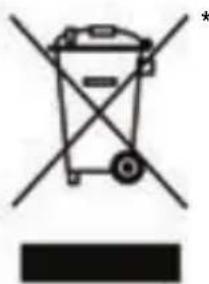
In the European Union: At the end of its working life, this product should not be disposed of with standard household waste, but rather dropped off at a collection point for the disposal of Waste Electrical and Electronic Equipment (WEEE) for recycling.
This is confirmed by the symbol found on the product, user manual or packaging. Depending on their characteristics, the materials may be recycled. Through recycling and other forms of processing Waste Electrical and Electronic Equipment, you can make a significant contribution towards helping to protect the environment.
Please contact your local authorities for information on the collection point nearest you.
For all other countries: Please adhere to local recycling laws for electrical and electronic equipment.
Retain this information. Colours and decorations may vary.
Plastic fasteners and adhesives should be removed from the product before it is used.
www.thrustmaster.com
*Applicable to EU and Turkey only
CE
T.Flight Hotas 4
PlayStation®4
INFORMATIONS RELATIVES A LA GARANTIE AUX CONSOMMATEURS
www.thrustmaster.com
www.thrustmaster.com
www.thrustmaster.com
www.thrustmaster.com
www.thrustmaster.com
www.thrustmaster.com
TEXHNUECKNEXAPAKTEPNUKNI
- Pbyar ynpabnien
- Pa3bEM USB
- Pa3bEm dIpyIa HnnpaBHeHnIy: IpnOdkJIoueHnI pyIa HnnpaBHeHnIa Thrustmaster RJ12 (npno6peTaetcra OTdIbHo)
- YnpaBneHne NOJeTOM BpaAioUeIcR pyKoITKOIN
-
BnHT 6IokupOBKn pyna HnpaBneHna pykoTke
-
WecnturpaHHbIKIoudnyyctaHOBKn/OTcoeINHeHn pyiHaaynpabJeHn
- PeryIaTOp cOnpoTnBJIeHn pyKoAaTKn
- YnpabJIeHne nOJeTOM 7apHnRHOKHOKoI
9.Функюногалььhoe KHOПКИ - KhoIIa PS c HdkaTopom
- Mhorono3nHnHbI nepeKIOUaTeIb TOckn 063opa
3HAKOMCTBO CДЖОИCTNUKOM HOTAS
PbIyAr UYPABJIENIA
B KOMPJIeKT JxOJcTnKa BxOJIT 6oJIbWoI pbIar ynpaBHeHna, C NOMOuKOTOpOrO yDObHo ynpaBnTb yckopeHneM camOneta.
PbIur ynpabneneHRABnEeTcBemhIM IN PpeDnoJaraet Dba BapnaHTa yCTaHOBKn:
OTdEJIbHOOTJXOHTNka
(ДЯ CO3DAHЯ peaINCTNHybIX yCNOBn NINOTNPOBaHЯ);
C KpeHHeHnEM K JxOoiCTnKy
PEYINPYEMOE COINPOTIBJEHNE PYKOKTNI
B 3aBnCIMOCTN OT CTINr Nrpbl, MoXeT Ntpe6oBaTbcra NOBbIWeHHa YyBCTBNTbHOCTB JKOJCTNka H peakua Ha MaJeIwee KacaHne nn 60JIbwa JxecTKocTb ero pa60Tb C HeKOTOpbIM COnpOTNBHeHem Pn CdBVraHnn.
ConpoTnBJIeHne pyKoTKn JxOJCTNka MoXHO HAcTpaNBaTb B COOTBeTCTBnC npednoUteHnMa reMepa. Ina HAcTpoiKn CnyKHT peryIaTOp CoPOTnBJIeHnpyKOATKn (7), paCNoJIOKeHHbI Ha HIXHe CTOpOHe 6a3bl JxOJCTNka.
ONTIMaJIbHOI peAKTHBHOCTN I NOBblIeHHOITouHOCTN, a TAKKe IJRA OBeCneueHnI DOCTyna KnapaMeTpam IXoIcTNka B COOTBeTCTByIOUx INrpax.
Cnncok irp dIy PlayStation®4, COBmecTmblx C daHbIM dxKOJCTNKOM, MOXHO haHTN Ha caIte:http://ts.thrustmaster.com. OTKpoIte pa3dErl PlayStation®/Joystick/T.Flight Hotas 4 n BvIbePnte Games Settings (HacTroponB vIrpax).
3TOT cHcOK 6yIeT NOCTOARHNO ObHOBJIaTBcR No Mepe BbIXoJa HObIX Irp dIpy PS4TM, COBMeCTnMbIX C JxOJCTNkOM T.Flight Hotas 4.
OBHOBJEHNIE PPOUINBKN JXOJCTNKA
ПрошИВКУВбаЗджОЧТИКА мОЖно оБнOBИТьdo 6Олee пОЗДнЕВерси,codepжацeуcoBERPшЕнCTBOВанЯ.
Для п ropсмOTpa установленьов в даньий MOMENT Версан пошИВКИ и се обновеня рпн HeobхODIMOCTN OTKpoNTe caT http://ts.thrustmaster.com.В pa3dene Updates and Downloads BыберITE PlayStation® /Joystick / T.Flight Hotas 4,Затem OTKpoITe Driver/Firmware И BыINOLHITe уka3aHAЯ NO 3aRpy3Ke И установке пошИВКИ.
YCTPAHEHNE HENCPABHOCTE IN PPEyPEXKDEHNA
-ДжоICTнК He pa6oTaETdoJXHbIM 06pa3OM nIN KaKeTcЯ HeBepHO OTkaJIb6poBaHHbIM
BbIKHIOHTe cNCTeMy, OTKIOHTe JKOJCTNK, NOKIOHTe erO cHOBa n nepe3aRpy3nte ngpy. Pn noKIOUeHN dKOJCTNa: OCTaBbTe pyKoTky, pyNb HAnpaBHeHn I pbIyar ynpabJeHn B ceHTpAbHom pIoXeHN n He cDburAte nx (BO n36exKaHne npobem KaIIb6pOBKn).
BbIynte n3 irpbl, OTKIOHTe dJOYCTNK, NOKIOHTe eRO cHOBa n HAXMITE KONky PS (10) Ha dJOYCTNke. BoIyTe B cBOIO yUeTHyO 3aINcSb Sony Entertainment Network, TTo6bl MOxHOb 6bIIO NcNoJIb3OBaTb dJOYCTNK.
CnHsKOM BbICOKa HJN HeOCTaTOUHa YBCTBNTeJIbHOcTb JxKOiCTnKa
-ДжоICTNK CamOCTOЯTeNbHO BbINOJIHЯET ABTOKaIIN6pOBky, NOcJIe TOrO KaK NOpb3OBaTeJIb COBepShaet HeCKoJIbKO DBrJKeHn Ha pa3JIuHbIX OcAx.
- B irpe, B pa3dene «Паразметры / Контponлел»: Habtpoite ChvBCTBHTeHocTB nIN MeptBbIe 30HbI ДЯ КОТролпера (ecn 3Ta onцяdoctynHa).
- HactpoIte cnpotnBHeHne pykoTkn C nOmoIbIO peryIaTopa (7) Ha HnxKHei CTOpOHe 6a3bl DKOINkA.
CnIshKOM BbICOKa YyBCTBNTeJbHOCTb yHKUN ynpabJIeHNA NOJEtOM
- BbIKHouHte BpaueHne pyKoTKn C nOMOuBnHTa 6nOKnPOBKn (5) Ha HnXHeN YaCTN 6a3bl DkoJCTnKa n HcNoIb3yTe dIg FyHKuIN ynpabNeHn NOIeTOM WapHnPHyIO KHOkY.
CπPABKA N OTBETbI HA YACTbIE BONPOcbl (HE ΠПВЕДEHbI E HACTOJIEM PYKOBODCTBE)
Ha caiTe http://ts.thrustmaster.com, B pa3dene Updates and Downloads, BBb6epnte PlayStation®/Joystick/T.Flight Hotas 4, 3aTeM OTKpoIte Manual/Help file.
CbeHn o noTpe6ntbcko rapaHTnn
KopnpaunGuillemot Corporation S.A., 3apeHcTpnpOBaHHa no aDpcy Place du Granier, B.P. 97143, 35571 Chantepie, Phanu, (daee - «Guillemot») rapaHTnpyET CBOIM KJIeHTAM BO BCEM MMpe, YTO B DaHHOM n3denn Thrustmaster He bdyet BbIaBHeo HNKaIX DepekTOB MaTePnaIOB I pOIN3BOvCTBa B TeHeHne rapaHTnHoro nepnoDA, KOtOpB paBeH cpoKy npEdbAWeHNA PPteH3N NO COOTBEcTCTBnIO Dnla DaHHORo n3denn. B ctpaHax Ebponeckoro Co03a 3OT cpoK COOTBEcTByET DBym (2) rOam C MOMeHt aNoCTABKN n3denn Thrustmaster. B dpynx cTpaHax rapaTnHbI nepnoD paBeH cpoKy npEdbAWeHNA PPteH3N IO COOTBEcTBAIO Dnla n3denn Thrustmaster, onpeDnEremomy COOTBEcTByIOUIm 3aKOHOaTeJIbCTBOM cTpaHbI, B KOtOpO npoxmban Notpe6ntel Ha MOMENT npio6peHnra n3denn Thrustmaster (ecnn PNOobhle npTeH3N He DeiCTBYOT B COOTBEcTByIOUe CTpaHe, rapaHTnHbI nepnoD paBHeTcR ODHOMY (1) rody c nepBOHaJbHo DaTbI npio6peHnra n3denn Thrustmaster).
HeB3npaHa BbIeH3IOKeHHoe, rapaHTna Ha akKymyTOpby paBHReTc sIECTN (6) MeCzam C nepBOHaJbHO DaTbI npno6peTeHn.
B cnyuae 6bnapykeHnI depeKTOB n3dennBO Bpemra rapaHTmHOro nepnoa He3aMeJITeNbHO o6paTtEcB Cnyk6by TexNHuecko NODepKKn, cotpydnKn KOtoPoN OnpedNAT daIbHeNShyO npoueDpy. Ecn IdepeKT 6bndet IOdTBePXDhen, n3dene cJeDuET BepHyb NO MecTy pniOpTeHn (INN B JIO6oe DpyrOe MeCTO, yka3aHHoe Cnyk6b ToxHuecko NODepKKn).
B pamkax DeiCTBnra rapaHTn ndepeKTHoe n3dene 6ydt, no yCMOTpeHHo cnykbI TeHNueckO NOdepKKN, 3aMeHEn Wn BO3BpaueHO B paBOe coCToHne. EcnB TceHne rapaHTnHoro cpoKa n3dene Thrustmaster 6ydt NODBeRKeHO TaKOMy BOCtAHOBHeHIO, K OCTaBWeMcyr rapAHTnHOMy cpoKy np6abJAEcTc nepNOBVPemEH, Hn He MeHee CEMN (7) dNeB, BO BPemr KOtPOr n3dene HaxOINIOb BHe yNOTpeBHeHn (Haayanom 3TOrO nepNoDA ChITaETc DaTa 3aPocA nOKynteO BMeUaTeNbCTBE INn DaTa npEOCTABHeHn DEpEKTHO 13dEInr DnBocCTaHO BmE HnBOCTaHO BmE HnC3DHeE, Yem 6bln CDeLah 3aPoc O BMeUaTeNBcTBe). B Mepe, paPeHHo PnIMeHMbIM 3aKOHDoTeNbCTBOM, NOHAR OTBETCTBEHHOCTB KOMNaHn Guillemot n ee DoOpHnx KOMPiHn (B TOM YNCNE KOCBeHHbYuep6)
OrpaHnHBaETcB OBCTaHOBnEHmepa6oHrcoCTOHHN 3AmHoN 3dEINThrustmaster. B Mepe, pa3peSeHHoI pRIMeHMbIM 3aKHOdaTeJIbCTBOM, KOMNaHnGuILlemot oKa3bIBaETcROT IIObIX rapaHTNI KOMMepueckoI PnRODHOCTN INI PnRODHOCTN DnI ONPeDeJIeHHoI CEIN.
Hactoia rapaHTn He pacpocpaHreTc: (1) Ha cnTuayu, KOrda n3deJe 6bIIO BUNONMeHeO, OTKpbITo, MoNfUmpoBaHO nn NOnyHIno NOBpeKdEHHB Pe3yIbTaTe HeDOnyCTMOrO nn HnnpaBnIbHOr IcNoB3OBAHn, He6peXHoCTn INn HeCACTHO rClyuAe, ECTeCTBeHHORo N3HOCA INn JIOboi DpyoR npuHb, He C8ra3aHoo C DepeKtOM MaepnaIOB INn PPOIN3BODCTBA (BKIOUaY, NOMMO IpOyeO, NCIOb3OBaHne N3dEHN Thrustmaster COBmecTHO C LIObIMN HEnODXODJUMM 3NeMeHTAMn, B YAcTHOCTN — C 6bLOkAmn NITAHN, AKKMyIANTOPAMN, 3apAnbIMN yCTPoIcTBAMN INIObIMN dpyIMN 3NeMeHTAMn, HE BXODIAUMN B KOMIIKeTAUHO Guillemot dnn daHoro n3dEJIa); (2) Ha cnTuayu, KOrda yka3aHnR cnykbI texHmecKo NOpdepKm He 6bln BblnoHeHb; (3) Na IO, TAK kak Ha taKoe PO paccpoctpaHReTc OTDeJIbHARpaHTN; (4) Ha paCXoHbIe MaepnaIbI (aemehtbl, InpeHa3Naehhble dnn 3aMeHbI B TeueHme cpoKa cnykbI IN3dEJIa; HapPImep, 6atapeKn u yUhble nOduuKn dner rapHNTyp nll HayUnHKOB); (5) Ha akceccyapbl (HaPImep, Ka6ebl, Yexbl, cyMK, fytIpaBl, hapuHbIe peMeuKn); (6) Ha cUYauPiopaoKn n3deJeNc OTKpbITOrO aykuioHa.
Daanha rapaHTnHe NopJeKIT nepeDahe.
Hactoia rapaHTn He yIeMJIeT npab notpe6nteJ, npedocTaBnEmbix emy npimeHmblm 3aKohm B OTHOweHn Ipodaxn Notpe6nteBcknx TObApOB B COOTBETCTByUcien CTpaHe.
DOnoJIHnTeIbHbIe ycJIOBna rapaHTmN
B TeueHne rapaHTnHoro cpoKa KOMpaHnaGuillemot, B obuem n ceIom, He npedocTabraT HkaKnx 3aNaChbix qacte, TAK KAK BCKpbITHe N/IN MOnDfNkauIIO JIObIX N3deIIM Thrustmaster Bnpabe OcyUeCTBnAByToTolkbKO cnJy6ba TexHnuecko PNOdepKNN (3a NCKnIOueHEm KaNX-JIbO pOouEpy nO MoDfNkauIIM, KOtOpBle CnyK6a texHnuecko PNOdepKNN MOKeT PpeDIOXHTB BblONIHNTB KInEHTy NytEM NcBMeHHbIX INHCTpyKmN I npedocTabnEHH, PnH NoobxOAnMOCTN, TpebyEmbIX 3aNaChbIX qAcTe: HaPImep, B CBy3N C OTCyTCTBnEM CTatYCa CTOXHOCTN INN KOHΦdEHNaJIbHOCTN y TAKO BOCCTAHOBITEbHOI pOueDypbl).
C yheTOM nepnoa ocboeHnHOBbIX N3deNIM IN B ceJx 3aunTbI CBOX HOy-Xay I KOMMepuecknx TaHHKoMaHnGuillemot, B obseM n cenom, He npedocTabnEET KaNX-JI6O yBeDMHeH N O BOCCTAHOBJIeHN IIN3apacbix Yactei nIIObIX N3deNIM Thrustmaster c nCTekuIm rapaHTnHBIM cPOKOM.
B CUSA n KaHade Hactoa a rapaHTn oRaHnHbAeTcB BHyTpEHMM MexaH3MOM n 6OJIOKo yCTPOICTBa. KopnpaGuillemot n ee doepHne npedpnaTn Hn pni KaHX ycNoBnx He HecyT OTBeTCTBeHHocn nepei TpeTBmN JInCaMn 3a KOCBeHHbIe INn clyuHbIe y6bITKn, CBraaHHbIe C HApUHeHem KACNX-JINBO RAHbIX INn POnpa3yMeBaEMbIX rapaHTn. B HeKOTobx WtTaX/npOBuHNzrx H e Donyckaetc O raPauHHeHne cPoka DeIcTBn IOnpa3yMeBaEMo rapaHTn INn ORpaHUnCeHne OTBeTCTBEHHocTn 3a KOCBeHHbIe/ClyuHaNbHie y6bITKn, PO3TOMy B BaWe m Cnyae Bblweyka3aHHbIe ORpaHUnEHHn INn NckJIouHeHn MOyT 6bITb HnprimeHMbl. HaCToa a rapaHTn npedocTabIe Bam ONpeJeHbIe kOpundueckne npaba. Y Bac MoryT TaKeke 6bITb dpyrme npaba, ONpeJeHbIe 3akOHodaTeJIbCTBOM WtTaTaN INn npOBuHNm.
OTBetCTBeeHHOCTb
B Mepe, pa3peuHno npimeHmblm 3aKoHOaTeJIbCTBOM, KOMnHnGuillemot Corporation S.A. (daee - «Guillemot») n ee doUeHne npednpnTnO tKa3bBAOTcR oIIO6o OTBeTCTBeHHocTn 3a IIO6o yueP6, Bbl3BaHbI ODNHM INN HeCKOBKMn IN3 CLeDyUOxN x fakTopoB: (1) BVDOn3MeHHe, BCKpbITne ININ MoDnФnkaCnry IN3dEInr; (2) HecobIoJeHne INcTpyKuIN No c6opKe; (3) HeDOnyCTmoe ININ HEnpaBnIbHoE INTOJb3OBAHne, He6peXHOCTb, HeCuaH (HaNPIMep, FIm3NuCeKoe BO3deYCTBNE); (4) eCTeCTBeHHbI IN3HOC. B Mpe, pa3peuHno npimeHmblm 3aKoHOaTeJIbCTBOM, KOMnHnGuillemot n ee doUeHne npednpnTn OTKa3bBAOTcR oIIO6o OTBeTCTBeHHocTn 3a IIO6o yueP6, He CBraHHbI C DeΦeKTAMM MaTePnAIOB INN IN3ROTOBNeHn, B OTHOeHN DaHHORO IN3dEInr (BKnIOUay, NOMMO IpOHeR, IIO6o yueP6, Bbl3BaHbI INPMAO INN ONOpceIOBaHNO IIO6bIM InpOpaMMHbIM ObecNeHEm ININ INCNoIb3OBAHmE IN3dEInr Thrustmaster C IO6bIMn HenODXoAaUMN 3IeMeHTAmN, B YAcTHOCN - 6IOKAMN NITAHN, AKKymyTAOpAMN, 3apndMbIM yCTPOIcTBAMN INIO6bIMn DpytMMN 3IeMeHTAmN, He BXODaUIMN B KOMPiKeTaUHO Guillemot dIra DAHHoro IN3dEInr).
THRUSTMASTER
TEXHNUECKOI NOIDEPKIN http://ts.thrustmaster.com


ABTOPCKNE IINPABA
© Kopnpopaця 2016 Guillemot Corporation S.A. BCE npaba 3aunuhebl. Thrustmaster®ЯьяетсяЗaperистрированьIM TOBAPbIM 3нakOM Koprnapazim Guillemot Corporation S.A.
IinueH3nI pynpaBn B EbPone, AphiKe, Ha BInxHem BoCToKe, B PocCn, HnDnn n OkeAHn. IINKJIIOHTeJbHorO nCNOJb3OBaHn c PlayStation84.
PlayStation, PlayStation, PlayStation, PlayStation, PlayStation, PlayStation, PlayStation, PlayStation, PlayStation, PlayStation, PlayStation, PlayStation, PlayStation, PlayStation, PlayStation, PlayStation, PlayStation, PlayStation, PlayStation, PlayStation, PlayStation, PlayStation, PlayStation, PlayStation, PlayStation, PlayStation, PlayStation, PlayStation, PlayStation, PlayStation, PlayStation, PlayStation, PlayStation, PlayStation, Playstation
Sony Computer Entertainment Inc. P54"YBnE3aepHCTpnpOBaHHbIM TOBaHPbIM 3HaKOM 3TOI JekomnaHn. Bce npaba 3aunueHbl.
Bce octaHbIe TOBapHbIe 3nAkn ABJIaIOTc CO6CTBeHHOCTbIO COOTBeTCTByIOxN BlaJeJIbUeB.
NIIIOCTpaun MOYr He COOTBETCTBOBaTb BHeUHEmy BnDy/foYHKzmaK KOHKpeTHORo N3deJIy. CoeepkaHne, KOHCTpykqur n TexHnueckne XapaKTepnCTnKn N3deJIy MOrY 6bITb N3MeHehbl 6e3 npedBapntelbHO r yBeDOMLeHnR n 3aBnCrt OT cTpaHbl pno6peTeHnR. CdeJano B KItae.
Pon3BeNo npacnpoctpaHReTcKomnaHneu Guillemot Corporation S.A.
Pn noIb3ObaHH n3deJIInem yuHTbBaIte CneJeUoJee: ZBeTa u nn3aH MOryT pa3JIuHaTbcra.
PnactNKOBBIE cTAAKKN KNeKkyIO JeHTy CneDyET ChrTb nepe IcNoIb3OBaHHeM N3dEJIa.
www.thrustmaster.com
EAC
T.Flight Hotas 4
PlayStation®4
Evyερίδιο xρήσης
TEXNIKA XAPAKTHPIETIKA
www.thrustmaster.com
^* Ioxuéi muo oE Ee kai Toupkia
T.Flight Hotas 4
PlayStation®4 Kullanma Kilavuzu
TEKNIK ÖZELLİKLER
www.thrustmaster.com
www.thrustmaster.com
"oljyI yI J" 1000000000000000000
()"011 11" 111 111 111 111 111 111 111 111 111 111
PLAYSTATION®4
PLAYSTATION@4
.1
.2
.3
Sony Entertainment 45 (10) PS jj
Network
.5
1
4 PLAYSTATION®4
T. Flight Hotas 4PlayStation®4
1
Updates and Downloadshttp://ts.thrustmaster.com JJ .Manual/Help file PlayStation/Joystick/T.Flight Hotas 4
1
Gullemot 124
Gullemot Corporation S.A 8
Thrustmaster 12
Thrustmaster 12
Thrustmaster 12
Thrustmaster 12
Thrustmaster 12
Thrustmaster 12
Thrustmaster 12
Thrustmaster 12
Thrustmaster 12
Thrustmaster 12
Thrustmaster 12
Thrustmaster 12
Thrustmaster 12
Thrustmaster 12
Thrustmaster 12
THrustmaster 12
Thrustmaster 12
Thrustmaster 12
Thrustmaster 12
Thrustmaster 12
Thrustmaster 12
Thrustmaster 12
Thrustmaster 12
Thrustmaster 12
Thrustmaster 12
Thrustmaster 12
Thrustmaster 12
Thrustmaster 12
Thrustmaster 12
Thrustmatter 12
Thrustmatter 12
Thrustmatter 12
Thrustmatter 12
Thrustmatter 12
Thrustmatter 12
Thrustmatter 12
y jiaai b
Jgalllll gill pcll lgl Gull 1Gullemot jgnlnlaallls
a
g 1 g i aaii jaiiaai laiai iaiy iaiy iaiy iaiy iaiy iaiy iaiy iaiy iaiy iaiy iaiy iaiy iaiy iaiy iaiy iaiy iaiy iaiy iaiy iaiy iaiy iaiy iaiy iaiy iaiy iaiy iaiy
J 4 14 15 16 17 18 19 20 21 22 23 24 25 26 27 28 29 30 31 32 33 34 35 36 37 38 39 40 41 42 43 44 45 46 47 48 49 50 51 52 53 54 55 56 57 58 59 60 61 62 63 64 65 66 67 68 69 70 71 72 73 74 75 76 77 78 79 80 81 82 83 84 85 86 87 88 89 90 91 92 93 94 95 96 97 98 99
auiiiaaiuuiiuie
www.thrustmaster.com
1
T.Flight Hotas 4
PlayStation®4 User Manual
TECHNICAL FEATURES
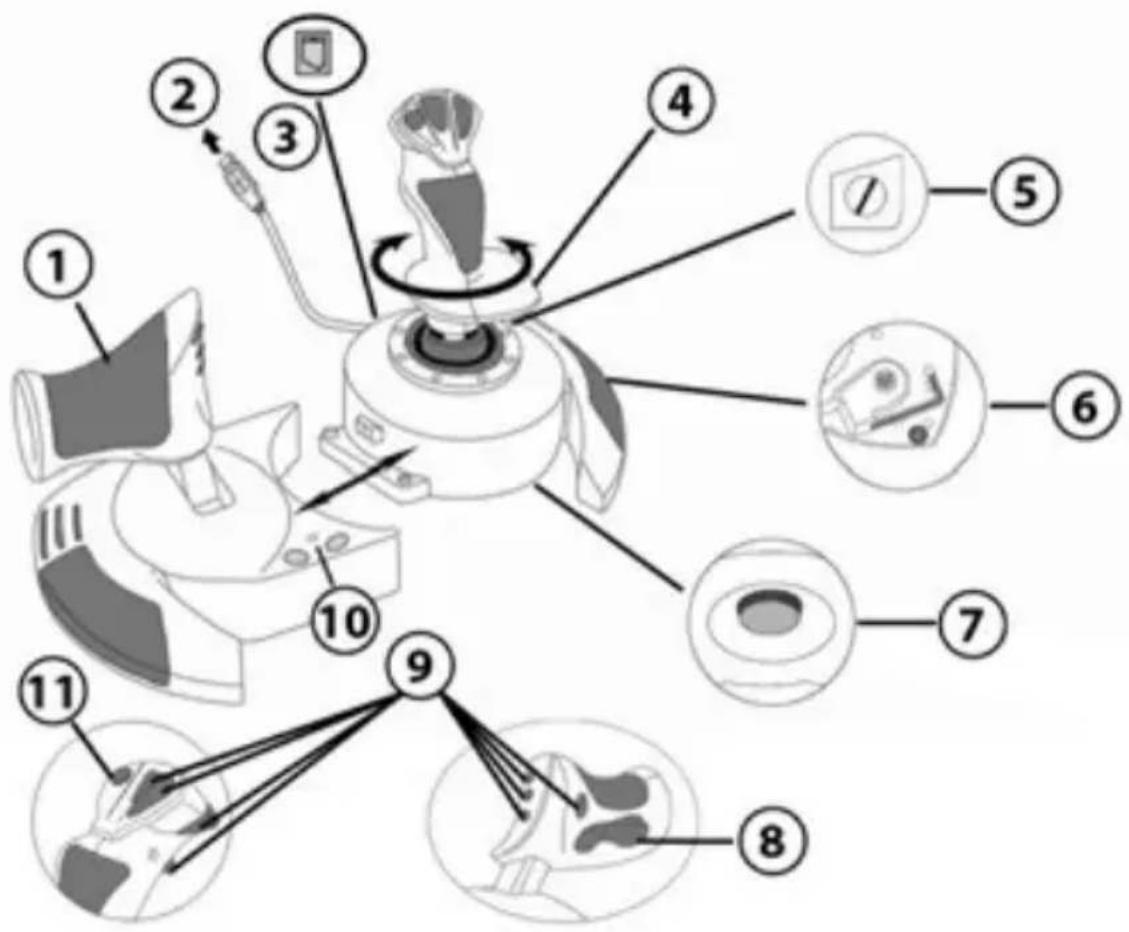
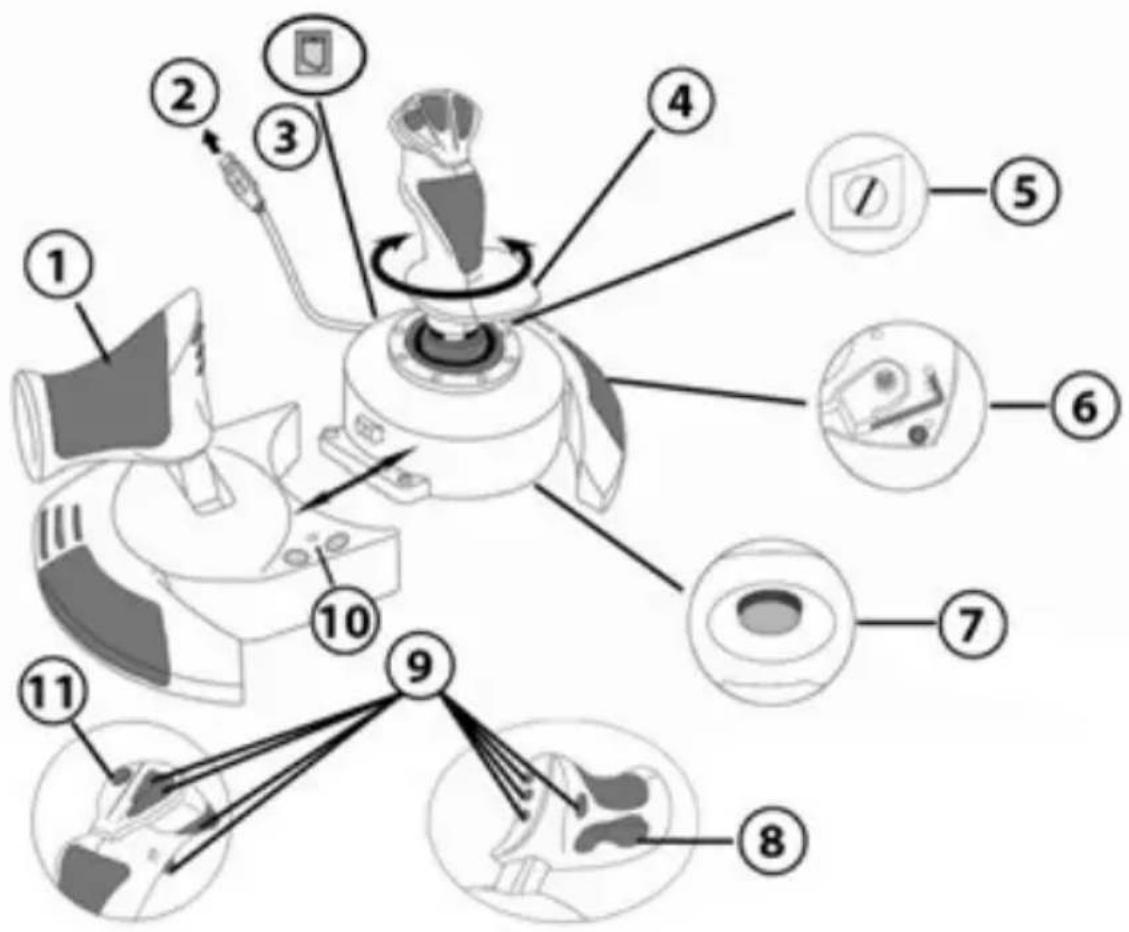
- Throttle
- USB connector
- Rudder connector: RJ12 Thrustmaster Rudder (sold separately) connector
- Rudder function via twisting handle
- Rudder locking screw on handle
-
Allen key to install or separate the throttle
-
Handle resistance adjustment dial
- Rudder via rocking button
- Action buttons
- PS button with LED
- Multidirectional "Point Of View" hat-switch
GETTING TO KNOW YOUR HOTAS JOYSTICK
THROTTLE
Your joystick features a large throttle which you can use to easily control the acceleration of your aircraft.
The throttle is detachable and may be positioned in 2 different ways, either:
Detached and separated from the joystick
(to re-create authentic piloting conditions)
Attached to the joystick
(for greater stability and to take up less space).
By default, the throttle comes detached from the joystick.
To attach the throttle to the joystick:
- Turn both items upside down (the throttle and the joystick).
- Take the Allen key (6) attached underneath the base of the joystick.
- Position the throttle to the left of the joystick.
Insert the connecting tab on the left of the joystick's base into the opening on the right hand side of the throttle.
- Using the key, tighten the two Allen screws undemeath the base
located on the left-hand side of the joystick's base). - Wind up the throttle cable and thread it through the cable guide slot.
- Put the Allen key back in its place so as not to lose it.
Carry out this procedure in reverse to detach the throttle from the joystick.
ADJUSTABLE HANDLE RESISTANCE
Depending on your style of gaming, you may wish to have an ultra-sensitive joystick, which responds to the slightest touch, or you may prefer to have a firmer joystick, which offers some resistance when you move it.
Your joystick's handle resistance is adjustable, in order to adapt to all players. To adjust it, use the handle resistance adjustment dial (7) located underneath your joystick's base.
RUDDER FUNCTION
Your joystick features a rudder function, which in a plane corresponds to the pedals used by the pilot to turn the steering, allowing the plane to pivot around its vertical axis (therefore making the plane turn left or right). This rudder function is accessible on your joystick by rotating the handle to the left or right.
This rudder function is accessible in two ways:
- on your joystick by rotating the handle (4) to the left or right.
- or via the rocking button (8) on the throttle.
If you are only using the rocking button (or if you are not using the rudder function), you can disable the handle's rotation thanks to the locking screw (5) located on the base of the joystick. Use a flat head screwdriver to change the screw's position and thus lock/unlock the rudder function.
MULTIDIRECTIONAL "POINT OF VIEW" HAT-SWITCH
Your joystick features a "Point Of View" hat-switch (11) which, as its name indicates, allows you (in games which permit) to instantly view everything that's going on around your plane. To do so, simply go to your game's configuration menu and program the different views (rear view, left view, right view, and also external views) onto the directions of the "Point Of View" hat-switch.
Of course, you can also use the "Point Of View" hat-switch for other functions instead (firing, etc.).
PLAYSTATION®4
INSTALLATION ON PLAYSTATION®4
- Connect the USB connector (2) to one of your system's USB ports.
- Switch on your system.
- The joystick's led turns RED.
- Press the joystick's PS button (10) and sign in to your Sony Entertainment Network account, in order to be able to use the joystick.
- Launch a game that supports the Flight Stick mode.
You are now ready to play!
LIST OF COMPATIBLE PLAYSTATION®4 GAMES
On PlayStation®4, the T.Flight Hotas 4:
- Is only compatible with the games that support the Flight Stick mode.
- Is recognized in games as a real joystick and not a gamepad, for better responsiveness and enhanced precision, and possibility to access the joystick's options in these games.
A list of PlayStation®4 games compatible with the joystick is available at http://ts.thrustmaster.com. Go to PlayStation® / Joystick / T.Flight Hotas 4, then select Games Settings.
This list will be added to regularly, with the arrival of new PS4™ games compatible with T.Flight Hotas 4.
UPDATING YOUR JOYSTICK'S FIRMWARE
The firmware included in your joystick's base can be updated to a more recent version featuring product enhancements.
To display the firmware version that your Joystick is currently using and update it if required: on PC, visit http://ts.thrustmaster.com. In the Updates and Downloads section, click PlayStation® / Joystick / T.Flight Hotas 4, then select Driver/Firmware and follow the instructions describing the download and installation procedure.
TROUBLESHOOTING AND WARNINGS
- My joystick doesn't function correctly or appears to be improperly calibrated:
- Switch off your system, disconnect your joystick, reconnect your joystick and then relaunch your game.
- When connecting your joystick: Leave the handle, rudder and throttle centered and do not move them (to avoid any calibration problems).
- Exit the game, unplug your joystick, plug it again, then press the PS button (10) on the joystick. Sign in to your Sony Entertainment Network account, in order to be able to use the joystick.
My joystick is too sensitive or not sensitive enough:
- Your joystick self-calibrates on its own after you have made a few movements on the different axes.
- In your game's "Options / Controller / Gamepad or Joystick" menu: Adjust the sensitivity or dead zones for your controller (if this option is available).
-
Adjust the handle resistance using the dial (7) located under your joystick's base.
-
The rudder function is too sensitive:
- Disable the handle's rotation using the locking screw (5) located on the base of the joystick and use the rocking button for the rudder function.
HELP FILES AND FAQs (NOT INCLUDED IN THIS MANUAL)
Please visit http://ts.thrustmaster.com, and in the Updates and Downloads section, click PlayStation® / Joystick / T.Flight Hotas 4, then select Manual/Help file.
CONSUMER WARRANTY INFORMATION
Worldwide, Guillemot Corporation S.A., whose registered office is located at Place du Granier, B.P. 97143, 35571 Chantepie, France (hereinafter "Guillemot") warrants to the consumer that this Thrustmaster product shall be free from defects in materials and workmanship, for a warranty period which corresponds to the time limit to bring an action for conformity with respect to this product. In the countries of the European Union, this corresponds to a period of two (2) years from delivery of the Thrustmaster product. In other countries, the warranty period corresponds to the time limit to bring an action for conformity with respect to the Thrustmaster product according to applicable laws of the country in which the consumer was domiciled on the date of purchase of the Thrustmaster product (if no such action exists in the corresponding country, then the warranty period shall be one (1) year from the original date of purchase of the Thrustmaster product).
Notwithstanding the above, rechargeable batteries are covered by a warranty period of six (6) months from the date of original purchase.
Should the product appear to be defective during the warranty period, immediately contact Technical Support, who will indicate the procedure to follow. If the defect is confirmed, the product must be returned to its place of purchase (or any other location indicated by Technical Support).
Within the context of this warranty, the consumer's defective product shall, at Technical Support's option, be either replaced or returned to working order. If, during the warranty period, the Thrustmaster product is subject to such reconditioning, any period of at least seven (7) days during which the product is out of use shall be added to the remaining warranty period (this period runs from the date of the consumer's request for intervention or from the date on which the product in question is made available for reconditioning, if the date on which the product is made available for reconditioning is subsequent to the date of the request for intervention). If permitted under applicable law, the full liability of Guillemot and its subsidiaries (including for consequential damages) is limited to the return to working order or the replacement of the Thrustmaster product. If permitted under applicable law, Guillemot disclaims all warranties of merchantability or fitness for a particular purpose.
This warranty shall not apply: (1) if the product has been modified, opened, altered, or has suffered damage as a result of inappropriate or abusive use, negligence, an accident, normal wear, or any other cause unrelated to a material or manufacturing defect (including, but not limited to, combining the Thrustmaster product with any unsuitable element, including in particular power supplies, rechargeable batteries, chargers, or any other elements not supplied by Guillemot for this product); (2) in the event of failure to comply with the instructions provided by Technical Support; (3) to software, said software being subject to a specific warranty; (4) to consumables (elements to be replaced over the product's lifespan; disposable batteries, audio headset or headphone ear pads, for example); (5) to accessories (cables, cases, pouches, bags, wrist-straps, for example); (6) if the product was sold at public auction.
This warranty is nontransferable.
The consumer's legal rights with respect to laws applicable to the sale of consumer goods in his or her country are not affected by this warranty.
Additional warranty provisions
During the warranty period, Guillemot shall not provide, in principle, any spare parts, as Technical Support is the only party authorized to open and/or recondition any Thrustmaster product (with the exception of any reconditioning procedures which Technical Support may request that the consumer carry out, by way of written instructions - for example, due to the simplicity and the lack of confidentiality of the reconditioning process - and by providing the consumer with the required spare part(s), where applicable).
Given its innovation cycles and in order to protect its know-how and trade secrets, Guillemot shall not provide, in principle, any reconditioning notification or spare parts for any Thrustmaster product whose warranty period has expired.
In the United States of America and in Canada, this warranty is limited to the product's internal mechanism and external housing. In no event shall Guillemot or its affiliates be held liable to any third party for any consequential or incidental damages resulting from the breach of any express or implied warranties. Some States/Provinces do not allow limitation on how long an implied warranty lasts or exclusion or limitation of liability for consequential or incidental damages, so the above limitations or exclusions may not apply to you. This warranty gives you specific legal rights, and you may also have other rights which vary from State to State or Province to Province.
Liability
If permitted under applicable law, Guillemot Corporation S.A. (hereinafter "Guillemot") and its subsidiaries disclaim all liability for any damages caused by one or more of the following: (1) the product has been modified, opened or altered; (2) failure to comply with assembly instructions; (3) inappropriate or abusive use, negligence, an accident (an impact, for example); (4) normal wear. If permitted under applicable law, Guillemot and its subsidiaries disclaim all liability for any damages unrelated to a material or manufacturing defect with respect to the product (including, but not limited to, any damages caused directly or indirectly by any software, or by combining the Thrustmaster product with any unsuitable element, including in particular power supplies, rechargeable batteries, chargers, or any other elements not supplied by Guillemot for this product).
DECLARATION OF CONFORMITY
CANADIAN COMPLIANCE NOTICE: this Class B digital apparatus meets all requirements of the Canadian Interference
Causing Equipment Regulations.
USA COMPLIANCE NOTICE: this equipment has been tested and found to comply with the limits for a Class B digital device, pursuant to Part 15 of the FCC rules. Operation is subject to the following two conditions:
(1) This device may not cause harmful interference, and
(2) This device must accept any interference received, including interference that may cause undesired operation.
These limits are designed to provide reasonable protection against harmful interference in a residential installation. This equipment generates, uses and can radiate radio frequency energy and, if not installed and used in accordance with the instructions, may cause harmful interference to radio communications. However, there is no guarantee that interference will not occur in a particular installation. If this equipment does cause harmful interference to radio or television reception, which can be determined by turning the equipment on and off, the user is encouraged to try to correct the interference by one or more of the following measures:
-
Reorient or relocate the receiving antenna.
-
Increase the separation between the equipment and receiver.
- Connect the equipment into an outlet on a circuit different from that to which the receiver is connected.
- Consult the dealer or an experienced radio/TV technician for help.
THRUSTMASTER
TECHNICAL SUPPORT
http://ts.thrustmaster.com


COPYRIGHT
© 2015 Guillemot Corporation S.A. All rights reserved. Thrustmaster® is a registered trademark of Guillemot Corporation S.A.
Manufactured & distributed under license by Sony Computer Entertainment America LLC.
Playstation, the PS family logo, PS3, PS4 and "Ox" are registered trademarks of Sony Computer Entertainment Inc. All rights reserved.
All other trademarks and brand names are hereby acknowledged and are property of their respective owners. Illustrations not binding. Contents, designs and specifications are subject to change without notice and may vary from one country to another. Made in China.
ENVIRONMENTAL PROTECTION RECOMMENDATION
Please adhere to local recycling laws for electrical and electronic equipment.
Retain this information. Colors and decorations may vary.
Plastic fasteners and adhesives should be removed from the product before it is used.
www.thrustmaster.com




T.Flight Hotas 4
PlayStation®4
Manual del usuario
CHARACTERISTICAS TÉCNICAS
www.thrustmaster.com





T.Flight Hotas 4
PlayStation®4
INFORMATIONS RELATIVES A LA GARANTIE AUX CONSOMMATEURS
www.thrustmaster.com




T.Flight Hotas 4
www.thrustmaster.com