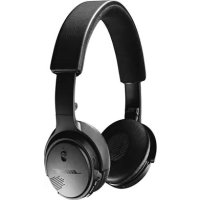
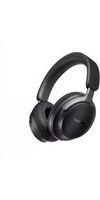
OnEar Wireless - Wireless Earbuds BOSE - Free user manual and instructions
Find the device manual for free OnEar Wireless BOSE in PDF.



| Product Type | On-ear wireless headphones |
| Brand | Bose |
| Model | OnEar Wireless |
| Dimensions (approx.) | 170 x 150 x 50 mm (folded) |
| Weight (approx.) | 150 g |
| Power Supply | Rechargeable lithium-ion battery, 5V 0.4A input |
| Battery Life | Up to 15 hours (full charge), 2 hours for 15 minutes of charge |
| Charging Time | Up to 3 hours |
| Wireless Technology | Bluetooth 4.1 (estimate), frequency 2400-2483.5 MHz |
| Bluetooth Range | Approximately 9 m (30 ft) |
| Main Functions | Play/pause, track skip, volume, call, voice assistant, multipoint pairing |
| Voice Guide | Multiple pre-installed languages, can be disabled |
| Care and Cleaning | Wipe with a soft, dry cloth; do not let moisture enter |
| Safety | Do not use at high volume for prolonged periods; do not drive while using the headset |
| Spare Parts and Repairability | Parts available through Bose customer service; battery replaceable by a professional |
| Warranty | Limited warranty, registration possible at global.Bose.com/register |
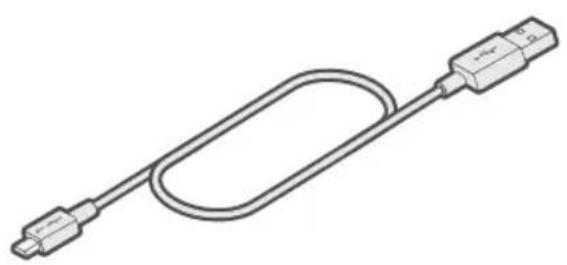
| Package Contents | Headset, carrying case, USB cable, 3.5 mm audio cable, documentation |
Frequently Asked Questions - OnEar Wireless BOSE
User questions about OnEar Wireless BOSE
0 question about this device. Answer the ones you know or ask your own.
Ask a new question about this device
Download the instructions for your Wireless Earbuds in PDF format for free! Find your manual OnEar Wireless - BOSE and take your electronic device back in hand. On this page are published all the documents necessary for the use of your device. OnEar Wireless by BOSE.
USER MANUAL OnEar Wireless BOSE
Please read and keep all safety and use instructions.
Important Safety Instructions
- Read these instructions.
- Keep these instructions.
- Heed all warnings.
- Follow all instructions.
- Do not use this apparatus near water.
- Clean only with a dry cloth.
- Only use attachments/accessories specified by the manufacturer.
- Refer all servicing to qualified personnel. Servicing is required when the apparatus has been damaged in any way, such as power-supply cord or plug is damaged, liquid has been spilled or objects have fallen into the apparatus, the apparatus has been exposed to rain or moisture, does not operate normally, or has been dropped.
WARNING/CAUTIONS
- Do NOT use the headphones at a high volume for any extended period.
- To avoid hearing damage, use your headphones at a comfortable, moderate volume level.
- Turn the volume down on your device before placing the headphones in/on your ears, then turn the volume up gradually until you reach a comfortable listening level.
- Do NOT use your headphones while driving or at any time in which the inability to hear surrounding sounds may present a danger to yourself or others.
- Focus on your safety and that of others if you use the headphones while engaging in any activity requiring your attention, e.g., while riding a bicycle or walking in or near traffic, a construction site or railroad, etc., and follow applicable laws regarding headphone use. Remove the headphones or adjust your volume to ensure you can hear surrounding sounds, including alarms and warning signals.
- Remove headphones immediately if you experience a warming sensation or loss of audio.
- Do NOT use mobile phone adapters to connect headphones to airplane seat jacks, as this could result in injury or property damage due to overheating.

Contains small parts which may be a choking hazard. Not suitable for children under age 3.

This product contains magnetic material. Consult your physician on whether this might affect your implantable medical device.
- To reduce the risk of fire or electrical shock, do NOT expose this product to rain, liquids or moisture.
- Do NOT expose this product to dripping or splashing, and do not place objects filled with liquids, such as vases, on or near the product.
- Do NOT make unauthorized alterations to this product.
- Use this product only with an agency approved power supply which meets local regulatory requirements (e.g., UL, CSA, VDE, CCC).
If the battery leaks, do not allow the liquid to come in contact with the skin or eyes. If contact is made, seek medical advice. - Do not expose products containing batteries to excessive heat (e.g. from storage in direct sunlight, fire or the like).
NOTE: This equipment has been tested and found to comply with the limits for a Class B digital device, pursuant to Part 15 of the FCC Rules. These limits are designed to provide reasonable protection against harmful interference in a residential installation. This equipment generates, uses, and can radiate radio frequency energy and, if not installed and used in accordance with the instructions, may cause harmful interference to radio communications. However, there is no guarantee that interference will not occur in a particular installation. If this equipment does cause harmful interference to radio or television reception, which can be determined by turning the equipment off and on, the user is encouraged to try to correct the interference by one or more of the following measures:
- Reorient or relocate the receiving antenna.
- Increase the separation between the equipment and receiver.
- Connect the equipment into an outlet on a circuit different from that to which the receiver is connected.
- Consult the dealer or an experienced radio/TV technician for help.
Changes or modifications not expressly approved by Bose Corporation could void the user's authority to operate this equipment.
This device complies with part 15 of the FCC Rules and with Industry Canada license-exempt RSS standard(s). Operation is subject to the following two conditions: (1) This device may not cause harmful interference, and (2) this device must accept any interference received, including interference that may cause undesired operation.
This device complies with FCC and Industry Canada radiation exposure limits set forth for general population. This transmitter must not be co-located or operating in conjunction with any other antenna or transmitter.
Meets IMDA Requirements.

Bose Corporation hereby declares that this product is in compliance with the essential requirements and other relevant provisions of Directive 2014/53/EU and all other applicable EU directive requirements. The complete declaration of conformity can be found at: www.Bose.com/compliance
For Europe:
Frequency band of operation 2400 to 2483.5 MHz
Bluetooth®: Maximum transmit power less than 20 dBm EIRP.
Bluetooth Low Energy: Maximum power spectral density less than 10 dBm/MHz EIRP.
This symbol means the product must not be discarded as household waste, and should be delivered to an appropriate collection facility for recycling. Proper disposal and recycling helps protect natural resources, human health and the environment. For more information on disposal and recycling of this product, contact your local municipality, disposal service, or the shop where you bought this product.
Management Regulation for Low-power Radio-frequency Devices
Article XII
According to "Management Regulation for Low-power Radio-frequency Devices" without permission granted by the NCC, any company, enterprise, or user is not allowed to change frequency, enhance transmitting power or alter original characteristic as well as performance to an approved low power radio-frequency devices.
Article XIV
The low power radio-frequency devices shall not influence aircraft security and interfere legal communications; If found, the user shall cease operating immediately until no interference is achieved. The said legal communications means radio communications operated in compliance with the Telecommunications Act.
The low power radio-frequency devices must be susceptible with the interference from legal communications or ISM radio wave radiated devices.
DON'T attempt to remove the rechargeable lithium-ion battery from this product. Contact your local Bose retailer or other qualified professional for removal.

Please dispose of used batteries properly, following local regulations. Do not incinerate.

Removal of the rechargeable lithium-ion battery in this product should be conducted only by a qualified professional. Please contact your local Bose retailer or see http://products.bose.com/static/compliance/index.html for further information.


| Names and Contents of Toxic or Hazardous Substances or Elements | ||||||
| Toxic or Hazardous Substances and Elements | ||||||
| Part Name | Lead(Pb) | Mercury(Hg) | Cadmium(Cd) | Hexavalent(CR(VI)) | PolybrominatedBiphenyl(PBB) | Polybrominated diphenylether(PBDE) |
| PCBs X 0 0 0 0 0 | ||||||
| Metal Parts X 0 0 0 0 0 | ||||||
| Plastic Parts 0 0 0 0 0 | 0 | |||||
| Speakers X 0 0 0 0 0 | ||||||
| Cables X 0 0 0 0 0 | ||||||
| This table is prepared in accordance with the provisions of SJ/T 11364.O: Indicates that this toxic or hazardous substance contained in all of the homogeneous materials for this part is below the limit requirement of GB/T 26572. | 5 | |||||
| X: Indicates that this toxic or hazardous substance contained in at least one of the homogeneous materials used for this part is above the limit requirement of GB/T 26572. | ||||||
Date of Manufacture: The eighth digit in the serial number indicates the year of manufacture; "8" is 2008 or 2018.
China Importer: Bose Electronics (Shanghai) Company Limited, Part C, Plan 9, No. 353 North Riying Road, China (Shanghai) Pilot Free Trade Zone
EU Importer: Bose Products B.V., Gorslaan 60, 1441 RG Purmerend, The Netherlands
Taiwan Importer: Bose Taiwan Branch, 9F-A1, No.10, Section 3, Minsheng East Road, Taipei City 104, Taiwan Phone Number: +886-2-2514 7676
Mexico Importer: Bose de Mexico, S. de R.L. de C.V., Paseo de las Palmas 405-204, Lomas de Chapultepec, 11000 Mexico, D.F. Phone Number: +5255 (5202) 3545
Input Rating: 5V = -0.4A
Charging temperature range: 41^ to 104^ ( 5^ to 40^ )
Discharging temperature range: -4^ to 113^ (-20^ to 45^)
The Bluetooth word mark and logos are registered trademarks owned by Bluetooth SIG, Inc. and any use of such marks by Bose Corporation is under license.
Apple, iPad, iPhone, and iPod are trademarks of Apple Inc., registered in the U.S. and other countries. The trademark "iPhone" is used in Japan with a license from Aiphone K.K.
Use of the Made for Apple badge means that an accessory has been designed to connect specifically to the Apple product(s) identified in the badge, and has been certified by the developer to meet Apple performance standards. Apple is not responsible for the operation of this device or its compliance with safety and regulatory standards.
Bose Corporation Headquarters: 1-877-230-5639
©2018 Bose Corporation. No part of this work may be reproduced, modified, distributed or otherwise used without prior written permission.
What's in the Carton?
Contents 8
Headphone Controls
Power on/off 9
Headphone functions 10
Media playback and volume functions 10
Call functions. 11
Battery Charging
Connect the USB cable 12
Check the headphone charging status 13
Status Indicators
Bluetooth*indicator 14
Battery indicator 14
Voice Prompts
Pre-installed languages 15
Change the language 15
Disable voice prompts 15
Bluetooth Connections
Pairing your mobile device. 16
Disconnect a mobile device 17
Reconnect a mobile device 17
Multiple Bluetooth Connections
Pair an additional mobile device. 18
Identify connected mobile devices 18
Switch between two connected devices 18
Reconnect a previously paired device 19
Clear the headache pairing list. 19
Wired Connections
Connect the 3.5 mm audio cable.. 20
Care and Maintenance
Store the headphones 21
Clean the headphones 22
Replacement parts and accessories 22
Limited warranty 22
Troubleshooting
Common solutions 23
Contents
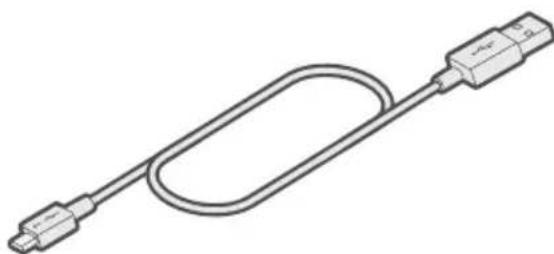
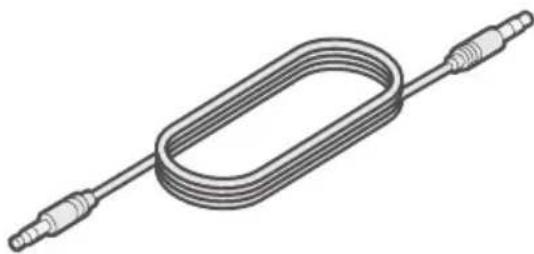
Confirm that the following parts are included:
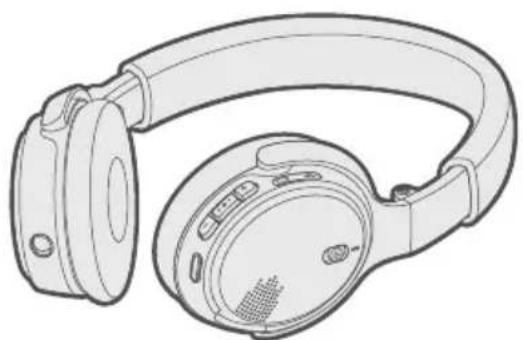
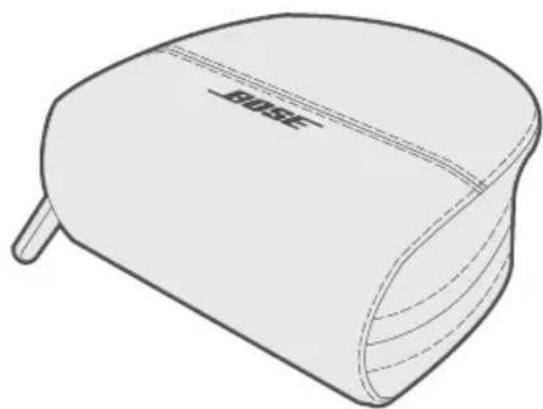
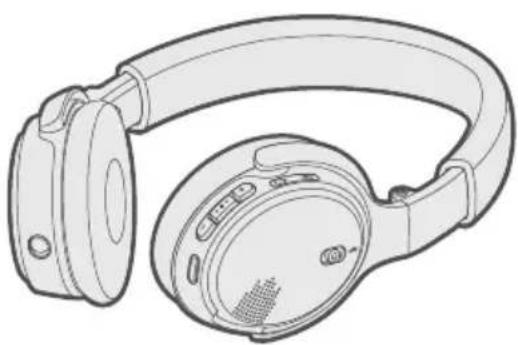
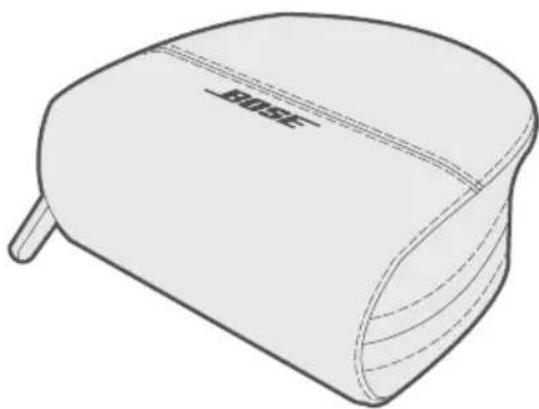
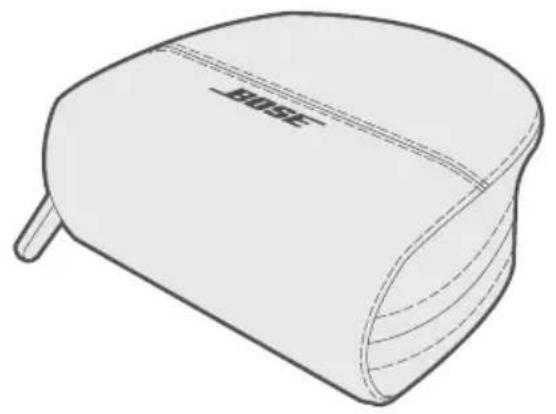
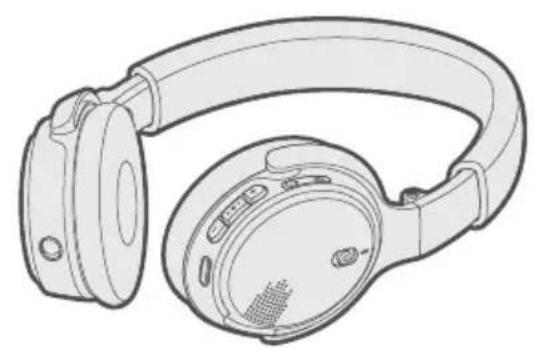
Bose® On-Ear Wireless headphones Carry case
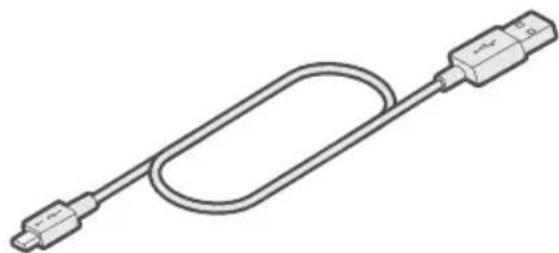
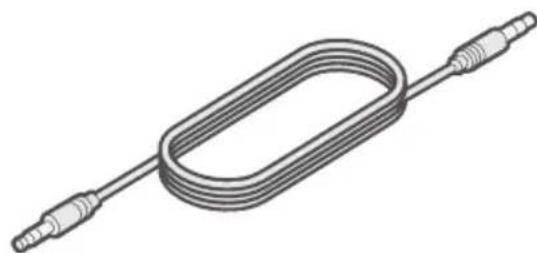
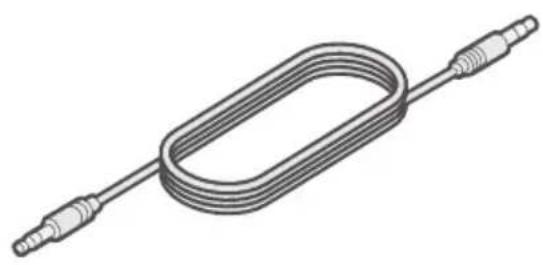
USB cable 3.5 mm audio cable
Note: If any part of your product is damaged, do not use it. Contact your authorized Bose dealer or Bose customer service.
Visit: global.Bose.com/Support/OEW
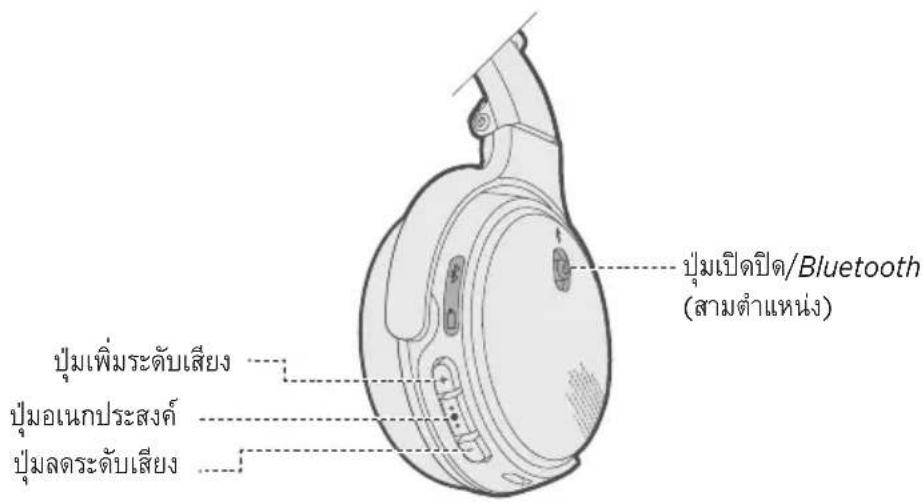
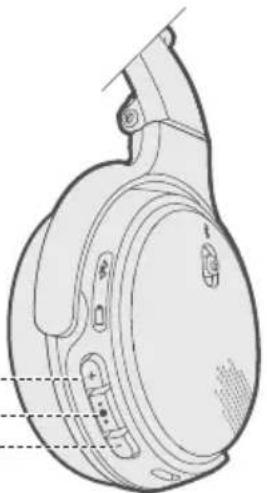
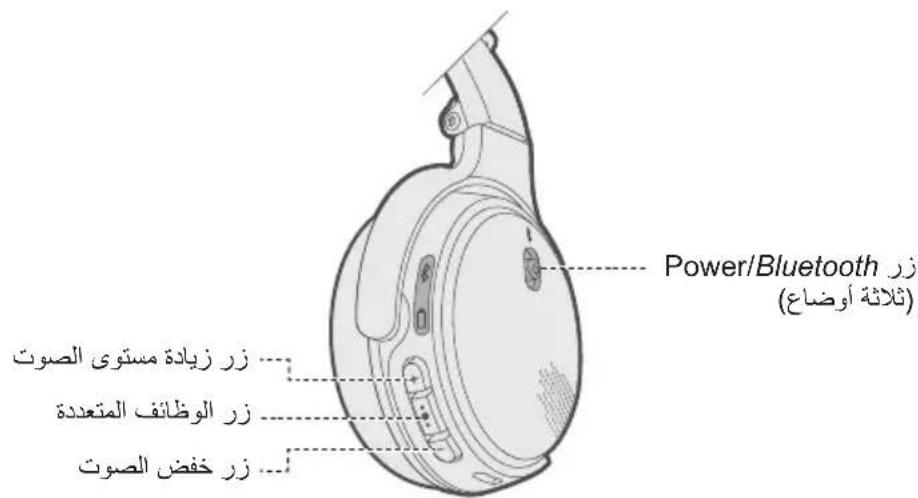
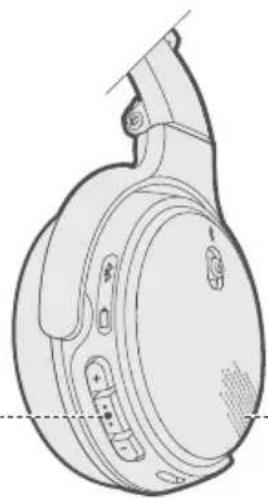
The headphone controls are located on the right earcup.
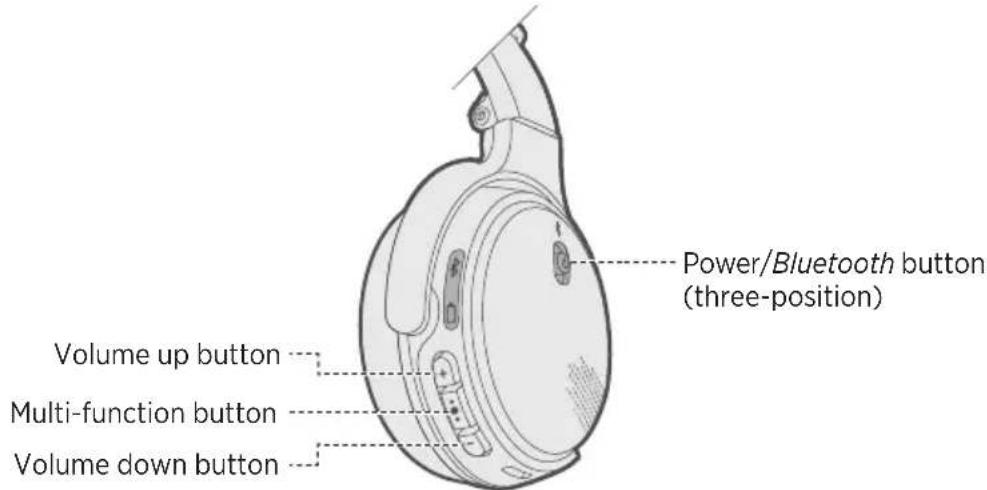
Power on/off
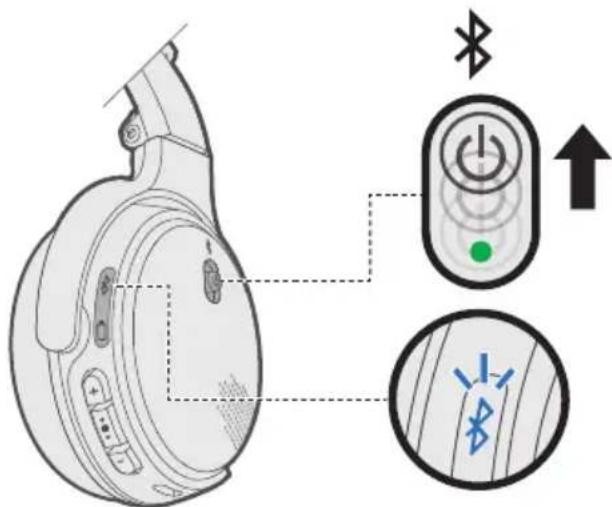
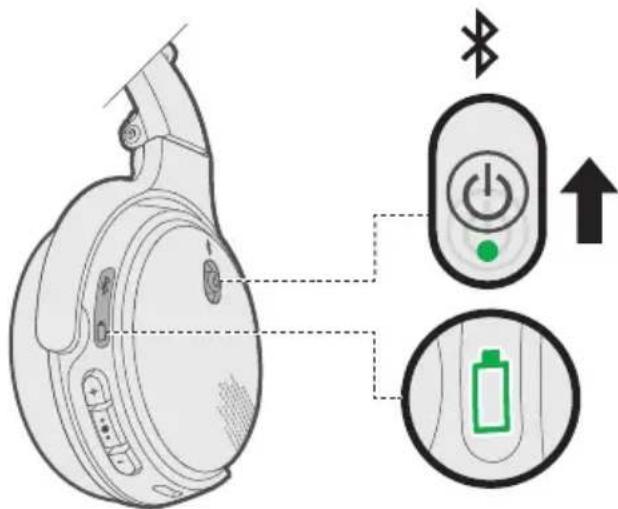
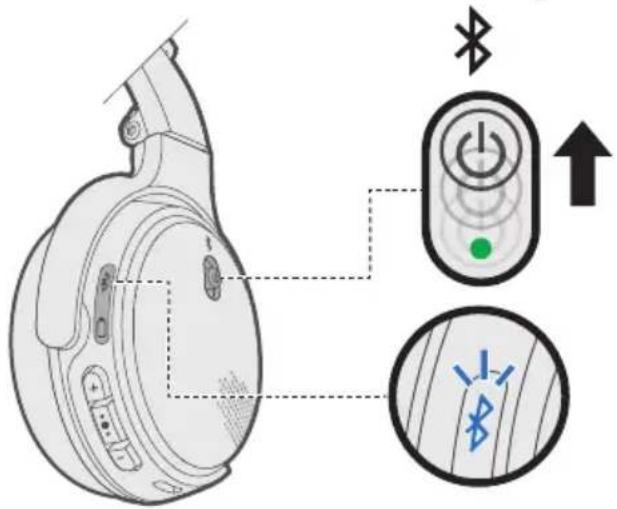
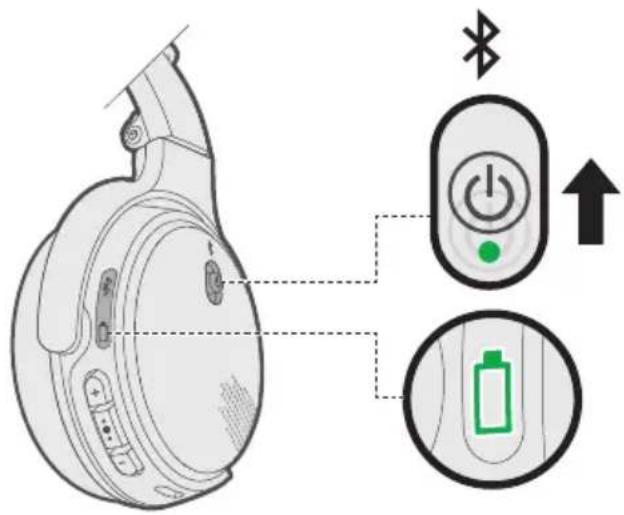
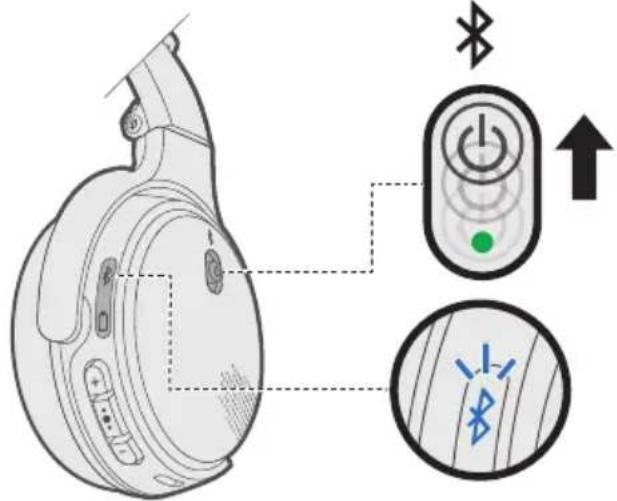
To power on: Slide the Power/Bluetooth button up.
The battery indicator glows green, glows amber or blinks red (to indicate the current battery level). You hear "Battery
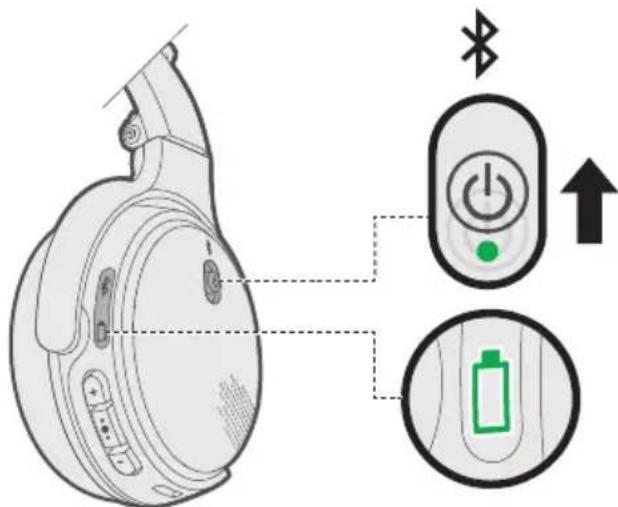
To power off: Slide Down. You hear the power-down tones.
Headphone functions
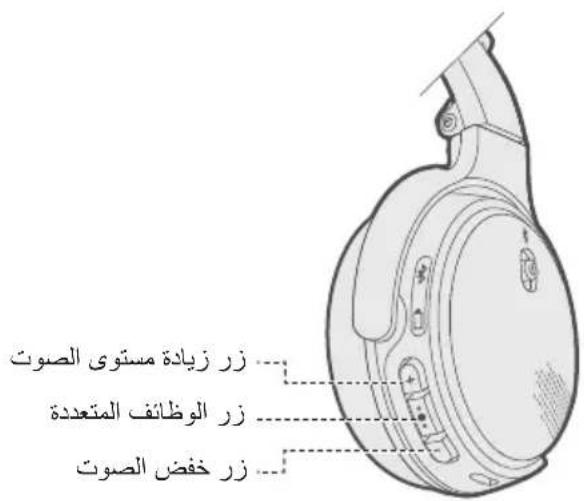
The headphone controls are located on the right earcup.
Media playback and volume functions
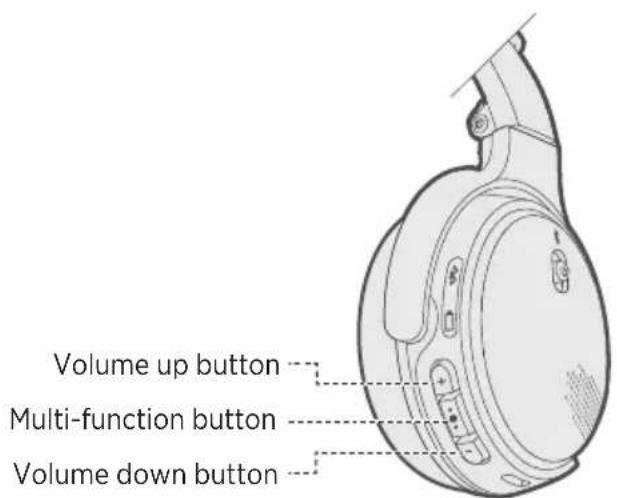
| Function What to do | |
| Play/Pause Press the Multi-function button . | ••• |
| Skip Forward Press twice quickly. | ••• |
| Skip Backward Press three times quickly. | ••• |
| Fast Forward Press twice quickly and hold the second press. | |
| Rewind Press three times quickly and hold the third press. | |
| Volume Up | Press + . |
| Volume Down | Press - . |
Call functions
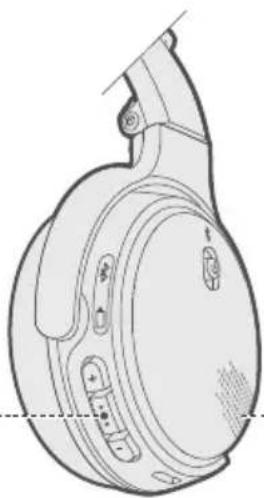
MicrophoneMulti-function button
| Function What to do | |
| Answer a call Press the Multi-function | button . .●● |
| End a call Press . | ●●● |
| Decline an incoming call Press and hold | for one second.●● |
| Answer a second incoming call and put the current call on hold | While on a call, press ●●● |
| Decline a second incoming call and stay on current call | While on a call, press and hold ●●● for one second. |
| Transfer a call to/from your mobile device | While on a call, press and hold ●●● for three seconds. |
| Switch between two calls With two active calls, press twice quickly.●● | |
| Create a conference call | With two active calls, press and hold ●●● for three seconds. |
| Access voice control to make a call | While not on a call, press and hold ●●● for one second. Your mobile device may not support voice control. Refer to your device owner's guide for more information. |
| Mute/unmute a call | While on a call, press + and - simultaneously. |
Connect the USB cable
CAUTION: Use this product only with an agency-approved power supply that meets local regulatory requirements (for example: UL, CSA, VDE, CCC).
- Plug the small end of the USB cable into the micro-USB connector on the right earcup.
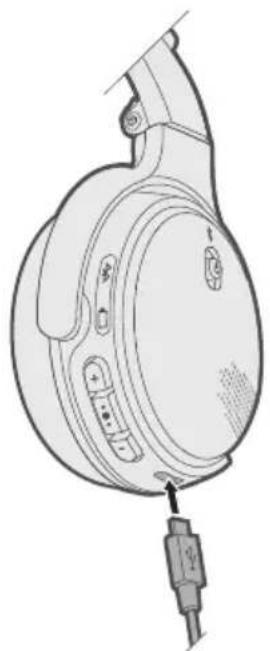
- Plug the other end of the USB cable into a wall charger or computer that is powered on.
Notes:
- The headphones do not play while charging.
While charging, the battery indicator glows amber. - When the battery is fully charged, the battery indicator glows green.
- Allow up to three hours to fully charge the battery. A full charge will power the headphones for up to 15 hours. A 15-minute partial charge will power the headphones for 2 hours.
Check the headphone charging status
Each time you power on the headphones, the voice prompt announces the headphone battery charge level. To visually check the battery, the indicator is located on the right earcup.
While the headphones are in use, the battery indicator blinks red when the battery needs charging. For more information, see "Battery indicator" on page 14.
Note: If connected to an Apple device, the device displays the headphone battery level near the upper right corner of the screen and in the notification center.
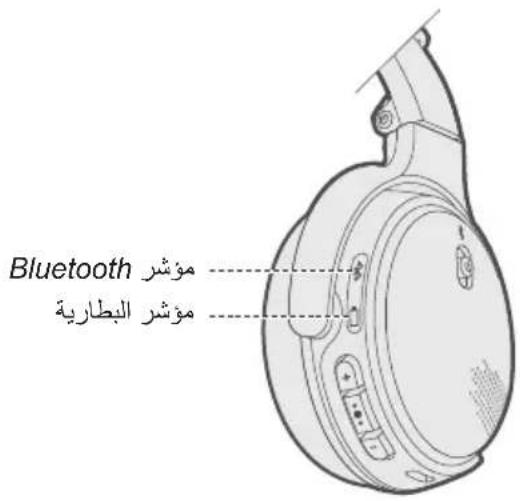
The Bluetooth and battery indicators are located on the right earcup.
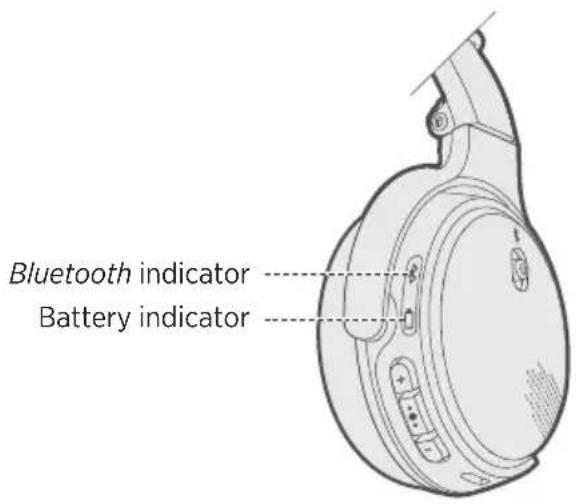
Bluetooth indicator
Shows the connection status of a mobile device.
| Behavior System state | |
| Blinking blue Ready to pair | |
| Blinking white Connecting | |
| Solid white Connected |
Battery indicator
Shows the battery charge level.
| Behavior System state | |
| Solid green Medium to full charge | |
| Solid amber Low charge | |
| Blinking red Need to charge | |
| Solid red Charging error. Contact | Bose customer service. |
Voice prompts guide you through the pairing and connecting processes, announce the battery level and identify connected devices. You can customize voice prompts using the buttons on the headphones.
Pre-installed languages
The following languages are pre-installed on your headphones:
- English - Spanish - French - German
- Mandarin - Japanese - Italian - Portuguese
Dutch - Russian - Polish
To check for additional languages
Download the Bose® Updater.
Visit: btu.Bose.com
Change the language
- Press and hold + simultaneously until you hear the voice prompt for the first language option.
- Press + or - to move through the list of languages.
- When you hear your language, press and hold to select it.
Disable voice prompts
Press and hold + and - simultaneously until you hear "Voice prompts off."
Note: Repeat to re-enable voice prompts.
Bluetooth wireless technology lets you stream music from mobile devices such as smartphones, tablets and laptop computers. Before you can stream music, pair the device with your headphones.
Pairing your mobile device
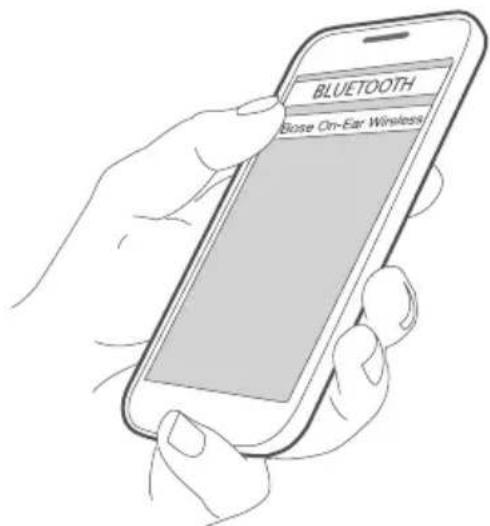
- With your headphones powered on, slide the Power/Bluetooth button up to the Bluetooth symbol and hold until you hear "Ready to pair" (if wearing the headphones) or you see the Bluetooth indicator blink blue (if holding the headphones).
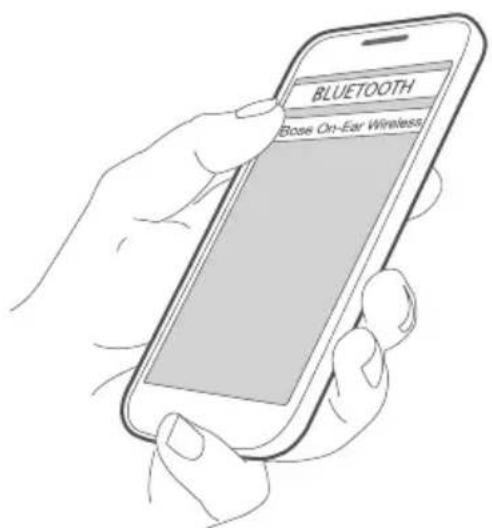
- On your mobile device, enable the Bluetooth feature.
Tip: The Bluetooth feature is usually found in the Settings menu.
- Select your headphones from the device list.
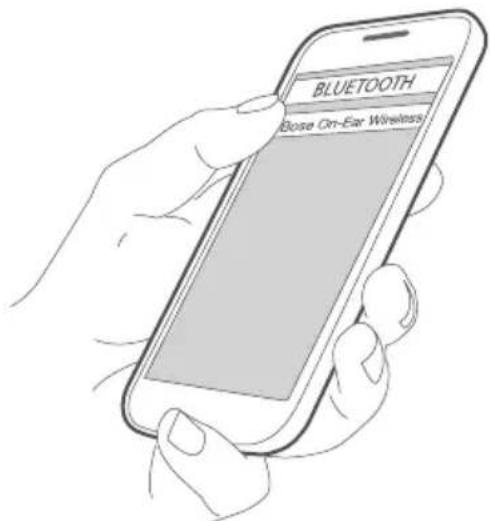
Once paired, you hear "Connected to
Disconnect a mobile device
Turn off the Bluetooth feature on your mobile device.
Reconnect a mobile device
When powered on, the headphones try to reconnect with up to two of the most recently connected devices.
Note: The devices must be within range (30 ft. or 9 m) and powered on.
You can pair additional devices to your headphones. These Bluetooth connections are controlled with the Power/Bluetooth button.
Note: Voice prompts must be enabled to control multiple Bluetooth connections (see page 15).
Pair an additional mobile device
You can store up to eight paired mobile devices in the headphone pairing list, and your headphones can be actively connected to two devices at a time.
To pair an additional device, repeat the instructions for "Pairing your mobile device" on page 16.
Note: You can play audio from only one device at a time.
Identify connected mobile devices
Slide the Power/Bluetooth button up to the Bluetooth symbol * and release to hear the devices that are currently connected.
Switch between two connected devices
- Pause audio on your first device.
- Play audio on your second device.
Reconnect a previously paired device
- Slide up to and release to hear the device that is currently connected.
- Slide up to again within three seconds to connect to the next device in the headphone pairing list.
- Repeat until you hear the desired device name.
- Play audio on the connected device.
Clear the headphone pairing list
- Slide up to and hold for 10 seconds, until you hear "Bluetooth device list cleared."
- Delete your Bose® On-Ear Wireless headphones from the Bluetooth list on your mobiledevice.
All devices are cleared and the headphones are ready to pair.
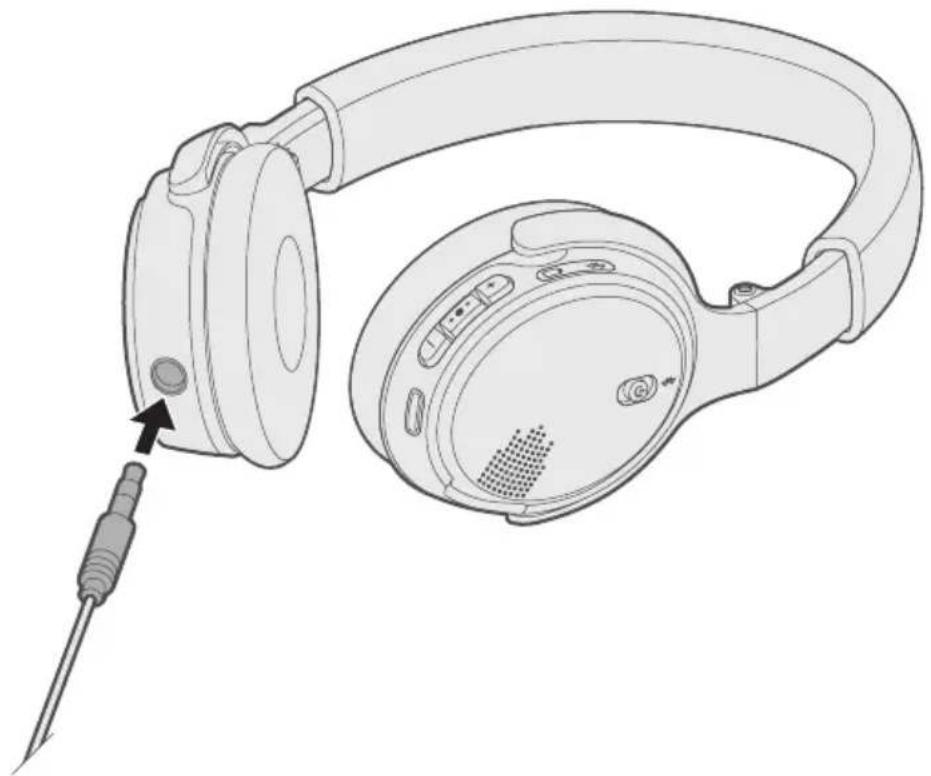
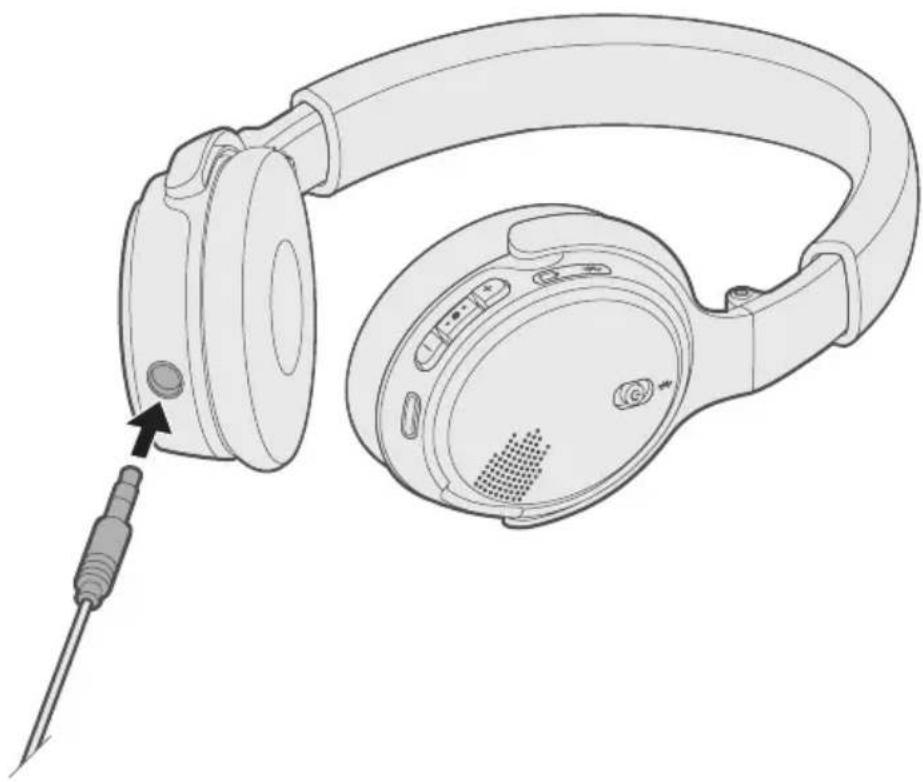
Connect the 3.5 mm audio cable
Use the supplied cable to connect a non-wireless device to the headphones, or if the headphone battery is depleted.
Note: Connecting to a device with the cable disables the headphones' microphone, preventing you from using the headphones for phone calls or voice commands.
-
Power off the headphones (see page 9).
-
Insert the cable into the connector on the left earcup.
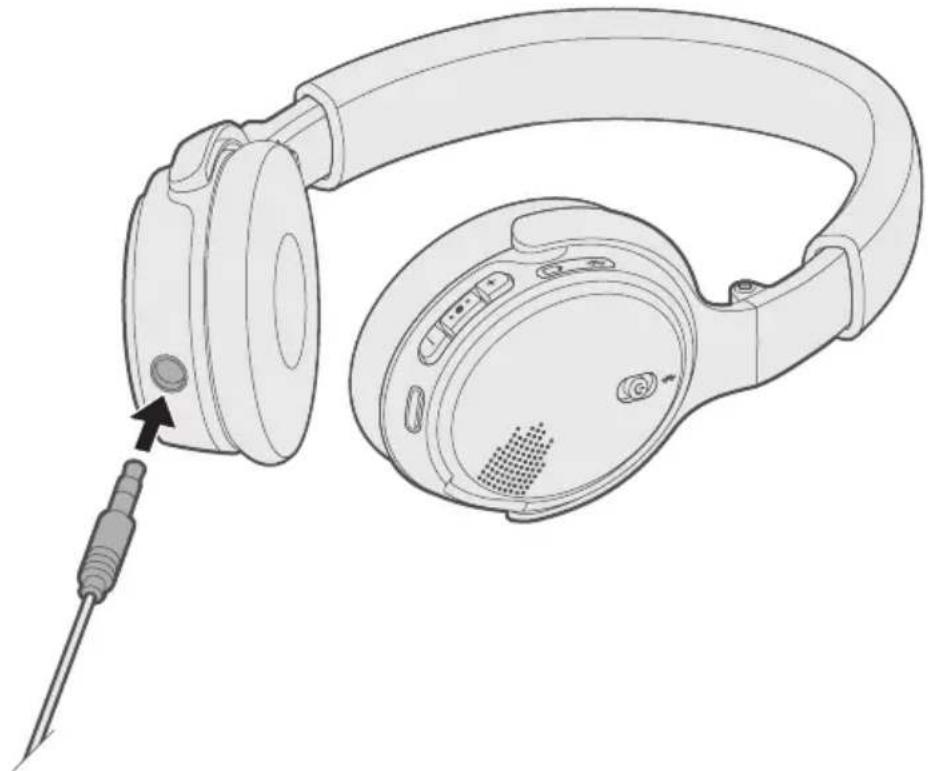
- Insert the other end of the cable into the connector on your device.
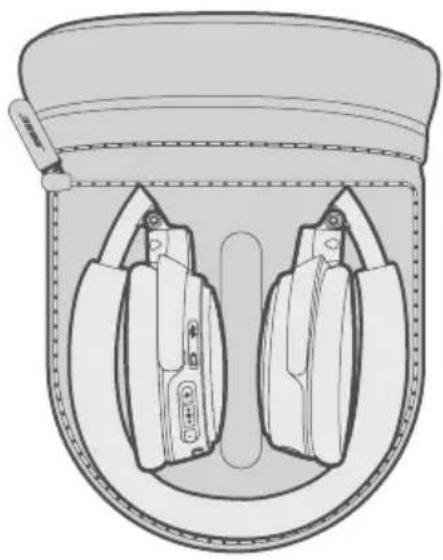
Store the headphones
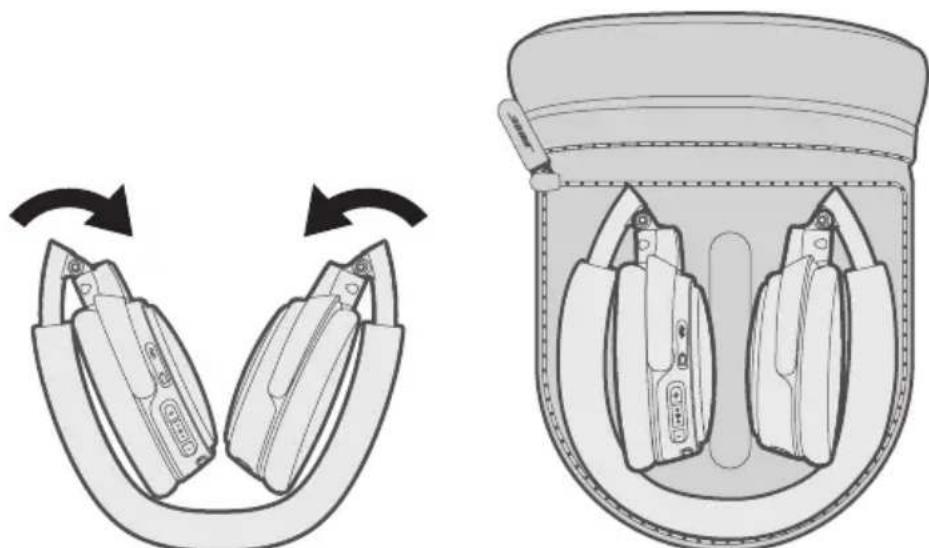
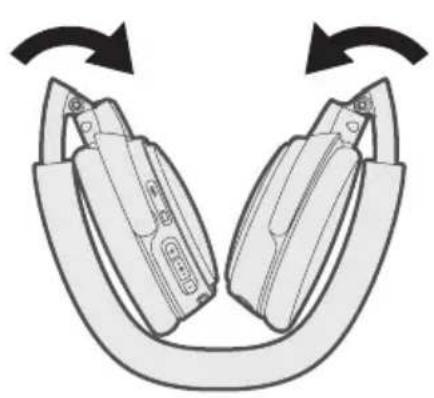
The earcups fold inward for easy, convenient storage. Place the folded headphones into the case with the soft divider between the two earcups.
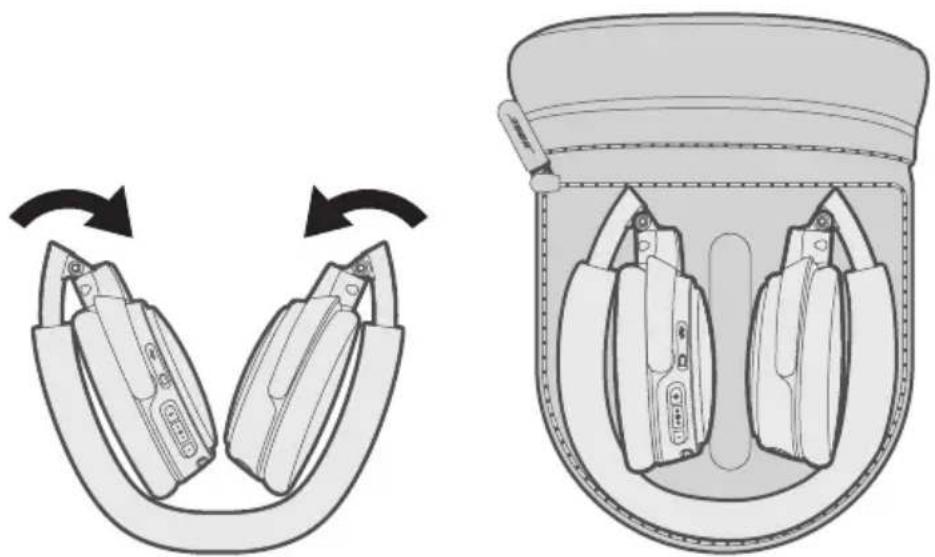
Notes:
- Turn the headphones off when not in use.
- Fully charge the battery before storing the headphones for more than a few months.
Clean the headphones
Your headphones may require periodic cleaning.
- Wipe the outside surfaces with a soft, dry cloth.
- Do not allow moisture to get inside the earcups or the audio input connector.
Replacement parts and accessories
Replacement parts and accessories can be ordered through Bose customer service. Visit: global.Bose.com/Support/OEW
Limited warranty
The headphones are covered by a limited warranty. Visit our website at global.Bose.com/warranty for details of the limited warranty.
To register your product, visit global.Bose.com/register for instructions. Failure to register will not affect your limited warranty rights.
Common solutions
If you experience problems with your headphones:
- Power on the headphones (see page 9).
- Check the state of the status indicators (see page 14).
- Make sure your mobile device supports Bluetooth (see page 16).
- Charge the battery (see page 12).
- Increase the volume on your headphones, device and music app.
- Try connecting another device (see page 16).
If you could not resolve your issue, use the table below to identify symptoms and solutions to common problems. If you are still unable to find a resolution, contact Bose customer service.
Visit: global.Bose.com/Support/OEW
| Symptom Solution | |
| Headphones don't power on | ·Make sure the Power/Bluetooth button is in the middle position (see page 9). ·Charge the battery (see page 12). |
| Headphones won't pair with mobile device | ·On your device: -Turn the Bluetooth feature off and then on. -Delete your headphones from the Bluetooth list on your device. Pair again (see page 16). ·Move your device closer to the headphones and away from any interference or obstructions. ·Pair a different device (see page 16). ·Visit: global.Bose.com/Support/OEW to see how-to videos. ·Clear the headphone pairing list (see page 19). Pair again. |
| No sound | ·If your device is wirelessly connected to the headphones: - Slide the Power/Bluetooth button up to the Bluetooth symbol and release to hear the connected device. Make sure you are using the correct device. - Move your device closer to the headphones and away from any interference or obstruction. - Use a different music source. - Pair a different device (see page 16). - If two devices are connected, pause the first device and play the other mobile device. - If two devices are connected, move the devices within range of the headphones (30 ft. or 9 m). ·If your device is connected to the headphones using the cable: - Secure both ends of the cable. - Power off the headphones (see page 9). - Connect another device. |
| Poor sound quality | ·If your device is wirelessly connected to the headphones: - Use a different music source. - Pair a different mobile device. - Disconnect the second device. - Move the device closer to the headphones, and away from any interference or obstructions. ·If your device is connected to the headphones using the cable: - Secure both ends of the cable. - Connect another device. |
Management Regulation for Low-power Radio-frequency Devices
ArticleXII
I henhold til "Management Regulation for Low-power Radio-frequency Devices" ma ingen virksomhed, organisation erller bruger uten tilladelse fra NCC aendre frekvensen, oge transmissonseffekten ell erandre de oprindelige egenskaber ell ydeevnen for godkendte laveffektradiofrekvenenheder.
ArticleXIV
Importar i Kina: Bose Electronics (Shanghai) Company Limited, Part C, Plan 9, No. 353 North Riying Road, Kina (Shanghai) Pilot Free Trade Zone
Importar i EU: Bose Products B.V., Gorslaan 60, 1441 RG Purmerend, Holland
Importor i Taiwan: Bose Taiwan Branch, 9F-A1, No.10, Section 3, Minsheng East Road, Taipei City 104, Taiwan
Telefonnummer: +886-2-2514 7676
Importar Mexico: Bose de Mexico, S. de R.L. de C.V., Paseo de las Palmas 405-204, Lomas de Chapultepec, 11000 Mexico, D.F. Telefonummer: +5255 (5202) 3545
Inputclassification: 5V = 0.4A
Temperaturomrade for opladning: 5^ til 40^
Temperaturomrade for afladning: -20^ til 45^
Download Bose® Updater.
Besøg: btu.Bose.com
Shift sproget
Begr oneself garanti
China-Import: Bose Electronics (Shanghai) Company Limited, Part C, Plan 9, No. 353 North Riying Road, China (Shanghai) Pilot Free Trade Zone
EU-Import: Bose Products B.V., Gorslaan 60, 1441 RG Purmerend, Niederlande
Taiwan-Import: Bose Taiwan Branch, 9F-A1, No.10, Section 3, Minsheng East Road, Taipei City 104, Taiwan
Telefonnummer: +886-2-2514 7676
Mexiko-Import: Bose de Mexico, S. de R.L. de C.V., Paseo de las Palmas 405-204, Lomas de Chapultepec, 11000 Mexico, D.F. Telefonummer: +5255 (5202) 3545
Importeur in China: Bose Electronics (Shanghai) Company Limited, Part C, Plan 9, No. 353 North Riying Road, China (Shanghai) Pilot Free Trade Zone
Importeur in de EU: Bose Products B.V., Gorslaan 60, 1441 RG Purmerend, Nederland
Importeur in Taiwan: Bose Taiwan Branch, 9F-A1, No.10, Section 3, Minsheng East Road, Taipei City 104, Taiwan Telefoonnummer: -886-2-2514 7676
Importeur in Mexico: Bose de Mexico, S. de R.L. de C.V., Paseo de las Palmas 405-204, Lomas de Chapultepec, 11000 Mexico, D.F. Telefoonnummer: -5255 (5202) 3545
Ingangsspecificities: 5V = - - 0.4A
Oplaadtemperatuur: 5^ tot 40^
Gaaar: global.Bose.com/Support/OEW
Importador en China: Bose Electronics (Shanghai) Company Limited, Part C, Plan 9, No. 353 North Riying Road, China (Shanghai) Pilot Free Trade Zone
Importador en UE: Bose Products B.V., Gorslaan 60, 1441 RG Purmerend, Paises Bajos
Importador en Taiwán: Sucursal de Bose en Taiwán, 9F-A1, No.10, Section 3, Minsheng East Road, Taipei City 104, Taiwan
Número de téléphone: +886-2-25147676
Importador en Mexico: Bose de Mexico, S. de R.L. de C.V., Paseo de las Palmas 405-204, Lomas de Chapultepec, 11000 Mexico, D.F.Numero de téléphone: +5255 (5202) 3545
Visite: global.Bose.com/Support/OEW
Cable USB Cable audio 3.5 mm
Consultez le site: global.Bose.com/Support/OEW
Importatore per la Cina: Bose Electronics (Shanghai) Company Limited, Part C, Plan 9, No. 353 North Riying Road, China (Shanghai) Pilot Free Trade Zone
Concessioni Bluetooth
Visitare: global.Bose.com/Support/OEW
Kinai importor: Bose Electronics (Shanghai) Company Limited, Part C, Plan 9, No. 353 North Riying Road, Kina (Shanghai) Pilot Free Trade Zone
EU-importor: Bose Products B.V., Gorslaan 60, 1441 RG Purmerend, The Netherlands
Tajvani importor: Bose Taiwan Branch, 9F-A1, No.10, Section 3, Minsheng East Road, Taipei City 104, Tajvan. Telefonszam: +886-2-2514 7676
Mexikói importo: Bose de México, S. de R.L. de C.V., Paseo de las Palmas 405-204, Lomas de Chapultepec, 11000 Mexico, D.F. Telefonszám: +5255 (5202) 3545
Nevleges bemeneti erteke: 5V = - = 0,4A
Management Regulation for Low-power Radio-frequency Devices
Artikkel XII
Importor for Kina: Bose Electronics (Shanghai) Company Limited, Part C, Plan 9, No. 353 North Riying Road, Kina (Shanghai) Pilot Free Trade Zone
Importor for EU: Bose Products B.V., Gorslaan 60, 1441 RG Purmerend, Nederland
Importor for Taiwan: Bose Taiwan Branch, 9F-A1, No.10, Section 3, Minsheng East Road, Taipei City 104, Taiwan Telephone number: +886-2-25147676
Importor for Mexico: Bose de Mexico, S. de R.L. de C.V., Paseo de las Palmas 405-204, Lomas de Chapultepec, 11000 Mexico, D.F. Telefonummer: +5255 (5202) 3545
Hovedkontor for Bose Corporation: +1-877-230-5639
Importer — Chiny: Bose Electronics (Shanghai) Company Limited, Part C, Plan 9, No. 353 North Riying Road, China (Shanghai) Pilot Free Trade Zone
Importer - UE: Bose Products B.V., Gorslaan 60, 1441 RG Purmerend, Holandia
Importer - Tajwan: Bose Taiwan Branch, 9F-A1, No.10, Section 3, Minsheng East Road, Taipei City 104, Tajwan. Numer telefonu: +886-2-2514 7676
Importer - Meksyk: Bose de Mexico, S. de R.L. de C.V., Paseo de las Palmas 405-204, Lomas de Chapultepec, 11000 Mexico, D.F. Numer Telefonu: +5255 (5202) 3545
Zasilanie: 5V 0.4A
Kinainportor: Bose Electronics (Shanghai) Company Limited, Part C, Plan 9, No. 353 North Riying Road, Kina (Shanghai) Pilot Free Trade Zone
EU-importor: Bose Products B.V., Gorslaan 60, 1441 RG Purmerend, Nederländerna
Taiwanimportor: Bose Taiwan Branch, 9F-A1, No.10, Section 3, Minsheng East Road, Taipei City 104, telfonummer Taiwan: +886-2-2514 7676
Mexikoimportor: Bose de Mexico, S. de R.L. de C.V., Paseo de las Palmas 405-204, Lomas de Chapultepec, 11000 Mexico, D.F. Telefonummer: +5255 (5202) 3545
Indata:5V0.4A
Temperaturinterval for uppladdning: 5^ till 40^
Temperaturinterval for urladdning: -20^ till 45^
Bluetooth Low Energy: 10 dBm/MHz EIRP
n
12
| (Pb) | (2019) (Hg) | (2019) (Cd) | (2019) (CR(VI)) | (2019) (PBB) | (2019) (PBDE) | |
| PCB | X | 0 | 0 | 0 | 0 | 0 |
| X | 0 | 0 | 0 | 0 | 0 | |
| 0 | 0 | 0 | 0 | 0 | 0 | |
| X | 0 | 0 | 0 | 0 | 0 | |
| X | 0 | 0 | 0 | 0 | 0 | |
| 5 | ||||||
7nnnnaa 8 nnnnnae nnne nnnnnae nnne nnnnnae "8" nnne nnne nn.2008 nnne nn.2018
Bose Electronics (Shanghai) Company Limited, Part C, Plan 9, No. 353 North Riying Road,
China (Shanghai) Pilot Free Trade Zone
EU: Bose Products B.V., Gorslaan 60, 1441 RG Purmerend, The Netherlands
Bose Taiwan Branch, 9F-A1, No.10, Section 3, Minsheng East Road, Taipei City 104,
Apple, iPad, iPhone uas iPod uuauuauuauuauu Apple Inc. uuuuuuuuuuuuuuuuuuuuuuuuuuuuuuuuuuuuuuuuuuuuuuuuuuuuuuuuuuuuuuuuuuuuuuuuuuuuuuuuuuuuuuuuuuuuuuuuuuuuuuuuuuuuuuuuuuuuuuuuuuuuuuuuuuuuuuuuuuuuuuuuuuuuuuuuuuuuuuuuuuuuuuuuuuuuuuuuuuuuuuuuuUU
Made for Apple wunwnanwnnwnnnnwnnnn nn nannnnnnaaennnnae Waaonnnnnaennne Apple
nuuwwwnwnnnnwnnnnwnn nn nannnnnnaaennnnae Waaonnnnnnnaennnnnae
wauwwwnnnnnnnnnnwnn nn nannnnnnaaennnnae Waaonnnnnnnaennnnnae
wauwwwnnnnnnnnnnnnwnn nn nannnnnnaaennnnae Waaonnnnnnnaennnnnae
Bose Corporation: 1-877-230-5639
© 2018 Bose Corporation wumnun unu uwww wunwnunauan ananr nnnn nn annn
T
a
8
W
9
Wnwnnnn W 10
10
Wanunns 11
1
12
13
Wuaovn7u
Wuaonanu Bluetooth 14
W Bose On-Ear Wireless
nnaaannnn
USB
3.5
Bose nanaananaananaananaananaananaananaananaananaananaananaananaananaananaananaananaananaananaananaananaananaananaananaananaananaananaananaananaananaananaananaananaananaananaananaananaananaananaananaananaananaananaananaananaananaananaananaananaananaananaanana ananae
a
//
muaa: uauu/Bluetooth
1
mJaa: 1000
Wn2uW
aannnnnnaeennnnnne aennnnnnne
n
1
| bahia บุญcescularis | |
| bahia zenso icosahedron | |
| bahia icosahedron | |
| bahia icosahedron | |
| bahia icosahedron | |
| Bose |
n
7777777777777777777777777777
- English - Spanish - French - German
- Mandarin - Japanese - Italian - Portuguese
Dutch • Russian • Polish
H
Bose'Updater
: btu.Bose.com
山
- nna
- n+na-wwaaanmnn
3.
y
+
HJ19: 1
nnaa aee 1
n
- Wawwawwawwawwawwawwawww/Bluetooth 0 wuwnwnwnwnnwnnbluetooth
Wauanwnwnwnwnwnwnwnwnwnwnwnwnwnwnwnwnwnwnwnwnwnwnwnwnwnwnwnwnwnwnwnwnwnwnwnwnwnwnwnwnwnwnwnwnwnwnwnwnwnwnwnwnwnwnwnwnwnwnwnwnwnwnwn
- 1uWnBnBnBnBnBnBnBnBnBnBnBnBnBnBnBnBnBnBnBnBnBnBnBnBnBnBnBnBnBnBnBnBnBnBnBnBnBnBnBnBnBnBnBnBnBnBnBnBnBnBn
3.
"
- 10 wnnn nnnn nnnn nnnn nnnn nnnn nnnn nnnn nnnn nnnn nnnn nnnn nnnn nnnn nnnn nnnn nnnn nnnn nnnn nnnn nnnn nnnn nnnn nnnn nnnn nnnn nnnn nnnn nnnn nnnn nnnn nnnn nnnn nnnn nannn nnnn nnnn nnnn nnnn nnnn nnnn nnnn nnnn nnnn nnnn nnnn nnnn nnnn nnnn nnnn nnnn nnnn nnnn nnnn nnnn nnnn nnnn nnnn nnnn nnnn nnnn nnnn nnnn
- Bose On-Ear Wireless BluetoothBluetooth
3.5
nnaaannnnnnae nnaaaananaananaananaananaananaananaananaananaananaananaananaananaananaananaananaananaananaananaananaananaananaananaananaananaananaananaananaananaananaananaananaananaananaananaananaananaananaananaananaananaananaananaananaananaananaananaananaananaananaananaan
- 9
2.
3.
#
1978
Jn
·
W
y
- ·
2
Bose
global.Bose.com/Support/OEW
n
global.Bose.com/warranty
nannnnnnaaee nnnnne aenennnne nee annnee global.Bose.com/register nnnnnnnnnnnnnnnnnnnnnnnnnnnnnnnnnnnnnnnnnnnnnnnnnnnnnnnnnnnnnnnnnnnnnnnnnnnnnnnnnnnnnnnnnnnnnnnnnnnnnnnnnnnnnnnnnnnnnnnnnnnnn
#
nannnnnns
中國國數:Bose Electronics (Shanghai) Company Limited, Part C, Plan 9, No. 353 North Riying Road, China (Shanghai) Pilot Free Trade Zone
EU Suilmerte: Bose Products B.V., Gorslaan 60, 1441 RG Purmerend, The Netherlands
[886-2-2514 7676]
www.Bose.com/compliance
欧洲:
工作频段2400至2483.5MHz:
www.Bose.com/compliance
欧洲:
請造訪:global.Bose.com/Support/OEW
中国におはし输入元:Bose Electronics (Shanghai) Company Limited, Part C, Plan 9, No. 353 North Riying Road, China (Shanghai) Pilot Free Trade Zone
EUにお願いいたします输入元:Bose Products B.V., Gorslaan 60, 1441 RG Purmerend, The Netherlands
台湾におはし輸入元:Bose Taiwan Branch, 9F-A1, No.10, Section 3, Minsheng East Road, Taipei City 104, Taiwan Phone Number: +886-2-2514 7676
Meksho 11000 Mexico, D.F. Phone Number: +5255 (5202) 3545
入力定格:5V- - - 0.4A
Bose Corporation Headquarters: 1-877-230-5639
43 = 2.68
2483.5 2400 a aai
Ism y aal 8y jy 8y 8y 8y 8y 8y 8y 8y 8y 8y 8y 8y 8y
a 1

JUAYI JI JI, BOO JI JI, JI JI JI, JI JI JI, JI JI JI, JI JI JI, JI JI JI, JI JI JI, JI JI JI, JI JI JI, JI JI JI, JI JI JI, JI JI JI, JI JI JI, JI JI JI, JI JI JI, JI J11111111111111111111111111111111111111111111111111


| \( \delta \) .\( p_{\text{压强}} \) \( \delta \) .\( q_{\text{压力}} \) \( \delta \) .\( \delta \) .\( \delta \) .\( \delta \) .\( \delta \) .\( \delta \) .\( \delta \) .\( \delta \) .\( \delta \) .\( \delta \) .\( \delta \) .\( \delta \) .\( \delta \) .\( \delta \) .\( \delta \) .\( \delta \) .\( \delta \) .\( \delta \)\( \delta \) .\( \delta \) .\( \delta \) .\( \delta \) .\( \delta \) .\( \delta \) .\( \delta \) .\( \delta \) .\( \delta \) .\( \delta \) .\( \delta \) .\( \delta \) .\( \delta \) .\( \delta \) .\( \delta \) .\( \delta \) .\( \delta \) (PBDE) | \( \delta \) .\( p_{\text{压强}} \) \( \delta \) .\( q_{\text{压力}} \) \( \delta \) .\( \delta \) .\( \delta \) .\( \delta \) .\( \delta \) .\( \delta \) .\( \delta \) .\( \delta \) .\( \delta \) .\( \delta \) .\( \delta \) . \( \delta \) .\( \delta \) .\( \delta \) .\( \delta \) .\( \delta \) .\( \delta \) .\( \delta \) .\( \delta \) .\( \delta \) .\( \delta \) .\( \delta \) .\( \delta \) .\( \delta \) .\( \delta \) .\( \delta \) .\( \delta \) .\( \delta (PBB) \) | \( \delta \) .\( p_{\text{压强}} \) \( \delta \) .\( q_{\text{压力}} \) \( \delta \) .\( \delta \) .\( \delta \) .\( \delta \) .\( \delta \) .\( \delta \) .\( \delta \) .\( \delta \) .\( \delta \) .\( \delta \) .\( \delta \) (PBB) | \( \delta \) .\( p_{\text{压强}} \) \( \delta \) .\( q_{\text{压力}} \) \( \delta \) .\( \delta \) .\( \delta \) .\( \delta \) .\( \delta \) .\( \delta \) .\( \delta \) .\( \delta \) .\( \delta \) .\( \delta \) .\( \delta \)\( \delta \) .\( \delta \) .\( \delta \) .\( \delta \) .\( \delta \) .\( \delta \) . (PBB) | \( \delta \) .\( p_{\text{压强}} \) \( \delta \) .\( q_{\text{压力}} \) \( \delta \) .\( \delta \) .\( \delta \) .\( \delta \) .\( \delta \) .\( \delta \) .\( \delta \) .\( \delta \) .\( \delta \) .\( \delta \) .\( \left(\mathrm {CR}(\mathrm {VI})\right) \) | \( \delta \) .\( p_{\text{压强}} \) \( \delta \) .\( q_{\text{压力}} \) \( \delta \) .\( \delta \) .\( \delta \) .\( \delta \) .\( \left(\mathrm {Cd}\right) \) | \( \delta \) .\( p_{\text{压强}} \) \( \delta \) .\( q_{\text{压力}} \) \( \delta \) .\( \left(\mathrm {Cd}\right) \) | \( \delta \) .\( p_{\text{压强}} \) \( \delta \) .\( q_{\text{压力}} \) \( \left(\mathrm {Cd}\right) \) | \( \delta \) .\( p_{\text{压强}} \) \( \delta \) .\( q_{\text{压力}} \) \( \left(\mathrm {Hg}\right) \) | \( \delta \) .\( p_{\text{压强}} \) \( \delta \) .\( q_{\text{压力}} \) \( \left(\mathrm {Pb}\right) \) | \( \delta \) .\( p_{\text{压强}} \) \( \delta \) .\( q_{\text{压力}} \) \( \left(\mathrm {Pb}\right) \) | |||||||||
| XOO | \( \delta \) .\( p_{\text{压强}} \) \( \delta \) .\( q_{\text{压力}} \) \( \left(\mathrm {PCBs}\right) \)\( \delta \) .\( \left(\mathrm {K}_{\text{L}}\right) \)\( \delta \) .\( \left(\mathrm {K}_{\text{L}}\right) \)\( \delta \) .\( \left(\mathrm {K}_{\text{L}}\right) \)\( \delta \) .\( \left(\mathrm {K}_{\text{L}}\right) \)\( \delta \) .\( \left(\mathrm {K}_{\text{L}}\right) \) | ||||||||||||||||||
| \( \delta \) .\( p_{\text{压强}} \) \( \delta \) .\( q_{\text{压力}} \) \( \left(\mathrm {PCBs}\right) \)\( \delta \) .\( \left(\mathrm {K}_{\text{L}}\right) \)\( \delta \) .\( \left(\mathrm {K}_{\text{L}}\right) \)\( \delta \)\( \left(\mathrm {K}_{\text{L}}\right) \)\( \delta \)\( \left(\mathrm {K}_{\text{L}}\right) \)\( \delta \)\( \left(\mathrm {K}_{\text{L}}\right) \)\( \delta \)\( \left(\mathrm {K}_{\text{L}}\right) \)\( \delta \)\( \left(\mathrm {K}_{8}\right) \)\( \delta \)\( \left(\mathrm {K}_{\text{L}}\right) \)\( \delta \)\( \left(\mathrm {K}_{\text{L}}\right) \)\( \delta \)\( \left(\mathrm {K}_{\text{L}}\right) \)\( \delta \)\( \left(\mathrm {K}_{\text{L}}\right) \)\( \delta ) \)\( \delta \)\( \left(\mathrm {K}_{\text{L}}\right) \)\( \delta \)\( \left(\mathrm {K}_{\text{L}}\right) \)\( \delta \)\( \left(\mathrm {K}_{\text{L}}\right) \)\( \delta \)\( \left(\mathrm {K}_{\text{L}}\right) \)\( \delta \)\$ | \( \delta \)\( \left(\mathrm {PCBs}\right) \)\( \delta \)\( \left(\mathrm {PCBs}\right) \)\( \delta \)\( \left(\mathrm {PCBs}\right) \)\( \delta \)\( \left(\mathrm {PCBs}\right) \)\( \delta \)\( \left(\mathrm {PCBs}\right) \)\( \delta \)\( \left(\mathrm {PCBs}\right) \)\( \delta \)\( \left(\mathrm {\Delta K}_{\text{L}}\right) \)\( \delta \)\( \left(\mathrm {\Delta K}_{\text{L}}\right) \)\( \delta \)\( \left(\mathrm {\Delta K}_{\text{L}}\right) \)\( \delta \)\( \left(\mathrm {\Delta K}_{\text{L}}\right) \)\( \delta \)\( \left(\mathrm {\Delta K}_{\text{L}}\right) \) | ||||||||||||||||||
| \( \delta \)\( \left(\mathrm {PCBs}\right) \)\( \delta \)\( \left(\mathrm {PCBs}\right) \)\( \delta \)\( \left(\mathrm {PCBs}\right) \)\( \delta \)\( \left(\mathrm {\Delta K}_{\text{L}}\right) \)\( \delta \)\( \left(\mathrm {\Delta K}_{\text{L}}\right) ) \)\( \delta \)\( \left(\mathrm {\Delta K}_{\text{L}}\right) \)\( \delta \)\( \left(\mathrm {\Delta K}_{\text{L}}\right) \)\( \delta \)\( \left(\mathrm {\Delta K}_{\text{L}}\right) \)\( \delta \)\( \left(\mathrm {\Delta K}_{\text{L}}\right) \)\( 11364 \)\( 11364 \)\( 11364 \)\( 11364 \)\( 11364 \)\( 11364 \)\( 11364 \)\( 11364 \)\( 11364 \)\( 11364 \)\( 11364 \)\( 11364\ }\( 11364\ }\) | |||||||||||||||||||
| 5 | \( S.J/T 11364 \)\( S.J/T 11364 \)\( S.J/T 11364 \)\( S.J/T 11364 \)\( S.J/T 11364 \)\( S.J/T 11364 \)\( S.J/T 11364 \)\( S.J/T 11364 \)\( S.J/T 11364 \)\( S.J/T11364 \)\( S.J/T11364 \)\( S.J/T11364 \)\( S.J/T11364 \)\( S.J/T11364 \)\( S.J/T11364 \)\( S.J/T11364 \)\( S.J/T11364 \)\( S.J/T11364 \)\( S.J/T 11364 \)\( S.J/T 11364 \)\( S.J/T 11364 \)\( S.J/T 11364 \)\( S.J/T 11364 \)\( S.J/T 11364 \)\( S.J/T 11364 \)\( S.J/T 113.64 \)\( S.J/T 11364 \)\( S.J/T 11364 \)\( S.J/T 11364 \)\( S.J/T 11364 \)\( S.J/T 11364 \)\( S.J/T 11364 \)\( S.J/T 11364 \)\( S.J/T 11364 \) | ||||||||||||||||||
| \( S.J/T 11364 \)\( S.J/T 11364 \)\( S.J/T 11364 \)\( S.J/T 11364 \)\( S.J/T 11364 \)\( S.J/T 11364 \)\( S.J/T 11364 \)\( S.J/T 11364 \)\( S.II.11364 \)\( S.II.11364 \)\( S.II.11364 \)\( S.II.11364 \)\( S.II.11364 \)\( S.II.11364 \)\( S.II.11364 \)\( S.II.11364 \)\( S.II.113.64 \)\( S.II.11364 \)\( S.II.11364 \)\( S.II.11364 \)\( S.II.11364 \)\( S.II.11364 \)\( S.II.11364 \)\( S.II.11364 \)\( S.II.11364 \) | |||||||||||||||||||
| \( S.J/T 11364 \)\( S.J/T 11364 \)\( S.J/T 11364 \)\( S.J/T 11364 \)\( S.J/T 11364 \)\( S.J/T 11364 \)\( S.J/T 113.64 \)\( S.J/T 11364 \)\( S.J /113.64 \)\( S.J /113.64 \)\( S.J /113.64 \)\( S.J /113.64 \)\( S.J /113.64 \)\( S.J /113.64 \)\( S.J /113.64 \)\( S.J /113.64 \)\( S.J /113.64 \) | |||||||||||||||||||
.2018 2008 8» «8» Compan Limited Part C:Plan No.353 North Riying Road.China (Shanghai) Pilot Free Trade Zone Bose Products B.V.Gorslaan 60.1441 RG Purmerend The Netherlands :Bose Taiwan Branch.9F-A1.No.10 Section 3 Minsheng East Road:+886-2-25147676:Taipei City 104, Taiwan Bose de Mexico.S.de R.L.de C.V.Paseo de las Palmas 405-204:+5255 (5202)3545:Lomas de Chapultepec.11000 Mexico.D.F. 0.4 5:Jn 5
(440 5 mn) 104 41 mn: drj
(445 20- mn) 113 4- mn: drj
Oglalbln 1y o. Bluetooth SIG, Inc. 45 k 1s 1023 1023 1023 1023 1023 1023 1023 1023 1023 1023 1023 1023 1023 1023 1023 1023 1023 1023 1023 1023 102
aai gii 1
8
aJll CieLau 5uill
9
10
10
11
y
12 USB
13
a
14 Bluetooth
14
aai
15
15
15
Bluetooth
16
17
17
Bluetooth
18
18
18 1
19
19 1
A
20 3.5
aaiia
21 2
22
22 1
22 2
LgUgIgIbSsIcLss
23 2
i 1
Bose
USB 3.5
Bose 2008 global.Bose.com/Support/OEW.
i 1
aalal
Power/Bluetooth
a
J 1
i j 1 1 1 1 1 1 1 1 1 1 1
gall gguag bilugll
| ### | ### |
| ### | ### |
| ### | ### |
| ### | ### |
| ### | ### |
| + ### | ### |
| - ### | ### |
JUaJI 1
S_ AOB = 12 · AO · OB = 12 × OB × 3
a a a a a a a a a a a a a a a a a a a a a a a a a a a a a a a a a a a
a a a a a a a a a a a a a a a a a a a a a a a a a a a a
14 a 8 "a"
yI 1
jai jia jao jao jao jao
J 1
Bluetooth
Jgssall jgsjgjll
(1) "voice prompts off" 2000
a
a 111 111 111 111 111 111 111 111 111 111 111 111 111 111 111 111 111 1
Jgaaal jgej
Bluethooh 0 Power/Bluetooth 0 j 1
eblue Bluetooth 0 (wJlclaw Jj J) "Jj J" Elaw gJrJ
.
Joullbluee Bluetooth 2
Bluetooth
BluBtooth 1
.
Jg jgs
Jzgo LgBlll 1000 y jge JdA lI Iy Bnlll lal
30) 3
Joo Bluetooth 1
.Power/Bluetooth
(15)Bluetooth Bluetooth
J 1
aolaiiee aee iie 1 jia
.16 a"Jgaoal jgej J" taiy 100000000000
:4a 10.0 y0 J5
aaiiaai jgaaai 0jzai
Bluethooh Power/Bluetooth
山
1.
2.
Laaa aai jai jajagdlae
1.
J 2.
3.
a1 = 2,an + 1 = 12( an + an + 1)
aiee aee
".Bluetooth jgs 10 s2aljg
JluuBleoth Bose
.
3.5 3
a 1 1 1 1 1 1 1 1 1 1 1 1 1 1 1 1 1 1 1 1 1 1 1 1 1 1 1 1
1.1(9 个
2s = 1
3.
a aal 10000000000000000000000000000000000000000000000
命题成立
lg( a + b) ≤ b^2 - 4ac 或 ( a + b) > - 4ac
y_ = 1
i
i 1
· = 0
·
aalalglal
. Bose 1oc 1s jy Jl 1n no ciaolall g Jll global.Bose.com/Support/OEW:
#
global.Bose.com/warranty 1500000000000000000000000000000000000000000000000000000
Bose eaoa Jaae Jaae Jaae Jaae Jaae Jaae Jaae Jaae
global.Bose.com/Support/OEW
- Please read and keep all safety and use instructions.
- Important Safety Instructions
- WARNING/CAUTIONS
- For Europe:
- Management Regulation for Low-power Radio-frequency Devices
- Article XII
- Article XIV
- What's in the Carton?
- Headphone Controls
- Battery Charging
- Status Indicators
- Voice Prompts
- Bluetooth Connections
- Multiple Bluetooth Connections
- Wired Connections
- Care and Maintenance
- Troubleshooting
- Contents
- Power on/off
- Headphone functions
- Media playback and volume functions
- Call functions
- Connect the USB cable
- Notes:
- Check the headphone charging status
- Bluetooth indicator
- Battery indicator
- Pre-installed languages
- To check for additional languages
- Change the language
- Disable voice prompts
- Pairing your mobile device
- Disconnect a mobile device
- Reconnect a mobile device
- Pair an additional mobile device
- Identify connected mobile devices
- Switch between two connected devices
- Reconnect a previously paired device
- Clear the headphone pairing list
- Connect the 3.5 mm audio cable
- Store the headphones
- Clean the headphones
- Replacement parts and accessories
- Limited warranty
- Common solutions
- ArticleXII
- ArticleXIV
- Shift sproget
- Begr oneself garanti
- Concessioni Bluetooth
- Artikkel XII
- n
- 12
- T
- a
- W
- 1
- Wuaovn7u
- //
- Wn2uW
- H
- 山
- y
- 3.5
- #
- 1978
- 2
- 欧洲:
- aai gii 1
- aJll CieLau 5uill
- aai
- Bluetooth
- aaiia
- LgUgIgIbSsIcLss
- aalal
- Laaa aai jai jajagdlae
- aiee aee
- 3
- i
- aalalglal
Brand : BOSE
Model : OnEar Wireless
Category : Wireless Earbuds