6936FD - Screwdriver MAKITA - Free user manual and instructions
Find the device manual for free 6936FD MAKITA in PDF.

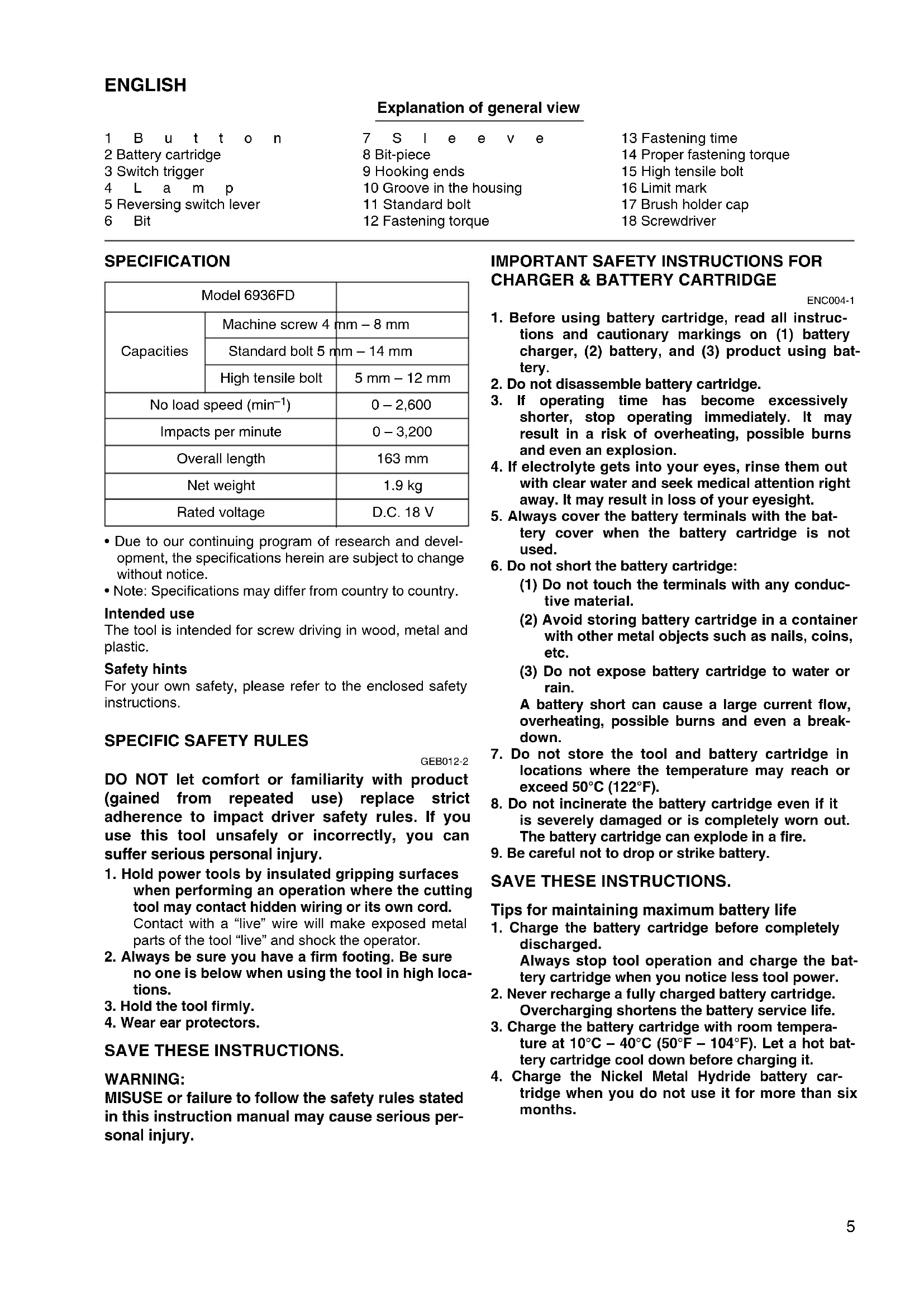


| Product type | Cordless impact driver |
| Brand | Makita |
| Model | 6936FD |
| Screw capacity (machine screw) | 4 mm - 8 mm |
| Screw capacity (standard bolt) | 5 mm - 14 mm |
| Screw capacity (high tensile bolt) | 5 mm - 12 mm |
| No load speed | 0 - 2,600 rpm |
| Blows per minute | 0 - 3,200 bpm |
| Overall length | 163 mm |
| Net weight | 1.9 kg |
| Rated voltage | 18 V DC |
| Power supply | Lithium-ion battery (not included) |
| Electric brake | Yes |
| Variable speed | Yes (variable speed trigger) |
| Forward/reverse rotation | Yes (forward/reverse + neutral position) |
| LED lighting | Yes (integrated) |
| Hanging hook | Yes (removable, install on left or right) |
| Chuck type | Keyless (hexagonal bit holder 6.35 mm) |
| Sound pressure level | 94 dB(A) |
| Sound power level | 105 dB(A) |
| Vibration (weighted acceleration) | 6.5 m/s² |
| Maintenance | Regular brush replacement (wear line) |
| Replacement parts | Carbon brushes, brush holder caps, bits |
| Repairability | Authorized Makita service center |
Frequently Asked Questions - 6936FD MAKITA
User questions about 6936FD MAKITA
0 question about this device. Answer the ones you know or ask your own.
Ask a new question about this device
Download the instructions for your Screwdriver in PDF format for free! Find your manual 6936FD - MAKITA and take your electronic device back in hand. On this page are published all the documents necessary for the use of your device. 6936FD by MAKITA.
USER MANUAL 6936FD MAKITA
GB Cordless Impact Driver Instruction Manual
| F Visseuse à chocs sans fil | Manuel d'instructions |
| D Akku-Schlagschrauber | Betriebsanleitung |
| I Avvitatore ad impulso a batteria | Istruzioni per l'uso |
| NL Accu-slagschroevendraaier | Gebruiksaanwijzing |
| E Atornillador de impacto a batería | Manual de instrucciones |
| P Berbequim de impacto a bateria | Manual de instruções |
| DK Akku slagskruetrækker | Brugsanvisning |
| S $laddlös hammarskruvdragare | Bruksanvisning |
| N Batteridrevet slagtrekker | Bruksanvisning |
| SF Iskevä akkuruuvinvännin | Käytöohje |
| GR Aσύρματό κρουσικό βίδοτρύπavo Μθηγίες χρήσεως | |
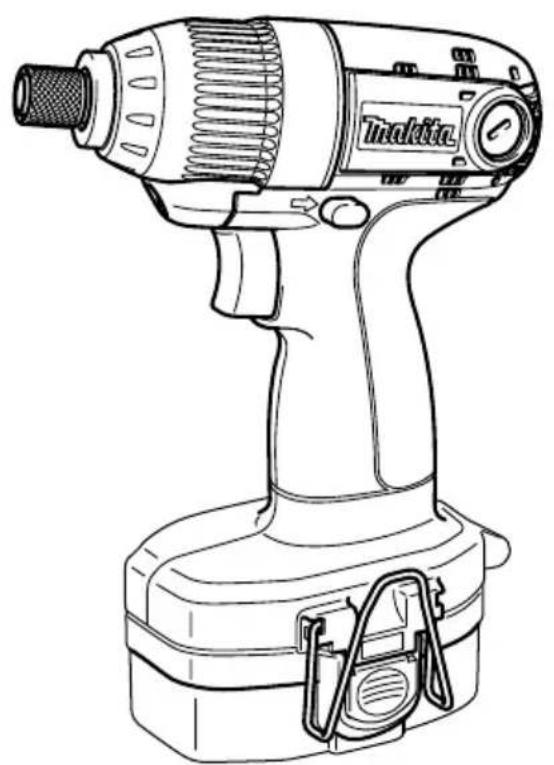
6936FD
1
2
3
4
5
6
7
8
9
10
11 12
13 14
15 16
17 18
1920
21 22
1 B u t t o n
2 Battery cartridge
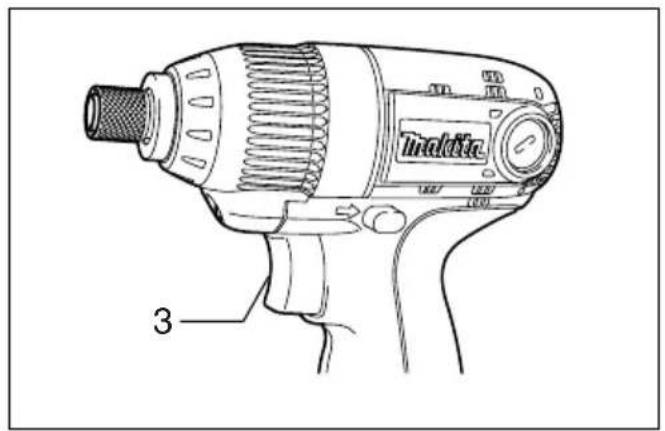
3 Switch trigger
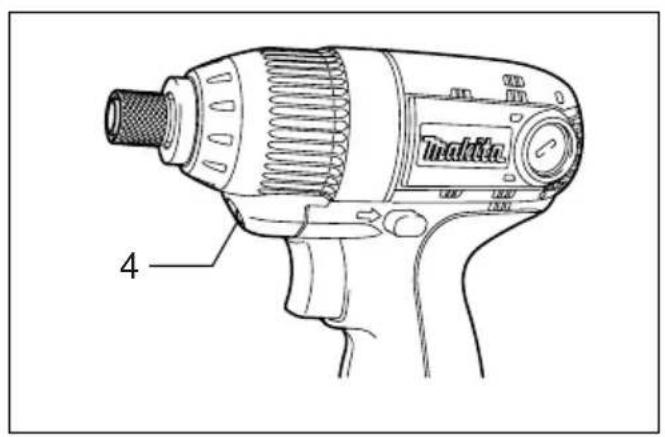
4 L a m p
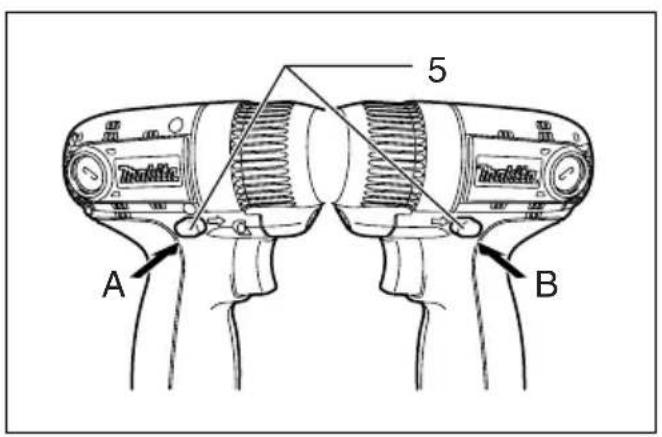
5 Reversing switch lever
6 Bit
Explanation of general view
| 7 S I e e v e | 13 Fastening time |
| 8 Bit-piece | 14 Proper fastening torque |
| 9 Hooking ends | 15 High tensile bolt |
| 10 Groove in the housing | 16 Limit mark |
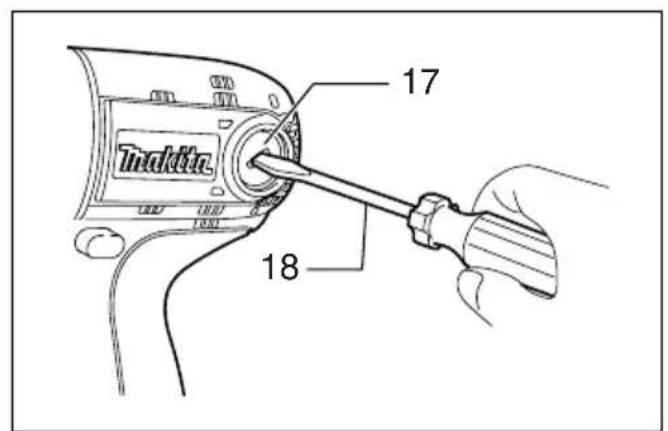
| 11 Standard bolt | 17 Brush holder cap |
| 12 Fastening torque | 18 Screwdriver |
SPECIFICATION
| Model 6936FD | ||
| Capacities | Machine screw 4 mm - 8 mm | |
| Standard bolt 5 mm - 14 mm | ||
| High tensile bolt | 5 mm - 12 mm | |
| No load speed (min-1) | 0 - 2,600 | |
| Impacts per minute | 0 - 3,200 | |
| Overall length | 163 mm | |
| Net weight | 1.9 kg | |
| Rated voltage | D.C. 18 V | |
- Due to our continuing program of research and development, the specifications herein are subject to change without notice.
- Note: Specifications may differ from country to country.
Intended use
The tool is intended for screw driving in wood, metal and plastic.
Safety hints
For your own safety, please refer to the enclosed safety instructions.
SPECIFIC SAFETY RULES
GEB012-2
DO NOT let comfort or familiarity with product (gained from repeated use) replace strict adherence to impact driver safety rules. If you use this tool unsafely or incorrectly, you can suffer serious personal injury.
- Hold power tools by insulated gripping surfaces when performing an operation where the cutting tool may contact hidden wiring or its own cord. Contact with a "live" wire will make exposed metal parts of the tool "live" and shock the operator.
- Always be sure you have a firm footing. Be sure no one is below when using the tool in high locations.
- Hold the tool firmly.
- Wear ear protectors.
SAVE THESE INSTRUCTIONS.
WARNING:
MISUSE or failure to follow the safety rules stated in this instruction manual may cause serious personal injury.
IMPORTANT SAFETY INSTRUCTIONS FOR CHARGER & BATTERY CARTRIDGE
ENC004-1
- Before using battery cartridge, read all instructions and cautionary markings on (1) battery charger, (2) battery, and (3) product using battery.
- Do not disassemble battery cartridge.
- If operating time has become excessively shorter, stop operating immediately. It may result in a risk of overheating, possible burns and even an explosion.
- If electrolyte gets into your eyes, rinse them out with clear water and seek medical attention right away. It may result in loss of your eyesight.
- Always cover the battery terminals with the battery cover when the battery cartridge is not used.
- Do not short the battery cartridge:
(1) Do not touch the terminals with any conductive material.
(2) Avoid storing battery cartridge in a container with other metal objects such as nails, coins, etc.
(3) Do not expose battery cartridge to water or rain. A battery short can cause a large current flow, overheating, possible burns and even a breakdown.
-
Do not store the tool and battery cartridge in locations where the temperature may reach or exceed 50^ (122^) .
-
Do not incinerate the battery cartridge even if it is severely damaged or is completely worn out. The battery cartridge can explode in a fire.
- Be careful not to drop or strike battery.
SAVE THESE INSTRUCTIONS.
Tips for maintaining maximum battery life
- Charge the battery cartridge before completely discharged. Always stop tool operation and charge the battery cartridge when you notice less tool power.
- Never recharge a fully charged battery cartridge.
Overcharging shortens the battery service life.
- Charge the battery cartridge with room temperature at 10^ - 40^ (50^ - 104^) . Let a hot battery cartridge cool down before charging it.
- Charge the Nickel Metal Hydride battery cartridge when you do not use it for more than six months.
FUNCTIONAL DESCRIPTION
CAUTION:
- Always be sure that the tool is switched off and the battery cartridge is removed before adjusting or checking function on the tool.
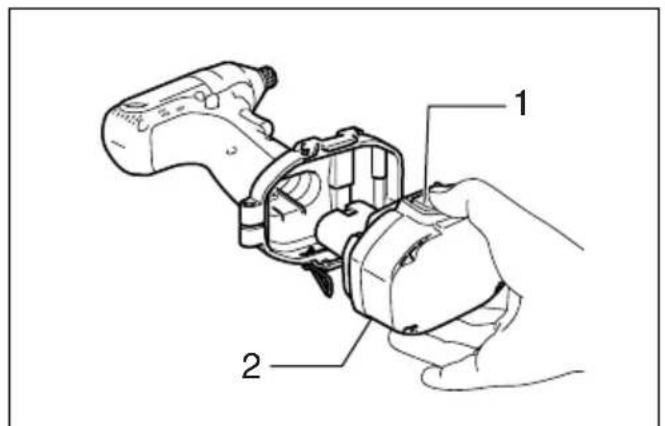
Installing or removing battery cartridge (Fig. 1)
- Always switch off the tool before insertion or removal of the battery cartridge.
- To remove the battery cartridge, withdraw it from the tool while pressing the buttons on both sides of the cartridge.
- To insert the battery cartridge, align the tongue on the battery cartridge with the groove in the housing and slip it into place. Always insert it all the way until it locks in place with a little click. If not, it may accidentally fall out of the tool, causing injury to you or someone around you.
- Do not use force when inserting the battery cartridge. If the cartridge does not slide in easily, it is not being inserted correctly.
Switch action (Fig. 2)
CAUTION:
- Before inserting the battery cartridge into the tool, always check to see that the switch trigger actuates properly and returns to the "OFF" position when released.
To start the tool, simply pull the switch trigger. Tool speed is increased by increasing pressure on the switch trigger. Release the switch trigger to stop.
Electric brake
This tool is equipped with an electric brake. If the tool consistently fails to quickly stop after switch trigger release, have tool serviced at a Makita service center.
Lighting up the front lamp (Fig. 3)
CAUTION:
- Do not look in the light or see the source of light directly.
Pull the switch trigger to light up the lamp. The lamp keeps on lighting while the switch trigger is being pulled.
NOTE:
- Use a dry cloth to wipe the dirt off the lens of lamp. Be careful not to scratch the lens of lamp, or it may lower the illumination.
Reversing switch action (Fig. 4)
This tool has a reversing switch to change the direction of rotation. Depress the reversing switch lever from the A side for clockwise rotation or from the B side for counterclockwise rotation.
When the reversing switch lever is in the neutral position, the switch trigger cannot be pulled.
CAUTION:
- Always check the direction of rotation before operation.
- Use the reversing switch only after the tool comes to a complete stop. Changing the direction of rotation before the tool stops may damage the tool.
- When not operating the tool, always set the reversing switch lever to the neutral position.
ASSEMBLY
CAUTION:
- Always be sure that the tool is switched off and the battery cartridge is removed before carrying out any work on the tool.
Installing or removing driver bit or socket bit (Fig. 5)
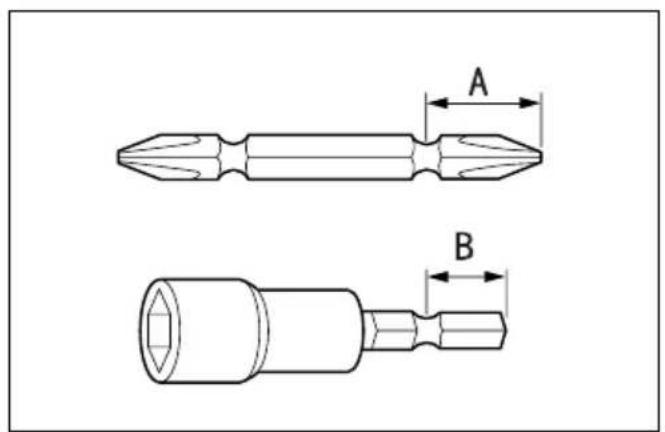
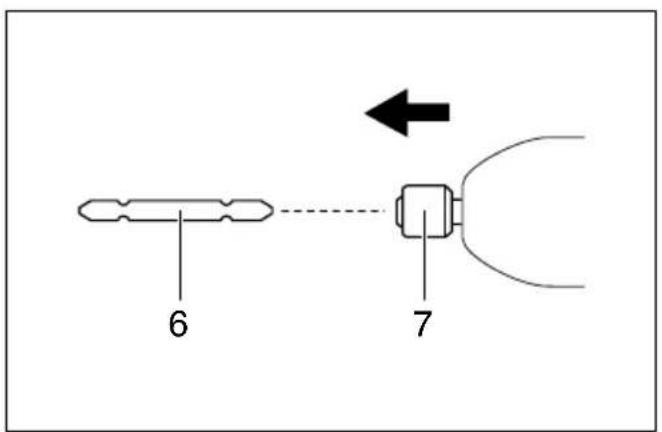
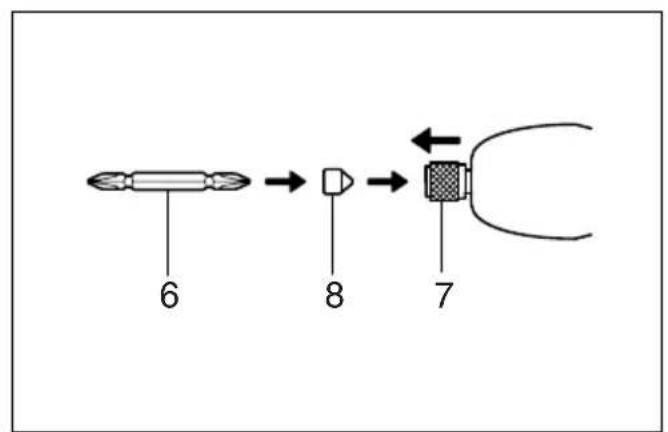
Use only the driver bit or socket bit shown in the figure.
Do not use any other driver bit or socket bit.
For European and North & South American countries, Australia and New Zealand
| A = 12 mm B = 9 mm | Use only these types of bits. Follow the procedure (1). (Note) Bit-piece is not necessary. |
For other countries
| A = 17 mm B = 14 mm | To install these types of bits, follow the procedure (1). (Note) Makita bits are these types. |
| A = 12 mm B = 9 mm | To install these types of bits, follow the procedure (2). (Note) Bit-piece is necessary for installing the bit. |
- To install the bit, pull the sleeve in the direction of the arrow and insert the bit into the sleeve as far as it will go. Then release the sleeve to secure the bit. (Fig. 6)
- To install the bit, pull the sleeve in the direction of the arrow and insert the bit-piece and bit into the sleeve as far as it will go. The bit-piece should be inserted into the sleeve with its pointed end facing in. Then release the sleeve to secure the bit. (Fig. 7)
To remove the bit, pull the sleeve in the direction of the arrow and pull the bit out firmly.
NOTE:
- If the bit is not inserted deep enough into the sleeve, the sleeve will not return to its original position and the bit will not be secured. In this case, try re-inserting the bit according to the instructions above.
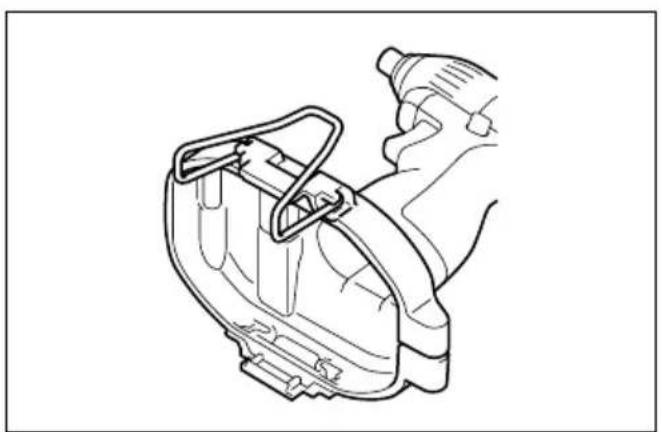
Hook (Fig. 8)
The hook is convenient for temporarily hanging the tool. This can be removed without using a tool. This can be installed on either side of the tool.
Installing and removing hook
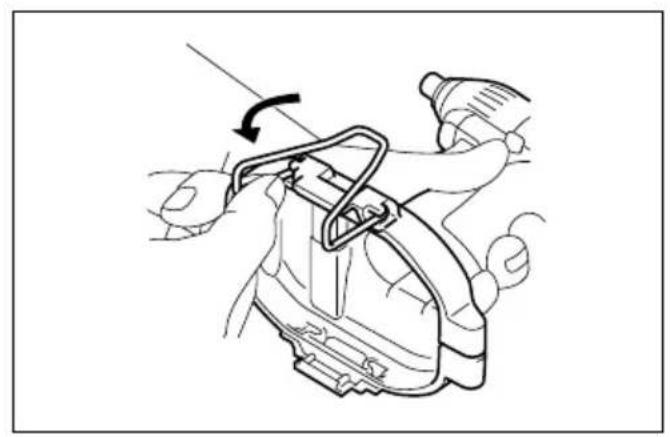
A) Removal
Remove the battery cartridge from the tool.
Place the tool in a stable and level surface.
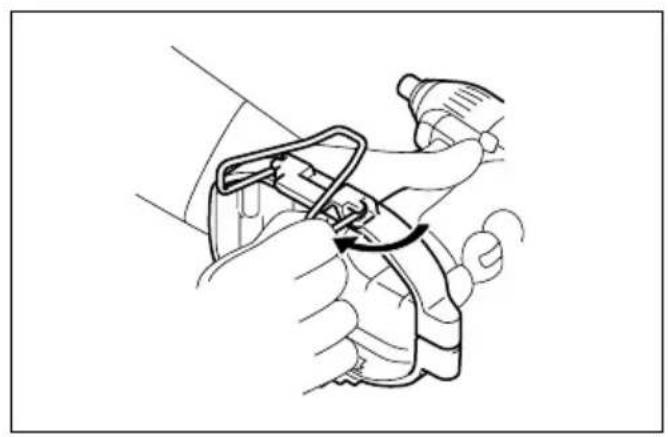
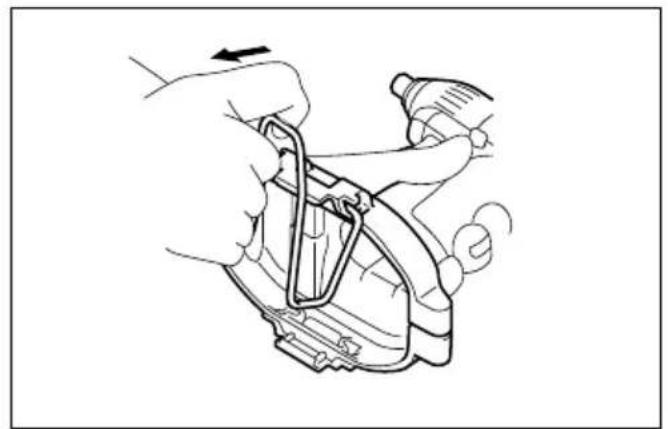
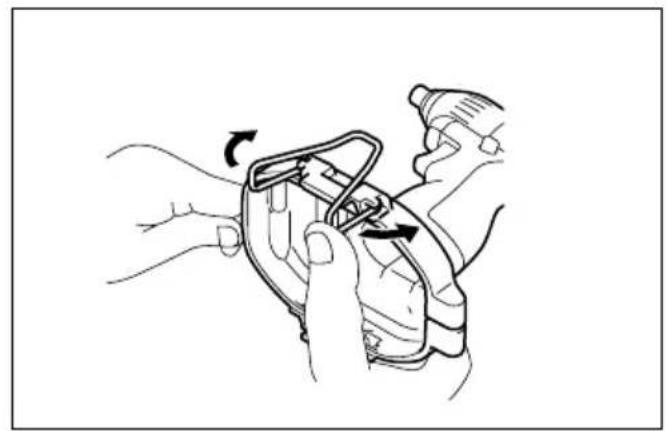
Expand an far end of the hook outward and slide it down while expanding. (Fig. 9)
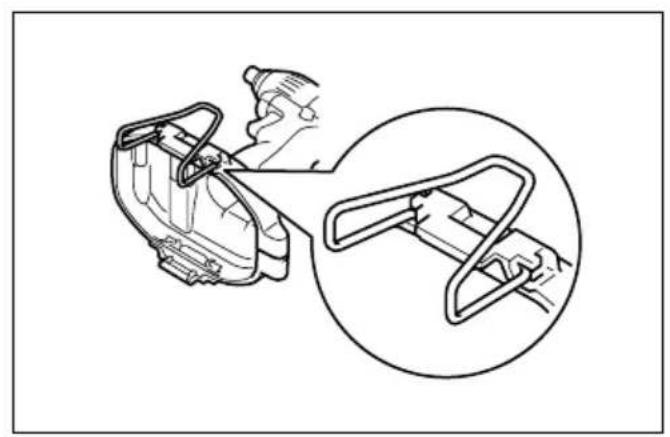
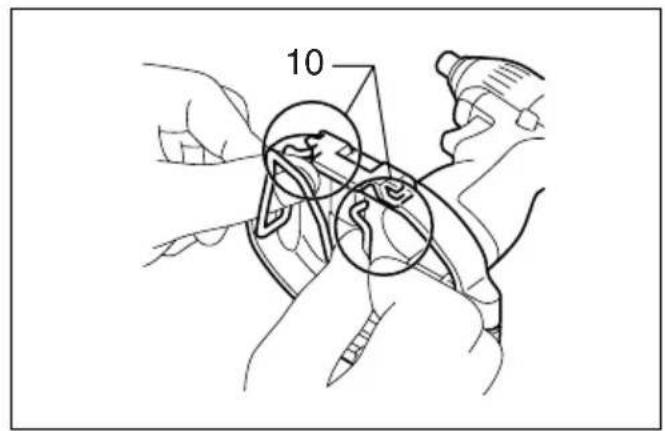
Expand the other far end in the same manner. (Fig. 10)
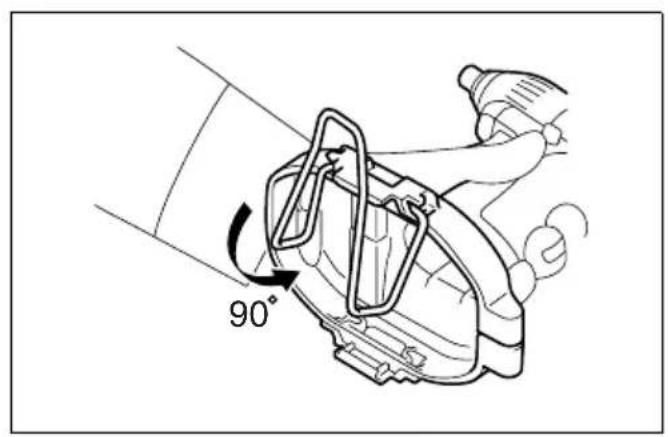
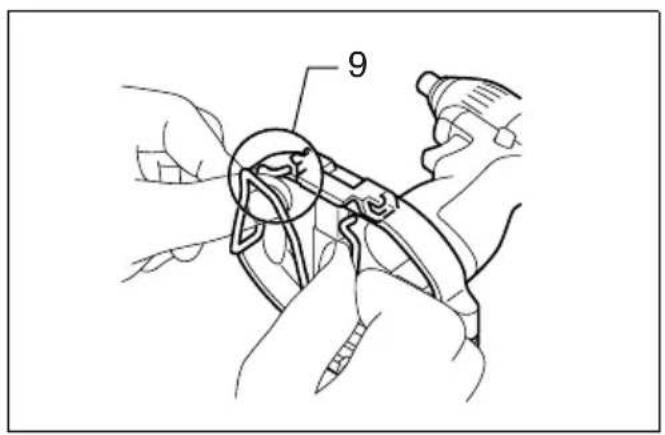
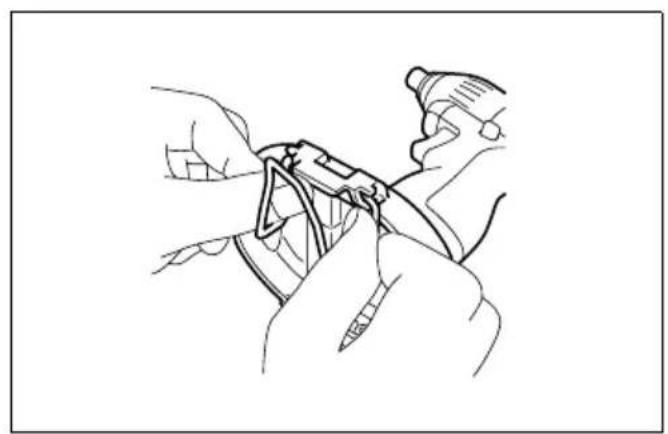
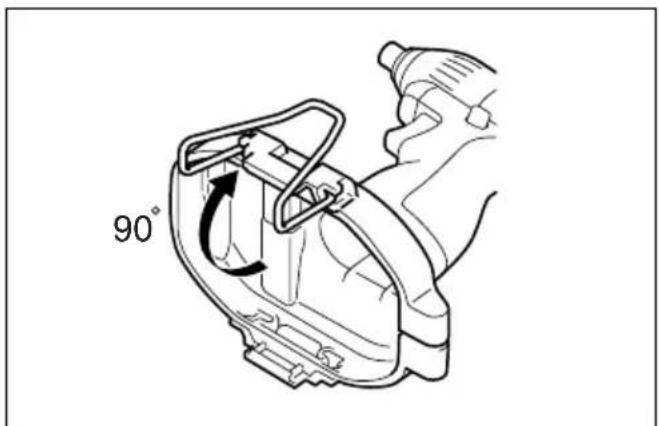
Keeping the hook in this position, rotate down to the angle 90^ and remove it by pulling in the direction of arrow as shown in the figure. (Fig. 11, 12 & 13)
B) Installation
Remove the battery cartridge from the tool.
Place the tool in a stable and level surface.
Hold both hooking ends in the upper position and expand the upper part of the hook. (Fig. 14)
Insert both ends, one by one, of the hook into the grooves in the tool housing. (Fig. 15 & 16)
Keeping the hook in this position, rotate it upwards to the angle 90^ and push both ends fully in the direction of arrow as shown in the figure. (Fig. 17 & 18)
OPERATION
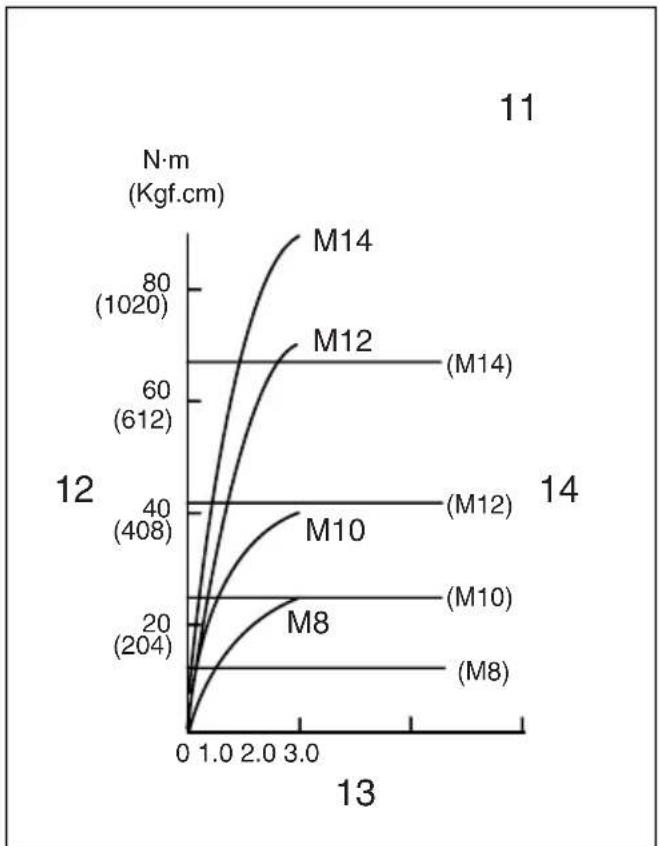
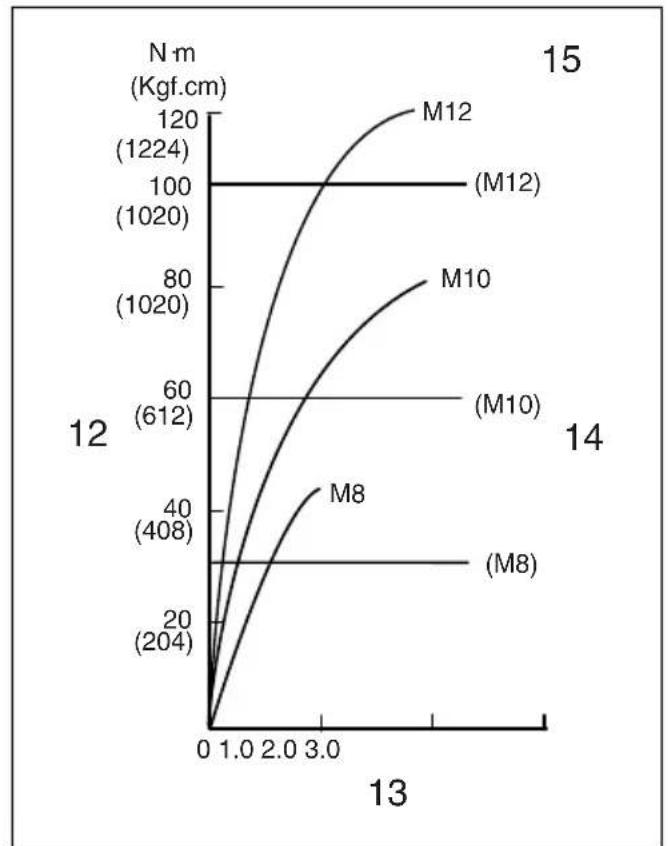
The proper fastening torque may differ depending upon the kind or size of the screw/bolt, the material of the workpiece to be fastened, etc. The relation between fastening torque and fastening time is shown in the figures.
(Fig. 19 & 20)
Hold the tool firmly and place the point of the driver bit in the screw head. Apply forward pressure to the tool to the extent that the bit will not slip off the screw and turn the tool on to start operation.
NOTE:
- Use the proper bit for the head of the screw/bolt that you wish to use.
- When fastening screw M8 or smaller, carefully adjust pressure on the switch trigger so that the screw is not damaged.
- Hold the tool pointed straight at the screw.
- If you tighten the screw for a time longer than shown in the figures, the screw or the point of the driver bit may be overstressed, stripped, damaged, etc. Before starting your job, always perform a test operation to determine the proper fastening time for your screw.
The fastening torque is affected by a wide variety of factors including the following. After fastening, always check the torque with a torque wrench.
- When the battery cartridge is discharged almost completely, voltage will drop and the fastening torque will be reduced.
- Driver bit or socket bit
Failure to use the correct size driver bit or socket bit will cause a reduction in the fastening torque.
- Bolt
Even though the torque coefficient and the class of bolt are the same, the proper fastening torque will differ according to the diameter of bolt.
- Even though the diameters of bolts are the same, the proper fastening torque will differ according to the torque coefficient, the class of bolt and the bolt length.
- The manner of holding the tool or the material of driving position to be fastened will affect the torque.
- Operating the tool at low speed will cause a reduction in the fastening torque.
MAINTENANCE
CAUTION:
- Always be sure that the tool is switched off and the battery cartridge is removed before attempting to perform inspection or maintenance.
Replacing carbon brushes (Fig. 21 & 22)
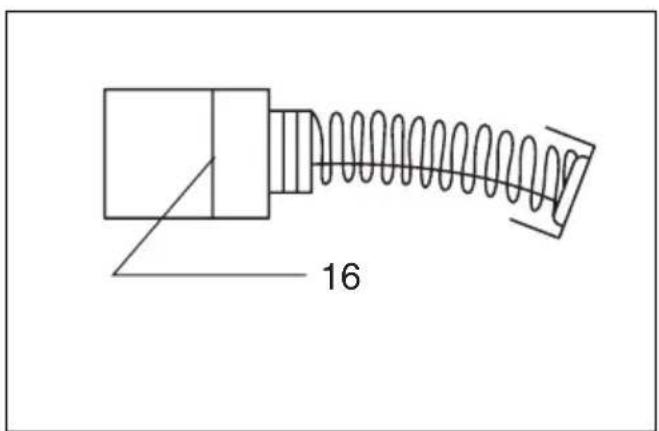
Remove and check the carbon brushes regularly. Replace when they wear down to the limit mark. Keep the carbon brushes clean and free to slip in the holders. Both carbon brushes should be replaced at the same time. Use only identical carbon brushes.
Use a screwdriver to remove the brush holder caps. Take out the worn carbon brushes, insert the new ones and secure the brush holder caps.
To maintain product SAFETY and RELIABILITY, repairs, any other maintenance or adjustment should be performed by Makita Authorized Service Centers, always using Makita replacement parts.
ACCESSIONS
CAUTION:
- These accessories or attachments are recommended for use with your Makita tool specified in this manual. The use of any other accessories or attachments might present a risk of injury to persons. Only use accessory or attachment for its stated purpose.
If you need any assistance for more details regarding these accessories, ask your local Makita service center.
- Screw bits
- Various type of Makita genuine batteries and chargers
- Plastic carrying case
Descriptif
1 B o u t o n 2 B a t e r i e
3 Gachette
4 Lampe
5 Inverseur
6 Embout
VEILIGHEIDSVOORSCHRIFTEN VOOR ACCULADER EN ACCU
EC-DECLARATION OF CONFORMITY
We declare under our sole responsibility that this product is in compliance with the following standards of standardized documents,
EN60745, EN55014
in accordance with Council Directives, 89/336/EEC and 98/37/EC.
FRANÇAISE
DECLARATION DE CONFORMITE CE
Michigan Drive, Tongwell, Milton Keynes,
Bucks MK15 8JD, ENGLAND
Responsible manufacturer: Produtlore responsable:
de accordo com as directivas 89/336/CEE e 98/37/CE do Conselho.
DANSK
EU-DEKLARATION OM KONFORMITET
Michigan Drive, Tongwell, Milton Keynes,
Bucks MK15 8JD, ENGLAND
For European countries only
Noise and Vibration
The typical A-weighted noise levels are
sound pressure level: 94 dB (A)
sound power level: 105 dB (A)
Uncertainty is 3 dB (A).
Wear ear protection.
The typical weighted root mean square acceleration value is 6.5m / s^2
These values have been obtained according to EN60745.