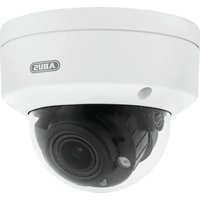
HDCC72500 - Surveillance Camera ABUS - Free user manual and instructions
Find the device manual for free HDCC72500 ABUS in PDF.



Frequently Asked Questions - HDCC72500 ABUS
User questions about HDCC72500 ABUS
0 question about this device. Answer the ones you know or ask your own.
Ask a new question about this device
Download the instructions for your Surveillance Camera in PDF format for free! Find your manual HDCC72500 - ABUS and take your electronic device back in hand. On this page are published all the documents necessary for the use of your device. HDCC72500 by ABUS.
USER MANUAL HDCC72500 ABUS
You can find important information and FAQs about this and other products online at:
www.abus.com
Introduction
Dear Customer,
Thank you for purchasing this product.
This device complies with the requirements of the applicable EU directives. The declaration of conformity can be obtained from:
To ensure this condition is maintained and guarantee safe operation, you are obliged to observe the instructions in this user manual.
Please read the entire user manual carefully before putting the product into operation, and pay attention to all operating instructions and safety information.
All company names and product descriptions are trademarks of the corresponding owner. All rights reserved.
If you have any questions, please contact your specialist installation contractor or specialist dealer.

Data storage is subject to national data privacy guidelines.

Disclaimer
This user manual has been produced with the greatest of care. Should you discover any omissions or inaccuracies, please contact us in writing at the address provided above.
ABUS Security-Center GmbH does not accept any liability for technical and typographical errors, and reserves the right to make changes to the product and user manuals at any time and without prior warning.
ABUS Security-Center GmbH is not liable or responsible for direct or indirect damage resulting from the equipment, performance and use of this product. No guarantee is made for the contents of this document.
Explanation of symbols
| The triangular high voltage symbol is used to warn of the risk of injury or health hazards (e.g. caused by electric shock). | |
| The triangular warning symbol indicates important notes in this user manual which must be observed. | |
| This symbol indicates special tips and notes on the operation of the device. |
Lists
| 1. ...2. ... | Lists with a set order, given either in the text or warning notice. |
| • ...• ... | Lists without a set order, given either in the text or warning notice. |
Intended use
Only use the device for the purpose for which it was built and designed. Any other use is considered unintended!
This device may only be used for the following purpose(s):
- This camera is designed for both daytime and night-time use. It provides video images in full HD resolution. The output signal is provided in HD-TVI format. This allows the use of a conventional coaxial cable for signal transmission. It is used for video surveillance in conjunction with a recording device. The device is designed for indoor and outdoor use.
Important safety information
General
Before using this device for the first time, please read the following instructions carefully and observe all warning information, even if you are familiar with the use of electronic devices.
| All guarantee claims are invalid in the event of damage caused by non-compliance with this user manual. We cannot be held liable for resulting damage. | |
| We cannot be held liable for material or personal damage caused by improper operation or non-compliance with the safety information. All guarantee claims are void in such cases. |
Retain this handbook for future reference.
If you sell or pass on the device on to third parties, you must include these instructions with the device.
The following safety information and hazard notes are not only intended to protect your health, but also to protect the device from damage. Please read the following points carefully:
Power supply
- Only operate this device through a power source which supplies the mains power specified on the type plate. If you are unsure of the power supply available to you, contact your energy provider.
- Disconnect the device from the power supply before carrying out maintenance or installation work.
- To fully disconnect the device completely from the mains, the mains plug must be withdrawn from the mains socket.
- To eliminate the risk of fire, the mains plug should generally be disconnected from the mains socket if the device is not used for a prolonged period of time.
Overload/over voltage
- Prior to severe weather and/or if there is a risk of lightning strike, please disconnect the device from the mains network or connect the device to a UPS.
- Avoid overloading electrical sockets, extension cables and adapters, as this can result in fire or electric shock.
Cable
Always grasp all cables by the plug connector and do not pull the cable itself.
- Never grasp the power cable with wet hands, as this can cause a short circuit or electric shock.
- Do not place the device itself, items of furniture or other heavy objects on the cable and ensure that it does not become kinked, especially at the connector plug and at the connection sockets.
- Never tie a knot in the cable and do not bundle it together with other cables.
All cable should be laid so that they cannot be trodden on, or cause a hazard.
- A damaged power cable can cause fire or electric shock. Check the power cable from time to time.
- Do not modify or manipulate the power cable or plug.
- Do not use any adapter plugs or extension cables that do not conform to the applicable safety standards and do not interfere with the mains or power cables.
Children
- Do not allow electrical devices to be handled by children. Do not allow children to use electrical devices unsupervised. Children may not properly identify possible hazards. Small parts may be fatal if swallowed.
- Also keep packaging film away from children. There is the risk of suffocation.
This device is not intended for children. If used incorrectly, parts under spring tension may fly out and cause injury to children (e.g. to eyes).
Surveillance
The use of surveillance equipment may be forbidden or regulated by law in some countries.
Before using this equipment, ensure that all of your surveillance activities are completely legal.
Installation location/operating environment
Operating temperature and operating humidity: -20^ to 60^ , maximum 90% relative humidity.
Ensure that:
- no direct sources of heat (e.g. radiators) can affect the device
- the image sensor is not exposed to direct sunlight or strong artificial light
the device is not in the immediate vicinity of magnetic fields (e.g. loudspeakers) - no naked lights (e.g. lit candles) are on, or next to the device
- there is no contact with aggressive liquids
- the device is not operated in the vicinity of water; take particular care that the device is never submerged
- no foreign bodies penetrate the device
- the device is not exposed to wide temperature variations, as otherwise there may be condensation from humidity causing electrical short circuits
- the device is not exposed to excessive shock or vibration.
Unpacking the device
Handle the device with extreme care when unpacking it.
Packaging and packaging aids can be reused and as far as possible should be sent for recycling.
We recommend that:
Paper, cardboard and corrugated cardboard, as well as plastic packaging items should be placed in the appropriate containers provided.
If no such facility exists in the area, then these materials should be put into general household waste.

Warning
If the original packaging has been damaged, start by inspecting the device. If the device shows signs of damage, return it in the original packaging and inform the delivery service.
Start-up
- Observe all safety and operating instructions before operating the device for the first time.

Warning
Improper or unprofessional work on the power supply system or domestic installations puts both you and others at risk.
Connect the installations so that the mains power circuit and low-voltage circuit always run separately from each other. They should not be connected at any point or become connected as a result of a malfunction.
Care and maintenance
Maintenance is necessary if the device has been damaged (e.g. damage to the power cable and plug, or the housing), or if liquids or foreign bodies have got into the interior of the device, or if it has been exposed to rain or damp, or if it does not work properly or has been dropped.
Maintenance
- If smoke, unusual noises or smells occur, switch the device off immediately and unplug from the socket. In such cases, the device should not be used until it has been inspected by a qualified technician.
- Have all maintenance tasks carried out by qualified technicians only.
- Never open the housing of the device or accessories. If the housing is open there is the risk of fatal electric shock.
Cleaning
- Clean the device housing using only a damp cloth.
- Do not use solvents, white spirit, thinners etc. and do not use any of the following substances:
- Brine, insect spray, solvents containing chlorine or acids (ammonium chloride), or scouring powder.
- Rub the surface gently with the cotton cloth until it is completely dry.

The device operates with a dangerous voltage level. When conducting maintenance work (e.g. cleaning), disconnect the device from the mains.
Contents
- Scope of delivery 33
1.1. HDCC62500 33
1.2. HDCC72500 33
- Camera description 34
2.1. HCC62500 34
2.2. HDCC72500 35
- Mounting/installation 36
3.1. Mounting the camera 36
3.2. Orientation of the camera 37
3.3. Power supply 37
3.4. Connecting the video cable 38
3.5. Cable-controlled WDR function 38
- On-screen display 39
4.1. Opening the on-screen display 39
4.2. Description of the on-screen display 39
- Disposal 47
- Technical data 47
1. Scope of delivery
1.1.HDCC62500
| Analogue HD 1080p Outdoor Camera including mounting material | Power supply unit including EU, Australian and UK adapters 12 V DC/1 A |
| Manual | |
| Manual | 30 m combination cable |
1.2.HDCC72500
| Analogue HD 1080p Outdoor Dome Camera including mounting material | Power supply unit including EU, Australian and UK adapters 12 V DC/1 A |
| Manual | |
| Manual | 30 m combination cable |
2. Camera description
2.1.HCC62500
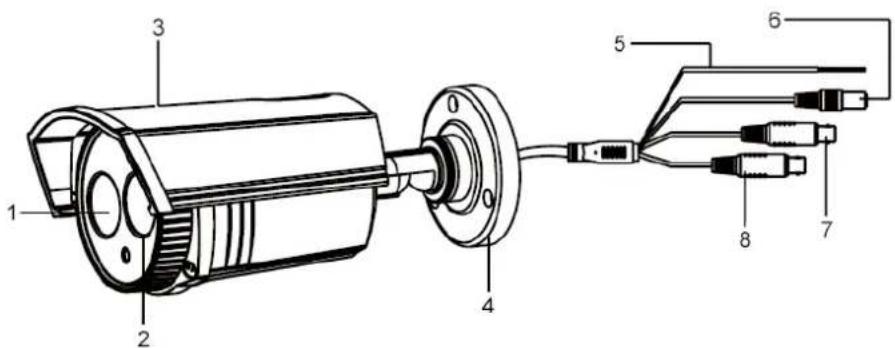
| 1 Lens |
| 2 Power IR LED |
| 3 Sun shield |
| 4 Mount |
| 5 WDR wiring Insulated and disconnected: WDR off Stripped and twisted: WDR on The analogue output is not available while WDR is activated. |
| 6 Power supply |
| 7 Analogue video output (BNC, for service purposes, labelled "CVBS") |
| Only while WDR is off. |
| 8 Analogue HD video output (BNC, labelled "TVI") |
2.2.HDCC72500
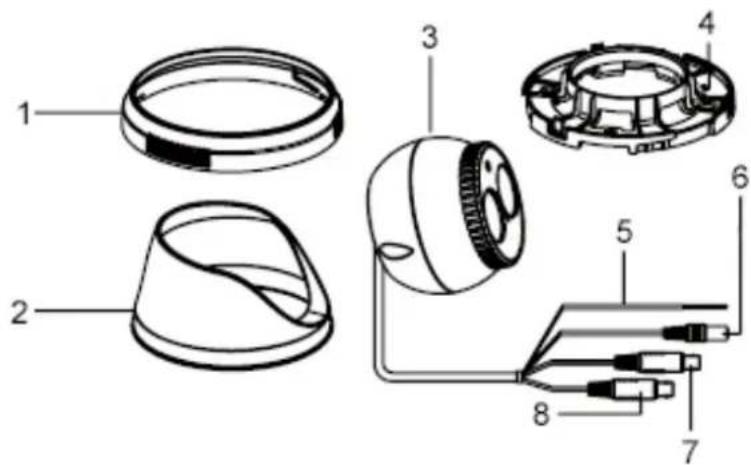
| 1 Locking ring |
| 2 Housing |
| 3 Camera |
| 4 Base plate |
| 5 WDR wiring Insulated and disconnected: WDR off Stripped and twisted: WDR on The analogue output is not available while WDR is activated. |
| 6 Power supply |
| 7 Analogue video output (BNC, for service purposes, labelled "CVBS") |
| Only while WDR is off. |
| 8 Analogue HD video output (BNC, labelled "TVI") |
3. Mounting/installation
3.1. Mounting the camera

IMPORTANT!
The camera must be disconnected from the power supply during installation.
HDCC62500
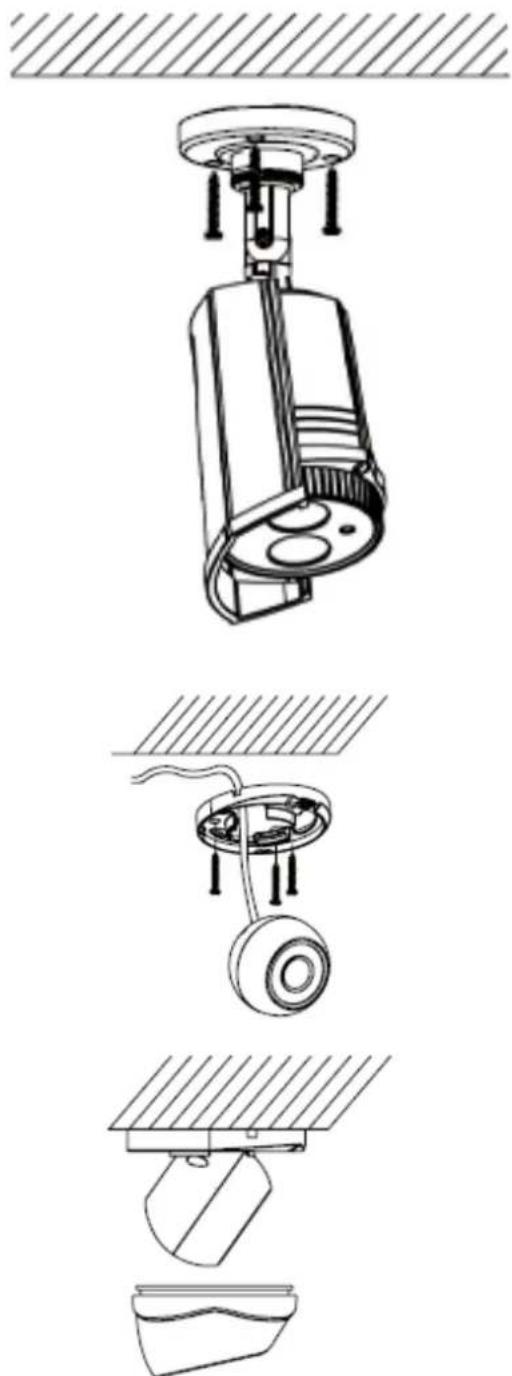
Use the accompanying drilling template for drilling the mounting holes. An opening is provided on the base plate of the mount for cabling at the side. Use screw anchors and screws that are appropriate to the surface to fix the camera in place.
Cabling can be at the side or hidden in the ceiling or wall.
HDCC72500
Use the accompanying drilling template for drilling the mounting holes. There are several (thinner) breaking points included on the locking ring for cabling from the side, which can be broken off with pliers. Use screw anchors and screws that are appropriate to the surface to fix the camera in place.
Cabling can be at the side or hidden in the ceiling or wall.
3.2. Orientation of the camera
HDCC62500
The camera module can be oriented in three axes.
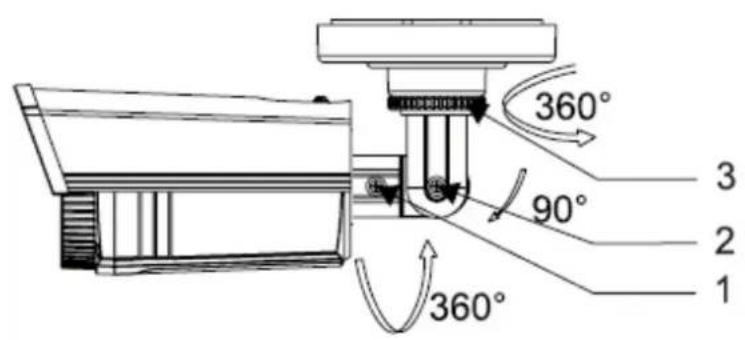
1: Fixing screw (rotation)
2: Fixing screw (tilt)
3: Fixing ring (turn)
HDCC72500
The camera module can be oriented in three axes.
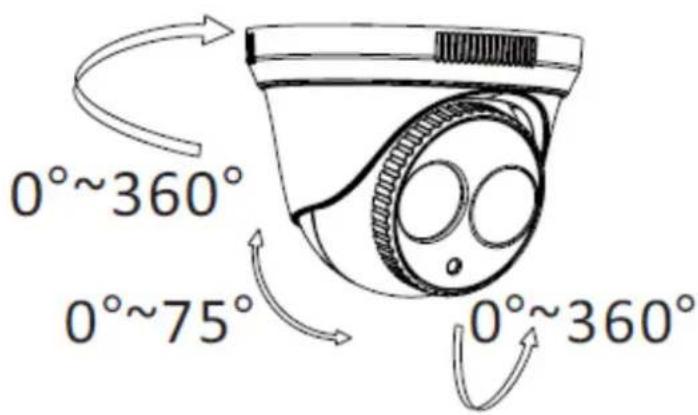
Unscrew the locking ring in an anti-clockwise direction and align the housing and camera module for orientation. Then fix in place by screwing the locking ring back on in a clockwise direction.
3.3. Power supply

IMPORTANT!
Before starting installation, ensure that the power supply voltage and the rated voltage of the camera are identical.

12 V DC, barrel connector, 5.5 × 2.1 ~mm
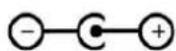
The cameras require a 12 V DC power supply. The polarity of the DC voltage supply must be observed!
3.4. Connecting the video cable
In order to transmit the HD-TVI video signal from the camera to a recorder, an RG59 or RG6 type coaxial cable with BNC connector (male) must be connected to the connection labelled "TVI". The cable length to the next device must not exceed 500m (RG6) or 300m (RG59).
An RG59 or RG6 type coaxial cable can be connected to the analogue video output (labelled "CVBS"). The cable length to the next device must not exceed 100m .

Note
To ensure optimum quality of the HD-TVI signal transmission, it is important that the cable is neither kinked nor crushed at any point, and that its radius is adequate (min. bending radius 6 cm).
Damage to the cable or porosity as a result of ageing can have a negative impact on the quality of the signal or image (e.g. shadowing around the edges).
3.5.Cable-controlled WDR function
The wide dynamic range function enhances the image quality in the event of high contrasts in the video image. This camera's wide dynamic range function can be activated and deactivated via an external contact (by on-screen display, only via ABUS HD-TVI DVR).
To activate the DwDR function, connect both connections of the external contact together.
If the DWDR function is not used or is controlled by the on-screen display of the HD-TVI DVR, both contacts should be isolated to prevent short-circuit, contact with other housing parts and electrical potential.
4. On-screen display
4.1. Opening the on-screen display
This camera's on-screen display can only be opened via the ABUS HD-TVI DVR. Please consult the user manual for the ABUS HD-TVI DVR.
4.2.Description of the on-screen display
MENU
1.VIDEO OUT PAL
2. LANGUAGE EN
3. MAIN MENU ↓
| Function Description | |
| VIDEO OUT Video | standard setting |
| PAL Video output and service monitor output are set to the 50 Hz standard (e.g. 720p50, 1080p50 or PAL) | |
| NTSC Video output and service monitor output are set to the 60 Hz standard (e.g. 720p60, 1080p60 or NTSC) | |
| LANGUAGE | Setting for the language of the on-screen display Language selection: Use the LEFT and RIGHT buttons to select the language. Then press the ENTER button to apply the selected language. |
| MAIN MENU Advanced camera settings Press the ENTER button to open the advanced camera settings menu. | |
Main menu
MAIN MENU
- SCENE INDOOR
2.APERTURE MANUAL - EXPOSURE
- BACKLIGHT OFF
- WHITE BAL. ATW
- DAY&NIGHT EXTERN.
- NOISE RED. ↓
- SPECIAL
- SET
- RESET
11.OUTPUT↓
SMART FOCUS
| Function Description | ||
| SCENE | ||
| SCENE Selection | of scene type, which applies certain pre- settings in the camera settings. | |
| INDOOR | Indoors without significant differences in brightness in the image | |
| OUTDOOR | Outdoors (with good reflection properties or residual light) | |
| INDOOR1 | Indoors with significant differences in brightness in the image | |
| LOW-LIGHT | Outdoors (with poor reflection properties or no residual light) | |
| APERTURE | ||
| APERTURE | Lens type setting. | |
| Manual (fixed) HDCC62500, HDCC72500: The lens focus setting has already been configured at the factory and cannot be changed. | ||
| For this model, no setting options are available for this item! | ||
| EXPOSURE | ||
| SHUTTER Exposure | time setting | |
| AUTO | Automatic adjustment of the exposure time to the environmental conditions. | |
| 1/25~1/50,000 Fixed exposure time | ||
| AGC | Setting for max. gain value (upper limit) used by the camera (0~15). The camera selects the gain value automatically. | |
| SENSITIVITY | Continuous exposure setting. Longer exposure times for each image make the resulting image lighter. However, the longer the exposure time, the lower the frame rate. | |
| OFF Continuous | exposure deactivated | |
| AUTO (2x~30x) | Continuous exposure activated, with value for upper limit | |
| BRIGHTNESS Basic image brightness setting (1~100) | ||
| D-WDR | Software enhancement of the contrast ratio in the image. Dark areas are brightened, whilst trying to not increase the brightness of existing light areas. | |
| OFF Function deactivated | ||
| ON Function activated | ||
| DEMIST | This function enhances the image quality in the event of a misty camera view. | |
| OFF Function deactivated | ||
| ON Function activated | ||
| RETURN Return to previous menu screen | ||
| BACKLIGHT | ||
| OFF Deactivate all backlight or contrast treatment | ||
| WDR | Wide dynamic range function. Contrast treatment of the video image through double exposure (short and long exposure) of the image. | |
| GAIN (LOW/MEDIUM/HIGH) | Intensity of the function | |
| WDR BRIGHT (0~60) | Move basic setting on a brightness scale | |
| WDR OFFSET (0~60) | Change basic gain factor | |
| BLC | Backlight compensation. Backlight compensation. The function displays light areas of the video image darker, whilst maintaining the brightness of dark areas. | |
| GAIN (LOW/MEDIUM/HIGH) | Intensity of the function | |
| AREA (POSITION/SIZE): | Setting of the reference area for the calculation. Press ENTER to change the position with the control buttons. Press ENTER again to change the size using the control buttons. | |
| STANDARD Press ENTER to reset all parameters of the BLC function to the factory settings. | ||
| HSBLC | This function marks areas above a certain brightness level black. This function may be used, for example, solely at night for oncoming vehicle headlights. In this case, the headlights will be marked black. The registration plates next to the headlights will then be more easily identifiable. | |
| SELECTION (AREA 1~4) | Selection of one of max. four areas. The function is applied in this area. | |
| DISPLAY (ON/OFF) | Activate/deactivate the area. Press ENTER once or twice to adjust the position and size with the control buttons. | |
| LEVEL (0~100) | Brightness threshold above which a pixel is marked black. | |
| MODE (PERMANENT/NIGHT-TIME ONLY) | Permanent activation of the function or only when in night mode | |
| MASKING (ON/OFF) Active or deactivate all areas. | ||
| STANDARD Press ENTER to reset all parameters of the HSBLC function to the factory settings. | ||
| RETURN Return to previous menu screen | ||
| WHITE BALANCE | ||
| ATW | Auto tracking white balance White balance is performed by the camera automatically and continuously updated. | |
| AWC -> SET | With this function, white balance is performed once after pressing the ENTER button and stored permanently. | |
| MANUAL Manual setting of the white balance | ||
| BLUE (0~100) | Proportion of blue in video image | |
| RED (0~100) | Proportion of red in video image | |
| DAY&NIGHT | ||
| EXTERN. | The day/night switching (ICR/IR) is controlled by the photo sensor integrated into the camera (switching threshold: 5-15 Lux) | |
| OFF Function deactivated | ||
| ON Function activated | ||
| The integrated IR LEDs can be deactivated in night mode if required. | ||
| COLOUR | The camera stays in colour mode permanently. The infrared cut filter is constantly in front of the lens, and the IR LEDs are constantly off. | |
| B/W | The camera stays in black/white mode permanently. The infrared cut filter is constantly separated from the lens. The IR LEDs are switched on and off automatically by the photo sensor. | |
| NOISE REDUCTION | ||
| 2DDNR | Noise reduction function, optimised for static picture content | |
| OFF Function deactivated | ||
| ON Function activated | ||
| 3DDNR | Noise reduction function, optimised for movement (image to image view) | |
| OFF Function deactivated | ||
| ON Function activated | ||
| Back Return to previous menu screen | ||
| SPECIAL | |
| TITLE Configuration of the title shown in the camera image. | |
| OFF Function deactivated | |
| ON Function activated | |
| Use the control buttons to navigate the cursor to the desired character. All available characters are displayed. Press ENTER to select the character. | |
| ← Move the cursor on the title line to the left | |
| → Move the cursor on the title line to the right | |
| CLR Clear the entire title line | |
| POS | Change the position of the title overlay. Select POS, then press ENTER and use the control buttons. Press ENTER again to return to the previous menu level. |
| END Exit the menu | |
| D-EFFECT | This menu item provides a number of digital functions for modifying the video image. |
| FREEZE Freeze the video image | |
| MIRROR | Horizontal mirroring and vertical rotation (horizontal and vertical mirroring) functions are available. |
| D-ZOOM | Digital zoom in the video image. Setting the zoom factor |
| S/N | Change the position of the title overlay. Select POS, then press ENTER and use the control buttons. Press ENTER again to return to the previous menu level. |
| SMART D-ZOOM | Automatic digital zoom in a selected area of the video image, triggered by the camera's internal motion detection. |
| SELECTION | Two areas can be configured for the automatic digital zoom function. The selection is made using the left/right buttons. |
| DISPLAY | Activate/deactivate the preview frame. The position of the area can be changed using the ENTER button. |
| SENSITIVITY Sensitivity for motion detection. | |
| D-ZOOM | Zoom factor setting after detecting motion in the configured area. | |
| TIME | Duration of the automatic digital zoom. Afterwards, full-screen mode is reactivated. | |
| STANDARD | Reset all settings made to the SMART D-ZOOM function. | |
| The SMART D-ZOOM function becomes active only after exiting the camera menu. | ||
| NEGATIVE IMAGE | Display the video image as a negative. | |
| MOTION | The camera's internal motion detection is integrated into the processor platform by default. This camera type does not have an interface (e.g. alarm output) to allow this function to be used. | |
| AREA SELECTION (1~4) | Selection of area (max. four) | |
| AREA DISPLAY (ON/OFF) | Activate/deactivate the preview frame. The position and size of the area can be changed using the ENTER button. | |
| SENSITIVITY (0~100) | Sensitivity for motion detection. | |
| MOTION INDICATION (OFF/ON) | A mark is displayed in the corresponding area in the live view when motion is detected. | |
| STANDARD Reset | all settings made to this function. | |
| PRIVATE ZONES | This function allows private zones to be set up in the video image to protect areas that are not to be monitored. | |
| AREA SELECTION (1~8) | Selection of an area for the configuration | |
| AREA DISPLAY (ON/OFF) | Activate/deactivate the preview frame. The position and size of the area can be changed using the ENTER button. | |
| TRANSPARENCY (0~3) | Intensity of the colour display (transparency) | |
| MOTION INDICATION (OFF/ON) | A mark is displayed in the corresponding area in the live view when motion is detected. | |
| STANDARD Reset | all settings made to this function. | |
| DEFECT | Function for correcting defective pixels in the image sensor | |
| LIVE (ON/AUTO/OFF) | Active continuous correction of pixels | |
| STATIC DPC (ON/OFF) | Static correction of defective pixels on restart | |
| RETURN Return to previous menu screen | ||
| SET | ||
| SHARPNESS | Edge and surface sharpness setting (modification of the video image by the software) (0~15) | |
| MONITOR | Adjustment of the camera signal to the output device or to the next connected device. | |
| LCD Optimisation | for LCD monitors | |
| GAMMA Automatic | or fixed gamma value setting | |
| BLUE SETTING (0~100) | Blue value setting | |
| RED SETTING (0~100) | Red value setting | |
| CRT Optimisation | for CRT monitors | |
| BLACK VALUE (-30~+30) | Black value setting | |
| BLUE SETTING (-30~+30) | Blue value setting | |
| RED SETTING (-30~+30) | Red value setting | |
| LSC | ||
| OFF Function deactivated | ||
| ON Function activated | ||
| RETURN Return to previous menu screen | ||
| RESET | ||
| FACTORY SET. (RESET): Reset all camera settings in the main menu to the factory settings | ||
| RETURN Return to previous menu screen | ||
| EXIT | ||
| RETURN | Exit the on-screen display | |
5. Disposal
Important: EU Directive 2002/96/EC regulates the proper return, treatment and recycling of used electronic devices. This symbol means that in the interest of environmental protection, the device must be disposed of separately from household or industrial waste at the end of its service life in accordance with applicable local legal guidelines. Used devices can be disposed of at official recycling centres in your country. Obey local regulations when disposing of material. Further details on returns (also for non-EU countries) can be obtained from your local authority. Separate collection and recycling conserve natural resources and ensure that all the provisions for protecting health and the environment are observed when recycling the product.
6. Technical data
| Model number | HDCC62500 | HDCC72500 |
| Image sensor 1/3 inch progressive scan CMOS | ||
| Camera type | Tube | Dome |
| Resolution 1080p25, 1080p30 | ||
| Pixels (effective) 1920 (H) x 1080 (V) | ||
| Lens | 2.8 mm, fixed lens | |
| Horizontal angle of view | 99.73° | 92.45° |
| Day/night switching Electromechanical IR cut filter | ||
| Minimum illumination (colour) | 0.1 Lux | |
| Minimum illumination (B/W) | 0.001 Lux (image integration on) | |
| Minimum illumination (IR) | 0 Lux | |
| Noise reduction | 2D DNR/3D DNR | |
| Electronic shutter regulation | 1/25 s to 1/50,000 s | |
| Camera control | On-screen display (OSD) | |
| Backlight compensation | WDR, BCL, HSBLC | |
| Privacy masking | Eight freely configurable areas | |
| Digital zoom | Yes | |
| Video system | HD-TVI | |
| IR LEDs | Yes, power LED | |
| IR range | 20 m | |
| Smart IR | Yes | |
| Connections | Video signal (HD-TVI, BNC), video signal (FBAS, BNC), power supply | |
| Power supply | 12 V DC ± 15% | |
| Power consumption | Max. 330 mA (max. 4 W) | |
| Operating temperature | -20°C-+60°C | |
| Humidity Max. 90% | ||
| Dimensions (L x W x H) | 210.8 x 94.6 x 83 mm | Φ114.6 x 89.1 mm |
| Weight 700 g 700 g | ||

The IR range is strongly dependent on the environmental conditions. If the area in the camera's field of view reflects poorly or if there are no objects within the max. illumination range, the brightness of the video image at night may be too low. This will result in poor usability of the video image.
In addition, when installing the camera it must be ensured that no objects are located in close proximity to the camera's field of view (e.g. roof gutter or wall). These objects can reflect back the IR light, resulting in circular fading on the video image in the opposite direction to the object.
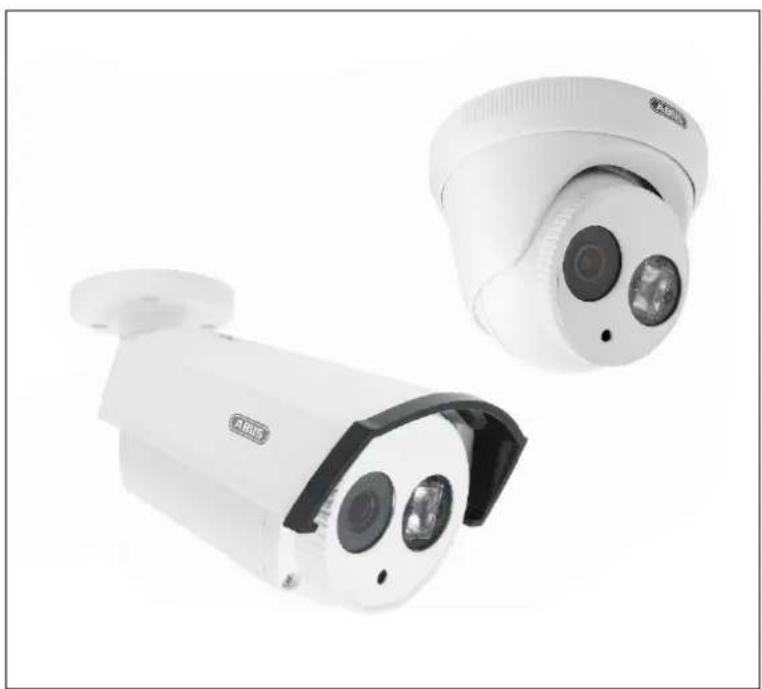
HDCC62500 / HDCC72500
Chere cliente, cher client,
Surcharge/Surtension
- Montage/Installation 59
3. Montage/Installation
- Montering / installation 105
3.1. Montering af kameraet 105
3.2. Justering af kameraet 106
3.3. Stromforsyning 106
3.4. Placering af videokablet 107
3.5. Kabelstyret fonction WDR 107
- Skaermmenu 108
4.1. Abning af skaermmenuen (OSD) 108
4.2. Beskrivelse af skaermmenuen (OSD) 108
- Bortskaffelse 116
- Tekniske data 116
1. Leveringsomfang
1.1.HDCC62500
| Analog HD 1080p Udendørs Kamera inkl. monteringsmateriale | Strømforsyning inkl. EU-, AU- og UK-adapter 12 VDC/ 1 A |
| Manual | |
| Vejledning | 30 m kombi-kabel |
1.2.HDCC72500
| Analog HD 1080p Udendørs Domekamera inkl. monteringsmateriale | Strømforsyning inkl. EU-, AU- og UK-adapter 12 VDC/ 1 A |
| Manual | |
| Vejledning | 30 m kombi-kabel |
3. Montering / installation
3.1. Montering af kameraet

VIGTIGT!
These operating instructions are published by ABUS Security-Center GmbH & Co.KG, Linker Kreuthweg 5, 86444 Affing, Germany. No reproduction (including translation) is permitted in whole or part e.g. photocopy, microfilming or storage in electronic data processing equipment, without the express written consent of the publisher.
The operating instructions reflect the current technical specifications at the time of print.
We reserve the right to change the technical or physical specifications.

Note de l'éditeur
Copyright 12/2015 by ABUS Security-Center