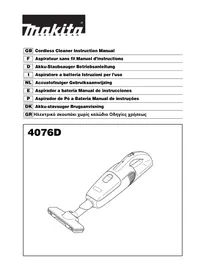
4076D - Cordless vacuum MAKITA - Free user manual and instructions
Find the device manual for free 4076D MAKITA in PDF.


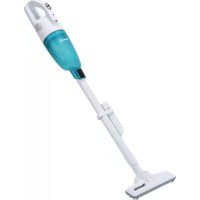
| Product Type | Cordless Vacuum Cleaner |
| Brand | Makita |
| Model | 4076D |
| Tank Capacity | 500 ml (dust bag), 330 ml (paper pack) |
| Runtime (high power) | Approx. 10 min |
| Runtime (normal power) | Approx. 20 min |
| Total Length | 446 mm (without attachment), 983 mm (with attachment) |
| Net Weight | 1.1 kg (without attachment), 1.4 kg (with attachment) |
| Rated Voltage | 7.2 V DC |
| Battery Type | Built-in Ni-Cd |
| Charging Time | 3 to 5 hours (max 9 hours depending on temperature) |
| Recommended Charger | Makita DC7021 |
| Suction Modes | Normal (LOW) and Powerful (HIGH) |
| Included Accessories | Extension tube, attachment, corner nozzle, dust bag, paper pack, dust screen, charger |
| Maintenance | Regularly clean the housing, openings, dust screen; wash the dust bag and sponge filter if necessary |
| Safety | Do not use for liquids, flammable materials; do not expose to rain; use with filters in place |
| Replacement Parts | Available from authorized Makita service centers |
Frequently Asked Questions - 4076D MAKITA
User questions about 4076D MAKITA
0 question about this device. Answer the ones you know or ask your own.
Ask a new question about this device
Download the instructions for your Cordless vacuum in PDF format for free! Find your manual 4076D - MAKITA and take your electronic device back in hand. On this page are published all the documents necessary for the use of your device. 4076D by MAKITA.
USER MANUAL 4076D MAKITA
Explanation of general view
1 Charging connector
2 Charging plug
3 L a m p
4 Switch
5 L e v e r
6 Dust stopper
7 Upper side of dust stopper
8 Lower side of dust stopper
9 Groove
10 Dust bag
11 Lower groove
12 Cleaner cavity
13 Hook of front cover
14 Front lip
15 Hook
16 Paper pack
17 Nozzle
18 Cleaner
19 Extension wand
20 Corner nozzle
21 Sponge filter
22 Wall
23 Rear cover
24 Battery unit
25 Connector
SPECIFICATIONS
| Model 4076D | ||
| Capacity | 500 ml (for dust bag) | |
| 330 ml (for paper pack) | ||
| Continuous use | High Approx. 10 min. | |
| Low Approx. 20 min. | ||
| Overall length 446 mm (without nozzle) / 983 mm (with nozzle) | ||
| Net weight | without nozzle 1.1 kg | |
| with nozzle | 1.4 kg | |
| Rated voltage | D.C. 7.2 V | |
- Due to our continuing programme of research and development, the specifications herein are subject to change without notice.
Note: Specifications may differ from country to country.
Intended use
The tool is intended for collecting dry dust.
IMPORTANT SAFETY INSTRUCTIONS
ENA005-1
When using an electrical appliance, basic precautions should always be followed, including the following:
READ ALL INSTRUCTIONS BEFORE USING THIS APPLIANCE.
WARNING - To reduce the risk of fire, electric shock or injury:
- Do not expose to rain. Store indoors.
- Do not allow to be used as a toy. Close attention is necessary when used by or near children.
- Use only as described in this manual. Use only manufacturer's recommended attachments.
- Do not use with damaged battery. If appliance is not working as it should, has been dropped, damaged, left outdoors, or dropped into water, return it to a service center.
- Do not handle appliance with wet hands.
- Do not put any object into openings. Do not use with any opening blocked; keep free of dust, lint, hair, and anything that may reduce air flow.
- Keep hair, loose clothing, fingers, and all parts of body away from openings and moving parts.
-
Turn off all controls before removing the battery.
-
Use extra care when cleaning on stairs.
-
Do not use to pick up flammable or combustible liquids, such as gasoline, or use in areas where they may be present.
- Use only the charger supplied by the manufacturer to recharge.
- Do not pick up anything that is burning or smoking, such as cigarettes, matches, or hot ashes.
- Do not use without filters in place.
- Do not charge the battery outdoors.
SAVE THESE INSTRUCTIONS.
This appliance is intended for household use.
ADDITIONAL SAFETY RULES
ENB106-1
- Read this instruction manual and the charger instruction manual carefully before use.
- Do not pick up wet materials, lit cigarettes or the like.
- Stop operation immediately if you notice anything abnormal.
- If you drop or strike the cleaner, check it carefully for cracks or damage before operation.
- Do not charge the cleaner close to dangerous flammable materials such as gasoline, gas, paint or adhesives.
- Do not charge the cleaner on papers, cloth, carpet, vinyl, etc. This may cause a fire.
- Do not charge the cleaner in a dusty place.
- Be sure no one is below when using the cleaner in high locations.
-
Do not bring close to stoves or other heat sources.
-
Do not block the intake hole or vent holes.
SAVE THESE INSTRUCTIONS.
IMPORTANT SAFETY INSTRUCTIONS FOR BUILT-IN BATTERY
ENC008-1
- Before using built-in battery, read all instructions and cautionary markings on (1) battery charger, (2) battery, and (3) product using battery.
- Do not disassemble built-in battery.
- If operating time has become excessively shorter, stop operating immediately. It may result in a risk of overheating, possible burns and even an explosion.
- If electrolyte gets into your eyes, rinse them out with clear water and seek medical attention right away. It may result in loss of your eyesight.
- Do not short the built-in battery:
(1) Do not touch the terminals with any conductive material.
(2) Avoid storing built-in battery in a container with other metal objects such as nails, coins, etc.
(3)Do not expose built-in battery to water or rain. A battery short can cause a large current flow, overheating, possible burns and even a breakdown.
- Do not store the tool and built-in battery in locations where the temperature may reach or exceed 50^ (122°F).
- Do not incinerate the built-in battery even if it is severely damaged or is completely worn out. The built-in battery can explode in a fire.
- Be careful not to drop or strike battery.
SAVE THESE INSTRUCTIONS.
Tips for maintaining maximum battery life
- Charge the built-in battery before completely discharged. Always stop tool operation and charge the built-in battery when you notice less tool power.
- Never recharge a fully charged built-in battery. Overcharging shortens the battery service life.
- Charge the built-in battery with room temperature at 10^ - 40^ (50°F - 104°F). Let a hot built-in battery cool down before charging it.
FUNCTIONAL DESCRIPTION
CAUTION:
- Always be sure that the tool is switched off before adjusting or checking function on the tool.
Charging the built-in battery (Fig. 1 & 2)
Use only the Makita charger DC7021 to charge this cleaner. Use of other type chargers may cause the battery to burst, resulting in personal injury and damage. Charge the cleaner when it is to be used for the first time or it has been left uncharged for a long time. Connect the charging plug to the charging connector, then plug in the charger to the power receptacle. The light in front of the cleaner switch will come on and charging will begin. Charging takes approximately 3 - 5 hours. The light goes out after the charging is complete. Refer to the instruction manual for the charger for more details.
CAUTION:
- Do not operate the cleaner during charging. It may be damaged.
- Always disconnect the charging plug from the cleaner after charging.
- When you charge a new cleaner or a cleaner which has been left uncharged for a long time, it may not accept a full charge. This is a normal condition and does not indicate a problem. You can recharge the cleaner fully after discharging it completely a couple of times.
Maximum charging time may be 9 hours depending on room temperature.
Switch action (Fig. 3)
CAUTION:
- Always be sure that the dust bag or paper pack is installed properly in the cleaner before use. Improper installation may allow dust to enter the motor, resulting in malfunction of the cleaner.
- Always switch off the cleaner after each use to prevent damage to the cleaner and to lengthen the service life of the batteries.
This cleaner can be operated in "standard" and "strong" suction. For standard suction, slide the switch forward to the LOW position. For strong suction, slide the switch further to the HIGH position.
To stop the cleaner, slide the switch back to the OFF position.
ASSEMBLY
Dust disposal
CAUTION:
- Empty the cleaner before it becomes too full, or the suction force weakens.
- Be sure to empty out the dust inside the cleaner itself. Failure to do so may cause the sponge filter to be clogged or the motor to be damaged.
- Never throw away the dust stopper because it should be used whenever either the dust bag or the paper pack is used.
Push the A part of the lever and grab it. Pull the lever in the direction B to open the cover. (Fig. 4 & 5)
CAUTION:
- Do not pull the lever in the direction C with excessive force. Doing this may cause the lever to be taken apart or damaged. (Fig. 6)
Pull out both the dust stopper and dust bag together at the same time. (Fig. 7)
Remove the dust stopper and empty the cleaner. (Fig. 8 & 9)
Dust bag and paper pack
Install either dust bag or paper pack before using cleaner.
Use the dust stopper when installing either dust bag or paper pack.
Dust bag is usable many times repeatedly by cleaning it out.
Paper pack is a throw-away type. Throw away the entire paper pack without emptying when it has become full.
Installing dust bag
Use the dust stopper when installing dust bag. Be careful not to take the upper side for the lower side by mistake because they are different each other. (Fig. 10)
- Insert the protrusion of the dust bag into the groove in the dust stopper as shown in the figure. (Fig. 11)
- There is no distinction between the upper and lower sides of the dust bag. You may insert its protrusion of any side into the lower groove of the dust stopper. (Fig. 12)
- Overlap the frame of dust stopper with that of the dust bag. (Fig. 13)
- Place the dust stopper and the dust bag together into the cleaner cavity in the same direction of arrow on the dust stopper. Insert them all the way into the slots in the cleaner cavity. (Fig. 14)
- Place the entire cloth part of the dust bag inside the tool itself. (Fig. 15)
- Hook the front cover onto the front lip of the cleaner. Then close the front cover. (Fig. 16)
Installing the paper pack
- Unfold the entrance of the paper pack before setting it on the dust stopper. (Fig. 17) Use the dust stopper also when installing paper pack. Be careful not to take the upper side for the lower side by mistake because they are different each other. (Fig. 18)
- Insert the protrusion of the paper pack into the groove in the dust stopper as shown in the figure. (Fig. 19)
- There is no distinction between the upper and lower sides of the paper pack. You may insert its protrusion of any side into the lower groove of the dust stopper. (Fig. 20)
- Overlap the frame of dust stopper with that of the paper pack. (Fig. 21)
- Place the dust stopper and the paper pack together into the cleaner cavity in the same direction of arrow on the dust stopper. Insert them all the way into the slots in the cleaner cavity. (Fig. 22)
- Place the entire container part of the paper pack inside the tool itself. (Fig. 23)
NOTE:
- The paper pack is a throw-away type. When it has become full, throw away the entire paper pack without emptying.
- Hook the front cover onto the front lip of the cleaner. Then close the front cover. (Fig. 24)
CAUTION:
- Forgetting to install the dust bag or the paper pack, failure to insert the dust stopper together with the dust bag or the paper pack all the way into the slots or using a broken or ripped bag, may allow dust to get into the motor. This may result in motor failure.
- Do not fold the cardboard at its opening when installing the paper pack.
- Never throw away the dust stopper because it need to be used repeatedly whenever either the dust bag or the paper pack is used.
OPERATION
Cleaning (Suction)
Nozzle (Fig. 25)
Attach the nozzle to clean off tables, desks, furniture, etc. Nozzle slips on easily.
Nozzle + Extension wand (Straight pipe) (Fig. 26)
The extension wand fits in between the nozzle and the cleaner itself. This arrangement is convenient for cleaning a floor while standing erect.
Corner nozzle (Fig. 27)
Fit on the corner nozzle for cleaning corners and crevices of a car or furniture.
Corner nozzle + Extension wand (Straight pipe) (Fig. 28)
In tight quarters where the cleaner itself cannot squeeze in, or in high places hard to reach, use this arrangement.
MAINTENANCE
CAUTION:
- Always be sure that the tool is switched off before attempting to perform inspection or maintenance.
After use (Fig. 29)
When charging or storing the cleaner, hang it from a nail using the convenient hanger in back by raising it.
Cleaning (Fig. 30 & 31)
From time to time wipe off the outside (cleaner body) of the cleaner using a cloth dampened in soapy water. Clean out also the suction opening, dust bag/paper pack mounting area and the dust stopper.
CAUTION:
- Never use gasoline, thinner or the like. Discoloration or cracks may result.
Wash the dust bag in soapy water when it is clogged with dust and the cleaner power becomes small. Dry it out thoroughly before use. An insufficiently dried bag may cause poor suction and shorten the service life of the motor.
NOTE:
- Paper pack is a throw-away type.
When the sponge filter is clogged with dust, remove it from the cleaner and then wipe it off or wash in water.
Removing and installing the sponge filter (Fig. 32, 33 & 34)
To remove the sponge filter, remove the dust bag or paper pack and then pinch and take it out.
Press in the whole edge of the sponge filter against the recessed wall inside the dust bag/paper pack mounting area.
CAUTION:
- After cleaning sponge filter, be sure to install it on the cleaner. If washed in water, dry it up before installing. An insufficiently dried sponge filter may shorten the service life of the motor.
Disposing cleaner
A Ni-Cd battery is built into this cleaner. Always remove it before disposing of the cleaner.
Removing built-in battery
CAUTION:
- Never remove the built-in battery from the cleaner except when disposing of the cleaner. The battery will be damaged or a battery short-circuit could result.
- Do not touch the terminals with any conductive material.
- Avoid storing battery unit in a container with other metal objects such as nails, coins, etc.
- Do not expose battery unit to water or rain.
-
Do not disassemble or alter battery unit.
-
To remove the rear cover, push it in the direction of the arrow. (Fig. 35)
-
Withdraw the built-in battery halfway. (Fig. 36)
- Disconnect the three lead wires from the battery by pressing the connector on the part 25 in the direction of arrow shown in the figure and pulling them. Then withdraw the battery unit completely.
- Put the removed battery unit in a plastic bag so that it is not circuit-shorted. (Fig. 37)
To maintain product SAFETY and RELIABILITY, repairs, any other maintenance or adjustment should be performed by Makita Authorized or Factory Service Centers, always using Makita replacement parts.
ACCESSIONS
CAUTION:
- These accessories or attachments are recommended for use with your Makita tool specified in this manual. The use of any other accessories or attachments might present a risk of injury to persons. Only use accessory or attachment for its stated purpose.
If you need any assistance for more details regarding these accessories, ask your local Makita Service Center.
- Extension wand (Straight pipe)
- Nozzle
- Corner nozzle
Dust bag - Paper pack
- Dust stopper
- Charger DC7021
Descriptif
Nettoyage (aspiration)
Raccord (Fig. 25)
EC-DECLARATION OF CONFORMITY
We declare under our sole responsibility that this product is in compliance with the following standards of standardized documents;
EN60335, EN55014
in accordance with Council Directives, 73/23/EEC and 89/336/EEC.
FRANÇAISE
Déclaration de CONFORMITE CE
Michigan Drive, Tongwell, Milton Keynes, Bucks MK15 8JD, ENGLAND
PORTUGUES
DECLARACAO DE CONFORMIDADE DA CE
Declaramos sob inteira responsabilitad que este produits obedece as seguintes normas de documents normalizados.
EN60335, EN55014
de accordo com as directivas 73/23/CEE e 89/336/CEE do Conselho.
DANSK
EU-DEKLARATION OM KONFORMITET
Michigan Drive, Tongwell, Milton Keynes, Bucks MK15 8JD, ENGLAND
Makita Corporation
Anjo, Aichi, Japan
- Intended use
- IMPORTANT SAFETY INSTRUCTIONS
- READ ALL INSTRUCTIONS BEFORE USING THIS APPLIANCE.
- SAVE THESE INSTRUCTIONS.
- ADDITIONAL SAFETY RULES
- IMPORTANT SAFETY INSTRUCTIONS FOR BUILT-IN BATTERY
- FUNCTIONAL DESCRIPTION
- Switch action (Fig. 3)
- ASSEMBLY
- Dust disposal
- Installing dust bag
- Installing the paper pack
- NOTE:
- CAUTION:
- OPERATION
- Cleaning (Suction)
- Nozzle (Fig. 25)
- Nozzle + Extension wand (Straight pipe) (Fig. 26)
- Corner nozzle (Fig. 27)
- Corner nozzle + Extension wand (Straight pipe) (Fig. 28)
- MAINTENANCE
- After use (Fig. 29)
- Cleaning (Fig. 30 & 31)
- Removing and installing the sponge filter (Fig. 32, 33 & 34)
- Disposing cleaner
- Removing built-in battery
- ACCESSIONS
- Descriptif
- Nettoyage (aspiration)
- Raccord (Fig. 25)
- EC-DECLARATION OF CONFORMITY
- FRANÇAISE
- Déclaration de CONFORMITE CE
- PORTUGUES
- DECLARACAO DE CONFORMIDADE DA CE
- DANSK
- EU-DEKLARATION OM KONFORMITET
- Makita Corporation
Brand : MAKITA
Model : 4076D
Category : Cordless vacuum