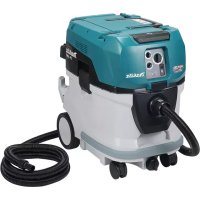
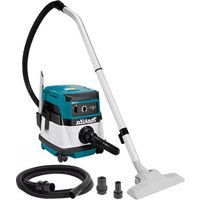
VC006GM - Cordless vacuum MAKITA - Free user manual and instructions
Find the device manual for free VC006GM MAKITA in PDF.



| Product type | Cordless vacuum cleaner |
| Brand | Makita |
| Model | VC006GM |
| Dimensions (L x W x H) | 586 mm x 385 mm x 598 mm |
| Net weight (with battery) | 18.4 - 20.8 kg |
| Power source | Lithium-ion battery 72 V - 80 V max. |
| Tank capacity (dust) | 40 L |
| Max. air volume on turbine | 4.9 m³/min |
| Max. depression | 18 kPa |
| Sound pressure level | 70 dB(A) or less (uncertainty 2.5 dB(A)) |
| Vibrations (total value) | 2.5 m/s² or less (uncertainty 1.5 m/s²) |
| Protection rating | IPX4 |
| Dust class | M (medium) - suitable for dry and wet dust |
| Compatible batteries | BL4020, BL4025, BL4040, BL4050F, BL4080F |
| Compatible charger | DC40RA, DC40RB, DC40RC, DC40WA, BCC01, BCC02 |
| Intended use | Commercial use: hotels, schools, hospitals, factories, shops, offices |
| Special features | Wireless activation, filter cleaning system, auto stop in wet vacuuming, MAKPAC compatibility |
| Maintenance | Regular filter cleaning, tank emptying, annual inspection by a trained person |
| Included accessories | Hose, nozzles, powder filter, pre-filter, damper, plug, filter bag |
Frequently Asked Questions - VC006GM MAKITA
User questions about VC006GM MAKITA
0 question about this device. Answer the ones you know or ask your own.
Ask a new question about this device
Download the instructions for your Cordless vacuum in PDF format for free! Find your manual VC006GM - MAKITA and take your electronic device back in hand. On this page are published all the documents necessary for the use of your device. VC006GM by MAKITA.
USER MANUAL VC006GM MAKITA
natural_image
Line drawing of a cleaning or maintenance robot with visible control panel and wheels (no text or symbols)
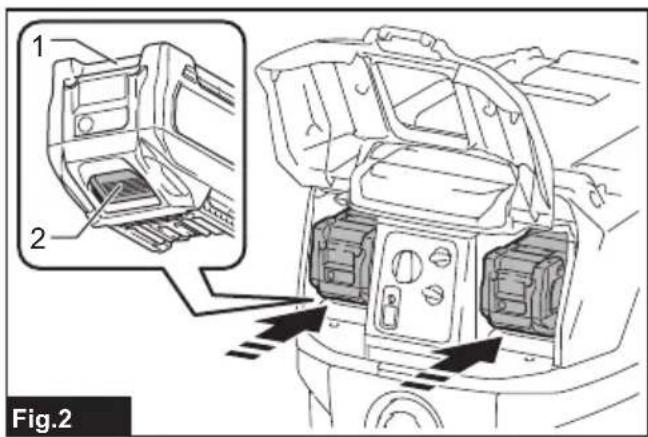
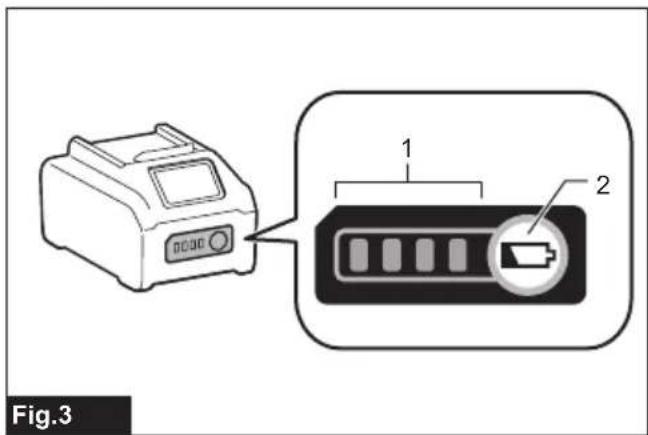
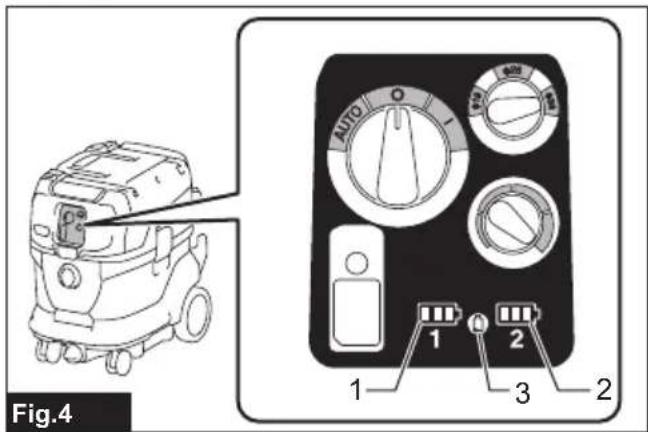
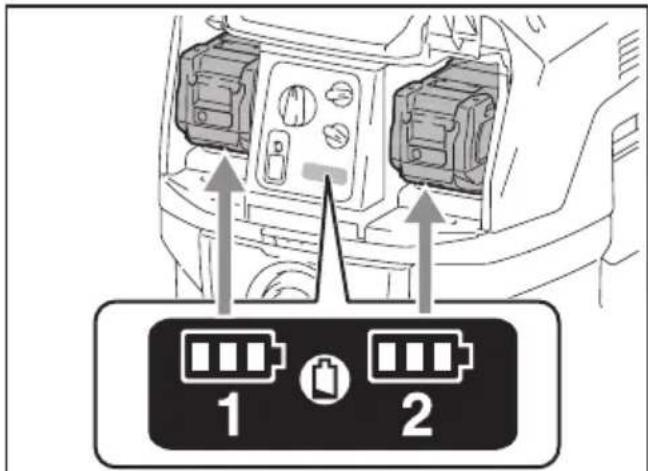
Fig.5
natural_image
Illustration of hands performing a medical or manual procedure on a device, labeled 'Fig.7' with no visible text or symbols.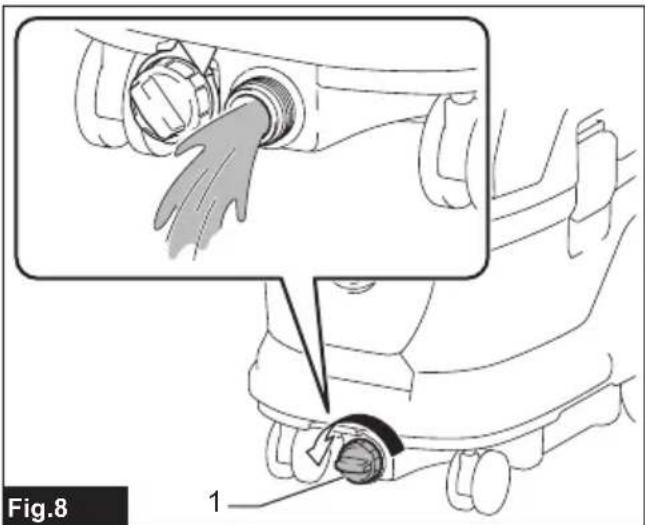

natural_image
Line drawing of a mechanical device with wheels and handle (no text or symbols)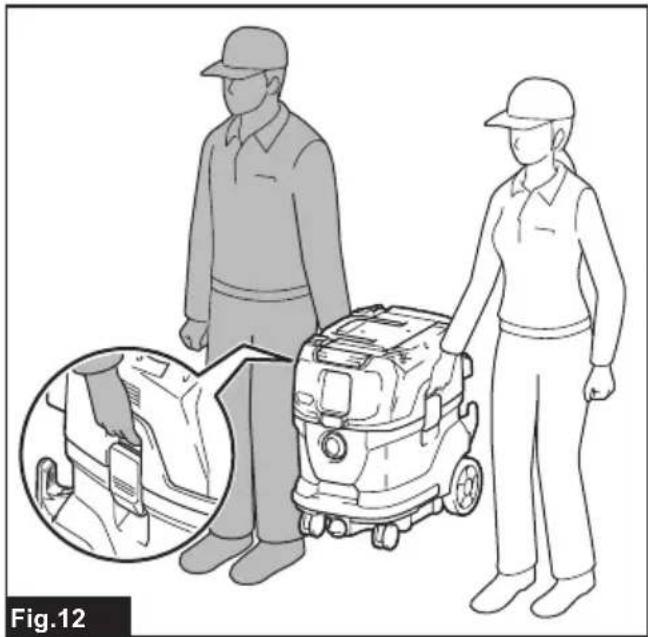
natural_image
Illustration of two workers with a cleaning robot, showing close-up details (no text or symbols)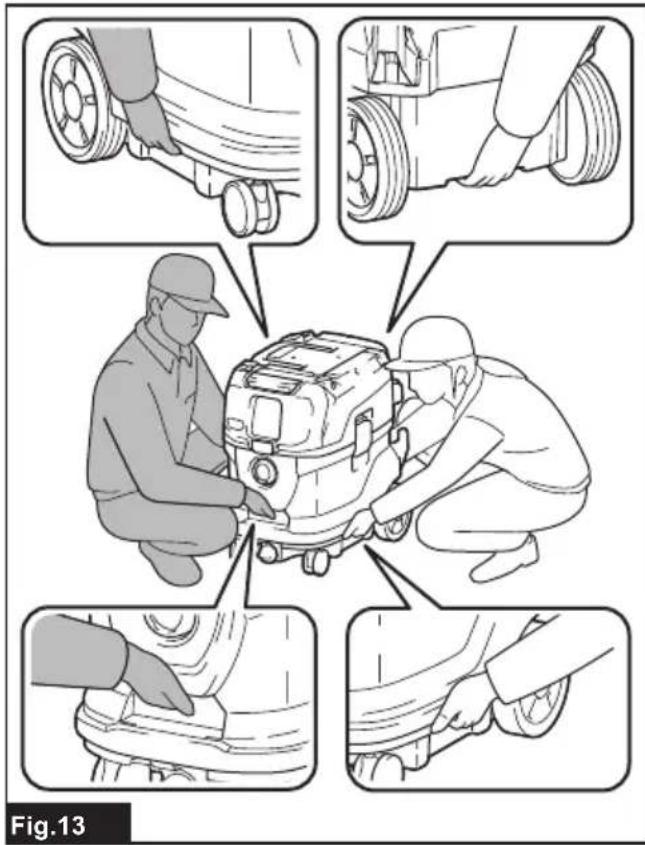



natural_image
Illustration of a vacuum cleaner emitting sound waves from a device, labeled Fig.25 (no text or symbols on the diagram itself)



natural_image
Illustration of hands cleaning a rectangular object with liquid dripping (no text or symbols)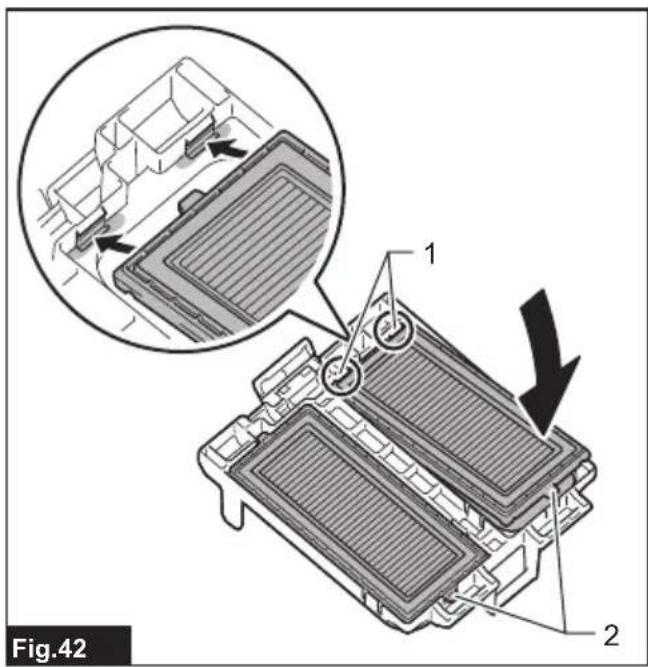
natural_image
Technical line drawing of a rectangular electronic component with multiple pins (no text or symbols)
natural_image
Diagram of a mechanical component with coiled hoses and a magnified inset showing a connector detail (no text or symbols)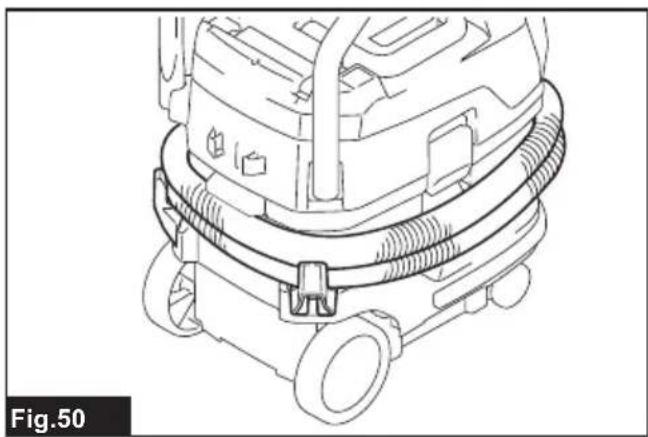
natural_image
Technical line drawing of a mechanical device with attached tubing and wheels (no text or symbols)WARNING
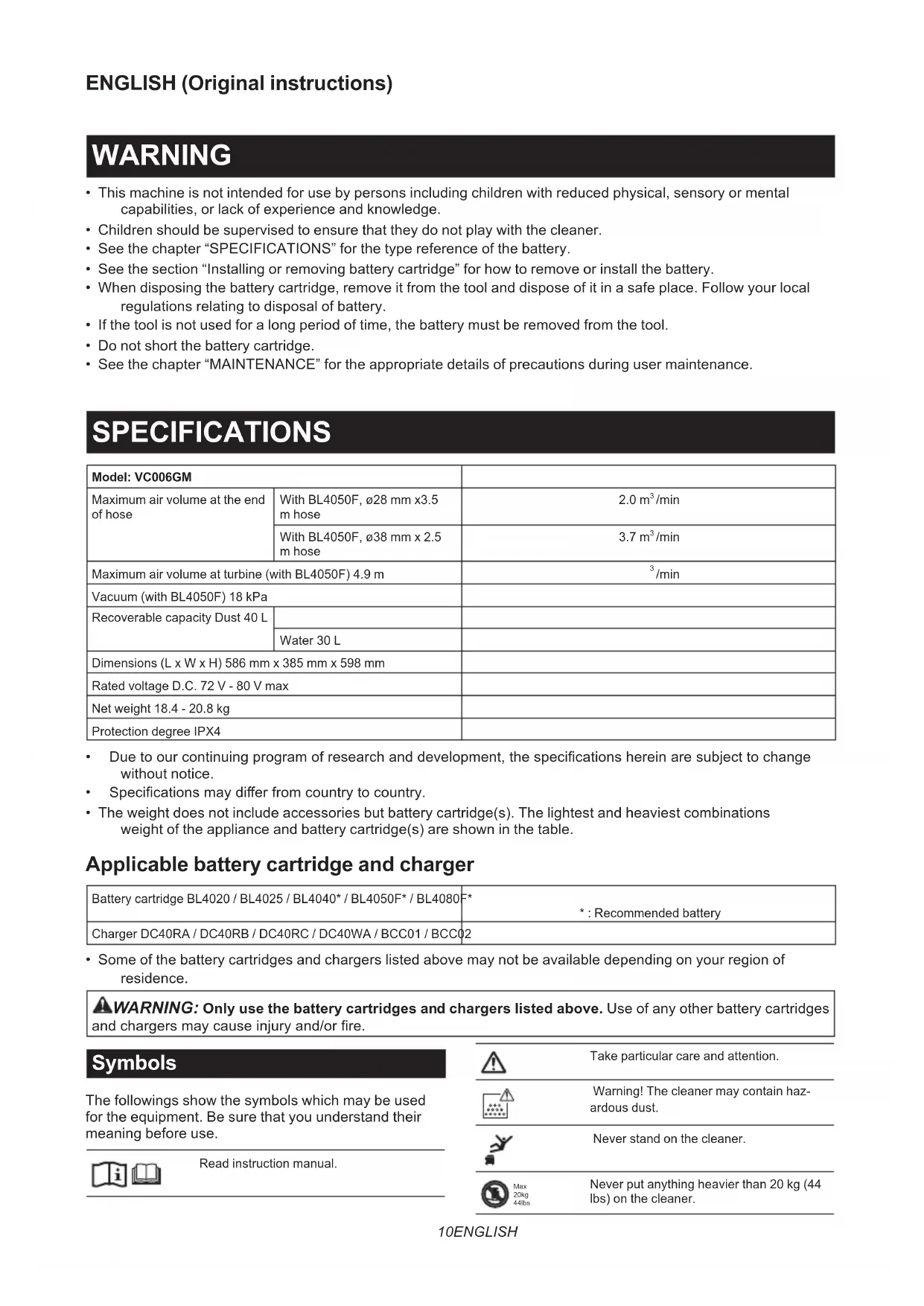
- This machine is not intended for use by persons including children with reduced physical, sensory or mental capabilities, or lack of experience and knowledge.
- Children should be supervised to ensure that they do not play with the cleaner.
- See the chapter "SPECIFICATIONS" for the type reference of the battery.
- See the section "Installing or removing battery cartridge" for how to remove or install the battery.
- When disposing the battery cartridge, remove it from the tool and dispose of it in a safe place. Follow your local regulations relating to disposal of battery.
- If the tool is not used for a long period of time, the battery must be removed from the tool.
- Do not short the battery cartridge.
- See the chapter "MAINTENANCE" for the appropriate details of precautions during user maintenance.
SPECIFICATIONS
| Model: VC006GM | ||
| Maximum air volume at the end of hose | With BL4050F, ø28 mm x3.5 m hose | 2.0 m3/min |
| With BL4050F, ø38 mm x 2.5 m hose | 3.7 m3/min | |
| Maximum air volume at turbine (with BL4050F) 4.9 m | 3/min | |
| Vacuum (with BL4050F) 18 kPa | ||
| Recoverable capacity Dust 40 L | ||
| Water 30 L | ||
| Dimensions (L x W x H) 586 mm x 385 mm x 598 mm | ||
| Rated voltage D.C. 72 V - 80 V max | ||
| Net weight 18.4 - 20.8 kg | ||
| Protection degree IPX4 | ||
- Due to our continuing program of research and development, the specifications herein are subject to change without notice.
• Specifications may differ from country to country. - The weight does not include accessories but battery cartridge(s). The lightest and heaviest combinations weight of the appliance and battery cartridge(s) are shown in the table.
Applicable battery cartridge and charger
| Battery cartridge BL4020 / BL4025 / BL4040* / BL4050F* / BL4080F* | *: Recommended battery |
| Charger DC40RA / DC40RB / DC40RC / DC40WA / BCC01 / BCC02 |
- Some of the battery cartridges and chargers listed above may not be available depending on your region of residence.

WARNING: Only use the battery cartridges and chargers listed above. Use of any other battery cartridges and chargers may cause injury and/or fire.
Symbols
The followings show the symbols which may be used for the equipment. Be sure that you understand their meaning before use.


Read instruction manual.


Take particular care and attention.
Warning! The cleaner may contain hazardous dust.
Never stand on the cleaner.
Never put anything heavier than 20 kg (44 lbs) on the cleaner.
| Dust class M (medium): for separating dust with a limit value of occupational exposure not less than 0.1 mg/m 3 . The cleaners are capable of picking up dust class L and M. Follow your country's regulations relating to dusts and to occupational health and safety. | |
| Only for EU countriesDue to the presence of hazardous components in the equipment, waste electrical and electronic equipment, accumulators and batteries may have a negative impact on the environment and human health.Do not dispose of electrical and electronic appliances or batteries with household waste!In accordance with the European Directive on waste electrical and electronic equipment and on accumulators and batteries and waste accumulators and batteries, as well as their adaptation to national law, waste electrical equipment, batteries and accumulators should be stored separately and delivered to a separate collection point for municipal waste, operating in accordance with the regulations on environmental protection.This is indicated by the symbol of the crossed-out wheeled bin placed on the equipment. |
Intended use
The appliance is intended for collecting both wet and dry dust. The appliance is suitable for commercial use, for example in hotels, schools, hospitals, factories, shops, offices and rental businesses.
Noise
The typical A-weighted noise level determined according to EN60335-2-69:
Sound pressure level ( LpA ): 70 dB(A) or less
Uncertainty (K) : 2.5 dB (A)
The noise level under working may exceed 80 dB (A).
NOTE: The declared noise emission value(s) has been measured in accordance with a standard test method and may be used for comparing one tool with another.
NOTE: The declared noise emission value(s) may also be used in a preliminary assessment of exposure.
WARNING: Wear ear protection.
WARNING: The noise emission during actual use of the power tool can differ from the declared value(s) depending on the ways in which the tool is used especially what kind of workpiece is processed.
WARNING: Be sure to identify safety measures to protect the operator that are based on an estimation of exposure in the actual conditions of use (taking account of all parts of the operating cycle such as the times when the tool is switched off and when it is running idle in addition to the trigger time).
Vibration
The vibration total value (tri-axial vector sum) determined according to EN60335-2-69:
Vibration emission ( ah,M ): 2.5 m/s 2 or less
Uncertainty (K) : 1.5 m/s 2
NOTE: The declared vibration total value(s) has been measured in accordance with a standard test method and may be used for comparing one tool with another.
NOTE: The declared vibration total value(s) may also be used in a preliminary assessment of exposure.
WARNING: The vibration emission during actual use of the power tool can differ from the declared value(s) depending on the ways in which the tool is used especially what kind of workpiece is processed.
⚠ WARNING: Be sure to identify safety measures to protect the operator that are based on an estimation of exposure in the actual conditions of use (taking account of all parts of the operating cycle such as the times when the tool is switched off and when it is running idle in addition to the trigger time).
Declarations of Conformity
For European countries only
The Declarations of conformity are included in Annex A to this instruction manual.
SAFETY WARNINGS
Cordless vacuum cleaner safety warnings
WARNING: IMPORTANT! READ CAREFULLY all safety warnings and all instructions BEFORE USE. Failure to follow the warnings and instructions may result in electric shock, fire and/or serious injury.
- Before use, make sure that this cleaner must be used by people who have been adequately instructed on the use of this cleaner.
- Before use, operators shall be provided with information, instruction and training for the use of the machine and the substances for which it is to be used, including the safe method of removal and disposal of the material collected.
- If foam/liquid comes out, switch off immediately.
- Clean the water level limiting device regularly and examine it for signs of damage.
- Always make sure that filters are correctly installed before use. Do not use the cleaner without filters in place. Replace a damaged filter immediately. It is recommended to have some spares as filters are consumable items.
- AVOID UNINTENTIONAL STARTING. Be sure
switch is OFF when installing battery(ies).
-
Do not attempt to pick up flammable materials, fireworks, lighted cigarettes, hot ashes, hot metal chips, and sharp materials such as razors, needles, broken glass or the like.
-
NEVER USE THE CLEANER IN THE VICINITY OF GASOLINE, GAS, PAINT, ADHESIVES OR OTHER HIGHLY EXPLOSIVE SUBSTANCES. The switch emits sparks when turned ON and OFF. And so does the motor commutator during operation. A dangerous explosion may result.
-
Never vacuum up toxic, carcinogenic, combustible or other hazardous materials such as asbestos, arsenic, barium, beryllium, lead, pesticides, or other health endangering materials.
-
Always place the cleaner on a horizontal flat surface to prevent it from falling or moving unintentionally.
-
Never use the cleaner outdoors in the rain.
-
For Finland, this machine is not to be used outdoors at low temperature.
-
Do not use close to heat sources (stoves, etc.).
-
If the exhaust air is returned to the room, it is necessary to provide for an adequate air change rate in the room. Reference to National regulations is necessary.
-
Do not block suction inlet/outlet/cooling vents. These vents permit cooling of the motor. Blockage should be carefully avoided otherwise the motor will burn out due to a lack of ventilation.
-
Keep proper footing and balance at all times.
-
Do not fold, tug or step on the hose.
-
Stop the cleaner immediately if you notice poor performance or anything abnormal during operation.
-
REMOVE THE BATTERY(IES). When not in use, before servicing, and when changing accessories.
-
Clean and service the cleaner immediately after each use to keep it in tiptop operating condition.
-
MAINTAIN THE CLEANER WITH CARE. Keep the cleaner clean for better and safer performance. Follow instructions for changing accessories. Keep handles dry, clean, and free from oil and grease.
-
CHECK DAMAGED PARTS. Before further use of the cleaner, a guard or other part that is damaged should be carefully checked to determine that it will operate properly and perform its intended function. Check for alignment of moving parts, binding of moving parts, breakage of parts, mounting, and any other conditions that may affect its operation. A guard or other part that is damaged should be properly repaired or replaced by an authorized service center unless otherwise indicated elsewhere in this instruction manual. Have defective switches replaced by authorized service center. Don't use the cleaner if switch does not turn it on and off.
-
For user servicing, the machine shall be dismantled, cleaned and serviced, as far as is reasonably practicable, without causing risk to the maintenance staff and others.
-
The machine should be technically inspected by the manufacturer, or an instructed person, at least annually, consisting of, for example, inspection of filters for damage, air tightness of the machine and proper function of the control mechanism.
-
When carrying out service or repair operations, all contaminated items which cannot be satisfactorily cleaned are to be disposed of; such items shall be disposed of in impervious bags in accordance with any current regulation for the disposal of such waste.
-
REPLACEMENT PARTS. When servicing, use only identical replacement parts.
-
When not in use, always store the cleaner indoors.
-
Wet filters and the interior part of the liquid container shall be dried before storage.
-
Be kind to your cleaner. Rough handling can cause breakage of even the most sturdily built cleaner.
-
Do not attempt to clean the exterior or interior with benzine, thinner or cleaning chemicals. Cracks and discoloration may be caused.
-
Do not use cleaner in an enclosed space where flammable, explosive or toxic vapors are given off by oil-based paint, paint-thinner, gasoline, some mothproofing substances, etc., or in areas where flammable dust is present.
-
Do not operate the cleaner or any tool while under the influence of drugs or alcohol.
-
As a basic rule of safety, use safety goggles or safety glasses with side shields.
-
Use a dust mask in dusty work conditions.
-
This machine is not intended for use by persons including children with reduced physical, sensory or mental capabilities, or lack of experience and knowledge.
-
Children should be supervised to ensure that they do not play with the cleaner.
-
Never handle battery(ies) and cleaner with wet hands.
-
Use extreme caution when cleaning on stairs.
-
Do not use the cleaner as a stool or work bench. The machine may fall down and may result in personal injury.
Battery tool use and care
-
Recharge only with the charger specified by the manufacturer. A charger that is suitable for one type of battery pack may create a risk of fire when used with another battery pack.
-
Use power tools only with specifically designated battery packs. Use of any other battery packs may create a risk of injury and fire.
-
When battery pack is not in use, keep it away from other metal objects, like paper clips, coins, keys, nails, screws or other small metal objects, that can make a connection from one terminal to another. Shorting the battery terminals together may cause burns or a fire.
-
Under abusive conditions, liquid may be ejected from the battery; avoid contact. If contact accidentally occurs, flush with water. If liquid contacts eyes, additionally seek medical help. Liquid ejected from the battery may cause irritation or burns.
- Do not use a battery pack or tool that is damaged or modified. Damaged or modified batteries may exhibit unpredictable behaviour resulting in fire, explosion or risk of injury.
- Do not expose a battery pack or tool to fire or excessive temperature. Exposure to fire or temperature above 130 °C may cause explosion.
- Follow all charging instructions and do not charge the battery pack or tool outside the temperature range specified in the instructions. Charging improperly or at temperatures outside the specified range may damage the battery and increase the risk of fire.
SAVE THESE INSTRUCTIONS.
⚠ WARNING: DO NOT let comfort or familiarity with product (gained from repeated use) replace strict adherence to safety rules for the subject product. MISUSE or failure to follow the safety rules stated in this instruction manual may cause serious personal injury.
Important safety instructions for battery cartridge
- Before using battery cartridge, read all instructions and cautionary markings on (1) battery charger, (2) battery, and (3) product using battery.
- Do not disassemble or tamper with the battery cartridge. It may result in a fire, excessive heat, or explosion.
- If operating time has become excessively shorter, stop operating immediately. It may result in a risk of overheating, possible burns and even an explosion.
-
If electrolyte gets into your eyes, rinse them out with clear water and seek medical attention right away. It may result in loss of your eyesight.
-
Do not short the battery cartridge:
(1) Do not touch the terminals with any conductive material.
(2) Avoid storing battery cartridge in a container with other metal objects such as nails, coins, etc.
(3) Do not expose battery cartridge to water or rain.
A battery short can cause a large current flow, overheating, possible burns and even a breakdown.
-
Do not store and use the tool and battery cartridge in locations where the temperature may reach or exceed 50 °C (122 °F).
-
Do not incinerate the battery cartridge even if it is severely damaged or is completely worn out. The battery cartridge can explode in a fire.
-
Do not nail, cut, crush, throw, drop the battery
cartridge, or hit against a hard object to the battery cartridge. Such conduct may result in a fire, excessive heat, or explosion.
-
Do not use a damaged battery.
-
The contained lithium-ion batteries are subject to the Dangerous Goods Legislation requirements.
For commercial transports e.g. by third parties, forwarding agents, special requirement on packaging and labeling must be observed.
For preparation of the item being shipped, consulting an expert for hazardous material is required. Please also observe possibly more detailed national regulations.
Tape or mask off open contacts and pack up the battery in such a manner that it cannot move around in the packaging. -
When disposing the battery cartridge, remove it from the tool and dispose of it in a safe place. Follow your local regulations relating to disposal of battery.
-
Use the batteries only with the products specified by Makita. Installing the batteries to non-compliant products may result in a fire, excessive heat, explosion, or leak of electrolyte.
-
If the tool is not used for a long period of time, the battery must be removed from the tool.
-
During and after use, the battery cartridge may take on heat which can cause burns or low temperature burns. Pay attention to the handling of hot battery cartridges.
-
Do not touch the terminal of the tool immediately after use as it may get hot enough to cause burns.
-
Do not allow chips, dust, or soil stuck into the terminals, holes, and grooves of the battery cartridge. It may cause heating, catching fire, burst and malfunction of the tool or battery cartridge, resulting in burns or personal injury.
-
Unless the tool supports the use near high-voltage electrical power lines, do not use the battery cartridge near high-voltage electrical power lines. It may result in a malfunction or breakdown of the tool or battery cartridge.
-
Keep the battery away from children.
SAVE THESE INSTRUCTIONS.
CAUTION: Only use genuine Makita batteries. Use of non-genuine Makita batteries, or batteries that have been altered, may result in the battery bursting causing fires, personal injury and damage. It will also void the Makita warranty for the Makita tool and charger.
Tips for maintaining maximum battery life
- Charge the battery cartridge before completely discharged. Always stop tool operation and charge the battery cartridge when you notice less tool power.
- Never recharge a fully charged battery cartridge. Overcharging shortens the battery service life.
- Charge the battery cartridge with room
temperature at 10 °C - 40 °C (50 °F - 104 °F). Let a hot battery cartridge cool down before charging it.
- When not using the battery cartridge, remove it from the tool or the charger.
- Charge the battery cartridge if you do not use it for a long period (more than six months).
Important safety instructions for wireless unit
- Never open the lid of the slot by yourself once installing the wireless unit.
- Do not disassemble or tamper with the wireless unit.
- Keep the wireless unit away from young children. If accidentally swallowed, seek medical attention immediately.
- Use the wireless unit only with Makita tools.
- Do not expose the wireless unit to rain or wet conditions.
- Do not use the wireless unit in places where the temperature exceeds 50 °C (122 °F).
- Do not operate the wireless unit in places where medical instruments, such as heart pace makers are nearby.
- Do not operate the wireless unit in places where automated devices are nearby. If operated, automated devices may develop malfunction or error.
- Do not operate the wireless unit in places under high temperature or places where static electricity or electrical noise could be generated.
- The wireless unit can produce electromagnetic fields (EMF) but they are not harmful to the user.
- The wireless unit is an accurate instrument. Be careful not to drop or strike the wireless unit.
- Avoid touching the terminal of the wireless unit with bare hands or metallic materials.
- Always remove the battery on the product when installing the wireless unit into it.
- When opening the lid of the slot, avoid the place where dust and water may come into the slot. Always keep the inlet of the slot clean.
- Always insert the wireless unit in the correct direction.
- Do not press the wireless activation button on the wireless unit too hard and/or press the button with an object with a sharp edge.
- Always close the lid of the slot when operating.
- Do not remove the wireless unit from the slot while the power is being supplied to the tool. Doing so may cause a malfunction of the wireless unit.
- Do not remove the sticker on the wireless unit.
- Do not put any sticker on the wireless unit.
- Do not leave the wireless unit in a place where static electricity or electrical noise could be generated.
- Do not leave the wireless unit in a place
subject to high heat, such as a car sitting in the sun.
23. Do not leave the wireless unit in a dusty or powdery place or in a place corrosive gas could be generated.
24. Sudden change of the temperature may bedew the wireless unit. Do not use the wireless unit until the dew is completely dried.
25. When cleaning the wireless unit, gently wipe with a dry soft cloth. Do not use benzine, thinner, conductive grease or the like.
26. When storing the wireless unit, keep it in the supplied case or a static-free container.
27. Do not insert any devices other than Makita wireless unit into the slot on the tool.
28. Do not use the tool with the lid of the slot damaged. Water, dust, and dirt come into the slot may cause malfunction.
29. Do not pull and/or twist the lid of the slot more than necessary. Restore the lid if it comes off from the tool.
30. Replace the lid of the slot if it is lost or damaged.
SAVE THESE INSTRUCTIONS.
FUNCTIONAL DESCRIPTION
CAUTION: Always be sure that the appliance is switched off and the battery cartridges are removed before adjusting or checking function on the appliance.
Installing or removing battery cartridge
⚠️ CAUTION: Always switch off the tool before installing or removing of the battery cartridge.
CAUTION: Hold the cleaner and the battery cartridge firmly when installing or removing battery cartridge. Failure to hold the cleaner and the battery cartridge firmly may cause them to slip off your hands and result in damage to the cleaner and battery cartridge and a personal injury.
CAUTION: Be careful not to pinch your fingers when opening or closing the battery cover. Failure to do so may cause personal injury.
To install the battery cartridge, release the lock first, and then open the battery cover. After that, insert the battery cartridge.
▶ Fig.1: 1. Lock 2. Battery cover
Align the tongue on the battery cartridge with the groove in the housing and slip it into place. Insert it all the way until it locks in place with a little click. Then lock the battery cover.
▶ Fig.2: 1. Battery cartridge 2. Button
To remove the battery cartridge, slide it from the tool
while sliding the button in front of the cartridge.
⚠️CAUTION: Always install the battery cartridge fully. If not, it may accidentally fall out of the cleaner, causing injury to you or someone around you. ⚠️CAUTION: Do not install the battery cartridge forcibly. If the cartridge does not slide in easily, it is not being inserted correctly.
NOTE: The cleaner does not work with only one battery cartridge.
Indicating the remaining battery capacity
Press the check button on the battery cartridge to indicate the remaining battery capacity. The indicator lamps light up for a few seconds.
▶ Fig.3: 1. Indicator lamps 2. Check button
| Indicator lamps Remaining | capacity | ||
| Lighted Off | Blinking | ||
 | 75% to 100% | ||
 | 50% to 75% | ||
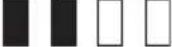 | 25% to 50% | ||
 | 0% to 25% | ||
 | Charge the battery. | ||
 ↑↓ ↑↓ | The battery may have malfunctioned. | ||
NOTE: Depending on the conditions of use and the ambient temperature, the indication may differ slightly from the actual capacity.
NOTE: The first (far left) indicator lamp will blink when the battery protection system works.
Battery indicators on control panel
The remaining battery capacity can be read on the control panel at any time. Press the check button, and the left and right indicators will show the battery charge levels correspondingly.
▶ Fig.4: 1. Left battery indicator 2. Right battery indicator 3. Check button
▶ Fig.5
| Battery indicator status Remaining | battery capacity | ||
| On Off | Blinking | ||
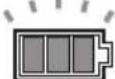 | 50% to 100% | ||
| Battery indicator status Remaining | battery capacity | ||
| On Off | Blinking | ||
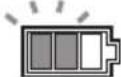 | 20% to 50% | ||
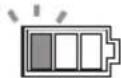 | 0% to 20% | ||
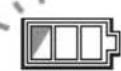 | Charge the battery | ||
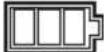 | Battery not inserted | ||
NOTE: Battery indicator works while two batteries are inserted. NOTE: The battery indicators will also be activated when the cleaner starts functioning.
Appliance / battery protection system
The appliance is equipped with an appliance/battery protection system. This system automatically cuts off power to the motor to extend appliance and battery life. The appliance will automatically stop during operation if the appliance or battery is placed under one of the following conditions:
Overload protection
When the appliance/battery is operated in a manner that causes it to draw an abnormally high current, the appliance automatically stops. In this situation, turn the appliance off and stop the application that caused the appliance to become overloaded. Then turn the appliance on to restart.
Overheat protection
| On Blinking | |
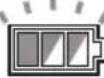 | 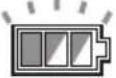 |
When the appliance is overheated, the appliance stops automatically, and both left and right battery indicators blink. In this situation, let the appliance cool down and clean out the filters before turning the appliance on again.
| On Blinking | |
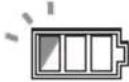 | |
When the battery is overheated, the appliance stops automatically, and one of the indicators for overheated battery blinks. In this situation, let the battery cool down before turning the appliance on again.
Overdischarge protection
When the battery capacity becomes low, the appliance stops automatically. If the appliance does not run along with the switch operation, remove the batteries from the appliance and recharge them.
Protections against other causes
Protection system is also designed for other causes that could damage the appliance and allows the appliance to stop automatically. Take all the following steps to clear the causes, when the appliance has been brought to a temporary halt or stop in operation.
- Turn the appliance off, and then turn it on again to restart.
- Charge the battery(ies) or replace it/them with recharged battery(ies).
- Let the appliance and battery(ies) cool down.
If no improvement can be found by restoring protection system, then contact your local Makita Service Center.
Switch action
Turning cleaner on
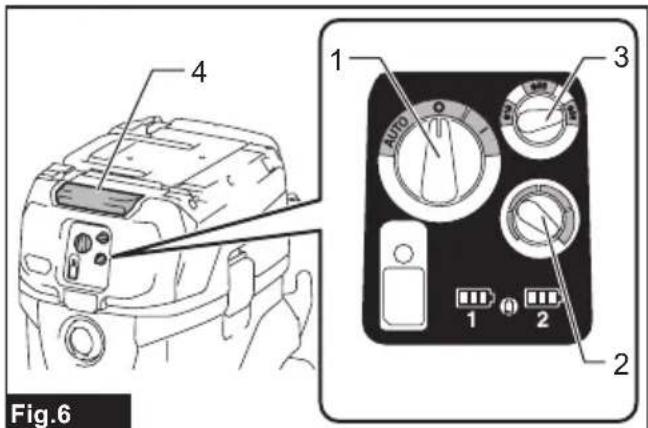
- Turn the stand-by switch in the "I" (ON) or "AUTO" (ON) position to have the cleaner ready in stand-by mode.
- Press the power button. To switch back to stand-by mode, press the power button again.
Turning cleaner off
Perform one of the following steps.
- Press the power button to set the cleaner back in stand-by mode.
- Turn the stand-by switch in the "O" (OFF) position.
Adjusting suction power
The suction power can be adjusted according to your work needs.
- Turn the suction force adjusting knob to the left to reduce the suction power.
- Turn the suction force adjusting knob to the right to increase the suction power.
Hose diameter selection
Turn the hose diameter selection dial to the hose's diameter that you are going to use.
NOTE: Do not turn the dial to a gap between the numbers. Always turn the dial according to the hose diameter.
▶ Fig.6: 1. Stand-by switch 2. Suction force adjusting knob 3. Hose diameter selection dial 4. Power button
NOTICE: Always set the stand-by switch to the "O" side when not using the cleaner for long time. The cleaner consumes power during stand-by state.
Warning beep
There are two types of beeping sound. One is short beeps, and the other is continuous beeps.
- When the air flow speed falls under 20 m/s, the cleaner emits short warning beeps for safety reasons. When it sounds, check the hose diameter
selection dial or if the suction force is not too low. If the beeps keep sounding, perform maintenance or ask your local service center.
- When the tank is filled with liquid, the cleaner emits continuous warning beeps and stops automatically.
After the cleaner stops, switch off the cleaner and empty the tank.
Auto-suction stop during wet suction operation
WARNING: Do not pick up foam or soapy
liquid. It can cause foam to come out of air exit. Continuous use under such conditions may cause an electric shock and breakage of the cleaner.
The cleaner has a mechanism that prevents water from immersing into the motor when picking up more than a certain amount of water.
When the tank is full with liquid, the cleaner emits continuous warning beeps and stops automatically. After the cleaner stops, switch off the cleaner and empty the tank.
Filter cleaning system
This appliance has filter cleaning system. During the use of the appliance, filter cleaning system dusts the filters automatically to prevent the suction force lowering because of clogging of filters.
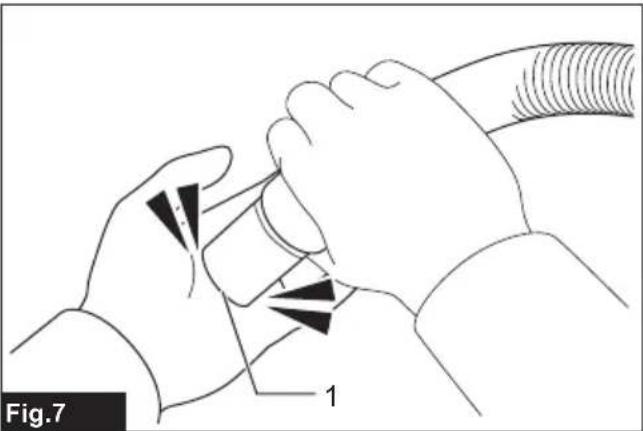
If the appliance sucks up the large quantity of dust all at once, suction force may decrease. In that case, manual filter cleaning is recommended.
- Switch off the appliance.
- Set the suction power to maximum, and then close the suction hose opening with your palm.
- Switch on the appliance and operate for approximately 15 seconds with the suction hose opening closed.
▶ Fig.7: 1. Suction hose opening
NOTE: Air volume may change while the filter cleaning system is being activated but it is not malfunctioned.
Water drain
When the tank is full with liquid, switch off the cleaner and open the water drain cap to empty the tank.
▶ Fig.8: 1. Water drain cap
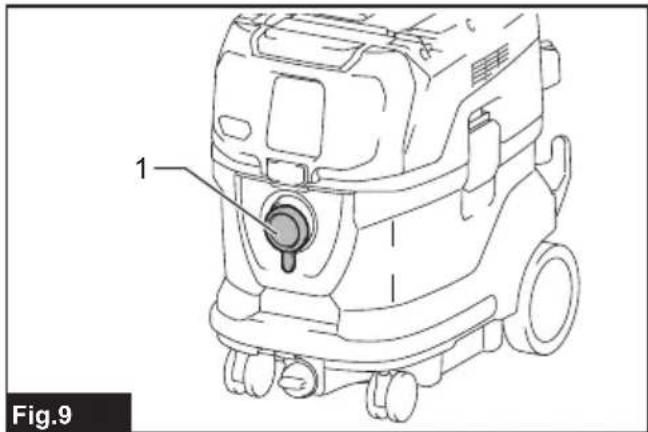
Cap
The cap is supplied with the appliance. Mounting the cap on the hose connecting port prevents the vacuumed dust from getting out from the cleaner.
▶ Fig.9: 1. Cap
Locking and unlocking casters
Front casters can be locked with stoppers to help the cleaner stand still.
Lower the stopper lever by hand to lock the caster, and
raise it up to release.
▶ Fig.10: 1. Caster 2. Stopper lever 3. Unlocked position 4. Locked position
NOTE: When moving the cleaner, make sure that the caster is unlocked. Moving the cleaner with the caster in a locked position may cause damage to the caster.
Carriage handle
⚠️CAUTION: Lift and carry the appliance with due care. Failing to do so may result in personal injury or damage to the appliance.
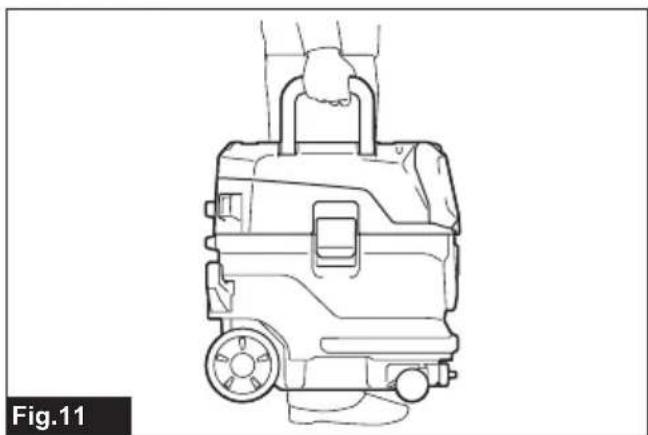
When carrying the cleaner, carry it by holding the handle on the head unit. The handle is retractable on the head unit when not in use.
▶ Fig.11
If it is difficult to carry the appliance by yourself, carry it by two people as shown in the figure.
▶ Fig.12
▶ Fig.13
ASSEMBLY
⚠ WARNING: This unit may contain hazardous dust. When replacing filter elements and dust bag or maintenance, always use a P2-respirator.
⚠️CAUTION: Always be sure that the appliance is switched off and the battery cartridges are removed before carrying out any work on the appliance.
Installing and disposing filter bag
⚠ WARNING: Always use a P2-respirator.
⚠ WARNING: Before using a filter bag, make sure that the filter unit is used together. Failure to use the filter unit together may cause unusual noise and heat, resulting in a fire.
WARNING: When using the appliance as dust class M, always make sure to use filter bag.
NOTICE: Never pick up water or other liquids or wet dusts when using a filter bag. Picking up such things may cause the filter bag breakage.
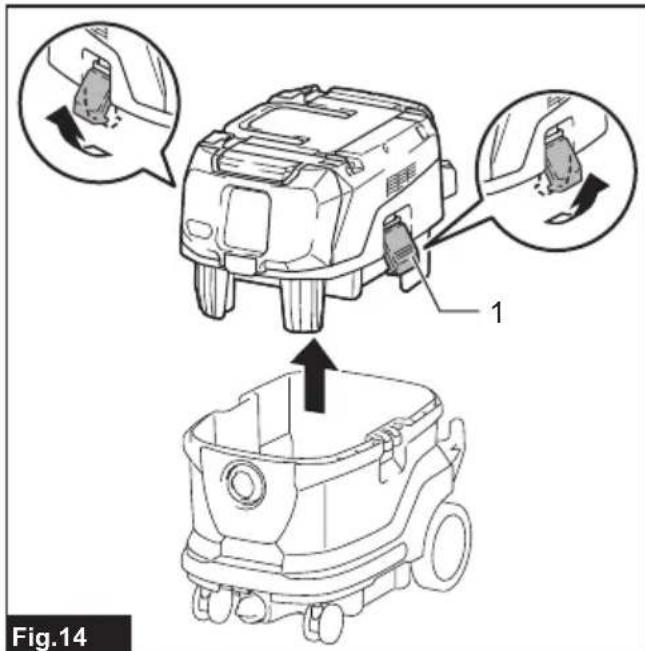
- Release the locking hooks and lift the head unit up off the tank.
▶ Fig.14: 1. Locking hook - Unfold a filter bag.
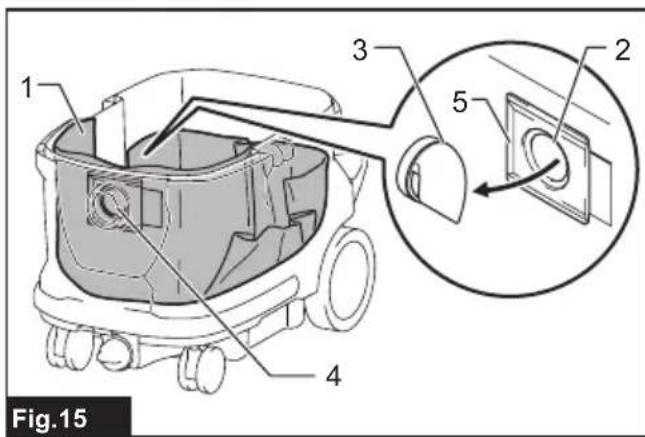
- Align the filter bag opening with the dust intake of the tank.
- Insert the cardboard of the filter bag onto the tool so that it is positioned at the end beyond the detent protrusion.
▶ Fig.15: 1. Filter bag 2. Cardboard opening 3. Filter bag holder 4. Dust intake 5. Edge
When disposing the filter bag, pull the edge on the filter bag's mouth so that the mouth is closed by a paper.
Installing polyethylene bag
Optional accessory
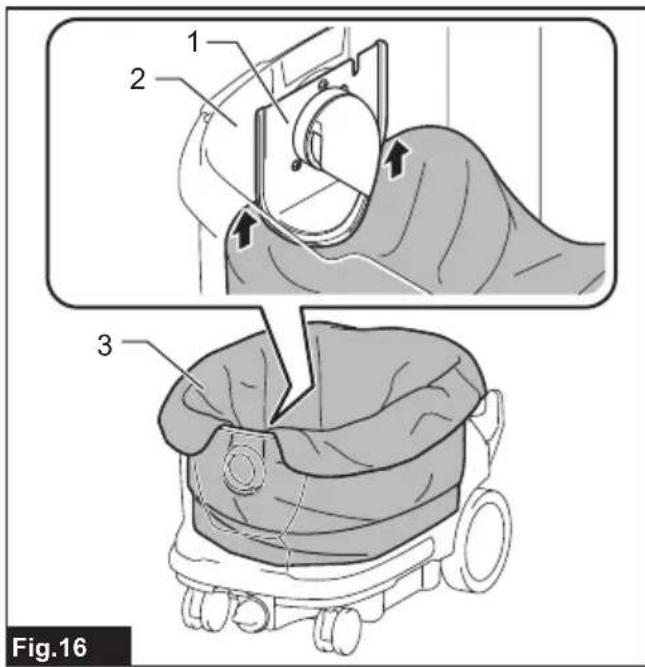
Lay a polyethylene bag over the tank, and slip one side of the top edge of the bag at its open end in between the holder plate and the front wall of the tank.
Then, spread the other top edges of the bag outwards over the top rims of the tank.
Polyethylene bag can be used with filter bag.
▶ Fig.16: 1. Holder plate 2. Front wall of tank 3. Polyethylene bag
NOTE: A polyethylene bag available on the market can be used. The thickness is over 0.04 mm and the perimeter is over 2,000 mm one is recommended.
NOTE: Too much dust will tear the polyethylene bag easily, so do not overfill the bag. Disposing the heavy bag may be a burden on a human body.
Emptying tank with polyethylene bag
WARNING: Always make sure that the cleaner is switched off and the battery cartridges are removed before emptying the tank. Failure to do so may cause an electric shock and serious personal injury.
NOTICE: Empty the tank at least once a day although this depends on picked-up dust volume in the tank. Or, the suction force will weaken and the motor may be broken.
NOTICE: Do not grab the locking hooks when emptying the tank. Grabbing the locking hooks may cause them to break.
- Release the locking hooks and lift the head unit up off the tank.
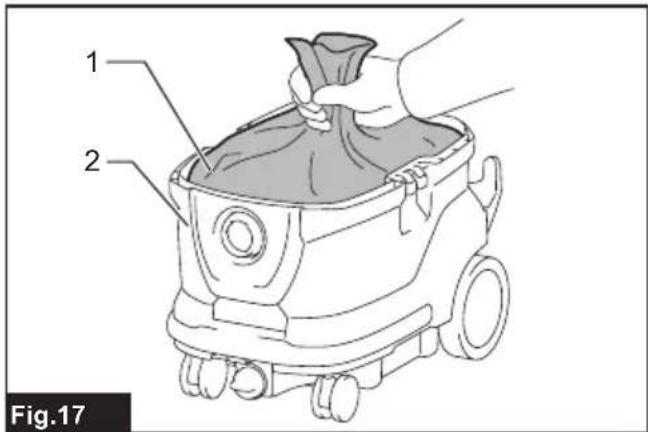
- Remove the polyethylene bag out of the tank, closing the opening of the bag by hand.
▶ Fig.17: 1. Polyethylene bag 2. Tank
NOTE: Take the polyethylene bag out of the tank carefully to avoid it from being scratched and torn by the edges inside the tank.
NOTE: Empty the polyethylene bag before it becomes full. Too much dust in the tank may cause the polyethylene bag to be torn.
Installing hose
NOTICE: Never force the hose for bending or stamp it. Never move the cleaner by pulling the hose. Forcing, stamping and pulling the hose may cause a breakage or deformation of the hose.
NOTICE: When picking up large wastes such as planer carvings, concrete dusts or similar other than small wastes, use the 38 mm inner diameter hose (optional accessory). Using the 28 mm inner diameter hose (optional accessory) may cause a hose stuffing and damage.
NOTICE: Always put the cap on the mounting port whenever you remove the hose from the cleaner.
Connection to cleaner
Remove the cap from the mounting port. The cap can be stored at the rear of the cleaner while the hose is connected to the cleaner.
▶ Fig.18: 1. Cap
Insert the hose end to the dust intake (hose inlet) of the cleaner, then turn it clockwise until it locks in place.
▶ Fig.19: 1. Hose 2. Dust intake (hose inlet)
Connections with your work tools (Country specific)
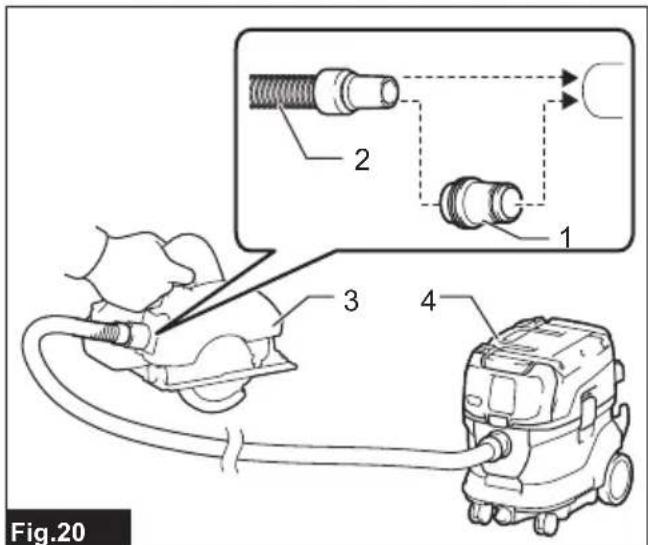
By connecting the vacuum cleaner to any available work tools compatible with the cleaner, it works as a dust extractor for your power tools.
Select one of the front cuffs or joints (optional accessories) as most suitable for your tool model. Place the cuffs or joint, as necessary, between the front end of the cleaner hose and a dust extraction port of your tool.
▶ Fig.20: 1. Front cuffs or joint 2. Cleaner hose
- Power tool 4. Vacuum cleaner
Installing or removing cleaner attachments
⚠️CAUTION: After installing an attachment, check if it is securely installed. If the attachment is installed imperfectly, it may come off and cause personal injury.
Attachments without lock function
Optional accessory
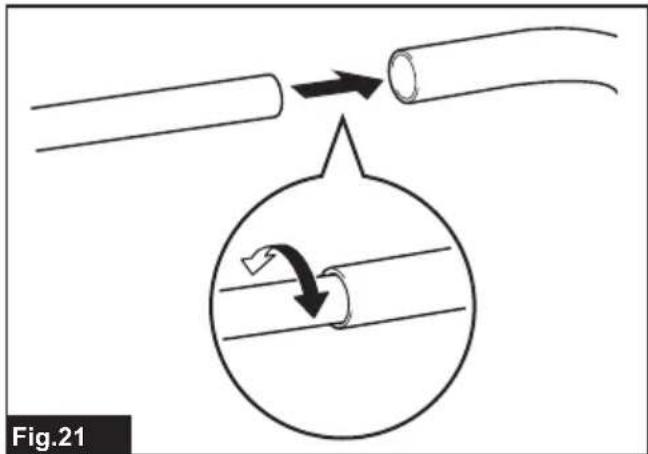
Insert an attachment into the suction inlet of the cleaner by pushing and hand screwing it in place.
Hand twist and pull the attachment apart from the suction inlet after use.
▶ Fig.21
Installing MAKPAC
Optional accessory
CAUTION: Do not stand on or sit on the top of the appliance. It may fall down because of instability.
CAUTION: Be careful with the operation when installing MAKPAC. Failing to do so may result in personal injury or damage to the appliance.
CAUTION: When MAKPAC is installed on the appliance, do not lift the appliance with the handle of MAKPAC.
CAUTION: When moving the appliance which is installed MAKPAC, do not push MAKPAC but the body of appliance. Pushing MAKPAC may break the latches and drop MAKPAC, which may result in personal injury.
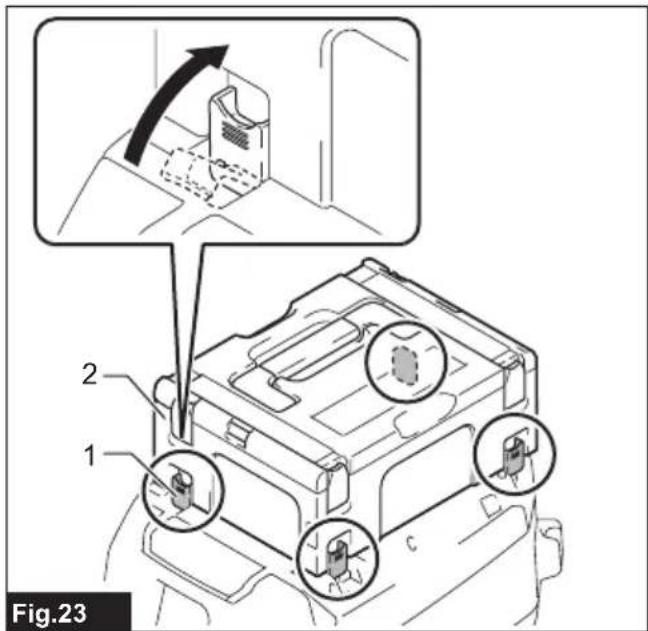
Connectable and stackable MAKPAC storage cases can be installed on top of the cleaner. The cases are available in many sizes and styles to suit your preferences.
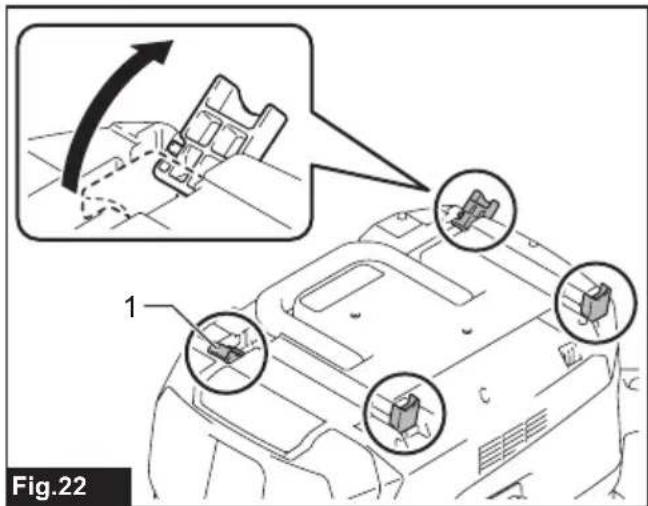
- Unfold the latches on top surface of the cleaner.
▶ Fig.22: 1. Latch - Mount the MAKPAC cases on top of the cleaner and fix it with latches.
▶ Fig.23: 1. Latch 2. MAKPAC
Maximum height and weight of installing MAKPAC are 315 mm and 20 kg respectively.
▶ Fig.24
OPERATION
WARNING: Always use a P2-respirator.
CAUTION: If foam or liquid escapes from the tool, switch off immediately. Continuing to using in this condition may cause an electric shock and breakage of the cleaner.
WIRELESS ACTIVATION FUNCTION
Optional accessory
What you can do with the wireless activation function
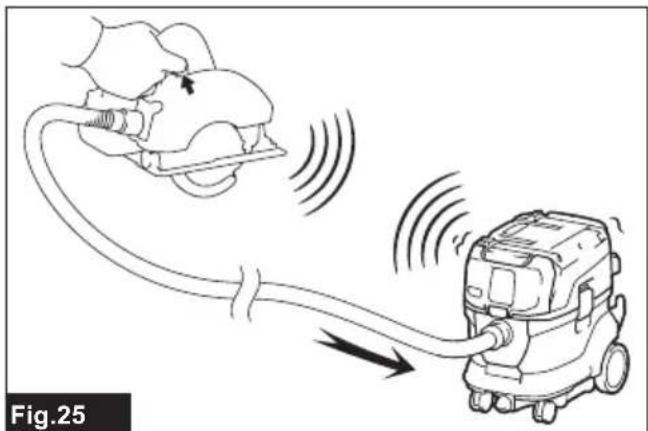
The wireless activation function enables clean and comfortable operation. By connecting a supported tool to the cleaner, you can run the cleaner automatically along with the switch operation of the tool.
▶ Fig.25
NOTICE: Be sure to refer to the instruction manual of the tool when using the cleaner with wireless activation function.
NOTICE: Do not disassemble or tamper with the wireless unit.
NOTICE: To prevent dust coming into the slot of the wireless unit, always close the lid securely during operation and storage.
NOTICE: Do not press the wireless activation button too hard and/or press the button with an object with a sharp edge.
NOTE: Wireless activation needs Makita tools equipped with the wireless unit.
NOTE: Prior to the initial use of the wireless activation function with each tool, the tool registration is required. Once the registration is finished with the tool, the re-registration is not required unless it is cancelled.
NOTE: Before registration, be sure that the wireless unit is properly inserted.
NOTE: One wireless unit can register up to 10 links with other wireless units. If more than 10 other wireless units are registered to one wireless unit, the one registered earliest will be cancelled automatically.
NOTE: The position of the wireless activation button varies depending on the tool.
NOTE: The cleaner also starts by pressing the power button when the stand-by switch is set to "AUTO". However the power button will not actuate when the wireless activation function is used.
Installing the wireless unit

WARNING: Open the lid when you install the eless unit at the first time only. Never open the after installing it.

CAUTION: Place the cleaner on a flat and ble surface when installing the wireless unit.
NOTICE: Clean the dust and dirt on the cleaner before installing the wireless unit. Dust or dirt may cause malfunction if it comes into the slot of the wireless unit.
NOTICE: To prevent the malfunction caused by static, touch a static discharging material, such as a metallic part, before picking up the wireless unit.
NOTICE: When installing the wireless unit, always be sure that the wireless unit is inserted in the correct direction and the lid is completely closed.
- Loosen the screw to open the lid on the cleaner as shown in the figure.
▶ Fig.26: 1. Lid 2. Screw
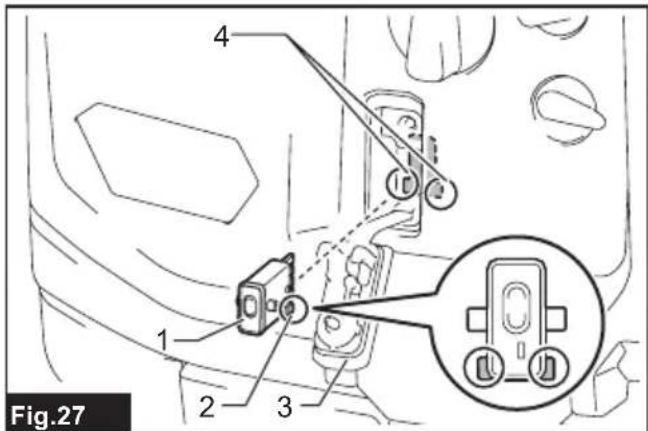
- Insert the wireless unit to the slot.
When inserting the wireless unit, align the projections with the recessed portions on the slot.
▶ Fig.27: 1. Wireless unit 2. Projection 3. Lid
-
Recessed portion
-
Tighten the screw completely to close the lid.
Tool registration for the cleaner
NOTE: A Makita tool supporting the wireless activation function is required for the tool registration.
NOTE: Finish installing the wireless unit to the tool before starting the tool registration.
NOTE: During the tool registration, do not pull the switch trigger on the tool or turn on the power switch on the cleaner.
NOTE: Refer to the instruction manual of the tool, too.
If you wish to activate the cleaner along with the switch operation of the tool, finish the tool registration beforehand.
- Install the wireless units to the cleaner and the tool, respectively.
- Install the batteries to the cleaner and the tool.
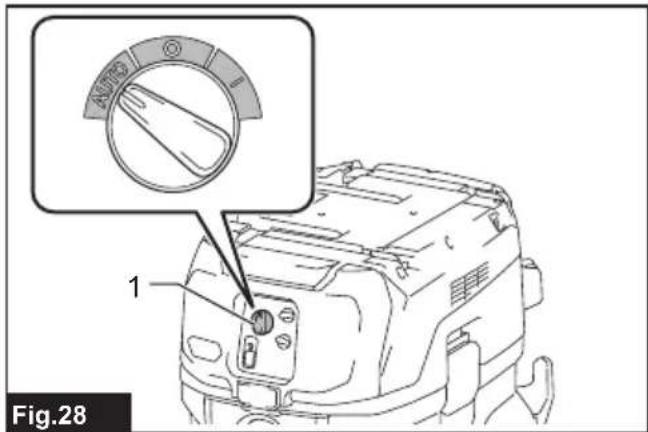
- Set the stand-by switch on the cleaner to "AUTO".
▶ Fig.28: 1. Stand-by switch
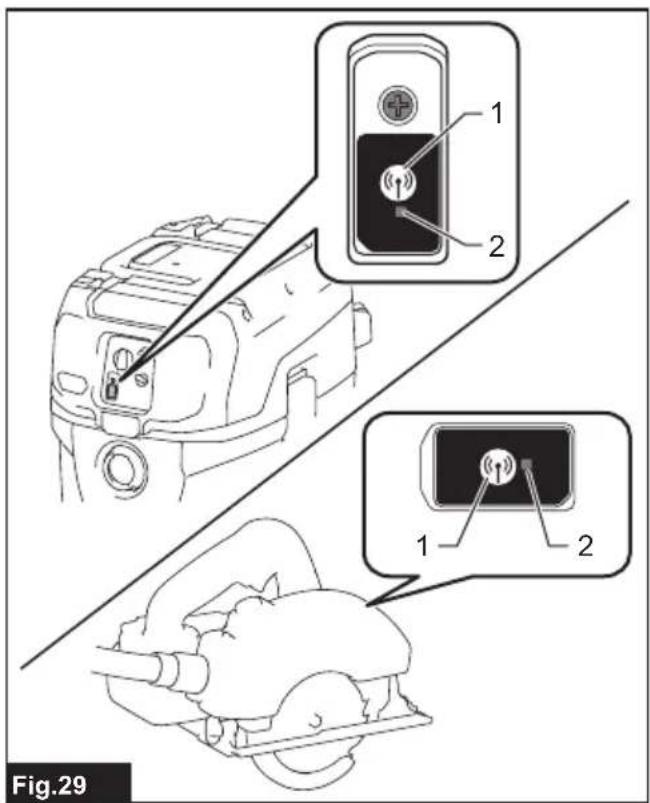
- Press the wireless activation button on the cleaner for 3 seconds until the wireless activation lamp blinks in green. And then press the wireless activation button on the tool in the same way.
▶ Fig.29: 1. Wireless activation button 2. Wireless activation lamp
If the cleaner and the tool are linked successfully, the wireless activation lamps will light up in green for 2 seconds and start blinking in blue.
NOTE: The wireless activation lamps finish blinking in green after 20 seconds elapsed. Press the wireless activation button on the tool while the wireless activation lamp on the cleaner is blinking. If the wireless activation lamp does not blink in green, push the wireless activation button briefly and hold it down again.
NOTE: When performing two or more tool registration for the cleaner, finish the tool registration one by one.
Starting the wireless activation function
NOTE: Finish the tool registration for the cleaner for wireless activation.
NOTE: Always place the cleaner so that you can see the status of the wireless activation lamp.
NOTE: Refer to the instruction manual of the tool, too.
After registering a tool to the cleaner, the cleaner will automatically runs along with the switch operation of the tool.
- Install the wireless units to the cleaner and the tool, respectively.
- Install the batteries to the cleaner and the tool.
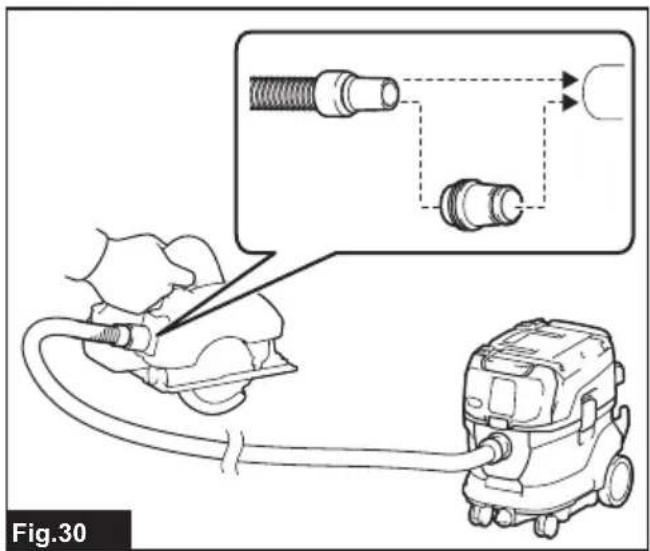
- Connect the hose of the cleaner with the tool.
▶ Fig.30 -
Set the stand-by switch on the cleaner to "AUTO".
▶ Fig.31: 1. Stand-by switch -
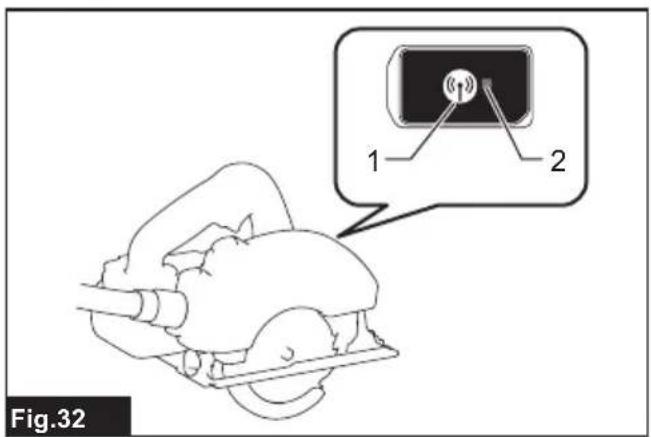
Push the wireless activation button on the tool briefly. The wireless activation lamp will blink in blue.
▶ Fig.32: 1. Wireless activation button 2. Wireless activation lamp
- Turn on the tool. Check if the cleaner runs while the tool is operating.
⚠️CAUTION: Always check if the wireless activation function works before starting a work with the tool.
To stop the wireless activation, push the wireless activation button on the tool, or set the stand-by switch on the cleaner to "I" or "O".
NOTE: The wireless activation lamp on the tool will stop blinking in blue when there is no operation for 2 hours. In this case, set the stand-by switch on the cleaner to "AUTO" and press the wireless activation button on the tool again.
NOTE: The cleaner starts/stops with a delay. There is a time lag when the cleaner detects a switch operation of the tool.
NOTE: The transmission distance of the wireless unit may vary depending on the location and surrounding circumstances.
NOTE: When two or more tools are registered to one cleaner, the cleaner may start running even if you do not turn on the tool because other user is using the wireless activation function.
Cancelling tool registration for the cleaner
Perform the following procedure when cancelling the tool registration for the cleaner.
-
Install the wireless units to the cleaner and the tool, respectively.
-
Install the batteries to the cleaner and the tool.
-
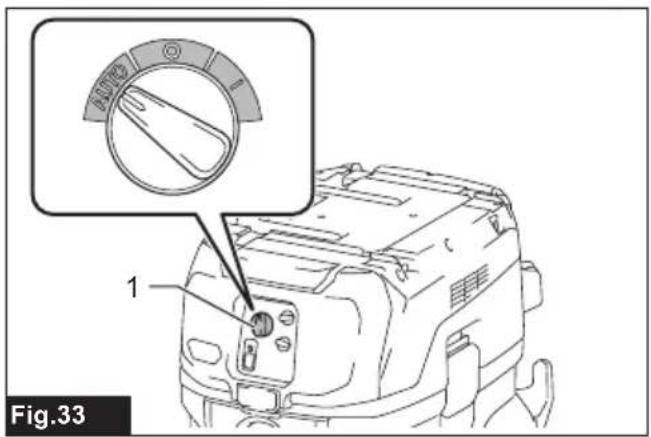
Set the stand-by switch on the cleaner to "AUTO".
▶ Fig.33: 1. Stand-by switch
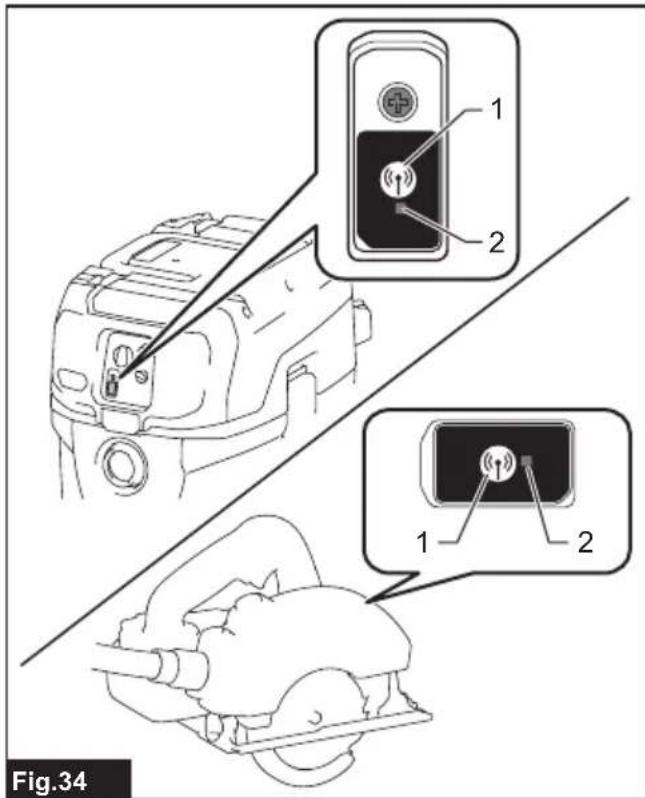
- Press the wireless activation button on the cleaner for 6 seconds. The wireless activation lamp blinks in green and then become red. After that, press the wireless activation button on the tool in the same way.
▶ Fig.34: 1. Wireless activation button 2. Wireless activation lamp
If the cancellation is performed successfully, the wireless activation lamps will light up in red for 2 seconds and start blinking in blue.
NOTE: The wireless activation lamps finish blinking in red after 20 seconds elapsed. Press the wireless activation button on the tool while the wireless activation lamp on the cleaner is blinking. If the wireless activation lamp does not blink in red, push the wireless activation button briefly and hold it down again.
Erasing all tool registrations
You can erase all tool registrations from the cleaner as follows.
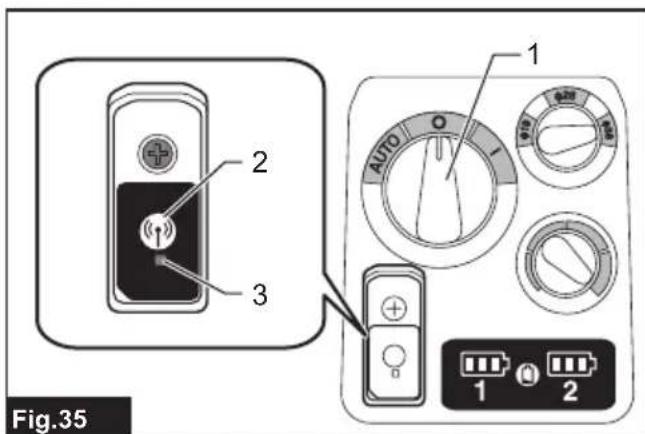
▶ Fig.35: 1. Stand-by switch 2. Wireless activation button 3. Wireless activation lamp
- Install the wireless unit to the cleaner.
- Install the batteries to the cleaner.
- Set the stand-by switch to "AUTO".
- Hold down the wireless activation button for about 6 seconds until the wireless activation lamp blinks in red (about twice per one second).
- When the wireless activation lamp starts blinking in red, release your finger from the wireless activation button. Thereafter, hold down the wireless activation button again for about 6 seconds.
- When the wireless activation lamp starts blinking fast (about 5 times per one second) in red, release your finger from the wireless activation button. When the wireless activation lamp lights up in red and later lights off, all tool registrations are erased.
NOTE: If the wireless activation lamp does not blink in red, press the wireless activation button briefly and try again.
Description of the wireless activation lamp status
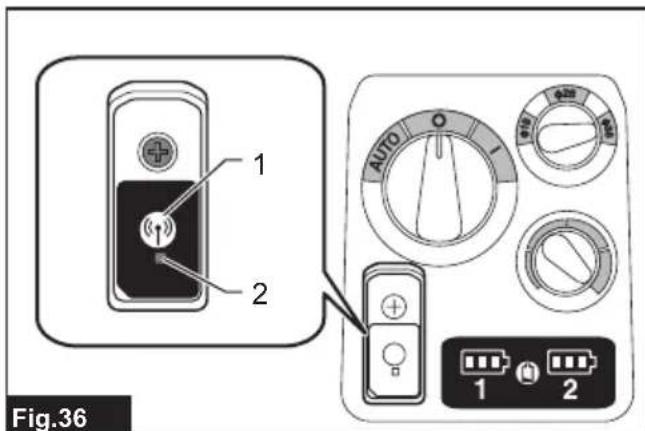
▶ Fig.36: 1. Wireless activation button 2. Wireless activation lamp
The wireless activation lamp shows the status of the wireless activation function. Refer to the below table for the meaning of the lamp status.
| Status Wireless activation lamp Description | |||||
| Standby B | ue | Cleaner: continuingTool: 2 hours | Waiting for the tool registration or the wireless activation function is available.The lamp on the cleaner blinks when the stand-by switch is set in AUTO. The lamp on the tool blinks when the wireless activation button is pushed. The lamp on the tool will automatically turn off when no operation is performed for 2 hours. | ||
| When the tool is running. | The wireless activation of the cleaner is available and the tool is running. | ||||
| Tool registration | Green | 20 seconds Ready for the tool registration. Searching the tool to be registered. | |||
| 2 seconds | The tool registration has been finished. The wireless activation lamp will start blinking in blue. | ||||
| Cancelling/erasing tool registration | Red | 20 seconds Ready for the cancellation of the tool registration. Searching the tool to be cancelled. | |||
| When the wireless activation button is pressed down. | Ready to erase all tool registrations. | ||||
| 2 seconds The tool registration has been cancelled/erased. The wireless activation lamp will start blinking in blue. | |||||
| Others Red | 3 seconds The power is supplied to the wireless unit and the wireless activation function is starting up. | ||||
| Off | - | - | The stand-by switch is not set to "AUTO". | ||
Troubleshooting for wireless activation function
Before asking for repairs, conduct your own inspection first. If you find a problem that is not explained in the manual, do not attempt to dismantle the tool. Instead, ask Makita Authorized Service Centers, always using Makita replacement parts for repairs.
| State of abnormality Probable cause | (malfunction) Remedy | |
| The wireless activation lamp does not light/blink. | The wireless unit is not installed into the cleaner and/or the tool.The wireless unit is improperly installed into the cleaner and/or the tool. | Install the wireless unit correctly. |
| The wireless activation button on the tool has not been pushed. | Push the wireless activation button on the tool briefly. | |
| The stand-by switch on the cleaner is not set to "AUTO". | Set the stand-by switch on the cleaner to "AUTO". | |
| No power supply Supply the power to the tool and the cleaner. | ||
| Cannot finish tool registration / cancelling tool registration successfully. | The wireless unit is not installed into the cleaner and/or the tool.The wireless unit is improperly installed into the cleaner and/or the tool. | Install the wireless unit correctly. |
| The stand-by switch on the cleaner is not set to "AUTO". | Set the stand-by switch on the cleaner to "AUTO". | |
| No power supply Supply the power to the tool and the cleaner. | ||
| Incorrect operation Push the wireless activation button briefly and perform the tool registration/cancellation procedures again. | ||
| The tool and cleaner are away from each other (out of the transmission range). | Get the tool and the cleaner closer to each other. The maximum transmission distance is approximately 10 m however it may vary according to the circumstances. | |
| Before finishing the tool registration/cancellation;- the switch of the tool is turned on or;- the power button on the cleaner is turned on. | Push the wireless activation button briefly and perform the tool registration/cancellation procedures again. | |
| The tool registration procedures for the tool or the cleaner has not finished. | Perform the tool registration procedures for the tool and the cleaner at the same timing. | |
| Radio disturbance by other appliances which generate high-intensity radio waves. | Keep the tool and the cleaner away from the appliances such as Wi-Fi devices and microwave ovens. | |
| The cleaner does not run along with the switch operation of the tool. | The wireless unit is not installed into the cleaner and/or the tool.The wireless unit is improperly installed into the cleaner and/or the tool. | Install the wireless unit correctly. |
| The wireless activation button on the tool has not been pushed. | Push the wireless activation button briefly and make sure that the wireless activation lamp is blinking in blue. | |
| The stand-by switch on the cleaner is not set to "AUTO". | Set the stand-by switch on the cleaner to "AUTO". | |
| More than 10 tools are registered to the cleaner. | Perform the tool registration again.If more than 10 tools are registered to the cleaner, the tool registered earliest will be cancelled automatically. | |
| The cleaner erased all tool registrations. | Perform the tool registration again. | |
| No power supply Supply the power to the | tool and the cleaner. | |
| The tool and cleaner are away from each other (out of the transmission range). | Get the tool and the cleaner closer to each other.The maximum transmission distance is approximately 10 m however it may vary according to the circumstances. | |
| Radio disturbance by other appliances which generate high-intensity radio waves. | Keep the tool and the cleaner away from the appliances such as Wi-Fi devices and microwave ovens. | |
| The cleaner runs while the tool is not operating. | Other users are using the wireless activation of the cleaner with their tools. | Turn off the wireless activation button of the other tools or cancel the tool registration of the other tools. |
| Cannot erase all tool registrations in the cleaner. | Pressing the wireless button on the tool. | Press the wireless button on the cleaner for erasing all tool registrations. |
| The stand-by switch on the cleaner is not set to "AUTO". | Set the stand-by switch on the cleaner to "AUTO". | |
| The wireless activation button is not held down correctly. | Hold down the wireless activation button for more than 6 seconds and then release it when the wireless activation lamp blinks in red. Hold down the wireless activation button for more than 6 seconds again until the wireless activation button rapidly blinks in red and then release the button. | |
MAINTENANCE
WARNING: Always use a P2-respirator during performing maintenance.
⚠️CAUTION: Always be sure that the appliance is switched off and the battery cartridges are removed before attempting to perform inspection or maintenance.
⚠CAUTION: A technical inspection, including inspection of filters, air tightness, and control mechanism, must be performed at least once a year by an instructed person.
CAUTION: During maintenance, all contaminated items which cannot be satisfactorily cleaned must be disposed. Such items must be disposed of in impervious bags which accord with your country's regulations.
CAUTION: After the operation in the hazardous area, the outside of the tool must be decontaminated by vacuum cleaning methods and wiped clean or treated with sealant before you take the tool out of a hazardous area. All the parts of the tool must be regarded as contaminated when removed from the hazardous area, and appropriate action must be taken to prevent dust dispersal.
⚠CAUTION: Change filters when filters are clogged with dust or you feel that the cleaner's performance declined.
CAUTION: Check the filters periodically. If there is a tear on filters, replace them immediately.
NOTICE: Never use gasoline, benzine, thinner, alcohol or the like. Discoloration, deformation or cracks may result.
To maintain product SAFETY and RELIABILITY, repairs, any other maintenance or adjustment should be performed by Makita Authorized or Factory Service Centers, always using Makita replacement parts.
Removing the filter unit
⚠️CAUTION: Wait for about 5 minutes so that dust in the tank completely settles down.
⚠️CAUTION: Be careful not to let the dust enter inside the tank cover when removing the filter unit.
The filter unit is attached on the head unit. It consists of top plate, prefilters, dampers and powder filters.
-
Release the locking hooks and lift the head unit up off the tank.
-
Remove the filter unit from the head unit as shown in the figure.
▶ Fig.37: 1. Latch 2. Filter unit
Removing powder filter and prefilter
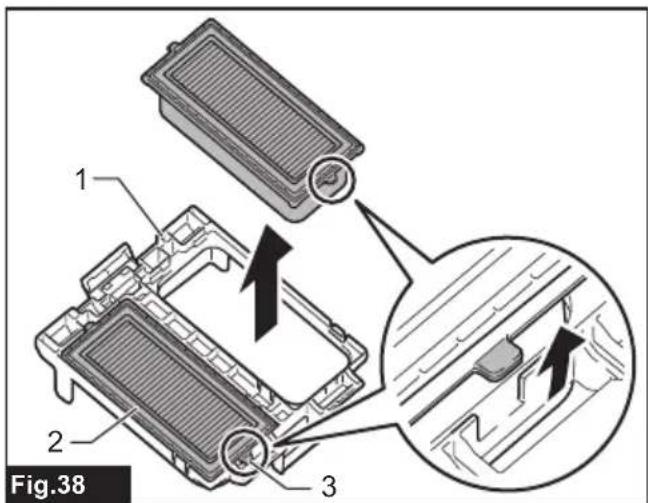
Picking up the knob and remove filters from the top plate.
▶ Fig.38: 1. Top plate 2. Filters 3. Knob
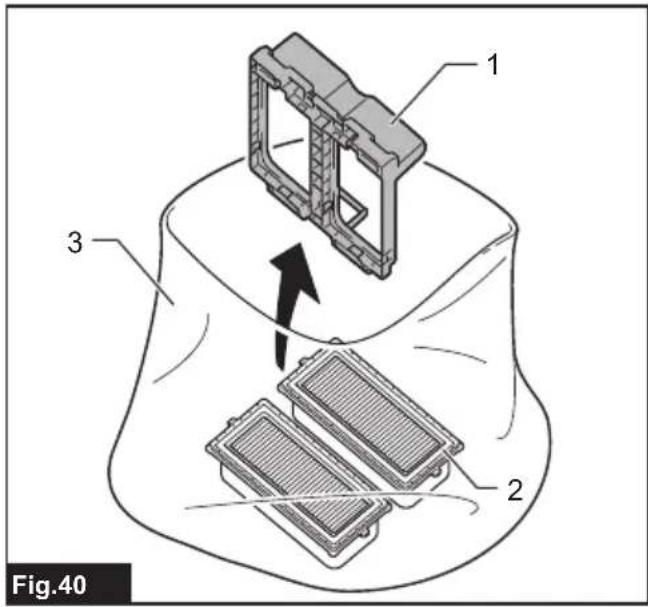
To prevent dusts from floating in the air, removing filters in the polyethylene bag is preferable.
When carrying the filter unit in order to clean out, tie a
polyethylene bag firmly.
▶ Fig.39: 1. Filter unit 2. Polyethylene bag
▶ Fig.40: 1. Top plate 2. Filters 3. Polyethylene bag
Cleaning of powder filter, prefilter and damper
Clean out the filters and damper from time to time.
Clogged filters and damper may result in poor suction performance.
Regularly clean out the accumulated dust of filters and damper.
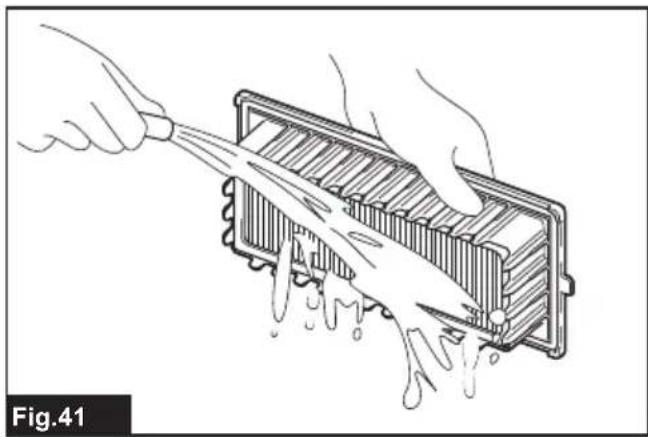
Occasionally wash the powder filter, prefilter and damper in water, rinse and dry thoroughly in the shade before use. Never wash them in a washing machine.
▶ Fig.41
NOTE: Do not rub or scratch the powder filter, the prefilter and the damper with hard objects such as a brush and a paddle.
NOTE: The filters wear out in course of time. It is recommended to have some spares for them.
Installing powder filter and prefilter
NOTICE: The powder filter and prefilter can pick up both dry dusts and wet dusts. Make sure that the water level sensors activate properly to prevent the powder filter breakage.
Hook the edges of the filter unit to the top plate, and then lower the knob.
NOTICE: Before using the powder filter, make sure that prefilter and damper are used together. It is not allowed to install powder filter alone.
Assembling the filters
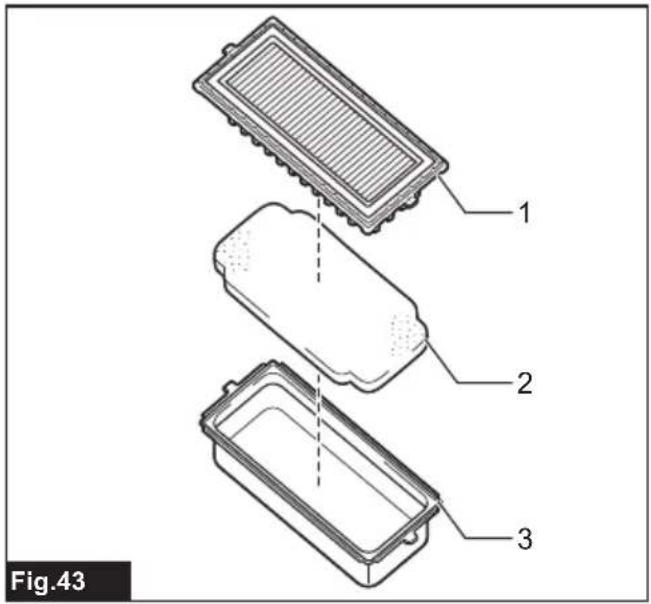
When you get the filters separately, assemble them as shown in the figure.
▶ Fig.43: 1. Powder filter 2. Damper 3. Prefilter
Installing the filter unit
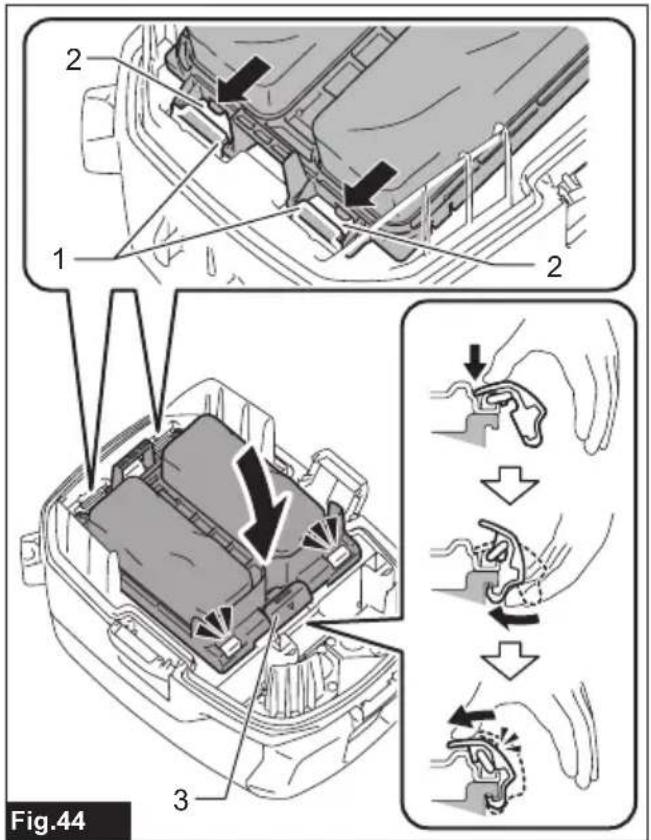
After installing the filters to the top plate, hook the holes of the filter unit to the U-shaped parts of the inner cover. Then, lock the latch as shown in the figure.
▶ Fig.44: 1. U-shaped part 2. Hole 3. Latch
Installing water filter
Optional accessory
NOTICE: For picking up wet dust, make sure that the water level sensors activate properly.
NOTICE: Do not use prefilter and damper when using water filter.
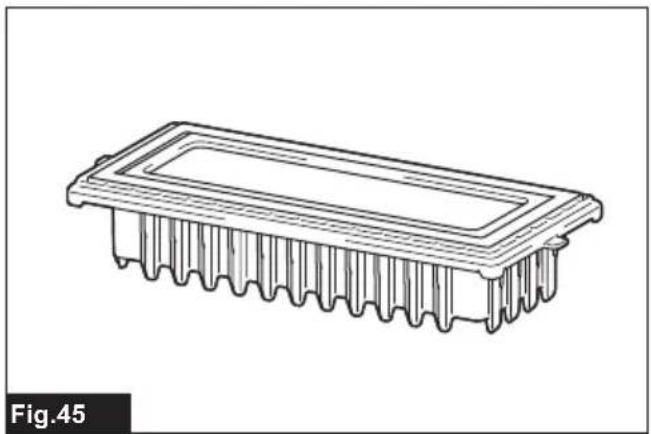
To pick up water or wet dust only, the water filter is more suitable than the powder filter and prefilter.
When installing the water filter, fit the water filter to the top plate same as powder filter and prefilter.
▶ Fig.45
NOTE: It is recommended that using water filter when picking up large amount of water repeatedly. Otherwise vacuum ability may be reduced in case of the powder filter and prefilter.
Cleaning the water level sensors
The water level sensors detect liquid when the tank becomes full with liquid. Clean the water level sensors with a soft cloth from time to time when changing filters.
▶ Fig.46: 1. Water level sensor
Storage of accessories
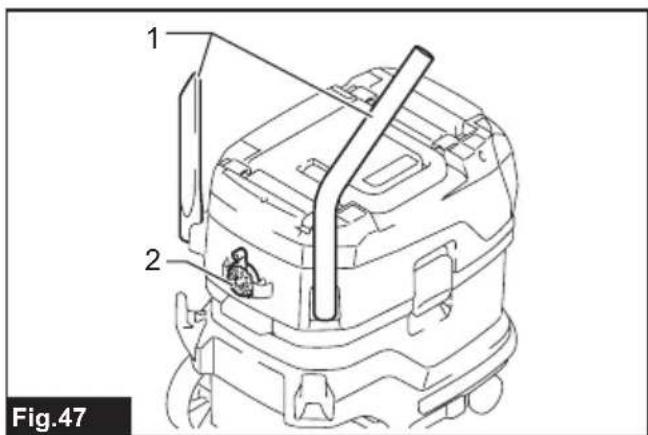
Accessories and attachments not in use, such as nozzles, pipes and a cap can be stored hanging on the hook at the rear of the cleaner.
▶ Fig.47: 1. Accessory and attachment not in use
2. Cap
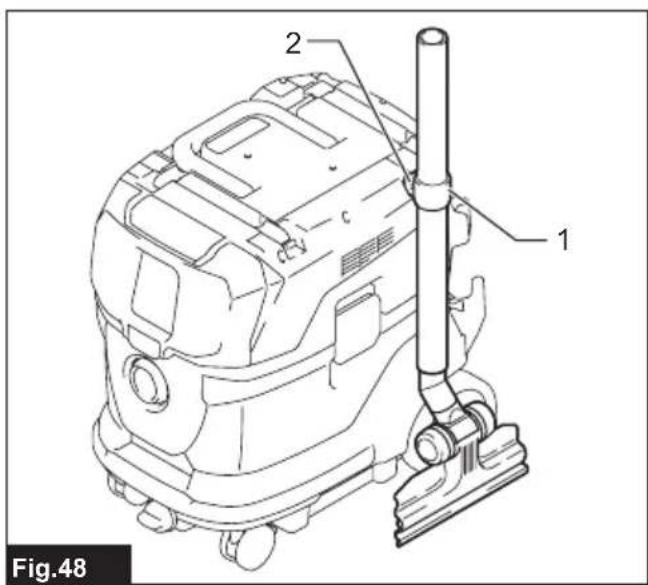
Pipes (with an optional stopper installed) can be placed into the pipe holder when not using the cleaner for a short time.
▶ Fig.48: 1. Stopper (optional accessory) 2. Pipe holder
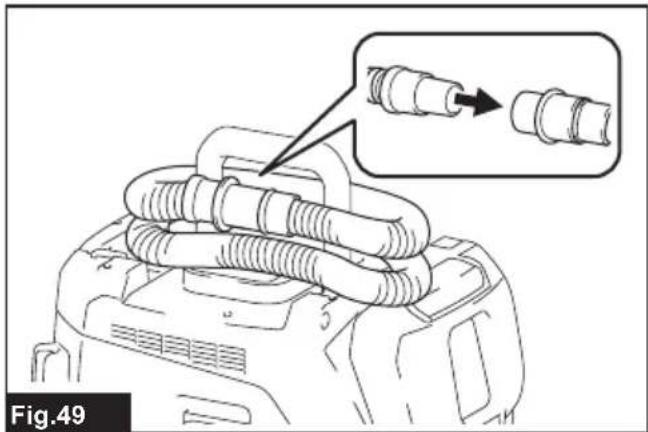
A hose can be wrapped and stored around the housing or handle of the cleaner in large loops. Connect its both ends together to make loops and hook the loops onto the handle raised up. Alternatively, keep its root end installed in the hose inlet and hang the loops on the multi hook with the loose end tied up.
▶ Fig.49
▶ Fig.50
OPTIONAL ACCESSORIES
⚠️CAUTION: These accessories or attachments are recommended for use with your Makita tool specified in this manual. The use of any other accessories or attachments might present a risk of injury to persons. Only use accessory or attachment for its stated purpose.
If you need any assistance for more details regarding these accessories, ask your local Makita Service Center.
- Hose
• Front cuffs (22, 24, 38) - Straight pipe
- Corner nozzle
- Round brush
• Powder filter M, H (HEPA) - Damper
- Prefilter
- Water filter
- Nozzle assembly
- Bent pipe
-
Polyethylene bag
-
Filter bag
Cap - Makita genuine battery and charger
- Wireless unit
- MAKPAC
NOTE: Some items in the list may be included in the tool package as standard accessories. They may differ from country to country.
AVERTISSEMENT
▶ Abb.2: 1. Akku 2. Knopf
▶ Abb.17: 1. Polyethylenbeutel 2. Tank
VEILIGHEIDSWAAR- SCHUWINGEN
▶ Fig.2: 1. Accu 2. Knop
▶ Fig.8: 1. Dop van de wateraftapopening
Dop
▶ Fig.26: 1. Afdekking 2. Schroef
- Steek de draadloos-eenheid in de gleuf.
▶ Fig.42: 1. Rand 2. Knop
OPTIONELE ACCESSOIRES
▶ Fig.23: 1. Cierre 2. MAKPAC
▶ Fig.26: 1. Tampa 2. Parafuso
- WARNING
- Symbols
- Intended use
- Noise
- WARNING: Wear ear protection.
- Vibration
- Declarations of Conformity
- SAFETY WARNINGS
- Cordless vacuum cleaner safety warnings
- Battery tool use and care
- SAVE THESE INSTRUCTIONS.
- Important safety instructions for battery cartridge
- Tips for maintaining maximum battery life
- Important safety instructions for wireless unit
- FUNCTIONAL DESCRIPTION
- Installing or removing battery cartridge
- Indicating the remaining battery capacity
- Battery indicators on control panel
- Appliance / battery protection system
- Overload protection
- Overheat protection
- Overdischarge protection
- Protections against other causes
- Switch action
- Turning cleaner on
- Turning cleaner off
- Adjusting suction power
- Hose diameter selection
- Warning beep
- Auto-suction stop during wet suction operation
- WARNING: Do not pick up foam or soapy
- Filter cleaning system
- Water drain
- Cap
- Locking and unlocking casters
- Carriage handle
- ASSEMBLY
- Installing and disposing filter bag
- Installing polyethylene bag
- Optional accessory
- Emptying tank with polyethylene bag
- Installing hose
- Connection to cleaner
- Connections with your work tools (Country specific)
- Installing or removing cleaner attachments
- Attachments without lock function
- Installing MAKPAC
- OPERATION
- WIRELESS ACTIVATION FUNCTION
- What you can do with the wireless activation function
- Installing the wireless unit
- Tool registration for the cleaner
- Starting the wireless activation function
- ⚠️CAUTION: Always check if the wireless activation function works before starting a work with the tool.
- Cancelling tool registration for the cleaner
- Erasing all tool registrations
- Description of the wireless activation lamp status
- Troubleshooting for wireless activation function
- MAINTENANCE
- Removing the filter unit
- Removing powder filter and prefilter
- Cleaning of powder filter, prefilter and damper
- Installing powder filter and prefilter
- Assembling the filters
- Installing the filter unit
- Installing water filter
- Cleaning the water level sensors
- Storage of accessories
- OPTIONAL ACCESSORIES
- AVERTISSEMENT
- VEILIGHEIDSWAAR- SCHUWINGEN
- Dop
- OPTIONELE ACCESSOIRES
Brand : MAKITA
Model : VC006GM
Category : Cordless vacuum