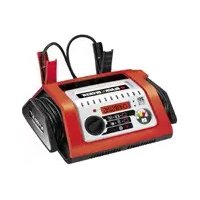
BLACK & DECKER BDSBC25A - Battery charger

BDSBC25A - Battery charger BLACK & DECKER - Free user manual and instructions

Find the device manual for free BDSBC25A BLACK & DECKER in PDF.

English EN Download 💬 AI Question 10 questions ⚙️ Specs
📄

Document temporarily unavailable

The manual is currently being transferred to our new server. It will be accessible again in a few hours. Thank you for your patience.

Pick your language and provide your email: we'll send you a specifically translated version.
Product type Battery charger
Brand Black & Decker
Model BDSBC25A
Input voltage 230 V AC
Nominal power 460 W
Output voltage 12 V DC
Output current 25 A
Weight 2.5 kg
Compatible battery capacity 20 to 450 Ah
Compatible battery type 12 V lead-acid batteries: automotive, maintenance-free, deep-cycle, marine, gel
Display LCD screen with scrolling messages
Main functions Smart 4-phase charging, alternator check, engine start
Protections Polarity reversal, overload, short circuit, overheating
Charge indicator Arrow on a scale from 0 to 100% (red to green)
Indicator light Green (battery charged), red (error)
Language selector Yes, built-in (memorizes choice)
Cable storage Housing for cable and clamps
Maintenance and cleaning Disconnect before cleaning; use a damp cloth, no solvent; clean clamps after each use
Safety Double insulation, do not immerse, outdoor use only, keep out of reach of children
Warranty 24 months (conditions: domestic use, no misuse)
Cable length Approximately 2 m (estimate)

Frequently Asked Questions - BDSBC25A BLACK & DECKER

How to connect the charger to the battery?
Connect the red clamp to the positive terminal (POS, P, +) of the battery, and the black clamp to the negative terminal (NEG, N, -) or to a metal ground on the vehicle (for an installed battery). Make sure the clamps do not touch each other. Then plug the charger into a 230 V mains outlet.
What types of batteries can I charge with the BDSBC25A?
This charger is designed exclusively for 12 V lead-acid batteries: standard automotive, maintenance-free, deep-cycle, marine, and gel electrolyte batteries. Never charge non-rechargeable batteries or dry-cell batteries.
How long does it take to charge a battery?
Charging time depends on battery capacity and condition. For example, a 60 Ah battery discharged 50% takes about 1h35 with 25 A current. Refer to the chart in the manual for more precise estimates.
What does the message 'CHECK BATTERY CONNECTIONS' mean?
This message indicates poor contact between the clamps and battery terminals. Disconnect the charger, clean the terminals, and reconnect the clamps correctly observing polarity.
How to use the alternator check function?
Select 'Alternator Check' mode before connecting the clamps. Connect the clamps to the battery, then follow the instructions. The charger analyzes the alternator and displays 'ALTERNATOR OK' (green) or 'NOT OK' (red). Perform two tests: no load and under load.
How to use the engine start function?
Select 'Engine Start' mode, connect the clamps to the battery, then wait for the 90-second countdown. Start the engine (3 to 5 attempts max). Allow 5 minutes cool-down between attempts. Always disconnect the charger after starting.
What to do if the red light comes on?
The red light indicates an error. Check the screen messages: 'CLAMPS REVERSED' (polarity reversal), 'OVERLOAD' (charging time exceeded), 'COOLING CYCLE' (overheating). Follow the manual instructions to resolve the issue.
How to maintain the charger?
Disconnect the charger before cleaning. Clean the casing with a damp cloth (no solvent). Clean the clamps after each use to prevent corrosion. Never immerse the device in water.
Can I leave the charger connected after charging?
The charger automatically switches to float mode once the battery is fully charged, allowing it to maintain the charge without overcharging. You can leave it connected safely for long-term use.
How to recycle the battery and charger?
Do not dispose of the device or battery with household waste. Return the charger to a Black & Decker authorized repair center for recycling. Lead-acid batteries (Pb) are recyclable: take them to a local recycling center or retailer.

User questions about BDSBC25A BLACK & DECKER

0 question about this device. Answer the ones you know or ask your own.

Ask a new question about this device

The email remains private: it is only used to notify you if someone responds to your question.

No questions yet. Be the first to ask one.

Download the instructions for your Battery charger in PDF format for free! Find your manual BDSBC25A - BLACK & DECKER and take your electronic device back in hand. On this page are published all the documents necessary for the use of your device. BDSBC25A by BLACK & DECKER.

USER MANUAL BDSBC25A BLACK & DECKER

Manual assistant
Powered by Anthropic
Waiting for your message
Product information

Brand : BLACK & DECKER

Model : BDSBC25A

Category : Battery charger