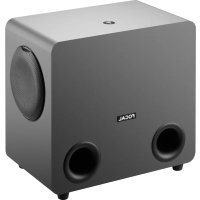
Sub One - Monitor FOCAL - Free user manual and instructions
Find the device manual for free Sub One FOCAL in PDF.



| Product Type | Active subwoofer for professional monitoring |
| Brand | Focal |
| Model | Sub One |
| Dimensions (HxWxD) | 475 x 310 x 520 mm |
| Weight | 18.5 kg |
| Amplification | 2 x 100 W RMS, Class D |
| Frequency response (±3 dB) | 32 Hz - 120 Hz |
| Maximum SPL | 114 dB (peak @ 1 m) |
| Transducers | 2 x Focal 20 cm speakers with Slatefiber membrane |
| Audio inputs | Left In, Right In, LFE In (female XLR, balanced, 110 kOhms) |
| Audio outputs | Left Out, Right Out, LFE Out (XLR) |
| User controls | Low Pass, Level, Phase, Polarity, Auto Standby, Defeat, Satellite high-pass frequency (60Hz/90Hz), Bypass 2.1 |
| Auto standby mode | Yes (disablable), consumption <0.5W |
| Power supply | Mains, with earth connection |
| Construction | 22 mm MDF panel with internal bracing |
| Finish | Dark grey vinyl |
| Warranty (France) | 2 years |
| Cleaning | Dry cloth only |
| Minimum ventilation distance | 5 cm around the device |
| Spare parts and repairability | Repair by qualified personnel only |
Frequently Asked Questions - Sub One FOCAL
User questions about Sub One FOCAL
0 question about this device. Answer the ones you know or ask your own.
Ask a new question about this device
Download the instructions for your Monitor in PDF format for free! Find your manual Sub One - FOCAL and take your electronic device back in hand. On this page are published all the documents necessary for the use of your device. Sub One by FOCAL.
USER MANUAL Sub One FOCAL
natural_image
Line drawing of a POCAL audio output box with speaker grille and two side speakers (no text or symbols on body)À LIRE EN PREMIER !
INSTRUCTIONS DE SÉCURITÉ IMPORTANTES !
natural_image
Front view of a rectangular electronic device with two circular ports and a central logo (no text or symbols on the device itself)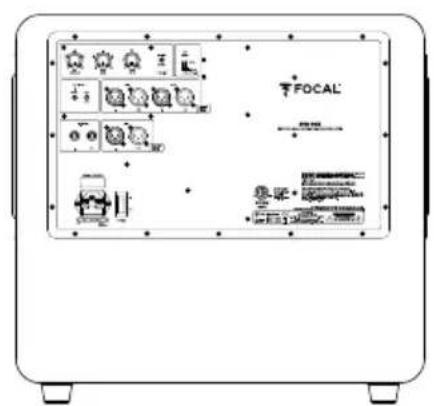
natural_image
Line drawing of two speaker units with circular components and a magnified inset showing the interior detail (no text or symbols)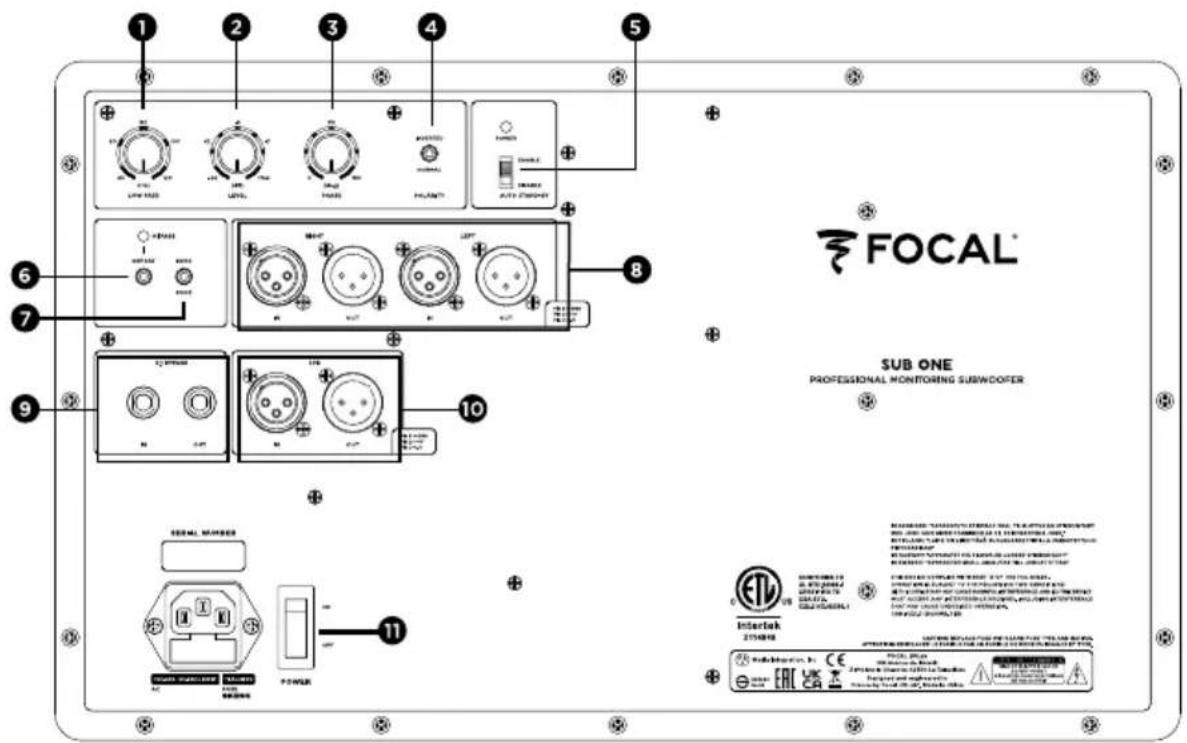
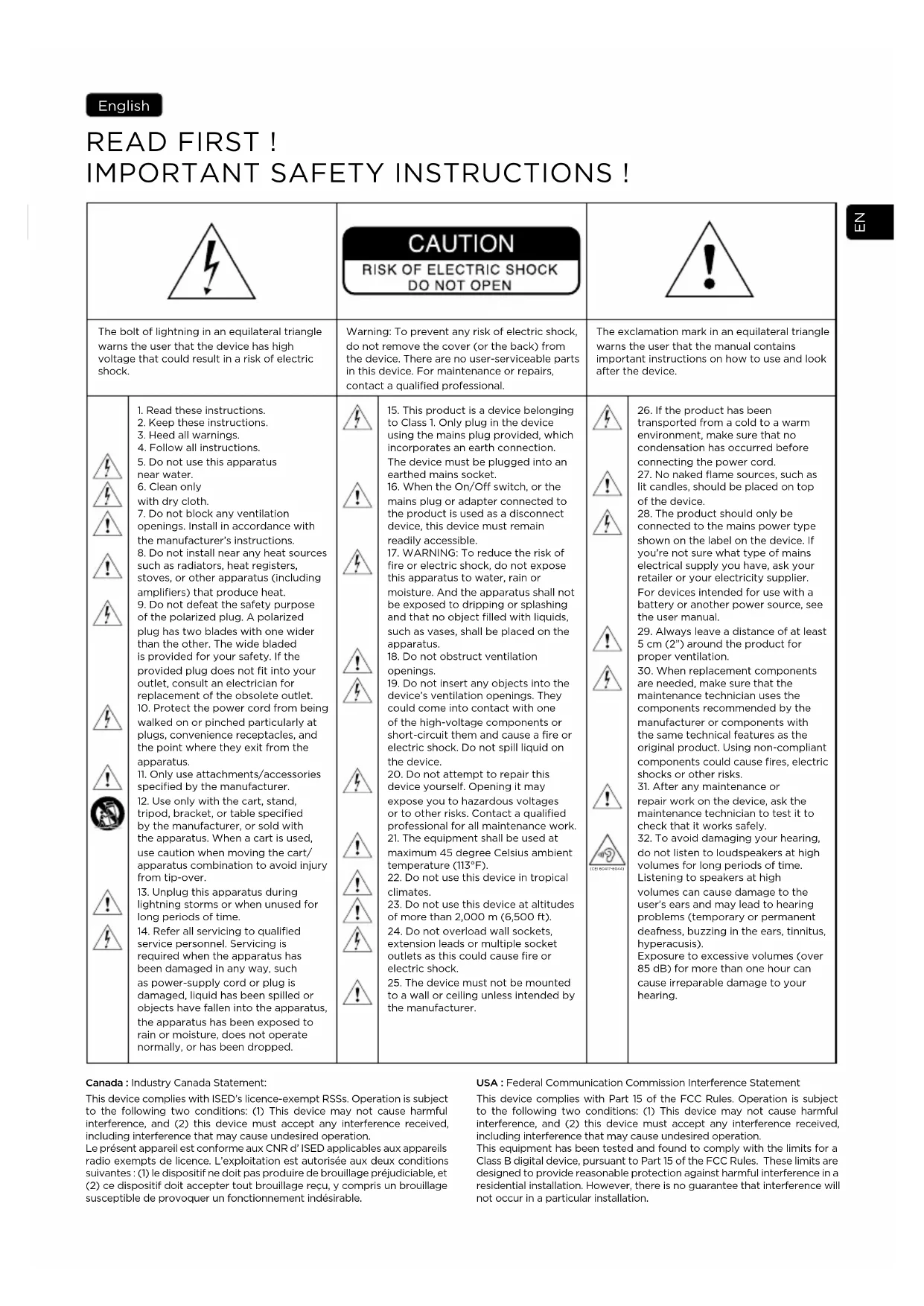
IMPORTANT SAFETY INSTRUCTIONS!
 | CAUTIONRISK OF ELECTRIC SHOCKDO NOT OPEN |  | |||
| The bolt of lightning in an equilateral triangle warns the user that the device has high voltage that could result in a risk of electric shock. | Warning: To prevent any risk of electric shock, do not remove the cover (or the back) from the device. There are no user-serviceable parts in this device. For maintenance or repairs, contact a qualified professional. | The exclamation mark in an equilateral triangle warns the user that the manual contains important instructions on how to use and look after the device. | |||
| 1. Read these instructions.2. Keep these instructions.3. Heed all warnings.4. Follow all instructions.5. Do not use this apparatus near water.6. Clean only with dry cloth.7. Do not block any ventilation openings. Install in accordance with the manufacturer's instructions.8. Do not install near any heat sources such as radiators, heat registers, stoves, or other apparatus (including amplifiers) that produce heat.9. Do not defeat the safety purpose of the polarized plug. A polarized plug has two blades with one wider than the other. The wide bladed is provided for your safety. If the provided plug does not fit into your outlet, consult an electrician for replacement of the obsolete outlet.10. Protect the power cord from being walked on or pinched particularly at plugs, convenience receptacles, and the point where they exit from the apparatus.11. Only use attachments/accessories specified by the manufacturer.12. Use only with the cart, stand, tripod, bracket, or table specified by the manufacturer, or sold with the apparatus. When a cart is used, use caution when moving the cart/ apparatus combination to avoid injury from tip-over.13. Unplug this apparatus during lightning storms or when unused for long periods of time.14. Refer all servicing to qualified service personnel. Servicing is required when the apparatus has been damaged in any way, such as power-supply cord or plug is damaged, liquid has been spilled or objects have fallen into the apparatus, the apparatus has been exposed to rain or moisture, does not operate normally, or has been dropped. | ! | 15. This product is a device belonging to Class 1. Only plug in the device using the mains plug provided, which incorporates an earth connection. The device must be plugged into an earthed mains socket.16. When the On/Off switch, or the mains plug or adapter connected to the product is used as a disconnect device, this device must remain readily accessible.17. WARNING: To reduce the risk of fire or electric shock, do not expose this apparatus to water, rain or moisture. And the apparatus shall not be exposed to dripping or splashing and that no object filled with liquids, such as vases, shall be placed on the apparatus.18. Do not obstruct ventilation openings.19. Do not insert any objects into the device's ventilation openings. They could come into contact with one of the high-voltage components or short-circuit them and cause a fire or electric shock. Do not spill liquid on the device.20. Do not attempt to repair this device yourself. Opening it may expose you to hazardous voltages or to other risks. Contact a qualified professional for all maintenance work.21. The equipment shall be used at maximum 45 degree Celsius ambient temperature (113°F).22. Do not use this device in tropical climates.23. Do not use this device at altitudes of more than 2,000 m (6,500 ft).24. Do not overload wall sockets, extension leads or multiple socket outlets as this could cause fire or electric shock.25. The device must not be mounted to a wall or ceiling unless intended by the manufacturer. | ! | 26. If the product has been transported from a cold to a warm environment, make sure that no condensation has occurred before connecting the power cord.27. No naked flame sources, such as lit candles, should be placed on top of the device.28. The product should only be connected to the mains power type shown on the label on the device. If you're not sure what type of mains electrical supply you have, ask your retailer or your electricity supplier. For devices intended for use with a battery or another power source, see the user manual.29. Always leave a distance of at least 5 cm (2") around the product for proper ventilation.30. When replacement components are needed, make sure that the maintenance technician uses the components recommended by the manufacturer or components with the same technical features as the original product. Using non-compliant components could cause fires, electric shocks or other risks.31. After any maintenance or repair work on the device, ask the maintenance technician to test it to check that it works safely.32. To avoid damaging your hearing, do not listen to loudspeakers at high volumes for long periods of time. Listening to speakers at high volumes can cause damage to the user's ears and may lead to hearing problems (temporary or permanent deafness, buzzing in the ears, tinnitus, hyperacusis).Exposure to excessive volumes (over 85 dB) for more than one hour can cause irreparable damage to your hearing. | |
This device complies with Part 15 of the FCC Rules. Operation is subject to the following two conditions: (1) This device may not cause harmful interference, and (2) this device must accept any interference received, including interference that may cause undesired operation.
This equipment has been tested and found to comply with the limits for a Class B digital device, pursuant to Part 15 of the FCC Rules. These limits are designed to provide reasonable protection against harmful interference in a residential installation. However, there is no guarantee that interference will not occur in a particular installation.
Please validate your Focal-JMlab warranty, it is now possible to register your product online: www.focal.com/warranty

Thank you for purchasing a Focal product. Welcome to our High-Fidelity world. Innovation, tradition, excellence and pleasure are our values; our one and only aim is to bring you a sound that is rich, pure and true. To get the most out of your product, we recommend that you read the instructions in this booklet, then store it in a safe place to refer to in the future.
Package contents
The SUB ONE is delivered with the following elements (in addition to this manual):
- 1 power cable
- 2 protective grilles for the two speaker drivers (we advise you to remove the grilles for listening as soon as possible)
- 1 unpacking instruction leaflet
Check that nothing is missing and remove all the accessories from the box. In order not to damage your product while unpacking it, please follow the steps outlined in the unpacking instruction leaflet, inside the cardboard box. Check that the packaging does not show any signs of damage. If the packaging has been damaged, let the carrier and the supplier know. It is important to keep the packaging in good condition for any future use.
Recommendations
We would like to point out that our product can generate high sound pressure. As the distortion level is low and user fatigue is minimal, it is not always easy to realise how high the sound pressure actually is. Remember that exposure to high volumes beyond a certain amount of time can lead to irreversible hearing loss.
Warranty terms and conditions
In the event of a problem, please contact your Focal dealer.
The warranty for France on any Focal equipment is 2 years, non-transferable in the event of resale, from the date of purchase. In the event of faulty equipment, you must send it in its original packaging and at your own expense to the dealer, who will analyse the equipment and determine the nature of the fault. If it is under warranty, the equipment will be returned to you or replaced. Otherwise, you will be offered an estimate for repair.
The warranty does not cover damage resulting from inappropriate use or incorrect wiring (burnt out voice-coils, for example). Outside France, Focal equipment is covered by a warranty for which the terms and conditions are determined locally by the official Focal-JMlab distributor for each country, in accordance with the laws in force in the region in question.
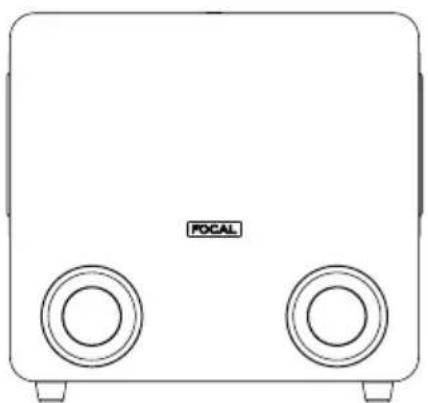
The SUB ONE is an active subwoofer for a professional control system. The speaker drivers used are two 7/8" (20cm) woofers with a Slatefiber cone, made in France, fitted with two large-section ports.
natural_image
Line drawing of a rectangular electronic device with two circular ports and a central logo (no text or symbols on the device itself)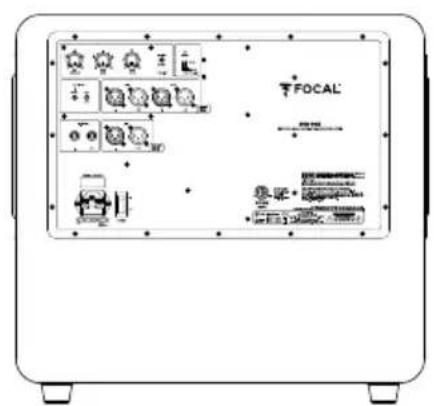
The SUB ONE can be used:
- in addition to bass or sub-bass for stereo + subwoofer installations (2.1 or 2.2). For this purpose, the rear panel connectivity of the SUB ONE allows you to connect a traditional stereo source (Left In and Right In), but also to pick up a signal (Left Out and Right Out) processed via the "high-pass" crossover included in the SUB ONE, designed to supply linked "satellite" loudspeakers.
- as a LFE (Low Frequency Effect) channel for use in a multichannel system (5.1, 5.2, 6.1, etc.) via a specific LFE input located on the rear panel of the SUB ONE.
Installation
Mains power
Your products must be earthed using the power cable.
Automatic stand-by
The SUB ONE is equipped with a "Stand-by" mode. When you power on the subwoofer, the "Stand-by" mode is enabled. To disable it, send an audio signal to the subwoofer by gradually increasing the volume of the audio source. After around 30 minutes without receiving an audio signal, the SUB ONE automatically switches to "Stand-by" mode. In
"Stand-by" mode, the power consumption is lower than 0.5W. This "Stand-by" function can be disabled using the Auto Stand-by switch (page 12).
Inserting/removing the grilles
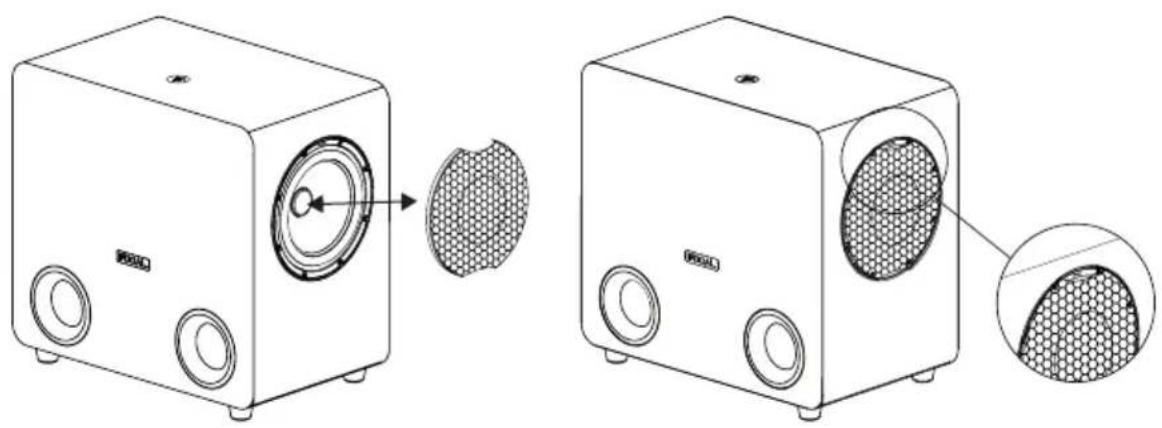
Two grilles are supplied for each of the two speaker drivers in the SUB ONE. To insert a grille, line up the grille notches with the dedicated slots and press gently. To remove a grille, simply use your fingers to pull on the notches above and below the grille.
natural_image
Line drawing of two speaker units with circular components and a mesh pattern, shown from different angles (no text or symbols)
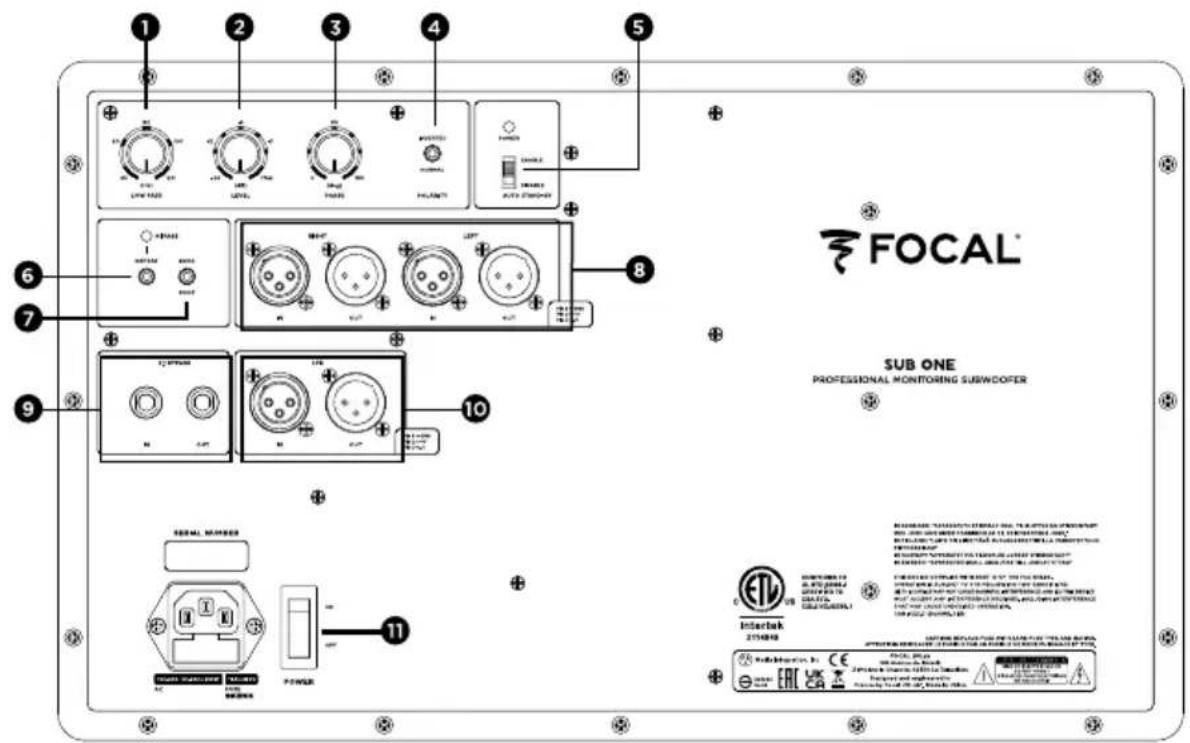
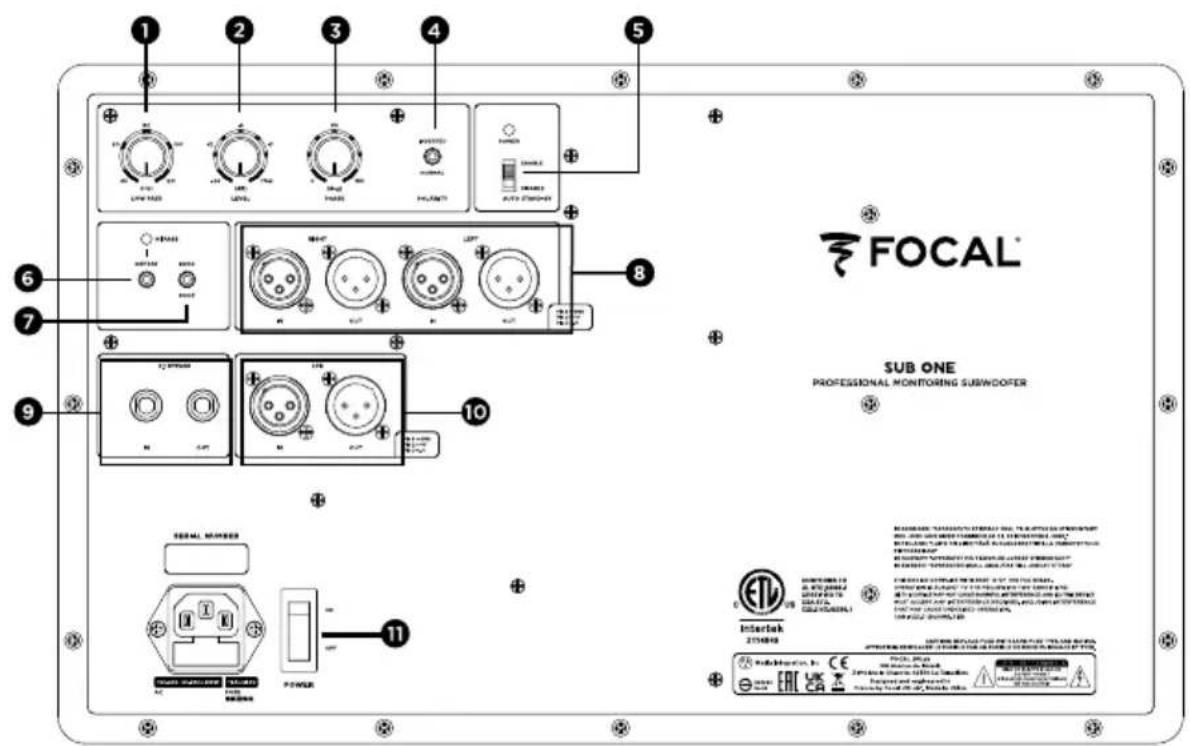
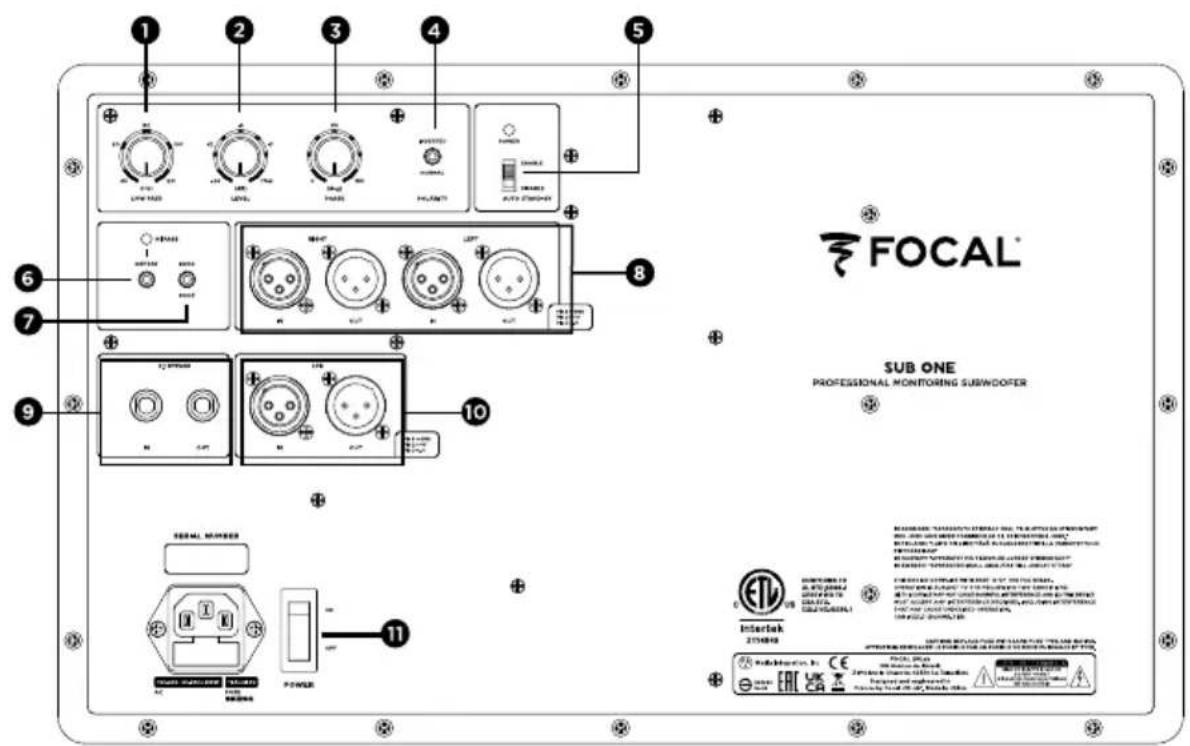
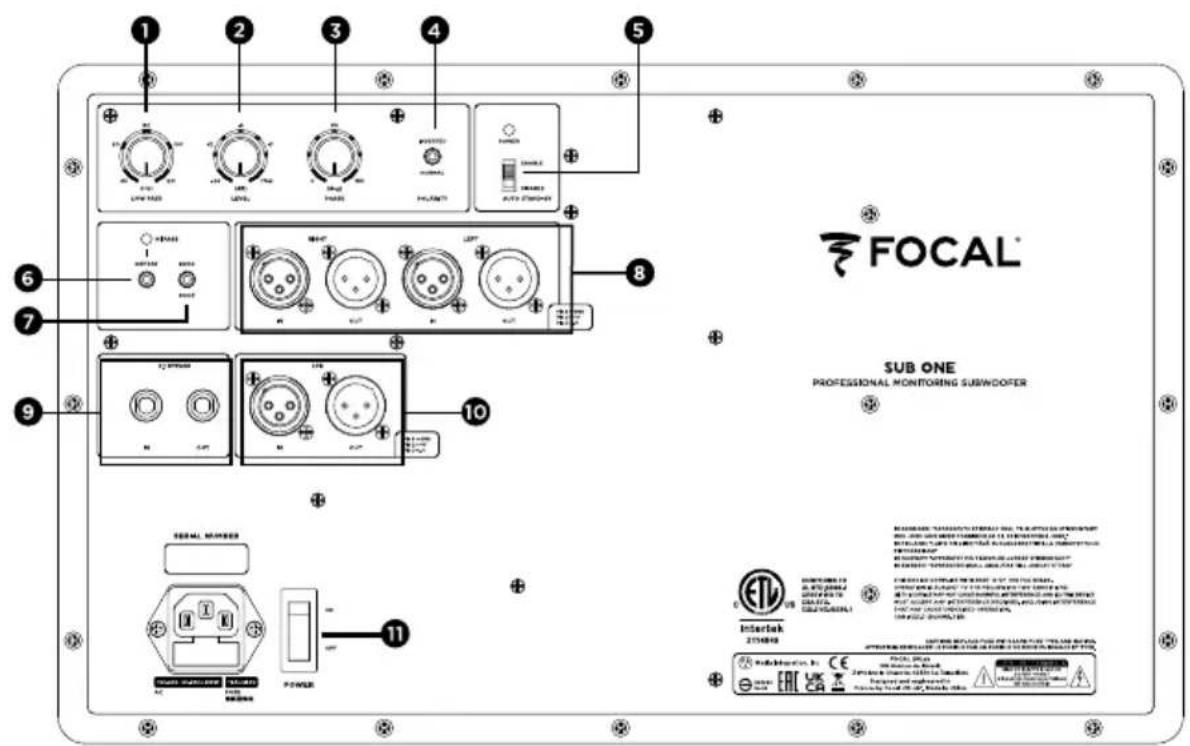
SUB ONE settings and control:
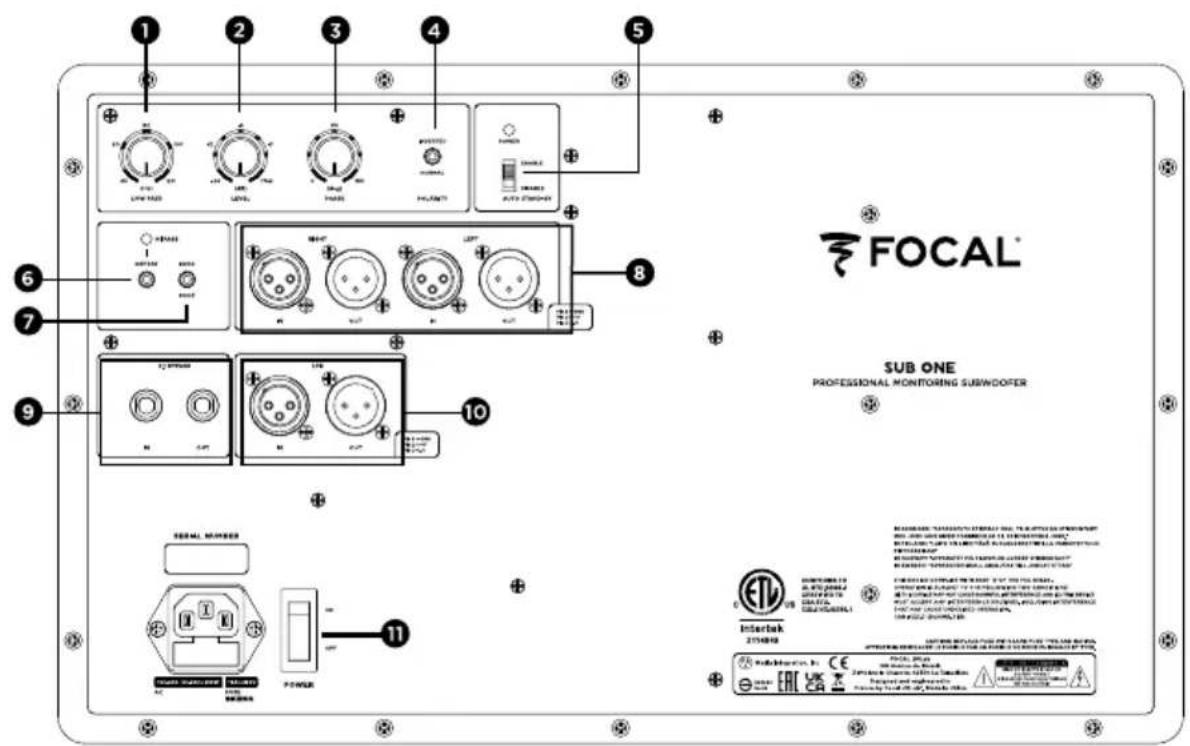
1 - LOW PASS
This rotary potentiometer allows you to adjust the subwoofer's low-pass cut-off frequency in order to determine the highest frequency that the SUB ONE will have to retranscribe. The aim is of course to obtain the most linear frequency response curve possible from the whole system (subwoofer + loudspeakers), and to thereby avoid reproducing the same frequencies through the subwoofer and the monitors.
2 - LEVEL
The SUB ONE level setting allows you set the subwoofer's volume according to that of the control monitors. This setting also offers the option to optimise the choice of the subwoofer's positioning, taking into account a 6dB increase for each rigid surface (floor, wall).
3-PHASE
This phase-adjustment potentiometer, combined with the polarity switch (4), will allow you to compensate for the positioning of the SUB ONE if required, in relation to that of the monitors. Depending on the distance of the subwoofer, on whether it is in a central position or not, this setting will allow you to simultaneously receive the sound information coming from the SUB ONE and its linked monitors.
4 - POLARITY
This polarity switch inverts the SUB ONE phase by 180^ .
5 - AUTO STAND BY
The SUB ONE is equipped with a "Stand-by" mode, which can be disabled if required. On leaving the factory, the subwoofer is set to the "ENABLE" position. The stand-by mode is therefore enabled. When you power on the SUB ONE, the "Stand-by" mode is enabled. To exit the "Stand-by" mode, send an audio signal to the subwoofer by gradually increasing the volume of the audio source. After around 30 minutes without receiving an audio signal, the subwoofer automatically switches to "Stand-by" mode. In "Stand-by" mode, the power consumption is lower than 0.5W. This automatic stand-by mode can be disabled. To do this, move the switch to the "DISABLE" position. In the "DISABLE" position, the SUB ONE is constantly powered on, as soon as the "ON-OFF" switch is in the "ON" position.
6 - DEFEAT
This switch engages or disengages the high-pass crossover of the satellite loudspeakers. When the LED is illuminated red, the DEFEAT mode is enabled, which disables the high-pass crossover of the monitors.
Z
7 - 60 Hz - 90 Hz
This switch allows you to select the cut-off frequency of the high-pass crossover of the satellite loudspeakers.
Left IN : this input is intended to receive the left output from your source (mixing desk, etc.).
Right IN : this input is intended to receive the right output from your source (mixing desk, etc.).
Left OUT : this output is reserved for the power from the left loudspeaker of your 2.1 system. The signal picked up will have been previously filtered by the low-pass crossover of your SUB ONE.
Right OUT : this output is reserved for the power from the right loudspeaker of your 2.1 system. The signal picked up will have been previously filtered by the low-pass crossover of your SUB ONE.
9 - BYPASS 2.1
This input allows you to connect a 2-position control pedal (not supplied), using a 1/4" (6.35mm) jack. Enabling the BYPASS will activate the subwoofer's "mute" function. This action will authorise the instant comparison through rapid switchover, between a "2.1" system (SUB ONE, linked to 2 monitors) and a traditional stereo system. This option will be particularly useful when optimising the crossover settings (phase, cut-off frequency, volume) between the SUB ONE and its linked monitors.
10 - LFE
Using the SUB ONE in a multichannel configuration (5.1, 5.2, 7.1, etc.)
LFE IN : this input is intended for powering your SUB ONE for a multichannel application (5.1, 5.2, 7.1, etc.). The LFE input is used exclusively for low frequencies.
LFE OUT: this output is intended for daisy-chaining your SUB ONE with another subwoofer for a multichannel application.
11 - POWER
The ON/OFF switch allows you to power the SUB ONE on and off.
System SUB ONE
• Frequency response (+/- 3dB) 32Hz - 120Hz
• Maximum SPL 114dB (peak @ 1m)
Electronic section
| • Inputs - Type / Impedance | - Connector | Left, Right, LFE |
| Electronically balanced / 110kOhms | ||
| - Sensitivity | 3-point female XLR | |
| Variable | ||
| • Outputs (to satellites) | - Connector Left + Right | 3-point male XLR in parallel on inputs |
| •Amplification2 x 100W RMS, D-class | ||
| • Internal signal processing and functions | - Subwoofer section Left + Right mono summation | 60Hz or 90Hz high-pass crossover |
| Adjustable low-pass crossover, 24dB/octave | ||
| Phase adjustment | ||
| Polarity | ||
| • User controls Subwoofer level adjustment (sensitivity) | ||
| • Indicators (LED) Power | ||
Transducers
- Subwoofer 2x8" (20cm) long-excision Focal speaker drivers with Slatefiber cones
Cabinet-work
| • Construction | 7/8" (22mm) MDF panel with internal braces |
| • Finish | Dark grey vinyl |
| • Dimensions (HxWxD) | 18^3/4 × 11^3/4 × 19^3/4 (475 × 310 × 520 mm) |
| • Weight | 40.8lbs (18.5kg) |
BITTE ZUERST LESEN!
natural_image
Front view of a rectangular electronic device with two circular ports and a 'FOCAL' label on the front panel (no other text or symbols)

natural_image
Line drawing of two speaker units with speaker blades and a mesh-patterned cover, shown from different angles (no text or symbols)
natural_image
Front view of a rectangular electronic device with two circular ports and a central logo (no text or symbols on the device itself)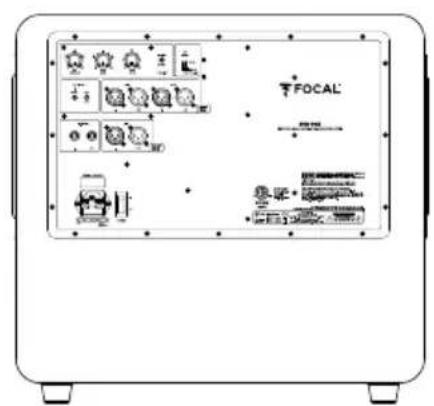
natural_image
Line drawing of two speaker units with circular components and a mesh pattern, shown from different angles (no text or symbols)

natural_image
Line drawing of a rectangular electronic device with two circular ports and a central label 'POCAL' (no additional text or symbols)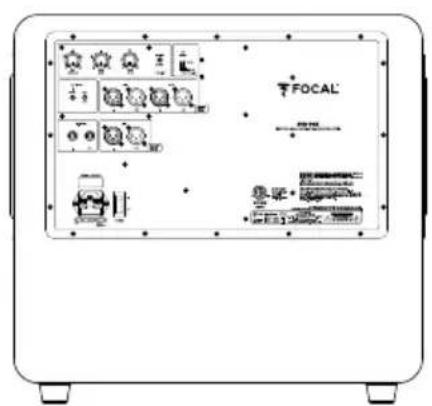
natural_image
Line drawing of two speaker units with circular components and a magnified inset showing the interior structure (no text or symbols)
Ajustes y controles del SUB ONE:
1 - LOW PASS
natural_image
Line drawing of a rectangular electronic device with two circular ports and a central label 'POCAL' (no additional text or symbols)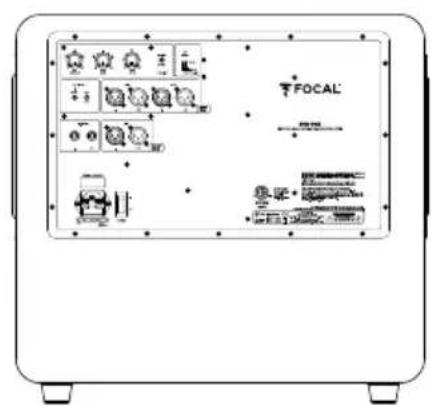
natural_image
Line drawing of two speaker units with circular components and a magnified inset showing the interior structure (no text or symbols)
natural_image
Front view of a rectangular electronic device with two circular ports and a central logo (no text or symbols on the device itself)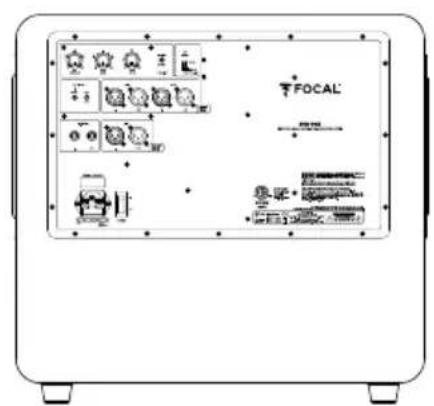
natural_image
Line drawing of two speaker units with circular components and a mesh pattern, showing external and internal views (no text or symbols)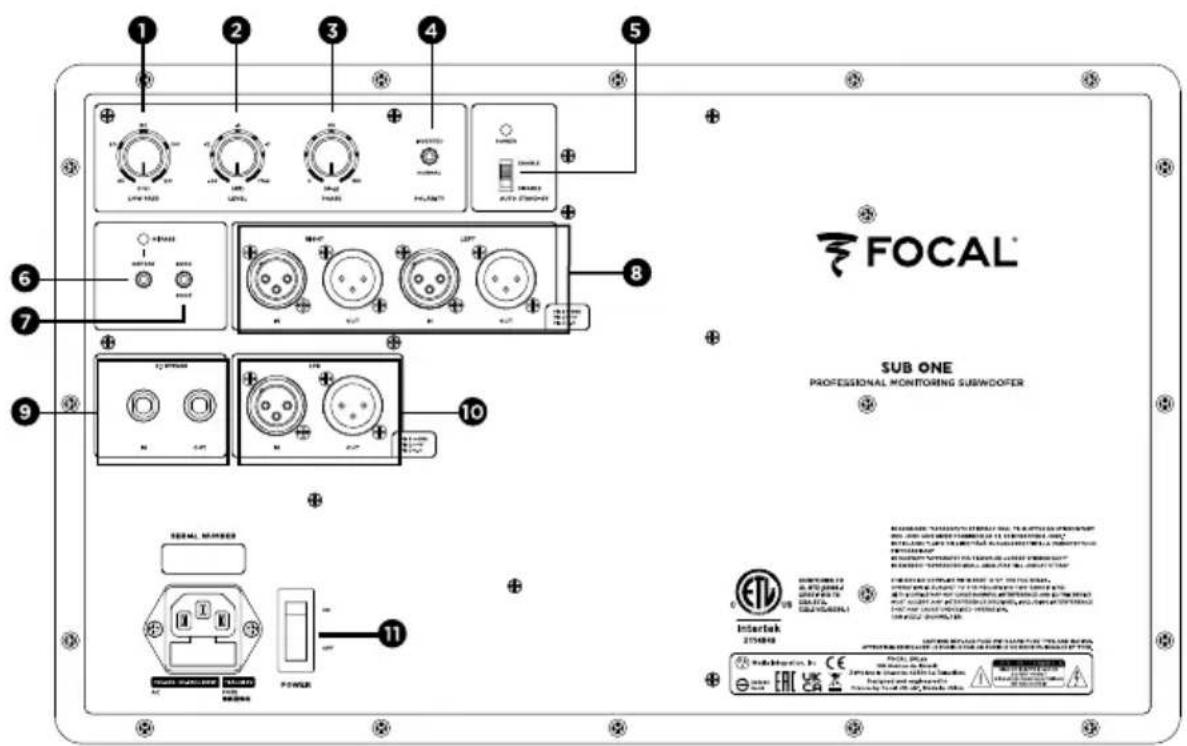

natural_image
Front view of a rectangular electronic device with two circular ports and a central logo (no text or symbols on the device itself)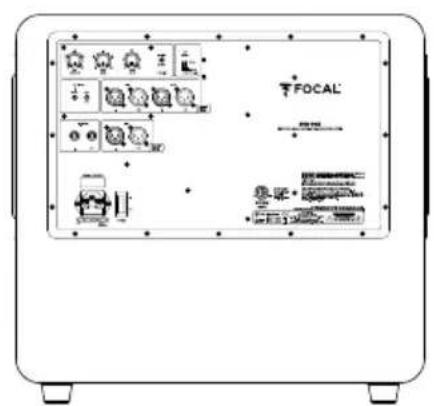
natural_image
Line drawing of two speaker units with circular components and a magnified inset showing the interior structure (no text or symbols)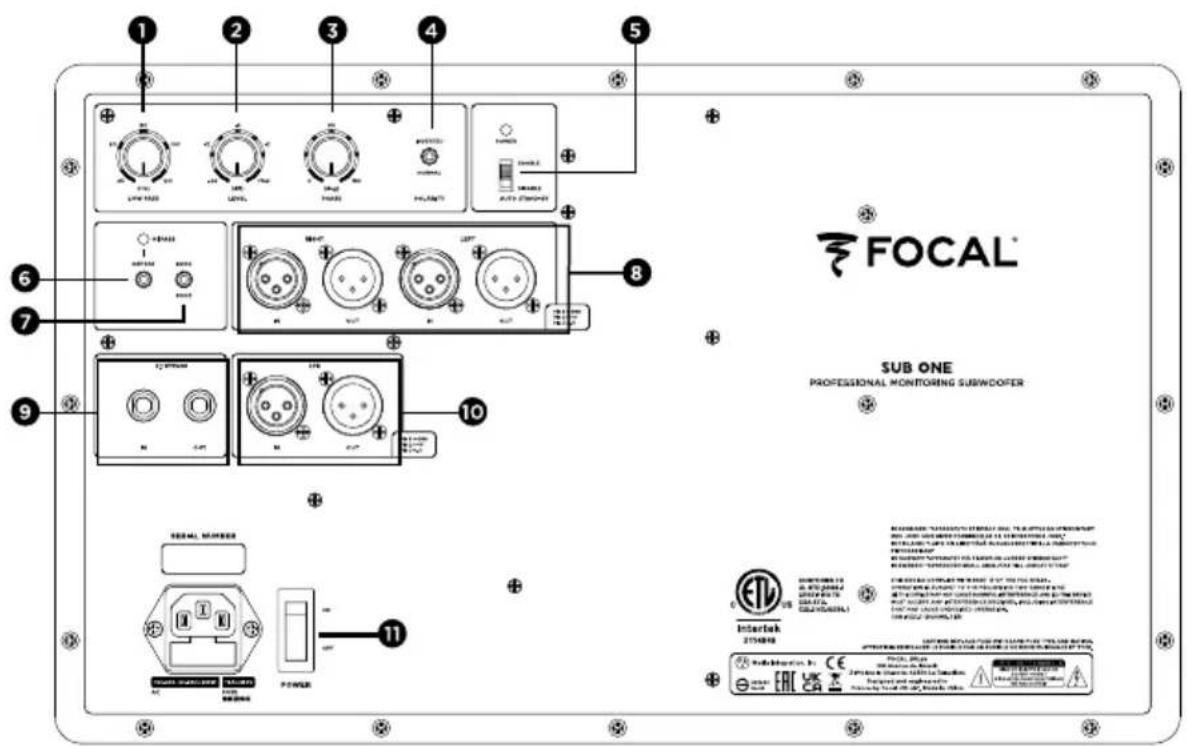
Correct elimination of this product.
This marking indicates that within the EU this product should not be disposed of with other household wastes. To prevent any risk to the environment or human health, please recycle them responsibly to encourage the reuse of material resources. To return your used device, please use the return and collection systems available, or contact the retailer where you purchased the product. They can recycle this product safely.


- À LIRE EN PREMIER !
- INSTRUCTIONS DE SÉCURITÉ IMPORTANTES !
- IMPORTANT SAFETY INSTRUCTIONS!
- Package contents
- Recommendations
- Warranty terms and conditions
- Installation
- Mains power
- Automatic stand-by
- Inserting/removing the grilles
- SUB ONE settings and control:
- - LOW PASS
- - LEVEL
- 3-PHASE
- - POLARITY
- - AUTO STAND BY
- - DEFEAT
- - 60 Hz - 90 Hz
- - BYPASS 2.1
- - LFE
- Using the SUB ONE in a multichannel configuration (5.1, 5.2, 7.1, etc.)
- - POWER
- System SUB ONE
- Transducers
- BITTE ZUERST LESEN!
- Correct elimination of this product.
Brand : FOCAL
Model : Sub One
Category : Monitor