
Twin6 Be - Monitor FOCAL - Free user manual and instructions
Find the device manual for free Twin6 Be FOCAL in PDF.


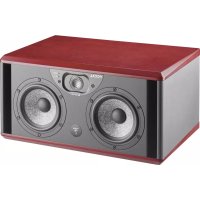
| Product Type | Three-way active monitoring loudspeaker |
| Frequency Response | 40 Hz - 40 kHz |
| Maximum SPL | 115 dB SPL (peak @ 1m) |
| Amplifiers | LF: 150W RMS (BASH), MF: 150W RMS (BASH), HF: 100W RMS (Class AB) |
| Input Type | Electronically balanced / 10 kOhms (XLR) |
| Input Sensitivity | Adjustable (+4 dBu or -10 dBV) |
| Woofer | 2 x 6.5" Focal 6W4370B (W cone) |
| High Frequency Driver | Focal TB871 inverted Beryllium dome tweeter |
| Controls | Input level switch, speaker (Left/Right) switch, LF and HF contour potentiometers, Power ON/OFF, mains voltage selector |
| Indicators | Power on LED (front panel) |
| Power Supply | 230V (2A fuse) or 115V (4A fuse) via IEC inlet with detachable cord |
| Cabinet Construction | 19 mm MDF panels with internal braces |
| Finish | Real red veneer on sides |
| Dimensions (HxWxD) | 250 mm x 500 mm x 340 mm (9.8" x 19.7" x 13.4") |
| Weight | 14 kg (30.8 lb) |
| Shielding | Integral through cancellation magnets or by magnet design |
| Recommended Distance | 1 to 3 meters from listener (nearfield monitoring) |
| Warranty | 2 years (EU) for defects in components and workmanship |
| Included Accessories | Power cord, guarantee card, protection grille for tweeter, adhesive tape for tweeter damage, information note |
| Safety Certifications | EN 55103, EN 61000, EN 60065 |
Frequently Asked Questions - Twin6 Be FOCAL
User questions about Twin6 Be FOCAL
0 question about this device. Answer the ones you know or ask your own.
Ask a new question about this device
Download the instructions for your Monitor in PDF format for free! Find your manual Twin6 Be - FOCAL and take your electronic device back in hand. On this page are published all the documents necessary for the use of your device. Twin6 Be by FOCAL.
USER MANUAL Twin6 Be FOCAL
Professional Analog Monitoring System
An example of this equipment has been tested and found to comply with the following European directives and international standards:
Electromagnetic compatibility
EN 55103
EN 61000
Electrical safety
EN 60065
Important safety information
Please read carefully the following instructions and safety information. Heed all warnings and follow all instructions.
- Do not remove the back panel. There are no user serviceable parts inside; please refer to qualified service personnel. This equipment must be earthed.
- Protect the power cord from being walked on or pinched particularly at plugs, convenience receptacles, and the point where they exit from the apparatus.
- Only use attachments/accessories specified by the manufacturer.
- Servicing is required when the unit has been damaged in any way, such as power cord or plug is damaged, liquid has been spilled or objects have fallen into the unit, the unit has been exposed to rain or moisture, does not operate normally, or has been dropped.
- Do not place naked flame sources, such as lighted candles, on the apparatus.
- Use the apparatus only in moderate climates (not in tropical climates).
- Do not expose the apparatus to dripping or splashing
- Do not place objects filled with liquids, such as vases, on the apparatus.

CAUTION!
RISK OF ELECTRIC SHOCK
DO NOT OPEN
DO NOT EXPOSE TO RAIN OR MOISTURE
The Solo6 Be and Twin6 Be use a tweeter equipped with a Beryllium dome, allowing a frequency range extending beyond 40kHz. In its solid form, Beryllium is harmless. However, due to its nature, certain special precautions should be observed to avoid exposure to unnecessary risk:
- Under no circumstances should the Beryllium dome be subjected to any form of abrasive action. To ensure no accidental damage to the tweeter dome it is advised to carefully replace the protection covers while not in use.
- In the unlikely case of damage to the dome, of any form, a wide piece of adhesive tape should be immediately used to seal the whole front surface of the tweeter. The protective cover should then be replaced and also taped securely in place. You should then inform the dealer from whom you purchased the product so that the tweeter can be removed by a professional and returned to the product distributor for replacement.
- If the dome is broken in any way giving rise to loose particles of Beryllium, these should be carefully collected with the use of an adhesive tape and sealed in a zip-top bag to be returned with the tweeter.
For further information, please contact Focal-JMlab directly: beryllium@focal.com
Thank you for choosing the FOCAL Solo6 Be - Sub 6 - and/or Twin6 Be. The Solo6, Twin6 Be, and the Sub6 are world class Professional Monitoring Systems. They have been designed to offer superior imaging, outstanding precision and extended frequency range, in a compact format suitable for near field monitoring.
Unpacking
In addition to one loudspeaker and a user manual (such as this one), each Solo6 or Twin6 carton should contain:
- A power cord.
- A guarantee card.
- A protection grille for the Beryllium tweeter (you are advised to remove it before listening to the speakers).
- A plastic bag containing an information note "Beryllium inverted dome tweeter", and some adhesive tape to affix on the tweeter in the unlikely event of the dome being damaged.
In addition to one subwoofer and a user manual each Sub6 carton include:
- A power cord.
- A guarantee card.
- A grille protecting the drive unit (which it is advisable to remove whenever possible).
Please check that none of these items are missing, and remove all accessories from the carton.
To remove the loudspeaker from its carton without damage, open the end flaps fully and bend them right back. Then remove the upper cushion and lift the loudspeaker out gently. Inspect the speaker for signs of any possible damage. In the unlikely event of this having occurred please inform the carrier and supplier. It is a good practice to keep the packaging in case of future transportation.
Preliminary recommendations
We would like to give a word of warning about the high sound pressure levels that can be generated by these loudspeakers, especially in a 5.1 configuration. Because of their low levels of distortion, and the minimal fatigue incurred by the user, it is not always obvious to realise the actual sound pressure level while working.
Please bear in mind that exposure to excessive levels over a sustained period of time may lead to permanent hearing loss.
Warranty
These products are guaranteed against defects in components and workmanship only, for a period of two years from the date of shipment to the end user for countries of the European Union. For other countries, please refer to the law in effect.
During the warranty period Focal will, at their discretion, either repair or replace products which prove to be defective, provided that the product is returned, shipping prepaid, to an authorised Focal service facility.
Defects caused by unauthorised modifications, accident, negligence or any misuse are not covered by this warranty.
For further information please contact your dealer or the distributor in your country.
![Hi Pass switch Defeat switch Phase control Level control Lo Pass control Polarity switch Mute switch HI PASS 140 -18 -2 -5 PHASE 40 POLARITY Inverted Mate Power 6.35 Jack connector for 2.1 Bypass footswitch remote control 2.1 BYPASS Right Left IN OUT IN OUT LFE IN Pin 1 = GND Pin 2 = + V Pin 3 = - V LFE input connector [mutichannel wiring only] Audio input connectors [Stereo/2.1 wiring only] Audio output connectors to satellites speakers [Stereo/2.1 wiring only] Sub6 Professional Monitoring System Warning: SHOCK HAZARD. DO NOT OPEN. ATTENTION : RISQUE DE CHOC ELECTRIQUE. NE PAS OUVRIR. Serial Number FOCAL Professional Division Manufactured by Focal-JMlab® in France BP 374 - 42353 La Talaudière codex - www.focal-fr.com Manufactured under License. U.S. Patent #5,075,634 and #5,510,753. Patent Pending. POWER ~ 50-60 Hz 350 VA Max. Voltage Selection Fuse: T1.6 AL for 230V T3.15 AL for 115V CE Voltage selector](/content/2026/05/812747/images/abbfa4060505976b2d695f0e09436730ed2c5e2b3228853c442d6227837373f3.jpg)
Solo6 Be
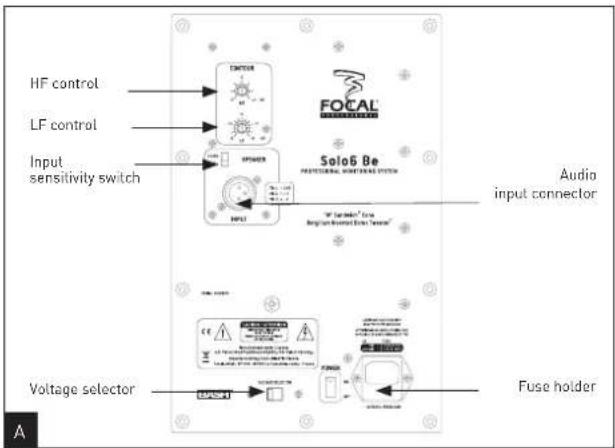
The Solo6 Be is a two-way active loudspeaker (2 internal amplifiers channels), comprising one "W" cone 6.5" low/mid unit, loaded with a large cross-section laminar port, and an inverted pure Beryllium dome (fig. A).
Twin6 Be
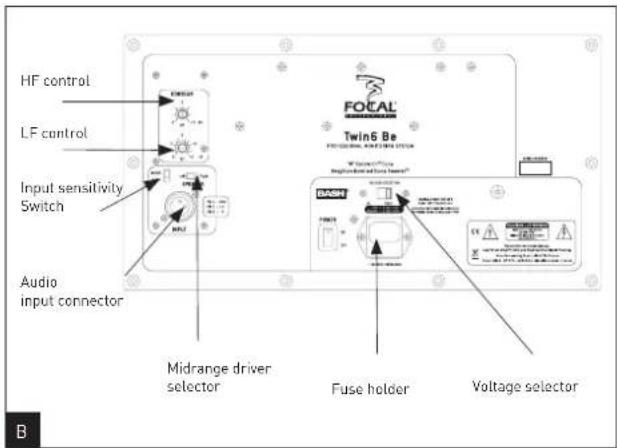
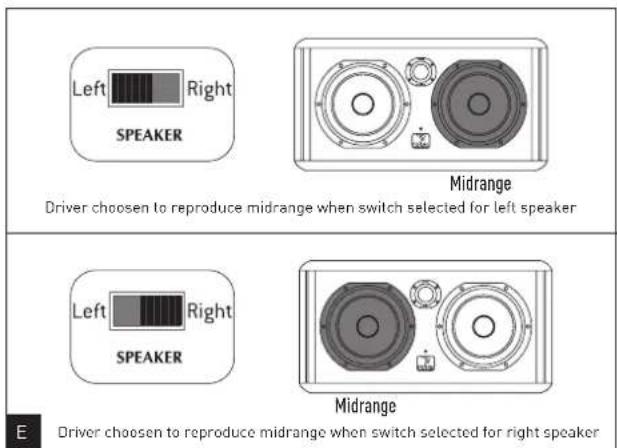
The Twin6 Be is a three-way active loudspeaker (3 internal amplifiers channels), comprising two "W" cone 6.5" low/mid units, loaded with two large cross-section laminar ports, and an inverted pure Beryllium dome. The two 6.5" drive units operate at low frequencies but only one of them (either can be selected) will reproduce the midrange (fig. B).
Sub6
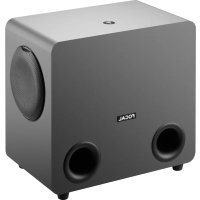
The Sub6 is an active subwoofer [1 integral amplifier] designed for professional monitoring systems. It uses a 11" drive unit equipped with a "W" composite cone, and loaded by a large cross-section laminar port (fig. G).
The Sub6 may be used :
- For bass or sub-bass enhancement in stereo + sub setups (2.1 or 2.2). The rear panel of the Sub6 allows for the connection of a traditional stereo source (Left In / Right In), while providing hi-passed outputs intended to feed the main speakers (satellites).
- As a LFE channel (Low Frequency Effects) in a multi-channel installation [5.1, 5.2, 6.1...], via a dedicated input of the rear panel.
Installing
Mains voltage
After having unpacked the unit, first check that the operating voltage is correctly set (see location on rear panel). If it is not, adjust the selector to the appropriate position. Also check and if necessary replace the fuse, which rating depends on the operating voltage (please refer to technical specifications).
The Solo6 and Twin6 must be earthed using the power cord supplied.
Audio connections: general
The audio signal is to connect to the XLR inlet. This is a balanced input, which use the standard cabling scheme, namely:
Pin 1 = Ground (shield)
Pin 2 = In phase voltage ("hot")
Pin 3 = Out-of-phase voltage ("cold")
If the audio source is unbalanced, common practice is to link "cold" and ground pins (pins 3 and 1 respectively). This is generally achieved within the cable.
Audio connections: Sub6 (fig. G)
Stereo + Sub setup (2.1 or 2.2):
Left IN: this input is intended to receive the signal coming from the left channel of your source (mixing console, or other...).
Right IN: this input is intended to receive the signal coming from the right channel of your source (mixing console, or other...).
Left OUT: this output is intended to connect to the left main loudspeaker of your system. The signal supplied by this output is internally processed through a high pass filter.
Right OUT: this output is intended to connect to the right main loudspeaker of your system. The signal supplied by this output is internally processed through a high pass filter.
Multichannel configuration:
LFE: this input is intended to feed your Sub6 in a multichannel application (5.1, 5.2, 6.1, ...): this channel is dedicated to low frequencies only.
SOLO6 BE - TWIN6 BE - SUB6: PRODUCT OVERVIEW
Professional Analog Monitoring System - User manual
Positioning
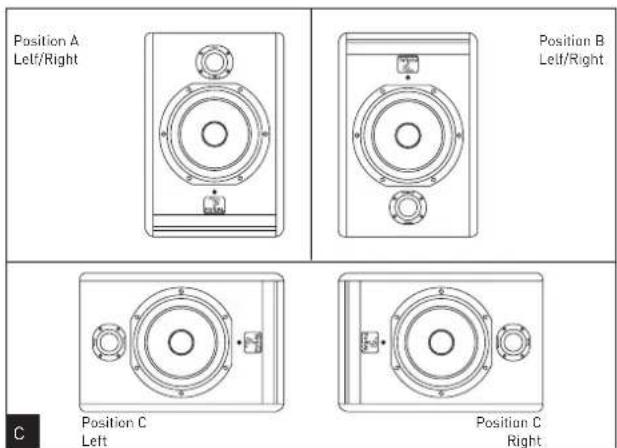
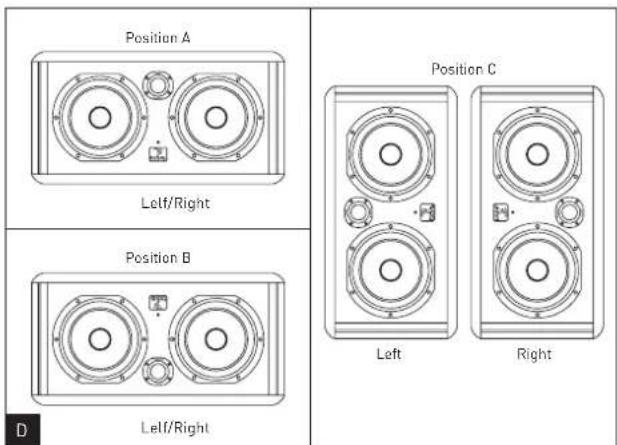
The Solo6 Be and Twin6 Be are designed for near field monitoring and should be placed at a distance between 1 and 3 metres from the listener, pointing towards the listening position. They can be sitting on the console top or placed on appropriate stands. In any way it is recommended that the tweeter is at a height from the floor approximately equivalent to that of the listener's ears. If required it can make sense to place the speakers upside down so that the previous rule is better fulfilled (fig. C,D).
The Solo6 Be could be used vertically or horizontally depending on the environment, preferably pointing towards the listener (fig. C).
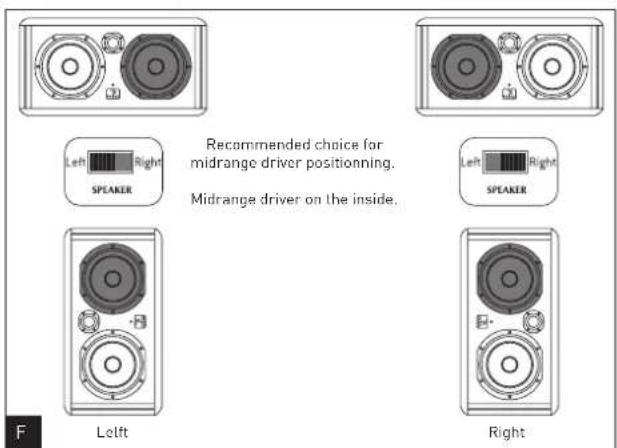
By design the Twinó Be's are rather intended for a landscape orientation, though in some situations they could be positioned vertically. As seen in the earlier rear panel description, the Twinó Be has a switch allowing to choose which drive unit is to reproduce the mid frequencies (see below) (fig. E). Consequently it will always be possible, as desirable, to configure the speakers in a "mirror" (ie symmetrical) way (fig. F). As a general rule having the "midrange" driver on the inside of the cabinet results in better imaging.
Optimal positioning of the Sub6 may vary depending on the surface, the shape and acoustic properties of the listening room. You are advised to try various locations so to choose the one giving the best possible and most level sound balance. As a rule of thumb the optimal location will often be in a corner of the room.
Running in
As in all brand new loudspeaker the drivers need some run in period: they are mechanical elements demanding a little time to settle and adapt to the climatic environment. This period will vary depending on the working conditions and may take up to a few weeks. Avoid pushing the speakers very hard during their first hours of use, but to accelerate the run-in process it is good practice to operate the speakers at moderate levels for 20 hours or so, with programmes having significant low frequency content. Only once the transducers have come to stabilize will you get the optimum performance.
Solo6 Be/Twin6 Be/Sub6 Controls
Speaker switch (Left/Right) : only for Twin6 Be
This switch allows the user to select which one of the two 6.5" drivers will reproduce the midrange. By convention, the "Right" position of the switch will select the left hand side driver (when facing the cabinet laying horizontally). Conversely in the "Left" position the right hand side driver (facing the cabinet) will be the one operating in the mid frequencies. It is easy to figure how useful this control is when it comes to get the best possible imaging in any cabinet layout (fig. E,F).
Input switch
The input sensitivity can be adjusted using this two position switch. The +4dBu position is suitable for standard professional audio equipment, while -10dBV position may be used for other types of sources providing a lesser output level.
HF contour
This control allows for a continuous adjustment of the high frequency level; it operates above 5kHz within a ±3dB range (fig. H).
LF contour
This control allows for a continuous adjustment of the low frequency level; it operates below 150Hz within a ±6dB range (fig. 1). This adjustment is typically useful to deal with possible excessive level of LF energy resulting from acoustic coupling associated with close reflecting surfaces: mixing console, nearby walls...
Power on indicator
A power on LED is located on the cabinet front panel, near the Focal logo.
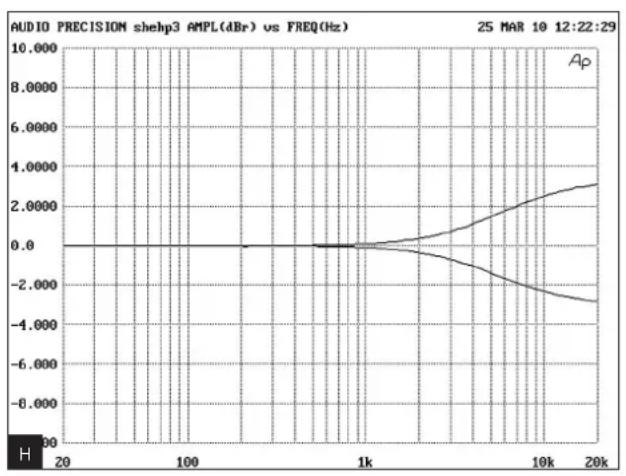
line
| Frequency (Hz) | Amplitude (dBr) | | -------------- | --------------- | | 20 | 0.0 | | 100 | 0.0 | | 1k | 0.0 | | 10k | 2.0000 | | 20k | 3.0000 |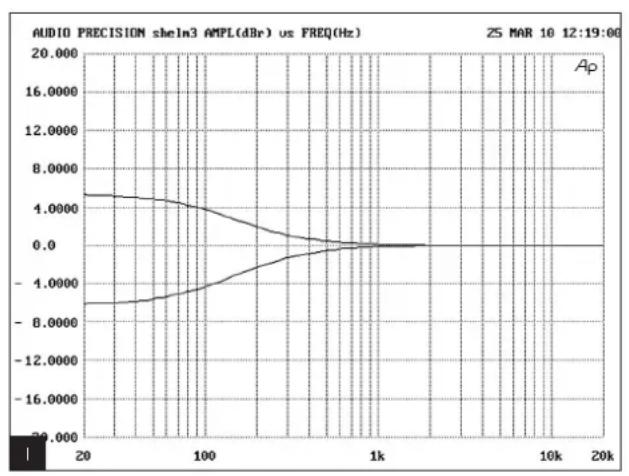
line
| Frequency (Hz) | Amplitude (dB) | | -------------- | -------------- | | 20 | 4.5 | | 100 | 3.0 | | 1k | 0.0 | | 10k | 0.0 | | 20k | 0.0 |Sub6 controls (fig. G)
Level
This adjustment allows to set the sound level of the subwoofer relative to that of the main loudspeakers. It should also be optimised taking into account the actual location of the subwoofer and its acoustic consequences: for example in an angle the 6 dB acoustic gain should be compensated by an equivalent attenuation to maintain the overall balance of the system.
Mute
This switch will turn out the output signal of the subwoofer channel (making it silent does not require to switch the power off). When muting the subwoofer the high pass filters used for the main speakers will remain active.
Hi Pass
This area is dedicated to the setting of the high pass filters intended for the main speakers in a 2.1 configuration. The "Defeat" switch allows to disable (ie by-pass) these filters. The 75 Hz / 100 Hz switch allows to select the cut-off frequency, in order to optimise the acoustic recombination between the satellites and the Sub6.
Lo Pass
This potentiometer adjusts the cut-off frequency of the low pass filter on the subwoofer channel, thus setting the upper frequency range to be reproduced by the Sub6. The goal is to achieve the smoothest frequency response of the whole system: sub + satellites.
Polarity
This switch inverts the signal polarity on the subwoofer channel (ie 180° phase shift).
Phase
This potentiomer provides some fine adjustment of the phase on the subwoofer channel. Combined with the polarity switch it can be used to compensate for the spacing between the sub and the main speakers, so to get a coherent soundfield through a proper time alignment of the different sources.
2.1 Bypass
This input allows for plugging in a control footswitch (not supplied) via a 14 " jack connector.
Turning it active will :
- mute the subwoofer channel
- defeat the high pass filters in the satellites signal paths. The satellites will then be fed with full range signals. This facility allows for instantaneous comparison between the 2.1 configuration (with sub) and the traditional stereo setup (without sub) with the same system.
Power indicator
Power "LED" indicator.
SYSTEM
| Frequency response | 40Hz - 40kHz |
| Maximum SPL | 113dB SPL (peak @ 1m) |
ELECTRONIC SECTION
| Input | Type/Impedance Connector Sensitivity | Electronically balanced / 10 kOhms XLR Adjustable, +4dBu ou -10dBV |
| LF amplifier stage HF amplifier stage | 150W rms, BASH® technology 100W rms, class AB | |
| Power supply | Main Voltage Connection | 230V (1.6A fuse rating) 115V (3.15A fuse rating) IEC inlet and detachable power cord |
| User controls | Input level switch LF and HF contours (potentiometers) Power ON/OFF switch, mains voltage selector | |
| Indicator | Power on LED |
TRANSDUCERS
| Woofer | "W" cone, Focal 6W4370B 6.5" drive unit |
| High frequency | Focal TB871 inverted Beryllium dome tweeter |
| Shielding | Integral through concellation magnets or by magnet design |
CABINET
| Construction | 19mm MDF panels with internal braces |
| Finish | Real red veneer on sides |
| Dimensions (HxWxD) | 330mm x 240mm x 290mm - [13"x9.5"x11.4"] |
| Weight | 11kg - (24.2lb) |
All specifications are subject to change.
SYSTEM
Frequency response 40Hz - 40kHz
Maximum SPL 115dB SPL (peak @ 1m)
ELECTRONIC SECTION
| Input | Type/Impedance Connector Sensitivity | Electronically balanced / 10 kOhms XLR Adjustable, +4dBu ou -10dBV |
| LF amplifier stage LF/MF amplifier stage HF amplifier stage | 150W rms, BASH® technology 150W rms, BASH® technology 100W rms, class AB | |
| Power supply | Main Voltage Connection | 230V (2A fuse rating) 115V (4A fuse rating) IEC inlet and detachable power cord |
| User controls | Input level switch Speaker (left/right) switch LF and HF contours (potentiometers) Power ON/OFF switch, mains voltage selector | |
| Indicator | Power on LED |
TRANSDUCERS
| Woofer | 2 x "W" cone, Focal 6W4370B 6.5" drive unit |
| High frequency | Focal TB871 inverted Beryllium dome tweeter |
| Shielding | Integral through concellation magnets or by magnet design |
CABINET
| Construction | 19mm MDF panels with internal braces |
| Finish | Real red veneer on sides |
| Dimensions (HxWxD) | 250mm x 500mm x 340mm - (9.8" x 19.7" x 13.4") |
| Weight | 14kg - (30.8lb) |
All specifications are subject to change.
SYSTEM
| Frequency response | 30Hz - 250Hz |
| Maximum SPL | 116dB SPL (peak @ 1m) |
ELECTRONIC SECTION
| Input | Type/Impedance Connector Sensitivity | Left, Right, LFE Electronically balanced / 10kOhms Female 3 pins XLR Variable |
| Output (to satellites) | Type/Impedance Connector | Left, Right Electronically balanced / 50 Ohms Male 3 pins XLR |
| Amplifier | 350 W rms, BASH® technology | |
| Internal processing and functions | Subwoofer section | Left + Right mono summation LFE + lo-passed mono sum 24dB/octave variable lo-pass filter Phase adjustment Polarity 24dB/octave, defeatable hi-pass filters with selectable frequency |
| Satellite section | ||
| User controls | Sub level (sensitivity) adjustment Lo-pass frequency adjustment Phase adjustment Polarity switch Mute 2.1 bypass (controlled by external footswitch) Hi-pass frequency selection Hi-pass defeat | |
| Indicators (LED's) | Power on Mute Hi-pass defeat | |
| Power supply | Mains voltage Connection | 230V (T1.6AL fuse rating) or 115V (T3.15AL fuse rating) IEC inlet and detachable power cord |
TRANSDUCERS
| Subwoofer | "W" composite sandwich cone, high excursion Focal 11W7670, 270mm [10.6"] drive unit |
CABINET
| Construction | 22mm MDF panels with internal braces |
| Finish | Real red veneer on sides - Black on body |
| Dimensions (HxWxD) | 380mm x 344mm x 440mm (15" x 13.5" x 17.3") |
| Weight | 23kg (50.7lb) |
All specifications are subject to change.
SOL06 BE - TWIN6 BE - SUB6 BE
Pin 1 = masse (blindage)
Pin 2 = point chaud (signal en phase)
Pin 3 = point froid (signal hors phase)
□ Post production Broadcast □
International guarantee
Now it's possible to register on line : www.focal.com/warranty
In order to validate the Focal guarantee, please return this page within 10 days to the following address:
Retailer or distributor name: ____
Company or owner name: ____
Technical manager: ____
Your complete address:
Retail price: ____
Occupation:
□ Audio studio Mastering □
□ Post production Broadcast □
☐ Other (please specify): ____
Installation details:
Exploitation details: Mac □ PC □
Used as: □ nearfield □ midfield
Used for: stereo □ □ multichannel
Mixing desk brand : ____
"Direct to disk" software:
In case of replacement, what were your previous acoustic speakers?
Explain in a few words why you chose Focal...
Your comments: ____


- Professional Analog Monitoring System
- Electromagnetic compatibility
- Electrical safety
- Important safety information
- CAUTION!
- RISK OF ELECTRIC SHOCK
- DO NOT OPEN
- DO NOT EXPOSE TO RAIN OR MOISTURE
- Unpacking
- Preliminary recommendations
- Warranty
- Solo6 Be
- Twin6 Be
- Sub6
- Installing
- Mains voltage
- Audio connections: general
- Multichannel configuration:
- SOLO6 BE - TWIN6 BE - SUB6: PRODUCT OVERVIEW
- Positioning
- Running in
- Solo6 Be/Twin6 Be/Sub6 Controls
- Speaker switch (Left/Right) : only for Twin6 Be
- Input switch
- HF contour
- LF contour
- Power on indicator
- Sub6 controls (fig. G)
- Level
- Mute
- Hi Pass
- Lo Pass
- Polarity
- Phase
- Bypass
- Power indicator
- SYSTEM
- SOL06 BE - TWIN6 BE - SUB6 BE
- International guarantee
- In order to validate the Focal guarantee, please return this page within 10 days to the following address:
- Occupation:
- Installation details:
Brand : FOCAL
Model : Twin6 Be
Category : Monitor