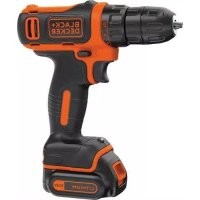
BDCDD12 - Drill BLACK & DECKER - Free user manual and instructions
Find the device manual for free BDCDD12 BLACK & DECKER in PDF.



Frequently Asked Questions - BDCDD12 BLACK & DECKER
User questions about BDCDD12 BLACK & DECKER
0 question about this device. Answer the ones you know or ask your own.
Ask a new question about this device
Download the instructions for your Drill in PDF format for free! Find your manual BDCDD12 - BLACK & DECKER and take your electronic device back in hand. On this page are published all the documents necessary for the use of your device. BDCDD12 by BLACK & DECKER.
USER MANUAL BDCDD12 BLACK & DECKER
English (Original instructions) 4
Your BLACK+DECKER BDCDD12 - Drill, has been designed for screwdriving applications and for drilling in wood, metal and plastics. This tool is intended for consumer use only.
Safety instructions
General power tool safety warnings

Warning! Read all safety warnings and all instructions. Failure to follow the warnings and instructions listed below may result in electric shock, fire and/or serious injury.
Save all warnings and instructions for future reference. The term "power tool" in all of the warnings listed below refers to your mains operated (cored) power tool or battery operated (cordless) power tool.
1. Work area safety
a. Keep work area clean and well lit. Cluttered or dark areas invite accidents.
b. Do not operate power tools in explosive atmospheres, such as in the presence of flammable liquids, gases or dust. Power tools create sparks which may ignite the dust or fumes.
c. Keep children and bystanders away while operating a power tool. Distractions can cause you to lose control.
2. Electrical safety
a. Power tool plugs must match the outlet. Never modify the plug in any way. Do not use any adapter plugs with earthed (grounded) power tools. Unmodified plugs and matching outlets will reduce risk of electric shock.
b. Avoid body contact with earthed or grounded surfaces such as pipes, radiators, ranges and refrigerators. There is an increased risk of electric shock if your body is earthed or grounded.
c. Do not expose power tools to rain or wet conditions. Water entering a power tool will increase the risk of electric shock.
d. Do not abuse the cord. Never use the cord for carrying, pulling or unplugging the power tool. Keep cord away from heat, oil, sharp edges or moving parts. Damaged or entangled cords increase the risk of electric shock.
e. When operating a power tool outdoors, use an extension cord suitable for outdoor use.
Use of a cord suitable for outdoor use reduces the risk of electric shock.
f. If operating a power tool in a damp location is unavoidable, use a residual current device (RCD) protected supply. Use of an RCD reduces the risk of electric shock.
3. Personal safety
a. Stay alert, watch what you are doing and use common sense when operating a power tool. Do not use a power tool while you are tired or under the influence of drugs, alcohol or medication. A moment of inattention while operating power tools may result in serious personal injury.
b. Use personal protective equipment. Always wear eye protection. Protective equipment such as dust mask, non-skid safety shoes, hard hat, or hearing protection used for appropriate conditions will reduce personal injuries.
c. Prevent unintentional starting. Ensure the switch is in the off-position before connecting to power source and/or battery pack, picking up or carrying the tool. Carrying power tools with your finger on the switch or energising power tools that have the switch on invites accidents.
d. Remove any adjusting key or wrench before turning the power tool on. A wrench or a key left attached to a rotating part of the power tool may result in personal injury.
e. Do not overreach. Keep proper footing and balance at all times. This enables better control of the power tool in unexpected situations.
f. Dress properly. Do not wear loose clothing or jewellery. Keep your hair, clothing and gloves away from moving parts. Loose clothes, jewellery or long hair can be caught in moving parts.
g. If devices are provided for the connection of dust extraction and collection facilities, ensure these are connected and properly used. Use of dust collection can reduce dust-related hazards.
4. Power tool use and care
a. Do not force the power tool. Use the correct power tool for your application. The correct power tool will do the job better and safer at the rate for which it was designed.
b. Do not use the power tool if the switch does not turn it on and off. Any power tool
that cannot be controlled with the switch is dangerous and must be repaired.
c. Disconnect the plug from the power source and/or the battery pack from the power tool before making any adjustments, changing accessories, or storing power tools. Such preventive safety measures reduce the risk of starting the power tool accidentally.
d. Store idle power tools out of the reach of children and do not allow persons unfamiliar with the power tool or these instructions to operate the power tool. Power tools are dangerous in the hands of untrained users.
e. Maintain power tools. Check for misalignment or binding of moving parts, breakage of parts and any other condition that may affect the power tools operation. If damaged, have the power tool repaired before use. Many accidents are caused by poorly maintained power tools.
f. Keep cutting tools sharp and clean. Properly maintained cutting tools with sharp cutting edges are less likely to bind and are easier to control.
g. Use the power tool, accessories and tool bits etc. in accordance with these instructions, taking into account the working conditions and the work to be performed. Use of the power tool for operations different from those intended could result in a hazardous situation.
5. Battery tool use and care
a. Recharge only with the charger specified by the manufacturer. A charger that is suitable for one type of battery pack may create a risk of fire when used with another battery pack.
b. Use power tools only with specific cally designated battery packs. Use of any other battery packs may create a risk of injury and fire.
c. When battery pack is not in use, keep it away from other metal objects, like paper clips, coins, keys, nails, screws, or other small metal objects, that can make a connection from one terminal to another. Shorting the battery terminals together may cause burns or a fire.
d. Under abusive conditions, liquid may be ejected from the battery; avoid contact.
If contact accidentally occurs, fl ush with water. If liquid contacts eyes, additionally seek medical help. Liquid ejected from the battery may cause irritation or burns.
- Service
a. Have your power tool serviced by a qualified repair person using only identical replacement parts. This will ensure that the safety of the power tool is maintained.
Additional power tool safety warnings

Warning! Additional safety warnings for drills
Use auxiliary handles supplied with the tool. Loss of control can cause personal injury.
Hold power tool by insulated gripping surfaces when performing an operation where the cutting accessory may contact hidden wiring. Cutting accessory contacting a "live" wire may make exposed metal parts of the power tool "live" and could give the operator an electric shock.
Hold power tool by insulated gripping surfaces, when performing an operation where the fastener may contact hidden wiring. Fasteners contacting a "live" wire may make exposed metal parts of the power tool "live" and could give the operator an electric shock.
Use clamps or another practical way to secure and support the workpiece to a stable platform. Holding the work by hand or against your body leaves it unstable and may lead to loss of control.
Before drilling into walls, floors or ceilings, check for the location of wiring and pipes.
Avoid touching the tip of a drill bit just after drilling, as it may be hot.
The intended use is described in this instruction manual. The use of any accessory or attachment or performance of any operation with this tool other than those recommended in this instruction manual may present a risk of personal injury and/or damage to property.
Safety of others
This tool is not intended for use by persons (including children) with reduced physical, sensory or mental capabilities, or lack of experience and knowledge, unless they
ENGLISH
have been given supervision or instruction concerning use of the tool by a person responsible for their safety.
Children should be supervised to ensure that they do not play with the appliance.
Residual risks
Additional residual risks may arise when using the tool which may not be included in the enclosed safety warnings. These risks can arise from misuse, prolonged use etc.
Even with the application of the relevant safety regulations and the implementation of safety devices, certain residual risks can not be avoided. These include:
Injuries caused by touching any rotating/ moving parts.
Injuries caused when changing any parts, blades or accessories.
Injuries caused by prolonged use of a tool. When using any tool for prolonged periods ensure you take regular breaks.
Impairment of hearing.
Health hazards caused by breathing dust developed when using your tool (example:working with wood, especially oak, beech and MDF.)
Vibration
The declared vibration emission values stated in the technical data and the declaration of conformity have been measured in accordance with a standard test method provided by EN 60745 and may be used for comparing one tool with another. The declared vibration emission value may also be used in a preliminary assessment of exposure.
Warning! The vibration emission value during actual use of the power tool can differ from the declared value depending on the ways in which the tool is used. The vibration level may increase above the level stated.
When assessing vibration exposure to determine safety measures required by 2002/44/EC to protect persons regularly using power tools in employment, an estimation of vibration exposure should consider, the actual conditions of use and the way the tool is used, including taking account of all parts of the operating cycle such as the times when the tool is switched off and when it is running idle in addition to the trigger time.
Labels on tool
The following symbols are shown on the tool along with the date code:

Warning! To reduce the risk of injury, the user must read the instruction manual.
Additional safety instructions for batteries and chargers (Not provided with the tool)
Batteries
Never attempt to open for any reason.
Do not expose the battery to water.
Do not store in locations where the temperature may exceed 40^
Charge only at ambient temperatures between 10^ and 40^ .
Charge only using the charger provided with the tool.
When disposing of batteries, follow the instructions given in the section "Protecting the environment".

Do not attempt to charge damaged batteries.
Chargers
Use your BLACK+DECKER charger only to charge the battery in the tool with which it was supplied. Other batteries could burst, causing personal injury and damage.
Never attempt to charge non-rechargeable batteries.
Have defective cords replaced immediately.
Do not expose the charger to water.
Do not open the charger.
Do not probe the charger.

The charger is intended for indoor use only.

Read the instruction manual before use.
Electrical safety

Your charger is double insulated; therefore no earth wire is required. Always check that the mains voltage corresponds to the voltage on the rating plate. Never attempt to replace the charger unit with a regular mains plug.
If the supply cord is damaged, it must be replaced by the manufacturer or an authorised BLACK+DECKER Service Centre in order to avoid a hazard.
Features
This tool includes some or all of the following features.
- Variable speedswitch
- Forward/reverse slider
- Torque adjustment collar
- Keyless chuck
- Battery
- Battery release button
- Charger
Assembly
Use
Warning! Let the tool work at its own pace. Do not overload.
Charging the battery (fi g. A)
The battery needs to be charged before first use and whenever it fails to produce sufficient power on jobs that were easily done before. The battery may become warm while charging; this is normal and does not indicate a problem.
Warning! Do not charge the battery at ambient temperatures below 10^ or above 40^ . Recommended charging temperature: approx. 24^ .
Note: The charger will not charge a battery if the cell temperature is below approximately 10^ or above 40^ . The battery should be left in the charger and the charger will begin to charge automatically when the cell temperature warms up or cools down.
Plug the charger (8) into any standard 230 Volts 50Hz electrical outlet.
Slide the battery pack into the charger as shown in figure A.
The green LED (9) will flash indicating that the battery is being charged.
The completion of charge is indicated by the green LED remaining on continuously. The pack is fully charged and may be used at this time or left on the charger.
Warning! Do not use tool while it is connected to the charger.
Warning! Fire hazard. When disconnecting the charger from the tool, be sure to unplug the charger from the outlet first, then disconnect the charger cord from the tool.
Installing and removing the battery pack from the tool (fi g. B)
Warning! Make certain the lock-off button is engaged to prevent switch actuation before
removing or installing battery. To install battery pack:
Insert battery pack into tool, until an audible click is heard (fi g. B)
Removing the battery pack from the tool (fi g. C)
Depress the battery release button as shown in (fi g. C) and pull battery pack out of tool.
Operating Instructions
Trigger switch & reversing button (fi g. D)
The drill is turned ON and OFF by pulling and releasing the trigger switch (1). The farther the trigger is depressed, the higher the speed of the drill operates at
A forward/reverse control button (2) determines the direction of the tool and also serves as a lock off button.
To select forward rotation, release the trigger switch and depress the forward/reverse control button to the left.
To select reverse, depress the forward/ reverse control button the opposite direction.
To lock the tool, set the forward/reverse slider into the centre position.
Note! The center position of the control button locks the tool in the off position. When changing the position of the control button, be sure the trigger is released.
Torque control (fi g. E)
This tool is fitted with a torque adjustment collar (3) to select the operating mode and to set the torque for tightening screws. Large screws and hard workpiece materials require a higher torque setting than small screws and soft workpiece materials.
For drilling, set the collar to the drilling position symbol
For screwdriving, set the collar to the desired setting. If you do not yet know the appropriate setting, proceed as follows:
Set the collar to the lowest torque setting.
Tighten the first screw.
If the clutch ratchets before the desired result is achieved, increase the collar setting and continue tightening the screw. Repeat until you reach the correct setting. Use this setting for the remaining screws
Keyless chuck (fi g. F)
Warning! Make certain the lock-off button is
ENGLISH
engaged to prevent switch actuation before installing or removing accessories. To insert a drill bit or other accessory:
Grasp the rear half of the chuck (10) with one hand and use your other hand to rotate the front half (11) in the counterclockwise direction, as viewed from the chuck end.
Insert the bit or other accessory fully into the chuck, and tighten securely by holding the rear half of the chuck and rotating the front portion in the clockwise direction as viewed from the chuck end.
Warning! Do not attempt to tighten drill bits (or any other accessory) by gripping the front part of the chuck and turning the tool on. Damage to the chuck and personal injury may occur when changing accessories.
Drilling/screwdriving
Select forward or reverse rotation using the forward/reverse slider (2).
To switch the tool on, press the switch (1). The tool speed depends on how far you press the switch.
To switch the tool off, release the switch.
Hints for optimum use
Drilling
Always apply a light pressure in a straight line with the drill bit.
Just before the drill tip breaks through the other side of the workpiece, decrease pressure on the tool.
Use a block of wood to back up workpieces that may splinter.
Use spade bits when drilling large diameter holes in wood.
Use HSS drill bits when drilling in metal.
Use masonry bits when drilling in soft masonry.
Use a lubricant when drilling metals other than cast iron and brass.
Make an indentation using a centre punch at the centre of the hole to be drilled in order to improve accuracy.
Screwdriving
Always use the correct type and size of screwdriver bit.
If screws are difficult to tighten, try applying a small amount of washing liquid or soap as a lubricant.
Always hold the tool and screwdriver bit in a straight line with the screw
Troubleshooting
| Problem Possible | cause Possible solution | solution |
| Unit will not start. Battery pack not charged. | Check battery pack charging requirements | |
| Battery pack will not charge. | Charger not plugged in. | Plug charger into a working outlet. |
| Surrounding air temperature too hot or too cold. | Move charger and battery pack to a surrounding air temperature of above 40 degrees F (45 °C) or below 105 degrees F (+40.5 °C) | |
| Unit shuts off abruptly. | Battery pack has reached its maximum thermal limit. | Allow battery pack to cool down. |
| Out of charge. (To maximize the life of the battery pack it is designed to shutoff abruptly when the charge is depleted | Place on charger and allow to charge. |
Maintenance
Your BLACK+DECKER tool has been designed to operate over a long period of time with a minimum of maintenance. Continuous satisfactory operation depends upon proper tool care and regular cleaning.
Your charger does not require any maintenance apart from regular cleaning.
Warning! Before performing any maintenance on the tool, remove the battery from the tool. Unplug the charger before cleaning it.
Regularly clean the ventilation slots in your tool and charger using a soft brush or dry cloth.
Regularly clean the motor housing using a damp cloth. Do not use any abrasive or solvent-based cleaner.
Regularly open the chuck and tap it to remove any dust from the interior.
Protecting the environment

Separate collection. This product must not be disposed of with normal household waste.
Should you find one day that your BLACK+DECKER product needs replacement, or if it is of no further use to you, do not dispose of it with household waste. Make this product available for separate collection.

Separate collection of used products and packaging allows materials to be recycled and used again. Re-use of recycled materials helps prevent environmental pollution and reduces the demand for raw materials.
Local regulations may provide for separate collection of electrical products from the household, at municipal waste sites or by the retailer when you purchase a new product.
BLACK+DECKER provides a facility for the collection and recycling of BLACK+DECKER products once they have reached the end of their working life. To take advantage of this service please return your product to any authorised repair agent who will collect them on our behalf.
You can check the location of your nearest authorised repair agent by contacting your local BLACK+DECKER offi ce at the address indicated in this manual. Alternatively, a list of authorised BLACK+DECKER repair agents and full details of our after-sales service and contacts are available on the Internet at: www.2helpU.com.
Batteries

There are no user servicable parts inside.
At the end of your products life return the whole unit to your service agent or to a local recycling station to have the battery recycled. Do not throw the unit out with household waste.
Technical data
| BDCDD12 | ||
| Voltage | VDC | 10.8 |
| No-load speed Min | -1 | 0-550rpm |
| Max. torque Nm 12.5/26 | ||
| Chuck capacity mm 1-10 | ||
| Max Drilling capacity | ||
| Steel/wood | mm | |
| Weight | kg | |
| Charger | |
| Input voltage V | AC 230 |
| Output voltage V | DC 10.8 |
| Current | mA 200 |
| Approx. charge time | Hours 8 |
| Charger | ||
| Input voltage V | AC | 230 |
| Output voltage V | DC | 10.8 |
| Current | mA | 400 |
| Approx. charge time | Hours | 3 - 5 |
| Charger | ||
| Input voltage V | AC | 230 |
| Output voltage V | DC | 10.8 |
| Current | Amp | 1 |
| Approx. charge time | Hours | 1.5 |
| Battery | BL1512 | |
| Voltage | VAC | 10.8 |
| Capacity | Ah | 1.5 |
| Type | Li-Ion | |
Level of sound pressure according to EN 60745:
Sound pressure (LpA) 63 dB(A), uncertainty (K)
3 dB(A), Sound power (LWA) 74 dB(A), uncertainty (K)
3 dB(A)
Vibration total values (triax vector sum) according to EN 60745:
Drilling into metal (a_h,D) < 2.5m / s^2 uncertainty (K) 1.5m / s^2 ,Screwdriving without impact (a_h) < 2.5m / s^2 uncertainty (K) 1.5m / s^2
EC declaration of conformity
MACHINERY DIRECTIVE

BDCDD12 - Drill, Screwdriver
Black & Decker declares that these products described under "technical data" are in compliance with: 2006/42/EC, EN 60745-1, EN 60745-2-1, EN 60745-2-2.
These products also comply with Directive 2004/108/EC (until 19/04/2016) 2014/30/EU (from 20/04/2016) and 2011/65/EU. For more information, please contact Black & Decker at the following address or refer to the back of the manual.
The undersigned is responsible for compilation of the technical file and makes this declaration on behalf of Black & Decker.
R. Laverick
Engineering Manager Black & Decker Europe 210 Bath Road, Slough Berkshire, SL1 3YD United Kingdom 14/07/2015
Guarantee
Black & Decker is confident of the quality of its products and offers an outstanding guarantee. This guarantee statement is in addition to and in no way prejudices your statutory rights. The guarantee is valid within the territories of the Member States of the European Union and the European Free Trade Area.
If a Black & Decker product becomes defective due to faulty materials, workmanship or lack of conformity, within 24 months from the date of purchase, Black & Decker guarantees to replace defective parts, repair products subjected to fair wear and tear or replace such products to ensure minimum inconvenience to the customer unless:
The product has been used for trade, professional or hire purposes;
The product has been subjected to misuse or neglect;
The product has sustained damage through foreign objects, substances or accidents;
Repairs have been attempted by persons other than authorised repair agents or Black & Decker service staff.
To claim on the guarantee, you will need to submit proof of purchase to the seller or an authorised repair agent. You can check the location of your nearest authorised repair agent by contacting your local Black & Decker offi ce at the address indicated in this manual. Alternatively, a list of authorised Black & Decker repair agents and full details of our aftersales service and contacts are available on the Internet at: www.2helpU.com.
Please visit our website www.blackanddecker.co.uk to register your new BLACK+DECKER product and to be kept up to date on new products and special offers. Further information on the BLACK+DECKER brand and our range of products is available at www.blackanddecker.co.uk.
210 Bath Road, Slough
Berkshire, SL1 3YD
Royaume-Uni
14/07/2015
Garantie
210 Bath Road, Slough
Berkshire, SL1 3YD
United Kingdom
14.7.2015
10,8
Záruka
By wtozyc akumulator:
Engineering Manager Black & Decker Europe
210 Bath Road, Slough Berkshire, SL1 3YD
Wielka Brytania
14.07.2015
BL1512
1.5
POLSKI
BLACK+DECKER
WARUNKI GWARANCJI:
He nbitaTecb 3apKaTb nobpeKdEHHbIe aKKymyTOpHbIe 6aTapeN.
3apnHbIe yctpOuCTBa
IcnoIb3yIte cBoe 3apAidHOye yCTpoiCTBO BLACK+DECKERToIbko DnA 3apAdkn aKKymIaTopa HnCTpyMeHTa, C KOTOpBM OHO nOCTaBnJIoCb. IcNoIb3OBaHHe
aKKyMyJrTOPOB dpyrOTo Tnna MOxET npINBeCTN K B3pBy, TpaBme I NOBpeKdEHNAM.
He nbitaTecb 3apXaTb OndHopa3OBbIe 6atapen.
HemeIeHHo 3aMeHnTe NOBpeKdEHHbI HHyp nHTAHy.
He noBepraTe 3apAnHoe yctpoiCTBO BO3dEINCTBnIO BnaI.
He BckpbBaIte 3apAnHoe yctpoIcTBO.
He pa3bnpaIte 3apAHyoe yctpoiCTBO.

3apnHoe yctpoCTBO MOXHO NCIOJIb3OBaTb TOJbKO B NOMEUeHN.

Ipeed hauanom paobtbpouHTe pykoBODCTBO no 3Kcnnyataun.
3JIeKTpueecka 6e3onacHocTb

Baue 3apraHoe yctpoiCTBO nMeet DBOHyIO n3OJauuIO, PO3TOMy 3a3eMJIeHn He Tpe6yeTc. Heo6xoIMMo o6aTeIbHO y6eHTbcraB TOM, YTO HAnpJxHeH NCTOCHNka IITAHNcoOTBETCTByET yKa3aHHOMy Ha uINbDnke. HnKOrda He nbItaIteCb 3aMeHHTb 3apAHO yCTPOICTBO Ha O6bUHyO cTeByIO BnIKy.
Ecnn noBpeKdEn cTeBOu shyp,ero HxKnHO 3aMeHnTb y npOn3BOUnteJnN B OoNuaJIbHom cepBnCHOM ueHTpe BLACK+DECKER, uTo6bl n36exKaTb pncOB.
XapakTepeNCTnK
3TOT INHCTpyMeHT NMeET CJeDyIOUne XapaKTePncTnKn Nnn HeKOTOpbIe n3 Hnx.
1.CnyckoBov BbIKNouateJb
2. PeBepCnBbI nOJ3yHKOBbl nepeKJIouaTeJIb
3. Kolboc yctahOBKn KpyTaeo MOMeHTa
4.БыстpoЗжIMнои naTpoH
5.AkkymyIaTOPHa6aTape
6. KhoNka pa36JIOKINPOBKN aKKyMnyTOpHOro OTceKa
7.3apraHoe yctpoCTBO
C6opka
IcnoJIb3OBAHne
BnMaHne! NcTpyMeHT dOJIKeH pa6oTaTB B o6bIyHom pexKHe. 36eraIte neperpy30k.
3apya aKKymyTOpHo 6aTapei (pnc. A)
IpeepnepBbIM nCNoB3OBAHHe m aKKymyJrTop HxKHO 3apAaTb, N DeJaTb 3TO BcKn pa3, KOrda yBCTByTe, YTO DnA BblONHeHn pa60TbI
HeXBataeMoHocTn HcTpymenta.Bo BpeMa3apAaKkMyJrTopHarpeBaetc,3To HOpMaIbHO He RoBOpTu HecnPpABHOCTn.
BHMaHHe! He 3apJkaTe 6aTapeIOp npi TempeType OkpykaOuSeI cpeIbI HnKe 10°C nII N BIIe 40°C. PeKOMeHdyEmaTempePaTypa npi 3apJdKe: OKoI O 24°C.
IpimueaHne: 3apAHOe yCTpoNcTBO He 3apJxAet aKKymyIaTOpe cIIN TeMnepaTypa aKKymyIaTOphORO 3JeMeHTa MeHbWe 10°C nII N 6OJIbWe 40°C. AKKymyIaTOp HxKHO OCTaBNTb B 3apAHDom yCTPONcTBe I 3apAka NaHeTcABTomATnueckN, KOrda TeMnepaTypa aKKymyIaTOphORO 3JeMeHTa CTaHET HopMaJIbHOI.
BCTaBBTe 3apAHHoe yCtpoiCTBO (8) BJIIO6yIO CTaHdApTHyo po3eTky 230 B 50 T.
BCTaBbTe aKKymyIaTOpHyIO 6aTaapeIO B3apAaHoe yCtpoiCTBO, KaK Ioka3aHO Ha pnc.A.
3eHbI CBeToIDoN (9) HauHET MraTb, YTO 03HaayaeT Haayao 3apAn6aTapen.
IOn OkOHuaHIO 3apAdkn 3eJeHbI CBeToDIOHauchET ropeTb HnpepbIBHO.Tenepb6aTapeR NOJIHOCTbIO 3apJKeHa, N ee MOxHONCNoB3OBaTb INN OCTaBNTb B 3aprHOMyctpoiCTBE.
BHMaHHe! He nCnoJb3yIte HnCTpyMeHT, noka OH NOdkIIOueH K 3apAHOmy yCTPOINCTBY. BHMaHHe! OrHeONacHO. Ppi OTcoeINHeHN 3apAHO rYCTPOINCTBO OT INCTpyMeHTa, CHaHaBA BbIHbTe BNIKy 3apAHO rYCTPOINCTBa N3 PO3ETKN, 3aTEM OTcoeINHInTE WHyP 3apAHO rYCTPOINCTBA OT INCTpyMeHTa.
YcTaHOBka Nn3BJIeueHne aKKymyIaTOPHO6aTapeu n3 nHCTpyMeHa (pnc. B)
BHMaHHe!Y6eIITecb,HaKaTaJN KHOJa 6nOKIpOBKn,UTo6bl NCKIIOHTb BepoTHOCTb cpaBaTBBaHnBaIKIOuATEJI npn ChrTn nn yCTaHOBKe 6atapen.YcTaHOBKa 6atapen:
BCTaBbTe aKKymyIaTOpHyIO 6aTapeIO B INHcTpymeHT Do CnblIMOrO ueNka (pnc.B)
ChTne aKKymyIaTOPHO6aTaPeu c HcTpymeHa (pnc. C)
HaxMnte KhoNky BbICBO6OxKeHn8 6aTapeu, KaK NOKa3aHO Ha (pnc. C) n BBtauNTe aKKMyIaTOphyO 6aTapeo n3 INHCTpyMeHTa.
Hctpykuu no 3Kcnnyatau
KypkoBbI BblKnHouaTeNb N KhoNka peBepcNBHO BpaueHn (pnc. D)
Дрел BKIOUOaETcR n BBIKIOUoAETcR
HaxaTneM n OTnyCKaHNem KypKOBOrO
BbIKIOUaTeTn (1). Yem cnJIbHee HaxaT
BbIKIOUaTeIb, Tem 60JIbWe cKOpocTb pa6Otbl
dpeTI
KhoNka n3MeHnHa npaBneHn BpaueHn (2) onpeJeT HnpaBneHne BpaueHn IHCTpyMeHTa, a TAKKe NcNoJb3yeTcra dJa 6NOKuPobKn IHCTpyMeHTa.
Дя установи Врашени no yacobо CTpeнke OTnyctinte KypKOBBI BBIKIQUaTeJIb HaxMITE KHONKY N3MeHeHnHaNpaBNeHn BJIeBO.
Дя установки peberpcnbHoro HanpaBHeHn BpaueHn HaXmITE KHOKNy N3MeHn HappaBHeHn BpaueHn B o6paTHOM HanpaBHeHn.
3a6JIOKINPOBaTb HCTpyMeHT, yCTaHOBtpepeKJIHouaTeIb BnpeI/Ha3aB B UeHTpaJIbHOe NOJoxKeHne.
PpmeHne! LcHTpaJIbHOe noOKeHne KhoNk ynpaBHeHn 6IOKpyET HCTpyMeHT B bIKJIOUeHHOM NOOKeHn. Pp n3MeHnNOOKeHn KhoNk ynpaBHeHn KypKOBbIB BbIKJIOuHaTeJIb DOJKeH 6bITb OTNyueH.
KoHTpOJIb KpyTЯUero MomingTa (Pnc. E)
B daHOM nHcTpymeTe nMeetc MyfTa
yCTaHOBKn KpyTaeTo MOMeHTa (3),
no3BOJraUoaa BbIbpaTb peKm pa6Otbl
n HAcTpOuTb BpaAouuN MOMeHT dJa
3aBHHuBaHn uypynOB. Jn8 BoJbux
wypynOB n JeCTkNx pa6OuNX MaTePnaNoB
Tpe6yETc 6oJbwn KpyTauN MOMeHT, Yem dJa
MaHehKnx WypynOB mMrgkNx MaTePnaNoB.
Дя CBepнeHЯ yctaHOBnTe MyФТy B NOJOKeHne CBepJIeHnA, OTMeueHHoe CmBOJOM
ДяЗавинчыняшурунов yctановпу MyФТУВHyЖHoe nOLOXKeHne HAcTpoKn. EcIn BbI He yBepeHb B HyxHOM 3HaueHnn, cdeJaTe CNeDyUoUee:
YcTaHOBnTe MyDfTy Ha camoe MaNoe 3HaueHHe BpaUaOuero MOMeHTa.
3aTaNHTe nepBbI wypn.
Ecnn MyfTa 3aTpeuNT do Toro, kak Bbldo6beTecb HxKHO pe3yNbTaT a, yBeINu7e 3HaueHnHaCTpoek n npOdoJXnTe 3aTgNBaTb Wypn.
IobtopaTe Do Tex nop, noka He HaJeTe HxHbIe 3HaueHnA HAcTpoEK. IcnoJb3yIte 3Tu HAcTpoiKn dIg octaBhIX wypynOB
БьICTpo3axmHNoI naTPOH (pnc.F)
BHHMaHHe!Y6eIITecb,HaXaTaJINKHOJa 6IOKnPOBKn,HTo6bI NCKJIIOHTB BepoTHOCTb cpa6aTbIBAHNBAIKJIIOUaTeI npu CHrTm INy UcTaHOBKe DOONHInTeNbHbIX pUnHaJNeJxHocTei. HTo6bI BCTaBnTB HacaIky INN dpyryo npHaJNeJxHocTb:
YdepxnBa3aHIOu qactb naTpoHa (10) OHOI pyKO, dpyroI pyKoI NOBOpauBaITe B HApBaJIeHN IPOTNB YacOBI CTpeIKN nepedHIOU qactb (11) NaTPOHa, CMOTpR co CTOPOHbI KOHcI naTPOHa.
ПОЛНOCТБIO BCTaBbTe HacaIky IIN dpyryIO npHnAДJIeXKHOCTb B nATPOH nHaDExKHO 3aTAHNTe, ydepxHBaB 3aDHIOU cAcTB naTPOHa nIOBopauNBaERo nepeDHIQU cAcTB nPoTb YacOBOc CTpeJKN, CMOTpco CTOPOHbI KOHca NaTPOHa.
BHHMaHHe! He nbItaTecb 3aTgNBaTb CBepNa DpeNn (nnn NIO6yIO dpyryIO OChAcTkY), ydepxNBa nATPOH IN BKNIOUa HNCTpyMeHT. PnCmHe npHaNDexKHOCTeM MOxHO IOBpeDNTb NaTPoH n NOJyUHTb TpaBMy.
CbepeHne/3aBnHnuBaHne wypnoB
BbIepeHnpaBJIeHne BpaueHn c nOmoU bI nepeKJIuOyateTn (2).
UTo6bI BkIOUHTb HNCTpyMeH THaXMMTe Ha CnYCKOBON BbIKJIOUaTeNb (1).CkOpocTb IHCTpyMeHtA 3aBNCNT OT CTeNEHn HaXaTna Ha 3OT BBKJIIOUaTeNb.
YTO6bI BbIKJIOUHTb INHCTpyMeHr OTNcyTnte CNYCKOBOB BbIKJIOUaTeJIb.
COBeTbI NO ONTImaJIbHOMy NCNoJIb3OBAHnIO
CbepeHne
Bcerda npinaraaTe He6oIbwoe ycuipe napaJIneJbHO HacaKe.
Ipeed Tem, KaHakOHeuHNK bpa BbIaTeT cdpyroCtOpOnbI pa6oey Detann, yMeHbWnte DaBJIeHnE Ha IHCTpymENT.
ИспόльзуйTe DepeBЯHHbI 6pycOK, NOДLOЖИВ erO c obpaTHOH CTOpHbI pa6oYeJ DeTaJIH, KOTOpbI MOKeT pacUeNITbcr.
Исторьштейпеговец Севардя Севарни OTВерсти Бolyшою Диметра вervebe.
Историяа леговец CBepno n3 6bICTpopexkyue CTaII npn CBepneHn OTBepCTN B MeTAnIe.
Историяе 6урьдя 6etoHa npn CBepJIeHn OTBepCTn B HeapMnpoBaHHOM 6etoHe.
IcnoB3yTe cMa3Ky npn CBepeHn OTBepCTn B MetaJIpe, KpOME yUryHa n NaTyHn.
CdaaTe Bbpy6ky c nOmoIbu OeHTpaHoro npoobHnka no ueHTpy OTBepCTn, KOTOpoe HxHo npocBepnTb dJr TORO, yTo6bl CdeNaTb 3TO 60JeE TOUHO.
3aBHHcBaHne wypynOB
Bcerda nCnoNb3yIte HacaAKn IJIa OTBeptKn HyKHO r Tnna n pa3Mepa.
EcIn BnHTb3aKpyuBaIOCTc TpydOm, nonpo6yIte HaHeCTn He6oJIbWoE KOJIueCTBO XnDKOrO MOUoTe OpeDCTBa IIN MbIa B KaueCTBe Cma3Kn.
Bcerda depknte nHctpymeHT nHaKOHeHHK OTBeptKN Ha ODNHOIN C BnHTOM
HencnpaBHOCTn n cnocobI nx yctpaHeHna
No npOn3B0DcTBy Black & Decker Europe 210 Bath Road, Slough Berkshire, SL1 3YD
United Kingdom 14.07.2015
TapaHTN
Black & Decker yBepeHb B kaueCTbe cBOx npOdyKTOB n npednaRaet 3aMeaTeNbHyIO rapaHTnIO. 3To 3aBHeHne O rapaHTn IOONHHTeNBHOe H N B KOe Mpe He npuHHaET Bpe Bd BaWM IOpNDUeCKM npaBaM. TapaHTnJeNCTByeT Ha TeppntOpN cTpaH EbPoneckoro Co03a n EbPonecko3OHbl CBO6oHDHOr TOPROBNI.
EcnB TeueHne 24 MeceB C MomeHTa npno6peTeHn6yDet o6hApxhen DePekr n3dennr Black & Decker B pe3yIbTaTe HeKaueCTBeHHbIX MaTePnaIOB, HeKaueCTBeHHORo n3ROTOBHeHn IIN HeCOOTBeTCTBnCtAHdApTaM, To KOMpaHnB Black & Decker o6ecneuHT 3aMeHy HEnCnpabHbIX DeTaJIeN, PemOH Tn3deJIHc HOpMaJIbHbIM N3HOCOM IIN 3aMeHy TaKHX n3dJI IN O6ecneHn MNHMajbHO
HeynobctBa nokynteH0,3a NCKNIOUeHNEM cnyuaeB,Korda:
ДанньnpodyKT nCnoJb3OBaJcЯДЯ KOMMepuecknx, npOceccnHaJIbHbIX ueJe IINI dJa apeHdbI;
Данн布局дукгИСпОьБВАлсЯ He no Ha3HачEHIO nIи C hapuWeHnE m HcTpyKcIn NO 3KcNpyatau;
Данн布局дукт поунл NOВрждень В pe3yntaTe NOпадань B Hero ИнорodнixnpedmetOB, BeuectB Ии B pe3yntaTe abapn;
БыларпepdnpnHЯТа nonbItka BblOnHeHnpeMOHTa NuaMn, KOTOpBie He yNoIHomOueHbI 3aHmMaTbCra TaKOro poDa peMOHTOM I KOTOpBie He YBaJIaHTcra CneuJaNCTaMn cepBnchbIX cHTpOB Black & Decker.
ДяЗЯВКИ npTeH3HNO rapaHTNI HeO6xOIMO npeIbYBnTb CBnIeTeJIbCTBO O NOKyKN OT npOaBua INN aBTOpI3OBaHHORo areHTa NO pemOnTy. AApEc 6JnxKaIWeRo aBTOpI3OBaHHORo cepBnCHoro ceHTpa MoXHo NOpUHTb, o6paTnIBuINcB MecTHoe npeIcTaBnTEJIbCTBO KOMNaHIn Black & Decker NO aDpeCy, yka3aHHOMy B HactToIeM pyKobOodCTBe. Kpome TOrO, cnucok aBTOpI3OBaHHbIX areHTOB NO pemOnTy Black & Decker IN noIpO6HyIO INΦopMaunio O nocJePpOdaJxHOM 6CnJyKbAHHN IN KOHTaKTax MOxHO HaITN Ha Be6-caIte: www.2helpU.com.
IocTeHaWBe6-caT
www.blackanddecker.co.uk,уTO6bl 3apeTnCTpnpOBaTB CBOE HOBOE n3dJIne BLACK+DECKER IN noIyauTb nHΦopMaunIO O HOBnHKax I cneuaJIbHbIX npeIIOKeHnX. IOpno6Hyu INΦopMaunIO O Mapke BLACK+DECKER IN haWeM accoPTmMeHTe TOBaPOB MoKHO HaITN NOI aDpecy: www.blackanddecker.co.uk.
PpIIOxHHe K pyKoBOdCTBy no 3KcNpyaTuIN 3JeKtpOnHCTpyMeHTa
Дрени akkymnyTophble
Moei:
BDCD12, BDCD8, BDCDD18, BDCDD186, BDCDD188, BDCDHD18, BDCHD18K, BDCDH18, BDK148, BDK148K, BDK188K, DCD700, EPC182, EPC182K2, EPC188K, SCD12, SCD20, STCD12, STCD20, STCH12, STCH20, STCH1081, STC12, STDC012*, STDC100A. - Cenahan to Kritae.
TcBnP -paHnHbIe BapnHTbI NCONHeHHN 3denn.
CepTnФнкat N2:RU C-DE.AR46.B.71081
DienCTBNTeHnO:11MapTa2018r.
BbIaH:OprA h no cepTnФkaCmN"POCTECT-MockBa"3AO
"PernohaIbHbI opraH no ceptnФkaun n TectpoBaHHO", Adepoc:
119049,r. MockBa, yInua KInTha, d. 14, cTp. 1; 117418, MockBa,
HaxmOBckn npoc., 31 (fakTueckn), Tenefoh: (499) 1292311, (495)
6682893;, aKc: (495) 6682893, E-mail: office@rotest.ru
I3roTOBtEnb: BnK 3Hd DekKepe XoJINHrc Fm6X
RepMaHn,65510,NdTaHn
Onpeenb Meecn H3roTOBHeHn no yka3aHHo HeJe n3roTOBHeHn
MOXHO cOrnaCHO npBVeDHHOH Hxke Ta6nIe.
YnONHMOUeHHoe n3rTOBNTeJIeM Kp.IIIO:
OOO"CT3HIN B3K 3Hd DeKKep",117485, rpoD MockBa, yInua O6pyeBa, dom 30/1, cTPOEHnE 2
Tepeoh:+7(495)258-3981,paKc:+7(495)258-3984,E-mail: inbox@dewalt.com
CBeHnO nMnOpTepe yka3aHbB cnpoBOnTeJbHo
DOKyMeHTaUH N/NN Ha yNaKOBKe
TpaHcnpTpObKa.
Kateropnyeckn He donyckaetca naheHne nIIObIe MekaHueckne BO3dienCTBna HA yNAKOBY npu TpAHCNOPTnpOBKe.
Pn pa3py3ke/norpy3ke He donyckaetcN cnoNb3ObaHne IIO6oB0BnDA TexHNK,pa6oTaioe N pnpHmny 3aKIMa ynaKOBKn.
IpeueHb KpTnuecknx OTka3OB, BO3MOXHbIE OUn6OuHbIe DeIcTBnepcoHana.
HeDonyckaetc3Kcnnyataunn3dennr
-Пи NOBJIeHn DbIMa n3 KOpNcA n3dEINr
-πρn noBpeKdHHom n/ nn OOrJeHHom cTeBOMKa6eNe
-ПИ NOBpeKdHm KOpnyca n3dEINr, 3aunTHoro KOkxyxpa, ykoTkn
- npn nonaHaHH XmKocTn B Kopnyc
-πpB03HKNHOBEHN CUNbHOB BUNpaU
-πpB03HMKHOBeHHm CnIbHOrO NCKpeHn BHyTpN KOpnyCa
Kpntepnn npedeBbHex coctoHH.
-πpπ NOBpeKdEHHOM N/UNOroJIeHHOM cTeBOM Ka6eJIe
- npn noBpeKdEHH KOpnyca n3deHn
| Месац | Яныарь | Февраль | Март | Арель | Май | Июнь | Июль | Агунст | Сенибрь | Октыбрь | Наябрь | Декабрь | Гов позивodства |
| Нedingу | 01 | 05 | 09 | 14 | 18 | 22 | 27 | 31 | 36 | 40 | 44 | 49 | 2014 |
| 02 | 06 | 10 | 15 | 19 | 23 | 28 | 32 | 37 | 41 | 45 | 50 | ||
| 03 | 07 | 11 | 16 | 20 | 24 | 29 | 33 | 38 | 42 | 46 | 51 | ||
| 04 | 08 | 12 | 17 | 21 | 25 | 30 | 34 | 39 | 43 | 47 | 52 | ||
| 05 | 09 | 13 | 18 | 22 | 26 | 31 | 35 | 40 | 44 | 48 | |||
| 14 | 27 | ||||||||||||
| Нedingу | 01 | 05 | 09 | 14 | 18 | 23 | 27 | 31 | 36 | 40 | 44 | 49 | 2015 |
| 02 | 06 | 10 | 15 | 19 | 24 | 28 | 32 | 37 | 41 | 45 | 50 | ||
| 03 | 07 | 11 | 16 | 20 | 25 | 29 | 33 | 38 | 42 | 46 | 51 | ||
| 04 | 08 | 12 | 17 | 21 | 26 | 30 | 34 | 39 | 43 | 47 | 52 | ||
| 09 | 13 | 18 | 22 | 27 | 31 | 35 | 40 | 44 | 48 | 53 | |||
| 14 | 36 | 49 | |||||||||||
| Нedingу | 01 | 05 | 09 | 13 | 17 | 22 | 26 | 31 | 35 | 39 | 44 | 48 | 2016 |
| 02 | 06 | 10 | 14 | 18 | 23 | 27 | 32 | 36 | 40 | 45 | 49 | ||
| 03 | 07 | 11 | 15 | 19 | 24 | 28 | 33 | 37 | 41 | 46 | 50 | ||
| 04 | 08 | 12 | 16 | 20 | 25 | 29 | 34 | 38 | 42 | 47 | 51 | ||
| 09 | 13 | 17 | 21 | 26 | 30 | 35 | 39 | 43 | 48 | 52 | |||
| 22 | 44 | ||||||||||||
| Нedingу | 01 | 05 | 09 | 13 | 18 | 22 | 26 | 31 | 35 | 39 | 44 | 48 | 2017 |
| 02 | 06 | 10 | 14 | 19 | 23 | 27 | 32 | 36 | 40 | 45 | 49 | ||
| 03 | 07 | 11 | 15 | 20 | 24 | 28 | 33 | 37 | 41 | 46 | 50 | ||
| 04 | 08 | 12 | 16 | 21 | 25 | 29 | 34 | 38 | 42 | 47 | 51 | ||
| 05 | 09 | 13 | 17 | 22 | 26 | 30 | 35 | 39 | 43 | 48 | 52 | ||
| 31 | 44 |
06naactb 3acTocyBaHHa
BawdpnB BDCDD12 Bnpo6HNTBa komnaHII BLACK+DECKER po3po6neHn IЯВИКОрпсТаннь ВякоCTI BIKpyTKN TaДЯ CBepdJIHHa DepeBa,MeTany Ta ПлactNKy.Цe iHcTpymENT npn3HaueHn LNsE ДЯ NO6yTOBOrO BИKOpNCtAHHЯ.
Ihctpykci 3 texhikn 6e3nekn 3araIbHI npabNla 6e3neKn dJe neKtpnHoro iHcTpymenty

NonepeJxH! Npei BnKOpNCaHHM iHCTpyMeHTy yBaXHo npOuNTaIte Bci nonepeJxEHn Ta iHCTpyKcII. HeBnKOHaHH nnonepeJxehb Ta iHCTpyKcI, HabeJeHX HxKYe, MoKe np3BeCTn Do ypaXeHH eJeKTPnuHM cTpyMOM, NoXeKi Ta/a6o cepNo3Hnx TpaBM.
36epexitb Bci nonepeJxehnTa iHctpykuii dna BnKOpncTahnra Ma6yTHbOmy.
TepmiH ,eJeKtpnHm iHcTpymeHT , B ycix nonpeJxehHx, nepepaxOBaHnx HxKxue, CTocyETbCBAKOpNCTOBvBaHx Bamu iHCTpyMeHTiB, 10 npauoToB BiMpeXei eHeproCNOXBAHHa (3 BnKOpNCtAHHM eJeKtpnHoro Ka6eH) a6o akymyIaTOPiB (6e3 Ka6eHIO).
1.Бeznekapo6ooyo30Hn
a. TpmaTe po6oy 30Hy qHcToIO Ta Do6pe ocBItIeHOJ. HeyopraKOBaHI Ta TemHi po6oHi 30HN 36JIbUyOHTb NMOBipHicTb HeuacHOro BnnaDky.
b.He BnKOpNCToByTe eNeKtpuHi IHCTpymEnTu y Bn6yXoHe6e3neuHi aTMocpePi, HapnPKnaD, y npncTyHocti BorHeHe6e3neuHnx PiINH, ra3IB Ta NnNy. ENeKTPnuHi IHCTpymEnTu CTBOPIObIckpn, 1O MOxYb 3aapanITn nIa a60 BnnapOBvBaHHra.
c. TpmaTe dite Ta cTOpOHHX noaJI nID qac BnKOpncTaHHiaHCTpyMeHTy. BiBepHeHHaYBaHMOKe npu3BecTu DO BtpaTN KOHTPOJIO.
- EneKtpnHa 6e3neKa
a. BnIka eJektpuHoro iNcTpymeHTy Maec BiDnOBiDatn po3etci. HikOnn HiaKm YHHOM He 3MiHOnTe BnIKy. He BnKopncToByte aanTepiB i3 3a3emJeHmne JektpuHmN
iHCTpyMeHTamn. HEmoDnphiikOBaHI BUNKn Ta po3eTKN, 10 niIxDxOyTb DO HIX, 3MeHswyOTb pN3NK ypaXeHHra eNeKTPnuHm CTPyMOM.
b. YHnKaIte KOHTaKTy Tina 3a3eMneHIMN NOBepxHAM, TaKIMN Jk Tpy6n, paiaTOpN, NNITNa XoJOniNbHnKn. JaKIo BaWe tino 3a3eMneHe, 36InbWyEcTbcra pN3NK ypaXeHHa eNEKTpUHm CTPymOM.
c. He 3aIIwaIte eIekTpNHi iHCTpymeHTn iId doUem a6o 3a yMOB niIDBnueHOI BOrorocTi.Boa, uO notpannae B eIekTpNHi iHCTpymeHT, nIDBnUyE pN3NK ypaXeHHra eIekTpNHN m CTPYMOM.
d. He BnKOpNCTOByTe Ka6eJIb XnBJeHHe 3a npn3HaueHHaM. HikOnn He BnKOpNCTOByTe uHyp dIy IpeHecEHn, BnTaryBaHH Ta BiKJIuOeHH BID po3eTKn XnBLeHH eJekTpHuHO IHcTpymEtY. TpMaHTe uHyp nOaIi BiD BnCOKnx Temepatyp, MaCTnla, roctpnx npedMeTIB Ta pyxomnx deTaleN. NookoKeHi a60 nepeKpyeHi uHpy NiDbNtUToB pN3NK BpaXeHH eJekTpNHm cTpyMOM.
e. Ipn BnKOpncTahHl eJekTpnuHoro IHcTpymEnTy Ha Bynni, BnKOpncToBnyTe NOOBxuyOuHm uHyp, 0o nIXoNDtB dJa BnKOpncTahHr Ha Bynni. BnKOpncTahHn ShaHypa, 0o nIXoNDtB dJa Bynni, 3NHXyE pN3NK ypaXeHHra eJekTpnuHm cTpymom.
f.Якso HeMoXJIbO yHnKHyTn BnKOpNCaHH eJeKtpuHOro iHcTpymeHTy 3a yMOB nIdbuIeHOi BONorocTi, BnKOpNCTOByte dKepeJIo KnBJIeHHa, 3axNueHe npncTroeM 3aNNkoBOrO cTpymy (RCD).BnKOpNCaHH RCD 3HnKye pN3NK ypaJKeHH eJeKtpuHm Ctpymom.
- Oco6ncta 6e3neka
a.Бydte B cTahi roTOBHOCTI,INIBITbc,IO BNpo6nte,Ta BnKOpNCTOByTe 3araJIbHNrJy3d,KoNn BN npauOTe 3 eNeKTPnuHm IHcTpymENTom.He BnKOpNCTOByTe eNeKTPnuHm IHcTpymENT,KOIN BVtOMJeHi a6o 3haxoNTecb NiD BNJIHBOM HApKOTuHx peOBHH,AnKOroJIo a6o NIKiB.BTpata yBaru npu po60Ti 3 eNeKTPnuHm IHcTpymENTamM MOKe pni3BeCTn Do cepNo3Hx TpaBM.
b. BnKOpncToByte oc6ncti 3ac06n 6e3neKn. 3aBxDn BnKOpncToByte 3ac06n 3axncty ouen. 3ac06n 6e3neKn, taKi ja K npOTUNIOBa MACKa, HecNt3bKi 6e3neHi YO6OTN, TBepdN KanepIox Ta 3ac06n 3axncty
CnyxOBOrO anapaty, kI BnKOpncTahi IJIa BiINOBiDHHX yMOB, 3MeHsUyOt b IMOBipHicTb Oco6NCTNX TpaBM.
c. YHnKaIe BnnaIaKOBoro 3aNycky. IpekeOnaIteCb B TOMy, lo BnMnKaay 3haxoIITbcraB no3nuii BnMK. nepei nikluoyehnma do Jxepela XNBLeHHa Ta/a6o akymyIaTopa, nepemieHHam a6o nepeHeceHHm npIcTpo. IpeHeceHHa IHCTpyMeHTy, TpImaIOU naIeCb Ha BVnMkaHi, a6oPiKnIOueHHa KINBneHHa 3 nepemkauem B no3nuiYbIMK. MoKe npN3BeCTn Do HeuacHO BnPaIky.
d. 3HIMITb Bci HanaTuBaIbHi KIOUaI a6o raIKOBI KIOUc Ipeep Tm, Jk BMKATn eEeKTPuHn IHCTpyMeHT. RaIKOBNI KIOU, 30 3aIIINBcra npNKpInNeHM Do kOIOcb Detani eEeKTPuHOro npNCtpo, IO o6ePTaETbcR, MOKe npN3BeCTn DO TpaBM.
e. He nepenapykytecb. 3aBXdnytpmyTe npabnblHy noctahOBky hiripibHObary. Ye dae Bam 3Mory kpaue KOHTPOJIIOBATn IHCTpyMeH T B HeoikyBaHNxCNTyaucix.
f. BdraTe BiINOBiHn OJr. He BdraTe BInbHn OJr qn npKpacn. TpMaTe BaWe BOLOcc, OJr Ta pyKaBnKn noaI BiD pyxomux DeTaneN. BInbHn OJr, npKpacn a6o DoBRE BOLOcc MoKe 3aueNTnc 3a pyxomi deTani.
g.Якpo nepe6auehi npnctroi npiKIOUeHHa Do 3acO6IB BnDIneHHa Ta 3bnpaHHa Nny,nepeKoHaTeC8, 90 BOH npaBnIbHO iKIOUeHi Ta BnKOpNCTOByOTbcR.BNKOpNCtAHHraTaknx npncTroIB 3MeHwye pN3IK BnHKnHeHHa He6e3neuHx CHTyaui, 90 NOB'3aHI 3 NOTpAnJHHaM Nny.
- BnKOpncTaHHa Ta DOrJa3a eNeKtpnHm IHcTpymeHTOM
a. He BnKOpNCTOByTe HaMipHi 3ycnnn npn po60ti 3 IHcTpymeHToM. BnKOpNCTOByTe BiDnOBiDnHneKtpuHn IHcTpymeT dna BaWoI 3aDaqi. IpaBnIbHo o6paHn IHcTpymeHT BnKOHaC 3aBdaHH Kpaue Ta 6e3neHhiue 3a yMOB, nla knx Bih 6yB po3pOBeHn.
b. He BnKOpncToBnyTe iHcTpymeHT, BMnKaaykoHO He BMnKae Ta He BmMnKae Noro. Bydb-yaekneEKeKtpuHni IHcTpymeHT, kHe MoKe ynpabTnCra BMnKaayem, c He6e3neHm imae 6yTu BiDpeMOHTObaHn.
c. BiKIOUitb BUNKy BiD JxepeJa KINBHeHH Ta/a6o 3HIMITb AkyMylrTopnH 6JOK 3 IHCTpymEtTy nepeT TM, k PO6HTu 6yDb-aki HanaTuYBaHH, 3MIHOBATN DOaTKOBe O6NaHaHHa 36epirATn IHCTpymEt. Li npoipinaKTnHi 3axoDi 3MeHNsIOTb pNtIK BUnAkoBOrO 3anycky eNEKTPuHOro IHCTpymEtY.
d. 36epiraTe BUMKHeHi eJekTpNHi IHcTpymENTn Iodani BiD ditee Ta He DO3BOJNeTe Oco6aM, 10 He 3HaNoMi 3 eJekTpNHM IHcTpymENTom a6o cHmN IHcTppykizMa, BHKOpNCTOBvBaTu eJekTpNHN IHcTpymENT. EJekTpNHi IHcTpymENTn EHe6e3neuHmN, RaIIO BOH N BHKOpNCTOBvOTbcr HeKBaJIiΦIKOBaHmN KOpNCyBaYamN.
e. Texhivhe 06cnyrobyBaHH eJektpnHx IHCTpymentiB. IpebipraTe ha BiDCyTHicTb BnpiBnHOBaHH a6o 3aiaHnpyxomnx DeTaJe, ykoJXeHNx YactnHa ta iHux yMOB, 1O MOKytB BNINBAtN Ha po6Ty eJekTpnuHoro IHCTpymeHTy. KkO c ykoJXeHH, BiDpeMOHTyIte eJektpuHm IHCTpymeNT nepeB BnKOpNCtAHHM. Barato HeuacnHexBnnaKIB e pe3yNbTaTOM TOrO, 1O IHCTpymeHT He npoiWOB BiIDNoBIDHOrTO texhivHOro 06cnyrobyBaHH.
f. TpmaTe pixyui iHCTpyMeHTn roCTpIMTu YNCTMNI. IpaBnIbHO DoTnHyTI pixyui HCTpyMeHTn 3 roCTpIMu pIXyUIMKpOMkAMMaIOTB MeHsY mOBiPHiCt b 3aIdaHHa, TaHIMN JERwe KepyBaTu.
g. BnKOpncToByIte eJekTpHn HcTpymENT,doaTKoBI IHcTpymENT Ta Detani IHcTpymENTy ToO y BiIDNoBIDHOCTi Do uNX IHcTpkyci, 3BaXaOuN Ha yMOBN BnKOpncTaHHa Ta pO6Oty, kA MaE 6yTu BnKOHaHa. BnKOpncTaHHa eJekTpHnx IHcTpymENTiB He 3a npn3HaueHHaM MOKe npn3BeCTn Do BnHkHeHHa He6e3neHnx cnTyaui.
5 BnKOpncTaHnAkyMnyTopHOro iHcTpymEnTy Ta DOrn4 3a Hm
a. 3apJxKaIe iHCTpyMeHT JnHe 3a DOJOMOIO 3apADHO npNCtpoIO, 0BkA3AHN BnPo6HnKoM. 3apJHn npICTpi, 0o nIXoAnITb Do OJHO TnPy akymyIaTOPiB, MoKe npN3BeCTn Do NOXeKi, KOJI N BuKOpNCToBcYcTBcA 3 IHnM akymyIaTOpOM.
b. BnKOpNCToByIte eJekTpNHi iHCTpyMeHTn Inwe 3i cneuaJIbHo po3po6JeHM akymyIaTOPom. BnKOpNCaHHa HUnx akymyIaTOpIB MoKe npu3BeCTn Do TpaBM a6o noXeKi.
c. KOnn akymyIaTOpn He BnKOpncToByOtbcra, 36epiraTe ix noDaJI BiD MeTaJIeBnx npEdmTeB,ЯckpInKn, MoHETN, KJIoui, ZbAxN, rBnHTn a6o iHwi HeBENKI npEdmTeN, 0moMoxytb npn3BeCTn Do 3aMnKaHHaDBOX KOHTaKTIB. 3imKHeHHaTePmHaJIb akymyIaTopa moKe npn3BeCTn Do BV6bxy a6o noXeki.
d. 3a HeBIDNOBIDHx yMOB BnKOpNCtAHnepiHa MoKe BNTeKTu 3 6aTapei, YHKaIte KOHTaKTu 3 cIcIO pIDNHO. Ppi BnnaKObOMy KOHTaKTI 3MnTe BiNobIDHe Micue BOdo. RaIO pIDHa notpannA B OCh, Heo6XiDHO 3BepHyTNcDo Jikapr. PiHa, IIO BNTiKaE 3 6aTapei, MOKe npN3BeCTn Do nOpa3Heh Ta onIKIB.
6. 06cnyroByBaHHa
a. HadaBaIte eJekTpHn iHcTpymeHT dIyOBaHHKbIiikOBaHm CneiaJIcTOM 3 peMOHTy Ta BnkOpNCToByTe tIbKn iDeHTNuHi 3amHHi Detani. Lc 3a6e3neuHb 6e3neKy eJekTpHoro npncTroIO, IIO o6cnyoByEcBcra.
PonepeJxHn! HCTpyMeHT NOBHeH npaIOBaTn i3 peKOMeHDoBaHOU WBNdkicTIO. He nepeBaHTaxKyIte Ioro.
BcTaHOBHeHH6aTapei (MaJ.A)
Heo6xio 3apnTb 6atapeo npeepnM BnKOpNCTaHHa, a TakoK KOJI BOHa He MoKe 3a6e3neuNTdoCTaTHIO NOTXHICTb DJI BnKOHaHHa 3aBdaHb, kI JeKo BnKOHyBaJNCb paHise. Batape MoKe cTaTn TeIIOIO iD qac 3apn; ue HopMaJIbHO Ta e NOKa3HnKOM npo6JIemn.
PonepeJxHn! He 3apJxJaTe 6aTapeo npi Tempepatyi HabkoNnHbOro cepeDobuHa Hxue 10^ a6o BnSe 40°C. PekomeHDoBaHa TeMnepaTpya 3apJKn: npn6n3Ho 24°C.
Iprnmtka.3apndn npncptpi He 6yde 3apdxkata6atapeo, kso Teemepatypa Hxue 10^ a6o Bnue 40^. Baatapeo Notpio6Ho 3aHunTu y 3apdHOMy npncTpoi, kno nOuHe 3apdxkata n abTomauHo, KOJI Tempepatya 6atapei BiINOBIIDHO niHIMetbcra 6o 3HN3NTbcra.
Пдкючызарднйnpссти (8)do ctahandapthoi eNeKtpnHoi po3etkn notykhic1230BoJbTa yactoTOIO 50T.
BcTaHOBIb 6aTapeo y 3apAHH npncptpi, k noka3aHo Ha MaJ. A.
3eHn Cbitnoio (9) noHne Muroitn, 0 e cbiDyeHHm toro, 06aTape 3apJkaetbcra.
Про 3аВершени зардк CBiДчNTь 3eHnCBITLOIOД,якг ropntb noCTiHOTa HeMnroTtB.Лe O3Haaye,иOбтaper nobHicTTOZapdIXeHa,MOXe BnKOpNCTOByBaTnC
Bidpa3y a6o 3aIIuWATnC8 B 3apAnHOMy npncTpoi.
IonepeJxehn! He BnKOpncToByTe iHCTpymeHT, KOJI BIn NiDkIIOyeHn Do 3apdHoro npucTpoI.
NonepeJxHn! He6e3neKa BnHKnHeHHn noKexi. Pnp BiKlOeyHHi 3apdHoro npncToPoBI iNCTpyMeHT cy cNoaTky BiKlOuyt b Noro BiD po3eTK, a NotIM BiKlOuyt b KaBeIb XnBnEHHa Bi iNCTpyMeHTy.
YcTaHOBka akymyIaTOpy B iHCTpyMeHT Ta NOro BnTaryBaHHra 3 iHCTpyMeHTy (MaI. B)
PonepeJxHn! PepB BCTaHOBHeHHMa Ta 3HIMAHnM 6aTapei nepeKoHaITeCb, 0io HCTpymEnT 3a6IOKOBaHn, 0o6 yHNKHyTN NOrO BnnaAdKOBOrO 3anycky.
YcTaHOBKa aKymyIaTOpY:
BcTaHOBIb aKymyIaTOPHn 6JOK BInCTpyMeHT Do BiIDNoBIDHOrO 3Byky (MaI. B)
BntryBaHHaKymyTopy 3 iHcTpymEnTy (MaI. C)
HaTnCHiB KONky BnTaryBaHHa6aTapei, k noka3aHO (MaJ. C), Ta BnTAYHITb 3 iHCTpymEnTy.
IHCtpyKci3 BnKOpncTaHHa
TpurepHn nepemkaayipebepcbHa KhoNka (MaJ.D)
Д��ь BMнkaeTbca Ta BmNkaeTbca HATNCHeHHaMa Ta BiPyckaHHaM TpRrePHoro nepemkaaya (1).Ym CunbHiwe HaNTcheHn TpRep, TmBuHa SWbNdkicTB po60Tu DpNJr
PeBepCnBHa KhoNka (2) Bu3Haaye HaprMOK po60Tu INCTpyMeHTy, a TaKoX E KhoNko 6NoKyBaHHa.
Ⅲo6 o6paTH O6epTaHH BnpeD, BiDnyCITb TpHrepH NepemKau Ta HATNCHTb peBepCNBHy KHOKNy BNIBO.
Κόδ σθρατη ΜόθερταHHЯ ὅλαί, ὅΤιςχΙΤόν πεβερκυBHy KΗΟΝΚγ y 3ΒΟρΟTHύΜγ ἀπργΑΜΚγ.
3abokybaHn iHctpymeHT,peecyhtepebpcBnHn nepemukay y ceHTpaJIbHe noJIOKeHHa.
Ppimitka! PeBepCnBHa KhoNka y ceHTpaJbHOMy noLoXeHHi 6Iokye iHcTpymeHT y BmKHeHOMy cTahi. Ppi 3miHi noLoXeHHa KHONknepekoHaItecb, IIO TpIrep BiDnyuSeHni.
UnpabniHHkpyTHM MOMHTOM (MaI. E)
IhctpymEnOcHaSeHo KInbCem peryIIOBaHHKpyTHOROMoMeHTy(3),0oD03BOJAE6paTnpo6OuHpeXIM Ta BCTaHOBHTN KpyTHNIOMeHTdIaTAYBaHHraBnHTiB.BeJIki rBnHTTu TBepDi MaTePiaJIN BmMarAOTb 6JIbUoro KpyTHOROMoMeHTy,HIX ManI rBnHTTuMaJrMaTePiaJN.
Дясвердлінгь поевпіье кільецу пооженна на сиmbолсвердлінгь 1.
Дя Викорпостангь вякosci ВикруTKN BCTaHOBITb KINbue y 6axaHe NOLOXKeHH. RaKIO BV He 3HaTe TOUHO, BЯke NOLOXKeHH NOTpi6HO NOrO BCTaHOBNTN, BVIKOHaIte HactynHdi:
BctaHObITb KJIbue Ha HauHnXue 3HaueHHKpyTHOROMOmeHTy.
3aTnHtB nepwn rBNHT.
MyfTa 3ynHbCn DO DocrHeHH 6aXaHOro pe3yIbTaTy, 36IbWitb 3HaueHHKINbTa npOobKyuTe 3aTAYBaHHrBnHTa. NOBtOpItb Do BCTaHOBNeHH 6aXaHOro nNoXeHH KInbCu.BNKOpNCToByte ne NoNoXeHHdIaIHnx rBnHTiB.
PntpoH 6e3 KJIoua (MaI. F)
NonepeJxHn! Npei BCTaHOBneHHMa Ta 3HIMAHm HacaDOK nepeKoHaITeCb, IIO IHCTpymENT 3a6JOKOBaHn, IIOb YHnKHyTn Ioro BnnaKDobOro 3aNyCKy.
BcTaHOBHeHHcBepJa Ta iHux HacaDOK:
Bi3bmitb 3aHIO qactHy natoHy (10) odHicpo ykoTo Ta dpyroTO pykoIO NOBepHiTb nepeHIO Ioro qactHy (11) npOTn rOINHHKOBOI cTpiIKN, kUo DNIBNTncr 3 TOnKn 3Opy KInzra naTPOHy.
BCTaTe CBepeJ a6o iHuy HacaIky NOBHicTHO B NaTPOH Ta MiUHO 3aTAYHITb Ioro, TpMaIOuN 3aHIO qAcTHHy NaTPOHY Ta NOBePTaIOU NHOr OpeDHIo YAcTHHy 3a RoHNHHKOBOIO CTPIKIO, AkuO DnBHTNCr 3 TOUY KINs NaTPOHy.
PonepeJxehn! He HamaTae3aTAYBaTN CBepen (a6o iHuy hacaKy), TpmauOni nepeHIO uactHy natoHy Ta BMKAIOUH IHcTpymEt. 3amHa hacadok moKe npn3BeCTN do ykoJxehn NaTPOHy Ta TpaBM.
CbeplHHBnKOpncTaHH BnKpyTKN
Bn6epiTb Hanpymok pyxu Bnpeed qH Ha3aD, BnKOpncTOByUOHy peBepcNBHn nepeMnKaU (2).
Дя BBIMKHeHH iNCTpyMeHTy HATnCHiTB nepemkaay (1). Wbndkictb IHCTpyMeHTy 3aJExNTb BiD TORO, HACKINbKN CInbHO Bn HaTnCHete Ha nepemkaay.
Ⅲo6 BmKHytn iHCTpyMeHT, BiDnycTiTb nepemuka.
PpIMiTKn IJy ONTmAlbHoro BnKOpNCtAHNr
CbeplHH
3aBXdN Deo HaTnCKaIe Ha iHCTpyMeHT, cnpmaOByUOu CNLy NOp npMaMn LiHi 3i CBepdnom.
Be3nocepEnHbO nepeTtM,ЯK KHeCb CBepnla 3'ABNTbcr 3 iHwOi CTOpOHN 3aROTOBKN,3MeHwITb TnCK Ha IHCTpyMeHT.
BukopncToByTe DepeB'ny nlaHky 3axncty 3aROTOBKn, kA MOKe po3KoJOTnC.
BukopncToByTe DoJotuaCTi HacaKn npn CBepeHHi OTbOpIB BeJIKNx DiAmetpiB y DepeBi.
BukopncToByTe CBePdJa 3 BnCOKOMiHoi CTaJI npn CBePdJIHHI MetaJy.
BukopncToByTe cBepJa dJaKn npn CBepeHHI M'koI ueJHoi KnaKn.
BukopncToByTe MaCTnIO npn CBePdJIHHI MeTany, 3a BnHrTKOM YaByHy Ta NaTyHi.
3po6iTb NOMIky, BnKOpNCTOBvOuN KepHep, 6iNa CEHTpy OTBOPy, 0o 6ynde npocBepdneHn, 0o6 noJIinTuNTuOHTHiCTb.
BnKOpncTaHHBaNkpyTKn
3aBxDn BkOpncToByTe npabHn TnT a po3Mip BnKpyTKN-BCTaBKn.
RaKIO TBnHTN BaxKO 3aTAYOTbcR, cnpo6yIte 3actocyBaTN HeBEnKy KInbKiCTb MNoOoi piINH NmNA BAKOCTi MaCTnla.
3aBxN TpMaIte iHCTpyMeHT Ta BnKpyTKyBCTaBky NO npMIM NiHii 3 RbHrTOM
UcyHeHH HeCnpaBHOCTeH
Texhihe o6cnyroByBaHHa
Baw inchtpymeHT Bnpo6hntBa KOMnaHII BLACK+DECKER npn3haeHn IJra po6tN npotarom doBrorO yacy 3 MihimabHM o6cnyrobyBaHHm. DOBra 3aDobinbHa po6ota iHCTpymeHT 3anexntb BiD BiDnOBiDHoro o6cnyrobyBaHHI hCtpyMeHT Ta peryIrpHoro Ioro OunueneHH.
Baw 3apAHN npncptiH He Bmarae TexhiHoro 06cnyroByBaHHa, IuIe Heo6xIDHO npOBoHTn perynpHe ounueHH.
NonepexeHn!peepBnuKoHaHHm 6ydb- koro o6cnyroByBaHH Heo6xIDHO BntaHyTu 6atapeo 3 iHcTpymenty. BntaHtB 3apAHN npncptpi 3 po3etKn nepeD ouuueHHM.
PeryIaRHO ouHsUyIe BeHTnJIaCiiHi OTBOpN IHCTpyMeHTy Ta 3apAHorO npcTpoU, BnKOpNCTOByOuN M'ky uItKy a6o cyxv raHcyk.
PeryIaRHO ouNuyTe KOpNc MoTOpy, BnKOpNCToBvUOu NBOJry raHUpKy. He BnKOpNCToBvIte a6pa3nBHi ouNuyBaCi Ta 3ac06n, 1o MiCTaTB po3UnHHNKn.
PeryIpaHb BiKpBaIte 3aTnCKHn NaTPOH Ta cTpuyIe Ioro, O6 BnDaJIHTN nJ3 cepeHNH.
3axnct HaBkoJnHbOrocepeoBnua

Okpeme 36npaHH. LcH npodyKT He MOxHa BnKnDaTn pa30m 3i 3BnuaHnM N6yTOBnCmTTAM.
Kko kocb Bn BpiuTe, 0o BaW Bpi6 fipMN BLACK+DECKER Ma€ 6yTu 3amHeNo, a6o Bin Bam 6iNbue He Notpi6Hn, He BnKnJaTe NOro Ha CMITHNK No6yTOBOrO CmTT. 3pObit ceN Bpi6 DOCTynHM dJn cneuaIbHorO 3bpaHH.

Okpemn 36ip BnKOpncTaHnx Bnpo6iB Ta yNaKOBKn DO3BOJNe NOBTOpHO nepepo6JIaTn Ta BnKOpncTObYBaTu MaTePiAn. Nepepo6ka NOBTOpHo BnKOpncTObYBaHnx MaTePiAnIB DOnOMarAc nonepeDntu 3a6pydHeHHa HABKOJIuHbOrO cepEOBUnsTa 3MeHwyc Notpe6y BCnpOBnHi.
MicuBei 3aKoHOaBcA kTn MoKyt b nepe6aatn Okpemn 36ip eNeKtpnHOrO oBnaHaHH B MyHicnPbHnx MicJx dIg 36Opy cMIIT Ta 60 npOdaum npn NOKyni HOBO O6NaHaHH.
Kompania BLACK+DECKER Mac Moklnbicb Дя 360pTa nepepo6kn npOyKtB Bnachoro BnO6HnTBA nic7a3aHcHNeHH IxHbOro TepmiHy CnyX6n. 7O6 cKopncTatnc zieIO nocnyroIO, NOBepHiB Bnpi6 Kompani B OphiuiHn CepBicnH IeHTp, rki 36npaHb BiDnpaCbObaH i npOyKtn 3a Haaw paxyHOK.
Bn mojkeTe 3haaHTn micue3haoJxHHeHH na6bnXyoro do Ba cepBicHoro ceHTpy,
3B'3aBwncb 3MiueBm ophiom KOMnaii BLACK+DECKER 3a aDpecoH, 0o Bka3aHa y uix iHctpyKx. Kpim toro, cncoc ooiinHnx cepBicnX ceHTpiB KOMnaii BLACK+DECKER 3 ycima noDpo6uqMn HaWOro nicJnpOdaXHO 06CnyroByBaHH Ta KOHTAeHO IHOpMaieIO MICtntbc B lItePheti 3a aDpecoH:
www.2helpU.com
Batapei

BcepeHnHi BiCyTHi DeTani, kKi KopncTyBaM MoKe 06cnyroByBaTu camOCTiINHO.
Hapnikinci tepmiHy cnyk6n 6atapei NOBepHIb ii areHTy 3 06cnyroByBaHHa6o Ha MicueBy cTAnuIIO nepepo6Kn dIe nepepo6Kn 6atapei. He BnKndaTe 6atapeo pa3OM i3 N6yTOBm CMITTM.
Texhiyihaihi
PibeHb 3ByKOBOrO TmCKy 3riJHO 3 EN 60745:
3BykoBn TnCK (L_pA) 63 d5(A), noxnbka (K) 3 d5(A), 3BykoBa nToyXHicTB (L_WA) 74 d5(A), noxnbka (K) 3 d5(A)
3araIbHI 3naueHnB Bi6pauii (BeKTopHa cyMa Tpbox BeKtopiB) 3riDHO 3 EN 60745:
CbeprnHMeTany (a_h,D) < 2,5M / c^2 ,nox6ka (K) 1,5M / c^2 CbePnHH6e3 yapy (a_h) < 2,5M / c^2 nox6ka (K) 1,5M / c^2
3aBa npo BiinobiHictb EC
INPEKTNBAДЛМEXAHIQUHOrO
OBJADHAHH

BDCDD12 -dpnib, BnKpyTka
Kompania Black & Decker 3aBnE, 0o npOyKTn, onncahi B po3diNi "TexHicHi daHi" BiINObidaIOTb: 2006/42/EC, EN 60745-1, EN 60745-2-1, EN 60745-2-2.
Li npOdykTN BiIDNOBIAIOb TaKoJdIupeKTHBi 2004/108/EC (do 19/04/2016) 2014/30/EU (3 20/04/2016) i 2011/65/EU. IaOpMaHnHa DoaTkoBoi IHOpMauii, Byb NaCa, 3BepHiTbcr 60KmnaHII Black & Decker 3a HacTyHHO aDpecoIo a6o npouHTaTe IHOpMauio Ha 3BOPOTHI CTOpOHI cBOrO KePiBnTuBa.
HnKyuIaNcaHn Hece BiIIOBiaIbHiCTb 3a ynpAkyBaHHaIy TexHiuHnx XapaKTepnCTNK Ta po6ntb IIO 3aBy BiD KOMNaHII Black & Decker.
90590287-02
P. JIabepi (R. Laverick)
TexhuiHn DnpeKTop Black & Decker Europe 210 Bath Road, Slough Berkshire, SL1 3YD
Belenko6pntaHia
14/07/2015
RapaHTia
Kompania Black & Decker BneBHeHa B kocti CBOe npodykui Ta npoHye yuDObi yMOBu rapaHTii. Li rapaHTiHi yMOBu E doaTKOBUMn Ta B kInc BiPi NiTBePdKyOToB BaSi 3aKOHnI npaba. Lra rapaHTiE dInCHO Ha Tepntopii
KpaH-HeHbPonecBkoTo Co03y Ta B cPoneeCkKi 30Hi BiNbHO! Topribni.
Kuo npOyKT Black & Decker cTae HecnpabHm Upe3 HeaKiChi MaTePiAn, KOHcTpPyKciIO a6o HeiIOBIDHCTb BmOram npToTgOM 24 McaZI 3 DnA NOKynK, KomnaiR Black & Decker rapaHTye 3AmHy HecnpabHnx DetaneN, pEmONT npOyKtIB, 0o NiDaJIncs 3Hocy, a6o 3aMHy TaNX npOyKTIB dJa 3a6e3neueHHaMIhImaJIbHnx He3pyuHOCTe dJa CNOXNBauIB, 3a BnHrTKOM BnnaKIB, KOn:
Пордукт ВИКОпСТОВУВАСВЕВ ПЮФ�сIHnx UINJx Ta O6'Emax;
IpoDyKT BnKOpNCToBvBaBCa He 3a npn3HaueHHa m a6o He o6cnyroByBaBCa;
IpoDyKT 3a3HaB MexaHicHNX NOsKOJxHeB, BnKlnKaHnx 3OBHiHIMN ppeMetam, peOBNHAM a6o IHsM BNINBOM;
Пюдукт hamaranca BiDpeMOHTyBaTN oco6n,як He ε npaicIBHKamN OphiHoro cepBichoro uehtpy a6o nepcoHaJOM 3 peMOHTy komnaHII Black & Decker.
Uo6 Otpimatn rapaHTiHe 06cnyroByBaHHa, Bam Heo6xIDHO HadaTn DOka3 NOKyNKn npOdaBueBi a6o areHTy 3 pEmOnTy. Bn MoKeTe 3HaaiTu Micce3NaXoJxEHHaH6IINKxOro Do Bac cepBicHoro ueHTpy, 3B'3aBUnCb 3 MicceBm ophiom KomnaHII Black & Decker 3a adpecoIO, Bka3aHO B uNx iHCTpyKciAx. KpIM TORO, Cnncok ophiuiHnx cepBicHnx ceHTpiB KompaniBlack & Decker 3 ycima noDpo6uZmaH NaIoro nicnpodaxHoro 06cnyroByBaHHa Ta KOHTAKTHIO IHOpMaCiEo MiCTNbCB B lHTepHeTi 3a adpecoIO: www.2helpU.com.
Bynb nacka, BiDbiDAnte Haaw caT www.blackanddecker.co.uk, 3apeectpyBatn CbiHOBni npoDKT BLACK+DECKER Ta OTPMByatn iHopMaio npo HOBI npoDKTu Ta CneiaIbHi npoOnzii. IpyMAHNHO DAATKOoi HOpMaui npo ToproBy Mapky BLACK+DECKER Ta Hawi npoDKTu BiDiDaaiTe Haaw caT 3a aAdpecoO www.blackanddecker.co.uk.
БЛЕКЕнДДЕКKEP
rapaHTiHi yMOBn
UaHOBnI nOKyPcH!
- Bitaemo Bac 3 nokykoB BuCOKoKICHoro Bnpo6y KOMnaHII BLACK+DECKER Ta BnCIOBIOeMo BaM CBOIO BdAHyHCTb 3a BaW Bn6ip.
1.1. HadiHa pO6oTa cIbOro Bnpo6y Ha npot3i BCboTo TepmiHy eKcnNyatauii E npedMeTOM oc06nBooI Typ60Tu Haux cepBicnHex cnyk6. Y BuNaKy BuHnKHeHHa 6yDb-kaNX npo6nem B npoueci ekCnNyatauui Bnpo6y Mn peKomeHdycMo Bam 3Beptatncr Nmue Do aBtOpN3OBAHnx cepBicnHex opraHiaazi, adpecn Ta TelefoH raXn Bu 3MOxKeTe 3HaHTn B IapantinHomy TaHOi a6o Di3HaTnca B Mara3nHi.
Haichi cepbihi ceHTpn - He TINbKKBaIiikOBaHn peMOHT, ane n Wnpokn Bn6ip 3anuactnTa akcecyapib.
1.2. Ipn Kynibn Bnpo6y BmaraTe nepeBipKn Horo KOMnneKTHocTi Ta cnpabHocTi 3a Baooi npncyHOCTi, HABHOCti IHcTpykui 3 ekCnnyatauTa 3anOBHeHoro TapaHTINHO TanoHy Ha ykpaIHcbki MObi. 3a yMOBNiDcyTHocTi y Bac npabInbHo 3anOBHeHoro TapaHTINHO TanoHy M6ydeMo BmUySeHi BiXnNtBuWi npTeH3I UOdo kOcTi CboHO Bnpo6y.
1.3. yHnKHyTn Bcix HENOpO3yMiHb HANonernBO npocmBo Bac nepei noayatkom po60Tu 3 BuPobom yBaXHO O3HaNoMOnTncb 3 IHCTpyKciEo IooIO NoIoro eknnyataqii.
1.4. 3BepTaMo BaUy yBaru Ha BnKlHouHo no6yTOBe npn3HaueHHa boro Bnpo6y. - PpaBOOIO OCHOBOIO daHnX rapaHTiINHX yMOB 6 dioue 3akoHOaDBCTBO Ta, 3okpema, 3akoN"Ppo 3axnCT npab CNOKINBaiv".
- TapaHTiHn TepMin Ha daHn Bnpi6 cknaJae 24 micai Ta nouHaεTbc8 3 Dn npoJaxy uepe3 po3dp6Hy ToproBy Mepexy. Y BnpaKy yCyHeHH HeDolikBnpo6y rapaHTiHn TepMH nOIOBXyETb8cHa nepio, IpOTaROM Jkoro Bnpi6 HE BNKOpNCTOBYABBC.
- TepmiCnIyK6B Bnpo6y - 5 pOKiB (MIHimaJIbHni, BCTaHOBJIeHNI y BiINOBiIDHOCTI Do 3aKOHy "PpO 3axNCT npAB CNOXNBaYIB").
- Haji rapahtiinhi 3o6ob'3aHHn nouHIOUbce TINbKn Ha HecnpabHocTi, BnBJIeHi npotrarom rapaHTiHoro TepmiHy Ta o6ymOBJIeHi Bnpo6HNmTa KOHCTpykTnBHMn φakTopamn.
- TapaHTiHi 306OB'3aHH He nouHPOIbC:
6.1.Ha HecnpabHocti Bnpo6y, 0o BnHKnBpe3yIbTati:
6.1.1. HeDOrpMaHnHa KOpNCrBaHem Bka3iBok IHCTpyKu3 3 ekCnJyataui Bnpo6y.
6.1.2.MexaHUYHIX NOUKOJKeHb, BHKINKAHX 3OBHIHHIM ydapHM a6o IHUM BNNUBOM.
6.1.3. BnKOpncTaHHBnpo6y B npocecinHnx ciJax Ta 06'Emax, B KOMepuiHnx ciJax.
6.1.4. 3actocybaHHBnpo6y He 3a npn3HaeeHHM.
6.1.5.CnXiHOro Jnxa.
6.1.6. HecpnraTnBOMy atmocfepHomy Ta iHux 3OBHIhIX BnIINbax Ha Bnpi6, TaKx JaDou, CHir, NiDbNueHa BONorictb, HarpiB, arpecNBi cepeoBnua, HeBiNobiIdHicTB npaMeTpib eJekTpomepexi npaMeTpam, Bka3aHm Ha IHCTpyMeHTi.
6.1.7. BnKOpNCTaHHa akceCyapiB, BnTpAHTnx MaTepiAIB Ta 3anYactH, rki He peKOMeHDoBaHi a6o He CXBaJIeHi Bnpo6HnKOM.
6.1.8.IpoHnKHeHHBCEpeDHy IHCTpymeHTy CTOpOHHX npEmTIB, KOMax, MaTepiAniB a6o peOBoHN, 0 He E BiXoJamn, rKi CynpOBdoJyOt b BnKOpNCtAHH IHCPTpymeHTy 3a npN3HaueHHaM, HApNKnad, CtpyKKn, OOnIKn Ta iH.
6.2.Ha iHcTpymeHTn, 0o 6ynn BiKpnTi, nIddaHI peMOHTy a6o MoNphiikaII no3a yNoBHOBXeHNM cepBICHm ueHtPOM.
6.3.Ha npHaJexHocti, 3anYactnH, 0 BuWuN 3 NaNy BHaCniOK HopMaIbHOro 3Hocy, Ta BHTpaTHi MaTepiAn, Taki k, npBODHi pemeHi, ByrJIbHi uITKn, HOKi, Ta IH.
6.4.Ha HecnpabHocTi,aki BnHnKnnB pe3yIbTaTI nepeBaHTaXeHHIHCtpymEnTy,IO npu3BeNo DO BnXoY 3 NaDy eNeKTPOdBnryHa a6o IHnx By3nIB Ta Detanei. Do 6e3ymOBnHex O3HaK nepeBaHTaXeHHBnPo6y HanexKaTb, 3OKpema: NOraBA KOJbOpIB MINlNbOcTi, DeOpMauiA abo ONnABnEHnDeTanei Ta By3nIB BnPo6y, NOTemHiHn A60 OByrHOBaHHN iOJauii dpotIB eNEKTPOdBnryHa nD BnNBom BnCOkoi TEMnepatypn.

060
Bvpo6nK:
"Stanley Black & Decker Deutschland GmbH" Black- & Decker Str.40, D-65510 Idstein, HimeyuHa
TÜRKÇE
Kullanim amaci
Black & Decker Europe, 210 Bath Road, Slough,
Berkshire, SL13YD, Egyesult Kiralysag
Forgalmazo:
Stanley Black & Decker Hungary Kft 1016. Budapest,
Mészáros u. 58/B
