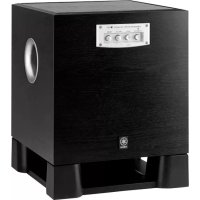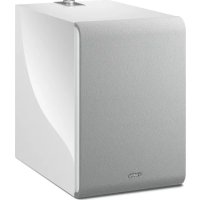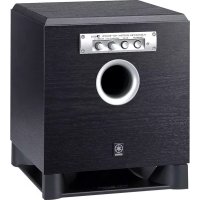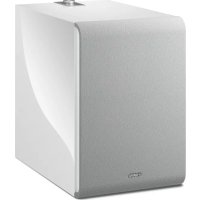
MusicCast SUB 100 - Subwoofer YAMAHA - Free user manual and instructions
Find the device manual for free MusicCast SUB 100 YAMAHA in PDF.



| Product type | Network subwoofer |
| Brand | YAMAHA |
| Model | MusicCast SUB 100 |
| Dimensions (W × H × D) | 252 mm × 383 mm × 418 mm |
| Weight | 12.6 kg |
| Power supply | AC 230 V, 50 Hz |
| Power consumption | 60 W |
| Standby power consumption | Eco standby: 0.1 W max; Wired network standby: 1.3 W max; Wireless network standby: 1.5 W max |
| Speaker | 20 cm cone woofer, without magnetic shielding |
| Output power | 130 W (100 Hz, 5 Ω, 10% THD) |
| Frequency response | 28 Hz – 300 Hz |
| Inputs | Wired network (RJ45, 100BASE-TX/10BASE-T); Analog (3.5 mm mono minijack) |
| Input sensitivity (analog) | 60 mV |
| Input impedance (analog) | 25 kΩ |
| Wireless connectivity | Wi-Fi 2.4 GHz and 5 GHz (IEEE 802.11 a/b/g/n/ac, 20 MHz channel) |
| Wireless security | WEP, WPA2-PSK (AES), mixed mode |
| Audio technologies | Advanced YST II, Twisted Flare Port, active high-cut filtering |
| Network functions | MusicCast, compatible with MusicCast CONTROLLER app |
| Pairing | Can be paired as a network subwoofer with a MusicCast surround/stereo device (Pairing Master) |
| Auto standby | After 20 minutes of inactivity (except in analog mode or with active MusicCast connection) |
| Maintenance and cleaning | Use a soft, dry cloth; do not use benzene or thinner; unplug before cleaning |
| Safety | Do not expose to water, do not block ventilation openings, observe safety distances (20 cm around), do not open the device |
| Repairability and spare parts | Contact a Yamaha dealer or qualified technician; do not disassemble yourself |
| General information | Manual available in French (PDF); serial number on the rear panel; normal operating temperature |
Frequently Asked Questions - MusicCast SUB 100 YAMAHA
User questions about MusicCast SUB 100 YAMAHA
0 question about this device. Answer the ones you know or ask your own.
Ask a new question about this device
Download the instructions for your Subwoofer in PDF format for free! Find your manual MusicCast SUB 100 - YAMAHA and take your electronic device back in hand. On this page are published all the documents necessary for the use of your device. MusicCast SUB 100 by YAMAHA.
USER MANUAL MusicCast SUB 100 YAMAHA
The precautions listed below are to prevent risk of harm to the user and others, as well as to prevent property damage, and to help the user use this unit properly and safely. Be sure to follow these instructions.
After reading this manual, be sure to keep it in a safe place where it can be referenced at any time.
- Be sure to request inspections or repairs from the dealer where you purchased the unit or from qualified Yamaha service personnel.
- Yamaha cannot be held responsible for injury to you or damage of the products caused by improper use or modifications to the unit.
- This product is for ordinary homes. Do not use for applications requiring high reliability, such as managing lives, health care or high-value assets.

WARNING
This content indicates "risk of serious injury or death." Power supply/power cord
-
Do not do anything that could damage the power cord.
-
Do not place it near a heater.
- Do not bend it excessively or alter it.
- Do not scratch it.
- Do not place it under a heavy object.
Using the power cord with the core of the cord exposed could cause electric shocks or a fire.
- Do not touch the power plug or cord if there is a chance of lightning. Failure to observe this may cause electric shocks.
- Use this unit with the power supply voltage printed on it. Failure to connect to an appropriate AC outlet may cause a fire electric shocks, or malfunctions.
- Check the electric plug periodically and remove any dirt or dust which may have accumulated on it. Failure to observe this may cause a fire or electric shocks.
- When setting up the unit, make sure that the AC outlet you are using is easily accessible. If some trouble or malfunction occurs, immediately turn off the power switch and disconnect the plug from the AC outlet. Even when the power switch is turned off, as long as the power cord is not unplugged from the wall AC outlet, the unit will not be disconnected from the power source.
- If you hear thunder or suspect approaching lightning, quickly turn off the power switch and pull the power plug from the AC outlet. Failure to observe this may cause a fire or malfunctions.
- If not using the unit for long periods of time, be sure to pull the power plug from the AC outlet. Failure to observe this may cause a fire or malfunctions.
Do not disassemble
- Do not disassemble or modify this unit. Failure to observe this may cause a fire, electric shocks, injury, or malfunctions. If you notice any irregularities, be sure to request an inspection or repair from the dealer where you purchased the unit or from qualified Yamaha service personnel.
Water warning
- Do not expose the unit to rain, use it near water or in damp or wet conditions, or place on it any containers (such as vases, bottles or glasses) containing liquids which might spill into any openings or places where water may drop. A liquid such as water getting into the unit may cause a fire, electric shocks, or malfunctions. If any liquid such as water seeps into the device, turn off the power immediately and unplug the power cord from the AC outlet. Then, request an inspection from the dealer where you purchased the unit or from qualified Yamaha service personnel.
- Never insert or remove an electric plug with wet hands. Do not handle this unit with wet hands. Failure to observe this may cause electric shocks or malfunctions.
Fire warning
- Do not place any burning items or open flames near the unit, since they may cause a fire.
Installation
- Install in the manner instructed in the manual. Falling or toppling may result in injury or damage.
- Confirm that the finished installation is safe and secure. Also, carry out safety inspections periodically. Failure to observe this may cause devices to fall and result in injury.
Maintenance and care
- Do not use aerosols or spray-type chemicals that contain combustible gas for cleaning or lubrication. The combustible gas will remain inside the unit, which may cause explosion or fire.
Wireless unit
- Do not use this unit near medical devices or inside medical facilities. Radio waves from this unit may affect electromedical devices.
- Do not use this unit within 15cm (6 in) of persons with a heart pacemaker implant or a defibrillator implant. Radio waves from this unit may affect electro-medical devices, such as a heart pacemaker implant or defibrillator implant.
If you notice any abnormality
- If any of the following abnormalities occur, immediately turn off the power and disconnect the power plug.
The power cord/plug is damaged.
- An unusual smell or smoke is emitted from the unit.
Foreign material gets into the interior of the unit.
- There is a loss of sound during use.
- There is a crack or damage in the unit.
Continued use could cause electric shocks, a fire, or malfunctions. Immediately request an inspection or repair from the dealer where you purchased the unit or from qualified Yamaha service personnel.
- Be careful not to drop or apply strong impact to this unit. If you suspect the unit may have been damaged due to dropping or impact, immediately turn off the power and pull the power plug from the AC outlet. Failure to observe this may cause electric shocks, a fire, or malfunctions. Immediately request an inspection from the dealer where you purchased the unit or from qualified Yamaha service personnel.
This content indicates "risk of injury."
Power supply/power cord
- Do not use an AC outlet where the power plug fits loosely when inserted. Failure to observe this may cause a fire, electric shocks, or burns.
- When removing the electric plug from the unit or an AC outlet, always hold the plug itself and not the cord. Pulling by the cord can damage it and cause electric shocks or a fire.
- Insert the power plug firmly all the way into the AC outlet. Using the unit when it is not plugged in sufficiently can cause dust to accumulate on the plug, causing a fire or burns.
Installation
- Do not place the unit in an unstable position where it might accidentally drop or fall over and cause injuries.
-
Do not block this unit's ventilation holes (cooling slits). This unit has ventilation holes on the rear to prevent the internal temperature from becoming too high. Failure to observe this may trap heat inside the unit, causing a fire or malfunctions.
-
When installing this unit:
-
Do not cover it with any cloth.
- Make sure the top surface faces up; do not install on its sides or upside down.
- Do not use the device in a confined, poorly-ventilated location.
Failure to observe the above may trap heat inside the unit, causing a fire or malfunctions. Ensure that there is adequate space around the unit: at least 20cm (7-7/8 in) on top, 20cm (7-7/8 in) on the sides, and 20cm (7-7/8 in) on the rear.
- Do not install the unit in places where it may come into contact with corrosive gases or salt air or places that have excessive smoke or steam. Doing so may result in malfunction.
- Avoid being near the unit during a disaster, such as an earthquake. Since the unit may turn over or fall and cause injury, quickly move away from the unit and go to a safe place.
- Before moving this unit, be sure to turn off the power switch and disconnect all connection cables. Failure to observe this may damage the cables or cause you or someone else to trip and fall.
- When transporting or moving the unit always use two or more people. Attempting to lift the unit by yourself may damage your back, result in other injury, or cause damage to the unit itself.
Hearing loss
- Do not use the unit/speakers or headphones for a long period of time at a high or uncomfortable volume level, since this can cause permanent hearing loss. If you experience any hearing loss or ringing in the ears, consult a physician.
- Before connecting the unit to other devices, turn off the power for all devices. Failing to do so may result in hearing loss, electric shock, or device damage.
Maintenance
- Remove the power plug from the AC outlet before cleaning the unit. Failure to observe this may cause electric shocks.
Handling
- Do not insert your hand or fingers into panel slits of this unit. Failure to observe this may cause injury.
- Do not insert foreign materials such as metal or paper into panel slits of this unit. Failure to observe this may cause a fire, electric shocks, or malfunctions. If foreign material gets into the unit, immediately shut off the power and pull the power plug from the AC outlet and request an inspection from the dealer where you purchased the unit or from qualified Yamaha service personnel.
-
Do not do the following:
-
stand on or sit on the equipment.
put heavy items on top of the equipment. - place the equipment in a stack.
-
apply unreasonable force to buttons, switches, input/output terminals, etc.
-
Avoid pulling the connected cables to prevent injuries or damage to the unit by causing it to fall.
- Do not operate the unit if the sound is distorting. Prolonged use in this condition could cause overheating and result in fire.
Notice
Indicates points that you must observe in order to prevent product failure, damage or malfunction and data loss.
Power supply/power cord
- If not using the unit for a long period of time, be sure to pull the power plug from the outlet. Even if the [()] (Standby/On) switch has been turned off (the power light is off), a minute current is still flowing.
Installation
- Do not use this unit in the vicinity of other electronic equipment, such as a TV, radio, or mobile phone. Failure to observe this may cause this unit or the TV or radio to produce noise.
- Do not use this unit in a location that is exposed to direct sunlight that becomes extremely hot, such as near a heater, or extremely cold, or that is subject to excessive dust or vibration. Failure to observe this may cause the unit's panel to become deformed, the internal components to malfunction, or for operation to become unstable.
- Install this unit as far away from other electronic equipment as possible.
Digital signals from this unit may interfere with other electronic equipment.
- If using a wireless function, avoid installing this unit near metal walls or desks, microwave ovens, or other wireless network devices. Obstructions could shorten the transmission distance.
Connections
- If connecting external units, be sure to thoroughly read the manual for each unit and connect them in accordance with the instructions.
Failure to properly handle a unit in accordance with the instructions could cause malfunctions.
Handling
- Do not place vinyl, plastic, or rubber products on this unit. Failure to observe this may cause discoloration or deformation in the panel of this unit.
- If the ambient temperature changes drastically (such as during unit transportation or under rapid heating or cooling) and there is a chance condensation may have formed in the unit, leave the unit for several hours without turning on the power until it is completely dry before use. Using the unit while there is condensation can cause malfunctions.
Maintenance
- If the temperature or humidity changes drastically, water droplets (condensation) may form on the unit surface. If water droplets form, immediately wipe them off with a soft cloth. If water droplets are left on the unit, they may be absorbed into the wooden parts, causing deformation.
- When cleaning the unit, use a dry, soft cloth. Using chemicals such as benzine or thinner, cleaning agents, or chemical scrubbing cloths can cause discoloration or deformation.
This unit's speakers use magnets. Do not place items that are sensitive to magnetism, such as CRT-type TVs, clocks, credit cards, floppy disks, etc., on or beside this unit.
Speakers
- Do not touch the speaker units. Failure to observe this may damage the speaker units.
Information
About functions and data included in the unit
Air may be blown out from the bass reflex port. This is not a malfunction. This occurs particularly often when outputting music with heavy bass.
Wireless devices transmitting over a 5 GHz frequency band can only be used indoors. Use of such devices outdoors is prohibited by law.
VOLTAGE SELECTOR (Asia and General models only)
The voltage selector switch on the rear panel of this unit must be set to your local main voltage BEFORE plugging this unit into the AC main supply. Voltages are 110-120/220-240 V AC, 50/60 Hz.
The model number, serial number, power requirements, etc., may be found on or near the name plate, which is at the rear of the unit. You should note this serial number in the space provided below and retain this manual as a permanent record of your purchase to aid identification in the event of theft.
Model No.
Serial No.
(rear_en_01)
Information for users on collection and disposal of old equipment:
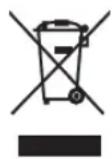
This symbol on the products, packaging, and/or accompanying documents means that used electrical and electronic products should not be mixed with general household waste.
For proper treatment, recovery and recycling of old products, please take them to applicable collection points, in accordance with your national legislation.
By disposing of these products correctly, you will help to save valuable resources and prevent any potential negative effects on human health and the environment which could otherwise arise from inappropriate waste handling.
For more information about collection and recycling of old products, please contact your local municipality, your waste disposal service or the point of sale where you purchased the items.
For business users in the European Union:
If you wish to discard electrical and electronic equipment, please contact your dealer or supplier for further information.
Information on Disposal in other Countries outside the European Union:
This symbol is only valid in the European Union. If you wish to discard these items, please contact your local authorities or dealer and ask for the correct method of disposal.
About content in this manual
- The illustrations and screens in this manual are for instructional purposes only.
- The company names and product names in this manual are the trademarks or registered trademarks of their respective companies.
- Software may be revised and updated without prior notice.
Wireless communication functions [U.K. and Europe models]
Wi-Fi (2.4 GHz)
Radio Frequency: 2402 MHz to 2482 MHz
Maximum Output Power (EIRP): 19.98 dBm
Wi-Fi (5 GHz)
Radio Frequency, Maximum Output Power (EIRP):
5170 to 5250 MHz, 22.30 dBm
5250 to 5330 MHz, 22.27 dBm
5490 to 5710 MHz, 24.56 dBm
5735 to 5835 MHz, 13.96 dBm
- Wireless devices transmitting over a 5 GHz frequency band can only be used indoors. Use of such devices outdoors is prohibited by law.
CONTENTS
FEATURES 5
What you can do using this unit 5
Advanced Yamaha Active Servo Technology II 7
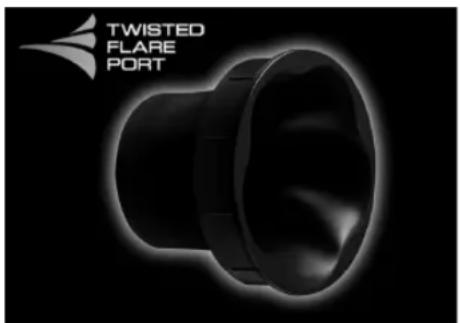
Twisted Flare Port 7
PARTS AND THEIR FUNCTIONS 8
Rear panel. 8
Top panel 9
GETTING READY. 10
Placement 10
CONNECTIONS 11
Connecting to a network 12
Making analog connections. 15
Adjusting the volume balance 15
OPTION SETTINGS. 16
Updating the firmware 16
Initializing all settings (factory reset) 17
APPENDIX 17
STATUS indicator operation table 17
TROUBLESHOOTING 18
TRADEMARKS 20
SPECIFICATIONS 21
INTRODUCTION
This unit is a network subwoofer that can be wirelessly connected to MusicCast Surround/Stereo compatible devices.
About this manual
When reading this manual, please note the following.
- Specifications and appearance are subject to change without notice in order to improve the product.
- Symbols used in this document

WARNING" indicates information that you must observe to avoid risk of death or serious injury.

CAUTION" indicates information that you must observe to avoid risk of injury.
- "NOTICE" indicates information that you must observe to prevent the product from malfunctioning or being damaged, or data from being lost.
- "NOTES supplements supplementary information that you will find useful.
FEATURES
What you can do using this unit
If you install the dedicated "MusicCast CONTROLLER" app on your smartphone or tablet, you'll be able to add this unit to a MusicCast network, allowing easy playback of low-frequency sound of MusicCast Surround/Stereo compatible devices.
- Wireless connection allows flexible installation
You'll be free to place the unit where you like, without the annoyance of making cable connections with external equipment.
- Enjoy optimal ultra-low-frequency sound at all times
The low-frequency range (crossover frequency) and volume balance are automatically adjusted as appropriate for the MusicCast Surround/Stereo compatible device that you're using, ensuring that the sound transitions naturally.
- Linked operation for power and volume
The power and volume are linked between this unit and the MusicCast Surround/Stereo compatible units that are paired with it.
Twisted Flare Port smoothly reproduces ultra-low-frequency sound
A flared port that twists as it spreads disperses the air turbulence that occurs near the opening of the port, ensuring smooth airflow. This suppresses noise that is not included in the original input signal, allowing clear low-frequency sound to be reproduced.
FEATURES
Advanced use with the convenient app (MusicCast CONTROLLER)

"MusicCast CONTROLLER" is a free dedicated app for operating MusicCast compatible devices. You can use a smartphone or other mobile device as a remote control, and easily select songs or make settings on a MusicCast compatible device.
For details, search for "MusicCast CONTROLLER" on the App Store or Google PlayTM.
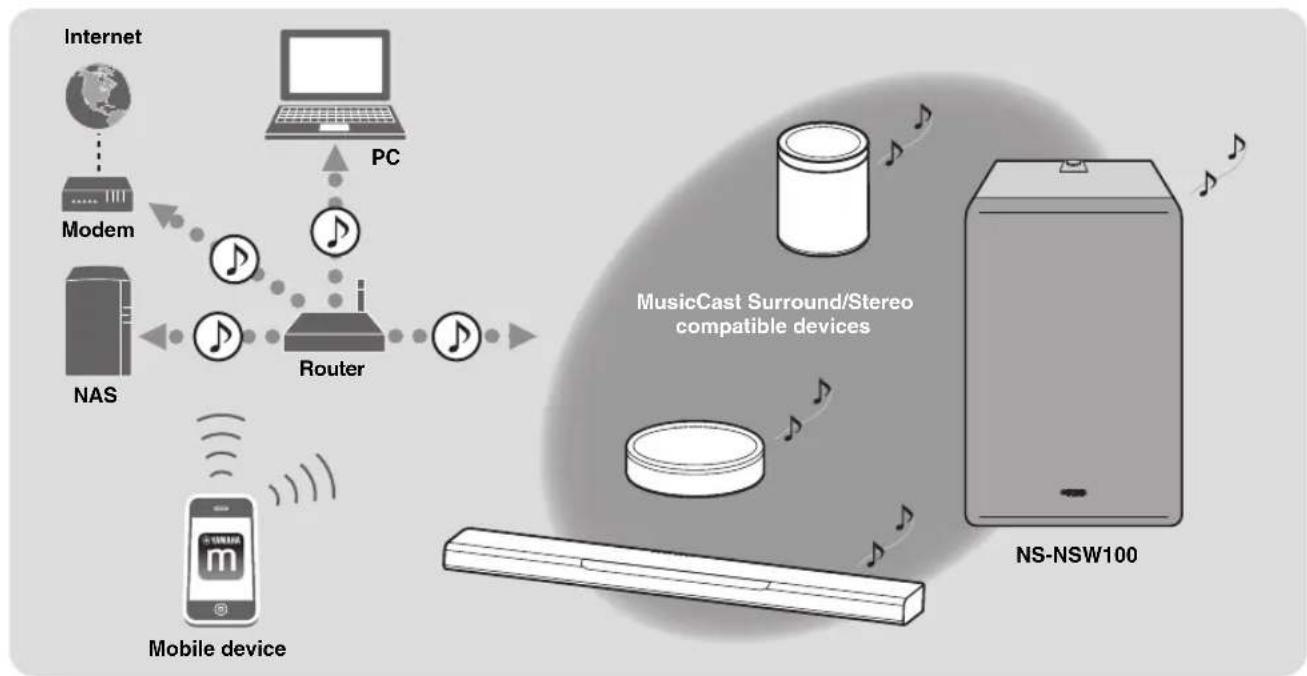
By using MusicCast, you can share music with other MusicCast compatible devices that are located in multiple rooms. Music from a mobile device, media server (PC or NAS), internet radio, or streaming service can be enjoyed anywhere in your home with simple operation.
For details on MusicCast and compatible devices, refer to the following website.
http://www.yamaha.com/musiccast/
In order to connect this unit to a network and use it, you'll need the "MusicCast CONTROLLER" mobile device app.
Install MusicCast CONTROLLER on your mobile device.
( p. 13 "Downloading the "MusicCast CONTROLLER" mobile device app")
Advanced Yamaha Active Servo Technology II
In 1988, Yamaha brought to the marketplace speaker systems utilizing YST (Yamaha Active Servo Technology) to give powerful, high quality bass reproduction. This technique uses a direct connection between the amplifier and speaker, allowing accurate signal transmission and precise speaker control.
As this technology uses speaker units controlled by the negative impedance drive of the amplifier and resonance generated between the speaker cabinet volume and port, it creates more resonant energy (the "air woofer" concept) than the standard bass reflex method. This allows for bass reproduction from much smaller cabinets than was previously possible.
Yamaha's newly developed Advanced YST II adds many refinements to Yamaha Active Servo Technology, allowing better control of the forces driving the amplifier and speaker. From the amplifier's point of view, the speaker impedance changes depending on the sound frequency. Yamaha developed a new circuit design combining negative-impedance and constant-current drives, which provides a more stable performance and clear bass reproduction, without any murkiness.
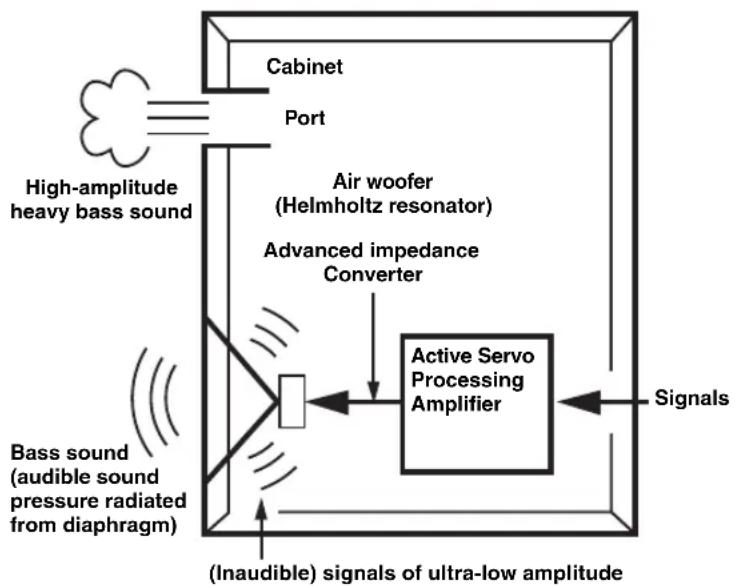
Twisted Flare Port
Today's bass reflex speakers use a Helmholtz resonator to improve their bass reproduction.
However when reproducing bass that is in the frequency region of this Helmholtz resonator, air moves violently in and out through the port between the interior and exterior of the speaker, sometimes producing noise due to the turbulent air flow at the end of the port.
The port and the cabinet resonate at a frequency that is determined by their dimensions and shape. On the other hand, turbulence in the air flow at the end of the port contains a broad range of frequency components that are not present in the input signal. This noise occurs because the broad range of frequency components includes components that match the resonant frequencies of the port and cabinet, causing strong resonance.
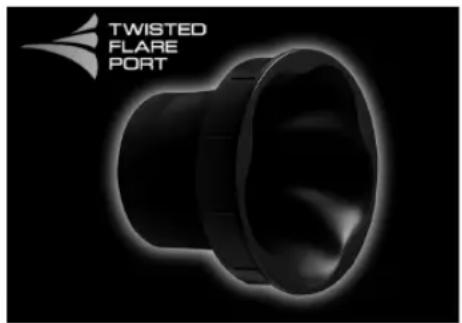
The Twisted Flare Port developed by Yamaha changes the way in which the port widens toward its end, and also adds a "twist" to suppress airflow turbulence at each end of the port and thus prevent noise from occurring.
This substantially reduces the "muddy sound" and "wind noise" that until now have been characteristic of bass reflex speakers, allowing bass to be reproduced clearly.
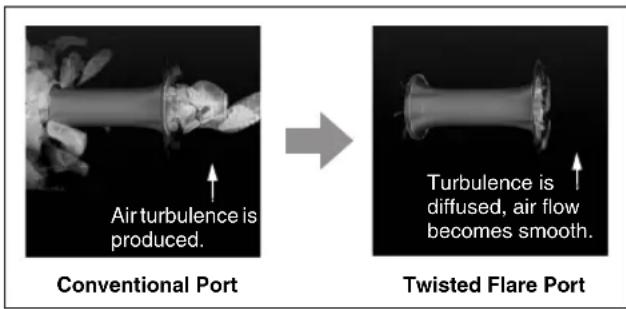
Air turbulence on both ends of the port creates noise
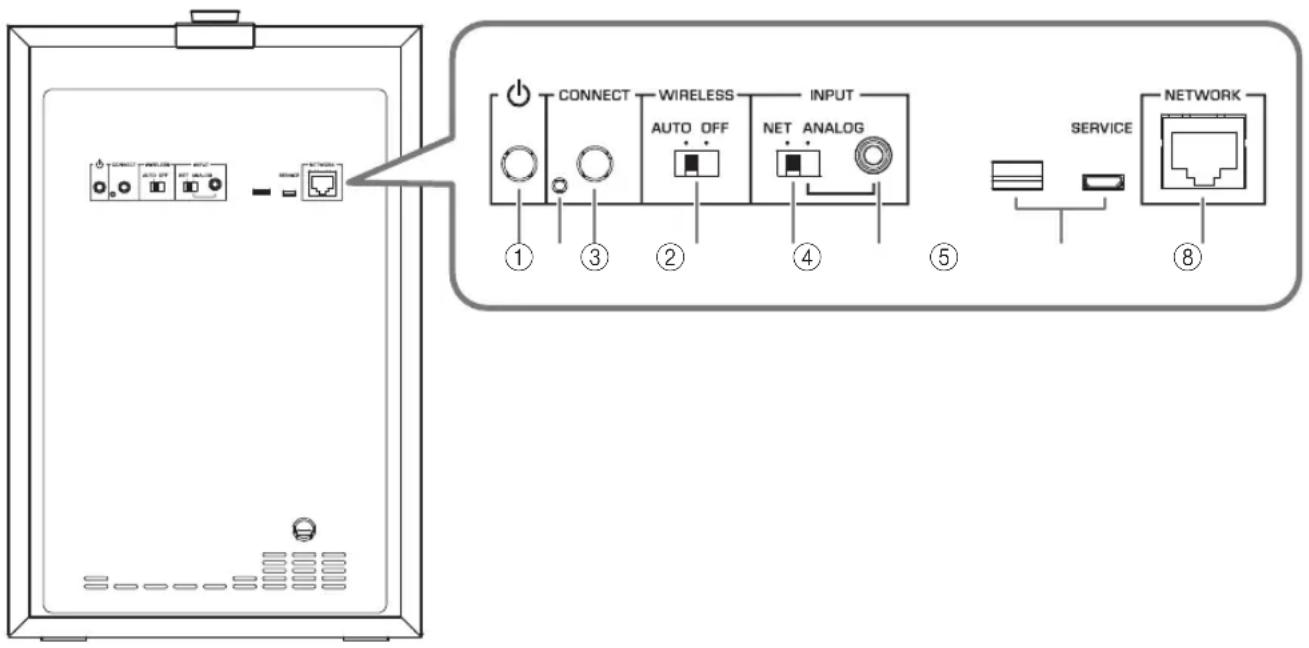
Rear panel
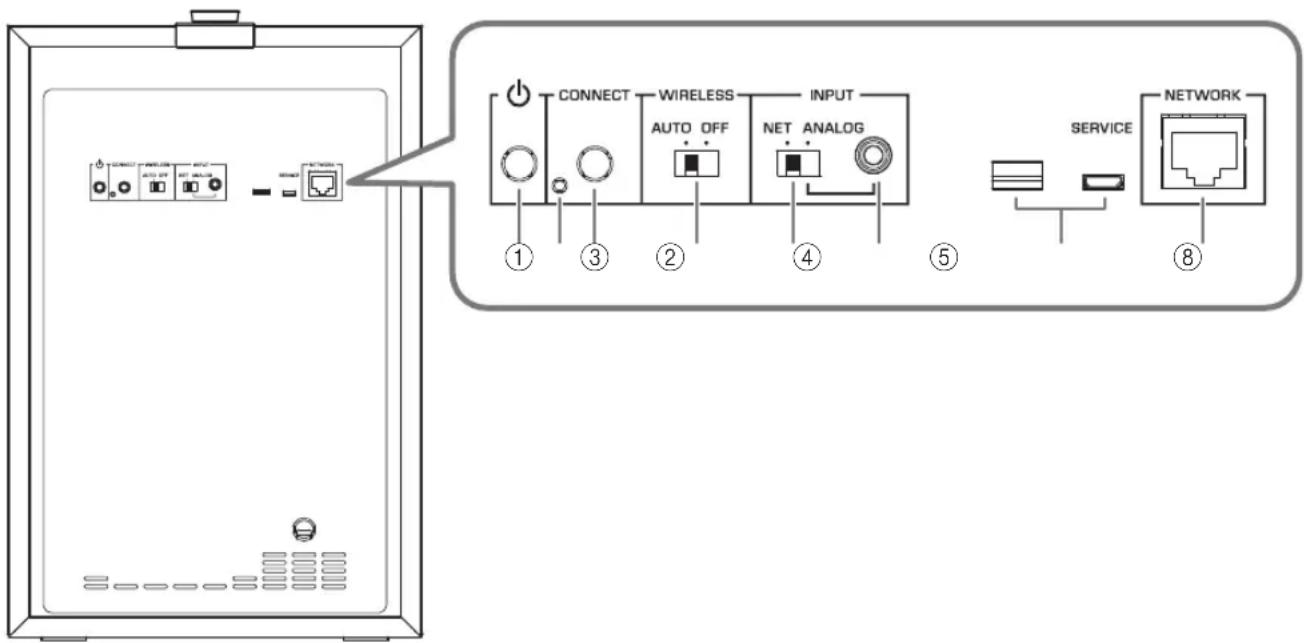
(STANDBY/ON)
This switches the unit's power between on and standby.
②Service port
This is for service, and is not normally used.
③ CONNECT
This is used for the following operations.
- Registering this unit on the MusicCast network p. 13
Updatingsfimware p.16 - Initializing the settings (factory reset) p. 17
④WIRELESS switch
This turns the wireless communication functionality (wireless LAN) on/off.
AUTO:
Wireless communication is on.
OFF:
Wireless communication is off. If connecting the unit to a network, use a wired connection. ( p. 12 "If connecting via a cable")
⑤INPUT switch
This switches the unit's type of connection.
NET:
Choose this if you're connecting the unit to a network.
ANALOG:
Choose this if you're connecting the unit directly to an amp or similar device, without connecting to a network.
⑥INPUT (ANALOG) jack
Use this if the INPUT switch is set to ANALOG.
Connect a cable from the amp's subwoofer jack or line output jack (such as PRE OUT) to this jack.
( p.12 "If connecting via a cable")
⑦Service ports
These are for service, and are not normally used.
⑧NETWORK port
Use a network cable (commercially available) to connect to your network via a cabled connection.
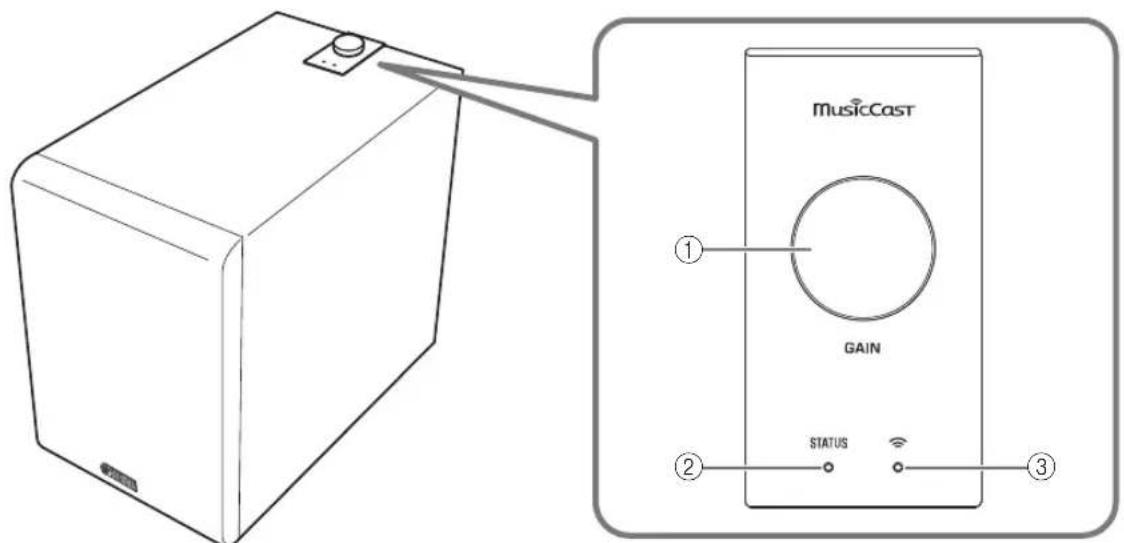
Top panel
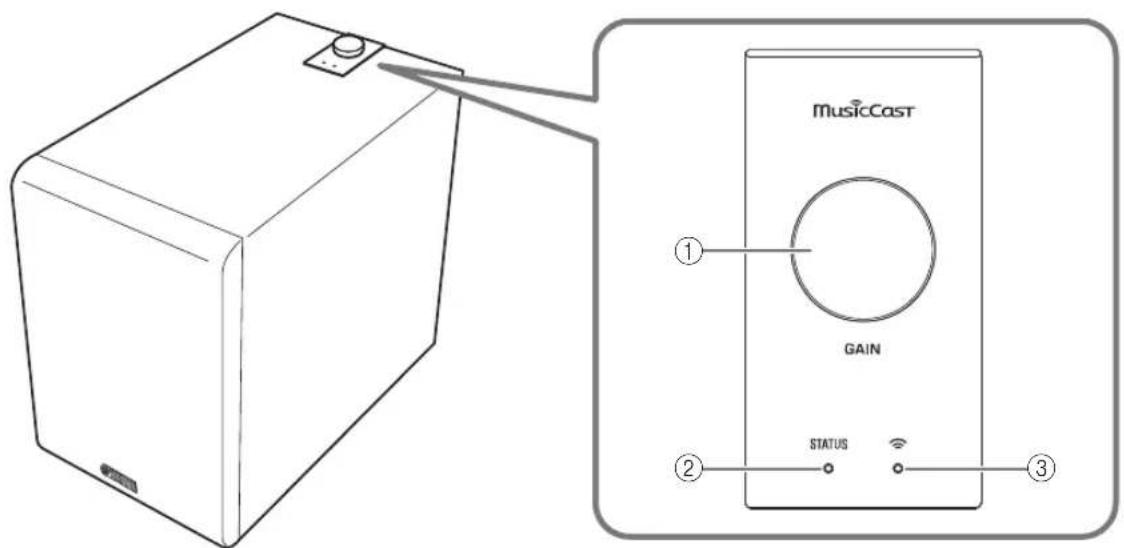
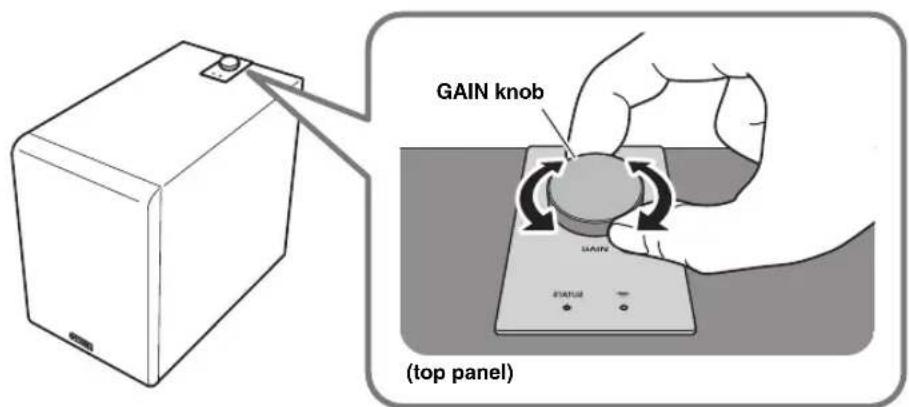
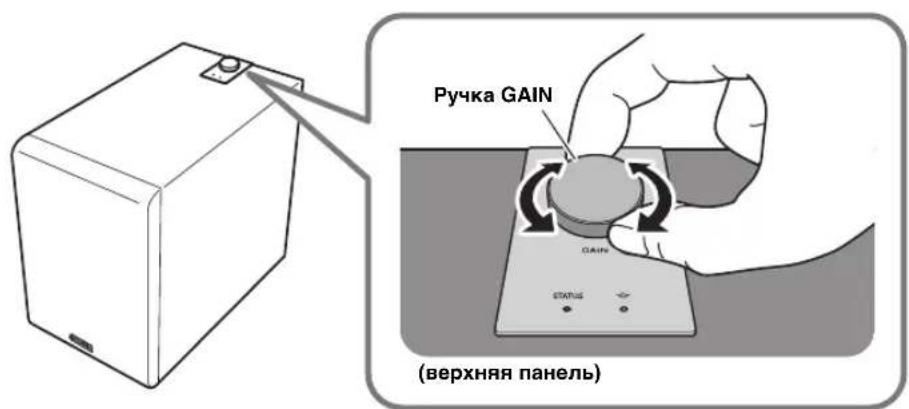
① GAIN knob
This knob adjusts the volume of this unit. Adjust the volume appropriately for your playback device. ( p. 15 "Adjusting the volume balance")
NOTE
While you're changing the volume, the color of the ② STATUS indicator shows the volume setting.
| Volume Color of the STATUS indicator |
| Minimum value Flashing blue |
| Low - Medium Blue - Purple |
| Medium - High Purple - Red |
| Maximum value Flashing red |
②STATUS indicator
The color and lit/flashing status of this indicator shows the input source that is selected or the status of this unit. ( ,17 "STATUS indicator operation table")
③ Wireless LAN indicator
The lit or flashing state of this indicator shows the operating status of the wireless network connection.
Auto power standby
If this unit is not operated and no playback occurs for 20 minutes, it automatically enters standby mode.
NOTE
- Thirty seconds before auto power standby occurs, the STATUS indicator bcgins flashing, and goes dark when standby occurs.
- Auto power standby does not operate if you're using a MusicCast connection, or if the rear panel INPUT switch is set to ANALOG.
Network standby
This unit's network function is enabled even when the power is in standby mode.
NOTE
When in network standby, the STATUS indicator is lit orange.
Eco standby mode
When eight hours have elapsed after the network was disconnected, the unit enters eco standby mode to save power.
NOTE
When in eco standby mode, the STATUS indicator is unlit.

With an advanced energy saving design, this product achieves a low power consumption of not more than two watts when in Network Standby mode.
GETTING READY
Placement
Since the low-end frequencies of audio signals feature long wavelengths, they are almost non-directional to human ears. The super-bass range does not create a stereo image. Therefore, a single subwoofer may be enough to produce a high-quality super-bass sound.
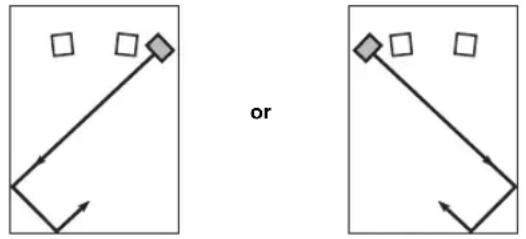
A
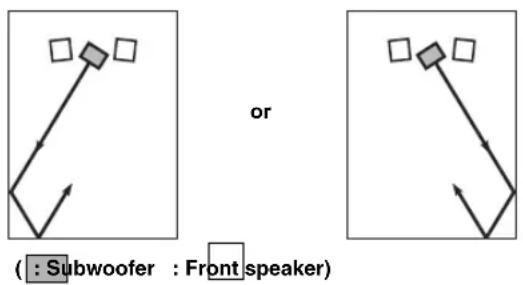
B
Note
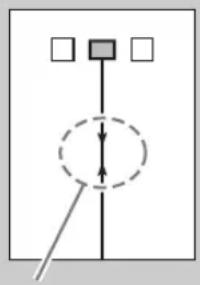
The placement shown in the figure on the right is also possible. However, if the subwoofer system is placed directly facing a wall, the bass effect may suffer due to phase cancellation caused by the interference between the direct and reflected sounds.
To prevent this from happening, place the subwoofer system at an angle. (Figures a)
NOTICE
There may be a case that you cannot obtain enough super-bass sound from the subwoofer due to standing waves.
NOTICE
- Placing the subwoofer too close to a CRT-type TV may impair the picture color or cause a buzzing noise. In this case, place the subwoofer and TV at a separated position where these effects do not occur. This is not an issue with LCD and plasma TVs.
- If the speaker volume is very loud, furniture or window glass may resonate and the subwoofer itself may vibrate. In this case, lower the volume level. To limit resonance, use a thick curtain or similar cloth that tends to absorb sound vibrations effectively. Also, changing the subwoofer position may be helpful.
- This unit's speaker uses magnets. Devices that are affected by magnetism (CRT televisions, clocks, bank cards, etc.) must not be placed on or near this unit.
CONNECTIONS
English
If using with a network connection
Wireless connection ( p. 12
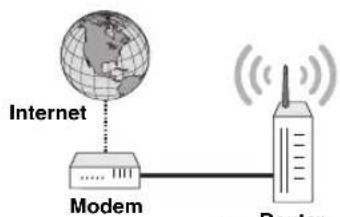
Mobile device
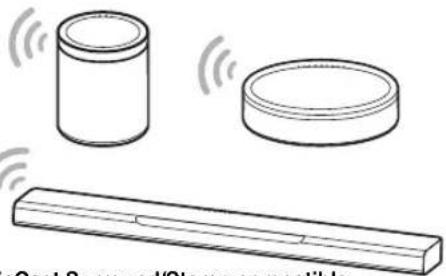
MusicCast Surround/Stereo compatible sound bar, wireless streaming speaker, etc.
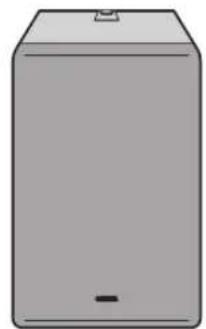
NS-NSW100
Wired connection ( p. 12)
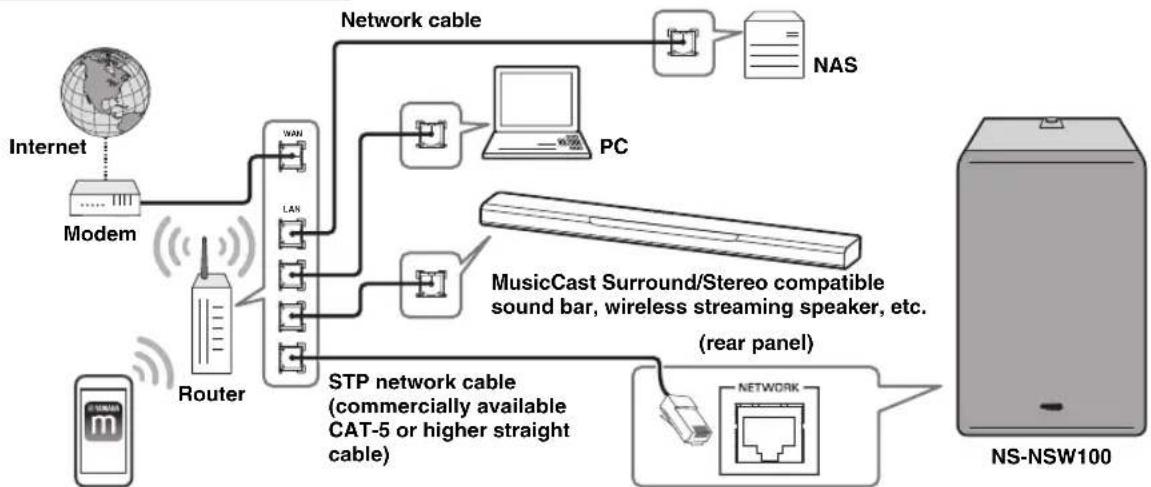
Mobile device
If using without connecting to a network (analog connection)
Analog connection ( p. 15)
(Connection example)
Sound bar etc. with
ANALOG output jacks
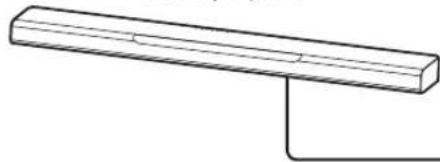
NS-NSW100
CONNECTIONS
Connecting to a network
Preparations for network connection
This unit can be connected to a network either via a cable or wirelessly. Choose the connection method that's appropriate for your situation.
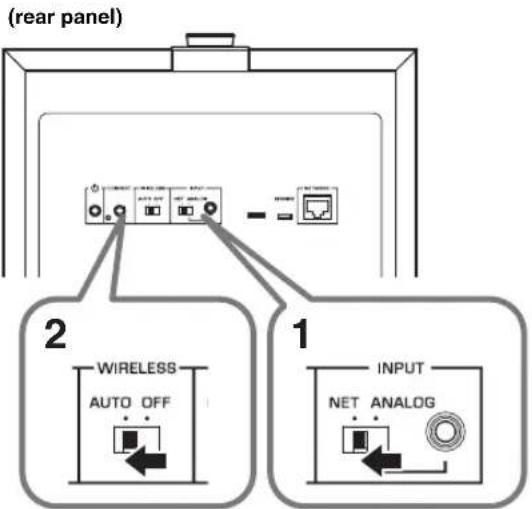
If connecting wirelessly
Make settings so that this unit can communicate wirelessly.
- Set the rear panel INPUT switch to NET.
- Set the rear panel WIRELESS switch to AUTO.
NOTICE
Do not connect a network cable to the NETWORK port. If a network cable is connected, the wired connection takes priority and wireless connection is not possible.
If connecting via a cable
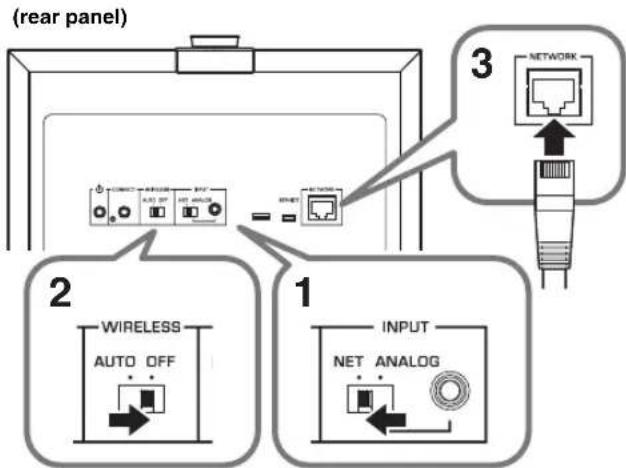
Use a commercially available STP network cable (CAT-5 or higher straight cable) to connect this unit to your router.
- Set the rear panel INPUT switch to NET.
- Set the rear panel WIRELESS switch to OFF.
- Connect a network cable to the NETWORK port.
NOTICE
If you want to connect this unit via a wired connection and play back music, all of the MusicCast Surround/ Stereo compatible devices that you want to link (such as a sound bar or a wireless streaming speaker) must be connected via a wired LAN.
Powering-on this unit
- Insert the power cord plug into an AC outlet.
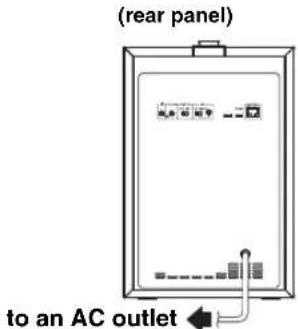
- Press the rear panel (STANDBY/ON) button to turn on the power of this unit.
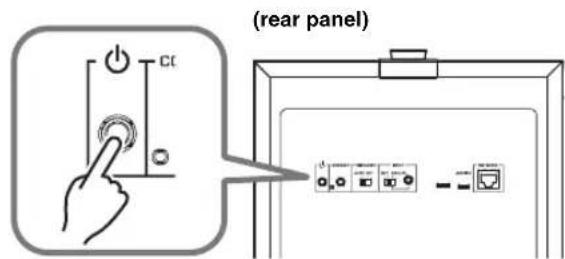
NOTE
- If the network is starting up, the STATUS indicator on the top panel flashes green.
- If you're using a wired connection, the LED on the inside of the NETWORK port flashes when connected to the router.
NOTICE
- When turning on the power in your audio system, always turn on this unit last.
Downloading the "MusicCast CONTROLLER" mobile device app
Install the MusicCast CONTROLLER app on your mobile device, connect this unit to the network, and register this unit as a MusicCast device.
Search for "MusicCast CONTROLLER" on the Apple Store or Google Play, and install it.
NOTE
- Make sure that the mobile device you're using is connected to your home's router before you proceed.
- The screens and menu names etc. of MusicCast CONTROLLER might change without notice.
- If a different MusicCast device is already registered to the MusicCast CONTROLLER app, you can add this unit to the app by tapping (Settings) in the "Room select" and selecting "Add new device."
Registering this unit on the MusicCast network
Here's how to use "MusicCast CONTROLLER" to register this unit on the MusicCast network, and simultaneously make network connection settings for this unit.
NOTE
To connect wirelessly to the network, you'll need to have the SSID and security key of the wireless LAN router (access point) that you're using.
- On your mobile device, start "MusicCast CONTROLLER" and tap "Settings."
- From the app's "Settings," tap "Add new device."
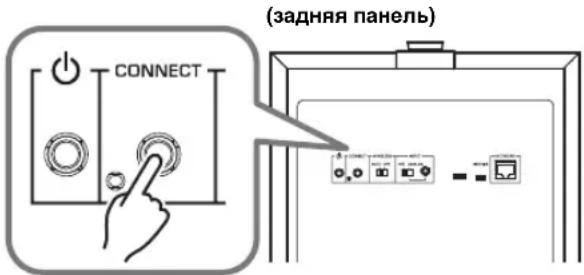
- As directed by the instructions that appear in the screen of your mobile device, operate "MusicCast CONTROLLER" and on the rear panel of this unit, hold down CONNECT for 5 seconds or longer.
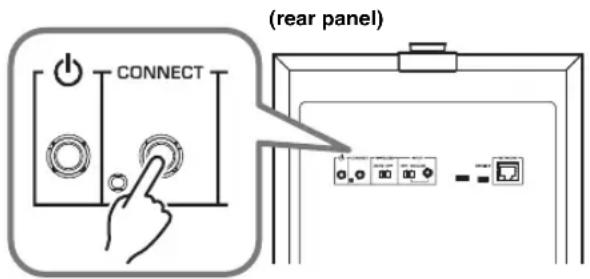
- As directed by the instructions that appear in the screen of your mobile device, operate "MusicCast CONTROLLER" to specify the network.
Next, pair this unit with the Pairing Master device of the MusicCast network. ( p. 14 "Linking this unit with the Pairing Master device")
NOTE
If you use a wireless connection to register this unit on the MusicCast network, the Wireless LAN indicator of this unit's top panel will light, indicated that registration on the MusicCast network is complete.
To cancel this unit's MusicCast network registration
Operate "MusicCast CONTROLLER" to cancel this unit's registration.
NOTE
If you initialize this unit before canceling the registration, the screen of the "MusicCast CONTROLLER" may show an error indicated that this device does not exist.
Linking this unit with the Pairing Master device
By registering this unit as a Pairing Device of the MusicCastnetwork's Pairing Master (such as a sound bar or wireless streaming speaker), you can use it as a network subwoofer to enjoy richer sound.
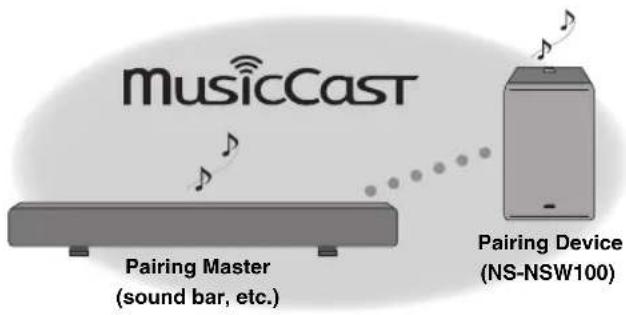
- Register this unit and the MusicCast Surround/Stereo (Pairing Master) compatible unit in the same location of the MusicCast CONTROLLER app. ( p.13 "Registering this unit on the MusicCast network")
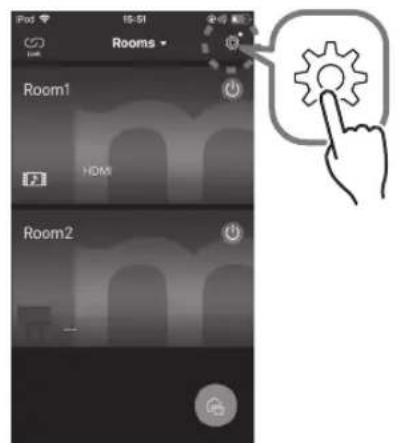
- On your mobile device, start "MusicCast CONTROLLER" and tap (settings).
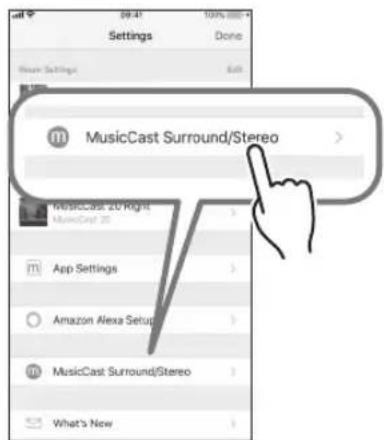
- Tap "MusicCast Surround/Stereo."
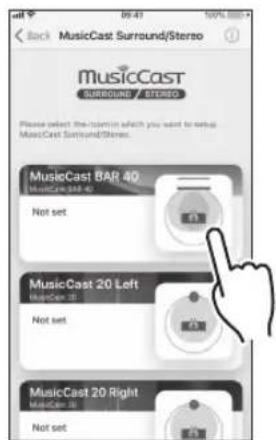
-
Select the room (Pairing Master) with which you want to link this unit.
-
Following the guidance in the app screen, register this unit as a subwoofer (Pairing Device).
When you have finished registering this unit as a Pairing Device, operate the appropriate room (Pairing Master) in the app screen to play back audio.
■Linked operation with the Pairing Master
When you register this unit as a network subwoofer, this unit will follow operations of the room (Pairing Master).
Power operation
This unit's power setting (Standby/ON) will follow operations of the room (Pairing Master).
Volume and other settings
In accordance with the settings of the room (Pairing Master), this unit's settings will also change in order to obtain optimal low-frequency sound.
Settings that are linked:
Volume
High-cut filter (crossover frequency)
NOTE
-
If audio is interrupted, check the app to see whether "Link control" located in the room (Pairing Master) settings is selected as shown below.
-
For a wireless connection: other than "Speed Boost"
-
For a wired connection: "Speed Boost"
To cancel the link with the Pairing Master
On your mobile device, operate "MusicCast CONTROLLER" to cancel the registration.
Making analog connections
Use the ANALOG jack on the rear panel of this unit if you want to connect this unit directly to other devices (such as a sound bar) without connecting to a network.
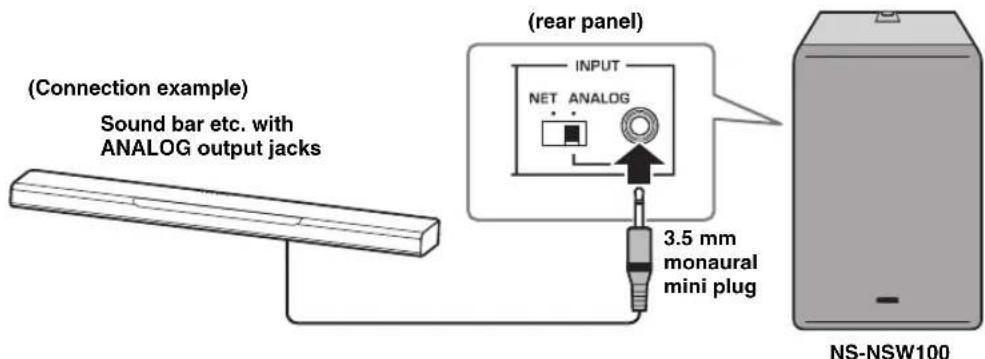
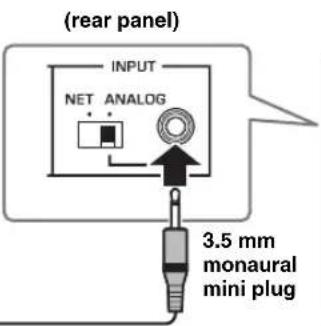
- Connect this unit's rear panel ANALOG jack to the subwoofer output jack or line output jack (e.g., PRE OUT) of the connected device.
- Set this unit's rear panel INPUT switch to ANALOG.
- Insert the power cord plug into an AC outlet.
- Press the rear panel (STANDBY/ON) button to turn on the power of this unit.
NOTICE
- Do not connect the power cord to the AC outlet until all connections are completed.
- Depending on the device (sound bar, etc.) that you're connecting, the connection method and the names of the jacks might differ from this instructions in this document, so you should also refer to the owner's manual of the respective device.
- When this unit is shipped from the factory, its volume is set to the minimum setting. When you have finished making connections, make adjustments so that this unit produces an appropriate volume.
Adjusting the volume balance
In order to ensure effective low-frequency playback, you can adjust the volume so that the sound of this unit blends naturally with the speaker that you're using.
If using a network connection
If this unit is connected to a network, the volume of this unit is automatically adjusted to match the Pairing Master, but you can make fine adjustments to your taste by using the top panel GAIN knob.
Default value: Depends on the setting of the Pairing Master
If using an analog connection
Use the top panel GAIN knob to adjust the volume of this unit.
High-cut filter frequency: fixed at 160Hz
Default value: MUTE
OPTION SETTINGS
Updating the firmware
If this unit is connected to a network, the firmware can be updated via the network. When new firmware is available, the STATUS indicator flashes white when the power of this unit turns on. Use the following procedure to update the firmware.
NOTICE
Observe the following points during the update.
- Do not operate this unit
- Do not disconnect the power cord or the network cable
Firmware update procedure
1. On the rear panel, press (STANDBY/ON) to put the unit in standby mode.
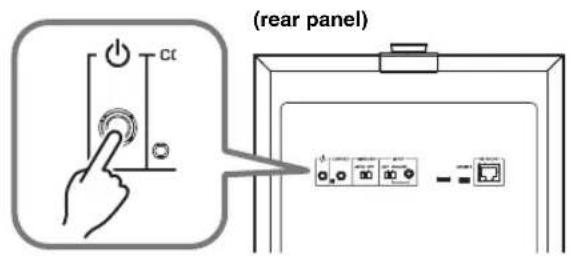
2. On the rear panel, hold down CONNECT for 10 seconds or longer.
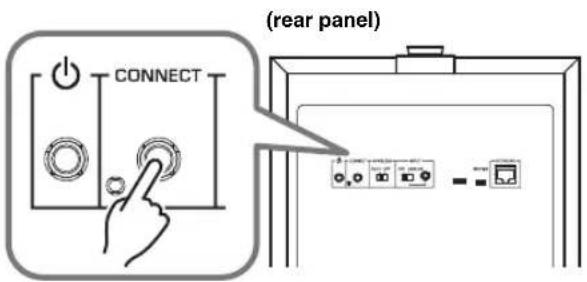
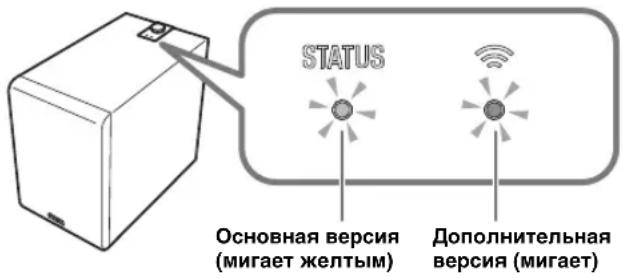
The STATUS indicator and the wireless LAN indicator on the top panel flash, and the firmware update begins.
When the indicator changes to steadily lit (orange), the firmware update is complete.
NOTE
- Firmware update takes about 10 or 20 minutes.
If the internet connection is not fast enough, or depending on the connection status of the wireless network, the firmware update might take longer or might fail. - If the firmware update fails, the STATUS indicator flashes red. Wait a while, and then try the operation again.
■Checking the firmware version
Here's how you can check the version of the firmware that's installed in this unit.
1. On the rear panel, press (STANDBY/ON) to put the unit in standby mode.
2. On the rear panel, press CONNECT.
The STATUS indicator and the Wireless LAN indicator on the top panel flash a number of times to indicate the firmware version. For example if the firmware version is 1.3, the STATUS indicator flashes once and the Wireless LAN indicator flashes three times.
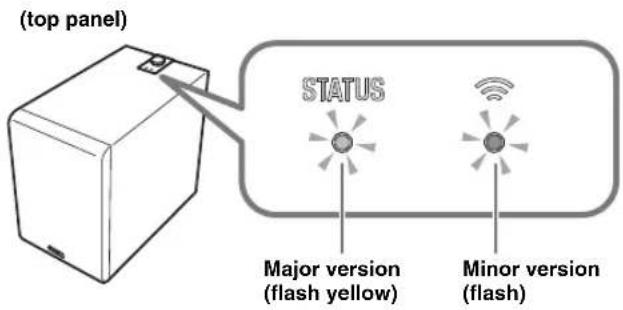
NOTE
If the firmware version is 2.0, the STATUS indicator flashes twice and the Wireless LAN indicator remains unlit.
3. Press CONNECT once again to return to standby mode.
Initializing all settings (factory reset)
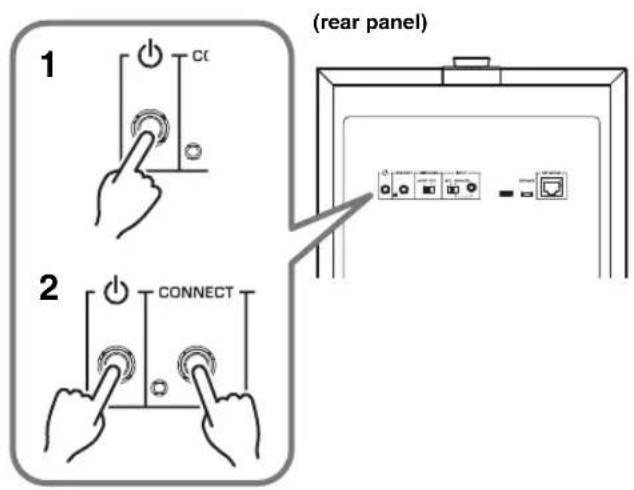
- On the rear panel, press (STANDBY/ON) to put the unit in standby mode.
- While holding down CONNECT, press (STANDBY/ON) once.
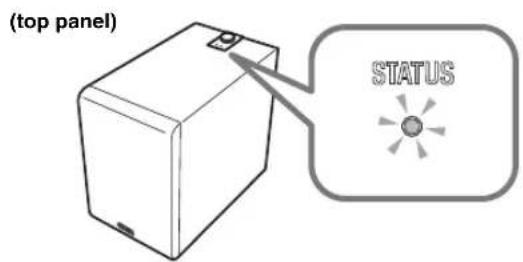
- When the STATUS indicator flashes, release CONNECT.
APPENDIX
STATUS indicator operation table
The color and lit/flashing state of the indicators shows the status of this unit.
NOTE
- The STATUS indicator and the Wireless LAN indicator can be used to check the firmware version of this unit. ( p. 16 "Checking the firmware version")
- While the firmware is being updated, the STATUS indicator and the Wireless LAN indicator can be used to check the progress. ( p. 16 "Firmware update procedure")
When the power is on
| Indicator Status | ||
| Green Lit The | rear panel INPUT | switch is set to NET. |
| White Lit The | rear panel INPUT | switch is set to ANALOG. |
| Green Flashing | Waiting to connect to the network. | |
| White Flashing | New firmware | is available. |
| Green/Orange | Flashing alternately | The auto power standby function will soon put the unit in standby mode. (Starts flashing 30 seconds beforehand.) |
| White/Orange | ||
| Orange Lit The | unit is in network | standby mode. |
| Blue/Purple/Red | Lit | The unit's volume is being changed. Blue: low volume - Purple: medium - Red: high volume |
| Blue/Red Flashing | The volume was set to minimum or maximum. | |
When in standby mode
| Indicator Status | ||
| Orange Lit The unit is in network | standby mode. | |
| - | Unlit | The unit's power is off or in eco standby mode. |
| Orange | Flashing | The protection circuit has operated. Turn off the power of the unit, disconnect the power plug from the AC outlet, and contact a Yamaha service center. |
TROUBLESHOOTING
Refer to the chart below if this unit does not function properly. If the problem you are experiencing is not listed below or if the instructions given below do not help, turn off the power to the unit, disconnect the power plug from the AC outlet, and contact an authorized Yamaha dealer or service center.
General
| Problem Cause What to Do | ||
| Power does not turn on. When the power is turned on, it turns off immediately. The unit does not operate correctly. | The power cord is not connected correctly. | Insert the power plug firmly into the AC outlet. |
| The unit cannot be operated. Electric shock (such as a lightning strike or excessive static electricity) or power supply voltage drop has caused the internal microcomputer to freeze. | Hold down the unit's rear panel (STANDBY/ON) button for ten seconds or longer to restart the unit.(If this does not solve the problem, disconnect the power cord from the AC outlet, wait approximately 30 seconds, and then plug it in once again.) | |
| The power suddenly turns off during use. | The protection circuit has operated to turn off the power because the internal temperature of the unit has risen. | Wait for the temperature to cool (approximately one hour), make sure that there is sufficient space around the unit and that the unit is not covered by a cloth etc., and then turn on the power again. |
| The unit does not operate correctly. | External electric shock (such as a lightning strike or excessive static electricity) or power supply voltage drop has caused the internal microcomputer to freeze. | Disconnect the power cord from the AC outlet, wait approximately 30 seconds, and then plug it in once again. |
| No sound. Low-frequency sound is not output or is not loud enough. | A source with little low-frequency sound is being played back. | Play back a source that contains low-frequency sound. |
| The sound is being affected by a standing wave. | Try changing the position or the angle of this unit. | |
| Low-frequency input signal is absent because of settings on the amp. | Change the amp's settings. | |
| If using a network connection | ||
| The volume of the MusicCast CONTROLLER app or of the Pairing Master is set to the minimum (0). Alternatively, headphones are connected to the Pairing Master. | Raise the volume by operating the MusicCast CONTROLLER app or the Pairing Master. You can also use this unit's GAIN knob to manually make fine adjustments to the volume. | |
| The network connection is not correct. Check the connection. | ||
| The playback device is not selected correctly. Operate the MusicCast CONTROLLER app or the Pairing Master to re-select the input source that you want to play back. | ||
| If using an analog connection | ||
| The volume of this unit is set to the minimum (0). | Use this unit's GAIN knob to adjust the volume. | |
| The connection is not correct. Alternatively, the connection is faulty. | Check the connection. | |
| The power does not turn on automatically when the source begins playing. | Since INPUT is set to ANALOG, the unit is not operating in linkage with the Pairing Master. | Turn on the power manually. |
| Low-frequency input signal is absent because of settings on the amp. | Change the amp's settings. | |
| Because there was no network connection for an extended time, the unit entered eco standby mode. | Turn on the power manually. | |
| Noise is output from this unit or from an electronic device located nearby. | A digital device or a high-frequency device is located near this unit. | Move this unit and the corresponding device farther apart. |
Network
| Problem Cause What to Do | ||
| Network functionality cannot be used. | Network information (IP address) has not been obtained correctly. | Enable the DHCP server function of your router. |
| Can't connect to the wireless LAN router (access point). | MAC address filtering is enabled on the wireless LAN router (access point). | Connection is not possible if MAC address filtering is enabled. Change the settings of the wireless LAN router (access point) so that connection can occur. |
| Can't connect to the internet via the wireless LAN router (access point). | The wireless LAN router (access point) is powered-off. | Power-on the wireless LAN router (access point). |
| The wireless LAN router (access point) and this unit are too far apart. | Locate the wireless LAN router (access point) and this unit closer together. | |
| There is an obstacle between the wireless LAN router (access point) and this unit. | Locate the wireless LAN router (access point) and this unit where there is no obstacle between them. | |
| This unit is not detected by the MusicCast CONTROLLER app. | This unit and the mobile device are not connected to the same network. | Check the network connections and the router settings, and connect them to the same network. |
| The wireless network cannot be found. | A device that generates electromagnetic radiation (such as a microwave oven or radio equipment) is located nearby. | If using this unit with a wireless connection, do not use it near a device that generates electromagnetic radiation. |
| Access to the network is being restricted by the firewall settings of the wireless LAN router (access point). | Check the firewall settings of the wireless LAN router (access point). | |
| Can't make connection settings using the MusicCast CONTROLLER app. | The mobile device is not connected to the wireless LAN router (access point). | Connect the mobile device to the wireless LAN router, and then use the MusicCast CONTROLLER app to make settings. |
| You're using a router that has multi-SSID support. | The router's network separation function might be making it impossible to access this unit. When connecting a mobile device, use an SSID that allows access to this unit (try connecting to the primary SSID). | |
| Failed to update the firmware via the network. | The state of the network connection is not good. | Wait a while, and then try updating again. |
| Can't connect with the Pairing Master. | The Pairing Master is not a MusicCast Surround/Stereo compatible device. | Use a MusicCast Surround/Stereo compatible device, or a device that allows analog connections. |
| The connection is not correct. Alternatively, the connection is faulty. | After initializing this unit, check that the Pairing Master is a MusicCast Surround/Stereo compatible unit, and then connect again. | |
| Pairing with another device has already been registered. | Cancel the registered pairing with that device, and make the registration settings again. | |
TRADEMARKS
AndroidTM
Google PlayTM
Android and Google Play are trademarks of Google LLC.

CERTIFIED
The Wi-Fi CERTIFIED™ Logo is certification mark of Wi-Fi Alliance®.
Wi-Fi, Wi-Fi CERTIFIED and WPA2 are registered trademarks or trademarks of Wi-Fi Alliance®.

MusicCast is a trademark or registered trademark of Yamaha Corporation.

Yamaha Eco-Label is a mark that certifies products of high environmental performance.
Licenses
For information on the licenses of the third-party software in this product, refer to the following.
http://IP address of this product*/licenses.html
- IP address of this product is checked with MusicCast CONTROLLER.
Explanations regarding GPL
This product utilizes GPL/LGPL open-source software in some sections.
You have the right to obtain, duplicate, modify, and redistribute this open-source code only.
For information on GPL/ LGPL open source software, how to obtain it, and the GPL/LGPL license, refer to the Yamaha Corporation website
(http://download.yamaha.com/sourcccodcs/musiccast/).
SPECIFICATIONS
General
Type Advanced Yamaha Active Servo Technology II
Driver 20 cm (8") cone woofer, non magnetic shielding type
Amplifier Output (100 Hz, 5 Ω, 10% THD) 130 W
Frequency Response 28 Hz - 300 Hz
Power Supply/Voltage AC 230 V, 50 Hz
Power Consumption 60 W
Input Section
NETWORK (wired). Ethernet: RJ45 (100BASE-TX/10BASE-T)
ANALOG (wired). 3.5 mm Mini Jack (Mono)
Input Sensitivity. 60 mV
Input Impedance 25 kΩ
Standby Power Consumption
Eco Standby . Below 0.1 W
Network Standby (wired) Below 1.3 W
Network Standby (wireless) Below 1.5 W
Dimensions (W× H× D) 252 mm × 383 mm × 418 mm (9-7/8" × 15-1/8" × 16-1/2")
Weight. 12.6 kg (27.8 lbs.)
Wi-Fi
Wireless LAN Standards. IEEE 802.11 a/b/g/n/ac*
- 20 MHz channel bandwidth only
Radio Frequency Band 2.4 GHz, 5 GHz
Available Security Method. WEP, WPA2-PSK (AES), Mixed Mode
PRECAUTIONS
LISEZ ATTENTIVEMENT AVANT DE PROCEDER À TOUTE UTILISATION. VEILLEZ À SUIVRE CES INSTRUCTIONS.
Advanced Yamaha Active Servo Technology II 7
Twisted Flare Port 7
FONCTIONS ET ÉLÉMENTS DE L'APPAREIL 8
Panneau arriere. 8
http://www.yamaha.com/musiccast/
Advanced Yamaha Active Servo Technology II
(http://download.yamaha.com/sourcccodcs/musiccast/).
FICHE TECHNIQUE
Généralités
Type. Advanced Yamaha Active Servo Technology II
Advanced Yamaha Active Servo Technology II 7
Twisted Flare Port 7
TEILE UND DEREN FUNKTIONEN 8
Rückwand. 8
Oberseite. 9
VORBEREITUNGEN 10
Aufstellung 10
VERBINDUNGEN 11
http://www.yamaha.com/musiccast/
Advanced Yamaha Active Servo Technology II
(http://download.yamaha.com/sourceccodcs/musiccast/)
TECHNISCHE DATEN
Allgemeines
Typ Advanced Yamaha Active Servo Technology II
WLAN-Standards. IEEE 802.11 a/b/g/n/ac*
Advanced Yamaha Active Servo Technology II 7
Twisted Flare Port 7
DELAR OCH DERAS FUNKTIONER. 8
Bakre panel 8
Overpanel. 9
FÖRBERDEALSE 10
Placering 10
ANSLUTNINGAR 11
http://www.yamaha.com/musiccast/
Advanced Yamaha Active Servo Technology II
(http://download.yamaha.com/sourceccodcs/musiccast/)
SPECIFICATIONER
■Allmänt
Typ Advanced Yamaha Active Servo Technology II
Drivenhet 20 cm konwoofer, icke magnetisk avskarmnningstyp
Förstärkarutgang (100 Hz, 5 Ω, 10% THD) 130 W
Frekvensatergivning 28 Hz - 300 Hz
Advanced Yamaha Active Servo Technology II 7
Twisted Flare Port 7
http://www.yamaha.com/musiccast/
Advanced Yamaha Active Servo Technology II
(http://download.yamaha.com/sourceccodcs/musiccast/)
SPECIFICHE
Generale
Tip0 Advanced Yamaha Active Servo Technology II
Consumo energetico in standby
Standby eco. .. .meno di 0,1 W
Standby di rete (via cavo) ......... .. .. .. .. .. .. .. .. .. .. .. .. .. .. .. .. .. .. .. .. .. .. .. .. .. .. . .. .. .. .. .. .. .. .. .. .. . .
Standby di rete (wireless) .... .. . .. .. .. .. .. .. .. .. .. .. .. .. .. .. .. .. .. .. .. .. .. .. .. .. .. .. .. .. .. .. .. .. .. .. .. .. .. .. .. .. .. .. .. .. . .
Dimensioni (L× A× P) 252 mm x 383 mm x 418 mm
Peso 12,6 kg
■Wi-Fi
Standard per reti wireless. IEEE 802.11 a/b/g/n/ac*
Advanced Yamaha Active Servo Technology II 7
Twisted Flare Port 7
LAS PARTES Y SUS FUNCIONES 8
Paneltrasero 8
Panel superior 9
PREPARACION 10
Ubicacion. 10
CONEXIONES 11
http://www.yamaha.com/musiccast/
Advanced Yamaha Active Servo Technology II
(http://download.yamaha.com/sourcccodcs/musiccast/).
ESPECIFICACIONES
General
Tip0 Advanced Yamaha Active Servo Technology II
Advanced Yamaha Active Servo Technology II 7
Twisted Flare Port 7
ONDERDELEN EN HUN FUNCTIONS 8
Achterpaneel 8
Bovenpaneel 9
DE EERSTE STAPPEN 10
Opstelling 10
VERBINDINGEN 11
Verbindingmake meteen network. 12
http://www.yamaha.com/musiccast/
Advanced Yamaha Active Servo Technology II
Volume
High-cut filter (crossover-frequentie)
OPMERKING
http://(IP address of this product*)/licenses.html
(http://download.yamaha.com/sourcccodcs/musiccast/).
TECHNISCHE GEGEVENS
■Algemeen
Type. Advanced Yamaha Active Servo Technology II
Driver 20 cm conuswoofer, non-magnetisch afgeschermd type
Uitgangsvermögen versterker (100 Hz, 5 Ω, 10% THV) 130 W
Frequentierrespn. 28 Hz - 300 Hz
MEPbl IpeIOCTOPOXHOCTN IPEd NcNoJIb3OBAHnEM BHIMATAJIbHO IPOuHTaIte DAHHbIE YKA3AHnA. CJEyIe 3TUM INHCTPyKUm.
IpeueHcneHHbHe Hxke Mepbl IpeDocTopOXHOCTn
npedHa3NaYeHbI dIa IpeD0TbpaueHn PnCKa
npuHHeHn BpeDa NOpb3OBaTeNIO n DpyrM IIOJAM, a
TaKKe dIa IpeD0TbpaueHn NOBpeKDeHn
mMyuEcTBA u OKa3AHN NOMOUI NOplb3OBaTeNIO NO
HaJIeXaUeMy u 6e3oNacHOMy NcNoIb3OBaHnIO
daHOrO aannapata.CJeDuYte 3TNM IHCTpyKUnAM.
IocJI npOHTHINxpaHTHe 3TO pyKOBOCTBO B HAnEKNOM MecTe, T06bIKHEMYMOKHO6bLIOOBpaHTbCERBIIIO6oeBpem.
-III npOBeHeHn OCMOTpa HnH peMOHTa 063aTeJbHo 06paAaTecb K dJIepe, y KOTOPo 6bl pHoopeTeH annapaT, IINBO B ccpBHCbI cHTp YamaHa.
Yamaha He Hecet OTBETCTBEHHOCTH 3a IIyueHHbIe BAMH TpaMBI HII NOBpeKJcEHHI H3JeIHIN B pe3yIbTaC HcHaIeKaIICrO HcNIOJIb3OBaHH HII MOnHΦHKaIIH anIapata.
JaHHe yctpoCTBO IpEHa3HaHeHO IINOMaHIero HCIOIB3OBAHH. He HCIOJIb3yITE ero B o6Iactx, Tpc6yIOIIHX BICOKOH HAnCKHocTH, HAnPHMcB Ccpcc KHN3CO6ccncychn, 3papBOoxpanCHn HIN pIn pa6OTc UeHHbIMn AKTHBaMH.

PPEyPPEKDEHNE
dHaHnHOpMaun npdeynpeKdaet o pncke r6en nn noJyehn cepbe3hbx TpaBM.
IcToUHnK nHTaHnY n Ka6eJb nHTaHnA
- He donyckaiTe noBpeKdeHn Ka6eI IITaHn.
-He paonolaraIteKa6eJIb pRJOMcO6OrpeBaTeJAMH.
-HeckpyuHbaiTe Hne cIh6aIteero.
-He npapaaTe Ka6eJIb IITaHH.
-He cTaBbTe Ha Ka6eIb IIITaHHI TKeJIbIe IpeIMtbl.
HcIOJIb3OBAHHe Ka6eJI IINTAHII C OROJIeHHbIM IPOBOJOM MOKeT IIpHBecTH K IIOpaJKeHHIO JJEKTPYeCKHM TOKOM HIN IOKaIpy.
He npkacaTecb K IITcncIIO HnH Ka6cIIIO nHTaHH pIHHaHHpNcKa yIapa MOHH. Heco6JIIOHeHne 3TOrO yKa3AHMOKeET IIpNHBeCTN K IOpAkeHHIO 3JIeKtprHueckHM TOKOM.
HaipraKcHHeNCTOHTHnKa HHTAHnHOIOJHKHO COOTBCTCTBOBaTb yka3aHHOMy Ha HEm 3NauchHIO. PIOKIOueHHe K HcnpaBHbHO pO3cTe NepcMeHHOrTO KA MoKeT CtA b PpHnHO NOKapa, IopaaeHHa 3IEKTPuHecHM TOKOM HIn HeHCnPaBHOCTH.
- IepnoHnueckn npOBepnnte HteNceJb H ouHnaTe cero ot CKoHHBHeCRA NJIIN Hrp3N. Heco6JIOJeHne OToro yka3aHH MoKeT IIpuBeCTn KIOKApy HIn IopAkeHHO 3JIeKTPueCKHM TOKOM.
- IpeI NaactpoHko annapaTa y6cHTcB, HTO hCIOJIb3yEmaP03eTKa IIepemEHORo TOKa IeTko DOCTyHa. IIPh BO3HHKHOBeHHNAKaKOrO-JINBO C6oR HIIH HeHCnPaBBocTH HeMeJIEHNO OTKIOHTeIITAHNE C IIMOIOBJ BbIKIOHateJI HOTCOEHHTE IITENCEJB OTPO3eTKH IIpeMeHHOToKA. DaKe ecJIH BBKIOHATEJI INHTAHINAXOHITCB B bIKIOeHHOM IOLOKEHHN, JO TEX IOp IOKAIITENCEJB HE OTcoeHHHET OPO3eTK, aIInapAT OCTaetcNIOJKIOHHeHHBM K HCTOUYHKY IITAHII.
B Cnyuae rpoMa HIN pN6HKeHHr IPO3bI He3aMeIHTeJIbHO OTKIOHTe BIKIOUATEJb HNTAHn H OTCOEHNITEIENCEJB OT PO3eTKI NepemEHOR TOKA. HecoBIOHeHNE 3TOrO yKa3AHN MOKeET PnHBecTH KIOKApY HIN HEHCnPpABHOCTM.
Ecn annapar He 6yier HcnoIb3OBaTbC B TeeHne IINHTeJIbHO BpeMeHH,OTcoeIHHe TITIECeJIb OTPO3ETKN IepemEHORTOKA.HecO6JIIOHeHc 3TOro yKa3AHn MOKeT INPbBcCTN KIOKApY HIN HcHcPiBaHocTm.
He pa36npaTb
He pa36hpaiTe anapat H He 3MeHnIe ero KOHCTpyKIIHO. Icc06TIOChHC 3TOrO yka3AHn MOKc T pNBCCTH K NOxApy, NopakCHIO 3JcKTPueCKHM TOKOM, TpaBMAM HIN HcHcPiabNtCM. PPH IOBTEHH HcnoTAIOK 6paanTecb DIA OCMOTpA Hn peMOHTa B MecTo IIpHoOpTeHHn aIIIapata HnBcePbCHbI ueHtp Yamaha.
Bepuy ot BObl
He IOnyckaIte NonaJaanHn Annapata NoI Joxkb, He NIOJB3yIReCb Hm PAnOM C BOIOB, B yCIOBHX cyIpOCTN HIN NOBbIeHNHO BIIaXHoCTH. He cTAbTe Ha annapat KaKHe-JIn6o EMKOCTH C KINIOKOCbIO (HaIPHMep, Ba3b, 6ytbIKH HIN CTAKAHb), KOTOPa MOKe TPOJIITbcH II NOIaCTb B OTBepCTH, a TAKKe He NIOJB3yIeTCb AIInapaTOM Tam, Tne IIa Hero MoKeT OIIaCTb BOa. IIOJaAIIHe KINIOKcTH, HApHMep BOIbI, BHyTp b Annapata MoKeT cTaB nPnHHO IOKaapa, NopaeHn 3JEKTpueCKHM TOKOM HIN HeHCnPaBHocTH. B cIyae IIOJaAHHn B Annapat KINIOKcTH, HApHMep BOIbI, HMeJeHHO OTKJIQUHTe NTtAHHe N OTCOEIHHTe KaBeJI NTaHAnr O pO3eTKI HpeMeEHHO ToKA. 3AtE MOpATIEcMbIg OcMOrpa annapata B MeTO IIPhOBpeHn HIN B cepBCHbI ueHTp Yamaha.
HnB KOem Cnyac Hc BCTABJIHTC Hc BbIHMaIe TITTCNCLMOKpbmm pykamn. He 6epntecb 3a aIIIapat BIAJXHIMpykamn. HecO6JIIOHeHNE 3TOIyka3AHMOKET IIpHBecTH K NopakCHHO JIKKTpHcckHM TOKOM HIN HcHcPiBaHOCTm.
Bepb ot orHa
He pa3MeaaiTe rOpAunne InpEIMeTbHIN HCTOHHKN OTKpbIToTO ORHa PdOM c aHIIapAton, IOCKOJIbKy 3TO MOKeT npHBcCTN K BO3rOpAHIO.
YCTAHOBKa
BbIOJIINTE yCTaIOBky coTACIO HNCTpyKIIHM B JaIIOOM pyKOBOCTBE. IaJeHHe HIN ONpOKnDbIAHHe MOKe TpHBecTH K TpaBME HIN IOBpeKdEHHIO.
- Y6eHTecb TOM, yTO yCTaHOBKa BbIIOJIHeHa 6e3OIIacHO HnAedKHO. TaKe IepHOJNUeCKn IPOBOUNTE IPOBepKy 6e3OIIacHOCTH. Heco6JIIOJEHHe 3TOrO yKa3aHnM oKeT npHBecTH K nAedeHHIO yCTpOcTB H NOlyueHHIO TpaBMbl.
06cnykBaHne uyxOa
He HIOJIb3yIte DIO OHCTKN HIN CMA3KN a3pO30JH HIN paIIbIcMbE XMHueCKHE BIEeCTBa, COepeKaaHne RopOHne ra3bI. TOpOuHn Ra3 MoKeT OCTaTBcBHyTpH aIIapata, YTO MOKeT IIpHBecTH K B3pbByH IN IOkApy.
Modylb6ecnpoBOHOBcBA3N
He HcnoJIb3yIte anIapar OKoIO mcHINHHCKHX np6OpOB n B McHINHHCKHX ypcKJcHnX. PaHNOBOJIbI OT DAHORO anIapara MOrYr BO3JeIcTBOBaRb Ha 3eKTPueckHe MeHNHHCKHe ycTPOHCTBa.
Ic HcnoJIb3yIte aIcapar 6HJKe, qem B 15 cm OT IIOeC c HMIJIaHTHPOBAHHBM KAPINHOCTMHYJITOPOM HII INeΦH6PHJITOTOM. PaIOBOIHbI, rEHePHyEble DAHHBM anIapATOM, MOrYT IOBJIHrTB Ha pa6Ory 3IEKTPHeCKHX MeIHINHHCKHX yCTPOIcTB, HAnPHMeP BxHBJeHHBX KApINHOCTMHYJITOPOB HIN DeΦH6pHJIITOPOB.
HeuTaThbIe cnTyauun
- IIpH BO3HKnKHOBeHHN JIO60I H3 yKa3aHbIX HIIKe Ipo6JIeM HeMe,IeHHO OTKIOHHTe IITaHHe IOTcoEduHHTe Ka6eJIb IITaHHN O TJekTPOCeTH.
-ⅡOBpeKdEHHKa6eJIHHTaHHHINITeNcEJI.
-Ⅰ3 aπiapaTa HxOHT Heo6bIuHbI 3aIax HIN IbIM.
-Bnhytpb annapara nnonai noctoponnnn npenmet.
-BoBpempa6o8tI npoiJaAeT3ByK.
-Ha annapare HMeiOTc TpeHHb HIN NOBpeKdeHHA.
IpoIOJIKeHHe HcIOJIb3OBAHHa MoKcT BbI3BaTb NopaKeHHc 3JIeKTPHueckHM TOKOM, IIOKap HIN NpHBecTH K HeHCIIpaBHOCTH. He3ameUHTteBHO O6paHTTEcB,IMOCMOTpa aIHapara B MecTo eTO IIpHo6peTeHHa HIN B cepBNCbHn CEHTP Yamaha.
He poHnIte H He IOBepraite aIInapat cHbHOMy
fH3HecKOMy BO3EeCTBHO. EcHn cyueCTBYet BepoTHOCTb
TOrO, YTO anIapat 6blIOOBpcKJH B pc3yIbTaTe NaChHH NHN
H3HtNCCKORO BO3CNECTBNI, HcMCdIHNO OTKHOHTe INHTaHHN
OTcoeHHNTc IIIeTcEBOT pO3eTK IIpeCMeHHOTOKa.
Heco6JIIOeHHc TO TOT OYka3aHHMOKeT pINBccTH K
HopaKeHHIO 3JIeKTpHcckHM TKOM, IOKApY HIN
HeHCNPABHOCTaM. He3AmeIITIEbHO O6paTHTEcb IIN OCmOtpa
anIapata B MecTo pNHO6pTeHHN HIN B cepBcHbI IeHTp
Yamaha.

BHUMAHNE
DaanHnHOpMaun npedynpeKdaet O pncke nOnyeHn TpaBmbl.
IcToUHnK nHTaHnY n Ka6JIb nHTaHnY
He HcnoJb3yIte po3eTKI IepemEHORo TOKa, B KOTopbIX IIITeNCEJIb IepKHTcH HeHaJeKHO. Heco6JIIOJEHHc 3TOrO yKa3aHH MoKeT IIpHBecTH K IIOKApY, IOpaKeHHIO 3JIeKTpHueckHM TOKOM HIN OKoRAM.
BbHHMaI IITcNcJIb H3 yCtpoCTBa HIN po3cTKIncpeMcHOro TOKa, cpcKHTcB 3a cam IITcNcJIb. HIKoIJa HC TAHNTc 3a IIHyp. To MOket IIPBEcTH KIOBpeKJdeHHIO Ka6JIa H CTaTb IIpHUNHOI IOPaKeHHN OJIeKlPrueckHM TOKOM HIN IOKapa.
BCTABTITC IITENCCJB BPO3TKY NCPCMCHHOTOKA IIIOHTHO IO yHopa. HcNOJB3OBAHHe yCTPOHCTBa, IITENCEJB KOTOPORO HEIOCTAOHYIIOTHBOCTABJIeHa BPO3TKY, MOKET BBIBaTB HAKONIICHHC YACTHI IIJIN HA IITCNCJCn H CTaTB PPNHHoN NOKAPA HJIN OKORA.
YctaHOBka
He octabJHte aIInapaT B HeycToHbOM NOIOKeHH. AIInapaT MOKcT cIyauH IOYnactb H nPnHnHTb TpaBMy.
He 3aKpbBaiTe BeHTHJIAUHOHHBe OTBepCTH (oxJaKaIOuHne npope3n) annapata. DaHbH nnnapat ocHaueH BeHTHJIAUHOHHm OTBepCTHMn C3aHn Dn IpeOToBPaHHe HcIHKOM ChIbHoro NOBbHIeHH TeMnepaTyb BHyTpH. HecobIoJeHnOTOrO yka3aHNMOKeT pNHBecTH K hapyHHeHIO OTBoJa TEHn OAI npApa, TTo MOKeT cTaTb PnHHOH IOKapa HnHEHCnPabBOcTei.
BoBpeMa yctaHOBKn anHapara: HeHaKpbBaHTe anHaparTKaHbIO;
-y6eHITecb,HTOBePxHRAHaHeJIHaIIpaBHeHaBBepx HTO anIapat He ycraHOBJE H IpepeBeyTOMIOJIOKeHHN HA 6OKy;
-He IIOJIb3yIITecb aIIIapaTOM B TcChbIX, IIIOXO IIPOBETPBAAEBIX IOMeHHEHX.
HecobIOeHNC pNHeIeHHbIX bblnc yka3aHm MOKcT pNBeCTn K hapuichno TOBda Tnla ot yctpoHCTBa. To MOKcET cTaB pNHHoio NOkapa Hn HcHcnpABHOCTe. Y6cHNTcB BHaHnHn IOCTaOHTHO CBO60Horo
IOpcTpaHCTBA BOKpy aIIapata: IIO kpaHHei Mepe 20 cm CBepx, 20 cm IO 6OKam n 20 cm c3aHn.
He yctanabnbaaTe ainnapat B mectax, Ie OI MOKET KOHTAKTHPOBATb C KOPPO3HOHHBMr Ra3AMH COJIeHBIM BO3dyXOM, JIN60 B MeCTax C Hpe3MePHBM KOIIHHECTBOM Dbima HIN npapa. To MOKET cTaTB pHNIHOHcHcPiabNocTH.
HepeKOMeHdyetc HAXOHTbcB H henoCpeCTBeHHo6IHHOCTn OT aIInapaTBO Bpemc tHXHHbIX 6eCTbH, HAnPmep 3MeIETpcEHNI. IocKOBky aIInapaT MoKeT IpeBepHytbcn HIN yIacTB H pHUNHITb TpaMy, 6bICTPO OToHNTEOT aIInapaTaNpeJNTBE 6e30NaIOE MecTO.
- IpepepepeeHem annapaTa OTKIOHTe BbIKIOHateJIb HHTAHN HOTCOEHHHTe BCE IOKIIIOHcHbIe Ka6JIH. HecobIOJIeHHe 3TOrO yka3aHnMoKet IIpHBecTH K IOBpeKJeiHIO Ka6JIeH NIN IIpHBecTH K NaJEHHIO Bac HIN KOrO-JIHO eH.
TpaHCHOpTHPOBAtb HINIepeMeHaTa b aIIHapar BceTaIOJIaIKHe MeHee DByx YeIOBek. IIOHbTKa IOIHHTb aIIHapat camOCToTeJbHO MOKe TpHBecTH K IOBpeKDeHHIO CIIHHbI, apyToI TpaBMe HINI Bb3BaTb IOBpeKDeHHe caMTO aIIHapara.
Ptoepa cnyxa
He HIOJIb3yIte aIIHapAT/KOIOHKn IIN HAYIHNIK B TeeHne IIHTcBHO TepHOa BpemCHN C BHCOKHM HIN HcKOMΦOpTHBM yPOBHCm rPOMKOCTH, NCKOJIbKY 3TO MOKCT npHBecTH K Heo6paTHMOI NOTCpe cJyxa. Pn yxyIeHH CJyxa HIN 3BOHe B yIax O6paTHTeCB K BpaY.
- IpeIIOKIOHcHHeAM annapata KpyTHM yctpoHCTBAM OTKIOHHTHE HITAIHIE. B IpOTHBIOOM cJyueae OTO MOKeT IIpNBecTHK IOTEpe cJyxa, NopaKeHHIO 0JIeKTpHueckHM TOKOM HII IOBpeKdEHHO yctpoHCTBa.
TexHnueckoe o6cnyKuBaHne
Bo Bpem qHCTKN OTcoeHNHnTte anIapar ot 3JKeKtpocetH. Heco6JIIOJIeHNHe 3TOrO yKa3aIIHH MoKeT IPhBecTH K IopApKeHHO 3JKeTKPHueCKHM TOKOM.
06paueHne c annapaTOM
He BCTaBTHIte pyky HIN HAIbHbIB IIpope3H HA HAIHEJIH aIIIapata. HecobJIOeHHe 3TOFO yKa3AHn MOKeT IIpHBecTH K TpaBMe.
He BCTABJHITNEIOCTOPOHINHEIpeIMetb,HaHPMHep,MeaJIHNbMyary,BIpope3NaHaHaHeiHaIIapata.HecobHOeHHeTOIOTOKa3AHNMOKETIPNBecTHKIOpaKeHHO3JIKTPHcCKHM TOKOM HIN HHCnPaBHOCTAM.PINIOHAaHHNIOCTOPOHHHX IpCmTOB BAanipat HCmDJIHCHO BbIKHOHTCINTaHHe NOTCOEHHITE IIIECEJB OTPO3TKIHepeMeHHORToKA HOBATHTECb 3a IPOBEEHem OCMOTPA K INIEpy,yKOTOPORo 6blI npHO6pTeH anIIapat,JIHO B cepBCHbIeHTPYamaHa.
-3aippeaaetc:
-BCTaBaTb HnCaHnTBcHnO6OpyIOBaHHc;
-CTaBHTb Ha 06opyIOBaHHe TKeJIbe IpeMeTbI;
-CTaBHTb 3K3eMIIIpaIbI o6OpyIOBaHnHa Ipyra;
-HPMCHHTbH36bItoOHyIO CHLY K KHONKAM,NEpeKIIIOaTeJAM, pa3beMaBBOa-BbBOa H T.Ⅱ
He TnIHTe 3a IIOKIIIOHcIIHbIe Ka6eJIH. 3To MOKET IIpHBecTH K TpaBMam HIN IOBpeKJeiHIO aHapara BCJIeCTBHe cTO HAJIHHA.
He HcnoJb3yIte annapat,ecTH 3ByK hckaeH.HTHTeJIbHOe HCIOJIb3OBAIIHE B TAKOM COCTOHH MOKeT Bb3BaTb IIpepePB H npHBecTH K IOkapy.
YbeodomJeHue
Yka3aHn, KOtOpbIe Heo6xOdHMo co6JHOdaTb BO n36eKaHHe HncnPabHocTn, NOBpeXDeHn nn HapyeHn pa60tbl n3deJnA, a TaKxe Notepn daHHbIX.
NCTOCHNK NITaHnI KAbel NITaHnI
Ecn annapat He 6yiet HcnoIb30BaTcB TteHHe IINHTeJIbHO BpeMeHH,OTcoeHNITe IITeNceJIb OTpO3eTKI IepemEHHO TOka. TaKe eCJIN BbIKIOHArTeJIb [()] (Standby/ On) BbIKIOHcH (HdHKaTOP INTHAHH HC rOpHT), Hc3HaHTcJIbHbI TK 6yET PPOIOKATb PpoteKaTb.
YctaHOBka
He HcnoIb3yIte daHHbI aIInapaT pAnOM cpyHIMN ⅡIEKTOIIbIM O6OpYIOBAIIHcM, HApPHMeP, TeJIeBn3OpOM, paIHIO HIN MO6NIbIbIM TeTefoHOM. HecO6JIHOeHIne OTOrO yKa3aIIH MaKeT CTaT IIpHHTIOI IMyMOB, co3IaBaEMbIX TeJEBn3OpOM HIN paIHIOPIHEMHKOM.
He HcnoJIb3yHre 3OT anIapat B MeCTe, KOtOpoe IIOBepKeIO BO3JeICTBIO IPRMOTO COJIIEHIOI OCBETA, KOTOpoe MOKET CINIKOM CNIIbHO HarpeTBcA (HApHMeP, PdOM C o6oRpeBaTeIeM) HIN OXIAHTBCJ IN6O KOtOpoe IOIBepKeHO CINIKOM CNIIbHOMY BO3JeCTBIO IIIN HIN Bn6paHH. 3TO MOKET IIpHBecTH K DEOpMAIH NAnHeH NAnIapATA, BbI3BaT HeHNIPABIOCTH BHytpeHHIX KOMIOHEHTOB HIN CTaTB IIpHNNOH HeCTabHIOH paOToIb.
YcTaHaBJIHBAIte anIapat KaM MoKHO daIbIe ot npyTOrO 3IEKtpOHHO O6OpyIOBaHH. UHpOBbc CHrHaJIbIOT aIIIpaT aMOrY co3JaBaTB NOMEXH IJRA npyTOrO 3IKTpOHHO O6OpyIOBaHH.
IIpn HcHIOB3OBaHH 6ecipPOBOHOH cTH H36eAaTe yCTaHOBKn dAHHO rAHIAPaT pAOM C metaJIINHeCKHM CTcHAM HIN CTOTAMH, MHKPOBOHOBbIMN NcYAMH HIN npyHM 6ccPiPOBOHbIMN CCtCBIMN ycPoHCTBaMn. IpcIITCTBm MOrT cOKpaHTb pacctOAnHc NpeJaH.
IopKJIIOUeHnA
- Pn HIOKIIIOCHENH BHCIIHHX yctpoHCTB 063aTeJIbHO BHNMaTcJIbIO IPOHTaHTe pyKOBOCTBO JIN KaKIOTO yctpoHCTBa H NOKIIIOHTe HX B COOTBETCTBH N C HCTpyKIIHIM.
HeipabHbHoe noKIOeHne annapaTa, npyHaiOniee HHTpyKHH, MoKeT nPbBecTH Kero HeipabHbHoi paOte.
06paueHne c annapaTOM
He ctabbe Ha 3OT annapat BHHIOBBie, IIaactMacCOBbie H pe3HIOBIE ppeIMTeB.3TO MOKeT cTAb IIpNHIOH JeOpMaIH IN HIN BnBETAHII HAJIIN aHApata.
- EcIIH IIpH pe3KOM H3MeHeHH BHeIe HeTMeNepaTypbI (HAnPnHMeP, IINr TpaHCnOPTnOBKe aIInapaT AINH IIpN 6bCTpOM HArrpeB EIOO OXIAJAKDEHH) eCTb BEPOHTHOCTb 06pa3OBAHNA KOHEHCATA B aIIHAPATE, IepeI NcIOJIb3OBaHHem OCTABbTE erO HA HeCKIOBKO YACOB, HE BKIOUOyI INITAHNA, IOKA OH HE BBICOXHET IOIHOCTBIO. HcIOJIb3OBaHHe AnIcaparA pIH HAINH H B HCM KOHNCHcATA MOKCT PnHBcTH K cTO NOBpcKdHIO.
TexHnueckoe o6cIyKuBaHne
IIpnpeKOM H3MeHeHH TeHepaTpyb HIN BIAKHOCTnEcTB BCPOrTHOCb 6pa3OBaHH KAnCJIck (KOHcHcata) Ha NOBcpxHOCTn aHApata. IIpn 6pa3OBaHH KaCJIck BOIb HEmEJIeHHO COTPHTx HX MIRKOIT KAHbIO.ECLIN OCTaBHtB KAIEIbHKI BOIb HA aHIIapate, OHN MOrYT BINTaTbCB A DepeBHHBeTeTAHN BB3BaTbDeOpMaHIO.
-ⅡHCTKN aHapata NOJb3yTecb MRTKoI cyXOITKaIHIO. HcIOJIb3OBaHHe XHMHKATOB, TAKHX KAK 6eH3HN HIN pa36abHTeJIb, MOIOxH CpeCTB HIN TKAHeII IIN XHMHeECKOII YHCTKN MOKeT IIpHBecTH K DeOpMaHH HIN O6ecuBEuHBAHIO.
B KOJIIOIIKAX aIIIapata HcIOJIb3yIOTc MaIHITbI. He pacHOIaraiTe IpeIMTe, YyBeTBHeJIbHbIE K MaIHITIOMy IOIIIO, HApHMeP, TeIEBn3Opblc KInHeCKOIIOM, HaCbI, KpeIHITbIe KapTbI, INckETbI N.T.I., Ha aIIIapate HIN pRdOM c HIM.
KoJIOHKn
He IIpHKacaiTrecb K KOJOHOKAM. HecO6JIODeHne 3TOIyKa3aHHMOKET IIPNBECTH K IOBpeKJEHHIO KOIOHOK.
Hhopmaua
Advanced Yamaha Active Servo Technology II 7
Twisted Flare Port 7
KOMNOHEHTbI IN IX ΦYHKUIN 8
3aHnHa nHeIb 8
BepxHnnaheIb 9
IIOIΓOTOBKA K PABOTE 10
PacnoonkeHne 10
IoiKJIIOUeHnA 11
ПоdkлоченkeКсети 12
YcTaHOBka aHaIorOBbIX noKJIoueHn 15
Perynupbka 6anaHca rpoMkoCTn. 15
HACTPOIKNI IAPAMETPOB 16
OboBJIeHHe BCTpoEHHO nporpaMMHO o6ecneHn 16
HnHuaHnHaBnBcEx HacTpoEK
(c6poc K 3aBODCKM HAcTpoiKaM) 17
PUNIOXEHNE 17
Tabnua 3nauehen nHdkaTopa STATUS 17
PONCK N YCTPAHEHNE HENCNPABHOCTEIT.18
TOBAPHBIE 3HAKI 20
TEXHUNECKNE XAPAKTEPNUKNI 21
BBEDEHNE
Annapat ABJETcCteBBIM ca6Byepom, KOtOpBIO MOKHO IOIKJIOaTb NO 6ecIpoBOIOH CBA3N K MusicCast Surround/Stereo-coBmectMbIM yctpoiCTbAM.
CbeHnO daHHOM pyKOBOdTBe
PnTuTeHHn DaHHoro pyKOBoDCBa 6paHTe BHHMaHHe Ha cJeDyIOUee.
- TexHHueckHe xapaKtepHCTHKn H BHeHHn Bn MoIyT 6bITb H3MeHeHb 6e3 yBeIOMJIeHHN B IeJHX y.IyUHeHHn IIpoIyKTa.
- 06o3HaueHHH, HcnoJb3yEmbC B JOKymHeTc

IPEyIPEKDEHNE" 603Haayet NyHKTB, KOToPbIe CJIeNyET co6HOnaTb, YTO6bI H36ekaTb pNcKa H ccpbc3HO TpaBMbl.

BHIMAHHE" 603Haaye TnyKtB, KOTOpBie CJIeIyET Co6JIOaTb, YTO6b H36eKaTb Pncka TpaBMbl.
-“YBDOHHE"o63NaactIyHKtI,KOToPbE cIeJyct co6JIIOdaTb,HTo6bI IppeOTbpaHTb HEnCIIpaBHocTb HIN IOBpeKHe IpoJyKTa JIN60 IOTepIO daHHbx.
-“IPWMEHHE"o6o3HaayactIIOJIHNCTcIbHyIO HΦopMaunHO,KOTOPaMOKcET 6bITb NOJIe3Ha.
ФУHKLUNI
Bo3moXkHocTn annapaTa
EeHbYcTAnOBHH CnHuaJIbHOe IpHIOKeHHe "MusicCast CONTROLLER" Ha cMaprfoHe HIN IHaIHeTe, BcCMoKeTe IO6aHTb NaHHb anIapat B cetb MusicCast, TTO N03BOJNT JERK BOcPOn3BOJNTb HN3KoyactOTHbI 3ByK Ha MusicCast Surround/Sterco-coBmectHMbIX yctpoCTbax.
BecnpoBOnHoc nKIOUeHHe 06ceHnBaet rH6kyu yctahOBky
BbCMOKCTe pa3McHaaTb aHIIapat B JIO6OM McCTc 6c3 HcO6XoHMoCTH IIPOKJIaIbBAHHa Ka6CbIbIX COcDHHICHH C BHCIMM O6OpyIOBaAHCM.
HacJaTaeTecb OHTMaJIbHbIM 3ByKOM CBePxHH3KOu YAcToTbI B JHO6oc BpeM
Hn3KoHaCTOTbI hnaa30H (aactota pa3cJIeHH) 6aJIaHC rpoMKoCTH aBTOMaTHcCKH HAcTpaHBAIOrC B COOTBeTcTBHc MusicCast Surround/Stereo-coBmecTHMbIM ycTpoiCTBOM, KOTOpoe Bbl HcNoJIb3yeTe, YTO rapaHTpye TectBeHHyIO nepdauy 3Byka.
CBAHaa peryJnpoBHTaHH H rPOMKocTH
IITaHHe H rpoMkoCTb daHHoro aapapa H coipjKeHHbIX c Hm MusicCast Surround/Sterco-coBmecTHMbIX yctpOiCTB CBra3aHbIMeKJy co6oH.
TexhoioTnTwisted Flare Port HcTo BoCpOn3B0nt 3ByKn CBepxHnKoJ qactotbI
PacnnpaHmncI np3akpyuHbAcTcB dHHy n paccenBaet 3abHexpeHne IOTOK Bo3dyxa, KOTOPoe BO3HNkaeT pAOM C OTBepCTHEm IIopTa, YTO obecueHbAe TIIABHbI IOTOK BO3dyxa. 3TO IIOJABJIeT IyMbI, KOTOpBIE OTCYCTBYOT B HxCODHom BXOHNOM CHHaJE, IO3BOJRA BOcPiOn3BOdHTb HcTbH HN3KoAcTOTbHb 3Byk.
PacshnPehHoe nCnoJb3OBaHne c NOMOu yIo6HO rnpIIOxHn (MusicCast CONTROLLER)

"MusicCast CONTROLLER" - 30 to 6ecnlaTHoe cneHnaIbHoe npJIOxHeHne Ipa6oTbIc MusicCast-coBmecThMbIMn ycToPoiCTBaMH. MoXHO HcIOJIb3ObaTb CMaprfoH HIN pyroe MOHJIbHOC yctpoHCTBO dIa HcTaHIOHIOHO yIpaBJeHHN H JIEKO HepeKIOHouATb KOMIO3HHN H BblIOJIHTb HAcToPoiKn Ha MusicCast-coBmecTHMOM ycToPoiCTBe.
ПлобпесиMuNTe "MusicCast CONTROLLER"В App Store Ин Google PlayTM.
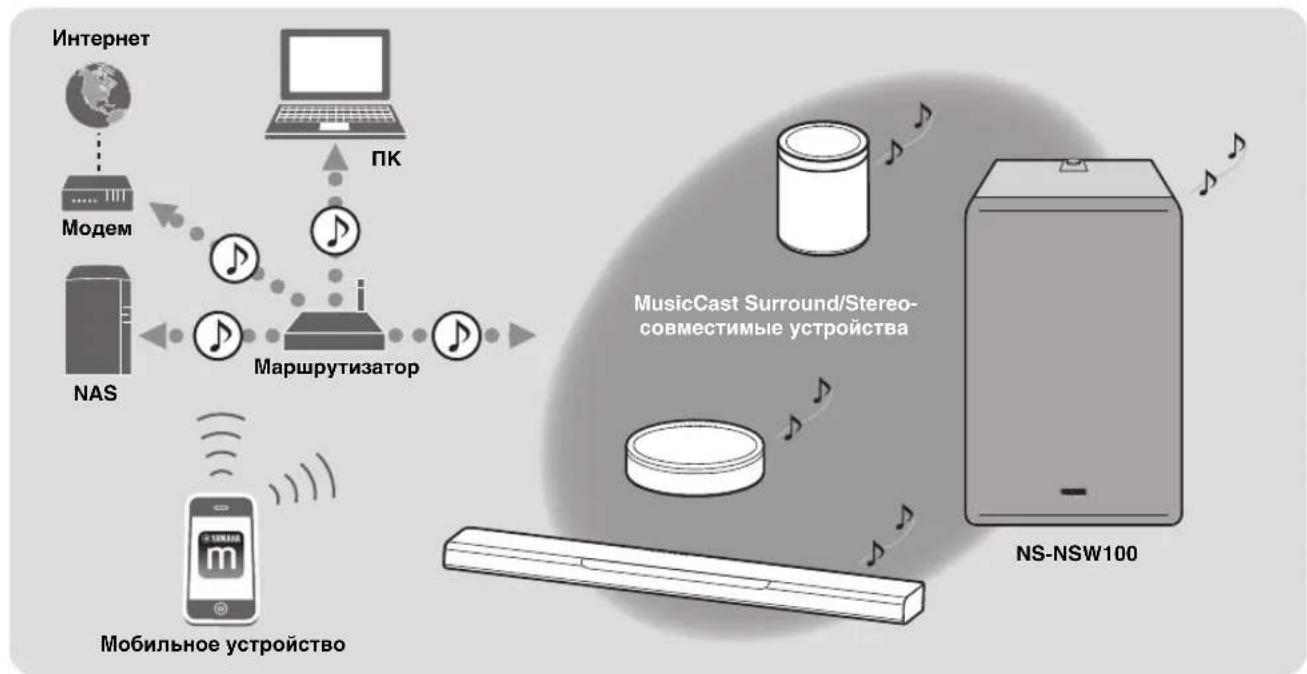
Ipn HcIOJIb3OBAHHM MusicCast MOKHO 6MBHBAIbCRA My3bIKo C pyrHMn MusicCast-coBMcCTHMbIMn yctpoiCTBaMH, KOTOpBie pacIOJIOKeHb B HeCKOJIbKHX KOMHaTAX. My3bIKo C MOHbHO rYcPoIcTBa, MeHna-cepBepa (IIK HIN NAS), INTEPcHT-paIHO HIN cIyKbI IOTOKOBII NpeDAHN MOKHO HacJaXdAITBCR B JIObOM MecTe BaIIErO Dom a IIMOIIbHO IIPOcTOI OIIepaHH.
IIOpO6Hee o MusicCast n coBmecTHMbX yCTpoHcTBaX cM. Ha CJIeNyIOJIeM Be6-caHrTe.
http://www.yamaha.com/musiccast/
Дя IOКIOUOeHnJaHHOro aIHHapata K cetH HeTo HcIIIOJB3OBaHHN He06xOdHMo IprHIOJKeHne IIT Mo6HJIbHorO yctpoictBa "MusicCast CONTROLLER".
YcraHOBHTe npHIOJKeHne MusicCast CONTROLLER Ha Mo6HbHOM ycIpoiCTbe.
( ctrp.13 "3aIpy3ka npHIOKeHHa "MusicCast CONTROLLER"IMnMo6NJIbHOyCtpoiictBa")
Advanced Yamaha Active Servo Technology II
B 1988 Iy KOMIIaHHa Yama h BbIyCTHla Ha pblHOK aycTneCKyIO cHTcEmy, B KOTOpOH HcIOJIb3ObaJAc bTexHOIOH YST (Yamaha Active Servo Technology) m MOIHHO H bICOKKaueCTBeHHo NpeJaHb 6acOBbIX aactOT.
B 3toTexHOIOHN HcIOJIb3yETcI npMoe coeHHeHHe MeKJy yCHJIHTeJIeM N KOIOHkAMN, TTO o6ecIIeHBAe TOTHyO nepeJaCy cnHaJa H ynpaBHeHne KOIOHkAMN.
Tak KaK 3Ta TexHOJIOrH NoIpa3yMeBaET HIOJB3OBAHHC KOIOHOK, B KOTOpbIX KOHTPOJIHPyeTcIINHaMnC OTPNtAteJIbHBIM COIPOTNBHeHHem ycHInTeJn Ipe3OHaHC, CO3aBACMbI MCKJy KOPIIYcOM KOIOIHKn H IOPTOM, OHA o6ecIeHNBaet 6oJIbIIHyO eHeprHIO pe3OHaHCA (KOHIeHHa"akycTHueCKoRTO pc3OHAtopa") IIO cpaBHeHHo C o6bUHbIMn fao30HHeBpToPAm. To o6ecIeHNBaet 6oJIeocfKeTbHByIO nepeJaCy 6acOBbX HaCTOT B KOPIycax MeHbIIeTo pa3Mepa, YEM 6BJIO BO3MOxHO B IPOIIOM.
BHObpa3pa6oTaHHaKOMHaHHeiYamaha
TexHOJOrnA Advanced YST II coepKHT
MHOKeCTBO Opa6oTOK IIO cpaBHeHIO C
TexHOJIorHeiYamaha Active Servo Technology,
KOTOpBe oEeCneHBAOT LyuHIn KOnTpOJIb cHIT,
IpuHBODIIHX B DeIcTBHe ycHINTeJIb H KOJOHKy.
C ToKN 3peHnY yCNINTeJIg ETO pINBOJNT K
H3MCHeHIO COIIPOTNBICHN DHHAMNKAB
3aBNCIMOCTH OT qACTOTb3ByKa.KOMHaHnYamaha
pa3pa6oTaIA HOByIO KOICTPyKUnIO UcHIN,
06BeINHARIOUY IOINHAMNK C OTPHNaTeJIbHbIM
COIPOTHBILICHN M INIHAMNK IOCTOARHO TOKa,
KOTOpBe oEeNEHBAOT BoJIee cTA6NJbHbIE
XapaKTepHCTKH N YHCtYIO YeTKyIO PepeJaHy
6acOB.
Twisted Flare Port
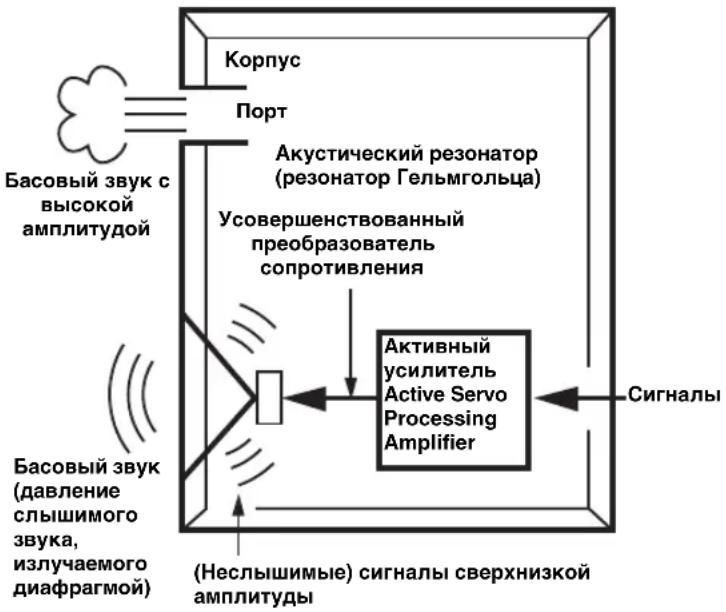
CobpcmcHbIc aKyCTHueckHe cHCTeMbI c fao3OHHBepTOpOM HIOJIb3yIOT pc3oHaTOp FJIbMToJIbua IJIa yIyUHCHN BOCIIpOHN3BcEChHn HIN3KHX YaCTOT.
OHaKIOIHNBOCIPoH3BeDEHHN H3KNX HaCTOT B DnAa3OHe DaHHORO pe30HaTopa FeIbMROJIbua BO3dyx IIBHKTeCpa3Eo BHyTpB H HopyKype3 IopT MeKdBy BHYtpHHeH HApyKHOJ CaTbKO JIOHOKN, YTO HHOJa CO3Jaet 11ym H3-3a Typ6yIeHTHO BO3dyHHOI NIOtOKa HA KOHe IIOPTa.
Iopr H Kopnyc pe3oHpyOT Ha qactote, KOtOpa onpeJeTcra Hx pa3mepamn H fopmoi. C dpyroon ctoPObIy, Typ6yHeHTHOCTb BO3dyuHOrO ITOka HA KOHIE NOPTa COCTOHT H3 IIIPOKOTO CNEKTpa YACTOTHBIX KOMIOHEHTOB, KOTOpbIE OTCYCTBYOT BO BXODOM CHHaJIe. 31OT IIyM BO3HNKAeT NOTOMy, YTO IIIPOKNI CNEKTp YACTOTHBIX KOMIOHEHTOB COJepKNT KOMIOHCHTIb, KOtOpbIE COBIIaAIOT C p3oHaHCbIMN YACTOTAMN IopTa H KopNYca, BB3bIBaR CNJIbHbI pe3OHAc.
Φa30HbCepToP Twisted Flare Port, pa3pa6oTaIIbI KOMIIaIIcH YamaHa, H3McHcT cIOco6 pacIHpcHn IOpTa Ha KOHIE, a TaKKe HMeet BHTOIN H3rH6, KOtOpB II IOaBJIcT TpyUleHTHOCtB BO3dyuHOrO IOTOKa HA KaKdOM KOHIE IOpTa, IpeIoTbPaIIa TaKHM o6pa3OM BO3HHKHOBeHHe IIyMa.
3TO HCKJIIOHaaET "HeHcNtBn 3ByK" N "IIMyM BeTpa", KOTOpbIE DO HAcTOrIeR O MmEcHTa 6bIJIN XapAKeTpHOI OC0eHHOCCTBIO aKyctHueckHX CnCTEm C a3OHHBepTopOM, YTO IIO3BOJIAET YHCTO BOCIIPOHN3BOIDHTb HHN3KHe HaCTOtBI.

Typ6yHeHnHa 06oNX KOHcX pa3OHnBepTopa co3daet wym
3aHnnaHeIb
(1) O (STANDBY/ON)
IpeekHIOyeHHe HHTaHHaIIapaTa MEXky BKIOCHHHbIM pCKHMOM H pCKHMOM OKHaHHa.
②CepBnchbI NoP
PpeHa3HaueH 06cJyKbAHn H 06bIyHO He HCIOJB3yCTc.
③ CONNECT
HcIOJIb3yIte IJI BbIIIOJIHeHHcJIeIyIOUHX onepaui.
Pernctpaunna annapaTa B cetn MusicCast ctp.13
- O6HOBJIeHHe BcTpOeHHOro
IIpoIpaMMHOrO o6ecIeueHHra → cTp.16
- HHHHaJIH3aIIH HaCTpoeK (c6poc K 3abOJckHM HaCTpoiKaM) → cTp.17
④пеклоча teь WIRELESS
BkIOUcHnC/BBIKIOUcHnCΦyIKuHH6ccIpOBOIOH CB3N(6ecIpOBOHaJIOKaJIbHaer cTeB).
AUTO:
6ecpOBOJHOe coeHHHe HBEKJIIOyeHO.
OFF:
6ecIIpOBOIOHoe coeINHHHeHne BbIKJIOUeHO. IIpn IIOJIIOHcHNn aIIIaparaK cETH HcIOJIb3yIte IIpOBOIOHoe coeINHHeHne. ( cTp.12 "IIOJIIOUOeHne C IOMOIIbIO Ka6eJ")
⑤NepekeIIOUaTeIb INPUT
NcnoB3yeTcIe IpeKJIOueHn Tnna coeINHeHn Ha annapate.
NET:
Bb6epHTc DaHHOC 3HaueHHc Iprn IIOKJIIOUChHH aIIIapapaT K cetH.
ANALOG:
Bb6epHTe IaHHoe 3HaueHHe IIpH IIOKIOOeHHn aIcapaTa HApmyIO K yCNJIHTeJIHO IIN aHaIOHNHOMy ycTpoiCTBy 6e3 IOKIOOeHHK cetn.
⑥ Φhe3do INPUT (ANALOG)
HcnoJb3yeTc,ecnIpeKIOHOaTeJB INPUT yctaHOBJENBIOIOKeHne ANALOG.
IIOKIIHOHTe Ka6eJIb OT rHe3Ja ca6Byfepepa ychJIHTeJIa HINr He3Ja JInHeHOrO BbIXoJa (HaIIpHMeP, PRE OUT) K IaHHOMy rHe3Jy. ( cTp. 12 "IOKIIHOueHne c IIOMOIbIO Ka6cJIa")
⑦CepBnchbIe nOpTbI
IpeHa3HaueHbI O6JyKbAHn HOBuHO He HCIOJB3yOTc.
⑧Nopt NETWORK
Icno3yTe ceTeBOJ Ka6JIb (IpOJaetcOtJeBHO) IINIOKIIIOCHNKR CCTNC NOMOIBIO Ka6CBHOROCeHNHeHH.
BepxHnnaHeJIb
①Pyuka GAIN
IIO3BOJIaTepeYJINPOBaTbPOMKOCTbJaHHORO aIIIapata.HacptpoIe rPOMKocTB COOTBcTbHN C yCTpOJIcTBOM BOCIIPOHUNBEJeHHN.
(→ctp.15 “PcIyJIINPOBka 6aJIaHca IpOMKocTH")
PIMMEYAHIE
B IIpoIcCc H3McHcIIHg rPOMKoCTH ICBt HIIINKaTopa
② STATUS noka3bBaet 3HaueHHe ypoBn rpoMkoCTH.
OTmeHa CBa3n c Pairing Master
HaMo6HbHOMycpOietBe HcnoJIb3yIe "MusicCast CONTROLLER",TO6bIOTMeHHbpeHCTpaIIIO.
YcTaHOBka aHaIOrOBbIX NOdKJIoueHn
Hcno3ynte 1he3IO ANALOG Ha 3aIHe Hn HeJn aIIapata IIE erO IOKIOueHHaHpMyIO K npymyK npctbAM (Haipmep, 3BkyBOoi NaHeJI) 6e3 NOKIOueHHK cetn.

- CoeHnHe rHe3do ANALOG Ha 3aHnei NaHeIaAnpapaTa C BbIXoDhbIM rHe3dOM ca6Byepa IInrHe3dOM JInHeiHoro BbIXOda (Ha npMep, PRE OUT) NOdkJIIOueHHoro yCTpoIcTba.
- YctaHOBnTe nepeKJIouateIb INPUT Ha 3aHne IaHeIa annapaTa B NOLOXeHne ANALOG.
- BCTaBbTe BnIky CnIOBOrO Ka6eJIa B po3eTKy NpeMeHHoro Toka.
- Haxmnte KhoNky (STANDBY/ON) Ha 3aHne NaHEn, YTO6bI BKJIIOHTb NITaHne daHHoro annapata.
YBEDOMNHEME
HeIOKIOHAnTe cHIOBOI Ka6eJIb Kpo3eTKe IepemEHIOTO kOa IO 3aBepiHnB CEx IOIKIOUeHH.
B3aBnCHMOCTHOTIOKJIHOHaEMOYcTPOIcTBa (3ByKOBAIIHeJIbH.T.I.)CIOOCoIOKJIIOHcEHNHa3BaHHrHE3MOryTOTJINuATbcrOHTpKcHnB HAcTOAICMIOKUMcTE,IO3OMyCJCUYcTaKKe 6paHTbCkpyKOBOCTByIOJIb3OBaTeJI COOTBeTcBYIOIeroycTPOIcTBa.
Ha MOMeHTIOCTaBKNIaHHORo aIIIapara c 3aBOJa ero IpOMKOCTb yCTaHOBJCHeHa MMHMaJIbHOC 3HaueCHNC. IocJIe 3aBePIIIeHNr BcEx IOKJIIOHeHn BBIOJIHITe COOTBeTcTByOIIHn HeacTpoKn, YTO6bI aIIIpaAT BOCIPoH3BOJHI 3ByK IIco6xoIHMOI rPOMKOCTH.
Pereynipobka 6aHaHca rpoMkoctn
IIN3HBOBIOHNEHHN H3KHX HAcTOT MOHO HAcPToHT POMKOCTb TaKHM O6pa3OM, TTO6b1 3BYKaIIapapa CMEHNBAJC ECTECTBEHNO C NMOUH HcNOJb3yEmo K0JOHKN.
IcnoJb3OBaHne ceTeBOrO NOdklUoyehnA
EcJIN daHHbI aHIIapar HOIKIOHeH K cETH, rPOMKocTb aHIIapara ABOTMAHueCKn HAcTpANBaETc, YTO6bl COOTBETBOBaTb Pairing Master, HO BbIMoKTe BbIOJIHTb 60JIe TOHKyIO HAcTpOHy CoJIaCHO BAIIHM IIpeIIOHTeHHM C NOMIOIbIO pyKn GAIN Ha BepXHeI NaHeH.
3haeHHe No yMoJuaHHIO: 3aBnCHr OT HacTpouKu Pairing Master
IcnoJb3OBaHne aHaJOrOBORo IODKJIoueHnA
C HOMO BIO pyuKn GAIN ha BepxHei HaHei HacIpoTe IpOMKOCTaIIHapata.
Yactota HJIbIpa Hn3Knx Yactot: HKKcHpObaHa Ha ypoBHe 160 T
3haeHHn no ymoJIuaHnIO: MUTE
HACTPOIKNIAPAMETPOB
06HOBJIeHne BcTpoEHHO nporpaMMHO o6ecneueHn
EcHn daHb nnapat IIOKIOueH K cTt, BCTPOeHHoe IO MOKHO 6OBHTb Ype3 cTb. IIpH HauHH HOBOI BOEHO IO HHNkaTop STATUS MHraet 6eJIbIM IEBotom, KOITaIIHTaHHe aIInapaTa BKJIOHeHO. BblIOIHNTe CIEyIOHc HAIH, TIO6bI O6HOHTB BCTPOeHHOC IO.
YBELOMATEHE
Co6HIOaIHe cJIeIyIOUIHC ycIOBn BO BpEmo6HOBJcHH.
- He BbIIOJIHIIe HnKaKHe OIepaIIH Ha aIIIapaTe
- Ic otKJIIOUaIte chIOBoH nII cCTeBOH Ka6eJIb
2. Ha 3aJHeI paHeIy ydePknBaIte KHOIIKY CONNECT He MeHee 10 cekynd.
INHnKaTOp STATUS INHnKaTOp Wireless LAN Ha BepxHei NaHeJIMHaTOT, HnHaHHaTeC8 06HOBJEHNBEcTPOeHHoIIO.
Korla HnHnKaTOp HaHHaet TopeTb NocToHHO (opaHkeBBIM IBeTOM), 6HOBJIeHne BCtpoEHHOro IIO 3aBepuio.
PIMMEYAHNE
- O6HOJIeHHe BcTpoeHHOro IIO 3aHMaet IprHMepeHo 10 HJIN 20 MHHyT.
EcJINIOIKIIOOeHHeK INHTepHety HeIOCTaTOOH 6bICTPOC HIN3aBHCNTOT COCTOHHNIOIKIIIOCHHN K 6ecIIPOBIOHOIcTH,06HOBJIEHNE BCTPOEHORIO MOKCT 3AHMaTb 6oJIbIe BPCMCHH HIN MOKCT Ipon3OHTn c60i. - EcJIN IpoHcxOJNT c6oB IIpN O6HOBJeHHN BCTPOeHHORIO, HJIKaTOp STATUS Mmraet KpaCHbIM IBeTOM. IIOJokJInTe HeKOTOPoe Bpemn HIIpO6yIte IOBTOPTb OIIepaHIO.
■PnoBepKa Bercn VBcTpoeHoro IO
BcpeHIO BCTpoeHHoro IIO,yCTaHOBJeHHoro Ha aIIIapate, MoKHO IIPOBepHTb CJIEyIOUHM 6pa3OM.
1. Ha 3aHHe naneHn HaxMnte KhoNky (STANDBY/ON), yTo6bI nepeBecTu annapat B peKIM OxNdaHn.
2. Ha 3aDHei nAHeJn HaxMMTe KHOKNy CONNECT.
HnDnKaTOp STATUS HnDnKaTOp Wireless LAN Ha BepxHei NaHeJIN MnTaOT HeckoJIbKO pa3, IOKa3bIBaBn BepcHIO BCTpoeHHORO IIO. HanpHmep, ccJIN BCpCnB CtPoecHHORO IIO 1.3, HnDnKaTOp STATUS MNract OdH pa3, a HnDnKaTOp Wireless LAN MnIact Tprpa3a.
(Bepxna naheJIb)
PIMMEYAHME
EcJIH BepcHb BCpoeHHoro IIO 2.0, INIHKaTOp STATUS MIRaET bBaKDbI, a INIHKaTOp Wireless LAN Hc MHRact.
3. Haxmte KhoNky CONNECTepe pa3, T06blBepHybCBpexnM OxndaHna.
Инциалзаць BCex Hactpoek (c6poc K 3aBOdckm Hactpoikam)
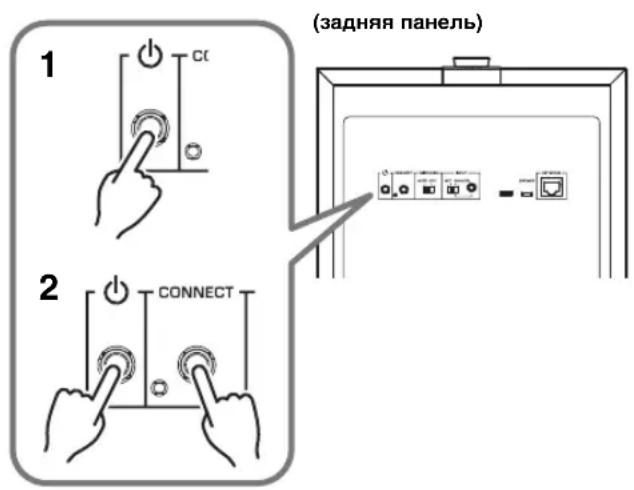
- Ha 3aHHe nHaHEn HaxMnte KhoNky (STANDBY/ON), yTo6bI nepeBecTn annapaT B pexm OxndaHna.
- YdepxnBaKhoNky CONNECT,HaXmTe KhoNky (STANDBY/ON) oDHH pa3.
- Korda Иndикадop STATUS начесу MURATb, OTNyCTnTe KhoNkY CONNECT.
(BepxHnnaHeJIb)
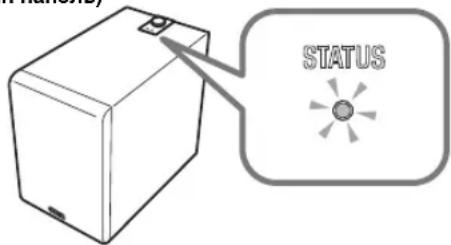
ПРИLOЖЕНЕ
Ta6nua 3naueHn HndkaTopa STATUS
UBeH H KcPbAHHoe/MHraOIIe cocToHHe HHnKaTOpOB Ioka3bHaOT COCToHHe daHHOr aIcapaTa.
PIMMEYAHME
- HIIHKaTOp STATUS H HIIHKaTOp Wireless LAN MOry T HIOJB3OBaTBcR DJII IPOBcPK BcPcH N BCTPOCHHO IIO daHHoro aannapara. ( cTp. 16 "PiobcPK BaCpH N BCTPOCHHO IIO")
B IIpoIece 6OBHJIeHH BCTpoEHHO IIO HINJHKaTOp STATUS H INHINKaTOp Wireless LAN MOrTy HcIOJIb3OBaTbcra JIIA IIPOBepKCHTeIeHH BbIIIOJIHeHH IIPOIecca. ( cTp.16 "IpoIeDypa 6OBHJIeHH BCTpoEHHO IIO")
Питане ВКлючно
(http://download.yamaha.com/sourcecodes/musiccast/).
TEXHINQUECKNEXAPAKTEPNCNIK
06üne xapaKTepeNTnKn
Tun Advanced Yamaha Active Servo Technology II
IIpHbOJ. KOHNueckn Byep 20 cm, HemaHTNTHbE KpaHpyIOeTo TnTa
BbIXoHoi cHrHaI yChJIHTeJIa (100 T, 5 O M, 10% IKT) 130 Br
Yactotnay xapaKtepehctnka 28T-300T
IIHTaHHe/HaHpaJKeHHe 230BIEpcMeHHoroTOka,50T
Iorpe6Jemam MoHocTb 60Bt
Bx0
NETWORK (Провдhoe). Ethernet: RJ45 (100BASE-TX/10BASE-T)
ANALOG (IpoBoiHoe) THe3IO Mini 3,5 MM (MoHo)
UyBCTBHTeJIbHocTb Ha BXOJIe 60 MB
CoppotNBJIeHHe Ha BXoJe 25 KOM
Iotpe6JrEmaa MoHIOCTb B peKHMc 0xHuaHHa
3KoHOMnHbIpeXHM OxHaHHa MeHee 0,1 Br
Cetb peKHM OxHuaHn (PpOBoJHoe). MeHee 1,3 Br
Cetb peKHM OxHuaHn (6ecPiPoBODHoe) MeHee 1,5 Bt
Pa3mepbI (II × B × Γ) 252 MM × 383 MM × 418 MM
Bcc 12,6K
Wi-Fi
CtAnapTb6ecnpoBHOJIOkaJIbHOI cetu. IEEE 802.11 a/b/g/n/ac*
- ToIbko IIOJoca IIpoNcKaHnK KaHaJa 20 MΓι
PaoohocotnbI dHaan30n 2,4Tg,5Tg
Cnocob oecneueHH 6eohacnoctn WEP, WPA2-PSK (AES), CmeaHbI pckHM
*B coJepKaannn Iannno pykoBOCTBA npHBeIeIb IIOcIeIIHe Ia MOMENT y6IINKanH INTexIHueckne XapakTePCHKN. Jnn IIOyueHHIOcIeIe BepCNpykoBOCTBA IOcETHTe Be6-caNT KOpNopAHH YamaHa II 3arpy3HrE paHc pykoBOCTBOM.
PRECAUÇões LEIA ATENTAMENTE ANTES DE USAR. CERTIFIQUE-SE DE SEGUIR ESTAS INSTRUÇões.
Advanced Yamaha Active Servo Technology II 7
Twisted Flare Port 7
COMPONENTES E SUAS FUNCOES 8
Painel traseiro 8
Painel superior 9
PREPARATIVOS. 10
Posicionalto 10
CONEXOES 11
http://www.yamaha.com/musiccast/
Advanced Yamaha Active Servo Technology II
http://(IP address of this product*)/licenses.html
(http://download.yamaha.com/sourceccodcs/musiccast/)
ESPECIFICAções
Geral
Tipol Advanced Yamaha Active Servo Technology II