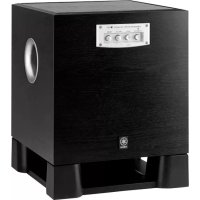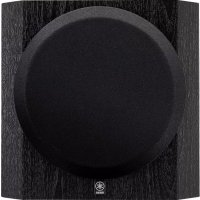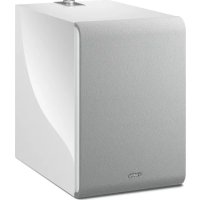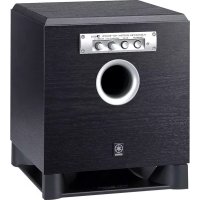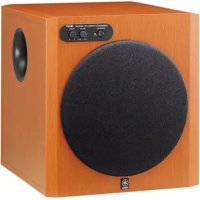
YSTRSW300 - Subwoofer YAMAHA - Free user manual and instructions
Find the device manual for free YSTRSW300 YAMAHA in PDF.



| Brand | YAMAHA |
| Model | YSTRSW300 |
| Product Type | Active Subwoofer |
| Technology | Advanced Yamaha Active Servo Technology II |
| Speaker | 25 cm cone woofer with magnetic shielding |
| Output Power | 250 W (100 Hz, 5 Ω, 10% THD) |
| Dynamic Power | 270 W (5 Ω) |
| Frequency Response | 20 Hz - 160 Hz |
| Inputs | INPUT1 (speaker terminals), INPUT2 (RCA line) |
| Outputs | OUTPUT (speaker terminals) |
| Functions | Adjustable HIGH CUT, PHASE switch, Auto Standby, Volume |
| Power Supply | 230 V, 50 Hz |
| Power Consumption | 80 W (operation), 0.5 W (standby) |
| Dimensions (W × H × D) | 372 × 400 × 428 mm |
| Weight | 20 kg |
| Included Accessories | Non-slip pads (4 pcs) |
| Maintenance | Clean with a clean, dry cloth. Do not use thinners. |
| Safety | Do not open the casing. Avoid moisture. Leave a 20 cm space around. |
| Repairability | Contact a Yamaha dealer or service center. |
| Manual | Available in PDF at notice-facile.com |
Frequently Asked Questions - YSTRSW300 YAMAHA
User questions about YSTRSW300 YAMAHA
0 question about this device. Answer the ones you know or ask your own.
Ask a new question about this device
Download the instructions for your Subwoofer in PDF format for free! Find your manual YSTRSW300 - YAMAHA and take your electronic device back in hand. On this page are published all the documents necessary for the use of your device. YSTRSW300 by YAMAHA.
USER MANUAL YSTRSW300 YAMAHA
CAUTION: Read this before operating your unit.
Please read the following operating precautions before use.
Yamaha will not be held responsible for any damage and/or injury caused by not following the cautions below.
- To assure the finest performance, please read this manual carefully. Keep it in a safe place for future reference.
- Install this unit in a cool, dry, clean place - away from windows, heat sources, sources of excessive vibration, dust, moisture and cold. Avoid sources of humming (transformers, motors). To prevent fire or electrical shock, do not expose this unit to rain or water.
- Never open the cabinet. If something drops into the set, contact your dealer.
- The voltage to be used must be the same as that specified on the rear panel. Using this unit with a higher voltage than specified is dangerous and may cause a fire and/or electric shock.
- To reduce the risk or fire or electric shock, do not expose this unit to rain or moisture.
- Do not use force on switches, controls or connection wires. When moving the unit, first disconnect the power plug and the wires connected to other equipment. Never pull the wires themselves.
- When not planning to use this unit for a long period (ie., vacation, etc.), disconnect the AC power plug from the wall outlet.
- Since this unit has a built-in power amplifier, heat will radiate from the rear panel. Place the unit apart from the walls, allowing at least 20cm of space above, behind and on both sides of the unit to prevent fire or damage. Furthermore, do not position with the rear panel facing down on the floor or other surfaces.
- Do not cover the rear panel of this unit with a newspaper, a tablecloth, a curtain, etc. in order not to obstruct heat radiation. If the temperature inside the unit rises, it may cause fire, damage to the unit and/or personal injury.
- Do not place the following objects on this unit:
Glass,china,small metallic etc.
If glass etc. falls by vibrations and breaks, it may cause bodily injury.
- A burning candle etc.
If the candle falls by vibrations, it may cause fire and bodily injury.
-A vessel with water in it
If the vessel falls by vibrations and water spills, it may cause damage to the speaker, and/or you may get an electric shock.
- Do not place this unit where foreign objects such as water drips might fall. It might cause a fire, damage to this unit, and/or personal injury.
- Never put a hand or a foreign object into the YST port located on the right side of this unit. When moving this unit, do not hold the port as it might cause personal injury and/or damage to this unit.
- Never place a fragile object near the YST port of this unit. If the object falls or drops by the air pressure, it may cause damage to the unit and/or personal injury.
-
Never open the cabinet. It might cause an electric shock since this unit uses a high voltage. It might also cause personal injury and/or damage to this unit.
-
When using a humidifier, be sure to avoid condensation inside this unit by allowing enough spaces around this unit or avoiding excess humidification. Condensation might cause a fire, damage to this unit, and/or electric shock.
- Super-bass frequencies reproduced by this unit may cause a turntable to generate a howling sound. In such a case, move this unit away from the turntable.
- This unit may be damaged if certain sounds are continuously output at high volume level. For example, if 20Hz - 50Hz sine waves from a test disc, bass sounds from electronic instruments, etc. are continuously output, or when the stylus of a turntable touches the surface of a disc, reduce the volume level to prevent this unit from being damaged.
- If you hear distorted noise (i.e., unnatural, intermittent "rapping" or "hammering" sounds) coming from this unit, reduce the volume level. Extremely loud playing of a movie soundtrack's low frequency, bass-heavy sounds or similarly loud popular music passages can damage this speaker system.
- Vibration generated by super-bass frequencies may distort images on a TV. In such a case, move this unit away from the TV set.
- Do not attempt to clean this unit with chemical solvents as this might damage the finish. Use a clean, dry cloth.
- Be sure to read the "TROUBLESHOOTING" section regarding common operating errors before concluding that the unit is faulty.
- Install this unit near the wall outlet and where the AC power plug can be reached easily.
- Secure placement or installation is the owner's responsibility. Yamaha shall not be liable for any accident caused by improper placement or installation of speakers.
This unit features a magnetically shielded design, but there is still a chance that placing it too close to a TV set might impair picture color. Should this happen, move this unit away from the TV set.
This unit is not disconnected from the AC power source as long as it is connected to the wall outlet, even if this unit itself is turned off. In this state, this unit is designed to consume a very small quantity of power.
IMPORTANT:
THE WIRES IN MAINS LEAD ARE COLOURED IN ACCORDANCE WITH THE FOLLOWING CODE: Blue: NEUTRAL
Brown: LIVE
As the colours of the wires in the mains lead of this apparatus may not correspond with the coloured markings identifying the terminals in your plug, proceed as follows: The wire which is coloured BLUE must be connected to the terminal which is marked with the letter N or coloured BLACK. The wire which is coloured BROWN must be connected to the terminal which is marked with the letter L or coloured RED. Making sure that neither core is connected to the earth terminal of the three pin plug.
For U.K. customers
If the socket outlets in the home are not suitable for the plug supplied with this appliance, it should be cut off and an appropriate 3 pin plug fitted. For details, refer to the instructions described below.
Note: The plug severed from the mains lead must be destroyed, as a plug with bared flexible cord is hazardous if engaged in a live socket outlet.
For Canadian Customers
To prevent electric shock, match wide blade of plug to wide slot and fully insert. This Class B digital apparatus complies with Canadian ICES-003.
VOLTAGE SELECTOR
(For Asia and General models only)
The voltage selector switch on the rear panel of this unit must be set for your local main voltage BEFORE plugging this unit into the AC main supply. Voltages are 110/120/220/230-240 V AC, 50/60 Hz.
CONTENTS
FEATURES 2
SUPPLIED ACCESSORIES 2
PLACEMENT 3
CONTROLS AND THEIR FUNCTIONS 4
CONNECTIONS 6
[1] Connecting to line output (pin jack) terminals of the amplifier 6
[2] Connecting to speaker output terminals of the amplifier 8
Connecting to the INPUT1/OUTPUT terminals of the subwoofer 10
Plug in the subwoofer to the AC outlet 11
ADJUSTING THE SUBWOOFER BEFORE USE 12
AUTOMATIC POWER-SWITCHING FUNCTION 13
Changing the AUTO STANDBY setting 13
FREQUENCY CHARACTERISTICS 14
ADVANCEDYAMAHAACTIVE SERVOTECHNOLOGYII 15
TROUBLESHOOTING 16
SPECIFICATIONS 17
FEATURES SUPPLI
D ACCESSORIES
- This subwoofer system employs Advanced Yamaha Active Servo Technology II, which Yamaha has developed for reproducing higher quality super-bass sound (refer to page 15 for details on Advanced Yamaha Active Servo Technology II). This super-bass sound adds a more realistic, theater-in-the-home effect to your stereo system.
- This subwoofer can be easily added to your existing audio system by connecting to either the speaker terminals or the line output (pin jack) terminals of the amplifier.
- For the effective use of the subwoofer, the subwoofer's super-bass sound should be matched to the sounds of your main speakers. You can create the best sound quality for various listening conditions by using the HIGH CUT control and the PHASE switch.
- The Automatic power-switching function saves you the trouble of pressing the STANDBY/ON button to turn the power on and off.
- This subwoofer system is equipped with a linear port unique to Yamaha that provides smooth bass response during playback, minimizing extraneous noise not included in the original input signal.
After unpacking, check that the following parts are contained.
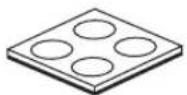
Non-skid pads (1 set: 4 pieces)
A
B
One subwoofer will have a good effect on your audio system, however, the use of two subwoofer is recommended to obtain more effect.
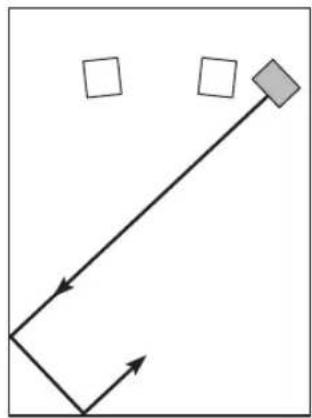
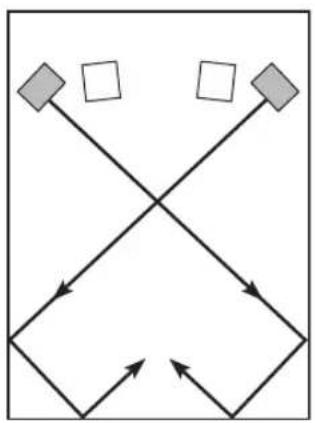
If using one subwoofer, it is recommended to place it on the outside of either the right or the left main speaker (see A). If using two subwoofoers, it is recommended to place them on the outside of each main speaker (see B). The placement shown in C is also possible, however, if the subwoofer system is placed directly facing the wall, the bass effect may die because the sound from it and the sound reflected by the wall may cancel out each other. To prevent this from happening, face the subwoofer system at an angle as in A or B.
Note
There may be a case that you cannot obtain enough super-bass sounds from the subwoofer when listening in the center of the room. This is because "standing waves" have been developed between two parallel walls and they cancel the bass sounds. In such a case, face the subwoofer obliquely to the wall. It also may be necessary to break up the parallel surfaces by placing bookshelves etc. along the walls.
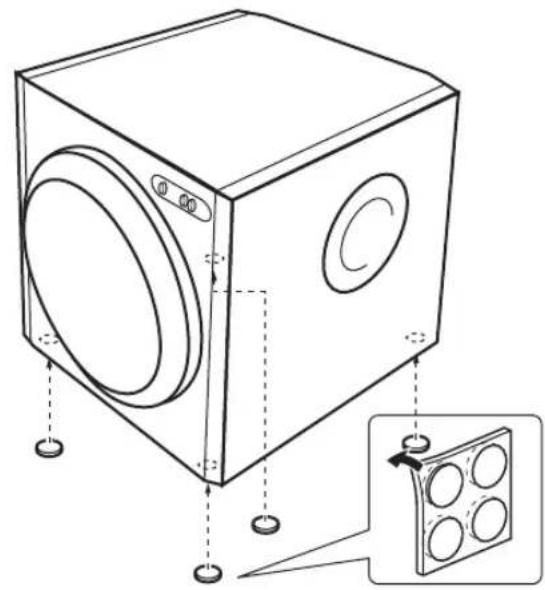
Use the non-skid pads
Put the provided non-skid pads at the four corners on the bottom of the subwoofer to prevent the subwoofer from moving by vibrations etc.
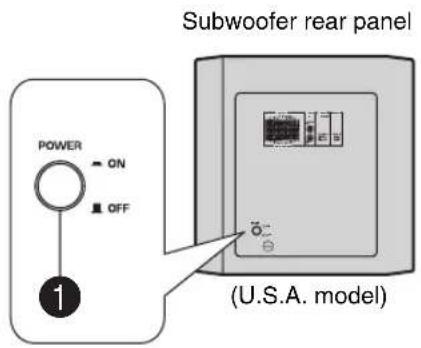
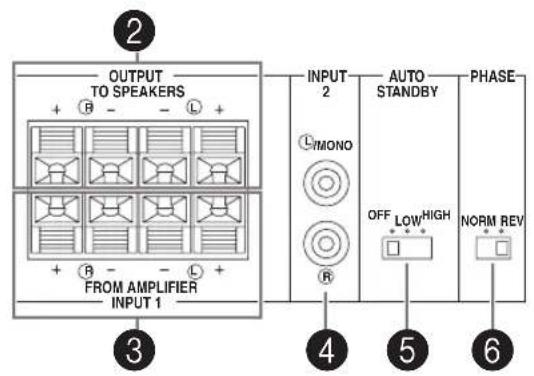
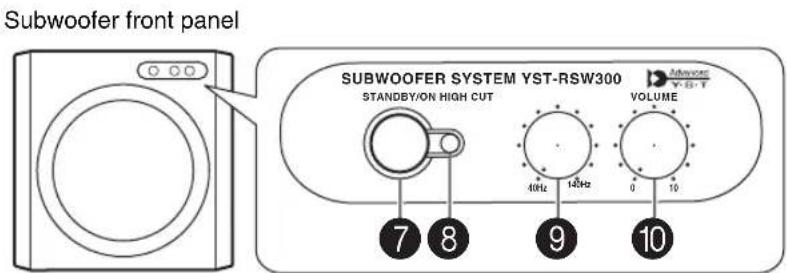
1 POWER switch
Normally, set this switch to the ON position to use the subwoofer. In this state, you can turn on the subwoofer or turn the subwoofer into the standby mode by pressing the STANDBY/ON switch.
OUTPUT (TO SPEAKERS) terminals
Can be used for connecting to the front speakers. Signals from the INPUT1 terminals are sent to these terminals. (Refer to "CONNECTIONS" for details.)
INPUT1 (FROM AMPLIFIER) terminals
Used to connect the subwoofer with the speaker terminals of the amplifier. (Refer to "CONNECTIONS" for details.)
4INPUT2 terminals
Used to input line level signals from the amplifier. (Refer to "CONNECTIONS" for details.)
5 AUTO STANDBY (OFF/LOW/HIGH) switch
This switch is originally set to the OFF position. By setting this switch to the HIGH or LOW position, the subwoofer's automatic power-switching function operates as described on page 13. If you do not need this function, leave this switch in the OFF position.
Note
Make sure to change the setting of this switch only when the subwoofer is set in the standby mode by pressing the STANDBY/ON switch.
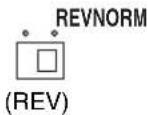
PHASE (NORM/REV) switch
Normally, this switch is to be set to the REV (reverse) position. However, according to your speaker systems or the listening condition, there may be a case when better sound quality is obtained by setting this switch to the NORM (normal) position. Select the better position by monitoring the sound.
7 STANDBY/ON switch
Press this switch to turn on the power when the POWER switch is set in the ON position (the status indicator lights up in green). Press again to set the subwoofer in the standby mode (the status indicator goes off).
Note
Even while the subwoofer is in the standby mode, it is still using a small amount of power.
Status indicator
Lights up in green while the subwoofer is on.
Lights up in red while the subwoofer is set in the standby mode by the operation of the automatic power-switching function.
Goes off when the subwoofer is set in the standby mode.
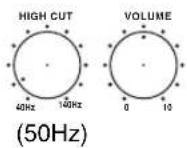
9 HIGH CUT control
Adjusts the high frequency cut off point. Frequencies higher than the frequency selected by this control are all cut off (and no output). One graduation of this control represents 10Hz
10 VOLUME control
Adjusts the volume level. Turn the control clockwise to increase the volume, and counterclockwise to decrease the volume.
CONNECTIONS
Choose one of the following two connecting methods that is more suitable for your audio system.
■Choose [1] (pages 6-7) if your amplifier has line output (pin jack) terminal(s)
■Choose [2] (pages 8-9) if your amplifier has no line output (pin jack) terminal
Caution
Unplug the subwoofer and other audio/video components before making connections.
Notes
- All connections must be correct, that is to say L (left) to L, R (right) to R, “+” to “+” and “-” to “-”. Also, refer to the owner's manual of your component to be connected to the subwoofer.
- After all connections are completed, plug in the subwoofer and other audio/video components.
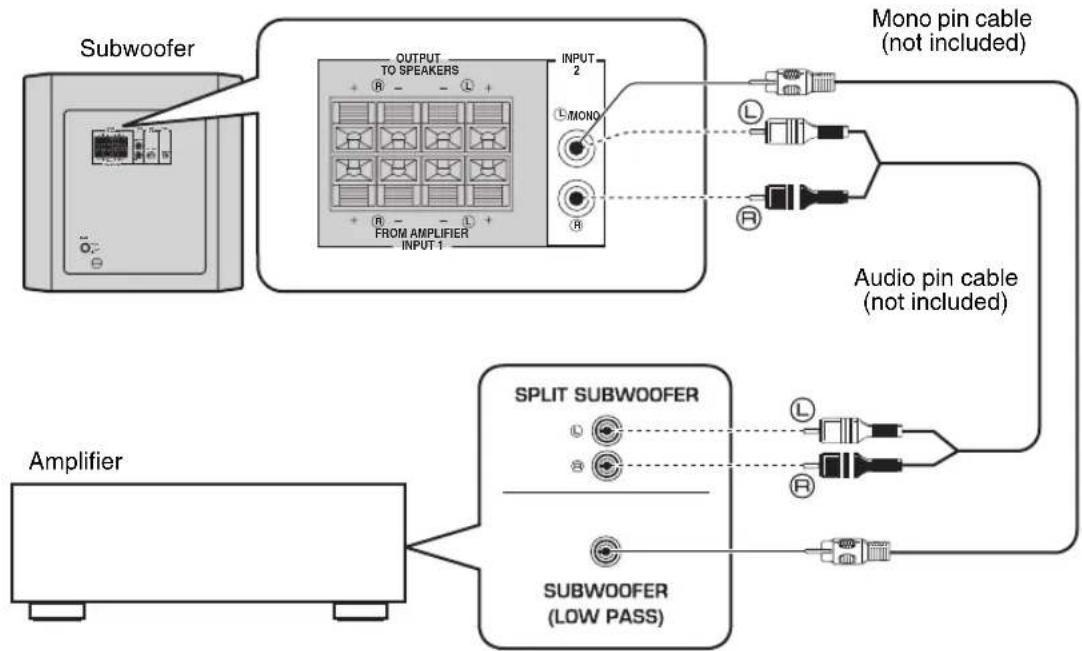
[1] Connecting to line output (pin jack) terminals of the amplifier
- To connect with a Yamaha DSP amplifier (or AV receiver), connect the SUBWOOFER (or LOW PASS etc.) terminal on the rear of the DSP amplifier (or AV receiver) to the MONO INPUT2 terminal of the subwoofer.
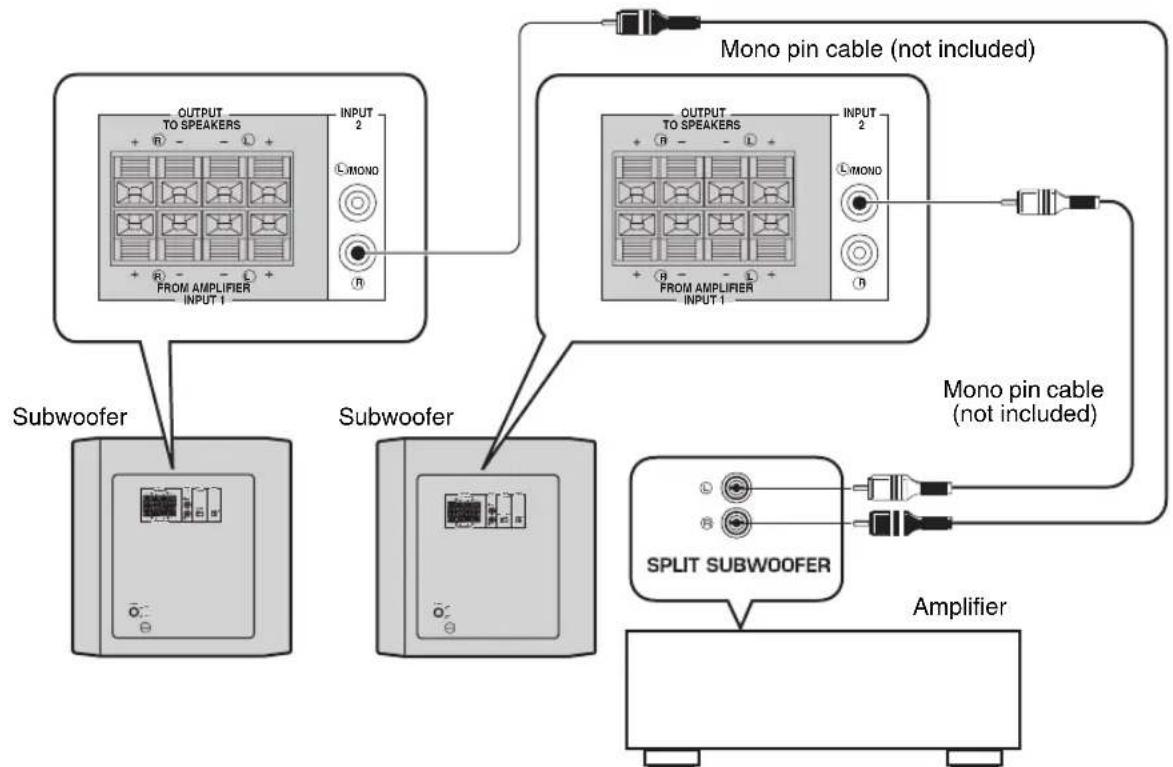
- When connecting the subwoofer to the SPLIT SUBWOOFER terminals on the rear of the DSP amplifier, be sure to connect the L/MONO INPUT2 terminal to the "L" side and the R INPUT2 terminal to the "R" side of the SPLIT SUBWOOFER terminals.
Notes
- Some amplifiers have line output terminals labeled PRE OUT. When you connect the subwoofer to the PRE OUT terminals of the amplifier, make sure that the amplifier has at least two sets of PRE OUT terminals. If the amplifier has only one set of PRE OUT terminals, do not connect the subwoofer to the PRE OUT terminals. Instead, connect the subwoofer to the speaker output terminals of the amplifier (refer to pages 8-9).
- When connecting to a monaural line output terminal of the amplifier, connect the L/MONO INPUT2 terminal.
- When connecting to line output terminals of the amplifier, other speakers should not be connected to the OUTPUT terminals on the rear panel of the subwoofer. If connected, they will not produce sound.
Using one subwoofer
Using two subwoofoers
[2] Connecting to speaker output terminals of the amplifier
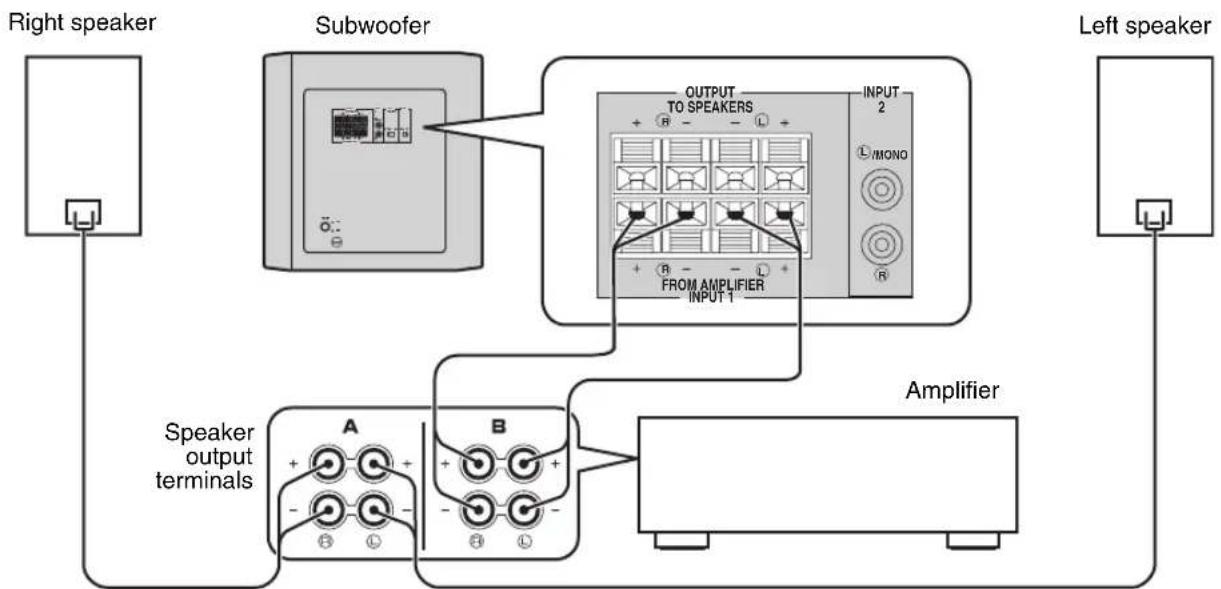
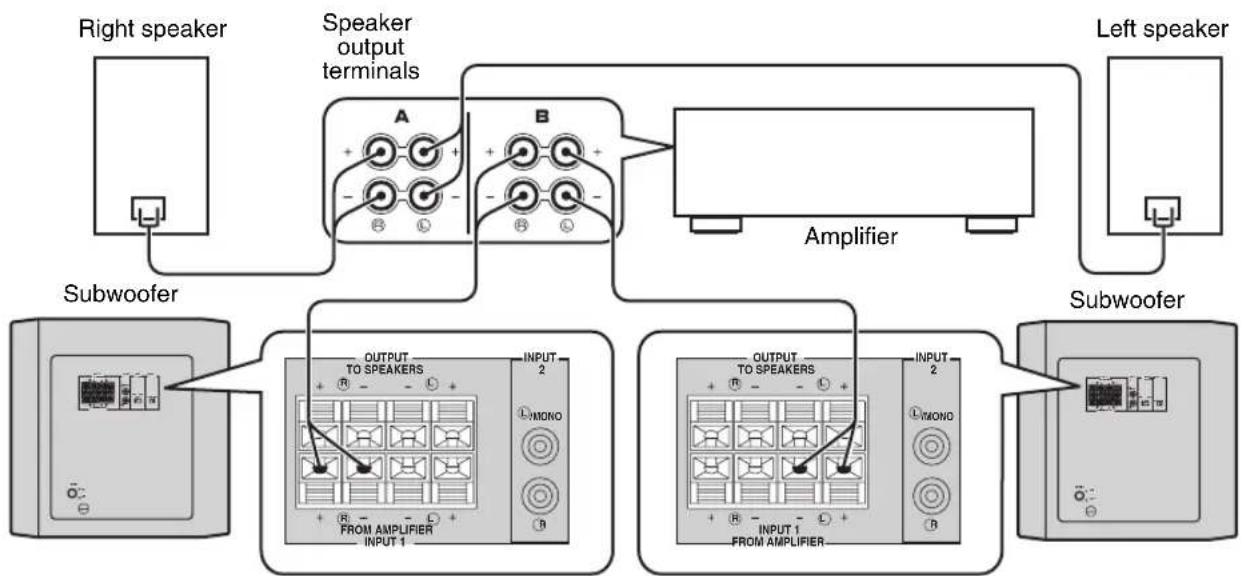
Select this method if your amplifier has no line output (pin jack) terminal. For details about the connection method of the INPUT1/OUTPUT terminals, see the "Connecting to the INPUT1/OUTPUT terminals of the subwoofer" on page 10.
If your amplifier has two sets of main speaker output terminals and both terminals can output sound signals simultaneously:
- Connect one set of main speaker output terminals of the amplifier to the INPUT1 terminals of the subwoofer, and connect the other set of main speaker output terminals of the amplifier to the main speakers.
- Set the amplifier so that both sets of main speaker output terminals output sound signals simultaneously.
Note
If your amplifier has only one set of main speaker output terminals, see page 9.
Using one subwoofer (with speaker cables)
Using two subwoofoers (with speaker cables)
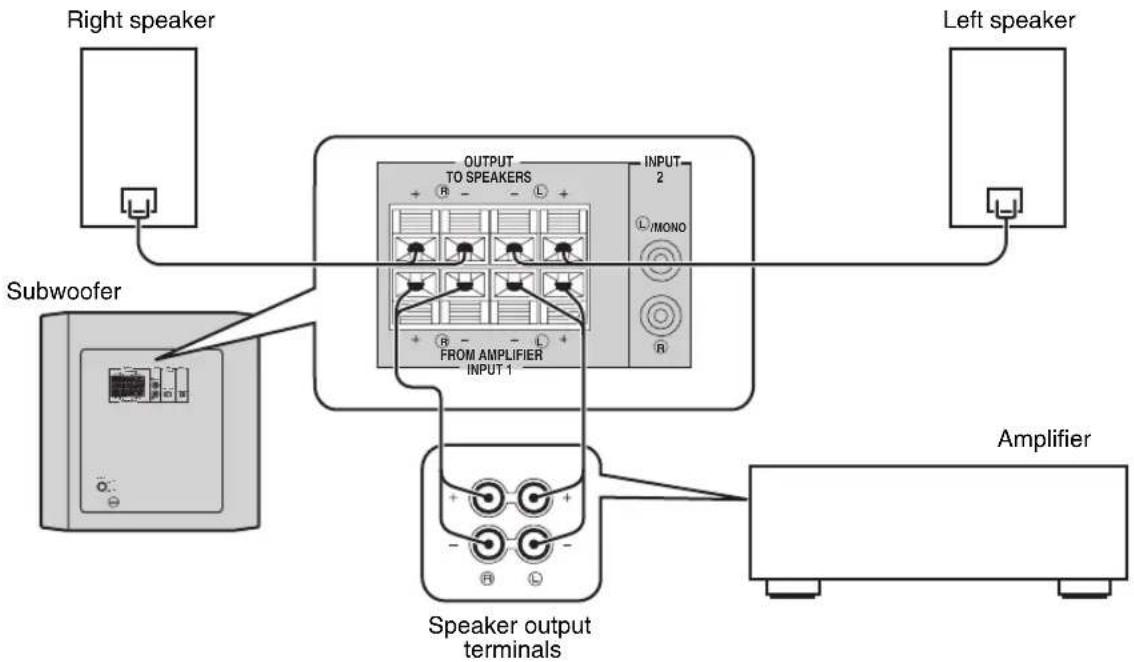
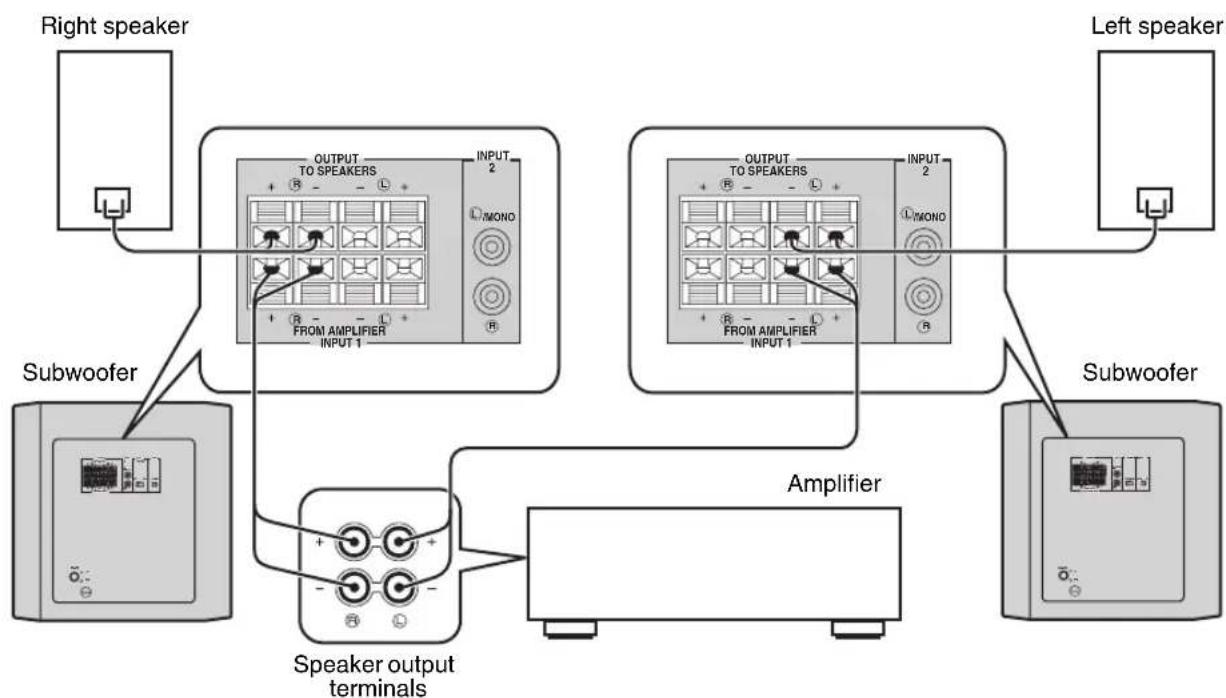
If your amplifier has only one set of main speaker output terminals:
Connect the speaker output terminals of the amplifier to the INPUT1 terminals of the subwoofer, and connect the OUTPUT terminals of the subwoofer to the main speakers.
Using one subwoofer (with speaker cables)
Using two subwoofoers (with speaker cables)
Connecting to the INPUT1/OUTPUT terminals of the subwoofer
For connection, keep the speaker cables as short as possible. Do not bundle or roll up the excess part of the cables. If the connections are faulty, no sound will be heard from the subwoofer or the speakers, or both of them. Make sure that the + and - polarity markings of the speaker cables are observed and set correctly. If these cables are reversed, the sound will be unnatural and lack bass.
Caution
Do not let the bare speaker wires touch each other, because this could damage the subwoofer or the amplifier, or both of them.
■Before connecting
Remove the insulation coating at the extremity of each speaker cable by twisting the coating off.
Good No Good
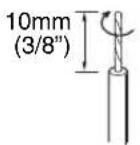

■How to connect
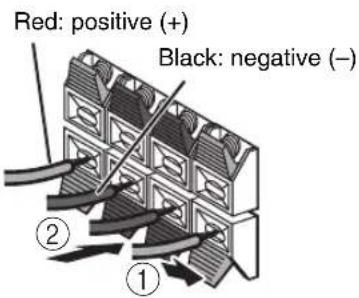
① Press and hold the terminal's tab, as shown in the figure below.
② Insert the bare wire.
③ Release your finger from the tab to allow it to lock securely on the cable's wire end.
Test the firmness of the connection by pulling lightly on the cable at the terminal.
Note
Do not insert the insulation coating into the hole. The sound may not be produced.
Plug in the subwoofer to the AC outlet
After all connections are completed, plug in the subwoofer and other audio/video components to the AC outlet.
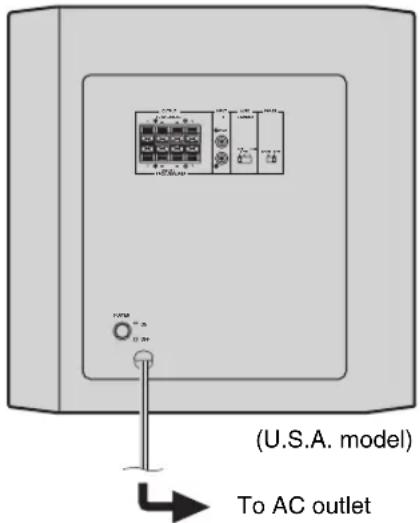
■VOLTAGE SELECTOR switch (For Asia and General models only)
This unit has a voltage selector switch on the rear panel. If the preset setting of the switch is incorrect, set the switch to the proper voltage range (110/120/ 220/230-240 V) of your area. Consult your dealer if you are unsure of the correct setting.
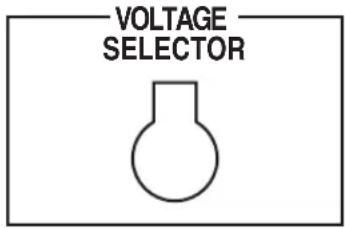
WARNING
Do not plug the subwoofer to the AC outlet before setting the VOLTAGE SELECTOR.
ADJUSTING THE SUBWOOFER BEFORE USE
Before using the subwoofer, adjust the subwoofer to obtain the optimum volume and tone balance between the subwoofer and the main speakers by following the procedures described below.
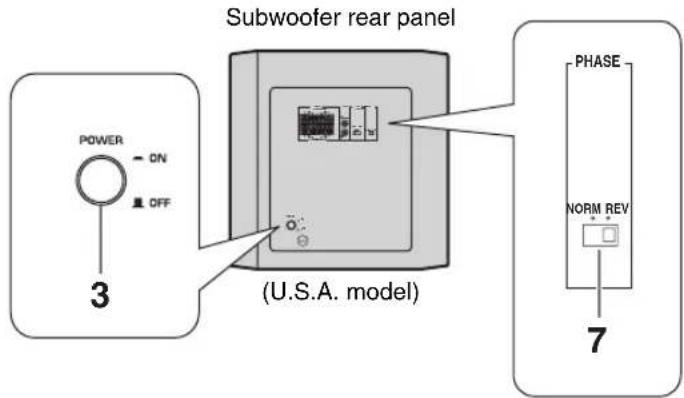
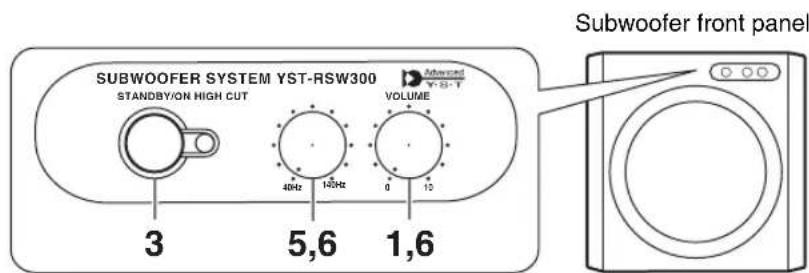
1 Set the VOLUME control to minimum (0).
2 Turn on the power of all the other components.
3 Make sure that the POWER switch on the rear panel is set to the ON position, then press the STANDBY/ON switch on the front panel to turn on the subwoofer.
- The status indicator lights up in green.
4 Play a source containing low-frequency signals and adjust the amplifier's volume control to the desired listening level.
Adjust the HIGH CUT control to the position where the desired response can be obtained. Normally, set the control to the level a little higher than the main speaker's rated minimum reproducible frequency*.
- The main speaker's rated minimum reproducible frequency can be looked up in the speakers' catalog or owner's manual.
6 Increase the volume gradually to adjust the volume balance between the subwoofer and the main speakers. Normally, set the control to the level where you can obtain a little more bass effect than when the subwoofer is not used. If the desired response cannot be obtained, adjust the HIGH CUT control and the VOLUME control again.
7 Set the PHASE switch to the position which gives you the better bass sound. Normally, set the switch to the REV (reverse) position. If the desired response cannot be obtained, set the switch to the NORM (normal) position.
Notes
- Once the volume balance between the subwoofer and the main speakers is adjusted, you can adjust the volume of your whole sound system by using the amplifier's volume control. However, if you change the main speakers to others, you must make this adjustment again.
For adjusting the VOLUME control, the HIGH CUT control and the PHASE switch, refer to "FREQUENCY CHARACTERISTICS" on page 14.
AUTOMATIC POWER-SWITCHING FUNCTION
This function automatically switches the unit between standby and power-on modes.
- The subwoofer automatically places itself in standby mode if it does not receive an input signal for 7 or 8 minutes (the status indicator lights red).
- When the subwoofer detects a bass signal input of below 200Hz , it automatically places itself in power-on mode (the status indicator lights green).
Changing the AUTO STANDBY setting
1 Set the subwoofer to standby.
2 Change the AUTO STANDBY setting.
- LOW: Normally select this position to activate this function.
- HIGH: If this function does not operate with AUTO STANDBY switch set to LOW, select this position so that the subwoofer detects input signals with a lower level and switches the power on automatically.
- OFF: Select this position to deactivate this function, for example, when the subwoofer switches the power on unexpectedly by sensing noises from other appliances.
Notes
- This function does not operate when the POWER switch is set to the OFF position, or when you manually set the subwoofer to the standby mode by pressing the STANDBY/ON switch.
- Noise received from other appliances may extend the time period before the subwoofer places itself in the standby mode to more than 8 minutes.
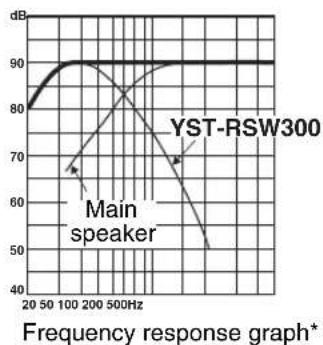
FREQUENCY CHARACTERISTICS
This subwoofer's frequency characteristics
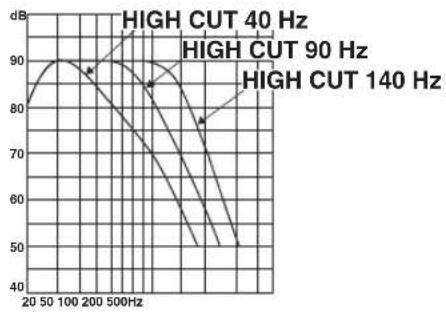
The figures below show the optimum adjustment of each control and the frequency characteristics when this subwoofer is combined with a typical main speaker system.
Example 1
When combined with a 4" or 5" (10 cm or 13 cm) acoustic suspension, 2 way system main speakers:
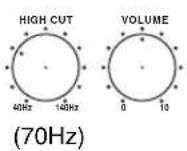
PHASE
■Example 2
When combined with an 8" or 10" (20 cm or 25 cm) acoustic suspension, 2 way system main speakers:
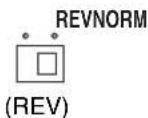
PHASE
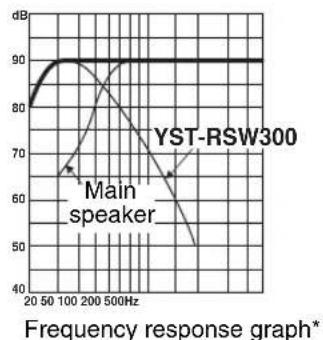
*This diagram does not depict actual frequency response characteristics accurately.
ADVANCED YAMAHA ACTIVE SERVO TECHNOLOGY II
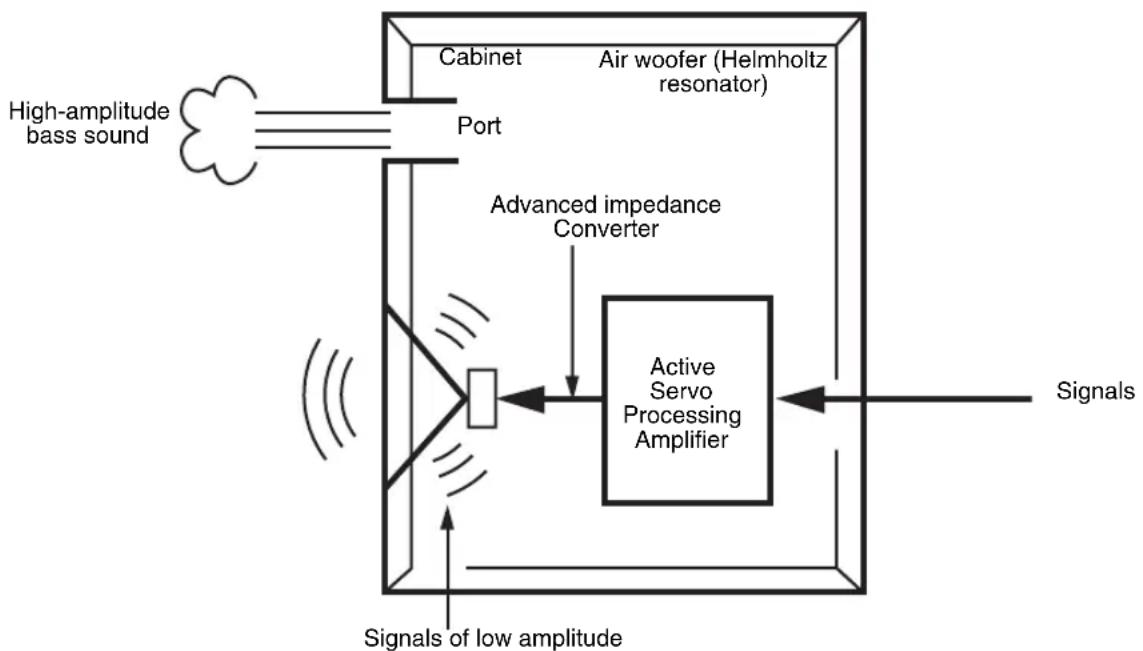
In 1988, Yamaha brought to the marketplace speaker systems utilizing YST (Yamaha Active Servo Technology) to give powerful, high quality bass reproduction. This technique uses a direct connection between the amplifier and speaker, allowing accurate signal transmission and precise speaker control.
As this technology uses speaker units controlled by the negative impedance drive of the amplifier and resonance generated between the speaker cabinet volume and port, it creates more resonant energy (the "air woofer" concept) than the standard bass reflex method. This allows bass reproduction from much smaller cabinets than before.
Yamaha's newly developed Advanced YST II adds many refinements to Yamaha Active Servo Technology, allowing better control of the forces driving the amplifier and speaker. From the amplifier's point of view, the speaker impedance changes depending on the sound frequency. Yamaha developed a new circuit design combining negative-impedance and constant-current drives, which provides a more stable performance and clear bass reproduction without any murkiness.
TROUBLESHOOTING
Refer to the chart below when this unit does not function properly. If the problem you are experiencing is not listed below or if the instructions given below do not help, disconnect the power cord and contact your authorized Yamaha dealer or service center.
| Problem Cause What to Do | ||
| Power is not supplied even though the STANDBY/ON switch is set to the ON position. | The power plug is not securely connected. | Connect it securely. |
| The POWER switch is set to the OFF position. | Set the POWER switch to the ON position. | |
| No sound. The volume is set to minimum. | Raise the volume up. | |
| Speaker cables are not connected securely. | Connect them securely. | |
| Sound level is too low. Speaker cables | are not connected correctly. | Connect them correctly, that is L (left) to L, R (right) to R, “+” to “+” and “-” to “-”. |
| Setting of the PHASE switch is not proper. | Set the PHASE switch to the other position. | |
| A source sound with few bass frequencies is played. | Play a source sound with bass frequencies. Set the HIGH CUT control to a higher position. | |
| It is influenced by standing waves. Reposition on the subwoofer or break up the parallel surface by placing bookshelves etc. along the walls. | ||
| The subwoofer does not turn on automatically. | The POWER switch is set to the OFF position. | Set the POWER switch to the ON position. |
| The STANDBY/ON switch is set to the STANDBY position. | Set the STANDBY/ON switch to the ON position. | |
| The AUTO STANDBY switch is set to the OFF position. | Set the AUTO STANDBY switch to the “HIGH” or “LOW” position. | |
| The level of input signal is too low. | Set the AUTO STANDBY switch to the “HIGH” position. | |
| The subwoofer does not turn into the standby mode automatically. | There is an influence of noise generated from external appliances etc. | Move the subwoofer farther away from such appliances and/or reposition the connected speaker cables. Otherwise, set the AUTO STANDBY switch to the OFF position. |
| The AUTO STANDBY switch is set to the OFF position. | Set the AUTO STANDBY switch to the “HIGH” or “LOW” position. | |
| The subwoofer turns into the standby mode unexpectedly. | The level of input signal is too low. | Set the AUTO STANDBY switch to the “HIGH” position. |
| The subwoofer turns on unexpectedly. | There is an influence of noise generated from external appliances etc. | Move the subwoofer farther away from such appliances and/or reposition the connected speaker cables. Otherwise, set the AUTO STANDBY switch to the OFF position. |
SPECIFICATIONS
Type .......Advanced Yamaha Active Servo Technology II
Driver. .25 cm (10") cone woofer
Magnetic shielding type
Output Power 250 W (100 Hz, 5 Ω 10% T.H.D)
Dynamic Power 270 W, 5 Ω
Input Sensitivity (50 Hz, 250 W/5 Ω, L+R)
Speaker terminal 1.0 V
RCA pin jack 50 mV
Input Impedance
Speaker terminal 2.2 kΩ
RCA pin jack 12 kΩ
Frequency Response 20 Hz - 160 Hz
Power Supply
U.S.A. and Canada models AC 120V,60 Hz
U.K. and Europe models .AC 230V,50 Hz
Australia model.. AC 240V, 50Hz
Asia and General models
AC 110/120/220/230-240 V, 50/60 Hz
Korea model .AC 220V,60 Hz
Power Consumption 80 W
Standby Power Consumption 0.5 W
Dimensions (W× H× D)
372 mm x 400 mm x 428 mm
(14-5/8" x 15-3/4" x 16-7/8")
Weight. 20 kg (44 lbs. 1oz.)
- Please note that all specifications are subject to change without notice.
ACCESSIONS FOURNIS 2
POSITIONNEMENT 3
LES COMMANDES ET LEURS FONCTIONS 4
BRANCHEMENTS 6
Type .......Advanced Yamaha Active Servo Technology II
MEDFOLJANDE TILLBEHOR 2
PLACERING 3
REGLAGE OCH DERAS FUNKTIONER 4
ANSLUTNINGAR 6
JUSTERING AV SUBWOOFERHÖGTALAREN INNAN BRUK 12
AUTOMATISK PÅSLAGNING/AVSTÄNGNING 13
JUSTERING AV SUBWOOFERHÖGTALAREN INNAN BRUK
Högtalarutgang 1,0 V
RCA-jack 50 mV
Inimpedans
Type .......Advanced Yamaha Active Servo Technology II
Driver. Conuswoofer van 25 cm
© 2007 YAMAHA CORPORATION All rights reserved.