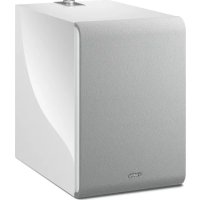
NSNSW100 - Subwoofer YAMAHA - Free user manual and instructions
Find the device manual for free NSNSW100 YAMAHA in PDF.



| Product Type | Network Subwoofer |
| Model | YAMAHA NS-NSW100 |
| Dimensions (W × H × D) | 252 mm × 383 mm × 418 mm |
| Weight | 12.6 kg |
| Power Supply | AC 110-120/220-240 V, 50/60 Hz (depending on region) |
| Power Consumption | 60 W |
| Output Power | 130 W (100 Hz, 5 Ω, 10% THD) |
| Frequency Response | 28 Hz – 300 Hz |
| Speaker | 20 cm cone woofer, without magnetic shielding |
| Inputs | Ethernet (RJ45), Analog (3.5 mm mono minijack) |
| Wireless Connectivity | Wi-Fi IEEE 802.11 a/b/g/n/ac (2.4 and 5 GHz) |
| Audio Technologies | Advanced YST II, Twisted Flare Port |
| Network Functions | MusicCast, pairing with Pairing Master, firmware update via network |
| Auto Standby | After 20 minutes of inactivity (except in analog or MusicCast mode) |
| Standby Power Consumption | Eco standby: < 0.1 W; Network standby (wired): 1.3 W; (wireless): 1.5 W |
| Safety | Thermal protection, protection circuit, automatic shutdown in case of overheating |
| Maintenance | Clean with a soft, dry cloth. Do not use chemicals. |
| Included Accessories | Power cord, user manual |
| Color | Black (not explicitly specified, but generally black for this model) |
Frequently Asked Questions - NSNSW100 YAMAHA
User questions about NSNSW100 YAMAHA
0 question about this device. Answer the ones you know or ask your own.
Ask a new question about this device
Download the instructions for your Subwoofer in PDF format for free! Find your manual NSNSW100 - YAMAHA and take your electronic device back in hand. On this page are published all the documents necessary for the use of your device. NSNSW100 by YAMAHA.
USER MANUAL NSNSW100 YAMAHA
IMPORTANT SAFETY INSTRUCTIONS
CAUTION
RISK OF ELECTRIC SHOCK
DO NOT OPEN
CAUTION: TO REDUCE THE RISK OF ELECTRIC SHOCK, DO NOT REMOVE COVER (OR BACK). NO USER-SERVICEABLE PARTS INSIDE. REFER SERVICING TO QUALIFIED SERVICE PERSONNEL.
The above warning is located on the rear of the unit.
- Explanation of Graphical Symbols
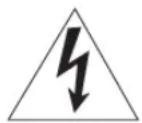
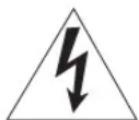
The lightning flash with arrowhead symbol, within an equilateral triangle, is intended to alert you to the presence of uninsulated “dangerous voltage” within the product’s enclosure that may be of sufficient magnitude to constitute a risk of electric shock to persons.
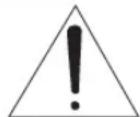
The exclamation point within an equilateral triangle is intended to alert you to the presence of important operating and maintenance (servicing) instructions in the literature accompanying the appliance.
- Read these instructions.
- Keep these instructions.
- Heed all warnings.
- Follow all instructions.
- Do not use this apparatus near water.
- Clean only with dry cloth.
- Do not block any ventilation openings. Install in accordance with the manufacturer's instructions.
- Do not install near any heat sources such as radiators, heat registers, stoves, or other apparatus (including amplifiers) that produce heat.
- Do not defeat the safety purpose of the polarized or grounding-type plug. A polarized plug has two blades with one wider than the other. A grounding type plug has two blades and a third grounding prong. The wide blade or the third prong are provided for your safety. If the provided plug does not fit into your outlet, consult an electrician for replacement of the obsolete outlet.
- Protect the power cord from being walked on or pinched particularly at plugs, convenience receptacles, and the point where they exit from the apparatus.
- Only use attachments/accessories specified by the manufacturer.
- Use only with the cart, stand, tripod, bracket, or table specified by the manufacturer, or sold with the apparatus. When a cart is used, use caution when moving the cart/apparatus combination to avoid injury from tip-over.
- Unplug this apparatus during lightning storms or when unused for long periods of time.
- Refer all servicing to qualified service personnel. Servicing is required when the apparatus has been damaged in any way, such as power-supply cord or plug is damaged, liquid has been spilled or objects have fallen into the apparatus, the apparatus has been exposed to rain or moisture, does not operate normally, or has been dropped.
IMPORTANT
Please record the serial number of this unit in the space below.
MODEL:
Serial No.:
The serial number is located on the rear of the unit.
Retain this Owner's Manual in a safe place for future reference.
FCC INFORMATION (USA)
1. IMPORTANT NOTICE: DO NOT MODIFY THIS UNIT!
This product, when installed as indicated in the instructions contained in this manual, meets FCC requirements. Modifications not expressly approved by Yamaha may void your authority, granted by the FCC, to use the product.
- IMPORTANT: When connecting this product to accessories and/or another product use only high quality shielded cables. Cable/s supplied with this product MUST be used. Follow all installation instructions.
Failure to follow instructions could void your FCC authorization to use this product in the USA.
- NOTE: This product has been tested and found to comply with the requirements listed in FCC Regulations, Part 15 for Class "B" digital devices. Compliance with these requirements provides a reasonable level of assurance that your use of this product in a residential environment will not result in harmful interference with other electronic devices. This equipment generates/uses radio frequencies and, if not installed and used according to the instructions found in the users manual, may cause interference harmful to the operation of other electronic devices.
Compliance with FCC regulations does not guarantee that interference will not occur in all installations. If this product is found to be the source of interference, which can be determined by turning the unit "OFF" and "ON", please try to eliminate the problem by using one of the following measures:
Relocate either this product or the device that is being affected by the interference.
Utilize power outlets that are on different branch (circuit breaker or fuse) circuits or install AC line filter/s.
In the case of radio or TV interference, relocate/reorient the antenna. If the antenna lead-in is 300 ohm ribbon lead, change the lead-in to coaxial type cable.
If these corrective measures do not produce satisfactory results, please contact the local retailer authorized to distribute this type of product. If you can not locate the appropriate retailer, please contact Yamaha Corporation of America A/V Division, 6600 Orangethorpe Avenue, Buena Park, CA 90620, USA.
The above statements apply ONLY to those products distributed by Yamaha Corporation of America or its subsidiaries.
COMPLIANCE INFORMATION STATEMENT (DECLARATION OF CONFORMITY PROCEDURE)
Responsible Party:
Yamaha Corporation of America A/V
Address: Division 6600 Orangethorpe Avenue,
Telephone: Buena Park, CA 90620 714-522-9011
Type of
Network Subwoofer
Equipment:
Model Name: NS-NSW100
* This applies only to products distributed by YAMAHA CORPORATION OF AMERICA.
FCC/IC NOTICE (U.S.A. and Canada)
This equipment complies with FCC/IC radiation exposure limits set forth for an uncontrolled environment and meets the FCC radio frequency (RF) Exposure Guidelines and RSS-102 of the IC radio frequency (RF) Exposure rules. This equipment should be installed and operated keeping the radiator at least 20cm or more away from person's body.
This device complies with Part 15 of FCC Rules and Industry Canada licence-exempt RSS standard(s). Operation is subject to the following two conditions:
(1) this device may not cause interference, and (2) this device must accept any interference, including interference that may cause undesired operation of this device.
This transmitter must not be co-located or operated in conjunction with any other antenna or transmitter.
(for Canada)
For indoor use only.
CAN ICES-3 (B)/NMB-3(B)
(can_b_02)
PRECAUTIONS
PLEASE READ CAREFULLY BEFORE USE. BE SURE TO FOLLOW THESE INSTRUCTIONS.
The precautions listed below are to prevent risk of harm to the user and others, as well as to prevent property damage, and to help the user use this unit properly and safely. Be sure to follow these instructions.
After reading this manual, be sure to keep it in a safe place where it can be referenced at any time.
- Be sure to request inspections or repairs from the dealer where you purchased the unit or from qualified Yamaha service personnel.
- Yamaha cannot be held responsible for injury to you or damage of the products caused by improper use or modifications to the unit.
- This product is for ordinary homes. Do not use for applications requiring high reliability, such as managing lives, health care or high-value assets.

WARNING
This content indicates "risk of serious injury or death."
Power supply/power cord
- Do not do anything that could damage the power cord.
- Do not place it near a heater.
- Do not bend it excessively or alter it.
Do not scratch it. - Do not place it under a heavy object.
Using the power cord with the core of the cord exposed could cause electric shocks or a fire. - Do not touch the power plug or cord if there is a chance of lightning. Failure to observe this may cause electric shocks.
- Use this unit with the power supply voltage printed on it. Failure to connect to an appropriate AC outlet may cause a fire, electric shocks, or malfunctions.
- Check the electric plug periodically and remove any dirt or dust which may have accumulated on it. Failure to observe this may cause a fire or electric shocks.
- When setting up the unit, make sure that the AC outlet you are using is easily accessible. If some trouble or malfunction occurs, immediately turn off the power switch and disconnect the plug from the AC outlet. Even when the power switch is turned off, as long as the power cord is not unplugged from the wall AC outlet, the unit will not be disconnected from the power source.
- If you hear thunder or suspect approaching lightning, quickly turn off the power switch and pull the power plug from the AC outlet. Failure to observe this may cause a fire or malfunctions.
- If not using the unit for long periods of time, be sure to pull the power plug from the AC outlet. Failure to observe this may cause a fire or malfunctions.
Do not disassemble
- Do not disassemble or modify this unit. Failure to observe this may cause a fire, electric shocks, injury, or malfunctions. If you notice any irregularities, be sure to request an inspection or repair from the dealer where you purchased the unit or from qualified Yamaha service personnel.
Water warning
- Do not expose the unit to rain, use it near water or in damp or wet conditions, or place on it any containers (such as vases, bottles or glasses) containing liquids which might spill into any openings or places where water may drop. A liquid such as water getting into the unit may cause a fire, electric shocks, or malfunctions. If any liquid such as water seeps into the device, turn off the power immediately and unplug the power cord from the AC outlet. Then, request an inspection from the dealer where you purchased the unit or from qualified Yamaha service personnel.
- Never insert or remove an electric plug with wet hands. Do not handle this unit with wet hands. Failure to observe this may cause electric shocks or malfunctions.
Fire warning
- Do not place any burning items or open flames near the unit, since they may cause a fire.
Installation
• Install in the manner instructed in the manual. Falling or toppling may result in injury or damage.
- Confirm that the finished installation is safe and secure. Also, carry out safety inspections periodically. Failure to observe this may cause devices to fall and result in injury.
Maintenance and care
- Do not use aerosols or spray-type chemicals that contain combustible gas for cleaning or lubrication. The combustible gas will remain inside the unit, which may cause explosion or fire.
Wireless unit
- Do not use this unit near medical devices or inside medical facilities. Radio waves from this unit may affect electro-medical devices.
- Do not use this unit within 15 cm (6 in) of persons with a heart pacemaker implant or a defibrillator implant. Radio waves from this unit may affect electro-medical devices, such as a heart pacemaker implant or defibrillator implant.
If you notice any abnormality
- If any of the following abnormalities occur, immediately turn off the power and disconnect the power plug.
- The power cord/plug is damaged.
- An unusual smell or smoke is emitted from the unit.
– Foreign material gets into the interior of the unit.
– There is a loss of sound during use. - There is a crack or damage in the unit.
Continued use could cause electric shocks, a fire, or malfunctions. Immediately request an inspection or repair from the dealer where you purchased the unit or from qualified Yamaha service personnel. - Be careful not to drop or apply strong impact to this unit. If you suspect the unit may have been damaged due to dropping or impact, immediately turn off the power and pull the power plug from the AC outlet. Failure to observe this may cause electric shocks, a fire, or malfunctions. Immediately request an inspection from the dealer where you purchased the unit or from qualified Yamaha service personnel.
This content indicates "risk of injury."
Power supply/power cord
- Do not use an AC outlet where the power plug fits loosely when inserted. Failure to observe this may cause a fire, electric shocks, or burns.
- When removing the electric plug from the unit or an AC outlet, always hold the plug itself and not the cord. Pulling by the cord can damage it and cause electric shocks or a fire.
- Insert the power plug firmly all the way into the AC outlet. Using the unit when it is not plugged in sufficiently can cause dust to accumulate on the plug, causing a fire or burns.
Installation
- Do not place the unit in an unstable position where it might accidentally drop or fall over and cause injuries.
- Do not block this unit's ventilation holes (cooling slits). This unit has ventilation holes on the rear to prevent the internal temperature from becoming too high. Failure to observe this may trap heat inside the unit, causing a fire or malfunctions.
- When installing this unit:
- Do not cover it with any cloth.
- Make sure the top surface faces up; do not install on its sides or upside down.
- Do not use the device in a confined, poorly-ventilated location.
Failure to observe the above may trap heat inside the unit, causing a fire or malfunctions. Ensure that there is adequate space around the unit: at least 20 cm (7-7/8 in) on top, 20 cm (7-7/8 in) on the sides, and 20 cm (7-7/8 in) on the rear.
- Do not install the unit in places where it may come into contact with corrosive gases or salt air or places that have excessive smoke or steam. Doing so may result in malfunction.
- Avoid being near the unit during a disaster, such as an earthquake. Since the unit may turn over or fall and cause injury, quickly move away from the unit and go to a safe place.
- Before moving this unit, be sure to turn off the power switch and disconnect all connection cables. Failure to observe this may damage the cables or cause you or someone else to trip and fall.
- When transporting or moving the unit always use two or more people. Attempting to lift the unit by yourself may damage your back, result in other injury, or cause damage to the unit itself.
Hearing loss
- Do not use the unit/speakers or headphones for a long period of time at a high or uncomfortable volume level, since this can cause permanent hearing loss. If you experience any hearing loss or ringing in the ears, consult a physician.
- Before connecting the unit to other devices, turn off the power for all devices. Failing to do so may result in hearing loss, electric shock, or device damage.
- When turning on the AC power in your audio system, always turn on the amplifier or receiver LAST, to avoid hearing loss and speaker damage. When turning the power off, the amplifier or receiver should be turned off FIRST for the same reason. Failure to observe the above may cause hearing impairment or speaker damage.
Maintenance
- Remove the power plug from the AC outlet before cleaning the unit. Failure to observe this may cause electric shocks.
Handling
- Do not insert your hand or fingers into panel slits of this unit. Failure to observe this may cause injury.
- Do not insert foreign materials such as metal or paper into panel slits of this unit. Failure to observe this may cause a fire, electric shocks, or malfunctions. If foreign material gets into the unit, immediately shut off the power and pull the power plug from the AC outlet and request an inspection from the dealer where you purchased the unit or from qualified Yamaha service personnel.
- Do not do the following:
- stand on or sit on the equipment.
- put heavy items on top of the equipment.
- place the equipment in a stack.
- apply unreasonable force to buttons, switches, input/output terminals, etc.
- Avoid pulling the connected cables to prevent injuries or damage to the unit by causing it to fall.
- Do not operate the unit if the sound is distorting. Prolonged use in this condition could cause overheating and result in fire.
NOTICE
Indicates points that you must observe in order to prevent product failure, damage or malfunction and data loss.
Power supply/power cord
- If not using the unit for a long period of time, be sure to pull the power plug from the outlet. Even if the [()] (Standby/On) switch has been turned off (the power light is off), a minute current is still flowing.
Installation
- Do not use this unit in the vicinity of other electronic equipment, such as a TV, radio, or mobile phone. Failure to observe this may cause this unit or the TV or radio to produce noise.
- Do not use this unit in a location that is exposed to direct sunlight that becomes extremely hot, such as near a heater, or extremely cold, or that is subject to excessive dust or vibration. Failure to observe this may cause the unit's panel to become deformed, the internal components to malfunction, or for operation to become unstable.
- Install this unit as far away from other electronic equipment as possible.
Digital signals from this unit may interfere with other electronic equipment. - If using a wireless function, avoid installing this unit near metal walls or desks, microwave ovens, or other wireless network devices. Obstructions could shorten the transmission distance.
Connections
- If connecting external units, be sure to thoroughly read the manual for each unit and connect them in accordance with the instructions. Failure to properly handle a unit in accordance with the instructions could cause malfunctions.
Handling
- Do not place vinyl, plastic, or rubber products on this unit. Failure to observe this may cause discoloration or deformation in the panel of this unit.
- If the ambient temperature changes drastically (such as during unit transportation or under rapid heating or cooling) and there is a chance condensation may have formed in the unit, leave the unit for several hours without turning on the power until it is completely dry before use. Using the unit while there is condensation can cause malfunctions.
Maintenance
- If the temperature or humidity changes drastically, water droplets (condensation) may form on the unit surface. If water droplets form, immediately wipe them off with a soft cloth. If water droplets are left on the unit, they may be absorbed into the wooden parts, causing deformation.
- When cleaning the unit, use a dry, soft cloth. Using chemicals such as benzine or thinner, cleaning agents, or chemical scrubbing cloths can cause discoloration or deformation.
Speakers
- Do not touch the speaker units. Failure to observe this may damage the speaker units.
INFORMATION
About functions and data included in the unit
• Air may be blown out from the bass reflex port. This is not a malfunction. This occurs particularly often when outputting music with heavy bass.
Wireless devices transmitting over a 5 GHz frequency band can only be used indoors. Use of such devices outdoors is prohibited by law.
• VOLTAGE SELECTOR (Asia and General models only)
The voltage selector switch on the rear panel of this unit must be set to your local main voltage BEFORE plugging this unit into the AC main supply. Voltages are 110-120/220-240 V AC, 50/60 Hz.
This unit's speakers use magnets. Do not place items that are sensitive to magnetism, such as CRT-type TVs, clocks, credit cards, floppy disks, etc., on or beside this unit.
The model number, serial number, power requirements, etc., may be found on or near the name plate, which is at the rear of the unit. You should note this serial number in the space provided below and retain this manual as a permanent record of your purchase to aid identification in the event of theft.
Model No.
Serial No.
Information for users on collection and disposal of old equipment:
This symbol on the products, packaging, and/or accompanying documents means that used electrical and electronic products should not be mixed with general household waste.
For proper treatment, recovery and recycling of old products, please take them to applicable collection points, in accordance with your national legislation.
By disposing of these products correctly, you will help to save valuable resources and prevent any potential negative effects on human health and the environment which could otherwise arise from inappropriate waste handling.
For more information about collection and recycling of old products, please contact your local municipality, your waste disposal service or the point of sale where you purchased the items.
For business users in the European Union:
If you wish to discard electrical and electronic equipment, please contact your dealer or supplier for further information.
Information on Disposal in other Countries outside the European Union:
This symbol is only valid in the European Union. If you wish to discard these items, please contact your local authorities or dealer and ask for the correct method of disposal.
About content in this manual
• The illustrations and screens in this manual are for instructional purposes only.
- The company names and product names in this manual are the trademarks or registered trademarks of their respective companies.
- Software may be revised and updated without prior notice.
(rear_en_01)
CONTENTS
FEATURES.... 7
What you can do using this unit 7
Advanced Yamaha Active Servo Technology II 9
Twisted Flare Port 9
PARTS AND THEIR FUNCTIONS .... 10
Rear panel.... 10
Top panel 11
GETTING READY.... 12
Placement 12
CONNECTIONS.... 13
Connecting to a network.... 14
Making analog connections.... 17
Adjusting the volume balance 17
OPTION SETTINGS.... 18
Updating the firmware 18
Initializing all settings (factory reset)....19
APPENDIX 19
STATUS indicator operation table 19
TROUBLESHOOTING 20
TRADEMARKS 22
SPECIFICATIONS.... 23
INTRODUCTION
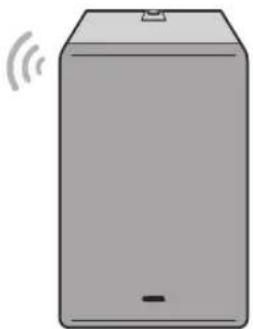
This unit is a network subwoofer that can be wirelessly connected to MusicCast Surround/Stereo compatible devices.
About this manual
When reading this manual, please note the following.
- Specifications and appearance are subject to change without notice in order to improve the product.
- Symbols used in this document

WARNING" indicates information that you must observe to avoid risk of death or serious injury.

CAUTION" indicates information that you must observe to avoid risk of injury.
- “NOTICE” indicates information that you must observe to prevent the product from malfunctioning or being damaged, or data from being lost.
- “”NOTicates supplementary information that you will find useful.
FEATURES
What you can do using this unit
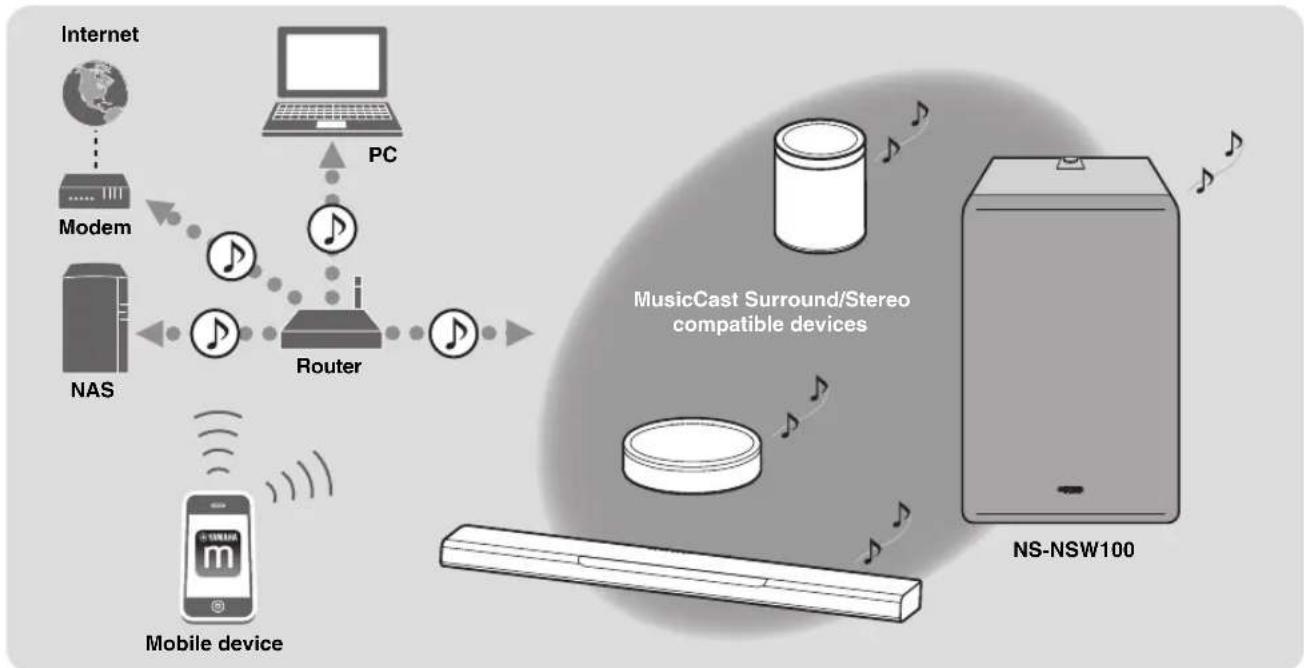
If you install the dedicated “MusicCast CONTROLLER” app on your smartphone or tablet, you’ll be able to add this unit to a MusicCast network, allowing easy playback (link playback) of low-frequency sound between MusicCast Surround/Stereo compatible devices and this unit.
- Wireless connection allows flexible installation
You'll be free to place the unit where you like, without the annoyance of making cable connections with external equipment.
- Enjoy optimal ultra-low-frequency sound at all times
The low-frequency range (crossover frequency) and volume balance are automatically adjusted as appropriate for the MusicCast Surround/Stereo compatible device that you're using, ensuring that the sound transitions naturally.
- Linked operation for power and volume
The power and volume are linked between this unit and the MusicCast Surround/Stereo compatible units that are paired with it.
- Twisted Flare Port smoothly reproduces ultra-low-frequency sound
A flared port that twists as it spreads disperses the air turbulence that occurs near the opening of the port, ensuring smooth airflow. This suppresses noise that is not included in the original input signal, allowing clear low-frequency sound to be reproduced.
Advanced use with the convenient app (MusicCast CONTROLLER)

"MusicCast CONTROLLER" is a free dedicated app for operating MusicCast compatible devices. You can use a smartphone or other mobile device as a remote control, and easily select songs or make settings on a MusicCast compatible device.
For details, search for "MusicCast CONTROLLER" on the App Store or Google Play™.
flowchart
graph TD
    A["Internet"] --> B["Modem"]
    B --> C["NAS"]
    C --> D["Router"]
    D --> E["PC"]
    E --> F["MusicCast Surround/Stereo compatible devices"]
    F --> G["NS-NSW100"]
    H["Mobile device"] --> I["Mobile device"]
    I --> J["Mobile device"]
    style A fill:#f9f,stroke:#333
    style B fill:#ccf,stroke:#333
    style C fill:#cfc,stroke:#333
    style D fill:#fcc,stroke:#333
    style E fill:#cff,stroke:#333
    style F fill:#ffc,stroke:#333
    style G fill:#cfc,stroke:#333
    style H fill:#fcc,stroke:#333
    style I fill:#cfc,stroke:#333
By using MusicCast, you can share music with other MusicCast compatible devices that are located in multiple rooms. Music from a mobile device, media server (PC or NAS), internet radio, or streaming service can be enjoyed anywhere in your home with simple operation.
For details on MusicCast and compatible devices, refer to the following website.
http://www.yamaha.com/musiccast/
In order to connect this unit to a network and use it, you'll need the "MusicCast CONTROLLER" mobile device app.
Install MusicCast CONTROLLER on your mobile device.
(→ p. 15 "Downloading the "MusicCast CONTROLLER" mobile device app")
Advanced Yamaha Active Servo Technology II
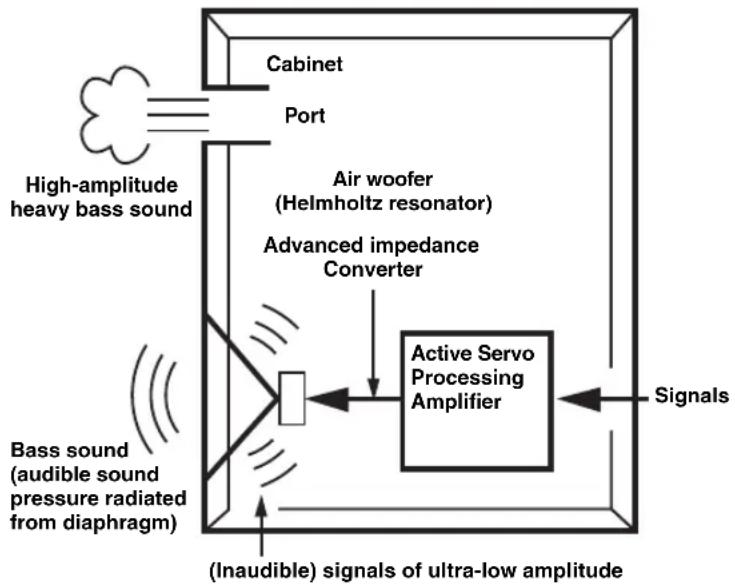
In 1988, Yamaha brought to the marketplace speaker systems utilizing YST (Yamaha Active Servo Technology) to give powerful, high quality bass reproduction. This technique uses a direct connection between the amplifier and speaker, allowing accurate signal transmission and precise speaker control.
As this technology uses speaker units controlled by the negative impedance drive of the amplifier and resonance generated between the speaker cabinet volume and port, it creates more resonant energy (the “air woofer” concept) than the standard bass reflex method. This allows for bass reproduction from much smaller cabinets than was previously possible.
Yamaha's newly developed Advanced YST II adds many refinements to Yamaha Active Servo Technology, allowing better control of the forces driving the amplifier and speaker. From the amplifier's point of view, the speaker impedance changes depending on the sound frequency. Yamaha developed a new circuit design combining negative-impedance and constant-current drives, which provides a more stable performance and clear bass reproduction, without any murkiness.
flowchart
graph TD
    A["High-amplitude heavy bass sound"] --> B["Air woofer (Helmholtz resonator)"]
    B --> C["Advanced impedance Converter"]
    C --> D["Active Servo Processing Amplifier"]
    D --> E["Signals"]
    F["Bass sound (audible sound pressure radiated from diaphragm)"] --> G["(Inaudible) signals of ultra-low amplitude"]
    G --> D
    H["Cabinet"] --> I["Port"]
    I --> D
Twisted Flare Port
Today's bass reflex speakers use a Helmholtz resonator to improve their bass reproduction.
However when reproducing bass that is in the frequency region of this Helmholtz resonator, air moves violently in and out through the port between the interior and exterior of the speaker, sometimes producing noise due to the turbulent air flow at the end of the port.
The port and the cabinet resonate at a frequency that is determined by their dimensions and shape. On the other hand, turbulence in the air flow at the end of the port contains a broad range of frequency components that are not present in the input signal. This noise occurs because the broad range of frequency components includes components that match the resonant frequencies of the port and cabinet, causing strong resonance.
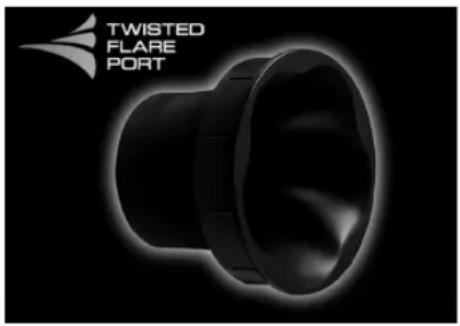
The Twisted Flare Port developed by Yamaha changes the way in which the port widens toward its end, and also adds a “twist” to suppress airflow turbulence at each end of the port and thus prevent noise from occurring.
This substantially reduces the “muddy sound” and “wind noise” that until now have been characteristic of bass reflex speakers, allowing bass to be reproduced clearly.
natural_image
Black and white image of a twisted flare port device against a black background (no text or symbols on the device itself)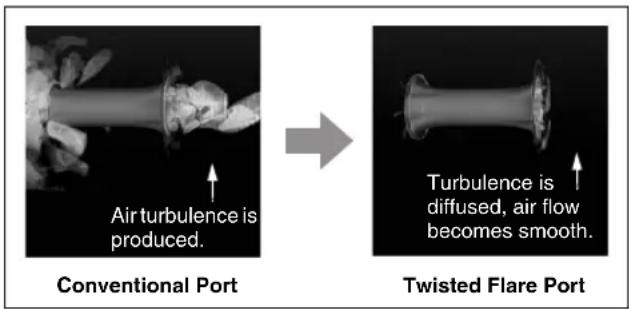
Air turbulence on both ends of the port creates noise
PARTS AND THEIR FUNCTIONS
Rear panel
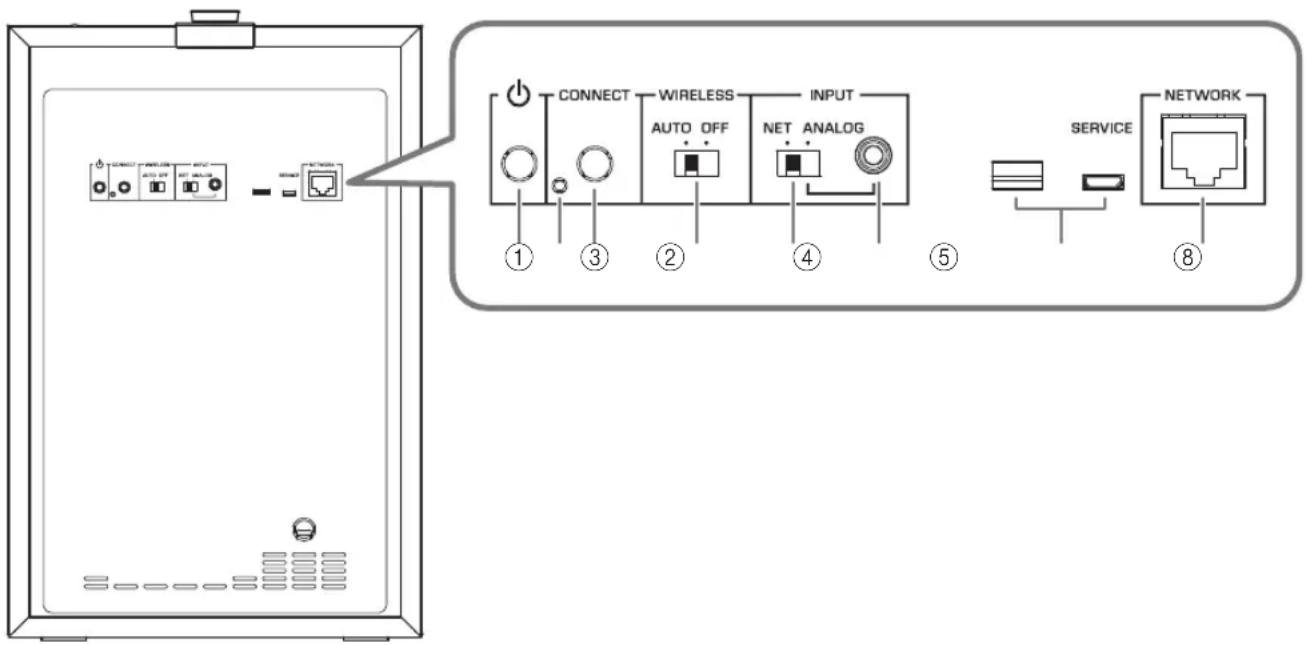
①(STANDBY/ON)
This switches the unit's power between on and standby.
②Service port
This is for service, and is not normally used.
③CONNECT
This is used for the following operations.
- Registering this unit on the MusicCast network p. 15
- Updating the firmware p. 18
- Initializing the settings (factory reset) p. 19
④WIRELESS switch
This turns the wireless communication functionality (wireless LAN) on/off.
AUTO:
Wireless communication is on.
OFF:
Wireless communication is off. If connecting the unit to a network, use a wired connection. ( p. 14 “If connecting via a cable”)
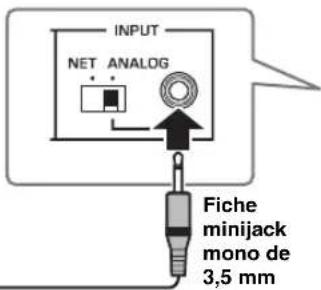
⑤INPUT switch
This switches the unit's type of connection.
NET:
Choose this if you're connecting the unit to a network.
ANALOG:
Choose this if you're connecting the unit directly to an amp or similar device, without connecting to a network.
⑥INPUT (ANALOG) jack
Use this if the INPUT switch is set to ANALOG.
Connect a cable from the amp's subwoofer jack or line output jack (such as PRE OUT) to this jack. ( p. 14 "If connecting via a cable")
⑦Service ports
These are for service, and are not normally used.
⑧NETWORK port
Use a network cable (commercially available) to connect to your network via a cabled connection.
Top panel
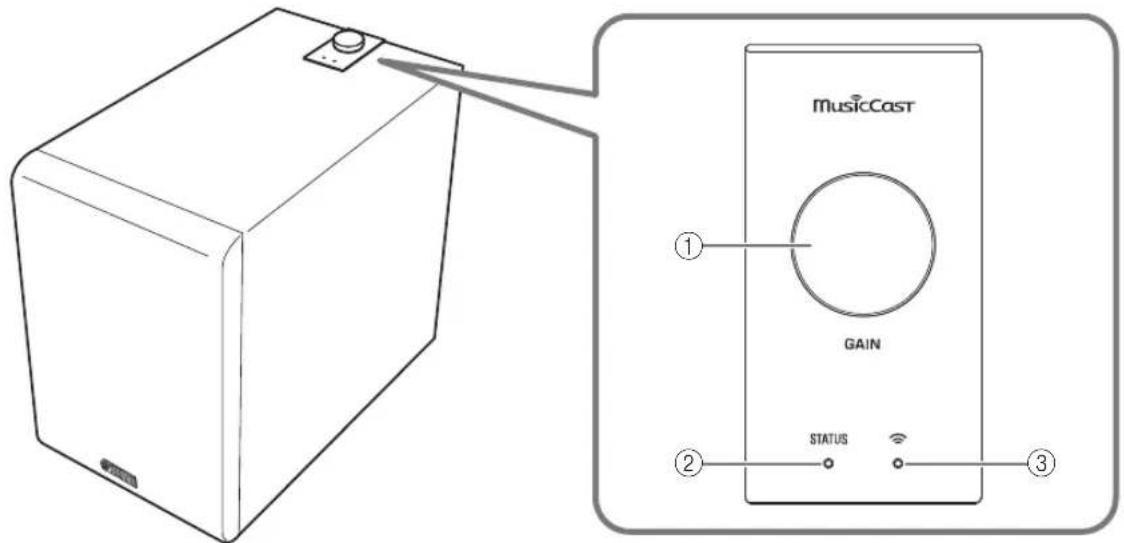
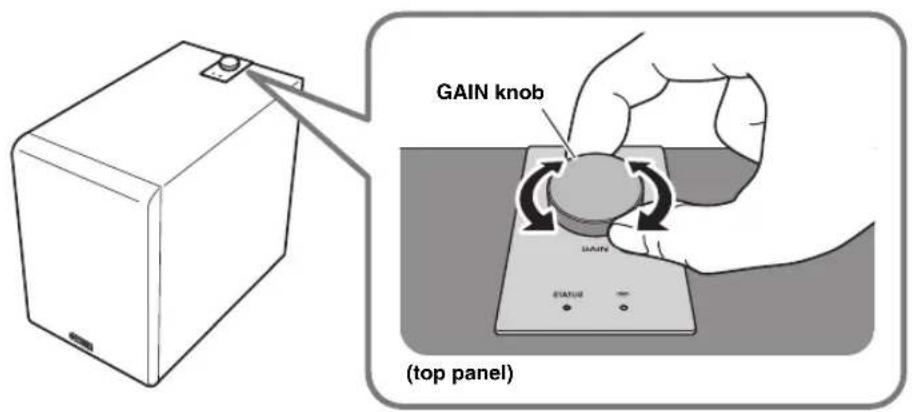
①GAIN knob
This knob adjusts the volume of this unit. Adjust the volume appropriately for your playback device. (→ p. 17 “Adjusting the volume balance”)
NOTE
While you're changing the volume, the color of the ②STATUS indicator shows the volume setting.
| Volume Color of the STATUS indicator | |
| Minimum value | Flashing blue |
| Low – Medium | Blue – Purple |
| Medium – High | Purple – Red |
| Maximum value | Flashing red |
②STATUS indicator
The color and lit/flashing status of this indicator shows the input source that is selected or the status of this unit. (→ p. 19 “STATUS indicator operation table”)
③ Wireless LAN indicator
The lit or flashing state of this indicator shows the operating status of the wireless network connection.
Auto power standby
If this unit is not operated and no playback occurs for 20 minutes, it automatically enters standby mode.
NOTE
- Thirty seconds before auto power standby occurs, the STATUS indicator begins flashing, and goes dark when standby occurs.
- Auto power standby does not operate if you're using a MusicCast connection, or if the rear panel INPUT switch is set to ANALOG.
Network standby
This unit's network function is enabled even when the power is in standby mode.
NOTE
When in network standby, the STATUS indicator is lit orange.
Eco standby mode
When eight hours have elapsed after the network was disconnected, the unit enters eco standby mode to save power.
NOTE
When in eco standby mode, the STATUS indicator is unlit.

With an advanced energy saving design, this product achieves a low power consumption of not more than two watts when in Network Standby mode.
GETTING READY
Placement
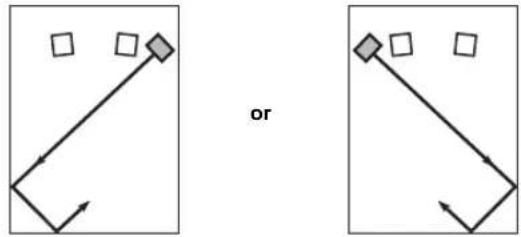
Since the low-end frequencies of audio signals feature long wavelengths, they are almost non-directional to human ears. The super-bass range does not create a stereo image. Therefore, a single subwoofer may be enough to produce a high-quality super-bass sound.
A
flowchart
graph TD
    A["Square Node"] --> B{or}
    B --> C["Square Node"]
    B --> D["Square Node"]
    style A fill:#f9f,stroke:#333
    style C fill:#bbf,stroke:#333
    style D fill:#bbf,stroke:#333
B
flowchart
graph TD
    A[" "] --> B[" "]
    C[" "] --> D[" "]
    E[" "] --> F[" "]
    G[" "] --> H[" "]
    I[" "] --> J[" "]
    K[" "] --> L[" "]
    M[" "] --> N[" "]
    O[" "] --> P[" "]
    Q[" "] --> R[" "]
    S[" "] --> T[" "]
    U[" "] --> V[" "]
    W[" "] --> X[" "]
    Y[" "] --> Z[" "]
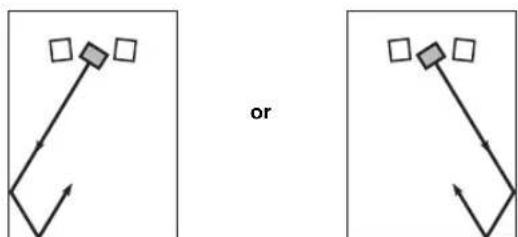
(:Subwoofer :Front speaker)
Note
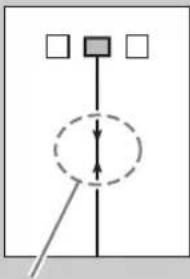
The placement shown in the figure on the right is also possible. However, if the subwoofer system is placed directly facing a wall, the bass effect may suffer due to phase cancellation caused by the interference between the direct and reflected sounds.
To prevent this from happening, place the subwoofer system at an angle.
(Figures A and)
flowchart
graph TD
    A[" "] --> C[" "]
    B[" "] --> C[" "]
    C --> D[" "]
    style C stroke-dasharray: 5 5
NOTICE
There may be a case that you cannot obtain enough super-bass sound from the subwoofer due to standing waves.
NOTICE
- Placing the subwoofer too close to a CRT-type TV may impair the picture color or cause a buzzing noise. In this case, place the subwoofer and TV at a separated position where these effects do not occur. This is not an issue with LCD and plasma TVs.
- If the speaker volume is very loud, furniture or window glass may resonate and the subwoofer itself may vibrate. In this case, lower the volume level. To limit resonance, use a thick curtain or similar cloth that tends to absorb sound vibrations effectively. Also, changing the subwoofer position may be helpful.
- This unit's speaker uses magnets. Devices that are affected by magnetism (CRT televisions, clocks, bank cards, etc.) must not be placed on or near this unit.
CONNECTIONS
If using with a network connection
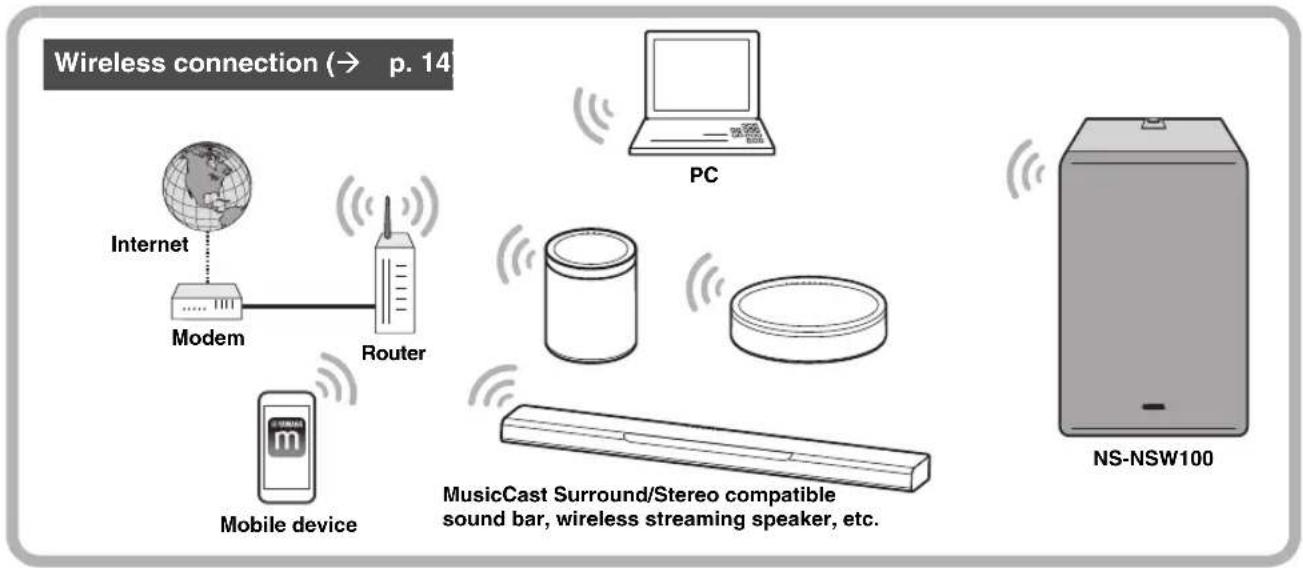
flowchart
graph TD
    A["Internet"] --> B["Modem"]
    B --> C["Router"]
    C --> D["Mobile device"]
    D --> E["PC"]
    E --> F["MusicCast Surround/Stereo compatible sound bar, wireless streaming speaker, etc."]
    G["NS-NSW100"] --> H["Computer"]
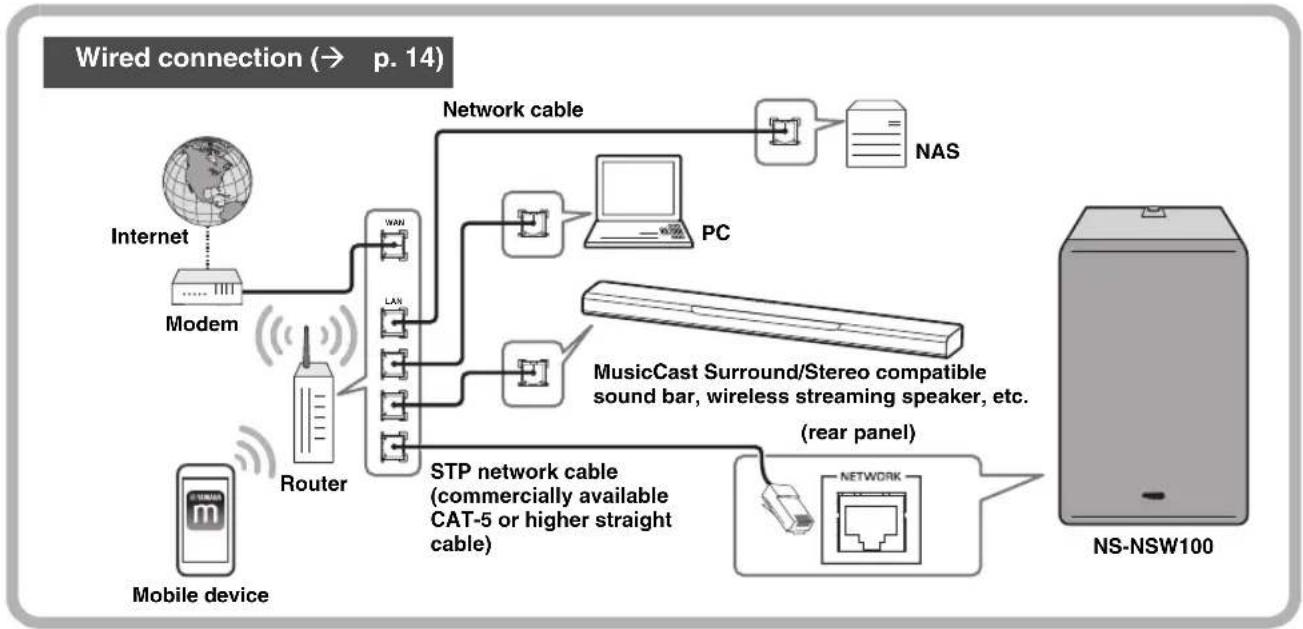
flowchart
graph TD
    A["Internet"] --> B["Modem"]
    B --> C["Router"]
    C --> D["STP network cable (commercially available CAT-5 or higher straight cable)"]
    D --> E["Network cable"]
    E --> F["NAS"]
    E --> G["PC"]
    G --> H["MusicCast Surround/Stereo compatible sound bar, wireless streaming speaker, etc. (rear panel)"]
    H --> I["NS-NSW100"]
    J["Mobile device"] --> C
If using without connecting to a network (analog connection)
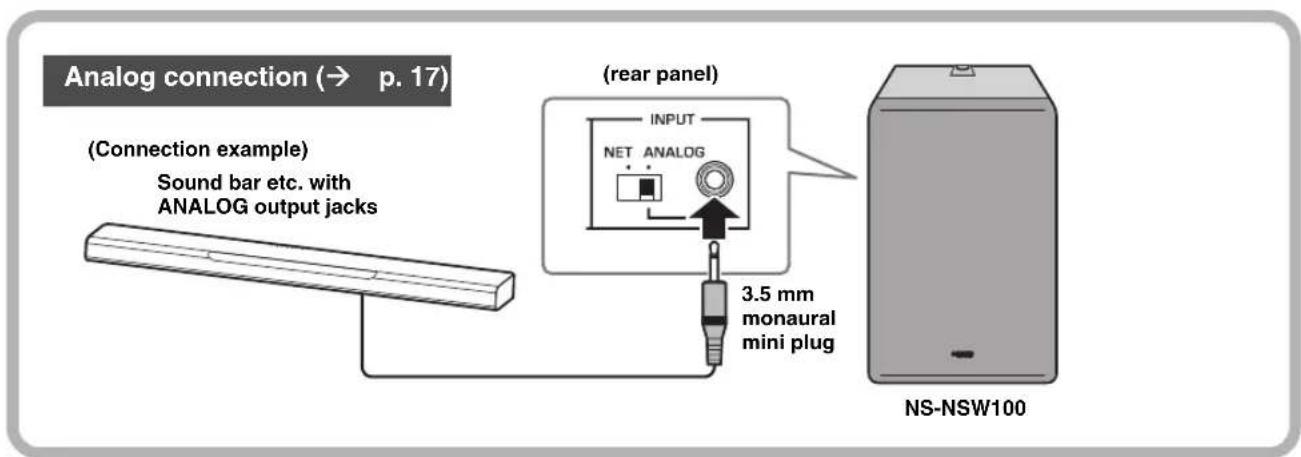
Connecting to a network
Preparations for network connection
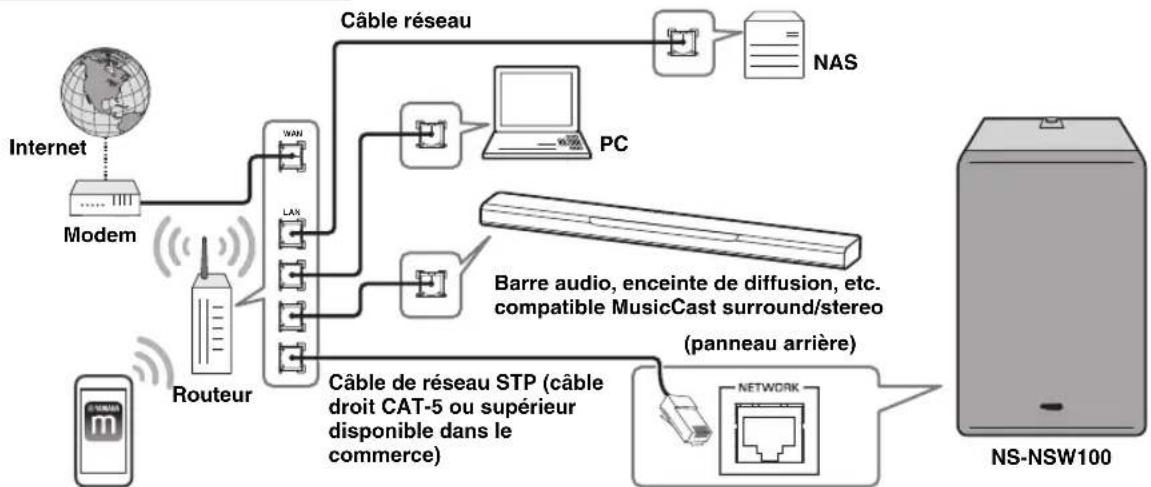
This unit can be connected to a network either via a cable or wirelessly. Choose the connection method that's appropriate for your situation.
If connecting wirelessly
Make settings so that this unit can communicate wirelessly.
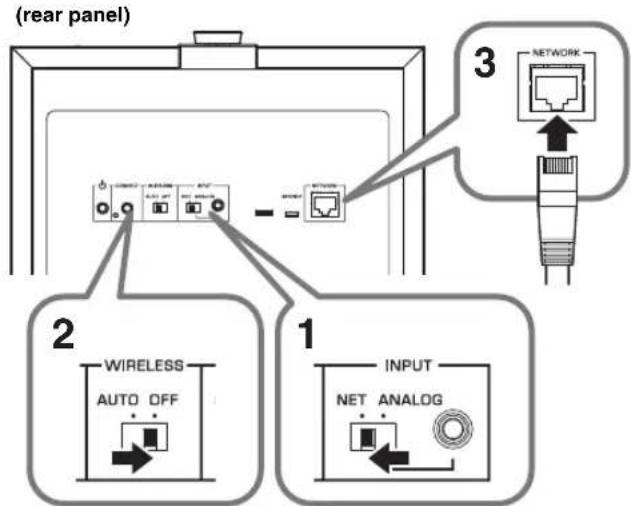
- Set the rear panel INPUT switch to NET.
- Set the rear panel WIRELESS switch to AUTO.
NOTICE
Do not connect a network cable to the NETWORK port. If a network cable is connected, the wired connection takes priority and wireless connection is not possible.
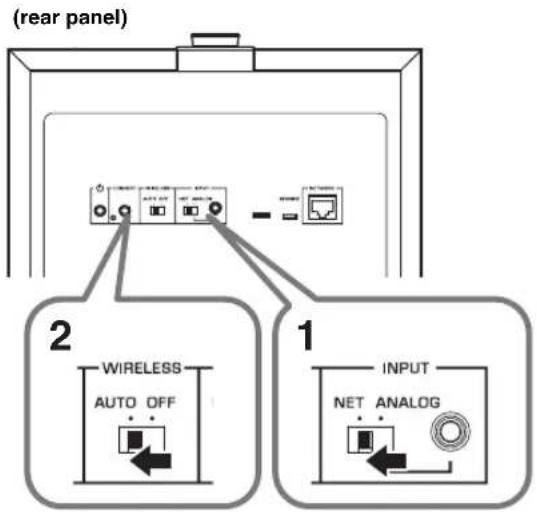
If connecting via a cable
Use a commercially available STP network cable (CAT-5 or higher straight cable) to connect this unit to your router.
- Set the rear panel INPUT switch to NET.
- Set the rear panel WIRELESS switch to OFF.
- Connect a network cable to the NETWORK port.
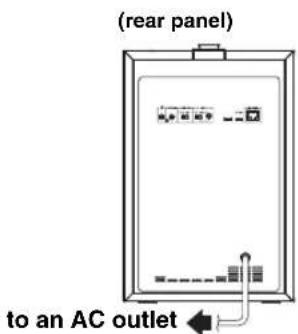
Powering-on this unit
- Insert the power cord plug into an AC outlet.
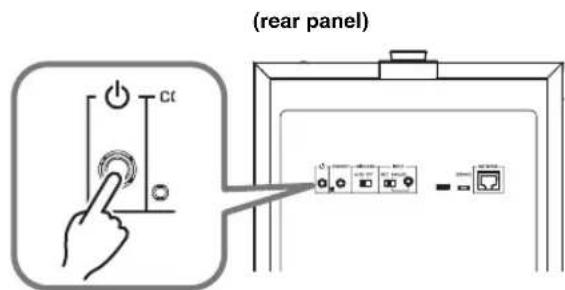
- Press the rear panel ⏻ (STANDBY/ON) button to turn on the power of this unit.
NOTE
- If the network is starting up, the STATUS indicator on the top panel flashes green.
- If you're using a wired connection, the LED on the inside of the NETWORK port flashes when connected to the router.
Downloading the "MusicCast CONTROLLER" mobile device app
Install the MusicCast CONTROLLER app on your mobile device, connect this unit to the network, and register this unit as a MusicCast device.
Search for "MusicCast CONTROLLER" on the Apple Store or Google Play, and install it.
NOTE
- Make sure that the mobile device you're using is connected to your home's router before you proceed.
- The screens and menu names etc. of MusicCast CONTROLLER might change without notice.
- If a different MusicCast device is already registered to the MusicCast CONTROLLER app, you can add this unit to the app by tapping ⚙️ (Settings) in the “Room select” and selecting “Add new device.”
Registering this unit on the MusicCast network
Here's how to use "MusicCast CONTROLLER" to register this unit on the MusicCast network, and simultaneously make network connection settings for this unit.
NOTE
To connect wirelessly to the network, you'll need to have the SSID and security key of the wireless LAN router (access point) that you're using.
- On your mobile device, start "MusicCast CONTROLLER" and tap "Settings."
- From the app's "Settings," tap "Add new device."
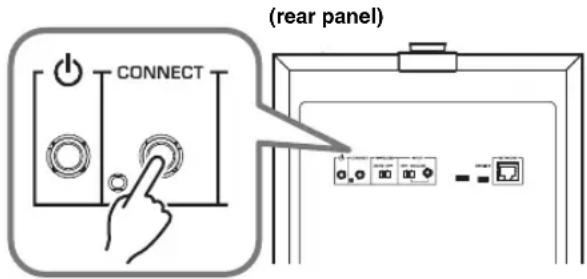
- As directed by the instructions that appear in the screen of your mobile device, operate "MusicCast CONTROLLER" and on the rear panel of this unit, hold down CONNECT for 5 seconds or longer.
- As directed by the instructions that appear in the screen of your mobile device, operate "MusicCast CONTROLLER" to specify the network.
Next, pair this unit with the Pairing Master device of the MusicCast network. ( p. 16 “Pairing this unit with the Pairing Master”)
NOTE
If you use a wireless connection to register this unit on the MusicCast network, the Wireless LAN indicator of this unit's top panel will light, indicated that registration on the MusicCast network is complete.
To cancel this unit's MusicCast network registration
Operate "MusicCast CONTROLLER" to cancel this unit's registration.
NOTE
If you initialize this unit before canceling the registration, the screen of the “MusicCast CONTROLLER” may show an error indicated that this device does not exist.
Pairing this unit with the Pairing Master
If you register this unit as a Pairing Device of the MusicCast network's Pairing Master (sound bar or wireless streaming speaker, etc.), you can use it as a network subwoofer to enjoy richer sound.
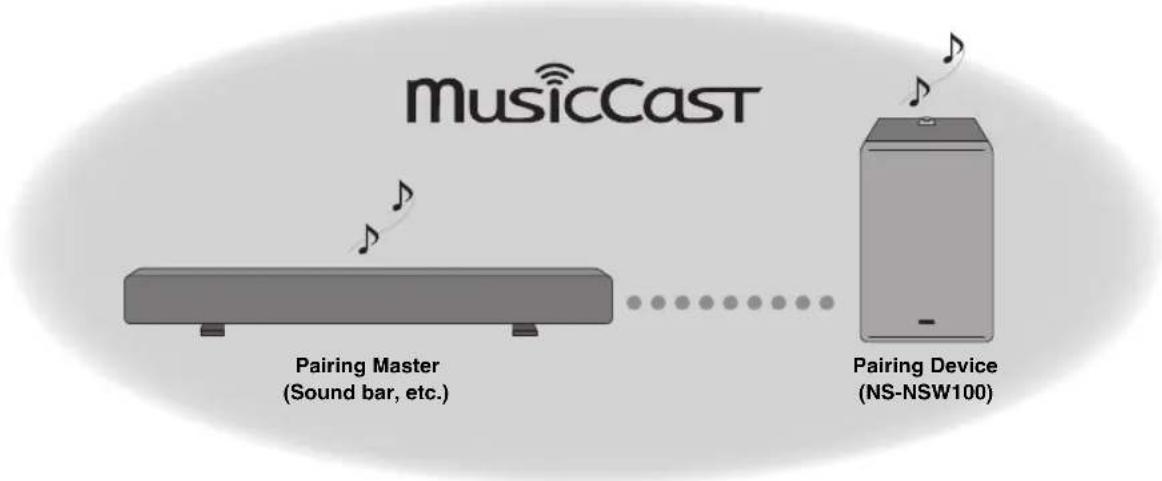
flowchart
graph LR
    A["MusicCast"] --> B["Pairing Master (Sound bar, etc.)"]
    B --> C["..."]
    C --> D["Pairing Device (NS-NSW100)"]
1. On your mobile device, start "MusicCast CONTROLLER" and open the settings screen of the Pairing Master.
NOTE
- Register both this unit and the Pairing Master on the MusicCast network in advance. (→ p. 15 "Registering this unit on the MusicCast network")
- When setting the Pairing Master in the screen of the app, select the following.
- For wireless connection: "Normal"
- For wired connection: "Speed Boost"
2. Following the guidance in the app, register this unit as a network subwoofer (Pairing Device).
When you have finished registering this unit as a Pairing Device, operate the Pairing Master in the app screen to play back audio.
To cancel pairing with the Pairing Master
Operate "MusicCast CONTROLLER" to cancel this unit's registration.
■Linking operation with the Pairing Master
When you pair this unit as a network subwoofer, this unit will follow operations of the Pairing Master.
Power operation
This unit's power (Standby/ON) is linked with operations of the Pairing Master.
Volume and other settings
In accordance with a setting of the Pairing Master this unit's settings also change in order to obtain the optimal low-frequency sound.
Settings that are linked:
• Volume
• High-cut filter (crossover frequency)
Making analog connections
Use the ANALOG jack on the rear panel of this unit if you want to connect this unit directly to other devices (such as a sound bar) without connecting to a network.
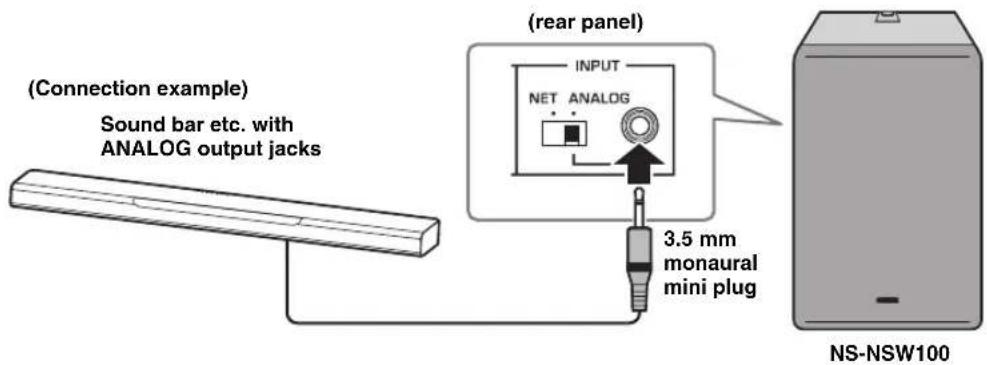
- Connect this unit's rear panel ANALOG jack to the subwoofer output jack or line output jack (e.g., PRE OUT) of the connected device.
- Set this unit's rear panel INPUT switch to ANALOG.
- Insert the power cord plug into an AC outlet.
- Press the rear panel ⏻ (STANDBY/ON) button to turn on the power of this unit.
NOTICE
- Do not connect the power cord to the AC outlet until all connections are completed.
- Depending on the device (sound bar, etc.) that you're connecting, the connection method and the names of the jacks might differ from this instructions in this document, so you should also refer to the owner's manual of the respective device.
- When this unit is shipped from the factory, its volume is set to the minimum setting. When you have finished making connections, make adjustments so that this unit produces an appropriate volume.
Adjusting the volume balance
In order to ensure effective low-frequency playback, you can adjust the volume so that the sound of this unit blends naturally with the speaker that you're using.
■If using a network connection
If this unit is connected to a network, the volume of this unit is automatically adjusted to match the Pairing Master, but you can make fine adjustments to your taste by using the top panel GAIN knob.
Adjustment range: ±10 dB
Default value: Depends on the setting of the Pairing Master
■If using an analog connection
Use the top panel GAIN knob to adjust the volume of this unit.
High-cut filter frequency: fixed at 160 Hz
Default value: MUTE
OPTION SETTINGS
Updating the firmware
If this unit is connected to a network, the firmware can be updated via the network. When new firmware is available, the STATUS indicator flashes white when the power of this unit turns on. Use the following procedure to update the firmware.
NOTICE
Observe the following points during the update.
- Do not operate this unit
- Do not disconnect the power cord or the network cable
Firmware update procedure
- On the rear panel, press ⏻ (STANDBY/ON) to put the unit in standby mode.
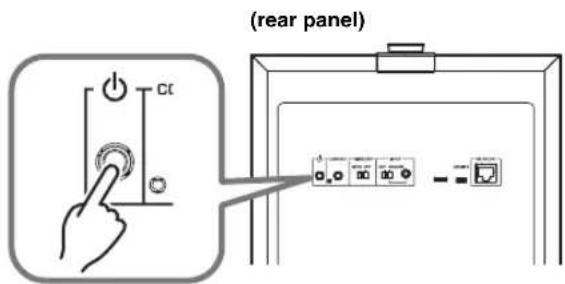
- On the rear panel, hold down CONNECT for 10 seconds or longer.
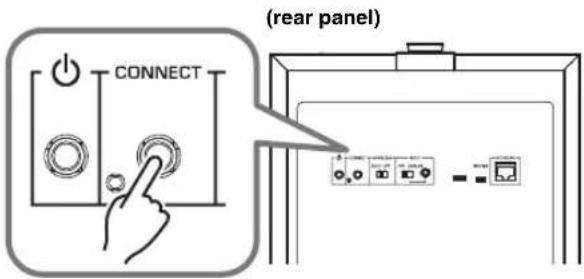
The STATUS indicator and the Wireless LAN indicator on the top panel flash, and the firmware update begins.
When the indicator changes to steadily lit, the firmware update is complete.
NOTE
- Firmware update takes about 10 or 20 minutes.
- If the internet connection is not fast enough, or depending on the connection status of the wireless network, the firmware update might take longer or might fail.
- If the firmware update fails, the STATUS indicator flashes red. Wait a while, and then try the operation again.
■Checking the firmware version
Here's how you can check the version of the firmware that's installed in this unit.
- On the rear panel, press ⏻ (STANDBY/ON) to put the unit in standby mode.
- On the rear panel, press CONNECT.
The STATUS indicator and the Wireless LAN indicator on the top panel flash a number of times to indicate the firmware version. For example if the firmware version is 1.3, the STATUS indicator flashes once and the Wireless LAN indicator flashes three times.
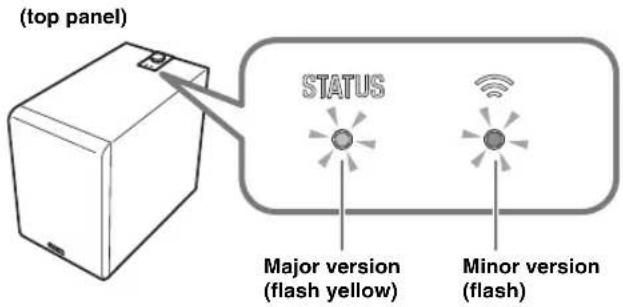
NOTE
If the firmware version is 2.0, the STATUS indicator flashes twice and the Wireless LAN indicator remains unlit.
- Press CONNECT once again to return to standby mode.
Initializing all settings (factory reset)

-
On the rear panel, press ⏻ (STANDBY/ON) to put the unit in standby mode.
-
While holding down CONNECT, press ⏻(STANDBY/ON) once.
-
When the STATUS indicator flashes, release CONNECT.
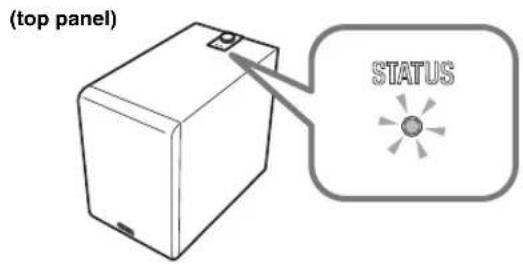
APPENDIX
STATUS indicator operation table
The color and lit/flashing state of the indicators shows the status of this unit.
NOTE
- The STATUS indicator and the Wireless LAN indicator can be used to check the firmware version of this unit. (→ p. 18 “Checking the firmware version”)
- While the firmware is being updated, the STATUS indicator and the Wireless LAN indicator can be used to check the progress. (→ p. 18 “Firmware update procedure”)
When the power is on
| Indicator Status | ||
| Green Lit The rear panel INPUT switch is set to NET. | ||
| White Lit The rear panel INPUT switch is set to ANALOG. | ||
| Green Flashing Waiting to connect to the network. | ||
| White Flashing New firmware is available. | ||
| Green/Orange | Flashing alternately | The auto power standby function will soon put the unit in standby mode. (Starts flashing 30 seconds beforehand.) |
| White/Orange | ||
| Orange Lit The unit is in network standby mode. | ||
| Blue/Purple/Red | Lit | The unit's volume is being changed.Blue: low volume – Purple: medium – Red: high volume |
| Blue/Red Flashing | The volume was set to minimum or maximum. | |
When in standby mode
| Indicator Status | ||
| Orange Lit The unit is in network standby mode. | ||
| - | Unlit | The unit's power is off or in eco standby mode. |
| Orange | Flashing | The protection circuit has operated. Turn off the power of the unit, disconnect the power plug from the AC outlet, and contact a Yamaha service center. |
TROUBLESHOOTING
Refer to the chart below if this unit does not function properly. If the problem you are experiencing is not listed below or if the instructions given below do not help, turn off the power to the unit, disconnect the power plug from the AC outlet, and contact an authorized Yamaha dealer or service center.
General
| Problem Cause What to Do | ||
| Power does not turn on.When the power is turned on, it turns off immediately.The unit does not operate correctly. | The power cord is not connected correctly. | Insert the power plug firmly into the AC outlet. |
| The unit cannot be operated. Electric shock (such as a lightning strike or excessive static electricity) or power supply voltage drop has caused the internal microcomputer to freeze. | Hold down the unit's rear panel (STANDBY/ON) button for ten seconds or longer to restart the unit.(If this does not solve the problem, disconnect the power cord from the AC outlet, wait approximately 30 seconds, and then plug it in once again.) | |
| The power suddenly turns off during use. | The protection circuit has operated to turn off the power because the internal temperature of the unit has risen. | Wait for the temperature to cool (approximately one hour), make sure that there is sufficient space around the unit and that the unit is not covered by a cloth etc., and then turn on the power again. |
| The unit does not operate correctly. | External electric shock (such as a lightning strike or excessive static electricity) or power supply voltage drop has caused the internal microcomputer to freeze. | Disconnect the power cord from the AC outlet, wait approximately 30 seconds, and then plug it in once again. |
| No sound.Low-frequency sound is not output or is not loud enough. | A source with little low-frequency sound is being played back. | Play back a source that contains low-frequency sound. |
| The sound is being affected by a standing wave. | Try changing the position or the angle of this unit. | |
| Low-frequency input signal is absent because of settings on the amp. | Change the amp's settings. | |
| If using a network connection | ||
| The volume of the MusicCast CONTROLLER app or of the Pairing Master is set to the minimum (0). Alternatively, headphones are connected to the Pairing Master. | Raise the volume by operating the MusicCast CONTROLLER app or the Pairing Master.You can also use this unit's GAIN knob to manually make fine adjustments to the volume. | |
| The network connection is not correct. Check the connection. | ||
| The playback device is not selected correctly. Operate the MusicCast CONTROLLER app or the Pairing Master to re-select the input source that you want to play back. | ||
| If using an analog connection | ||
| The volume of this unit is set to the minimum (0). | Use this unit's GAIN knob to adjust the volume. | |
| The connection is not correct. Alternatively, the connection is faulty. | Check the connection. | |
| The power does not turn on automatically when the source begins playing. | Since INPUT is set to ANALOG, the unit is not operating in linkage with the Pairing Master. | Turn on the power manually. |
| Low-frequency input signal is absent because of settings on the amp. | Change the amp's settings. | |
| Because there was no network connection for an extended time, the unit entered eco standby mode. | Turn on the power manually. | |
| Noise is output from this unit or from an electronic device located nearby. | A digital device or a high-frequency device is located near this unit. | Move this unit and the corresponding device farther apart. |
Network
| Problem Cause What to Do | ||
| Network functionality cannot be used. | Network information (IP address) has not been obtained correctly. | Enable the DHCP server function of your router. |
| Can’t connect to the wireless LAN router (access point). | MAC address filtering is enabled on the wireless LAN router (access point). | Connection is not possible if MAC address filtering is enabled. Change the settings of the wireless LAN router (access point) so that connection can occur. |
| Can’t connect to the internet via the wireless LAN router (access point). | The wireless LAN router (access point) is powered-off. | Power-on the wireless LAN router (access point). |
| The wireless LAN router (access point) and this unit are too far apart. | Locate the wireless LAN router (access point) and this unit closer together. | |
| There is an obstacle between the wireless LAN router (access point) and this unit. | Locate the wireless LAN router (access point) and this unit where there is no obstacle between them. | |
| This unit is not detected by the MusicCast CONTROLLER app. | This unit and the mobile device are not connected to the same network. | Check the network connections and the router settings, and connect them to the same network. |
| The wireless network cannot be found. | A device that generates electromagnetic radiation (such as a microwave oven or radio equipment) is located nearby. | If using this unit with a wireless connection, do not use it near a device that generates electromagnetic radiation. |
| Access to the network is being restricted by the firewall settings of the wireless LAN router (access point). | Check the firewall settings of the wireless LAN router (access point). | |
| Can’t make connection settings using the MusicCast CONTROLLER app. | The mobile device is not connected to the wireless LAN router (access point). | Connect the mobile device to the wireless LAN router, and then use the MusicCast CONTROLLER app to make settings. |
| You’re using a router that has multi-SSID support. | The router’s network separation function might be making it impossible to access this unit. When connecting a mobile device, use an SSID that allows access to this unit (try connecting to the primary SSID). | |
| Failed to update the firmware via the network. | The state of the network connection is not good. | Wait a while, and then try updating again. |
| Can’t connect with the Pairing Master. | The Pairing Master is not a MusicCast Surround/Stereo compatible device. | Use a MusicCast Surround/Stereo compatible device, or a device that allows analog connections. |
| The connection is not correct. Alternatively, the connection is faulty. | After initializing this unit, check that the Pairing Master is a MusicCast Surround/Stereo compatible unit, and then connect again. | |
| Pairing with another device has already been registered. | Cancel the registered pairing with that device, and make the registration settings again. | |
TRADEMARKS
Android™
Google Play™
Android and Google Play are trademarks of Google LLC.

CERTIFIED
The Wi-Fi CERTIFIED™ Logo is certification mark of Wi-Fi Alliance®.
Wi-Fi, Wi-Fi CERTIFIED and WPA2 are registered trademarks or trademarks of Wi-Fi Alliance®.

MusicCast is a trademark or registered trademark of Yamaha Corporation.

Yamaha Eco-Label is a mark that certifies products of high environmental performance.
Licenses
For information on the licenses of the third-party software in this product, refer to the following.
http://(IP address of this product*)/licenses.html
* IP address of this product is checked with MusicCast CONTROLLER.
Explanations regarding GPL
This product utilizes GPL/LGPL open-source software in some sections.
You have the right to obtain, duplicate, modify, and redistribute this open-source code only.
For information on GPL/LGPL open source software, how to obtain it, and the GPL/LGPL license, refer to the Yamaha Corporation website
(http://download.yamaha.com/sourcecodes/musiccast/).
SPECIFICATIONS
General
Type...... Advanced Yamaha Active Servo Technology II
Driver 20 cm (8") cone woofer, non magnetic shielding type
Amplifier Output (100 Hz, 5 Ω, 10% THD)....130 W
Frequency Response 28 Hz - 300 Hz
Power Supply/Voltage
USA and Canada models....AC 120 V, 60 Hz
Asia, Latin america and General models....AC 110-120/220-240 V, 50/60 Hz
Power Consumption 60 W
Input Section
NETWORK (wired)....Ethernet: RJ45
ANALOG (wired).... 3.5 mm Mini Jack (Mono)
Input Sensitivity....60 mV
Input Impedance 25 kΩ
Standby Power Consumption
Eco Standby .... Below 0.1 W
Network Standby (wired) Below 1.3 W
Network Standby (wireless) .... Below 1.5 W
Dimensions (W × H × D) .....252 mm × 383 mm × 418 mm (9-7/8" × 15-1/8" × 16-1/2")
Weight.... 12.6 kg (27.8 lbs.)
Wi-Fi
Wireless LAN Standards..... IEEE 802.11 a/b/g/n/ac*
* 20 MHz channel bandwidth only
Radio frequency band 2.4 GHz, 5 GHz
Available security method......WEP, WPA2-PSK (AES), Mixed Mode
PRÉCAUTIONS CONCERNANT LA SÉCURITÉ
CAUTION
RISK OF ELECTRIC SHOCK
DO NOT OPEN
ATTENTION : POUR RÉDUIRE LES RISQUES D'INCENDIE ET DE DÉCHARGE ELECTRIQUE, NE PAS RETIRER LE COUVERCLE (OU LE PANNEAU ARRIÈRE). AUCUNE PIÈCE INTERNE NE PEUT ÊTRE CHANGÉE PAR L'UTILISATEUR. POUR L'ENTRETIEN, S'ADRESSER À UN PERSONNEL QUALIFIÉ.
Advanced Yamaha Active Servo Technology II 9
Twisted Flare Port 9
FONCTIONS ET ÉLÉMENTS DE L'APPAREIL ..... 10
http://www.yamaha.com/musiccast/
Advanced Yamaha Active Servo Technology II
natural_image
Black 3D model of a twisted flare port against a black background (no text or symbols on the object itself)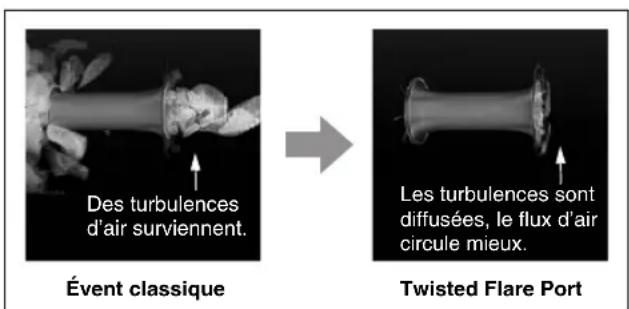
flowchart
graph TD
    A[" "] --> C[" "]
    B[" "] --> C[" "]
    C --> D[" "]
    style C stroke-dasharray: 5 5
AVIS
natural_image
Illustration of three electronic components: a cylindrical capacitor, a circular sensor device, and a rectangular electronic device with visible wiring (no text or symbols)Barre audio, enceinte de diffusion, etc. compatible MusicCast surround/stereo
natural_image
Illustration of a gray rectangular device with a speaker icon emitting sound waves (no text or symbols)NS-NSW100
Connexion filaire (→ p. 14)
natural_image
Simple line drawing of a rectangular object with a bent end, no text or symbols present(panneau arrière)
natural_image
Simple line drawing of a rectangular container with a lid and base (no text or symbols)NS-NSW100
flowchart
graph LR
    A["MusicCast"] --> B["Pairing Master (Barre audio, etc.)"]
    B --> C["Pairing Device (NS-NSW100)"]
(http://download.yamaha.com/sourcecodes/musiccast/).
FICHE TECHNIQUE
Généralités
Type...... Advanced Yamaha Active Servo Technology II
Alimentation/tension
Advanced Yamaha Active Servo Technology II 7
Twisted Flare Port 7
LAS PARTES Y SUS FUNCIONES 8
Panel trasero 8
Panel superior 9
PREPARACIÓN.... 10
Ubicación.... 10
CONEXIONES 11
http://www.yamaha.com/musiccast/
Advanced Yamaha Active Servo Technology II
natural_image
Black and white image of a twisted flare port device against a black background (no text or symbols on the device itself)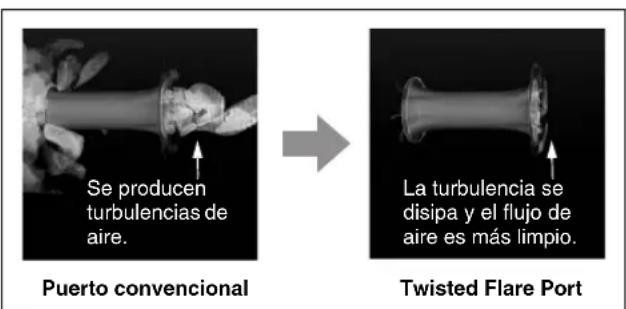
flowchart
graph TD
    A[" "] --> C[" "]
    B[" "] --> C[" "]
    C --> D[" "]
    style C stroke-dasharray: 5 5
AVISO
AJUSTES DE OPCIONES
APÉNDICE
(http://download.yamaha.com/sourcccodes/musiccast/).
Yamaha Global Site https://www.yamaha.com/
Yamaha Downloads http://download.yamaha.com/
Manual Development Group © 2018 Yamaha Corporation
Published 07/2018 IPEI-A0
- IMPORTANT SAFETY INSTRUCTIONS
- IMPORTANT
- FCC INFORMATION (USA)
- IMPORTANT NOTICE: DO NOT MODIFY THIS UNIT!
- COMPLIANCE INFORMATION STATEMENT (DECLARATION OF CONFORMITY PROCEDURE)
- FCC/IC NOTICE (U.S.A. and Canada)
- CAN ICES-3 (B)/NMB-3(B)
- PRECAUTIONS
- PLEASE READ CAREFULLY BEFORE USE. BE SURE TO FOLLOW THESE INSTRUCTIONS.
- WARNING
- This content indicates "risk of serious injury or death."
- Power supply/power cord
- Do not disassemble
- Water warning
- Fire warning
- Installation
- Maintenance and care
- Wireless unit
- If you notice any abnormality
- This content indicates "risk of injury."
- Hearing loss
- Maintenance
- Handling
- NOTICE
- Indicates points that you must observe in order to prevent product failure, damage or malfunction and data loss.
- Connections
- Speakers
- INFORMATION
- About functions and data included in the unit
- Information for users on collection and disposal of old equipment:
- For business users in the European Union:
- Information on Disposal in other Countries outside the European Union:
- About content in this manual
- CONTENTS
- FEATURES.... 7
- PARTS AND THEIR FUNCTIONS .... 10
- GETTING READY.... 12
- CONNECTIONS.... 13
- OPTION SETTINGS.... 18
- APPENDIX 19
- TROUBLESHOOTING 20
- TRADEMARKS 22
- SPECIFICATIONS.... 23
- INTRODUCTION
- About this manual
- FEATURES
- What you can do using this unit
- Advanced use with the convenient app (MusicCast CONTROLLER)
- Advanced Yamaha Active Servo Technology II
- Twisted Flare Port
- PARTS AND THEIR FUNCTIONS
- Rear panel
- ①(STANDBY/ON)
- ②Service port
- ③CONNECT
- ④WIRELESS switch
- ⑤INPUT switch
- ⑥INPUT (ANALOG) jack
- ⑦Service ports
- ⑧NETWORK port
- Top panel
- ①GAIN knob
- NOTE
- ②STATUS indicator
- ③ Wireless LAN indicator
- Auto power standby
- Network standby
- Eco standby mode
- GETTING READY
- Placement
- Connecting to a network
- Preparations for network connection
- If connecting wirelessly
- If connecting via a cable
- Powering-on this unit
- Downloading the "MusicCast CONTROLLER" mobile device app
- Registering this unit on the MusicCast network
- To cancel this unit's MusicCast network registration
- Pairing this unit with the Pairing Master
- On your mobile device, start "MusicCast CONTROLLER" and open the settings screen of the Pairing Master.
- Following the guidance in the app, register this unit as a network subwoofer (Pairing Device).
- To cancel pairing with the Pairing Master
- ■Linking operation with the Pairing Master
- Power operation
- Volume and other settings
- Making analog connections
- Adjusting the volume balance
- ■If using a network connection
- ■If using an analog connection
- OPTION SETTINGS
- Updating the firmware
- Firmware update procedure
- ■Checking the firmware version
- Initializing all settings (factory reset)
- APPENDIX
- STATUS indicator operation table
- TROUBLESHOOTING
- TRADEMARKS
- CERTIFIED
- Licenses
- Explanations regarding GPL
- SPECIFICATIONS
- General
- Power Supply/Voltage
- Input Section
- Standby Power Consumption
- Wi-Fi
- PRÉCAUTIONS CONCERNANT LA SÉCURITÉ
- FONCTIONS ET ÉLÉMENTS DE L'APPAREIL ..... 10
- FICHE TECHNIQUE
- Généralités
- Alimentation/tension
- LAS PARTES Y SUS FUNCIONES 8
- PREPARACIÓN.... 10
- CONEXIONES 11
- AVISO
- AJUSTES DE OPCIONES
- APÉNDICE
Brand : YAMAHA
Model : NSNSW100
Category : Subwoofer