Purion Performance Line - Electronic meter BOSCH - Free user manual and instructions
Find the device manual for free Purion Performance Line BOSCH in PDF.



| Product type | Electronic display (on-board computer) for Bosch eBike system |
| Brand | Bosch |
| Model | Purion Performance Line |
| Power supply | 2 CR2016 button cell batteries (1.5 V) |
| Weight | 0.1 kg |
| Protection rating | IP54 (dust-proof and splash-proof) |
| Operating temperature | -5 °C to +40 °C |
| Storage temperature | -10 °C to +50 °C |
| Display | Current speed, distance (TRIP/TOTAL), range (RANGE), assistance level, battery charge indicator, lighting, error codes |
| Assistance levels | OFF, ECO, TOUR, SPORT, TURBO |
| Walk assist | Yes, up to 6 km/h |
| Lighting | Control of bike lighting (front/rear) via the on-board computer |
| USB port | USB diagnostic port (for maintenance only) |
| Maintenance and cleaning | Slightly damp soft cloth, no cleaning products; do not immerse |
| Safety | Read the safety instructions; do not get distracted by the display; observe temperature limits |
| Repairability | Replaceable batteries; repairs by an authorized Bosch dealer; annual technical inspection recommended |
| Spare parts | CR2016 button cell batteries (part number: 1 270 016 819), mounting screws, USB protective cap |
| General information | Bosch eBike system using FreeRTOS; compatibility with standard and rack batteries |
Frequently Asked Questions - Purion Performance Line BOSCH
User questions about Purion Performance Line BOSCH
0 question about this device. Answer the ones you know or ask your own.
Ask a new question about this device
Download the instructions for your Electronic meter in PDF format for free! Find your manual Purion Performance Line - BOSCH and take your electronic device back in hand. On this page are published all the documents necessary for the use of your device. Purion Performance Line by BOSCH.
USER MANUAL Purion Performance Line BOSCH
Active Line/Performance Line Active Line/Performance Line
Robert Bosch GmbH
Bosch eBike Systems
72703 Reutlingen
GERMANY
www.bosch.ebike.com
1270020XBP(2016.04)T/76WEU
Purion
1270020916|1270020917

BOSCH
Read all safety warnings and all instructions. Failure to follow the warnings and instructions may result in electric shock, fire and/or serious injury.
Save all safety warnings and instructions for future reference.
The term "battery pack" used in these operating instructions, irrespective of model, refers both to standard battery packs (battery packs with holder on the bike frame) and to rack-type battery packs (battery packs with holder in the rear rack/ carrier).
Make sure to not be distracted by the display of the on-board computer. If you do not focus exclusively on the traffic, you risk being involved in an accident.
Read and observe the safety warnings and instructions in all operating instructions of the eBike system and in the operating instructions of your eBike.
Product Description and Specifications
Intended Use
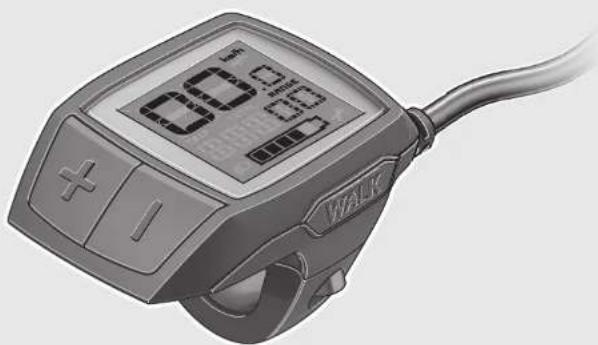
The Purion on-board computer is designed to control Bosch eBike systems and display riding data.
Product Features
The numbering of the components shown refers to the illustrations on the graphic pages at the beginning of the manual. Individual illustrations in these operating instructions may differ slightly from the actual circumstances depending on the equipment of your eBike.
1 On/Off button for on-board computer
2 Push-assistance button "WALK"
3 Fastening screw for on-board computer
4 Holder for on-board computer
5 Decrease assistance level button “-”
6 Increase assistance level button “+”
7 Display
8 Protective cap of USB port
9 USB diagnostic socket (for servicing purposes only)
10 Battery lid
Display elements of on-board computer
a Speed indication
b km/h unit indicator
c mph unit indicator
d Total distance indicator "TOTAL"
e Range indicator "RANGE"
f Service indicator

g Battery charge-control indicator
h Light indicator
i Assistance level indicator/value indicator
j Trip distance indicator "TRIP"
Technical Data
On-board computer Purion
| Article number | 1270020916/917 |
| Batteries1) | 2 x 1.5 V CR2016 |
| Operating temperature | °C -5...+40 |
| Storage temperature | °C -10...+50 |
| Protection type2) | IP 54 (dust and splash water protected) |
Weight, approx. kg 0.1
1) We recommend using the batteries offered by Bosch. You can purchase them from your bicycle dealer (part number: 1270016819).
2) When USB cover is closed
Bosch eBike system uses FreeRTOS (see www.freertos.org)
Operation
Initial Operation
Requirements
The eBike system can only be activated when the following requirements are met:
- A sufficiently charged battery pack is inserted (see battery pack operating instructions).
- The speed sensor is connected properly (see drive unit operating instructions).
Switching the eBike System On/Off
Options for switching on the eBike system:
- Press the On/Off button 1 of the on-board computer with the eBike battery pack inserted.
- Press the On/Off button of the eBike battery pack (see battery pack operating instructions).
The drive is activated as soon as you step on the pedals (except for in the push assistance function or in assistance level "OFF"). The motor output depends on the settings of the assistance level on the on-board computer.
As soon as you stop pedaling when in normal operation, or as soon as you have reached a speed of 25 / 45km / h the assistance from the eBike drive is switched off. The drive is automatically re-activated as soon you start pedaling again and the speed is below 25 / 45km / h .
Options for switching off the eBike system:
- Press the On/Off button 1 of the on-board computer.
- Switch the eBike battery pack off by its On/Off button (see battery pack operating instructions).
If the eBike is not moved and no button is pressed on the on-board computer for 10 minutes, the eBike system will shut down automatically in order to save energy.
Note: Always switch off the eBike system when you park the eBike.
Note: If the batteries of the on-board computer are empty, you can still switch on your eBike using the bike's battery pack. It is, however, recommended that you replace the internal batteries as soon as possible in order to avoid damage.
Displays and configurations of the on-board computer
Symbols and their meaning
| Symbol Explanation | |
| short button press (less than 1 second) | |
| medium button press (between 1 second and 2.5 seconds) | |
| long button press (longer than 2.5 seconds) |
Energy supply of the on-board computer
The on-board computer is supplied with voltage by two CR2016 button cells.
Changing the Batteries (see figure A)
If the on-board computer shows "LOW BAT" on the display, remove the on-board computer from the handlebars by unscrewing the fastening screw 3 of the on-board computer. Open the battery lid 10 using a suitable coin, remove the used batteries and insert new CR 2016 batteries. You can obtain the batteries recommended by Bosch from your bicycle dealer.
When inserting batteries, pay attention to the correct polarity. Close the battery compartment again and fasten the on-board computer to your eBike's handlebars using the fastening screw 3.
Battery Charge-control Indicator
The battery charge-control indicator g displays the charge level of the eBike battery pack. The charge level of the eBike battery pack can also be checked on the LEDs of the battery pack itself.
On indicator g, each bar of the battery pack symbol is equivalent to a capacity of approx. 20%

The eBike battery pack is fully charged.

The eBike battery pack should be recharged.

The LEDs of the charge-control indicator on the battery extinguish. The capacity for assisting the drive has been used up, and assistance is gently switched off. The remaining capacity is made available for the lighting. The indicator flashes.
The capacity of the eBike battery pack is enough for about 2 hours of lighting.
Switching the Push-assistance mode On/Off
The push-assistance feature makes it easier to push the eBike. The speed in this function depends on the set gear and cannot exceed 6km / h (max.). The lower the set gear, the lower the speed in the push-assistance function (at full output).
The push-assistance function may only be used when pushing the eBike. Danger of injury when the wheels of the eBike do not have ground contact while using the pushassistance function.
To activate the push-assistance function, short-press the button "WALK" on your on-board computer. After activation, press button "+" within 3 s and keep it pressed. The eBike drive is switched on.
Note: The push assistance cannot be activated in the "OFF" assistance level.
The push assistance is switched off as soon as one of the following occurs:
-
you release button “+” 6,
-
the wheels of the eBike are blocked (e.g. by actuating the brakes or impacting against an obstacle),
-
the speed exceeds 6km / h
Note: On some systems the push-assistance function can be started directly by pressing the "WALK" button.
Setting the Assistance Level
On the on-board computer you can set how much the eBike drive assists you while pedalling. The assistance level can be changed at any time, even while cycling.
Note: For individual versions, it is possible that the assistance level is pre-set and cannot be changed. It is also possible that less assistance levels are available for selection than listed here.
The following assistance levels (max.) are available:
- "OFF": The motor assistance is switched off, and the eBike can be moved as a normal bicycle only by pedalling. The push assistance cannot be activated in this assistance level.
- "ECO": Effective assistance at maximum efficiency for maximum cruising range
- "TOUR": Uniform assistance, for touring with long cruising range
- "SPORT": Powerful assistance for sportive riding off road as well as for urban traffic
-TURBO": Maximum assistance, supporting highest cadence for sportive riding
To increase the assistance level, short-press the button “+” 6 on the on-board computer repeatedly until the required assistance level appears in indicator i. To decrease the assistance level, short-press the button “-” 5.
Switching bike lights on/off
In the version which has the bike lights powered by the eBike system, medium-press the button “+” to switch on the front and rear lights at the same time. To switch off the bike lights, long-press the button “+”.
The lighting symbol is displayed when the light is on.
Switching the bike light on and off has no effect on the back lighting of the display.
Displays and configurations of the on-board computer
Speed and Distance Indication
The speed indication a always displays the current speed.
Indicator i always displays the last setting as standard. Repeatedly medium-press the button “-” to display the trip distance “TRIP”, the total distance “TOTAL” and the range of the battery pack “RANGE” one after the other. (Short-pressing the button “-” will decrease the assistance level!)
The trip distance "TRIP" is reset by simultaneously long-pressing the buttons "+" and "-". The display will initially show "RESET". If you continue to press both buttons, the trip distance "TRIP" will be set to "0".
You can switch the displayed values from kilometres to miles by holding down button “-” and briefly pressing the On/Off button 1
The versions of the subsystems can be displayed for the purposes of servicing. With the system switched off, simultaneously press buttons “-” and “+” and then press the On/Off button 1.
The USB socket is reserved for connecting diagnostic systems. The USB socket does not have any other function.
The USB connection must always be completely sealed with the protective cap 8.
| Action Buttons Duration | ||
| Switch on on-board computer | ○ | Any |
| Switch off on-board computer | ○ | Any |
| Increase assistance | + | ○ |
| Decrease assistance | - | ○ |
| Display “TRIP”, “TOTAL”, “RANGE”, assistance modes | - | ○ |
| Switch on bike lights + | ○ | |
| Switch off bike lights | + | ○ |
| Reset trip distance | - + | ○ |
| Activate push assistance | WALK | 1. |
| Perform push assistance | + | 2. Any |
| Switch from kilometres to miles - 1. Hold | ||
| ○ | 2. | |
| Display the versions1)2) | - + | 1. Hold |
| ○ | 2. | |
| 1) The eBike system must be switched off. | ||
| 2) The information is shown as scrolling text. | ||
Error Code Indication
The components of the eBike system are continuously and automatically monitored. If an error is detected, the corresponding error code will appear in the speed indication a.
Depending on the type of error, the drive unit is automatically shut off, if required. Continued travel without assistance from the drive unit is possible at any time. However, have the eBike checked before attempting new trips.
Have all repairs performed only by an authorised bike dealer.
| Code Cause Corrective Measure | ||
| 410 | One or more buttons of the on-board computer are blocked. | Check if any buttons are blocked, e.g. from dirt or debris. Clean the but-tons, if required. |
| 414 | Connection problem of the operating unit | Have connections and contacts checked. |
| 418 | One or more buttons of the operating unit are blocked. | Check if any buttons are blocked, e.g. from dirt or debris. Clean the but-tons, if required. |
| 419 | Configuration error | Restart the system. If the problem persists, contact your Bosch eBike dealer. |
| 422 Connection problem of the drive unit Have connections and contacts checked. | ||
| 423 | Connection problem of the eBike battery pack | Have connections and contacts checked. |
| 424 | Communication error among the components | Have connections and contacts checked. |
| 426 | Internal time-out error | Restart the system. If the problem persists, contact your Bosch eBike dealer. In this error status, it is not possible to display or adjust the wheel circumference in the basic settings menu. |
| 430 | Internal battery pack of the on-board computer is empty. | Charge the on-board computer (in the holder or via the USB port). |
| 431 | Software version error | Restart the system. If the problem persists, contact your Bosch eBike dealer. |
| 440 | Internal error of the drive unit | Restart the system. If the problem persists, contact your Bosch eBike dealer. |
| 450 | Internal software error | Restart the system. If the problem persists, contact your Bosch eBike dealer. |
| 460 | Error at USB connection Remove the cable from the USB connection of the on-board computer. If the problem persists, contact your Bosch eBike dealer. | |
| 490 | Internal error of the on-board computer | Have the on-board computer checked. |
| 500 | Internal error of the drive unit | Restart the system. If the problem persists, contact your Bosch eBike dealer. |
| 502 | Bike lighting error | Check the light and the associated wiring. Restart the system. If the problem persists, contact your Bosch eBike dealer. |
| 503 | Error of the speed sensor | Restart the system. If the problem persists, contact your Bosch eBike dealer. |
| 510 | Internal sensor error | Restart the system. If the problem persists, contact your Bosch eBike dealer. |
| 511 | Internal error of the drive unit | Restart the system. If the problem persists, contact your Bosch eBike dealer. |
| 530 | Battery pack error | Switch off the eBike, remove the eBike battery pack and reinsert the eBike battery pack. Restart the system. If the problem persists, contact your Bosch eBike dealer. |
| Code Cause | Corrective Measure | |
| 531 | Configuration error | Restart the system. If the problem persists, contact your Bosch eBike dealer. |
| 540 | Temperature error | The eBike is outside of the permissible temperature range. Switch off the eBike system and allow the drive unit to either cool down or heat up to the permissible temperature. Restart the system. If the problem persists, contact your Bosch eBike dealer. |
| 550 | An improper load was detected. | Remove load. Restart the system. If the problem persists, contact your Bosch eBike dealer. |
| 580 | Software version error | Restart the system. If the problem persists, contact your Bosch eBike dealer. |
| 591 | Authentication error | Switch off the eBike system. Remove the battery pack and reinsert it. Restart the system. If the problem persists, contact your Bosch eBike dealer. |
| 592 | Incompatible component | Insert a compatible display. If the problem persists, contact your Bosch eBike dealer. |
| 593 | Configuration error Restart the system. | If the problem persists, contact your Bosch eBike dealer. |
| 595, 596 | Communication error Check the wiring to the transmission and restart the system. If the problem persists, contact your Bosch eBike dealer. | |
| 602 Internal battery pack error while charging | Unplug the charger from the battery pack. Restart the eBike system. Plug the charger into the battery pack. If the problem persists, contact your Bosch eBike dealer. | |
| 602 | Internal battery pack error | Restart the system. If the problem persists, contact your Bosch eBike dealer. |
| 603 | Internal battery pack error | Restart the system. If the problem persists, contact your Bosch eBike dealer. |
| 605 | Battery pack temperature error | The eBike is outside of the permissible temperature range. Switch off the eBike system and allow the drive unit to either cool down or heat up to the permissible temperature. Restart the system. If the problem persists, contact your Bosch eBike dealer. |
| 605 | Battery pack temperature error while charging | Unplug the charger from the battery pack. Allow the battery pack to cool. If the problem persists, contact your Bosch eBike dealer. |
| 606 | External battery pack error | Check the wiring. Restart the system. If the problem persists, contact your Bosch eBike dealer. |
| 610 | Battery pack voltage error | Restart the system. If the problem persists, contact your Bosch eBike dealer. |
| 620 | Charging error | Replace the charger. Contact your Bosch eBike dealer. |
| 640 | Internal battery pack error | Restart the system. If the problem persists, contact your Bosch eBike dealer. |
| 655 | Multiple battery pack errors | Switch off the eBike system. Remove the battery pack and reinsert it. Restart the system. If the problem persists, contact your Bosch eBike dealer. |
| 656 | Software version error Contact your Bosch eBike dealer so that he can perform a software update. | |
| 7xx | Transmission error | Please observe the operating instructions provided by the transmission manufacturer. |
| No display | Internal error of the on-board computer | Restart your eBike system by switching it off and back on. |
Maintenance and Service
Maintenance and Cleaning
Do not immerse any components, including the drive unit, in water or clean them with pressurised water.
Clean your on-board computer using a soft cloth dampened only with water. Do not use any detergents.
Have your eBike system checked by an expert at least once a year (including mechanical parts, up-to-dateness of system software).
The bicycle manufacturer or dealer may also store a distance travelled for the service date in the system. In this case, the on-board computer will show you that the service date is due by displaying f".
For service or repairs on the eBike, please refer to an authorised bicycle dealer.
After-sales Service and Application Service
In case of questions concerning the eBike system and its components, please refer to an authorised Bosch eBike dealer.
For contact data of authorised Bosch eBike dealers, please refer to www.bosch-ebike.com
Disposal

The drive unit, on-board computer including operating unit, battery pack, speed sensor, accessories and packaging should be disposed of in an environmentally correct manner.
Do not dispose of eBikes and their components into household waste!
Only for EC countries:
According to the European Guideline 2012/19/EU, electrical devices/tools that are no longer usable, and according to the European Guideline 2006/66/EC, defective or used battery packs/batteries, must be collected separately and disposed of in an environmentally correct manner.
Please return battery packs and on-board computers that are no longer usable to an authorised bicycle dealer.
Subject to change without notice.
f Indikator for service

Rettilandringerforbeholds.
Sakerhetsanvisiningar

Touxiéia evdeIeNc oToV unoLoyoiotn oxHuaTOC (On-board computer)
aEvdeiEh taXuEETPOU
bEvdeiEg eXμ/.oPd
cEvdelta e o μλ/ωp
d'Evdeiŋ ouvoλiknc anoToaon «TOTAL»
eEvoeiE n eβελειας «RANGE»
fEvBcEbn oepBic
gEvdeiηkataoantc φopTionc μntapias
hEvdeiEg wtiou
iEv6eIg eineou unooTnpiEnc/ev6eIgnc Tmuw
j'Ev6e1n δiδpoumic «TRIP»