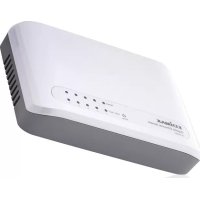
ES5500P - Switch Edimax - Free user manual and instructions
Find the device manual for free ES5500P Edimax in PDF.



| Product Type | Ethernet Switch |
| Brand | Edimax |
| Model | ES5500P |
| Ports | 5 RJ-45 ports 10/100/1000 Mbps |
| Network Functions | Auto-MDI/MDI-X, automatic speed detection |
| Power Supply | 5V DC, 1A power adapter (included) |
| Dimensions (L x W x H) | 230 mm x 140 mm x 35 mm |
| Weight | 600 g |
| Operating Temperature | 0°C to 55°C |
| Operating Humidity | 10% to 95% non-condensing |
| LED Indicators | PWR (power), LNK/ACT (link/activity), SPEED (10/100/1000) |
| Maximum Cable Length | 100 meters (Category 5 or higher UTP cable) |
| Maintenance | Clean with a dry, soft cloth. Do not use liquid or abrasive products. |
| Safety Instructions | Do not expose to water, heat sources, or obstruct ventilation openings. |
| Replacement Parts | Power adapter available from the manufacturer |
Frequently Asked Questions - ES5500P Edimax
User questions about ES5500P Edimax
0 question about this device. Answer the ones you know or ask your own.
Ask a new question about this device
Download the instructions for your Switch in PDF format for free! Find your manual ES5500P - Edimax and take your electronic device back in hand. On this page are published all the documents necessary for the use of your device. ES5500P by Edimax.
USER MANUAL ES5500P Edimax

5/8Ports Desktop Gigabit Ethemet Switches
Quick Installation Guide
Content Table
English 2
Cesky 5
Deutsch 8
Espanol 11
Francais 14
Italiano 17
Magyar 20
Nederlands 23
Polski 26
Portugues 29
Pycckn 32
Türkce 35
English

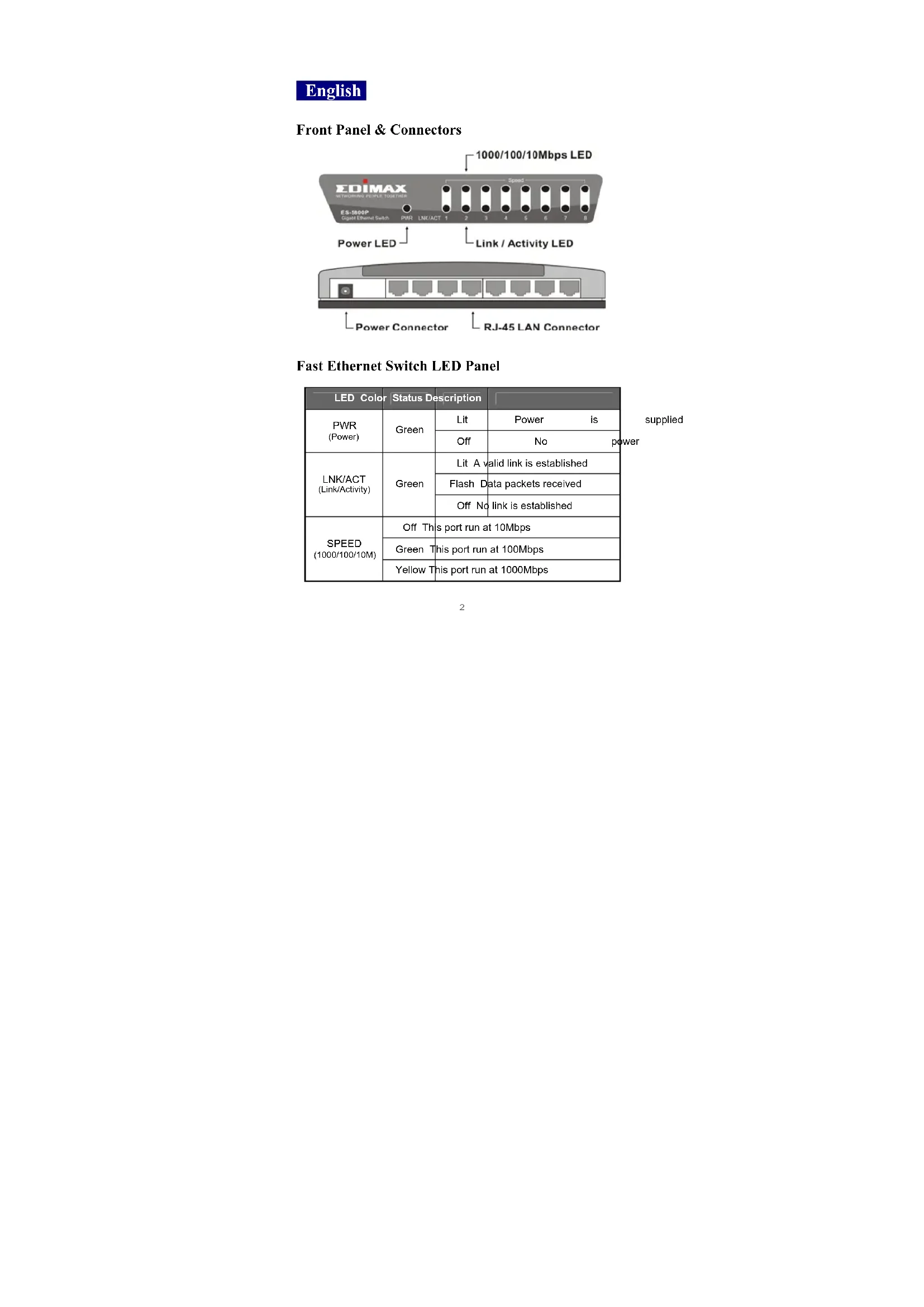
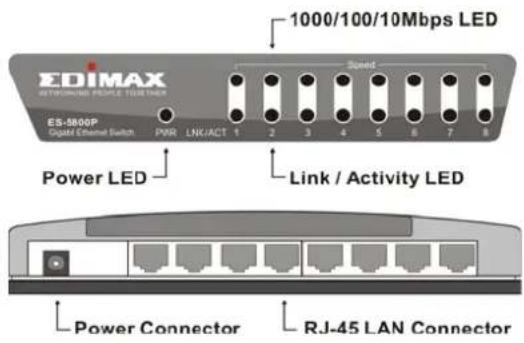
Front Panel & Connectors
Fast Ethernet Switch LED Panel
| LED Color | Status Description | |
| PWR(Power) | Green | Lit Power is |
| Off No power | ||
| LINK/ACT(Link/Activity) | Green | Lit A valid link is established |
| Flash Data packets received | ||
| Off No link is established | ||
| SPEED(1000/100/10M) | Off This port run at 10Mbps | |
| Green This port run at 100Mbps | ||
| Yellow This port run at 1000Mbps | ||
1. Operating Environment
This switching hub must be installed and operated within the limits of specified operating temperature (32 - 131^) and humidity (10-95% Non-condensing).
- Do not place objects on top of the unit.
- Do not obstruct any vents at the sides of the unit.
- Do not position the unit near any heating source such as heater, radiator, or direct exposure to sun.
Prevent entering of water and moisture into the unit. If necessary, use dehumidifier to reduce humidity.
2. Connecting to network devices
The RJ-45 ports on the switch support Auto-MDI/MDI-X function which allows using straight-through or cross-over type cables to connect this switch to workstation or hub.
Connect one end of the network cable to the RJ-45 port on the rear panel, and connect the other end of the network cable to the RJ-45 port on the network device. Follow the same procedure to connect all the RJ-45 ports of the switch.
The UTP network cables must comply with EIA/TIA 568 specifications and Category 5 standard for 100Mbps data transmission. Maximum length: using UTP cable, between the switch and connected device is 100 meters (300ft).
Once the network cable is connected to both ends and the attached network device is powered on, the green LNK/ACT LED should be lit.
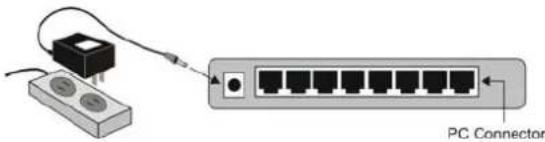
3. Connecting the power
Connect the power adapter to the power connector on the rear panel of the unit; the green Power LED on the front panel should be lit.
Trouble Shooting
1. Power LED is not lit
- Check if the power cord is properly connected to the external power adapter and the power outlet. Make sure the DC power jack is firmly plugged into the power socket of the switch.
2. Link/Activity is not lit when connect to 100Mbps device
- Check the power switch of the network device attached to the switch; make sure it is turned ON.
- Check the network cable; make sure it is properly connected to the switch and the network device.
- Check the network cable; make sure the UTP cables comply with EIA/TIA 568 and Category 5 specification.
[!] Contact your dealer if problem persist.

4.Индкатop Link/Activity He ropt npn coeHHeHn c 100M6nt/c yctpoictbamn
PpOBepBte npaBnJIbHOCTb NOKJIIOUeHINIITAHINK CTeBOMy yCTPOINCTBy nYbEaNTecb, YTO OHO BKIOUeHO.
IpoBepBe CTeBoKabEnb Mekdy KOMMyTaTOpom n CeTeBBIM yCTpOINCTBOM, y6eInuTEcB COOTBeTCTBn Ka6eN CneUΦKauaqam EIA/TIA 568 n Category 5.
[!] B cIyuae HeBO3MOXHOCTn ycTpaHEHn npo6JeMbI 06paTHTeCb K npoDaBu.
Urinun Kullanim Icin Hazirlanmasi (Baglanti ve Montaj)
LED Tanmlari
| SRS | |||||
| TCL | |||||
| PAS | |||||
| ON ON ON ON ON ON ON ON ON ON ON ON ON ON ON ON ON ON ON ON ON ON ON ON ON ON ON ON ON ON ON ON ON ON ON ON ON ON ON ON ON ON ON ON ON ON ON ON ON ON ON ON ON ON ON ON ON ON ON ON ON ON ON ON ON ON ON ON ON ON ON ON ON ON ON ON ON ON ON ON ON ON ON ON ON ON ON ON ON ON ON ON ON ON ON ON ON ON ON ON ON | ILLEAEUR | ||||