HWM360 - Soundbar SAMSUNG - Free user manual and instructions
Find the device manual for free HWM360 SAMSUNG in PDF.



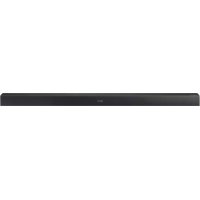
| Product type | Soundbar with wireless subwoofer |
| Brand | Samsung |
| Model | HWM360 |
| Dimensions (W x H x D) - Soundbar | 907.5 x 53.5 x 70.5 mm |
| Dimensions (W x H x D) - Subwoofer | 179.0 x 353.0 x 299.5 mm |
| Weight - Soundbar | 1.5 kg |
| Weight - Subwoofer | 4.6 kg |
| Power supply | AC/DC adapter 19V (DC input 19V) |
| Power consumption (standby) | 4.1 W |
| Rated output power - Soundbar | 35 W x 2 (6 ohms) |
| Rated output power - Subwoofer | 130 W (3 ohms) |
| Supported audio formats | LPCM 2ch, Dolby Audio, DTS |
| Connectivity | Bluetooth, USB (5V 0.5A), optical input (DIGITAL AUDIO IN), AUX input (analog) |
| Main features | Surround sound, sound modes (Standard, Music, Clear Voice, Sports, Cinema), treble/bass adjustment, audio sync, Auto Power Link, Bluetooth Power, TV remote control |
| Wall mounting | Possible with mounting kit (screws M4 x L12 provided) |
| Maintenance and cleaning | Unplug the device before cleaning. Use a soft, dry cloth. Do not use chemicals. |
| Safety | Do not expose to rain or moisture. Ensure ventilation (7-10 cm around). Unplug during thunderstorms or prolonged non-use. |
| Spare parts and repairability | Contact Samsung customer service or an authorized center for spare parts. Do not open the device. |
Frequently Asked Questions - HWM360 SAMSUNG
User questions about HWM360 SAMSUNG
0 question about this device. Answer the ones you know or ask your own.
Ask a new question about this device
Download the instructions for your Soundbar in PDF format for free! Find your manual HWM360 - SAMSUNG and take your electronic device back in hand. On this page are published all the documents necessary for the use of your device. HWM360 by SAMSUNG.
USER MANUAL HWM360 SAMSUNG
Thank you for purchasing this Samsung product.
To receive more complete service, please register
your product at www.samsung.com/register
SAFETY INFORMATION
SAFETYWARNINGS
TO REDUCE THE RISK OF ELECTRIC SHOCK, DO NOT REMOVE THE COVER (OR BACK). NO USER- SERVICEABLE PARTS ARE INSIDE. REFER SERVICING TO QUALIFIED SERVICE PERSONNEL.
| CAUTION RISK OF ELECTRIC SHOCK. DO NOT OPEN. | |
| This symbol indicates that high voltage is present inside. It is dangerous to make any kind of contact with any internal part of this product. | |
| This symbol indicates that this product has included important literature concerning operation and maintenance. | |
| Class II product: This symbol indicates that it does not require a safety connection to electrical earth (ground). | |
| AC voltage: This symbol indicates that the rated voltage marked with the symbol is AC voltage. | |
| DC voltage: This symbol indicates that the rated voltage marked with the symbol is DC voltage. | |
| Caution, Consult instructions for use: This symbol instructs the user to consult the user manual for further safety related information. |
WARNING
- To reduce the risk of fire or electric shock, do not expose this appliance to rain or moisture.
CAUTION
- TO PREVENT ELECTRIC SHOCK, MATCH WIDE BLADE OF PLUG TO WIDE SLOT, FULLY INSERT.
- This apparatus shall always be connected to a AC outlet with a protective grounding connection.
- To disconnect the apparatus from the mains, the plug must be pulled out from the mains socket, therefore the mains plug shall be readily operable.
- Do not expose this apparatus to dripping or splashing. Do not put objects filled with liquids, such as vases on the apparatus.
- To turn this apparatus off completely, you must pull the power plug out of the wall socket. Consequently, the power plug must be easily and readily accessible at all times.
PRECAUTIONS
- Ensure that the AC power supply in your house complies with the power requirements listed on the identification sticker located on the back of your product. Install your product horizontally, on a suitable base (furniture), with enough space around it for ventilation (7 10~cm) .Make sure the ventilation slots are not covered. Do not place the unit on amplifiers or other equipment which may become hot. This unit is designed for continuous use. To fully turn off the unit, disconnect the AC plug from the wall outlet. Unplug the unit if you intend to leave it unused for a long period of time.
- During thunderstorms, disconnect the AC plug from the wall outlet. Voltage peaks due to lightning could damage the unit.
- Do not expose the unit to direct sunlight or other heat sources. This could lead to overheating and cause the unit to malfunction.
-
Protect the product from moisture (i.e. vases), and excess heat (e.g. a fireplace) or equipment creating strong magnetic or electric fields. Unplug the power cable from the AC wall socket if the unit malfunctions. Your product is not intended for industrial use. It is for personal use only. Condensation may occur if your product has been stored in cold temperatures. If transporting the unit during the winter, wait approximately 2 hours until the unit has reached room temperature before using.
-
The battery used with this product contains chemicals that are harmful to the environment. Do not dispose of the battery in the general household trash. Do not expose the battery to excess heat, direct sunlight, or fire. Do not short circuit, disassemble, or overheat the battery. Danger of explosion if the battery is replaced incorrectly. Replace only with the same or equivalent type.
ABOUT THIS MANUAL
The user manual has two parts: this simple paper, USER MANUAL and a detailed FULL MANUAL you can download.

USER MANUAL
See this manual for safety instructions, product installation, components, connections, and product specifications.
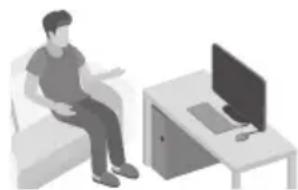

FULL MANUAL
You can access the customer support centre by scanning the QR code. To see the manual on your PC or mobile device, download the manual in document format from the website. (http://www.samsung.com/support)
Design and specifications are subject to change without prior notice.
CONTENTS
01 Checking the Components 2
Inserting Batteries before using the Remote Control (AA batteries X 2) 2
02 Product Overview 3
Front Panel / Right Side Panel of the Soundbar 3
Bottom Panel of the Soundbar 4
03 Connecting the Soundbar 5
Connecting Electrical Power 5
Connecting the Soundbar to the Subwoofer 6
- Automatic connection between the subwoofer and the Soundbar 6
- Manually connecting the subwoofer if automatic connection fails
04 Connecting to your TV 9
Method 1. Connecting with a Cable
- Connecting using an Optical Cable 9
Method 2. Connecting Wirelessly 10
- Connecting a TV via Bluetooth 10
05 Connecting an External Device 12
Connecting using an Optical or Analogue Audio (AUX) Cable 12
06 Connecting a USB 13
07 Connecting a Mobile Device 15
Connecting via Bluetooth 15
Using the Samsung Audio Remote App 18
- Installing the Samsung Audio Remote App 18
- Launching the Samsung Audio Remote App 18
08 Using the Remote Control 19
How to Use the Remote Control 19
Adjusting the Soundbar volume with a TV remote control 22
Using the Hidden Buttons 23
Output specifications for the different sound effect modes 23
09 Installing the Wall Mount 24
Installation Precautions 24
Wallmount Components 24
Detaching the Soundbar from the Wall 27
10 Software Update 27
Updating Procedure 28
If UPDATE is not displayed 28
11 Troubleshooting 29
Licence 30
Open Source Licence Notice 30
Important Notes About Service 30
Specifications and Guide 31
Specifications 31
01 CHECKING THE COMPONENTS


Soundbar Main Unit Subwoofer Remote Control / Batteries

Power Cord (Subwoofer) AC/DC Adapter (Main Unit) Optical Cable
AC Plug (Depending on the country and model)
- The power connection steps are labelled (1,2,3) . For more information about power connections, see page 5.
- For Soundbar wall mounting components, see page 24.
- Micro USB to USB adapter Cable is sold separately. To purchase, contact a Samsung Service Centre or Samsung Customer Care.
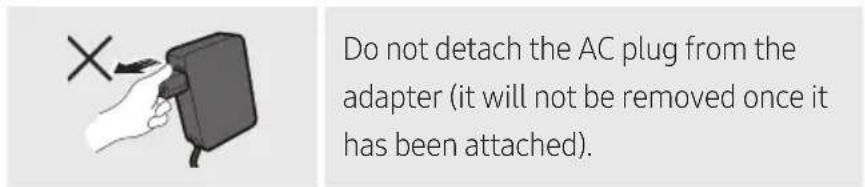
- Depending on the region, the AC plug may vary in appearance, or it may be supplied integrated with the AC/DC adapter.
The appearance of the accessories may differ slightly from the illustrations above.
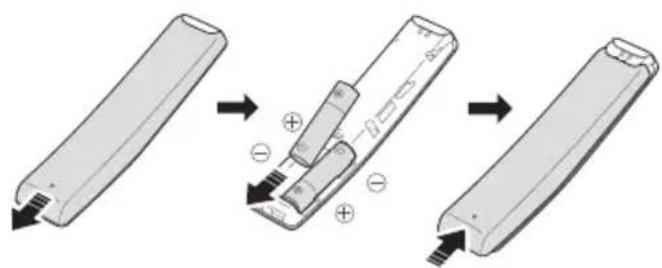
Inserting Batteries before using the Remote Control (AA batteries X 2)
Slide the battery cover in the direction of the arrow until it is completely removed. Insert 2 AA batteries (1.5V) oriented so that their polarity is correct. Slide the battery cover back into position.
ENG-2
02 PRODUCT OVERVIEW
Front Panel / Right Side Panel of the Soundbar
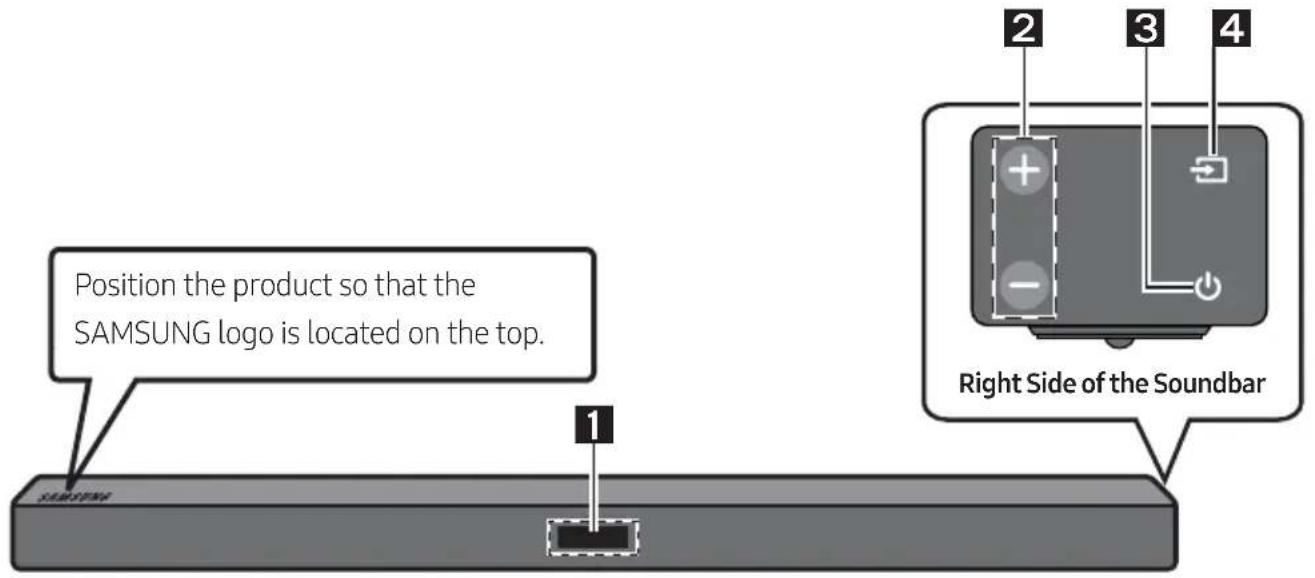
| 1 | Display Displays the product's status and current mode. | |
| 2 | +/- (Volume) Button Adjusts the volume. · When adjusted, the volume level appears on the Soundbar's front display. | |
| 3 | ● (Power) Button Turns the power on and off. | |
| 4 | ● (Source) Button Selects the source input mode. | |
| Input mode Display | ||
| Optical Digital input D.IN | ||
| AUX input AUX | ||
| BLUETOOTH mode BT | ||
| USB mode USB | ||
| · To turn on “BT PAIRING” mode, change the source to “BT” mode, and then press and hold the ● (Source) button for more than 5 seconds. | ||
- When you plug in the AC cord, the power button will begin working in 4 to 6 seconds.
- When you turn on this unit, there will be a 4 to 5 second delay before it produces sound.
- If you want to enjoy sound only from the Soundbar, you must turn off the TV's speakers in the Audio Setup menu of your TV. Refer to the owner's manual supplied with your TV.
Bottom Panel of the Soundbar
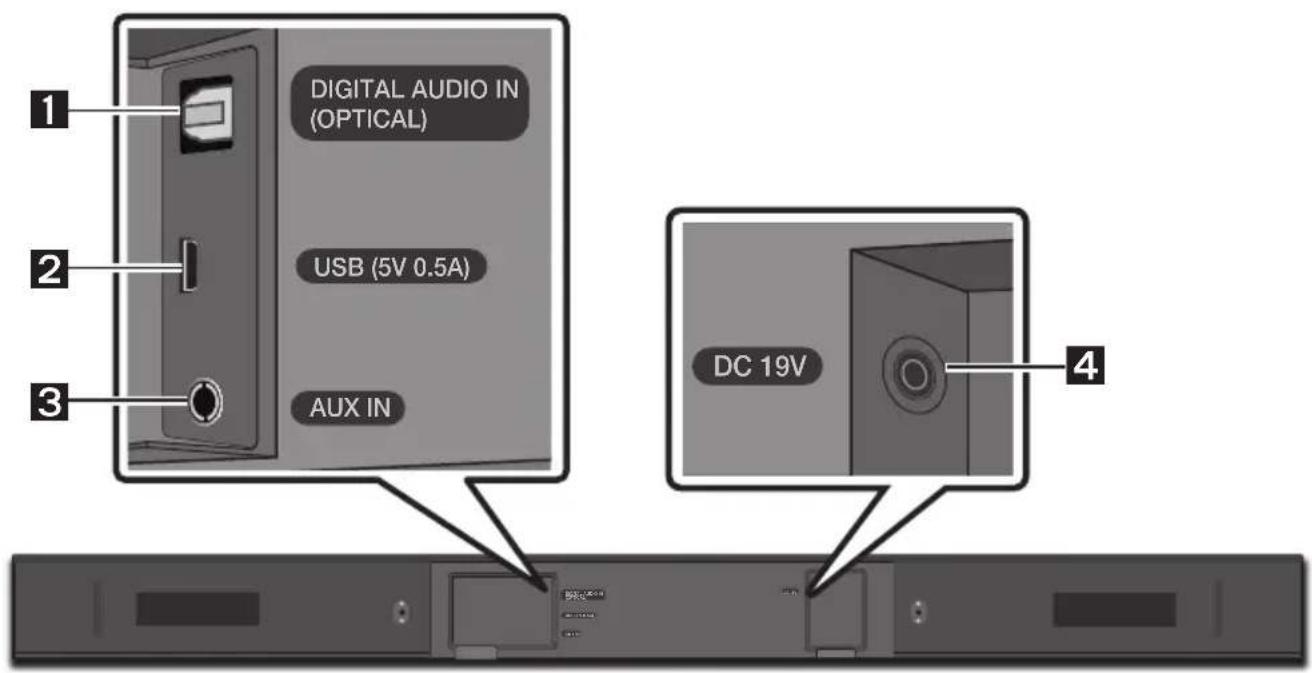
| 1 | DIGITAL AUDIO IN (OPTICAL) Connect to the digital (optical) output of an external device. |
| 2 | USB (5V 0.5A) Connect a USB device here to play music files on the USB device through the Soundbar. |
| 3 | AUX IN Connect to the Analogue output of an external device. |
| 4 | DC 19V (Power Supply In) Connect the AC/DC power adapter. |
- When disconnecting the power cable of the AC/DC power adaptor from a wall outlet, pull the plug. Do not pull the cable.
- Do not connect this unit or other components to an AC outlet until all connections between components are complete.
03 CONNECTING THE SOUNDBAR
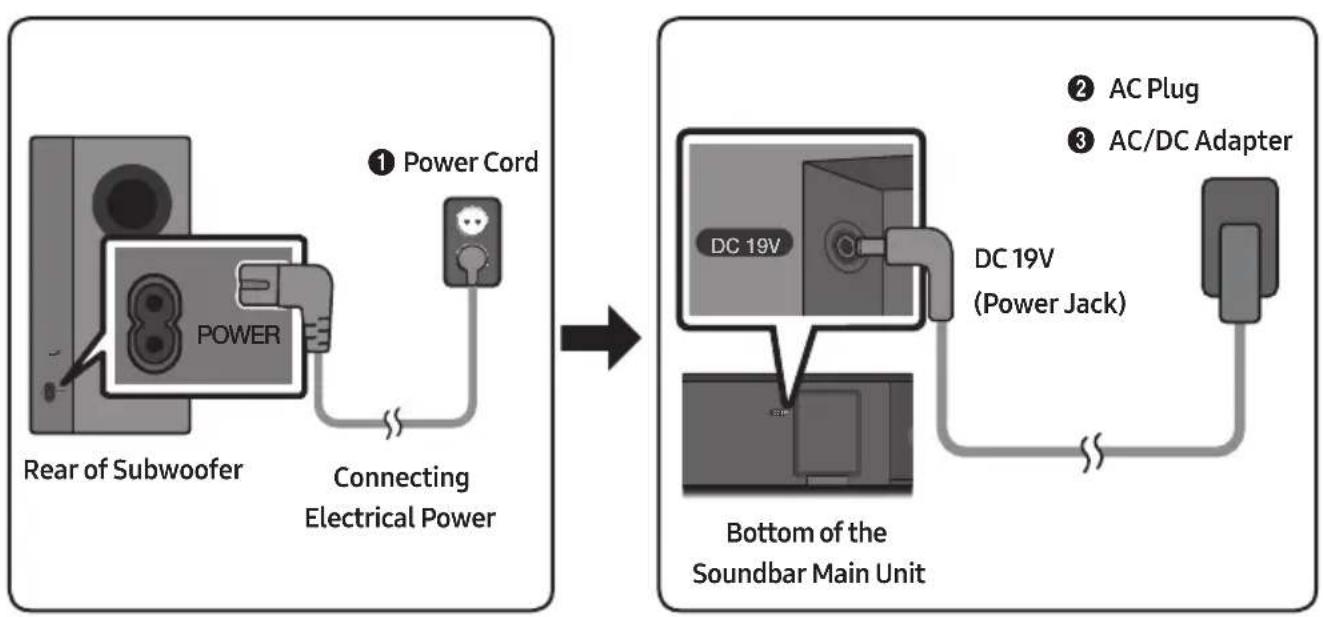
Connecting Electrical Power
Use the power components (1, 2, 3) to connect the units to electrical outlets in the following order:
1.) Subwoofer 2 .) Soundbar Main Unit. See the illustrations below.
- For more information about the required electrical power and power consumption, refer to the label attached to the product. (Label : Bottom of the Soundbar Main Unit)
Connecting the Soundbar to the Subwoofer
When the subwoofer is connected, you can enjoy rich bass sound.
Automatic connection between the subwoofer and the Soundbar
When you turn the power on after connecting the power cables to the Soundbar and subwoofer, the subwoofer is automatically connected to the Soundbar.
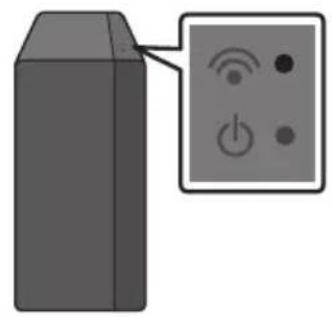
- When auto pairing is complete, the blue indicators at the top of the subwoofer turn on.
LED Indicator Lights on the Top of Subwoofer
| LED Status Description Resolution | |||
| Blue | On | Successfully connected (normal operation) | - |
| Blinking Recovering the connection | Check if the power cable to the main Soundbar unit is connected properly or wait for a while. (If blinking persists, try manually connecting the subwoofer. See page 7.) | ||
| Red On | Standby (with the Soundbar main unit turned off) | Check if the power cable to the main Soundbar unit is connected properly. | |
| Connection failed | Connect again. See the instructions for manual connection on page 7. | ||
| Red and blue | Blinking Malfunction | See the contact information for the Samsung Service Centre in the manual. | |
Manually connecting the subwoofer if automatic connection fails
Check before performing the manual connection
- Check whether the power cables for the Soundbar and subwoofer are connected properly.
-
Make sure that the Soundbar is turned on.
-
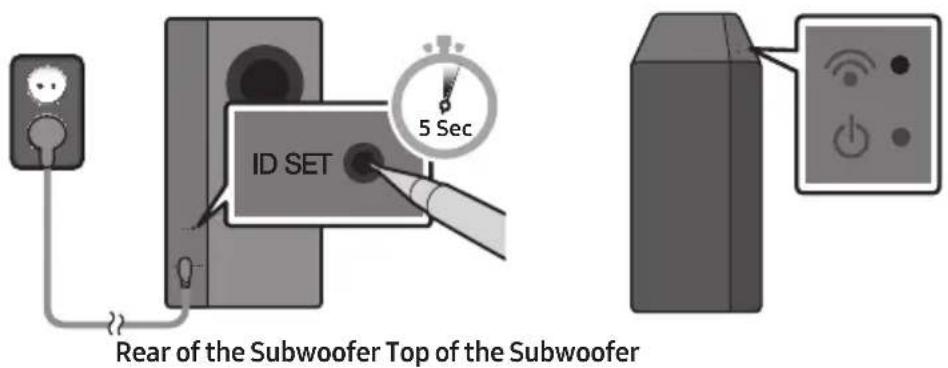
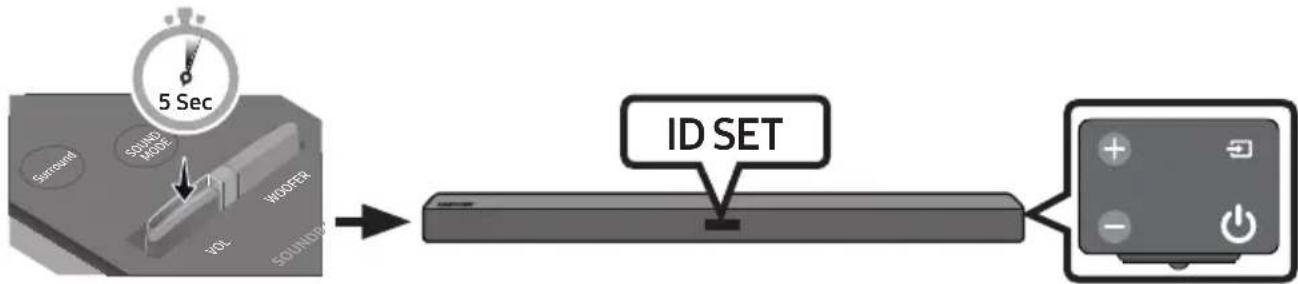
Press and hold ID SET on the rear of the subwoofer for at least 5 seconds.
The red indicator on the top of the subwoofer turns off and the blue indicator blinks.
- Turn off the Soundbar.
- Press and hold the VOL button on the remote control for at least 5 seconds with the Soundbar turned off (OFF).
- The ID SET message appears on the display of the Soundbar for 1.3 seconds, and then disappear.
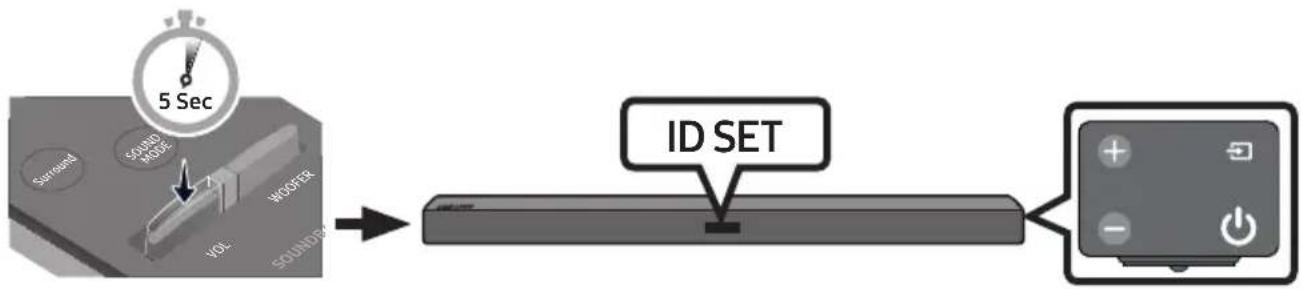
- When the blue indicator on the subwoofer blinks, turn on the Soundbar's power by pressing (Power) button on the right side of the main unit or on the remote control.
-
When the connection is successfully established, the blue indicator on the top of the subwoofer stops blinking and glows continuously.
-
If the connection process fails, the blue indicator will flash continuously. Go to Step 1 and start again.
NOTES
- Do not connect the power cord of this product or your TV to a wall outlet until all connections between components are complete.
-
Before moving or installing this product, be sure to turn off the power and disconnect the power cord.
-
If the main unit is powered off, the wireless subwoofer will go into stand-by mode and the STANDBY LED on the top will be Red after blinking Blue several times.
- If you use a device that uses the same frequency (5.8GHz) as the Soundbar near the Soundbar, interference may cause some sound interruption.
- The maximum transmission distance of the wireless signal of the main unit is about 10 meters, but may vary depending on your operating environment. If a steel-concrete or metallic wall is between the main unit and the wireless subwoofer the system may not operate at all, because the wireless signal cannot penetrate metal.
PRECAUTIONS
- Wireless receiving antennas are built into the wireless subwoofer. Keep the units away from water and moisture.
- For optimal listening performance, make sure that the area around the wireless subwoofer and Wireless Receiver Module (Sold separately) location is clear of any obstructions.
Expand to true wireless surround sound by connecting the Samsung Wireless Rear Speaker Kit (SWA-8500S) to your Soundbar (Sold separately). For more information, see the Samsung Wireless Rear Speaker Kit manual.
04 CONNECTING TO YOUR TV
Hear TV sound from your Soundbar through wired or wireless connections.
-
When the Soundbar is connected to a selected Samsung TVs, the Soundbar can be controlled using the TV's remote control.
-
When using optical cable, this feature can be supported by 2017 Samsung Smart TVs that support Bluetooth.
-
This function also allows you to use the TV menu to adjust the sound field and various settings as well as the volume and mute.
Method 1. Connecting with a Cable
Connecting using an Optical Cable
-
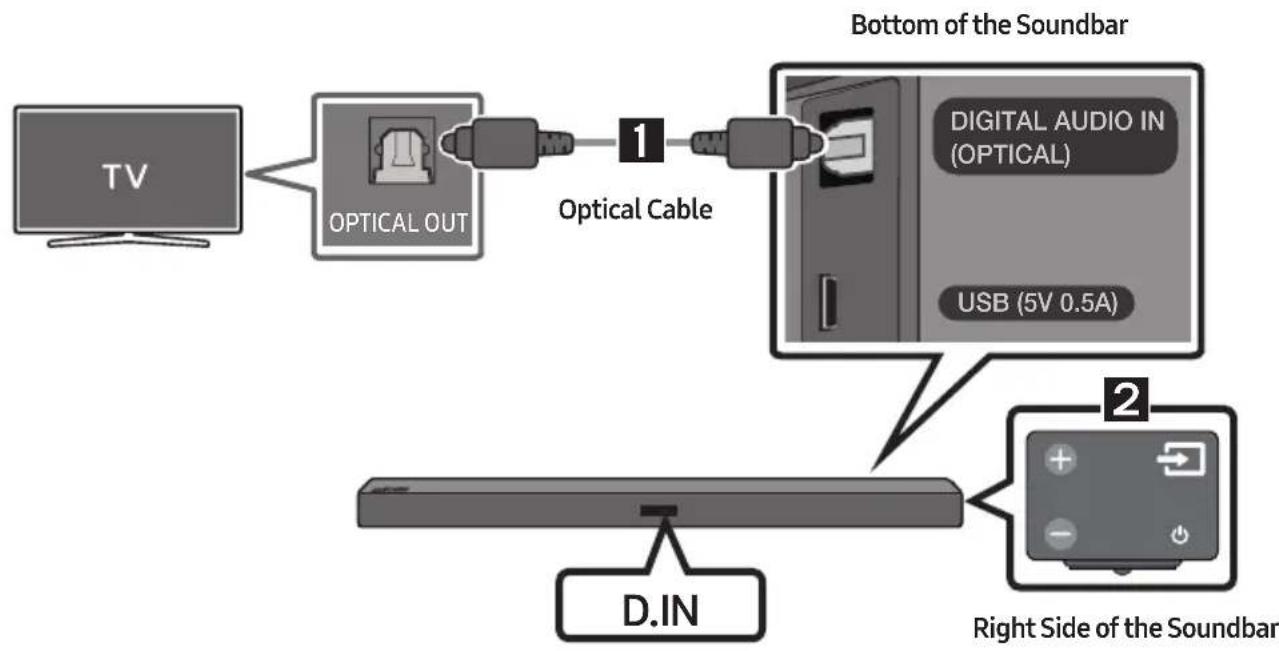
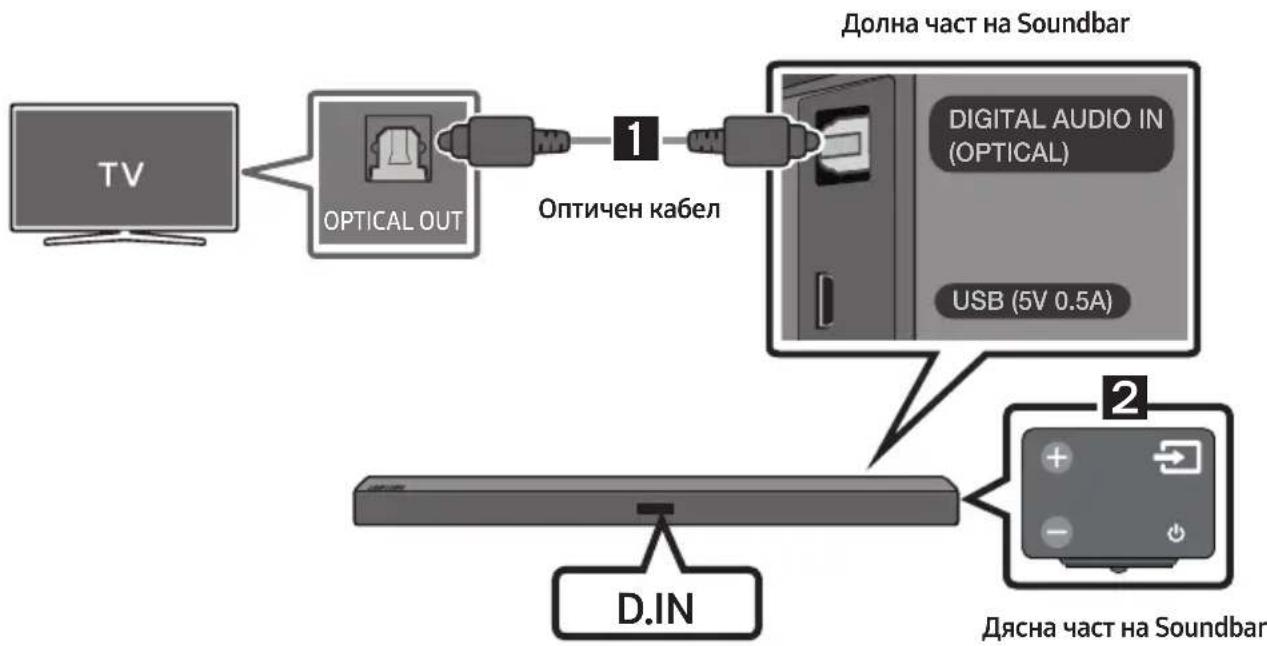
Connect the DIGITAL AUDIO IN (OPTICAL) jack on the Soundbar to the OPTICAL OUT jack of the TV with a digital optical cable.
-
Press the (Source) button on the right side panel or remote control, and then select mode "D.IN".
-
When the Soundbar is connected to a Samsung smart TV released in 2017 or later, the Bluetooth POWER function automatically turns on to enable the Soundbar to be controlled with the TV remote control. (See page 21 for details on Bluetooth POWER.)
Auto Power Link
Auto Power Link automatically turns on the Soundbar when the TV is turned on.
-
Connect the Soundbar and a TV with a digital optical cable.
-
Press the (Source) button on the right side panel or on the remote control, and then select "D.IN".
-
Press the Left button on the remote control for 5 seconds to turn Auto Power Link on or off.
-
Auto Power Link is set to ON by default. (To turn off this function, turn off Auto Power using the Soundbar.)
-
Depending on the connected device, Auto Power Link may not function.
-
This function is only available in the "D.IN" mode.

Method 2. Connecting Wirelessly
Connecting a TV via Bluetooth
When a TV is connected using Bluetooth, you can hear stereo sound without the hassle of cabling.
- Only one TV can be connected at a time.

The initial connection
-
Press the (Source) button on the right side panel or on the remote control, and then select "BT".
-
Change "BT" to "BT PAIRING".
-
If "BT READY" appears, press and hold the l (Source) button on the right side panel of the Soundbar or on the remote control for more than 5 seconds to display "BT PAIRING".
-
Select Bluetooth mode on the TV. (For more information, see the TV's manual.)
-
Select "[AV] Samsung Soundbar Mxxx M-Series" from the list on TV's screen.
An available Soundbar is indicated with "Need Pairing" or "Paired" on the TV Bluetooth device list. To connect to the Soundbar, select the message and establish a connection.
-
When the TV is connected, [TV Name] "BT" appears on the Soundbar's front display.
-
You can now hear TV sound from the Soundbar.
If the device fails to connect
- If the previously connected Soundbar listing (e.g. "[AV] Samsung Soundbar Mxxx M-Series") appears in the list, delete it.
- In "BT" mode, press and hold the (Source) button for more than 5 seconds on the right side panel of the Soundbar or on the remote control to switch to "BT PAIRING" mode.
Then, select "[AV] Samsung Soundbar Mxxx M-Series" from the TV's search list.
What are the BT READY and BT PAIRING statuses?
- BT READY: In this mode, you can search for previously connected TVs or connect to the Soundbar from a previously connected mobile device.
- BT PAIRING: In this mode, you can connect to a new device. (While in "BT" mode, press and hold the Source) button for more than 5 seconds on the right side of the Soundbar or on the remote control.)
NOTES
- If asked for a PIN code when connecting a Bluetooth device, enter <0000>.
- In Bluetooth connection mode, the Bluetooth connection will be lost if the distance between the Soundbar and the Bluetooth device exceeds 10 meters.
- The Soundbar automatically turns off after 5 minutes in the Ready state.
-
The Soundbar may not perform Bluetooth search or connection correctly under the following circumstances:
-
If there is a strong electrical field around the Soundbar.
- If several Bluetooth devices are simultaneously paired with the Soundbar.
-
If the Bluetooth device is turned off, not in place, or malfunctions.
-
Electronic devices may cause radio interference. Devices that generate electromagnetic waves must be kept away from the Soundbar main unit - e.g., microwaves, wireless LAN devices, etc.
Disconnecting the Soundbar from the TV
Press the (Source) button on the right side panel or on the remote control and switch to any mode but "BT".
- Disconnecting takes time because the TV must receive a response from the Soundbar.
(The time required may differ, depending on the TV model.)
- To cancel automatic Bluetooth connection between the Soundbar and TV, press the
II (Play/Pause) button on the remote control for 5 seconds in "BT READY" status. (Toggle On Off)
05 CONNECTING AN EXTERNAL DEVICE
Connect to an external device via a wired or wireless network to play the external device's sound through the Soundbar.
Connecting using an Optical or Analogue Audio (AUX) Cable
BD/DVD player/Set-top box/
Game console
Right Side of the Soundbar
1 Optical Cable
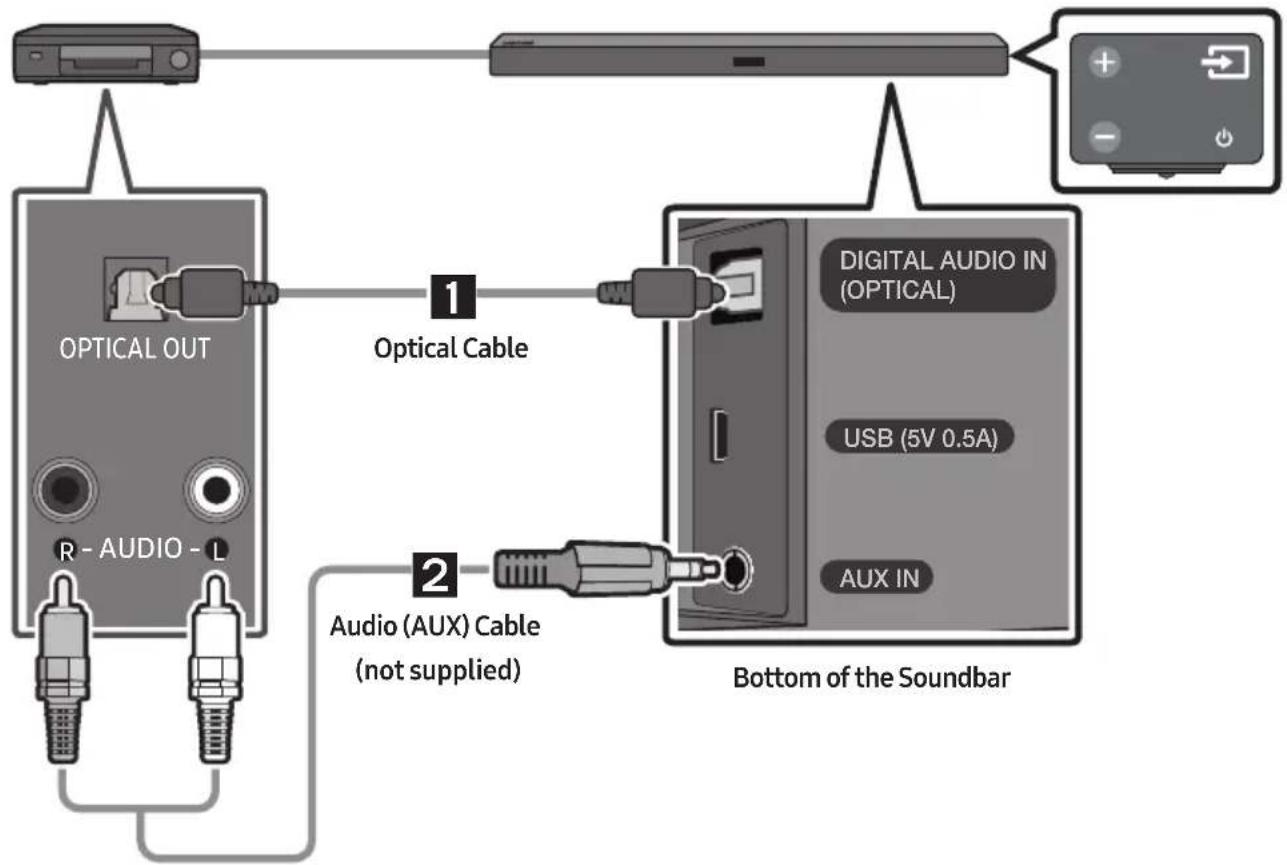
Connect DIGITAL AUDIO IN (OPTICAL) on the main unit to the OPTICAL OUT jack of the Source Device using a digital optical cable.
Select "D.IN" mode by pressing the (Source) button on the right side panel or on the remote control.
2 Audio (AUX) Cable
Connect AUXIN (Audio) on the main unit to the AUDIO OUT jack of the Source Device using an audio cable.
Select "AUX" mode by pressing (Source) button on the right side panel or on the remote control.
06 CONNECTING A USB
You can play music files located on USB storage devices through the Soundbar.
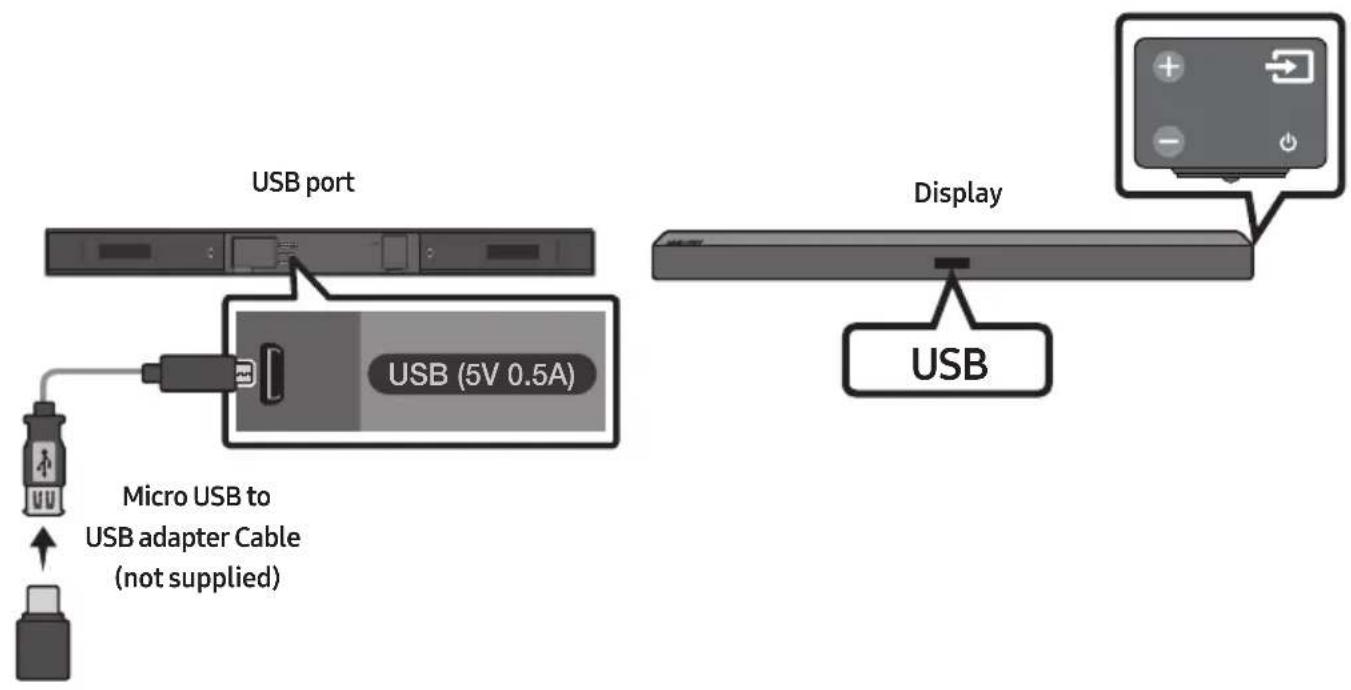
- Connect a Micro USB to USB adapter cable with a male USB 2.0 Micro USB plug (Type B) on one end and a standard female 2.0 USB jack (Type A) on the other end to the micro USB jack on your Soundbar.
- Micro USB to USB adapter Cable is sold separately. To purchase, contact a Samsung Service Centre or Samsung Customer Care.
- Connect your USB device to the female end of the adapter cable.
- Press the (Source) button on the right side panel or on the remote control, and then select "USB".
- "USB" appears in the display screen.
-
Play music files from the USB storage device through the Soundbar.
-
The Soundbar automatically turns off (Auto Power Off) if no USB device has been connected for more than 5 minutes.
File Format Type Compatibility list
| Extension | Codec | Sampling Rate | Bit Rate |
| *.mp3 MPEG 1 Layer2 | 16KHz ~ 48KHz 80kbps~320kbps | ||
| MPEG 1 Layer3 16KHz ~ 48KHz 80kbps~320kbps | |||
| MPEG 2 Layer3 16KHz ~ 48KHz 80kbps~320kbps | |||
| MPEG 2.5 Layer3 16KHz ~ 48KHz 80kbps~320kbps | |||
| *.wma | Wave_Style_MSAudio1 | 16KHz ~ 48KHz | 56kbps~128kbps |
| Wave_Style_MSAudio2 16KHz ~ 48KHz 56kbps~128kbps | |||
| *.aac | AAC | 16KHz ~ 96KHz | 48kbps~320kbps |
| AAC-LC | 16KHz ~ 96KHz | 128kbps~192kbps5.1ch 320kbps | |
| HE-AAC | 24KHz ~ 96KHz | 48kbps~64kbps5.1ch 160kbps | |
| *.wav | - | 16KHz ~ 48KHz | up to 3000kbps |
| *.ogg | OGG 1.1.0 | 16KHz ~ 48KHz | 50kbps~500kbps |
| *.flac | FLAC 1.1.0, FLAC 1.2.1 | 16KHz ~ 96KHz | up to 3000kbps |
- If there are too many folders and files stored on the USB device, it may take the Soundbar sometime to access and play files.
07 CONNECTING A MOBILE DEVICE
Connecting via Bluetooth
When a mobile device is connected using Bluetooth, you can hear stereo sound without the hassle of cabling.
- You cannot connect more than one Bluetooth device at a time.

The initial connection
- Press the (Source) button on the right side panel or on the remote control, and then select "BT".
-
Change "BT" to "BT PAIRING".
-
If "BT READY" appears, press and hold the (Source) button on the right side panel of the Soundbar or on the remote control for more than 5 seconds to display "BT PAIRING".
-
Select "[AV] Samsung Soundbar Mxxx M-Series" from the list.
-
When a Soundbar is connected to the Bluetooth device, [Bluetooth Device Name] "BT" appears in the front display.
-
Play music files from the device, connected via Bluetooth, through the Soundbar.
If the device fails to connect
- If the previously connected Soundbar listing (e.g. "[AV] Samsung Soundbar Mxxx M-Series") appears in the list, delete it.
- In "BT" mode, press and hold the (Source) button for more than 5 seconds on the right side panel of the Soundbar or on the remote control to switch to "BT PAIRING" mode.
Then, select "[AV] Samsung Soundbar Mxxx M-Series" from the Bluetooth device search list.
What are the BT READY and BT PAIRING statuses?
- BT READY: In this mode, you can search for previously connected TVs or connect to the Soundbar from a previously connected mobile device.
- BT PAIRING: In this mode, you can connect to a new device. (While in "BT" mode, press and hold the Source) button for more than 5 seconds on the right side of the Soundbar or on the remote control.)
NOTES
- If asked for a PIN code when connecting a Bluetooth device, enter <0000>.
- In Bluetooth connection mode, the Bluetooth connection will be lost if the distance between the Soundbar and the Bluetooth device exceeds 10 meters.
- The Soundbar automatically turns off after 5 minutes in the Ready state.
-
The Soundbar may not perform Bluetooth search or connection correctly under the following circumstances:
-
If there is a strong electrical field around the Soundbar.
- If several Bluetooth devices are simultaneously paired with the Soundbar.
-
If the Bluetooth device is turned off, not in place, or malfunctions.
-
Electronic devices may cause radio interference. Devices that generate electromagnetic waves must be kept away from the Soundbar main unit - e.g., microwaves, wireless LAN devices, etc.
The Soundbar supports SBC data (44.1kHz, 48kHz). - Connect only to a Bluetooth device that supports the A2DP (AV) function.
- You cannot connect the Soundbar to a Bluetooth device that supports only the HF (Hands Free) function.
-
Once you have paired the Soundbar to a Bluetooth device, selecting "[AV] Samsung Soundbar Mxxx M-Series" from the device's scanned devices list will automatically change the Soundbar to "BT" mode.
-
Available only if the Soundbar is listed among the Bluetooth device's paired devices.
(The Bluetooth device and the Soundbar must have been previously paired at least once.)
- The Soundbar will appear in the Bluetooth device's searched devices list only when the Soundbar is displaying "BT READY".
- Soundbar cannot be paired to another Bluetooth device, while using the Bluetooth function.
Bluetooth POWER On (Bluetooth POWER)
If a previously paired Bluetooth device tries to pair with the Soundbar when the Bluetooth POWER On function is on and the Soundbar is turned off, the Soundbar turns on automatically.
- Press the Bluetooth POWER button on the remote while the Soundbar is turned on.
- "ON-BLUETOOTH POWER" appears on the Soundbar's display.
Disconnecting the Bluetooth device from a Soundbar
You can disconnect a Bluetooth device from the Soundbar. For instructions, see the Bluetooth device's user manual.
- The Soundbar will be disconnected.
- When the Soundbar is disconnected from the Bluetooth device, the Soundbar will display "BT DISCONNECTED" on the front display.
Disconnecting the Soundbar from the Bluetooth device
Press the (Source) button on the right side panel or on the remote control, and then change to any mode except "BT".
- Disconnecting takes time because the Bluetooth device must receive a response from the Soundbar. (Disconnection time may differ, depending on the Bluetooth device)
- When the Soundbar is disconnected from the Bluetooth device, the Soundbar will display "BT DISCONNECTED" on the front display.
NOTES
- In Bluetooth connection mode, the Bluetooth connection will be lost if the distance between the Soundbar and the Bluetooth device exceeds 10 meters.
- The Soundbar automatically turns off after 5 minutes in the Ready state.
More About Bluetooth
Bluetooth is a technology that enables Bluetooth-compliant devices to interconnect easily with each other using a short wireless connection.
- A Bluetooth device may cause noise or malfunction, depending on usage, if:
- A part of your body is in contact with the receiving/transmitting system of the Bluetooth device or the Soundbar.
- It is subject to electrical variation from obstructions caused by a wall, corner, or office partition.
- It is exposed to electrical interference from same frequency-band devices including medical equipment, microwave ovens, and wireless LANs.
- Pair the Soundbar with the Bluetooth device while they are close together.
- The further the distance between the Soundbar and Bluetooth device, the worse the quality is. If the distance exceeds the Bluetooth operational range, the connection is lost.
- In poor reception areas, the Bluetooth connection may not work properly.
- The Bluetooth connection only works when it is close to the unit. The connection will be automatically cut off if the Bluetooth device is out of range. Even within range, the sound quality may be degraded by obstacles such as walls or doors.
- This wireless device may cause electric interference during its operation.
Using the Samsung Audio Remote App
Installing the Samsung Audio Remote App
To control the Soundbar with your smart device and the Samsung Audio Remote app, download the Samsung Audio Remote app from the Google Play store.
Market search : Samsung Audio Remote

Launching the Samsung Audio Remote App
To launch and use the Samsung Audio Remote app, touch the Audio Remote icon on your smart device, and then follow the directions on the screen.
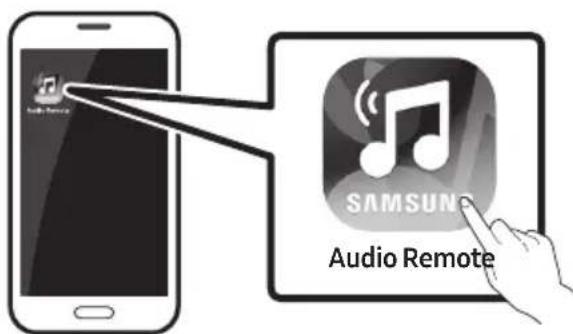
- The Samsung Audio Remote app is only compatible with Android mobile phones and mobile devices running Android OS 3.0 or later.
08 USING THE REMOTE CONTROL
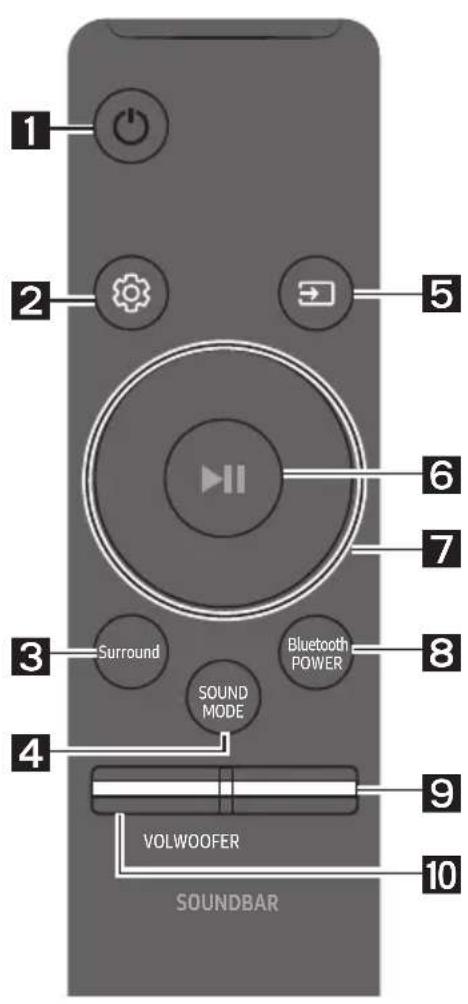
How to Use the Remote Control
| 1 | Power | Turns the Soundbar on and off. |
| 2 | Sound Control | You can select from TREBLE, BASS, or AUDIO SYNC. • To control the volume of the treble or bass sound, select TREBLE or BASS in Sound Settings, and then adjust the volume between -6~+6 by using the Up/Down buttons. • Press and hold the (Sound Control) button for about 5 seconds to adjust the sound for each frequency band. 150Hz, 300Hz, 600Hz, 1.2KHz, 2.5KHz, 5KHz, and 10KHz are selectable (Left/Right) and each can be adjusted to a setting between -6~+6 (Up/Down). • If the video and audio between the TV and your Soundbar are not synchronised, select AUDIO SYNC in Sound Settings, and then set audio delay between 0~300 milliseconds by using the Up/Down buttons. (Except "USB" mode) • Audio Sync is only supported in some functions. |
| 3 | Surround Surround | The Surround Sound function adds depth and a sense of space to sound. Each time you press this button, ON and OFF alternate. • ON: Play sound over all the speakers. • OFF: You can hear the sound of the original source channel from several speakers. |
| 4 | SOUND MODE SOUND MODE | You can select the desired sound effect by choosing STANDARD, MUSIC, CLEAR VOICE, SPORTS, or MOVIE. Select the "STANDARD" mode if you want to enjoy the original sound. • DRC (Dynamic Range Control) Lets you apply dynamic range control to Dolby Digital tracks. If you press and hold the SOUND MODE button while in standby mode, DRC (Dynamic Range Control) turns on or off. With the DRC turned on, loud sound is reduced. (The sound may be distorted.) |
| 5 | Source | Press to select a source connected to the Soundbar. • BT PAIRING mode To turn on "BT PAIRING" mode in "BT" mode, press and hold the Source button for more than 5 seconds. See page 15 for details. • Auto Power Down Function The unit turns off automatically in the following situations. - D.IN / BT / USB Mode: If there is no audio signal for 5 minutes. - AUX Mode: - If the Audio (AUX) Cable is disconnected for 5 minutes. - If there is no KEY input for 8 hours when the Audio (AUX) Cable is connected. (Auto Power Down function can be turned off only in that case.) - To turn off Auto Power Down function, while in "AUX" mode, press and hold the button for 5 seconds. "ON-AUTO POWER DOWN" / "OFF-AUTO POWER DOWN" appears on the display. |
| 6 | Play / Pause | Press the button to pause a music file temporarily. If you press the button again, the music file plays. |
| 7 | Up/Down/Left/Right | Press the indicated areas to select Up/Down/Left/Right. |
| Press Up/Down/Left/Right on the button to select or set functions. • Repeat To use the Repeat function in "USB" mode, press the Up button. • Music Skip Press the Right button to select the next music file. Press the Left button to select the previous music file. • Auto Power Link You can turn Auto Power Link on or off. Auto Power Link is controlled by the Right and Left buttons respectively. - Auto Power Link: If the Soundbar is connected to your TV through a digital optical cable, the Soundbar can automatically turn on when you turn on your TV. Press and hold the Left button for 5 seconds to toggle Auto Power Link ON and OFF. - Auto Power Link is set to ON by default. | ||
| 8 | BluetoothPOWERBluetoothPOWER | Press to turn the Bluetooth POWER or volume restriction function on and off. • Bluetooth POWER function: If the Soundbar is in standby mode and the Bluetooth POWER function is On, when you turn on a previously connected Bluetooth device, the Soundbar automatically turns on and connects via Bluetooth to the device. - When the Bluetooth POWER function is on, "ON-BLUEOTHOPower" appears on the Soundbar display. To turn off the Bluetooth POWER function, press the Bluetooth POWER button once. Then "OFF-BLUEOTHOPower" appears on the front display. - If the "D.IN" mode is on and the Soundbar is connected to a Samsung smart TV released in 2017 or later, the Soundbar can be controlled with the TV remote control. In this mode, you cannot turn off Bluetooth POWER. • Volume restriction function: Because it may damage hearing when the power is turned on at high volumes, it adjusts the volume to 20 when the set volume is higher than 20. - The default value for Volume restriction is off. The set volume is maintained even when the power is turned off. - To change the setting, press the Bluetooth POWER button on the remote control for 5 seconds. With the volume restriction off, "V FREE" appears on the front display and with the function on, "V LOCK" appears. |
| 9 | WOOFER | Push the button up or down to adjust the volume of the subwoofer to -12 or -6 to +6. Pressing the button reverts the subwoofer volume to level 0. |
| 10 | VOL | Push the button up or down to adjust the volume. • Mute Press the VOL button to mute the sound. Press it again to unmute the sound. |
Adjusting the Soundbar volume with a TV remote control
Use the TV menu to set the TV speaker on a Samsung TV to external speakers. (For more information, see the TV's user manual.)
- After installing the Soundbar, you can adjust the Soundbar's volume using the IR remote control that came with a Samsung TV. (If you do not want to use this function, when the Soundbar is on, press and hold the Surround button for 5 seconds. "OFF-TV REMOTE" appears in the Soundbar's display and the function turns off.)
To adjust the volume using only the Samsung TV remote control, press and hold the Surround button for more than 5 seconds until "SAMSUNG-TV REMOTE" appears in the Soundbar display.
-
Each time the Surround button is held for 5 seconds, the mode switches in the following order: "SAMSUNG-TV REMOTE" (Default mode) "OFF-TV REMOTE" "ALL-TV REMOTE".
-
To adjust the Soundbar volume with the remote control that came with a TV made by a third party manufacturer, turn the Soundbar on, press and hold the Surround button for 5 seconds ("OFF-TV REMOTE" appears on the Soundbar's display), release the Surround button, and then press and hold the Surround button again for more than 5 seconds. ("ALL-TV REMOTE" appears on the Soundbar's display.)
-
This function may not be available, depending on the remote control.
Manufacturers supporting this function:
VIZIO, LG, Sony, Sharp, PHILIPS, PANASONIC, TOSHIBA, GRUNDIG, Hisense, RCA
Using the Hidden Buttons
| Hidden Button | Reference page | |
| Remote Control Button Function | ||
| Surround | TV remote control On/Off | page 22 |
| (Source) | BT Paring page 15 | |
| II (Play / Pause) | Auto Power Down On/Off (AUX mode) page 20 | |
| Initialise (Standby) page 28 | ||
| VOL | ID SET (Standby) | page 7 |
| Left | Auto Power Link ON/OFF | page 10 |
| (Sound Control) | 7 Band EQ page 19 | |
| SOUND MODE | DRC ON/OFF (Standby) | page 20 |
| Bluetooth POWER | Volume restriction On/Off | page 21 |
Output specifications for the different sound effect modes
| Effect Input | Output | |||
| Except Wireless Rear Speaker Kit | Include Wireless Rear Speaker Kit | |||
| Surround Surround | ON | 2.0 ch | 2.1 ch | 4.1 ch |
| 5.1 ch | 2.1 ch | 4.1 ch | ||
| SOUND MODE SOUND MODE | STANDARD | 2.0 ch | 2.1 ch | 4.1 ch |
| 5.1 ch | 2.1 ch | 4.1 ch | ||
| MUSIC | 2.0 ch | 2.1 ch | 4.1 ch | |
| 5.1 ch | 2.1 ch | 4.1 ch | ||
| CLEAR VOICE | 2.0 ch | 2.1 ch | 4.1 ch | |
| 5.1 ch | 2.1 ch | 4.1 ch | ||
| SPORTS | 2.0 ch | 2.1 ch | 4.1 ch | |
| 5.1 ch | 2.1 ch | 4.1 ch | ||
| MOVIE | 2.0 ch | 2.1 ch | 4.1 ch | |
| 5.1 ch | 2.1 ch | 4.1 ch | ||
Samsung Wireless Rear Speaker Kit can be purchased separately. To purchase a Kit, contact the vendor you purchased the Soundbar from.
09 INSTALLING THE WALL MOUNT
Installation Precautions
Install on a vertical wall only.
- Do not install in a place with high temperature or humidity.
- Verify whether the wall is strong enough to support the product's weight. If not, reinforce the wall or choose another installation point.
Purchase and use the fixing screws or anchors appropriate for the kind of wall you have (plaster board, iron board, wood, etc.). If possible, fix the support screws into wall studs.
Purchase wall mounting screws according to the type and thickness of the wall you want to mount the Soundbar on.
Diameter: M5
Length: 35mm or longer recommended.
- Connect cables from the unit to external devices before you install the Soundbar on the wall.
- Make sure the unit is turned off and unplugged before you install it. Otherwise, it may cause an electric shock.
Wallmount Components

Wall Mount Guide


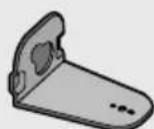
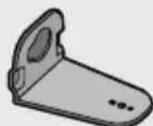
Holder-Screw (2 EA) Screw (2 EA) Bracket-Wall Mount L Bracket-Wall Mount R
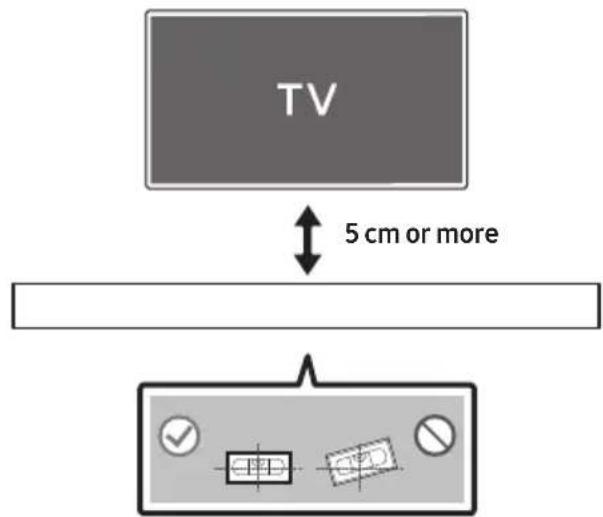
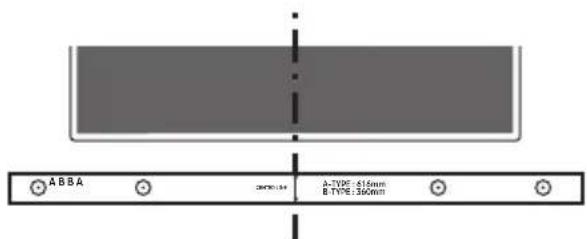
- Place the Wall Mount Guide against the wall surface.
The Wall Mount Guide must be level.
If your TV is mounted on the wall, install the Soundbar at least 5 cm below the TV.
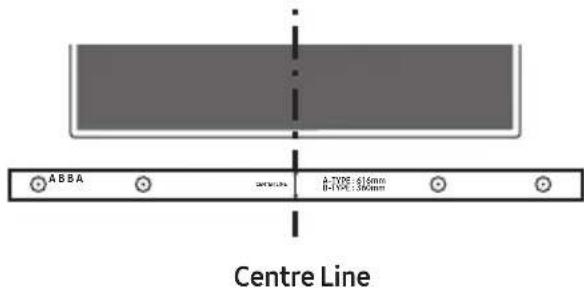
- Align the Paper Template's Centre Line with the centre of your TV (if you are mounting the Soundbar below your TV), and then fix the Wall Mount Guide to the wall using tape.
If you are not mounting below a TV, place the Centre Line in the centre of the installation area.
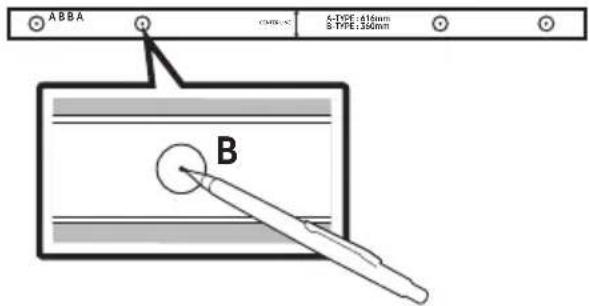
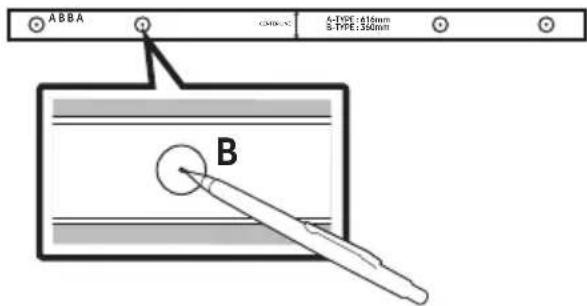
- Push a pen tip or sharpened pencil tip through the centre of the B-TYPE images on each end of the Guide to mark the holes for the supporting screws, and then remove the Wall Mount Guide.
-
Using an appropriately sized drill bit, drill a hole in the wall at each marking.
-
If the markings do not correspond to the positions of studs, make sure you insert appropriate anchors or molliies into the holes before you insert the support screws. If you use anchors or molliies, make sure the holes you drill are large enough for the anchors or molliies you use.
-
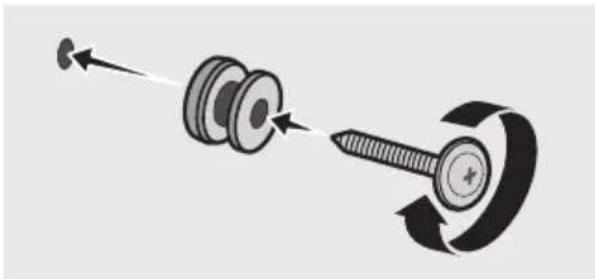
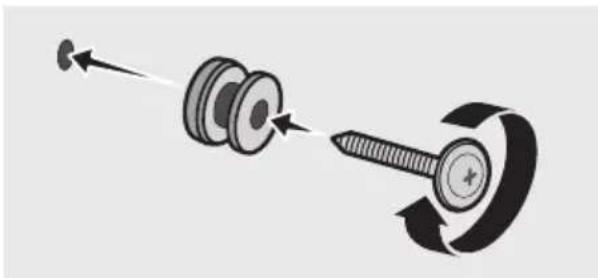
Push a screw (not supplied) through each Holder-Screw, and then screw each screw firmly into a support screw hole.
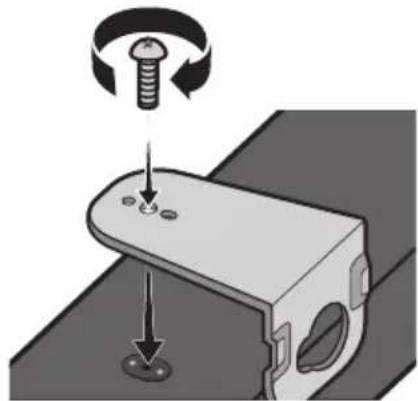
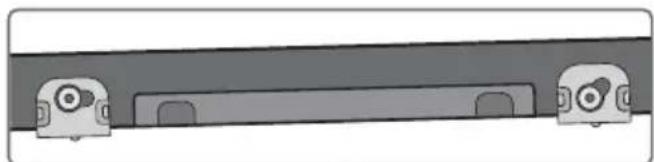
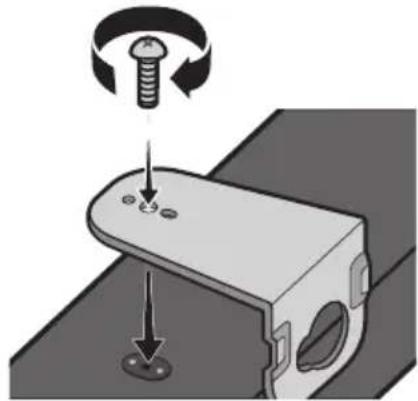
- Use the two Screws (M4 x L12) to attach both Bracket-Wall Mount L and R to the Soundbar's bottom.
For a proper fit, make sure to align the bumps on the Soundbar to the holes on the brackets.
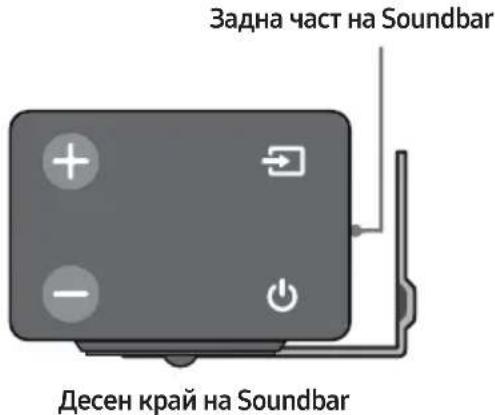
- When assembling, make sure the hanger part of the Bracket-Wall Mounts are located behind the rear of the Soundbar.
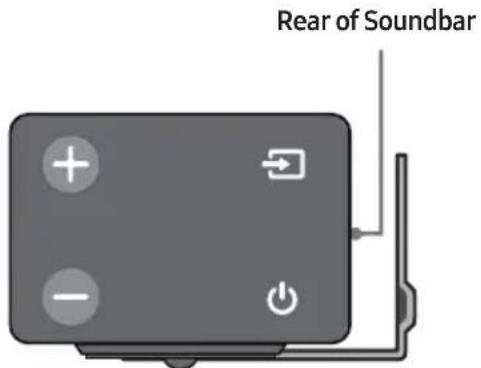
Right end of Soundbar
- The left and right mounts are different shapes. Make sure to position them correctly.

Wall Mount R Wall Mount L
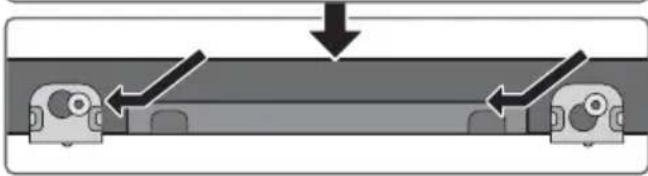
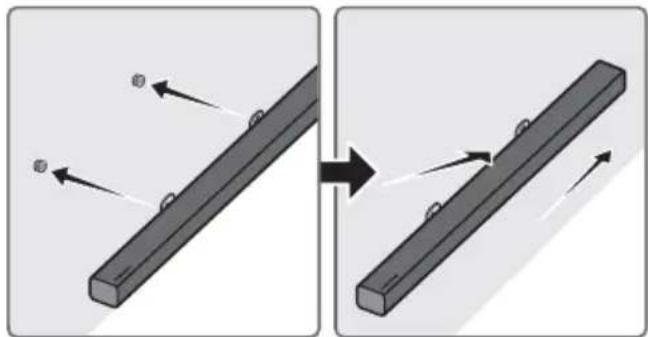
- Install the Soundbar with the attached Bracket-Wall Mounts by hanging the Bracket-Wall Mounts on the Holder-Screws on the wall.
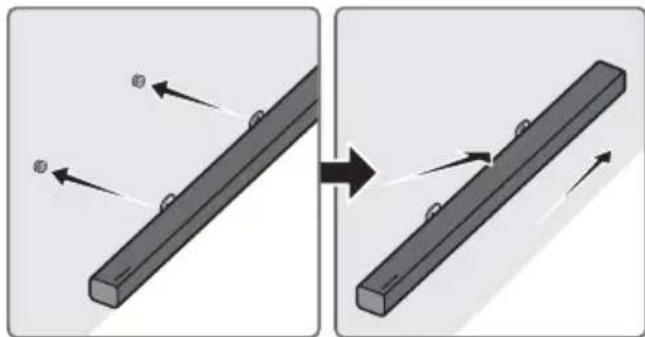
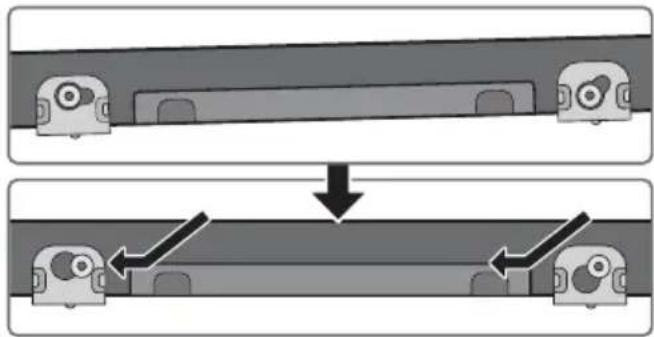
- Slightly tilt the Soundbar to insert both Holder-Screw heads into Bracket-Wall Mount holes. Push the Soundbar in the direction of the arrow to make sure both sides are firmly fixed.
Detaching the Soundbar from the Wall
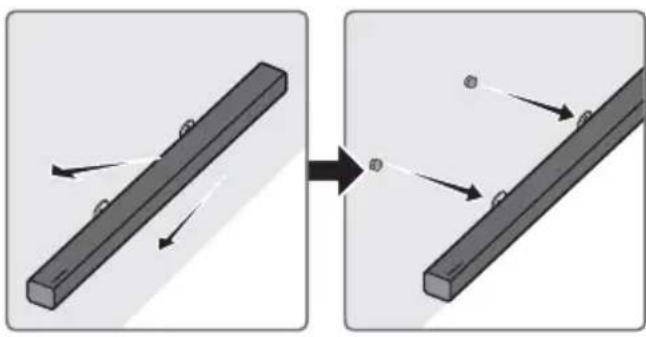
- To separate the Soundbar from the wall mount, push it in the direction of arrow, tilt it up slightly, and then pull it away from the wall as shown.
- Do not hang onto the installed unit and avoid striking or dropping the unit.
- Secure the unit firmly to the wall so that it does not fall off. If the unit falls off, it may cause an injury or damage the product.
- When the unit is installed on a wall, please make sure that children do not pull any of the connecting cables, as this may cause it to fall.
- For the optimal performance of a wall mount installation, install the speaker system at least 5 cm below the TV, if the TV is mounted on the wall.
- For your safety, if you do not mount the unit on the wall, install it on a secure, flat surface where it is unlikely to fall.
10 SOFTWARE UPDATE
Samsung may offer updates for the Soundbar's system firmware in the future.
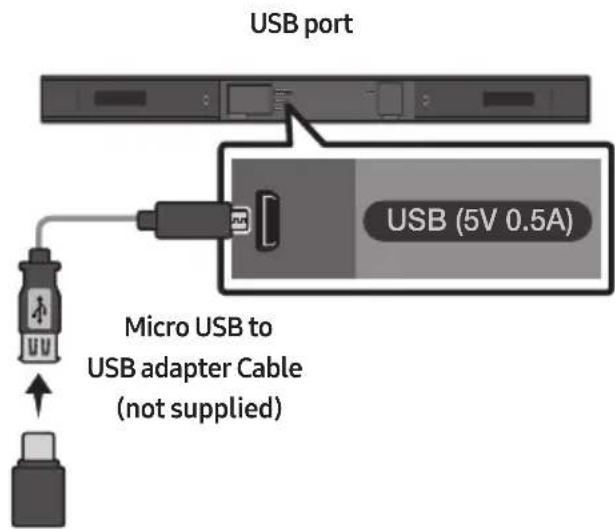
If an update is offered, you can update the firmware by connecting a USB device with the firmware update stored on it to the USB port on your Soundbar.
For more information about how to download update files, go to the Samsung Electronics website at (www.samsung.com Support).
Then, enter or select the model of your Soundbar, select Software & Apps, and then Downloads.
The option name can vary.
Updating Procedure
-
Connect a Micro USB to USB adapter cable with a male USB 2.0 Micro USB plug (Type B) on one end and a standard female 2.0 USB jack (Type A) on the other end to the micro USB jack on your Soundbar.
-
The Micro USB to USB adapter cable is sold separately. To purchase, contact a Samsung Service Centre or Samsung Customer Care.
-
Follow the steps below to download the product software:
Go to the Samsung website at (samsung.com) search for the model name - select the customer support option (the option name is subject to change) - Save the downloaded software to a USB stick and select "Extract Here" to unzip the folder.
- Turn off the Soundbar and connect the USB stick containing the software update to the female port on a Micro USB adapter cable. Connect the cable to the USB port on the Soundbar.
- Turn on the Soundbar. Within 3 minutes, "UPDATE" is displayed and updating begins.
-
When the update finishes, the Soundbar turns off. Press the button on the remote control for 5 seconds. "INIT" appears on the display and then the Soundbar turns off. The update is complete.
-
This product has a DUAL BOOT function. If the firmware fails to update, you can update the firmware again.
If UPDATE is not displayed
- Turn off the Soundbar, disconnect and then reconnect the USB storage device that contains the update files to the Soundbar's USB port.
-
Disconnect the Soundbar's power cord, reconnect it, and then turn on the Soundbar.
-
Updating firmware may not work properly if audio files supported by the Soundbar are stored in the USB storage device.
- Do not disconnect the power or remove the USB device while updates are being applied. The main unit will turn off automatically after completing the firmware update.
-
After update is completed, the user setup in Soundbar is initialised. We recommend you write down your settings so that you can easily reset them after the update. Note that updating firmware resets the subwoofer connection too. If the connection to the subwoofer is not re-established automatically after the update, refer to page 6. If the software update fails, check if the USB stick is defective.
-
Mac OS users should use MS-DOS (FAT) as the USB format.
- Updating via USB may not be available, depending on the USB storage device manufacturer.
11 TROUBLESHOOTING
Before seeking assistance, check the following.
| The unit will not turn on. |
| Is the power cord plugged into the outlet?→Connect the power plug to the outlet. |
| A function does not work when the button is pressed. |
| Is there static electricity in the air?→Disconnect the power plug and connect it again. |
| Sound dropouts occur in BT mode. |
| →See the Bluetooth connection sections on pages 10 and 15. |
| Sound is not produced. |
| Is the Mute function on?→Press the VOL button to cancel the function. |
| Is the volume set to minimum?→Adjust the Volume. |
| The remote control does not work. |
| Are the batteries drained?→Replace with new batteries. |
| Is the distance between the remote control and Soundbar main unit too far?→Move the remote control closer to the Soundbar main unit. |
| The red LED on the subwoofer blinks and the subwoofer is not producing sound. |
| This issue can occur if the subwoofer is not connected to the Soundbar main unit.→Try to connect your subwoofer again. (See page 6.) |
| The subwoofer drones and vibrates noticeably. |
| Try to adjust the vibration of your subwoofer.→Push the WOOFER button on your remote control up or down to adjust the subwoofer volume. (between -12, -6 ~ +6). |
12 LICENCE

DOLBY
AUDIO
Manufactured under license from Dolby Laboratories. Dolby, Dolby Audio, Pro Logic, and the double-D symbol are trademarks of Dolby Laboratories.


2.0 Channel
For DTS patents, see http://patents.dts.com. Manufactured under license from DTS Licensing Limited. DTS, the Symbol, DTS in combination with the Symbol, and DTS 2.0 Channel are registered trademarks or trademarks of DTS, Inc. in the United States and/or other countries. © DTS, Inc. All Rights Reserved.
13 OPEN SOURCE LICENCE NOTICE
To send inquiries and requests regarding open sources, contact Samsung via Email (oss.request@samsung.com).
14 IMPORTANT NOTES ABOUT SERVICE
- Figures and illustrations in this User Manual are provided for reference only and may differ from actual product appearance.
- An administration fee may be charged if either
(a) an engineer is called out at your request and there is no defect with the product (i.e. where the user manual has not been read).
(b) you bring the unit to a repair centre and there is no defect with the product (i.e. where the user manual has not been read).
- You will be informed of the administration fee amount before a technician visits.
15 SPECIFICATIONS AND GUIDE
Specifications
| GENERAL | USB | 5V/0.5A | |
| Weight | Soundbar Main Unit | 1.5kg | |
| Subwoofer (PS-WM20) | 4.6kg | ||
| Dimensions (W x H x D) | Soundbar Main Unit | 907.5 x 53.5 x 70.5 mm | |
| Subwoofer (PS-WM20) | 179.0 x 353.0 x 299.5 mm | ||
| Operating Temperature Range | +5°C to +35°C | ||
| Operating Humidity Range | 10 % ~ 75 % | ||
| AMPLIFIER | Rated Output power | Soundbar Main Unit | 35W x 2, 6 ohm |
| Subwoofer (PS-WM20) | 130W, 3 ohm | ||
| Supported play formats (DTS 2.0 sound is played in DTS format.) | LPCM 2ch, Dolby AudioTM (supporting Dolby® Digital), DTS | ||
| Wireless device output power | BT max transmitter power | 100mW at 2.4GHz – 2.4835GHz | |
| SRD max transmitter power | 25mW at 5.725GHz – 5.825GHz | ||
NOTES
Samsung Electronics Co., Ltd reserves the right to change the specifications without notice.
- Weight and dimensions are approximate.
- For more information about the power supply and power consumption, refer to the label attached to the product. (Label : Bottom of the Soundbar Main Unit)
| Overall Standby Power Consumption (W) | 4.1W | |
| Bluetooth Port deactivation method | Press the “Bluetooth POWER” button on the remote control when “BT” mode. | |
- Hereby, Samsung Electronics, declares that this equipment is in compliance with Directive 2014/53/EU.
The full text of the EU declaration of conformity is available at the following internet address: http://www.samsung.com go to Support > Search Product Support and enter the model name.
This equipment may be operated in all EU countries.

(Applicable in countries with separate collection systems)
This marking on the battery, manual or packaging indicates that the batteries in this product should not be disposed of with other household waste at the end of their working life. Where marked, the chemical symbols Hg, Cd or Pb indicate that the battery contains mercury, cadmium or lead above the reference levels in EC Directive 2006/66.
If batteries are not properly disposed of, these substances can cause harm to human health or the environment.
To protect natural resources and to promote material reuse, please separate batteries from other types of waste and recycle them through your local, free battery return system.
Correct Disposal of This Product
(Waste Electrical & Electronic Equipment)
(Applicable in countries with separate collection systems)
This marking on the product, accessories or literature indicates that the product and its electronic accessories (e.g. charger, headset, USB cable) should not be disposed of with other household waste at the end of their working life. To prevent possible harm to the environment or human health from uncontrolled waste disposal, please separate these items from other types of waste and recycle them responsibly to promote the sustainable reuse of material resources.
Household users should contact either the retailer where they purchased this product, or their local government office, for details of where and how they can take these items for environmentally safe recycling.
Business users should contact their supplier and check the terms and conditions of the purchase contract. This product and its electronic accessories should not be mixed with other commercial wastes for disposal.
For information on Samsung's environmental commitments and product specific regulatory obligations e.g. REACH, WEEE, Batteries, visit:
http://www.samsung.com/uk/aboutsamsung/samsungelectronics/corporatecitizenship/data-corner.html
(B 3aBnCmOCT OT CtpaHaTa n MoJeNa)

- Ctbnkte 3a Cbbp3BaHe Ha 3axpaHbaHeTo ca 0603HaueHn (1,2,3).3a DonbHnTeHa nΦopMaun OTHOCHO Cbbp3BaHeTo Ha 3axpaHbaHeTo BxKTe CTpaHua 5.
- 3a KOMNoHEnTn 3a MOHTnpaHe Ha Soundbar KbM CteHaTa BnXTe CtpaHnla 24.
- Aдаллстория Кабел Мьро USB Кьм USB с позда в OTдени. 3а дуллупге, с CBьрхетсьсервиен цentьр на Samsung илс цentьр за облuyквае на Клиенти Ha Samsung.
B3aBnCmOCTOTpernoHa,ueNcBbT3a npomeHnB TOK moKe da ce pa3nUaBa IO BbHseH BnIIMoKe da 6bde doctabEn nHTerpnpaH c AC/DC aanTepa.
BbHnHnT BnHa akcecoapnte moke neko da ce pa3nUaBa ot nIIOCTpaunTe no-rope.
CBeTInHHn LED nHdNkAToPn B rOpHaTa qact Ha cy6yΦepa
3aHa yact Ha cy6yphiepa TopHa yact Ha cy6yphiepa
2.ИЗкlioуeteSoundbar.
3. HatncheTe n 3aDpBxTe 6yToHa VOL Ha IInCTaHcNHOHOTo ynpabNeHne Hau-MaKko 3a 5 cekyHn, JOKato Soundbar e N3KJIuOHe (OFF).
4. Cb06eHnTo 3a ID SET ce noBBA ha nCnpe Ha Soundbar 3a 1,3 cekynn n cIeTob a N3Ye3Ba.
-
Korato синяг Индikatop Ha cy6yepa Mna, Bkliouhe Te 3axpaHbaHeTo Ha Soundbar, KaTo HATINCHETe 6yToHa (3axpaHbaHe) OTdACHO Ha OCHOBHOTO yCTPOICTBO Nn Ha INCTaHIOHHOTO ynpabJIeHne.
-
Korato Bpb3kata ce yctahOBu ycneuHO, cHnrt nHdkatop B rohpata qact Ha cy6yepa cnnpa da Mna I 3aNoCb Da CBETN NOCTOHHO.
-
Ako npouecbT ha cBbP3BaHe e HeycneWeH, CnHra T HnDnKaTOp ige Mira HenpeKbChaTo. IpemHeTe KbM CtbNka 1 n 3anoyHeTe OTHaHano.
BENEXKNI
He cBbP3BaIte 3axpaHbaaJna Ka6eHa To3n npOyKT nIn BaJnT TeJeBn3Op KbM eJekTpueckn KOHTaKT, JOKaTO BCuHK B0b3KN MeKdV KOMNoHEHTne He 6bDat 3aBbDpeHn.
- Преши да пемecтITE си Инсталпате TОИ порукТ, Траьда се уberпг, Ye 3axpaHbaHeto e n3KJIQUeHOи 3axpaHbAшят Кбел He e CBp3aH KbM eJekTOnueCKN KOHTaKT.
- Ako ochobhoto yctpoiCTBO e n3KJIoueHO, 6e3KmUHnT cy6yfepe Bne3e B pejkm Ha rTOBHOCT n CBeToIOIDbT 3a STANDBY OTROpe ue CBetn B cepBeHo, cIeI KaTO npemrHe HAKOKNo PbTN B CINHbO.
- Ako n3no3BaTe yctpoiCtBO, Koeto n3no3Ba cBuaTa yeCToTA (5,8 GHz), KaKTo Soundbar, B 6n3OCT Do Soundbar, cmUeHnraT MoRat Da npuHnT pKeKbCBAhe Ha 3Byka.
- М akсmaHOTO pa3ctoHne Ha npedabane Ha 6e3KnHnHa cnHaI Ha oCHOBnHa MOnyI e Okolo 10 MeTpa, Ho MoXe Da Bapnpa B 3aBncMocT OT BaWata pa6oTHa cpeI. Ako MeJxu OChOBnHa Moyn I 6e3KnHnry cy6yΦep Ima CTOMaHObetoHnHa nII MeTaHa CTeHa, CInCTeMa TMOx e N3O6Uo da He pa6oTN, 3aIoTO 6e3KnHnYr CnHaI He MoXe Da npOHnKHe ppe3 MetaI.
PNEДПАЗИМЕРКИ
B6e3KnHnCy6yep nMa Brpaedn aHTen 3a npneMaHe Ha 6e3Kuueh CnHaI. CbXpaHbAit MeMylnte daJeU OT BOna N Blara.
3a da cn ocinrgyprte onntmamno kauectbo npn cnyshahe, ybepeTe ce, ye B 3oHaTa OKONo 6e3xnuHnBvcoKOrOBOpTeI 3a HnCKn YecTOn n MoUyla Ha 6e3xnuHn npneMnK (npodaba ce OTdJIHo) Hma npenrTCTBn.
3a Да постигнелу Истинскп 6eЗкчен сbpayнд 3ByK, CBbpжete КOMПлектб 6eЗкчни 3aДи ВИСКОТВОРИТЕЛи Ha Samsung (SWA-8500S) кьm свог Soundbar (прада в ce OTделно). 3a ДдblNTeHLЯ Инфорmaця ВIXTe рБКOBODCTBOTO 3a KOMПлект a 6eЗкчни 3aДи ВИСКОТВОРИТЕЛи Ha Samsung.
04 CBbP3BAHE KbM BALUNA TEJIEBN3OP
MoKeTe Na Cnyuata 3Byka Ha TeJeBn3opa O T CBOr Soundbar Upe3 Ka6eJHa nn6e3KmUHa Bpb3ka.
Korato caynd6apbTe cBbp3aH KbM n36paHn TeleBn3Opn Samsung, toJ moKe da ce ynpabnaBa nocpeiCTBOM dNCTaHcUHHOTo ynpabIeHne Ha TeleBn3Opa.
- Пи ИЗПОЛЗВане на оптуен Кабел Тази Функциma може за ce подьржа OT смартелевизори Samsung, модали 2017 г., кочу подьржатBluetooth.
- OcbeH ToBa Ta3n FyHKuIe Bn N03BOLra Ba Da N3N0J3BaTe MeHIO To Ha TeJeBu3Opa, 3a Da 3aDaBaTe POnEtO Ha 3Byka I pa3JIuHn HAcTpoiKn, KaKTo I CInaTa Ha 3Byka I 3aRnyUbaHaTeo Ha 3Byka.
MeToI. Cbbp3BaHe 4pe3 ka6eI
Cbbp3BaHe ype3 onTnueH ka6eI
-
CBbpxkTe Jka DIGITAL AUDIO IN (OPTICAL) Ha Soundbar KbM Jka OPTICAL OUT Ha TeIeBn3opa Upe3 uΦpOB onTnueH ka6en.
-
Hatachete 6ytoHa (N3ToCHNK) Ha naneHa OTdACHO nn Ha dNCTaHOnHOTo ynpabLeHne n Cled ToBa n36epTe peKIM ,D.IN".
Korato Soundbar e cBbp3aH KbM cMapr TeIeBn3Op Samsung, n3JbHa na3apa cnei 2017 r. ynpabna BOWER ce BkIIOvBa ABTOMaTHUHO, 3a da MoKe Soudbar da ce npabna BOM dNCTaHcIOHHO ynpabneHne Ha TeIeBn3Opa.
(BnKTe cTpaHua 21 3a noDpo6Ha INΦopMaunr OTHoCHO fynKcIyTa Bluetooth POWER.)
Auto Power Link
Bp3kata 3a aBTOMATNUHO 3axpaHbAbe BKJIIOUBA aBTOMATNUHO Soundbar, kORATo TeIeBN3OpbT Ce BKJIIOU.
- CbpxKeTe Soundbar n TeIeBn3opa Upe3 cIΦpOB oNTuYeH ka6eJ.
-
Hatachete 6ytoHa (N30uHnK) Ha nane la OTdACHO nn Ha ndaHcnoHHOTO ynpabHeHne n Cled ToBa n36epe pejkm D.IN".
-
HataHcHete 6yToHa HAnBaHO Ha nCTaHnOHHOT ynpabHeHne 3a 5 cekyn,3a da BkIouHTe nn n3KIOHTe Auto Power Link.
Bpb3kata 3a aBTOMaTHUHO 3axpaHBAHe nO noJa pa36npaHe c hAcTpoKa ON. (3a da n3KJIIOHTe Ta3n fYHKcIa, n3KJIIOHTe aBTOMaTHUHO 3axpaHBAHe, KaTO n3NoJ3BaTe Soundbar.)
B3aBnCmOCTOTCBbp3aHToyctpOiCTBOeBb3MoJHoAutoPowerLinkda HeФунKUHOHa.
- Ta3n ΦyHKUЯ e HaJIuHа cAmO bpeKIM „D.IN".
MeToI2. Be3xNHyO CBbp3BaHe
Cbbp3BaHe Ha TeleBn3Op ue3 Bluetooth
Korato TeIeBn3OpbTe cBbP3aH ue3 Bluetooth, moXeTe da cnUwate cTepeo 3Byk, 6e3 da nMa xaoc c Ka6eInte.
- Camo einn TeJeBn3Op MoKe Na 6bIe CbP3aH B DaIe H MomeHT.

PbBOHaayalno Cbbp3BaHe
- Hatachete 6ytoHa (N30uHnK) Ha nane la OTdACHO nn Ha ndaHcNOHOTO ynpabHeHne n CneTToBa n36epTe peXm ,BT".
- CmeHete ^ _ BT PAIRING
Ako ce noaBn,BT READY",HaTncHeTe 3aApbXte 6yToHa (N3TOUHnK) Ha nane OToCHo HaSoundbar nnHa dntaHcnoHHoTo ynpabLeHne 3a nobuee ot 5 cekyni,3a da ce n3BeDe "BT PAIRING".
3.ИЗберете рекиma Bluetooth Ha TeleBn3opa.(3a ДовнHTeHа Ифорmaця ВЖТepbKOBOCTBOTO Ha TeleBn3opa.)
- Ako He MoHTnpaTe NOD TeNEBn3Op,
noctabete LcHtpaHa nnHbHa Ha 3oHaTa 3a MOHTupaHe.
UeHTpaHaIHHNIA
- MapknpaTe c Bbpxa Ha xIMnKaI nII IIOoctpeH MOINB ppe3 ueHTbpa Ha N3O6paXeHNrTa OT B-TYPE BbB BCEKN Kp Ha BoJaA, 3a Ja otBeJeKIne OTBOpNte 3 OONPHnte BnHTObE, CneT TOBa OTCTpaHete Boa4 3a MoHTnpaHe Ha CTeHa.
-
KaTo n3NoJ3BaTe CBpeIIO C NOxOJaU pa3Mep, npo6nIte OTBOP B CTehata Bbpxy BCa MapKnupOBka.
-
Ako MapknpoBknte He cBbnaat Ha no3nnte Ha rpeinte, noctabete noxodn ankepn nn nio6ein B OTbopnte, npden da noctabite onopnnte BHTOBe. Ako n3no3BaTe ankepn nn nIO6eIn, yBepTe ce, ye OTbopnte, kONTO npo6nBaTe, ca IOCTaTbHNO rOleMn 3a anKepeNte nn IO6eInTe, KOnTO nO3BaTe.
-
BkapaTe BnHT (He e DocTaBeH) npe3 BceKu
Дьрхач-BИNT И След TOBa 3aВиHTe BCEKN BИNT 3ДраBO B OTBOPa 3a ONOpEн BИNT.
6.ИЗползваiteДВаТаВиHTa(M4xL12),3aДа 3akpeniteСкобаЗмOTжнЯСてнЯЛКьМДьHOTHaSoundbar.3a npabINHOTO NOCTABYHe NOdpaBHeTe N3dATINHITE Ha SoundbarKbMOTBOPHTeHaСкOBNTe.
- Ppi crIIO6BaHcTo ce yBepTe, ye 3aKaJaIkaTa Ha KOH3OJI 3a OKaUBaHe Ha cTeHa e pa3nOJKeHa 3aJ 3aJHaTa qact Ha Soundbar.
- JЯВATA ИДЯСHATA KOH3Ola ca c pa3nUHa φopMa. ПocTаБeTe ГправинHo.

KoH3OJa 3a cTeHa J KOH3OJa 3a cTeHa J
- MoNTnpaIte Soundbar c npNKpeHneTe KOH30JI 3a OKaYBaHe Ha CTeHa, KaTO 3aKaHTe KOH30JI 3a OKaYBaHe Ha CTeHa Ha DbPkaU-BNHTOBeTe Ha CTeHaT.
- Лекноюпe Soundbar, за вкapate Д breathe Глави на БухочьВВТВOTВОпe Ha Kohзола за okaybahe Na CTeHa.Натисныe Soundbar no nocokata Na CTpePkata, за за ce увете, Que DBete CTpaHn ca 3akpenen 3драBO.
ДемоNTиране Ha Soundbar ot CTehaTa
- 3a Да OTделпe Soundbar ot CTehata, 6yTHete FO NO Nocokata Ha CTpeKkata, NaKIOHete FO JIeKO I CJIeD TOBa FOДрbHHeTe daley OT CTehata, KaKTo e NOKa3aHo
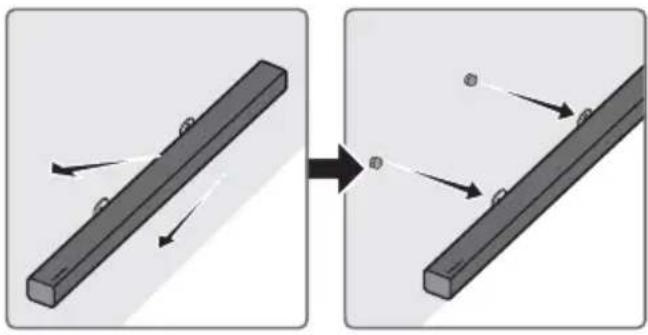
He OKaYBaITe HnIcO Ha MOHTnpaHOToyCTpoIcTBO IN BHMMaBaITe Da He ydapnte nnN3nyChete yCTPOIcTBOTO.
- 3akpenete yctpoiCTBOTO 3dpaBO KbM CTehata, 3a da He naDHe. Ako yctpoiCTBOTO NaDHe, TOBa MoKe Da npuHn HapaHraBaHe IIN NOBpeHa Ha npOdyKta.
Korato yctpoiCTBOTO e MOHTnpaHO KbM CTeha, ce ybepete, ye He e B3MOxH0 Deua Da Ibpnat CBbp3BaUnte Ka6eIn, TbN KaTO TOBa MoKe da Cb6Opn yCTPOiCTBOTO.
- 3a ONTUMaHa eΦeKTHBHOCT Ha CTeHHn MOHTaX MoHTuPaIte BnCOKoROBOpITeHata CnCTema Hai-MaIko Ha 2 NnHa (5 cm) noT TeLeBn3Opa, aKO Toi e MoHTuPaH KbM CTeHata.
COrIeHaBaWata6e30NaChOCT,aKOHe MOHTnPaTe yCTpOuCTBOTO KbM CTeHaTa, MOHTpaIte rHa cTaNlaHa,pabHa IOBbPxHOCT,KbDeTo HMa BepoTHOCT da NaIHe.
10 AKTYAJIIN3NPAHE HA COΦTYEP
Samsung Moxe da npedloxn aKtuaaun Ha cnCTemHna Pbmyep Ha Soundbar B 6bdeune.
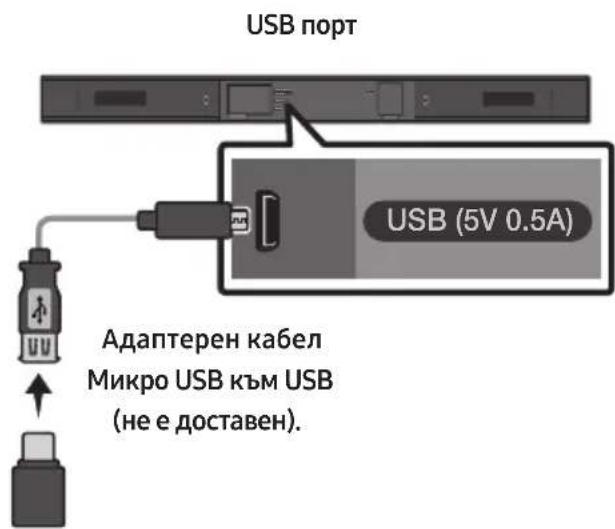
Ako ce npedla r a ktyaun3aun, mokeTe da aKtyaun3npate fbpmyepa, kaTo cBbpxte USB yctpoicTBO c aKtyaun3aunra Ta Ha fbpmyepa, cbxpaneha B Hero, KbM USB nopTa ha Baunr Soundbar.
3adoTbHnTeHa HhOpMaun OTHOCHO3TeRnHeTo Ha faiNoBe cakTuAn3aun, nocetete ye6caIHa Samsung Electronics Ha aDpec www.samsung.com Support. Cnei toBa BbVeTee NIIuN36epTe MoJeHa CBOA Soundbar, 36epTe CoFtyep i npiloxeHn I cIeTobA IV3ternHn. Imeto Ha onuTa MoKe da ce pa3nUvAb.
Ako He ce nokajke UPDATE
1.ИЗклю悔eSoundbar,ИЗвадеTeиСБьржete OTHOBOSUBCTNka,KoITOcBДьржа Файнооветe caktyaJIIN3aUIn,KbMUSB npota HaSoundbar.
2.ИЗклочete 3axpaHbauЯ Ka6eI Ha Soundbar, cIeI TOBa ITo CBbPjKeTe OTHOBO IN BkIIOChTe Soundbar.
- Aktyализиранeto Na Фърмуера можende не павелно, акayднофайLOBete подьржан OTSoundbar, ca сьхсан USB стika.
He n3KlIOUBAIte 3axpaHbAHeTo n He oTcTaPnBaIte USB yCTpOiCTBOTO, JOKaTO ce aKtuaN3aunTe ce npuHaT. OChOBnIrT MoyI ue ce n3KlIoUn abTomAtuHcIe,IaBbPbBaHe Ha aKtuaN3aunTa HaΦbPmYepa. - Cnéд като aktyализацята завьрши, сеницализигратnotpe6nteIckite ностюкп ha Soundbar. Рpenopьчамеда си зашиete BaшITE настюк, тaka, Че лесно ду можete ду вьзctановite сnéд aktyализаця. ИмайтпpeДВИ, Чe aktyализигрето Ha Фырмуера нулра сьци и Врьзкata Кьм cy6yфера. Ако Врьзкata Кьм cy6yфера He ce Вьзctанови abTomatnHо сnéд aktyализацята, Вьжte CTpaHица 6. Ако aktyализацята Ha coФтуера e нecyneша, поверete дani USB CTNKьт He e Deфekten.
- Потребителпе на Mac OS Тразьда нзползват MS-DOS (FAT) koTo USB формат.
- Aktyализиранeto урет USB може за не се налочь в забисимост OT
- поизвдпелся на USB стika.
11 OTCTPAHЯBAHE HA HEN3ПРABHOCTN
Ipei Da nonckate cepBn3HO 6cLyKbaHe, npOBepTe cJeHTo.
YcTpoIcTBOTo He Ce BkIIOUyBa.
3axpaHbauT Ka6eBVKIOUeyen Ie B eEneKtpueeckn KOHTaKT?
→CbpxKeTe 3axpaHbuaIy IeIcE NkM eIeKtpnueckn KONTaKT.
Дадана Функця He pa6OTи, korato ce haTnche 6yToHbT.
IIma IIn CtAnuHo eNeKTpNuecTBO BbB Bb3Dyxa?
→ИЗключeteиселаHa3axpaHbauяKa6eI OT KOHTaKtЯN CJIe,I TOBa FO BKIOUte OTHOBO.
BpeKIM BT ce noBraBat npeKbCbaHn Ha 3ByKa.
→ BnKTe pa3dJIInTe 3a Bluetooth cBbP3BaHe Ha cTpaHn1u 10 n15.
He ce Bb3npoN3BexJa 3ByK.
AknBpapaHa Ie e yHKunraTa 3a 3arLyuBaHa He Ha 3Byka?
→HATINCHETe 6yToHa VOL,3aJa OTMeHNTe FyHKUraTa.
HactpoenJIe3ByKbT KbM MHHmMym?
→HactpoIte cnilaTa Ha 3Byka.
ДиctaHcHOnHTo ynpaBneHne He pa6oTn.
I3toeHnIinca6aTePnnte?
→3aMeHeTe C HOBN 6aTeepuN.
Pa3ctoHHeTo MeKdy DnCTaHcNoHHTo ynpabNeHne N OCHOBHO To yCtpoiCTBO Ha Soundbar TBbpde roJMy o n e?
Manufactured under license from Dolby Laboratories. Dolby, Dolby Audio, Pro Logic, and the double-D symbol are trademarks of Dolby Laboratories.


2.0 Channel
For DTS patents, see http://patents.dts.com. Manufactured under license from DTS Licensing Limited. DTS, the Symbol, DTS in combination with the Symbol, and DTS 2.0 Channel are registered trademarks or trademarks of DTS, Inc. in the United States and/or other countries. © DTS, Inc. All Rights Reserved.
13 БЕLEЖKA 3A ЛИЦЕНЗА 3A OTBOPEH KOD
3a n3npaandaHa 3aNTBaHnI 3aBKn BbB Bpb3Ka C n3TOUHnIte C OTBOpEN KoI Ce CBpbjKeTe cbc Samsung ype3 ImeJ (oss.request@samsung.com).
14BAJKH N BELEXKN 3A OBCIyXBAHETO
- Κифрип e n nIIOCTpaцnITE B TOBa Рьковдъво 3a Notpe6nteЯ ca ПпсeoctaBeHn сamO 3a СпразВka n MoRaT Да Се разИчавТ OT DeIeCTBNTeJHnЯ ИЗглeД Ha ИЗдeЛиЕТо.
- Je da ce haucn TaKca 3a aDMHNCTpnpaHe, aKO:
(a) e n3BnKaH TexHnK NO BaIe HaCToRBaHe n HЯMa IeΦeKT B npOdykTa (T.e. He CTe npOyei PbKOBOdCTBOTO 3a NOTpe6ntela)
(b) 3ahece Te ypeDa B cepBn3eH ceHTbp N HЯMa DeΦeKT B npOdyKta (T.e. He cTe npOyei pBkoBOdCTBOTO 3a noTpe6ntela).
Cymata 3a Ta3n TaKc3a aDMNHnCTpnpaHe 5e Bn 6bJe Cbo6uHa, Ppei Da ce I3BbPm KkaBaTo n Da e 6nlo pa6oTa nn NocceHne Bkbu.
15 CNEUΦNKAU IN PbKOBOdTCTBO
Cneunfkauzia
SIGURNOSNE INFORMACije
SIGURNOSNA UPOZORENJA
DA BISTE SMANJILI OPASNOST OD
ELEKTRICNOG UDARA, NE ODSTRANJUJE
POKLOPAC (ILI POLEDINU).
U UNUTRAŠNJOSTI NEMA DIJELOVA KOJE MOZE
SERVISIRATI KORISNIK. PREPUSTITE
SERVISIRANJE KVALIFICIRANOM SERVISNOM
OSOBLJU.
| 4 | OPREZ OPASNOST OD ELEKTRICNOG UDARA NE OTVARAJTE |
| 5 | Ovaj simbol znači da je struja u unutrašnjosti visokog napona. Opasno je dolaziti u bilo kakav doticaj s unutarnjim sklopopovima proizvoda. |
| 7 | Ovaj simbol naznačuje da je uz urežaj priložena važna dokumentacija o njejgovom radu i odžavanju. |
| 10 | Proizvod II. razreda: Ovaj simbol označava da nije potrebna sigurnosna veza s uzemljem. |
| ~ | AC napon: Ovaj simbol označava da Nazivni napon označen navenimen simbolom predstavlja AC napon. |
| --- | DC napon: Ovaj simbol označava da nazivni napon označen navenimen simbolom predstavlja DC napon. |
| i | Oprez, pogledajte upute za upotrebu: Ovaj simbol upićuje korisnika da potraži dodatne informacije u pogledu sigurnosti u korisničkom prisćniku. |
UPOZORENJE
- Da biste smanjili opasnost od požara ili elektricnog udara, ne izlažite uredaj kisi ili vlazi.
OPREZ
DA BISTE SPRIJEČILI ELEKTRICNI UDAR, NAMJESTITE ŠIROKE KONTAKTE UTIKAÇA U SIOK UTOR, UMETNUT DO KRAJA.
- Ovaj uredaj treba uvijek biti spojen na uticnicu izmjenične struje sa zašitnim uzemljenjem.
- Da biste isključili urežaj iz struje, morate izvuci utikač iz strujne utičnice. Stoga strujni utikač treba biti spreman za rad.
- Ne izlažite ovaj urešaj kapanju ili prskanjutekućina. Ne stavljajte predmete punetekućine, poput vaza, na urešaj.
- Da biste potpuno isključili ovaj uredaj, morate izvuci utikač za napajanje iz zidne uticnice. Stoga utikač mora uvijek biti lako dostupan.
MJERE OPREZA
Manufactured under license from Dolby Laboratories. Dolby, Dolby Audio, Pro Logic, and the double-D symbol are trademarks of Dolby Laboratories.


2.0 Channel
For DTS patents, see http://patents.dts.com. Manufactured under license from DTS Licensing Limited. DTS, the Symbol, DTS in combination with the Symbol, and DTS 2.0 Channel are registered trademarks or trademarks of DTS, Inc. in the United States and/or other countries. © DTS, Inc. All Rights Reserved.
13 OBAVIJEST O LICENCIZA UPORABU SOFTVERA OTVORENOC KODA
Za slanje upita i zahtjeva u vezi otvorenih izvora obratite se tvrtki Samsung putem e-poste (oss.request@samsung.com).
14 VAŽNA NAPOMENA VEZANA UZ SERVIS
- Slike u ovom korisničkom prisuručniku služe kao samo kao referencei i mogu se razlikovati od stvarnog izgleda proizvoda.
- Moguca je naplata administrativne pristojbe u slučaju
(a) poziva inženjera na vaš zahtjev, a nema oštećenja na proizvodu (tj. ako niste pročitali korisnički prirucnik)
(b) da做一些te Jedinicu na popravak u servis, a nema ostecenja na proizvodu (tj. akoniste proci tali korisniicki prisucnik)
- S visinom administrativne pristoje bit cete upoznati prije poduzimanja bilo kakvih radnji ili kućnog posjeta.
15 TEHNICKI PODACI I VODIC
Tehnicki podaci
| OPćENITO | USB | 5V/0,5A | |
| Težina | Glavna jedinica Soundbar | 1,5 kg | |
| Subwoofer (PS-WM20) | 4,6 kg | ||
| Dimenzije (Š x V x D) | Glavna jedinica Soundbar | 907,5 x 53,5 x 70,5 mm | |
| Subwoofer (PS-WM20) | 179,0 x 353,0 x 299,5 mm | ||
| Raspon radne temperature | +5°C do +35°C | ||
| Raspon vlažnosti | 10 % ~ 75 % | ||
| POJACALO | Nazivna izlazna snaga | Glavna jedinica Soundbar | 35W x 2, 6 ohm |
| Subwoofer (PS-WM20) | 130W, 3 ohm | ||
| Podržani formati za reprodukciju (Zvuk DTS 2.0 se reproducira u formatu DTS.) | LPCM 2ch, Dolby AudioTM (podržava Dolby® Digital), DTS | ||
| Izlazna snaga bežičnog urežaja | Maks. snaga BT odašiljača | 100 mW pri 2,4 GHz - 2,4835 GHz | |
| Maks. snaga SRD odašiljača | 25 mW pri 5,725 GHz - 5,825 GHz | ||
NAPOMENE
Samsung Electronics Co., Ltd prirzava pravo promjene specifikacija bez prethodne obavijesti
- Težina i dimenzije su približni.
- Za vise informacija o napajanju i potrošnji enerqije pogledajte naljepnicu na proizvodu.
(Oznaka : Podnožje Glavne Jedinice Soundbar)
| Ukupna potrošnja energije u stanju mirovanja (W) | 4,1W | |
| Bluetooth | Način isključivanja ulaza | Pritisnite gumb „Bluetooth POWER" na daljinskom upravljacu kada je u načinu rada „BT". |
Manufactured under license from Dolby Laboratories. Dolby, Dolby Audio, Pro Logic, and the double-D symbol are trademarks of Dolby Laboratories.


2.0 Channel
For DTS patents, see http://patents.dts.com. Manufactured under license from DTS Licensing Limited. DTS, the Symbol, DTS in combination with the Symbol, and DTS 2.0 Channel are registered trademarks or trademarks of DTS, Inc. in the United States and/or other countries. © DTS, Inc. All Rights Reserved.
13 POZNÁMKA K LICENCI OTEVRENEHO SOFTWARE
Das Benutzerhandbuch hat zwei Teile:这其中, there are two basic concepts. The first is the concept of a handbuch. It is a book that has been written by a number of authors and which includes a description of the basic concepts. The second is a text about how to use these concepts.
BENUTZERHANDBUCH
Manufactured under license from Dolby Laboratories. Dolby, Dolby Audio, Pro Logic, and the double-D symbol are trademarks of Dolby Laboratories.


2.0 Channel
For DTS patents, see http://patents.dts.com. Manufactured under license from DTS Licensing Limited. DTS, the Symbol, DTS in combination with the Symbol, and DTS 2.0 Channel are registered trademarks or trademarks of DTS, Inc. in the United States and/or other countries. © DTS, Inc. All Rights Reserved.
13 BEKANNTMACHUNG ZU OPEN SOURCE LIZENZEN
Manufactured under license from Dolby Laboratories. Dolby, Dolby Audio, Pro Logic, and the double-D symbol are trademarks of Dolby Laboratories.


2.0 Channel
For DTS patents, see http://patents.dts.com. Manufactured under license from DTS Licensing Limited. DTS, the Symbol, DTS in combination with the Symbol, and DTS 2.0 Channel are registered trademarks or trademarks of DTS, Inc. in the United States and/or other countries. © DTS, Inc. All Rights Reserved.
13 AVATUD LÄHTEKOODI LITSENTSI TEATIS
Manufactured under license from Dolby Laboratories. Dolby, Dolby Audio, Pro Logic, and the double-D symbol are trademarks of Dolby Laboratories.


2.0 Channel
For DTS patents, see http://patents.dts.com. Manufactured under license from DTS Licensing Limited. DTS, the Symbol, DTS in combination with the Symbol, and DTS 2.0 Channel are registered trademarks or trademarks of DTS, Inc. in the United States and/or other countries. © DTS, Inc. All Rights Reserved.
13 AVIS DE LICENCE LIBRE
Manufactured under license from Dolby Laboratories. Dolby, Dolby Audio, Pro Logic, and the double-D symbol are trademarks of Dolby Laboratories.

dtts
2.0 Channel
For DTS patents, see http://patents.dts.com. Manufactured under license from DTS Licensing Limited. DTS, the Symbol, DTS in combination with the Symbol, and DTS 2.0 Channel are registered trademarks or trademarks of DTS, Inc. in the United States and/or other countries. © DTS, Inc. All Rights Reserved.
Manufactured under license from Dolby Laboratories. Dolby, Dolby Audio, Pro Logic, and the double-D symbol are trademarks of Dolby Laboratories.


2.0 Channel
For DTS patents, see http://patents.dts.com. Manufactured under license from DTS Licensing Limited. DTS, the Symbol, DTS in combination with the Symbol, and DTS 2.0 Channel are registered trademarks or trademarks of DTS, Inc. in the United States and/or other countries. © DTS, Inc. All Rights Reserved.
13 NYLT
FORRÁSKÓDÜ
LICENC
MEGJEGYZES
Manufactured under license from Dolby Laboratories. Dolby, Dolby Audio, Pro Logic, and the double-D symbol are trademarks of Dolby Laboratories.


2.0 Channel
For DTS patents, see http://patents.dts.com. Manufactured under license from DTS Licensing Limited. DTS, the Symbol, DTS in combination with the Symbol, and DTS 2.0 Channel are registered trademarks or trademarks of DTS, Inc. in the United States and/or other countries. © DTS, Inc. All Rights Reserved.
13 AVVISO DI LICENZA OPEN SOURCE
11 PROBLEMU NOVER'SANA
Manufactured under license from Dolby Laboratories. Dolby, Dolby Audio, Pro Logic, and the double-D symbol are trademarks of Dolby Laboratories.


2.0 Channel
For DTS patents, see http://patents.dts.com. Manufactured under license from DTS Licensing Limited. DTS, the Symbol, DTS in combination with the Symbol, and DTS 2.0 Channel are registered trademarks or trademarks of DTS, Inc. in the United States and/or other countries. © DTS, Inc. All Rights Reserved.
13 PAZINOJUMS PAR ATVERTA PIRMKODA LICENCI
Manufactured under license from Dolby Laboratories. Dolby, Dolby Audio, Pro Logic, and the double-D symbol are trademarks of Dolby Laboratories.

dtts
2.0 Channel
For DTS patents, see http://patents.dts.com. Manufactured under license from DTS Licensing Limited. DTS, the Symbol, DTS in combination with the Symbol, and DTS 2.0 Channel are registered trademarks or trademarks of DTS, Inc. in the United States and/or other countries. © DTS, Inc. All Rights Reserved.
13 ATVIROSIOS PROGRAMINES IRANGOS LICENCIJOS PRANEŠIMAS
Noredami siusti uzklausas ir prasymus, susijusius su atviraja programine jranga, susisiekite su „Samsung" el. pastu (oss.request @samsung.com).
14 SVARBI PASTABA APIE TECHNINE PRIEŽIURA
Manufactured under license from Dolby Laboratories. Dolby, Dolby Audio, Pro Logic, and the double-D symbol are trademarks of Dolby Laboratories.

dtts
2.0 Channel
For DTS patents, see http://patents.dts.com. Manufactured under license from DTS Licensing Limited. DTS, the Symbol, DTS in combination with the Symbol, and DTS 2.0 Channel are registered trademarks or trademarks of DTS, Inc. in the United States and/or other countries. © DTS, Inc. All Rights Reserved.
13 INFORMACJA O LICENCJI OPEN SOURCE
Manufactured under license from Dolby Laboratories. Dolby, Dolby Audio, Pro Logic, and the double-D symbol are trademarks of Dolby Laboratories.


2.0 Channel
For DTS patents, see http://patents.dts.com. Manufactured under license from DTS Licensing Limited. DTS, the Symbol, DTS in combination with the Symbol, and DTS 2.0 Channel are registered trademarks or trademarks of DTS, Inc. in the United States and/or other countries. © DTS, Inc. All Rights Reserved.
13 NOTIFICARE DE LICENTÀ OPEN SOURCE
SIGURNOSNE INFORMACije
SIGURNOSNA UPOZORENJA
DA BISTE SMANJILI OPASNOST OD
ELEKTRICNOG UDARA, NE SKIDAJTE POKLOPAC (ILI ZADNJU PLOCU).
UNUTRA SE NE NALAZE DELOVI KOJI SE MOGU
SERVISIRATI. SERVISIRANJE POVERITE
KVALIFIKOVANOM OSOBLJU SERVISA.
| 4 | OPREZ OPASNOST OD ELEKTRICNOG UDARA. NE OTVARATI. | |
| 4 | Ovaj simbol ukazuje na to da je unutar uredaja prisutan visoki napon. Svaka vrsta kontakta sa unutrašnjim komponentama ovog uredaja predstavlja opasnost. | |
| ! | Ovaj simbol ukazuje na to da se uz proizvod isporučuje važna dokumentacija koja se odnosi na rukovanje i održavanje. | |
| Proizvod klase II: Ovaj simbol označava da povezivanje na zašitno elektricno uzemljenje.nije neophodno. | ||
| ~ | Naizmenična struja: Ovaj simbol označava da naizmeničnu struju. | |
| - | Jednosmerna struja: Ovaj simbol označava da Jednosmernu struju. | |
| i | Oprez, videti uputstva za upotrebu: Ovaj simbol upićuje korisnika da u korisničkom prisćniku pročita dodatne informacije u vezi sa bezbednosću. | |
UPOZORENJE
- Da biste smanjili opasnost od požara ili elektricnog udara, ne izlazite ovaj proizvod kiši ili vlazi.
OPREZ
Manufactured under license from Dolby Laboratories. Dolby, Dolby Audio, Pro Logic, and the double-D symbol are trademarks of Dolby Laboratories.


2.0 Channel
For DTS patents, see http://patents.dts.com. Manufactured under license from DTS Licensing Limited. DTS, the Symbol, DTS in combination with the Symbol, and DTS 2.0 Channel are registered trademarks or trademarks of DTS, Inc. in the United States and/or other countries. © DTS, Inc. All Rights Reserved.
13 OBAVEŠTENJE O LICENCI OTVORENOG IZVORNOG KODA
Svoje upite i zahteve u vezi sa otvorenim izvornim kodovima možete uputiti kompaniji Samsung putem e-poste (oss.request@samsung.com).
14 VAŽNA NAPOMENA O SERVISIRANJU
- Slike i ilustracije koje su upotrebljene u ovom korisničkom uputstvu date su samo kao reference i mogu se razlikovati od vaşeg proizvoda.
- Administrativni troškovi mogu biti naplaceni u sledecim slučajevima:
11 RIESENIE PROBLEMOV
Manufactured under license from Dolby Laboratories. Dolby, Dolby Audio, Pro Logic, and the double-D symbol are trademarks of Dolby Laboratories.


2.0 Channel
For DTS patents, see http://patents.dts.com. Manufactured under license from DTS Licensing Limited. DTS, the Symbol, DTS in combination with the Symbol, and DTS 2.0 Channel are registered trademarks or trademarks of DTS, Inc. in the United States and/or other countries. © DTS, Inc. All Rights Reserved.
13 POZNÁMKA K LICENCI S OTVORENÍM ZDROJOVÍM KÓDOM
Manufactured under license from Dolby Laboratories. Dolby, Dolby Audio, Pro Logic, and the double-D symbol are trademarks of Dolby Laboratories.


2.0 Channel
For DTS patents, see http://patents.dts.com. Manufactured under license from DTS Licensing Limited. DTS, the Symbol, DTS in combination with the Symbol, and DTS 2.0 Channel are registered trademarks or trademarks of DTS, Inc. in the United States and/or other countries. © DTS, Inc. All Rights Reserved.
13 OBVESTILO O ODPRTOKODNIH LICENCAH
© 2017 Samsung Electronics Co., Ltd. All rights reserved.
Contact SAMSUNG WORLD WIDE
If you have any questions or comments relating to Samsung products, please contact the SAMSUNG customer care Centre.
| Country Contact Centre | Web Site |
| ■ Europe | |
| UK 0330 SAMSUNG (7267864) | www.samsung.com/uk/support |
| IRELAND (EIRE) 0818 717100 | www.samsung.com/ie/support |
| GERMANY 06196 77 555 77 | www.samsung.com/de/support |
| FRANCE 01 48 63 00 00 | www.samsung.com/fr/support |
| ITALIA 800-SAMSUNG (800.7267864) | www.samsung.com/it/support |
| SPAIN 0034902172678 | www.samsung.com/es/support |
| PORTUGAL 808 207267 | www.samsung.com.pt/support |
| LUXEMBURG 261 03710 | www.samsung.com/be_fr/support |
| NETHERLANDS 088 90 90 100 | www.samsung.com/nl/support |
| BELGIUM 02-201 24-18 | www.samsung.com/be/support (Dutch)www.samsung.com/be_fr/support (French) |
| NORWAY 815 56430 | www.samsung.com/no/support |
| DENMARK 707 019 70 | www.samsung.com/dk/support |
| FINLAND 030-6227 515 | www.samsung.com/fe/support |
| SWEDEN 0771 726 786 | www.samsung.com/se/support |
| POLAND | 801-172-678* lub +48 22 607-93-33* (* (koszt polaczenia wedlug teryfy operadora) |
| HUNGARY | 06805AMSUNG (0680-726-7864) |
| AUSTRIA | 0800-SAMSUNG (0800-7267864) [Only for Dealers] 0810-112233 |
| Country Contact Centre | Web Site |
| SWITZERLAND 0800 726 78 64 (0800-SAMSUNG) | www.samsung.com/ch/support (German)www.samsung.com/ch_fr/support (French) |
| CZECH 800 - SAMSUNG (800-726786) | www.samsung.com/cz/support |
| SLOVAKIA 0800 - SAMSUNG (0800-726 786) | www.samsung.com/sk/support |
| CROATIA 072 726 786 | www.samsung.com/hr/support |
| BOSNIA 055 233 999 | www.samsung.com/support |
| MONTENEGRO 020 405 888 | |
| SLOVENIA 080 697 267 (brezplačna številka) | www.samsung.com/si/support |
| SERBIA 011 321 6899 | www.samsung.com/rs/support |
| ALBANIA 045 620 202 | www.samsung.com/al/support |
| BULGARIA *3000Цени в мреката0800 111 31, Бецлathа телегонналика | www.samsung.com/bg/support |
| ROMANIA *8000 (apel in retea)08008-726-78-64 (08008-SAMSUNG)apel GRATUIT | www.samsung.com/ro/support |
| CYPRUS 8009 4000 only from landline, toll free | www.samsung.com/gr/support |
| GREECE 80111-SAMSUNG (80111 726 7864) only from land line(+30) 210 6897691 from mobile and land line | |
| LITHUANIA 8-800-77777 | www.samsung.com/lt/support |
| LAT VIA 8000-7267 | www.samsung.com/lv/support |
| ESTONIA 800-7267 | www.samsung.com/ee/support |