
HW-M450/EN - Soundbar SAMSUNG - Free user manual and instructions
Find the device manual for free HW-M450/EN SAMSUNG in PDF.


| Product type | Soundbar |
| Brand | Samsung |
| Model | HW-M450/EN |
| Dimensions (L x H x D) | 860 x 60 x 80 mm |
| Weight | 2.5 kg |
| Total power | 200 W RMS |
| Channels | 2.1 |
| Connectivity | Bluetooth, HDMI ARC, USB, optical input |
| Main features | Virtual surround sound, cinema mode, night mode, sports mode |
| Power supply | 100-240 V AC, 50/60 Hz |
| Power consumption | 30 W |
| Maintenance and cleaning | Clean with a soft, dry cloth. Do not use liquid or abrasive products. |
| Safety | Do not expose to moisture or heat sources. Unplug before cleaning. |
| Spare parts and repairability | Parts available through after-sales service. Repairability index: 8.0/10 |
| General information | Soundbar compatible with most Samsung TVs. Wireless subwoofer included. |
Frequently Asked Questions - HW-M450/EN SAMSUNG
User questions about HW-M450/EN SAMSUNG
0 question about this device. Answer the ones you know or ask your own.
Ask a new question about this device
Download the instructions for your Soundbar in PDF format for free! Find your manual HW-M450/EN - SAMSUNG and take your electronic device back in hand. On this page are published all the documents necessary for the use of your device. HW-M450/EN by SAMSUNG.
USER MANUAL HW-M450/EN SAMSUNG
Thank you for purchasing this Samsung product.
To receive more complete service, please register
your product at www.samsung.com/register
SAFETY INFORMATION
SAFETY WARNINGS
TO REDUCE THE RISK OF ELECTRIC SHOCK, DO NOT REMOVE THE COVER (OR BACK). NO USER-SERVICEABLE PARTS ARE INSIDE. REFER SERVICING TO QUALIFIED SERVICE PERSONNEL.
 | CAUTIONRISK OF ELECTRIC SHOCK.DO NOT OPEN. |  |
 | This symbol indicates that high voltage is present inside. It is dangerous to make any kind of contact with any internal part of this product. | |
 | This symbol indicates that this product has included important literature concerning operation and maintenance. | |
| [c6G8] | Class II product: This symbol indicates that it does not require a safety connection to electrical earth (ground). | |
 | AC voltage: This symbol indicates that the rated voltage marked with the symbol is AC voltage. | |
 | DC voltage: This symbol indicates that the rated voltage marked with the symbol is DC voltage. | |
 | Caution, Consult instructions for use: This symbol instructs the user to consult the user manual for further safety related information. | |
WARNING
- To reduce the risk of fire or electric shock, do not expose this appliance to rain or moisture.
CAUTION
- TO PREVENT ELECTRIC SHOCK, MATCH WIDE BLADE OF PLUG TO WIDE SLOT, FULLY INSERT.
- This apparatus shall always be connected to a AC outlet with a protective grounding connection.
- To disconnect the apparatus from the mains, the plug must be pulled out from the mains socket, therefore the mains plug shall be readily operable.
- Do not expose this apparatus to dripping or splashing. Do not put objects filled with liquids, such as vases on the apparatus.
- To turn this apparatus off completely, you must pull the power plug out of the wall socket. Consequently, the power plug must be easily and readily accessible at all times.
PRECAUTIONS
- Ensure that the AC power supply in your house complies with the power requirements listed on the identification sticker located on the back of your product. Install your product horizontally, on a suitable base (furniture), with enough space around it for ventilation (7\~10 cm). Make sure the ventilation slots are not covered. Do not place the unit on amplifiers or other equipment which may become hot. This unit is designed for continuous use. To fully turn off the unit, disconnect the AC plug from the wall outlet. Unplug the unit if you intend to leave it unused for a long period of time.
- During thunderstorms, disconnect the AC plug from the wall outlet. Voltage peaks due to lightning could damage the unit.
- Do not expose the unit to direct sunlight or other heat sources. This could lead to overheating and cause the unit to malfunction.
-
Protect the product from moisture (i.e. vases), and excess heat (e.g. a fireplace) or equipment creating strong magnetic or electric fields. Unplug the power cable from the AC wall socket if the unit malfunctions. Your product is not intended for industrial use. It is for personal use only. Condensation may occur if your product has been stored in cold temperatures. If transporting the unit during the winter, wait approximately 2 hours until the unit has reached room temperature before using.
-
The battery used with this product contains chemicals that are harmful to the environment. Do not dispose of the battery in the general household trash. Do not expose the battery to excess heat, direct sunlight, or fire. Do not short circuit, disassemble, or overheat the battery. Danger of explosion if the battery is replaced incorrectly. Replace only with the same or equivalent type.
ABOUT THIS MANUAL
The user manual has two parts: this simple paper USER MANUAL and a detailed FULL MANUAL you can download.
natural_image
Illustration of a person sitting on a sofa using a laptop (no text or symbols visible)USER MANUAL
See this manual for safety instructions, product installation, components, connections, and product specifications.

natural_image
Illustration of a person sitting on a couch next to a computer (no text or symbols visible)
FULL MANUAL
You can access the customer support centre by scanning the QR code. To see the manual on your PC or mobile device, download the manual in document format from the website. (http://www.samsung.com/support)
Design and specifications are subject to change without prior notice.
CONTENTS
01 Checking the Components 2
Inserting Batteries before using the Remote Control (AA batteries X 2) ____ 2
02 Product Overview 3
Front Panel / Right Side Panel of the Soundbar 3
Bottom Panel of the Soundbar 4
03 Connecting the Soundbar 5
Connecting Electrical Power ____ 5
Connecting the Soundbar to the Subwoofer 6
- Automatic connection between the subwoofer and the Soundbar ____ 6
- Manually connecting the subwoofer if automatic connection fails ____ 7
04 Connecting to your TV 9
Method 1. Connecting with a Cable ____ 9
- Connecting using an Optical Cable 9
- Connecting a TV using an HDMI Cable 10
Method 2. Connecting Wirelessly ____ 11
- Connecting a TV via Bluetooth 11
05 Connecting an External Device 13
Connecting using an Optical or Analogue Audio (AUX) Cable 13
Connecting using an HDMI Cable 14
06 Connecting a USB 15
07 Connecting a Mobile Device 17
Connecting via Bluetooth ____ 17
Using the Samsung Audio Remote App ____ 20
- Installing the Samsung Audio Remote App 20
- Launching the Samsung Audio Remote App 20
08 Using the Remote Control 21
How to Use the Remote Control ____ 21
Adjusting the Soundbar volume with a TV remote control 24
Using the Hidden Buttons ____ 25
Output specifications for the different sound effect modes ____ 25
09 Installing the Wall Mount 26
Installation Precautions 26
Wallmount Components 26
Detaching the Soundbar from the Wall 29
10 Software Update 29
Updating Procedure 30
If UPDATE is not displayed 30
11 Troubleshooting 31
12 Licence 32
13 Open Source Licence Notice 32
14 Important Notes About Service 32
15 Specifications and Guide 33
Specifications 33
01 CHECKING THE COMPONENTS

natural_image
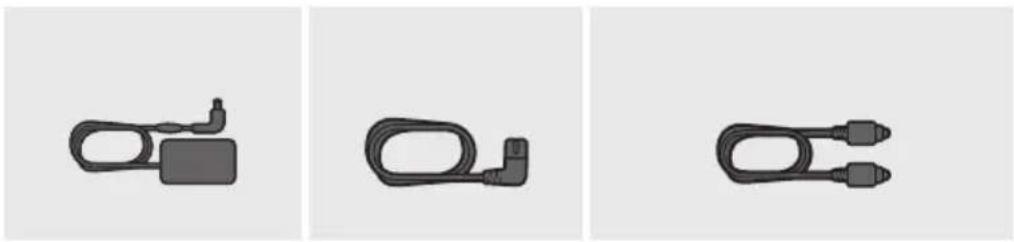
Three grayscale product photos: a rectangular remote, a two-tiered speaker, and a remote control with three speakers (no text or symbols visible)Soundbar Main Unit Subwoofer Remote Control / Batteries

Power Cord (Subwoofer)

natural_image
Three black plastic cable connectors shown in separate panels (no text or symbols)AC/DC Adapter (Main Unit)
Power Cord (AC/DC Adapter)
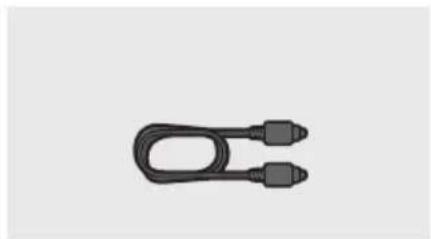
natural_image
Simple black U-shaped cable with two connectors, isolated on white background (no text or symbols)Optical Cable
- The power connection steps are labelled (1, 2, 3). For more information about power connections, see page 5.
- For Soundbar wall mounting components, see page 26.
- Micro USB to USB adapter and HDMI cables are sold separately. To purchase, contact a Samsung Service Centre or Samsung Customer Care.
- The appearance of the accessories may differ slightly from the illustrations above.
Inserting Batteries before using the Remote Control (AA batteries X 2)
Slide the battery cover in the direction of the arrow until it is completely removed. Insert 2 AA batteries (1.5V) oriented so that their polarity is correct. Slide the battery cover back into position.

02 PRODUCT OVERVIEW
Front Panel / Right Side Panel of the Soundbar
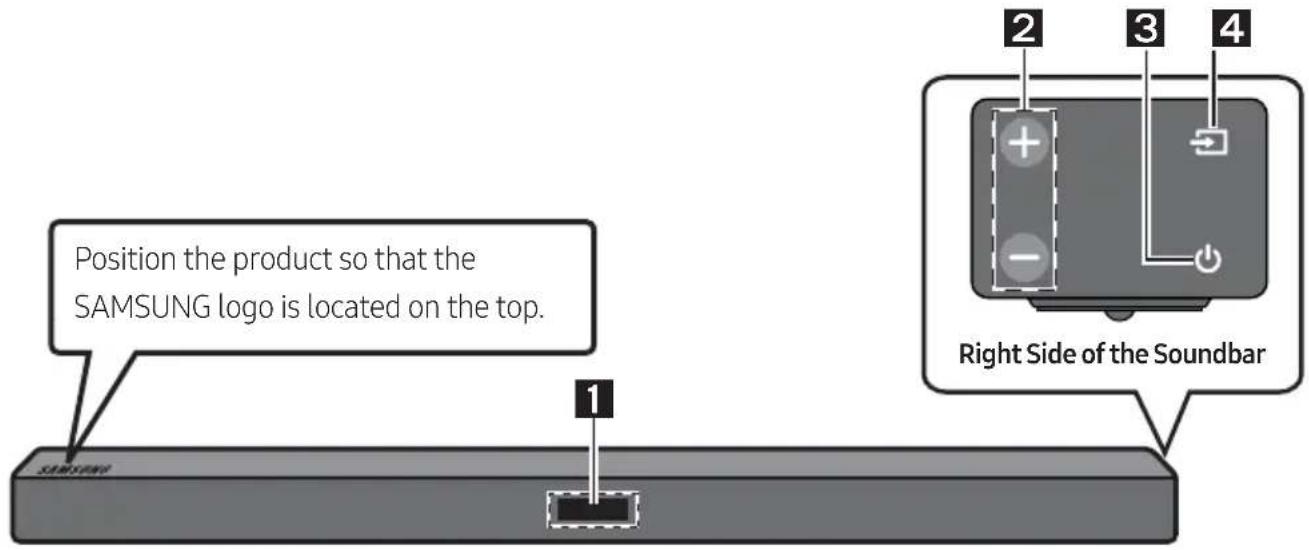
| 1 | DisplayDisplays the product's status and current mode. | |
| 2 | +/- (Volume) ButtonAdjusts the volume.When adjusted, the volume level appears on the Soundbar's front display. | |
| 3 | (Power) ButtonTurns the power on and off. | |
| 4 | (Source) ButtonSelects the source input mode. | |
| Input mode Display | ||
| Optical Digital input D.IN | ||
| ARC (HDMI OUT) input | D.IN → TV ARC (Auto conversion) | |
| AUX input AUX | ||
| HDMI input HDMI | ||
| BLUETOOTH mode BT | ||
| USB mode USB | ||
| • To turn on "BT PAIRING" mode, change the source to "BT" mode, and then press and hold the(Source) button for more than 5 seconds. | ||
- When you plug in the AC cord, the power button will begin working in 4 to 6 seconds.
- When you turn on this unit, there will be a 4 to 5 second delay before it produces sound.
- If you want to enjoy sound only from the Soundbar, you must turn off the TV's speakers in the Audio Setup menu of your TV. Refer to the owner's manual supplied with your TV.
Bottom Panel of the Soundbar

| 1 | DIGITAL AUDIO IN (OPTICAL)Connect to the digital (optical) output of an external device. |
| 2 | USB (5V 0.5A)Connect a USB device here to play music files on the USB device through the Soundbar. |
| 3 | AUX INConnect to the Analogue output of an external device. |
| 4 | HDMI INInputs digital video and audio signals simultaneously using an HDMI cable.Connect to the HDMI output of an external device. |
| 5 | HDMI OUT (TV-ARC)Connect to the HDMI (ARC) jack on a TV. |
| 6 | DC 24V (Power Supply In)Connect the AC/DC power adapter. |
- When disconnecting the power cable of the AC/DC power adaptor from a wall outlet, pull the plug. Do not pull the cable.
- Do not connect this unit or other components to an AC outlet until all connections between components are complete.
03 CONNECTING THE SOUNDBAR
Connecting Electrical Power
Use the power components (1, 2, 3) to connect the units to electrical outlets in the following order:
1.) Subwoofer → 2.) Soundbar Main Unit. See the illustrations below.
- For more information about the required electrical power and power consumption, refer to the label attached to the product. (Label : Bottom of the Soundbar Main Unit)

flowchart
graph LR
    A["Power Cord"] -->|Connecting Electrical Power| B["Back of Subwoofer"]
    B --> C["DC 24V Device"]
    C -->|Connecting Electrical Power| D["AC/DC Adapter"]
- Make sure to rest the AC/DC Adapter flat on a table or the floor. If you place the AC/DC Adapter so that it is hanging with the AC cord input facing upwards, water or other foreign substances could enter the Adapter and cause the Adapter to malfunction.
Connecting the Soundbar to the Subwoofer
When the subwoofer is connected, you can enjoy rich bass sound.
Automatic connection between the subwoofer and the Soundbar
When you turn the power on after connecting the power cables to the Soundbar and subwoofer, the subwoofer is automatically connected to the Soundbar.
- When auto pairing is complete, the blue indicators at the rear of the subwoofer turn on.
LED Indicator Lights on the Rear of Subwoofer
| LED Status Description Resolution | |||
| Blue | On | Successfully connected (normal operation) | - |
| Blinking Re | recovering the connection | Check if the power cable to the main Soundbar unit is connected properly or wait for a while. (If blinking persists, try manually connecting the subwoofer. See page 7.) | |
| Red On | Standby (with the Soundbar main unit turned off) | Check if the power cable to the main Soundbar unit is connected properly. | |
| Connection failed | Connect again. See the instructions for manual connection on page 7. | ||
| Red and blue | Blinking Malfunction | See the contact information for the Samsung Service Centre in the manual. | |
Manually connecting the subwoofer if automatic connection fails
Check before performing the manual connection
- Check whether the power cables for the Soundbar and subwoofer are connected properly.
• Make sure that the Soundbar is turned on.
- Press and hold ID SET on the rear of the subwoofer for at least 5 seconds.
The red indicator on the rear of the subwoofer turns off and the blue indicator blinks.

Rear of Subwoofer
- Turn off the Soundbar.
- Press and hold the VOL button on the remote control for at least 5 seconds with the Soundbar turned off (OFF).
- The ID SET message appears on the display of the Soundbar for 1.3 seconds, and then disappear.
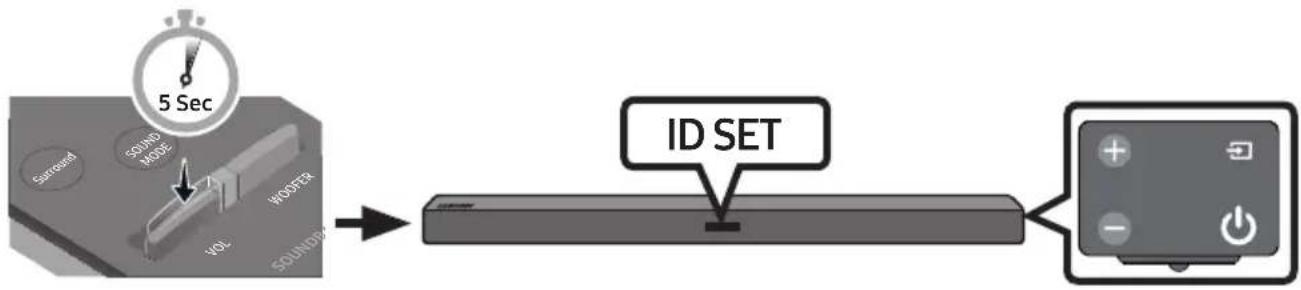
flowchart
graph LR
    A["5 Sec"] --> B["ID SET"]
    B --> C["+/-"]
    style A fill:#f9f,stroke:#333
    style B fill:#ccf,stroke:#333
    style C fill:#cfc,stroke:#333
- When the blue indicator on the subwoofer blinks, turn on the Soundbar's power by pressing
(Power) button on the right side of the main unit or on the remote control.
- When the connection is successfully established, the blue indicator on the rear of the subwoofer stops blinking and glows continuously.
- If the connection process fails, the blue indicator will flash continuously. Go to Step 1 and start again.
NOTES
- Do not connect the power cord of this product or your TV to a wall outlet until all connections between components are complete.
-
Before moving or installing this product, be sure to turn off the power and disconnect the power cord.
-
If the main unit is powered off, the wireless subwoofer will go into stand-by mode and the STANDBY LED on the rear will be Red after blinking Blue several times.
- If you use a device that uses the same frequency (5.8GHz) as the Soundbar near the Soundbar, interference may cause some sound interruption.
- The maximum transmission distance of the wireless signal of the main unit is about 10 meters, but may vary depending on your operating environment. If a steel-concrete or metallic wall is between the main unit and the wireless subwoofer the system may not operate at all, because the wireless signal cannot penetrate metal.
PRECAUTIONS
- Wireless receiving antennas are built into the wireless subwoofer. Keep the units away from water and moisture.
- For optimal listening performance, make sure that the area around the wireless subwoofer and Wireless Receiver Module (Sold separately) location is clear of any obstructions.
Expand to true wireless surround sound by connecting the Samsung Wireless Rear Speaker Kit (SWA-8500S) to your Soundbar (Sold separately). For more information, see the Samsung Wireless Rear Speaker Kit manual.
04 CONNECTING TO YOUR TV
Hear TV sound from your Soundbar through wired or wireless connections.
- When the Soundbar is connected to a selected Samsung TVs, the Soundbar can be controlled using the TV's remote control.
- When using optical cable, this feature can be supported by 2017 Samsung Smart TVs that support Bluetooth.
- This function also allows you to use the TV menu to adjust the sound field and various settings as well as the volume and mute.
Method 1. Connecting with a Cable
Connecting using an Optical Cable
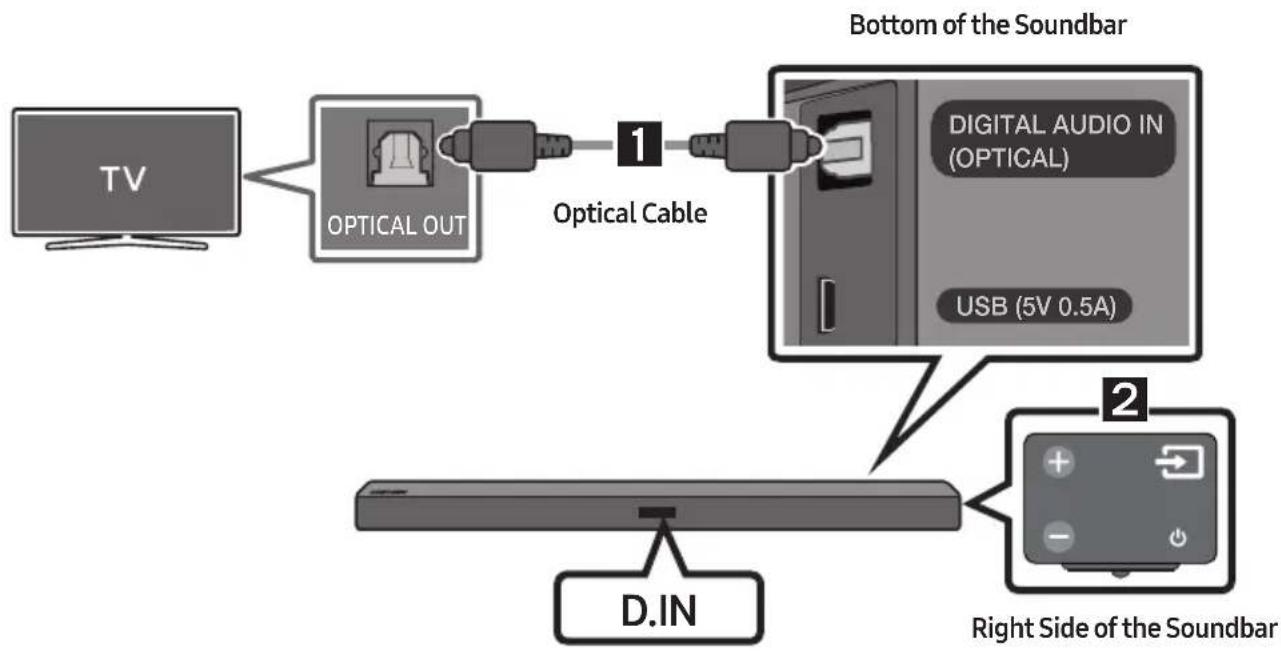
flowchart
graph TD
    A["TV"] --> B["OPTICAL OUT"]
    B --> C["Optical Cable 1"]
    C --> D["D.IN"]
    D --> E["Right Side of the Soundbar"]
    F["Bottom of the Soundbar"] --> G["DIGITAL AUDIO IN (OPTICAL)"]
    G --> H["USB (5V 0.5A)"]
    I["2"] --> J["Right Side of the Soundbar"]
-
Connect the DIGITAL AUDIO IN (OPTICAL) jack on the Soundbar to the OPTICAL OUT jack of the TV with a digital optical cable.
-
Press the → (Source) button on the right side panel or remote control, and then select mode "D.IN".
- When the Soundbar is connected to a Samsung smart TV released in 2017 or later, the Bluetooth POWER function automatically turns on to enable the Soundbar to be controlled with the TV remote control. (See page 23 for details on Bluetooth POWER.)
Auto Power Link
Auto Power Link automatically turns on the Soundbar when the TV is turned on.
- Connect the Soundbar and a TV with a digital optical cable.
- Press the → (Source) button on the right side panel or on the remote control, and then select "D.IN".
- Press the Left button on the remote control for 5 seconds to turn Auto Power Link on or off.
• Auto Power Link is set to ON by default.
(To turn off this function, turn off Auto Power using the Soundbar.)
- Depending on the connected device, Auto Power Link may not function.
- This function is only available in the "D.IN" mode.

natural_image
Circular play button icon with two vertical bars, no text or symbols presentConnecting a TV using an HDMI Cable
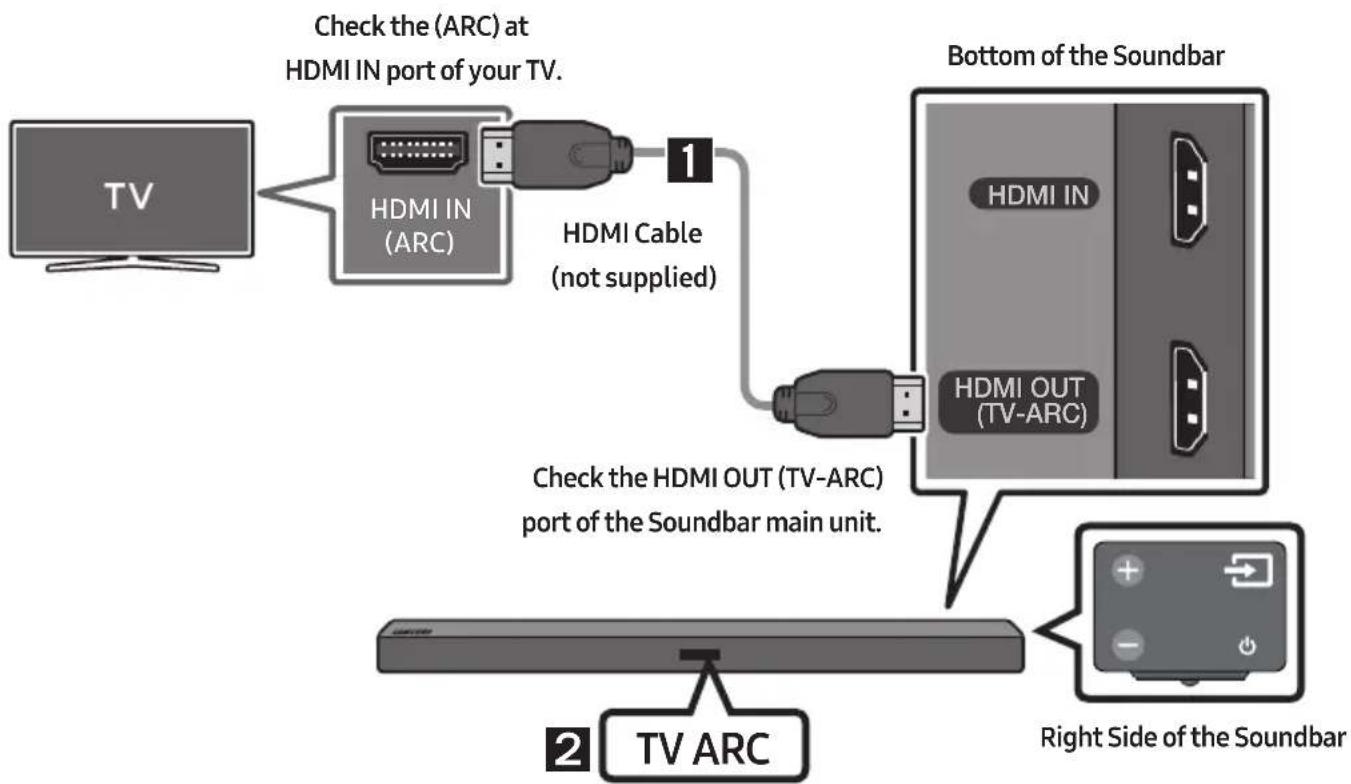
flowchart
graph TD
    A["TV"] --> B["HDMI IN (ARC)"]
    B --> C["Check the (ARC) at HDMI IN port of your TV."]
    C --> D["HDMI Cable (not supplied)"]
    D --> E["Bottom of the Soundbar"]
    E --> F["HDMI OUT (TV-ARC)"]
    F --> G["Check the HDMI OUT (TV-ARC) port of the Soundbar main unit."]
    G --> H["Right Side of the Soundbar"]
    H --> I["TV ARC"]
-
With the Soundbar and TV turned on, connect the HDMI cable (not supplied) as shown in the figure.
-
"TV ARC" appears in the display window of the Soundbar main unit and the Soundbar plays TV sound.
- If TV sound is inaudible, press the → (Source) button on the remote control or on the right side of the Soundbar to switch to "D.IN" mode. The screen displays "D.IN" and "TV ARC" in sequence, and TV sound is played.
- If "TV ARC" does not appear in the display window of the Soundbar main unit, confirm that the cable is connected to the correct port.
- Use the volume buttons on the TV's remote control to change the volume on the Soundbar.
NOTES
- HDMI is an interface that enables the digital transmission of video and audio data with just a single connector.
- If the TV provides an ARC port, connect the HDMI cable to the HDMI IN (ARC) port.
- We recommend you use a coreless HDMI cable if possible. If you use a cored HDMI cable, use one whose diameter is less than 14 mm.
- Anynet+ must be turned on.
- This function is not available if the HDMI cable does not support ARC.
Method 2. Connecting Wirelessly
Connecting a TV via Bluetooth
When a TV is connected using Bluetooth, you can hear stereo sound without the hassle of cabling.
- Only one TV can be connected at a time.

flowchart
graph LR
    A["TV"] -->|Bluetooth| B["Remote"]
    B --> C["Device with +, -, and power icons"]
The initial connection
-
Press the → (Source) button on the right side panel or on the remote control, and then select "BT".
-
Change "BT" to "BT PAIRING".
- If "BT READY" appears, press and hold the ➞ (Source) button on the right side panel of the Soundbar or on the remote control for more than 5 seconds to display "BT PAIRING".
-
Select Bluetooth mode on the TV. (For more information, see the TV's manual.)
-
Select "[AV] Samsung Soundbar Mxxx M-Series" from the list on TV's screen.
An available Soundbar is indicated with "Need Pairing" or "Paired" on the TV Bluetooth device list. To connect to the Soundbar, select the message and establish a connection.
- When the TV is connected, [TV Name] "BT" appears on the Soundbar's front display.
- You can now hear TV sound from the Soundbar.
If the device fails to connect
- If the previously connected Soundbar listing (e.g. "[AV] Samsung Soundbar Mxxx M-Series") appears in the list, delete it.
- In "BT" mode, press and hold the → (Source) button for more than 5 seconds on the right side panel of the Soundbar or on the remote control to switch to "BT PAIRING" mode. Then, select "[AV] Samsung Soundbar Mxxx M-Series" from the TV's search list.
What are the BT READY and BT PAIRING statuses?
- BT READY : In this mode, you can search for previously connected TVs or connect to the Soundbar from a previously connected mobile device.
- BT PAIRING : In this mode, you can connect to a new device. (While in "BT" mode, press and hold the → (Source) button for more than 5 seconds on the right side of the Soundbar or on the remote control.)
NOTES
- If asked for a PIN code when connecting a Bluetooth device, enter <0000>.
- In Bluetooth connection mode, the Bluetooth connection will be lost if the distance between the Soundbar and the Bluetooth device exceeds 10 meters.
- The Soundbar automatically turns off after 5 minutes in the Ready state.
-
The Soundbar may not perform Bluetooth search or connection correctly under the following circumstances:
-
If there is a strong electrical field around the Soundbar.
- If several Bluetooth devices are simultaneously paired with the Soundbar.
- If the Bluetooth device is turned off, not in place, or malfunctions.
- Electronic devices may cause radio interference. Devices that generate electromagnetic waves must be kept away from the Soundbar main unit - e.g., microwaves, wireless LAN devices, etc.
Disconnecting the Soundbar from the TV
Press the → (Source) button on the right side panel or on the remote control and switch to any mode but "BT".
- Disconnecting takes time because the TV must receive a response from the Soundbar. (The time required may differ, depending on the TV model.)
- To cancel automatic Bluetooth connection between the Soundbar and TV, press the ▶II (Play/Pause) button on the remote control for 5 seconds in "BT READY" status. (Toggle On → Off)
05 CONNECTING AN EXTERNAL DEVICE
Connect to an external device via a wired or wireless network to play the external device's sound through the Soundbar.
Connecting using an Optical or Analogue Audio (AUX) Cable
BD / DVD player / Set-top box /
Game console
Right Side of the Soundbar

flowchart
graph TD
    A["Input"] --> B["Optical OUT"]
    B --> C["Optical Cable"]
    C --> D["Digital Audio IN (OPTICAL)"]
    D --> E["USB (5V 0.5A)"]
    D --> F["AUX IN"]
    B --> G["R - AUDIO - L"]
    B --> H["Audio (AUX) Cable (not supplied)"]
    D --> I["Bottom of the Soundbar"]
1 Optical Cable
1 Connect DIGITAL AUDIO IN (OPTICAL) on the main unit to the OPTICAL OUT jack of the Source Device using a digital optical cable.
② Select "D.IN" mode by pressing the → (Source) button on the right side panel or on the remote control.
2 Audio (AUX) Cable
1 Connect AUX IN (Audio) on the main unit to the AUDIO OUT jack of the Source Device using an audio cable.
② Select "AUX" mode by pressing → (Source) button on the right side panel or on the remote control.
Connecting using an HDMI Cable
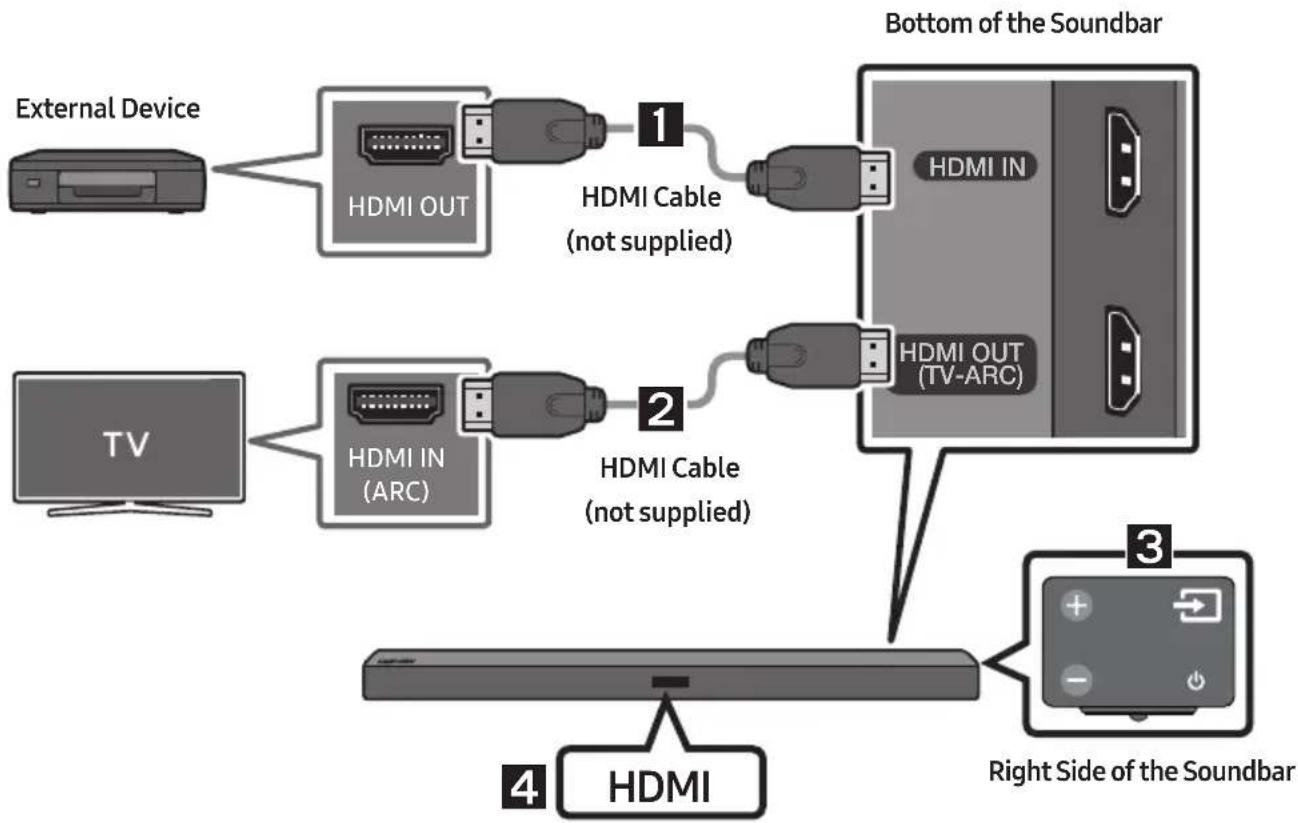
flowchart
graph TD
    A["External Device"] --> B["HDMI OUT"]
    B --> C["1 HDMI Cable (not supplied)"]
    D["TV"] --> E["HDMI IN (ARC)"]
    E --> F["2 HDMI Cable (not supplied)"]
    G["Bottom of the Soundbar"] --> H["HDMI IN"]
    G --> I["HDMI OUT (TV-ARC)"]
    J["Right Side of the Soundbar"] --> K["3 HDMI"]
    L["4 HDMI"] --> M["Bottom of the Soundbar"]
- Connect an HDMI cable (not supplied) from the HDMI IN jack on the back of the product to the HDMI OUT jack on your digital device.
- Connect an HDMI cable (not supplied) from the HDMI OUT (TV-ARC) jack on the back of the product to the HDMI IN jack on your TV.
- Press the → (Source) button on the right side panel or on the remote control, and then select "HDMI".
- "HDMI" mode is displayed on the Soundbar display panel and sound plays.
06 CONNECTING A USB
You can play music files located on USB storage devices through the Soundbar.

- Connect a Micro USB to USB adapter cable with a male USB 2.0 Micro USB plug (Type B) on one end and a standard female 2.0 USB jack (Type A) on the other end to the micro USB jack on your Soundbar.
- Micro USB to USB adapter Cable is sold separately. To purchase, contact a Samsung Service Centre or Samsung Customer Care.
-
Connect your USB device to the female end of the adapter cable.
-
Press the → (Source) button on the right side panel or on the remote control, and then select "USB".
-
"USB" appears in the display screen.
-
Play music files from the USB storage device through the Soundbar.
- The Soundbar automatically turns off (Auto Power Off) if no USB device has been connected for more than 5 minutes.
File Format Type Compatibility list
| Extension | Codec | Sampling Rate | Bit Rate |
| *.mp3 MPEG 1 Layer2 | 16KHz ~ 48KHz 80kbps~320kbps | ||
| MPEG 1 Layer3 16KHz ~ 48KHz 80kbps~320kbps | |||
| MPEG 2 Layer3 16KHz ~ 48KHz 80kbps~320kbps | |||
| MPEG 2.5 Layer3 16KHz ~ 48KHz 80kbps~320kbps | |||
| *.wma | Wave_Format_MSAudio1 | 16KHz ~ 48KHz | 56kbps~128kbps |
| Wave_Format_MSAudio2 16KHz ~ 48KHz 56kbps~128kbps | |||
| *.aac | AAC | 16KHz ~ 96KHz | 48kbps~320kbps |
| AAC-LC | 16KHz ~ 96KHz | 128kbps~192kbps5.1ch 320kbps | |
| HE-AAC | 24KHz ~ 96KHz | 48kbps~64kbps5.1ch 160kbps | |
| *.wav | - | 16KHz ~ 48KHz | up to 3000kbps |
| *.ogg | OGG 1.1.0 | 16KHz ~ 48KHz | 50kbps~500kbps |
| *.flac | FLAC 1.1.0, FLAC 1.2.1 | 16KHz ~ 96KHz | up to 3000kbps |
- If there are too many folders and files stored on the USB device, it may take the Soundbar some time to access and play files.
07 CONNECTING A MOBILE DEVICE
Connecting via Bluetooth
When a mobile device is connected using Bluetooth, you can hear stereo sound without the hassle of cabling.
- You cannot connect more than one Bluetooth device at a time.

The initial connection
- Press the → (Source) button on the right side panel or on the remote control, and then select "BT".
- Change "BT" to "BT PAIRING".
- If "BT READY" appears, press and hold the ➞ (Source) button on the right side panel of the Soundbar or on the remote control for more than 5 seconds to display "BT PAIRING".
- Select "[AV] Samsung Soundbar Mxxx M-Series" from the list.
- When a Soundbar is connected to the Bluetooth device, "[Bluetooth Device Name] "BT" appears in the front display.
- Play music files from the device, connected via Bluetooth, through the Soundbar.
If the device fails to connect
- If the previously connected Soundbar listing (e.g. “[AV] Samsung Soundbar Mxxx M-Series”) appears in the list, delete it.
- In "BT" mode, press and hold the (Source) button for more than 5 seconds on the right side panel of the Soundbar or on the remote control to switch to "BT PAIRING" mode.
Then, select "[AV] Samsung Soundbar Mxxx M-Series" from the Bluetooth device search list.
What are the BT READY and BT PAIRING statuses?
- BT READY : In this mode, you can search for previously connected TVs or connect to the Soundbar from a previously connected mobile device.
- BT PAIRING : In this mode, you can connect to a new device. (While in "BT" mode, press and hold the

(Source) button for more than 5 seconds on the right side of the Soundbar or on the remote petrol.)
NOTES
- If asked for a PIN code when connecting a Bluetooth device, enter <0000>.
- In Bluetooth connection mode, the Bluetooth connection will be lost if the distance between the Soundbar and the Bluetooth device exceeds 10 meters.
- The Soundbar automatically turns off after 5 minutes in the Ready state.
-
The Soundbar may not perform Bluetooth search or connection correctly under the following circumstances:
-
If there is a strong electrical field around the Soundbar.
- If several Bluetooth devices are simultaneously paired with the Soundbar.
-
If the Bluetooth device is turned off, not in place, or malfunctions.
-
Electronic devices may cause radio interference. Devices that generate electromagnetic waves must be kept away from the Soundbar main unit - e.g., microwaves, wireless LAN devices, etc.
- The Soundbar supports SBC data (44.1kHz, 48kHz).
- Connect only to a Bluetooth device that supports the A2DP (AV) function.
- You cannot connect the Soundbar to a Bluetooth device that supports only the HF (Hands Free) function.
- Once you have paired the Soundbar to a Bluetooth device, selecting “[AV] Samsung Soundbar Mxxx M-Series” from the device’s scanned devices list will automatically change the Soundbar to “BT” mode.
- Available only if the Soundbar is listed among the Bluetooth device's paired devices.
(The Bluetooth device and the Soundbar must have been previously paired at least once.)
- The Soundbar will appear in the Bluetooth device's searched devices list only when the Soundbar is displaying "BT READY".
- Soundbar cannot be paired to another Bluetooth device, while using the Bluetooth function.
Bluetooth POWER On (Bluetooth POWER)
If a previously paired Bluetooth device tries to pair with the Soundbar when the Bluetooth POWER On function is on and the Soundbar is turned off, the Soundbar turns on automatically.
- Press the Bluetooth POWER button on the remote while the Soundbar is turned on.
- "ON-BLUETOOTH POWER" appears on the Soundbar's display.
Disconnecting the Bluetooth device from a Soundbar
You can disconnect a Bluetooth device from the Soundbar. For instructions, see the Bluetooth device's user manual.
• The Soundbar will be disconnected.
- When the Soundbar is disconnected from the Bluetooth device, the Soundbar will display "BT DISCONNECTED" on the front display.
Disconnecting the Soundbar from the Bluetooth device
Press the → (Source) button on the right side panel or on the remote control, and then change to any mode except "BT".
- Disconnecting takes time because the Bluetooth device must receive a response from the Soundbar. (Disconnection time may differ, depending on the Bluetooth device)
- When the Soundbar is disconnected from the Bluetooth device, the Soundbar will display "BT DISCONNECTED" on the front display.
NOTES
- In Bluetooth connection mode, the Bluetooth connection will be lost if the distance between the Soundbar and the Bluetooth device exceeds 10 meters.
- The Soundbar automatically turns off after 5 minutes in the Ready state.
More About Bluetooth
Bluetooth is a technology that enables Bluetooth-compliant devices to interconnect easily with each other using a short wireless connection.
- A Bluetooth device may cause noise or malfunction, depending on usage, if:
- A part of your body is in contact with the receiving/transmitting system of the Bluetooth device or the Soundbar.
- It is subject to electrical variation from obstructions caused by a wall, corner, or office partition.
- It is exposed to electrical interference from same frequency-band devices including medical equipment, microwave ovens, and wireless LANs.
- Pair the Soundbar with the Bluetooth device while they are close together.
- The further the distance between the Soundbar and Bluetooth device, the worse the quality is. If the distance exceeds the Bluetooth operational range, the connection is lost.
- In poor reception areas, the Bluetooth connection may not work properly.
- The Bluetooth connection only works when it is close to the unit. The connection will be automatically cut off if the Bluetooth device is out of range. Even within range, the sound quality may be degraded by obstacles such as walls or doors.
- This wireless device may cause electric interference during its operation.
Using the Samsung Audio Remote App
Installing the Samsung Audio Remote App
To control the Soundbar with your smart device and the Samsung Audio Remote app, download the Samsung Audio Remote app from the Google Play store.
Market search : Samsung Audio Remote

Launching the Samsung Audio Remote App
To launch and use the Samsung Audio Remote app, touch the Audio Remote icon on your smart device, and then follow the directions on the screen.
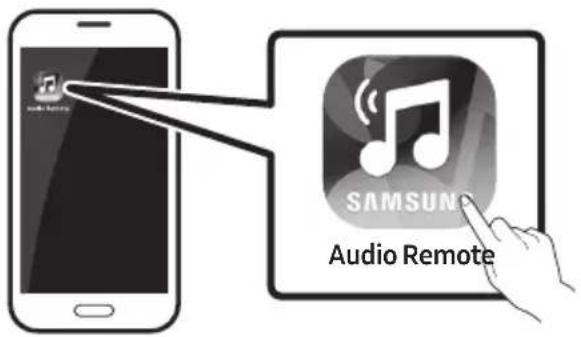
- The Samsung Audio Remote app is only compatible with Android mobile phones and mobile devices running Android OS 3.0 or later.
08 USING THE REMOTE CONTROL
How to Use the Remote Control
| 1 | Power | Turns the Soundbar on and off. |
| 2 | Sound Control | You can select from TREBLE, BASS, or AUDIO SYNC. • To control the volume of the treble or bass sound, select TREBLE or BASS in Sound Settings, and then adjust the volume between -6~+6 by using the Up/Down buttons. • Press and hold the (Sound Control) button for about 5 seconds to adjust the sound for each frequency band. 150Hz, 300Hz, 600Hz, 1.2KHz, 2.5KHz, 5KHz, and 10KHz are selectable (Left/Right) and each can be adjusted to a setting between -6 ~ +6 (Up/Down). • If the video and audio between the TV and your Soundbar are not synchronised, select AUDIO SYNC in Sound Settings, and then set audio delay between 0~300 milliseconds by using the Up/Down buttons. (Except "USB" mode) • Audio Sync is only supported in some functions. |
| 3 |  Surround Surround | The Surround Sound function adds depth and a sense of space to sound.Each time you press this button, ON and OFF alternate.ON: Play sound over all the speakers.OFF: You can hear the sound of the original source channel from several speakers. |
| 4 |  SOUND MODE SOUND MODE | You can select the desired sound effect by choosing STANDARD, MUSIC, CLEAR VOICE, SPORTS, or MOVIE.Select the “STANDARD” mode if you want to enjoy the original sound.• DRC (Dynamic Range Control)Lets you apply dynamic range control to Dolby Digital tracks. If you press and hold the SOUND MODE button while in standby mode, DRC (Dynamic Range Control) turns on or off. With the DRC turned on, loud sound is reduced. (The sound may be distorted.) |
| 5 |  Source Source | Press to select a source connected to the Soundbar.• BT PAIRING modeTo turn on “BT PAIRING” mode in “BT” mode, press and hold the → (Source) button for more than 5 seconds. See page 17 for details.• Auto Power Down FunctionThe unit turns off automatically in the following situations.- D.IN / HDMI / BT / USB Mode : If there is no audio signal for 5 minutes.- AUX Mode :- If the Audio (AUX) Cable is disconnected for 5 minutes.- If there is no KEY input for 8 hours when the Audio (AUX) Cable is connected. (Auto Power Down function can be turned off only in that case.)- To turn off Auto Power Down function, while in “AUX” mode, press and hold the ▶II button for 5 seconds. “ON-AUTO POWER DOWN” / “OFF-AUTO POWER DOWN” appears on the display. |
| 6 |  Play / Pause Play / Pause | Press the ▶II button to pause a music file temporarily.If you press the button again, the music file plays. |
| 7 |  Up/Down/Left/Right Up/Down/Left/Right | 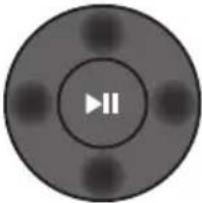 Press the indicated areas to select Up/Down/Left/Right.Press Up/Down/Left/Right on the button to select or set functions.RepeatTo use the Repeat function in "USB" mode, press the Up button.Music SkipPress the Right button to select the next music file. Press the Left button to select the previous music file.Anynet+ / Auto Power LinkYou can turn Anynet+ and Auto Power Link on or off.Anynet+ and Auto Power Link are controlled by the Right and Left buttons respectively.- Anynet+ : If the Soundbar is connected to a Samsung TV through an HDMI cable, you can control your Soundbar with a Samsung TV remote control.Press and hold the Right button for 5 seconds to toggle Anynet+ ON and OFF.- Auto Power Link : If the Soundbar is connected to your TV through a digital optical cable, the Soundbar can automatically turn on when you turn on your TV. Press and hold the Left button for 5 seconds to toggle Auto Power Link ON and OFF.- Anynet+ / Auto Power Link are set to ON by default. Press the indicated areas to select Up/Down/Left/Right.Press Up/Down/Left/Right on the button to select or set functions.RepeatTo use the Repeat function in "USB" mode, press the Up button.Music SkipPress the Right button to select the next music file. Press the Left button to select the previous music file.Anynet+ / Auto Power LinkYou can turn Anynet+ and Auto Power Link on or off.Anynet+ and Auto Power Link are controlled by the Right and Left buttons respectively.- Anynet+ : If the Soundbar is connected to a Samsung TV through an HDMI cable, you can control your Soundbar with a Samsung TV remote control.Press and hold the Right button for 5 seconds to toggle Anynet+ ON and OFF.- Auto Power Link : If the Soundbar is connected to your TV through a digital optical cable, the Soundbar can automatically turn on when you turn on your TV. Press and hold the Left button for 5 seconds to toggle Auto Power Link ON and OFF.- Anynet+ / Auto Power Link are set to ON by default. |
| 8 | BluetoothPOWERBluetoothPOWER | Press to turn the Bluetooth POWER or volume restriction function on and off.Bluetooth POWER function: If the Soundbar is in standby mode and the Bluetooth POWER function is On, when you turn on a previously connected Bluetooth device, the Soundbar automatically turns on and connects via Bluetooth to the device.- When the Bluetooth POWER function is on, "ON-BLUETOOTH POWER" appears on the Soundbar display. To turn off the Bluetooth POWER function, press the Bluetooth POWER button once. Then "OFF-BLUETOOTH POWER" appears on the front display.- If the "D.IN" mode is on and the Soundbar is connected to a Samsung smart TV released in 2017 or later, the Soundbar can be controlled with the TV remote control. In this mode, you cannot turn off Bluetooth POWER.Volume restriction function: Because it may damage hearing when the power is turned on at high volumes, it adjusts the volume to 20 when the set volume is higher than 20.- The default value for Volume restriction is off. The set volume is maintained even when the power is turned off.- To change the setting, press the Bluetooth POWER button on the remote control for 5 seconds. With the volume restriction off, "V FREE" appears on the front display and with the function on, "V LOCK" appears. |
| 9 |  WOOFER WOOFER | 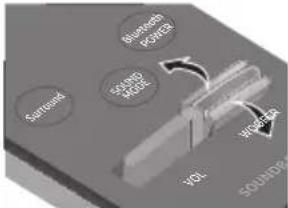 |  Push the button up or down to adjust the volume of the subwoofer to -12 or -6 to +6. Pressing the button reverts the subwoofer volume to level 0. Push the button up or down to adjust the volume of the subwoofer to -12 or -6 to +6. Pressing the button reverts the subwoofer volume to level 0. |
| 10 | VOL | Push the button up or down to adjust the volume.• MutePress the VOL button to mute the sound. Press it again to unmute the sound. | |
Adjusting the Soundbar volume with a TV remote control
Use the TV menu to set the TV speaker on a Samsung TV external speakers. (For more information, see the TV's user manual.)
- After installing the Soundbar, you can adjust the Soundbar's volume using the IR remote control that came with a Samsung TV. (If you do not want to use this function, when the Soundbar is on, press and hold the Surround button for 5 seconds. "OFF-TV REMOTE" appears in the Soundbar's display and the function turns off.) To adjust the volume using only the Samsung TV remote control, press and hold the Surround button for more than 5 seconds until "SAMSUNG-TV REMOTE" appears in the Soundbar display.
- Each time the Surround button is held for 5 seconds, the mode switches in the following order: "SAMSUNG-TV REMOTE" (Default mode) "OFF-TV REMOTE" "ALL-TV REMOTE".
- To adjust the Soundbar volume with the remote control that came with a TV made by a third party manufacturer, turn the Soundbar on, press and hold the Surround button for 5 seconds ("OFF-TV REMOTE" appears on the Soundbar's display), release the Surround button, and then press and hold the Surround button again for more than 5 seconds. ("ALL-TV REMOTE" appears on the Soundbar's display.)
- This function may not be available, depending on the remote control.
- Manufacturers supporting this function:
VIZIO, LG, Sony, Sharp, PHILIPS, PANASONIC, TOSHIBA, GRUNDIG, Hisense, RCA
Using the Hidden Buttons
| Hidden Button | Reference page | |
| Remote Control Button Function | ||
| Surround | TV remote control On/Off | page 24 |
 (Source) (Source) | BT Paring page 17 | |
| ▶II (Play / Pause) | Auto Power Down On/Off (AUX mode) page 22 | |
| Initialise (Standby) page 30 | ||
| VOL ID SET (Standby) | page 7 | |
| Left | Auto Power Link ON/OFF | page 10 |
| Right Anynet+ ON/OFF page 23 | ||
 (Sound Control) (Sound Control) | 7 Band EQ page 21 | |
| SOUND MODE | DRC ON/OFF (Standby) | page 22 |
| Bluetooth POWER | Volume restriction On/Off | page 23 |
Output specifications for the different sound effect modes
| Effect Input | Output | |||
| Except Wireless Rear Speaker Kit | Include Wireless Rear Speaker Kit | |||
 Surround Surround | ON | 2.0 ch | 2.1 ch | 4.1 ch |
| 5.1 ch | 2.1 ch | 4.1 ch | ||
 SOUND MODE SOUND MODE | STANDARD | 2.0 ch | 2.1 ch | 4.1 ch |
| 5.1 ch | 2.1 ch | 4.1 ch | ||
| MUSIC | 2.0 ch | 2.1 ch | 4.1 ch | |
| 5.1 ch | 2.1 ch | 4.1 ch | ||
| CLEAR VOICE | 2.0 ch | 2.1 ch | 4.1 ch | |
| 5.1 ch | 2.1 ch | 4.1 ch | ||
| SPORTS | 2.0 ch | 2.1 ch | 4.1 ch | |
| 5.1 ch | 2.1 ch | 4.1 ch | ||
| MOVIE | 2.0 ch | 2.1 ch | 4.1 ch | |
| 5.1 ch | 2.1 ch | 4.1 ch | ||
- Samsung Wireless Rear Speaker Kit can be purchased separately. To purchase a Kit, contact the vendor you purchased the Soundbar from.
09 INSTALLING THE WALL MOUNT
Installation Precautions
- Install on a vertical wall only. - Do not install in a place with high temperature or humidity.
- Verify whether the wall is strong enough to support the product's weight. If not, reinforce the wall or choose another installation point.
- Purchase and use the fixing screws or anchors appropriate for the kind of wall you have (plaster board, iron board, wood, etc.). If possible, fix the support screws into wall studs.
- Purchase wall mounting screws according to the type and thickness of the wall you want to mount the Soundbar on.
- Diameter: M5
– Length: 35 mm or longer recommended.
- Connect cables from the unit to external devices before you install the Soundbar on the wall.
- Make sure the unit is turned off and unplugged before you install it. Otherwise, it may cause an electric shock.
Wallmount Components

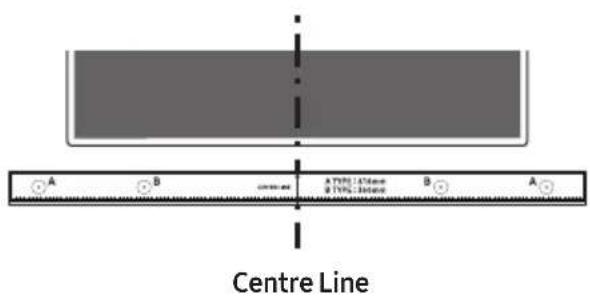
Wall Mount Guide


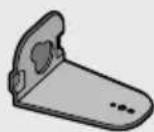

Holder-Screw (2 EA) Screw (2EA) Bracket-Wall Mount L Bracket-Wall Mount R
- Place the Wall Mount Guide against the wall surface.
• The Wall Mount Guide must be level.
- If your TV is mounted on the wall, install the Soundbar at least 5 cm below the TV.

- Align the Paper Template's Centre Line with the centre of your TV (if you are mounting the Soundbar below your TV), and then fix the Wall Mount Guide to the wall using tape.
- If you are not mounting below a TV, place the Centre Line in the centre of the installation area.
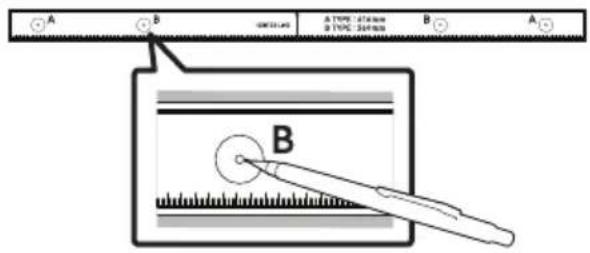
- Push a pen tip or sharpened pencil tip through the centre of the B-TYPE images on each end of the Guide to mark the holes for the supporting screws, and then remove the Wall Mount Guide.
- Using an appropriately sized drill bit, drill a hole in the wall at each marking.
- If the markings do not correspond to the positions of studs, make sure you insert appropriate anchors or mollies into the holes before you insert the support screws. If you use anchors or mollies, make sure the holes you drill are large enough for the anchors or mollies you use.
- Push a screw (not supplied) through each Holder-Screw, and then screw each screw firmly into a support screw hole.

natural_image
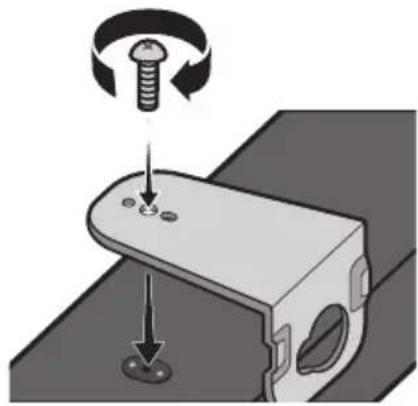
Diagram showing mechanical components with arrows indicating motion, no text or symbols present- Use the two Screws (M4 x L12) to attach both Bracket-Wall Mount L and R to the Soundbar's bottom.
For a proper fit, make sure to align the bumps on the Soundbar to the holes on the brackets.

natural_image
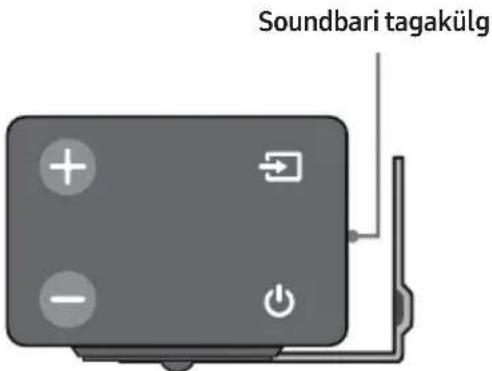
Mechanical assembly diagram showing a bolt and nut on a bracket with a screw being inserted (no text or symbols)- When assembling, make sure the hanger part of the Bracket-Wall Mounts are located behind the rear of the Soundbar.

Right end of Soundbar
- The left and right mounts are different shapes. Make sure to position them correctly.

natural_image
Simple line drawing of a vehicle front view with two rear seats (no text or symbols)Wall Mount R Wall Mount L
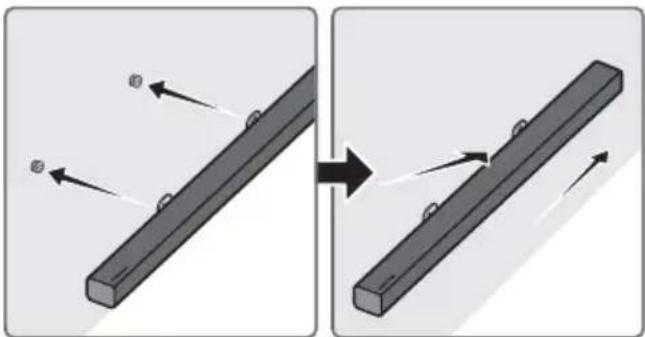
- Install the Soundbar with the attached Bracket-Wall Mounts by hanging the Bracket-Wall Mounts on the Holder-Screws on the wall.
natural_image
Diagram showing two mechanical components with arrows indicating motion, no text or symbols present- Slightly tilt the Soundbar to insert both Holder-Screw heads into Bracket-Wall Mount holes. Push the Soundbar in the direction of the arrow to make sure both sides are firmly fixed.

natural_image
Diagram showing two mechanical components with arrows indicating motion or assembly (no text or symbols)Detaching the Soundbar from the Wall
- To separate the Soundbar from the wall mount, push it in the direction of arrow, tilt it up slightly, and then pull it away from the wall as shown.
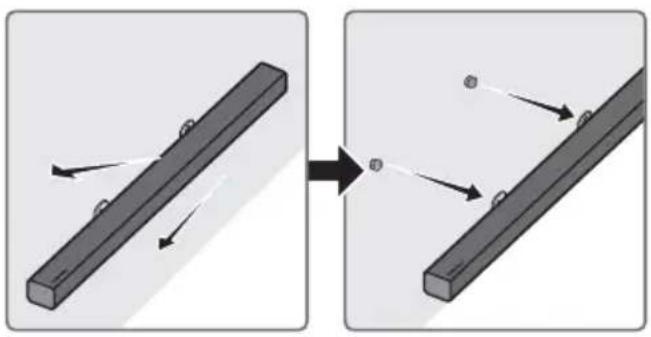
natural_image
Diagram showing two mechanical components with arrows indicating motion, no text or symbols present- Do not hang onto the installed unit and avoid striking or dropping the unit.
- Secure the unit firmly to the wall so that it does not fall off. If the unit falls off, it may cause an injury or damage the product.
- When the unit is installed on a wall, please make sure that children do not pull any of the connecting cables, as this may cause it to fall.
- For the optimal performance of a wall mount installation, install the speaker system at least 5 cm below the TV, if the TV is mounted on the wall.
- For your safety, if you do not mount the unit on the wall, install it on a secure, flat surface where it is unlikely to fall.
10 SOFTWARE UPDATE
Samsung may offer updates for the Soundbar's system firmware in the future.

If an update is offered, you can update the firmware by connecting a USB device with the firmware update stored on it to the USB port on your Soundbar.
For more information about how to download update files, go to the Samsung Electronics website at (www.samsung.com → Support).
Then, enter or select the model of your Soundbar, select Software & Apps, and then Downloads.
The option name can vary.
Updating Procedure
- Connect a Micro USB to USB adapter cable with a male USB 2.0 Micro USB plug (Type B) on one end and a standard female 2.0 USB jack (Type A) on the other end to the micro USB jack on your Soundbar.
- The Micro USB to USB adapter cable is sold separately. To purchase, contact a Samsung Service Centre or Samsung Customer Care.
- Follow the steps below to download the product software:
Go to the Samsung website at (samsung.com) → search for the model name - select the customer support option (the option name is subject to change)
-
Save the downloaded software to a USB stick and select "Extract Here" to unzip the folder.
-
Turn off the Soundbar and connect the USB stick containing the software update to the female port on a Micro USB adapter cable. Connect the cable to the USB port on the Soundbar.
-
Turn on the Soundbar. Within 3 minutes, "UPDATE" is displayed and updating begins.
-
When the update finishes, the Soundbar turns off. Press the ▶II button on the remote control for 5 seconds. "INIT" appears on the display and then the Soundbar turns off. The update is complete.
- This product has a DUAL BOOT function. If the firmware fails to update, you can update the firmware again.
If UPDATE is not displayed
-
Turn off the Soundbar, disconnect and then reconnect the USB storage device that contains the update files to the Soundbar's USB port.
-
Disconnect the Soundbar's power cord, reconnect it, and then turn on the Soundbar.
-
Updating firmware may not work properly if audio files supported by the Soundbar are stored in the USB storage device.
- Do not disconnect the power or remove the USB device while updates are being applied. The main unit will turn off automatically after completing the firmware update.
- After update is completed, the user setup in Soundbar is initialised. We recommend you write down your settings so that you can easily reset them after the update.
Note that updating firmware resets the subwoofer connection too.
If the connection to the subwoofer is not re-established automatically after the update, refer to page 6.
If the software update fails, check if the USB stick is defective.
- Mac OS users should use MS-DOS (FAT) as the USB format.
- Updating via USB may not be available, depending on the USB storage device manufacturer.
11 TROUBLESHOOTING
Before seeking assistance, check the following.
The unit will not turn on.
Is the power cord plugged into the outlet?
→Connect the power plug to the outlet.
A function does not work when the button is pressed.
Is there static electricity in the air?
→Disconnect the power plug and connect it again.
Sound dropouts occur in BT mode.
→ See the Bluetooth connection sections on pages 11 and 17.
Sound is not produced.
Is the Mute function on?
→ Press the VOL button to cancel the function.
Is the volume set to minimum?
→Adjust the Volume.
The remote control does not work.
Are the batteries drained?
→Replace with new batteries.
Is the distance between the remote control and Soundbar main unit too far?
→ Move the remote control closer to the Soundbar main unit.
The red LED on the subwoofer blinks and the subwoofer is not producing sound.
This issue can occur if the subwoofer is not connected to the Soundbar main unit.
→ Try to connect your subwoofer again. (See page 6.)
The subwoofer drones and vibrates noticeably.
Try to adjust the vibration of your subwoofer.
→ Push the WOOFER button on your remote control up or down to adjust the subwoofer volume. (between -12, -6 \~ +6).
12 LICENCE

DOLBY
AUDIO
Manufactured under license from Dolby Laboratories. Dolby, Dolby Audio, Pro Logic, and the double-D symbol are trademarks of Dolby Laboratories.

dts®
2.0 Channel
For DTS patents, see http://patents.dts.com. Manufactured under license from DTS Licensing Limited. DTS, the Symbol, DTS in combination with the Symbol, and DTS 2.0 Channel are registered trademarks or trademarks of DTS, Inc. in the United States and/or other countries. © DTS, Inc. All Rights Reserved.

HIGH-DEFINITION MULTIMEDIA INTERFACE
The terms HDMI and HDMI High-Definition Multimedia Interface, and the HDMI Logo are trademarks or registered trademarks of HDMI Licensing LLC in the United States and other countries.
13 OPEN SOURCE LICENCE NOTICE
To send inquiries and requests regarding open sources, contact Samsung via Email (oss.request@samsung.com).
14 IMPORTANT NOTES ABOUT SERVICE
- Figures and illustrations in this User Manual are provided for reference only and may differ from actual product appearance.
- An administration fee may be charged if either
(a) an engineer is called out at your request and there is no defect with the product (i.e. where the user manual has not been read).
(b) you bring the unit to a repair centre and there is no defect with the product (i.e. where the user manual has not been read).
- You will be informed of the administration fee amount before a technician visits.
15 SPECIFICATIONS AND GUIDE
Specifications
| GENERAL | USB | 5V/0.5A | |
| Weight | Soundbar Main Unit | 2.0 kg | |
| Subwoofer (PS-WM30) | 7.2 kg | ||
| Dimensions(W x H x D) | Soundbar Main Unit | 908.5 x 53.5 x 70.5 mm | |
| Subwoofer (PS-WM30) | 200.0 x 392.0 x 378.0 mm | ||
| Operating Temperature Range | +5°C to +35°C | ||
| Operating Humidity Range | 10 % ~ 75 % | ||
| AMPLIFIER | Rated Output power | Soundbar Main Unit | 40W x 4, 6 ohm |
| Subwoofer (PS-WM30) | 160W, 3 ohm | ||
| Supported play formats(DTS 2.0 sound is played in DTS format.) | LPCM 2ch, Dolby AudioTM(supporting Dolby® Digital), DTS | ||
| Wireless device output power | BT max transmitter power | 100mW at 2.4GHz – 2.4835GHz | |
| SRD max transmitter power | 25mW at 5.725GHz – 5.825GHz | ||
NOTES
- Samsung Electronics Co., Ltd reserves the right to change the specifications without notice.
- Weight and dimensions are approximate.
- For more information about the power supply and power consumption, refer to the label attached to the product. (Label: Bottom of the Soundbar Main Unit)
| Overall Standby Power Consumption (W) | 2.9W | |
| Bluetooth Port deactivation method | Press the “Bluetooth POWER” button on the remote control when “BT” mode. | |
- Hereby, Samsung Electronics, declares that this equipment is in compliance with Directive 2014/53/EU.
The full text of the EU declaration of conformity is available at the following internet address: http://www.samsung.com go to Support > Search Product Support and enter the model name.
This equipment may be operated in all EU countries.


[Correct disposal of batteries in this product]
(Applicable in countries with separate collection systems)
This marking on the battery, manual or packaging indicates that the batteries in this product should not be disposed of with other household waste at the end of their working life. Where marked, the chemical symbols Hg, Cd or Pb indicate that the battery contains mercury, cadmium or lead above the reference levels in EC Directive 2006/66.
If batteries are not properly disposed of, these substances can cause harm to human health or the environment.
To protect natural resources and to promote material reuse, please separate batteries from other types of waste and recycle them through your local, free battery return system.
Correct Disposal of This Product (Waste Electrical & Electronic Equipment)
(Applicable in countries with separate collection systems)
This marking on the product, accessories or literature indicates that the product and its electronic accessories (e.g. charger, headset, USB cable) should not be disposed of with other household waste at the end of their working life. To prevent possible harm to the environment or human health from uncontrolled waste disposal, please separate these items from other types of waste and recycle them responsibly to promote the sustainable reuse of material resources.
Household users should contact either the retailer where they purchased this product, or their local government office, for details of where and how they can take these items for environmentally safe recycling.
Business users should contact their supplier and check the terms and conditions of the purchase contract. This product and its electronic accessories should not be mixed with other commercial wastes for disposal.
For information on Samsung's environmental commitments and product specific regulatory obligations e.g. REACH, WEEE, Batteries, visit:
http://www.samsung.com/uk/aboutsamsung/samsungelectronics/corporatecitizenship/data_corner.html
natural_image
Illustration of a person sitting on a sofa using a laptop (no text or symbols visible)РЪКОВОДСТВО НА ПОТРЕБИТЕЛЯ
natural_image
Illustration of a person sitting on a sofa next to a desk with a laptop (no text or symbols visible)
ПЪЛНО РЬКОВОДСТВО
natural_image
Diagram showing three stages of battery internal structure: open, open with internal contacts, and closed (no text or symbols)BUL - 2
natural_image
Circular gray button with a play symbol icon at center (no text or symbols)natural_image
Diagram showing a screw being inserted into a housing, with arrows indicating direction (no text or symbols)natural_image
Mechanical assembly diagram showing a bolt and screw on a housing component with a rotating arrow indicating rotation (no text or symbols)natural_image
Simple line drawing of a rectangular object with two circular features on top (no text or symbols)natural_image
Diagram showing two mechanical components with arrows indicating motion, no text or symbols presentnatural_image
Diagram showing two mechanical components with arrows indicating motion or assembly (no text or symbols)natural_image
Diagram showing two mechanical components with arrows indicating motion, no text or symbols presentManufactured under license from Dolby Laboratories. Dolby, Dolby Audio, Pro Logic, and the double-D symbol are trademarks of Dolby Laboratories.

dts®
2.0 Channel
For DTS patents, see http://patents.dts.com. Manufactured under license from DTS Licensing Limited. DTS, the Symbol, DTS in combination with the Symbol, and DTS 2.0 Channel are registered trademarks or trademarks of DTS, Inc. in the United States and/or other countries. © DTS, Inc. All Rights Reserved.

HIGH-DEFINITION MULTIMEDIA INTERFACE
The terms HDMI and HDMI High-Definition Multimedia Interface, and the HDMI Logo are trademarks or registered trademarks of HDMI Licensing LLC in the United States and other countries.
13 БЕЛЕЖКА ЗА ЛИЦЕНЗА ЗА ОТВОРЕН КОД
natural_image
Illustration of a person sitting on a sofa using a laptop (no text or symbols)KORISNIČKI PRIRUČNIK
Pogledajte ovaj priručnik za sigurnosne upute, instalaciju proizvoda, komponente, povezivanje i specifikacije proizvoda.

natural_image
Illustration of a person sitting on a couch next to a desk with a laptop (no text or symbols)
POTPUNI PRIRUČNIK
Možete pristupiti centru službe za korisnike skeniranjem koda QR. Kako biste vidjeli priručnik na vašem računalu ili mobilnom uređaju preuzmite ga s mrežne stranice u obliku dokumenta.
(http://www.samsung.com/support)
Dizajn i specifikacije mogu se promijeniti bez prethodne najave.
SADRŽAJ
01 Provjera Komponenti 2
Umetanje baterija prije upotrebe daljinskog upravljača (AA baterije X 2) ____ 2
02 Pregled Proizvoda 3
Prednja ploča / Ploča na desnoj strani uređaja Soundbar ____ 3
Donja ploča uređaja Soundbar 4
natural_image
Three grayscale product photos: a rectangular remote, a two-story speaker, and a remote control with three speakers (no text or symbols visible)Glavna jedinica Soundbar Subwoofer Daljinski upravljač / Baterije

Kabel za napajanje (Subwoofer)

natural_image
Simple illustration of a USB flash drive (no text or symbols)AC/DC adapter (Glavna jedinica)

natural_image
Black rubber hose with a U-shaped end, isolated on white background (no text or symbols)Kabel za napajanje (AC/DC adapter)

natural_image
Simple black U-shaped connector with two connectors (no text or symbols)Optički kabel
- Koraci za povezivanje napajanja označeni su (1, 2, 3). Za više informacija o povezivanju napajanja pogledajte stranicu 5.
- Za komponente za postavljanje Soundbara na zid pogledajte stranicu 26.
- Micro USB za USB prilagodnik i HDMI kabeli prodaju se zasebno. Za kupnju kontaktirajte Samsungov servisni centar ili korisničku podršku.
- Izgled dodatnog pribora može se malo razlikovati od gornjih crteža.
Umetanje baterija prije upotrebe daljinskog upravljača (AA baterije X 2)
02 PREGLED PROIZVODA
Prednja ploča / Ploča na desnoj strani uređaja Soundbar

| 1 | ZaslonPrikazuje status proizvoda i trenutni način. | |
| 2 | Gumb +/- (Glasnoća)Prilagođava glasnoću.• Prilikom prilagođavanja razine glasnoća se prikazuje na prednjem zaslonu uređaja Soundbar. | |
| 3 | Gumb(Napajanje)Uključuje i isključuje napajanje. | |
| 4 | Gumb(Izvor)Odabir načina unosa izvora. | |
| Način unosa Zaslon | ||
| Optički digitalni ulaz D.IN | ||
| Unos ARC (HDMI OUT) | D.IN → TV ARC (Automatska pretvorba) | |
| Unos AUX AUX | ||
| Unos HDMI HDMI | ||
| Način BLUETOOTH BT | ||
| Način USB USB | ||
| • Za uključivanje načina „BT PAIRING" promijenite izvor u način „BT", a zatim pritisnite i držite gumb(Izvor) duže od 5 sekundi. | ||
- Kad priključite kabel napajanja, tipka napajanja radi još 4 do 6 sekundi.
- Kad uključite napajanje ove jedinice, početak reprodukcije zvuka kasnit će 4 do 5 sekundi.
- Ako želite uživati u zvuku koji se reproducira samo putem uređaja Soundbar, zvučnike televizora morate isključiti u izborniku Postavke zvuka televizora. Pogledajte priručnik TV-a koji je isporučen uz TV.
Donja ploča uređaja Soundbar

| 1 | DIGITAL AUDIO IN (OPTICAL)Povežite na digitalni (optički) izlaz vanjskog uređaja. |
| 2 | USB (5V 0.5A)Povežite USB uređaj kako biste reproducirali glazbu s uređaja USB pomoću uređaja Soundbar. |
| 3 | AUX INPovežite na analogni izlaz vanjskog uređaja. |
| 4 | HDMI INUnosi digitalne video i audio signale istovremeno pomoću kabela HDMI.Povežite na izlaz HDMI vanjskog uređaja. |
| 5 | HDMI OUT (TV-ARC)Povežite s priključkom HDMI (ARC) na televizoru. |
| 6 | DC 24V (Ulaz napajanja)Spojite AC/DC adapter. |
- Prilikom isključivanja iz zidne utičnice, kabel za napajanje adaptera izmjenične/istosmjerne struje držite za utikač. Ne povlačite kabel.
- Ne spajajte ovu jedinicu ili druge komponente na utičnicu za napajanje izmjeničnom strujom dok u potpunosti ne spojite sve komponente.
03 SPAJANJE UREĐAJA SOUNDBAR
natural_image
Circular play button icon with two playback buttons (no text or symbols)Povezivanje televizora pomoću kabela HDMI

flowchart
graph TD
    A["TV"] --> B["HDMI IN (ARC)"]
    B --> C["Kabel HDMI (nije priloženo)"]
    C --> D["Provjere priključak HDMI OUT (TV-ARC) na glavnoj jedinici Soundbara."]
    D --> E["TV ARC"]
    F["Donji dio uređaja Soundbar"] --> G["HDMI OUT (TV-ARC)"]
    G --> H["Desna strana uređaja Soundbar"]
-
S uključenim Soundbarom i TV-om priključite kabel HDMI (nije priložen) kao što je prikazano na slici.
-
„TV ARC” se prikazuje u prozoru zaslona glavne jedinice Soundbar i zvuk televizora se reproducira pomoću Soundbara.
- Ako se zvuk televizora ne čuje, pritisnite gumb 📄 (Izvor) na daljinskom upravljaču na desnoj strani Soundbara kako biste promijenili način u „D.IN”. Na zaslonu se prikazuju „D.IN” i „TV ARC” u nizu i zvuk s televizora se reproducira.
natural_image
Diagram showing a screw being inserted into a pulley and then being inserted into a screw, with no text or symbols present.- Upotrijebite dva Vijka (M4 x L12) za pričvršćivanje Zidni nosač L i D na dno uređaja Soundbar.
Za ispravno postavljanje obavezno osigurajte da su udubine na uređaju Soundbar u ravnini s otvorima na nosaču.
natural_image
Mechanical assembly diagram showing a bolt and screw on a bracket with a rotating knob (no text or symbols)natural_image
Close-up of a gray electronic device with four function buttons and an antenna (no text or symbols visible)natural_image
Simple line drawing of a vehicle chassis with two wheels and a side panel (no text or symbols)natural_image
Diagram showing two mechanical components with arrows indicating motion, no text or symbols presentnatural_image
Diagram showing two mechanical components with arrows indicating motion or assembly (no text or symbols)Uklanjanje uređaja Soundbar sa zida
natural_image
Diagram showing two mechanical components with arrows indicating motion, no text or symbols present- Nemojte se pridržavati za postavljenu jedinicu i izbjegavajte udaranje ili ispuštanje jedinice.
- Dobro učvrstite jedinicu na zid kako ne bi pala. Ako jedinica padne, može izazvati ozljedu ili oštetiti proizvod.
- Kad je jedinica postavljena na zid pazite da djeca ne povlače priključne kabele jer to može dovesti do pada.
- Za optimalnu učinkovitost zidnog držača postavite sustav zvučnika barem 5 cm ispod televizora ako je televizor postavljen na zid.
- Zbog vaše sigurnosti, ako ne postavljate jedinicu na zid, postavite je na sigurnu, ravnu površinu s koje neće pasti.
10 AŽURIRANJE SOFTVERA
Manufactured under license from Dolby Laboratories. Dolby, Dolby Audio, Pro Logic, and the double-D symbol are trademarks of Dolby Laboratories.

dts®
2.0 Channel
For DTS patents, see http://patents.dts.com. Manufactured under license from DTS Licensing Limited. DTS, the Symbol, DTS in combination with the Symbol, and DTS 2.0 Channel are registered trademarks or trademarks of DTS, Inc. in the United States and/or other countries. © DTS, Inc. All Rights Reserved.

HIGH-DEFINITION MULTIMEDIA INTERFACE
The terms HDMI and HDMI High-Definition Multimedia Interface, and the HDMI Logo are trademarks or registered trademarks of HDMI Licensing LLC in the United States and other countries.
13 OBAVIJEST O LICENCI ZA UPORABU SOFTVERA OTVORENOG KODA
Za slanje upita i zahtjeva u vezi otvorenih izvora obratite se tvrtki Samsung putem e-pošte (oss.request@samsung.com).
14 VAŽNA NAPOMENA VEZANA UZ SERVIS
- Slike u ovom korisničkom priručniku služe kao samo kao referenca i mogu se razlikovati od stvarnog izgleda proizvoda.
- Moguća je naplata administrativne pristojbe u slučaju
natural_image
Illustration of a person sitting on a sofa using a laptop (no text or symbols visible)UŽIVATELSKÁ PŘÍRUČKA
natural_image
Illustration of a person sitting on a couch next to a laptop (no text or symbols present)
KOMPLETNÍ PŘÍRUČKA
natural_image
Three grayscale product photos: a rectangular remote unit, a two-tiered speaker tower, and a remote control with three speakers (no text or symbols visible)Napájecí kabel (Subwoofer)

natural_image
Three black plastic cable connectors shown in separate panels (no text or symbols)natural_image
Two identical black cable connectors with end caps, shown from left and right angles (no text or symbols)natural_image
Diagram showing three stages of battery internal structure: open, folded, and closed (no text or symbols)02 POPIS VÝROBKU
natural_image
Circular gray button with a play symbol and double arrow icon, no text or symbols present.natural_image
Diagram showing a screw being inserted into a pulley and then being inserted into a screw, with no text or symbols present.natural_image
Mechanical assembly diagram showing a bolt and screw on a bracket with a rotating arrow indicating rotation (no text or symbols)natural_image
Close-up of a gray electronic device with four labeled buttons (positive, negative, right, and power) connected to a cable or connector (no text or symbols beyond basic icons)natural_image
Pure diagram of a mechanical component with two circular features on either side (no text or symbols)natural_image
Diagram showing two mechanical components with arrows indicating motion, no text or symbols presentnatural_image
Diagram showing two mechanical components with arrows indicating motion or assembly (no text or symbols)natural_image
Diagram showing two mechanical components with arrows indicating motion, one being tilted and the other tilted (no text or symbols)Manufactured under license from Dolby Laboratories. Dolby, Dolby Audio, Pro Logic, and the double-D symbol are trademarks of Dolby Laboratories.

dts®
2.0 Channel
For DTS patents, see http://patents.dts.com. Manufactured under license from DTS Licensing Limited. DTS, the Symbol, DTS in combination with the Symbol, and DTS 2.0 Channel are registered trademarks or trademarks of DTS, Inc. in the United States and/or other countries. © DTS, Inc. All Rights Reserved.

HIGH-DEFINITION MULTIMEDIA INTERFACE
The terms HDMI and HDMI High-Definition Multimedia Interface, and the HDMI Logo are trademarks or registered trademarks of HDMI Licensing LLC in the United States and other countries.
13 POZNÁMKA K LICENCI OTEVŘENÉHO SOFTWARU
natural_image
Illustration of a person sitting on a sofa using a laptop (no text or symbols visible)BENUTZERHANDBUCH
natural_image
Illustration of a person sitting on a couch next to a desk with a laptop (no text or symbols visible)
VOLLSTÄNDIGES HANDBUCH
natural_image
Three grayscale product photos: a rectangular remote, a two-story speaker, and a remote control with three speakers (no text or symbols visible)Stromkabel (Subwoofer)
natural_image
Three black plastic cable connectors shown in separate panels (no text or symbols)natural_image
Simple black U-shaped connector with two connectors (no text or symbols)Optisches Kabel
DEU - 2
02 PRODUKTÜBERSICHT
natural_image
Circular play button icon with double arrow symbol (no text or numbers)natural_image
Diagram showing mechanical components with arrows indicating motion, no text or symbols presentnatural_image
Mechanical assembly diagram showing a screw being inserted into a housing with a bolt, no text or symbols presentnatural_image
Simple line drawing of a vehicle chassis with two wheels and a front-mounted door (no text or symbols)natural_image
Diagram showing two mechanical components with arrows indicating motion, no text or symbols presentflowchart
graph TD
    A["Top: Device placement"] --> B["Downward arrow"]
    B --> C["Bottom: Display panel with directional arrows"]
natural_image
Diagram showing two mechanical components before and after assembly, with arrows indicating motion direction (no text or symbols)Manufactured under license from Dolby Laboratories. Dolby, Dolby Audio, Pro Logic, and the double-D symbol are trademarks of Dolby Laboratories.

dts®
2.0 Channel
For DTS patents, see http://patents.dts.com. Manufactured under license from DTS Licensing Limited. DTS, the Symbol, DTS in combination with the Symbol, and DTS 2.0 Channel are registered trademarks or trademarks of DTS, Inc. in the United States and/or other countries. © DTS, Inc. All Rights Reserved.

HIGH-DEFINITION MULTIMEDIA INTERFACE
The terms HDMI and HDMI High-Definition Multimedia Interface, and the HDMI Logo are trademarks or registered trademarks of HDMI Licensing LLC in the United States and other countries.
13 BEKANNTMACHUNG ZU OPEN SOURCE LIZENZEN
natural_image
Illustration of a person sitting on a couch next to a desk with a laptop (no text or symbols visible)
TÄIELIK JUHEND
natural_image
Three grayscale product photos: a rectangular remote unit, a two-tiered speaker tower, and a remote control with three batteries (no text or symbols visible)natural_image
Simple black U-shaped connector with two connectors (no text or symbols)Optiline kaabel
02 TOOTE ÜLEVAADE
Soundbari esipaneel / parempoolne paneel

natural_image
Circular gray button with a play symbol icon, no text or symbols presentnatural_image
Diagram showing a screw being inserted into a housing, with arrows indicating direction (no text or symbols)natural_image
Mechanical assembly diagram showing a bolt and screw on a housing component with a rotating arrow indicating rotation (no text or symbols)- Kokkupanekul veenduge, et Seinakinnituskronstein riputusosad jääksid Soundbari taha.
Heliriba parempoolne ots
natural_image
Simple line drawing of a vehicle front view with two rear seats (no text or symbols)Seinakinnitus R Seinakinnitus L
- Paigaldage Soundbar koos selle külge kinnitatud Seinakinnituskronstein, riputades Seinakinnituskronstein seinal olevatele Hoidikkruvi.

natural_image
Diagram showing two mechanical components before and after assembly, with arrows indicating motion direction (no text or symbols)- Kallutage veidi Soundbari, et sisestada mölema Hoidikkruvi pea
natural_image
Diagram showing two mechanical components with arrows indicating motion or assembly (no text or symbols)Soundbari eemaldamine seinalt
natural_image
Diagram showing two mechanical components with arrows indicating motion, no text or symbols presentManufactured under license from Dolby Laboratories. Dolby, Dolby Audio, Pro Logic, and the double-D symbol are trademarks of Dolby Laboratories.

dts®
2.0 Channel
For DTS patents, see http://patents.dts.com. Manufactured under license from DTS Licensing Limited. DTS, the Symbol, DTS in combination with the Symbol, and DTS 2.0 Channel are registered trademarks or trademarks of DTS, Inc. in the United States and/or other countries. © DTS, Inc. All Rights Reserved.

HIGH-DEFINITION MULTIMEDIA INTERFACE
The terms HDMI and HDMI High-Definition Multimedia Interface, and the HDMI Logo are trademarks or registered trademarks of HDMI Licensing LLC in the United States and other countries.
13 AVATUD LÄHTEKOODI LITSENTSI TEATIS
natural_image
Illustration of a person sitting on a couch next to a computer (no text or symbols visible)
MANUEL COMPLET
natural_image
Three grayscale product photos: a rectangular remote unit, a two-tiered speaker tower, and a three-wire remote control unit (no text or symbols visible)natural_image
Simple illustration of a black plastic keychain with a handle and connector (no text or symbols)natural_image
Simple black outline of a U-shaped connector or clamp (no text or symbols)natural_image
Black U-shaped cable with two connectors, isolated on white background (no text or symbols)Câble optique
02 PRÉSENTATION DU PRODUIT
natural_image
Circular play button icon with no text or symbolsflowchart
graph LR
    A["Smartphone"] --> B["Wireless Signal"]
    B --> C["Device"]
    C --> D["Control buttons: +, -, +, -"]
Connexion initiale
natural_image
Diagram showing a screw being inserted into a pinhole, with motion arrows indicating direction (no text or symbols)natural_image
Mechanical assembly diagram showing a bolt and screw being inserted into a housing (no text or symbols)natural_image
Simple diagram of a rectangular object with two circular features on either side, no text or symbols present.Fixation murale D Fixation murale G
natural_image
Diagram showing two mechanical components with arrows indicating motion, no text or symbols presentflowchart
graph TD
    A["Top Section"] --> B["Downward Arrow"]
    B --> C["Bottom Section"]
natural_image
Diagram showing two mechanical components with arrows indicating motion, no text or symbols presentManufactured under license from Dolby Laboratories. Dolby, Dolby Audio, Pro Logic, and the double-D symbol are trademarks of Dolby Laboratories.

dts®
2.0 Channel
For DTS patents, see http://patents.dts.com. Manufactured under license from DTS Licensing Limited. DTS, the Symbol, DTS in combination with the Symbol, and DTS 2.0 Channel are registered trademarks or trademarks of DTS, Inc. in the United States and/or other countries. © DTS, Inc. All Rights Reserved.

HIGH-DEFINITION MULTIMEDIA INTERFACE
The terms HDMI and HDMI High-Definition Multimedia Interface, and the HDMI Logo are trademarks or registered trademarks of HDMI Licensing LLC in the United States and other countries.
13 AVIS DE LICENCE LIBRE
natural_image
Illustration of a person sitting on a sofa using a laptop (no text or symbols visible)ΕΓΧΕΙΡΙΔΙΟ ΧΡΗΣΗΣ
natural_image
Illustration of a person sitting on a couch next to a desk with a laptop (no text or symbols visible)
ΠΛΗΡΕΣ ΕΓΧΕΙΡΙΔΙΟ
GRE - 2
natural_image
Circular play button icon with double arrow symbol (no text or numbers)natural_image
Diagram showing a screw being inserted into a pin, with motion arrows indicating direction (no text or symbols)natural_image
Mechanical assembly diagram showing a bolt and screw on a bracket with a screw base (no text or symbols)natural_image
Simple line drawing of a rectangular object with two side panels, no text or symbols present.natural_image
Diagram showing two mechanical components with arrows indicating motion, no text or symbols presentflowchart
graph TD
    A["Top: Device placement"] --> B["Downward arrow"]
    B --> C["Bottom: Display panel with directional arrows"]
natural_image
Diagram showing a mechanical assembly before and after transformation, with no visible text or symbolsManufactured under license from Dolby Laboratories. Dolby, Dolby Audio, Pro Logic, and the double-D symbol are trademarks of Dolby Laboratories.

dts®
2.0 Channel
For DTS patents, see http://patents.dts.com. Manufactured under license from DTS Licensing Limited. DTS, the Symbol, DTS in combination with the Symbol, and DTS 2.0 Channel are registered trademarks or trademarks of DTS, Inc. in the United States and/or other countries. © DTS, Inc. All Rights Reserved.

HIGH-DEFINITION MULTIMEDIA INTERFACE
The terms HDMI and HDMI High-Definition Multimedia Interface, and the HDMI Logo are trademarks or registered trademarks of HDMI Licensing LLC in the United States and other countries.
natural_image
Illustration of a person sitting on a sofa using a laptop (no text or symbols visible)FELHASZNÁLÓI KÉZIKÖNYV
natural_image
Illustration of a person sitting on a sofa next to a desk with a laptop (no text or symbols visible)
TELJES KÉZIKÖNYV
natural_image
Three grayscale product photos: a rectangular remote unit, a two-tiered speaker tower, and a remote control with three speakers (no text or symbols visible)natural_image
Three black plastic cable connectors shown in separate panels (no text or symbols)natural_image
Simple black U-shaped cable with two connectors, isolated on white background (no text or symbols)Optikai kábel
HUN - 2
02 A TERMÉK ÁTTEKINTÉSE
natural_image
Circular play button icon with two vertical bars, no text or symbols presentnatural_image
Diagram showing a screw being inserted into a pin, with motion arrows indicating direction (no text or symbols)natural_image
Mechanical assembly diagram showing a bolt and screw on a bracket with a rotating arrow indicating rotation (no text or symbols)natural_image
Simple line drawing of a vehicle chassis with two wheels and a front-mounted door (no text or symbols)Fali Konzol J Fali Konzol B
natural_image
Diagram showing two mechanical components with arrows indicating motion, no text or symbols presentflowchart
graph TD
    A["Top: Device placement"] --> B["Downward arrow"]
    B --> C["Bottom: Device assembly with directional arrows"]
natural_image
Diagram showing two mechanical components with arrows indicating motion, no text or symbols presentManufactured under license from Dolby Laboratories. Dolby, Dolby Audio, Pro Logic, and the double-D symbol are trademarks of Dolby Laboratories.

dts®
2.0 Channel
For DTS patents, see http://patents.dts.com. Manufactured under license from DTS Licensing Limited. DTS, the Symbol, DTS in combination with the Symbol, and DTS 2.0 Channel are registered trademarks or trademarks of DTS, Inc. in the United States and/or other countries. © DTS, Inc. All Rights Reserved.

HIGH-DEFINITION MULTIMEDIA INTERFACE
The terms HDMI and HDMI High-Definition Multimedia Interface, and the HDMI Logo are trademarks or registered trademarks of HDMI Licensing LLC in the United States and other countries.
13 NYÍLT FORRÁSKÓDÚ LICENC MEGJEGYZÉS
natural_image
Illustration of a person sitting on a sofa using a laptop (no text or symbols)MANUALE UTENTE
natural_image
Illustration of a person sitting on a sofa next to a desk with a laptop (no text or symbols visible)
MANUALE COMPLETO
natural_image
Three grayscale product photos: a rectangular remote unit, a two-tiered speaker tower, and a remote control with three speakers (no text or symbols visible)natural_image
Simple illustration of a black plastic clip with a handle and connector (no text or symbols)natural_image
Simple black plastic connector with a U-shaped handle and a small protrusion (no text or symbols)natural_image
Simple black U-shaped connector with two connectors (no text or symbols)Cavo ottico
02 PANORAMICA DEL PRODOTTO
natural_image
Circular play button icon with no text or symbolsnatural_image
Diagram showing a screw being inserted into a housing, with arrows indicating direction (no text or symbols)natural_image
Mechanical assembly diagram showing a bolt and screw on a bracket with a rotating knob (no text or symbols)natural_image
Simple line drawing of a vehicle front view with two rear seats (no text or symbols)natural_image
Diagram showing two mechanical components with arrows indicating motion, no text or symbols presentflowchart
graph TD
    A["Top: Device with two circular components"] --> B["Downward arrow"]
    B --> C["Bottom: Device with two circular components"]
natural_image
Diagram showing a mechanical assembly before and after transformation, with no visible text or symbolsManufactured under license from Dolby Laboratories. Dolby, Dolby Audio, Pro Logic, and the double-D symbol are trademarks of Dolby Laboratories.

dts®
2.0 Channel
For DTS patents, see http://patents.dts.com. Manufactured under license from DTS Licensing Limited. DTS, the Symbol, DTS in combination with the Symbol, and DTS 2.0 Channel are registered trademarks or trademarks of DTS, Inc. in the United States and/or other countries. © DTS, Inc. All Rights Reserved.

HIGH-DEFINITION MULTIMEDIA INTERFACE
The terms HDMI and HDMI High-Definition Multimedia Interface, and the HDMI Logo are trademarks or registered trademarks of HDMI Licensing LLC in the United States and other countries.
13 AVVISO DI LICENZA OPEN SOURCE
http://www.samsung.com/it/aboutsamsung/sustainability/environment/our-commitment/data/
DROŠĪBAS INFORMĀCIJA
DROŠĪBAS BRĪDINĀJUMI
LAI SAMAZINĀTU ELEKTRISKĀS STRĀVAS TRIECIENA RISKU, NENOŅEMIET PĀRSEGU (VAI KORPUSA AIZMUGURI). IERĪCES IEKŠPUSĒ NEATRODAS NEVIENA DETAļA, KURAS APKOPE BŪTU JĀVEIC LIETOTĀJAM. UZTICIET APKOPI KVALIFICĒTIEM APKOPES SPECIĀLISTIEM.
natural_image
Illustration of a person sitting on a sofa using a laptop (no text or symbols visible)LIETOTĀJA ROKASGRĀMATA
natural_image
Illustration of a person sitting on a sofa next to a desk with a computer (no text or symbols visible)
PILNĀ ROKASGRĀMATA
natural_image
Diagram showing three stages of battery internal structure: open, folded, and closed (no text or symbols)02 IZSTRĀDĀJUMA PĀRSKATS
natural_image
Circular play button icon with a double arrow symbol at center (no text or numbers)flowchart
graph LR
    A["Smartphone"] -->|Bluetooth Signal| B["Radio System"]
    B --> C["Device with Power/Control buttons"]
natural_image
Diagram showing a screw being inserted into a nut, with motion arrows indicating direction (no text or symbols)natural_image
Mechanical assembly diagram showing a bolt and screw on a bracket with a rotating arrow indicating rotation (no text or symbols)natural_image
Diagram showing two mechanical components with arrows indicating motion, no text or symbols presentflowchart
graph TD
    A["Top: Device placement"] --> B["Downward arrow"]
    B --> C["Bottom: Device assembly with directional arrows"]
natural_image
Diagram showing a mechanical assembly before and after transformation, with no visible text or symbols11 PROBLÉMU NOVĚRŠANA
Manufactured under license from Dolby Laboratories. Dolby, Dolby Audio, Pro Logic, and the double-D symbol are trademarks of Dolby Laboratories.

dts®
2.0 Channel
For DTS patents, see http://patents.dts.com. Manufactured under license from DTS Licensing Limited. DTS, the Symbol, DTS in combination with the Symbol, and DTS 2.0 Channel are registered trademarks or trademarks of DTS, Inc. in the United States and/or other countries. © DTS, Inc. All Rights Reserved.

HIGH-DEFINITION MULTIMEDIA INTERFACE
The terms HDMI and HDMI High-Definition Multimedia Interface, and the HDMI Logo are trademarks or registered trademarks of HDMI Licensing LLC in the United States and other countries.
13 PAZIÑOJUMS PAR ATVÉRTÃ PIRMKODA LICENCI
natural_image
Illustration of a person sitting on a sofa using a laptop (no text or symbols visible)NAUDOTOJO VADOVAS
natural_image
Illustration of a person sitting on a sofa next to a desk with a computer (no text or symbols visible)
IŠSAMUS VADOVAS
02 GAMINIO APŽVALGA
natural_image
Circular play button icon with no text or symbolsnatural_image
Diagram showing a screw being inserted into a housing, with arrows indicating direction of motion (no text or symbols)natural_image
Mechanical assembly diagram showing a bolt and screw on a bracket with a rotating knob (no text or symbols)natural_image
Simple line drawing of a rectangular object with two side panels, no text or symbols present.natural_image
Diagram showing two mechanical components before and after assembly, with arrows indicating motion direction (no text or symbols)natural_image
Diagram showing two mechanical components with arrows indicating motion or assembly (no text or symbols)natural_image
Diagram showing two mechanical components with arrows indicating motion, no text or symbols presentManufactured under license from Dolby Laboratories. Dolby, Dolby Audio, Pro Logic, and the double-D symbol are trademarks of Dolby Laboratories.

dts®
2.0 Channel
For DTS patents, see http://patents.dts.com. Manufactured under license from DTS Licensing Limited. DTS, the Symbol, DTS in combination with the Symbol, and DTS 2.0 Channel are registered trademarks or trademarks of DTS, Inc. in the United States and/or other countries. © DTS, Inc. All Rights Reserved.

HIGH-DEFINITION MULTIMEDIA INTERFACE
The terms HDMI and HDMI High-Definition Multimedia Interface, and the HDMI Logo are trademarks or registered trademarks of HDMI Licensing LLC in the United States and other countries.
13 ATVIROSIOS PROGRAMINĖS JRANGOS LICENCIJOS PRANEŠIMAS
natural_image
Illustration of a person sitting on a couch next to a desk with a computer (no text or symbols visible)
PEŁNY PODRĘCZNIK UŻYTKOWNIKA
natural_image
Diagram showing three-step battery internal structure transformation, with arrows indicating movement from external casing to internal components (no text or symbols)02 OPIS PRODUKTU
natural_image
Circular play button icon with double arrow symbol (no text or numbers)flowchart
graph LR
    A["Smartphone"] --> B["Bluetooth"]
    B --> C["Device with Bluetooth icon"]
    C --> D["Device with +/- button icon"]
natural_image
Diagram showing a screw being inserted into a nut, with motion arrows indicating direction (no text or symbols)natural_image
Mechanical assembly diagram showing a bolt and screw on a housing component with a rotating arrow indicating rotation (no text or symbols)natural_image
Diagram showing two mechanical components with arrows indicating motion, no text or symbols presentflowchart
graph TD
    A["Top: Object with two circular objects"] --> B["Downward arrow"]
    B --> C["Bottom: Object with two circular objects"]
natural_image
Diagram showing two mechanical components with arrows indicating motion, no text or symbols presentManufactured under license from Dolby Laboratories. Dolby, Dolby Audio, Pro Logic, and the double-D symbol are trademarks of Dolby Laboratories.

dts®
2.0 Channel
For DTS patents, see http://patents.dts.com. Manufactured under license from DTS Licensing Limited. DTS, the Symbol, DTS in combination with the Symbol, and DTS 2.0 Channel are registered trademarks or trademarks of DTS, Inc. in the United States and/or other countries. © DTS, Inc. All Rights Reserved.

HIGH-DEFINITION MULTIMEDIA INTERFACE
The terms HDMI and HDMI High-Definition Multimedia Interface, and the HDMI Logo are trademarks or registered trademarks of HDMI Licensing LLC in the United States and other countries.
13 INFORMACJA O LICENCJI OPEN SOURCE
natural_image
Illustration of a person sitting on a sofa using a laptop (no text or symbols visible)MANUAL DE UTILIZARE
natural_image
Illustration of a person sitting on a couch next to a laptop and desk (no text or symbols)
MANUAL COMPLET
natural_image
Three grayscale product photos: a rectangular remote, a speaker tower, and a remote control with two USB flash drives (no text or symbols visible)02 DESCRIERI
natural_image
Circular play button icon with double arrow symbol (no text or numbers)natural_image
Diagram showing a screw being inserted into a housing, with arrows indicating direction (no text or symbols)natural_image
Mechanical assembly diagram showing a bolt and nut on a bracket with a screw, no text or symbols presentnatural_image
Diagram showing two mechanical components with arrows indicating motion, no text or symbols presentflowchart
graph TD
    A["Top: Device placement"] --> B["Downward arrow"]
    B --> C["Bottom: Device assembly with directional arrows"]
natural_image
Diagram showing two mechanical components with arrows indicating motion, no text or symbols presentManufactured under license from Dolby Laboratories. Dolby, Dolby Audio, Pro Logic, and the double-D symbol are trademarks of Dolby Laboratories.

dts®
2.0 Channel
For DTS patents, see http://patents.dts.com. Manufactured under license from DTS Licensing Limited. DTS, the Symbol, DTS in combination with the Symbol, and DTS 2.0 Channel are registered trademarks or trademarks of DTS, Inc. in the United States and/or other countries. © DTS, Inc. All Rights Reserved.

HIGH-DEFINITION MULTIMEDIA INTERFACE
The terms HDMI and HDMI High-Definition Multimedia Interface, and the HDMI Logo are trademarks or registered trademarks of HDMI Licensing LLC in the United States and other countries.
13 NOTIFICARE DE LICENȚĂ OPEN SOURCE
natural_image
Illustration of a person sitting on a sofa using a laptop (no text or symbols visible)KORISNIČKI PRIRUČNIK
Pogledajte ovaj priručnik za bezbednosna uputstva, postavljanje proizvoda, komponente, povezivanje i specifikacije proizvoda.

natural_image
Illustration of a person sitting on a couch next to a laptop and desk (no text or symbols)
KOMPLETAN PRIRUČNIK
Možete pristupiti centru za podršku korisnicima tako što ćete skenirati QR kod. Da biste pogledali priručnik na vašem računaru ili mobilnom uređaju, preuzmite priručnik u formatu dokumenta sa internet stranice. (http://www.samsung.com/support)
natural_image
Three grayscale product photos: a rectangular remote unit, a two-tiered speaker tower, and a remote control with three speakers (no text or symbols visible)Glavni uređaj Soundbar Sabvufer Daljinski upravljač/baterije

Kabl za napajanje (Sabvufer)
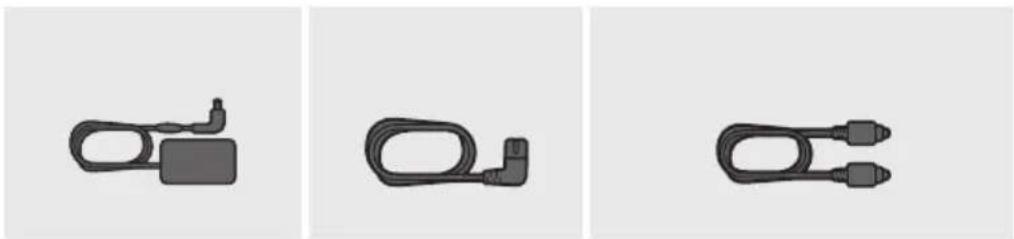
natural_image
Three black plastic cable connectors shown in separate panels (no text or symbols)AC/DC adapter (Glavni uređaj)
Kabl za napajanje (AC/DC adapter)
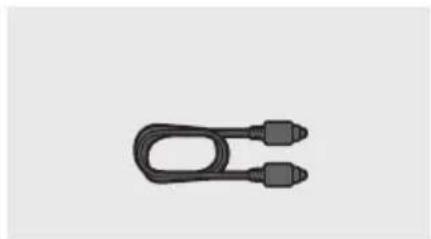
natural_image
Simple black U-shaped cable with two connectors, isolated on white background (no text or symbols)Optički kabl
- Koraci za povezivanje napajanja su označeni (1, 2, 3). Za više informacija o povezivanju napajanja, pogledajte str. 5.
- Za komponente za montažu na zid uređaja Soundbar, pogledajte str 26.
- Adapterski kabl Micro USB na USB i HDMI kabl se prodaju odvojeno. Da biste ga nabavili, obratite se servisnom centru ili korisničkoj službi kompanije Samsung.
- Dodatna oprema se može malo razlikovati od one prikazane na gornjim slikama.
natural_image
Diagram showing three stages of battery internal structure: open, folded, and closed (no text or symbols)02 PREGLED PROIZVODA
Prednji panel/panel sa desne strane uređaja Soundbar
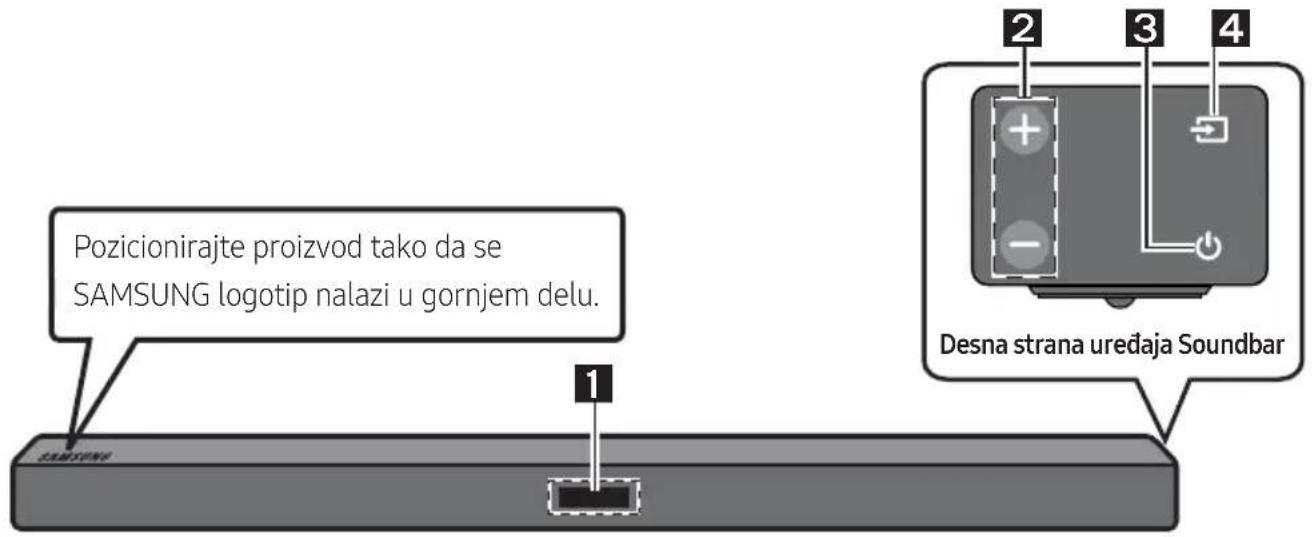
| 1 | EkranPrikazuje status proizvoda i trenutni režim. | |
| 2 | Dugme +/- (Jačina zvuka)Podešava jačinu zvuka.Kada se podesi, nivo jačine zvuka se prikazuje na prednjem ekranu uređaja Soundbar. | |
| 3 | Dugme (napajanje)Uključuje i isključuje napajanje. | |
| 4 | Dugme (Izvor)Bira režim ulaza izvora. | |
| Režim ulaza Ekran | ||
| Optički digitalni ulaz D.IN | ||
| ARC (HDMI OUT) ulaz | D.IN → TV ARC (automatska konverzija) | |
| AUX ulaz AUX | ||
| HDMI ulaz HDMI | ||
| BLUETOOTH režim BT | ||
| USB režim USB | ||
| Da biste uključili režim „BT PAIRING“, promenite izvor na režim „BT“, a zatim pritisnite i zadržite dugme (Izvor) duže od 5 sekundi. | ||
natural_image
Circular gray button with a play symbol icon, no text or symbols presentPovezivanje televizora pomoću HDMI kabla
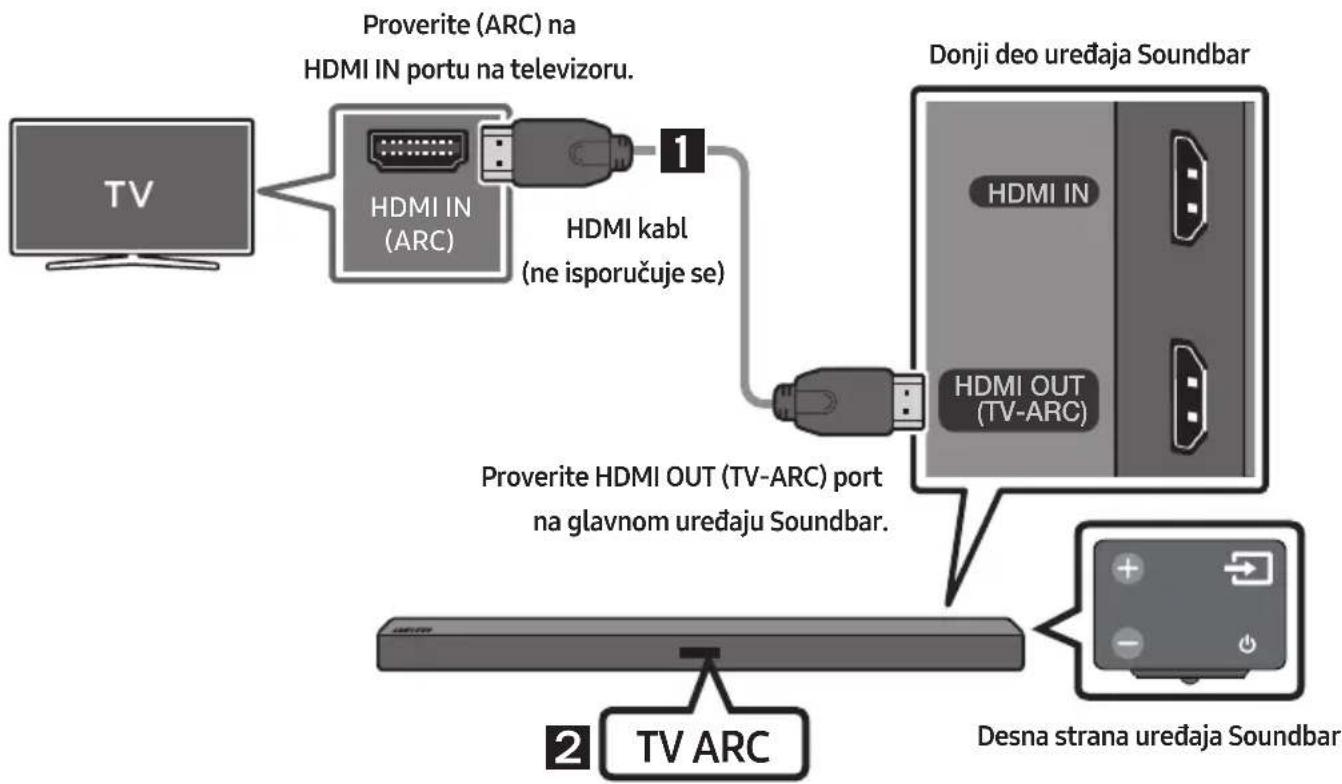
flowchart
graph TD
    A["TV"] --> B["HDMI IN (ARC)"]
    B --> C["Proverite (ARC) na HDMI IN portu na televizoru."]
    B --> D["HDMI kabl (ne isporučuje se)"]
    D --> E["Proverite HDMI OUT (TV-ARC) port na glavnom uređaju Soundbar."]
    E --> F["Donji deo uređaja Soundbar"]
    E --> G["Desna strana uređaja Soundbar"]
    H["TV ARC"] --> I["Proverite HDMI OUT (TV-ARC) port na glavnom uređaju Soundbar."]
flowchart
graph LR
    A["TV"] --> B["..."]
    B --> C["Remote Device"]
    C --> D["+/- Battery icon"]
natural_image
Diagram showing a screw being inserted into a housing, with arrows indicating direction (no text or symbols)- Pomoću dva Zavrtanj (M4 x L12) pričvrstite Nosač za montažu na zid L i D na donji deo uređaja Soundbar.
U cilju pravilne montaže, obavezno poravnajte izbočine na uređaju Soundbar sa otvorima na nosačima.
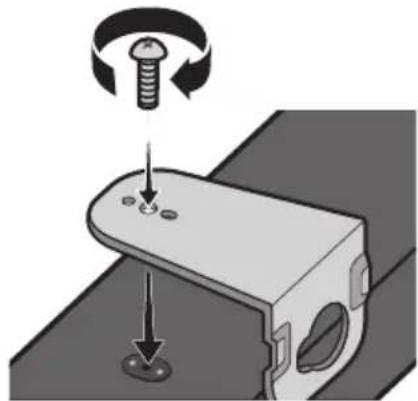
natural_image
Mechanical assembly diagram showing a bolt and screw on a bracket with a rotating knob (no text or symbols)- Prilikom sklapanja noseći delovi Nosač za montažu na zid treba da se nalaze sa zadnje strane uređaja Soundbar.
Zadnja strana uređaja Soundbar

natural_image
Close-up of a gray electronic device with four function buttons (no text or symbols visible)natural_image
Simple line drawing of a rectangular object with two side panels, no text or symbols present.Desni zidni nosač Levi zidni nosač
- Postavite uređaj Soundbar sa pričvršćenim Nosač za montažu na zid tako što ćete okačiti Nosač za montažu na zid na Zavrtanj držača na zidu.

natural_image
Diagram showing two mechanical components with arrows indicating motion, no text or symbols present- Malo nagnite uređaj Soundbar da biste stavili glave oba Zavrtanj držača u otvore na Nosač za montažu na zid. Gurnite uređaj Soundbar u smeru strelice da biste proverili da li su obe strane dobro pričvršćene.
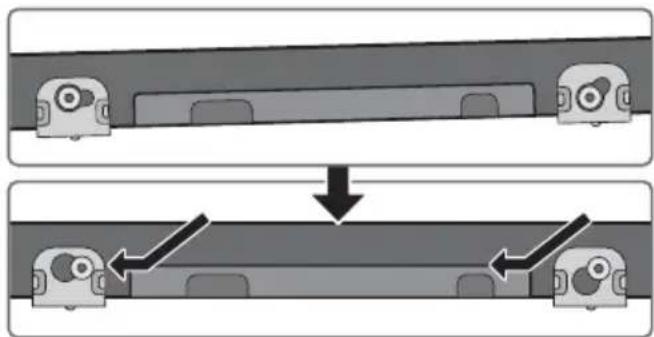
flowchart
graph TD
    A["Top: Device placement"] --> B["Downward arrow"]
    B --> C["Bottom: Device assembly with directional arrows"]
Skidanje uređaja Soundbar sa zida
- Da biste odvojili uređaj Soundbar od nosača za zid, gurnite ga u smeru strelice, malo ga gurnite nagore, a zatim povucite od zida kao što je prikazano.
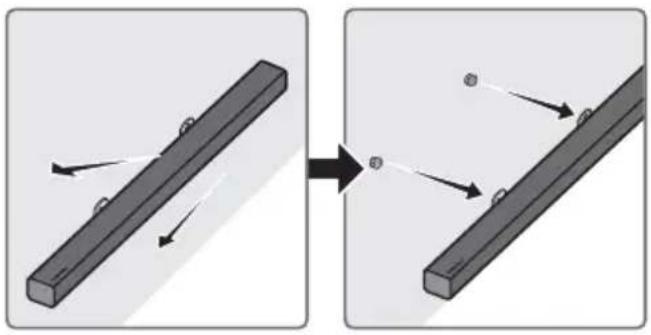
natural_image
Diagram showing two mechanical components with arrows indicating motion, no text or symbols present- Nemojte gaziti po postavljenom uređaju i izbegavajte da uređaj udarate ili ispustite.
- Dobro pričvrstite uređaj na zid da ne bi pao. Ako uređaj padne, to može da dovede do povreda ili oštećenja proizvoda.
- Kada je uređaj postavljen na zid, pazite da dete ne povuče neki od spojnih kablova, jer to može da dovede do pada uređaja.
- Za optimalan učinak uređaja postavljenog na zid, postavite sistem zvučnika najmanje 5 cm ispod televizora, ako je televizor montiran na zid.
- Radi sopstvene bezbednosti, ukoliko uređaj ne montirate na zid, postavite ga na bezbednu i ravnu površinu sa koje verovatno neće pasti.
10 AŽURIRANJE SOFTVERA
Manufactured under license from Dolby Laboratories. Dolby, Dolby Audio, Pro Logic, and the double-D symbol are trademarks of Dolby Laboratories.

dts®
2.0 Channel
For DTS patents, see http://patents.dts.com. Manufactured under license from DTS Licensing Limited. DTS, the Symbol, DTS in combination with the Symbol, and DTS 2.0 Channel are registered trademarks or trademarks of DTS, Inc. in the United States and/or other countries. © DTS, Inc. All Rights Reserved.

HIGH-DEFINITION MULTIMEDIA INTERFACE
The terms HDMI and HDMI High-Definition Multimedia Interface, and the HDMI Logo are trademarks or registered trademarks of HDMI Licensing LLC in the United States and other countries.
13 OBAVEŠTENJE O LICENCI OTVORENOG IZVORNOG KODA
natural_image
Illustration of a person sitting on a sofa using a laptop (no text or symbols visible)POUŽÍVATELŠKÁ PRÍRUČKA
natural_image
Illustration of a person sitting on a couch next to a desk with a laptop (no text or symbols visible)
ÚPLNÁ PRÍRUČKA
natural_image
Diagram showing three stages of battery internal structure with arrows indicating disassembly or reassembly (no text or symbols present)02 OPIS PRODUKTU
natural_image
Circular gray button with a play symbol inside, no text or numbers presentPripojenie TV pomocou kábla HDMI

flowchart
graph TD
    A["TV"] --> B["HDMI IN (ARC)"]
    B --> C["Kábel HDMI (nie je súčastou dodávky)"]
    C --> D["Spodná strana zariadenia Soundbar"]
    D --> E["HDMI OUT (TV-ARC)"]
    E --> F["Pravá strana zariadenia Soundbar"]
    F --> G["TV ARC"]
    style A fill:#f9f,stroke:#333
    style B fill:#ccf,stroke:#333
    style C fill:#cfc,stroke:#333
    style D fill:#fcc,stroke:#333
    style E fill:#cff,stroke:#333
    style F fill:#ffc,stroke:#333
    style G fill:#fcc,stroke:#333
flowchart
graph LR
    A["TV"] --> B["..."]
    B --> C["Switch"]
    C --> D["Device with battery icon"]
    style A fill:#f9f,stroke:#333
    style D fill:#bbf,stroke:#333
Prvé pripojenie
natural_image
Diagram of a mechanical assembly showing a pulley and screw with directional arrows indicating motion (no text or symbols)natural_image
Mechanical assembly diagram showing a bolt and nut on a bracket with a screw, no text or symbols presentnatural_image
Simple line drawing of a vehicle front view with two rear seats (no text or symbols)natural_image
Diagram showing two mechanical components with arrows indicating motion, no text or symbols presentflowchart
graph TD
    A["Top: Device with two cameras"] --> B["Downward arrow"]
    B --> C["Bottom: Device with two cameras"]
Demontáž zariadenia Soundbar zo steny
natural_image
Diagram showing two mechanical components with arrows indicating motion, no text or symbols presentManufactured under license from Dolby Laboratories. Dolby, Dolby Audio, Pro Logic, and the double-D symbol are trademarks of Dolby Laboratories.

dts®
2.0 Channel
For DTS patents, see http://patents.dts.com. Manufactured under license from DTS Licensing Limited. DTS, the Symbol, DTS in combination with the Symbol, and DTS 2.0 Channel are registered trademarks or trademarks of DTS, Inc. in the United States and/or other countries. © DTS, Inc. All Rights Reserved.

HIGH-DEFINITION MULTIMEDIA INTERFACE
The terms HDMI and HDMI High-Definition Multimedia Interface, and the HDMI Logo are trademarks or registered trademarks of HDMI Licensing LLC in the United States and other countries.
13 POZNÁMKA K LICENCII S OTVORENÝM ZDROJOVÝM KÓDOM
natural_image
Illustration of a person sitting on a sofa using a laptop (no text or symbols visible)UPORABNIŠKI PRIROČNIK
natural_image
Illustration of a person sitting on a couch next to a desk with a laptop (no text or symbols)
POPOLNI PRIROČNIK
02 PREGLED IZDELKA
natural_image
Circular gray button with a white play symbol inside, no text or numbers present.flowchart
graph LR
    A["Smartphone"] --> B["Bluetooth"]
    B --> C["Network Device"]
    C --> D["Control Panel Interface"]
Osnovna povezava
natural_image
Diagram showing a screw being inserted into a housing, with arrows indicating direction (no text or symbols)- Uporabite dva Vijaka (M4 x L12), da privijete oba Stenska nosilca L in D na spodnji del zvočnika Soundbar.
Za ustrezno prileganje morate poravnati izbokline na zvočniku Soundbar z luknjami na nosilcih.
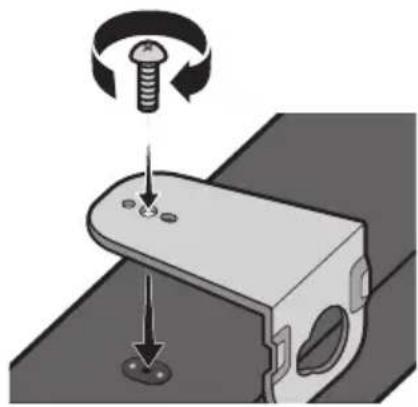
natural_image
Mechanical assembly diagram showing a bolt and screw on a bracket with a rotating knob (no text or symbols)natural_image
Simple diagram of a rectangular object with two side panels, no text or symbols presentStensko držalo D Stensko držalo L
- Zvočnik Soundbar namestite s priloženimi Stenskimi nosilci, tako da stenski nosilec obesite na Držala vijakov na steni.

natural_image
Diagram showing two mechanical components before and after assembly, with arrows indicating motion direction (no text or symbols)- Zvočnik Soundbar rahlo nagnite, da vstavite obe glavi Držala vijaka v luknji Stenskega nosilca. Zvočnik Soundbar potisnite v smeri puščice, da zagotovite, da sta obe strani čvrsto pritrjeni.
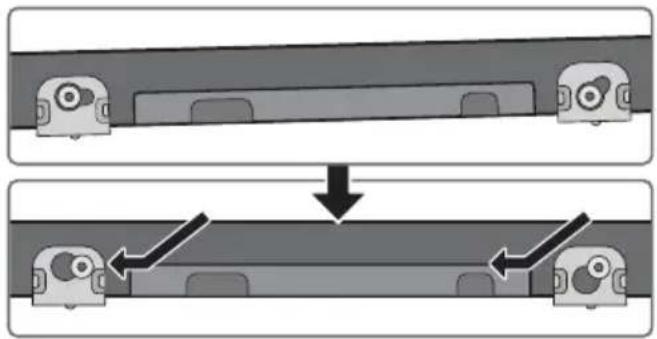
natural_image
Diagram showing two mechanical components with arrows indicating motion or assembly (no text or symbols)Odstranjevanje zvočnika Soundbar s stene
natural_image
Diagram showing two mechanical components with arrows indicating motion, no text or symbols presentManufactured under license from Dolby Laboratories. Dolby, Dolby Audio, Pro Logic, and the double-D symbol are trademarks of Dolby Laboratories.

dts®
2.0 Channel
For DTS patents, see http://patents.dts.com. Manufactured under license from DTS Licensing Limited. DTS, the Symbol, DTS in combination with the Symbol, and DTS 2.0 Channel are registered trademarks or trademarks of DTS, Inc. in the United States and/or other countries. © DTS, Inc. All Rights Reserved.

HIGH-DEFINITION MULTIMEDIA INTERFACE
The terms HDMI and HDMI High-Definition Multimedia Interface, and the HDMI Logo are trademarks or registered trademarks of HDMI Licensing LLC in the United States and other countries.
13 OBVESTILO O ODPRTOKODNIH LICENCAH
© 2017 Samsung Electronics Co., Ltd. All rights reserved.
Contact SAMSUNG WORLD WIDE
If you have any questions or comments relating to Samsung products, please contact the SAMSUNG customer care Centre.
| Country | Contact Centre | Web Site |
| ■Europe | ||
| UK 0330 SAMSUNG (7267864) | www.samsung.com/uk/support | |
| IRELAND (EIRE) 0818 717100 | www.samsung.com/ie/support | |
| GERMANY 06196 77 555 77 | www.samsung.com/de/support | |
| FRANCE 01 48 63 00 00 | www.samsung.com/fr/support | |
| ITALIA 800-SAMSUNG (800.7267864) | www.samsung.com/it/support | |
| SPAIN 0034902172678 | www.samsung.com/es/support | |
| PORTUGAL 808 207 267 | www.samsung.com/pt/support | |
| LUXEMBURG 261 03 710 | www.samsung.com/be_fr/support | |
| NETHERLANDS 088 90 90 100 | www.samsung.com/nl/support | |
| BELGIUM 02-201-24-18 | www.samsung.com/be/support (Dutch)www.samsung.com/be_fr/support (French) | |
| NORWAY 815 56480 | www.samsung.com/no/support | |
| DENMARK 707 019 70 | www.samsung.com/dk/support | |
| FINLAND 030-6227 515 | www.samsung.com/fi/support | |
| SWEDEN 0771 726 786 | www.samsung.com/se/support | |
| POLAND | 801-172-678* lub +48 22 607-93-33** (koszt połączenia według taryfy operatora) | http://www.samsung.com/pl/support/ |
| HUNGARY | 0680SAMSUNG (0680-726-7864) | www.samsung.com/hu/support |
| AUSTRIA | 0800-SAMSUNG (0800-7267864)[Only for Dealers] 0810-112233 | www.samsung.com/at/support |
| Country Contact Centre | Web Site | |
| SWITZERLAND | 0800 726 78 64 (0800-SAMSUNG) | www.samsung.com/ch/support (German)www.samsung.com/ch_fr/support (French) |
| CZECH | 800 - SAMSUNG (800-726786) | www.samsung.com/cz/support |
| SLOVAKIA | 0800 - SAMSUNG (0800-726 786) | www.samsung.com/sk/support |
| CROATIA 072726 | 786 | www.samsung.com/hr/support |
| BOSNIA | 055 233 999 | www.samsung.com/support |
| MONTENEGRO | 020 405 888 | |
| SLOVENIA | 080 697 267 (brezplačna številka) | www.samsung.com/si/support |
| SERBIA | 011 321 6899 | www.samsung.com/rs/support |
| ALBANIA 045 620 | 202 | www.samsung.com/al/support |
| BULGARIA | *3000 Цена в мрежата0800 111 31, Безплатна телефонна линия | www.samsung.com/bg/support |
| ROMANIA | *8000 (apel in retea)08008-726-78-64 (08008-SAMSUNG)Apel GRATUIT | www.samsung.com/ro/support |
| CYPRUS | 8009 4000 only from landline, toll free | www.samsung.com/gr/support |
| GREECE | 80111-SAMSUNG (80111 726 7864) only from land line(+30) 210 6897691 from mobile and land line | |
| LITHUANIA 8-800-77777 | www.samsung.com/lt/support | |
| LAT VIA | 8000-7267 | www.samsung.com/lv/support |
| ESTONIA 800-7267 | www.samsung.com/ee/support | |
- SAFETY INFORMATION
- SAFETY WARNINGS
- WARNING
- CAUTION
- PRECAUTIONS
- ABOUT THIS MANUAL
- USER MANUAL
- FULL MANUAL
- CONTENTS
- Checking the Components 2
- Product Overview 3
- Connecting the Soundbar 5
- Connecting to your TV 9
- Connecting an External Device 13
- Connecting a USB 15
- Connecting a Mobile Device 17
- Using the Remote Control 21
- Installing the Wall Mount 26
- Software Update 29
- Troubleshooting 31
- Licence 32
- Open Source Licence Notice 32
- Important Notes About Service 32
- Specifications and Guide 33
- CHECKING THE COMPONENTS
- Inserting Batteries before using the Remote Control (AA batteries X 2)
- PRODUCT OVERVIEW
- Bottom Panel of the Soundbar
- CONNECTING THE SOUNDBAR
- Connecting Electrical Power
- Connecting the Soundbar to the Subwoofer
- Automatic connection between the subwoofer and the Soundbar
- Manually connecting the subwoofer if automatic connection fails
- Check before performing the manual connection
- NOTES
- CONNECTING TO YOUR TV
- Method 1. Connecting with a Cable
- Connecting using an Optical Cable
- Auto Power Link
- Connecting a TV using an HDMI Cable
- Method 2. Connecting Wirelessly
- Connecting a TV via Bluetooth
- The initial connection
- If the device fails to connect
- What are the BT READY and BT PAIRING statuses?
- Disconnecting the Soundbar from the TV
- CONNECTING AN EXTERNAL DEVICE
- Connecting using an Optical or Analogue Audio (AUX) Cable
- Optical Cable
- Audio (AUX) Cable
- Connecting using an HDMI Cable
- CONNECTING A USB
- CONNECTING A MOBILE DEVICE
- Connecting via Bluetooth
- Bluetooth POWER On (Bluetooth POWER)
- Disconnecting the Bluetooth device from a Soundbar
- Disconnecting the Soundbar from the Bluetooth device
- More About Bluetooth
- Using the Samsung Audio Remote App
- Installing the Samsung Audio Remote App
- Launching the Samsung Audio Remote App
- USING THE REMOTE CONTROL
- Adjusting the Soundbar volume with a TV remote control
- INSTALLING THE WALL MOUNT
- Installation Precautions
- Wallmount Components
- Detaching the Soundbar from the Wall
- SOFTWARE UPDATE
- Updating Procedure
- If UPDATE is not displayed
- TROUBLESHOOTING
- LICENCE
- OPEN SOURCE LICENCE NOTICE
- IMPORTANT NOTES ABOUT SERVICE
- SPECIFICATIONS AND GUIDE
- [Correct disposal of batteries in this product]
- (Applicable in countries with separate collection systems)
- Correct Disposal of This Product (Waste Electrical & Electronic Equipment)
- РЪКОВОДСТВО НА ПОТРЕБИТЕЛЯ
- ПЪЛНО РЬКОВОДСТВО
- БЕЛЕЖКА ЗА ЛИЦЕНЗА ЗА ОТВОРЕН КОД
- KORISNIČKI PRIRUČNIK
- POTPUNI PRIRUČNIK
- SADRŽAJ
- Provjera Komponenti 2
- Pregled Proizvoda 3
- Umetanje baterija prije upotrebe daljinskog upravljača (AA baterije X 2)
- PREGLED PROIZVODA
- Donja ploča uređaja Soundbar
- SPAJANJE UREĐAJA SOUNDBAR
- Povezivanje televizora pomoću kabela HDMI
- Uklanjanje uređaja Soundbar sa zida
- AŽURIRANJE SOFTVERA
- OBAVIJEST O LICENCI ZA UPORABU SOFTVERA OTVORENOG KODA
- VAŽNA NAPOMENA VEZANA UZ SERVIS
- UŽIVATELSKÁ PŘÍRUČKA
- KOMPLETNÍ PŘÍRUČKA
- POPIS VÝROBKU
- POZNÁMKA K LICENCI OTEVŘENÉHO SOFTWARU
- BENUTZERHANDBUCH
- VOLLSTÄNDIGES HANDBUCH
- PRODUKTÜBERSICHT
- BEKANNTMACHUNG ZU OPEN SOURCE LIZENZEN
- TÄIELIK JUHEND
- TOOTE ÜLEVAADE
- Soundbari eemaldamine seinalt
- AVATUD LÄHTEKOODI LITSENTSI TEATIS
- MANUEL COMPLET
- PRÉSENTATION DU PRODUIT
- Connexion initiale
- AVIS DE LICENCE LIBRE
- ΕΓΧΕΙΡΙΔΙΟ ΧΡΗΣΗΣ
- ΠΛΗΡΕΣ ΕΓΧΕΙΡΙΔΙΟ
- FELHASZNÁLÓI KÉZIKÖNYV
- TELJES KÉZIKÖNYV
- A TERMÉK ÁTTEKINTÉSE
- NYÍLT FORRÁSKÓDÚ LICENC MEGJEGYZÉS
- MANUALE UTENTE
- MANUALE COMPLETO
- PANORAMICA DEL PRODOTTO
- AVVISO DI LICENZA OPEN SOURCE
- DROŠĪBAS INFORMĀCIJA
- DROŠĪBAS BRĪDINĀJUMI
- LIETOTĀJA ROKASGRĀMATA
- PILNĀ ROKASGRĀMATA
- IZSTRĀDĀJUMA PĀRSKATS
- PROBLÉMU NOVĚRŠANA
- PAZIÑOJUMS PAR ATVÉRTÃ PIRMKODA LICENCI
- NAUDOTOJO VADOVAS
- IŠSAMUS VADOVAS
- GAMINIO APŽVALGA
- ATVIROSIOS PROGRAMINĖS JRANGOS LICENCIJOS PRANEŠIMAS
- PEŁNY PODRĘCZNIK UŻYTKOWNIKA
- OPIS PRODUKTU
- INFORMACJA O LICENCJI OPEN SOURCE
- MANUAL DE UTILIZARE
- MANUAL COMPLET
- DESCRIERI
- NOTIFICARE DE LICENȚĂ OPEN SOURCE
- KOMPLETAN PRIRUČNIK
- Povezivanje televizora pomoću HDMI kabla
- Skidanje uređaja Soundbar sa zida
- OBAVEŠTENJE O LICENCI OTVORENOG IZVORNOG KODA
- POUŽÍVATELŠKÁ PRÍRUČKA
- ÚPLNÁ PRÍRUČKA
- Pripojenie TV pomocou kábla HDMI
- Prvé pripojenie
- Demontáž zariadenia Soundbar zo steny
- POZNÁMKA K LICENCII S OTVORENÝM ZDROJOVÝM KÓDOM
- UPORABNIŠKI PRIROČNIK
- POPOLNI PRIROČNIK
- PREGLED IZDELKA
- Osnovna povezava
- Odstranjevanje zvočnika Soundbar s stene
- OBVESTILO O ODPRTOKODNIH LICENCAH
- Contact SAMSUNG WORLD WIDE
Brand : SAMSUNG
Model : HW-M450/EN
Category : Soundbar