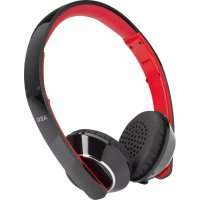
KH 4230 BT - Earphones AEG - Free user manual and instructions
Find the device manual for free KH 4230 BT AEG in PDF.


| Product type | Bluetooth over-ear wireless headset |
| Brand | AEG |
| Model | KH 4230 BT |
| Net weight | Approx. 0.21 kg |
| Power supply | Rechargeable lithium polymer battery 3.7 V / 400 mAh |
| Charging time | Approx. 3.5 hours |
| Battery life | Approx. 8 hours |
| Wireless technology | Bluetooth V3.0 + EDR |
| Bluetooth range | Approx. 10 meters |
| Bluetooth profiles | A2DP, AVRCP |
| Transmission frequency | 2.4 GHz |
| Control elements | Multifunction button, volume +/-, next/previous track, built-in microphone |
| LED indicators | Red status, blue status, charging |
| Included accessories | USB charging cable (Type A to Micro-B) |
| Care | Clean with a slightly damp cloth, do not immerse |
| Ear pad replacement | Possible (pads not included) |
| Safety | Keep away from pacemakers, do not use while driving, avoid high volume |
| Usage | Private use, do not expose to moisture or heat |
Frequently Asked Questions - KH 4230 BT AEG
User questions about KH 4230 BT AEG
0 question about this device. Answer the ones you know or ask your own.
Ask a new question about this device
Download the instructions for your Earphones in PDF format for free! Find your manual KH 4230 BT - AEG and take your electronic device back in hand. On this page are published all the documents necessary for the use of your device. KH 4230 BT by AEG.
USER MANUAL KH 4230 BT AEG
PykoBOCTBO NO 3KcNpyaTALM 42
D NL F E I GB PL H UA RUS
STEREO BLUETOOTH KOPFHÖRER
KH 4230 BT
C E
AEG
Élimination. Page 16
Espanol
Indice
Overview of the Components.. Page 3
Instruction Manual.. Page 25
Technical Data.. Page 28
Disposal. Page 28
Język polski
Spistresci
TexhiHHi npametprn .ctop.41
Pycckn
CoepkaHne
Obop deTaeIe npibopa... ctp. 3
PykoBocTBo no 3KcPnyaTaun.. ctp.42
TexHHueckne daHHbIe ctp.45
Overview of the Components
Przeglad elementów obtsugi
Thank you for choosing our product. We hope you will enjoy using the appliance.
Symbols in these Instructions for Use
Important information for your safety is specially marked. It is essential to comply with these instructions in order to avoid accidents and prevent damage to the machine:
WARNING:
This warns you of dangers to your health and indicates possible injury risks.
CAUTION:
This refers to possible hazards to the machine or other objects.
NOTE:
This highlights tips and information.
Safety instructions
Read the operating instructions carefully before putting the appliance into operation and keep the instructions including the warranty, the receipt and, if possible, the box with the internal packing. If you give this device to other people, please also pass on the operating instructions.
- The appliance is designed exclusively for private use and for the envisaged purpose. This appliance is not fit for commercial use.
- Do not use the device with wet hands.
- To minimize the risk of fire or electrical shock, subject the device neither to rain nor to humidity. Do not operate the device in the direct proximity of water (e.g. bathroom, swimming pool).
- Do not use the device if it has been exposed to water, humidity or other fluids.
- Keep the device away from heat, direct sunlight and sharp edges.
- Keep the device away from naked flames.
- Do not subject the battery to a hard impact or pressure.
- Do not insert any metal objects into the device. Risk of short circuit!
- Do not use the device in an extremely humid or muggy environment.
- To avoid a static charge, do not utilize the device in an extremely dry climate.
- The device needs to be examined regularly for signs of damage or material fatigue. If damage is noticed, the device may no longer be used.
Children and Frail Individuals
In order to ensure your children's safety, please keep all packaging (plastic bags, boxes, polystyrene etc.) out of their reach.
WARNING!
Do not allow small children to play with the foil. There is a danger of suffocation!
Special Safety Instructions
WARNING:
- Do not set the volume level of your headphones too loud, this may damage your hearing and you may put yourself and others in danger.
- Set the volume to low in order not to disturb your surroundings.
If you suffer from tinnitus, set the volume to low or do not use the device. - Ear specialists recommend that you do not use headphones constantly over long periods.
- Do not use the device together with a hearing aid, since it may cause interference.
- Safety remains paramount. Do not use the device when driving a motorised vehicle, when riding a bicycle or when jogging on the street. Adjust the volume to match the surrounding traffic.
- Do not use the device in situations in which you need to be able to hear without any interference.
The headphones generate magnetic fields which may affect pacemakers and implanted defibrillators. Keep the device at least 10cm away from pacemakers or implanted defibrillators. - Only use the headphones in planes, in which the wireless Bluetooth technology is permitted.
CAUTION:
Do not keep the headband of the headphones stretched for a long period of time, since this may weaken the tension of the headband.
Check the scope of delivery
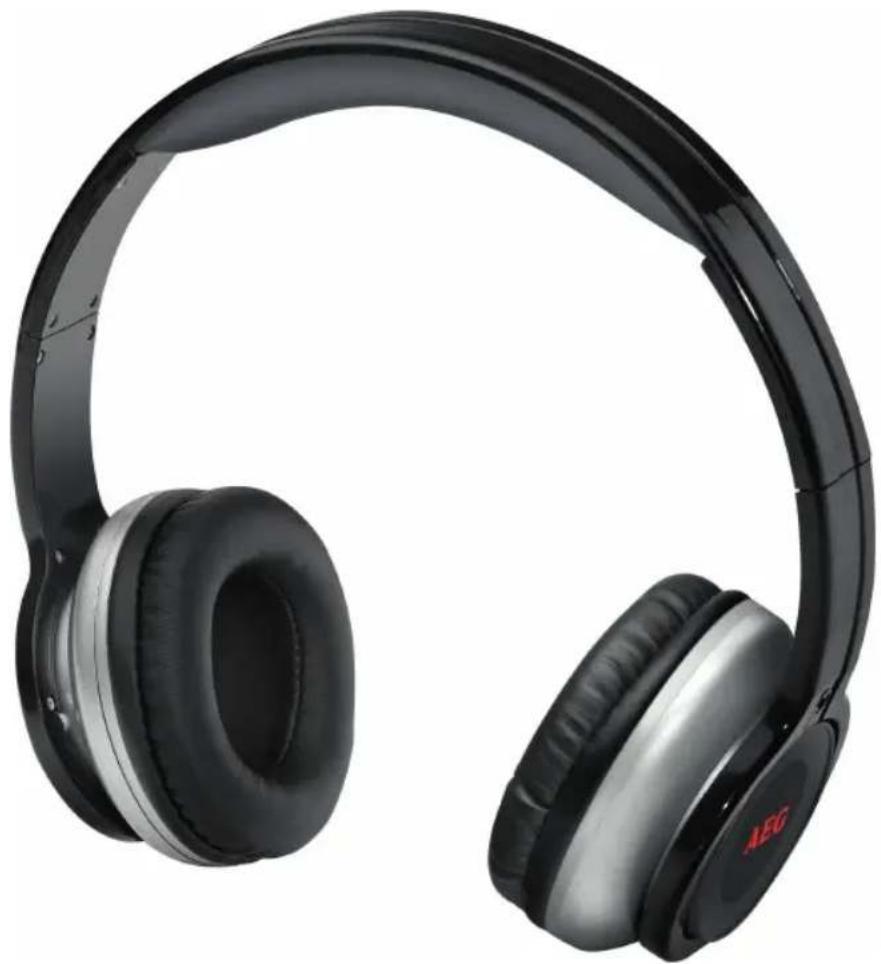
1 Headphones
1 Charging cable (USB plug type A to plug type Micro-B)
Overview of the Components
1 Status light, red
2 Status light, blue
3 Charging indicator light
4 Button "Forward" (next title)
5 Microphone
6 Charger connector
7 Volume " " (press or keep pressed down)
8 Multifunction button: On/ Off, Play/Pause, accepting/terminating/ignore call
9 Button Backward (previous title)
10 Volume "press or keep pressed down)
26 English Before First Use
- Charge the battery before first use. See details in chapter "Charge Integrated Battery".
Charge Integrated Battery
The player is powered by the integrated rechargeable lithium battery. Charge the battery as follows:
- Connect the device to a computer that is switched on using the supplied USB cable. The indicator lamp lights up red.
- When the battery is fully loaded, the indicator light will go out.
- Remove the charging cable from the headphones and the PC. If the headphones remain connected to a computer that is switched off, the battery of the headphones is discharged again.
i NOTE:
The battery is only charged while the PC is switched on.
- Do not connect the player for a long period of time to a laptop computer disconnected from mains power. Otherwise the laptop computer's battery may be discharged.
The charging time varies according to battery use.
If the device is out of use for a long period of time, charge the battery at least once every 6 to 12 weeks. Even when switched off, the battery of the headphones is continuously discharged.
Use
Putting on the headphones
- Follow the marking on the outer side of the headphoneearpiece. R = Right, L = Left
- The headphone earpiece is adjustable according to the size of the head. This ensures that the headphones sit properly.
WARNING:
Listening when the volume level is loud may damage the hearing of the listener.
Bluetooth
Bluetooth involves a technology for wireless radio connection of devices over a short distance. Devices with Bluetooth standard are transmitting between 2.402 and 2.480GHz in the ISM band (Industrial, Scientific and Medical). Interferences can however be caused by WLAN networks, wireless telephones, or microwave ovens, for example, which operate in the same frequency band.
Bluetooth technology enables hands-free operation of mobile phones, for example. This device offers you the possibility to use a Bluetooth-enabled device. The function radius is thereby restricted device-dependant to approx. 15 meters.
If your playing device supports the A2DP profile (Advanced Audio Distribution Profile) and has a music-player function, then you can also wirelessly transfer music to the device. The A2DP profile involves a multi-vendor Bluetooth profile. By streaming, stereo-audio signals are wirelessly transferred between the playing device (source) and the receiving device. To be able to operate the source by remote control, the player needs to support the AVRCP profile (Audio Video Remote Control Profile).
Due to the different device manufacturers, models, and software versions, a full functionality cannot be guaranteed.
Logging on devices (Pairing)
Before you can listen to music or make phone calls with the headphones, you need to first register the devices with each other.
- Ensure, that the Bluetooth function is activated in your player (e.g. mobile phone). For this, refer to the operation manual of your player.
- Keep the button pressed for approx. 5 seconds when the device is switched off. A beep can be heard. After a short time, the indicator lights (1) and (2) flash alternately. The device is now set to the pairing mode.
- Choose the Bluetooth menu in your player and register the device in your player. For this, refer to the operation manual of your player. The device "AEG KH 4230 BT" will show in your player as a selection.
NOTE:
Only one player can be connected to the headphones at any one time. If the headphones are already connected to a different player, the device will not appear in the BT selection menu.
- Now enter the password "0000" in your player, depend - ing on the device manufacturers, model, and software version.
If registration was successful, the headphones will emit a short beep. Then the blue light flashes twice every 5 seconds. If possible, adjust the volume of the player to a suitable listening volume.
NOTE:
Depending on the device manufacturer, you need to perform the registration (PAIRING) again to connect the devices.
- The Bluetooth compatibility cannot be ensured for devices (e.g. mobile phones) getting released in the future.
To ensure an optimal connection, make sure that the battery of your player is completely charged.
NOTE:
Some of the mobile phone brands have an energy-saving mode. Deactivate the energy-saving mode as it can otherwise result in problems during the data transfer through Bluetooth.
To be able to transfer audio data, Bluetooth needs to stay activated in your player. Observe the operation manual of your player.
If the Bluetooth connection is interrupted, the indicator lights (1) and (2) flash rapidly.
Operation
The device is equipped with multi functional buttons. For different functions press the respective button briefly or press and hold.

II On/Off
- Press and hold the button approx. 3 seconds to turn the player on. A beep can be heard. After a short time, the indicator lights (1) and (2) flash alternately.

NOTE: Automatic connection
If supported by your player (e.g. mobile phone), the devices will be connected automatically. The prerequisite for this is:
The devices were already connected with each other.
- Bluetooth is activated in your player.
- In order to switch the headphones off again, keep the button pressed for approx. 3 seconds. A beep is heard and the devices are separated. The indicator lights (1) and (2) flash alternately. Press and hold the button again approx. 3 seconds to turn the player off.

NOTE:
Depending on the playback device used and its operating system, the headphones switch off immediately if necessary.
- Turn off the headphones when you are not using them to conserve the battery.
After approx. 12 minutes without a Bluetooth connection, the headphones switch off automatically.
Replay/Pause
- Briefly press the button to pause playback.
Press the button again to continue playback.
NOTE:
Depending on the device manufacturers, models, and software versions you need to start the music playback in your player.
Adjust Volume
Press the "or" button to adjust the volume.

WARNING:
Listening to music at high volume can damage your hearing.

OTE:
If the maximum or minimum volume is reached on the headphones, a beep will sound.
Select Music
- Press the button in order to select the next track.
- If you press the button, the current track will be played from the beginning. Press the button twice to select the previous track.

NOTE:
Your player must support this function.
Accept/terminate a conversation
- Push the button to accept an incoming call.
- To end the conversation, push the button one more time.

NOTE:
During an incoming telephone call, the music playback will stop. After terminating the conversation, the music piece will continue to be played back.
Ignore a call
To ignore an incoming call, keep the button pressed for approx. 3 seconds.

OTE:
Your mobile phone must support this function.
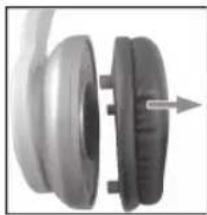
Change the ear pads
(Spare ear pads not included)
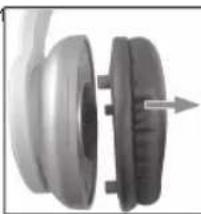
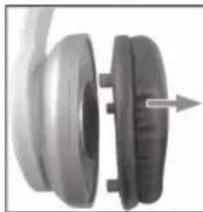
- Pull the ear pad holder carefully from the earpiece.
- Remove the old ear pad.
- Attach the new ear pad to the ear pad holder.
- Attach the ear pad holder onto the earpiece so that the studs latch into the round holders.
Cleaning and storage

CAUTION:
Do not immerse the headphones in water!
- There are no parts inside the device which can be maintained by the user.
- Clean the headphones with a slightly damp cloth and no additional cleaning agents.
Troubleshooting
| Symptoms Possible cause Solution | ||
| Headphones cannot be turned on | Battery empty Charge the battery ( ➔ Page 26) | |
| No audio signal during Bluetooth connection | Headphones are turned off | Turn the Headphones on. |
| Headphones are not paired with the audio source. | Check whether the con- nection exists. Pair the Headphones with the audio source again, if necessary. | |
| Volume too low Increase the volume on the headphones | ||
| Increase the volume on the audio source. | ||
| Headphones cannot be connected | Pairing does not work | Check, whether the audio source supports the A2DP protocol. |
| Audio source is turned off. | Turn the audio source on. | |
| Bluetooth is turned off on the audio source. | Turn the Bluetooth function on in the audio source. | |
Technical Data
Model: KH 4230 BT
Net weight: approx. 0.21 kg
Battery: 3.7 V 400 mAh lithium polymer Charging time: approx. 3.5 hours
Operating time: approx. 8 hours
Bluetooth
Bluetooth support: .V3.0 + EDR
Range: approx. 10 meters
Transmitting frequency: 2.4 GHz
Protocols: A2DP,AVRCP
The right to make technical and design modifications in the course of continuous product development remains reserved.
This device complies with the relevant CE Directives and is designed in accordance with the latest safety regulations
Disposal
Battery disposal

The device has a rechargeable battery. Used batteries and accumulators do not belong in the household waste.
The batteries / accumulators must be removed before the product goes into the waste disposal. For this, consult qualified specialized personnel.
Environmental protection
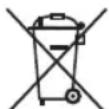
Do not dispose of the device at the end of its service life with normal household waste. Bring it to the official collection point for recycling. By doing this, you help protect the environment.
Instrukcja obslugi
CTC Clatronic Sp. z o.o
Bluetooth - ue texhonorir paio3'edhaHHn npictroiB Ha Kopotki BicTaH. PnCTpoi, B AKNX BIKOPNCOTByETbCtHa dapt Bluetooth, nepedaIOb IHΦopMaio B diana30Hi cactOT bi2,402 do 2,480 Tci i Biana30Hi ISM (Industrial, Scientific and Medical). WLAN networks, wireless telephones, or microwave ovens, for example, which operate in the same frequency band. Moke CTbopiBaTu 3abdi nla Bluetooth.
Texhonoria Bluetooth Do3BONHe MaTn BILbHpykN, HanpKlaI, nIc hopncTyBaHHa MObIbHm TepeHOM. LcI npCTpi dae MoKJIbICt b KopNCyBaTncb pncToPMN 3 aCTocyBaHHam Texhonorii Bluetooth. PadiYc dii B 3aJexHoCTi BiD pnicToPO MOKe cTaHOBnT pnp6JIu3HO do 15 MeTpIB.
Ku npucpi BIDTBOpENH nItpmye npophiA2DP (Advanced Audio Distribution Profile) i Mae yHKUIO My3NHO rnpopabaHa, MoxHa taKoK nepeabatn 3aNCn Ha npucpi 6e3dpoTobM kaHAnOM. Y npophii A2DP BIKOpncTOByeTbCn yHibepcAlhni npophiB Bluetooth. CTepeosByk NOTOKOBIM CNOCOBm npedeAeTbcR mix npucpoeM BiITBOpeHH (DkepeHOM) i npucpoeM-nPiMaueM. DnKepyBaHH npucpoeM 3a DOnomOIO pNtby DnCTaHIO HOrO KepyBaHH npopbaH Ma e nItpmYbAtn npophiAVRCP (Audio Video Remote Control Profile).
Yepe3 BiDmiHHoCTi MIX p3HMMBnPo6NkAmn, MoeJIaMn i BepciMa NpOgPamHOrO 3a6e3neueHHaOBHn Ha6ip cyHKuI rapaHTyBaTn HEMOXJIINBO.
ПлкюechнДо npictpoIB (3'EDHaHnA)
PepH HIX npocnyxbyATM My3nky CH OTpIMyBATN TepeohHi D3BHNK 3a DOONOMORIO HabyuHKnIB, CIId NiDKIQUHTN pInCTpoi OINH Do OINHO.
- NpekoHaTecb y TOMy, uo cyHKJIO Bluetooth aKTHBOBaHO Ha nporpaBHi (HapnKJaM, MobjBHomY TeJefoHI).NIB.KepiBnHTBO 3 ekCnIyatauji nporpabaHa.
- Hatncihtb i ytpmyte KhoNky II npn6n3HO npoTAROM 5 cekyH, kOnn npnctpiB BmKHeHO. PnpCTPi NOdactb 3ByKOBI CNrHaJ. Ypee3 DeaKu Yac IHNkAToPI (1) i (2) noHyTB no cep3i 6nMaTH. Lc Bka3ye Ha nepexid npnCTpoIB y pexIM 3'EdHaHH.
- BiKpnIte Ha nporpaBai MeHIO Bluetooth i 3apeectpyTe Ha HbOMy npicTpii. DnB. KepiBnHTBO 3 EKcnIyataaII nporpaBaay. Y MeHIO nporpaBaay BiO6pa3ntbcB aPiaHT "AEG KH 4230 BT".
IINPIMITKA.
Y6yIb-RAHIMOMENTHACYIOHABUYHNIKIBMOKe6yTNi'EDHaHOJIWEOINpOrpaBa.YKIOHABUYHNIKBNKeNIDeHaHOIOIHUoro npOrpaBaHa,piuCTPIHnE3'ABITbcBMeHIOBluetooth.
40
YkpaIHcbka
- BBejTb y nporpaBnnapoB "0000", RkM 3aJexMtB BiD Bnpo6Hnka, MoDeni i Bepci nporpamHoro 3a6e3neHHe HnpicrpoI.
Ypasi ycniHoi peecTpaui HabyuHNKn noaaytb KopoTKnx 3BykOBn CnRan. Ncra uboro cniH iNnKaTOp 6bnmhe dhi 3 iHTepBaIOM y5cekyd. Hkuo moKlnBO, BCTaHOBt npu INHATy CNJy 3BykY B HabyuHNkax.
i
NIPMITKA.
3anexhoBIDBnpo6hka npncptpO, nIa 3'EdhaHH npncptpoIB MOKe 3HaIObNTuC Ue pa3 3INCHTN (PAIRING).
Cymichicnt i3 cTahaprom Bluetooth He moKe 6yn rapaHTOBaHO IINI pNTcpoIB (HAnpNKlaN,MO6JIbHNX TeJeOHiB),AKI BUNyCKaTmMyTbcraB MaM6yTHbOMy.
Длгза6e3neueHHOnTtMajbHOrO3'EDHaHHNepekoHAnTEcB y TOMy,LoakymyIaTOP nporpaBaHa nobHicTo 3apdKeHo.
- DeRki MapKMOBbHnx TepeohIB MaIOb peXIM ehepro36peXeHHa BmKHiTb peXIM eHepro36peXeHHa, iHaKWe MOxYb BnHKnHYtn IpOBeJEMu y nepeDaHnX intepfcom Bluetooth.
- IJIpeIaBAHH ayIOHaHX pexMM Bluetooth Mae 3aIIuATncb AKTINBOBaHIM y nporpaaba.i. INB. KepiBHnLTBO 3 ekCnIyatauii nporpaaba.
- Y pa3i nepeepnBaHHa 3'eHaHHa Bluetooth iHdkatopn (1) i (2) wBnKo 6mMaIOb.
KepyBaHH
Pnucpi O6naHaHO 6araToOpyHKIOHaJIbHIMN KHONKaMn.
IINBbOpY IHIoi OyHKUcIe HATNCHTN BiINOiHy KONKY
KOPOTKOaCHO YI 3 YTPMaHHAM.

BbIMKHeHHBMMKeHH
HaTNCiB iYrPMyIe 10 KONky npoTAROM 3ceKHyI, UO6 yBIMKHyTN IporpaBaH. HabyuHNKn NODaTyB 3ByKOBn CnHAn. Ypeez DeAkn Yac IHNkATOpn (1)i (2) NoHYb NO cepz6nMaTu.
PIMITKA.ABtOMaTnue 3'eDHaHHA
Rkuo nporpaBau (HnpiKnaD, MoibbHn TepeoH) niTpMHye Taky cyHKuio, npucptpoi 3'cHyIObCRA BTO MatuHO. DIIaLbOro Heo6xindHO:
Luo6 npucTpoB Bxke 6yto 3'EDHaHO OHN 3OHNM.
- y nporpaayi 6yno BBIMKHeHo Bluetooth.
-ДЯВIMKHEHHA HabyUHKnIB, CIIJ yTPMByATn IIO KHOI KI np6IIN3HO npOTAROM 3 cekyH. HabyUHKnI NOaDytB 3ByKOBm CNrHaI, I pncTpoI bye po3'eDHaHO. IHNkaTOpN (1) i (2) NOHyTB no cep3i 6bnmat.ДЯ BIMKHeHHA HabyUHKnIB, CIIJ UIe pa3 HATNCHTN yTPMByATn IIO KHOIky np6IIN3HO npOTAROM 3 cekyH.

TPMIMITKA.
3aIexHoBIDnpicTpoIO-npOpaBaHa Ta Ioro onepa CInHOICCTEMHABUYHNIKMOKYb BIMKHHTNC HeraHOBpaI Heo6xIDHOCTI.
Lio6ekOHOMHT3apnakymyIATopa,BIMNKaHTe HabyuHNIK,AKUoHEKOPNCTyBaTmETbCRAHMM npOTAROM TpNBALORO Yacy.
Vpa3i BiCyTHOCTI 3'EDHNNBlaeoth HabyuHnKBNMKAOTbCA ABTomTuHO 3a 12 XBUNH.
BiodbopeHHa/nay3a
Ipyn3yHHeHHBjTBopeHHcIiKopoTKoHaCHO HATUCHYTN KHONKY
IINPNOOBXeHHBjTDBOpeHHCnIDNOBTOPOHaTNCHYTN KHONKY

TPMIMTKA.
3aIexHo BID BnObHnka npicTpoIO, MoJI Ta BepCII nporpaMHO 3a6e3neueHH MoKe 6yTN nOTpiHO noaTH BiITBOpEHn My3KN Ha nporpaBaHi.
PerynkoBHa rHyHocti
IperyulIOBAHHrYHOCTBUNKOpNCOTBYOTBCKNHONK
"Ta".

NONIEPEJXEHHA
IPOCNYXBAHNA3aINCIB 13 BNCOKIMPIBHEM RYHOCTMOKE NOLKODNTCNLY CNYCXNYXaHa.

IPMMITKA.
Ha HabyuHnKax DocaHTo MaKcMaJIbHOI rHyocTi, BOH NoJaTyb 3ByKObN CnHAn.
Bn6ip 3anucy
HaTnCHiB KHOIky, 106 Bn6paTu HAcTyHm 3aIc.
KkuoHaTnCHyTN KHOKNKU,noTOHm3aNNc noHe BIDTBOPIOBATNCbI NOATky.106BbpaTN nonepeHni 3aNc, CIIH HATnCHyTN KHOKNKU

PIPMMITKA.
LioyHKJIO MAePiDtpmByaTN nporpaBaH.
PnHHTTa TpnnHeHHPO3MOBn
HaTnCHITb KONKy 106 npHATn HnpOYCTTN D3BIOHK.
Lio63aBepuHTn po3MOBy,HaTNCiHt bIO KHOIky ue pa3.

PIMMITKA.
IiucBxIHORoTeIEpOHHOz3BiHkBaITbOpEHMy3IK npnHHETcb. Iicna 3akHHeHH po3MOBn BiITbOpEHMy3IKnpoOBKyETcb.
IponyckaHnHa3BiHka
Ll06 nponyctnBxHm d3Bihok, cniD npu6n3Ho Ha 3 cekyHn HATNCHTN KHONKY

#
LioyHKJIO MaieiTpMByaTMOBilbHmTelefoH.
3aɪHa Ḥaɪdɔk Ḥaɪbʌhɪnɪkɪb
(sanachi Hauklaikn HabuHnKIB y KOMNKeKT He BxOaTb)
- AkypaTHO 3HIMITb TpMmaHakJaKu 3 rONOBHORo TEJeFOHy.
- 3HIMITb CTapy HAKJaIky.
- BДаггИть На Триман HOу HaКладу.
- BctaHOBITb TpIMaHakJaKn y ro- IOBHN TeJeFOH TaK, 106 WTNΦTN TpIMaHa BBIIuIN B OTBOP TEe- FOHy.
YnueHHa i 36epiraHHa

YBAGA.
He 3aHypioTe HabyUHNKIN B BOY!
BcepeHHi HabyuHKnIB Hema deTanei, kni iinraioTb TexHiHOMy 06CJyROByBaHHIO KOpNCTyBaHEM.
HNTN HABUYHNI KCI, DEU BOJIO TO TKAHHO, He DOaOH JKOHI MmHi 3ac6n.
IouykiucyHeHHHHeCnpaBHOCTe
YactOTHn dianao: 2,4T
PpotoKo: A2DP,AVRCP
3diinchioHnocTHypoBTo 3 noiinuHnCBOeipnoDyKu, Bnpo6Hk 3aJInuae 3a CooIO npabo BBOHTN 3MiHn BTexHi HxapakTepcntKn i dni3aH.
LcBnBip6 BiDnOBiJaE dIpeKtTbAm PaDn EbpOnn, Aki CTocyIObCnOJIbHnx npICrpoIB, i CnpoeKToBaHO y BiNIOBIHOCtIdo YHHNX npaBnJ Be3neKn.
PykoBoDcTBO nO 3KcnIyatauIN
Blaorapm3aNoknyHaeweroN3dienra.MbHaedeemca, TTO BcC yOBOJbCTBnEM 6yTe NlB3OBaTbCnM.
CIMBOJI npIMeHReMbIe B daHHOM pyKOBOIDCTBE NOJb3OBATeJA
BaxhIbe peKoMeHdaaIINI IIO oecneueHnBaIeI 6e3OanACHOCTN Oo3HaueHbI NIO ocOBeHHOMy.ObraTeIbHo CJeDyITe 3TNIM peKoMeHdaaIAM, YTObI PnEOTbPaTb HecactThbI CNyau INI NOLOMKy IN3dJIIN:

IPEYIPTPEXDEHNE:
PpeDynpexJaet o6 onaChocTn dIra 3dopOBbI IN BO3MOX-HOM pncke nOlyeHnra TpaBmbl.

BHIMMAHINE:
Yka3bBaet Ha BO3MOxHHyIO ONaCHOCTb,IINI3JeJIIMN IpyTNX OKpyKaIOUxN INpeDMETOB.

ПРИМЕЧАЦ:
Jaet COBtI INHOpMaIIO.
Yka3aHnno TExHnke 6e3OnachOCTn
Ipeed Hauanom 3KcNpyatau npibopa BHImaTeIbHO npoHTaIte npiIarAemyIO INCTpyLIO NO 3KcNpyatauIM COxpaHNTe ee B HAdexHOM MecTe, BMeCTe C rapaHTnHBIM TaHOOM, KaccOBbIM YekOM N, NO BO3MOXHOCTN, KAPTOHHO1 KOPO6KO C yNAKOBOHbIM MaTePnaIOM. EcnI daTe KOMyJIbO NOIOnB3OBAtBCr npibopOM, O83aTeJIbHO daITe BpndHaHy dAnHyIO INCTpyLIO NO 3KcNpyatauIM
- ПльзунТсь пибором только чаСтнБIM оБразим И по Назанчehи. Пибор He ппeДиЗанчeн Дд КСМерчecКОТИ NGЛьзOBAHIN.
He nCnoIb3yIte yCTpoIcTBO C MOKpbIMn pyKaAMN.
-ДЯ MIMMn3aPn pNcKa noKapa nIy yDapa 3neKtpnCeCKm TOKOM He NOBepraTe yCTpoiCTBO BO3deiCTBIOdoXn BIAxHocTn. He IcNoJIb3yIte yCTpoiCTBO HEnOcpeIcTBHeHOn 6JIIN30CTn OT BoIbI (HaNPmEp, B BaHHo KOMHaTe nIIN B 6acceHne).
He nIcnoJIb3yIte yCTpoIcTBO,ecnOHO nOJBeprIocB BO3dEICTBIO BOIbI,BlAxAKHOCTNIN INHbIX KIKKOCTe.
-Держnte yctpoCTBO BdANOT Japbl, npambIX COJIHeHbIX LyHei NOCtpbIX PpeDMETOB.
-ДерхитЕ устоювдам OTКритоггн.
He noDBepraiTe aKKyMylrTopbI cNlBhIM yJapam nnJaBJIeHIO.
He BCTaBnIe HnKaKne MeTaJIINuCeCKne npEIMeTbI ByyCTPOJcTO. ONaCHOCTb KOpOTKOrO 3AmbIKAHIN!
He nCnoB3yIte yCTpoIcTBO B yCIOBnIX NOBbIeHHoB BlaxHOCTN INIIN TEMpepaTypbl. -
UTo6bI u36eKaTb CTaTuYeCKoTe 3apJa, He IcNoJIb3yInTe yCTpOJCTBO B KpaIHe CyXOM KJIIMate.
-
YcTpoICTBO Heo6xOJIMo npOBepaTb peyIapHO Ha npeImet HAIINHnI pIn3HaKOB NOBpexJeHnI INI IN3HocamatepaIIOB.EcII 3ameHeNO nobPexJeHne,yCTpoICTBO 60JIbIe HeJIb3r IVCIOJIb3OBA Tb.
EtN Iuca HxkaiouecB npuCmOTpe
V3 coo6paKeHn 6e30NaChOCTn IJr ITeTHe OCTaBnaIte JexKaTb yNakOBky (PiactNKOBbIe MeuK, KapTOH, NeHONnact n T.D.) 6e3 npCmOTpa.

PPEUYIPEXKDEHNEI
He no3B0JIaTe DeTAM IVrpaTb C nonIINaTHUIneHOBOI nIIeH KOI. OnacHocTb ydyuBa!
Oco6bIe HnCTpyKcHn No 6e3OnacHoCTn

IPEDYIPPEXDEHNE:
He yctaHabBnBaIte CnUKOM BbICOKN YPOBEHb RomKOCTb BaIIX HAYUNKOB,3TO MOXET NOBpeNTb BaI CNYx,N Bbl MOXTe NDBepHyTb ONACHOCTN Ce6n IN Dpynx IIOJeN.
- YctaHOBInTe Hn3Kn yPoBeHb rPOMKocTn, YTo6 He MeuTaB OkpyKaIOUIM.
- EcIn Bbl CtpaAet OT 3BOHa BYUax, YCTaHOBnTe Hn3 KIN yPOBeHb rPOMKoCTn INI He NIOJIb3yIte YCTpOHTCBOM.
- OToJIapHrOJIOrn peKOMeHryIOT He NcIOnJIb3ObaTb HayUHNI KIOCToRHHO INB TeueHne IINTEJIbHO BpeMeHN.
He nCnoJb3yIte yCTpoJICTBO BmecTe CO CJyXOBbIMn annapaTaMn, TAK KAK 3TO MOKET BBi3BaTb NOMEXN.
Be30nacnoctb Bcergda Ha nepBOM MeTe. He noIb3y TeCb ycTpoiCTBOM 3a pyIe TpaHCnOpTHOro CpeIcTBa, npn e3Ne Ha BeNoCInPe IIN BO BpEma Ipo6exKn No yInue. OtperynpyTe rpmKocTb IIN COOTBETCTBna OkpykaioUeMy yPobHIO UyMa.
He nCIOJIb3yIte yCTPOINCTBO B CNTyALnx, B KOTOpBX BAM HYKHO CJbIuATb 6e3 KaKx-JIno NOMex.
HayuHnKnReHeepuyOTMaHHTBIENoIaKOTOpbEMOyTIOBJIATbHaKapDIOCTMMyJATOpbINIMNlaHTIpOBaHHbIeDeΦn6pUJIATOpbl.1epXKeTeYcTpOietBOHaPacCToAHNNKaK MHNmym 10cmOT KAPDIOCTMMyJATOpOB INIMNlaHTnpOBaHHbIX DeΦn6pUJIATOpob.
- NcnoIb3yIte HayuHnKn ToIbKO B Tex camoJeTax, rpepa3peSeHo nCNoJIb3OBAHne TexHOJOrn 6blOtY3.

BHIMAHVE:
He donyckaTe, yTo6bI o6pyH hayuHnKOB 6bln pactaHT B TeueHne IOnrOBO rBpeMeHN, TAK KAc 3TO MoXeT Ocna 6ntb HataKeHne o6pya HayuHnKOB.
Поберы Компг�хость
1 HayuHnki
1 Ka6eIb IJ3apAdkn (UTeKeP USB Tnna A n UTeKeP Tnna Micro-B)
0630p kOMnoHErTOB
1 INHnkaTop COCTOHN, KpaChbI
2 INHINKATOP COCTOAHNA, CINHIN
3 INHnkaTOp 3apJa
4 KhoNka "Bnpeed" (cIeNyUoue Ha3BaHne)
5 Minkpoho
6 KOHNHeKToP 3aApIaHOrO yCTpoIcTBA
7PomKocTb" (HaxMNTe INN ydepXnBaIte HaxaToi)
8 MhorofoyHKUHOHaJIbHaJ KHOpKa: BKn./BbIKI., Bocnpou3BeJeHne /Pay3a, npHHaTb/3aBepuHTb 3BOHOK /HHopupoBaTb
9 KhoNkaHa3a(npeBdyueee Ha3BaHne)
10PomKoCTb“(HaxMnte nnIydepXnBaIte HaxaToi)
IpeepnepBbIM nCpOJIb3OBaHHeM
- 3apdTe aKKyMylrTop nepeI nepBbIM nCnoJIb3OBAHnem.Cm.IoIpo6HyIO INΦopMaLIO B pa3Je "3apdBCTPOEHHOaKKyMylrTopa".
3apd BCtpoEHORO aKKymyIaTopa
IITAHNE nIeepa ocUeCTBnEETcO bCTpoEHNO nepe3apraKaemOro IITnEBOrO aKKyMylTOpa. 3apxkaTe aKKMyJLrTOp cNeDyUoUm o6pa3OM:
- PdKJIHOHTe YCTPOINCTBO K BKLIOHCHOMY KOMNbIOTepy, INCIOJIb3y BXOJAHUIN B KOMNJIeKT NocTABKN USBKa6eJIb. INHINKATop 3arOpNTCR KpachbIM CBETOM.
- KordaakKymyTOp nonHocTbO 3apJKeH, INdkaTOp norachET.
- OTKIIOHTe Ka6eIb IaI 3apAikn OT HayuHnKOB nIK. Ecn HAYuHnKIOCTaHyTcN IOKJIIOUeHHbIMNK BbIKIO-ueHHOMy PI, aKKyMylrTop HAYuHnKOB ChOba pa3pIITc.
I I PIMMEYAHNIA:
AkkymyTop 3ap8kaetcTolbKO TOrda, KOrda PIK BKJIOUeH.
He npoknouaTe nleep Ha npotaxeHn dnttehoro nepnoa BpemeH K HOYky, OTKIOUeHHOMy OT 3neKtpocetN. BnpOTNBOM clyae MoxET pa3pndt b C AKKymIATop camoRHOHYkya.
Bpem3apra3aBnCITOTNCIOB3OBAHNAAKKMyIaTopa.
B cIyae ecn yCTPOCTBO He nCNOJIb3yeTc H a npOTaJxHnn dIITeJIbHO rpeNoDa BpemeHN, 3apXkaTe akKymJATOP KAK MUNHMm KkXbIe 6-12 HeJeIb. Jaxe B OTKIIIOUeHHOM COCTOAHMn AKKymJATOp HayJHIKOB NOCTeNEHHO pa3paKaETc.
IcnoJb3OBaHne
HadeBaHne HayuHnKOB
CneIyIe MapKIpOBKe Ha BHeUHei CTOpOHe KaXDoRo HayuHnKa.R=PiabBly,L=JeBbI
HayuHnKMOxHOOTpeyIPOBaTB COOTBeTCTBm C pa3MepOM rOIOBbl.3To o6ecneHT npabINbHyIO NOcAky HayuHnKOB.
IPEDUNPPEKDEHNE:
IpocnyuBaHne C BbICOKOM yPOBHe rPOMKOCn MOxET NOBpeNTb BaU CNyX.
Блютуз
KpaTko HaxMITE KHONKY Tn npIOCTaHOBKn BOCpOUN3BeDeHH.
Haxmnte KhoNky CHOBa TTo6bl npOJnxTaB BOCnpo3BeHeHie.
in
IMEYAHNIA:
B 3abncmocn OT npo13BODnteJe yctpoCTBa, moJeIe I Bepcni nporpamMHO OecneYeHra, Bam HyKHO HaTaTb BOCPOn3BeHeHne My3bKn Ha BaWem Pneepe.
Hactpoika rpoMkoctn
HaxmTe KhoNky "nIIN" nIa HacTPOkI rPOMKOCTN.
A
IPEUYIPXEKDEHNE:
IpocnyuBaHnE My3bIK C BbICOKI rPOMKOCbIO MOXET NOBpeNTb BaUcJyX.
in
PIMEYAHN:
EcnIOCTTHyT MaKcIMaJIbHbI ININ MInHMaJIbHbI yPoBeHrPOMKOCTN,HayUHNIKN N3daYT 3ByKOBOCnIHaI.
Bb60p My3bikn
Hakmte KhoNkyIyIyBbOpa CneDyUoero Tpeka.
EcnBbHaXMeTe KOnKy1,TekyUm Tpek 6dyet Bocnpoun3BeHc Hauana. HaxMTE KOnKy1 DbaXDbI Bb6opa npdeBduJeero Tpeka.

ПРИМЕЧАЦ:
Baw nneep donjkeh nopekmbaTb 3Ty fynkuio.
PpHHTb/3aBepuHTb 3BOHOK
HakmITE KHOKky Tn npin Tna BXOJueero 3BOHka.
Длзавершенибесынхмптсноку се ра3.

ПРИМЕЧАЦ:
Bo BpemBxOJaIeero TeNefoHHoro 3BOHka BocpnOn3Be-DeHne My3bIKyDcET OctaHOBnEHO. Nocne 3abepeHnA 6ecdeBbOCpOn3BeDeHne KOMNo3UIM BO306HOBnTCA.
Irhopnpobahme 3BOhka
IINHOPINOBAHINBXOJIUEERO3BOHKAHAXMITEUYepKJVAIHTe HAKATOKNHOHNHeHNEpIMepHO3CEKYH.

ПРИМЕЧАЦ:
BaMBoHbTepeOHdoXeHpoepxNbaTb 3Ty cyHKUIO.
3aMeHa am6yUOpOB
(3aIaChbIe aMbIyHOpbI He BxOJIaT B KOMIIeKT NocTaBKN)
- OCTOPOXHO BbITRHTe,epKaTeIb am6yUkopa n3 HayuHnka.
- CHINMITECTapbiam6yIIOP
3.YCTaHOBNTe HObI aMbUHOp B DepXkATEb aMbUHOpA.
4.BCTaBbTe DepeKtaTeIb am6yUlop a B HayuHK TaKIM Oba3OM, YTO6bl BbICTynb 3aueKHyJInCb B KpyTbn
OuHcTka n xpaHeHne

BHIMMAHIVE:
He norpykaTe HayuHnKIn B BoV!
BHTPNyCTpOCTBa Het Yacte, KOtOpBie MOrT TexHn-yeCKN O6CNYKBAbTaC RIOJIb3OBaTeJEM.
OuCTHTeHAYUHNK CJIERKa BnAUXHO TpAHOKo 6e3 KaNX-NI6O YNCTAUX CpeCTB.