
KH 4222 BT - Earphones AEG - Free user manual and instructions
Find the device manual for free KH 4222 BT AEG in PDF.
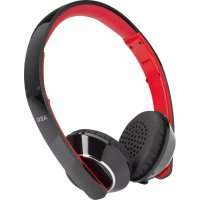


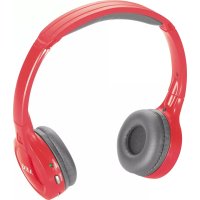
| Product type | Wireless Bluetooth Headset |
| Brand | AEG |
| Model | KH 4222 BT |
| Net weight | Approx. 0.106 kg |
| Battery type | Integrated rechargeable lithium polymer |
| Battery capacity | 3.7 V / 400 mAh |
| Charging time | Approx. 2 hours |
| Talk time | Approx. 8 hours |
| Music playback time | Approx. 12 hours |
| Bluetooth version | V2.1 + EDR |
| Bluetooth range | 15 meters |
| Transmission frequency | 2.4 GHz |
| Bluetooth protocols | A2DP, AVRCP |
| Audio connector | 3.5 mm stereo jack |
| Box contents | 1 headset, 1 USB charging cable, 1 3.5 mm audio cable |
| Key functions | Bluetooth, hands-free calling, voice command, play/pause, volume, track navigation, call reject, last number redial |
| Maintenance and cleaning | Clean with a slightly damp cloth, no cleaning products |
| Safety | Do not expose to water, moderate volume to protect hearing, keep away from pacemakers |
| Spare parts and repairability | Replaceable ear pads (not included); no user-serviceable internal parts |
| General information | Use with cable or wirelessly via Bluetooth; CE compliance |
Frequently Asked Questions - KH 4222 BT AEG
User questions about KH 4222 BT AEG
0 question about this device. Answer the ones you know or ask your own.
Ask a new question about this device
Download the instructions for your Earphones in PDF format for free! Find your manual KH 4222 BT - AEG and take your electronic device back in hand. On this page are published all the documents necessary for the use of your device. KH 4222 BT by AEG.
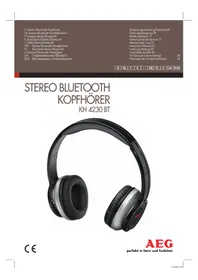
USER MANUAL KH 4222 BT AEG
D Stereo Bluetooth Headphones F Casque stéréo Bluetooth E Auriculares Estéreo Bluetooth I Cuffie Stereo Bluetooth GB Stereo Bluetooth Headphones
Disposal. Page 12
Italian
Index
Controls . . . . . . . . . . . . . . . . . . . . . . . . . . . . . . . . . . . . . . . . . . . . . . .
Overview of the Components.. Page 3
Instruction Manual.. Page 21
Technical Specifications.. Page 24
Disposal . Page 24
Spanish
Indexes
Environmental protection
Cordless via Bluetooth
Thank you for choosing our product. We hope you will enjoy using the appliance.
Symbols in these Instructions for Use
Important information for your safety is specially marked. It is essential to comply with these instructions in order to avoid accidents and prevent damage to the machine:
WARNING:
This warns you of dangers to your health and indicates possible injury risks.
CAUTION:
This refers to possible hazards to the machine or other objects.
NOTE:
This highlights tips and information.
Safety instructions
Read the operating instructions carefully before putting the appliance into operation and keep the instructions including the warranty, the receipt and, if possible, the box with the internal packing. If you give this device to other people, please also pass on the operating instructions.
The appliance is designed exclusively for private use and for the envisaged purpose. This appliance is not fit for commercial use. - Do not use the device with wet hands. - To minimize the risk of fire or electrical shock, subject the device neither to rain nor to humidity. Do not operate the device in the direct proximity of water (e.g. bathroom, swimming pool). - Keep the device away from heat, direct sunlight and sharp edges. - Keep the device away from naked flames. - Do not subject the battery to a hard impact or pressure. - Do not insert any metal objects into the device. Risk of short circuit! - Do not use the device in an extremely humid or muggy environment. - To avoid a static charge, do not utilize the device in an extremely dry climate. - The device needs to be examined regularly for signs of damage or material fatigue. If damage is noticed, the device may no longer be used.
Children and Frail Individuals
In order to ensure your children's safety, please keep all packaging (plastic bags, boxes, polystyrene etc.) out of their reach.
WARNING!
Caution! Do not allow small children to play with the foil as there is a danger of suffocation!
Special Safety Instructions
WARNING:
- Do not set the volume level of your headphones too loud, this may damage your hearing and you may put yourself and others in danger.
- Set the volume to low in order not to disturb your surroundings. If you suffer from tinnitus, set the volume to low or do not use the device.
- Ear specialists recommend that you do not use headphones constantly over long periods.
- Do not use the device together with a hearing aid, since it may cause interference.
- Safety remains paramount. Do not use the device when driving a motorised vehicle, when riding a bicycle or when jogging on the street. Adjust the volume to match the surrounding traffic.
- Do not use the device in situations in which you need to be able to hear without any interference. The headphones generate magnetic fields which may affect pacemakers and implanted defibrillators. Keep the device at least 10 cm away from pacemakers or implanted defibrillators.
- Only use the headphones in planes, in which the wireless Bluetooth technology is permitted.
CAUTION:
Do not keep the headband of the headphones stretched for a long period of time, since this may weaken the tension of the headband.
Check the scope of delivery
1 Headphones 1 Charging cable (USB on 3.5 mm jack) 1 Audio cable (2x 3.5 mm stereo jack)
Overview of the operating elements
1 Red pilot lamp 2 Blue pilot lamp 3 Multifunction button () 4 Next track/search forward 5 Volume increase (VOL) + 6 Microphone 7 3.5 mm socket 8 Volume decrease (VOL) - 9 Previous track/search backwards () 10 Headphones on/off (
22 English Before First Use
- Charge the battery before first use. See details in chapter "Charge Integrated Battery".
Charge Integrated Battery
The player is powered by the integrated rechargeable lithium battery. Charge the battery as follows:
- Plug the 3.5 mm jack from the charging cable into the socket (7) of the headphones. Connect the USB plug to a powered-on computer. After a short time, the red pilot lamp (1) will start to blink and the battery will be charged. After a short time, the pilot lamp will be lit constantly.
- When the battery is completely charged, the red control light will blink in irregular intervals.
- Remove the charging cable from the headphones and the PC.
CAUTION:
- The supplied USB charging cable may only be used with this device. It cannot be used for other devices.
- Never leave the device unattended during the charging process.
NOTE:
The battery is only charged while the PC is switched on. - Do not connect the player for a long period of time to a laptop computer disconnected from mains power. Otherwise the laptop computer's battery may be discharged. The charging time varies according to battery use. - Should you not use the device for longer than half a year, charge the battery at least every 6 to 12 months.
Use
You have two ways to use the device: by cable or cordless via Bluetooth.
WARNING:
Listening when the volume level is loud may damage the hearing of the listener.
By cable
- Connect the 3.5 mm stereo RCA cable to an external audio source. If required, use a suitable adapter (not included).
- Plug the other end of the cable into the socket (7) on the headphones.
- Put the headphones on. Observe the labeling on the inside of the headband. R = Right, L = Left
- Adjust the volume on the audio source. The VOL +/- buttons on the headphones are without function.
NOTE:
The headphones do not have to be turned on when using them with cables.
Cordless via Bluetooth
Bluetooth is a technology for wireless radio connection of devices over a short distance. Devices with Bluetooth standard transmit between 2.402 and 2.480 GHz in the ISM band (Industrial, Scientific and Medical). Interferences can however be caused by WLAN networks, wireless telephones, or microwave ovens, for example, which operate in the same frequency band.
Bluetooth technology enables hands-free operation of mobile phones, for example. This device offers you the possibility to use a Bluetooth-enabled device. The function radius is thereby restricted device-dependant to ca. 15 meters.
If your playing device supports the A2DP profile (Advanced Audio Distribution Profile) and has a music-player function, then you can also wirelessly transfer music to the device. The A2DP profile involves a multi-vendor Bluetooth profile. By streaming, stereo-audio signals are wirelessly transferred between the playing device (source) and the receiving device. To be able to operate the source by remote control, the player needs to support the AVRCP profile (Audio Video Remote Control Profile).
Due to the different device manufacturers, models, and software versions, a full functionality cannot be guaranteed.
- Logging on devices (Pairing)
Before you can listen to music or make phone calls with the headphones, you need to first register the devices with each other.
- Ensure that the Bluetooth function is activated in your player (e.g. mobile phone). For this, refer to the operation manual of your player.
- Keep the button (3) pressed down until the red and the blue pilot lamp (1/2) blink alternately. The device is now set to the pairing mode.
- Choose the Bluetooth menu in your player and register the device in your player. For this, refer to the operation manual of your player. The device "AEG KH 4222" will show in your player as a selection.
- Now enter the password "0000" in your player, depending on the device manufacturer, model, and software version.
If the registration was done successfully, a short beep sound will be heard from the headphones. The blue pilot lamp (2) will quickly blink twice for a short time and then again slowly.
NOTE:
Depending on the device manufacturer, you need to perform the registration (PAIRING) again to connect the devices. - The Bluetooth compatibility cannot be ensured for devices (e.g. mobile phones) getting released in the future. To ensure an optimal connection, make sure that the battery of your player is completely charged. - Some of the mobile phone brands have an energy-saving mode. Deactivate the energy-saving mode as it can otherwise result in problems during the data transfer through Bluetooth. To be able to transfer audio data, Bluetooth needs to stay activated in your player. Observe the operation manual of your player. - If the Bluetooth connection is separated on the device, both control lights will light up for approx. 3 seconds.
Operation
The device is equipped with multi-functional buttons. For different functions, press the respective button briefly or press and hold.
On/Off (10)
- Press and hold the button approx. 3 seconds to turn the player on. A beeping sound comes from the headphones and the blue pilot lamp (2) will blink slowly.
NOTE: Automatic connection
If supported by your player (e.g. mobile phone), the devices will be connected automatically. The prerequisite for this is:
The devices were already connected with each other. - Bluetooth is activated in your player.
- Press and hold the button again approx. 2 seconds to turn the player off. The devices are separated. The red pilot lamp (1) blinks for about approx. 4 seconds and then goes out.
NOTE:
Turn off the headphones when you are not using them to conserve the battery.
Pause (3)
- Briefly press the button to pause playback.
- Press the button again to continue playback.
NOTE:
Depending on the device manufacturers, models, and software versions, you may need to start the music playback in your player.
Adjust Volume (5/8)
Press the + (5) and - (8) buttons to adjust the desired volume step by step. Press and hold the buttons to continuously change the volume level.
WARNING:
Listening to music at high volume can damage your hearing.
NOTE:
If the maximum volume on the headphones has been reached, a beeping sound will be heard. - Increase the volume on your player.
Select Music (4/9)
- Press the (4) button to skip to the next track.
- Press the (9) button to skip to the previous track.
Press and hold the buttons to search through the track. The sound is muted.
NOTE:
Your player must support this function.
Accept/terminate a conversation
- Push the button (3) to accept an incoming call.
- To end the conversation, push the button one more time.
NOTE:
During an incoming telephone call, the music playback will stop. After terminating the conversation, the music piece will continue to be played back. The volume will slowly climb back up to the value from before the phone call.
Reject the call
To reject the incoming call, push the button (3) twice.
NOTE:
Your mobile phone must support this function.
Calling the last dialed number
Push the button twice (3). The number is called that you last called with your mobile.
NOTE:
- Your mobile phone must support this function.
- The mobile phone may not be in the music replay setting.
Voice control
Keep the (3) button pushed down for two seconds to activate the voice control in your mobile phone. For further operation, please consult the manual for your mobile phone.
24 English
NOTE:
- Your mobile phone must support this function.
- The mobile phone may not be in the music replay setting.
Replace the Ear Cushions
(Spare ear cushions not included.)
- Carefully remove the ear cushion from the earpiece.
- Fit the new ear cushion onto the earpiece.
Maintenance and Cleaning

CAUTION:
Do not immerse the headphones in water!
- There are no parts inside the device which can be maintained by the user.
- Clean the headphones with a slightly damp cloth and no additional cleaning agents.
Troubleshooting
| Symptoms Possible cause Solution | ||
| Headphones cannot be turned on | Battery empty Charge | get the battery (⇒ Page 22) |
| No audio signal during Bluetooth connection | Headphones are turned off | Turn the Headphones on. |
| Headphones are not paired with the audio source. | Check whether the connection exists. Pair the Headphones with the audio source again, if necessary. | |
| Audio cable or charging cable is connected | The Bluetooth connection is automatically separated when a cable is connected to the 3.5 mm plug. Remove the cable. | |
| Volume too low Increase | ease the volume on the headphones | |
| Increase the volume on the audio source. | ||
| Headphones cannot be connected | Pairing does not work | Check, whether the audio source supports the A2DP protocol. |
| Audio source is turned off. | Turn the audio source on. | |
| Bluetooth is turned off on the audio source. | Turn the Bluetooth function on in the audio source. | |
Technical Specifications
Model: KH 4222 BT
Audio connection: 3.5 mm stereo jack plug
Net weight: approx. 0.106 kg
Battery: 3.7 V 400 mAh lithium polymer
Charging time: approx. 2 hours
Operating time
(Talking / Music): approx. 8 hours. / approx. 12 hours
Bluetooth
Bluetooth support: V2.1 + EDR
Range: 15 meters
Transmitting frequency: 2,4 GHz
Protocols: A2DP, AVRCP
Subject to technical changes without prior notice!
This device complies with the relevant CE Directives and is designed in accordance with the latest safety regulations.
Disposal
Battery disposal
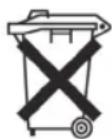
The device has a rechargeable battery. Used batteries and accumulators do not belong in the household waste.
The batteries / accumulators must be removed before the product goes into the waste disposal. For this, consult qualified specialized personnel.
Environmental protection
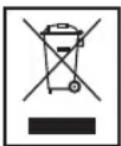
Do not dispose of the device at the end of its service life with normal household waste. Bring it to the official collection point for recycling. By doing this, you help protect the environment.


- ITALIAN
- INDEX
- SPANISH
- INDEXES
- ENVIRONMENTAL PROTECTION
- CORDLESS VIA BLUETOOTH
- SYMBOLS IN THESE INSTRUCTIONS FOR USE
- WARNING
- CAUTION
- NOTE
- SAFETY INSTRUCTIONS
- CHILDREN AND FRAIL INDIVIDUALS
- SPECIAL SAFETY INSTRUCTIONS
- CHECK THE SCOPE OF DELIVERY
- OVERVIEW OF THE OPERATING ELEMENTS
- ENGLISH BEFORE FIRST USE
- CHARGE INTEGRATED BATTERY
- USE
- BY CABLE
- LOGGING ON DEVICES (PAIRING)
- OPERATION
- ON/OFF (10)
- NOTE: AUTOMATIC CONNECTION
- PAUSE (3)
- ADJUST VOLUME (5/8)
- SELECT MUSIC (4/9)
- ACCEPT/TERMINATE A CONVERSATION
- REJECT THE CALL
- CALLING THE LAST DIALED NUMBER
- VOICE CONTROL
- ENGLISH
- REPLACE THE EAR CUSHIONS
- MAINTENANCE AND CLEANING
- TROUBLESHOOTING
- TECHNICAL SPECIFICATIONS
- BLUETOOTH
- DISPOSAL
- BATTERY DISPOSAL
Brand : AEG
Model : KH 4222 BT
Category : Earphones