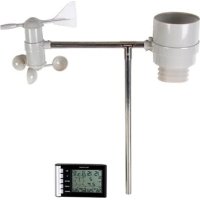
WS1060 - Weather Station VELLEMAN - Free user manual and instructions
Find the device manual for free WS1060 VELLEMAN in PDF.



| Product type | Wireless weather station |
| Brand | Velleman |
| Model | WS1060 |
| Base station power supply | 3 alkaline batteries LR6/AA 1.5V (not included) |
| External sensors power supply | 2 alkaline batteries LR6/AA 1.5V per sensor (not included) |
| Sensors included | 4 external sensors: thermo/hygrometer, anemometer, wind direction sensor, rain gauge |
| Outdoor temperature range | -40°C to +65°C |
| Outdoor temperature accuracy | ±1°C |
| Indoor temperature range | -9.9°C to +60°C |
| Relative humidity range | 1% to 99% |
| Outdoor humidity accuracy | ±5% |
| Wind speed | 0 to 180 km/h |
| Rainfall | 0 to 999.9 mm (resolution 0.3 mm) |
| Transmission frequency | 868 MHz |
| Transmission range | 100 m in open field |
| Display | Backlit LCD with multiple indicators |
| Main functions | Indoor/outdoor temperature/humidity measurement, wind speed and direction, rainfall, wind chill, dew point, DCF clock, weather alarms, 24h history, min/max values, perpetual calendar |
| Mounting | Wall-mounted or free-standing |
| Maintenance and cleaning | Clean with a dry cloth; replace worn batteries; do not expose to water |
| Safety | Keep out of reach of children; do not open or modify; use indoors; respect battery polarity |
| Spare parts and repairability | Replaceable external sensors (Velleman ref.); replaceable battery |
| Warranty | Velleman warranty according to conditions at the end of the manual |
Frequently Asked Questions - WS1060 VELLEMAN
User questions about WS1060 VELLEMAN
0 question about this device. Answer the ones you know or ask your own.
Ask a new question about this device
Download the instructions for your Weather Station in PDF format for free! Find your manual WS1060 - VELLEMAN and take your electronic device back in hand. On this page are published all the documents necessary for the use of your device. WS1060 by VELLEMAN.
USER MANUAL WS1060 VELLEMAN
WIRELESS WEATHER STATION, DCF CLOCK, OUTDOOR SENSOR
DRAADLOOS WERSTATION MET DCF-KLOK EN BUITENSENSOR
STATION MÉTÉO SANS FIL, HORLOGE DCF ET CAPTEUR EXTERNE
ESTACION METEOROLógICA INALÁMBRICA CON RELOJ DCF Y
SENSOR EXTERIOR
DRAHTLOSE WETTERSTATION MIT DCF-UHR UND AUBENSENOR ESTAGAO METEORLOGICALA SEM FIO, RELOGIO DCF, SENSOR EXTERNO
To all residents of the European Union
Important environmental information about this product
This symbol on the device or the package indicates that disposal of the device after its lifecycle could harm the environment. Do not dispose of the unit (or batteries) as unsorted municipal waste; it should be taken to a specialized company for recycling. This device should be returned to your distributor or to a local recycling service. Respect the local environmental rules.

If in doubt, contact your local waste disposal authorities.
Thank you for choosing Velleman! Please read the manual thoroughly before bringing this device into service. If the device was damaged in transit, don't install or use it and contact your dealer.
2. Safety Instructions
Keep this device away from children and unauthorized users.
3. General Guidelines
Refer to the Velleman® Service and Quality Warranty on the last pages of this manual.
| Indoor use only. Keep the display away from rain, moisture, splashing and dripping liquids. | |
| Keep this device away from dust and extreme temperatures. | |
| Protect this device from shocks and abuse. Avoid brute force when operating the device. |
Familiarise yourself with the functions of the device before actually using it.
- All modifications of the device are forbidden for safety reasons. Damage caused by user modifications to the device is not covered by the warranty.
- Only use the device for its intended purpose. Using the device in an unauthorised way will void the warranty.
- Damage caused by disregard of certain guidelines in this manual is not covered by the warranty and the dealer will not accept responsibility for any ensuing defects or problems.
- Keep this manual for future reference.
4. Features
- indoor temperature and humidity measuring
- outdoor temperature and humidity RF reception
- wind chill, wind direction and rainfall RF reception
- ^ C / ^ unit selectable
- rainfall data (inches or millimetres): 1 hour, 24 hours, one week, one month, and total since last reset
- all minimum and maximum values along with time and date of their recordings
- wind speed (mph, m/s, km/h, knots, Beaufort)
- wind direction display with 8 directions
- weather alarm modes for: temperature, humidity, wind chill, dew point, rainfall, wind speed
- receive and display the radio controlled time and date
12 or 24-hour time display
perpetual calendar
time zone setting
time alarm - LED backlight
- wall hanging or free standing
-
synchronized instant reception
-
set includes:
receiver
4 outdoor sensors: thermo-hygrometer, wind speed sensor, wind direction sensor, and rain sensor.
5. Overview
Refer to the illustrations on page 2-3 of this manual.
Base station display
| 1 | Time alarm enabled | 15 | Rainfall unit: mm or inch |
| 2 | RCC signal reception | 16 | Outdoor temperature alarm high/low enabled |
| 3 | Day of the week | 17 | Outdoor temperature |
| 4 | Date | 18 | Outdoor signal reception |
| 5 | Wind direction alarm enabled | 19 | Outdoor humidity |
| 6 | Maximum measurements are displayed | 20 | Outdoor transmitter battery low |
| 7 | Wind direction | 21 | Outdoor humidity alarm high/low enabled |
| 8 | Minimum measurements are displayed | 22 | Rainfall |
| 9 | Rainfall high alarm enabled | 23 | Rainfall period: 1h, 24h, week, month, or total |
| 10 | Indoor temperature alarm high/low enabled | 24 | Wind speed |
| 11 | Temperature unit: °C or °F | 25 | Wind speed unit: bft, mph, knots, km/h, m/s |
| 12 | Indoor temperature | 26 | Wind speed high alarm enabled |
| 13 | Indoor humidity alarm high/low enabled | 27 | Time |
| 14 | Indoor humidity |
Outdoor unit
| A | Wind direction sensor | D | Thermo-hygrometer (shielded) and transmitter unit |
| B | Bubble level | E | Shaft |
| C | Rain collector | F | Anemometer |
6. Installation
Refer to the illustrations on page 2-3 of this manual.
6.1 Assembly
The thermo-hygrometer, rain collector, and wind direction sensor are already mounted on the shaft. You just need to attach the wind cups for the anemometer.
- Push the wind cups onto the anemometer's steel shaft [K].
- Use an Allen key (incl.) to tighten the screw on the side of the wind cups [L].
- Spin the wind cups and make sure they can move freely. If the movement is hindered, the wind speed measurements will be incorrect.
6.2 Initialising the weather station
Before installing the weather station in its final location, you must install batteries in the outdoor unit and base station, and let the devices initialise and synchronise. This makes sure that the communication between outdoor unit and base station is working correctly. Poor communication can often be improved by changing the location.
Battery guidelines

Do not puncture batteries or throw them in fire as they may explode. Do not attempt to recharge nonrechargeable batteries (alkaline). Dispos of batteries in accordance with local regulations. Keep batteries away from children.
- Use only batteries of the correct size and voltage.
- Remove the batteries from the indoor and outdoor units if the device will not be used for a long time. Old batteries can begin to leak and damage the device.
- Respect the polarity when inserting batteries. The wrong polarity can damage the device.
- Alkaline batteries have a typical operating temperature range of -20^ +54^ . Do not use the device outside this temperature range.
Installing batteries in the outdoor unit
- At the bottom side of the rain collector, loosen the screw and slide the metal catch sideways to free the battery compartment [G].
- Pull out the battery compartment [H].
- Insert 2 × AA 1.5 ~V LR6 batteries according to the polarity markings in the compartment [I].
- Push the battery compartment back into the rain collector base [J].
The LED located at the back of the rain collector lights during 4 seconds. If not, check if the batteries are inserted properly.
- Slide the metal catch back in position to secure the battery compartment, and fasten the catch with the screw.
Installing batteries in the base station
- Open the battery compartment cover at the back of the base station.
- Insert 3 × AA 1.5V LR6 batteries according to the polarity markings in the compartment.
All segments on the LCD display light up during 2 seconds. If not, check if the batteries are inserted properly.
- Close the battery compartment cover.
- At this moment, do not press any buttons yet.
Allow the device to initialise and synchronise with the outdoor unit first.
If necessary, remove the batteries from the indoor unit and wait for at least 10 seconds before you put them back in.
- Wait until both indoor and outdoor temperatures appear on the display before you continue.
The transmitter sends weather data to the base station every 48 seconds.
Radio-controlled clock signal reception
After inserting batteries, the transmitter in the outdoor unit sends weather data to the base station, and then scans for the DCF radio-controlled clock (RCC) signal to set the date and time automatically. When the DCF signal is detected, the LED at the back of the rain collector flashes 5 times, then lights during 20 seconds. The
transmitter sends the date and time information to the base station. The display will show the RCC icon
If the DCF signal is poor and reception is not possible, the transmitter stops searching after 1 minute, and returns to normal operating mode (= transmitting weather data to the base station). The transmitter retries once every two hours to receive the DCF signal. If it cannot find the DCF signal, or if the last signal was
received more than 12 hours ago, the RCC icon will disappear from the display.
Note: The best time for DCF signal reception is at night between midnight and 6:00am, when there is less atmospheric interference.
During DCF signal reception, the transmitter does not send weather data to the base station. DCF signal reception lasts max. 5 minutes.
Note: if it is not possible to receive the DCF signal, you can set the date and time manually. See 7.2 Units, date and time. However, when the transmitter receives the DCF signal, it will overwrite your manual date and time settings.
6.3 Installation
Note: Assemble the weather station and make sure that the communication between outdoor unit and base station is working correctly before you install the weather station into its final location. Problems with radio transmission can usually be solved by changing the location.
When choosing a suitable location for outdoor unit and base station, take the following into account:
- Radio communication between transmitter and base station can reach up to 100m (330ft) in the open field, provided that there are no interfering obstacles such as buildings, trees, vehicles, high voltage lines...
- Radio interference from PC screens, radios, or TV sets can disturb or even entirely cut off radio communication.
Shelters such as trees, hedges, walls... can influence the measurements. Choose an open area where the elements can reach the sensors from all sides.
For accurate wind speed measurements, keep the device away from buildings, trees, or other obstructions. - For accurate temperature measurements, keep the device away from heat sources such as buildings, the ground, and direct sunlight without proper shielding in hot weather environments.
- For accurate humidity measurements, keep the device away from the ground, grass, or other sources of humidity.
Install the weather station as follows:
- Make sure the outdoor unit is fully assembled and batteries are installed in outdoor unit and base station.
- Place the outdoor unit and base station in the locations where you want them, and check if the communication is working.
If yes, continue with the next step.
If no, change the location of the outdoor unit and/or base station until proper communication is established.
- Use the adjustable hoops (incl.) to attach the shaft of the outdoor unit to a mast [M]. Before you tighten the screws, check if the weather station is positioned well, as described below.
- On the edge of the wind direction sensor, there are markers [N] representing the north (N), east (E), south (S), and west (W). Use a compass (not incl.) to position the device so that the markers correspond with your real location: the N marker must be directed north, the E marker east... If you do not position the sensor correctly, the wind direction measurement will be incorrect.
- Use the bubble level [B] on the rain collector to position the device perfectly level.
- Fix the device in its final position by tightening the screws on the adjustable hoops [M].
7. Configuring the base station
The base station has five keys for easy operation: SET, +, HISTORY, ALARM, and MIN/MAX.
-
Press SET to scroll through settings.
-
Press the + key to increase values, or the MIN/MAX key to decrease values.
- Press and hold the + or MIN/MAX keys for 2 seconds to increase/decrease in larger steps.
- The setting procedure will end automatically after 30 seconds if you press no keys; or you can exit the setting procedure at any time by pressing HISTORY.
7.1 Quick display mode
You can quickly change the information that is displayed on the LCD screen of the base station. Indicators on the display show which information is currently shown. Select the information to display as follows:
- From normal mode, press SET.
The station is now in quick display mode.
- Press SET to confirm the current setting and go to the next; use the + or MIN/MAX keys to change the values.
| Setting | Display | Description |
| Wind | (nthing) | Display the wind speed. |
| Gust | Display the gust speed. | |
| Rainfall | 1h | Display the rainfall in the last hour. |
| 24h | Display the rainfall in the last 24 hours. | |
| week | Display the rainfall in the last week. | |
| month | Display the rainfall in the last month. | |
| TOTAL | Display the total rainfall since the last reset. Note: when the total rainfall quantity is displayed, you can reset it by pressing and holding SET for 2 seconds. | |
| Temperature | TEMP | Display the outdoor temperature. |
| WIND CHILL | Display the outdoor wind chill. | |
| DEW POINT | Display the outdoor dew point. |
- To return to normal mode, press HISTORY.
7.2 Units, date and time
To specify units and date/time settings, proceed as follows:
- From normal mode, press and hold SET for 2 seconds. The station is now in settings mode.
- Press SET to confirm the current setting and go to the next; use the + or MIN/MAX keys to change the values.
| Setting | Description |
| LCD brightness | Adjust the brightness of the LCD display from 0 to 8. |
| Time zone | Select your time zone, from -12 to +12. In Europe, 0 = GMT+1; 1 = GMT+2; -1 = GMT. |
| Time format | Choose between 12h or 24h formats for displaying the time [27]. |
| Time | If the DCF signal cannot be detected, you can set the current time (hours/minutes) manually. |
| Date format | Choose between day-month-year (DM) or month-day-year (MD) formats for displaying the date [4]. |
| Date | If the DCF signal cannot be detected, you can set the current date manually. |
| Wind speed unit | Choose to display the wind speed / gust speed in km/h, m/s, bft (Beaufort), mph, or knots. The corresponding indicator [25] appears on the display. |
| Wind direction | Adjust the wind direction. |
| Rainfall unit | Choose to display the rainfall in mm or inches. The corresponding indicator [15] appears on the display. |
| Temperature unit | Choose to display the temperature in degrees Celsius or Fahrenheit. The corresponding indicator [11] appears on the display. |
- To return to normal mode, press HISTORY.
7.3 History mode
In history mode you can display measurements from the past 24 hours.
Displaying history data
- From normal mode, press HISTORY.
The station is now in history mode. The display shows HIS [3].
- In history mode, press MIN/MAX repeatedly to go back in 3-hour steps.
- To return to normal mode, press HISTORY.
Resetting the history data
- From normal mode, press HISTORY.
The station is now in history mode. The display shows HIS [3].
- Press SET.
The word CLEAR flashes on the display.
To reset the history data, press and hold SET for 2 seconds.
To exit without resetting the history data, press HISTORY to return to normal mode.
7.4 Setting alarms
You can program the base station to trigger an alarm at a specific time or for specific indoor or outdoor weather conditions. When an alarm is triggered, the alarm sounds for 120 seconds. The corresponding display indicator flashes until the alarm condition is no longer met.
- Press any key to mute the alarm.
- When the alarm condition is no longer met, the display stops flashing. However, the alarm is still enabled, and will go off again if the alarm threshold is crossed. If you no longer want the alarm to go off, you must disable it in the alarm menu.
If the alarm condition is met again within 3 hours since the last alarm, the display indicator will flash, but the alarm will not sound. This feature prevents repeated triggering for the same alarm condition.
You can define:
- alarms for high conditions: the alarms goes off when the measured value exceeds the alarm threshold, for example if the wind speed exceeds 20m / s .
- alarms for low conditions: the alarm goes off when the measured value drops below the alarm threshold, for example if the outdoor temperature drops below -5^ .
To set up, enable, or disable alarms, proceed as follows:
- From normal mode, press ALARM.
The station is now in high alarm mode, where you can set the alarms for high conditions (see the overview in the table below). The display shows HIAL [4] and the current high alarm values. If an alarm value is not set, the display shows - - " - Press ALARM again to go to low alarm mode, where you can set the alarms for low conditions (see the overview in the table below). The display shows LOAL [4] and the current low alarm values. If an alarm value is not set, the display shows - - "
- Press SET to scroll through alarm settings.
-
Press the + or MIN/MAX keys to set the values.
-
Press ALARM to enable/disable the alarm. If the alarm is enabled, the corresponding alarm indicator and HI AL (or LO AL for a low alarm) appear on the display.
- Press SET to confirm the current setting and go to the next.
- To return to normal mode, press HISTORY.
High alarm settings
| High alarm | Description |
| Time alarm | Set the time (hours:minutes) when you want the alarm to go off. Note: you can also set the time alarm via low alarms settings. |
| Wind speed | Set the wind speed threshold value (0~50m/s). The alarm goes off when the wind speed is higher than the specified value. |
| Gust speed | Set the gust speed threshold value (0~50m/s). The alarm goes off when the gust speed is higher than the specified value. |
| Wind direction | Set the wind direction. The alarm goes off when the wind comes from the specified direction. |
| 1 hour rainfall | Set the value of rainfall in 1 hour (0~999.9mm). The alarm goes off when there is more rain in 1 hour than the specified value. |
| 24 hour rainfall | Set the value of rainfall in 24 hours (0~999.9mm). The alarm goes off when there is more rain in 24 hours than the specified value. |
| Outdoor humidity | Set the outdoor humidity value (1%~99%). The alarm goes off when the outdoor humidity is higher than the specified value. |
| Outdoor temperature | Set the outdoor temperature value (-40°C~+60°C). The alarm goes off when the outdoor temperature is higher than the specified value. |
| Wind chill | Set the wind chill value (-40°C~+60°C). The alarm goes off when the wind chill temperature is higher than the specified value. |
| Dew point | Set the dew point value (-40°C~+60°C). The alarm goes off when the dew point temperature is higher than the specified value. |
| Indoor humidity | Set the indoor humidity value (1%~99%). The alarm goes off when the indoor humidity is higher than the specified value. |
| Indoor temperature | Set the indoor temperature value (-9.9°C~+60°C). The alarm goes off when the indoor temperature is higher than the specified value. |
Low alarm settings
| Low alarm | Description |
| Outdoor humidity | Set the outdoor humidity value (1%~99%). The alarm goes off when the outdoor humidity is lower than the specified value. |
| Outdoor temperature | Set the outdoor temperature value (-40°C~+60°C). The alarm goes off when the outdoor temperature is lower than the specified value. |
| Wind chill | Set the wind chill value (-40°C~+60°C). The alarm goes off when the wind chill temperature is lower than the specified value. |
| Dew point | Set the dew point value (-40°C~+60°C). The alarm goes off when the dew point temperature is lower than the specified value. |
| Indoor humidity | Set the indoor humidity value (1%~99%). The alarm goes off when the indoor humidity is lower than the specified value. |
| Indoor temperature | Set the indoor temperature value (-9.9C~+60°C). The alarm goes off when the indoor temperature is lower than the specified value. |
7.5 Minimum and maximum
The weather station keeps track of minimum and maximum measurements for each weather condition (since the last reset), together with the time and date when they were recorded.
Displaying minimum and maximum measurements
To display minimum and maximum measurements, proceed as follows:
- From normal mode, press MIN/MAX.
The station is now in maximum mode. The displays show the maximum indicator [6]. - Press + repeatedly to display the maximum values for: wind speed, gust speed, 1 hour rainfall, 24 hour rainfall, weekly rainfall, monthly rainfall, outdoor humidity, outdoor temperature, wind chill temperature, dew point, indoor humidity, indoor temperature.
-
Press MIN/MAX to go to minimum mode. The displays show the minimum indicator [8].
-
Press + repeatedly to display the minimum values for: outdoor humidity, outdoor temperature, wind chill temperature, dew point, indoor humidity, indoor temperature.
- Press HISTORY to return to normal mode.
Resetting a minimum or maximum
To reset a minimum or maximum:
- Enter minimum or maximum reading mode and press + to display the value that you want to reset.
- Press and hold SET for 3 seconds.
- Repeat for any other minimum or maximum value that you want to reset.
- Press HISTORY to return to normal mode.
8. Resetting
To reset the weather station to the factory defaults, press and hold the + key for 20 seconds.
9. Troubleshooting
| Problem | Possible Cause | Solution |
| Transmission problem | Distance between the two units is too long | Reduce distance |
| Shielding materials between two units (thick wall, steel...) | Find a different mounting location | |
| Interference from other sources | Eliminate interference sources | |
| Data on LCD is illegible | No data reception | Find a different mounting location |
| Low batteries | Replace batteries | |
| Incorrect data | Low batteries | Replace batteries |
| Incorrect settings | Reprogram the weather station |
10. Calibration
For accurate measurements, you can calibrate wind speed, temperature, humidity, and rainfall measurements using calibration tools (not incl.).
To enter calibration mode, proceed as follows:
- From normal mode, press and hold HISTORY for 8 seconds.
The station is now in calibration mode. The wind factor digits on the display flash. - Press SET to go to the next setting; use the + or MIN/MAX keys to change the values.
- To exit the calibration mode, press HISTORY.
See below for a description of each calibration setting.
Wind speed calibration
The default wind speed calibration setting is 1.0. The adjustment factor ranges from 0.75 to 1.25. You can set it in 0.01 increments.
Wind speed is the most sensitive to installation constraints. The following factors influence wind speed measurement:
the location of the weather station: proximity of buildings, trees, or other obstructions
- the wear of the moving parts of the anemometer.
To calibrate the wind speed, we recommend using a calibrated wind meter (not incl.) and a constant-speed, high-speed fan (not incl.).
Temperature calibration
You can calibrate indoor and outdoor temperature measurements.
The following factors influence temperature measurement:
- proximity of heat sources, such as buildings, the ground...
- installation in direct sunlight without proper shielding in hot weather environments.
To calibrate the temperature, we recommend using a mercury or alcohol thermometer (not incl.). Do not use bi-metal (dial) or other digital thermometers, as they have their own error margin. Do not use a local weather station in your area (difference in location, timing of updates, and possible calibration errors).
To calibrate the temperature, proceed as follows:
- Place the temperature sensor in a shaded, controlled environment.
-
Place the thermometer right next to it.
-
Allow the installation to stabilise for 48 hours.
- Compare the temperature reading on the display to the temperature reading on the thermometer, and adjust the setting in calibration mode to match the thermometer.
Humidity calibration
The hygrometer sensor's accuracy is ± 5% . You can improve the accuracy by calibrating indoor and outdoor humidity measurements.
Humidity measurements can drift over time. The proximity of humidity sources such as the ground, grass... influence the measurement.
We recommend using a sling psychrometer (not incl.) or commercially available humidity calibration kits (not incl.) to measure humidity. Adjust the setting in calibration mode to match the measurement.
Rainfall calibration
The default rainfall calibration setting is 1.0. The adjustment factor ranges from 0.75 to 1.25.
We recommend using a tube type rain gauge (not incl.), with an aperture of at least 10cm ( 4'' ). Any smaller and the readings may not be accurate. Do not use rainfall readings from weather reports on radio, TV, newspapers, or even your neighbour's weather station (difference in location).
To calibrate the rainfall measurement, proceed as follows:
- Place the tube rain gauge right next to the rain collector of the weather station.
- Compare the totals of three storms.
- Based on this, develop an average for how far off the readings are.
Total rainfall calibration
To calibrate the total rainfall value, keep in mind that the factor is applied to the running total, not to individual tips of the bucket in the rain collector.
You can adjust the total rainfall in 0.3mm steps.
The total rainfall measurement works as follows:
- The rain collector is calibrated at the factory so that the bucket tips over (and records rainfall) for every 0.3mm (0.01^ ) of rain.
- The total number of times the bucket tips over (since the last reset) is counted and multiplied by 0.3 to get a total in mm. (For a reading in inches, a conversion factor is applied.)
- The calibration factor is then applied to this total.
11. Cleaning and maintenance
11.1 Replacing batteries
Replacing batteries in the base station
When the display becomes difficult to read, replace the batteries. See Installing batteries in the base station.
Caution: When you remove the batteries from the base station, you lose all previous weather data and alarm settings.
Replacing batteries in the outdoor unit
When the battery level in the transmitter is low, the display will show that case, replace the transmitter batteries as soon as possible. See Installing batteries in the outdoor unit.
Note: Take into account that the low battery indicator only works correctly within an outdoor temperature range of 10 35^ . Outside this temperature range, the low battery indicator may show even if the batteries are still good.
When you replace the batteries in the transmitter, the transmitter will resynchronize with the indoor station within the next 3 hours. All previous weather data and alarm value settings are maintained.
However, if you want the devices to synchronise faster, you can remove the batteries from the indoor station and replace them after 10 seconds.
Caution: In this case you lose all previous weather data and alarm settings.
11.2 Replacing the sensors
Refer to the illustrations on page 2-3 of this manual.
Replacing the rain collector and thermo-hygro sensor
To replace the rain collector and thermo-hygro sensor, proceed as follows:
- Loosen the three screws [O] at the bottom of the rain collector.
- Remove the rain collector from the base [P].
- Loosen the 4 screws of the sensor cover and remove the cover [Q].
- Unplug the data cable [R].
- Loosen the screw [S] that fixes the sensor unit and pull it gently off the shaft.
- Slide the new sensor unit on the shaft and fix it with the screw.
- Reconnect the data cable.
- Replace the sensor cover and fix it with the screws.
- Place the new rain collector on the base.
- Fix the rain collector to the base using the three screws at the bottom.
- Use the bubble level [B] on the rain collector to check if the device is still perfectly level. If necessary, adjust the position.
Replacing the wind sensor
To replace the wind sensor, proceed as follows:
- Unplug the data cable: see Replacing the rain collector and thermo-hygro sensor for instructions.
- Loosen the screw [T] that fixes the sensor unit and pull it gently off the shaft.
- Slide the new sensor unit on the shaft and fix it with the screw.
- Reconnect the data cable.
- On the edge of the wind direction sensor, there are markers [N] representing the north (N), east (E), south (S), and west (W). Use a compass (not incl.) to position the device so that the markers correspond with your real location: the N marker must be directed north, the E marker east... If you do not position the sensor correctly, the wind direction measurement will be incorrect.
- Use the bubble level [B] on the rain collector to position the device perfectly level. If necessary, adjust the position.
12. Technical Specifications
| Outdoor data | ||
| Transmission distance | 100 m (330 ft) in open field | |
| Frequency | 868 MHz | |
| Measuring interval thermo-hygro sensor | 48 seconds | |
| Temperature | Range | -40°C~+65°C (-40°F~+149°F) |
| Accuracy | ±1°C | |
| Resolution | 0.1°C | |
| Relative humidity | Range | 1%~99% |
| Accuracy | ±5% | |
| Rain volume | Range | 0~999.9mm (displays - - if out of range) |
| Accuracy | ±10% | |
| Resolution | 0.3 mm (if rain volume < 1000 mm); 1 mm (if rain volume > 1000 mm) | |
| Wind speed | Range | 0~180 km/h (0~110 mph) (displays - - if out of range) |
| Accuracy | ±1 m/s (wind speed < 10 m/s); ±10% (wind speed > 10 m/s) | |
| Indoor data | ||
| Measuring interval (temperature and humidity) | 30 seconds | |
| Temperature | Range | -9.9°C~+60°C (14°F~+149°F) (displays - - if out of range) |
| Resolution | 0.1°C | |
| Relative humidity | Range | 1%~99% |
| Accuracy | ±1% | |
| Power consumption | ||
| Outdoor sensor | 2 x AA 1.5V LR6 alkaline batteries (not incl.) | |
| Base station | 3 x AA 1.5V LR6 alkaline batteries (not incl.) | |
| Estimated battery life | 12 months for base station 24 months for thermo-hygro sensor Note: this is only an estimation that you can use as a guideline. Actual battery life depends on several factors, such as ambient temperature. | |
Use this device with original accessories only. Velleman nv cannot be held responsible in the event of damage or injury resulted from (incorrect) use of this device.
For more info concerning this product and the latest version of this manual, please visit our website www.velleman.eu.
The information in this manual is subject to change without prior notice.
© COPYRIGHT NOTICE
The copyright to this manual is owned by Velleman nv. All worldwide rights reserved.
No part of this manual or may be copied, reproduced, translated or reduced to any electronic medium or otherwise without the prior written consent of the copyright holder.
GEBRUIKERSHANDLEIDING
1. Inleiding
Consignes relatives aux piles

Instalar as pilhas naunities exterior
Instalar as pilhas na本站址


- To all residents of the European Union
- Safety Instructions
- General Guidelines
- Features
- Overview
- Installation
- Assembly
- Initialising the weather station
- Battery guidelines
- Installing batteries in the outdoor unit
- Installing batteries in the base station
- Radio-controlled clock signal reception
- Installation
- Configuring the base station
- Quick display mode
- Units, date and time
- History mode
- Displaying history data
- Resetting the history data
- Setting alarms
- You can define:
- Minimum and maximum
- Displaying minimum and maximum measurements
- Resetting a minimum or maximum
- Resetting
- Troubleshooting
- Calibration
- Wind speed calibration
- Temperature calibration
- Humidity calibration
- Rainfall calibration
- Total rainfall calibration
- Cleaning and maintenance
- Replacing batteries
- Replacing batteries in the base station
- Replacing batteries in the outdoor unit
- Replacing the sensors
- Replacing the rain collector and thermo-hygro sensor
- Replacing the wind sensor
- Technical Specifications
- © COPYRIGHT NOTICE
- GEBRUIKERSHANDLEIDING
- Inleiding
- Consignes relatives aux piles
- Instalar as pilhas naunities exterior
- Instalar as pilhas na本站址
Brand : VELLEMAN
Model : WS1060
Category : Weather Station