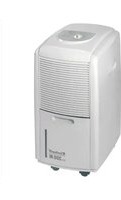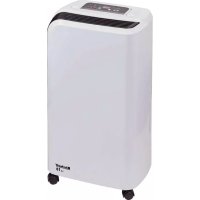
LE 10 - Dehumidifier EINHELL - Free user manual and instructions
Find the device manual for free LE 10 EINHELL in PDF.



| Product type | Dehumidifier |
| Brand | Einhell |
| Model | LE 10 |
| Dimensions (L x W x H) | 276 x 185 x 470 mm |
| Weight | 9.9 kg |
| Power supply | 220-240 V ~ 50 Hz |
| Max power consumption | 245 W |
| Dehumidification capacity (30°C, 80% RH) | 0.42 l/h |
| Dehumidification capacity (27°C, 60% RH) | 0.23 l/h |
| Water tank | 2 L |
| Max air flow | 90 m³/h |
| Refrigerant | R134a (130 g) |
| Noise level | ≤ 47 dB(A) |
| Operating temperature range | 5 to 35 °C |
| Operating humidity range | > 40 % RH |
| Main functions | Humidity control (40-80%), timer (1-24h), 2 fan speeds, auto shut-off when tank full, continuous drainage, defrost function |
| Air filter | Washable, clean every 2 weeks |
| Safety | Anti-restart protection (3 min), compressor protection (outside 5-35°C range) |
| Net weight | 9.9 kg |
| Warranty | 2 years |
Frequently Asked Questions - LE 10 EINHELL
User questions about LE 10 EINHELL
0 question about this device. Answer the ones you know or ask your own.
Ask a new question about this device
Download the instructions for your Dehumidifier in PDF format for free! Find your manual LE 10 - EINHELL and take your electronic device back in hand. On this page are published all the documents necessary for the use of your device. LE 10 by EINHELL.
USER MANUAL LE 10 EINHELL
When using the equipment, a few safety precautions must be observed to avoid injuries and damage. Please read the complete operating instructions and safety regulations with due care. Keep this manual in a safe place, so that the information is available at all times. If you give the equipment to any other person, hand over these operating instructions and safety regulations as well. We cannot accept any liability for damage or accidents which arise due to a failure to follow these instructions and the safety instructions.
1. Safety regulations
Danger!
Read all safety regulations and instructions.
Any errors made in following the safety regulations and instructions may result in an electric shock, fire and/or serious injury.
Keep all safety regulations and instructions in a safe place for future use.
The dehumidifier must always be in an upright position.
- Whenever the equipment has been transported or tilted (inclined positions), leave it for at least one hour before connecting it to a socket outlet.
The equipment must have approx. 0.5m air clearance above and behind to enable it to take in sufficient air.
- Keep all foreign bodies away from the air inlet opening and the air outlet opening.
- Set up the equipment well clear of heaters or other heat-generating units.
- Never pour or spray water over the equipment.
- Never use the power plug to switch the equipment on or off.
Always use the switch on the control panel.
Before you move the equipment, switch it off with the Off/On switch, then pull out the power plug and empty the condensate collector.
Clean the air filter before it becomes heavily soiled. The equipment works best when the filter is clean.
- Do not use spray solutions or other combustible cleaning agents on the equipment.
If the equipment displays any malfunctions, pull out the power plug and contact your customer service center.
If the power cable for the equipment becomes
damaged, it must be replaced by the manufacturer, its customer service or similarly trained personnel in order to avoid danger.
This equipment can be used by children of 8 years and older and by people with limited physical, sensory or mental capacities or those with no experience and knowledge if they are supervised or have received instruction in how to use the equipment safely and understand the dangers which result from such use. Children are not allowed to play with the equipment. Unless supervised, children are not allowed to clean the equipment and carry out user-level maintenance work.
2. Layout and items supplied
2.1 Layout (Fig. 1)
1 Front housing panel
2 Air outlet
3 Handle
4 Indicator panel
5 Air filter
6 Air inlet grille
7 Condensate collector
8 Power cable
2.2 Items supplied
- Open the packaging and take out the equipment with care.
- Remove the packaging material and any packaging and/or transportation braces (if available).
Check to see if all items are supplied. - Inspect the equipment and accessories for transport damage.
If possible, please keep the packaging until the end of the guarantee period.
Danger!
The equipment and packaging material are not toys. Do not let children play with plastic bags, foils or small parts. There is a danger of swallowing or suffocating!
- Dehumidifer
Original operating instructions
GB
3. Proper use
The dehumidifi er is designed only for use in privately used rooms (e.g. living rooms, bedrooms, bathrooms, storage areas, laundry rooms or basements).
Note:
65% humidity is the upper limit at which the human body feels comfortable. If it is too warm for the human body, the humidity level (i.e. water content) is too high. Humidity and temperature are interrelated. A relative humidity (RH) of 35 to 65% at 21^ is generally considered to be ideal.
It is uneconomical to use the equipment at a room temperature below 10^ or at a room humidity below 40% .
The equipment is to be used only for its prescribed purpose. Any other use is deemed to be a case of misuse. The user / operator and not the manufacturer will be liable for any damage or injuries of any kind caused as a result of this.
Please note that our equipment has not been designed for use in commercial, trade or industrial applications. Our warranty will be voided if the machine is used in commercial, trade or industrial businesses or for equivalent purposes.
4. Technical data
Power supply: 220-240 V ~ 50 Hz
Max. rated current consumption: 1.23 A
Starting current: 9 A
Max. power consumption: 245 W
Sound pressure level: 47 dB(A)
Dehumidifying capacity:
0.42 l/h (at a room temperature of 30^ and air humidity of 80%
0.23 l/h (at a room temperature of 27^ and air humidity of 60% )
Humidity operating range: >40%
Temperature operating range: 5-35°C
Max. volumetric air flow: 90 m³/h
Condensate collector capacity: 2 liters
Refrigerant: R134a
Greenhouse warming potential
(GWP, kg CO2 eq.) 1430
Coolant quantity: 130 g
Equipment dimensions: 276 x 185 x 470 mm
Equipment weight: 9,9 kg
5. Before starting the equipment
Before you connect the equipment to the mains supply make sure that the data on the rating plate are identical to the mains data.
Features
The fan and compressor switch off once the preset room humidity has been reached. The fan and compressor switch on again whenever the preset room humidity is exceeded.
5.1 Description of the control panel (Fig. 2)
11 LED, Condensate collector full (Water full)
12 LED „Voltage present" (Power)
13 LED_Humidity setting (Settings)
14 LED,Timera(Timer)
15 LED, Low fan speed (Low)
16 LED, High fan speed (High)
17 LED indicator
21 ON/Off switch (Power)
22 Switch "Humidity setting" (Settings)
23 Switch „Time setting“ (Timer)
24 Switch „Fan speed"
The following information is displayed in the LED indicator panel (Item 17):
If the device is supplied with mains voltage, the prevailing humidity level at the integrated sensor will be displayed in percent.
The set value is displayed in percent during the setting of the humidity.
The set value is displayed in hours during the setting of the timer.
If the prevailing humidity at the integrated sensor is below 35% "35" is displayed.
If the prevailing humidity at the integrated sensor is above 95% "95" is displayed.
The LEDs shine when the function has been set (Item 11-16).
The device will switch off automatically when the condensate collector is full.
Provision has also been made for the condensate to be drained off continuously if preferred.
GB
Principle of operation
The dehumidifi er monitors the relative humidity of the inlet air. The humidity condenses on the cooling elements and is directed into the water collector. The dry air - warmed slightly at the condenser - is returned to the room. A refrigerant compressor is needed for the dehumidifi er's operation.
Note:
The room temperature must lie in the range from 5 to 35^ and the room humidity must lie in the range from 40 to 95% RH. The dehumidifier does not work outside this range.
To achieve an optimum circulation of air you should set up the equipment in the middle of the room if at all possible.
- Avoid opening windows and doors, avoid entering and leaving the room frequently, etc.
The equipment must not be used in environments containing lots of dust or chlorine.
The dehumidifier's performance depends on the room's conditions, temperature and humidity.
If the condensate collector is not fitted correctly, the equipment will not work.
- To prevent high starting currents, the equipment has a restart inhibit function which does not allow the compressor to be switched on again until after a waiting period of 3 minutes.
6. Operation
The LEDs shine when the function has been set (Item 11-16).
- If the device is supplied with mains voltage, the "Power" LED shines (Fig. 2 / Item 12).
- To switch on, press the On/Off switch (Fig. 2 / Item 21).
3. Fan speed
To choose between a high and a low fan speed, press the "Fan speed" switch (Fig. 2 / Item 24).
4. Desired humidity
Press the switch, "Humidity setting" (Fig. 2 / Item 22) to adjust the set-point humidity to between 40% and 80% in steps of 5% . If the prevailing humidity at the integrated sensor falls below the desired humidity setting by ap
prox. 2% , the compressor will stop, followed a little later by the fan. If the prevailing humidity at the integrated sensor exceeds the desired humidity setting by approx. 2% , both the fan and the compressor (3 minute restart inhibit function) will start up again.
5. Timer
With the equipment ON, press the switch for "Timer setting" (Fig. 2 / Item 23) to set the desired operating time (1 - 24 h) in steps of 1h. If the timer is not ON, the equipment will run continuously.
- To switch off, press the On/Off switch (Fig. 2 / Item 21).
7. Emptying the condensate collector
Note:
The device switches off automatically when the condensate collector (Fig. 1 / Item 7) is full. The "Condensate collector full" LED will light up and a warning signal will sound for a few seconds.
If the condensate collector (Fig. 1 / Item 7) is not refitted correctly after it has been emptied, the "Condensate collector full" LED will continue to shine.
- Never remove the "Float" (Fig. 3 / Item A) from the condensate collector, otherwise the automatic switch-off function will no longer work.
If the condensate collector is dirty, you can clean it with warm water.
- Remove the condensate collector (Fig. 1 / Item 7) by pulling it out carefully and then empty it.
- Slide the collector back into the device after you have emptied it.
GB
8. Using an external condensate drain (Fig. 4-5)
Note:
- Important: To prevent water damage, make sure that the condensate is drained away properly at all times.
- Important: If the weather is very cold you will have to take appropriate measures to prevent the water from freezing in the drainage hose.
It is best to direct the condensate into a lower lying drain. If you use an external collecting container (e.g. a trough), the equipment must be positioned accordingly higher. - The drainage hose must be installed with a downward gradient. It must not be kinked or become clogged.
- If the drainage hose becomes clogged, the condensate must run into the condensate collector from the overflow.
- Remove the condensate collector (7).
- Remove the rubber plug and keep it in a safe place (it must be reinserted in the connection socket when the external condensate drain is no longer used).
- Connect the suction port with a matching water hose (C) with a 10mm inside diameter.
- Place the condensate collector (7) back in the equipment and pass the water hose (C) to the outside.
De-icing function
To prevent the cooling elements becoming iced up at operating temperatures below 21^ , the equipment has a de-icing function. In this case the compressor is switched off but the fan motor continues to run.
During this phase the dehumidifying function is interrupted for a few minutes.
Please observe the equipment's operating range (see Technical Data).
The equipment has a compressor protector which automatically shuts down the equipment when the temperature rises above 35^ or falls below 5^ , or when the power consumption rises too high.
9. Cleaning, maintenance and ordering of spare parts
Be sure to pull out the power plug before doing any maintenance and cleaning work!
Use only a soft cloth to clean the casing.
- Do not use any aggressive chemicals, detergents, chemically treated cleaning cloths or solvents. They could damage the casing.
Cleaning the air fiiter (every 2 weeks)
- Remove the air filter cover (Fig. 6 / Item 5).
Use a vacuum cleaner.
If the filter is very dirty, wash it with warm water (max. 40^ ). Then allow it to dry thoroughly. Never expose the filter to the sun or other sources of heat. Never reinsert the filter while it is still damp.
Maintenance
There are no other parts inside the equipment which require maintenance.
Storage
If you are not going to use the dehumidifi er for some time, proceed as follows:
- Switch off the equipment, pull out the power plug and roll up the power cable.
- Empty the water collector and dry it thoroughly.
- Clean the ventilation grille and the dust filter cover the equipment and store it in a dry and dust-free place.
Ordering replacement parts:
Please quote the following data when ordering replacement parts:
Type of machine
Article number of the machine
Identification number of the machine
- Replacement part number of the part required
For our latest prices and information please go to www.isc-gmbh.info
10. Storage
Store the equipment and accessories in a dark and dry place at above freezing temperature. The ideal storage temperature is between 5 and 30
°C. Store the electric tool in its original packaging.
GB
11. Troubleshooting
The equipment does not start:
- Check whether the power plug has been inserted properly.
- Is there a power failure?
- Is the red lamp of the water level indicator lit? If it is, the water collector is full and must be emptied or the collector is not inserted properly.
- Do the room conditions lie within the operating range (see Technical Data)?
The equipment does not seem to be working:
- Is the fi I tter soiled?
- Is the air supply line or exhaust line blocked?
- Is the room's humidity already very low?
The equipment seems to be working very poorly:
- Are too many doors and windows open?
- Is something in the room producing too much humidity?
The equipment is very loud:
- Is the equipment vibrating because it is not standing squarely or is tilted?
- Is the floor uneven?
Important. Never try to repair the equipment yourself. Contact your customer service center.
GB

For EU countries only
Never place any electric power tools in your household refuse.
To comply with European Directive 2012/19/EC concerning old electric and electronic equipment and its implementation in national laws, old electric power tools have to be separated from other waste and disposed of in an environment-friendly fashion, e.g. by taking to a recycling depot.
Recycling alternative to the return request:
As an alternative to returning the equipment to the manufacturer, the owner of the electrical equipment must make sure that the equipment is properly disposed of if he no longer wants to keep the equipment. The old equipment can be returned to a suitable collection point that will dispose of the equipment in accordance with the national recycling and waste disposal regulations. This does not apply to any accessories or aids without electrical components supplied with the old equipment.
The reprinting or reproduction by any other means, in whole or in part, of documentation and papers accompanying products is permitted only with the express consent of the iSC GmbH.
Subject to technical changes
GB
Warranty certificate
Dear Customer:
All of our products undergo strict quality checks to ensure that they reach you in perfect condition. In the unlikely event that your device develops a fault, please contact our service department at the address shown on this guarantee card. You can also contact us by telephone using the service number shown. Please note the following terms under which guarantee claims can be made:
- These guarantee terms apply to consumers only, i.e. natural persons intending to use this product neither for their commercial activities nor for any other self-employed activities. These warranty terms regulate additional warranty services, which the manufacturer mentioned below promises to buyers of its new products in addition to their statutory rights of guarantee. Your statutory guarantee claims are not affected by this guarantee. Our guarantee is free of charge to you.
- The warranty services cover only defects due to material or manufacturing faults on a product which you have bought from the manufacturer mentioned below and are limited to either the rectification of said defects on the product or the replacement of the product, whichever we prefer. Please note that our devices are not designed for use in commercial, trade or professional applications. A guarantee contract will not be created if the device has been used by commercial, trade or industrial business or has been exposed to similar stresses during the guarantee period.
-
The following are not covered by our guarantee:
-
Damage to the device caused by a failure to follow the assembly instructions or due to incorrect installation, a failure to follow the operating instructions (for example connecting it to an incorrect mains voltage or current type) or a failure to follow the maintenance and safety instructions or by exposing the device to abnormal environmental conditions or by lack of care and maintenance.
- Damage to the device caused by abuse or incorrect use (for example overloading the device or the use or unapproved tools or accessories), ingress of foreign bodies into the device (such as sand, stones or dust, transport damage), the use of force or damage caused by external forces (for example by dropping it).
-
Damage to the device or parts of the device caused by normal or natural wear or tear or by normal use of the device.
-
The guarantee is valid for a period of 24 months starting from the purchase date of the device. Guarantee claims should be submitted before the end of the guarantee period within two weeks of the defect being noticed. No guarantee claims will be accepted after the end of the guarantee period. The original guarantee period remains applicable to the device even if repairs are carried out or parts are replaced. In such cases, the work performed or parts fitted will not result in an extension of the guarantee period, and no new guarantee will become active for the work performed or parts fitted. This also applies if an on-site service is used.
-
To make a claim under the guarantee, please register the defective device at: www.isc-gmbh.info. Please keep your bill of purchase or other proof of purchase for the new device. Devices that are returned without proof of purchase or without a rating plate shall not be covered by the guarantee, because appropriate identification will not be possible. If the defect is covered by our guarantee, then the item in question will either be repaired immediately and returned to you or we will send you a new replacement.
Of course, we are also happy offer a chargeable repair service for any defects which are not covered by the scope of this guarantee or for units which are no longer covered. To take advantage of this service, please send the device to our service address.
Also refer to the restrictions of this warranty concerning wear parts, consumables and missing parts as set out in the service information in these operating instructions.
F
Danger!
Chere cliente, cher client,
Apsorbovana snaga, maks: 245 W
Nivo zvučnog pritiska: ≤ 47 dB(A)
Učinak odvlaživanja:
...0,42 litra/sat (na sobnoj temperaturi 30^ i vlazi ...vazduha 80%
...0,23 litra/sat (na sobnoj temperaturi 27^ i vlazi .vazduha 60%
Vlaga radnog podruca: >40%
Temperatura radnog podruoja: 5-35 °C
Zapremina protoka vazduha, maks.: 90 ml/h
5. Pre puštanja u pigeon
Pre priključivanja proverite da li podaci na tablici s oznakom tipa odgovaraju podacima o mreži.
Karakteristike:
Nakon sto se postigne podesena vlaga vizduha u prostoriji iskjučuje se ventilator i kompresor. Kod prekoračenja vlage vizduha u prostoriji ventilator i kompresor se ponovo uključe.
5.1 Objasnenje znakova na panelu za upravljanje (sl. 2)
11 LED, Rezervaor kondenzata pun (Water full)
12 LED „Mrežni napon" (Power)
13 LED „Podešavanje vlage vazduha" (Settings)
14 LED_Uklopni sat(Timer)
15 LED, Mala brzina ventilatoria (Low)
16 LED, Velika brzina ventilatoria (High)
17 LED - displej
21 Prekidač za ukljucivanje/iskljucivanje (Power)
22 Prekidač „Podesavanje vlage vizduha" (Settings)
23 Prekidač „Podesavanje uklopnog sata" (Ti-mer)
24 Prekidac „Brzina ventilatora"
RS
Sledece informaciè pojavljuju se na LED displeju (poz. 17):
Ako se ureddaj snabdeva strujnim naponom, pri Kazana je postojeca vlaga vazduha na integrisanom senzoru u proecentina.
- Za vreme PODešavanja vlage vazduha prika-zuje se PODešena vrednost u procentima.
- Za vreme PODešavanja uklopnog sata prika-zuje se podesena vrednost u Časovima.
Ako je vlaga vazduha na integrisanom senzoru ispod 35% , pri Kazakhstan je,35.
Ako je vlaga vazduha na integrisanom sen-zoru veça od 95% , pri Kazano je "95".
Kod podesene fungcije svetle LED sijalice (poz. 11-16).
Aeiotn n eataoq, aEoiue n
ta npovta mac uokvtae auotnp eeyxnooiotnac.Eav n ouakeun autn nap 6a auta kanoTseev aeitoupyoei ayoya, uunumaote nou kai aacnapakaloume va anotaveite npoc to tna mac Eunnpetnonc neatwv otnv dieuvon nou avapepeta otny kaptataut. Euxapiotwc eiatae kai thaeuwika otntiaeaon acotov aptuo epic nou avapepeta otny kaptatayuyuno. Tia tnaywn ts yyyunons ioxouuv ta EHS:
-
Autoi oi opoi eyyunon 1xuovu movo yia katavaawtec, 8nλ. yia fuoka npoomega nou evxnoiotoov to pioov auto oute yia enayyeaatikooc okotouc oute yia aaln aveaptnan aaoxolnon. Autoi oi opoi eyyunonputhetauv npooetec napoxec eyyunonncou noooxetai oTIO kATW kataokkuaantnc nepav tnc voumuNC eyyunonctouc ayopaaotcTwv vew oukeuwv tou. dE thiyovtaian tvnv eyyunon autn oi vomuec aewoeic ac eyyunonC H eyyunon maac na TApexetai dwepav.
-
H eyyunon etekteivetai anokkietikaku movo oE laattwatao eia oukeun tou nio katow kataokveaotn kai tou aopovv elattwata uukouh kataokeun cai nepiopietai ata tvn kpion moc otnv anokataotaon auttwv tawelattwpatwytnc oukeun h otnyavitkataotaon tnc. Napakaolue v npooEeTne ooikeucac dev npoipovtai yia enayylambdaikni, biotexviik h biounxavikxphon. Na loyoo auto dev ouvantetai oumaen yeyunon c e terpintwnkata thyn oioia ngunoiognnkate ta hi diapkeia ncs yeyunon c e biounxavikc h biotexvkiec enxiepooeic h evd kteonke ne napoiaevtatikxphon.
-
Ano tvv eyyunon ma esaipouovtal ta Enc:
-
Blaec ts oukeunou oediovotai e mtn npnon twv obnyiw ovapuoloyonc n oe oxi ouot sykataoan, mtn npnon twv obnyiw xphoc (otw s.x. ouveon e oepalavn taon n ae laoc ioboc peuatoC) n oe un npnon twv opwov uvtnpnonc kai aopaaeiac n oe nepintwn ekoeanc ts ouakeuncs ae auvnthetae Kaipikes ouvthenek c n e Elambdaen povtidaq kal ouvtnpnonc.
-
Bλαβε tcns oukevn nou ophiavnta e kataxpnoatikn εoφalμevn xρnon (onwc π.x. utepoortwn ts ouakeunn xρnon μn Eyekpμeewv spyailew n aEosouap), σε εio do Evww avtkeμevw otn oukeun (ontwπ.x. αμoc, πetpcnokov, βλαβε μetaΦopac), aoknon βiaq n Evn εneβaon (onwc π.x. βλαβn ano πtwon).
-BaBcTg oukeunn n TmuTsw nou ookue nou opelalovtal e uynn n duokn
-
H diapkeia tnc eyyunonc avepxetai 24 mve cai apxi cai npv nuepounvia tnc ayopac tnc ouakeunc. Oa eioeic eyyunonc npenra va eeyepov npiv tn hEn tn diapkeiac tn eyyunonc evtoc duo eboouadow an toyn biariotwn tou eaattwpatoc. Anokieovta aeiwoec eyyunonc meta nvy napodo tnc diapkeiac tnc eyyunonc. H enoekun n avikaratoan dev ouvenayetai tvn enktaon mc diapkeiac tnc eyyunonc oute tn vea evapen tn cdiapkeiac tn eyyunonc yia tn ouokeun n ia evexoeuvewc xpoiaumoihevta vea aataaaktka. Aut oixuei kal otnv nepintwn on epbis ent tonou.
-
Tn aEiwn nTc eyyunon napakaloue va 8nWoTe Tnv EaattwmuKn oac oukeun oTo: www.isc-gmbh.info. Na exete na ciaac nTv ano6eiN nC vae ac ouakeuNC. OI ouakeuec nov aooteAovtai xwpic ano6eiEci kai xwpic ivakida otoxeiw, anokleiovta ano tvv eyyunon loywn duvatotntac taivoumonc. Eav to eAattwa kaunetai ano tvv eyyunon, thoc eniortpae i quowc etie n eniokeuaevn ouokeun etie ia kaivoupyia ouokeun.
Euxapiotw eiokeuaoue Eaattuata Tc oukeun c evavntnnpuuc, dav ta Eaattuata auta 6ev kaunovta ano tvv yyyun. Ta to okonto auto npakalouue va otelare m oukeun ot n 6ieuuvon tou aepic mac.
Tia avaiwoua kai oe nepiintwn nou aeinouv Eaaptnmuata npanepunoue otous nepiopouoc autns Tc Eyyunom ouofova me tou nnpoopoeic eepic autow twv obnyiw xphonc.
BG
Onachoct!
PnH3noJ3BaHeTo Ha ypeJTe Tp8Ba ce cna3BAT HKoH PneJa3HN MepKn, CbBp3aHc n 6e3oNaChocTta, 3a da CE ppeD0TpAraT HapaHbAAHH N eTt. 3a eIeta BhMATEHn npOeTe ToBA yNbTBaHe 3a yN0TpEba/ yka3AHA 3a 6e3oNaChoc. Na3eTe ro Do6pe, 3a da pa3noJlarete CnHOpMaunrTa NO BcKO Bpeme.B cnUay, He Tpa6Ba Da npEDAeTe ypeHa Ha DpyuN Iua, MoJI, PpeaTe IM N TOBA yNbTBaHe 3a yN0TpEba/Yka3AnHra 3a 6e3oNaChoc. Hne He NoeMaMe OTROBOPHOCT 3a 3IIOJyHKn NnI UeTI, KOnTO Bb3HNKBat BCJeCTBHe Ha HeCb6JIODaBAHeTo HA TOBA yNbTBaHe Ha Yka3aHnRTA 3a 6e3oNaChoc.
1.Инструкции 3a 6e3oanachoct
Onachoct!
Ipooyetete BcHKn yHa3aHn 3a
6e3oNaCHOCT N HcTpyKuHn. IpnOyCKHTe npn
Cna3BaHTo Ha yKa3aHnRTa 3a 6e3oNaCHOCT IN
NcHTpyKuHnTE Moar Da nMaT KaTO nocLeNuCA
eJeHTprueChn Uyap, NoKap N/nuI TeKKn
HapaRaBHn.CbXpaHete 3a B 6bDee
BcHKn yHa3aHn 3a 6e3oNaCHOCT N
HcTpyKuHn.
BlaoryoNtTeT Tp6Ba BnHaH na 6bde BBB BepTKaJIHO NOJIOKeHne.
CneTpaHcnpTnpeHnnnoCTaBHeBa HAKIOHEHO NOIOKeHHe (Ha HAKOHOHeHm MeCTa) He BkIOuBaIte ypeDa B KOHTaT a noHe 1 vac.
- YpeIbT Tpr6Ba da Ima OTrope nOT3aI dOKoI0 0,5 M Bb3dUsha MeKdHa, 3a Da MOKe Da 3acMykBa DoCTaTb4HO Bb3dyx.
6IIN3OdoOTBopa3a3acmyKBaHeHaBb3dyx INoOTBopa3aH3XOJaNnB3dyx He TpR6Ba Da HMA HNKaKBn PpeDMETN.
IocTaBMyTe ypeHa pa3ToHHe oT OTOJIInTeJINn HArpeBaTeJINypeJN.
- HnKora He n3IbBaIte Boa Bbpxy ypea I He ro npbckaIte C Boa.
HnKora He n3noI3BaIte MpeKOBnI cen, 3a Da BKNIOHTe HIN 3a Da N3KIOHTe ypeia.
BnHaHn 3nOJBaIe npeBKnIOUbaTeJIa HanaHeJa 3a ynpabJeHne.
- PpeHn da npemecntte ypeHa, TpR6Ba da ro n3KJIIOHTe OT 6yTOHa 3a BKN./n3Kn. CneT TOBA n3KJIOHTe MpeKOBnIeNcEIN n n3npa3HeTe KOHDeH3Hnpe3epBoap.
- PocHTBaIte Bb3dyuHnH HnITbp, npEi Da ce e 3aMbpcH MHO. YpeBt pa60T ONTMaJIHO, KOrATo HnITbpBT eYCT.
He n3noI3BaIte npIbepn3aTOpn IIN dpynrTopmN noHCTBaun cpeDcTBa. - Пи НИЗТРАВНOCТИ NO ypeДa, ИЗКЛЮЧЕТуpeДa, ИЗКЛЮЧЕТ МрЕЖОВЯ УЕСЕN ИУBEДOMETe cepBи3a.
Ako3axpaHbauNtKa6eIceNoBpei,ToITPraBa Da ce CMeHNOT PpOn3BODnTeJI,OTHeROBnCEpBn3nnOT KBaInΦuNpHaNOIue,3a Da CE npEDoTbPaTnPCHOBete.
To3n ypeJ moKeJa ce n3noJ3Ba ot Dea ha Bb3pact ot 8 roDHH Harope, KaHTo n ot LInca C hAmaleHn Fm3uYeCKn, CETBHN IIN yMCTBeHn cNoC6bOcHtN IIN IINcHa OOnT N IO3HaHnA, Ako ca noI Na6bIOJeHne IIN ca NoyUHn INcTpKUnn 3a n3noL3BaHe Ha yPeDa NO 6e3oIacen HauHn I pa3bIpar pOni3TuHaunTe OT TOBA OnaCHOCTn. Deqata He TprBa da cn Irgparc CypeA. POnICTBaHne I NOTpeBHTeNcKa nOpaBkHa He TprBa Da CE n3BbPbWba OT Dea 6e3 Ha6bIOJeHne.
2. OncaHne Ha ypea n o6em Ha doCTaBHa
2.1 Onncanhe na ypepa (fnr. 1)
1IInueBaHaCTHaKOpnyCa
2 OTBOP3aHxOJaUb3dyx
3 Dpbkk
4 KOnTpOJIeH nAHeI
5Bb3dyweHΦnTbp
6 PeWetKa Ha BXOaIuN Bb3dyX
7 CbД 3a KOHDeH3
8 3axpaHbau Ka6eJ
2.2 06em Ha doCTabHa
- OTbOpTe ONaKOBHata N BHIMaTeJIHO 3BaIe Te ypeDa OT ONaKOBHata.
- OTeTpaHete onaKOBbYHnMaTepnAa KaKTo n OnaKOBbYHnTe/H TpaHCnOpTHN OcHpyoBKn (ako NMa TaKnBa).
IpoBepTe daHn o6embT Ha doCTabKa e IbJen. - PpOBepTe daniynyeDbT n npHaJnEHHoCTHne HMaT NOBpeN O T pAnCnpTnpaHe.
NoBb3MOxHOCCT3ana3eTe onakOBkata do n3TnHaHe Ha rapaHcnoHHncaPOK.
BG
Onachoct!
YpeBt N onaHOBByHHr MaTePnHaJI He ca dETChN HrpaHNI Dea He 6bNA da nrrpA rC pIACTMACOBN Top6bHNI, FOJINO MaKN dTeaNN! CbseCTByBa onaHocT da rN rBThAT N da ce3aDyuat!
BlaoroyloBHTeI
OpunHnHno yntbTahe 3a ynoTpe6a
3. Ynotpe6a no npedHa3HaueHne
BlaoroyloBnTeIe npedHa3NaeHcMo 3a npemaxBaHe Ha BlaRa B 6ntOBn NOMEeHnra (Hap.3a BCEKnDHeBHN, CnaHN, BaHN, nepaHn, cNlAOBn Hn H3BeHn NOMEeHn).
yKa3aHHa:
65% BλaHnOCT Ha Bb3dYxa e rρhata rpaHua, npi KOrTo QOBek Ce yBcTBa DoBpe. Ako Bn e MHOro Ropeio, BODHOTo CbIbPxHaHne E MHOro BnCOK, T.e.BλaHnOCTTa Ha Bb3dYxa e MHOro BnCOKA. MeKdy BλaHnOCTTa Ha Bb3dYxa N Temnepatypata Nma OnpeJeHe OcTOHoWeHne. No npinHn 3a Hah-noDxOJaMa ce pInema OTHoCteHa BλaHnOCT Ha Bb3dYxa MeHny 35- 65% npi Temnepatypota ot 21°C.
PnCtaiHa TempeaTpaNo 10°C nIIN
PnOTHOCHTeHa BlaKHOCT Ha Bb3dyXa B
NOMSeHHeTo No4 9% n3no3BaHeTo Ha ypea
e HeeFekTnBHO.
MaunhaTpr6ba da ce n3no3Ba camo no npedna3NaeHneTo N.Bcra Ka no-hataBuaHa n3bH ToBA yNtpe6a He e no npedna3NaeHne. 3a npedn3BvKaHn OT ToBA uTeHnn HapaRaBHaNOT BcKaKbB Bd OTOBOPHOCT Hocn Notpe6bntIa/06cLyhBaIoTo IInCe, a He npOn3BODInTeJIaT.
Molra,ImaTe npedBnD,Ye haunTe ypeDi CbflacHO npedHa3NaHeHTo Cn He ca npOn3BeDeHN 3a pOmNlNeHa,3aHaTChKa nIn NHyCTpnaHa yNoTpE6a.Hne He NoeMaMe OTROBOPHOCT,aKO ypeDbT Ce H3NoI3Ba BV pOmNlNeHH,3aHaTCHnCKn INn NHyCTpnaJIHn npEnPnTnK, KaTO n Pn paBHoCTOHH DeHocTH.
4. TexHHuechn daHHN
3axpaHbauoHaNPeKeHHe:.....220-240V\~50Hz
HOMHaJIeN KOHCympaH ToK MaCc: 1,23 A
IyckOB TOK: 9 A
KohcymupaHa MoHocT MaHC: 245 W
HnBO Ha 3ByKOHOHaJrahe: ..47 dB(A)
HanauntHa obe3bnaJXnBaHe: 0,42 n/acy (npn cTaimHa TemnepaTypa 30^ n BlanKHOCT Ha B3dyxa 80% 0,23 n/acy (npn cTaimHa TemnepaTypa 27^ n BlanKHOCT Ha B3dyxa 60%
Pa6oTeH dHaana30n Ha BnaKHOCT: >40%
Pa6oTeH TemnepaTypeH dnaanaoh:5-35°C
TToK Ha 6pa6oTBaHnBb3dyx MaHC:..90 m³/h
BmecTnMoCT Ha Cbda 3a KOHdEh3: 2
XlaIeH areHT: R134a
IapHnKOB nOtEnuJn (GWP, kg CO2Aq.) ... 1430
KoJIyueCTBO Ha xlaIINHnA areHT: 130r
PazmepnHa ypea: 276 x 185 x 470 MM
TeroHa ypeda: 9,9K
5.Ппсн рисн В ecnnoataua
IpeDn CbP3BaHTo Ce y6eTe, Ye daHHnte Bbyx TINOBaTa TaBeJIka OTROBapr Ha daHHnte OT MPekata.
XapakTepnTHN:
CleidocHTnHa Ha 3aJaHeHTo HnBO Ha BIAJHKoCT B NOMeUeHHeTO BeHTnLaTOpbT N KOMnPecOpbT N3KIOuBaT ABTomAtuHNo. PnHaBnBnAbaHe Ha 3aJaDeHata BIAJXHOCT Ha Bb3dYaBeHTnLaTOpbT N KOMnPecOpbT Ce BHIOuBaT OTHOBO.
5.1.PaHEn 3a ynpabLeHne (Phr.2)
11 LED INДИКаТОР „ПьлЕн peЗервоар" (Waterfull)
12 LED INHINKATOp,HaJIuNHe Ha HAnpeKeHne OT MPeKaTa" (Power)
13 LED INHINKATOp ,HAcTPOINBaHE BInXHOCTTaHa Bb3dyxa" (Settings)
14 LED INHДИКАТОР, TaIMeP" (Timer)
15 LED INHINKATOp ,Hncka ChopocT Ha BeHTNaTopa" (Low)
16 LED INHINKA Top, Bucoka ChopocT ha BENTINaTopa (High)
17 LED INHINKAtop - INCNnei
BG
21 Ctap/CTon (Power)
22 ByToH,HaCToPoiBaHe BlaaKHoCTTa HaBb3dyxa" (Settings)
23 BytoH,HaCToPka Ha TaMepa(Timer)
24 ByToH,CKOpocT Ha BeHTnlaTopa
Ha nncnner ce noaBbaT cneHnTe nok3aHn (no3.17):
Ako ypeBt noJyaba HanpeKeHne ot MpeKaTa,OTYeTeHaTa OT BrpaDeHn DaTNUK BlaJHHocHT Ha Bb3DyXa Ce BnKDa B nPoUeHTN.
- PnHaCTpoBbAHe Na BlaJHooCTTa Ha Bb3dya 3aadeHaTcToHocTe CeOTHTa B npOeHTI.
- Пин haCtpoBaHe Na TaMepa 3aJaDeHaTa CTOnHOCT CE OTHTA B YaCOBe.
AkoOTYeTeHaTAtOBBpaJeHnJaTuNK BlaJHHocHTNaBb3dyxa eI0d 35% ,CBETBa noka3aHne, 35^
AkoOTYeTeHaT0BTrpaJeHnJaTuNK BlaJHHocHT Ha B3dyxa e Hn 95%CBETBa noka3aHne,95".
Pn3aadaeHa yHKuHnHnKaTOpHTe CBETT (no3.11-16).
YpeBt N3KIOUyBa ABTOMaTHuHO, KOrATo CbIbT 3a KOHDeH3a e IIJIeH.
CbueCTByBaB3MOHcHcT3a HnpeKbChato OTdJIeHa He KOHNHe3a.
PnHnHa DeIcTBne
BlafoyIOBHTeT KOnHToIpa OTHocTeJIHaTa BnaKHOCT HaNoDAeHnB B3dYx. BnaKHNr T B3dyxC npEBpUa B KOHeN3 B OXaHNTeHnTE eJeMeHt N Ce OTBeJda Bpe3epBoapa. HcSyWeHnT B3dyxC 3aToPnIA MaIKo B KOHeH3aTopa N Ce BPbua B NOMeueHnEto. 3a pa6Otata H aypea e Heo6xoDmKOMnpecOp c XlaDIneH areHT.
Yka3aHHJ:
TemnepaTpaTaHa NOMEeHneTo Tp6Ba Da 6bJe MEJy5-35°C, a BlaJHHocTtHa H Bb3DyxA B NOMEeHneTo MeJy40-95%. IV3BbN Te3n IpaHnCi BlaOyoNobTeJIrHe pa6OtN.
3a noctnrahe Ha ONTImaHa cHpKyIauNHa Hb3dyxa NO Bb3MOxHcOCT ypeBt Tpr6Ba da Ce nocTabn B cpeDaTa HA NOMEueHHeTO.
He octabnTe OTBOpHn np03Opn n BpaTH, He bIn3aIte H He h3In3aIte OT NOMeueHHeTO YecTo.
He n3noI3BaIte ypeBa B cnIHO 3aIpaSeHa nnXlopnpaHa cpeA.
HanaunTeTbHaabcpbpaHataBnaraOtypeda3aBnCHOTXapAHTepnCTNKITEHaNOMUeHNeto,OTcAINHATATEMnepaTypaNOTOTHOCHTEHLHATA BlaJHOCHTBaB3dyxaBNOMUeHNHeTO.
AkoKoHdEHN3HnTpe3epBoaPHe nOCTaBEN npabnHO,ypebT Hma da pa6OTN.
3a npedotbpaTbaHe Ha cnIeH nyckOB ToK npn BkIOUBaHe ypeDbTe o60pyDaBc Cbc 3aunTa cpeu NybOpHo BkIOUBaHe, KOrTO nO3BOJRAHa HA KOMnPecopa Da CE BkIOUCh cJeD INTEpBaI OT 3 MNHyTN.
6.06cIyHbAne
Pn3aadaeHa yHKnIy HndkAtOpHTe CBETT (no3.11-16).
3. ChopocT Ha BeHTnlaTopa
- Ako ypeobt noJyUaba HanpeKeHne oT mpeKaTa, CBetn HndKatOpbT, Power" (ΦIg. 2/No3. 12).
- 3a BHKIOUHbHe HaTHcHete CTapr/CTon (ΦnR. 2/nos. 21).
Ye3 HaTnCkHe Ha 6yToHa, ChOpocT Ha BeHTnIaTopa" (fHr.2/No3.24) MoKeTe da H3bnpaTe MeKdy HnCkHa BnCOKa ChOpocT Ha BeHTnIaTopa.
4. 3aabahe Ha KeJaHaTa BlaHHOCT
CHaTnCKaHe Ha 6yToHa,HaCTpOBAHe BAnHOCTTa Ha Bb3Dyxa" (Phr.2/No3. 22)MOHETe Da N36peTe CToHOCT Ha BAnHOCCTTa B rpaHnUte OT 40% Do 80% npes 5%.Horato OTHeHATAOT BrpaDeHn DaTnK CTOHCT Ha BAnHOCCTTa Ha Bb3Dyxa DOCTnHE pa3nHa OT OKoI O 2% cnpmo 3aAdeHATA CToHOCT, KOMnPecOpBT cnPi, a MaNHO CTeD TOBa N BeHTnlaTOptB. Korato OTChEhAOT DaTnHa BAnHOCCT Ha Bb3DyxA HADnHcO KOLO 2% 3aJaDeHata CToHOCT,BeHTnlaTOptB IN KOMnPecOpBT CE BkIOOBAT OTHBO (3 MNHyTN 3aUNTa OT NOBTOPOBHKIOVAHe).
5. TaHmep
PnB BKIOUeH ypeI hATINCHETe 6yTOHa "HAcTPOIka H a TaIMepe" (PHr.2/No3.23), 3a Da bVBeTeJKeIaHATA npOdbJNHTeHNOCT Ha pa6oTa (1-24 Yaca), KATO CTOnHOCTNTe ca npE3 1 Yac.AKo TaIMepbT He e BKNIOUeH,
BG
ypeBt pa60Tu HenpeKbChato.
- 3a n3HJIIOUbaHe HaTnchTe „CTapr/CTon" (ФИг.2/no3.21).
8. PeknHa pa6oTa c BbHweH dpenHa Ha KOHeH3aTa (fNrgpa 4-5)
YHa3aHn:
BHMAMHe:3aDa He ce pa3nBa B0da, OcHypTe npaBnHO OTBeJdaHe Ha KOHNHeHaTa.
BHHMaHHe: Ako BODaTe e MHOro CTyDeHa, Tp6Ba Da B3eMeTe MEPKn, 3a Da He 3ampb3He BODaTa B OTTOHHM MapKHy.
KoHdEHN3aTbTpr6BaJa ceOTBeJda B HnCko pa3noJIOHEN OTTOe HKaHAn. AHO Tp6BaJa N3No13BaTe BbHueH CbD (HanpImep BaHaN nn dp.) , NOCTabeTe ypeDa NO-BnCOO OToCbJa.
- OTTOHHT MapKhy Tp6Ba Da ce NoCTaBn NOI HAKLOH, He Tp6Ba Da ce ORbBA n Da ce 3anyuBa.
AkoOTOnHnIaMapKyu ce3anyu, npeJIeIaT KOHeH3aI ue ce OTTuBa KOnHeH3Hna pe3epBoap.
- OTepaHete Cbda 3a KOHeH3a (7).
- OTCpaHete rymeHaTa Tana nЯ noctabeTe Ha CnIpyHO MRCTo, TbK HAto CJeJ npNKIOUyBaHa HbHUnna DpeHax Ha KOHeH3ata, TpH6Ba Da noCTaBte TanaTa OTHOB B DpeHAn HnPo6ka.
- CbpxkTe 乌uepa c noxodma Mapky 3a BODa (C) C btpweH dAmMeTbp 10 MM.
- NocTaBete Cbda 3a KOHdEh3a (7) OTHOBBypeDa nI3BaTe MapHyua (C).
Pa3mpa3BaasaФункия
3a da He 3ampb3BaT OxlaKaDaunite eEnemeHTn npn pa60THa Temnepatypa nD 21 ^ C , ypeBt hMa pa3mpa3Ba7aФyHKnur. KomnpecopbT n3HIOUba, DBnIraTeJrHa BeENTnlaTopa npoBnKaba da pa60Tu.
DOKATO pOoBJIHkAba Ta3n Pha3a, H3CyUbaHeto Ha Bb3dyxa cnnpa 3a HrKOJIO MmHyTN. Cna3BaIte pa60THnI dHaNA3oH ha ypea (BNKTE TeXHnueckTe daHH).
YpeBTe oobopydBaH c63aunHa KOMPecopa, KOrTO H3KNIOBa ypeA aBTOMATNUHO npn TempepaTpaHAD 35^ nno 5^ KaKTo INpN YbeJIueH BaTaK.
9.ПоунctBaHe,поДрьЖHa n норьЧа№Ha peЗерВиЧаftи
H3JIIOUbaTe 电eNcena npedn BcKaKbPa6Otn no nOaPbHHata n OcbLyHbHaTo!
- NocTbaIe ypea cMo C MeKa Kbpna.
He n3no3BaIte arpecbHbN XHMHaJI, nepuHInn npenapatn, NocnCTBaau KbPn, TpeTnpaHn C xHMueckn npenapatn HJn pa3TbpOpTeJI. Bb3MOxHO e Te da noBpepaT Kopnyca.
NoHCTBaHe Ha Bb3dUwHnA HnTbp (Ha BCEN 2 ceMn)
- IV3BaIeTe Bb3dUHHnA FmITbP (FNR.6/No3.5).
H3noJ3BaIe npaxocmykaHa.
AHOΦHnTbpBt E MNOrO 3aMbpcEn, Tpr6Ba Da rno HmneTe CToNla B0da (He NoBeeOT 40^) .OctabeTe rdo Hn3cbXhe Dope.He N3naIarKe Ie HnTbpa Ha npKa CJIbHcEba CBETInHa nn HA dpYrN n3TOUHnHa ToNlHA.HnKora He noCTabRnTE BypeDa BLaHexe HnTbp.
BG
PnDpBHHKa
BbTpBeBypeDaHMaYactn,KoHTOu3NCKBaT noDpBjKHa.
CbxpaneHne
AHO HMA Da N3NO3BAte BNAFOYIOBNTIa NPObJIHHTeHIO BPeMe, TpR6Ba Da HAnpaBHTe CNEHOTO:
I3KIOUOte ypeDa, n3KIOUeTe uenCeLa n HABnITe 3axpaHbAsnKa6eJ.
I3npa3HETe pe3epBoapa n ro noocyuweTe do6pe.
- PocnteBENTnlaonHATApeetHa npaxoyabnnaPnTbp, nOKpnIte ypea I ro noCTaBeTaHa cyxo, He3anpaueHO mrcTo.
IopbHa Ha pe3epBHN qactn:
Pnp npbukata Ha pe3epBnH qactn Tp6Ba da ce nocoyat cneHNTE daHHN:
TnypeA
ApTNKynenHOMepHa ypei
IeHTnΦNkaHNoHeH HOpHa ype
HomepHa Heo6xOIMMaTa pe3epBHa qact
AHTaJIHnIeHNnIHΦOpMaunIe OTKpneTe Ha www.isc-gmbh.info
- YpeBt HrMa MoUHocT:
-BepoTHOΦHITbPbTe3aMbpcHe.
-BepoTHO npITOKbT Ha Bb3dyx HIN OTBeKaHaTOH3XODaNIR Bb3dyxC 6IoknpaHn.
-BepoTHO BnAkhocTHa Ha Bb3dyxa B nOMEueHHeTo E MHOro HnCKa.
- YpeBt HMa MHOrO cna6a MoUHocT:
-ИмалгOTBOPEHMHOROBpTN npO3Opu?
-B nomeeHHeTo mMa Jn MHOro Bnara?
- YpeabT pa60TH MHORO yMHO:
-BepoTHO ypeBt He e cTaBnIe Hnn E nakIoHEn 3aTOba Bnbpnpa.
-BepoarTHNoIOBtHeepaBeH.
BHHMaHHe! HkOra He ce onntBaIte da pemOnHTnpate ypeDa camn.ObbPheTe ce KbM cepBn3.
10. CbxpahEnHe Ha cKnaI
ChlndpaTe ypea N npHnAdJeHnOcHTe My Ha TbMHO, Cxyo MRCTO, KbDeTo HrMa ONaCHOCTOT 3amp3BaHe N KOeTo Da e HeNoctbNHO 3a Deua. ONTmAlHaTemaTepaTypa Ha ChlndpaTe e MeJdy 5 n 30°C. CbXpaHraBaTe eJeHTprUeckn HnCTpymEt B opnHnAHaTa My ONaKOBka.
11. YHa3aHnHa 3a OTePaHbAHe Ha nobpeDn
-
YpeBbT He ce BKNIOUBa:
-
PpOBepTe daIIN uenCeIbTe nBxHAT DOKpaI.
-BepoTHO eNeKtpo3axpaHbAHeTo e npkebChaTO.
-CBETNJIHcpeBaHaTaJAMNaHaINHdkaTopa
3a HNBOTo Ha BOdata? Ako lamnata CBETn, pe3epBOapbTe nblneH Tpr6Ba da ce n3pa3HN nIe pe3epBOapbHe e noCTabeH npabINHO.
-B Hopma Jn ca xapaKtepeCTNknte Ha nomeJeHHeTo B paMKnte Ha pa60THata 3oHa? (BnKTeTexHHeCKeNTe daHHn.)
BG

Cama 3a cTpaHn oTEC
He n3xbpIte eIeKtpOnHcTpymEnTe npi 6ntoBnTe otnaBtu!
CbIaHcO Ebponeckata dnpEeTBA 2012/19/EO 3a eEeKtpnueckn H eEeKtpoHH n CTapn ypei n npnaRaHTo B hauhoHaHTo npabo ynotpe6eHte eEeKtpoHHCTpymEnTu TpaBba da ce Cb6pata OTdEHO n da ce doctabrt 3a ekONorHnHa NoBtOpHa ynotpe6a.
AInTeHaTnBa 3a peuKlnpaHne no OTHoWeHne Ha npn3nBa 3a BpbuaHe:
CobCTBeHnKbT Ha eNEKtpOpyeda BmecTo BpBlaHae anTePhaTHBHO C cEe CbDeIcTBHe e 3aDbJIke H NO OTHoEHHe Ha ceneCbO6pa3HOTo ONON3OTBOPBaHe B CnyaH HA OKa3 OT CO6CTBeHOCT.
CTaprrt ypeid 3a ceta TaTO KaMOHe Da CE npedoctabn B nyHHT 3a o6paTHo B3emaHe, KbTeOe CnBbPbWAOTcTpaHbAbe No CMNCbHa NaHouHOaHnHE Tae kAOHNc 3a cb6pHaTeO, N3BO3BaHeTo, CKIaHpaHeTo n PeuKInPaHeto H OtnaDbu. ToBa HE zacra npioKeHeNt KbM CTaprrte yepdi OTdJIeHNuACTn OT pInnaJeHXoCTHne N NOMOCh cpeCTBa be3 eJEnTpHneckn KOMOnEOHTHn.
IpeetaTbaHTo Hn Dpyr Bn pa3mHOxHaBaHe Ha DOKymeHTaun n CbnpoBODTeHN DOKymeHTn Ha npOyKTnE, Cbto TaHa Ha yactn E doynCTmO cmo C n3pnuHTo Cbflacne Ha iSC Gmb/HCK Tm6X/.
3anaeHO e npaBTo 3a n3BbPwBaHe Ha TexHneCKn npomeHH
BG
TapaHcNoHHa KapTa
YBaKaemnKIneHTN,
HaunTe npodykTn noDleKaT ha cTpor KaheCTBHe KOHTpO. B clya, Ye BbnpKeH ToBa TOni UpeNd HnKOrA He FyHnOHHpa 6e3ynpeHNO, To MHORo CbKaJABaMe 3a ToBA n Bu MoNIM da ce o6bPheTe KbM Haata cepBn3Ha cnyk6a Ha aPeDa, NocOeH Ta3n rapaHcNoHnKa KapTa. C yDobOJIcTBne CMe HA Baue paoIonoHHeNe CbIoo n No TeLoeFOHa Ha NocOeH NteLoeHOH Ome 3a 06CNYBaHe.
OTHOCHO ppeBBAHTo Ha rapaHOnHH nPeTeHcN E B Cnla CneHOTO:
- RapaHnOHHTe yCIOBnCe OTHACr Camo 3a Notpe6ntIn, ToeCT 3a FHNmEChN Lna, KOHTO HAMa Da IINoJ3BAt YpeDa HIT0 3a IpnO3BODCTBEHn CEIn, HIT0 3a Dpy BrD CaMOCTOrTeHa DeHocT. TeHr RapaHnOHH NcIOBnPEIaMeHTnPaT DOnbJIHnTEJIHn RapaHnOHH YcLyTr, KOHTO NO-DOy NOCOHeHH TPOIN3BODIn DoIbJIHnTEINO He OBeIaBA KbM 3aKHObAra rapaHnHa KaYBaHnTe Ha HerOBtne HOB nyei. BaWite 3aKOHOBn RapaHnOHH npaba He ce 3acarat Ot Ta3n rapaHnq. Hawata rapaHnOHH ycLyra e 6e3nLaTha 3a Bac.
2.「PapauHOnHHata ycLyra o6xBa7a caMo HeoocTaTbun no 3aKynen OT Bac HOB ypeHa DoIyNOCOeHn Ipn3BODInTe, KOITo DOKa3yeMoCe dJbHnat Ha Ipn03BODCTBHeN IIN OTHacRiC Ce DO MaTePnAHa DeEeKT, INHOH N36Op Ce ORpaHnUba DO OTcPaHnBAHETo HA TAKIBa HeoctTaTbUn No ypeDa IIN Do NOpMaHnAta Ha ypeDa. MoJIa, HmAJte PpeBnD, Ye HauNTe ypeDu Cnped PpeHa3NaueHHeTO Cn He Ca KOHCTpyuPAHN 3a IpomnUHe, 3aHaHTMnCKa IIN HdycTPnAHL HaYOTpeBa. FapauHOnHoH Dorop BOpn ToBa He ce PeaJIIna ToRa I, KOrato YpeDb t E bIL N3NoJ3BaN B pAMnTE Ha PapauHOnHHnepeNOB D PpOMnUHe, 3aHaTmckn IIN HdycTPnAHL npeDnprnTn IIN e 6bIL N3NoKeH NaIOOBeH Bd HATOBapBaHe. -
OT haata rapaunce n3KIOUOBat:
-
LjETn no ypeDa, Bb3HKnHaJI NcIeCTBHe Ha HeCb6IIOdaBaHETo Ha yIbTBAHETo 3a MOHTaK IIN Bb3 OCHOBa H TeXHmEHN KHeOMNTeHTA INCTALaUH, HA HeCNa3BaHETo HA pBkoBDCTBOTO 3a yNtpeBa (KAto HApN. NocPeCDTBOM CbP3BaHE KbM HenpABINHO MpeHO HnneH0 HanpeKeHn IIN BnD eLEKTPueCTBO) IIN BCJeCTBHe Ha HeCb6IIOdaBEHo PAa3Nope6Ite 3a NoDpBkn H IN TexHHKa H 6e3OJaCHOCT IIN NocPeCDTBOM N3IgAHATo Ha ypeDa Ha aHOpMaIIHN YcIOBn, XapAKTepHn 3a OKOIHaTcpe Da II NopAdn IIN NCBaUa PoIDpBHKn IOBCJyKBn
-
Μετη no ypeδa, b3HnKhaJIb BCLEdCTBHe ha HEnO3BOJEA nI IN pOΦeCNOHaIIHO HEKOMNTeHTHa yNoTpe6a (Kato HAp. npeTOBapBaHe Ha ypeδa nI IN hNoI3BaHe Ha Hepa3peUeHN IHCTpyMeHTn 3a yNoTpe6a nI IN oOpdyBaHe), pOHHKaHe Ha yJxJIn TeLa B ypeδa (Kato HAp. NcBk, KaMbHn nI npax, TpAchOpTN IeTHe), npVlaHaHe Ha cIIa nI IN yJxDn B3dEiCTBnA (Kato HAp. Μετη BCLEdCTBHe Ha naDAHe).
-
LjETn no ypeHa nn No qactn Ha ypeDa, bJkaun Ce Ha n3HocBaHe BCJeCTBHe Ha nOJI3BaHe, Ha ObnuaHNO nn npyro ECTeCTBeHO n3HocBaHe.
-
TapaHnOHHNHT npHNO Bb3JIN3a Ha 24 Meceua n 3anOyBa da Teue ot DaTata Ha noKynHa Ha ypeDa. TapaHnOHHnpTeHnCneBa da ce npedBraBt npEn H3TNuHeTo Ha rapaHnOHHn npHNO B pAMKIne Ha DBe CedeMnC, cNe KaTO CTe OKPnHn DeFeKeTA. PpeDRABaHETo Ha rapaHnOHHn npTeHnCneI IN3TuAHe Ha rapaHnOHHn npHNO e IN3HIOyeHO. PeMOHTbT nI IPOMaHATA Ha ypeDa HINTo BOIN DO YdJIbKaBaHe Ha rapaHnOHHn npHNO, HINTo Ce CTapTnp HOB rapaHnOHeh npHNO B pe3yIaT ha Ta3n ycLyra, IN3BpUeHa no OTHoWeHne Ha ypeDa II EBEHTyaJIHO MOHTnpAHn pe3epBnHn cactn. ToBA BaHN cbIoo npn IOn3BaHeTo Ha cepBn3Ho 06cJyKBaHe HA MCTO.
- 3a da npedanhe rapaunnoHna pteTeuHn, Tp6ba da perncptpaTe nobpeHn yepd Ha www.isc-gmbh.info. POndTBeTc Kacobata 6beJHKa nn DpyrN DOKymeHTn, yOCTOBepraa nOKynkata Ha yepa. Yepn, KOTo 6bDat an3npateHn 6e3 CbotBEHTne DOKymeHTn nn 6e3 fApBnHa TaBeJIa, HMa Da 6bDat B3ETn NOD BHUMAHNE 3a rapaunHO HO oCByKBaHe nopadn HeB3MOHOCT 3a IeHTfHnpuHn eTOHm.CJeI kato HauHrT rapaunHOH cEBn3YCTaHOBn NOBpeDaTa, BeHara ige Bu n3npaTHM nonpaBHeHyepuH.
Pa3bnpa ce, cpeu yB3CTaHOBAhe Ha pa3XoHnTE Hne OCTpaHnBaMe C yDObOJCTBne CbIoo TaKa deΦeKTH NO ypeDa, KOHTo He ca BkIoUeHn Nm BeYe He ce BnIOUyBaT B 06xBata Ha rapaunra.3a ueNTa, INpTaTe, MOJIa, ypeHa Ha aHHa cepBn3eH aIpec.
IIO OTHOUHHe Ha 3NHOCBaUNCe, yNOtpe6BaHN HIN DeΦeKTH NuaCTn OOBbJAMe BHNMaHHe Ha orpaHnueHnraTa H Ta3n rapaHnra Cbo6pa3Ho INΦOpMaunrTa OTHOCHO 0cClyKBAHETO B TOBa yTbTbAte 3a yNoTpe6a.
GB explains the following conformity according to EU directives and norms for the following product
Noise: measured L_m = dB (A); guaranteed L_w0 = dB (A)
P = KW; L/0 = cm
Notified Body:
2004/26/EC
Emission No.:
Standard references: EN 60335-1; EN 60335-2-40; EN 62233; EN 55014-1; EN 55014-2; EN 61000-3-2; EN 61000-3-3
Subject to change without notice
Archive-File/Record: NAPR013014
Documents registrar: Landauer Josef
Wiesenweg 22, D-94405 Landau/Isar

-90

-91
1
EH 02/2016 (01)