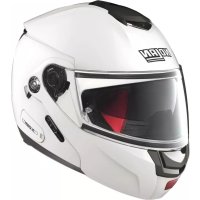
USER MANUAL N902 SPECIAL NCOM Nolan
SAFETY AND INSTRUCTIONS FOR USE
LEXAN is a trademark of SABIC
CONGRATULATIONS... for the purchase of your new helmet.
This helmet has been designed and created to be a modern, high performing product, able to satisfy the most demanding requests as for safety and comfort. This is made possible by the helmet design, its ergonomic, comfort and aerodynamic properties as well as its practical and easy-to-use controls.
SAFETY AND NORMS OF USE
IMPORTANT
- Before using the helmet read this booklet and all enclosed documents carefully, in that they contain very important indications on how to use the helmet easily and safely.
- Failure to observe these instructions may reduce the protection provided by the helmet and consequently put your safety at risk.
USING THE HELMET
- The helmet has been specifically designed for motorcycle and motorbike use therefore it must not be used for other purposes (or uses or scopes). Equal protection is not guaranteed for any use different from the intended one.
- In case of accident, the helmet represents a protective element, which reduces injuries and head damage. This notwithstanding, it cannot alone prevent serious and/or fatal injuries due to the specific accident dynamics, therefore drive carefully.
- When driving any motorcycle, always wear the helmet properly fastened in order to fully exploit its protection.
- Never wear scarves under the fastening system nor caps of any sort under the helmet.
- The helmet can muffle traffic noises. However make sure that you can hear essential sounds such as horns and emergency vehicle sirens.
- Always keep the helmet away from heat sources like the exhaust muffler, the bag seat or the interior of a vehicle.
- Do not modify nor damage the helmet or part of it for whatsoever reason. Use only original accessories and/or spare parts suitable for your specific helmet model.
- Damage resulting from accidental fall may not be visible; helmets, which received violent impacts, are to be replaced.
In case of doubt about the helmet integrity and safety, avoid using it and contact an authorized dealer to let it check.
CHOOSING THE HELMET
Size
In order to determine the correct helmet size, try on helmets of different sizes and choose the one which suits best the shape of your head and which you feel firm once worn and fastened, thus ensuring a great comfort.
- Should the helmet be too big, it may slide down covering the eyes or turn slowly to the side while riding.
- Keep it on for a few minutes and make sure there are no points of extreme pressure that may cause pain or headache.
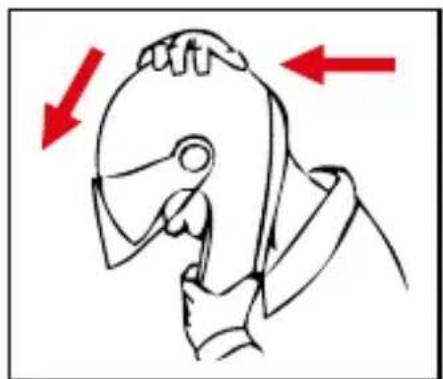
Taking off the helmet
-
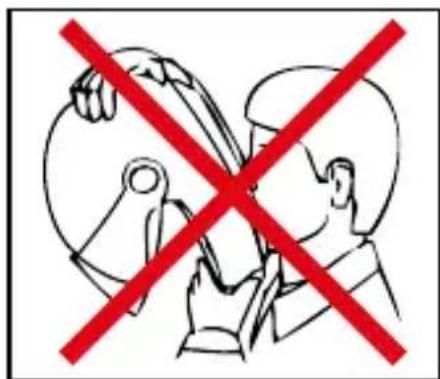
With the helmet on and the strap securely fastened, try to take the helmet off as shown in Fig. A. In case of accident the different forces at stake and their various directions may result in helmet rotations or they may even cause the helmet to slip off if it is not securely fastened.
-
The helmet should not rotate nor move on the head and should not slide off. Should the contrary happen, adjust strap length or change helmet size. Repeat test.
Retention System
- The retention system (wrap) is factory-adjusted at a standard length. Before use, check that it is correctly pre-adjusted.
- Make sure the strap is properly fastened and tightened so as to keep the helmet firmly in place. Anyway, before riding, make sure that the strap is well fastened under the chin, as close as possible to the throat, but without being uncomfortable.
- The correct strap tension should allow normal breathing and swallowing, but without leaving the space of a finger between strap and throat.
- Attention: the button which may be present on the strap only prevents its end from flapping once the strap has been fastened properly.
VISOR
- If the visor is damaged or deeply scratched causing reduced visibility, this means that the protective treatment is probably damaged so the visor is to be replaced.
- The visor can be used only for the intended helmet model.
- Do not paint nor apply stickers.
MAINTENANCE AND CLEANING
- Damage resulting from accidental fall may not be visible; helmets, which received violent impacts, are to be replaced.
- Attention: Helmet and visor may be seriously damaged by some common substances without the damage being however visible. Use only lukewarm water and mild soap to clean helmet and visor, and then let them dry at room temperature away from sunrays and/or heat sources.
- Attention: Never use petrol, thinner, benzene, solvents nor other chemicals which may:
-
Irreparably damage the helmet;
-
Modify optical properties, reduce mechanical ones and weaken the visor protective treatment.
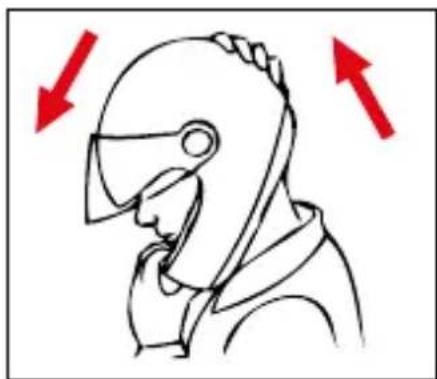
Fig. A
INSTRUCTIONS FOR USE
The helmet can be used in two configurations: with chin guard closed (P configuration) or with chin guard open (J configuration).
Using the helmet with chin guard and visor closed definitely guarantees a higher level of protection if compared with the other configuration.
DUAL ACTION
This unique chin guard opening system - positioned in the centre of it - allows for easy, one-handed opening and prevents it from accidentally opening because chin guard can only be opened after actuating the first red release lever to allow second red lever to open.
NOTE: the configuration with chin guard open and VPS raised is recommended to ensure a better fit of the helmet.
1.ChinGuardOpening
1.1. Push the red release lever outwards by turning it with your thumb (Fig.1).
1.2. Place your forefinger on top of the opening lever and push it downwards to unlock the chin guard (Fig.2).
1.3. Pull and gently rotate the chin guard forwards then upwards (Fig.3).
Warning: If you use your helmet with chin guard open (J configuration), we recommend that the left side lock slider be placed in position "J" to secure chin guard in its lifted position (Fig.4B).
2.ChinGuardClosing
Warning: Make sure the left side lock slider is in position "P" to be able to allow chin guard closing (Fig.4A).
2.1. Pull the chin guard downwards, accompanying it as it rotates, until you hear the clicks of the closing mechanism. (Fig.3).
2.2. Make sure the chin guard is correctly fastened by pulling it forward and by checking that both sides remain fastened to the shell.
When the left side lock slider is in position "P", the chin guard can be opened or closed (Fig.4A).
When the left side lock slider is in position "J", the chin guard cannot be closed and remains locked in the open position (Fig.4B).
Warning: When the left side lock slider is in position "J", do not force chin guard closing. This can damage helmet closure mechanism. Move then the lock slider into position "P" whenever you want to close the chin guard (Fig.4A).
WARNING
- The protection level of this helmet while riding depends on the configuration adopted by the user as follows. Total protection with chin guard and visor closed, partial protection with chin guard and/or visor open.
- Do not remove nor adjust the screws fixing chin guard to shell.
- Do not use the helmet without chin guard.
- Never use the helmet in case the chin guard opening system fails or is damaged. In case of doubts regarding the correct operation of the chin guard opening mechanism, contact a Nolan authorized dealer.
VISOR
3.VisorDisassembly
3.1. Close the chin guard and open the visor completely.
3.2. Press and hold the visor release button (A) and slide the visor forwards until it clicks. (Fig.5).
3.3. Release visor fastenings (B1 and B2) from their seats (Fig.6).
3.4. Repeat the same steps on the other side of the helmet.
4.VisorAssembly
4.1. Close the chin guard and open the visor by shifting the visor fastening hooks (B1 and B2) in correspondence with the slots in the visor mechanism (Fig.6).
4.2. Insert fastening hook B1 in the provided housing and press the visor against the shell in correspondence with hook B2, by pushing the visor release button (A) as well.
4.3. Slide the visor backwards until the visor release button (A) clicks.
4.4. Repeat the same steps on the other side of the helmet.
4.5.Closethevisorcompletely.
WARNING
- Make sure that the mechanisms are working properly. Open the visor; while lifting the chin guard, the visor should automatically close. If necessary, repeat the above-mentioned steps.
- Make sure that the mechanisms are working properly. Open and close the visor, making sure that the mechanisms hold it in the different positions. If need be, repeat the above-mentioned steps.
- Do not use the helmet if the visor has not been assembled properly.
- Do not remove the side mechanisms from the chin guard.
- Should any of the side mechanisms fail or be damaged, please refer to a Nolan authorized dealer.
PINLOCK
(Available as standard or accessory/spare part)
5.InnerVisorPINLOCK ® Assembly
5.1. Disassemble the visor (see instructions above).
5.2. Make sure that the inner surface of the visor is clean and check that the pin ad-justment external levers are turned inwards (Fig.7).
5.3.PutthePINLOCK 器 inner visor onto the visor.
Warning: The silicone-sealed profile of the PINLOCK ^ inner visor should be in contact with the inner surface of the visor.
5.4. Insert one side of the PINLOCK inner visor on one of the two visor pins and hold it in position (Fig.8).
5.5. Widen the visor and fasten the other side of the PINLOCKNner visor to the second pin (Fig.9).
5.6.Releasethevisor.
5.7. Remove the protective film from the PINLOCKKnner visor and check that the entire silicone-sealed profile of the inner visor adheres to the visor.
5.8. Fit the visor on the helmet - as per instructions above.
Checking and Adjusting the PINLOCK® Inner Visor Stretch
Check the correct PINLOCK® inner visor assembly by opening and closing the visor and make sure that they do not move. If the PINLOCK® inner visor is not tightly fixed to the visor, move gradually both external adjustment levers upwards to stretch (Fig.8). The maximum stretch is achieved when the pin adjustment external levers are turned outwards.
WARNING
- The presence of dust between the two visors may scratch both surfaces.
-ScratchedPINLOCK ^® visors and inner visors may reduce visibility and should therefore be replaced.
- Regularly check the correct stretch of the PINLOCK® inner visor to prevent it from moving and scratching both surfaces.
- If the helmet visor fogs up and/or condensation forms between the visors, check that the PINLOCK® inner visor is both correctly assembled and stretched.
- An excessive and early stretch of the PINLOCK inner visor may result in excess-sive adherence against the visor surface and/or permanent deformations with subsequent inability to correctly perform any following adjustments.
- Intense sweating/breathing, the use under particular weather conditions - low temperatures, high humidity, sudden changes in temperature, heavy rain - or wear may affect the performance of the PINLOCK® inner visor and cause fogging or condensation. In such cases, remove the PINLOCK® inner visor from the helmet visor and let it dry with dry and warm air after use, to restore its performance. The same procedure should be applied to the helmet in order to dry out humidity in case it has formed up as a consequence of the conditions described above.
6.PINLOCK ® Inner Visor Disassembly
6.1. Remove the visor with PINLOCKinner visor as per instructions above.
6.2. Widen the visor and release the PINLOCKinner visor from its pins (Fig.7).
6.3.Releasethevisor.
Maintenance and Cleaning
-RemovethePINLOCK ^内 inner visor from the visor. Using a damp and soft cloth, gently clean it with neutral liquid soap. Remove the soap under running water.
Dry the inner visor with dry and warm air without wiping it.
- Let the helmet dry in a ventilated and dry place with the visor open after use. Keep it away from heat sources and store it in a place away from direct light. This way inner visor will be kept in good conditions over time.
- Do not use solvents nor chemicals.
VISION PROTECTION SYSTEM (VPS)
The exclusive inner VISION PROTECTION SYSTEM (VPS) is a LEXAN™(*) polycar-bonate moulded sunscreen with scratch-resistant/fog-resistant treatment. It is very simple and practical to use. Just lower to activate it or lift to remove it from the field of vision. It is useful in all sorts of situations, both on long journeys out of town and shorter town trips.
Moreover, the innovative fastening system allows you to assemble and disassemble the sunscreen without the need for any tools for ordinary maintenance and cleaning operations.
(1) LEXAN is a trademark of SABIC.
VPS Operation
The VPS mechanism allows to activate the sunscreen by simply lowering it until it partially covers the visor field of vision. This way, the desired light transmittance reduction is achieved. At any time, without operating the visor, the VPS can be deactivated with a simple movement and easily lifted up to restore the normal conditions of visibility and protection guaranteed by the approved helmet visor.
To deactivate the VPS, push the side slider completely downwards (Fig.10A). To completely activate the VPS push the side slider completely upwards (Fig.10B).
Precautions for Use
The current approval standards (ECE22-05) state that the visor minimum light transmittance levels should be greater than 80% when riding at night and not less than 50% when riding during the day. For this reason, when riding during the day under particularly bright weather conditions, e.g. very strong sunlight caused by high intensity and/or incidence of the sunbeams, the use of sunglasses - which have a transmittance much lower than 50% - turns out to be advisable, if not absolutely necessary, to reduce eye fatigue on long trips. Sunglasses also reduce the risk of direct dazzling as opposed to the use of mere approved helmet visor. However, the use of sunglasses makes it difficult to perform emergency manoeuvres when the maximum visibility range of the visor should be quickly restored. Just think, for example, of what happens when you enter a tunnel or when unexpected changes in environmental brightness occur. Thanks to its operating mechanism, the VPS makes these operations much easier.
WARNING
- Use the special slider to activate/deactivate the VPS. Do not deactivate the VPS by handling it directly.
The VPS can only be used during the day and under the environmental conditions described before.
- At night and/or in conditions of poor visibility, the VPS should be deactivated.
- Always check that the VPS is properly positioned according to different weather/environmental conditions and/or the above-mentioned recommendations for use.
We recommend using the VPS only and solely together with the approved standard visor, which has a transmittance value greater than 80% .
- The VPS does not replace the protection guaranteed by the visor.
- Always make sure that the VPS is clean and that it is operating properly in order to avoid scratches and/or anomalous wear on it every time it is activated.
- As for VPS and visor maintenance and cleaning operations, please refer to the appropriate section in the helmet user's manual.
The VPS scratch-resistant/fog-resistant treatment highly reduces fogging. Pro-tracted periods of adverse weather and/or environmental conditions might cause fogging and/or formation of condensation on the VPS, which entails a reduction of visibility and/or sharpness of vision: in this case, deactivate the VPS.
In case of rain, the direct contact of raindrops with the scratch-resistant/fog-resistant treated VPS quickly reduces sharpness of vision, thus causing scarce visibility: in this case, deactivate the VPS.
- The special VPS fog-resistant treatment is usually sensitive to high temperatures or heat sources. In this case, contaminations caused by contact with other materials might occur. These contaminations will cause marks and stains to develop. In these cases (e.g. when the helmet is kept in the top case on hot days), it is recommended to make sure the VPS is not touching other materials.
7.VPSDisassembly
To remove the sun screen from the helmet, lift the helmet chin guard and lower the VPS by rotating the side slider completely upwards (Fig.10B).
Hold the left side of the sun screen and pull it outwards (Fig.11).
Repeat the same operation on the right side of the helmet.
8.VPSAssembly
To assemble the sun screen on the helmet, lift the helmet chin guard and push the side slider completely upwards (Fig.10B).
Insert the sun screen left end into the left side guide until the grip pawl is hooked in shell housing (Fig.11).
Repeat the same operation on the right side of the helmet.
WARNING
- Make sure the VPS operates correctly by moving the left side lock slider towards the bottom (Fig.10A) and the top side of the helmet (Fig.10B).
If necessary, repeat the above-mentioned steps.
- If the VPS opening/closing mechanisms are not working properly or if such mechanisms get damaged, please contact a Nolan authorized dealer.
- Do not use the helmet if the VPS has not been assembled properly.
Since the VPS does not assure you the same protection as the one provided by the visor, it has to be used only when the helmet visor is lowered.
REMOVABLE INNER COMFORT PADDING
To remove the inner comfort padding, lift the VPS and the chin guard of the helmet (see instructions above).
9. Inner Comfort Padding Disassembly
9.1. Open the chin strap (see related instructions) and release the band from the possible presence of elastic loops on the straps.
9.2. Pull the front part of the left cheek pad towards the inside of the helmet to release the snap fastener from its frame (Fig.12).
Follow the same steps on the right side of the helmet.
9.3. Release the roll neck left eyelet from the left side frame (Fig.13).
Follow the same steps on the right side of the helmet.
9.4. Release the left snap fastener located on the back of the cheek pad near the roll neck from the outer shell (Fig.14).
Follow the same steps on the right side of the helmet.
9.5. Remove left and right side flaps of the comfort padding from the cavity between the inner polystyrene cheek pads and the outer shell (Fig.15).
9.6. Release the liner left rear flap from the support fixed to the inner polystyrene shell by slightly deforming the shell edge and slightly pulling the comfort padding towards the inside (Fig.16).
Then repeat the same steps to remove the central flap as well as the right flap.
9.7. Hold the left front part of the liner and pull it upwards in order to remove the liner flap from the support fixed to the polystyrene inner shell (Fig.17).
Then repeat the same steps for the central front and right flap.
9.8. Remove the chin straps from the liner (Fig.18).
9.9. Completely remove the liner from the helmet.
10. InnerComfortPaddingAssembly
10.1. Insert the liner correctly into the helmet and fit it well against the base.
10.2. Insert the chin strap into the corresponding slot in the cheek pad area of the liner (Fig.18). Follow the same steps on the right side of the helmet.
10.3. Insert the left front flap of the liner into its seat on the support fixed to the polystyrene inner shell and push it downwards until it is completely locked.
Follow the same steps for the central and right flap (Fig.17).
10.4. Insert the right and left side flaps of the liner pushing them into the cavities between the inner polystyrene cheek pads and the outer shell (Fig.15).
Note: Check the correct assembly of the liner front area by lifting and lowering the VPS. These movements should be smooth. If this is not the case, repeat the steps 9.6 and 10.3.
10.5. Insert the rear right, central and left flaps of the liner into the relevant seats on the support fixed to the polystyrene inner shell by slightly deforming the shell edge (Fig.16). Push the flaps until they are fully hooked onto the support.
10.6. Place the back slot of the roll neck around the left snap fastener on the back of the cheek pad. Hook the button to the outer shell (Fig.14). Follow the same steps on the right side of the helmet.
10.7. Hook the roll neck left eyelet to the left side frame (Fig.13). Follow the same steps on the right side of the helmet.
10.8. Press the left cheek padding in correspondence to the snap fastener located on its back. Hook the button to the provided housing of the frame fixed to the shell (Fig.12). Follow the same steps on the right side of the helmet.
10.9. Insert the chin strap band through the elastic loops that may be on the strap.
WARNING
-
If your helmet is equipped with the D-Ring retention system, pull it down as indicated in the attached D-Ring label.
-
Remove the inner comfort padding only when cleaning or washing is required.
- Never use the helmet before completely and correctly reassembling its inner comfort padding.
Delicately hand-wash in lukewarm water (max. 30^ ) and neutral soap.
Rinse with cold water and allow drying at room temperature, away from direct sunlight.
- Never machine-wash the inner comfort padding.
The inner polystyrene is an easily deformable material. It is apt to change or get partially destroyed to help absorb shocks.
- Do not modify or alter the helmet's internal polystyrene components in any way.
Clean the inner components with a damp cloth only and allow it to dry at room temperature away from direct sunlight.
- Do not modify or alter the helmet's internal polystyrene components in any way.
- Never use tools or equipment of any sort to carry out the steps described above.
WIND PROTECTOR
(Available as standard or accessory/spare part)
This accessory allows improved helmet performance under certain conditions of use.
The Wind Protector reduces unpleasant infiltrations of air under the chin.
See Fig.19 for the assembly and disassembly.
VENTILATION
The ventilation system of the helmet consists of:
Upper air intake: provides homogeneous ventilation to the upper side of the head even at low speed and regardless of the VPS position.
See Fig.20 for opening and closing operations.
Chin guard air intake: allows ventilation in the mouth area and conveys the air directly on the visor reducing fogging. See Fig.21 for opening and closing operations.
Rear extractor: allows warm and stale air to flow out, ensuring maximum comfort inside the helmet (Fig.22).
(Available depending on the product version).
Your Nolan helmet is factory-preset to be equipped with the N-Com communication system. During the communication system installation (see the specific instructions contained in the N-Com kit), it will be necessary to remove the foam material fillers located in the polystyrene cheek pads next to the N-Com earphones seats.
WARNING
- The above-mentioned fillers should only be removed if the helmet is used with an N-COM compatible system installed.
MOUSSE INTÉRIÉURE DE CONFORT, AMOVIBLE
MANUTENÇÂO E LIMPEZA
(1) LEXAN is a trademark of SABIC.
(1) LEXAN is a trademark of SABIC.
Tou Kpavouc, oTWC yia TnapadElyma OuBaivei otav mTnaievkaveic 6 eva TouveA h, Yevka, OTAV TAPOUATCovTAt aIVPVIDEC METAOECTG PWTELVOTNTAC Tou TEPiABALovTOc. XApn oTo mXavioo AetoupyiaC Tou, OTNV TEPiTTWOn Tou VPS, oi Xeiplooi autoi AVTIeTA ANLOTTOLOVtAI.
PPOOxH