SoundOne - Docking station Wentronic - Free user manual and instructions
Find the device manual for free SoundOne Wentronic in PDF.



User questions about SoundOne Wentronic
0 question about this device. Answer the ones you know or ask your own.
Ask a new question about this device
Download the instructions for your Docking station in PDF format for free! Find your manual SoundOne - Wentronic and take your electronic device back in hand. On this page are published all the documents necessary for the use of your device. SoundOne by Wentronic.
USER MANUAL SoundOne Wentronic
natural_image
Black and white photo of a CABSTONE portable radio with no visible text or symbols on the device body.
DESIGNED IN GERMANY
| DE | BETRIEBSANLEITUNG |
| UK | USER MANUAL |
| FR | MODE D'EMPLOI |
| IT | ISTRUZIONI PER L'USO |
| ES | MANUAL DEL USARIO |
| DK | BRUGERMANUAL |
| SE | BRUKSANVISNING |
| CZ | UŽIVATELSKÁ PŘÍRUČKA |
| KR | 에 대한 사용 설명서 |
| CN | 用户手册 |
| RU | РУКОВОДСТВО ПОЛЬЗОВАТЕЛЯ |
| PL | INSTRUKCJA OBSŁUGI |
| JP | ユーザーズマニュアル |
| TH | คุมื้อการใช้งานบลุทู ๓ สําหรับ |

BETRIEBSANLEITUNG
BETRIEBSANLEITUNG 2
USER MANUAL 10
MODE D'EMPLOI 18
ISTRUZIONI PER L'USO 26
MANUEL DEL USARIO 34
BRUGERMANUAL.... 42
BRUKSANVISNING 50
UŽIVATELSKÁ PŘÍRUČKA 58
INSTRUKCJA OBSŁUGI 66
natural_image
Two technical diagrams showing a component being inserted into a housing, with no visible text or symbols.1 Safety Instructions.... 11
1.1 General Notes 11
2 Description and Function.... 11
2.1 Scope of Delivery.... 12
2.2 Operating elements.... 12
3 Intended Use 13
4 Energy supply 13
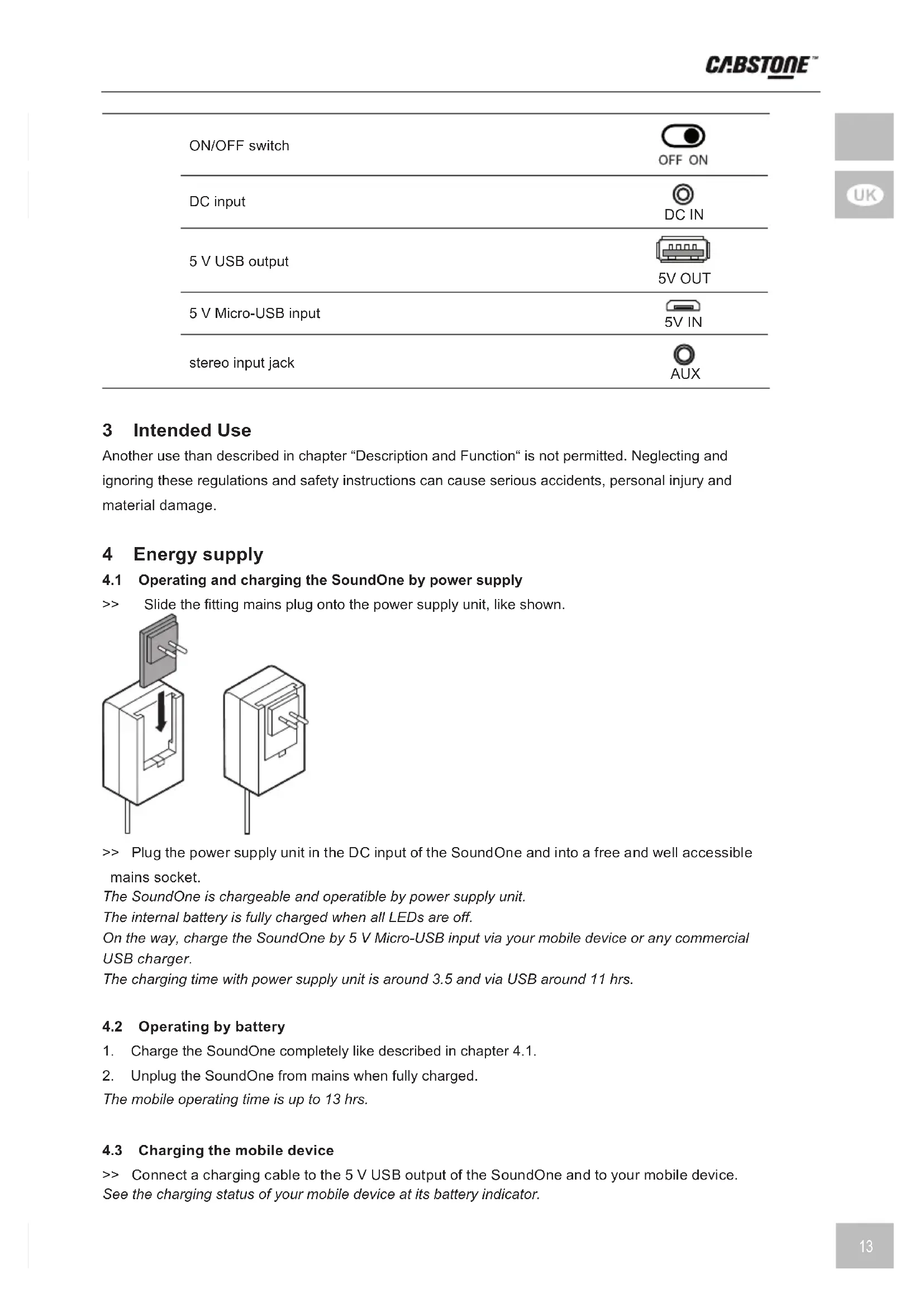
4.1 Operating and charging the SoundOne by power supply..... 13
4.2 Operating by battery 13
4.3 Charging the mobile device 13
5 Connecting and disconnecting devices.... 14
5.1 Connecting devices by bluetooth.... 14
5.2 Connecting devices by Bluetooth via NFC 14
5.3 Disconnecting the Bluetooth connection 14
5.4 Connect and disconnect devices by audio cable.... 14
5.5 Taking the device out of operation 14
6 Playing music 14
6.1 Set the volume 14
6.2 Play and Pause 14
6.3 Changing titles 15
7 Telephoning 15
8 Status indicators.... 15
9 Specifications 15
10 Maintenance, Care, Storage and Transport 16
11 Disposal Instructions 16
12 EC Declaration of Conformity 17
1 Safety Instructions
1.1 General Notes
- Read the including product documentation completely and carefully before use. It is part of the product.
- Attend to the safety instructions in product documentation, on product and accessories, such as on the package.
- Use product, product parts and accessories only in perfect condition.
- Keep the product documentation for other potential users and for later requests.
- For questions, defects, mechanical damage, disturbances and other not remediable problems, consult your dealer.
Notes for network separation of the power supply unit
The product has no power switch and must be used only in easily accessible outlets to quickly remove it in an emergency and after use.
Voltage-free only with pulled plug.
In case of emergency, during thunderstorms and after use, pull the product on its plug housing!
Risk of self-intervention and misuse
Do not modify or alter either the product or the accessories!
Do not open the housing.
Do not short-circuit ports and circuits.
Only use the supplied power supply.
Risk of injury by inappropriate ambient conditions
Do not use in road traffic, so that important signals are not drowned out.
Risk of permanent damage to health
Do not turn the music too loud to avoid hearing damage. Permanent high noise levels may damage your hearing permanently.
Risk of magnetism
The product contains magnetic materials.
Regarding their compatibility with implanted medical devices, consult a doctor.
Risk of injury by cutting
Protect small parts and insulation material against unintentionally use.
Material damage
The specifications of all used products must match or be within the specified range.
Use product, product parts and accessories only in perfect condition.
Avoid extreme conditions, such as extreme heat, coldness, humidity or direct exposure to the sun, as well as vibrations and mechanical pressure.
Only use in dry ambience.
Dispose leaked, deformed or corroded by appropriate protectives.
Clean only with a dry, soft cloth.
Do not use cleaning agents and chemicals.
2 Description and Function
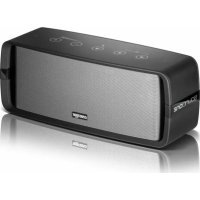
The SoundOne is a versatile Bluetooth auxiliary speaker that allows you to
play music from your mobile device via Bluetooth or cable. It is supplied with an external power supply, powering the SoundOne at home and charges the internal, permanently installed lithium-ion battery for mobile use. Charge your mobile device with the additional USB port on the go during music playback.


The 5 V Micro-USB port allows charging the SoundOne from your mobile device or from a commercial USB charger. Use the touch panel to control the most important audio functions, depending on your smartphone model. The built-in microphone additionally offers a speakerphone.
2.1 Scope of Delivery
| part figure amount | ||
| SoundOne |  | 1 |
| power supply unit with 2 AC plugs | 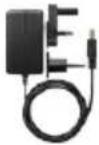 | 1 |
| audio cable | 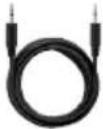 | 1 |
2.2 Operating elements
| operating element figure | ||
 | play previous song |  |
| play next song |  | |
| play music>> play and pause | ||
 | telephone calls>> answering call>> quit call |  |
| volume down |  | |
| volume up |  | |
| location of the NFC chip NFC | ||
| ON/OFF switch |  OFF ON OFF ON |
| DC input | DC IN |
| 5 V USB output | 5V OUT |
| 5 V Micro-USB input | 5V IN |
| stereo input jack | AUX |

3 Intended Use
Another use than described in chapter "Description and Function" is not permitted. Neglecting and ignoring these regulations and safety instructions can cause serious accidents, personal injury and material damage.
4 Energy supply
4.1 Operating and charging the SoundOne by power supply
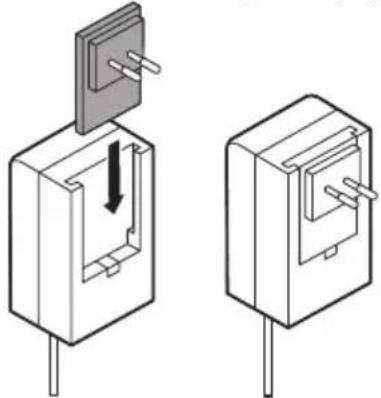
Slide the fitting mains plug onto the power supply unit, like shown.
natural_image
Two technical line drawings of electronic components with pins, showing a close-up and disassembly (no text or symbols)Plug the power supply unit in the DC input of the SoundOne and into a free and well accessible mains socket.
The SoundOne is chargeable and operatible by power supply unit.
The internal battery is fully charged when all LEDs are off.
On the way, charge the SoundOne by 5 V Micro-USB input via your mobile device or any commercial USB charger.
The charging time with power supply unit is around 3.5 and via USB around 11 hrs.
4.2 Operating by battery
- Charge the SoundOne completely like described in chapter 4.1.
- Unplug the SoundOne from mains when fully charged.
The mobile operating time is up to 13 hrs.
4.3 Charging the mobile device
Connect a charging cable to the 5 V USB output of the SoundOne and to your mobile device. See the charging status of your mobile device at its battery indicator.

5 Connecting and disconnecting devices
5.1 Connecting devices by bluetooth
- Switch the ON/OFF switch
The SoundOne automatically starts the Bluetooth mode. - Switch on the Bluetooth function of your mobile device.
- Search "SoundOne" in the device list and connect it.
If your mobile device requires a password, enter "0000".
After successfully connecting, a short beep tone sounds.
The SoundOne is now ready for playing music.


5.2 Connecting devices by Bluetooth via NFC
- Switch the ON/OFF switch
The SoundOne automatically starts the Bluetooth mode.

-
Switch on the NFC function of your mobile device.
-
Hold the NFC sensor of your mobile device to the SoundOnes' NFC sensor.
Your mobile device automatically starts the Bluetooth mode and requires confirming of the connection.
- To confirm the connection request with the soundOne.
After successfully connecting, a short beep sounds.
The SoundOne is now ready for playing music.

5.3 Disconnecting the Bluetooth connection
Press both buttons 🔊 and ⏻ simultaneously for disconnecting.
5.4 Connect and disconnect devices by audio cable
Connect the supplied audio cable to the stereo input jack of the SoundOne and your mobile device.
Switch the ON/OFF switch OFF ON to ON.
The Bluetooth mode is deactivated.
Disconnect all cable connections after use and to reactivate Bluetooth function.
5.5 Taking the device out of operation
- Disconnect all Bluetooth and cable connections when not in use.
- Switch the ON/OFF switch OFF ON to OFF.
- Disconnect the power supply unit from mains.
- Read chapter "Maintenance, Care, Storage and transport".
6 Playing music
6.1 Set the volume
Adjust a low volume level at your mobile device.
Set the volume by buttons ⊕ / of the SoundOne or via your mobile device.
6.2 Play and Pause
Play and pause music with the ⏻ button of the SoundOne or via control center of your mobile device.
6.3 Changing titles
Press 🖼 button for previous or 📊 button for next music title.
7 Telephoning
Go to the vicinity of SoundOne so its microphone detects your voice.
Answer and quit calls with the 🏠 / button.
The SoundOne interrupts playing music and plays the ringtone of your mobile device.
8 Status indicators
status LED display mode speed
| connecting | blue | flashing | slow |
| connected | - | OFF | - |
| Battery capacity <10 % or input voltage <6.4 V | white | flashing | slow |
| charging while connected | white | ON | - |
| charging while connecting | white | ON | - |
| charged and connected | - | OFF | - |
| charged while connecting | blue | flashing | slow |
| max. volume | white | flashing | fast |
9 Specifications
speakers
| audio formats: | HD Audio, Stereo |
| max. output power (W): | 2x 3.5 (R/L)+6 (Subwoofer) |
| construction: | 3 way system |
| frequency range (Hz): | 55-20000 |
| SNR (dB): | >65 |
| impedance (Ω): | 4 |
| microphone | |
| frequency range (Hz): | 50-10000 |
| impedance (kΩ): 2.2 | |
| sensitivity (dB): | 42 (±3) |
| battery | |
| type: | Lithium-Ion |
| permanently integrated: | yes |
| voltage (V): | 7.4 |
| max. capacity (mAh): | 2,600 |
| max. operating time (hrs): | 8 @ 75 % Vol., 13 @ 50 % Vol. |
| max. charging time (hrs): | 3.5 @ 9.5 V/1.5 A, 11 @ 5 V / 0.5 A |
| connections | |
| input, type: | DC socket |

| input 2, type: Micro-USB socket (type B) |
| input 3, type: 3.5 mm STEREO jack |
| output, type: USB-A 2.0 socket (type A) |
| output, voltage (V DC): 5 |
| output, max. current (A): 1.0 |
power supply
| input, voltage (V AC): 100-240 |
| input, current (A): 0.45 |
| mains frequency (Hz): 50/60 |
| output, voltage (V DC): 9.5 |
| output, current (A): 1.5 |
compatibility
| Apple: MacBook, iPhone, iPad, iPad mini, iPod | |
| Samsung: Samsung Books, Galaxy Tab, Galaxy S, etc. | |
| others: | many Bluetooth capable notebooks, tablets, mobile phones, etc. |
general
| color: black | |
| material: ABS | |
| width (mm): 300 | |
| height (mm): 115 | |
| depth (mm): | 120 |
| weight (g): | ~1,500 |
radio technology
| Bluetooth reach (m): | max. 10 (varies by mobile phone and structural conditions) |
| Bluetooth version: | 4.0 |
| frequency range (MHz): | 2,402-2,480 |
| Bluetooth protocol: | A2DP V1.2\HFP V1.6 |
10 Maintenance, Care, Storage and Transport
Clean only with a dry, soft cloth.
Do not use cleaning agents and chemicals.
When not in use for longer time, charge the product every 3 months to keep the capacity.
Store cool and dry.
Keep and use the original packaging for transport.
11 Disposal Instructions
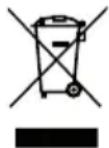
According to the European WEEE directive, electrical and electronic equipment must not be disposed with consumers waste. Its components must be recycled or disposed apart from each other. Otherwise contaminative and hazardous substances can pollute our environment.
As a consumer, you are committed by law to dispose electrical and electronic devices to the producer, the dealer, or public collecting points at the end of the devices lifetime for free. Particulars are regulated in national right. The symbol on the product, in the user's manual, or at the packaging alludes to these terms. With this kind of waste separation, application, and waste disposal of used devices you achieve an important share to environmental protection.
12 EU Declaration of Conformity
CE With the CE sign Cabstone ^TM , a registered trademark of the Wentronic GmbH ensures that the product is conformed to the basic standards and other provisions of directive
1999/5/EC or 2014/53/EU and all applicable EU directives. The full EC Declaration of Conformity is available at https://www.wentronic.com/.

MODE D'EMPLOI
BETRIEBSANLEITUNG 2
USER MANUAL.... 10
MODE D'EMPLOI 18
ISTRUZIONI PER L'USO 26
MANUEL DEL USARIO 34
BRUGERMANUAL.... 42
BRUKSANVISNING 50
UŽIVATELSKÁ PŘÍRUČKA 58
INSTRUKCJA OBSŁUGI 66
natural_image
Two technical line drawings of a mechanical component with a pull-up and downward arrow, shown from different angles (no text or symbols)natural_image
Two technical diagrams showing a component being inserted into a housing, with no visible text or symbols.natural_image
Two technical line drawings of a component with a pull-up and internal structure, showing no text or symbols.Alcance Bluetooth (m):
natural_image
Two isometric diagrams of a device with a switch and internal components, showing no text or symbols.natural_image
Two technical diagrams showing a component being inserted into a housing, with no visible text or symbols.natural_image
Two technical line drawings of a mechanical component with a pull-up section showing internal structure (no text or symbols)natural_image
Two technical line drawings of a mechanical component with a pull-up and internal structure, showing no text or symbols.natural_image
Two technical diagrams showing a component being inserted into a box, with no visible text or symbols.https://www.wentronic.com/.
用户手册
BETRIEBSANLEITUNG 2
USER MANUAL.... 10
MODE D'EMPLOI.... 18
ISTRUZIONI PER L'USO 26
MANUEL DEL USARIO 34
BRUGERMANUAL.... 42
BRUKSANVISNING.... 50
UŽIVATELSKÁ PŘÍRUČKA 58
INSTRUKCJA OBSŁUGI 66
natural_image
Two technical line drawings of a mechanical component with a pull-up and mounting features, showing internal structure (no text or symbols)natural_image
Two technical line drawings of a mechanical component with a pull-up and internal structure, showing no text or symbols.natural_image
Two technical diagrams showing a component being inserted into a housing, with one part highlighted by a downward arrow (no text or symbols present)natural_image
Two technical diagrams showing a component being inserted into a housing, with one part highlighted by a downward arrow (no text or symbols present)natural_image
Black soundstone portable speaker with visible grille and control buttons (no text or symbols on body)Cabstone™
by Wentronic GmbH
Pillmannstraße 12
38112 Braunschweig
Germany
Designed in Germany, made in China.
Hotline: +49 (0180) 5002524
Web: www.cabstone.com