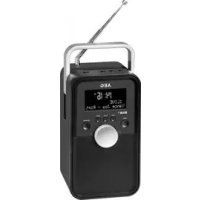
DR 4149 DAB+ - Radio AEG - Free user manual and instructions
Find the device manual for free DR 4149 DAB+ AEG in PDF.



| Product type | DAB+/FM Radio |
| Brand | AEG |
| Model | DR 4149 DAB+ |
| Display | LCD screen with backlight |
| Antenna | Telescopic antenna |
| Mains power supply | DC 5V / 2A mains adapter |
| Battery | Li-ion 3.7V 1050 mAh (type BL-5C) |
| Battery life | Approximately 8 hours |
| Charging time | Approximately 2 hours |
| Power consumption | 8 W |
| Net weight | Approximately 0.8 kg |
| FM frequency range | 87.5 – 108.0 MHz |
| DAB/DAB+ frequency range | 174.92 – 239.20 MHz |
| Speaker | Built-in speaker |
| Auxiliary input | AUX-IN socket (3.5 mm jack) |
| Alarms | 2 independent alarms with snooze |
| Radio presets | 30 stations (DAB+ and FM) |
| Sleep function | Adjustable sleep timer (10, 20, 30, 60, 90, 120 min) |
| Brightness adjustment | 3 levels (bright, medium, dark) |
| OSD menu languages | Multilingual (adjustable) |
| Maintenance | Clean with a slightly damp cloth; do not immerse |
| Safety | Do not expose to moisture; do not open the casing |
| Included accessories | Mains adapter, battery, user manual |
Frequently Asked Questions - DR 4149 DAB+ AEG
User questions about DR 4149 DAB+ AEG
0 question about this device. Answer the ones you know or ask your own.
Ask a new question about this device
Download the instructions for your Radio in PDF format for free! Find your manual DR 4149 DAB+ - AEG and take your electronic device back in hand. On this page are published all the documents necessary for the use of your device. DR 4149 DAB+ by AEG.
USER MANUAL DR 4149 DAB+ AEG
DAB stations scanners
Bouton STBY/FUNC (7)
Balayer les stations FM
Digital Audio Broadcasting (DAB) is an institution that focuses on radio-diffusion and information storage. The DAB system is a system of radio frequency broadcasting (RF) and digital transmission (DT). It is a system of radio frequency broadcasting (RF) and digital transmission (DT) in which the radio is transmitted to the user through a fixed channel. Digital Audio Broadcasting (DAB) is a system of radio-diffusion and information storage. The DAB system is a system of radio frequency broadcasting (RF) and digital transmission (DT) in which the radio is transmitted to the user through a fixed channel. Digital Audio Broadcasting (DAB) is a system of radio-diffusion and information storage. The DAB system is a system of radio frequency broadcasting (RF) and digital transmission (DT) in which the radio is transmitted to the user through a fixed channel. Digital Audio Broadcasting (DAB) is a system of radio-diffusion and Information Storage Technology (ISIT) in which the radio is transmitted to the user through a fixed channel. Digital Audio Broadcasting (DAB) is a system of radio-diffusion and information storage. The DAB system is a system of radio-diffusion and information storage.
NOTE:
AM = manana, PM = tarde
DAB/DAB+174,92~239,20MHz
......DAB/DAB+174,92~239,20MHz
Thank you for choosing our product. We hope you will enjoy using the appliance.
Symbols in these Instructions for Use
Important information for your safety is specially marked. It is essential to comply with these instructions in order to avoid accidents and prevent damage to the machine:
WARNING:
Wards of dangers for your health and indicates potential risks of injury.
CAUTION:
Indicates potential dangers for the device or other objects.
NOTE: Highlights tips and information for you.
General Safety Guidelines
Before using this device, carefully read this user manual and keep it together with the Warranty Certificate, cashier receipt and if possible, the original package inclusive its interior packing. If you hand on the device to any third person, include the user manual as well.
- To avoid the risk of fire or electric shock, you should not expose the device to rain or humidity. Do not use the device near water (e.g. bathroom, swimming pool, humid cellars).
- Do not use the unit in extremely hot, cold, dusty, or damp places.
- The unit is designed solely for private use and its intended purpose. This unit is not designed for commercial use.
- Make sure that the power cable is not bent, pinched, or comes into contact with heat sources.
- Make sure that the power cable is not a tripping hazard.
- The power supply unit is only suitable for use in dry rooms.
- Never touch the power supply unit or the cable with wet hands.
- Only connect the power supply unit to a properly installed wall outlet. Ensure that the listed voltage matches the voltage of the wall outlet. Also ensure that the output current, voltage and the polarity of the power supply unit match the information on the connected device.
Always install batteries in the correct direction. - Avoid covering the device's vent openings.
- Never cover the vent holes with objects, such as magazines, tablecloths, curtains etc.
- This appliance shall not be exposed to dripping or splashing water and that no object filled with liquids such as vases shall be placed on apparatus.
-
Open sources of fire, such as e.g. burning candles may not be placed onto the unit.
-
Never open the device's case. Improper repairs can cause severe danger to the user. If the device or particularly the power cord is damaged, don't use the device any further and have it repaired by a qualified specialist. Check the power cord regularly for damage.
- If you do not use the device for a long period of time, pull the power supply unit from the wall socket and/or remove the batteries.
- Disconnect the unit from the power supply for cleaning or if a fault occurs.
These symbols may be found on the machine and are intended to indicate the following:
The lightning symbol should advise the user of parts in the inside of the device which carry dangerously high voltage levels.

The symbol with an exclamation mark should advise the user of important operation or maintenance instructions in the accompanying documentation.
Children and Frail Individuals
- In order to ensure your children's safety, please keep all packaging (plastic bags, boxes, polystyrene etc.) out of their reach.
WARNING!
Do not allow small children to play with the foil. There is a danger of suffocation!
- This device is not intended to be used by individuals (including children) who have restricted physical, sensory or mental abilities and/or insufficient knowledge and/or experience, unless they are supervised by an individual who is responsible for their safety or have received instructions on how to use the device.
Children should be supervised at all times in order to ensure that they do not play with the device.
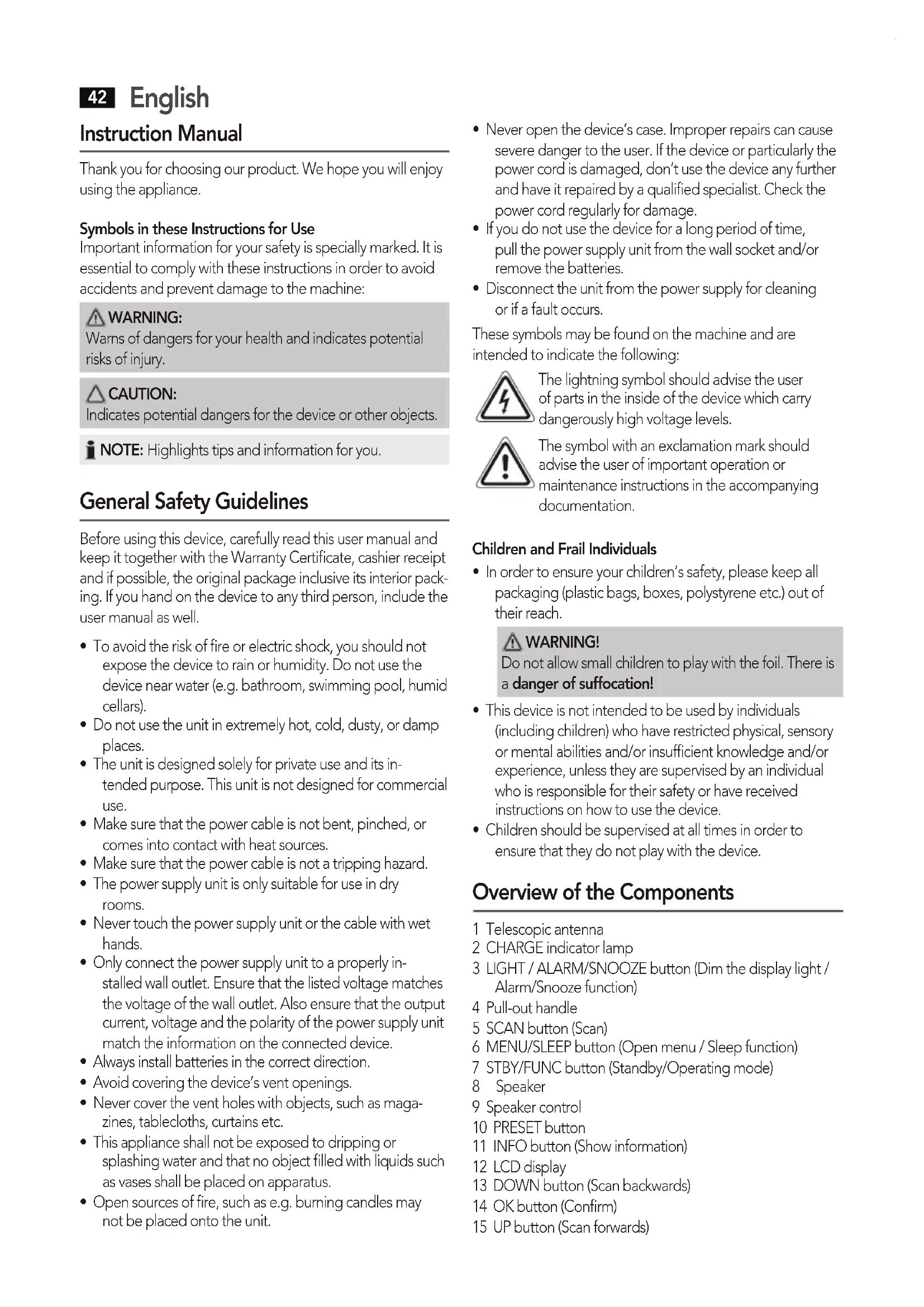
Overview of the Components
1 Telescopic antenna
2 CHARGE indicator lamp
3 LIGHT / ALARM/SNOOZE button (Dim the display light / Alarm/Snooze function)
4 Pull-out handle
5 SCAN button (Scan)
6 MENU/SLEEP button (Open menu / Sleep function)
7 STBY/FUNC button (Standby/Operating mode)
8 Speaker
9 Speaker control
10 PRESET button
11 INFO button (Show information)
12 LCD display
13 DOWN button (Scan backwards)
14 OK button (Confirm)
15 UP button (Scan forwards)
Rear view (without illustration)
Battery compartment
AUX-IN jack
DC 5 V connector
ON/OFF switch (On / Off)
Installation
- Read the manual thoroughly before operating the device!
- Choose a suitable location for the device. Suitable locations are dry, even and antislip surfaces on which you may operate the device easily.
- Make sure there is proper ventilation for the device!
- Sensitive surfaces such as the display may be protected by plastic foil. Remove this foil.
Power supply (Adaptor)
- Make sure the grid voltage corresponds to the figures on the rating plate.
- Insert the grid plug into a properly installed three prong socket. Connect the device with the plug connector by inserting its plug into the DC 5 V jack of the device.
CAUTION:
- Only use the supplied power adaptor for this device.
Do not use for other devices. - Always use the original AC adapter. This adapter is designed to charge the supplied battery efficiently. Other adapters can shorten the life of the battery or may damage the battery or the unit.
NOTE:
- Disconnect from mains power supply during longer periods of non-use.
- The preset time/alarm time is lost as soon as the power supply is interrupted.
Insert the battery / Battery operation
You can also choose to operate the unit with the supplied 3.7 V Li-ion battery.
- Open the battery compartment on the back.
- Insert the supplied battery. Mind the correct polarity (indicated on the bottom of the battery case)!
- Close the battery case.
CAUTION:
- If the unit is out of use for long periods, remove the battery from the unit to prevent the battery acid from "leaking" out.
- Batteries must not be disposed of in the garbage. Please bring used batteries to competent collection centers or back to the dealer.
- Only replace the battery with another battery of the same type.
WARNING:
Do not expose batteries to any high temperatures such as sunlight, fire, or the like. There is a danger of explosion!
Charge the battery
Before you can operate the unit with the battery, you must first charge it.
- Insert the battery. ( see "Insert the battery / Battery operation")
- Connect the unit to the mains socket using the power supply. The indicator lamp CHARGE lights up orange and the battery is charged.
If the battery is fully charged, the indicator lamp CHARGE lights up green.
CAUTION:
Never leave the unit unattended during charging.
NOTE:
The duration of the charging process depends on the charge status of the battery.
First use
- Fully extend the telescopic antenna (1). Stand it upright for initial installation.
- Switch the device on at the back of the device using the ON OFF switch. If the unit does not automatically switch on, press the STBY/FUNC button. The unit starts in FM mode.
- Select the DAB mode using the STBY/FUNC button. The device automatically searches for DAB stations. SCAN-NING... and a progress bar appears on the display. The figure on the right of the display shows the number of radio stations found. The first alphanumeric DAB station is played.
When playing a radio station, the time and date is taken from the broadcasting service. If the device does not receive DAB stations in your location, set the time manually as described in "Settings menu".
Changing the OSD language
The factory default of the OSD menu is German. To change the language, proceed as follows:
- Press the MENU/SLEEP button (6).
- Select the menu option "SYSTEM" with the UP/DOWN buttons (15/13). Set it with the OK button (14).
- Select the menu option "SPRACHE" with the UP/DOWN buttons. Set it with the OK button.
- Select the desired language with the UP/DOWN buttons. Set it with the OK button.

NOTE:
The menu is described with the selected language "ENG-LISH" in the instruction manual.
General operation
Switch the device on/off
- Switch the device on by setting the ON OFF switch on the back of the device to ON.
- Standby / On: Now you can switch the device between Standby and On. Press the STBY/FUNC button in order to do so. Keep the STBY/FUNC pressed for approx. 2 seconds to switch the unit off. The time and the date appear on the display in standby.
- To switch off the device, set the ON OFF switch to OFF. The date and time will be lost by doing so. These will be automatically synchronized the next time a radio station plays. If the received radio station does not transmit the date and time, set them manually. See section on "Settings menu".

NOTE:
- The unit stores the last operating mode before switching off (standby mode). After switching back on, the unit starts in this operating mode.
- The storage of the time/ date will get lost as soon as the device has been shut off with the ON OFF switch, or if the power supply is interrupted.
- In AUX mode: After approx. 15 minutes without a signal, the unit will switch automatically to standby.
STBY/FUNC button (7)
For switching between DAB, FM and AUX mode.
Volume control (9)
Adjust to your preferred volume level.
Delayed shut-off (SLEEP)
The device automatically switches off when the selected time is reached.
- Keep the MENU/SLEEP button (6) pressed. "SET SLEEP TIME SLEEP OFF" appears on the display. Use the UP/DOWN buttons (15/13) to select the time after which the unit should switch off. Select from: 10, 20, 30, 60, 90 and 120 minutes.
- The SLEEP OFF setting deactivates this function.

NOTE:
- If the function is activated, the " " symbol is shown on the display.
- Keep the MENU/SLEEP pressed briefly to display the remaining time.
Display light
Use the LIGHT / ALARM/SNOOZE button (3) to select three different brightness levels for the display. The settings are: bright, medium and dark (off).

NOTE: In operation
After approx. 3 minutes, the display is automatically dimmed to the "dark" setting. Press any button to increase the display light again.
Listening to the radio
Scan FM stations
- Repeatedly press STBY/FUNC button (7) until the display shows "FM MODE".
-
You have two options for tuning a station:
-
Press the UP/DOWN buttons (15/13).
-
Press the SCAN button (5). Depending on which button you have already pressed (UP or DOWN), the unit scans to the next or previous station.
-
If the reception is too weak and there is noise on the received station, try to improve the reception by changing the position of the telescopic antenna.
Show FM information
Press the INFO button (11) to show the following information, if broadcasted by a radio station.
- Radio Text is shown by default on the display. If no information is available, [No RadioText] appears on the display.
- The program type (PTY) of the station is displayed (e.g. Pop music, news etc.). If no PTY is received, [No PTY] appears on the display.
- Display of the radio frequency.
- Display the time.
- Display the date.
Scan DAB stations
Digital Audio Broadcasting (DAB) is a digital broad casing standard for terrestrial reception of digital radio. A list of radio stations which can be received in Germany is available on the Internet at www.digitalradio.de.
NOTE:
In Germany approx. 70% of the country's area is covered by digital radio broadcasts (as of Nov. 2011). In the individual areas however, coverage and provision vary greatly. If the DAB stations in your region cannot be received or only with interferences depending on location, in this case you can switch to the FM band to receive this station. This is only possible however if these stations are broadcast via VHF. Find out more on the internet site of the radio station.
-
Press the STBY/FUNC button (7) repeatedly until "DAB MODE" appears on the display.
-
Press the SCAN button (5). The device then searches for the radio stations which can be received.
- You can select the next or the previous station by using the UP/DOWN buttons (15/13). Confirm your selection with the OK button (14).
- If the reception is too weak and the received station "motorboats", try to improve the reception by changing the position of the antenna.
NOTE:
- For optimum DAB reception, we recommend to align the telescopic antenna vertically.
- To manually set a DAB frequency, proceed as described in the "Settings menu" sections.
Display additional DAB information
In DAB mode, you can display the following additional information if broadcast by the radio station. To do so, press the INFO button (11).
The DLS text is shown on the display by default.
- DLS: Short for Dynamic Label Segment. This involves complementary data. This content may be e.g. information about the station or the music title and artist being played. If information on the track title is transmitted by the station, you can display this information with the INFO button.
- Displays the received signal strength.
- This indicates the station category (e.g. Pop-Music, News etc.).
- Displays the name of the station group (e.g. DR Deutschland).
Frequency of the current radio station. - The "SIGNAL ERROR" display shows the signal quality. The lower the adjacent figure, the better the quality.
- Displays the digital Audio Bit Rate.
- Display the time.
- Display the date.
Save station
- If you have found the desired station, hold down the PRESET button (10). The first preset location appears on the display. If the preset location is still empty the word EMPTY appears under PRESET STORE.
- For choosing the memory position, please press UP/DOWN buttons (15/13).
- Press OK to save the settings.
Select a preset station
- Press the PRESET button (10).
- Press the UP/DOWN buttons (15/13) to choose a memory position.
- Confirm your selection with the OK button (14).
AUX-IN jack
For connecting to external players, e.g. MP3 player, smartphone, tablet PC etc.
- Connect the external device to the AUX-IN jack with a 3.5 mm stereo jack.
- Press the STBY/FUNC repeatedly (7) until "Auxiliary Input Mode" is shown on the display.
- You can listen to the audio playback from an external device through the speaker. You can use the control (9) to adjust the volume.
- For further information, please refer to the manual for the external audio source.
NOTE:
Adjust the volume of the external device to an audible level.
Settings menu
Numerous settings are made via the Settings menu (see page 5).
In the Settings menu you can find the main menu and the related submenus with the individual options.
To open the menu, press the MENU/SLEEP button (6) during operation.
- Use the UP/DOWN buttons (15/13) to navigate in the menu.
- Use the OK button (14) to select a submenu, or confirm a setting.
- To exit the menu, press the MENU/SLEEP button (6).
NOTE:
- If you do not press any button within 30 seconds, the menu is hidden.
- The currently set option is highlighted by " "
A Settings menu can be found in DAB mode, as well as in FM/AUX mode. The DAB and FM/AUX menu is explained below along with the general SYSTEM menu.
DAB Menu
The DAB menu is divided into menus: Full scan, Manual tune, DRC and Prune.
Full scan: Starts the station scan. The DAB frequency band is scanned for stations.
- Manual tune: To do so you need to know the station frequency. This can be found on the internet site of the broadcasting service. Select individual frequencies using the UP/DOWN buttons (15/13).
- DRC: short for Digital Range Control (dynamic range). The term DRC describes the ratio between the quietest and the loudest sound. If the dynamic range is very high there are very soft sounds as well as very loud sounds. Under some circumstances this may present a problem
English
with playback. Let us assume that you are listening to a radio station in a relatively loud environment. By increasing the volume you can play the quiet sections louder. This however has the disadvantage that the loud sections become uncomfortably loud. It makes sense here to reduce the dynamic range. Select between the options:
- DRC off: The dynamic range is not reduced.
- DRC high: The dynamic range is sharply reduced.
-
DRC low: The dynamic range is slightly reduced.
-
Prune: It may be that you can no longer receive some stations after a station scan or change of location. With this function you can delete these stations from the reception list. Select "YES" and confirm with the OK button.
DAB + FM Menu (SYSTEM)
The following submenus can be found in the SYSTEM menu.
-
Time: Set the time and the date manually. You can also set the automatic update and the display format of the date.
-
Set Time/Date: Here, you can manually set the time and date.
-
Auto update: Here, select the source from which the automatic update of time and date should be carried out. Select from: Update from all sources, DAB only, FM only and no update.
-
Set 12/24 hour: Select between 24 hour and 12 hour display.

NOTE: In 12 hour display
AM = morning, PM = afternoon appears.
- Set date format: Select between the two options for displaying the date. Day-Month-Year or Month-Day-Year.
Language: Change the OSD language.
Factory reset: Select the "YES" command if you want to reset the device again to the factory defaults. All settings which you have made will be lost.
- SW version: Here, you can display the Software Version of the device.
Alarm function
You can set the device in such a way that it switches on at a specific time. You have the option of setting two alarm times.
You can also use this function to switch to another radio station at a specific time.
- The alarm function can only be set if the unit is switched on.
- To select an option, press the UP/DOWN buttons (15/13).
- Select an option with the OK button (14).
Setting the alarm time
Keep the LIGHT / ALARM/SNOOZE button pressed
-
1x = to set the first alarm time
-
2x = to set the second alarm time
The instructions for setting alarm time 1 are given below
- "ALARM 1 SETUP" appears on the display. The "symbol also flashed on the display.
- Press the OK button. "ALARM 1 WIZARD" appears on the display and the hours for the switch-on time flash.
- Now set the alarm time.
- DURATION: Set the time, after which the device will switch off automatically.
- SOURCE: Select a source by which you want to be awakened. Select from: BUZZER (beep), DAB, FM.
NOTE: Important!
Consider setting the required volume with the control (9). The unit switches on with the last set volume.
5a If DAB or FM has been selected, now select the desired radio station which should play when the set alarm time is reached. You choose from "LAST LISTENED" and the preset stations.
6. Select the time at which the alarm time needs to be activated. Select from: DAILY, ONCE, WEEKENDS, WEEK-DAYS.
6a If ONCE is selected, now set the date at which you want to be awakened.
7. Activate the alarm time by selecting "ALARM ON".
After you have made all your settings, the message "ALARM SAVED" briefly appears. The activated alarm function is shown on the display by the "1" symbol.
Turn off the alarm signal
To turn off the alarm, keep the LIGHT / ALARM/SNOOZE button (3) pressed for approx. 2 seconds. The message "ALARM OFF" appears briefly on the display.
Snoopze
The automatically set alarm function can be switched off for 10 minutes with the LIGHT / ALARM/SNOOZE button.
NOTE:
If the Snooze function is activated, the time until the next alarm is shown on the display. The "symbol appears on the display.
Deactivate alarm function
- Keep the LIGHT / ALARM/SNOOZE button (3) pressed briefly once or twice.
- Proceed as described above and select the option "ALARM OFF" in step 7. The "or symbol goes out.
Cleaning and maintenance
CAUTION:
Do not immerse the device in water.
- Disconnect the mains plug before cleaning.
- You may wipe off external stains, using a slightly damp cloth without any additives.
Troubleshooting
| Problem Cause | Solution | |
| The unit cannot be operated | The unit is blocked and "hangs" | Switch the unit off using the ON OFF switch. Wait for approx. 5 seconds before switching the unit on again. |
| Reset the device to the factory defaults. see "Settings menu" | ||
| No DAB Radio reception | Telescopic antenna incorrectly aligned | Fully extend the tele-scopie antenna and align it vertically. |
| No Digital Radio can be received in your area | ||
| Problems with DAB radio reception | Depending on the location, you may not be able to receive some stations at all or with interference in your region. see also note on page 44 | Switch to FM mode to receive these stations. If these stations are transmitted via VHF. Find out more on the internet site of the radio station. |
| No sound Volume is too low Increase the volume | ||
| Poor sound quality | Radio signal too weak | Try to adjust the antenna position. |
| Battery almost empty | Charge the battery or operate the unit with the power supply. | |
| Alarm function does not sound | Volume set too low | Increase the volume with the control (9). |
| The indicator ECO ON appears briefly on the display. A countdown of 10 seconds then starts. | The SCAN button was keep pressed for approx. 2 seconds. | This is a service func-tion. Keep the SCAN button pressed for approx. 2 seconds. ECO OFF appears briefly on the display. |
Technical Data
| Model: DR 4149 DAB+ |
| Battery: 3.7 V 1050 mAh Li-Ion battery, Type BL-5C |
| Battery operation: approx. 8 hrs. |
| Battery charging time: approx. 2 hrs. |
| Power consumption: .8 W |
| Net weight: approx. 0.8 kg |
| Radio: Frequency ranges: FM 87.5 ~ 108.0 MHz DAB/DAB+ 174.92 ~ 239.20 MHz |
External power adaptor
| Input: AC 100-240 V, 50/60 Hz Output: DC 5 V / 2.0 A Polarity: Θ-G-⊕ Protection Class: II |
The right to make technical and design modifications in the course of continuous product development remains reserved.
This device complies with all current CE directives, such as electromagnetic compatibility and low voltage directive and is manufactured according to the latest safety regulations.
Disposal
Meaning of the "Wheelie Bin" Symbol
Take care of our environment, do not dispose of electrical applications via the household waste.
Dispose of obsolete or defective electrical appliances via municipal collection points.
Please help to avoid potential environmental
and health impacts through improper waste disposal.
You contribute to recycling and other forms of utilization of old electric and electronic appliances.
Your municipality provides you with information about collecting points.
Disposal of batteries

The unit includes a rechargeable battery. Used batteries do not belong in household waste.
The battery must be removed before the product is disposed of. Information on where the battery must be disposed of can be found via your local authorities or municipalities.
Przycisk STBY/FUNC (7)
......DAB/DAB+174,92~239,20MHz
CTC Clatronic Sp. z o.o
BCTABKa aKKymyIaTopa / Pa60Ta ot aKKymyIaTopa
Moxho nCnOJb3OBaTb yCTPOIcTB O C NITAHNEM OT JNTNIH- OHHO aKKyMyJIrTopa 3,7 B n3 KOMnJIeKTA NOCTABKn.
- OtkpoIte OTcEK aKKyMylTOpa Ha 3aDHei CTopoHe.
- BCTaBbTe aKKymyIaTOp n3 KOMnJIeKta noCTaBKn. Co6HIOJaIte nOJIaRPhoCTb (yKa3aHa Ha HIXKHeu YAcTn OTCeKa aKKymyIaTopa)!
- 3akpoTe oTcek aKKyMnyIaTopa.
BHIMAHNE:
- Ecnn yctpoiCTBO He 6ydt DOJIO npIMeHrTbCn, n3BNEKInTe aKKMyIaTOp n3 yCTPOIcTBa, YTObI ppeoT-BpaTtB BItEkaHne KNCLOTbI n3 aKKMyIaTopa.
AkkymyIaTObpI He DoJIxHbI BbIbpaCbIbTaBcABMeCTe C6bITOBbIMN OTxOJaMn. IoxaJynCTa, DoCTaBbTe INX B IOxOJaMn cHTp cbopa nIN BepHInTe p03HnHOMy npoDaBuY.
3aMeHnTe aKKMyJrTOp TOnbKO Ha aKKMyJrTOp TOrO Xe TUna.
I PENEYIPEJKDEHNE:
He noDBepraIte aKKyMylTOp BO3JeCTBIO BbICOKO TemnepaTypbI,HaNPIMe COJHcHOro CBeta,OTKpbIToro ORHn T.D.CyUecTByET OAnchoCTb B3pbIbA!
3apdka akkymyIHTopa
IpeNd hauanom pa6oTbI yCTpOyCTBa OT aKKymyJrTopa Heo6XoIMo 3apRntb eRo.
- BctabTe aKKymyIaTOP ( cm."BcTaBka aKKymyIaTopa/ Pa60ta OT aKKymyIaTopa")
2.ПОДКЛЮЧИТЕУСТРОДСТВОКCEТN3JIeKTPONITAHNYUpeezaДАПТЕРПITAHNY.IHДИКATOPHAJAMNOYCHARGE3aTOpNTCOPAнЖeBbIMCBETOMIakKymyIaTOp6yTe3apXKaTbCra.
Korda akkymnylTop nonHocTbIO 3apxKeH, INdkaTopHaJ lamnoquKa CHARGE cTaHET 3eJeHoI.
BHIMAHNE:
Bo Bpemr 3apRkHe oCTaBnIte ycTpoiCtBO 6e3 npICMOtpa.
IINPIMEUYAHNE:
IpoJIOJIKNTeJIbHOCTb IpoUecca 3apJIKn 3aBNCITOT COCTOHHN 3apJKN aKKyMylATopa.
PepBoe nCnoJb3OBaHne
1.ПонhoeьвыдьиьTe Teileckoичeckyo aHTehHy (1). Пoctabte ee nprmo npnпрвональhoN NOIROTOBKe.
2.Вклочte yctpoiCtBO nepekIIOUaTeJIeM ON/OFF Ha 3aДнeиЧаст.ЕсЛи yctpoiCtBO He BKlIOHITcA bTOmAtnueckN,нжмITE KhoNky STBY/FUNC.YcTpoiCTBO nepeiDTe B pexIM FM.
3. BbI6epnte pexm DAB KhoNkoSTBY/FUNC.YcTpoiCTBO aBTOMaTHueCKn HauHET NOnck cTaHzIM DAB. OTo6paXaeTcnaHdNcB SCANNING...nHnDkaTopHaJnoLoCa BbIOJIHeHnY. YncNo B npaBoy qacTn ducnpe noka3bIBaet KOJIYeCTBO HaJeHHbIX paAnOCTaHzIM. BocPon3BOJNTc TaHzIM DAB, cToaJra NapBoB aIΦaBHTHO-UΦpOBom nopRKe.
Пи ВOCПОИЗBEDEHIN paДIOCTaHcIIN BpeM I dTaI 3BVEKAIOTCI IN 3CEPВИСнБIx DAHHbIX TpaHCJIaCII. EcN YCTPOIcTBO He ПпИнмael CTaHcIIN DAB B onpeIeJIeHHoI MEcTHOCTI, YcTAHOBInTe BpeM BpyHnyI, KaYka3aHO B "MeHIO HAcTpoiKn".
N3MeHeHne Ra3bika Ha 3KpaHe DnCnJe (OSD)
No ymouhanu B meHIO ha 3KpaHe nucnpe (OSD) nCnoB-3yeTc HEmeLkN r3bIK. DnI N3MeHEnr r3bika BblOnHInTe cJeDyUoee:
- Haxmnte KhONky MENU/SLEEP (6).
- Bыберп Te pyнкт Meию "SYSTEM" KhoIGNkamu UP/DOWN (15/13). ПоДТВердпTe KhoIGNКоI OK (14).
- BbIepeHte NyHKT MeHIO "SPRACHE" KhoNkamn UP/ DOWN. IooTBepeHtTe KhoNkoK OK.
- BbIepeHte HxKhBn Ra3bIK KhoNkamu UP/DOWN. TBePdTe KhoNkoK OK.

PIMMEYAHNE:
B pykoBoIcTBe NO 3KcNlyaTaaun paccMTopeHo MeHIO C BbIbpaHHbIM aHrJIiNCKmR3bIKOM "ENGLISH".
06uhe onepaun
BkIOUeHne/BBKIOUeHne ycTpoiCTBa
BkJIOHTe yCTPOIcTBO,yCTaHOIB npeKIOUaTeIb ON OFF Ha 3aHHe cTEHKe B noIOXKeHHe ON (BkJIOUeHo).
-Джуньп ржимВКIOчЕн:Tepeb MOxHo
пеклочаь устюгТВО мжду джу ржимпом
и пбочь ржимь (ВКLOчЕн).Дяя STORO habKMITE
Кногк STBY/FUNC.YdEpKnBaIte KhoNkY STBY/FUNC
нжаго npIMepH0 2 cekyIbI,чTOБы BBKIOчITb
устюв.ВджурHom ржиме на ДИСПLEН BbIBODNT-
сЯ ВрмЯ Иdata.
- YTO6bI BbIKNoHTb yCTPOINCTBO, yCTaHOBInTE nepeKIOHaTeNb ON OFF B OFF. Pn 3OM 6yDyT nOtepHbI Bpemn I data. OHN ONrTB 6yDyT ABtOMaTnueCKn CINxPOHn3nPoBaHbI NO CNEyUoCEB BOCPOn3BOJIMoN paINocTaHcNn. Ecn npHnMaemaar paINocTaHcNn He nepeJaET INΦopMaUIO O dATE N BpemeHn, HAcTPOInTe INX BpyHyO. CM. pa3dEn "MeHIO HAcTPOKn".
IIPIMEMAHNE:
Khonka STBY/FUNC (7)
- EcnH He HaxaTb HN OdHy 3K HONOK 3a 30 cekyH, MeHIO 6yDet CkpItO.
TekyuBbI6paHHbBapnaHT BbIeJIaTcTa
MeHIO hAcTpoiKn IocTyIHO B pexIMe DAB, a TaKke B peXIMe FM/AUX. MeHIO pexIMOB DAB n FM/AUX paCCMO- TpeHb HIXe BMecTe C oBzIM MeHIO SYSTEM.
MeHIO DAB
MeHIO DAB noIPA3dJIaTeTcHa noIMeHIO: Full Scan, Manual tune, DRC u Prune.
Full scan: 3aNyckaet nonck cTaHcN. YacToTHbI dHaana-30H DAB cKaHpyeTcHa HaNue cTaHcN.
- Manual tune: Heo6xOdIMO 3HaTb YactOTy cTaHcIM. Ee MoXHo y3HaTb Ha caIte B IVHTepHete BeIaTeJIbHOJ CTaHcIM. BbIePITe ONpeIeJIeHHbIe YactOTbl KhoNkAMN UP/DOWN (15/13).
- DRC: ab6peBnAtypa Digital Range Control (uΦpOBoe ynpabIeHne dINHAMueckm dNanap3oHOM). TepMH DRC onpeJenET OTHoEHe camoro Tnxoro n camoro rPOMKOro 3ByKOB. B uNpOKom dINHAMueckm dNana30He MOnKHO cblIaTb KaK nprIyUeHHbIe, TaK n OChb rPOMKHe 3ByKn. Pn OnpeJenEHbIX ycIOBnX 3TO CO3daet np6JIeMbl Prn BOCpON3BeHEn. IpeDNOJxIM, Ndt npocLyuINBaHne paNIOCTAHn n pR IOCTaTOHOb BBICOKOM yPOBHe NOCTOPOHnX UyMOb. 3a CHT YBEJIuHEnra TpOMKOCTn MOXHO yCblIaTb OChb TNXIE 3ByKOBbIe φpaMeHtbl. Ondako daJe, pn BOCpON3BeHIn rPOMKx φpaMeHToB, 3BYK CTaHET HEPnRTbIM n IN3bToHn TpOMKm. B TaKnx YcIOBnX LyUWe yKaTb DINHAMueckn dNanap3oH. JIra eTOrO Bbl6epnte oDHN n3 BapnaHTOB:
Set date format: Bb6op n3 DByx BapnaHTOB OTo6pa- XEHHaTbI: DeHb-MeCArTO, INN MeCAr, DeHb-TO.
Language:ИЗМЕHEHЯЗыкдяэКранДиСплг (OSD).
Factory reset: BB6epnte KOMaHny "YES" nla c6pocayCTpoiCTBa C BO3BpaUeHnEM K IVCXoHbIM napameTpam HAcTpoiKn. Bce CdeJaHHbI paHee I3MeHEnHaCtpoiKn 6ydyT noTePraHbl.
- SW version: 3Дecь можно уз haTь Версию пограMMHOro обесенья устpoиCTba.
Функця 6удльнka
MoXHO HAcTPOuTB yCTPOuCTBO Ha BKJIOHeHne B ONpeJeHHOeBpemr. ObecneueHa HAcTPOuKa dByx BpeMeH 6yDnIbHnka.
Takke moxho nCnoB3ObaTb 3Tu cyHKUIO dIe nepeKIOueHnHa npuyu paNOCTaHcIO B ONpeJeHHe Bpemr.
-ФункцюбудиьнkaMOЖHO3aДaТbTOЛБКОHa BKJIIO-YeHHOMyCTpoIcTBe.
-Дя Вьбopa зToI BO3MOxHOCn HaxMnte KhoIKN UP/DOWN(15/13).
-ПодтВердпЕ Вьбор Кногкоf OK(14).
Hactpoika Bpemehn 6ydnbHnka
YdepKnBaIte HkaToN KhONky LIGHT/ALARM/SNOOZE
-1x=ДЯнlaHacTpOuKINBpeMeHn nepBOrO6yDInbHnka
-2x=ДЯн HabtpoRKn BpeMeHn BTOPO6yDJIbHnka
HCTpykUIN NO HAcTpoIKe BpeMeH 6yDnJIbHnka 1 npBVeDeHb HNKe:
- Ha ncnne noBnTc "ALARM 1 SETUP (Hactpoika 6yDnIb- Hka 1)". Kpome toro,Ha ncnne Miraet CmboN
- Haxmnte KhoNky OK. Hndnscb "ALARM 1 WIZARD" NOBHTcHa DnCnIe e HaHrHeTcMraHne YacOB dIa BpemEHn BKIOUeHn6yDnIbHnka.
- Tenepb ykaknte Bpema 6yduNbHnka.
- DURATION: ykaxnite Bpem, kOJa ycTpoiCTBO 6yJeT BbIKJIOyeHO aBOMaTIueCKn.
- SOURCE: ykaxnTe nCTOuHk ayDIO nIpyno pO6yKeHna. Bb6epnte: BUZZER, DAB nn FM.
IIPIMEAYAHNE:BaXHO!
Ipn HacTpoKe yHTbIaIte Tpe6yEmbI yPOBeHb rPOMKoCTn cOrnaCHO opraHy ynpabJIeHnA (9).YcTpO-CTBO BKJIIOHTCn C IocJeIHM 3aJaHHbIM yPOBHeM rPOMKoCTn.
5a EcInn Bb6paH peKIM DAB nIu FM, ykaJnte Tpe6yeMyo padnoctaHcIO, KOtOpYIO HyXHO BOCpOIN3BOIDITb npi NaCTynIeHN 3aDaHHOrO BpeMeHbUdNbHnKa. MoxHo yka3aTb "LAST LISTENED" nIu npEJaHacTpoEHHyo cTaHcIO.
6. YkaxnTe Tpe6yembl nHTepBaI aKTHBaUH 6yDnBnKa.BbIePntE:DALY (eKeJHeBHO)ONCE (OuH pa3)WEEKENDs(BbIXoHbIe),WEEKDAYs(paboune dH).
6a Ecnu yka3aHO ONCE, ykaxnte daty nnpo6yxdnna.
7. AKTINBUPyIe BpEma 6yDnJIbHnKa Bbl6Opom "ALARM ON".
Iocne npoBeHnBce HacTpoKn KpaTKOBpeMeHHO BbIODHTc coo6ueHne "ALARMSAVED (6ydnlbHnK coxpaneH)”.ФнкиakTNBnPoBaHnHO 6ydnlbHnKa OTO6paXaETcHaDCNJIee CmBOJOM"
OTKIOUeHne CnHana 6yDnIbHMka
YTo6bI BvIKLIOUHTb 6yDINbHnK, yDepxNBAte KhONky LIGHT/ ALARM/SNOOZE (3) HaxaToI npm. 2 cekyni. Ha dinCnnee KpaTkoBpeMeHHo BvIBoDITc COo6ueHne "ALARM OFF".
Kopotkni coh
A B T O M A T N U E C K N H A C T P O E H H A F y H K U N I 6 b d n l b h i k a m o x e t O K J I O U A T B C R H a 10 M N H Y T K H O N K O I L I G H T / A L A R M/ S N O O Z E.
I PIMMEUHNE:
EcniakTNBnPOBaHa cyHKunKOPOTKOrO cHa,HaDnCnIeBbIOuNTcBApeMdo CneDyUoEero CnHana6yDnJIbHnKa.
DeakTBAauny FyHKuM 6yDnJIbHnKa
-
KpaTKOBpeMeHHo HaxMnte KhoNky LIGHT/ALARM/SNOOZE (3) Odnn nn Dba pa3a.
-
Пюдожи te corlacho yka3aHnM Bblwe N Bbl6epnte bapnT "ALARM OFF" ha ware 7. CmBON "nI" norachet.
OuNTka n o6cnyxnbHne
BHUMAHNE:
He norpyxai Te yctpoiCTBO B BODY.
-Перед очирков OTКLOЧиTe yctpoiCTBO OT ceTu 3JIeKTPoIHTaHn.
MoxHO ydaJIITb HApyKHbIe 3aRpa3HeHHa CJIeKa BJIax-Ho TkaHbIO 6e3 KaKx-JIbO MoIOUnx CpeIDTB.
Диагностка
Iotpe6JIreMa MOnHocTb: .8BT
Bec HeTTO: npn6JI. 0,8 K
Papino:
YacToTHbe nnana3oHb: FM 87,5\~108,0 M
......DAB/DAB+ 174,92 ~ 239,20 MГι
Bheunn aadTep nTaHn
BxoiAC100-240B,50/60T
BbIXoI: DC 5 B/2,0 A
Ponapnoctb: -C-+
Klacc 3aunTbI:
CoxpaHReTc npaBO Ha n3MeHeHne KOHCTpyKuIN I nn3aHaB paMKax NOCToAHHO pa3pa60TKI.
3TO yCTPOMCTBO COOTBETCTBYeT BCEM TEKUYIM DInpeKTINBAM CE, BKJIIOyA HOpMbI NO 3JIeKTPOMaHHTHOJ COBMecTUMOCTN Hn3KOBJLbTHOMY 6OpUdOBaHIO, IN3rOToBJeHO COrJaCHO NocJIeHN M Tpe6oBaHnM NO 6e3OnaCHOCTN.
GARANTIEKARTE
warranty card · garantiekaart · carte de garantie · schedadi garanzia · tarjeta de garantia · cartao de garantia · garantikort karta gwarancyjna · zaru.cnli list · karta jamstva · carte de garantie · fapaunnoHa Kapta · zaru.cnly list · garancijski list · garanciajegy · rapaHTHnHOpMynrp · fapaHTnHbIraon
DR 4149 DAB+
24 Monate Garantie gemäß Garantierkurragung - 24 months warranty according to warranty declaration - 24 maanden garantie volgens garantieverklang - 24 mois de garantie selon la déclaration de garantie - 24 mesi de garanzia seconde la dichiarazione di garanzia - 24 measles de garantia de acquero con la déclaration de garantia - 24 measles de garantia, de accordo a declaration de garantia - 24 manedors garanti i henhold til garantibetingelsene - 24 misiace gwarancj na podstawie owiadzcnia gwarancjynego - zaruka 24 mesioc podle prohajeni o zarue - 24 mjesecno jamstvo u skladu s jamstvenom deklaracionj - 24 luni garantie conform declaratie de garantie - 24 mecaa rapanunb in b cotsertbcne c rapanunnHATA deknapau - 24 meaena zaruka podla vhyalasn o zarue - 24-mesea nacgarancaj, skladno z garancjsko Izavo - 24 honap garancia a garanciafeelteteleken leirtak szerint - rapanthna Ha 24 MIOI BIDNOIBHO ZARU npo raptanio - Rapantno 24 Mecaa cornacho SaraneHHBIM rapanmHBM ppaamam - 24 mien
Kaufdatum, Handlsterpmel. Unterschied - date of purchase, dealer stamg, signature - aankoe-datum, dealtempsel, handtckening - date d'achat, tampon du concessionaire, signature - data di acquisto, timbre del rivendatore, firma - fecha de compora, sello del distribuidor, fornra - data de compra, carimbo do distribuidor, assinata - kjagsdato, forhandlemisterung, signature - data zukupi, piezed sporadycy, podis - datum zukoupeni, rahtke prodeje, podis - datum kupovne, brig trovca, podig - datum o achiefej, pampia fumizorul, jemnatura - Data na noynmica, Hletar na Ipogaaana, Ingnac - datum nikupa, petaclica obchodnik/predajc podi - datum nakua, brig trovca, podig - Data nasdati datuma, koreskodb egyegejbe, alina - Data npnpabene, nekatna npdaan, nipnc - Data npopeternin, shaan npopaana, npndn.

www.etrvd




- DAB stations scanners
- Bouton STBY/FUNC (7)
- Balayer les stations FM
- NOTE:
- Symbols in these Instructions for Use
- WARNING:
- CAUTION:
- General Safety Guidelines
- Children and Frail Individuals
- WARNING!
- Overview of the Components
- Installation
- Power supply (Adaptor)
- Insert the battery / Battery operation
- Charge the battery
- First use
- Changing the OSD language
- General operation
- Switch the device on/off
- STBY/FUNC button (7)
- Volume control (9)
- Delayed shut-off (SLEEP)
- Display light
- NOTE: In operation
- Listening to the radio
- Scan FM stations
- Show FM information
- Scan DAB stations
- Display additional DAB information
- Save station
- Select a preset station
- AUX-IN jack
- Settings menu
- DAB Menu
- English
- DAB + FM Menu (SYSTEM)
- Alarm function
- Setting the alarm time
- NOTE: Important!
- Turn off the alarm signal
- Snoopze
- Deactivate alarm function
- Cleaning and maintenance
- Technical Data
- External power adaptor
- Disposal
- Meaning of the "Wheelie Bin" Symbol
- Disposal of batteries
- Przycisk STBY/FUNC (7)
- BCTABKa aKKymyIaTopa / Pa60Ta ot aKKymyIaTopa
- BHIMAHNE:
- I PENEYIPEJKDEHNE:
- 3apdka akkymyIHTopa
- IINPIMEUYAHNE:
- PepBoe nCnoJb3OBaHne
- N3MeHeHne Ra3bika Ha 3KpaHe DnCnJe (OSD)
- PIMMEYAHNE:
- 06uhe onepaun
- BkIOUeHne/BBKIOUeHne ycTpoiCTBa
- IIPIMEMAHNE:
- Khonka STBY/FUNC (7)
- MeHIO DAB
- Функця 6удльнka
- Hactpoika Bpemehn 6ydnbHnka
- IIPIMEAYAHNE:BaXHO!
- OTKIOUeHne CnHana 6yDnIbHMka
- Kopotkni coh
- I PIMMEUHNE:
- DeakTBAauny FyHKuM 6yDnJIbHnKa
- OuNTka n o6cnyxnbHne
- BHUMAHNE:
- Диагностка
- Bheunn aadTep nTaHn
- GARANTIEKARTE
- DR 4149 DAB+
Brand : AEG
Model : DR 4149 DAB+
Category : Radio