
DSMHS95D - Monitor SONY - Free user manual and instructions
Find the device manual for free DSMHS95D SONY in PDF.



| Brand | Sony |
| Model | SDM-HS95D |
| Product Type | Color LCD Monitor |
| Screen Size | 19 inches (48.26 cm) |
| Maximum Resolution | 1280 x 1024 pixels |
| Horizontal Frequency | 28 - 80 kHz (analog) / 28 - 64 kHz (digital) |
| Vertical Frequency | 48 - 75 Hz (analog) / 60 Hz (digital) |
| Video Inputs | DVI-D (digital) and HD15 (analog) |
| Power Supply | 100-240 V, 50/60 Hz, 1.0 A max |
| Power Consumption (normal) | 50 W max |
| Power Consumption (standby) | 1.0 W max |
| Dimensions (W x H x D) | 435 x 418 x 146 mm |
| Weight | Approx. 6 kg |
| Tilt | Adjustable (tilt forward and backward) |
| Image Functions | Brightness, contrast, gamma, color temperature, sharpness, phase/clock |
| On-Screen Display (OSD) | Yes, multilingual (French, English, German, etc.) |
| Power Saving | VESA DPMS, deep sleep mode |
| Security | Kensington lock |
| Maintenance and Cleaning | Soft cloth, mild detergents, avoid solvents |
| Spare Parts and Repairability | Contact an authorized Sony dealer |
Frequently Asked Questions - DSMHS95D SONY
User questions about DSMHS95D SONY
0 question about this device. Answer the ones you know or ask your own.
Ask a new question about this device
Download the instructions for your Monitor in PDF format for free! Find your manual DSMHS95D - SONY and take your electronic device back in hand. On this page are published all the documents necessary for the use of your device. DSMHS95D by SONY.
USER MANUAL DSMHS95D SONY
This display is designed for use in Japan only and cannot be used in any other country.
Specifications
SDM-HS75D
Operating Instructions
GB
SDM-HS75D
SDM-HS95D
Owner's Record
The model and serial numbers are located at the rear of the unit. Record these numbers in the spaces provided below. Refer to them whenever you call upon your dealer regarding this product. Model No. _ _ Serial No. ____
WARNING
To reduce the risk of fire or electric shock, do not expose this apparatus to rain or moisture.
Dangerously high voltages are present inside the unit. Do not open the cabinet. Refer servicing to qualified personnel only.
FCC Notice
This equipment has been tested and found to comply with the limits for a Class B digital device, pursuant to Part 15 of the FCC Rules. These limits are designed to provide reasonable protection against harmful interference in a residential installation. This equipment generates, uses, and can radiate radio frequency energy and, if not installed and used in accordance with the instructions, may cause harmful interference to radio communications. However, there is no guarantee that interference will not occur in a particular installation. If this equipment does cause harmful interference to radio or television reception, which can be determined by turning the equipment off and on, the user is encouraged to try to correct the interference by one or more of the following measures: - Reorient or relocate the receiving antenna. - Increase the separation between the equipment and receiver. - Connect the equipment into an outlet on a circuit different from that to which the receiver is connected. - Consult the dealer or an experienced radio/TV technician for help. You are cautioned that any changes or modifications not expressly approved in this manual could void your authority to operate this equipment.
IMPORTANT
If you have any questions about this product, you may call; Sony Customer Information Services Center 1-800-222-7669 or http://www.roy.com/
Declaration of Conformity
Trade Name: SONY
Model: SDM-HS75D
SDM-HS95D
Responsible Party: Sony Electronics Inc.
Address: 16530 Via Esprillo, San Diego,
CA 92127 U.S.A.
Telephone Number: 858-942-2230
This device complies with part 15 of the FCC rules. Operation is subject to the following two conditions: (1) This device may not cause harmful interference, and (2) this device must accept any interference received, including interference that may cause undesired operation.
NOTICE
This notice is applicable for USA/Canada only.
If shipped to USA/Canada, install only a UL LISTED/CSA
LABELLED power supply cord meeting the following specifications:
SPECIFICATIONS
Plug Type: NEMA Plug 5-15P
Cord Type: SVT or SJT, minimum 3 x 18 AWG
Length: Maximum 15 feet
Rating: Minimum 7 A, 125 V
NOTICE
As an ENERGY STAR Partner, Sony Corporation has determined that this product meets the ENERGY STAR guidelines for energy efficiency.
Table of Contents
Precautions. 4
Identifying parts and controls 5
Setup. 7
Step 1: Open the stand .7
Step 2: Connect the display to your computer . 7
Step 3: Connect the power cord. 8
Step 4: Secure the cords and replace the back cover .8
Step 5: Turn on the monitor and computer 8
Adjusting the tilt 9
Selecting the input signal (INPUT button). 9
Customizing Your Monitor 10
Adjusting to the desired brightness. 10
Navigating the menu. 10
Adjusting the backlight (BACKLIGHT) 11
Adjusting the contrast (CONTRAST) 12
Adjusting the black level of an image (BRIGHTNESS). 12
Adjusting the picture's sharpness and centering (SCREEN) (analog RGB signal only) 12
Adjusting the color temperature (COLOR) 13
Changing the gamma setting (GAMMA). 14
Adjusting the sharpness (SHARPNESS) 14
Changing the menu's position (MENUPosition) 14
Changing the input automatically (INPUT SENSING) 14
Selecting the on-screen menu language (LANGUAGE). 15
Additional settings. 15
Technical Features 16
Power saving function. 16
Reducing the power consumption (mode) 16
Automatic picture quality adjustment function
(analog RGB signal only) 16
Troubleshooting. 17
On-screen messages 17
Trouble symptoms and remedies 18
Specifications. 20
- Macintosh is a trademark licensed to Apple Computer, Inc., registered in the U.S.A. and other countries.
- Windows® and MS-DOS are registered trademarks of Microsoft Corporation in the United States and other countries.
- IBM PC/AT and VGA are registered trademarks of IBM Corporation of the U.S.A. VESA and DDC are trademarks of the Video Electronics Standards Association.
- ENERGY STAR is a U.S. registered mark.
- Adobe and Acrobat are trademarks of Adobe Systems Incorporated.
- All other product names mentioned herein may be the trademarks or registered trademarks of their respective companies.
- Furthermore, "TM" and "8" are not mentioned in each case in this manual.
Precautions
Warning on power connections
- Use the supplied power cord. If you use a different power cord, be sure that it is compatible with your local power supply.
For the customers in the U.S.A.
If you do not use the appropriate cord, this monitor will not conform to mandatory FCC standards.
For the customers in the UK
If you use the monitor in the UK, be sure to use the appropriate UK power cord.
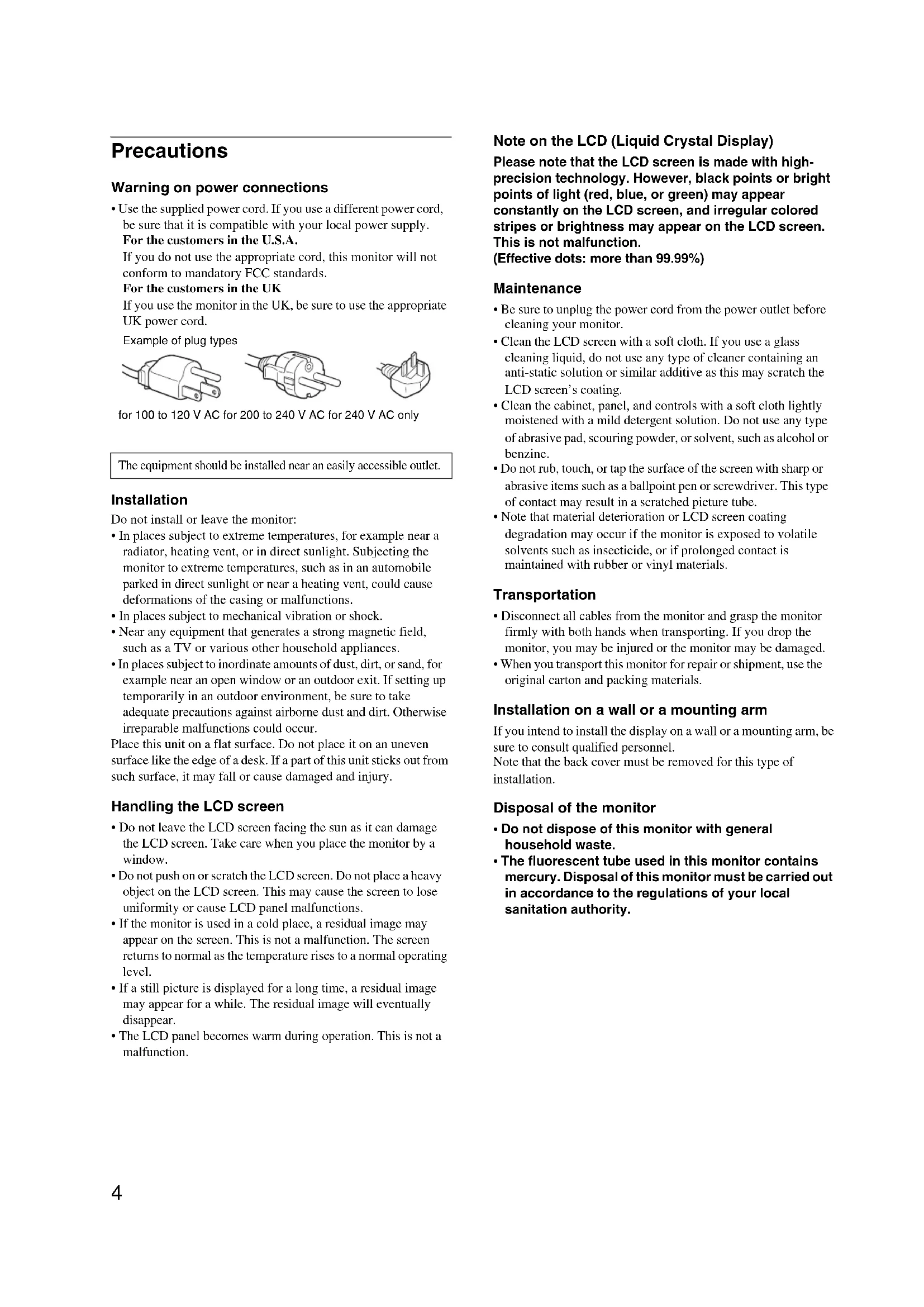
Example of plug types
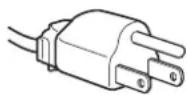
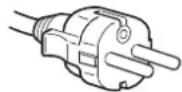
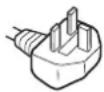
for 100 to 120 V AC for 200 to 240 V AC for 240 V AC only
The equipment should be installed near an easily accessible outlet.
Installation
Do not install or leave the monitor:
- In places subject to extreme temperatures, for example near a radiator, heating vent, or in direct sunlight. Subjecting the monitor to extreme temperatures, such as in an automobile parked in direct sunlight or near a heating vent, could cause deformations of the casing or malfunctions.
- In places subject to mechanical vibration or shock.
- Near any equipment that generates a strong magnetic field, such as a TV or various other household appliances.
- In places subject to inordinate amounts of dust, dirt, or sand, for example near an open window or an outdoor exit. If setting up temporarily in an outdoor environment, be sure to take adequate precautions against airborne dust and dirt. Otherwise irreparable malfunctions could occur.
Place this unit on a flat surface. Do not place it on an uneven surface like the edge of a desk. If a part of this unit sticks out from such surface, it may fall or cause damage and injury.
Handling the LCD screen
- Do not leave the LCD screen facing the sun as it can damage the LCD screen. Take care when you place the monitor by a window.
- Do not push on or scratch the LCD screen. Do not place a heavy object on the LCD screen. This may cause the screen to lose uniformity or cause LCD panel malfunctions.
- If the monitor is used in a cold place, a residual image may appear on the screen. This is not a malfunction. The screen returns to normal as the temperature rises to a normal operating level.
- If a still picture is displayed for a long time, a residual image may appear for a while. The residual image will eventually disappear.
- The LCD panel becomes warm during operation. This is not a malfunction.
Note on the LCD (Liquid Crystal Display)
Please note that the LCD screen is made with high-precision technology. However, black points or bright points of light (red, blue, or green) may appear constantly on the LCD screen, and irregular colored stripes or brightness may appear on the LCD screen. This is not a malfunction.
(Effective dots: more than 99.99%)
Maintenance
- Be sure to unplug the power cord from the power outlet before cleaning your monitor.
- Clean the LCD screen with a soft cloth. If you use a glass cleaning liquid, do not use any type of cleaner containing an anti-static solution or similar additive as this may scratch the LCD screen's coating.
- Clean the cabinet, panel, and controls with a soft cloth lightly moistened with a mild detergent solution. Do not use any type of abrasive pad, scouring powder, or solvent, such as alcohol or benzine.
- Do not rub, touch, or tap the surface of the screen with sharp or abrasive items such as a ballpoint pen or screwdriver. This type of contact may result in a scratched picture tube.
- Note that material deterioration or LCD screen coating degradation may occur if the monitor is exposed to volatile solvents such as insecticide, or if prolonged contact is maintained with rubber or vinyl materials.
Transportation
- Disconnect all cables from the monitor and grasp the monitor firmly with both hands when transporting. If you drop the monitor, you may be injured or the monitor may be damaged.
- When you transport this monitor for repair or shipment, use the original carton and packing materials.
Installation on a wall or a mounting arm
If you intend to install the display on a wall or a mounting arm, be sure to consult qualified personnel.
Note that the back cover must be removed for this type of installation.
Disposal of the monitor
- Do not dispose of this monitor with general household waste.
- The fluorescent tube used in this monitor contains mercury. Disposal of this monitor must be carried out in accordance to the regulations of your local sanitation authority.
Identifying parts and controls
See the pages in parentheses for further details.
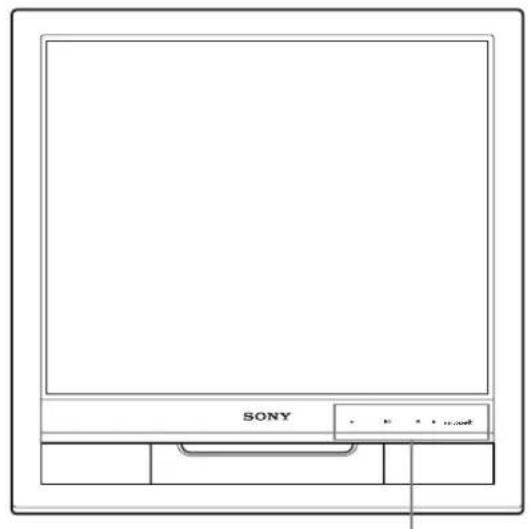
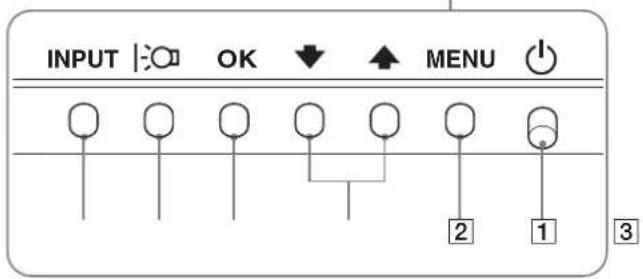
The power switch and the control buttons are on the lower right part of the front of the monitor.
Front of the display
Rear of the display
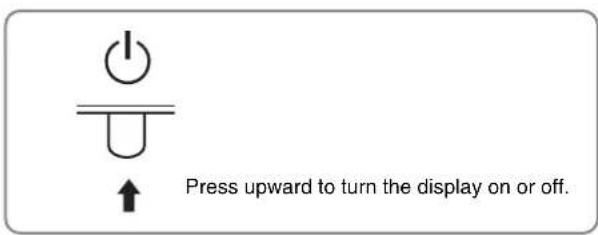
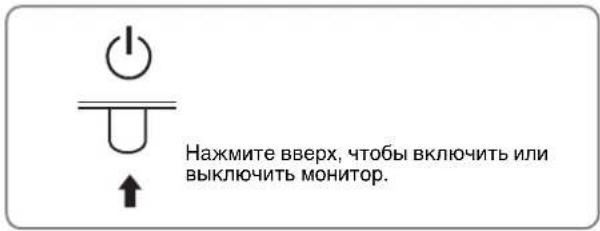
1 (Power) switch and indicator (pages 8, 16)
To turn the display on or off, press the power switch upward.
The power indicator lights up in green when the display is turned on, and lights up in orange when the monitor is in power saving mode.
2 MENU button (pages 10, 11)
This button displays or closes the main menu.
3 Down/Up buttons (page 11)
These buttons function as the down/up buttons when selecting the menu items and making adjustments.
4 OK button (page 11)
This button selects the item or executes the settings in the menu.
5 Button (page 10)
This button is used to change the brightness of the screen.
6 INPUT button (page 9)
This button switches the video input signal between INPUT1 and INPUT2 when two computers are connected to the
monitor.
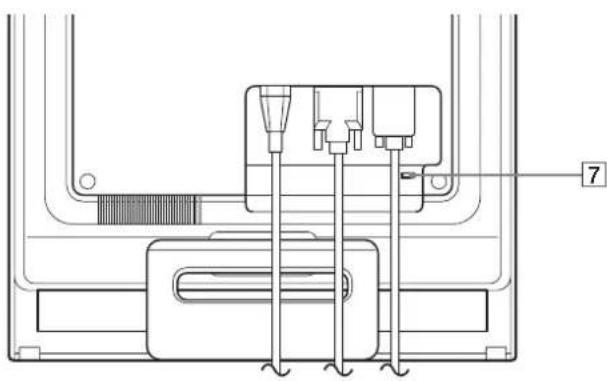
7 Security Lock Hole
The security lock hole should be applied with the Kensington Micro Saver Security System.
Micro Saver Security System is a trademark of Kensington.
Rear of the display
Remove the back cover.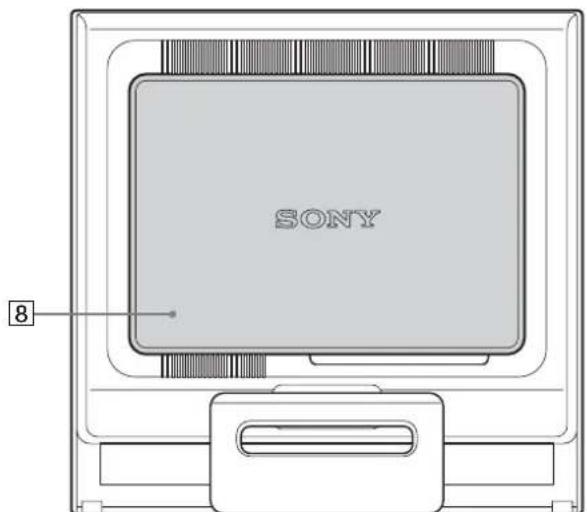
Back cover (page 8)
Remove this cover when you connect/disconnect cables or cords.
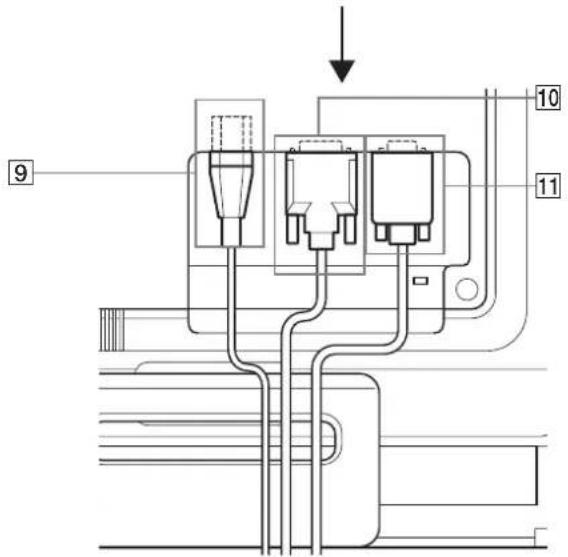
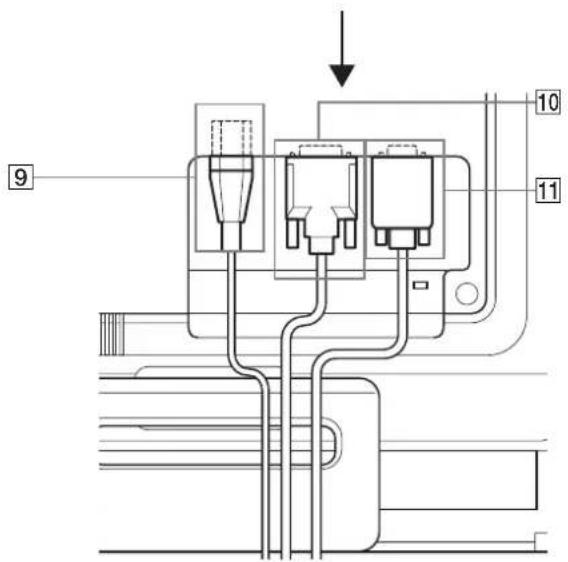
9 AC IN connector (page 8)
Connect the power cord (supplied).
10 DVI-D input connector (digital RGB) for INPUT1 (page 7)
This connector inputs digital RGB video signals that comply with DVI Rev.1.0.
11 HD15 input connector (analog RGB) (page 7)
This connector inputs analog RGB video signals (0.7 Vp-p, positive) and SYNC signals.
Setup
Before using your monitor, check that the following items are included in your carton:
- LCD display Power cord HD15-HD15 video signal cable (analog RGB) DVI-D video signal cable (digital RGB) Cord strap
- CD-ROM (utility software for Windows/Macintosh, Operating Instructions, etc.) Warranty card
- Quick Setup Guide
Step 1: Open the stand
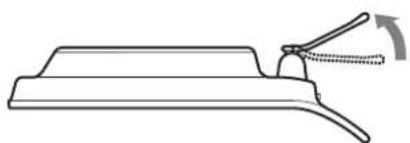
Note
The stand is folded at the factory. Be sure not to place the display vertically with the stand as it is. Otherwise, the display may topple over.
Step 2: Connect the display to your computer
Turn off the monitor and computer before connecting.
Notes
- Do not touch the pins of the video signal cable connector as this might bend the pins.
- Check the alignment of the HD15 connector to prevent bending the pins of the video signal cable connector.
Connect a computer equipped with a DVI output connector (digital RGB).
Using the supplied DVI-D video signal cable (digital RGB), connect the computer to the monitor's DVI-D input connector (digital RGB).
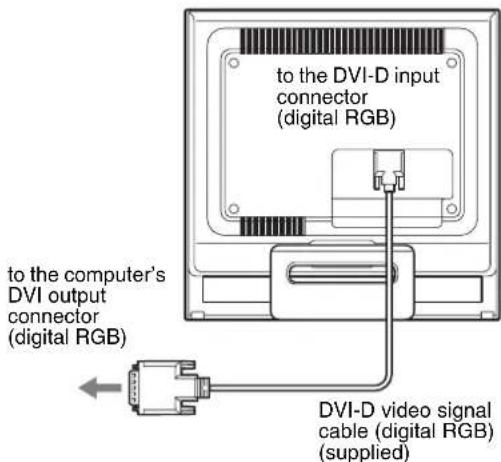
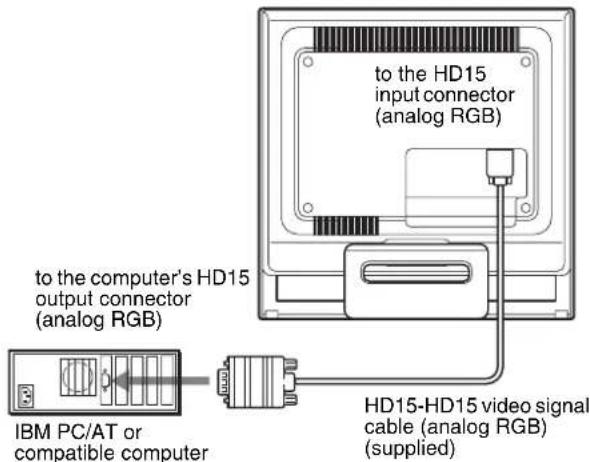
Connect a computer equipped with an HD15 output connector (analog RGB).
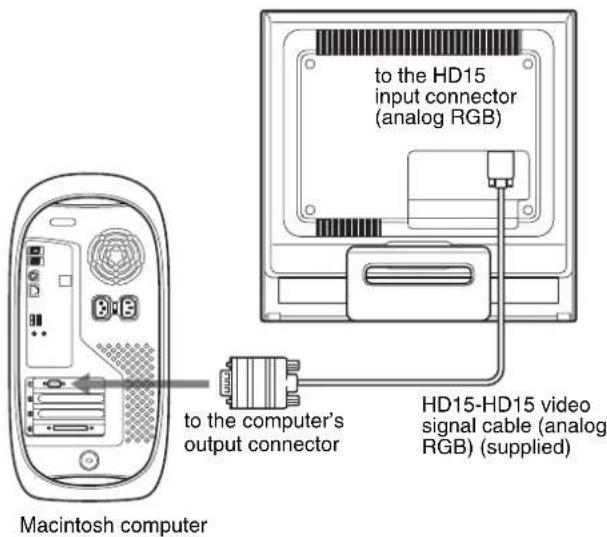
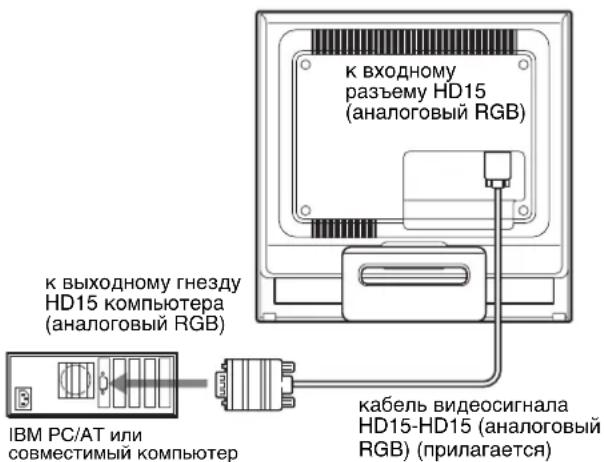
Using the supplied HD15-HD15 video signal cable (analog RGB), connect the computer to the monitor's HD15 input connector (analog RGB).
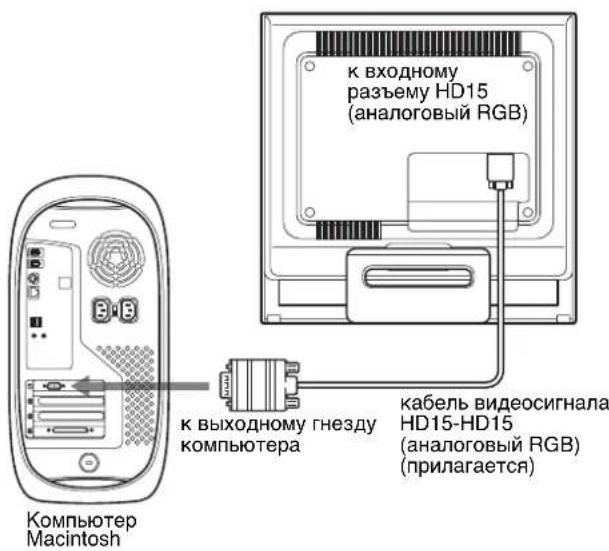
Connect the computer according to the following illustrations.
- Connecting to an IBM PC/AT or compatible computer
- Connecting to a Macintosh computer
When connecting this monitor to a Macintosh computer, use the Macintosh adapter (not supplied) if necessary. Connect the Macintosh adapter to the computer before connecting the cable.
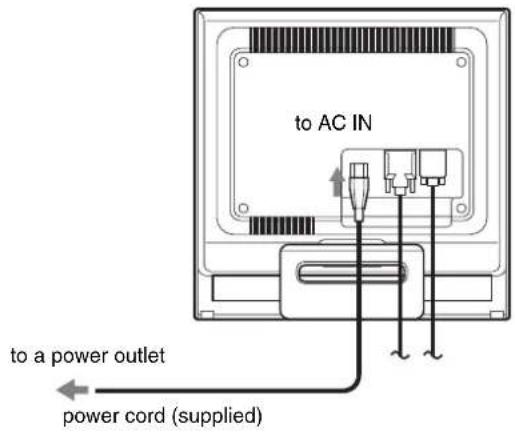
Step 3: Connect the power cord.
With the monitor and computer switched off, first connect the power cord to the monitor, then connect it to a power outlet.
Step 4: Secure the cords and replace the back cover.
1. Bundle the cables and cords.
Using the supplied cord strap, bundle the cables and cords.
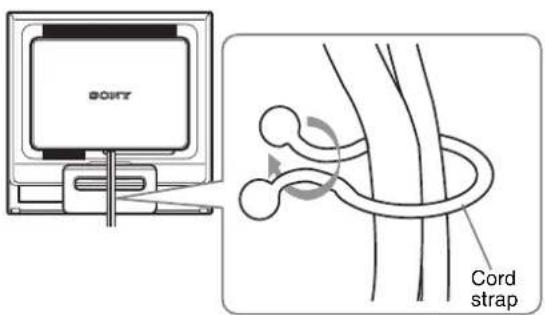
The illustration of the back of the monitor shown here is that of the SDM-HS75D.
The same applies for the other models.
2 Replace the back cover.
Step 5: Turn on the monitor and computer
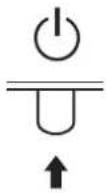
1 Press the power switch upward.
The power indicator of the monitor lights up in green.
2 Turn on the computer.
The installation of your monitor is complete. If necessary, use the monitor's controls to adjust the picture.
If no picture appears on your screen
- Check that the power cord and the video signal cable are properly connected.
- If NO INPUT SIGNAL appears on the screen:
The computer is in the power saving mode. Try pressing any key on the keyboard or moving the mouse.
- If CABLE DISCONNECTED appears on the screen:
Check that the video signal cable is properly connected.
- If OUT OF RANGE appears on the screen:
Reconnect the old monitor. Then adjust the computer's graphics board within the following ranges.
| Analog RGB Digital RGB | |
| Horizontal frequency | 28-80 kHz 28-64 kHz |
| Vertical frequency | 48-75 Hz 60 Hz |
| Resolution | 1280 × 1024 or less 1280 × 1024 or less |
For more information about the on-screen messages, see "Trouble symptoms and remedies" on page 18.
No need for specific drivers
The monitor complies with the "DDC" Plug & Play standard and automatically detects all the monitor's information. No specific driver needs to be installed to the computer.
The first time you turn on your computer after connecting the monitor, the setup Wizard may appear on the screen. In this case, follow the on-screen instructions. The Plug & Play monitor is automatically selected so that you can use this monitor.
The vertical frequency turns to 60Hz
Since flickers are unobtrusive on the monitor, you can use it as it is. You do not need to set the vertical frequency to any particular high value.
Adjusting the tilt
This display can be adjusted within the angles shown below.
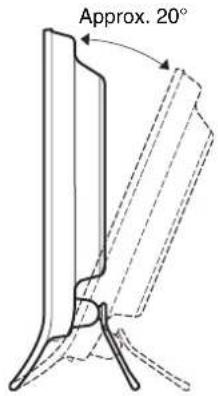
Grasp the lower sides of the LCD panel, then adjust screen tilt.
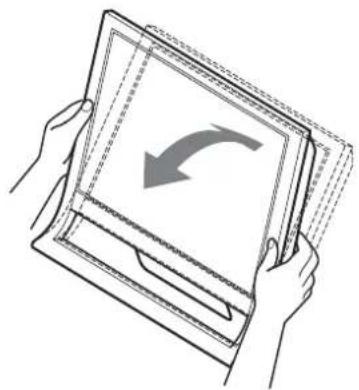
To use the display comfortably
This display is designed so that you can set it up at a comfortable viewing angle. Adjust the viewing angle of your display according to the height of the desk and chair, and so that light is not reflected from the screen to your eyes.
Note
When adjusting the screen tilt, make sure not to knock or drop the display off the desk.
Selecting the input signal (INPUT button)
Press the INPUT button.
The input signal changes each time you press this button.
| INPUT | |
| On-screen message | Input signal configuration |
| (Appears about 5 seconds on the upper left corner.) | |
| INPUT1: DVI-D DVI-D input connector (digital RGB) for INPUT1 | |
| INPUT2: HD15 HD15 input connector (analog RGB) for INPUT2 | |
Customizing Your Monitor
Before making adjustments
Connect the monitor and the computer, and turn them on. Wait for at least 30 minutes before making adjustments for the best result.
You can make numerous adjustments to your monitor using the on-screen menu.
Adjusting to the desired brightness
Pressing the button, you can change the brightness of the screen. Each time you press the button, the changes are as follows.
USER HIGH MIDDLE LOW USER ...
The brightness of the screen will decrease as the mode setting changes from HIGH to LOW.
If you select USER, you can adjust the backlight level by pressing the / buttons, the same as when you select BACKLIGHT using the menu.
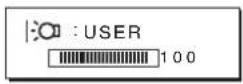
Only while the mode is set to USER, are the BACKLIGHT, CONTRAST, and BRIGHTNESS items of the menu available (page 11).
If you select LOW, the power consumption is reduced (page 16).
Navigating the menu
Press the MENU button to display the main menu on your screen. See page 11 for more information on using the MENU button.
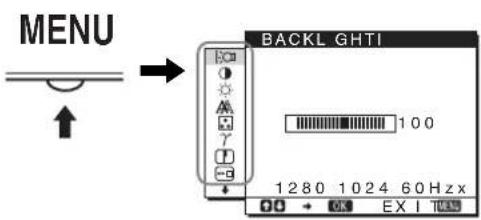
Use the / and OK buttons to select the icons in the above main menu illustration. The following 1 to 10 menu appears. Keep pressing to scroll down until the icons in menu 9 and 10 appear. See page 11 for more information on using the / and OK buttons.
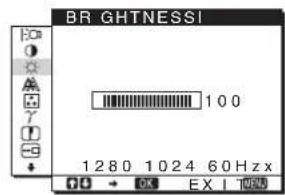
1 BACKLIGHT (page 11)
Select the BACKLIGHT menu to adjust the brightness of the backlight.
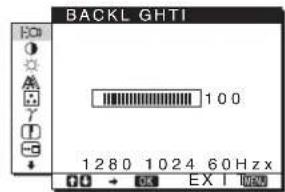
2 CONTRAST (page 12)
Select the CONTRAST menu to adjust the picture contrast.
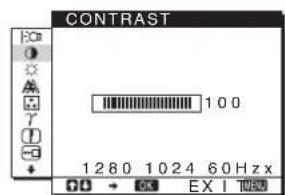
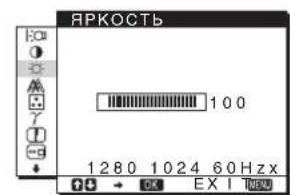
3 BRIGHTNESS (page 12)
Select the BRIGHTNESS menu to adjust the picture brightness (black level).
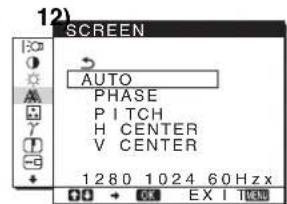
4 SCREEN
Select the SCREEN menu to adjust the picture's sharpness (phase/pitch) or its centering (horizontal/vertical position).
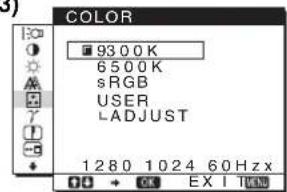
5 COLOR
(page
Select the COLOR menu to adjust the color temperature of the picture. This adjusts the tone of the screen. While COLOR is set to sRGB, you cannot adjust CONTRAST, BRIGHTNESS or GAMMA.
13)
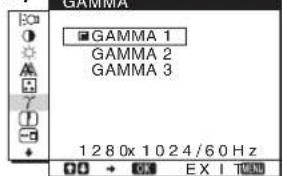
6 GAMMA
(page
Select the GAMMA menu to change the picture's color shade setting.
14)
7 SHARPNESS (page 14)
Select the SHARPNESS menu to adjust the sharpness of image edges.
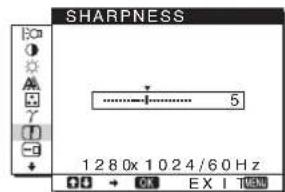
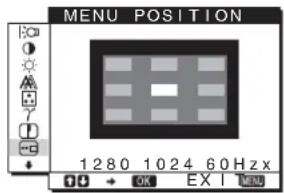
8 MENU POSITION-3 (page 14)
Select the MENU POSITION to change the on-screen menu position.
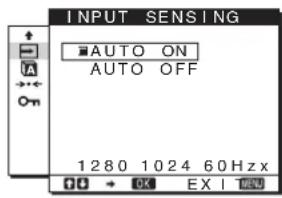
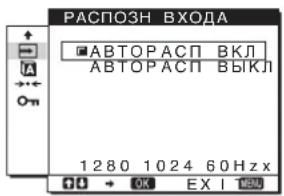
9 INPUT SENSING (page 14)
The monitor automatically detects an input signal to an input terminal, and changes the input automatically before the monitor goes into the power saving mode.
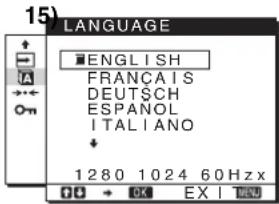
10 LANGUAGE (page
Select LANGUAGE to change the language used on menus or messages.
11 Other menus (page 15)
Set the following menu items. - RESET MENU
Using the MENU, down/up, and OK buttons
1 Display the main menu.
Press the MENU button to display the main menu on your screen.
2 Select the menu you want to adjust.
Press the down/up buttons to display the desired menu. Press the OK button to select the menu item.
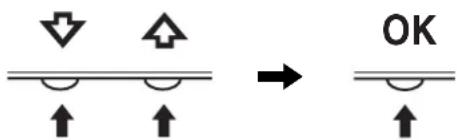
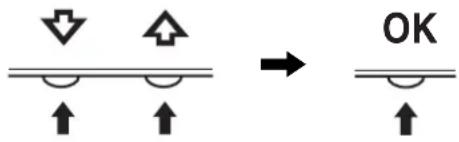
3 Adjust the menu.
Press the down/up buttons to make the adjustment, then press the OK button. When you press the OK button, the setting is stored, then the display returns to the previous menu.
4 Close the menu.
Press the MENU button once to return to normal viewing. If no buttons are pressed, the menu closes automatically after about 45 seconds.
Resetting the adjustments
You can reset the adjustments using the RESET menu. See page 15 for more information on resetting the adjustments.
Adjusting the backlight (BACKLIGHT)
If the screen is too bright, adjust the backlight and make the screen easier to see.
Note
The backlight cannot be adjusted when the mode is set to HIGH, MIDDLE, or LOW (page 10).
1 Press the MENU button.
The main menu appears on the screen.
2 Press the down/up buttons to select (BACKLIGHT) and press the OK button.
The BACKLIGHT menu appears on the screen.
3 Press the down/up buttons to adjust the light level and press the OK button.
Adjusting the contrast (CONTRAST)
Adjust the picture contrast.
Note
The contrast cannot be adjusted when the mode is set to HIGH, MIDDLE, or LOW (page 10).
1 Press the MENU button. The main menu appears on the screen. 2 Press the down/up buttons to select (CONTRAST) and press the OK button. The CONTRAST menu appears on the screen. 3 Press the down/up buttons to adjust the contrast and press the OK button.
Adjusting the black level of an image (BRIGHTNESS)
Adjust the picture brightness (black level).
Note
The brightness cannot be adjusted when the mode is set to HIGH, MIDDLE, or LOW (page 10).
1 Press the MENU button. The main menu appears on the screen. 2 Press the down/up buttons to select (BRIGHTNESS) and press the OK button. The BRIGHTNESS menu appears on the screen. 3 Press the down/up buttons to adjust the brightness and press the OK button.
Adjusting the picture's sharpness and centering (SCREEN) (analog RGB signal only)
Automatic picture quality adjustment function
When the monitor receives an input signal, it automatically adjusts the picture's position and sharpness (phase/pitch), and ensures that a clear picture appears on the screen (page 16).
Note
While the automatic picture quality adjustment function is activated, only the power switch will operate.
If the automatic picture quality adjustment function of this monitor seems to not completely adjust the picture
You can make further automatic adjustment of the picture quality for the current input signal. (See AUTO below.)
If you still need to make further adjustments to the picture quality
You can manually adjust the picture's sharpness (phase/pitch) and position (horizontal/vertical position).
These adjustments are stored in memory and automatically recalled when the display receives the same input signal.
These settings may have to be repeated if you change the input signal after reconnecting your computer.
Make further automatic adjustments to the picture quality for the current input signal (AUTO)
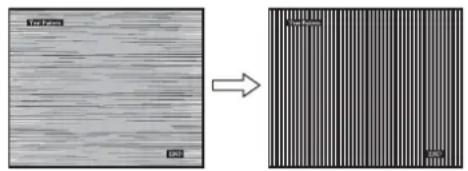
1 Press the MENU button. The main menu appears on the screen. 2 Press the down/up buttons to select (SCREEN) and press the OK button. The SCREEN menu appears on the screen. 3 Press the down/up buttons to select AUTO and press the OK button. Make the appropriate adjustments of the screen's phase, pitch and horizontal/vertical position for the current input signal and store them. 4 Press the down/up buttons to select the right arrow and press the OK button. Return to the menu screen. Adjust the picture's sharpness manually (PHASE/PITCH) You can adjust the picture's sharpness as follows. 1 Set the resolution to 1280 x 1024 on the computer. 2 Load the CD-ROM. 3 Start the CD-ROM, select the region and model, and display the test pattern. For Windows Click [Utility] -> [Windows]/[Win Utility.exe]. For Macintosh Click [Utility] -> [Mac]/[Mac Utility]. 4 Press the MENU button. The main menu appears on the screen. 5 Press the down/up buttons to select (SCREEN) and press the OK button. The SCREEN menu appears on the screen. 6 Press the down/up buttons to select PHASE and press the OK button. The PHASE menu appears on the screen. 7 Press the down/up buttons until the horizontal stripes are at a minimum.
Adjust so that the horizontal stripes are at a minimum.
8 Press the OK button.
Return to the SCREEN menu.
If vertical stripes are observed over the entire screen, adjust pitch by the following steps.
9 Press the down/up buttons to select PITCH and press the OK button.
The PITCH menu appears on the screen.
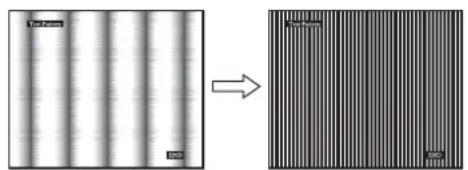
10 Press the down/up buttons until the vertical stripes disappear.
Adjust so that the vertical stripes disappear.
11 Click END on the screen to turn off the test pattern.
12 Press the OK button.
Return to the SCREEN menu.
13 Press the down/up buttons to select the arrow and press the OK button.
Return to the menu screen.
Adjust the picture's position manually (H CENTER/V CENTER)
If the picture is not in the center of the screen, adjust the picture's centering as follows.
1 Set the resolution to 1280 x 1024 on the computer.
2 Load the CD-ROM.
3 Start the CD-ROM, select the region and model, and display the test pattern.
For Windows
Click [Utility] -> [Windows]/[Win Utility.exe].
For Macintosh
Click [Utility] -> [Mac]/[Mac Utility].
4 Press the MENU button.
The main menu appears on the screen.
5 Press the down/up buttons to select (SCREEN) and press the OK button.
The SCREEN menu appears on the screen.
6 Press the down/up buttons to select H CENTER or V CENTER and press the OK button.
The H CENTER or V CENTER menu appears on the screen.
7 Press the down/up buttons to center the test pattern in the screen.
8 Click END on the screen to turn off the test pattern.
9 Press the OK button.
Return to the SCREEN menu.
10 Press the down/up buttons to select the right arrow and press the OK button.
Return to the menu screen.
Adjusting the color temperature (COLOR)
You can select the color level of the picture's white color field from the default color temperature settings.
Also, if necessary, you can fine tune the color temperature.
You can set the desired color temperature for each mode of the brightness of screen.
1 Press the MENU button.
The main menu appears on the screen.
2 Press the down/up buttons to select (COLOR) and press the OK button.
The COLOR menu appears on the screen.
3 Press the down/up buttons to select the desired color temperature and press the OK button.
Whites will change from a bluish hue to reddish hue as the temperature is lowered from 9300K (default setting) to 6500K.
While "USER" is selected for the brightness of screen, you can set the color temperature to "sRGB."
When you select "sRGB," the colors adjust to the sRGB profile. (The sRGB color setting is an industry-standard color space protocol designed for computer products.) If you select "sRGB," the color settings of your computer must be set to the sRGB profile.
Notes
- If a connected computer or other equipment is not sRGB-compliant, color cannot be adjusted to the sRGB profile.
- While COLOR is set to sRGB, you cannot adjust CONTRAST, BRIGHTNESS or GAMMA.
Fine tuning the color temperature (USER ADJUSTMENT)
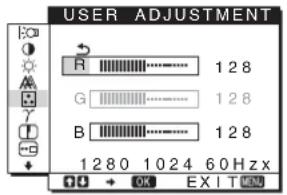
1 Press the down/up buttons to select ADJUST and press the OK button.
The USER ADJUSTMENT menu appears on the screen.
2 Press the down/up buttons to select R (Red) or B (Blue) and press the OK button. Then press the down/up buttons to adjust the color temperature and press the OK button.
Since this adjustment changes the color temperature by increasing or decreasing the R and B components with respect to G (green), the G component is fixed.
3 Press the down/up buttons to select the arrow, then press the OK button.
The new color setting is stored in memory for USER and automatically recalled whenever USER is selected.
The main menu appears on the screen.
Changing the gamma setting (GAMMA)
You can associate the picture's color shade on the screen with the picture's original color shade.
1 Press the MENU button.
The main menu appears on the screen.
2 Press the down/up buttons to select gamma (GAMMA) and press the OK button.
The GAMMA menu appears on the screen.
3 Press the down/up buttons to select the desired mode and press the OK button.
Adjusting the sharpness (SHARPNESS)
Adjust to sharpen the edge of images, etc.
1 Press the MENU button.
The main menu appears on the screen.
2 Press the down/up buttons to select (SHARPNESS) and press the OK button.
The SHARPNESS menu appears on the screen.
3 Press the down/up buttons to adjust the sharpness and press the OK button.
Changing the menu's position (MENU POSITION)
You can change the menu position if it is blocking an image on the screen.
1 Press the MENU button.
The main menu appears on the screen.
2 Press the down/up buttons to select (MENU POSITION) and press the OK button.
The MENU POSITION menu appears on the screen.
3 Press the down/up buttons to select the desired position and press the OK button.
There are three positions each for the top, center and bottom of the screen.
Changing the input automatically (INPUT SENSING)
When you select AUTO ON in the INPUT SENSING menu, the monitor automatically detects an input signal to an input terminal, and changes the input automatically before the monitor goes into the power saving mode.
1 Press the MENU button.
The main menu appears on the screen.
2 Press the down/up buttons to select (INPUT SENSING) and press the OK button.
The INPUT SENSING menu appears on the screen.
3 Press the down/up buttons to select the desired mode and press the OK button.
- AUTO ON: When the selected input terminal has no input signal, or when you select an input terminal by the INPUT button on the monitor and the terminal has no input signal, the on-screen message appears (page 17) and the monitor checks the input signal to another input terminal automatically to change the input. When the input is changed, the selected input terminal is displayed on the left upper of the screen. When there is no input signal, the monitor goes into the power saving mode automatically.
- AUTO OFF: The input is not changed automatically. Press the INPUT button to change the input.
Selecting the on-screen menu language (LANGUAGE)
You can change the language used on menus or messages displayed on this monitor.
1 Press the MENU button.
The main menu appears on the screen.
2 Keep pressing the down button until the icon of the desired option item appears.
3 Press the down/up buttons to select (LANGUAGE) and press the OK button.
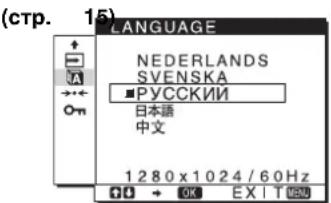
The LANGUAGE menu appears on the screen.
4 Press the down/up buttons to select a language and press the OK button.
- ENGLISH FRANÇAIS: French
- DEUTSCH: German
- ESPANOL: Spanish ITALIANO: Italian
- NEDERLANDS: Dutch SVENSKA: Swedish :RvSiKu ·曲本蕴ese ·中文: Chinese
Additional settings
You can adjust the following options:
- RESET → -MENU LOCK
1 Press the MENU button.
The main menu appears on the screen.
2 Keep pressing the down button until the icon of the desired option item appears.
3 Press the down/up buttons to select the desired option item and press the OK button.
Adjust the selected option item according to the following instructions.
Resetting the adjustment data to the defaults
You can reset the adjustments to the default settings.
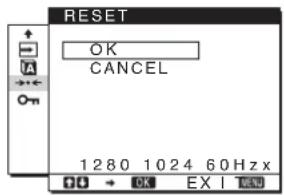
1 Press the down/up buttons to select RESET and press the OK button.
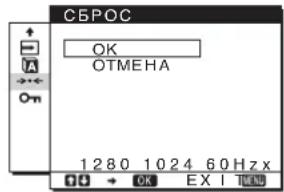
The RESET menu appears on the screen.
2 Press the down/up buttons to select the desired mode and press the OK button.
- OK: To reset all of the adjustment data to the default settings. Note that the LANGUAGE setting is not reset by this method.
- CANCEL: To cancel resetting and return to the menu screen.
Locking the menus and controls
You can lock the control of buttons to prevent accidental adjustments or resetting.
1 Press the down/up buttons to select ON (MENU LOCK) and press the OK button.
The MENU LOCK menu appears on the screen.
2 Press the down/up buttons to select ON or OFF and press the OK button.
- ON: Only the power switch will operate. If you attempt any other operation, the MENU LOCK icon appears on the screen.
- OFF: Set (MENU LOCK) to OFF. If you set the (MENU LOCK) item to ON, only this menu item can be selected.
Technical Features
Power saving function
This monitor meets the power-saving guidelines set by VESA, ENERGY STAR, and NUTEK. If the monitor is connected to a computer or video graphics board that is DPMS (Display Power Management Standard) for Analog input/DMPM (DVI Digital Monitor Power Management) for Digital input compliant, the monitor will automatically reduce power consumption as shown below.
SDM-HS75D
| Power mode Power consumption (power) indicator | |
| normal operation | 45 W (max.) green |
| active off* (deep sleep)** | 1.0 W (max.) orange |
| power off 1.0 W (max.) off | |
SDM-HS95D
| Power mode Power consumption | ( power) indicator | |
| normal operation | 50 W (max.) green | |
| active off* (deep sleep)** | 1.0 W (max.) | orange |
| power off 1.0 W (max.) | off | |
- When your computer enters the "active off" mode, the input signal is cut and NO INPUT SIGNAL appears on the screen. After 5 seconds, the monitor enters the power saving mode. ** "deep sleep" is the power saving mode defined by the Environmental Protection Agency.
Reducing the power consumption
(m o d e)
If you set the mode to LOW by pressing the button on the front of the monitor, the backlight level is reduced and the power consumption is reduced, too.
Press the button several times until LOW appears.
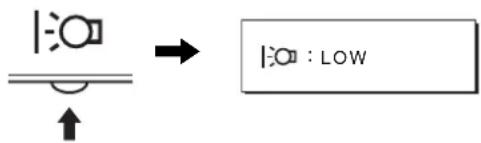
LOW appears on the screen and the backlight level is reduced. LOW automatically disappears after about 5 seconds.
Automatic picture quality adjustment function (analog RGB signal only)
When the monitor receives an input signal, it automatically adjusts the picture's position and sharpness (phase/pitch), and ensures that a clear picture appears on the screen.
The factory preset mode
When the monitor receives an input signal, it automatically matches the signal to one of the factory preset modes stored in the monitor's memory to provide a high quality picture at the center of the screen. If the input signal matches the factory preset mode, the picture appears on the screen automatically with the appropriate default adjustments.
If input signals do not match one of the factory preset modes
When the monitor receives an input signal that does not match one of the factory preset modes, the automatic picture quality adjustment function of this monitor is activated to ensure that a clear picture always appears on the screen (within the following monitor frequency ranges):
Horizontal frequency: 28 - 80kHz
Vertical frequency: 48 - 75Hz
Consequently, the first time the monitor receives input signals that do not match one of the factory preset modes, the monitor may take a longer time than normal to display the picture on the screen. This adjustment data is automatically stored in memory so that next time, the monitor will function in the same way as when the monitor receives the signals that match one of the factory preset modes.
Note
There is no need to adjust the digital RGB signals of the DVI-D input connector for INPUT1.
If you adjust the phase, pitch, and picture position manually
For some input signals, the automatic picture quality adjustment function of this monitor may not completely adjust the picture position, phase, and pitch. In this case, you can set these adjustments manually (page 12). If you set these adjustments manually, they are stored in memory as user modes and automatically recalled whenever the monitor receives the same input signals.
Note
While the automatic picture quality adjustment function is activated, only the (power) switch will operate.
Troubleshooting
Before contacting technical support, refer to this section.
On-screen messages
If there is something wrong with the input signal, one of the following messages appears on the screen. To solve the problem, see "Trouble symptoms and remedies" on page 18.
If OUT OF RANGE appears on the screen
This indicates that the input signal is not supported by the monitor's specifications. Check the following items.
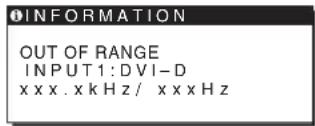
If "xxx.x kHz/xxx Hz" is displayed
This indicates that either the horizontal or vertical frequency is not supported by the monitor's specifications.
The figures indicate the horizontal and vertical frequencies of the current input signal.
If "RESOLUTION > 1280 × 1024" is displayed
This indicates that the resolution is not supported by the monitor's specifications (1280 × 1024 or less).
If NO INPUT SIGNAL appears on the screen
This indicates that no signal is being input.
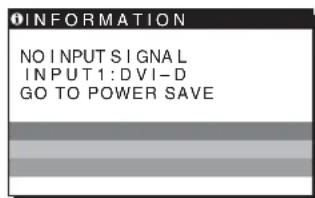
GO TO POWER SAVE
The monitor will enter the power saving mode after about 5 seconds from the time the message is displayed.
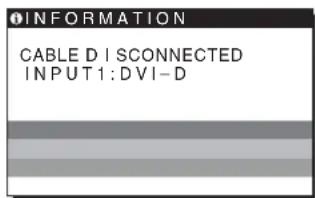
If CABLE DISCONNECTED appears on the screen
This indicates that the video signal cable has been disconnected.
Trouble symptoms and remedies
If a problem is caused by the connected computer or other equipment, please refer to the connected equipment's instruction manual.
| Symptom Check these items | |
| No picture | |
| If the (power) indicator is not lit, or if the (power) indicator will not light up when the (power) switch is pressed, | Check that the power cord is properly connected. |
| If CABLE DISCONNECTED appears on the screen, | Check that the video signal cable is properly connected and all plugs are firmly seated in their sockets (page 7).Check that the video input connector's pins are not bent or pushed in.A non-supplied video signal cable is connected. If you connect a non-supplied video signal cable, CABLE DISCONNECTED may appear on the screen before entering the power saving mode. This is not a malfunction. |
| If NO INPUT SIGNAL appears on the screen, or the (power) indicator is orange, | Check that the video signal cable is properly connected and all plugs are firmly seated in their sockets (page 7).Check that the video input connector's pins are not bent or pushed in.Problems caused by a computer or other equipment connected, and not caused by the monitorThe computer is in the power saving mode. Try pressing any key on the keyboard or moving the mouseCHECK that your graphics board is installed properly.Check that the computer's power is on.Restart the computer. |
| If OUT OF RANGE appears on the screen, | Problems caused by a computer or other equipment connected, and not caused by the monitorCheck that the video frequency range is within that specified for the monitor. If you replaced an old monitor with this monitor, reconnect the old monitor and adjust the computer's graphics board within the following ranges:Horizontal: 28-80 kHz (analog RGB), 28-64 kHz (digital RGB)Vertical: 48-75 Hz (analog RGB), 60 Hz (digital RGB)Resolution: 1280 x 1024 or less |
| If you are using Windows and replaced an old monitor with this monitor, | If you replaced an old monitor with this monitor, reconnect the old monitor and do the following. Select "SONY" from the "Manufacturers" list and select "SDM-HS75D" or "SDM-HS95D" from the "Models" list in the Windows device selection screen. If the model name of this monitor does not appear in the "Models" list, try "Plug & Play." |
| If using a Macintosh system, | If you use the Macintosh adapter (not supplied), check that the Macintosh adapter and the video signal cable are properly connected (page 7). |
| Picture flickers, bounces, oscillates, or is scrambled | Adjust the pitch and phase (page 12).Try plugging the monitor into a different AC outlet, preferably on a different circuit.Problems caused by a computer or other equipment connected, and not caused by the monitorCheck your graphics board manual for the proper monitor setting Confirm that the graphics mode (VESA, Macintosh 19" Color, etc.) and the frequency of the input signal are supported by this monitor. Even if the frequency is within the proper range, some graphics boards may have a sync pulse that is too narrow for the monitor to sync correctly.Adjust the computer's refresh rate (vertical frequency) to obtain the best possible picture. |
| Picture is fuzzy · Adjust the brightness and contrast (page 12). · Adjust the pitch and phase (page 12). ■ Problems caused by a computer or other equipment connected, and not caused by the monitor · Set the resolution to 1280 × 1024 on your computer. | |
| Picture is ghosting | · Eliminate the use of video cable extensions and/or video switch boxes. · Check that all plugs are firmly seated in their sockets. |
| Picture is not centered or sized properly | · Adjust the pitch and phase (page 12). · Adjust the picture position (page 13). Note that some video modes do not fill the screen to the edges. |
| Picture is too small | ■ Problems caused by a computer or other equipment connected, and not caused by the monitor · Set the resolution to 1280 × 1024 on your computer. |
| Picture is dark | · Adjust the brightness using the BRIGHTNESS menu (page 12). · Adjust the backlight (page 11). · Adjust the brightness using the button (page 10). · It takes a few minutes for the display to become bright after turning on the monitor. |
| Wavy or elliptical pattern (moire) is visible | · Adjust the pitch and phase (page 12). |
| Color is not uniform · Adjust the pitch and phase (page 12). | |
| White does not look white · Adjust the color temperature (page 13). | |
| Monitor buttons do not operate (appears on the screen) | · If the menu lock is set to ON, set it to OFF (page 15). |
| The monitor turns off after a while | ■ Problems caused by a computer or other equipment connected, and not caused by the monitor · Set the computer's power saving setting to off. |
| Resolution displayed on the menu screen is incorrect | · Depending on the graphics board setting, the resolution displayed on the menu screen may not coincide with the one set on the computer. |
If any problem persists, call your authorized Sony dealer and give the following information:
Model name: SDM-HS75D or SDM-HS95D - Serial number - Detailed description of the problem - Date of purchase - Name and specifications of your computer and graphics board
Specifications
SDM-HS75D
LCD panel Panel type: a-Si TFT Active Matrix
Picture size: 17.0 inch
Input signal format RGB operating frequency*
Horizontal: 28 - 80 kHz (analog RGB)
28-64 kHz (digital RGB)
Vertical: 48 - 75 Hz (analog RGB)
60 Hz (digital RGB)
Resolution Horizontal: Max. 1280 dots
Vertical: Max. 1024 lines
Input signal levels Analog RGB video signal
0.7 Vp-p, 75 Ω, positive
SYNC signal
TTL level, 2.2 kΩ
positive or negative
(Separate horizontal and vertical)
Digital RGB (DVI) signal: TMDS
(Single link)
Power requirements 100-240 V, 50-60 Hz
Max. 1.0 A
Power consumption Max. 45 W
Operating temperature 5-35 C
Dimensions (width/height/depth)
Display (upright):
Approx. 388 x 382.5 x 139.2 mm
(15 1/4 x 15 x 5 1/2 inches)
Mass Approx. 5 kg (11 lb).
3/8 oz.)
Plug & Play DDC2B
Accessories See page 7.
SDM-HS95D
LCD panel Panel type: a-Si TFT Active Matrix
Picture size: 19.0 inch
Input signal format RGB operating frequency*
Horizontal: 28 - 80 kHz (analog RGB)
28-64 kHz (digital RGB)
Vertical: 48 - 75 Hz (analog RGB)
60 Hz (digital RGB)
Resolution Horizontal: Max.1280 dots
Vertical: Max.1024 lines
Input signal levels Analog RGB video signal
0.7 Vp-p, 75 Ω, positive
SYNC signal
TTL level, 2.2 kΩ
positive or negative
(Separate horizontal and vertical)
Digital RGB (DVI) signal: TMDS
(Single link)
Power requirements: 100-240 V, 50-60 Hz
Max. 1.0 A
Power consumption: Max. 50 W
Operating temperature: 5-35°C
Dimensions (width/height/depth)
Display (upright):
Approx. 435 × 418 × 146 mm
(17 1/8 × 16 1/2 × 5 3/4 inches)
Mass: Approx. 6 kg (13 lb. 3
5/8 oz.)
Plug & Play: DDC2B
Accessories See page 7.
- Recommended horizontal and vertical timing condition
Horizontal sync width duty should be more than 4.8% of total horizontal time or 0.8 μs, whichever is larger. Horizontal blanking width should be more than 2.5 μs. Vertical blanking width should be more than 450 μs.
Design and specifications are subject to change without notice.
TFT LCD Color Computer Display
User's Guide.
FR
SDM-HS75D
SDM-HS95D
Owner's Record
The model and serial numbers are located at the rear of the unit. Record these numbers in the spaces provided below. Refer to them whenever you call upon your dealer regarding this product. Model No. ____ Serial No. ____
WARNING
To reduce the risk of fire or electric shock, do not expose this apparatus to rain or moisture.
Dangerously high voltages are present inside the unit. Do not open the cabinet. Refer servicing to qualified personnel only.
FCC Notice
This equipment has been tested and found to comply with the limits for a Class B digital device, pursuant to Part 15 of the FCC Rules. These limits are designed to provide reasonable protection against harmful interference in a residential installation. This equipment generates, uses, and can radiate radio frequency energy and, if not installed and used in accordance with the instructions, may cause harmful interference to radio communications. However, there is no guarantee that interference will not occur in a particular installation. If this equipment does cause harmful interference to radio or television reception, which can be determined by turning the equipment off and on, the user is encouraged to try to correct the interference by one or more of the following measures: - Reorient or relocate the receiving antenna. - Increase the separation between the equipment and receiver. - Connect the equipment into an outlet on a circuit different from that to which the receiver is connected. - Consult the dealer or an experienced radio/TV technician for help. You are cautioned that any changes or modifications not expressly approved in this manual could void your authority to operate this equipment.
IMPORTANT
If you have any questions about this product, you may call; Sony Customer Information Services Center 1-800-222-7669 or http://www.sony.com/
Declaration of Conformity
Trade Name: SONY
Model: SDM-HS75D
SDM-HS95D
Responsible Party: Sony Electronics Inc.
Address: 16530 Via Esprillo, San Diego
CA 92127 U.S.A.
Telephone Number: 858-942-2230
This device complies with part 15 of the FCC rules. Operation is subject to the following two conditions: (1) This device may not cause harmful interference, and (2) this device must accept any interference received, including interference that may cause undesired operation.
NOTICE
This notice is applicable for USA/Canada only.
If shipped to USA/Canada, install only a UL LISTED/CSA
LABELLED power supply cord meeting the following
specifications:
SPECIFICATIONS
Plug Type Nema-Plug 5-15p
Cord Type SVT or SJT, minimum 3 × 18 AWG
Length Maximum 15 feet
Rating Minimum 7 A, 125 V
NOTICE
As an ENERGY STAR Partner, Sony Corporation has determined that this product meets the ENERGY STAR guidelines for energy efficiency.
Specifications
Power consumption Max. 45 W
Power consumption Max. 50 W
The model and serial numbers are located at the rear of the unit. Record these numbers in the spaces provided below. Refer to them whenever you call upon your dealer regarding this product. Model No. ____ Serial No. ____
WARNING
To reduce the risk of fire or electric shock, do not expose this apparatus to rain or moisture.
Dangerously high voltages are present inside the unit. Do not open the cabinet. Refer servicing to qualified personnel only.
FCC Notice
This equipment has been tested and found to comply with the limits for a Class B digital device, pursuant to Part 15 of the FCC Rules. These limits are designed to provide reasonable protection against harmful interference in a residential installation. This equipment generates, uses, and can radiate radio frequency energy and, if not installed and used in accordance with the instructions, may cause harmful interference to radio communications. However, there is no guarantee that interference will not occur in a particular installation. If this equipment does cause harmful interference to radio or television reception, which can be determined by turning the equipment off and on, the user is encouraged to try to correct the interference by one or more of the following measures: - Reorient or relocate the receiving antenna. - Increase the separation between the equipment and receiver. - Connect the equipment into an outlet on a circuit different from that to which the receiver is connected. - Consult the dealer or an experienced radio/TV technician for help. You are cautioned that any changes or modifications not expressly approved in this manual could void your authority to operate this equipment.
IMPORTANT
If you have any questions about this product, you may call; Sony Customer Information Services Center 1-800-222-7669 or http://www.roy.com/
Declaration of Conformity
Trade Name: SONY
Model: SDM-HS75D
SDM-HS95D
Responsible Party: Sony Electronics Inc.
Address: 16530 Via Esprillo, San Diego,
CA 92127 U.S.A.
Telephone Number: 858-942-2230
This device complies with part 15 of the FCC rules. Operation is subject to the following two conditions: (1) This device may not cause harmful interference, and (2) this device must accept any interference received, including interference that may cause undesired operation.
NOTICE
This notice is applicable for USA/Canada only.
If shipped to USA/Canada, install only a UL LISTED/CSA
LABELLED power supply cord meeting the following
specifications:
SPECIFICATIONS
Plug Type Nema-Plug 5-15p
Cord Type SVT or SJT, minimum 3 x 18 AWG
Length Maximum 15 feet
Rating Minimum 7 A, 125 V
NOTICE
As an ENERGY STAR Partner, Sony Corporation has determined that this product meets the ENERGY STAR guidelines for energy efficiency.
The model and serial numbers are located at the rear of the unit. Record these numbers in the spaces provided below. Refer to them whenever you call upon your dealer regarding this product. Model No. ______ Serial No. ______
WARNING
To reduce the risk of fire or electric shock, do not expose this apparatus to rain or moisture.
Dangerously high voltages are present inside the unit. Do not open the cabinet. Refer servicing to qualified personnel only.
FCC Notice
This equipment has been tested and found to comply with the limits for a Class B digital device, pursuant to Part 15 of the FCC Rules. These limits are designed to provide reasonable protection against harmful interference in a residential installation. This equipment generates, uses, and can radiate radio frequency energy and, if not installed and used in accordance with the instructions, may cause harmful interference to radio communications. However, there is no guarantee that interference will not occur in a particular installation. If this equipment does cause harmful interference to radio or television reception, which can be determined by turning the equipment off and on, the user is encouraged to try to correct the interference by one or more of the following measures: - Reorient or relocate the receiving antenna. - Increase the separation between the equipment and receiver. - Connect the equipment into an outlet on a circuit different from that to which the receiver is connected. - Consult the dealer or an experienced radio/TV technician for help. You are cautioned that any changes or modifications not expressly approved in this manual could void your authority to operate this equipment.
IMPORTANT
If you have any questions about this product, you may call; Sony Customer Information Services Center 1-800-222-7669 or http://www.sony.com/
Declaration of Conformity
Trade Name: SONY
Model: SDM-HS75D
SDM-HS95D
Responsible Party: Sony Electronics Inc.
Address: 16530 Via Esprillo, San Diego,
CA 92127 U.S.A.
Telephone Number: 858-942-2230
This device complies with part 15 of the FCC rules. Operation is subject to the following two conditions: (1) This device may not cause harmful interference, and (2) this device must accept any interference received, including interference that may cause undesired operation.
NOTICE
This notice is applicable for USA/Canada only.
If shipped to USA/Canada, install only a UL LISTED/CSA
LABELLED power supply cord meeting the following
specifications:
SPECIFICATIONS
Plug Type Nema-Plug 5-15p
Cord Type SVT or SJT, minimum 3 × 18 AWG
Length Maximum 15 feet
Rating Minimum 7 A, 125 V
NOTICE
As an ENERGY STAR Partner, Sony Corporation has determined that this product meets the ENERGY STAR guidelines for energy efficiency.
Precautions 4
(Horizontal and vertical
independent)
(Horizontal and vertical
independent)
Serial RVA (DVI) digital: TMDS
(single link)
Power requirements: AC 100 to 240 V, 50 to 60 Hz
Max. 1.0 A
Power consumption: Max. 50 W
TTL (transistor-transistor logic)
The model and serial numbers are located at the rear of the unit. Record these numbers in the spaces provided below. Refer to them whenever you call upon your dealer regarding this product. Model No. ____ Serial No. ____
WARNING
To reduce the risk of fire or electric shock, do not expose this apparatus to rain or moisture.
Dangerously high voltages are present inside the unit. Do not open the cabinet. Refer servicing to qualified personnel only.
FCC Notice
This equipment has been tested and found to comply with the limits for a Class B digital device, pursuant to Part 15 of the FCC Rules. These limits are designed to provide reasonable protection against harmful interference in a residential installation. This equipment generates, uses, and can radiate radio frequency energy and, if not installed and used in accordance with the instructions, may cause harmful interference to radio communications. However, there is no guarantee that interference will not occur in a particular installation. If this equipment does cause harmful interference to radio or television reception, which can be determined by turning the equipment off and on, the user is encouraged to try to correct the interference by one or more of the following measures: - Reorient or relocate the receiving antenna. - Increase the separation between the equipment and receiver. - Connect the equipment into an outlet on a circuit different from that to which the receiver is connected. - Consult the dealer or an experienced radio/TV technician for help. You are cautioned that any changes or modifications not expressly approved in this manual could void your authority to operate this equipment.
IMPORTANT
If you have any questions about this product, you may call; Sony Customer Information Services Center 1-800-222-7669 or http://www.sony.com/
Declaration of Conformity
Trade Name: SONY
Model: SDM-HS75D
SDM-HS95D
Responsible Party: Sony Electronics Inc.
Address: 16530 Via Esprillo, San Diego,
CA 92127 U.S.A.
Telephone Number: 858-942-2230
This device complies with part 15 of the FCC rules. Operation is subject to the following two conditions: (1) This device may not cause harmful interference, and (2) this device must accept any interference received, including interference that may cause undesired operation.
NOTICE
This notice is applicable for USA/Canada only.
If shipped to USA/Canada, install only a UL LISTED/CSA
LABELLED power supply cord meeting the following
specifications:
SPECIFICATIONS
Plug Type: Nema-Plug 5-15p
Cord Type: SVT or SJT, minimum 3 x 18 AWG
Length: Maximum 15 feet
Rating: Minimum 7 A, 125 V
NOTICE
As an ENERGY STAR Partner, Sony Corporation has determined that this product meets the ENERGY STAR guidelines for energy efficiency.
The model and serial numbers are located at the rear of the unit. Record these numbers in the spaces provided below. Refer to them whenever you call upon your dealer regarding this product. Model No. ____ Serial No. ____
WARNING
To reduce the risk of fire or electric shock, do not expose this apparatus to rain or moisture.
Dangerously high voltages are present inside the unit. Do not open the cabinet. Refer servicing to qualified personnel only.
FCC Notice
This equipment has been tested and found to comply with the limits for a Class B digital device, pursuant to Part 15 of the FCC Rules. These limits are designed to provide reasonable protection against harmful interference in a residential installation. This equipment generates, uses, and can radiate radio frequency energy and, if not installed and used in accordance with the instructions, may cause harmful interference to radio communications. However, there is no guarantee that interference will not occur in a particular installation. If this equipment does cause harmful interference to radio or television reception, which can be determined by turning the equipment off and on, the user is encouraged to try to correct the interference by one or more of the following measures: - Reorient or relocate the receiving antenna. - Increase the separation between the equipment and receiver. - Connect the equipment into an outlet on a circuit different from that to which the receiver is connected. - Consult the dealer or an experienced radio/TV technician for help. You are cautioned that any changes or modifications not expressly approved in this manual could void your authority to operate this equipment.
IMPORTANT
If you have any questions about this product, you may call; Sony Customer Information Services Center 1-800-222-7669 or http://www.roy.com/
Declaration of Conformity
Trade Name: SONY
Model: SDM-HS75D
SDM-HS95D
Responsible Party: Sony Electronics Inc.
Address: 16530 Via Esprillo, San Diego,
CA 92127 U.S.A.
Telephone Number: 858-942-2230
This device complies with part 15 of the FCC rules. Operation is subject to the following two conditions: (1) This device may not cause harmful interference, and (2) this device must accept any interference received, including interference that may cause undesired operation.
NOTICE
This notice is applicable for USA/Canada only.
If shipped to USA/Canada, install only a UL LISTED/CSA
LABELLED power supply cord meeting the following specifications:
SPECIFICATIONS
Plug Type Nema-Plug 5-15p
Cord Type SVT or SJT, minimum 3 x 18 AWG
Length Maximum 15 feet
Rating Minimum 7 A, 125 V
NOTICE
As an ENERGY STAR Partner, Sony Corporation has determined that this product meets the ENERGY STAR guidelines for energy efficiency.
Indices
Precautions 4
Adjusting the sharpness (SHARPNESS) 14
Changing the menu position (MENU POSITION) 14
Changing the input automatically (INPUT SENSING) 14
Select the menu language on the screen (LANGUAGE).
Adjust the sharpness (SHARPNESS).
Adjust to increase the sharpness of image outlines, etc.
1 Press the MENU button.
The main menu appears on the screen.
Horizontal Resolution: Max. 1280 dots
The model and serial numbers are located at the rear of the unit. Record these numbers in the spaces provided below. Refer to them whenever you call upon your dealer regarding this product. Model No. ____ Serial No. ____
WARNING
To reduce the risk of fire or electric shock, do not expose this apparatus to rain or moisture.
Dangerously high voltages are present inside the unit. Do not open the cabinet. Refer servicing to qualified personnel only.
FCC Notice
This equipment has been tested and found to comply with the limits for a Class B digital device, pursuant to Part 15 of the FCC Rules. These limits are designed to provide reasonable protection against harmful interference in a residential installation. This equipment generates, uses, and can radiate radio frequency energy and, if not installed and used in accordance with the instructions, may cause harmful interference to radio communications. However, there is no guarantee that interference will not occur in a particular installation. If this equipment does cause harmful interference to radio or television reception, which can be determined by turning the equipment off and on, the user is encouraged to try to correct the interference by one or more of the following measures: - Reorient or relocate the receiving antenna. - Increase the separation between the equipment and receiver. - Connect the equipment into an outlet on a circuit different from that to which the receiver is connected. - Consult the dealer or an experienced radio/TV technician for help. You are cautioned that any changes or modifications not expressly approved in this manual could void your authority to operate this equipment.
IMPORTANT
If you have any questions about this product, you may call; Sony Customer Information Services Center 1-800-222-7669 or http://www.roy.com/
Declaration of Conformity
Trade Name: SONY
Model: SDM-HS75D
SDM-HS95D
Responsible Party: Sony Electronics Inc.
Address: 16530 Via Esprillo, San Diego,
CA 92127 U.S.A.
Telephone Number: 858-942-2230
This device complies with part 15 of the FCC rules. Operation is subject to the following two conditions: (1) This device may not cause harmful interference, and (2) this device must accept any interference received, including interference that may cause undesired operation.
Manufacturer: Sony Corporation Address: 6-7-35 Kitashinagawa, Shinagawa-ku, Tokyo 141-0001, Japan
Country of Origin: China
NOTICE
This notice is applicable for USA/Canada only. If shipped to USA/Canada, install only a UL LISTED/CSA LABELLED power supply cord meeting the following specifications: SPECIFICATIONS Plug Type Nema-Plug 5-15p Cord Type SVT or SJT, minimum 3 x 18 AWG Length Maximum 15 feet Rating Minimum 7 A, 125 V
NOTICE
As an ENERGY STAR Partner, Sony Corporation has determined that this product meets the ENERGY STAR guidelines for energy efficiency.
Safety precautions. 4
Identification of controls and parts. 5
Preparation for use. 7
Preparation 1: Unpacking. 7
Preparation 2: Connecting the display to your computer. 7
Preparation 3: Connecting the power cord. 8
Preparation 4: Securing the cords and installing the rear cover. 8
Preparation 5: Turning on the monitor and computer. 8
Tilt adjustment. 9
Selecting the input signal (INPUT button). 9
Safety precautions
Safety precautions when connecting to the power supply
- Use the power cord supplied with the monitor. If you use another power cord, make sure that it is suitable for use in your local power supply. For customers in the USA, if you use an unsuitable power cord, the monitor will not comply with the mandatory FCC standards. For customers in the United Kingdom, if you use the monitor in the UK, use the appropriate power cord for the UK.
AC 100-120V
AC power supply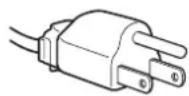
AC 200-240V
AC power supply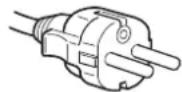
Only for 240 V AC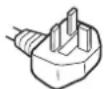
The power outlet should be located within easy reach and close to the device.
Installation
Do not install or leave the monitor:
In places exposed to high temperatures, for example, near radiators, heaters, or in places where direct sunlight may fall. Placing the monitor in places exposed to high temperatures, for example, in cars parked in sunny places or near heaters, may cause deformation of the housing or malfunctions. In places where there is vibration or sharp mechanical impacts. Near devices that emit strong magnetic fields, for example, televisions or other household appliances. In places where a lot of dust, dirt, or sand can accumulate, for example, near an open window or at the entrance to a room. If the device is moved to another place, be sure to take appropriate precautions against dust and dirt in the air. Otherwise, the device may be irreparably damaged.
Install the system on a flat surface. Do not install it on an uneven surface: for example, on the edge of a table. If part of the system protrudes beyond the edge of the surface on which it is installed, this may cause the device to fall, trip, or be damaged.
LCD screen care
Do not leave the LCD screen in places where sunlight falls on it, as this may damage it. Be careful when placing the monitor near a window. Do not touch or scratch the LCD screen. Do not place heavy objects on the LCD screen. This may cause the screen to warp or the LCD panel to malfunction. - If the monitor is used in a cold place, residual image may appear on the screen. This is not a malfunction. The screen will return to normal display as soon as the temperature becomes normal.
- If a still image is displayed for a long time, a residual image may appear on the screen temporarily. The residual image will disappear over time.
- The LCD panel heats up during operation. This is not a malfunction.
LCD (Liquid Crystal Display) precautions
Please note that the LCD screen is manufactured using high-precision technology. However, dark or light dots (red, blue, or green) may constantly appear on the LCD screen, as well as irregular colored stripes or bright spots. This is not a malfunction.
(3ΦΦeKTHBHOe YnCNo ToeK: 60Jee 99,99%)
yxo
-Пелегд УСТКО MOHITOPA 683aTeIbHO OTKJIIOHTe Ka6eIb NITAHN I3 po3eTKI. - PpOtpaIte 3KpaH KKD MmKoT KAnbI. PpN NcNoB3OBAHN XmMueCkX CpeCTB DnA UcTKn CTekNa He npImeHrIte KxIDKOCTN, COepKaunne aHTNCaTNUeCKNe INn aHaONuHbIe Do6aKn, TAK KaOH MOrY T NOpeDntb NOKpbITne 3KpaHa KKd. - PpOtpaIte KOpNc, naHeIb n OpraHb ynpAbeHnMaRKOI TKAHbIO, CJIeKa CMOeHHoB B CJa6om pAcTBOpE MoIoUero cpeDCTBa. He noJIb3yItecB rpy6bIMn UeTkAmn, a6pa3uHBbIMn NaCTaMn IIN TaKIMn pAcTBOpHTeJAMn, KaK CInPT IN N6eH3nH. - He cne dyet npikacatbca K dncnneio, ckpeTn nn CTyata b Ho Hemy octpbIM Nnn IeepwaBbIMN ppeMeTaMn (wapNKOBO pyko, OTBePTKo). 3TO MOKET npNBecTn K NOBJIENIO capanIH Ha nobepxHocTn 3IKeKTpoHO-NyueBO Tpy6kn. - 06paTne BHHMaHHe, YTO o6pa6oTKa MOHITopa TaKIMN HeTyUHMn paCTBOpNTeLAMN, KaK INHcEKTNUIbI, ININ erO DInTEJbHbIK KOHTaKT C pe3INHOBbIMN ININ BHNIOOBIMM MaTePnaIaAMN, MoXeT PnIBeCTN K yXyDWeHIO MaTePnaIIOB ININ CTapeHIO NOKpItIg 3kPaHa KKД.
TpaHcnOpTuPoBka
- OTCoeHInTe OT MOHTopa BCE Ka6eHN N KpeNko 0xbatnte erO o6eHMn pykam. Ecnm MOHTop ynaTe, Bbl MoXete nOlyuHb NOBpeKdEHe nnn 6yDet NOBpeKdEH cAm MOHTop. -ПипгьбоЗke MOHITOPа ИИн erO DoCTaBKe BpeMOHTHyIO MacTePcKyo NOIb3yIteCb 3aBOJcKO JApTOHHO Kopo6KoI yIpaKOBOuHbIMMaTePnAnamN.
MONTAX Ha CTHe HnHa HeCyUeMpIyAre
Ecnn BbCobnpaTeB 3akpenntb MOHITOp Ha CTHe nn yCTaHOBT bero Ha Hecyuem pbyare, PpeDbapNTbHo npOKOHcyIbTnpuyTeCB C KBaJIncpUPOBaHHbIMn cneuaNtam.
POMHHTe, YTO DnY yCTaHOBKn TAKORO TINa Heo6xOIMo CHrTb 3aDIOIO naHeIb.
YTNIN3aUNMOHNTopa
He BbIbpaBbAaTe 3TOT MOHHTOp BmecTe C dpyrMM6bITOBbIMN OTXoAMn. -Флуоресentнаялама,установленив B 3TOM MOHHTOpe, codepkn ptyb. YTNIN3aUNA DAHHORO MOHHTOPA DOJXHa npoBODtbcB COOTBeTCTBmC NHCTpyKUAMM MEChtbix caHITapHbIX opraHOB.
IdeHTnФkaZna DeTaJIeN OpraHOv ynpaBHeHn
CM. cTpaHnBCKo6kax dna noJyueHn noDpo6hix CBeHeH.
BbIKIOHATen (NITaHne) IN KHOKNynpaBHeHH HAXOJTCBHN3Y Cnpaba Ha nepeDHe NAHEN MOHITOPA.
BvIcpeepnHa dnCpnei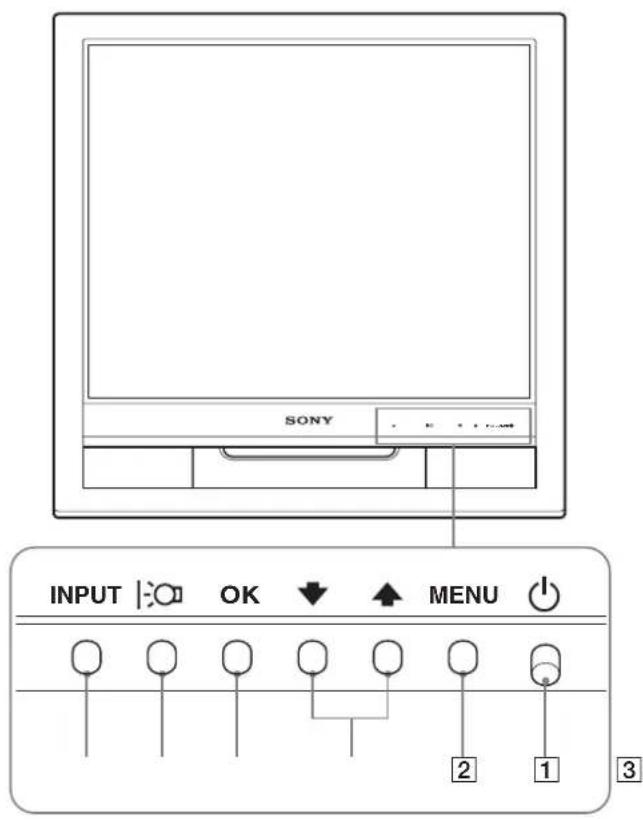
Budc3aHa dncnne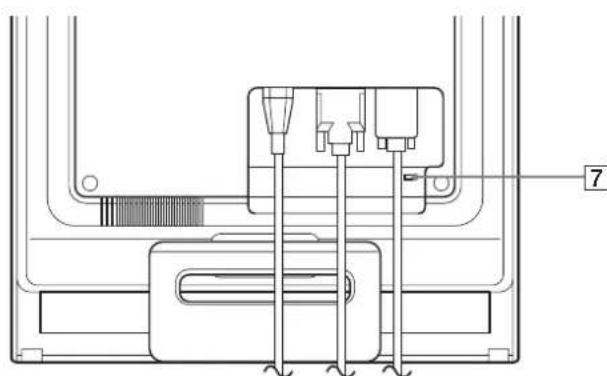
1 Power switch (standby) (p.8,16) To turn the monitor on or off, press the power switch up. When the monitor is on, the indicator glows green, and when the monitor is in power saving mode, it glows orange. 2 Menu button (p. 10, 11) This button displays or hides the full menu. 3 Down/Up buttons (p. 11) These buttons work like the down/up buttons when selecting menu items and making adjustments. 4 OK button (p. 11) This button selects an item or applies a setting in the menu. 5 Button (p. 10) This button is used to adjust the screen brightness. 6 INPUT button (p. 9) With this button, you can switch the video signal input between INPUT1 and INPUT2 when two computers are connected to the monitor. 7 Security lock slot The security lock slot is necessary for using the Kensington Micro Saver Security System. Micro Saver Security System is a registered trademark of Kensington.
Display
Remove the lock.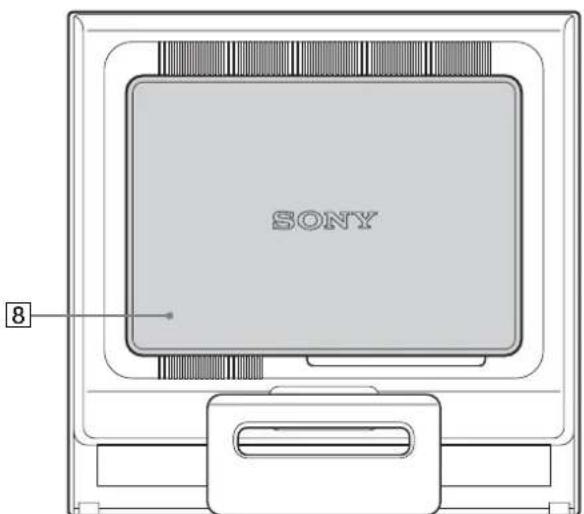
8 Lock (p.8)
Remove this cover when connecting/disconnecting cables.
9 AC IN connector (p. 8)
Connect the power cord (supplied).
10 DVI-D input connector (digital RGB) for INPUT1 (p.7)
Digital RGB video signals conforming to DVI Rev.1.0 are supplied through this connector.
11 HD15 input connector (analog RGB) (p.7)
Analog RGB video signals (0.7 Vp-p, positive) and synchronization signals are supplied through this connector.
Preparation
Before using the monitor, check that the following items are in the box:
- LCD display - Power cord - Signal cable HD15-HD15 (analog RGB) - Signal cable DVI-D (digital RGB) - Cable holder - CD-ROM (programs for Windows and Macintosh, operating instructions, etc.) - Warranty card - Quick setup guide
1 Connecting to an IBM PC/AT or compatible computer
Connecting to a Macintosh computer
Connect this monitor to a Macintosh computer using the Macintosh adapter if necessary (not included). The Macintosh adapter must be connected to the computer before connecting the cable.
Install the rear cover in place.
Before performing adjustments
Connect the monitor to the computer, then turn them on.
Allow at least 30 minutes for the monitor to warm up before making adjustments for best results.
The monitor settings are adjusted using the on-screen menu.
Quick reference
Pressing the button changes the screen brightness. Each press of the button changes the setting in the following order.
BRIGHT → RED → GREEN → DARK → BRIGHT...
When changing the parameter from RED to DARK, the screen brightness decreases. When BRIGHT is selected, you can adjust the backlight level by pressing the button in the same way as when selecting BACKLIGHT using the menu.
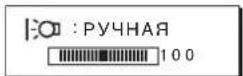
Only when the mode is set to BRIGHT will the menu items BACKLIGHT, CONTRAST, and BRIGHTNESS be available (p.11). When DARK is selected, power consumption decreases (p.16).
Navigating the on-screen menu
Press the MENU button to display the main menu on the screen. See p.11 for detailed information about the MENU button.
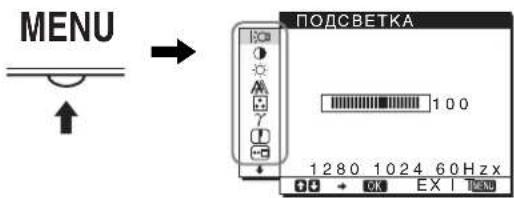
Using the ↓/↑ and OK buttons, select the icons shown in the main menu figure. One of the following menus will appear on the screen: 1 to 10. While holding down the button, scroll through the menu until the icons for menus 9 to 10 appear. See p.11 for additional information about using the ↓/↑ and OK buttons.
1 BACKLIGHT (p.11) Select the BACKLIGHT menu to adjust the brightness of the backlight. 2 CONTRAST (p.12) Select the CONTRAST menu to adjust the contrast of the image. 3 BRIGHTNESS (p.12) Select the BRIGHTNESS menu to adjust the brightness of the image (gray level).
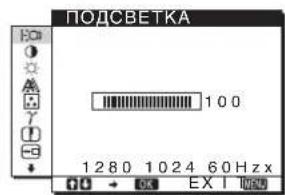
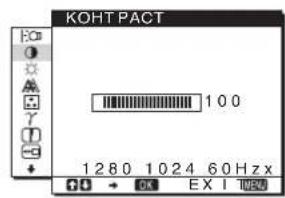
4 SCREEN (p. Select the SCREEN menu to adjust the sharpness (phase) and position (horizontal/vertical) of the image.
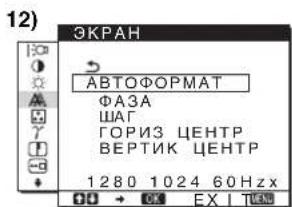
5 COLOR (p.13) Select the COLOR menu to adjust the color temperature of the image. This adjusts the color tones on the screen. When the sRGB parameter is selected in the COLOR menu, the CONTRAST, BRIGHTNESS, or GAMMA menu parameters cannot be adjusted.
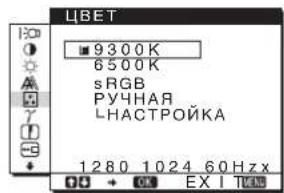
6 GAMMA (p.14) Select the GAMMA menu to change the color tone of the image.
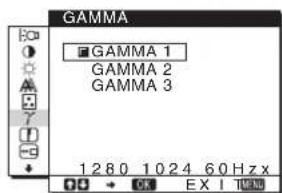
7 SHARPNESS (p.14) Select the SHARPNESS menu to adjust the sharpness of the edges of the image.
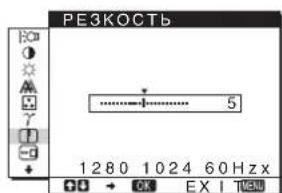
8 OSD MENU (p.14) Select the OSD MENU to change the position of the menu on the screen.
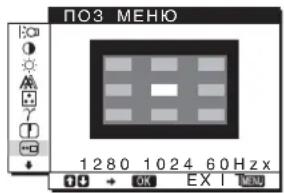
9 INPUT DETECT (p.14) The monitor automatically detects the input signal and switches to the input connector, before the monitor enters the power saving mode.
10 LANGUAGE Select LANGUAGE to change the language used for displaying the menu and messages.
11 Other menus (p.15) Adjust the following menu items. RESET -> - MENU LOCK
Using the MENU buttons, / and OK
1 Display the main menu (MENU). Press the MENU button to display the main menu (MENU) on the screen.
2 Select the menu in which you need to make adjustments. Press the / buttons to display the desired menu, then press the OK button to select the menu item.
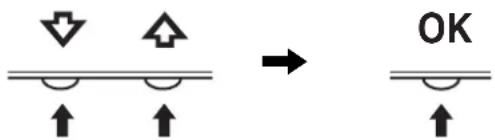
3 Perform the menu adjustment. Press the / buttons to make the adjustment, then press the OK button. When you press OK, the adjustment is saved, and the display returns to the previous menu.
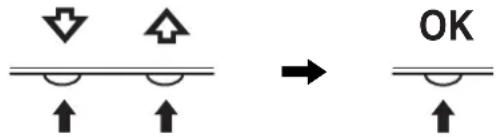
4 Close the menu. Press the MENU button once to return to the normal viewing mode. If the button is not pressed, the on-screen menu automatically disappears after approximately 45 seconds.
Reset settings
Settings reset: To reset all settings to factory defaults, see page 15 for detailed instructions on performing a settings reset.
Adjusting the backlight (BACKLIGHT)
If the screen is too bright, adjust the backlight to make it more comfortable to work with.
Note: The backlight cannot be adjusted when the picture mode is set to BRIGHT, STANDARD, or DARK (page 10).
1 Press the MENU button. The main menu appears on the screen. 2 Press the down/up buttons to select BACKLIGHT, then press the OK button. The BACKLIGHT menu appears on the screen. 3 Press the down/up buttons to adjust the backlight level, then press the OK button.
Adjusting the contrast (CONTRAST)
Adjust the contrast of the image.
Note
Contrast cannot be adjusted when the picture mode is set to BRIGHT, STANDARD, or DARK (page 10).
1 Press the MENU button. The main menu appears on the screen. 2 Press the down/up buttons to select CONTRAST, then press the OK button. The CONTRAST menu appears on the screen. 3 Press the down/up buttons to adjust the contrast, then press the OK button.
Adjusting the brightness level of the image (BRIGHTNESS)
Adjust the brightness of the image (brightness level).
Note
Brightness cannot be adjusted when the picture mode is set to BRIGHT, STANDARD, or DARK (page 10).
1 Press the MENU button. The main menu appears on the screen. 2 Press the down/up buttons to select BRIGHTNESS, then press the OK button. The BRIGHTNESS menu appears on the screen. 3 Press the down/up buttons to adjust the brightness, then press the OK button.
Adjusting the sharpness and centering of the image (SCREEN) (analog RGB signals only)
Automatic image quality adjustment function
When receiving an input signal, the monitor automatically adjusts the position and sharpness of the image (phase/clock) and ensures a clear image on the screen (p.16).
Note
If the automatic image quality adjustment function is activated, it works only when the power is turned on.
If, when using the automatic image quality adjustment function of this monitor, the image is not adjusted completely
You can perform further automatic image quality adjustment for the current input signal. (See the description of the AUTO FORMAT function below.)
If you need to perform additional image quality adjustment
You can manually adjust the sharpness (phase/clock) and position (horizontal/vertical) of the image.
These adjustments are stored in memory and are automatically recalled every time the monitor receives the same input signal.
It is possible that these adjustments may need to be repeated if the input signal changes after reconnecting the computer.
Further automatic image quality adjustments for the current input signal (AUTO FORMAT)
1 Press the MENU button.
The main menu appears on the screen.
2 Press the / buttons to select (SCREEN) and press the OK button.
The screen menu will appear on the screen.
3 Press the ↓/↑ buttons to select AUTO FORMAT and press the OK button.
Perform the appropriate screen adjustments for the position of horizontal/vertical lines for the current input signal and save them.
4 Press the ↓/↑ buttons to select → and press the OK button.
The menu screen appears again.
Sharpness adjustment (Razor/Sharpness)
The sharpness of the image can be adjusted as follows.
1 Set the resolution to 1280 × 1024 on the computer. 2 Insert the CD-ROM. 3 Start the CD-ROM, select the model region, and display the test pattern. For Windows
Select [Utility] → [Windows]/[Win Utility.exe]. For Macintosh
Select [Utility] → [Mac]/[Mac Utility].
4 Press the MENU button.
The main menu appears on the screen.
5 Press the ↓/↑ buttons to select (SCREEN) and press the OK button. The SCREEN menu appears on the screen. 6 Press the ↓/↑ buttons to select LANGUAGE and press the OK button. The LANGUAGE menu appears on the screen. 7 Press the ↓/↑ buttons until the horizontal lines become minimal.
Adjust so that the horizontal lines are minimal.
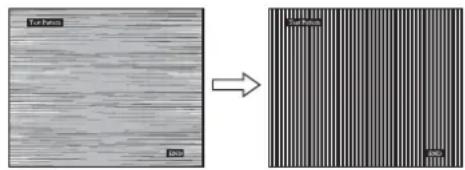
8 Press the OK button.
Return to the screen menu.
If vertical bars appear on the screen, adjust them by performing the following steps.
9 Press the ↓/↑ buttons to select and press the OK button.
The menu appears on the screen.
10 Press the ↓/↑ buttons until the vertical bars disappear.
Adjust them so that the vertical bars disappear.
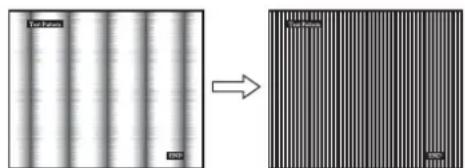
11 Press the END button on the screen to disable the test pattern.
12 Press the OK button.
Return to the screen menu.
13 Press the ↓/↑ buttons to select and press the OK button.
The screen menu appears again.
Image position adjustment (H-POSITION / V-POSITION)
If the image is not centered on the screen, adjust the image centering as follows.
1 Set the resolution to 1280 × 1024 on the computer.
2 Insert the compact disc.
3. Select the region, model, and display the test pattern.
For Windows
Select [Utility] -> [Windows]/[Win Utility.exe].
Select [Utility] -> [Mac]/[Mac Utility].
4. Press the MENU button.
The main menu appears on the screen.
5. Press the down/up arrow buttons to select (SCREEN) and press the OK button.
The SCREEN menu appears on the screen.
6. Press the down/up arrow buttons to select HORIZ CENTER or VERT CENTER and press the OK button. The HORIZ CENTER or VERT CENTER menu appears on the screen. 7. Press the down/up arrow buttons to move the test pattern to the center of the screen. 8. Press the END button on the screen to turn off the test pattern. 9. Press the OK button.
Return to the SCREEN menu.
10. Press the down/up arrow buttons to select and press the OK button.
The SCREEN menu appears again.
Adjusting the Color Temperature (LBT)
You can select the white level of the image from the following color temperature settings by default.
Also, if necessary, you can fine-tune the color temperature.
1 Press the MENU button.
The main menu appears on the screen.
2 Press the DOWN/UP button to select (LBT) and press the OK button.
The LBT menu appears on the screen.
3 Press the DOWN/UP button to select the desired color temperature, then press the OK button.
When the color temperature is decreased from 9300K (default setting) to 6500K, bluish tones in white light will change to reddish.
When the parameter "USER" is selected on the screen, you can select the color temperature "sRGB."
When the parameter "sRGB" is selected, the color setting will be performed according to the sRGB profile. (The sRGB color space (red-green-blue) is a standard industry protocol for describing light in computer graphics.) If the parameter "sRGB" is selected, the computer's light settings should be set according to the sRGB profile.
Note
- If the connected computer or any other equipment is not compatible with the sRGB profile, the color may not be adjusted according to the sRGB profile. When the sRGB parameter is selected in the COLOR menu, the parameters of the CONTRAST, BRIGHTNESS, or GAMMA menu cannot be adjusted.
Fine adjustment of color temperature (USER ADJUST)
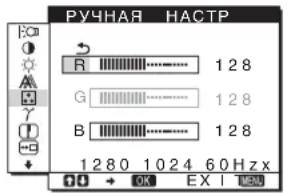
1 Press the DOWN/UP button to select ADJUST and press the OK button.
The USER ADJUST menu appears on the screen.
2 Press the DOWN/UP button to select R (Red) or B (Blue), then press the OK button. Then press the DOWN/UP button to adjust the color temperature, and then press the OK button.
Since this color temperature adjustment is changed by increasing or decreasing the components relative to G (Green), the green component remains unchanged.
Press the DOWN/UP button to select the element, then press the OK button.
The new color setting will be saved for the PICTURE element and will be called from the memory each time the PICTURE element is selected. The main menu will appear on the screen.
Changing the gamma setting (GAMMA)
You can match the color tint of the on-screen image with the color tint of the original image.
1 Press the MENU button. The main menu will appear on the screen. 2 Press the DOWN/UP buttons to select GAMMA and press the OK button. The GAMMA menu will appear on the screen. 3 Press the DOWN/UP buttons to select the desired mode, then press the OK button.
Adjusting sharpness (SHARPNESS)
The adjustment is performed to increase the sharpness of image edges, etc.
1 Press the MENU button. The main menu will appear on the screen. 2 Press the DOWN/UP buttons to select the element (SHARPNESS) and press the OK button. The SHARPNESS menu will appear on the screen. 3 Press the DOWN/UP buttons to adjust the sharpness, then press the OK button.
Changing the position of the on-screen menu (OSD MENU)
You can change the position of the menu if it blocks the image on the screen.
1 Press the MENU button. The main menu will appear on the screen. 2 Press the DOWN/UP buttons to select (OSD MENU) and press the OK button. The OSD MENU menu will appear on the screen. 3 Press the DOWN/UP buttons to select the desired position, then press the OK button. There are three positions: top, middle, and bottom of the screen respectively.
AUTOMATIC INPUT SWITCHING (INPUT DETECTION)
If you select the value AUTO for INPUT DETECTION in the menu, the monitor will automatically detect the input signal and switch to it before the monitor enters power saving mode.
1 Press the MENU button.
The main menu will appear on the screen.
Press the buttons / to select (INPUT SELECT), then press the OK button.
The INPUT SELECT screen appears.
Press the buttons / to select the input mode, then press the OK button.
- AUTO INPUT:
If there is no input signal on the selected input terminal, or if the input terminal is selected with the INPUT button on the monitor and there is no input signal on that terminal, a message appears on the screen (p.17). The monitor automatically checks for the presence of an input signal on the other input terminals and changes the input.
When the input is changed, the selected input terminal is displayed in the upper left corner of the screen.
If there is no input signal, the monitor automatically switches to power saving mode.
- AUTO INPUT OFF:
Automatic input change is not performed. Press the INPUT button to change the input terminal.
Selecting the language in the on-screen menu (LANGUAGE)
You can change the language used for displaying the menu and messages on this monitor.
1 Press the MENU button.
The main menu appears on the screen.
2 Keep the button pressed until the icon of the desired parameter appears.
3 Press the buttons / to select (LANGUAGE) and press the OK button.
The LANGUAGE menu will appear on the screen.
Press the ↑/↓ buttons to select a language, then press the OK button.
- ENGLISH: English
- FRANÇAIS: French
- DEUTSCH: German
- ESPACOL: Spanish ITALIANO: Italian
- NEDERLANDS: Dutch SVENSKA: Swedish Русский 中文
If the input signal does not match any of the factory-preset modes
When the monitor receives an input signal that does not match any of the factory-preset modes, the automatic picture quality adjustment function is activated, which ensures a constantly sharp image on the screen (within the following monitor synchronization frequency ranges):
Horizontal scanning frequency:
28-80 kHz
Vertical scanning frequency:
48-75 Hz
T
Therefore, when the monitor receives an input signal that does not match any of the factory-preset modes for the first time, it takes longer than usual to display the image. Subsequently, these settings are automatically saved in memory, so the next time the monitor will operate in the same way as when receiving signals that match one of the factory-preset modes.
Note
Set the RGB signal input from the DVI-D input connector; there is no need for adjustment.
If you adjust the phase, clock, and image position manually
For some input signals, the automatic image quality adjustment function of this monitor may not fully adjust the image position, phase, and clock. In this case, these adjustments can be performed manually (p.12). If the adjustments are made manually, they are stored in memory as user modes and are automatically recalled each time the same input signals are received by the monitor.
Note
If the automatic image quality adjustment function has been activated, it works only when the power is turned on.
Troubleshooting
Before contacting Technical Support, please read this section.
Screen messages
If something is wrong with the input signal, one of the following messages appears on the screen. For instructions on how to fix the problem, see the section "Symptoms of malfunctions and actions to take" on p.18.
If the screen displays "OUT OF RANGE"
This indicates that the input signal does not match the monitor's specifications. Check the following.
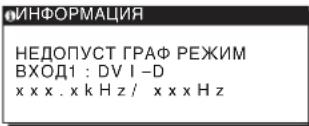
If the screen displays "xxx.xkHz/ xxxHz", this indicates that either the horizontal frequency or the vertical frequency does not match the monitor's specifications. The numbers indicate the horizontal and vertical frequencies of the current input signal.
If the screen displays "RESOLUTION>1280 ×1024"
This indicates that the resolution does not match the monitor's specifications (1280×1024 or lower).
The screen displays the message NO SIGNAL
This indicates that at the current moment the signal is not being supplied.
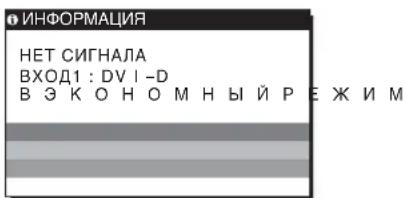
In energy-saving mode
Image size: 19.0
Pixels
Input signal format
Operating frequency RGB*
Horizontal:
28-80K (analog RGB)
28-64K (digital RGB)
Vertical:
Resolution horizontally: max. 1280
pixels
Vertically: max. 1024
lines
0.7 Vp-p, 75 Ω,
Input
Sync signal
TTL level, 2.2 kΩ,
Input
Negative
Separate horizontal
and vertical
Digital RGB (DVI):
TMDS (single link)
Power supply requirements
100-240 V, 50-60 Hz
Max. 1.0 A
Monocle
MAX. 50 W
Operating temperature
5-35°C
Dimensions (width/height/depth)
Vertical
Approx. 435×418×146 mm
Weight approx. 6 kg
Plug & Play DDC2B
For details, see page 7.
- Recommended synchronization mode: horizontal and vertical
- The horizontal sync pulse width must be greater than 4.8% of the total horizontal scan period or 0.8 µs, whichever is greater.
- The interval between horizontal scan signals must be greater than 2.5 µs. The interval between vertical scan signals must be greater than 450 µs.
Design and specifications are subject to change without prior notice.
TFTLCD Color Computer Display
Operating Instructions
SE
SDM-HS75D
SDM-HS95D
Owner's Record
The model and serial numbers are located at the rear of the unit. Record these numbers in the spaces provided below. Refer to them whenever you call upon your dealer regarding this product. Model No. _ _ Serial No. ____
WARNING
To reduce the risk of fire or electric shock, do not expose this apparatus to rain or moisture.
Dangerously high voltages are present inside the unit. Do not open the cabinet. Refer servicing to qualified personnel only.
FCC Notice
This equipment has been tested and found to comply with the limits for a Class B digital device, pursuant to Part 15 of the FCC Rules. These limits are designed to provide reasonable protection against harmful interference in a residential installation. This equipment generates, uses, and can radiate radio frequency energy and, if not installed and used in accordance with the instructions, may cause harmful interference to radio communications. However, there is no guarantee that interference will not occur in a particular installation. If this equipment does cause harmful interference to radio or television reception, which can be determined by turning the equipment off and on, the user is encouraged to try to correct the interference by one or more of the following measures: - Reorient or relocate the receiving antenna. - Increase the separation between the equipment and receiver. - Connect the equipment into an outlet on a circuit different from that to which the receiver is connected. - Consult the dealer or an experienced radio/TV technician for help. You are cautioned that any changes or modifications not expressly approved in this manual could void your authority to operate this equipment.
IMPORTANT
If you have any questions about this product, you may call; Sony Customer Information Services Center 1-800-222-7669 or http://www.roy.com/
Declaration of Conformity
Trade Name: SONY
Model: SDM-HS75D
SDM-HS95D
Responsible Party: Sony Electronics Inc.
Address: 16530 Via Esprillo, San Diego,
CA 92127 U.S.A.
Telephone Number: 858-942-2230
This device complies with part 15 of the FCC rules. Operation is subject to the following two conditions: (1) This device may not cause harmful interference, and (2) this device must accept any interference received, including interference that may cause undesired operation.
NOTICE
This notice is applicable for USA/Canada only.
If shipped to USA/Canada, install only a UL LISTED/CSA
LABELLED power supply cord meeting the following
specifications:
SPECIFICATIONS
Plug Type: NEMA Plug 5-15P
Cord Type: SVT or SJT, minimum 3 × 18 AWG
Length: Maximum 15 feet
Rating: Minimum 7 A, 125 V
NOTICE
As an ENERGY STAR Partner, Sony Corporation has determined that this product meets the ENERGY STAR guidelines for energy efficiency.
8 Rear panel (p. 8)
Click [Utility] → [Windows]/[Win Utility.exe].
For Macintosh
Click [Utility] → [Mac]/[Mac Utility].
4 Press the MENU button.
Digital RGB signal (DVI):
TMDS (Single link)
-240V, 50-60Hz
Max. 1.0 A
Digital RGB-signal (DVI):
TMDS (Single link)
Power supply 100
-240 V, 50-60 Hz,
Max. 1.0 A
The model and serial numbers are located at the rear of the unit. Record these numbers in the spaces provided below. Refer to them whenever you call upon your dealer regarding this product. Model No. ____ Serial No. ____
WARNING
To reduce the risk of fire or electric shock, do not expose this apparatus to rain or moisture.
Dangerously high voltages are present inside the unit. Do not open the cabinet. Refer servicing to qualified personnel only.
FCC Notice
This equipment has been tested and found to comply with the limits for a Class B digital device, pursuant to Part 15 of the FCC Rules. These limits are designed to provide reasonable protection against harmful interference in a residential installation. This equipment generates, uses, and can radiate radio frequency energy and, if not installed and used in accordance with the instructions, may cause harmful interference to radio communications. However, there is no guarantee that interference will not occur in a particular installation. If this equipment does cause harmful interference to radio or television reception, which can be determined by turning the equipment off and on, the user is encouraged to try to correct the interference by one or more of the following measures: - Reorient or relocate the receiving antenna. - Increase the separation between the equipment and receiver. - Connect the equipment into an outlet on a circuit different from that to which the receiver is connected. - Consult the dealer or an experienced radio/TV technician for help. You are cautioned that any changes or modifications not expressly approved in this manual could void your authority to operate this equipment.
IMPORTANT
If you have any questions about this product, you may call; Sony Customer Information Services Center 1-800-222-7669 or http://www.roy.com/
Declaration of Conformity
Trade Name: SONY
Model: SDM-HS75D
SDM-HS95D
Responsible Party: Sony Electronics Inc.
Address: 16530 Via Esprillo, San Diego,
CA 92127 U.S.A.
Telephone Number: 858-942-2230
This device complies with part 15 of the FCC rules. Operation is subject to the following two conditions: (1) This device may not cause harmful interference, and (2) this device must accept any interference received, including interference that may cause undesired operation.
NOTICE
This notice is applicable for USA/Canada only.
If shipped to USA/Canada, install only a UL LISTED/CSA
LABELLED power supply cord meeting the following
specifications:
SPECIFICATIONS
Plug Type Nema-Plug 5-15p
Cord Type SVT or SJT, minimum 3 x 18 AWG
Length Maximum 15 feet
Rating Minimum 7 A, 125 V
NOTICE
As an ENERGY STAR Partner, Sony Corporation has determined that this product meets the ENERGY STAR guidelines for energy efficiency.
Table of Contents
The model and serial numbers are located at the rear of the unit. Record these numbers in the spaces provided below. Refer to them whenever you call upon your dealer regarding this product. Model No. ______ Serial No. ______
WARNING
To reduce the risk of fire or electric shock, do not expose this apparatus to rain or moisture.
Dangerously high voltages are present inside the unit. Do not open the cabinet. Refer servicing to qualified personnel only.
FCC Notice
This equipment has been tested and found to comply with the limits for a Class B digital device, pursuant to Part 15 of the FCC Rules. These limits are designed to provide reasonable protection against harmful interference in a residential installation. This equipment generates, uses, and can radiate radio frequency energy and, if not installed and used in accordance with the instructions, may cause harmful interference to radio communications. However, there is no guarantee that interference will not occur in a particular installation. If this equipment does cause harmful interference to radio or television reception, which can be determined by turning the equipment off and on, the user is encouraged to try to correct the interference by one or more of the following measures: - Reorient or relocate the receiving antenna. - Increase the separation between the equipment and receiver. - Connect the equipment into an outlet on a circuit different from that to which the receiver is connected. - Consult the dealer or an experienced radio/TV technician for help. You are cautioned that any changes or modifications not expressly approved in this manual could void your authority to operate this equipment.
IMPORTANT
If you have any questions about this product, you may call; Sony Customer Information Services Center 1-800-222-7669 or http://www.sony.com/
Declaration of Conformity
Trade Name: SONY
Model: SDM-HS75D
SDM-HS95D
Responsible Party: Sony Electronics Inc.
Address: 16530 Via Esprillo, San Diego,
CA 92127 U.S.A.
Telephone Number: 858-942-2230
This device complies with part 15 of the FCC rules. Operation is subject to the following two conditions: (1) This device may not cause harmful interference, and (2) this device must accept any interference received, including interference that may cause undesired operation.
NOTICE
This notice is applicable for USA/Canada only.
If shipped to USA/Canada, install only a UL LISTED/CSA
LABELLED power supply cord meeting the following specifications:
SPECIFICATIONS
Plug Type: Nema-Plug 5-15p
Cord Type: SVT or SJT, minimum 3 × 18 AWG
Length: Maximum 15 feet
Rating Minimum 7 A, 125 V
NOTICE
As an ENERGY STAR Partner, Sony Corporation has determined that this product meets the ENERGY STAR guidelines for energy efficiency.
Contents
The model and serial numbers are located at the rear of the unit. Record these numbers in the spaces provided below. Refer to them whenever you call upon your dealer regarding this product. Model No. _ _ Serial No. ____
WARNING
To reduce the risk of fire or electric shock, do not expose this apparatus to rain or moisture.
Dangerously high voltages are present inside the unit. Do not open the cabinet. Refer servicing to qualified personnel only.
FCC Notice
This equipment has been tested and found to comply with the limits for a Class B digital device, pursuant to Part 15 of the FCC Rules. These limits are designed to provide reasonable protection against harmful interference in a residential installation. This equipment generates, uses, and can radiate radio frequency energy and, if not installed and used in accordance with the instructions, may cause harmful interference to radio communications. However, there is no guarantee that interference will not occur in a particular installation. If this equipment does cause harmful interference to radio or television reception, which can be determined by turning the equipment off and on, the user is encouraged to try to correct the interference by one or more of the following measures: - Reorient or relocate the receiving antenna. - Increase the separation between the equipment and receiver. - Connect the equipment into an outlet on a circuit different from that to which the receiver is connected. - Consult the dealer or an experienced radio/TV technician for help. You are cautioned that any changes or modifications not expressly approved in this manual could void your authority to operate this equipment.
IMPORTANT
If you have any questions about this product, you may call; Sony Customer Information Services Center 1-800-222-7669 or http://www.sony.com/
Declaration of Conformity
Trade Name: SONY
Model: SDM-HS75D
SDM-HS95D
Responsible Party: Sony Electronics Inc.
Address: 16530 Via Esprillo, San Diego,
CA 92127 U.S.A.
Telephone Number: 858-942-2230
This device complies with part 15 of the FCC rules. Operation is subject to the following two conditions: (1) This device may not cause harmful interference, and (2) this device must accept any interference received, including interference that may cause undesired operation.
NOTICE
This notice is applicable for USA/Canada only.
If shipped to USA/Canada, install only a UL LISTED/CSA
LABELLED power supply cord meeting the following specifications:
SPECIFICATIONS
Plug Type Nema-Plug 5-15p
Cord Type SVT or SJT, minimum 3 x 18 AWG
Length Maximum 15 feet
Rating Minimum 7 A, 125 V
NOTICE
As an ENERGY STAR Partner, Sony Corporation has determined that this product meets the ENERGY STAR guidelines for energy efficiency.
Table of Contents
Precautions 4
The model and serial numbers are located at the rear of the unit. Record these numbers in the spaces provided below. Refer to them whenever you call upon your dealer regarding this product. Model No. ____ Serial No. ____
WARNING
To reduce the risk of fire or electric shock, do not expose this apparatus to rain or moisture.
Dangerously high voltages are present inside the unit. Do not open the cabinet. Refer servicing to qualified personnel only.
FCC Notice
This equipment has been tested and found to comply with the limits for a Class B digital device, pursuant to Part 15 of the FCC Rules. These limits are designed to provide reasonable protection against harmful interference in a residential installation. This equipment generates, uses, and can radiate radio frequency energy and, if not installed and used in accordance with the instructions, may cause harmful interference to radio communications. However, there is no guarantee that interference will not occur in a particular installation. If this equipment does cause harmful interference to radio or television reception, which can be determined by turning the equipment off and on, the user is encouraged to try to correct the interference by one or more of the following measures: - Reorient or relocate the receiving antenna. - Increase the separation between the equipment and receiver. - Connect the equipment into an outlet on a circuit different from that to which the receiver is connected. - Consult the dealer or an experienced radio/TV technician for help. You are cautioned that any changes or modifications not expressly approved in this manual could void your authority to operate this equipment.
IMPORTANT
If you have any questions about this product, you may call; Sony Customer Information Services Center 1-800-222-7669 or http://www.sony.com/
Declaration of Conformity
Trade Name: SONY
Model: SDM-HS75D
SDM-HS95D
Responsible Party: Sony Electronics Inc.
Address: 16530 Via Esprillo, San Diego,
CA 92127 U.S.A.
Telephone Number: 858-942-2230
This device complies with part 15 of the FCC rules. Operation is subject to the following two conditions: (1) This device may not cause harmful interference, and (2) this device must accept any interference received, including interference that may cause undesired operation.
NOTICE
This notice is applicable for USA/Canada only.
If shipped to USA/Canada, install only a UL LISTED/CSA
LABELLED power supply cord meeting the following
specifications:
SPECIFICATIONS
Plug Type Nema-Plug 5-15p
Cord Type SVT or SJT, minimum 3 × 18 AWG
Length Maximum 15 feet
Rating Minimum 7 A, 125 V
NOTICE
As an ENERGY STAR Partner, Sony Corporation has determined that this product meets the ENERGY STAR guidelines for energy efficiency.
The model and serial numbers are located at the rear of the unit. Record these numbers in the spaces provided below. Refer to them whenever you call upon your dealer regarding this product. Model No. ____ Serial No. ____
WARNING
To reduce the risk of fire or electric shock, do not expose this apparatus to rain or moisture.
Dangerously high voltages are present inside the unit. Do not open the cabinet. Refer servicing to qualified personnel only.
FCC Notice
This equipment has been tested and found to comply with the limits for a Class B digital device, pursuant to Part 15 of the FCC Rules. These limits are designed to provide reasonable protection against harmful interference in a residential installation. This equipment generates, uses, and can radiate radio frequency energy and, if not installed and used in accordance with the instructions, may cause harmful interference to radio communications. However, there is no guarantee that interference will not occur in a particular installation. If this equipment does cause harmful interference to radio or television reception, which can be determined by turning the equipment off and on, the user is encouraged to try to correct the interference by one or more of the following measures: - Reorient or relocate the receiving antenna. - Increase the separation between the equipment and receiver. - Connect the equipment into an outlet on a circuit different from that to which the receiver is connected. - Consult the dealer or an experienced radio/TV technician for help. You are cautioned that any changes or modifications not expressly approved in this manual could void your authority to operate this equipment.
IMPORTANT
If you have any questions about this product, you may call; Sony Customer Information Services Center 1-800-222-7669 or http://www.sony.com/
Declaration of Conformity
Trade Name: SONY
Model: SDM-HS75D
SDM-HS95D
Responsible Party: Sony Electronics Inc.
Address: 16530 Via Esprillo, San Diego,
CA 92127 U.S.A.
Telephone Number: 858-942-2230
This device complies with part 15 of the FCC rules. Operation is subject to the following two conditions: (1) This device may not cause harmful interference, and (2) this device must accept any interference received, including interference that may cause undesired operation.
NOTICE
This notice is applicable for USA/Canada only.
If shipped to USA/Canada, install only a UL LISTED/CSA
LABELLED power supply cord meeting the following specifications:
SPECIFICATIONS
Plug Type Nema-Plug 5-15p
Cord Type SVT or SJT, minimum 3 x 18 AWG
Length Maximum 15 feet
Rating Minimum 7 A, 125 V
As an ENERGY STAR Partner, Sony Corporation has determined that this product meets the ENERGY STAR guidelines for energy efficiency.
Table of Contents
Precautions 4
Monitor parts and adjustments 5
Setup 7
Press the INPUT button.
Click [Utility] -> [Windows]/[Win Utility.exe].
For Macintosh
Click [Utility] -> [Mac]/[Mac Utility].
4 Press the MENU button.
The main menu appears on the screen.
5 Press the down/up arrow buttons to select (SCREEN) and press the OK button.
The SCREEN menu appears on the screen.
6 Press the down/up arrow buttons to select PHASE and press the OK button.
The PHASE menu appears on the screen.
7 Press the / keys until the horizontal bars are minimal.
Adjust until the horizontal bars are minimal.
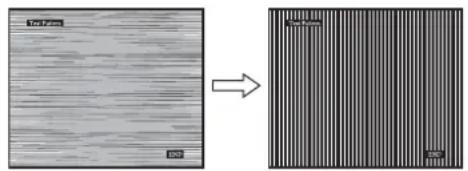
8 Press the OK key.
Enter the SCREEN menu.
Click [Utility] → [Windows]/[Win Utility.exe].
For Macintosh
Click [Utility] → [Mac]/[Mac Utility].
4 Press the MENU key.
The main menu appears on the screen.
5 Press the / keys to select (SCREEN) and press the OK key.
The SCREEN menu appears on the screen.
6 Press the / keys to select H CENTER or V CENTER and press the OK key.
The H CENTER or V CENTER menu appears on the screen.
7 Press the / keys to center the test pattern on the screen.
Image size: 19.0
Input signal form Working frequency RGB*
signal
Horizontal: 28 - 80kHz (analog
RGB)
28-64kHz
(digital RGB)
Vertical: 48 - 75Hz (analog
RGB)
60 Hz (digital RGB)
Resolution Horizontal: Max 1280 dots
Vertical: max 1024 lines
Input signal level Analog RGB video signal
0.7 Vp-p, 75 Ω, positive
SYNC signal
TTL level, 2.2kΩ
positive and negative
(located horizontally and
vertically)
Digital RGB (DVI) signal:
TMDS (single link)
Power requirements: 100-240 V, 50-60 Hz
max. 1.0 A
The model and serial numbers are located at the rear of the unit. Record these numbers in the spaces provided below. Refer to them whenever you call upon your dealer regarding this product. Model No. ____ Serial No. ____
WARNING
To reduce the risk of fire or electric shock, do not expose this apparatus to rain or moisture.
Dangerously high voltages are present inside the unit. Do not open the cabinet. Refer servicing to qualified personnel only.
FCC Notice
This equipment has been tested and found to comply with the limits for a Class B digital device, pursuant to Part 15 of the FCC Rules. These limits are designed to provide reasonable protection against harmful interference in a residential installation. This equipment generates, uses, and can radiate radio frequency energy and, if not installed and used in accordance with the instructions, may cause harmful interference to radio communications. However, there is no guarantee that interference will not occur in a particular installation. If this equipment does cause harmful interference to radio or television reception, which can be determined by turning the equipment off and on, the user is encouraged to try to correct the interference by one or more of the following measures: - Reorient or relocate the receiving antenna. - Increase the separation between the equipment and receiver. - Connect the equipment into an outlet on a circuit different from that to which the receiver is connected. - Consult the dealer or an experienced radio/TV technician for help. You are cautioned that any changes or modifications not expressly approved in this manual could void your authority to operate this equipment.
IMPORTANT
If you have any questions about this product, you may call Sony Customer Information Services Center
1-800-222-7669 or visit http://www.sony.com/
Declaration of Conformity
Trade Name: SONY
Model: SDM-HS75D
SDM-HS95D
Responsible Party: Sony Electronics Inc.
Address: 16530 Via Esprillo, San Diego,
CA 92127 U.S.A.
Telephone Number: 858-942-2230
This device complies with part 15 of the FCC rules. Operation is subject to the following two conditions: (1) This device may not cause harmful interference, and (2) this device must accept any interference received, including interference that may cause undesired operation.
NOTICE
This notice is applicable for USA/Canada only.
If shipped to USA/Canada, install only a UL LISTED/CSA
LABELLED power supply cord meeting the following
Specifications:
SPECIFICATIONS
Plug Type: NEMA Plug 5-15P
Cord Type: SVT or SJT, minimum 3 × 18 AWG
Length: Maximum 15 feet
Rating: Minimum 7 A, 125 V
NOTICE
As an ENERGY STAR Partner, Sony Corporation has determined that this product meets the ENERGY STAR guidelines for energy efficiency.
Contents
Warnings 4
Selecting the input signal (INPUT button) 9
User adjustment of the monitor 10
Adjusting to the desired brightness 10
Using the menu 10
Adjusting the backlight (BACKLIGHT) 11
Adjusting the contrast (CONTRAST) 12
The model and serial numbers are located at the rear of the unit. Record these numbers in the spaces provided below. Refer to them whenever you call upon your dealer regarding this product. Model No. ______ Serial No. ______
WARNING
To reduce the risk of fire or electric shock, do not expose this apparatus to rain or moisture.
Dangerously high voltages are present inside the unit. Do not open the cabinet. Refer servicing to qualified personnel only.
FCC Notice
This equipment has been tested and found to comply with the limits for a Class B digital device, pursuant to Part 15 of the FCC Rules. These limits are designed to provide reasonable protection against harmful interference in a residential installation. This equipment generates, uses, and can radiate radio frequency energy and, if not installed and used in accordance with the instructions, may cause harmful interference to radio communications. However, there is no guarantee that interference will not occur in a particular installation. If this equipment does cause harmful interference to radio or television reception, which can be determined by turning the equipment off and on, the user is encouraged to try to correct the interference by one or more of the following measures:
- Reorient or relocate the receiving antenna.
- Increase the separation between the equipment and receiver.
- Connect the equipment into an outlet on a circuit different from that to which the receiver is connected.
- Consult the dealer or an experienced radio/TV technician for help. You are cautioned that any changes or modifications not expressly approved in this manual could void your authority to operate this equipment.
IMPORTANT
If you have any questions about this product, you may call; Sony Customer Information Services Center 1-800-222-7669 or http://www.roy.com/
Declaration of Conformity
Trade Name: SONY
Model: SDM-HS75D
SDM-HS95D
Responsible Party: Sony Electronics Inc.
Address: 16530 Via Esprillo, San Diego, CA
92127 U.S.A.
Telephone Number: 858-942-2230
This device complies with part 15 of the FCC rules. Operation is subject to the following two conditions: (1) This device may not cause harmful interference, and (2) this device must accept any interference received, including interference that may cause undesired operation.
NOTICE
This notice is applicable for USA/Canada only.
If shipped to USA/Canada, install only a UL LISTED/CSA
LABELLED power supply cord meeting the following specifications:
SPECIFICATIONS
Plug Type Nema-Plug 5-15p
Cord Type SVT or SJT, minimum 3 × 18 AWG
Length Maximum 15 feet
Rating Minimum 7 A, 125 V
NOTICE
As an ENERGY STAR Partner, Sony Corporation has determined that this product meets the ENERGY STAR guidelines for energy efficiency.
Table of Contents
Precautions 4
Identifying Parts and Controls 5
Installation 7
Step 1: Open the stand 7
Step 2: Connect the monitor to your computer 7
Step 3: Connect the power cord 8
Step 4: Bundle the cords and close the back cover 8
Step 5: Turn on the monitor and computer 8
Adjusting the tilt 9
Selecting the input signal (INPUT button) 9
Setting up the monitor 9
Set to desired brightness 9
Navigation menu 9
Adjust backlight (Backlight) 11
Adjust contrast (Contrast) 11
Adjust image black level (Brightness) 11

- SPECIFICATIONS
- SDM-HS75D
- OWNER'S RECORD
- WARNING
- FCC NOTICE
- IMPORTANT
- DECLARATION OF CONFORMITY
- NOTICE
- TABLE OF CONTENTS
- SETUP
- CUSTOMIZING YOUR MONITOR
- TECHNICAL FEATURES
- TROUBLESHOOTING
- PRECAUTIONS
- WARNING ON POWER CONNECTIONS
- INSTALLATION
- HANDLING THE LCD SCREEN
- NOTE ON THE LCD (LIQUID CRYSTAL DISPLAY)
- MAINTENANCE
- TRANSPORTATION
- INSTALLATION ON A WALL OR A MOUNTING ARM
- DISPOSAL OF THE MONITOR
- IDENTIFYING PARTS AND CONTROLS
- FRONT OF THE DISPLAY
- REAR OF THE DISPLAY
- STEP 1: OPEN THE STAND
- NOTE
- STEP 2: CONNECT THE DISPLAY TO YOUR COMPUTER
- NOTES
- CONNECT A COMPUTER EQUIPPED WITH A DVI OUTPUT CONNECTOR (DIGITAL RGB)
- CONNECT A COMPUTER EQUIPPED WITH AN HD15 OUTPUT CONNECTOR (ANALOG RGB)
- CONNECTING TO AN IBM PC/AT OR COMPATIBLE COMPUTER
- CONNECTING TO A MACINTOSH COMPUTER
- STEP 3: CONNECT THE POWER CORD
- STEP 4: SECURE THE CORDS AND REPLACE THE BACK COVER
- BUNDLE THE CABLES AND CORDS
- REPLACE THE BACK COVER
- STEP 5: TURN ON THE MONITOR AND COMPUTER
- PRESS THE POWER SWITCH UPWARD
- TURN ON THE COMPUTER
- IF NO PICTURE APPEARS ON YOUR SCREEN
- IF NO INPUT SIGNAL APPEARS ON THE SCREEN
- IF CABLE DISCONNECTED APPEARS ON THE SCREEN
- IF OUT OF RANGE APPEARS ON THE SCREEN
- NO NEED FOR SPECIFIC DRIVERS
- ADJUSTING THE TILT
- TO USE THE DISPLAY COMFORTABLY
- SELECTING THE INPUT SIGNAL (INPUT BUTTON)
- PRESS THE INPUT BUTTON
- BEFORE MAKING ADJUSTMENTS
- ADJUSTING TO THE DESIRED BRIGHTNESS
- USER HIGH MIDDLE LOW USER
- NAVIGATING THE MENU
- BACKLIGHT (PAGE 11)
- CONTRAST (PAGE 12)
- BRIGHTNESS (PAGE 12)
- SCREEN
- COLOR
- (PAGE
- GAMMA
- SHARPNESS (PAGE 14)
- MENU POSITION-3 (PAGE 14)
- INPUT SENSING (PAGE 14)
- LANGUAGE (PAGE
- OTHER MENUS (PAGE 15)
- USING THE MENU, DOWN/UP, AND OK BUTTONS
- DISPLAY THE MAIN MENU
- SELECT THE MENU YOU WANT TO ADJUST
- ADJUST THE MENU
- CLOSE THE MENU
- RESETTING THE ADJUSTMENTS
- ADJUSTING THE BACKLIGHT (BACKLIGHT)
- PRESS THE MENU BUTTON
- PRESS THE DOWN/UP BUTTONS TO SELECT (BACKLIGHT) AND PRESS THE OK BUTTON
- PRESS THE DOWN/UP BUTTONS TO ADJUST THE LIGHT LEVEL AND PRESS THE OK BUTTON
- ADJUSTING THE CONTRAST (CONTRAST)
- ADJUSTING THE BLACK LEVEL OF AN IMAGE (BRIGHTNESS)
- ADJUSTING THE PICTURE'S SHARPNESS AND CENTERING (SCREEN) (ANALOG RGB SIGNAL ONLY)
- MAKE FURTHER AUTOMATIC ADJUSTMENTS TO THE PICTURE QUALITY FOR THE CURRENT INPUT SIGNAL (AUTO)
- PRESS THE OK BUTTON
- PRESS THE DOWN/UP BUTTONS TO SELECT PITCH AND PRESS THE OK BUTTON
- PRESS THE DOWN/UP BUTTONS UNTIL THE VERTICAL STRIPES DISAPPEAR
- PRESS THE DOWN/UP BUTTONS TO SELECT THE ARROW AND PRESS THE OK BUTTON
- ADJUST THE PICTURE'S POSITION MANUALLY (H CENTER/V CENTER)
- START THE CD-ROM, SELECT THE REGION AND MODEL, AND DISPLAY THE TEST PATTERN
- FOR WINDOWS
- FOR MACINTOSH
- PRESS THE DOWN/UP BUTTONS TO SELECT (SCREEN) AND PRESS THE OK BUTTON
- PRESS THE DOWN/UP BUTTONS TO SELECT H CENTER OR V CENTER AND PRESS THE OK BUTTON
- PRESS THE DOWN/UP BUTTONS TO CENTER THE TEST PATTERN IN THE SCREEN
- CLICK END ON THE SCREEN TO TURN OFF THE TEST PATTERN
- PRESS THE DOWN/UP BUTTONS TO SELECT THE RIGHT ARROW AND PRESS THE OK BUTTON
- ADJUSTING THE COLOR TEMPERATURE (COLOR)
- PRESS THE DOWN/UP BUTTONS TO SELECT (COLOR) AND PRESS THE OK BUTTON
- PRESS THE DOWN/UP BUTTONS TO SELECT THE DESIRED COLOR TEMPERATURE AND PRESS THE OK BUTTON
- FINE TUNING THE COLOR TEMPERATURE (USER ADJUSTMENT)
- CHANGING THE GAMMA SETTING (GAMMA)
- ADJUSTING THE SHARPNESS (SHARPNESS)
- CHANGING THE MENU'S POSITION (MENU POSITION)
- CHANGING THE INPUT AUTOMATICALLY (INPUT SENSING)
- SELECTING THE ON-SCREEN MENU LANGUAGE (LANGUAGE)
- KEEP PRESSING THE DOWN BUTTON UNTIL THE ICON OF THE DESIRED OPTION ITEM APPEARS
- PRESS THE DOWN/UP BUTTONS TO SELECT (LANGUAGE) AND PRESS THE OK BUTTON
- PRESS THE DOWN/UP BUTTONS TO SELECT A LANGUAGE AND PRESS THE OK BUTTON
- ADDITIONAL SETTINGS
- PRESS THE DOWN/UP BUTTONS TO SELECT THE DESIRED OPTION ITEM AND PRESS THE OK BUTTON
- RESETTING THE ADJUSTMENT DATA TO THE DEFAULTS
- PRESS THE DOWN/UP BUTTONS TO SELECT RESET AND PRESS THE OK BUTTON
- PRESS THE DOWN/UP BUTTONS TO SELECT THE DESIRED MODE AND PRESS THE OK BUTTON
- LOCKING THE MENUS AND CONTROLS
- PRESS THE DOWN/UP BUTTONS TO SELECT ON (MENU LOCK) AND PRESS THE OK BUTTON
- PRESS THE DOWN/UP BUTTONS TO SELECT ON OR OFF AND PRESS THE OK BUTTON
- POWER SAVING FUNCTION
- REDUCING THE POWER CONSUMPTION
- (M O D E)
- AUTOMATIC PICTURE QUALITY ADJUSTMENT FUNCTION (ANALOG RGB SIGNAL ONLY)
- THE FACTORY PRESET MODE
- IF INPUT SIGNALS DO NOT MATCH ONE OF THE FACTORY PRESET MODES
- IF YOU ADJUST THE PHASE, PITCH, AND PICTURE POSITION MANUALLY
- ON-SCREEN MESSAGES
- IF "XXX.X KHZ/XXX HZ" IS DISPLAYED
- IF "RESOLUTION > 1280 × 1024" IS DISPLAYED
- GO TO POWER SAVE
- TROUBLE SYMPTOMS AND REMEDIES
- SDM-HS95D
- TFT LCD COLOR COMPUTER DISPLAY
- INDICES
- ADJUST THE SHARPNESS (SHARPNESS)
- PREPARATION FOR USE
- SAFETY PRECAUTIONS
- SAFETY PRECAUTIONS WHEN CONNECTING TO THE POWER SUPPLY
- LCD SCREEN CARE
- LCD (LIQUID CRYSTAL DISPLAY) PRECAUTIONS
- YXO
- TPAHCNOPTUPOBKA
- MONTAX HA CTHE HNHA HECYUEMPIYARE
- YTNIN3AUNMOHNTOPA
- IDEHTNФKAZNA DETAJIEN OPRAHOV YNPABHEHN
- DISPLAY
- PREPARATION
- BEFORE PERFORMING ADJUSTMENTS
- QUICK REFERENCE
- BRIGHT → RED → GREEN → DARK → BRIGHT
- NAVIGATING THE ON-SCREEN MENU
- USING THE MENU BUTTONS, / AND OK
- RESET SETTINGS
- ADJUSTING THE BRIGHTNESS LEVEL OF THE IMAGE (BRIGHTNESS)
- ADJUSTING THE SHARPNESS AND CENTERING OF THE IMAGE (SCREEN) (ANALOG RGB SIGNALS ONLY)
- FURTHER AUTOMATIC IMAGE QUALITY ADJUSTMENTS FOR THE CURRENT INPUT SIGNAL (AUTO FORMAT)
- IMAGE POSITION ADJUSTMENT (H-POSITION / V-POSITION)
- ADJUSTING THE COLOR TEMPERATURE (LBT)
- FINE ADJUSTMENT OF COLOR TEMPERATURE (USER ADJUST)
- ADJUSTING SHARPNESS (SHARPNESS)
- CHANGING THE POSITION OF THE ON-SCREEN MENU (OSD MENU)
- AUTOMATIC INPUT SWITCHING (INPUT DETECTION)
- SELECTING THE LANGUAGE IN THE ON-SCREEN MENU (LANGUAGE)
- IF THE INPUT SIGNAL DOES NOT MATCH ANY OF THE FACTORY-PRESET MODES
- IF YOU ADJUST THE PHASE, CLOCK, AND IMAGE POSITION MANUALLY
- SCREEN MESSAGES
- IF THE SCREEN DISPLAYS "OUT OF RANGE
- THE SCREEN DISPLAYS THE MESSAGE NO SIGNAL
- IN ENERGY-SAVING MODE
- TFTLCD COLOR COMPUTER DISPLAY
- CONTENTS
- USER ADJUSTMENT OF THE MONITOR
- SETTING UP THE MONITOR
Brand : SONY
Model : DSMHS95D
Category : Monitor