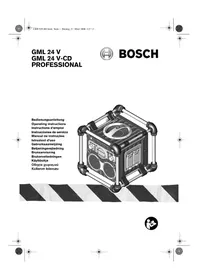
GML 24 VCD - Cd player/recorder BOSCH - Free user manual and instructions
Find the device manual for free GML 24 VCD BOSCH in PDF.


User questions about GML 24 VCD BOSCH
0 question about this device. Answer the ones you know or ask your own.
Ask a new question about this device
Download the instructions for your Cd player/recorder in PDF format for free! Find your manual GML 24 VCD - BOSCH and take your electronic device back in hand. On this page are published all the documents necessary for the use of your device. GML 24 VCD by BOSCH.
USER MANUAL GML 24 VCD BOSCH
Operating instructions
Service +43(0)1/610380
Fax: +43 (0)1 / 61 03 84 91
Kundenberater +43 (0)1 / 7 97 22 30 66
E-Mail:abe@abe-service.co.at
Schweiz
044/8471511
Fax 044/8471551
Luxemburg
+32(0)70/225565
Fax +32(0)70/225575
E-Mail: outillage.gereedschap@be.bosch.com
Entsorgung
Read all instructions. Failure to follow all instructions listed below
may result in electric shock, fire and/or serious injury. The term "electrical device", as used in the following, refers to mains operated electrical devices (corded) and to battery operated (cordless) electrical devices.
In these operating instructions the radio charger is also referred to as an electric device or as a charger.
Save these instructions.
1) Work area
a) Keep work area clean and well lit. Cluttered and dark work areas invite accidents.
b) Do not operate the unit on easily inflammable surfaces (e.g. paper, textiles, etc.) or in inflammable environments. Fire hazard due to occurring heat build-up.
2) Electrical Safety
a) The plugs of electrical devices must match the outlet. Never modify the plug in any way. Do not use any adapter plugs with earthed (grounded) electrical devices. Unmodified plugs and matching outlets will reduce the risk of electric shock.
b) Do not misuse the cord. Never use the cord for carrying, pulling or unplugging the electrical device. Keep cord away from heat, oil, sharp edges and moving parts. Damaged or entangled cords increase the risk of electric shock.
c) When operating an electrical device outdoors, use an extension cord suitable for outdoor use. Use of a cord suitable for outdoor use reduces the risk of electric shock.
d) Connect electrical devices that are used outdoors via a residual current device (RCD).
e) Connect the electrical device to a mains supply that is properly connected to earth. Socket and extension cord must have an operative protective conductor.
f) Protect the electrical device from rain and moisture. The penetration of water in a battery charger increases the risk of electric shock.
g) Do not charge the batteries of other manufacturers. Danger of fire and explosion. The device is only suitable for the charging of Bosch batteries (NiCd/NiMH) with a voltage range of 12V and 24V .
h) Keep the battery charger clean. Contamination may result in danger of electric shock.
i) Check the electrical device, cable and plug each time before using. Do not use the electrical device when defects are detected. Do not open the electrical device yourself and have it repaired only by qualified personnel using original spare parts. Damaged electrical devices, cables and plugs increase the risk of electric shock.
3) Service
a) Have repairs performed only by a qualified technician and only using original spare parts. This ensures that the safety of the electrical device is maintained.
Functional Description

Read all instructions. Failure to follow all instructions listed below may result in electric shock, fire and/or serious injury.
Functional Elements
The numbering of the device elements refers to the representation of the electrical device on the graphic page.
1 Carrying handle
2 Integrated outlet cover(s)
3 Speaker
4 Display
5 Control panel
6 POWER switch
7 "Bass/Treble" tone button
8 Button for equalizer settings
9 Enhanced BOSCH SOUND button
10 CD drive assembly (GML 24 V-CD)
11 CD OPEN/CLOSE button (GML 24 V-CD)
12 Button for CD functions STOP/START- PAUSE (GML 24 V-CD)
13 Button for CD function TRACK/radio function PRESET (GML 24 V-CD)
14 Control knob for TUNE/SEEK/SEARCH and CD functions REV and FAST FORWARD (GML 24 V-CD)
15 STEREO button for mono/stereo playback
16 CD MODE button REPEAT/RANDOM (GML 24 V-CD)
17 MEMORY button for radio stations/CD function program memo (GML 24 V-CD)
18 TIME SET button
19 HOUR button for changing of hour indication
20 MINUTE button for changing of minute indication
21 VOLUME control knob
22 Operating mode button CD/AUX/Radio FM/Radio AM (GML 24 V-CD)
23 Operating mode button AUX/Radio FM/Radio AM (GML 24 V)
24 Control knob for TUNE/SEEK function (GML 24 V)
25 PRESET forwards button (GML 24 V)
26 PRESET back button (GML 24 V)
27 Enhanced "BOSCH SOUND" indicator
28 Equalizer setting indicator
29 Time indication
30 STEREO reception indicator
31 Display for radio frequency/volume and running time of the CD track (GML 24 V-CD)
32 Indicator for "RANDOM" play mode of CD (GML 24 V-CD)
33 Indicator for "REPEAT" play mode of CD (GML 24 V-CD)
34 Battery warning indicator
35 Indicator "CHARGING"
36 "Battery inserted" indicator
37 FM frequency band indicator
38 AM frequency band indicator
39 Indication of CD source selection (GML 24 V-CD)
40 Indication of AUX source selection
41 Indicator for radio/CD track number preset (GML 24 V-CD)
42 PRESET function indicator
43 Power outlets
44 Connection socket for external audio source (AUX)
45 Fuse for 12 V connection
46 Connection socket for 12 V plug
47 Locking lever for battery compartment lid
48 Battery compartment lid
49 Charging compartment
50 Battery *
51 Battery compartment for AAA batteries
52 Rod aerial
53 Remote control
54 Increase volume button
55 Button for Start/Pause (GML 24 V-CD)/Button for PRESET (GML 24 V)
56 Button for FAST FORWARD
57 Button for REVERSE
58 Reduce volume button
59 ON/OFF button
60 Operating mode button
61 MUTE button
62 Clip
Illustrated or described accessories are not included as standard delivery.
Technical Data
| Radio charger GML 24 V | PROFESSIONAL | GML 24 V-CD PROFESSIONAL | |
| Article number 3 601 D29 4.. 3 601 D29 5.. | |||
| Operating voltage, radio/CD V 12-24 12-24 | |||
| Tuner | |||
| FM frequency band MHz 87.9-107.90 87.9-107.90 | |||
| AM frequency band kHz 520-1710 520-1710 | |||
| CD Player | |||
| Laser class - 1 | |||
| Frequency range kHz - 20-20000 | |||
| Amplifier | |||
| Power output (sine) W 10 10 | |||
| Battery Charger | |||
| Allowable batteries | NiCd/NiMH | NiCd/NiMH | |
| Battery charging voltage (automatic voltage detection) | V | 12-24 | 12-24 |
| Charging current, rapid charging | A | 1.2 | 1.2 |
| Charging current, trickle charging, approx. mA 60 60 | |||
| Allowable charging temperature range | °C | 0-60 | 0-60 |
| Charging time for battery voltage/capacity, approx. | |||
| 1.2 Ah | min | 70 70 | |
| 1.4 Ah | min | 80 80 | |
| 1.7 Ah | min | 100 | 100 |
| 2.0 Ah | min | 120 | 120 |
| 2.4 Ah | min | 140 | 140 |
| 2.6 Ah | min | 150 | 150 |
| Weight according to EPTA-Procedure 01/2003 | kg | 8.5 | 8.5 |
Please observe the article number on the type plate of your radio charger. The trade names of individual radio chargers may vary.
The data applies for rated voltages [U] of 230/240 V. For lower voltages and in country-specific versions, these data can vary.

This radio charger produces class 1 laser radiation according to EN 60825. When using the radio charger as intended for, hazards from laser radiation are not to be expected.
Operation
Starting Procedure
Observe correct mains voltage! The voltage of the power source must agree with the data specified on the type plate of the radio charger. Radio chargers marked with 230V can also be connected to 220V .
The radio charger can also be operated without a mains connection off a battery inserted in the charging compartment 49. See section "Charging a Battery".
To start the radio charger, push the power butto 6. When switching on the radio charger, the display 4 and the last set operating mode (FM/AM/AUX/CD) are activated.
To increase the volume, turn the VOLUME control knob 21 in clockwise direction. The selected volume is indicated for several seconds in the indicator 31 (VOL 00 - 20).
To reduce the volume, turn the VOLUME control knob 21 in anticlockwise direction.
To switch off the radio charger, press the power button 6 again.
Setting the Clock
When plugging the mains plug into the outlet or inserting a battery into the charge port, the radio charger switches to the standby mode. The indicated time on the display is "12:00". To adjust the correct time, proceed as follows.
Press the TIME SET button 18. The time indication 29 flashes.
Press the HOUR button 19 as often as required until the correct hour is indicated. You can also press and hold the button until the correct hour is indicated.
Press the MINUTE button 20 as often or as long until the correct minute is indicated.
Press the TIME SET button 18 again. A "beep" confirms the new setting.
Even when the device is switched off, the set clock will continue to run, powered by the AAA batteries.
Programming the Automatic Switch-off Function
The radio charger can be set to switch off automatically after a preset period.
Press the TIME SET button 18 for three seconds until the symbol 29 time indication flashes in the time indication.
Press the HOUR button for changing of hour indication 19 to select one of the pre-adjusted switch-off periods in steps of 30 minutes ("2:00", "1:30", "1:00", "30", "OFF").
Press the TIME SET button 18 again at the desired switch-off period. A "beep" confirms the desired setting.
To indicate the remaining time until the radio charger switches off, press the MINUTE button for changing of minute indication 20.
If the radio charger is switched off via the POWER switch 6 before the switch-off period has elapsed, the automatic switch-off setting is deleted.
Radio Operation
GML 24 V: Press the AUX/Radio FM/Radio AM operating mode button 23 until FM 37 and AM 38 are indicated in the display.
GML 24 V-CD: Press the CD/AUX/Radio FM/Radio AM operating mode button 22 until FM 37 and AM 38 are indicated in the display.
Connecting the Aerial
The radio charger is supplied with the mounted rod aerial 52. Pivot the rod aerial in the direction with the best reception.
Setting the Radio Station
Before setting a radio station, reduce the volume to as low as possible.
■ Briefly turn the TUNE control knob 14 (GML 24 V-CD) or 24 (GML 24 V) in clockwise direction to increase the frequency in steps of 0.05MHz (FM frequency band) or 10kHz (AM frequency band). The selected frequency is indicated in the display 31.
■ Briefly turn the TUNE control knob 14 (GML 24 V-CD) or 24 (GML 24 V) in counterclockwise direction to decrease the frequency in steps of 0.05MHz (FM frequency band) or 10kHz (AM frequency band). The selected frequency is indicated in the display 31.
Turn the TUNE control knob 14 (GML 24 V-CD) or 24 (GML 24 V) and hold it in this position to start the SEEK function. The tuner automatically searches for the next radio station with good reception.
When operating within the direct vicinity of radio plants and radio equipment, radio reception can be impaired.
Presetting Radio Stations
20 FM and 10 AM tuner presets are possible.
Before setting a radio station, reduce the volume to as low as possible.
■Select the desired FM or AM frequency band.
■Select the radio station with the TUNE control knob 14 (GML 24 V-CD) or 24 (GML 24 V).
Press the radio station MEMORY button 17. The PRESET function indicator 42 and the indicator for radio station preset 41 flash in the display. Press the PRESET forwards 25 or back button 26 (GML 24 V) or the radio function PRESET button 13 (GML 24 V-CD) to select the desired preset number.
Press the radio station MEMORY button 17. A "beep" confirms the adjustment.
Selecting Preset Radio Stations
Before setting a radio station, reduce the volume to as low as possible.
■Select the desired FM or AM frequency band.
Press the PRESET forwards 25 or back button 26 (GML 24 V) or the radio function PRESET button 13 (GML 24 V-CD) to select the desired preset number.
CD Player Operation (GML 24 V-CD)
Press the CD/AUX/Radio FM/Radio AM operating mode button 22 until CD 39 is indicated in the display.
Inserting and Playing a CD
Press the CD OPEN/CLOSE button 11 to open the CD drive assembly 10.
Place the CD centrally on the CD drive assembly, with the inscription facing upward.
Press the CD OPEN/CLOSE button 11 to close the CD drive assembly 10.
Press the TRACK button 13 right or left to select the desired track, which is displayed in the CD track number indicator 41.
Press the START/PAUSE button 12 to the right; playback of the track begins.
■By turning the REV and FAST FORWARD control knob 14, you can move to a certain location within a track.
Press the START/PAUSE button 12 to the right; playback is stopped. Pressing the button again initiates playback from where it was stopped.
Press the STOP button 12 to the left to end the playback.
Programming the Playback
You can play back the tracks of a CD in any sequence by programming them in the desired order. The program can include up to 20 tracks.
Insert the CD, but do not start the playback.
Press the CD function program memo button 17.
■Select the desired track with the TRACK button 13 which appears in the indicator for the CD track number 41. Press the MEMORY button 17 for the CD function program memo, to take over the track in the program.
Press the START button 12 to the right; playback begins.
Repeated CD Playback
You can play all tracks on a CD repeatedly. After the last track has run off, the playback begins with the first track.
Insert the CD, but do not start the playback.
Press the CD MODE button 16 (REPEAT) until the REPEAT indicator 33 appears in the display 4.
Press the START button 12 to the right; playback begins.
Repeated Playback of a CD Track
You can repeatedly play a track on a CD. After the track has run off, the playback begins again.
Insert the CD and start the playback of the desired track.
Press the CD MODE button 16 until the REPEAT indicator 33 flashes in the display 4.
Press the START button 12 to the right; playback begins.
Random CD Playback
You can mix all tracks and play them randomly. When this function is performed again, the playback can be completely different.
Insert the CD, but do not start the playback.
Press the CD MODE button 16 until the RANDOM indicator 32 appears in the display 4. (RANDOM)
Press the START button 12 to the right; playback begins. The tracks are played in random sequence.
To continue the playback even after playing the last track, press the CD MODE button 16 until the RANDOM indicator 32 and the REPEAT indicator 33 appear in the display 4.
Press the START button 12 to the right; playback begins.
Operation with External Audio Source
You can connect an external audio source, e. g., an external CD player or an MP3 player with line output, to the radio charger.
GML 24 V: Press the AUX/Radio FM/Radio AM operating mode button 23 until AUX 40 is indicated in the display.
GML 24 V-CD: Press the CD/AUX/Radio FM/Radio AM operating mode button 22 until AUX 40 is indicated in the display.
Remove the protective cap from the AUX connection socket 44 on the left side of the radio charger.
Insert the plug of the external audio source into the AUX connection socket 44.
Connect the other end of the cable with the external audio source.
Set the volume of the external audio source to approx. 50% and start the playback.
■Set the desired volume with the volume control knob 21.
Audio Settings
Stereo/Mono
With a sufficiently strong signal and reception of a correspondingly transmitted radio programme, the tuner automatically switches to stereo reception. The STEREO reception indicator 30 appears in the display 4. To switch between playback in mono and stereo, press the STEREO button 15.
Tone Control
For optimal sound playback, an equalizer is integrated in the radio charger.
a) Manual Adjustment
The bass and treble settings of the radio charger can be controlled individually.
To raise or lower the basses, press the "Bass/Treble" tone button 7 until "BASS" is indicated in the display 4. To raise the basses, turn the VOLUME control knob 21 in clockwise direction. The selected setting is indicated several seconds in the display 31 (BASS 00 - 10). To lower the basses, turn the VOLUME control knob 21 in anticlockwise direction.
To raise or lower the treble, press the "Bass/Treble" tone button 7 until "TREBLE" is indicated in the display 4. To raise the treble, turn the VOLUME control knob 21 in clockwise direction. The selected setting is indicated several seconds in the display 31 (TREBLE 00 - 10). To lower the treble, turn the VOLUME control knob 21 in anticlockwise direction.
b) Equalizer
5 equalizer setting are available, which offer preset treble and bass settings for the respective music styles.
To change between the individual settings, press the equalizer settings button (EQ) 8. The selected preset is indicated in the equalizer setting indicator 28 in the display 4: NORMAL (no indication) - JAZZ-ROCK-POP-CLASSICAL.
Enhanced Bosch Sound
For playback of excellent and powerful sound, the radio charger is equipped with a digital sound processor.
Press the enhanced "BOSCH SOUND" button 9 to switch the sound effect on or off.
Remote control (see figure H)
The remote control 53 operates within a radius of 2 × 55^ from the centre axis of the radio charger and within a range of up to 7 metres.
The remote control 53 can be stowed in the carrying handle 1.
As an example, the remote control 53 can be fastened to a belt loop. Unlatch the clip 62 and hook on the remote control 53.
| Button Function | ||||
| GML 24 V GML 24 V-CD | ||||
| Radio operation Radio operation CD operation | ||||
| Increase volume 54 | Increases the volume in steps | Increases the volume in steps | Increases the volume in steps | Increases the volume in steps |
| Start/Pause 55 - - Starting or stopping | CD playback | |||
| PRESET 55 Advances for ward to the next memorised station | - | - | ||
| FAST FORWARD (press briefly) | 56 Increases the station frequency in steps | Advances forward to the next memorised station | Advances to the next CD track | |
| FAST FORWARD (keep pressed) | 56 SEEK station, forwards SEEK station, forwards FAST FORWARD, CD track can be heard distorted | |||
| REVERSE (press briefly) | 57 Reduces the station frequency in steps | Advances back to the next memorised station | Advances back to the next CD track | |
| REVERSE (keep pressed) | 57 SEEK station, backwards | SEEK station, backwards | FAST REVERSE, CD track can be heard distorted | |
| Reduce volume 58 Reduces the volume in steps | Reduces the volume in steps | Reduces the volume in steps | ||
| POWER 59 Switches the radio charger on and off | Switches the radio charger on and off | Switches the radio charger on and off | ||
| Operating mode 60 Selects operating mode: AUX/Radio FM/ Radio AM | Selects operating mode: CD/AUX/Radio FM/ Radio AM | Selects operating mode: CD/AUX/Radio FM/ Radio AM | ||
| MUTE 61 Mutes the tone | Mutes the tone | Mutes the tone | ||
Replacing the Remote Control Batteries
Unscrew the battery compartment screw on the rear side of the remote control and remove the lid.
Replace the battery (type CR2032) and fasten the lid with the screw again.
Charging a Battery
Inserting a Battery (see figures F und G)
Open the battery compartment lid 48 by unlatching the locking lever 47.
Insert the battery 50 into the charging compartment 49 as indicated in the figure.
Charging Procedure
The charging procedure starts as soon as the mains plug is plugged into the socket and the battery is inserted into the charging compartment 49.
Due to the intelligent charging method, the charging condition of the battery is automatically detected and the battery is charged with the optimum charging current, depending on battery temperature and voltage. This gives longer life to the battery and always leaves it fully charged when kept in the radio charger for storage.
The charging procedure is indicated through the indicators in the display 4. During the rapid-charging procedure, the "CHARGING" indicator 35 and the "Battery inserted" indicator 36 appear. The charging procedure is ended when the "CHARGING" indicator 35 goes out. The charger switches to the trickle charging mode, which equalizes the natural running-down of the battery. (CHARGING)
If the battery warning indicator 34 appears when a battery is inserted, then the battery temperature is not within the allowable temperature range (0^ - 60^) and will not be charged. Bring the battery temperature within the allowable temperature range by cooling down or warming up. As soon as the battery temperature is within the allowable temperature range again, the battery charger automatically switches to rapid charging.
The charged battery can be removed from the charging compartment 49 or used as a mobile power source for the radio charger instead of a mains supply, when left in the charging compartment.

Check the temperature of the battery before removing it. The battery can warm up considerably during charging.
Practical Advice
A new battery or one that has not been used for an extended period of time requires five charging/discharging cycles to gain its full capacity. Leave the battery in the charging compartment until it has warmed up.
A significantly reduced working period after charging indicates that the battery is used up and must be replaced.
12 V Connection (see figure E)
You can connect an external electrical device/unit with a 12V plug and a maximum current consumption of 1 A. When operating the radio charger with the inserted battery, the connection socket is switched off.
Remove the protective cap of the 12 V connection socket 46 on the left side of the radio charger.
Insert the plug of the external device into the socket of the 12 V connection 46.
If a 12 V voltage is not present, check the fuse 45. For this, unscrew the fuse cap. Insert a 5 × 20 ~mm fuse with a 1 A rating, if required. Afterwards, firmly screw on the fuse cap.
Only use the specified 1 A fuse. Use of other fuses can cause damage to the radio charger.
Integrated Power Outlets
Two protective contact power outlets 43 are integrated in the radio charger for the supply of power to external power tools. The maximal allowable current consumption of the connected power tools may not exceed the value listed in the following table. The power outlets can vary depending on country-specific standards. The power outlets are deactivated when operating the radio charger via the inserted battery.
| Article number 3601 D29 ... | max. current consumption of the connected power tools |
| ...401, ...403, A | 15 |
| ...421, ...422, | |
| ...501, ...503, | |
| ...521, ...522 | |
| ...471, ...571 A 12 | |
| ...402, ...431, A | 9 |
| ...502, ...531 |
Replacing the AAA Batteries
Open the battery compartment lid 48 by unlatching the locking lever 47.
■Slide the plastic lever to the side and remove the lid of the battery compartment 51.
Replace the AAA batteries and reattach the lid of the battery compartment 51 again.
Fault Finding and Troubleshooting
| Problem Possible Cause | Use Corrective Measure | |
| Radio or CD player not operative. | Mains plug not plugged in. Plug in the mains plug. | |
| For battery operation: Battery not fully inserted. | Completely insert the battery. | |
| For battery operation: Battery dis-charged. | Charge the battery by plugging in the mains plug. | |
| Insufficient radio reception. | Bad location. Place the radio charger at a different location. | |
| Aerial not aligned optimally. Turn the aerial to other directions. | ||
| 12 V connection not operative. | Fuse for 12 V connection not inserted. Insert a 5 x 20 mm 1 A fuse. | |
| Fuse for 12 V connection defective. Replace the fuse. | ||
| Power outlets 43 not operative. | Mains plug not plugged in. Plug in the mains plug. | |
| Radio charger does not operate. | Mains plug not plugged in. Plug in the mains plug. | |
| Software error. If the display is not lit up when switched on, the software in the radio charger must be reset. Pull the mains plug and/or remove the battery and wait for 30 seconds. | ||
| Faulty clock display. Clock batteries dead. Replace the AAA batteries and reset the clock. | ||
Maintenance and Service
Maintenance and Cleaning
Before any work on the radio charger, pull the mains plug from the power outlet.
If the radio charger should fail despite the care taken in manufacturing and testing procedures, repair should be carried out by an after-sales service centre for Bosch power tools
In all correspondence and spare parts orders, please always include the 10-digit article number on the type plate of the radio charger. The type plate is located on the bottom side of the radio charger.
Mains Cable
The mains cable is fitted with a special safety connection. The mains cable may only be replaced by an authorised after-sales service agent for Bosch power tools.
WARNING! This appliance must be earthed.
Important instructions for connecting a new 3-pin plug.
The wires in the cable are coloured according to the following code:
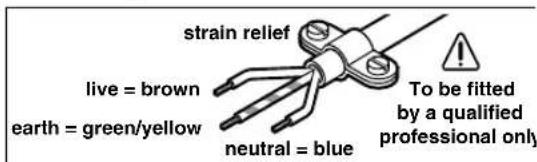
Do not connect the blue or brown wire to the earth terminal of the plug.
Important: If for any reason the moulded plug is removed from the cable of this machine, it must be disposed of safely.
Service and Customer Assistance
Exploded views and information on spare parts can be found under: www.bosch-pt.com
Great Britain
Robert Bosch Ltd. (B.S.C.)
P.O.Box 98
Broadwater Park
North Orbital Road
Denham-Uxbridge
Middlesex UB 95HJ
Service +44 (0) 18 95 / 83 87 82
Advice line. +44 (0) 18 95 / 83 87 91
Fax +44 (0) 1895/838789
Ireland
Beaver Distribution Ltd.
Greenhills Road
Tallaght-Dublin 24
Service +353 (0)1 / 414 9400
Fax +353 (0)1 / 459 8030
Australia and New Zealand
Robert Bosch Australia Pty. Ltd.
RBAU/SPT
1555 Centre Road
P.O.Box 66
3168 Clayton/Victoria
+61(0)1/300307044
Fax +61 (0)1 / 3 00 30 70 45
www.bosch.com.au
Disposal
Power tools, accessories and packaging should be sorted for environmental-friendly recycling.
Only for EC countries:
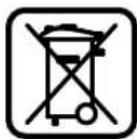
Do not dispose of power tools into household waste!
According to the European Directive 2002/96/EC on waste electrical and electronic equipment and its incorporation into national law, power
tools that are no longer suitable for use must be separately collected and sent for recovery in an environmental-friendly manner.
Subject to change without notice.
10 Slitta porta drive CD (GML 24 V-CD)
11 Tasto espulsione CD (GML 24 V-CD)
CLASS 1 LASER PRODUCT
25 Tast for minneplass fremover (GML 24 V)
26 Tast for minneplass bakover (GML 24 V)
Bosch San. ve Tic. A.S.
Ahi Evran Cad. No:1 Kat:22
Polaris Plaza
80670 Maslak/Istanbul
Müsteri Danismani +90 (0)212 / 335 06 66
Müsteri Servis Hatti +90 (0)212 / 335 07 52